查看分析过程、攻击步骤与完整代码
#### step1
You should always check the file type first with a tool like [Detect it Easy](https://github.com/horsicq/Detect-It-Easy). Also, make sure to run these in a sandboxed environment. In this case it was a Linux executable — an ELF file. By giving it the correct permissions, you can run it.
Although, on the surface, it looks like a regular password bypass challenge, this one has a few tricks up its sleeve.
#### Initial debugging
My tool of choice for this challenge was [IDA Free](https://hex-rays.com/ida-free/), but you can use something like [Ghidra](https://github.com/NationalSecurityAgency/ghidra) or [Radare2](https://github.com/radareorg/radare2). Take note that, in IDA, if you wish to debug an interactive program and need input/output, you should open it in a terminal with this command:
``` bash
cat | ./ida64
```
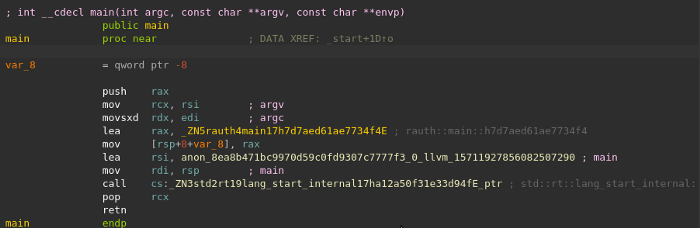
After importing the file, we can dive into the decompiled code. We need to find the "main" function, and try and make sense of the program structure from there.
- 
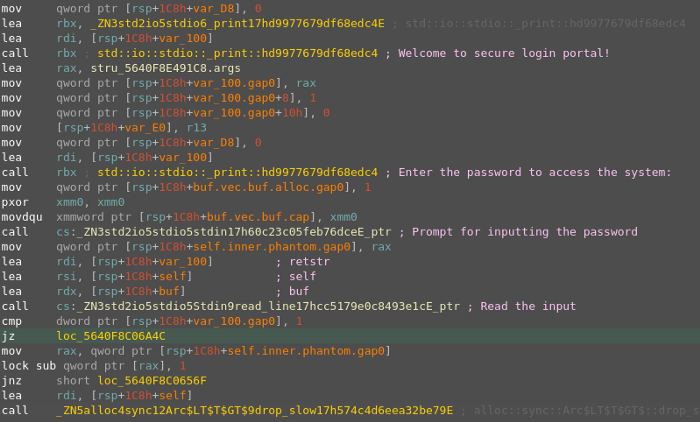
The first time we run, we can already start annotating (as seen in purple), what each function does.
- 
#### Challenge complete?
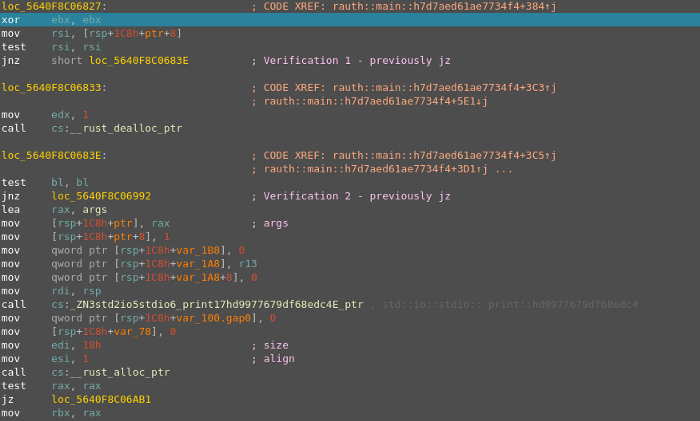
After debugging for a few minutes, we come to the conclusion that there are two jumps — jump if zero, to be more precise — that keep us from bypassing the verification. We’ll invert those assembly instructions to JNZ — jump if not zero.
- 
And… voilá. Challenge complete… Or so it would seem.
- 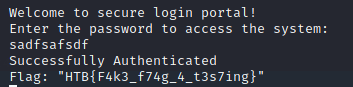
As expected, there’s a twist. This is a mock development environment. If we want to have any chance at getting the flag, we’ll have to get it from the production environment — the server that was mentioned at the start.
This means we need to find out the actual password, not just bypass it. So let’s go back and retrace our steps.
#### Cryptography 101
But how far do we need to go back? We need to find out where and how the password we enter is verified.
Shortly after we enter our password, we can find this function:
- 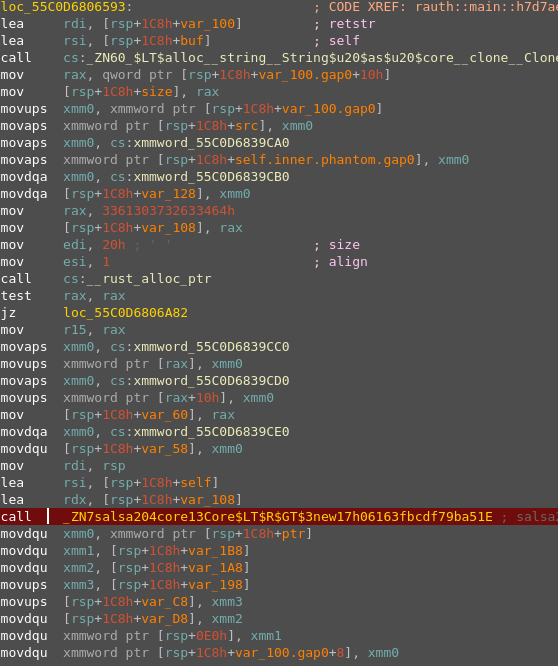
Notice how it says "Salsa20". I've heard this term before to describe a cryptographic algorithm.
If we check Wikipedia, or some other similar source, we can verify Salsa20 is a variation of the Salsa stream cipher algorithm with 20 rounds.
In Wikipedia's Salsa article, you can find the following table:
- 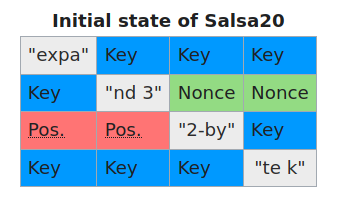
This essentially means that, before the Salsa algorithm can be applied to encrypt a piece of data, it needs to create a matrix with the following information. So, ideally we should be able to find and easily identify each individual piece in memory. Let’s take a look at our registers:
- 
There it is! The Salsa20 function we paused the debugging at, was actually responsible for generating this matrix. All that was left to do was to find the right register containing the information, in this case it was the RSP register.
So from: expaef39f4f20e76e33bnd 3d4c270a32-byd25f4db338e81b10te k
We can extract the following components:
- Key: ef39f4f20e76e33bd25f4db338e81b10
- Nonce: d4c270a3
So now, we have all we need to decrypt the password data, except for the encrypted password data itself. Bummer. Here’s where the next challenge lies.
#### Single Challenge Multiple Problems
As the program has the Salsa matrix fully built, we can deduce that it will soon enough execute its algorithm over the password we entered and compare its encrypted data to the actual encrypted passsword itself. So let’s explore the decompiled code a little more.
- 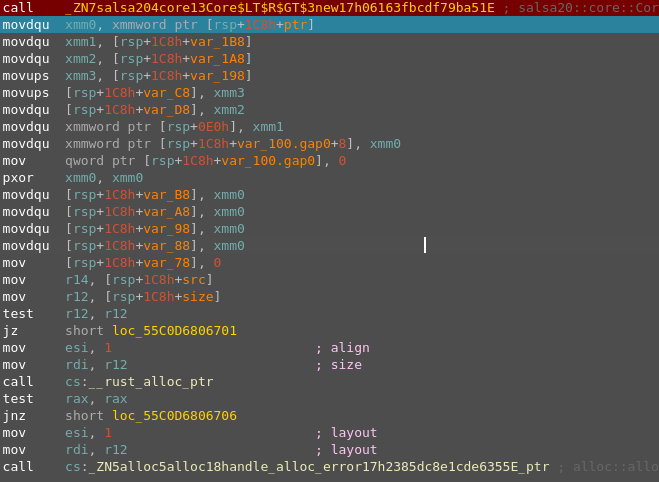
Alright, somewhere along the next few lines, we see some pointer arithmetic and, afterwards, two comparisons. One of these, should compare both encrypted keys and validate our authentication.
If we run the next few lines and pay attention to the general registers, nothing will show up. The tip is the “xmm” keyword that keeps popping up.
These XMM registers are actually specific registers for Streaming SIMD Extensions, or SSE, for short. An Intel designed set of additional CPU instructions that rely on specific registers — XMM 0 through 15. These are used in order to achieve Instruction Level Parallelism, by executing some operation over a vector of values.
If we take a look a few lines back, we can actually detect a few xmm constants.
- 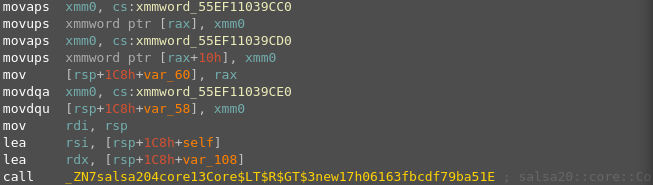
The ones we need to pay attention to are the first two.
- 55EF11039CC0: 0F331CBA656F5D958D5A829A3B15F0505h
- 55EF11039CD0: 0F91BAD626FB63EE372EC9DC9312A4324h
We can remove the "h" at the end, which only tells us the value is in hexadecimal, meaning each byte is represented by two letters/numbers. So let’s separate the value by bytes as well. While we’re at it, we’ll also remove the initial 0 that isn’t doing anything there.
- 55EF11039CC0: F3 31 CB A6 56 F5 D9 58 D5 A8 29 A3 B1 5F 05 05
- 55EF11039CD0: F9 1B AD 62 6F B6 3E E3 72 EC 9D C9 31 2A 43 24
The problem now is that IDA was representing the value in big-endian (most significant bytes at the end), while x86 memory is in little-endian (most significant bytes at the start). This means that we need to invert the bytes, but not the string itself, as the byte pairs are self-contained.
What we're left with is this:
- 55EF11039CC0: 05 05 5F B1 A3 29 A8 D5 58 D9 F5 56 A6 CB 31 F3
- 55EF11039CD0: 24 43 2A 31 C9 9D EC 72 E3 3E B6 6F 62 AD 1B F9
Since the data is still encoded and encrypted, we need to create a small program to decode and then decrypt it and verify if we've found the encrypted password. I chose to write a small program in Python using [Spyder](https://www.spyder-ide.org/), but you can use whatever you feel most comfortable with.
``` bash
from Cryptodome.Cipher import Salsa20
import codecs
def UnHex(s):
return codecs.decode(s.replace(" ", ""), 'hex_codec')
secret = b"ef39f4f20e76e33bd25f4db338e81b10"
nonce = b"d4c270a3"
# decrypt
ciphertext = UnHex("05 05 5F B1 A3 29 A8 D5 58 D9 F5 56 A6 CB 31 F3" + "24 43 2A 31 C9 9D EC 72 E3 3E B6 6F 62 AD 1B F9")
cipher = Salsa20.new(key=secret, nonce=nonce)
print(cipher.decrypt(ciphertext))
```
From this, we get the following password:
``` bash
┌──(root💀kali)-[~/hackthebox/challenge/reversing/RAuth]
└─# python3 de.py
b'TheCrucialRustEngineering@2021;)'
```
#### Finishing up
Now that we have the password, we only need to insert it in the production environment. So we launch the server and connect to it with an interactive TCP connection from the terminal.
``` bash
┌──(root💀kali)-[~/hackthebox/challenge/reversing/RAuth]
└─# ./rauth
Welcome to secure login portal!
Enter the password to access the system:
TheCrucialRustEngineering@2021;)
Successfully Authenticated
Flag: "HTB{F4k3_f74g_4_t3s7ing}"
```
``` bash
┌──(root💀kali)-[~/hackthebox/challenge/reversing/RAuth]
└─# nc 167.172.58.213 30700
Welcome to secure login portal!
Enter the password to access the system:
TheCrucialRustEngineering@2021;)
Successfully Authenticated
Flag: "HTB{I_Kn0w_h0w_t0_5al54}"
```
And voilá!
#### Sources
Endianness — https://en.wikipedia.org/wiki/Endianness
Salsa20 — https://en.wikipedia.org/wiki/Salsa20
SSE — https://en.wikipedia.org/wiki/Streaming_SIMD_Extensions